
Computer Networking Concepts Bridges Bridges Bridges are both
Computer Networking Concepts: Bridges
Bridges • Bridges are both hardware and software devices. • They can be standalone devices - separate boxes specifically designed for bridging applications, or they can be dedicated PCs with 2 NICs and bridging software. • Most servers software will automatically act as a bridge when a second NIC card is installed.
Bridge OSI Operating Layer • Bridges operate on the OSI Model Data Link Layer. • They look at the MAC addresses for Ethernet and Token Ring to determine whether or not to forward or ignore a packet.
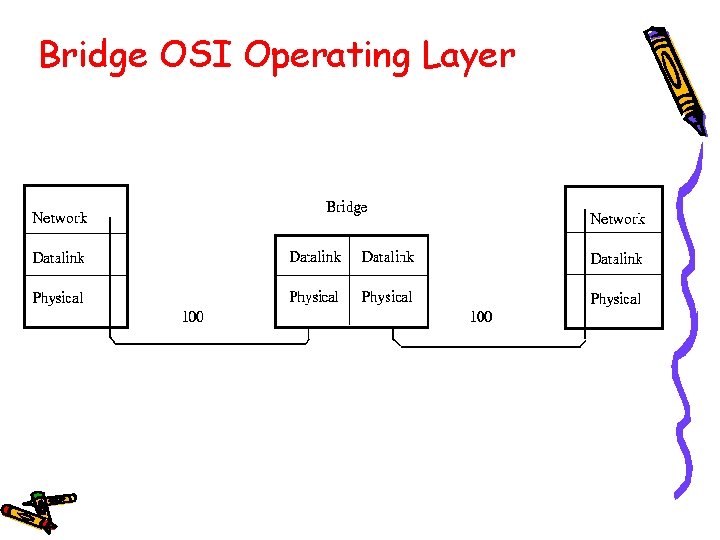
Bridge OSI Operating Layer
Purpose of a Bridge • The purposes of a Bridge are: • Isolates networks by MAC addresses • Manages network traffic by filtering packets • Translate from one protocol to another

Purpose of a Bridge con’t • Isolates networks by MAC addresses • For example, you have 1 segment called Segment 100 with 50 users in several departments using this network segment. • The Engineering Dept. is CAD (Computer Aided Design) oriented and the Accounting Dept. is into heavy number crunching: year end reports, month end statements etc. .
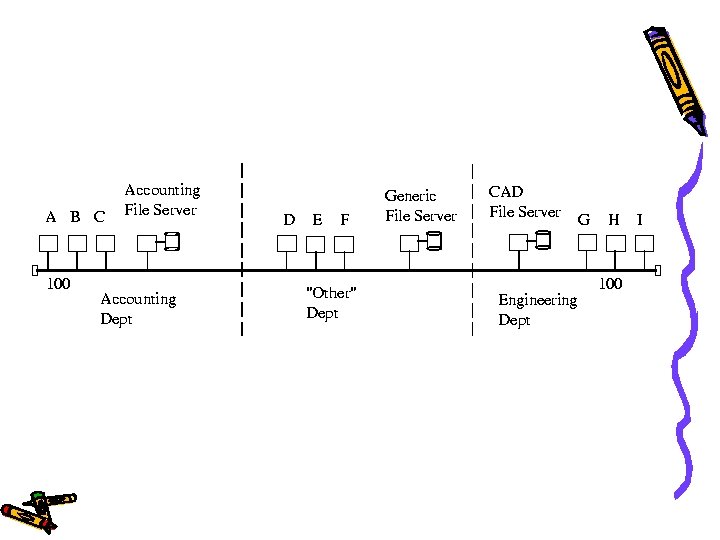
Purpose of a Bridge con’t • On this network, any traffic between Client A, B or C and the Accounting File Server in the Accounting Dept. will be heard across the Segment 100. • Likewise any traffic between the Engineering Dept. 's Clients G, H or I to the CAD File Server will be heard throughout the Network Segment.
Purpose of a Bridge con’t • The result is that the "Other" Departments access to the Generic File Server is incredibly slow because of the unnecessary traffic occurring due to other departments: Engineering & Accounting. • Note: The designations A, B, and C are used instead of MAC addresses for brevity. The actual MAC addresses would be hexadecimal numbers such as 08 -00 -EF-45 -DC-01.
Purpose of a Bridge con’t • The solution is to use a Bridge to isolate the Accounting Dept. and another bridge to isolate the Engineering Department. • The Bridges will only allow packets to pass through that are not on the local segment. The bridge will first check its "routing" table to see if the packet is on the local segment, if it is, it will ignore the packet and not forward it to the remote segment.
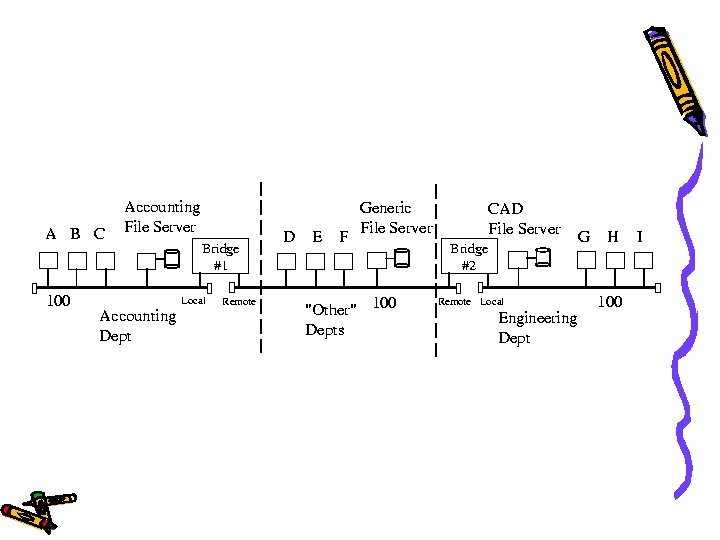

Purpose of a Bridge con’t • If Client A sent a packet to the Generic File Server, again Bridge #1 will check its routing table to see if the Generic File Server is on the local port. • If it is not, then Bridge #1 will forward the packet to the remote port. • Note: The terms local and remote ports are abitrarily chosen to distinguish between the two network ports available on a bridge.
Purpose of a Bridge con’t • In this manner the network is segmented and the local department traffic is isolated from the rest of the network. • Overall network bandwidth increases because the Accounting Dept. does not have to fight with the Engineering Dept. for access to the segment. Each segment has reduced the amount of traffic on it and the result is faster access. • Each department still has complete access to the other segments but only when required.
References Introduction to Data Communications Copyleft Sept. 1999 - Jan 2005 TCP/IP Tutorial and Technical Overview An IBM Redbooks publication Published 19 December 2006 Computer Networking: A Top-Down Approach (7 th Edition) James Kurose & Keith Ross
- Slides: 14