
COMPUTER NETWORK AND DESIGN CSCI 3385 K Understanding
- Slides: 61
COMPUTER NETWORK AND DESIGN CSCI 3385 K
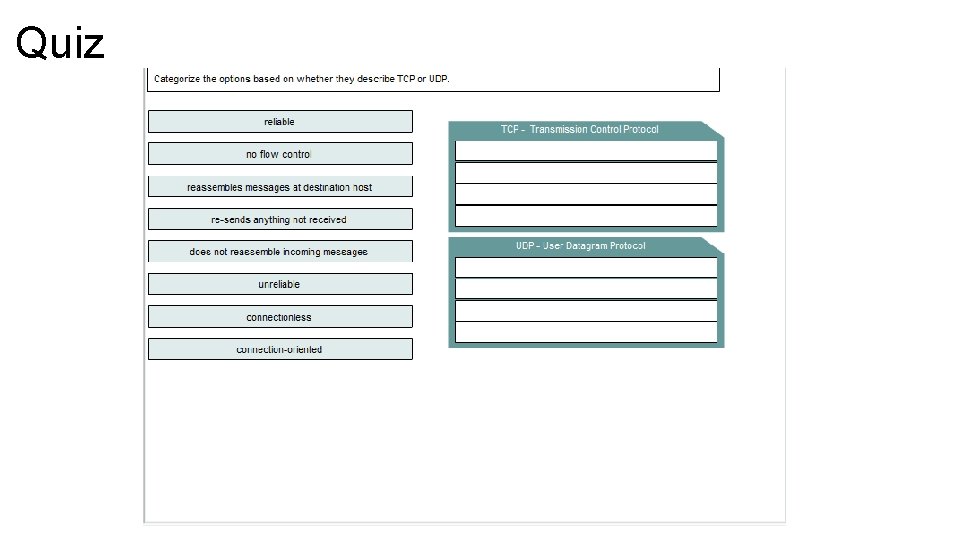
Understanding the TCP/IP – Transport Layer • The transport layer provides two protocols, UDP (User Datagram Protocol) and TCP, (Transfer Control Protocol) which provide communication services directly to the application process on the host. • The basic service provided by this layer is session multiplexing, which is perform by both UDP and TCP. • The premier service provided by the transport layer is ensuring reliable delivery which is performed only by TCP • The primary duty of the transport layer is the interconnection of application sessions to the network layer, which is provided by both UDP and TCP. If TCP is used, the transport layer has the responsibility of establishing endto-end operations, segmentation, flow control, and applying reliability mechanisms
Transport Layer - UDP – Sending Regular Mail • An analogy of the UDP services is using the regular service by the post office to send your bill payments. You address each bill payment to the specific company address, stamp the envelope and include your return address. The postal service guarantees its best effort to deliver each payment. The postal service does not guaranty delivery and it is not responsible for letting you know if the delivery was successful or unsuccessful. Like regular mail service, UDP is a very simple protocol that provides only the most basic data transfer services
Transport Layer - TCP – Sending Mail “Certified” • An analogy for the TCP services is sending certified mail through a postal service. Imagine that you live in San Francisco and have a book that you’d like to send to your mother in New York. Then you discover that the postal service will only handle letters. You rip the pages out of the book, putting each page in a separate envelope. You address the envelopes and send the first one as “certified” mail. The postal service delivers it by truck and any route but because it is certified upon delivery the carrier must get a signature from your mother and return a certificate of delivery to you.
Transport Layer – TCP – Cont. TCP – Sending Mail “Certified” • Sending each page separately is tedious, so you send several envelopes together. The postal service again delivers each envelope by any truck and any route. Your mother signs a separate receipt for each envelope in the batch as she receives them. If one envelope is lost in transit you would not receive a certificate of delivery for that numbered envelope and you would resend the page. After receiving all the envelopes your mother puts the pages in the right order and pastes them back together to make the book. Like certified mail TCP is a complex protocol that offers precise and traceable data transfer services.
Transport Layer - Session Multiplexing • Session multiplexing is an activity in which a single computer, with a single IP address is able to have multiple sessions occur simultaneously. • Session is created when a source machine needs to send data to a destination machine. Most often, this involves a reply but a reply is not mandatory. • Session is created and controlled within the IP network application which contains functionality of OSI Layer 5 through 7 • A best-effort session is very simple. The session parameters are sent to UDP, it sends data to the indicated IP address using the port numbers provided. • Each transmission is a separate event, and no memory or association between transmission is retained
Transport Layer - Session Multiplexing – Cont. • When using reliable TCP service, a connection must first be established between the sender and the receiver before any data can be transmitted. • TCP opens a connection and negotiates connection parameters with the destination. • During data flow, TCP maintains reliable delivery of the data and, when complete, closes the connection Example: You enter a URL for yahoo in a browser, then you open another browser and enter a URL for google, then you open another browser and enter a URL for cisco. Three sites are open using only one IP connection because the session layer is sorting the separate requests based on the port number.
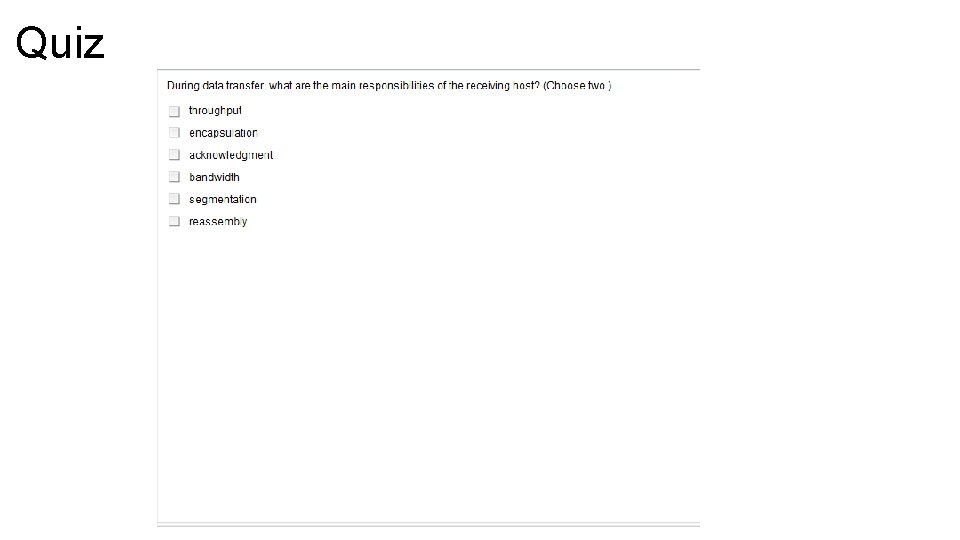
Transport Layer - Segmentation • TCP takes data chunks from the application layers and prepares them for shipment onto the network. • Each chunk is broken up into smaller segments which will fit the maximum transmission unit (MTU) of the underlying network layers. • UDP being simpler, does not check or negotiate and expects the application process to give it data that will work.
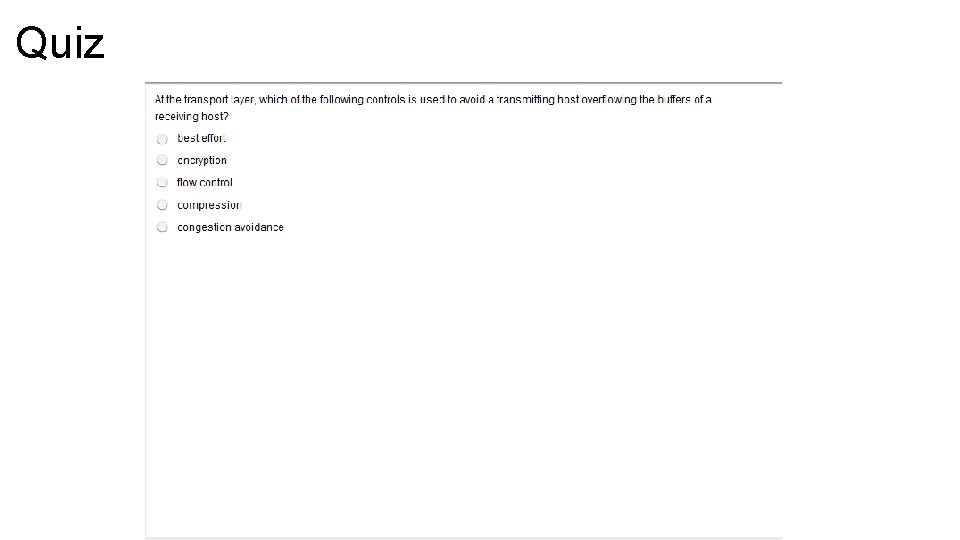
Transport Layer – Flow Control • If a sender transmits data faster than the receiver can receive it, the receiver will drop the data, requiring to be retransmitted. • Retransmission can waste time and network resources, which is why most flow control methods try to maximize the transfer rate while minimizing the requirements to retransmit • In TCP, basic flow is implemented by acknowledgement by the receiver of the receipt of data; the sender waits for this acknowledgement before sending the next part. However, if the round-trip time (RTT) is significant, the overall transmission rate may slow to an unacceptable level. A mechanism called windowing increases network efficiency when combined with basic flow control. • Windowing allows a receiving computer to advertise how much data it is able to receive before transmitting an acknowledgment to the sending computer.
Transport Layer – Connection-Oriented • Within the transport layer, a connection protocol such as TCP establishes the session connection and then maintains the connection during the entire transmission. • Once the transmission is complete, the session is terminated
Transport Layer – Reliability • Reliability has three main objective: • Recognition and correction of data loss • Recognition and correction of duplicate or out-of-order data • Avoidance of congestion in the network • Reliability is not always necessary. • Example: in a video stream, if a packet is dropped and then retransmitted, it will appear out of order. It will be frustrating and confusing to the audience and serve no useful purpose. In real-time applications, such as voice and video stream, dropped packets can be tolerated, as long as the overall percentage of dropped packets is low.
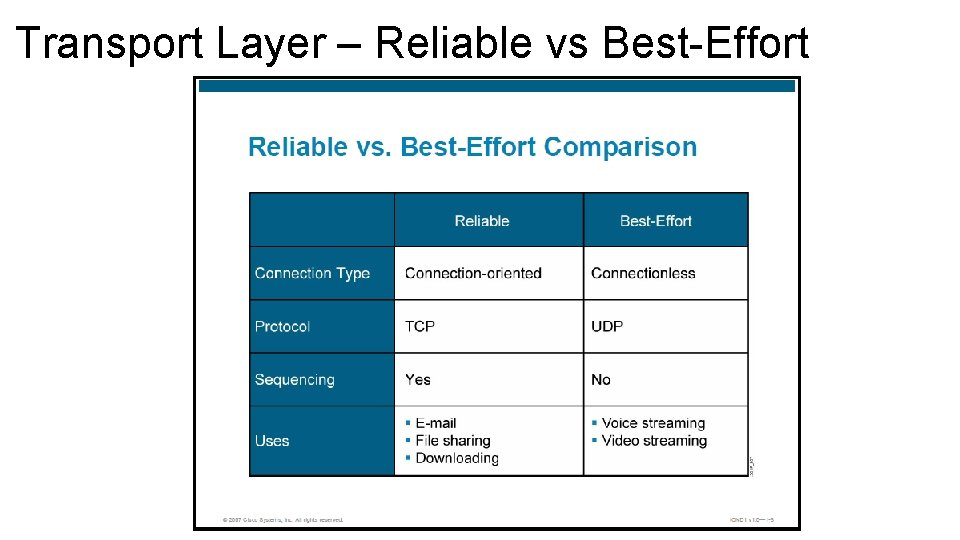
Transport Layer – Reliable vs Best-Effort
Transport Layer – Reliable vs Best-Effort Reliable (Connection-Oriented) • TCP reliable protocol • Connection must be established • During initial process, an exchange of information about the capabilities of the receiver and agreement of starting parameters is made. • These parameters are then used for the tracking of the data transfer for the duration of the connection • Sending computer transmit data and it gives the data a sequence number • Receiving computer responds with an acknowledgement number equal to the next expected sequence number
Reliable vs Best-Effort – Cont. • This exchange of sequence and acknowledgment numbers allows the protocol to recognize when data get lost or duplicated, or arrives out of order. • TCP is a very complex transport layer protocol.
Reliable vs Best-Effort – Cont. Reliable (Connectionless) • UDP being best-effort does not need or want to keep information about data previously sent. • No need to establish a connection with the receiver that is why it is connectionless. • There are many situation where this type of connection is more desirable than a reliable one. • A connectionless connection is desirable for applications that requires faster communication without verification of receipt.
UDP Characteristics • UDP operates at Layer 4 of the OSI model and TCP/IP stack • UDP provides applications with access to the network layer without the overhead reliability mechanisms. • Like IP, UDP is connectionless which is a one-way datagram is sent to a destination without advance notification to the destination device. • UDP performs very limited form of error checking. The UDP datagram includes an optional checksum value in which the receiving device can use to test the integrity of the data. • UDP datagram includes a pseudo-header that includes the destination address; if device sees that the datagram is directed to an inactive port, it returns a message that the port is unreachable.
UDP Characteristics – cont. • UDP provides service on a best-effort basis, and does not guarantee data delivery because packets can be misdirected, duplicated, or lost on the way to their destination. • UDP does not provide any special features that recover lost or corrupted packets. • Protocols that use UDP include TFTP, Simple Network Management Protocol (SNMP), Network File System (NFS), and Domain Name System (DNS)
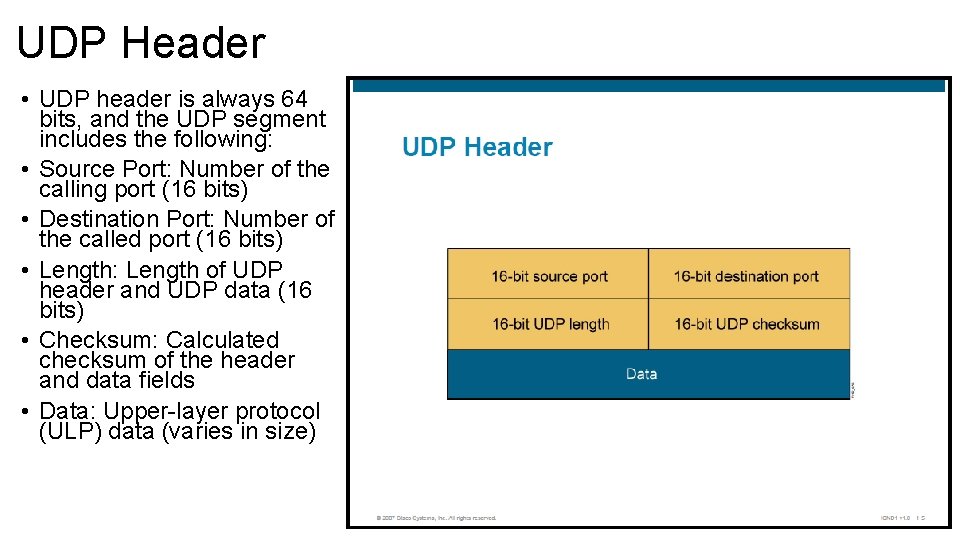
UDP Header • UDP header is always 64 bits, and the UDP segment includes the following: • Source Port: Number of the calling port (16 bits) • Destination Port: Number of the called port (16 bits) • Length: Length of UDP header and UDP data (16 bits) • Checksum: Calculated checksum of the header and data fields • Data: Upper-layer protocol (ULP) data (varies in size)
TCP Characteristics • TCP operates at Layer 4 of the OSI model and TCP/IP stack. • TCP provides applications with access to the network layer. • TCP is a connection-oriented protocol which is two devices set up a communication to exchange data. The end systems synchronize with one another to manage packet flow and adapt to congestion in the network. • TPC is a pair of virtual circuits, one in each direction, so it appears in full-duplex mode. • TCP provides error checking by including a checksum in the datagram to verify that the TCP header information is not corrupt. • TCP segments are number and sequenced so the destination can reorder segments and determine is data is missing.
TCP Characteristics – Cont. • Upon receipt of one or more TCP segments, the receiver returns an acknowledgement to the sender indicating that it received the segment. If segments are not acknowledged, the sender may retransmit the segment, or it may terminate the connection if it determines that the receiver is not longer on the connection. • TCP provides recovery services in which the receiver can request retransmission of a segment. If a segment receipt is not acknowledged, the sender will resend the segment. • Reliable data delivery services are critical for applications such as file transfer, database services, transaction processing and other critical applications in which packet delivery must be guaranteed. • TPC provides reliability, sometimes sacrificing speed while UDP provides speed at the expense of reliability.
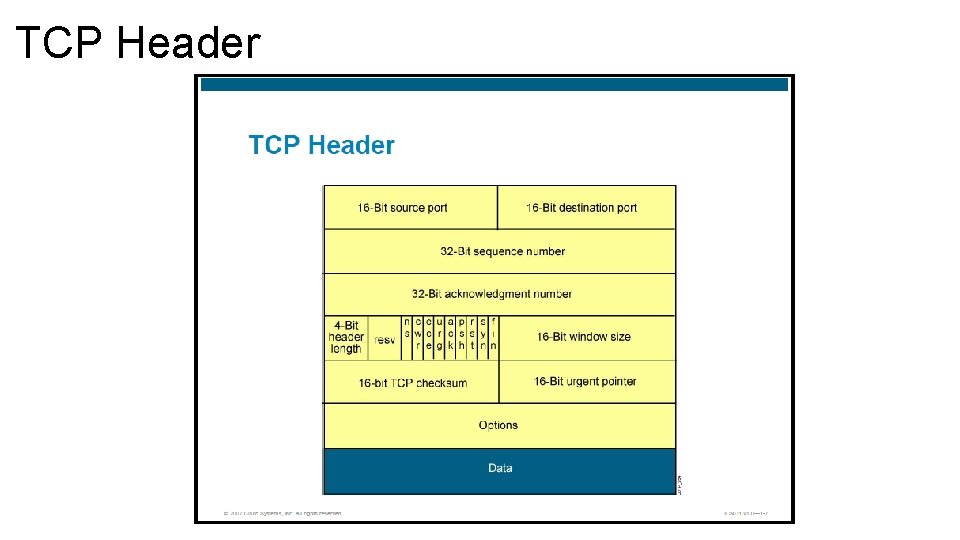
TCP Header
TCP Header – Cont. • The TCP header follows the IP header, supplying information specific to the TCP protocol and it is 20 bytes long. The fields of the TCP header include the following: • Source port: Number of the calling port (16 bits) • Destination port: Number of the called port (16 bits) • Sequence number: The sequence number of the first octet in this segment, used to ensure correct sequencing of the arriving data (32 bits) • Acknowledgement number: Next expected TCP octet (32 bits) • Header length: Number of 32 -bits words in the header (4 bits) • Reserved: Set to 0 (3 bits)
TCP Header – Cont. • Control bits: Control functions such as setup, congestion and determination of a session (9 bits) (A single bit that has a specific meaning is often referred to as a flag) • Window: Number of octets that the devices is willing to accept (16 bits) • Checksum: Calculated checksum of the header and data fields (16 bits) • Urgent: Indicates the end of the urgent data (16 bits) • Options: One currently defined – maximum TCP segment size (0 to 32 bits, if any) • Data: Upper-layer protocol data (varies in size)
TCP/IP Applications • TCP/IP suite also includes applications that support other services such as files transfer, e-mail, and remote login. • File Transfer Protocol (FTP): FTP is reliable, connection-oriented service that uses TCP to transfer files between systems that support FTP. It supports bidirectional binary and ASCII file transfers. • Trivial File Transfer Protocol (TFTP): is a connectionless service that uses UDP. Routers use TFTP to transfer configuration files and Cisco IOS images, and to transfer files between systems that support TFPT • Telnet: Telnet provides the capability to remotely access another computer. Telnet enables a user to log in to a remote host and execute command
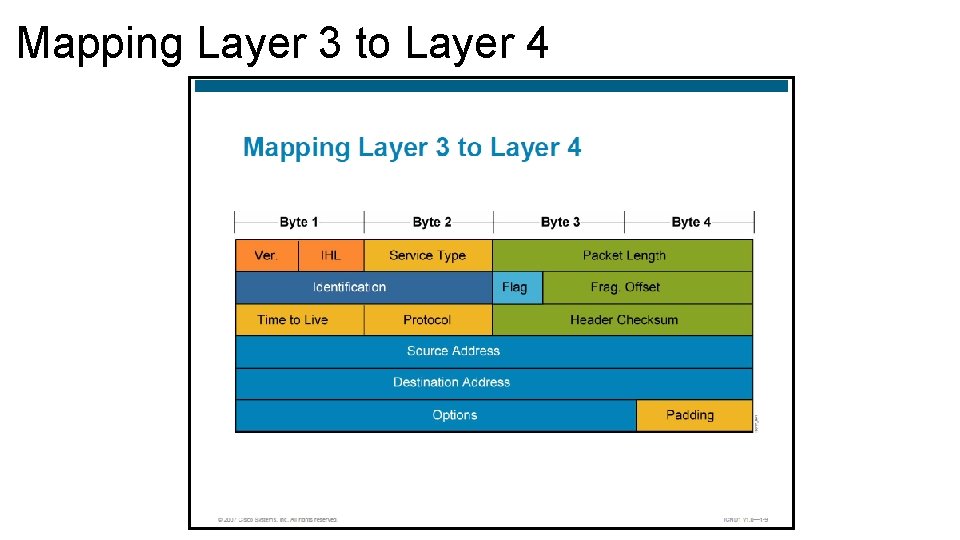
Mapping Layer 3 to Layer 4 • We focus in the protocol field (8 bits), which is another field in the IP packet header. IP uses a protocol number in the datagram header to identify the ULP (Upper Layer Protocol) to which the data field of the datagram will be passed, and each number relates to a different protocol. • The host or router reads the protocol number from the header of the datagram, compares it to the entries in the transport protocol table, then it passes it to the appropriate protocol. • Example: • If protocol number is 6, IP delivers the datagram to TCP • If protocol number is 17, IP delivers the datagram to UDP
Mapping Layer 3 to Layer 4
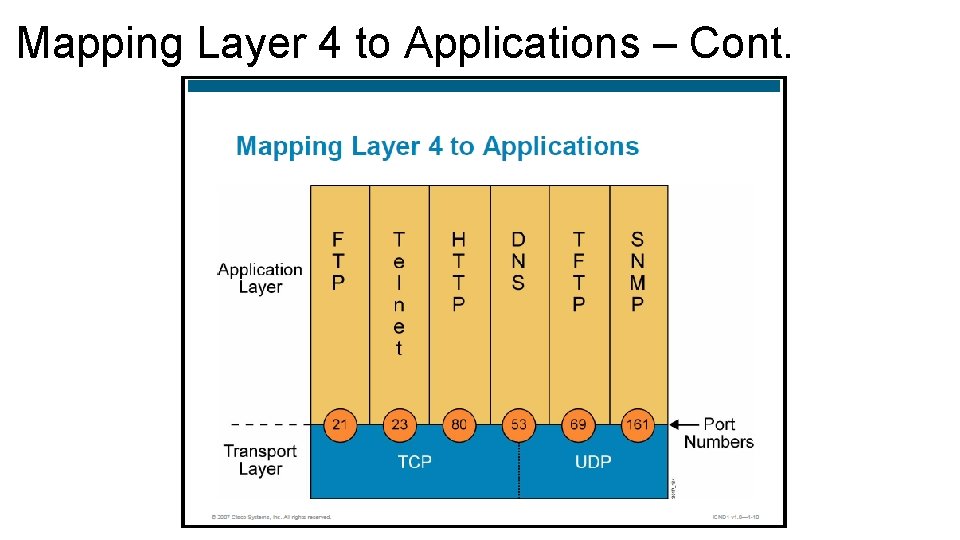
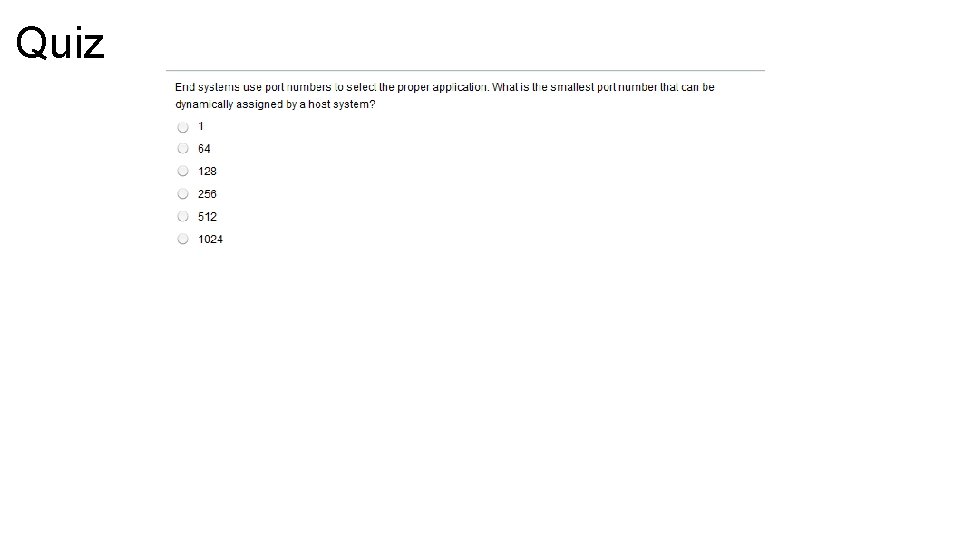
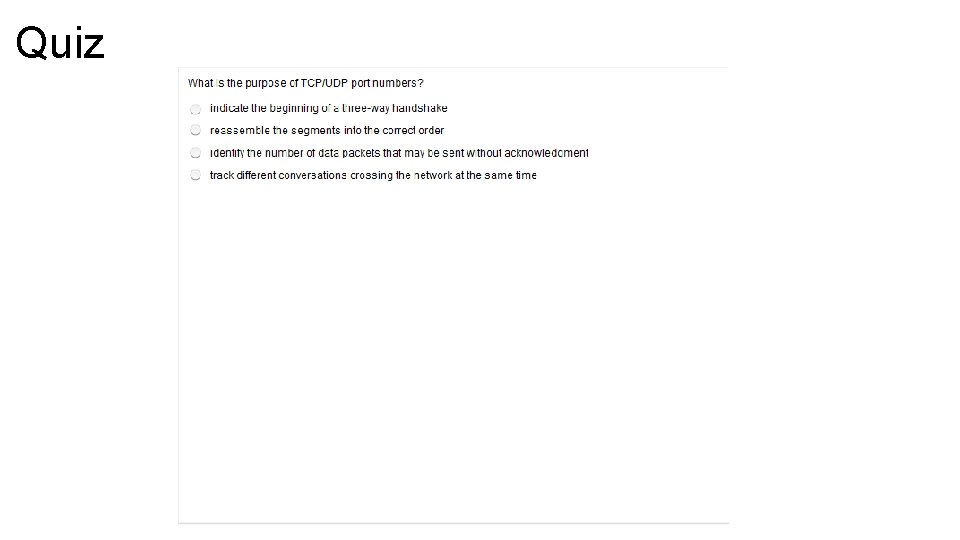
Mapping Layer 4 to Applications • UDP and TCP use internal software ports to support multiple conversations between different network devices. • Single hosts may have multiple sessions running at the same time, connected to one or more computers. • Each session is multiplexed through the same network interface and local network link. • Segments form each of these sessions are interleaved and sent through the network interface. • The Internet Assigned Numbers Authority (IANA) controls port numbers. • Some frequently used applications have permanently assigned port numbers, these are referred as “well-known” ports • Other applications may use ports that are dynamically assigned
Mapping Layer 4 to Applications – Cont. Well-Known Ports • Are assigned by the IANA and are numbered 1023 and below. • Assigned to applications that are fundamental to the Internet Registered Ports • Are listed by IANA and are numbered from 1024 to 49151. • Used for Proprietary applications, such as Lotus Mail. Dynamically Assigned Ports • Are assigned numbers between 49152 to 65535. • Assigned dynamically for the duration of a specific session.
Mapping Layer 4 to Applications – Cont.
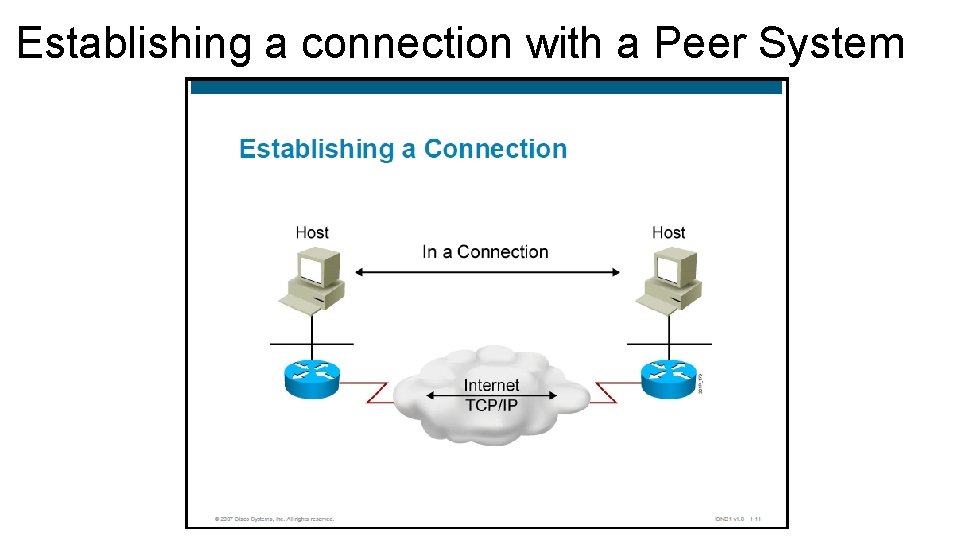
Establishing a connection with a Peer System
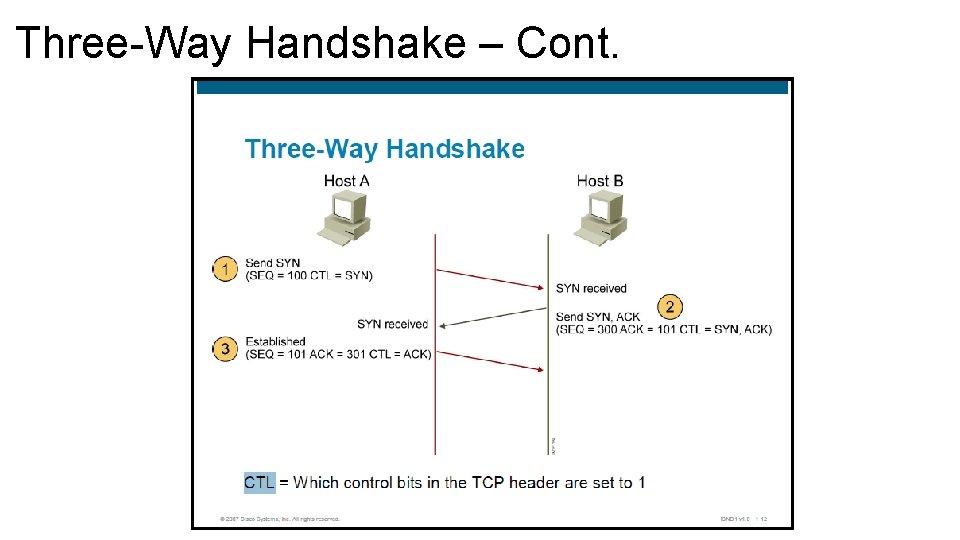
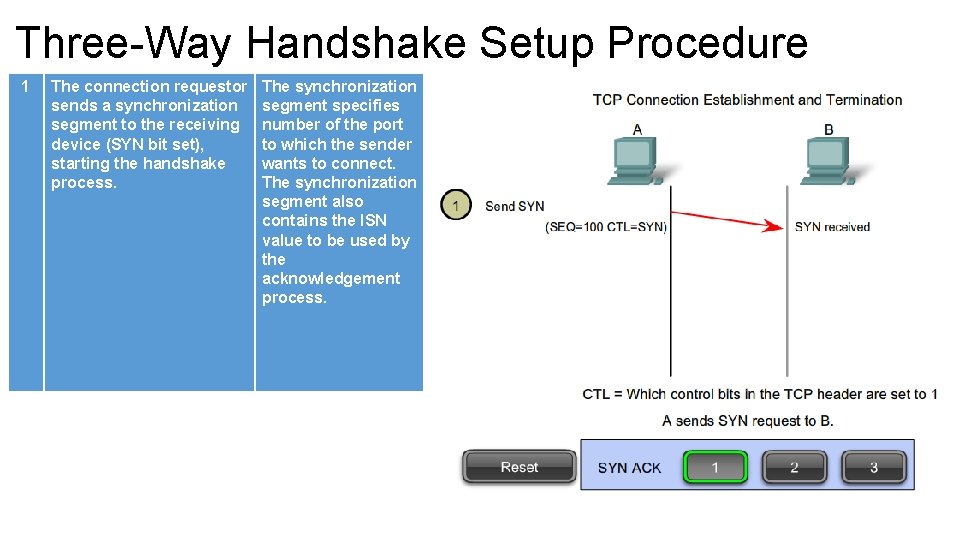
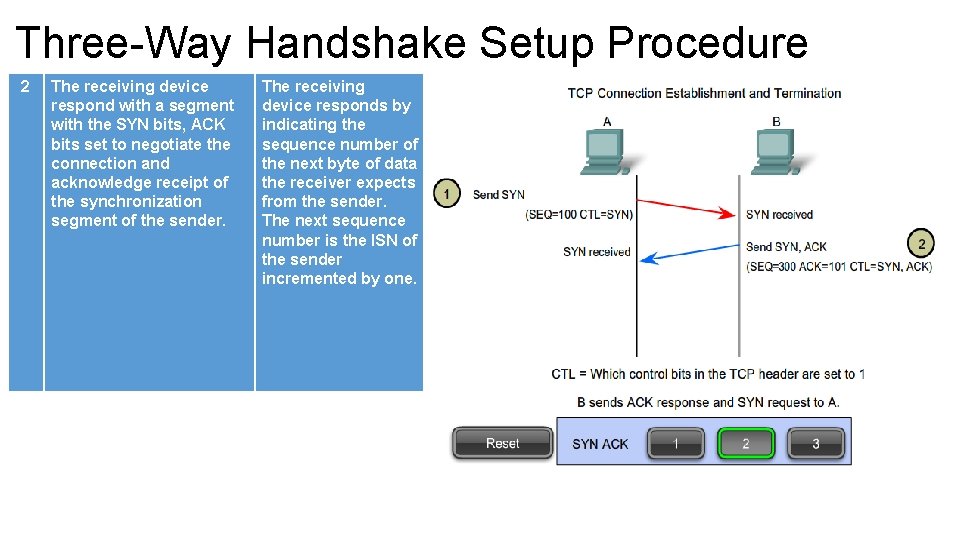
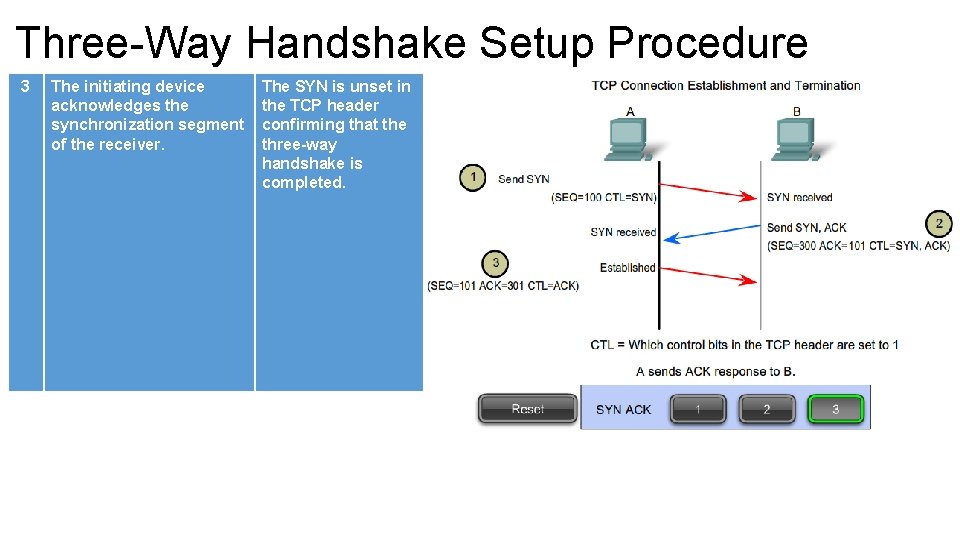
Three-Way Handshake • TCP requires the connection using a process the three-way handshake. • This process involves synchronization (SYN) bit and acknowledgement (ACK) bit in the segments between the two devices. • Important function during this process is the first device informs the second device of the initial sequence number (ISN) which is used to track data bytes on this connection.
Three-Way Handshake – Cont.
Three-Way Handshake Setup Procedure 1 The connection requestor sends a synchronization segment to the receiving device (SYN bit set), starting the handshake process. The synchronization segment specifies number of the port to which the sender wants to connect. The synchronization segment also contains the ISN value to be used by the acknowledgement process.
Three-Way Handshake Setup Procedure 2 The receiving device respond with a segment with the SYN bits, ACK bits set to negotiate the connection and acknowledge receipt of the synchronization segment of the sender. The receiving device responds by indicating the sequence number of the next byte of data the receiver expects from the sender. The next sequence number is the ISN of the sender incremented by one.
Three-Way Handshake Setup Procedure 3 The initiating device acknowledges the synchronization segment of the receiver. The SYN is unset in the TCP header confirming that the three-way handshake is completed.
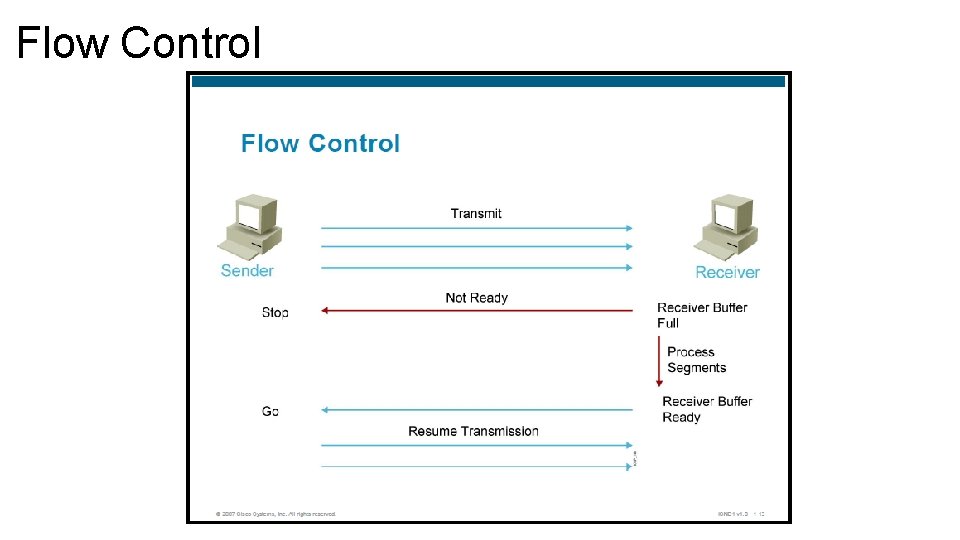
Flow Control • Flow controls prevents the problem of a sender overflowing the buffers in the receiver. • Because lost data is unacceptable, flow control is a requirement of the system. • Transport layer can issue a “not ready” indicator to the sender. The indicator is actually just the receiving computer advertisement a new window size of 0. The not ready indicator tells the sender to stop sending data and wait for a “ready” indicator. • Once the receiving computer has processed enough datagrams to make space available, the transport function sends a ready indicator to the sending computer. • When the sender receives this indicator, it resumes sending datagrams.
Flow Control
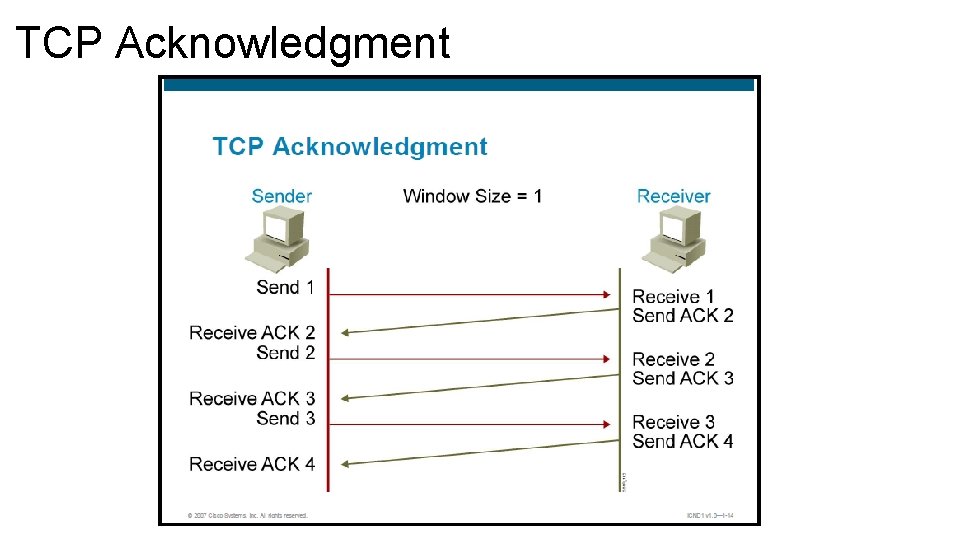
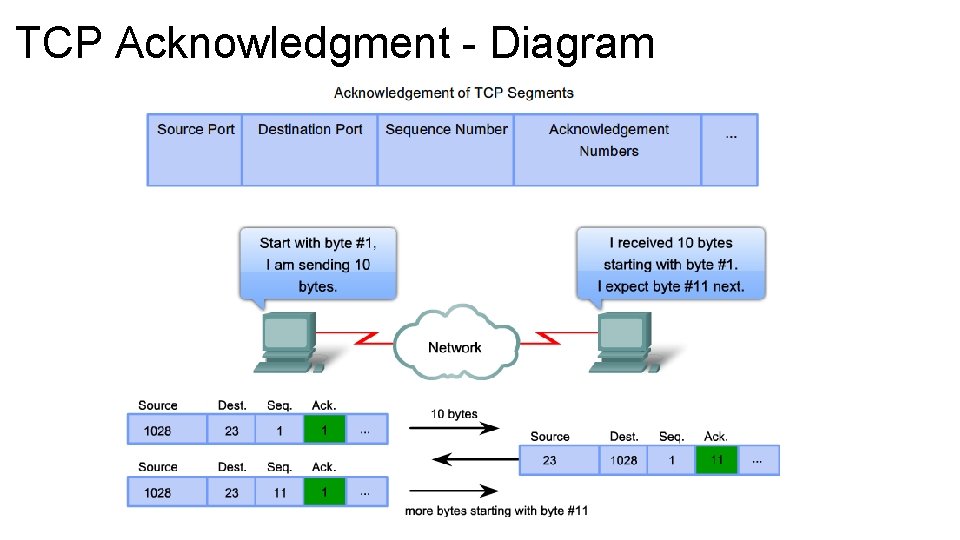
TCP Acknowledgment • TCP performs sequencing of segments with a forward reference acknowledgment. • Forward reference acknowledgment comes form the receiving device and tells the sending device which segment it is expecting to receive next. • The complex operation of TCP is simplified in a number of ways. • Simple incremental numbers are used as the sequence numbers and acknowledgments, although sequence number in reality tracks the number of bytes received.
TCP Acknowledgment
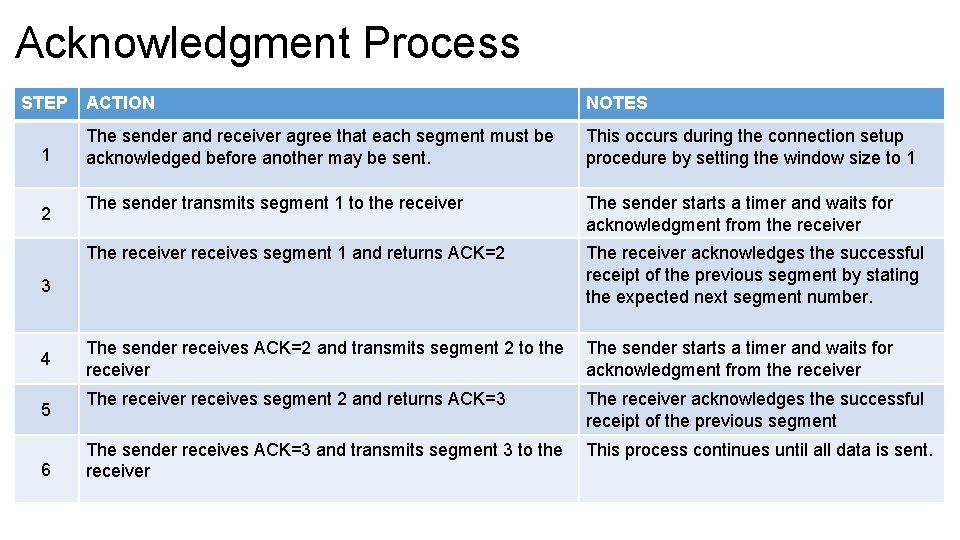
Acknowledgment Process STEP 1 2 ACTION NOTES The sender and receiver agree that each segment must be acknowledged before another may be sent. This occurs during the connection setup procedure by setting the window size to 1 The sender transmits segment 1 to the receiver The sender starts a timer and waits for acknowledgment from the receiver The receiver receives segment 1 and returns ACK=2 The receiver acknowledges the successful receipt of the previous segment by stating the expected next segment number. The sender receives ACK=2 and transmits segment 2 to the receiver The sender starts a timer and waits for acknowledgment from the receiver The receiver receives segment 2 and returns ACK=3 The receiver acknowledges the successful receipt of the previous segment The sender receives ACK=3 and transmits segment 3 to the receiver This process continues until all data is sent. 3 4 5 6
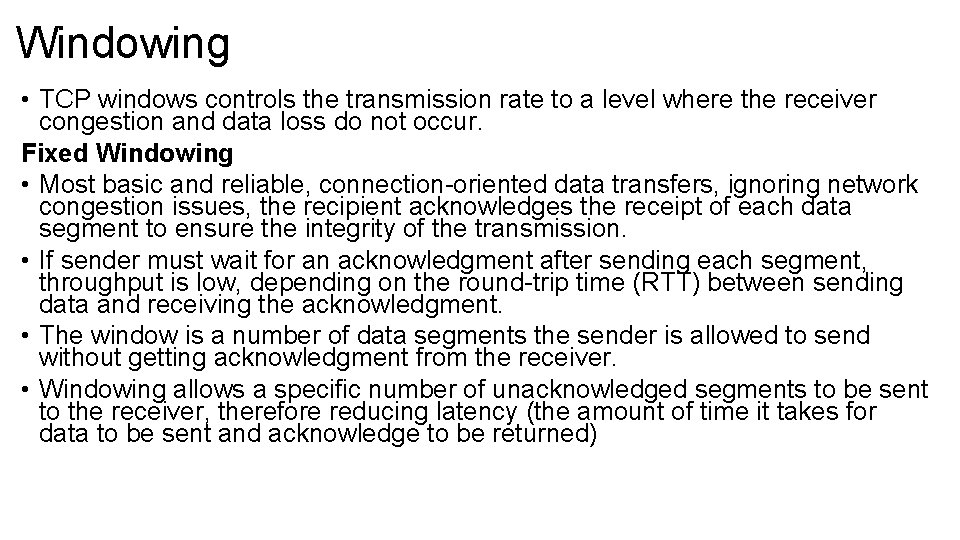
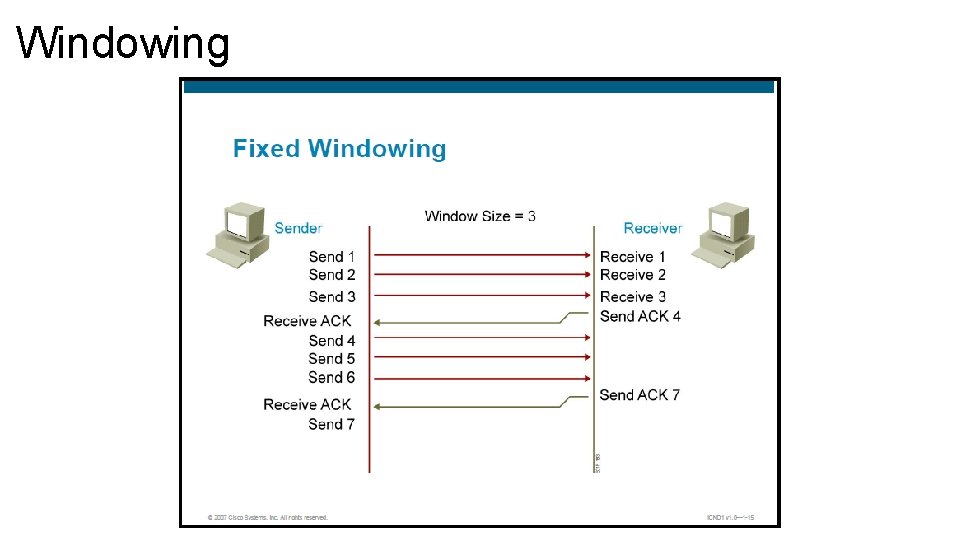
Windowing • TCP windows controls the transmission rate to a level where the receiver congestion and data loss do not occur. Fixed Windowing • Most basic and reliable, connection-oriented data transfers, ignoring network congestion issues, the recipient acknowledges the receipt of each data segment to ensure the integrity of the transmission. • If sender must wait for an acknowledgment after sending each segment, throughput is low, depending on the round-trip time (RTT) between sending data and receiving the acknowledgment. • The window is a number of data segments the sender is allowed to send without getting acknowledgment from the receiver. • Windowing allows a specific number of unacknowledged segments to be sent to the receiver, therefore reducing latency (the amount of time it takes for data to be sent and acknowledge to be returned)
Windowing
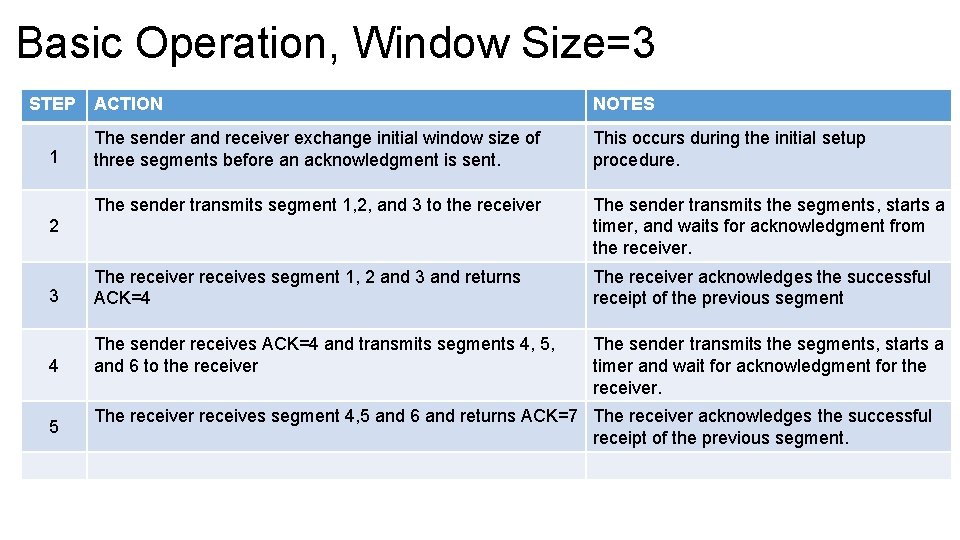
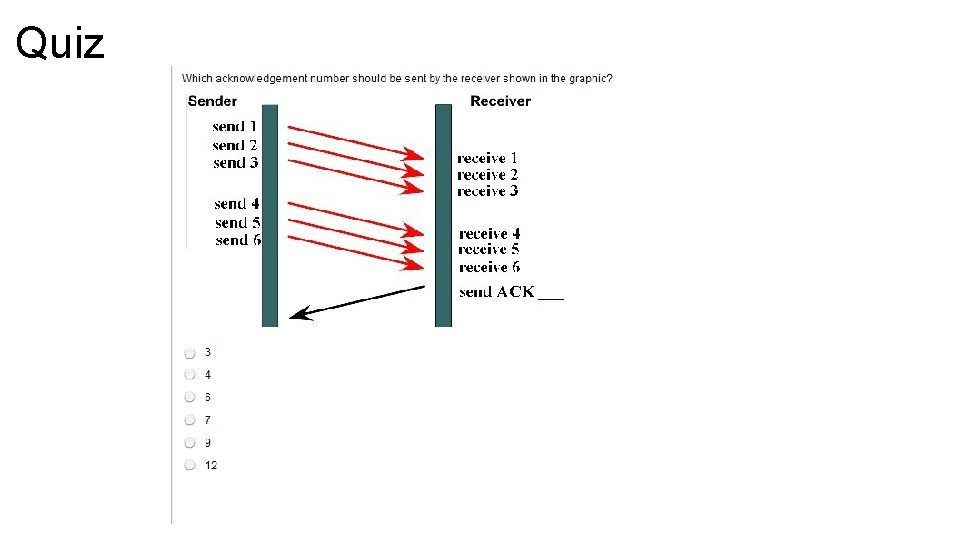
Basic Operation, Window Size=3 STEP ACTION NOTES The sender and receiver exchange initial window size of three segments before an acknowledgment is sent. This occurs during the initial setup procedure. The sender transmits segment 1, 2, and 3 to the receiver The sender transmits the segments, starts a timer, and waits for acknowledgment from the receiver. 3 The receiver receives segment 1, 2 and 3 and returns ACK=4 The receiver acknowledges the successful receipt of the previous segment 4 The sender receives ACK=4 and transmits segments 4, 5, and 6 to the receiver The sender transmits the segments, starts a timer and wait for acknowledgment for the receiver. 1 2 5 The receiver receives segment 4, 5 and 6 and returns ACK=7 The receiver acknowledges the successful receipt of the previous segment.
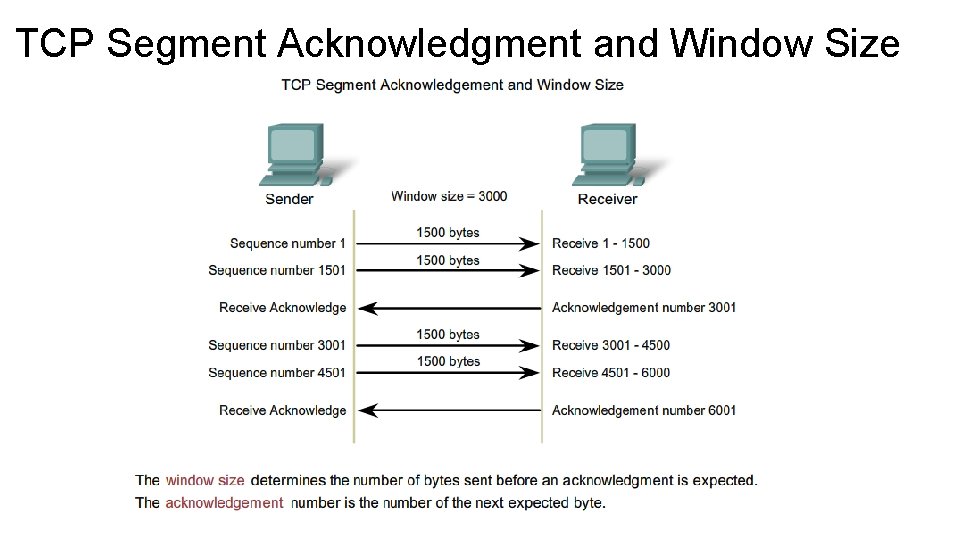
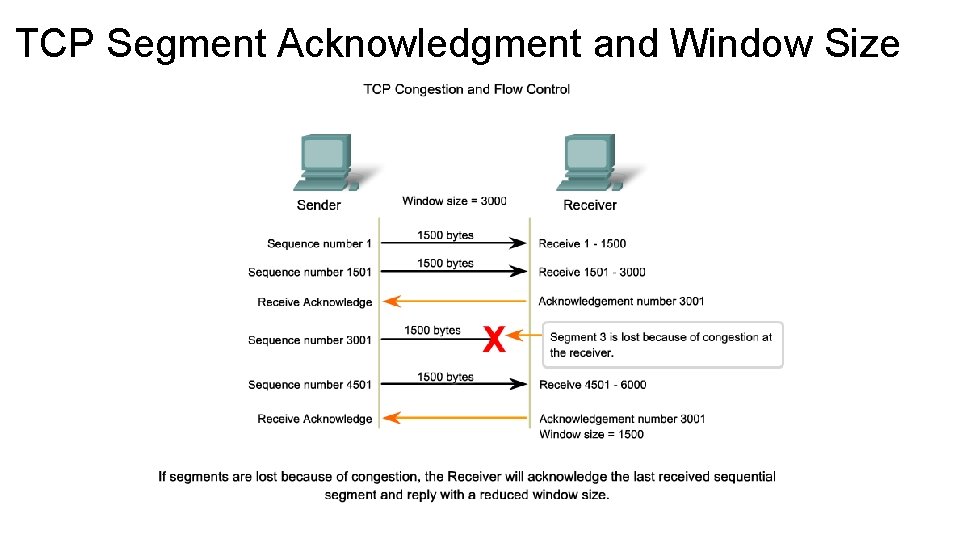
TCP Segment Acknowledgment and Window Size
TCP Segment Acknowledgment and Window Size
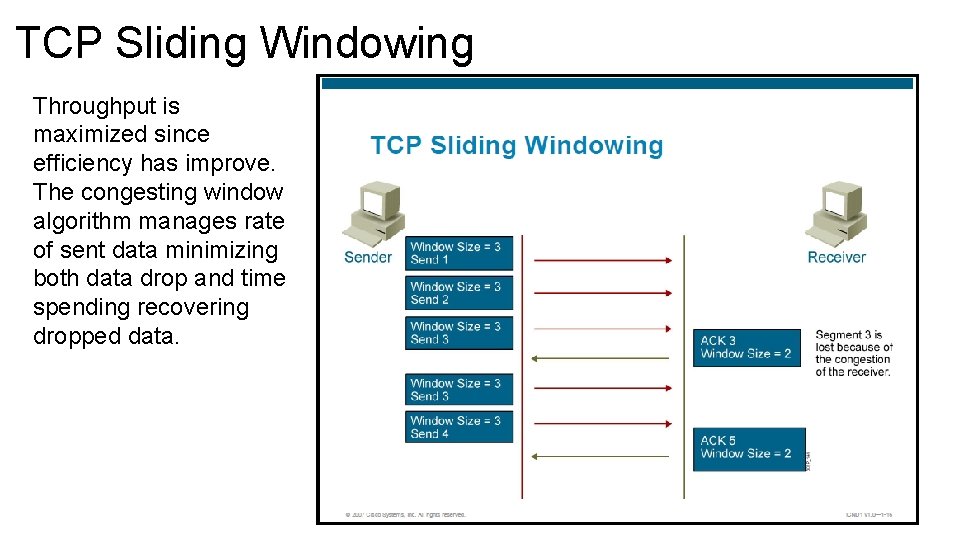
TCP Sliding Windowing • In sliding windowing, the window size is negotiated at the beginning of the connection and can change dynamically during the TCP session. • Sliding window results in more efficient use of bandwidth because larger window size allows more data to be transmitted pending acknowledgment. • If receiver reduces the advertise window to 0, effectively stops transmission until a new window greater than 0 is sent. • Each acknowledgment transmitted contains a window advertisement that indicated the number of bytes the receiver can accept. This allows the window to be expanded or contracted as necessary to manage buffer space and processing. • TCP maintains a separate congestion window size (CWS) parameter which is normally the same size as the window size of the receiver but cut in half when segments are lost (this is perceive a network congestion)
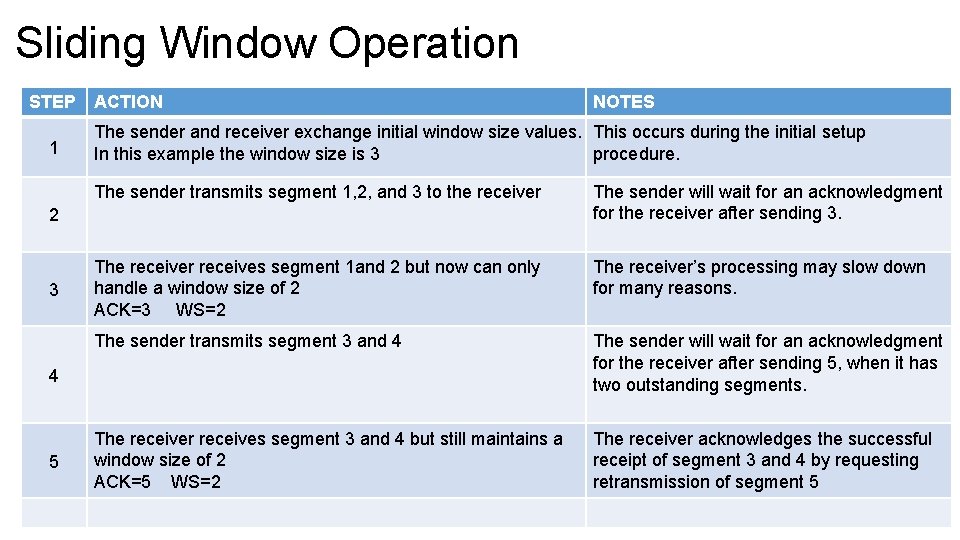
Sliding Window Operation STEP 1 ACTION The sender and receiver exchange initial window size values. This occurs during the initial setup In this example the window size is 3 procedure. The sender transmits segment 1, 2, and 3 to the receiver The sender will wait for an acknowledgment for the receiver after sending 3. The receiver receives segment 1 and 2 but now can only handle a window size of 2 ACK=3 WS=2 The receiver’s processing may slow down for many reasons. The sender transmits segment 3 and 4 The sender will wait for an acknowledgment for the receiver after sending 5, when it has two outstanding segments. The receiver receives segment 3 and 4 but still maintains a window size of 2 ACK=5 WS=2 The receiver acknowledges the successful receipt of segment 3 and 4 by requesting retransmission of segment 5 2 3 4 5 NOTES
TCP Sliding Windowing Throughput is maximized since efficiency has improve. The congesting window algorithm manages rate of sent data minimizing both data drop and time spending recovering dropped data.
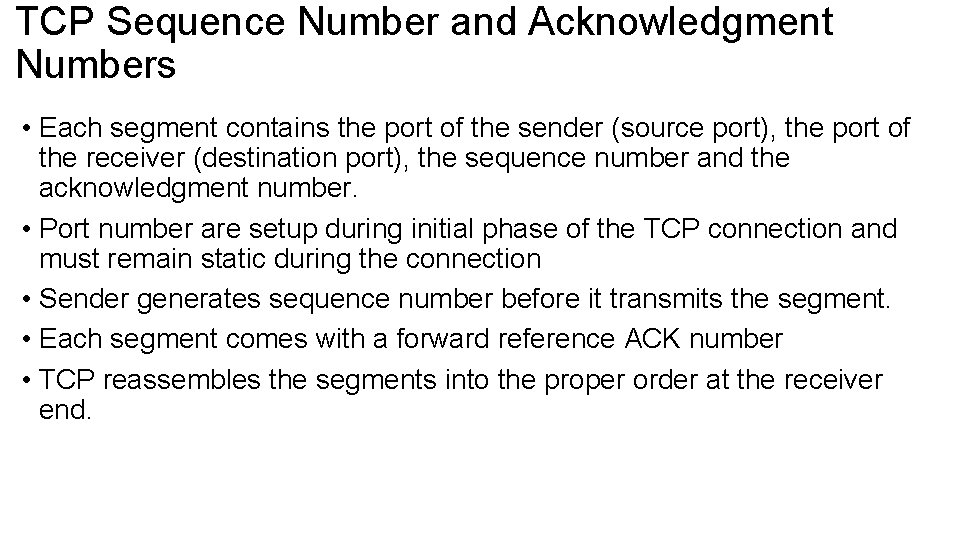
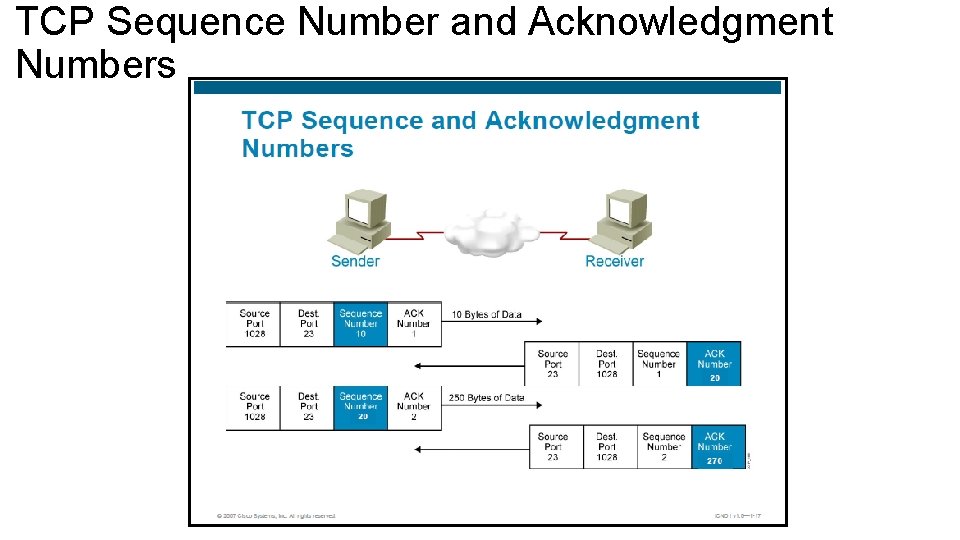
TCP Sequence Number and Acknowledgment Numbers • Each segment contains the port of the sender (source port), the port of the receiver (destination port), the sequence number and the acknowledgment number. • Port number are setup during initial phase of the TCP connection and must remain static during the connection • Sender generates sequence number before it transmits the segment. • Each segment comes with a forward reference ACK number • TCP reassembles the segments into the proper order at the receiver end.
TCP Sequence Number and Acknowledgment Numbers
TCP Acknowledgment - Diagram
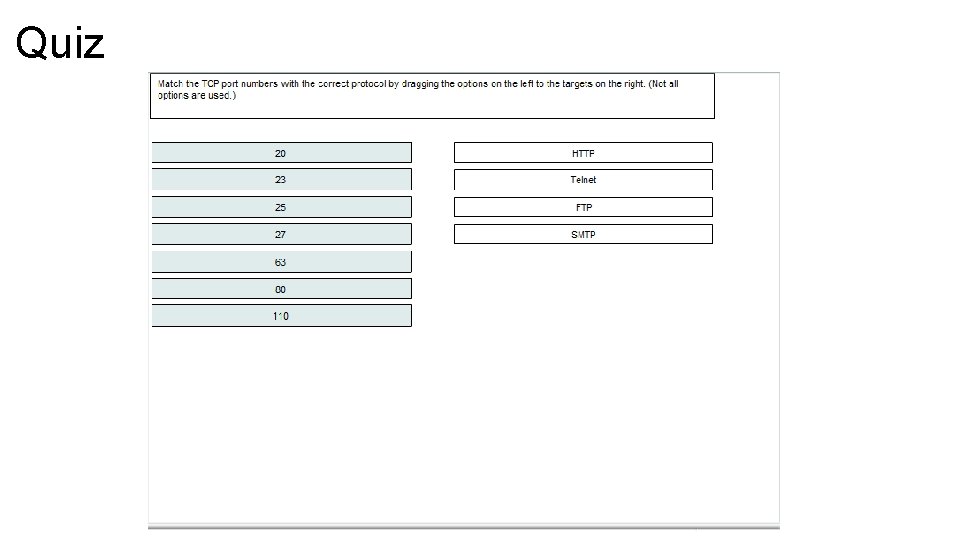
Quiz
Quiz
Quiz
Quiz
Quiz
Quiz
Quiz
Quiz
Quiz
Quiz