
COMPUTER NETWORK AND DESIGN CSCI 3385 K Routing
- Slides: 72
COMPUTER NETWORK AND DESIGN CSCI 3385 K Routing Protocols - Dynamic
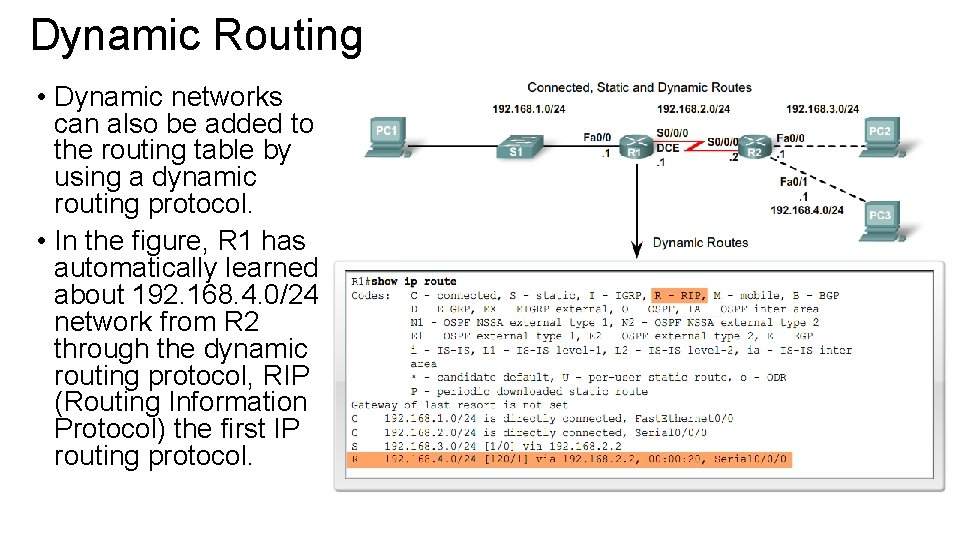
Dynamic Routing • Dynamic networks can also be added to the routing table by using a dynamic routing protocol. • In the figure, R 1 has automatically learned about 192. 168. 4. 0/24 network from R 2 through the dynamic routing protocol, RIP (Routing Information Protocol) the first IP routing protocol.
Dynamic Routing – Cont. • Dynamic routing protocols are used by routers to share information about the reachability and status of remote networks. Dynamic routing protocols perform several activities, including: • Network discovery • Updating and maintaining routing tables Automatic Network Discovery • Network discovery is the ability of a routing protocol to share information about the networks that it knows about with other routers that are also using the same routing protocol. Instead of configuring static routes to remote networks on every router, a dynamic routing protocol allows the routers to automatically learn about these networks from other routers. These networks and the best path to each network are added to the router’s routing table and denoted as a network learned by a specific dynamic routing protocol.
Dynamic Routing – Cont. Maintaining Routing Tables • After the initial network discovery, dynamic routing protocols update and maintain the networks in their routing tables. Dynamic routing protocols not only make a best path determination to various networks, they will also determine a new best path if the initial path becomes unusable (or if the topology changes). For these reasons, dynamic routing protocols have an advantage over static routes. Routers that use a dynamic routing protocols automatically share routing information with other routers and compensate for any topology changes without involving the network administrator.
Dynamic Routing Protocols • There are several dynamic protocols for IP, some of the more common dynamic routing protocols for routing IP packets are: • RIP (Routing Information Protocol) • IGRP (Interior Gateway Routing Protocol) • EIGRP (Exterior Interior Gateway Routing Protocol) • OSPF (Open Shortest Path First) • IS-IS (Intermediate System-to-Intermediate System) • BGP (Border Gateway Protocol) Note: RIP (version 1 and 2), EIGRP, and OSPF are discussed in this course. IGRP and EIGRP are Cisco proprietary routing protocols, all other routing protocols listed are standard non proprietary protocols.
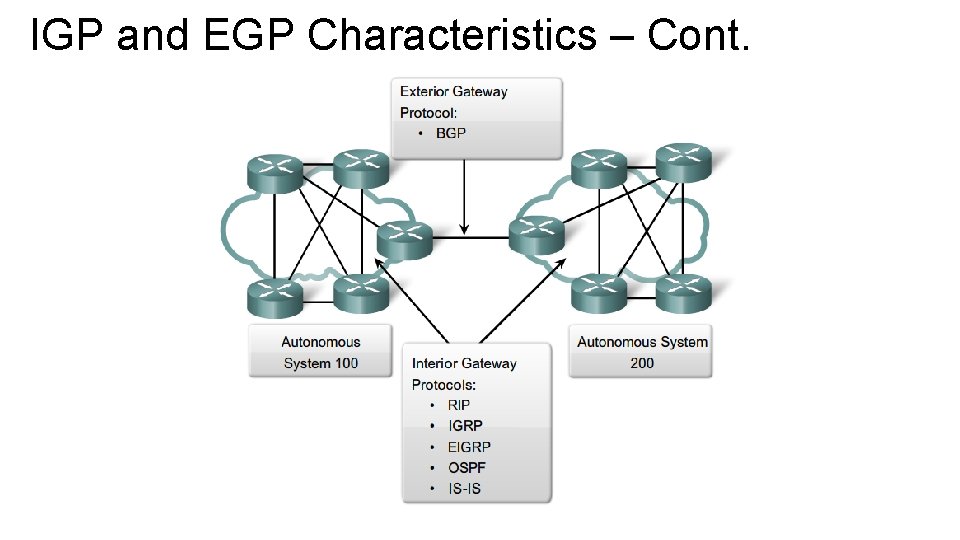
IGP and EGP • An autonomous system (AS) also known as routing domain is a collection of routers under a common administration. Examples are a company’s internal network and an Internet service provider’s network. • Internet is based on AS concept, two types of routing protocols are required: interior and exterior routing protocols: • Interior Gateway Protocol (IGP) are used for intra-autonomous system routing – routing inside an autonomous system. • Exterior Gateway Protocol (EGP) are used for inter-autonomous system routing between autonomous systems.
IGP and EGP Characteristics • IGPs are used for routing within a routing domain, those networks within the control of a single organization. An autonomous system is commonly comprised of many individual network belonging to companies, schools, and other institutions. • IGPs are used to route within the autonomous system, and also used to route within the individual networks themselves. Example: • CENIC operates an autonomous system comprised of California schools, colleges and universities. CENIC uses an IGP route within its autonomous system in order to interconnect all of these institutions. Each of these institutions also uses IGP of their own choosing to route within its own individual network. • IGP used by each entity provides best path determination within its own routing domains. • Routing protocols such as RIP, IGRP, EIGRP, OSPF and IS-IS
IGP and EGP Characteristics – Cont. • EGP on the other hand, are designed for use between different autonomous systems that are under the control of different administration. • BGP is the only currently-viable EGP and is the routing protocol used by the Internet. BPG is a path vector protocol that can use many different attributes to measure routes.
IGP and EGP Characteristics – Cont.
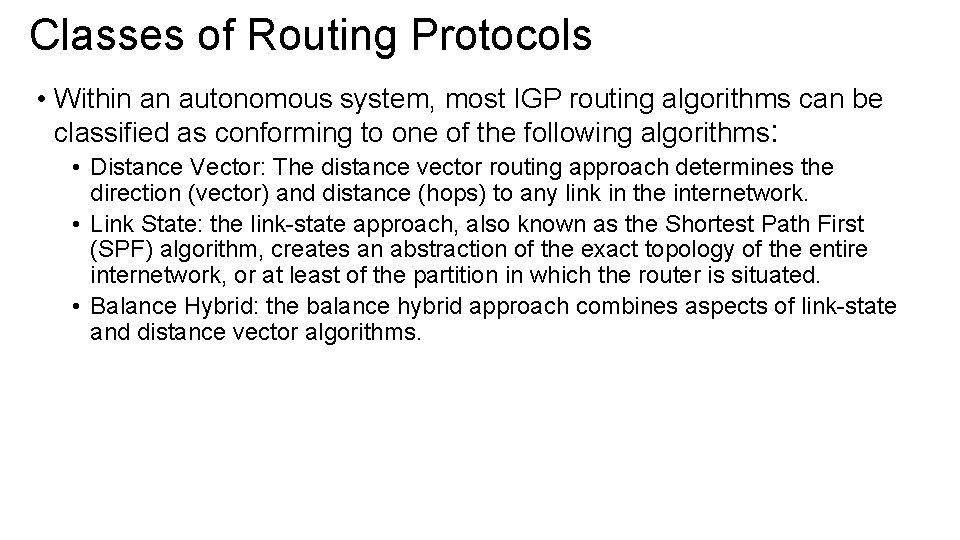
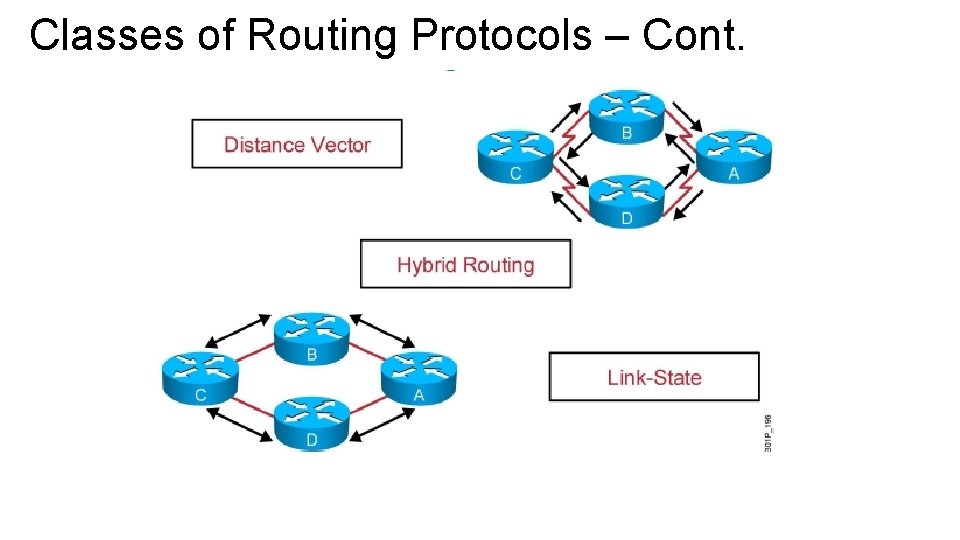
Classes of Routing Protocols • Within an autonomous system, most IGP routing algorithms can be classified as conforming to one of the following algorithms: • Distance Vector: The distance vector routing approach determines the direction (vector) and distance (hops) to any link in the internetwork. • Link State: the link-state approach, also known as the Shortest Path First (SPF) algorithm, creates an abstraction of the exact topology of the entire internetwork, or at least of the partition in which the router is situated. • Balance Hybrid: the balance hybrid approach combines aspects of link-state and distance vector algorithms.
Classes of Routing Protocols – Cont.
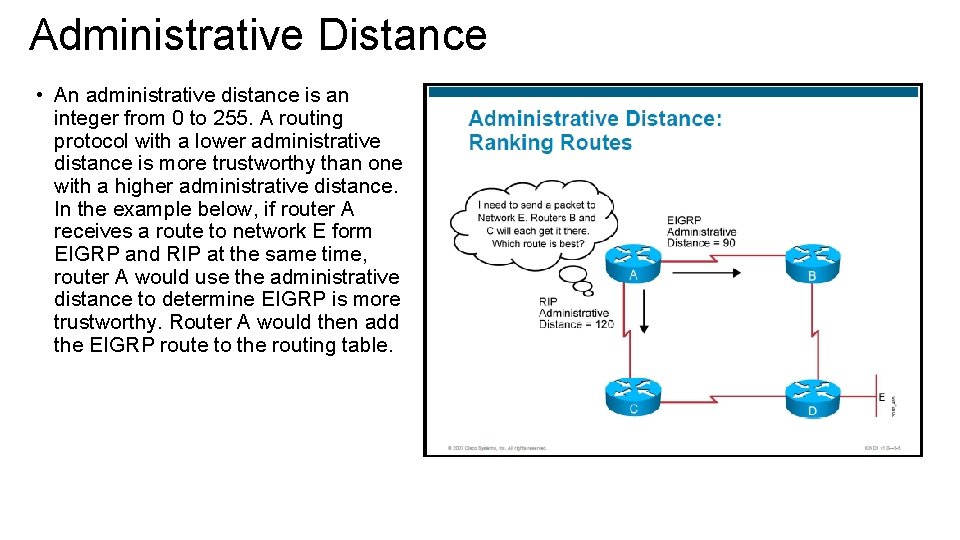
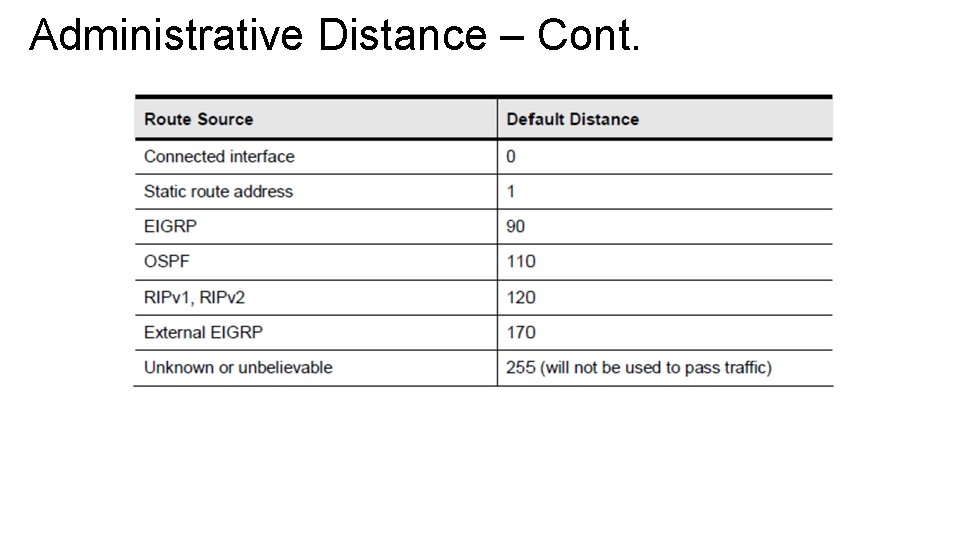
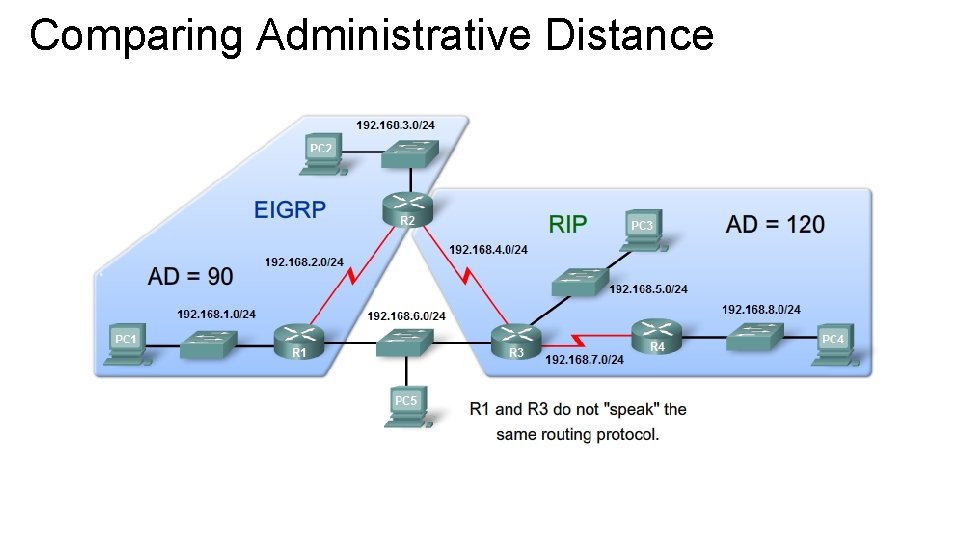
Administrative Distance • An administrative distance is an integer from 0 to 255. A routing protocol with a lower administrative distance is more trustworthy than one with a higher administrative distance. In the example below, if router A receives a route to network E form EIGRP and RIP at the same time, router A would use the administrative distance to determine EIGRP is more trustworthy. Router A would then add the EIGRP route to the routing table.
Administrative Distance – Cont.
Comparing Administrative Distance
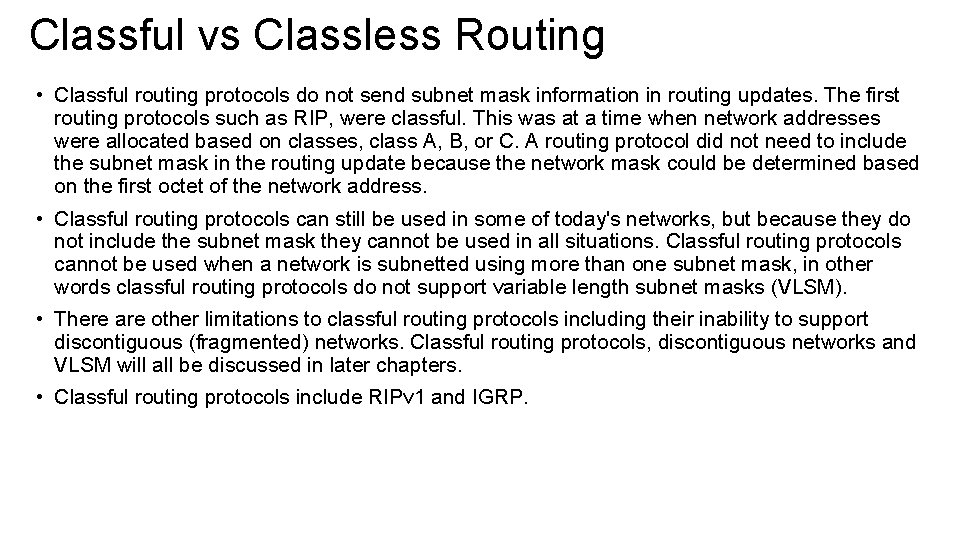
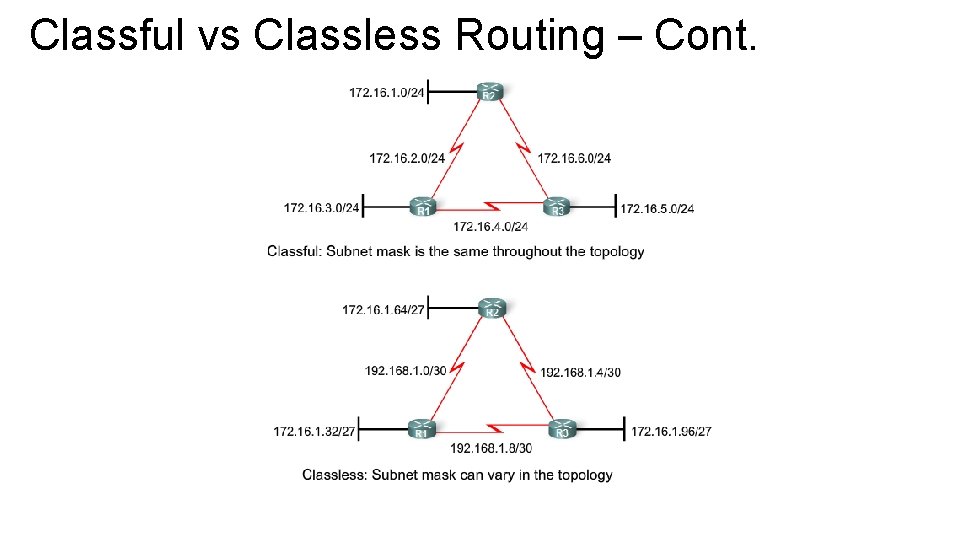
Classful vs Classless Routing • Classful routing protocols do not send subnet mask information in routing updates. The first routing protocols such as RIP, were classful. This was at a time when network addresses were allocated based on classes, class A, B, or C. A routing protocol did not need to include the subnet mask in the routing update because the network mask could be determined based on the first octet of the network address. • Classful routing protocols can still be used in some of today's networks, but because they do not include the subnet mask they cannot be used in all situations. Classful routing protocols cannot be used when a network is subnetted using more than one subnet mask, in other words classful routing protocols do not support variable length subnet masks (VLSM). • There are other limitations to classful routing protocols including their inability to support discontiguous (fragmented) networks. Classful routing protocols, discontiguous networks and VLSM will all be discussed in later chapters. • Classful routing protocols include RIPv 1 and IGRP.
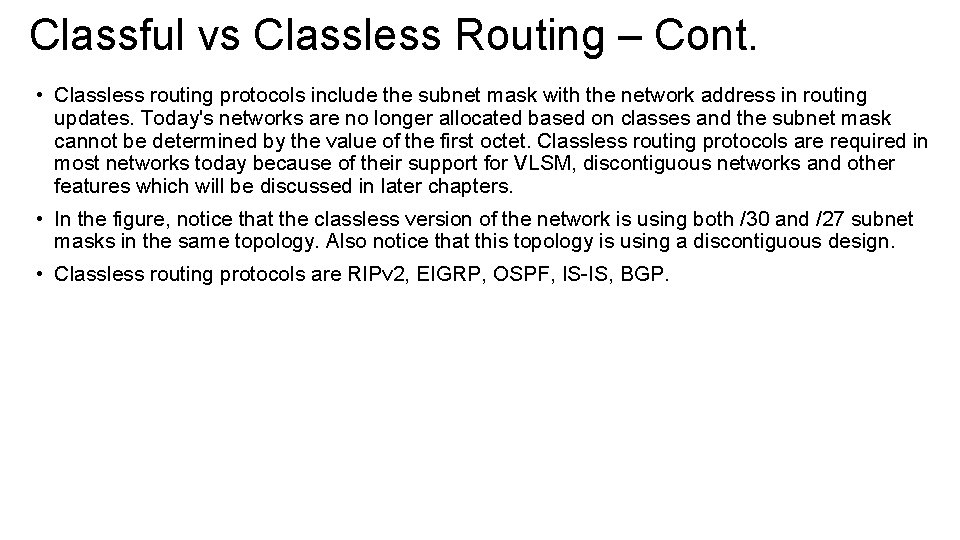
Classful vs Classless Routing – Cont. • Classless routing protocols include the subnet mask with the network address in routing updates. Today's networks are no longer allocated based on classes and the subnet mask cannot be determined by the value of the first octet. Classless routing protocols are required in most networks today because of their support for VLSM, discontiguous networks and other features which will be discussed in later chapters. • In the figure, notice that the classless version of the network is using both /30 and /27 subnet masks in the same topology. Also notice that this topology is using a discontiguous design. • Classless routing protocols are RIPv 2, EIGRP, OSPF, IS-IS, BGP.
Classful vs Classless Routing – Cont.
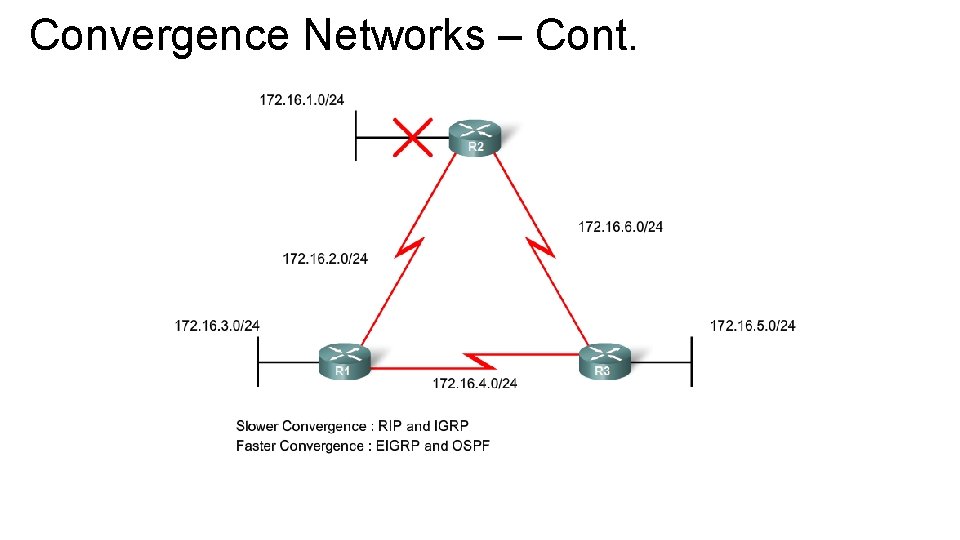
Convergence Networks • Convergence is when all routers' routing tables are at a state of consistency. The network has converged when all routers have complete and accurate information about the network. Convergence time is the time it takes routers to share information, calculate best paths, and update their routing tables. A network is not completely operable until the network has converged; therefore, most networks require short convergence times. • Convergence is both collaborative and independent. The routers share information with each other but must independently calculate the impacts of the topology change on their own routes. Because they develop an agreement with the new topology independently, they are said to converge on this consensus. • Convergence properties include the speed of propagation of routing information and the calculation of optimal paths. Routing protocols can be rated based on the speed to convergence; the faster the convergence, the better the routing protocol. Generally, RIP and IGRP are slow to converge, whereas EIGRP and OSPF are faster to converge.
Convergence Networks – Cont.
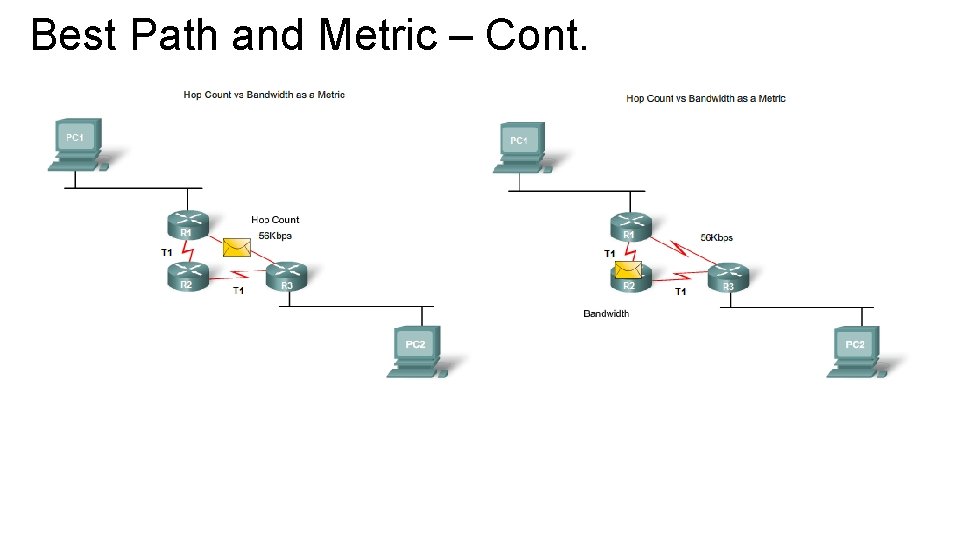
Best Path and Metric • Determining a router’s best path involve the evaluation of multiple paths to the same destination network and selecting the optimum or “shortest” path to reach that network. Whenever multiple paths to reach the network exists, each path uses a different exit interface on the router to reach that network. • The best path is selected by a routing protocol based on the value or metric it uses to determine the distance to reach a network. Some routing protocol such as RIP use a simple hop-count, which is the number of routers and the destination network. Other routing protocols such OSPF determine the shortest path by examining the bandwidth of the links and using the links with the fastest bandwidth from a router to the destination network. • Dynamic routing protocols typically use their own rules and metrics to build and update routing tables. A metric is the quantitative value used to measure the distance to a given route. The best path to a network is the path with the lowest metric. For example, a router will prefer a path that is 5 hops away over a path that is 10 hops away. • The routing algorithm generates a value or a metric, for each path through the network. • Metrics can be based on either a single characteristic or several characteristics of a path. Some routing protocols can base route selection on multiple metrics, combining them into a single metric. The smaller the value of the metric, the better the path.
Best Path and Metric – Cont. Comparing Hop Count and Bandwidth Metrics • Hop count: is the number of routers that a packet must travel through before reaching its destination. Each router is equal to one hop. A hop count of 4 indicates that a packet must pass through 4 routers to reach its destination. If multiples are available to a destination, the routing protocol such as RIP picks the path with the least number of hops. • Bandwidth: is the data capacity of a link, sometimes referred to as the speed of the link. For example, Cisco’s OSPF routing protocol uses bandwidth as its metric. The best path to a network is determined by the path with an accumulation of links that have the highest bandwidth values, or the fastest link. Note: Speed is technically not an accurate description of bandwidth because all bits travel at the same speed over the same physical medium. Bandwidth is more accurately define as the number of bits that can be transmitted over a link per second.
Best Path and Metric – Cont.
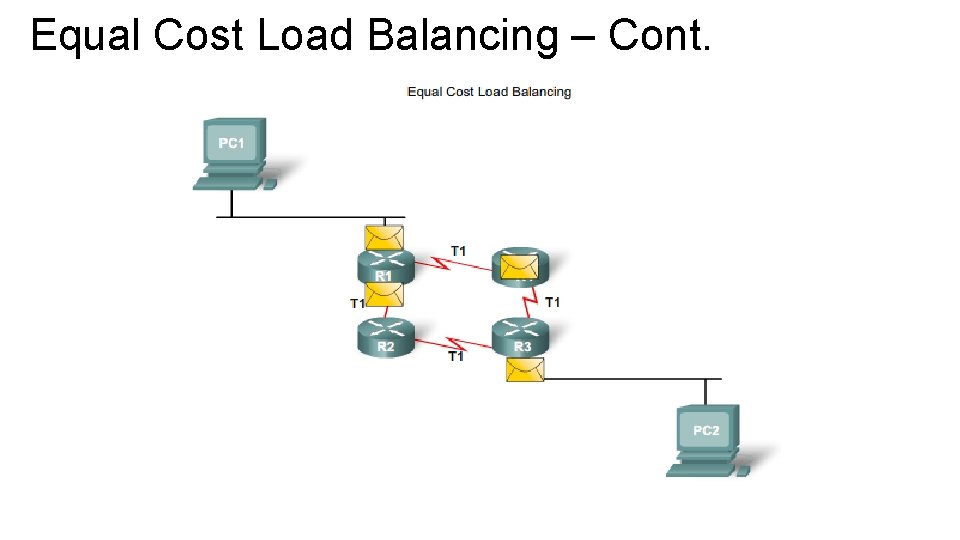
Equal Cost Load Balancing • If a routing table has two or more paths with the same metric to the same destination network or when the router has multiple paths to a destination network and the value of that metric (hop count, bandwidth, etc. ) is the same, this is known as an equal cost metric, and the router will perform equal cost load balancing. • The routing table will contain the single destination network but will have multiple exit interfaces, one for each equal cost path. The router will forward packets using the multiple interfaces listed in the routing table. • If configure correctly, load balancing can increase the effectiveness and performance of the network. Equal cost load balancing can be configured to use both dynamic routing protocols and static routes
Equal Cost Load Balancing – Cont.
Path Determination • The determination function is the progress of how the router determines which path to use when forwarding a packet. To determine the best path, the router searches its routing table for a network address that matches the packet’s destination IP address. • Three path determinations results from this path: • Directly Connected Network: If the destination IP address of the packet belongs to a device on a network that is directly connected to one of the router interfaces, that packet is forward directly to that device. This means that the destination IP address of the packet is a host address on the same network as the router’s interface. • Remote Network: If the destination IP address of the packet belongs to a remote network, then the packet is forward to another router. Remote networks can only be reached by forwarding packets to another router. • No Router Determined: If the destination IP address of the packet does not belong to either a connected or remote network, and if the router does not have a default route, then the packet is discarded. The router send an ICMP unreachable message to the source IP address of the packet.
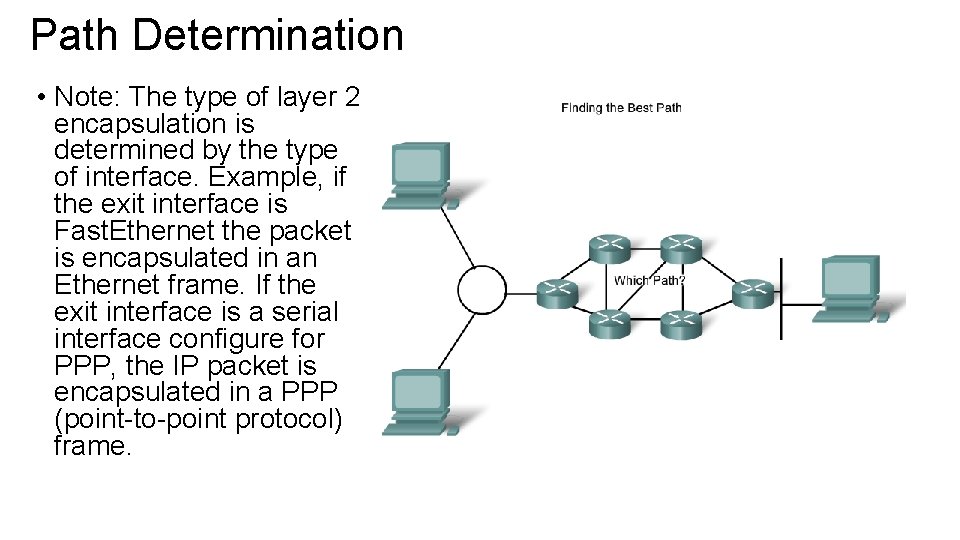
Path Determination • Note: The type of layer 2 encapsulation is determined by the type of interface. Example, if the exit interface is Fast. Ethernet the packet is encapsulated in an Ethernet frame. If the exit interface is a serial interface configure for PPP, the IP packet is encapsulated in a PPP (point-to-point protocol) frame.
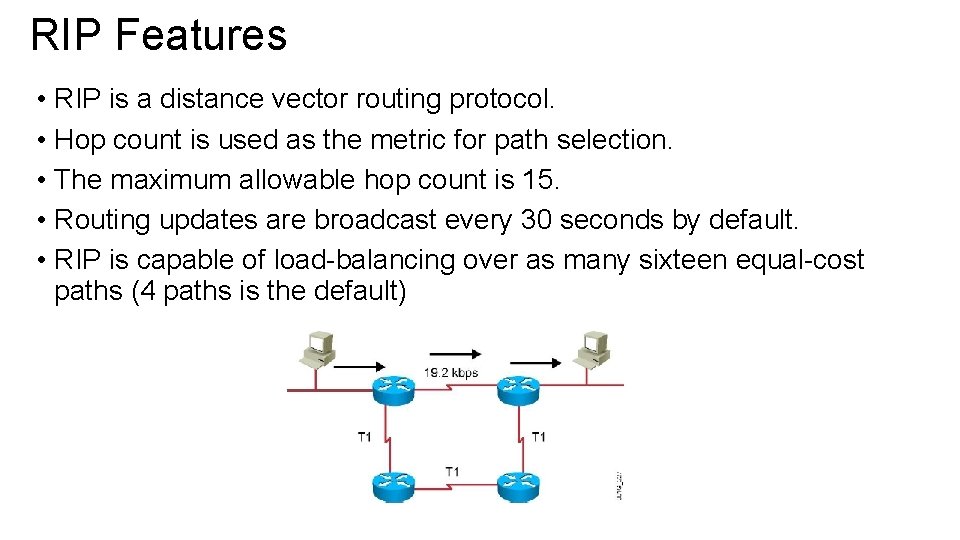
RIP Features • RIP is a distance vector routing protocol. • Hop count is used as the metric for path selection. • The maximum allowable hop count is 15. • Routing updates are broadcast every 30 seconds by default. • RIP is capable of load-balancing over as many sixteen equal-cost paths (4 paths is the default)
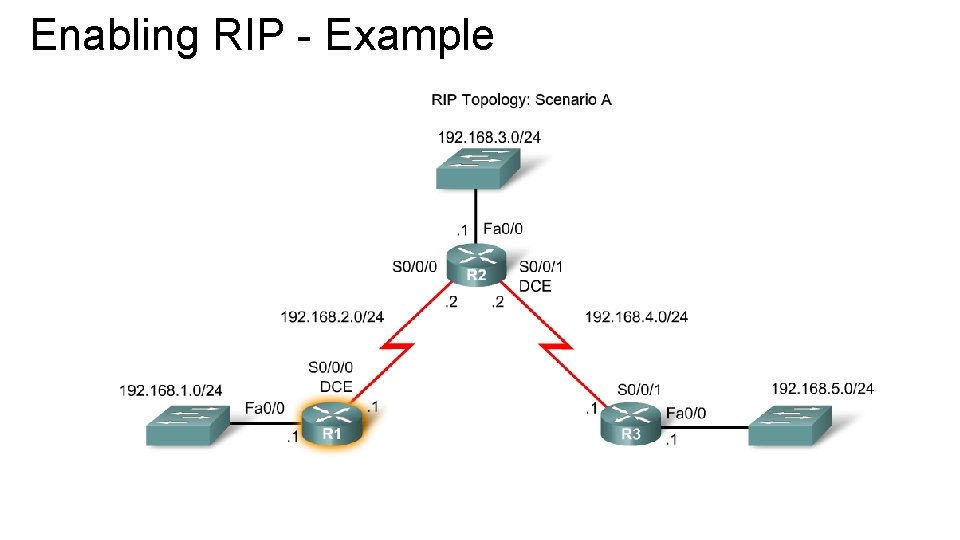
Enabling RIP - Example
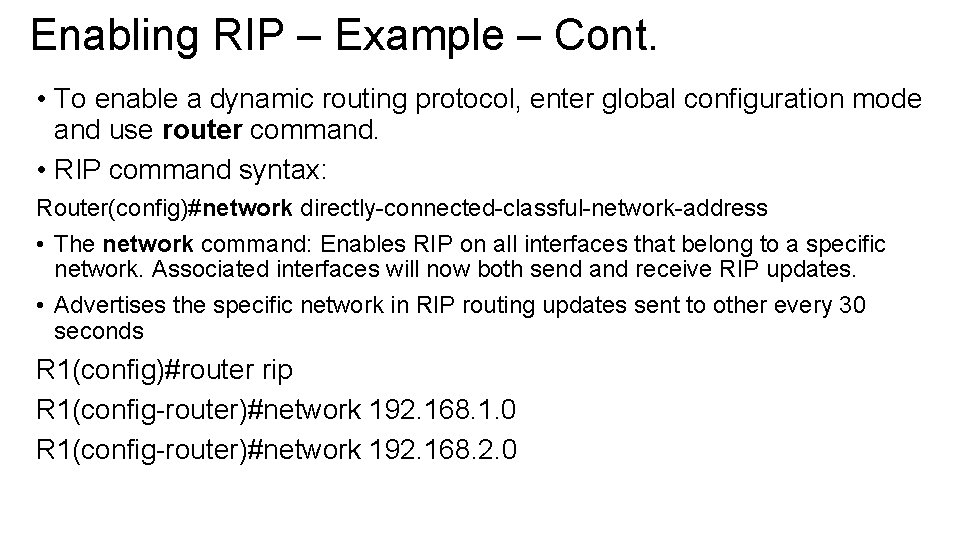
Enabling RIP – Example – Cont. • To enable a dynamic routing protocol, enter global configuration mode and use router command. • RIP command syntax: Router(config)#network directly-connected-classful-network-address • The network command: Enables RIP on all interfaces that belong to a specific network. Associated interfaces will now both send and receive RIP updates. • Advertises the specific network in RIP routing updates sent to other every 30 seconds R 1(config)#router rip R 1(config-router)#network 192. 168. 1. 0 R 1(config-router)#network 192. 168. 2. 0
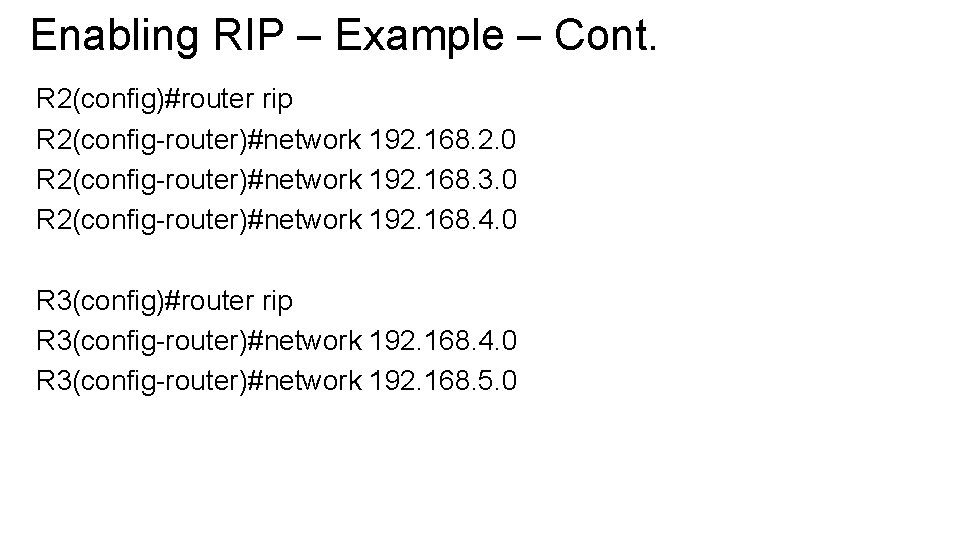
Enabling RIP – Example – Cont. R 2(config)#router rip R 2(config-router)#network 192. 168. 2. 0 R 2(config-router)#network 192. 168. 3. 0 R 2(config-router)#network 192. 168. 4. 0 R 3(config)#router rip R 3(config-router)#network 192. 168. 4. 0 R 3(config-router)#network 192. 168. 5. 0
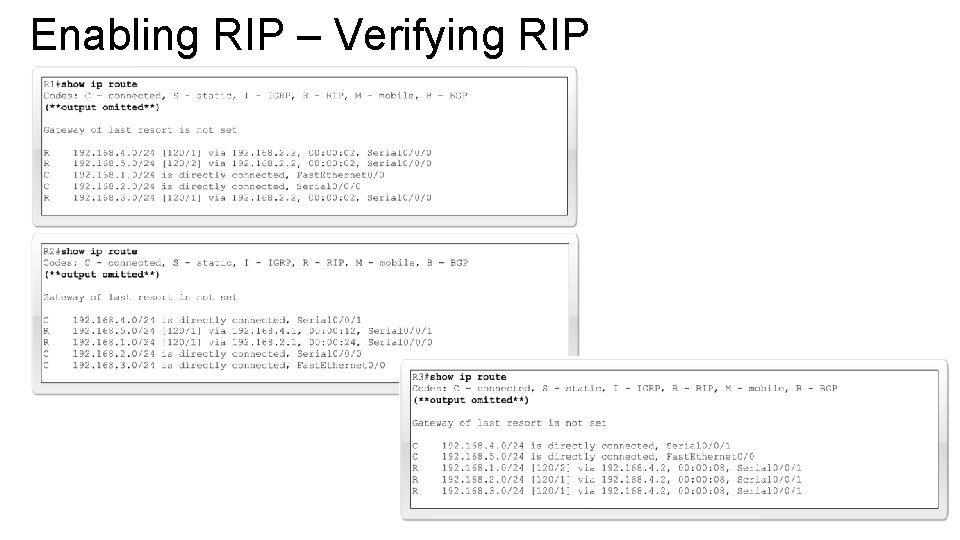
Enabling RIP – Verifying RIP
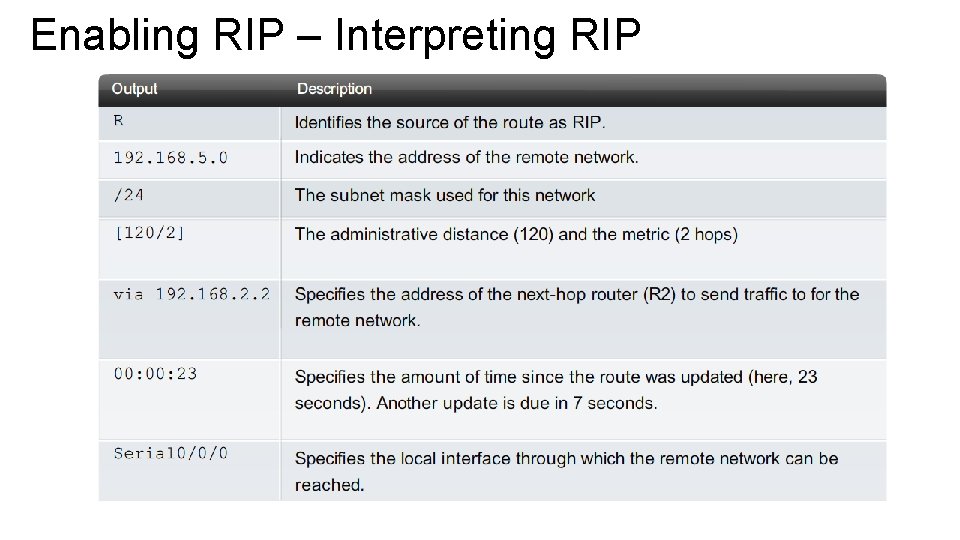
Enabling RIP – Interpreting RIP
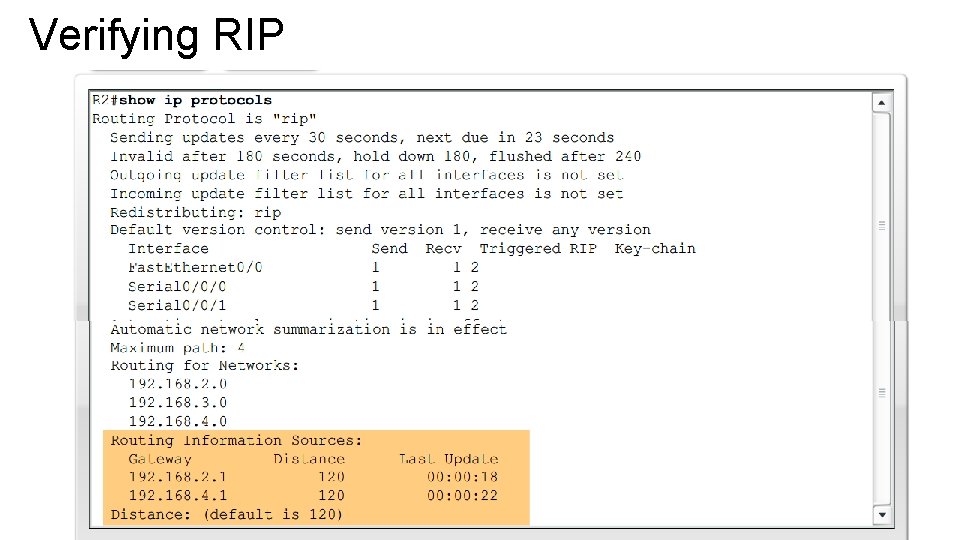
Verifying RIP • If a network is missing from a routing table, check the configuration using show ip protocols. This command displays the routing protocol that is currently configured on the routers. This output can be used to verify most RIP parameters to confirm that: • • RIP routing is configured The correct interfaces send and receive RIP updates The router advertises the correct networks RIP neighbors are sending updates • This command is useful when verifying the operations of the routing protocols for EIGRP and OSPF.
Verifying RIP
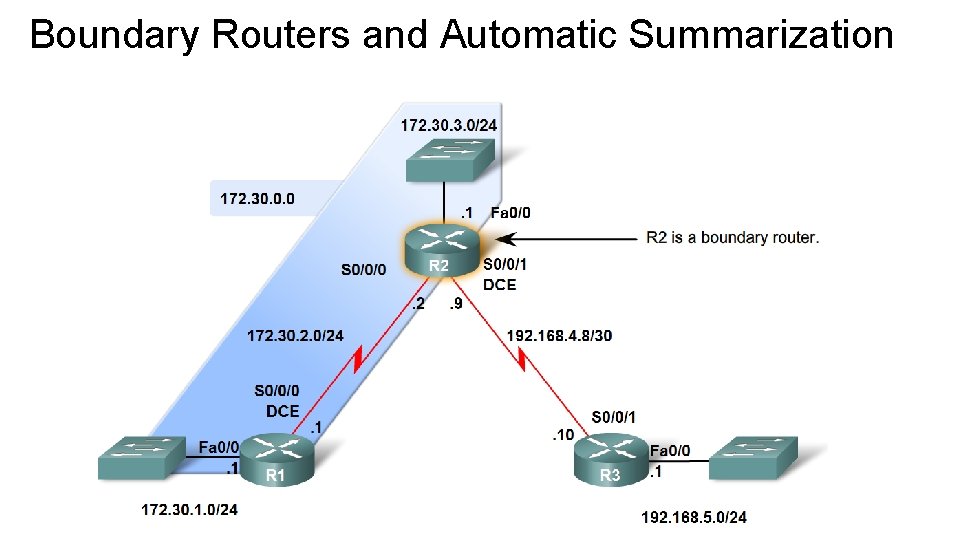
Boundary Routers and Automatic Summarization • As you know, RIP is a classful routing protocol that automatically summarizes classful networks across major network boundaries. In the figure, you can see that R 2 has interfaces in more than one major classful network. This makes R 2 a boundary router in RIP. Serial 0/0/0 and Fast. Ethernet 0/0 interfaces on R 2 are both inside the 172. 30. 0. 0 boundary. The Serial 0/0/1 interface is inside the 192. 168. 4. 0 boundary. • Because boundary routers summarize RIP subnets from one major network to the other, updates for the 172. 30. 1. 0, 172. 30. 2. 0 and 172. 30. 3. 0 networks will automatically be summarized into 172. 30. 0. 0 when sent out R 2's Serial 0/0/1 interface.
Boundary Routers and Automatic Summarization
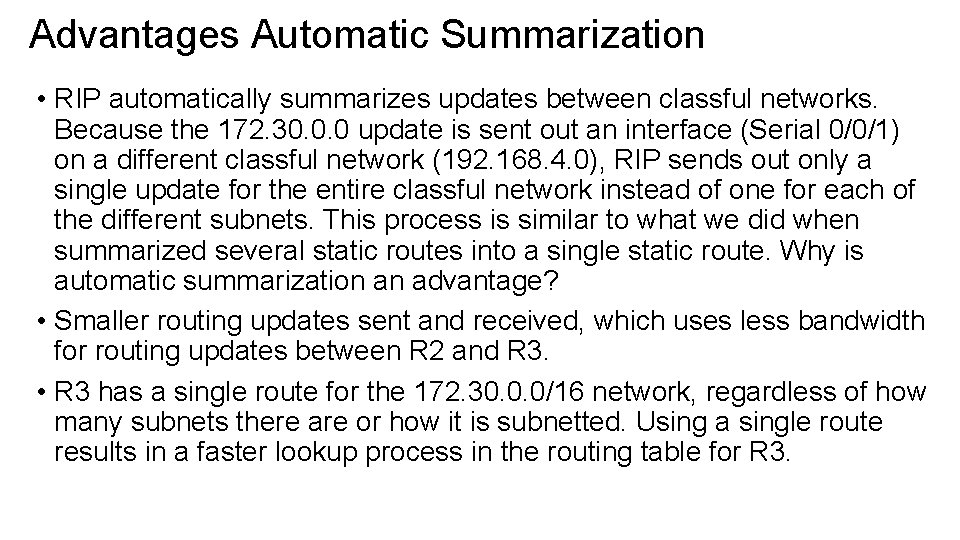
Advantages Automatic Summarization • RIP automatically summarizes updates between classful networks. Because the 172. 30. 0. 0 update is sent out an interface (Serial 0/0/1) on a different classful network (192. 168. 4. 0), RIP sends out only a single update for the entire classful network instead of one for each of the different subnets. This process is similar to what we did when summarized several static routes into a single static route. Why is automatic summarization an advantage? • Smaller routing updates sent and received, which uses less bandwidth for routing updates between R 2 and R 3. • R 3 has a single route for the 172. 30. 0. 0/16 network, regardless of how many subnets there are or how it is subnetted. Using a single route results in a faster lookup process in the routing table for R 3.
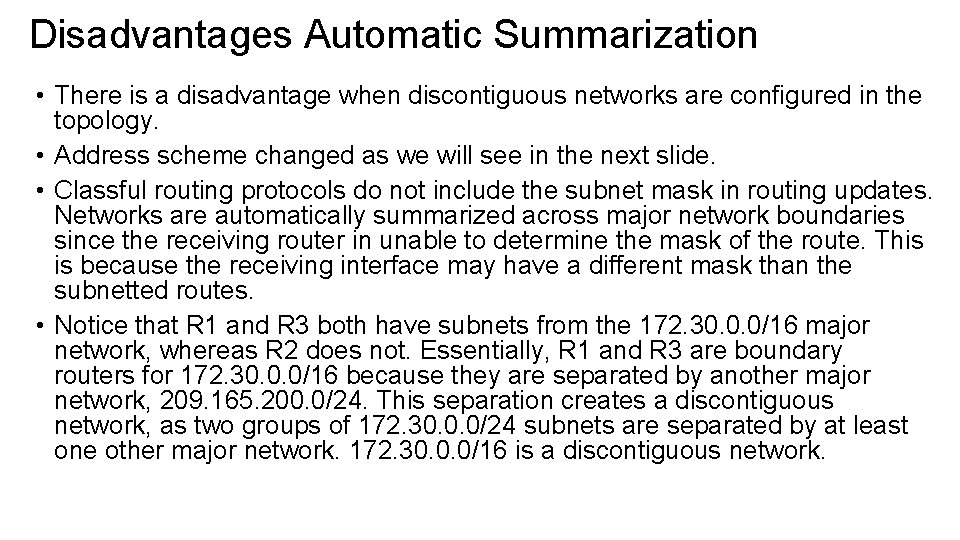
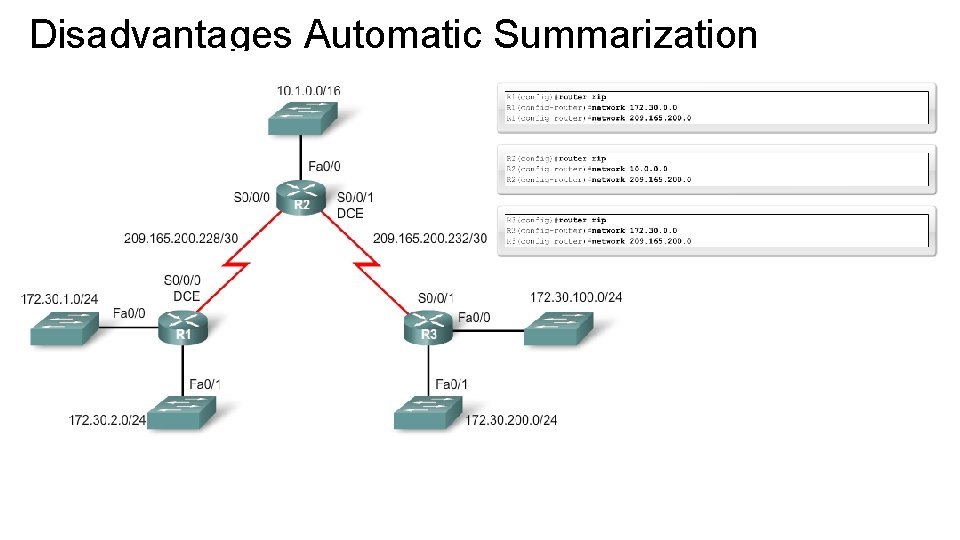
Disadvantages Automatic Summarization • There is a disadvantage when discontiguous networks are configured in the topology. • Address scheme changed as we will see in the next slide. • Classful routing protocols do not include the subnet mask in routing updates. Networks are automatically summarized across major network boundaries since the receiving router in unable to determine the mask of the route. This is because the receiving interface may have a different mask than the subnetted routes. • Notice that R 1 and R 3 both have subnets from the 172. 30. 0. 0/16 major network, whereas R 2 does not. Essentially, R 1 and R 3 are boundary routers for 172. 30. 0. 0/16 because they are separated by another major network, 209. 165. 200. 0/24. This separation creates a discontiguous network, as two groups of 172. 30. 0. 0/24 subnets are separated by at least one other major network. 172. 30. 0. 0/16 is a discontiguous network.
Disadvantages Automatic Summarization
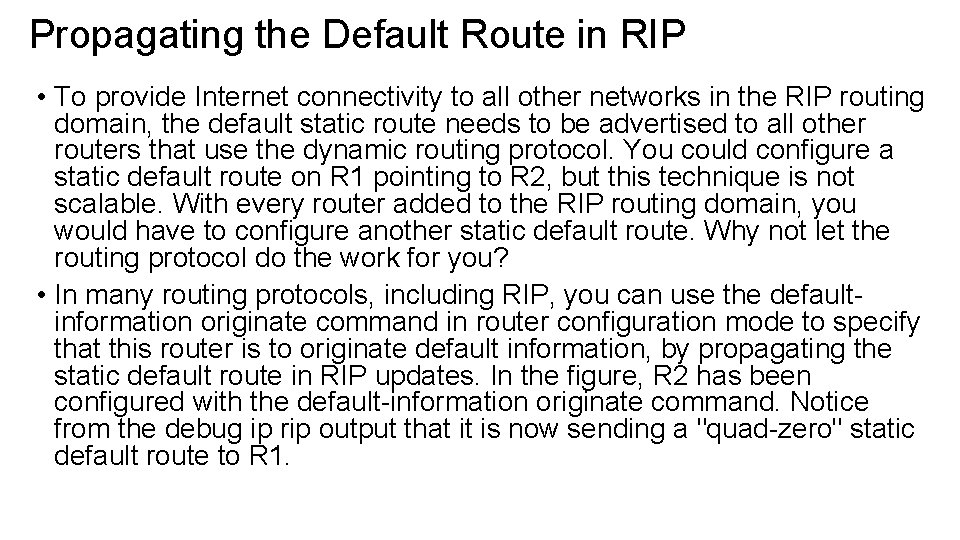
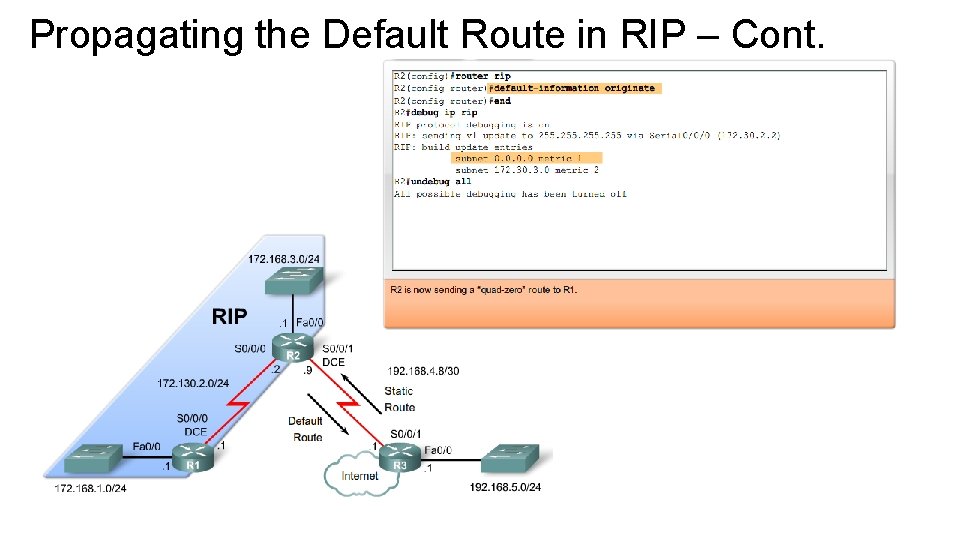
Propagating the Default Route in RIP • To provide Internet connectivity to all other networks in the RIP routing domain, the default static route needs to be advertised to all other routers that use the dynamic routing protocol. You could configure a static default route on R 1 pointing to R 2, but this technique is not scalable. With every router added to the RIP routing domain, you would have to configure another static default route. Why not let the routing protocol do the work for you? • In many routing protocols, including RIP, you can use the defaultinformation originate command in router configuration mode to specify that this router is to originate default information, by propagating the static default route in RIP updates. In the figure, R 2 has been configured with the default-information originate command. Notice from the debug ip rip output that it is now sending a "quad-zero" static default route to R 1.
Propagating the Default Route in RIP – Cont.
Enabling RIP v 2 • By default when a Cisco router is configured RIP v 1 is the routing protocol. • To enable RIP v 2 enter the following command Router(config)#router rip Router(config-router)#version 2 • This command should be configured on all routers in the routing domain. • In RIP v 2 the subnet mask will be included in all updates • RIP v 2 is a classless routing protocol
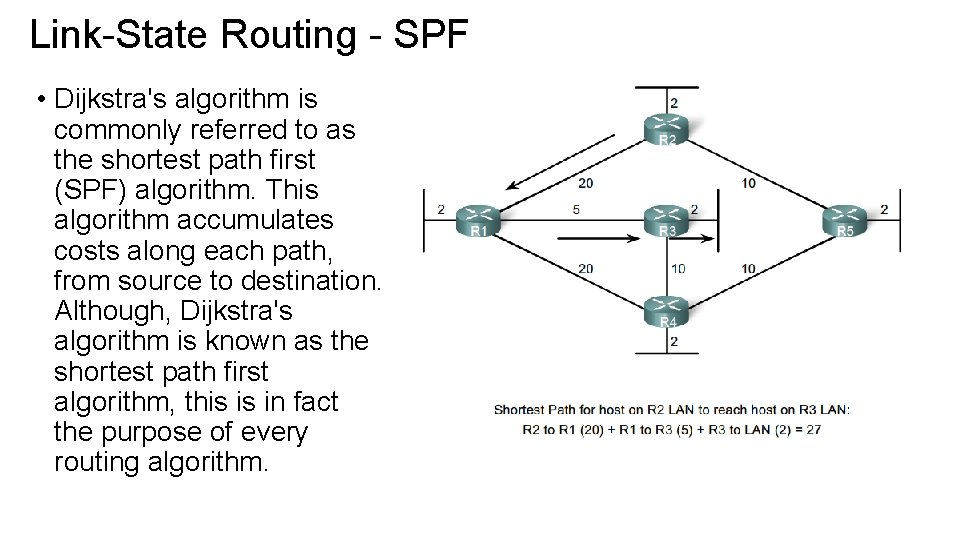
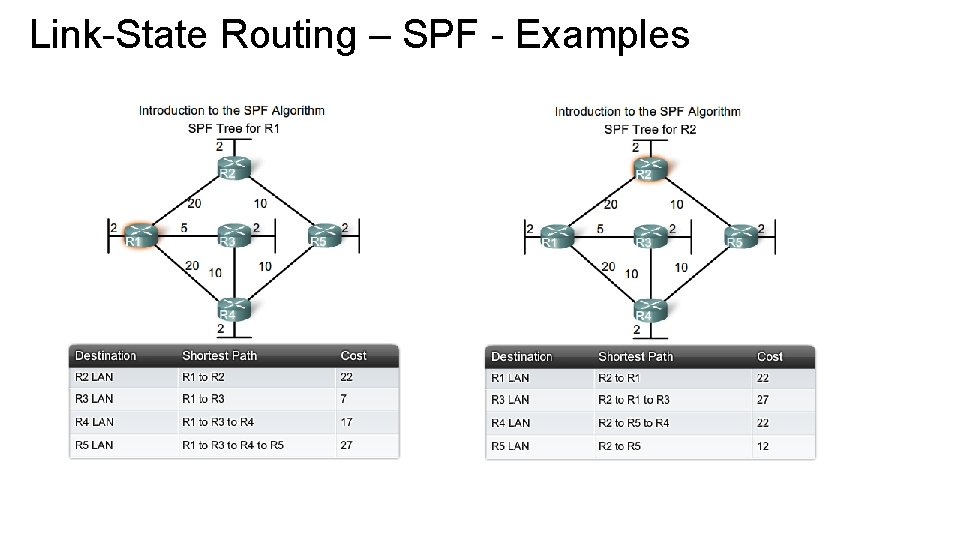
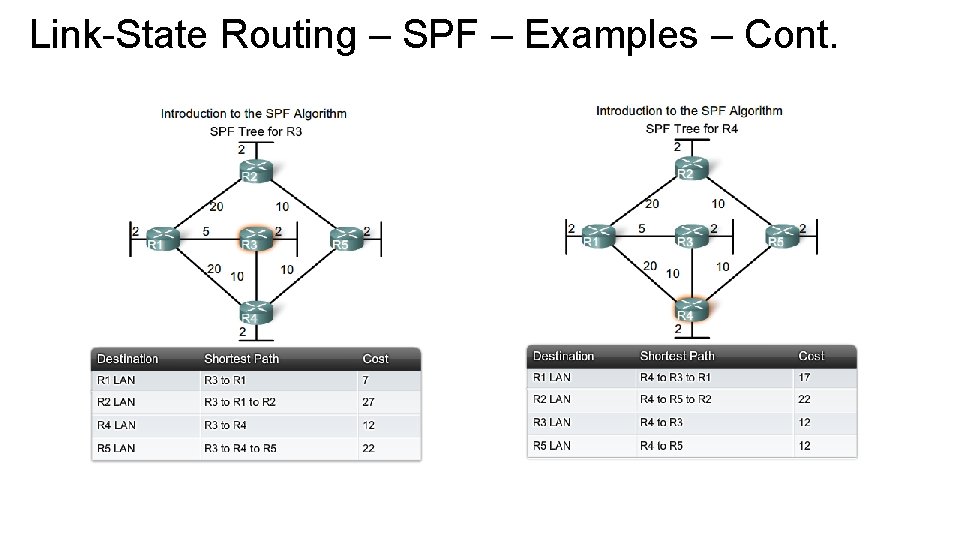
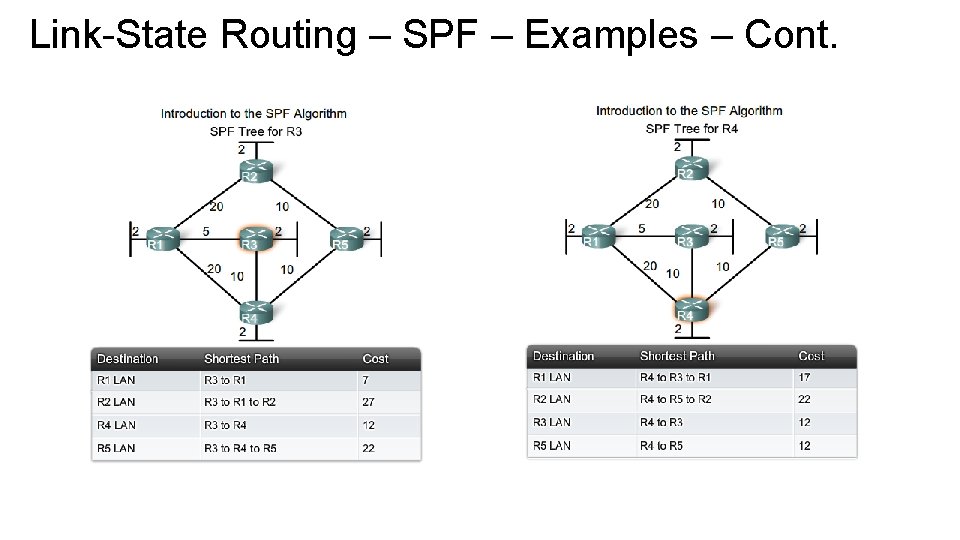
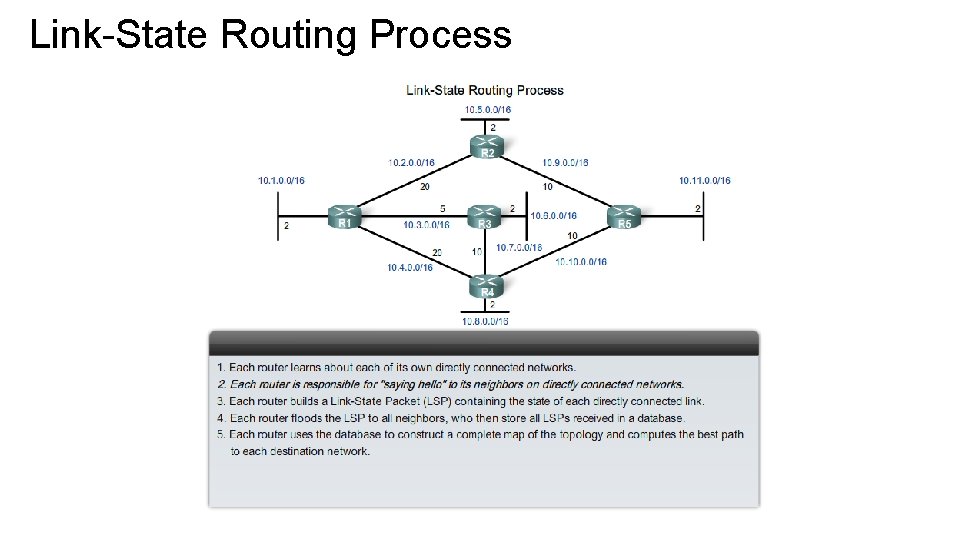
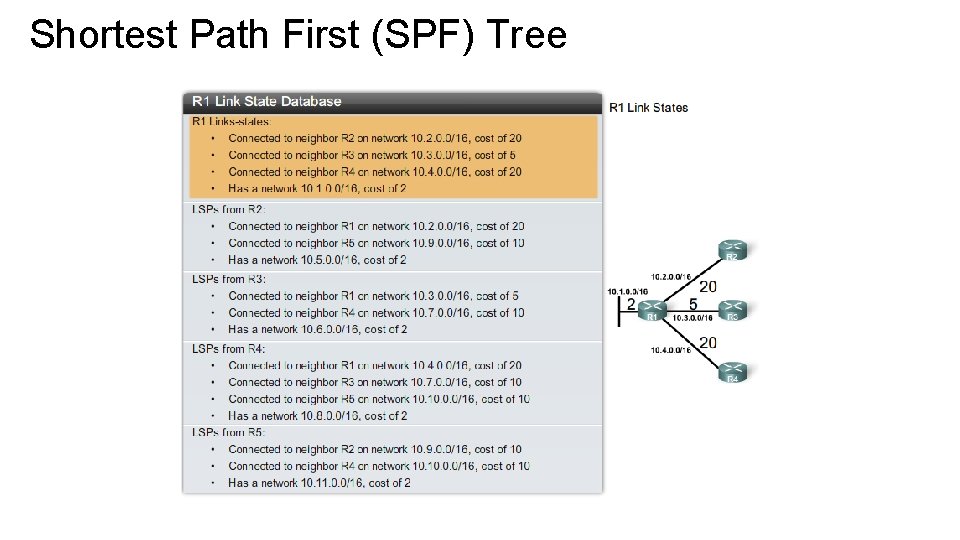
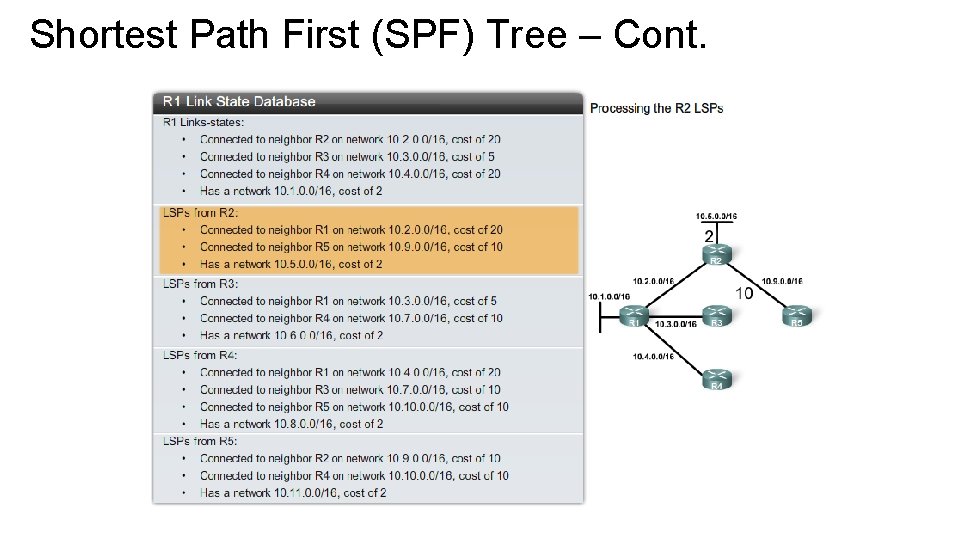
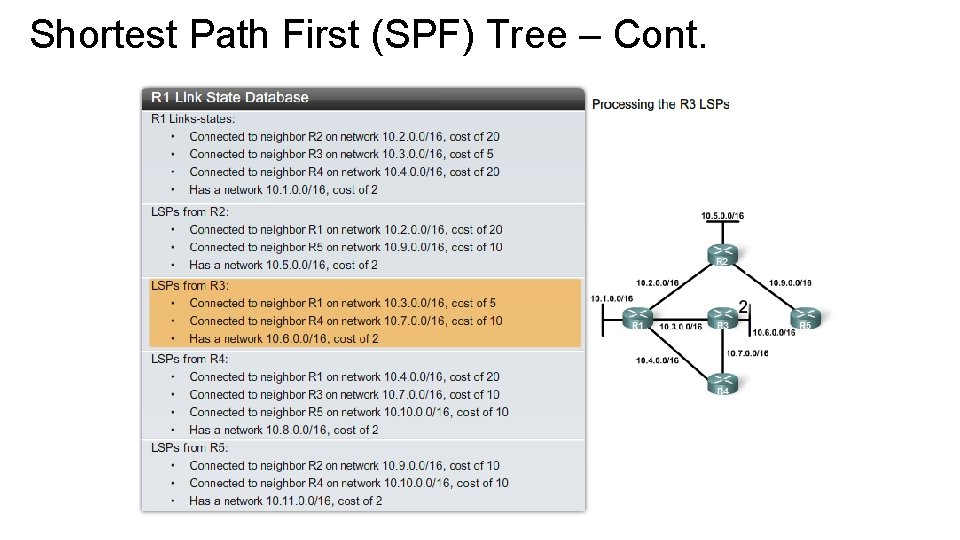
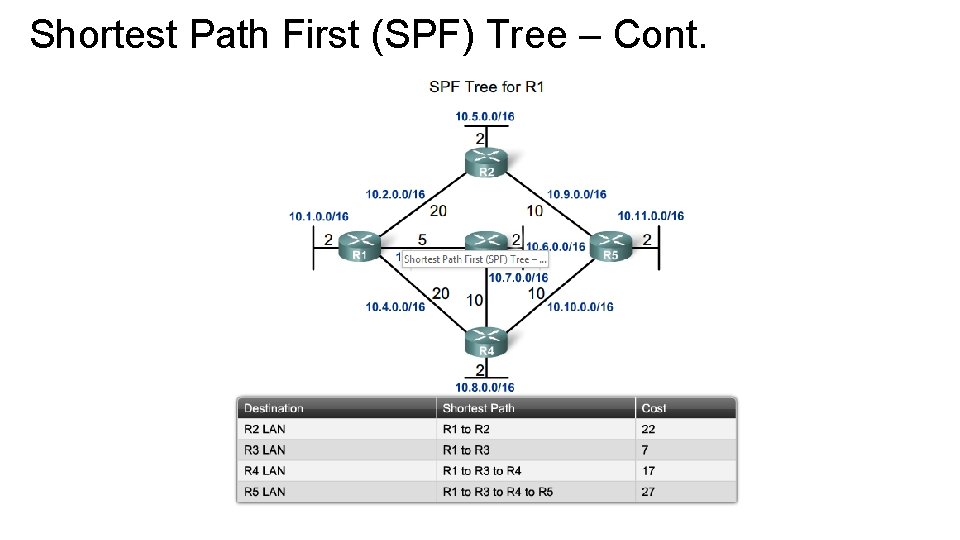
Link-State Routing - SPF • Dijkstra's algorithm is commonly referred to as the shortest path first (SPF) algorithm. This algorithm accumulates costs along each path, from source to destination. Although, Dijkstra's algorithm is known as the shortest path first algorithm, this is in fact the purpose of every routing algorithm.
Link-State Routing – SPF - Examples
Link-State Routing – SPF – Examples – Cont.
Link-State Routing – SPF – Examples – Cont.
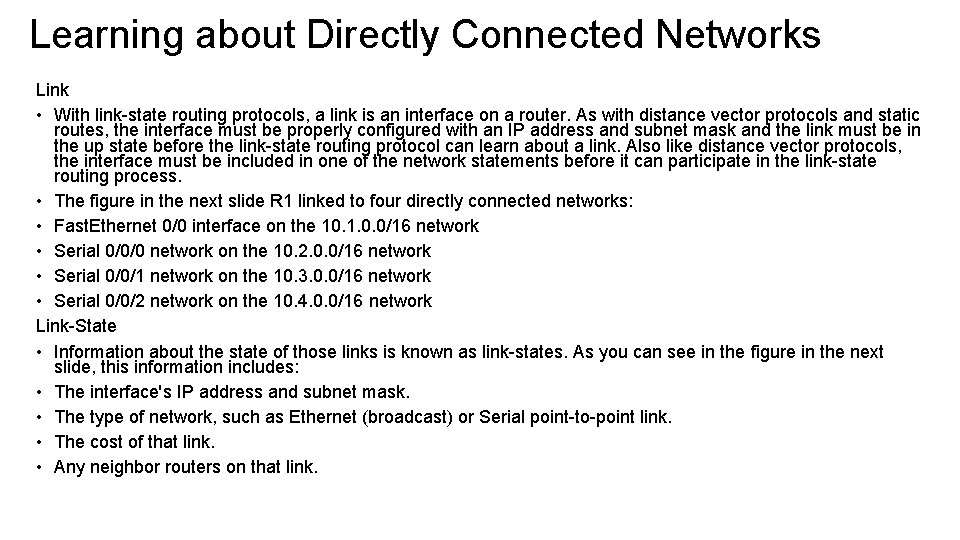
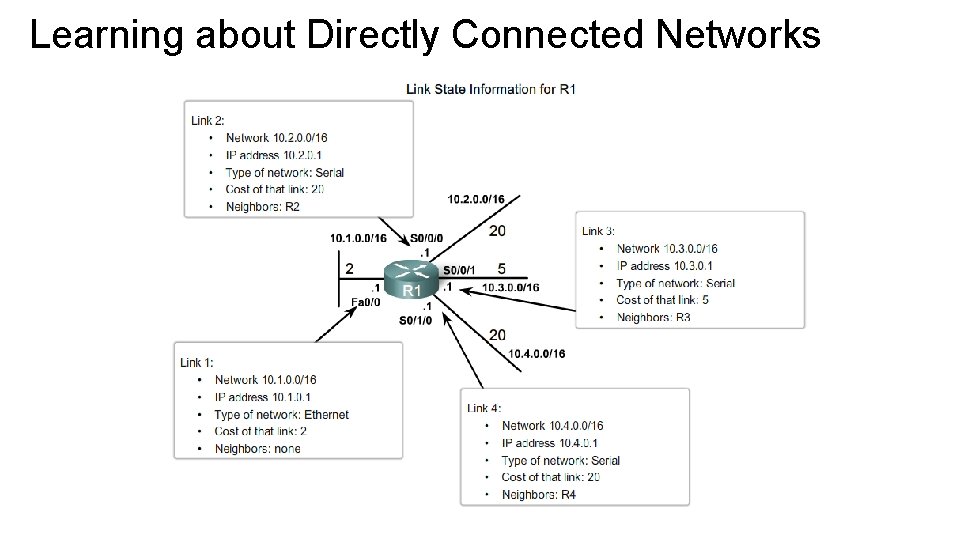
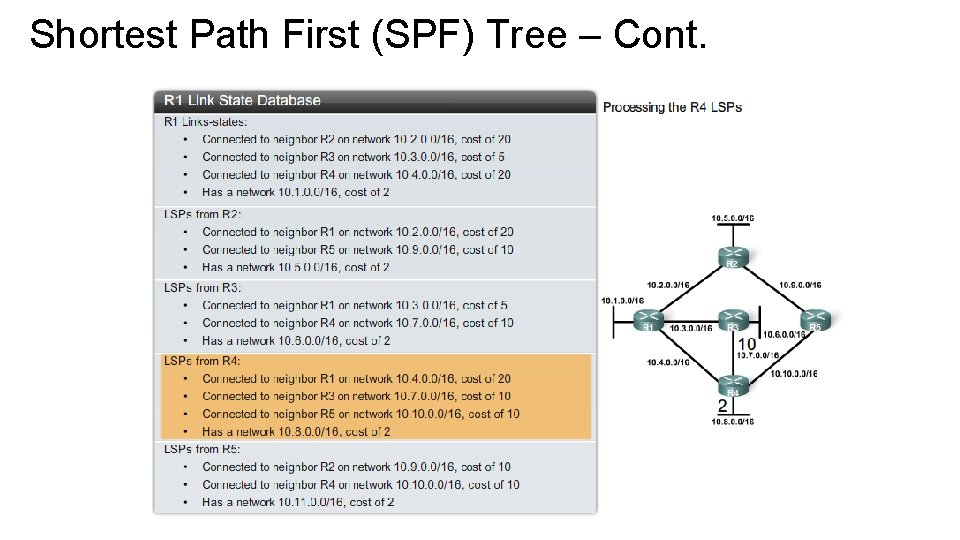
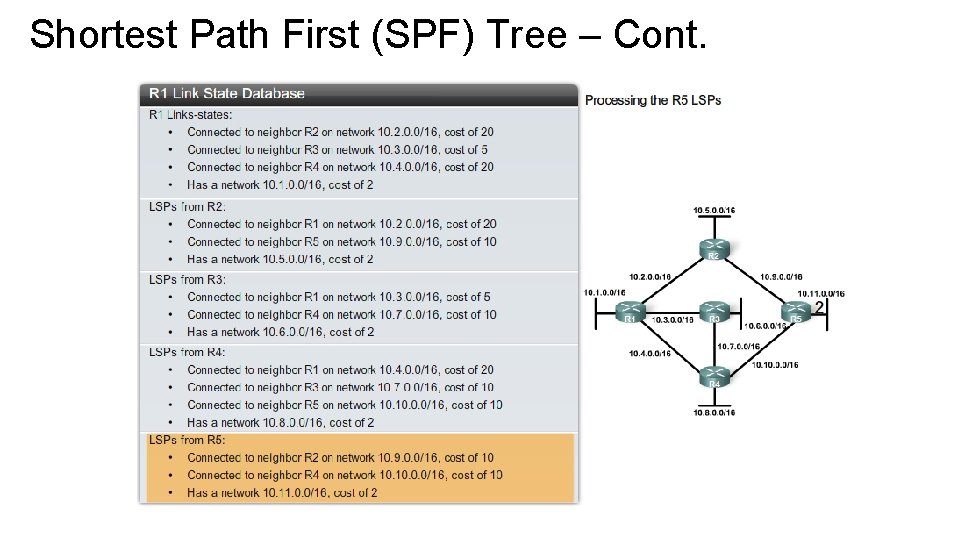
Learning about Directly Connected Networks Link • With link-state routing protocols, a link is an interface on a router. As with distance vector protocols and static routes, the interface must be properly configured with an IP address and subnet mask and the link must be in the up state before the link-state routing protocol can learn about a link. Also like distance vector protocols, the interface must be included in one of the network statements before it can participate in the link-state routing process. • The figure in the next slide R 1 linked to four directly connected networks: • Fast. Ethernet 0/0 interface on the 10. 1. 0. 0/16 network • Serial 0/0/0 network on the 10. 2. 0. 0/16 network • Serial 0/0/1 network on the 10. 3. 0. 0/16 network • Serial 0/0/2 network on the 10. 4. 0. 0/16 network Link-State • Information about the state of those links is known as link-states. As you can see in the figure in the next slide, this information includes: • The interface's IP address and subnet mask. • The type of network, such as Ethernet (broadcast) or Serial point-to-point link. • The cost of that link. • Any neighbor routers on that link.
Learning about Directly Connected Networks
Link-State Routing Process
Shortest Path First (SPF) Tree
Shortest Path First (SPF) Tree – Cont.
Shortest Path First (SPF) Tree – Cont.
Shortest Path First (SPF) Tree – Cont.
Shortest Path First (SPF) Tree – Cont.
Shortest Path First (SPF) Tree – Cont.
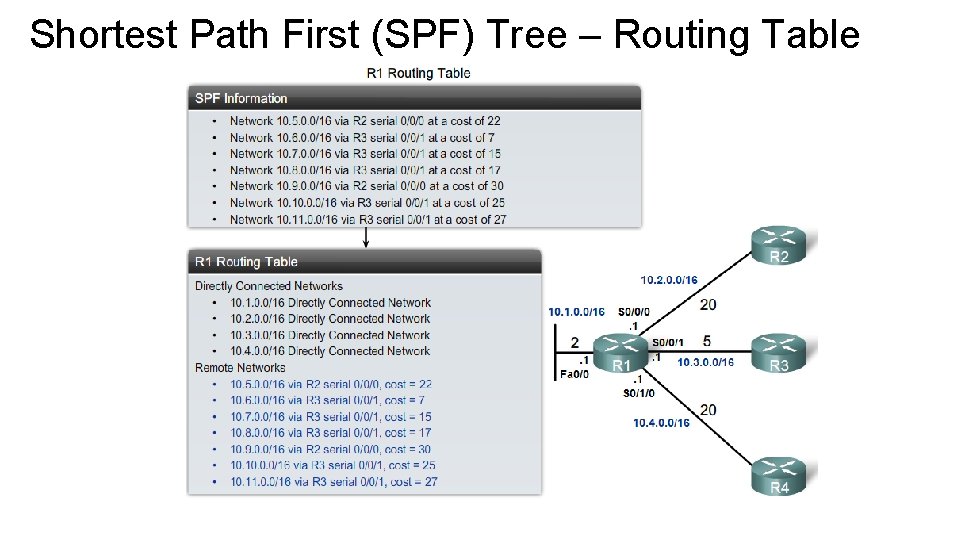
Shortest Path First (SPF) Tree – Routing Table
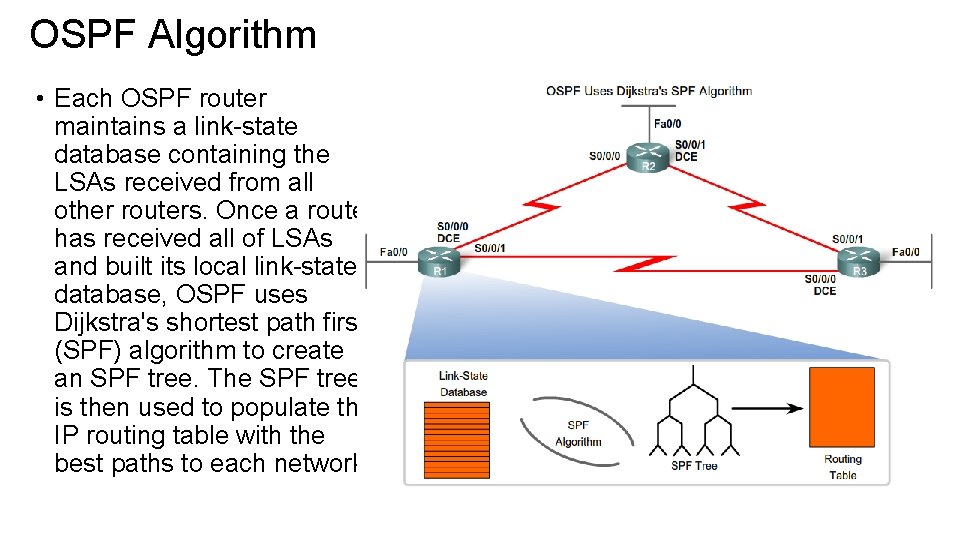
OSPF Algorithm • Each OSPF router maintains a link-state database containing the LSAs received from all other routers. Once a router has received all of LSAs and built its local link-state database, OSPF uses Dijkstra's shortest path first (SPF) algorithm to create an SPF tree. The SPF tree is then used to populate the IP routing table with the best paths to each network.
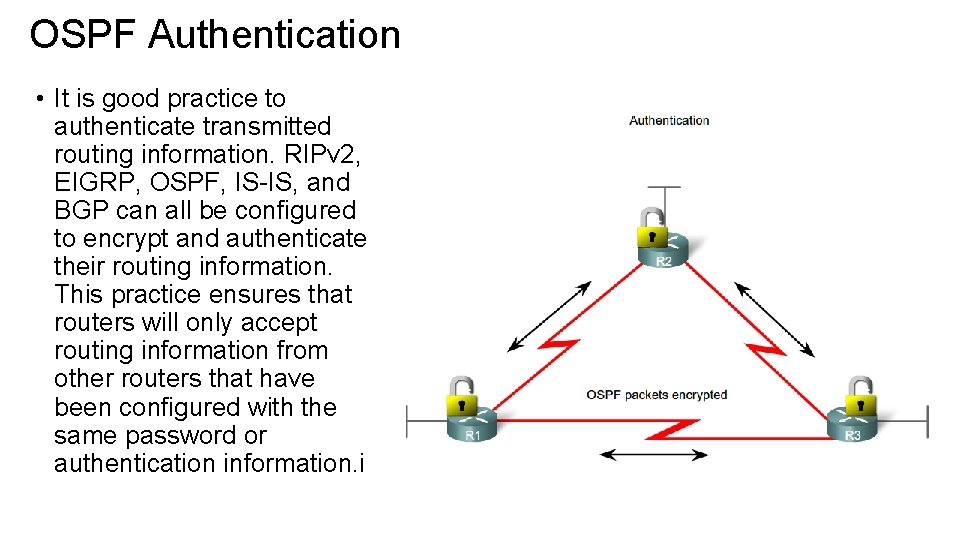
OSPF Authentication • It is good practice to authenticate transmitted routing information. RIPv 2, EIGRP, OSPF, IS-IS, and BGP can all be configured to encrypt and authenticate their routing information. This practice ensures that routers will only accept routing information from other routers that have been configured with the same password or authentication information. i
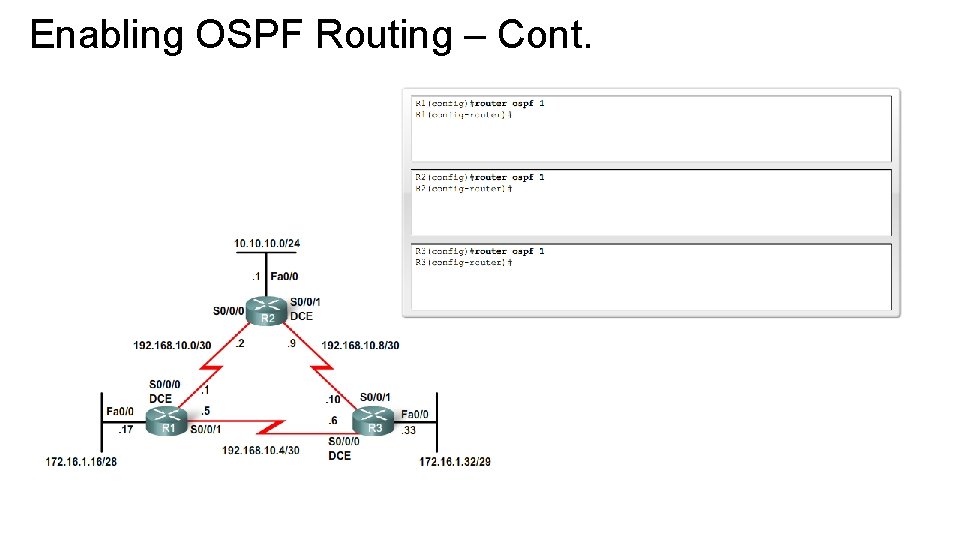
Enabling OSPF Routing • OSPF is enabled with the router ospf process-id global configuration command. The process-id is a number between 1 and 65535 and is chosen by the network administrator. The process-id is locally significant, which means that it does not have to match other OSPF routers in order to establish adjacencies with those neighbors. This differs from EIGRP. The EIGRP process ID or autonomous system number does need to match for two EIGRP neighbors to become adjacent. • In our topology, we will enable OSPF on all three routers using the same process ID of 1. We are using the same process ID simply for consistency.
Enabling OSPF Routing – Cont.
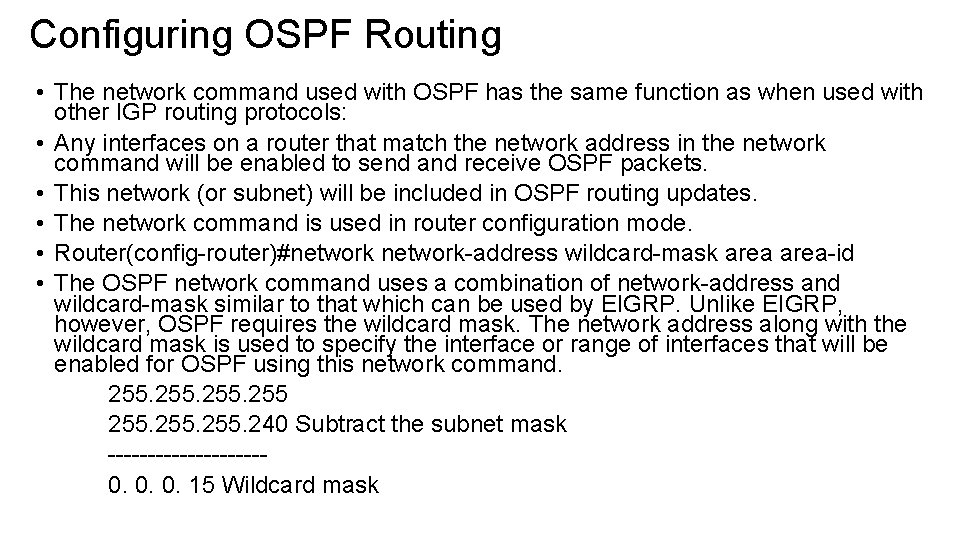
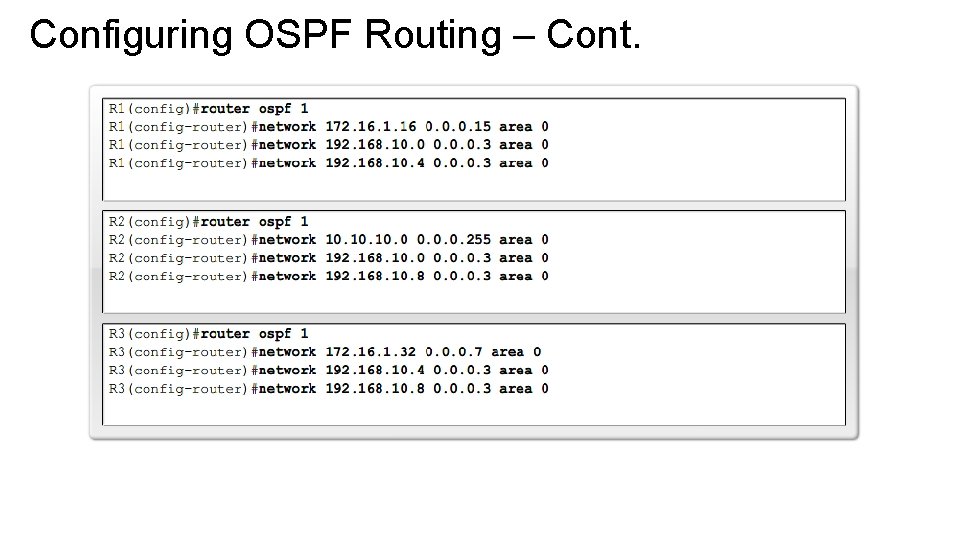
Configuring OSPF Routing • The network command used with OSPF has the same function as when used with other IGP routing protocols: • Any interfaces on a router that match the network address in the network command will be enabled to send and receive OSPF packets. • This network (or subnet) will be included in OSPF routing updates. • The network command is used in router configuration mode. • Router(config-router)#network-address wildcard-mask area-id • The OSPF network command uses a combination of network-address and wildcard-mask similar to that which can be used by EIGRP. Unlike EIGRP, however, OSPF requires the wildcard mask. The network address along with the wildcard mask is used to specify the interface or range of interfaces that will be enabled for OSPF using this network command. 255. 240 Subtract the subnet mask ----------0. 0. 0. 15 Wildcard mask
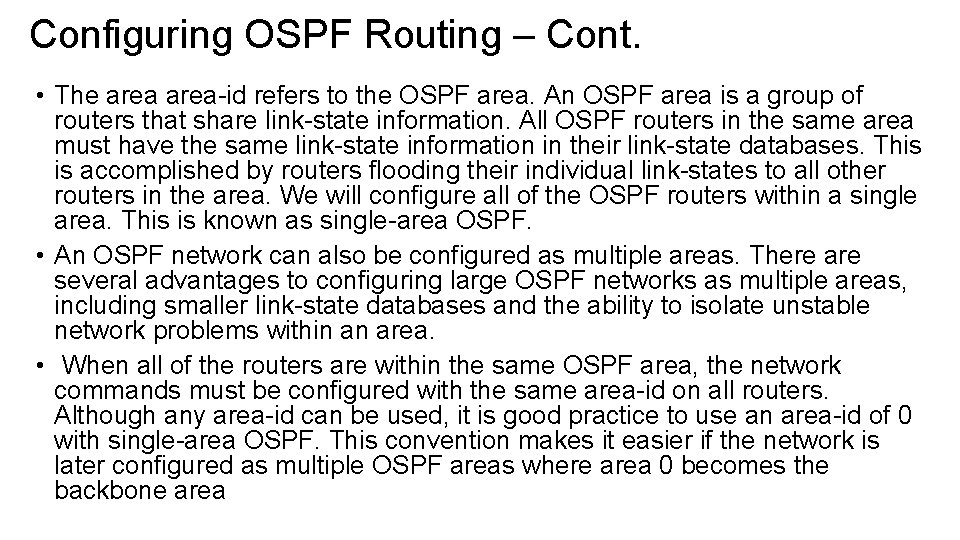
Configuring OSPF Routing – Cont. • The area-id refers to the OSPF area. An OSPF area is a group of routers that share link-state information. All OSPF routers in the same area must have the same link-state information in their link-state databases. This is accomplished by routers flooding their individual link-states to all other routers in the area. We will configure all of the OSPF routers within a single area. This is known as single-area OSPF. • An OSPF network can also be configured as multiple areas. There are several advantages to configuring large OSPF networks as multiple areas, including smaller link-state databases and the ability to isolate unstable network problems within an area. • When all of the routers are within the same OSPF area, the network commands must be configured with the same area-id on all routers. Although any area-id can be used, it is good practice to use an area-id of 0 with single-area OSPF. This convention makes it easier if the network is later configured as multiple OSPF areas where area 0 becomes the backbone area
Configuring OSPF Routing – Cont.
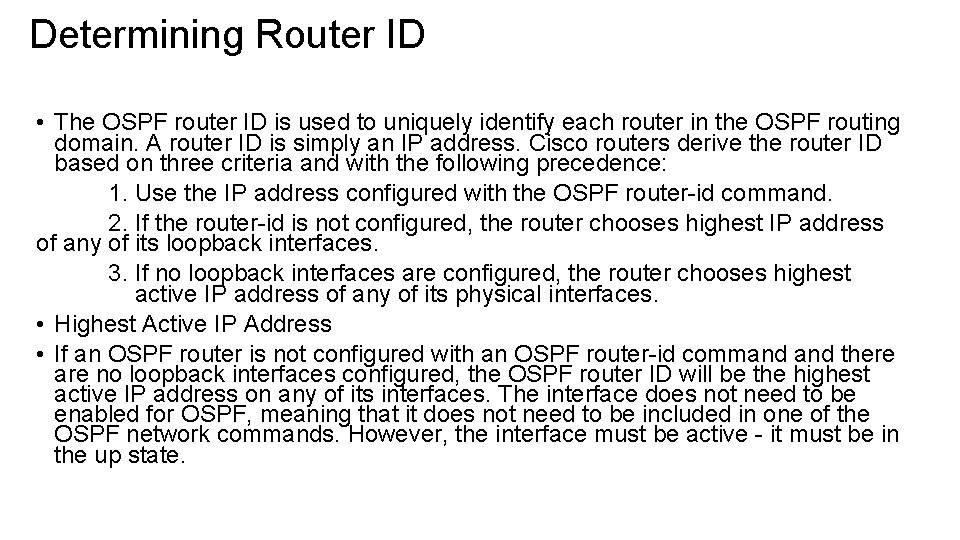
Determining Router ID • The OSPF router ID is used to uniquely identify each router in the OSPF routing domain. A router ID is simply an IP address. Cisco routers derive the router ID based on three criteria and with the following precedence: 1. Use the IP address configured with the OSPF router-id command. 2. If the router-id is not configured, the router chooses highest IP address of any of its loopback interfaces. 3. If no loopback interfaces are configured, the router chooses highest active IP address of any of its physical interfaces. • Highest Active IP Address • If an OSPF router is not configured with an OSPF router-id command there are no loopback interfaces configured, the OSPF router ID will be the highest active IP address on any of its interfaces. The interface does not need to be enabled for OSPF, meaning that it does not need to be included in one of the OSPF network commands. However, the interface must be active - it must be in the up state.
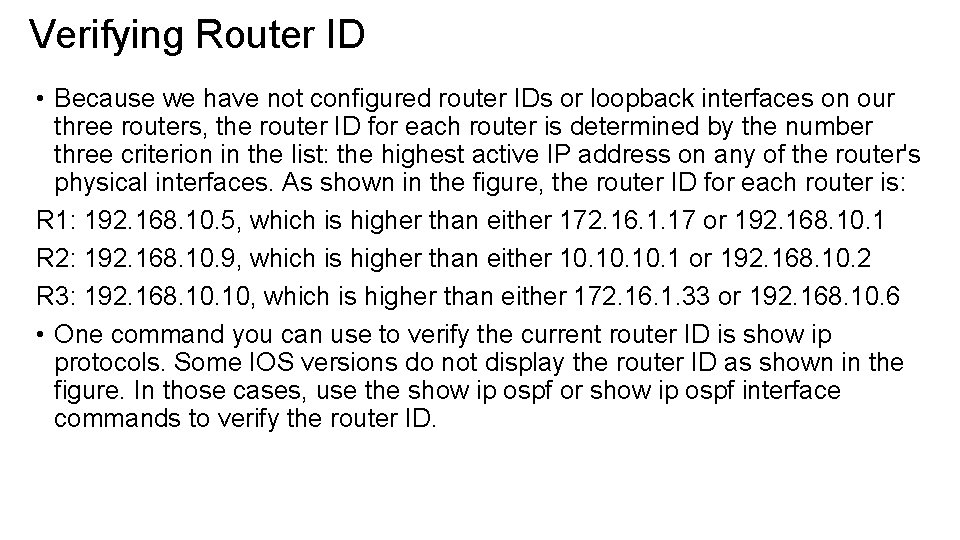
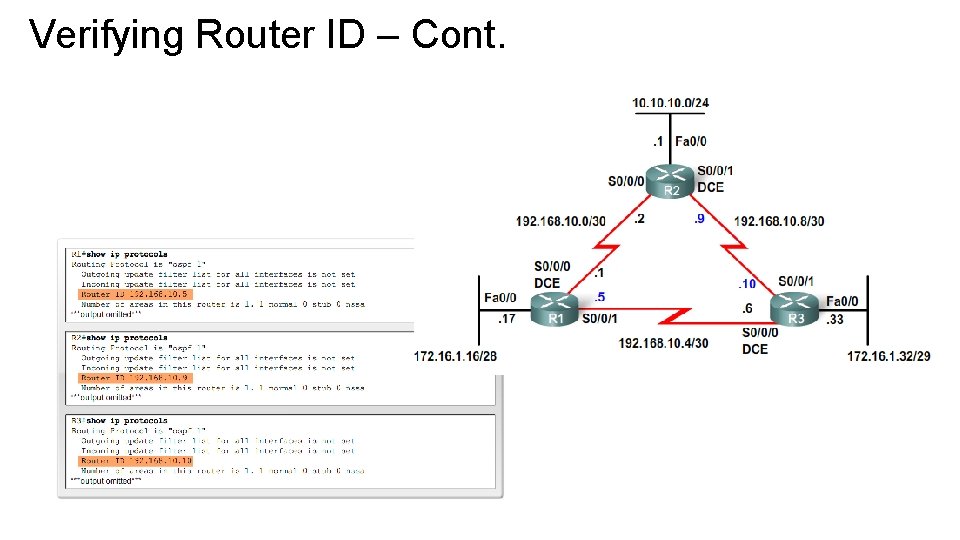
Verifying Router ID • Because we have not configured router IDs or loopback interfaces on our three routers, the router ID for each router is determined by the number three criterion in the list: the highest active IP address on any of the router's physical interfaces. As shown in the figure, the router ID for each router is: R 1: 192. 168. 10. 5, which is higher than either 172. 16. 1. 17 or 192. 168. 10. 1 R 2: 192. 168. 10. 9, which is higher than either 10. 10. 1 or 192. 168. 10. 2 R 3: 192. 168. 10, which is higher than either 172. 16. 1. 33 or 192. 168. 10. 6 • One command you can use to verify the current router ID is show ip protocols. Some IOS versions do not display the router ID as shown in the figure. In those cases, use the show ip ospf or show ip ospf interface commands to verify the router ID.
Verifying Router ID – Cont.
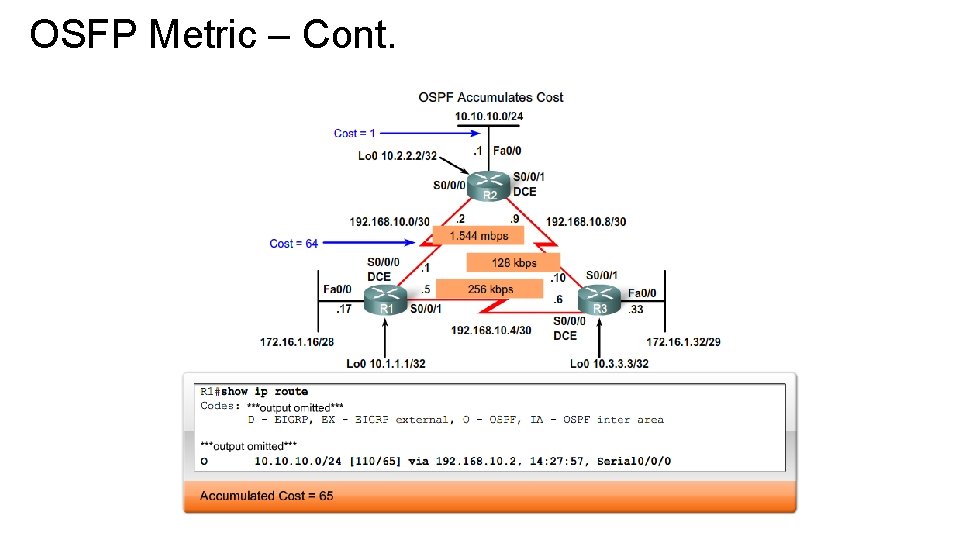
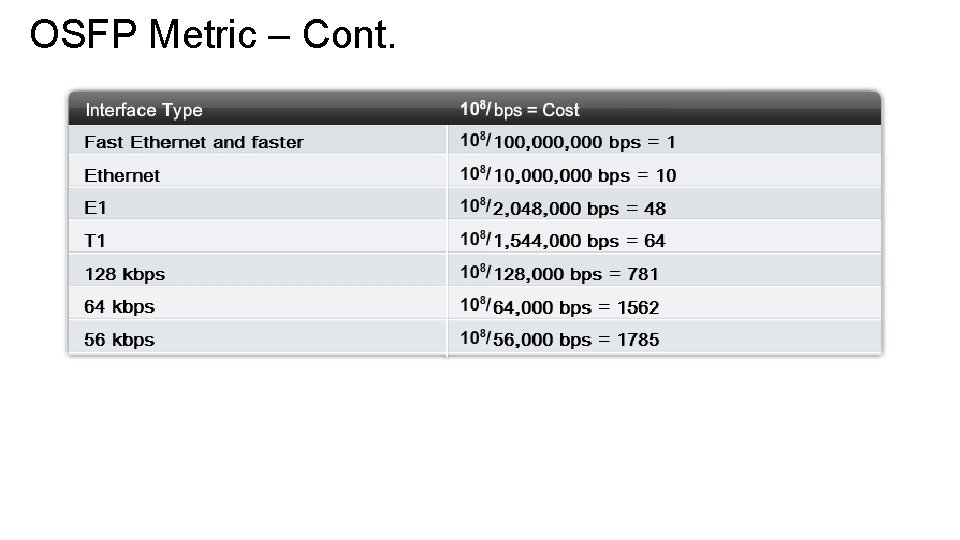
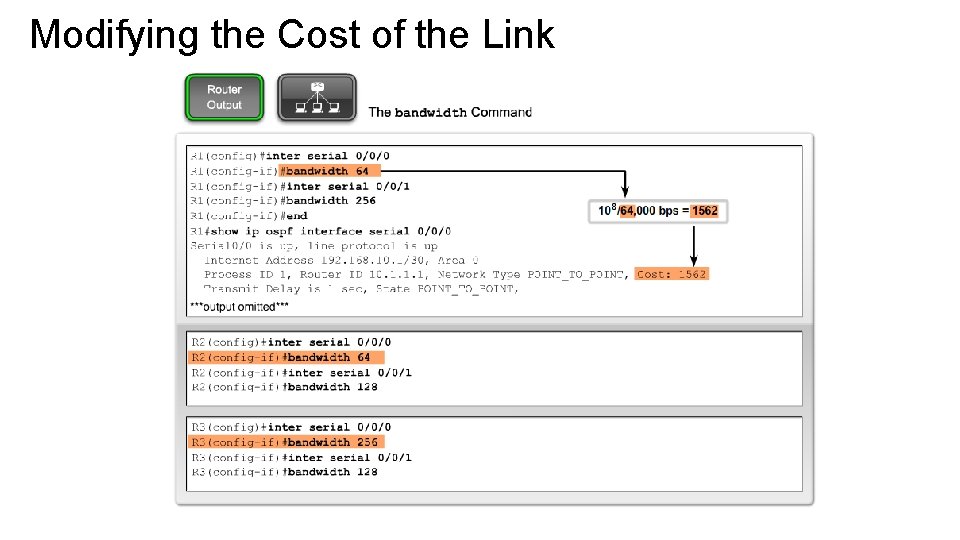
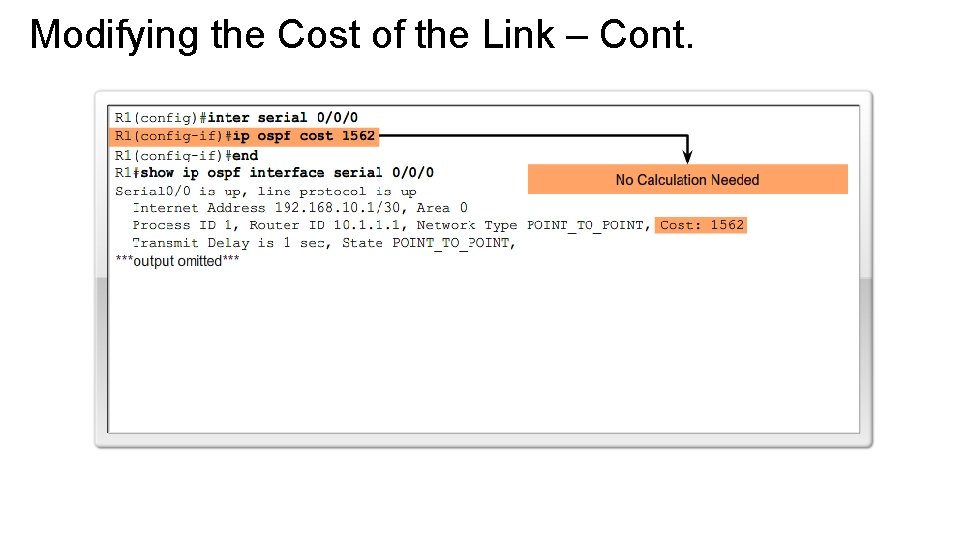
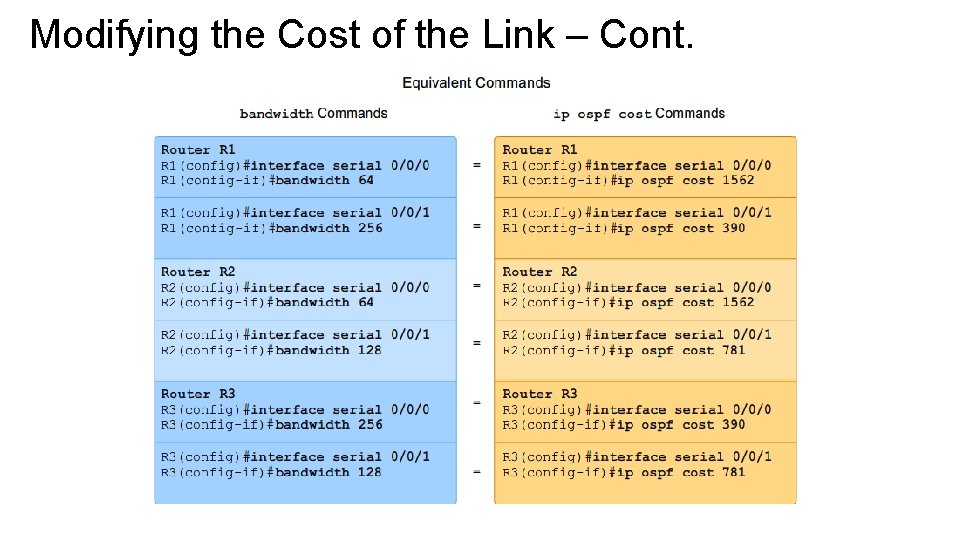
OSFP Metric • The OSPF metric is called cost. “A cost is associated with the output side of each router interface. This cost is configurable by the system administrator. The lower the cost, the more likely the interface is to be used to forward data traffic. " • The Cisco IOS uses the cumulative bandwidths of the outgoing interfaces from the router to the destination network as the cost value. At each router, the cost for an interface is calculated as 10 to the 8 th power divided by bandwidth in bps. This is known as the reference bandwidth. Dividing 10 to the 8 th power by the interface bandwidth is done so that interfaces with the higher bandwidth values will have a lower calculated cost. Remember, in routing metrics, the lowest cost route is the preferred route (for example, with RIP, 3 hops is better than 10 hops). The figure shows the default OSPF costs for several types of interfaces. Reference Bandwidth • The reference bandwidth defaults to 10 to the 8 th power, 100, 000 bps or 100 Mbps. This results in interfaces with a bandwidth of 100 Mbps and higher having the same OSPF cost of 1. The reference bandwidth can be modified to accommodate networks with links faster than 100, 000 bps (100 Mbps) using the OSPF command auto-cost reference-bandwidth. When this command is necessary, it is recommended that it is used on all routers so the OSPF routing metric remains consistent.
OSFP Metric – Cont.
OSFP Metric – Cont.
Modifying the Cost of the Link
Modifying the Cost of the Link – Cont.
Modifying the Cost of the Link – Cont.