
COMPUTER FUNDAMENTALS BY MS K GAYATHRI ASSISTANT PROFESSOR
COMPUTER FUNDAMENTALS BY: MS. K. GAYATHRI, ASSISTANT PROFESSOR, DEPARTMENT OF COMPUTER SCIENCE, BON SECOURS COLLEGE FOR WOMEN, THANJAVUR.
Introduction To Computers • Definition: • Its an electronic device that is used for information Processing. • Computer. . Latin word. . compute • Calculation Machine • A computer system includes a computer, peripheral devices, and software
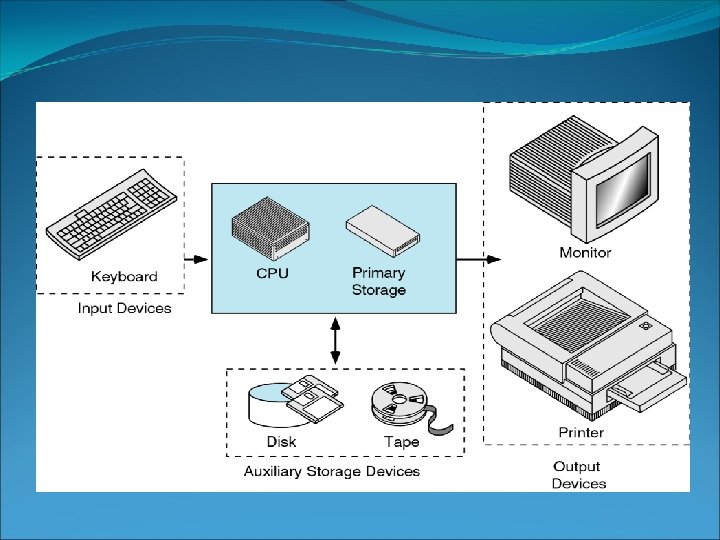
Introduction To Computers • • • Accepts input, processes data, stores data, and produces output Input refers to whatever is sent to a Computer system Data refers to the symbols that represent facts, objects, and ideas Processing is the way that a computer manipulates data A computer processes data in a device called the central processing unit (CPU)
Introduction To Computers • Memory is an area of a computer that holds data that is waiting to be processed, stored, or output • Storage is the area where data can be left on a permanent basis • Computer output is the result produced by the computer • An output device displays, prints or transmits the results of processing
Introduction To Computers Computer Performs computations and makes logical decisions Millions / billions times faster than human beings Computer programs Sets of instructions for which computer processes data Hardware Physical devices of computer system Software Programs that run on computers. Set of instructions.
• Definition: • • • Introduction To Computer Software Operating system Problem solving Techniques Computer Prog ramming languages Computer Threats
Introduction To Computers • Capabilities of Computers • Huge Data Storage • Input and Output • Processing
Introduction To Computers • Characteristics of Computers • • • High Processing Speed Accuracy Reliability Versatility Diligence
Introduction To Computers Generations of computers Generation 1: Vacuum Tube Generation 2: Transistor Generation 3: Integrated Circuits Generation 4: Microprocessors Generation 5: Artificial Intelligence
Introduction To Computers Major peripherals • Keyboard • Mouse • Hard Disk • Floppy Disk • CD ROM • Printer • Scanner • Joystick
Introduction To Computers OPERATING SYSTEM • OS is system software, which may be viewed as collection of software consisting of procedures for operating the computer. • It provides an environment for execution of programs (application software). • It’s an interface between user & computer. (eg: windows)
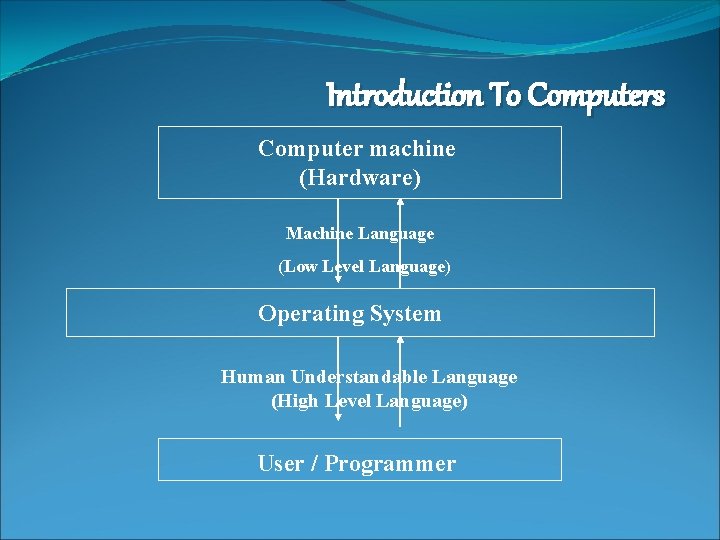
Introduction To Computers Computer machine (Hardware) Machine Language (Low Level Language) Operating System Human Understandable Language (High Level Language) User / Programmer

THANK YOU
- Slides: 13