
Computer Based Technology Microcomputer Hardware Definition The physical
Computer Based Technology: Microcomputer Hardware
Definition: • The physical equipment that makes up the computer. • A computer’s specific combination of hardware components is referred to as its configuration.
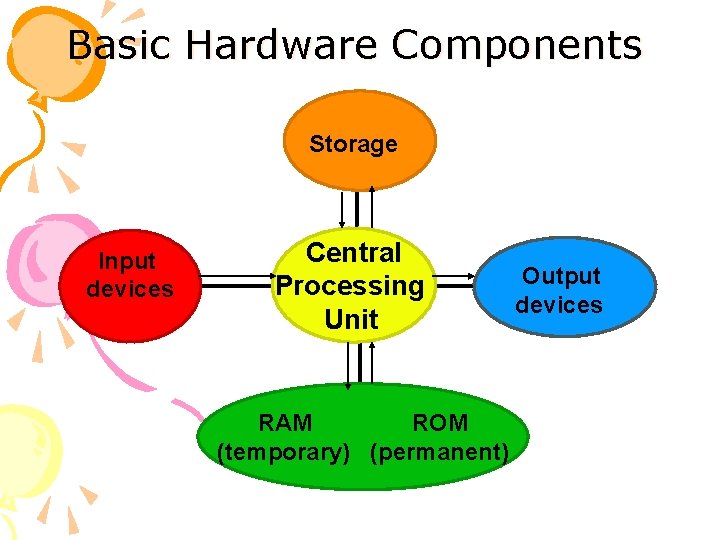
Basic Hardware Components Storage Input devices Central Processing Unit RAM ROM (temporary) (permanent) Output devices

Input device : • transmit information into the computer • translate data that people can understand into a form that the computer can process. • eg-keyboard, mouse
Central Processing Unit • The core element that carries out all the calculations and control the total system. • Memories stores information for manipulation by the CPU • It control instruction and set of data are stored in two types of memory
• Each type of CPU has its own machine language. • The CPU consists of a Control Unit and Arithmetic/Logic Unit (ALU). • The control unit controls the operation of the peripheral devices and the transfer of information between the units that make up the computer. • The Arithmetic/Logic Unit performs calculation.
Read-Only Memory (ROM) • Memory refers to the computer chips that store information for quick retrieval by the CPU. • Contains critical information and software that must be permanently available for computer operation, such as the operating system that directs the computer’s actions from start up to shut down.
• Consists of the control instructions that have been wired permanently into the memory. • Eg – programming languages - internal monitoring functions • ROM is called nonvolatile memory because the memory chips do not lose their information when power to the computer is turned off.
Random-Access Memory (RAM) • Is used to store the information and instructions that operates the computer’s programme. • It is also known as volatile memory because the information within the computer chips is lost when power to the computer is turned off. • Flexible part of the memory • Unfortunately, it is limited in size and needs to be constantly cleared and refill
• Particular programme or set of data being manipulated by the user is temporarily stored in it. • Then, it erased to make way for the next programme. • A computer memory’s size describe in terms of how many bytes it can store at one time.
Hard disk drive • Store information in magnetic particles embedded in a disk. • Usually a permanent part of the computer, hard disk drives can store large amounts of information and retrieve that information very quickly. • Hard drives come in different capacities • When it comes to hard drives, bigger is better, within reason. • This would allow you to install quite a few programs and still have room left for your data
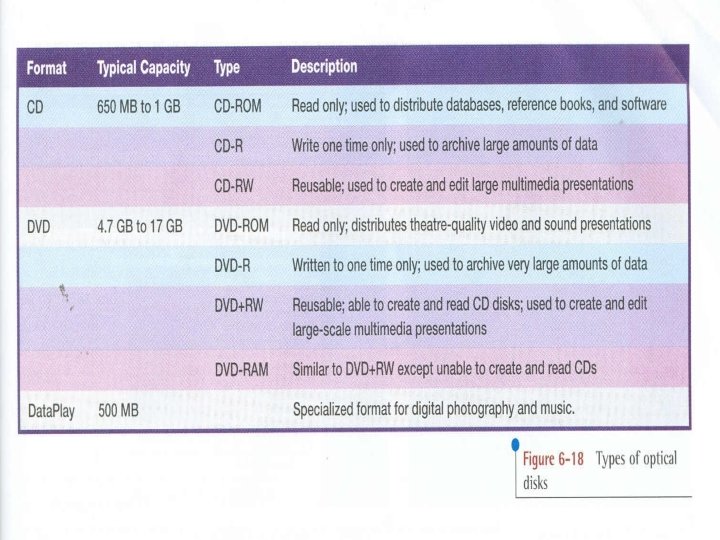
Storage • The computer’s operating system, application programmes and data files are stored outside its CPU when not in use. • Most common storage mechanism – the magnetic disk, Recordable CDROMs
Output device • the output devices – CTR, (cathoderay tube), liquid crystal ( CLD), printer • Translate the process information from the computer into a form that people can understand.
- Slides: 15