
Computer Architecture and Assembly Language Practical Session 6

Computer Architecture and Assembly Language Practical Session 6
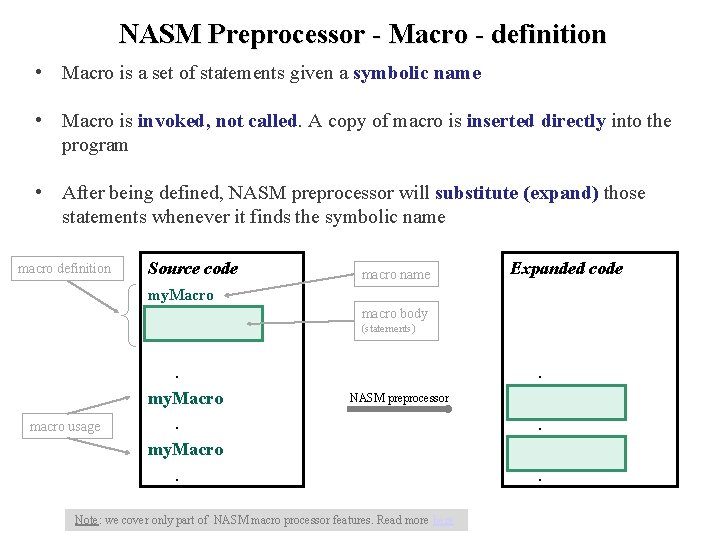
NASM Preprocessor - Macro - definition • Macro is a set of statements given a symbolic name • Macro is invoked, not called. A copy of macro is inserted directly into the program • After being defined, NASM preprocessor will substitute (expand) those statements whenever it finds the symbolic name macro definition Source code macro name Expanded code my. Macro macro body (statements) macro usage . my. Macro. . NASM preprocessor Note: we cover only part of NASM macro processor features. Read more here . .
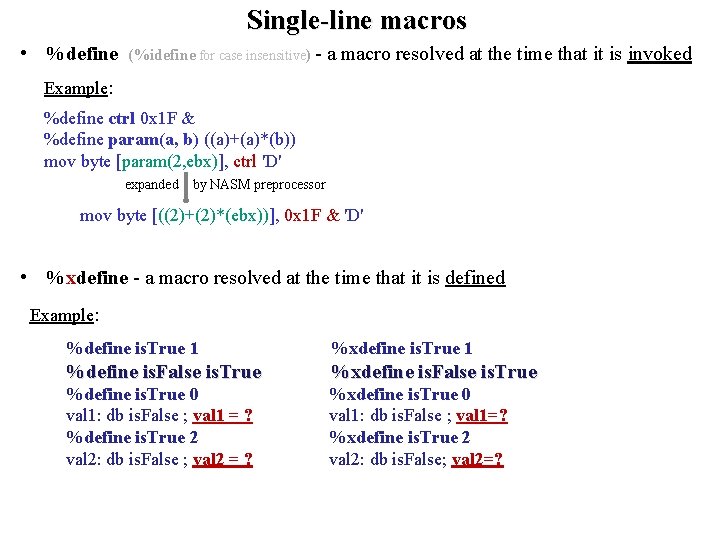
Single-line macros • %define (%idefine for case insensitive) - a macro resolved at the time that it is invoked Example: %define ctrl 0 x 1 F & %define param(a, b) ((a)+(a)*(b)) mov byte [param(2, ebx)], ctrl 'D' expanded by NASM preprocessor mov byte [((2)+(2)*(ebx))], 0 x 1 F & 'D' • %xdefine - a macro resolved at the time that it is defined Example: %define is. True 1 %xdefine is. True 1 %define is. False is. True %xdefine is. False is. True %define is. True 0 %xdefine is. True 0 val 1: db is. False ; val 1 = ? val 1: db is. False ; val 1=? %define is. True 2 %xdefine is. True 2 val 2: db is. False ; val 2 = ? val 2: db is. False; val 2=?
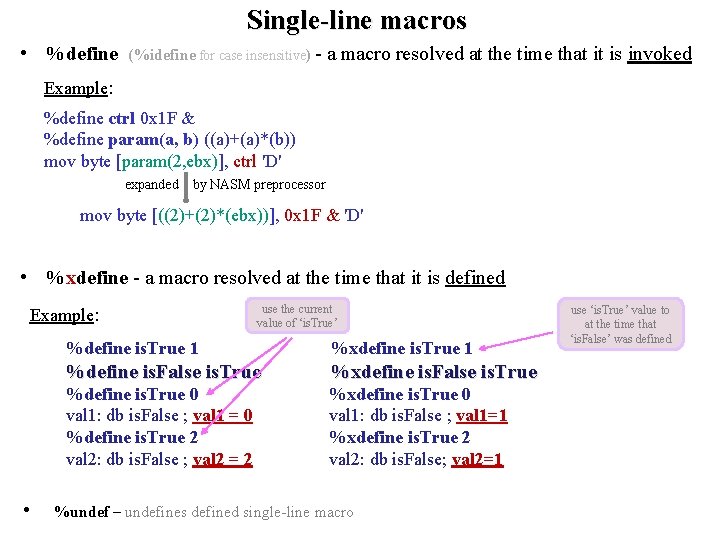
Single-line macros • %define (%idefine for case insensitive) - a macro resolved at the time that it is invoked Example: %define ctrl 0 x 1 F & %define param(a, b) ((a)+(a)*(b)) mov byte [param(2, ebx)], ctrl 'D' expanded by NASM preprocessor mov byte [((2)+(2)*(ebx))], 0 x 1 F & 'D' • %xdefine - a macro resolved at the time that it is defined Example: use the current value of ‘is. True’ %define is. True 1 %xdefine is. True 1 %define is. False is. True %xdefine is. False is. True %define is. True 0 %xdefine is. True 0 val 1: db is. False ; val 1 = 0 val 1: db is. False ; val 1=1 %define is. True 2 %xdefine is. True 2 val 2: db is. False ; val 2 = 2 val 2: db is. False; val 2=1 • %undef – undefines defined single-line macro use ‘is. True’ value to at the time that ‘is. False’ was defined
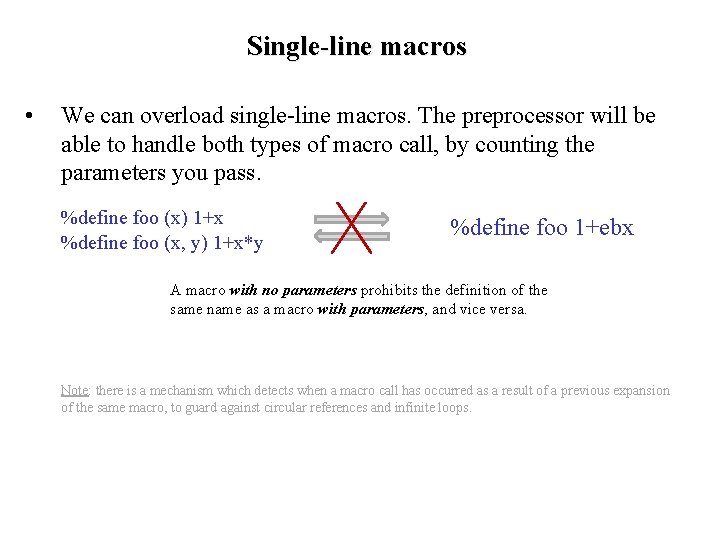
Single-line macros • We can overload single-line macros. The preprocessor will be able to handle both types of macro call, by counting the parameters you pass. %define foo (x) 1+x %define foo (x, y) 1+x*y %define foo 1+ebx A macro with no parameters prohibits the definition of the same name as a macro with parameters, and vice versa. Note: there is a mechanism which detects when a macro call has occurred as a result of a previous expansion of the same macro, to guard against circular references and infinite loops.
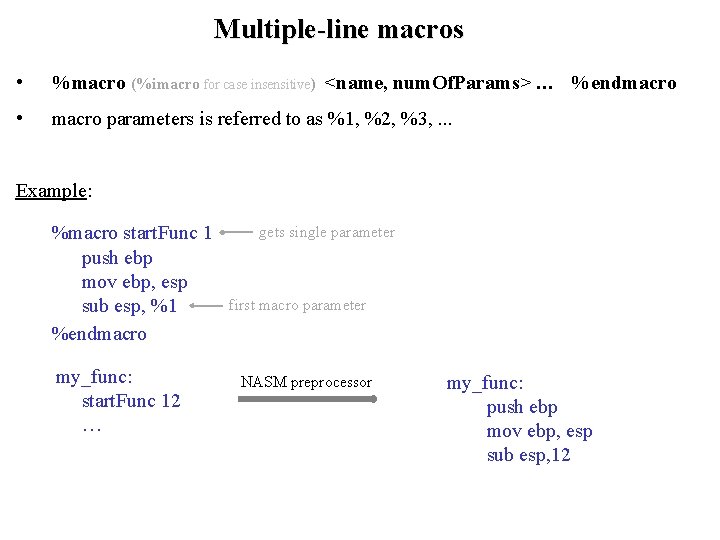
Multiple-line macros • %macro (%imacro for case insensitive) <name, num. Of. Params> … %endmacro • macro parameters is referred to as %1, %2, %3, . . . Example: %macro start. Func 1 push ebp mov ebp, esp sub esp, %1 %endmacro my_func: start. Func 12 … gets single parameter first macro parameter NASM preprocessor my_func: push ebp mov ebp, esp sub esp, 12

Multiple-line macros • If we need to pass a comma as part of a parameter to a multi-line macro, we can do that by enclosing the entire parameter in braces. %macro Define. Byte 2 %2: db %1 %endmacro NASM preprocessor Define. Byte {“Hello”, 10, 0}, msg • msg: db “Hello”, 10, 0 Multi-line macros can be overloaded by defining the same macro name several times with different amounts of parameters. (Also macros with no parameters. ) %macro push 2 push %1 push %2 %endmacro ; this line is original push instruction push ebx push eax, ecx ; but this one is a macro invocation Note: if define macro ‘push’ with one parameter, the original ‘push’ instruction would be overloaded.
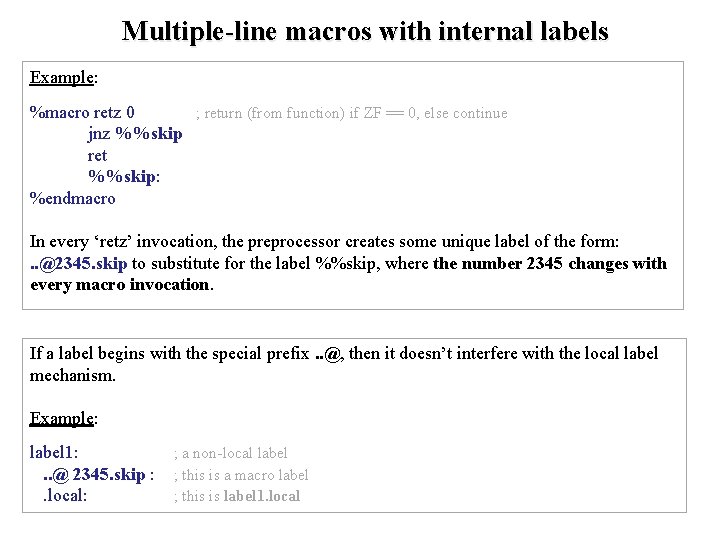
Multiple-line macros with internal labels Example: %macro retz 0 ; return (from function) if ZF == 0, else continue jnz %%skip ret %%skip: %endmacro In every ‘retz’ invocation, the preprocessor creates some unique label of the form: . . @2345. skip to substitute for the label %%skip, where the number 2345 changes with every macro invocation. If a label begins with the special prefix. . @, then it doesn’t interfere with the local label mechanism. Example: label 1: ; a non-local label. . @ 2345. skip : ; this is a macro label . local: ; this is label 1. local
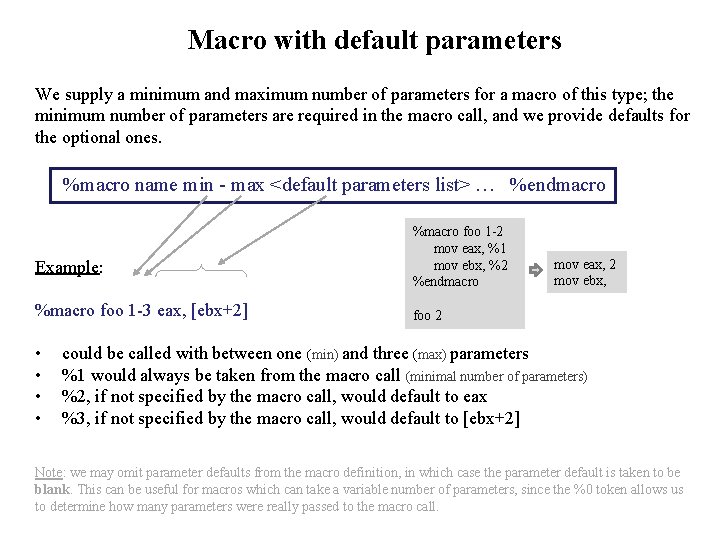
Macro with default parameters We supply a minimum and maximum number of parameters for a macro of this type; the minimum number of parameters are required in the macro call, and we provide defaults for the optional ones. %macro name min - max <default parameters list> … %endmacro Example: %macro foo 1 -3 eax, [ebx+2] • • %macro foo 1 -2 mov eax, %1 mov ebx, %2 %endmacro mov eax, 2 mov ebx, foo 2 could be called with between one (min) and three (max) parameters %1 would always be taken from the macro call (minimal number of parameters) %2, if not specified by the macro call, would default to eax %3, if not specified by the macro call, would default to [ebx+2] Note: we may omit parameter defaults from the macro definition, in which case the parameter default is taken to be blank. This can be useful for macros which can take a variable number of parameters, since the %0 token allows us to determine how many parameters were really passed to the macro call.
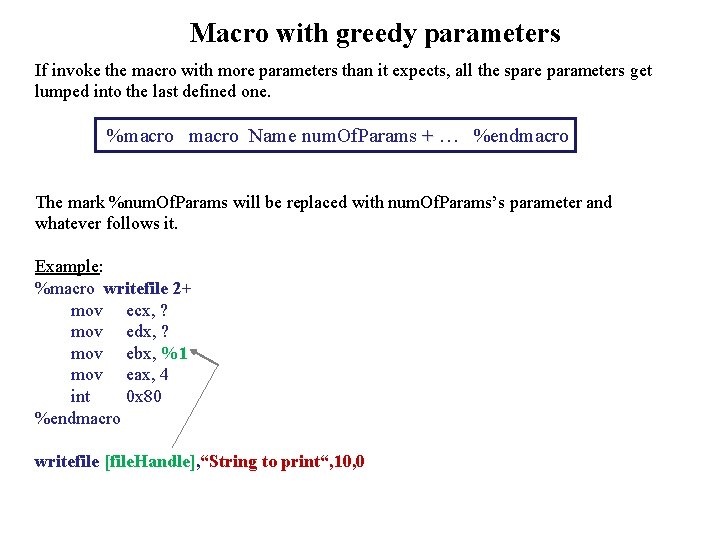
Macro with greedy parameters If invoke the macro with more parameters than it expects, all the spare parameters get lumped into the last defined one. %macro Name num. Of. Params + … %endmacro The mark %num. Of. Params will be replaced with num. Of. Params’s parameter and whatever follows it. Example: %macro writefile 2+ mov ecx, ? mov edx, ? mov ebx, %1 mov eax, 4 int 0 x 80 %endmacro writefile [file. Handle], “String to print“, 10, 0
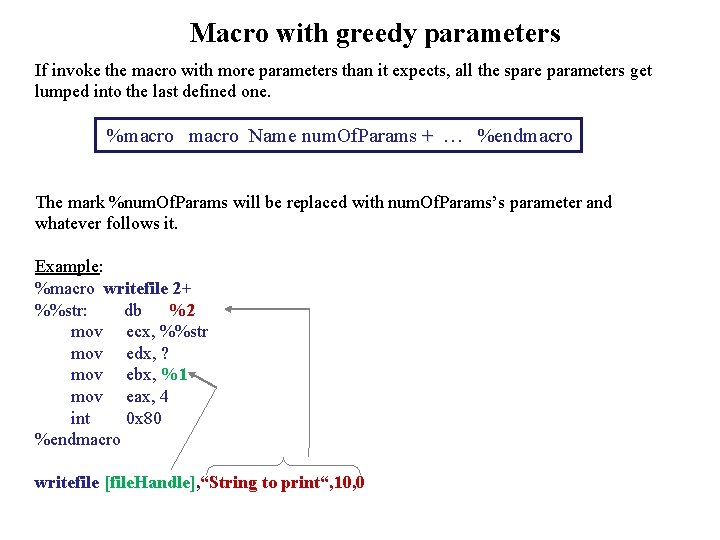
Macro with greedy parameters If invoke the macro with more parameters than it expects, all the spare parameters get lumped into the last defined one. %macro Name num. Of. Params + … %endmacro The mark %num. Of. Params will be replaced with num. Of. Params’s parameter and whatever follows it. Example: %macro writefile 2+ %%str: db %2 mov ecx, %%str mov edx, ? mov ebx, %1 mov eax, 4 int 0 x 80 %endmacro writefile [file. Handle], “String to print“, 10, 0
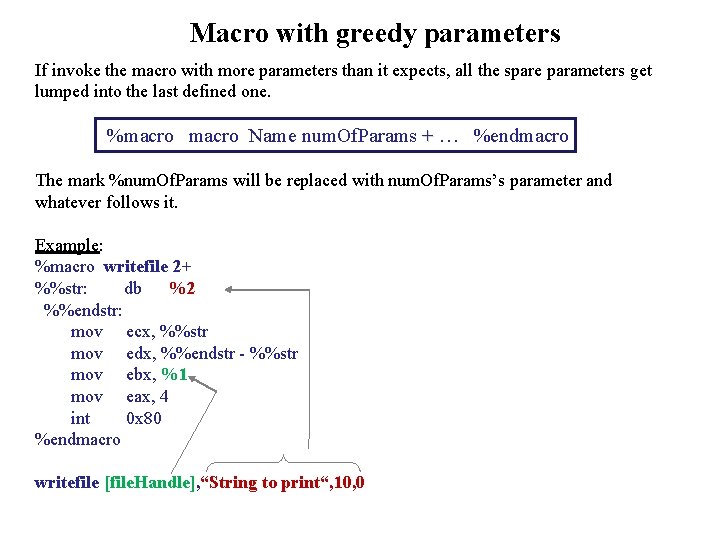
Macro with greedy parameters If invoke the macro with more parameters than it expects, all the spare parameters get lumped into the last defined one. %macro Name num. Of. Params + … %endmacro The mark %num. Of. Params will be replaced with num. Of. Params’s parameter and whatever follows it. Example: %macro writefile 2+ %%str: db %2 %%endstr: mov ecx, %%str mov edx, %%endstr - %%str mov ebx, %1 mov eax, 4 int 0 x 80 %endmacro writefile [file. Handle], “String to print“, 10, 0
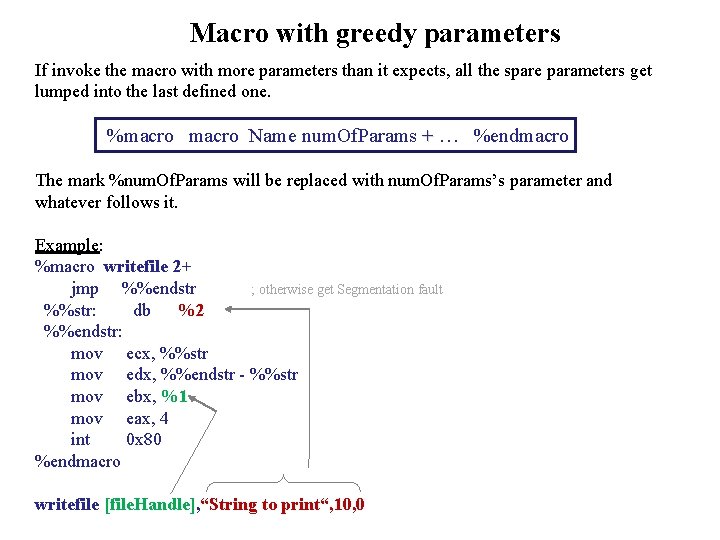
Macro with greedy parameters If invoke the macro with more parameters than it expects, all the spare parameters get lumped into the last defined one. %macro Name num. Of. Params + … %endmacro The mark %num. Of. Params will be replaced with num. Of. Params’s parameter and whatever follows it. Example: %macro writefile 2+ jmp %%endstr ; otherwise get Segmentation fault %%str: db %2 %%endstr: mov ecx, %%str mov edx, %%endstr - %%str mov ebx, %1 mov eax, 4 int 0 x 80 %endmacro writefile [file. Handle], “String to print“, 10, 0
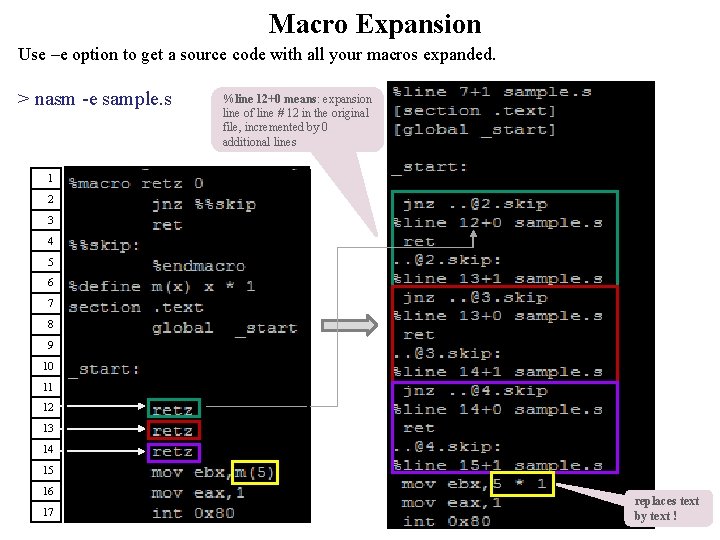
Macro Expansion Use –e option to get a source code with all your macros expanded. > nasm -e sample. s %line 12+0 means: expansion line of line # 12 in the original file, incremented by 0 additional lines 1 2 3 4 5 6 7 8 9 10 11 12 13 14 15 16 17 replaces text by text !
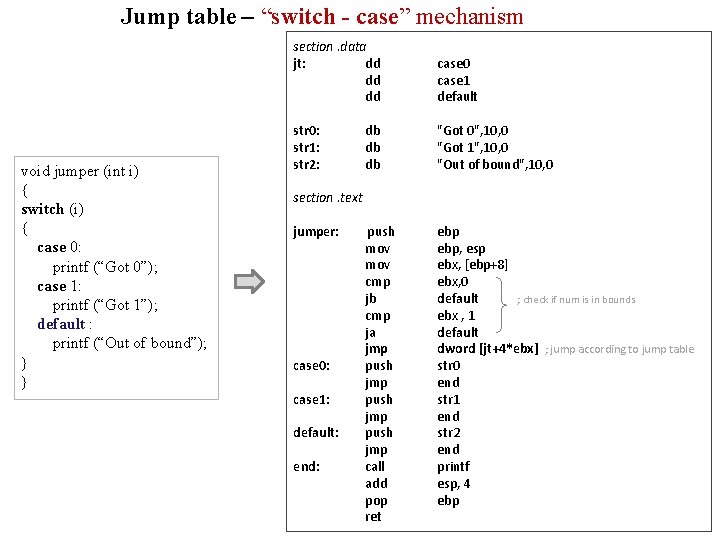
Jump table – “switch - case” mechanism void jumper (int i) { switch (i) { case 0: printf (“Got 0”); case 1: printf (“Got 1”); default : printf (“Out of bound”); } } section. data jt: dd dd dd case 0 case 1 default str 0: str 1: str 2: db db db "Got 0", 10, 0 "Got 1", 10, 0 "Out of bound", 10, 0 push mov cmp jb cmp ja jmp push jmp call add pop ret ebp, esp ebx, [ebp+8] ebx, 0 default ; check if num is in bounds ebx , 1 default dword [jt+4*ebx] ; jump according to jump table str 0 end str 1 end str 2 end printf esp, 4 ebp section. text jumper: case 0: case 1: default: end:

- Slides: 20