
COMPUTER AND ITS COMPONENTS By Dr Yasir Zafar
COMPUTER AND ITS COMPONENTS By Dr. Yasir Zafar Khan Computer Science Faculty AMU Girls’ School, AMU, Aligarh iec. ice@gmail. com
WHAT IS COMPUTER • An electronic device which is capable of receiving information (data) in a particular form and of performing a sequence of operations in accordance with a predetermined but variable set of procedural instructions (program) to produce a result in the form of information or signals. • A computer is a device that accepts information and manipulates it based on a program, which is a sequence of instructions. • The word computer comes from the word "compute", which means, "to calculate"
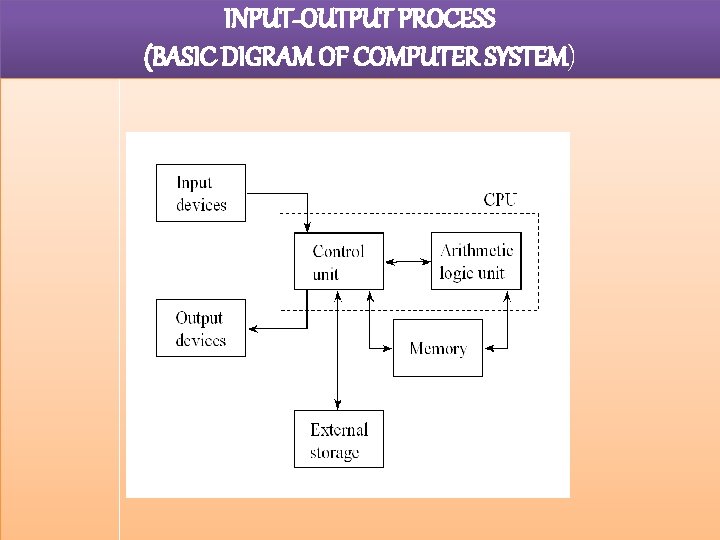
INPUT-OUTPUT PROCESS (BASIC DIGRAM OF COMPUTER SYSTEM)
CHARACTERISTICS OF COMPUTER • Automatic: Given a job, computer can work on it automatically without human interventions. • Speed: Computer can perform data processing jobs very fast, usually measured in microseconds (10 -6), nanoseconds (10 -9), and picoseconds (10 -12). • Accuracy: Accuracy of a computer is consistently high and the degree of its accuracy depends upon its design. Computer errors caused due to incorrect input data or unreliable programs are often referred to as Garbage- In-Garbage-Out (GIGO)
• Diligence: Computer is free from tiredness, and lack of concentration. It can continuously work for hours without creating any error and without grumbling. • Versatility: Computer is capable of performing almost any task, if the task can be reduced to a finite series of logical steps. • Power of Remembering: Computer can store and recall any amount of information because of its secondary storage capability. It forgets or looses certain information only when it is asked to do so.

EVOLUTION OF COMPUTER • Blaise Pascal invented the first mechanical adding machine in 1642. • Baron Gottfried Wilhelm von Leibniz invented the first calculator for multiplication in 1671. • Keyboard machines originated in the United States around 1880.
GENERATION OF COMPUTER • The first electronic computer was designed and built at the University of Pennsylvania based on vacuum tube technology. • Computers have been divided into five generations according to the development of technologies used to fabricate the processors, memories and I/O units.
FIRST GENERATION (1945 – 55 ) • Bulky, vacuum based and costly, used assembly language which was translated to machine level language for execution. • These computers were used mainly for scientific calculations. Examples: ENIAC, EDSAC, EDVAC, UNIVAC.
Second Generation (1955 – 65) • Smaller than vacuum based computers, but better performance-wise, used transistors instead of vacuum tubes. • High level languages such as FORTRAN and COBOL were used. • Punched cards continued to be used during this period. • Computers, then, were used increasingly in business, industry and commercial organizations. Examples: IBM 7030, Honeywell 400.
Third Generation (1965 – 75) • Small Scale Integration and Medium Scale Integration technology were implemented in CPU, I/O processors etc. • Faster processors with magnetic core memories that were later replaced by RAM and ROM. • This is when microprogramming was introduced as were operating system software. • Database management, multi-user application, online systems like closed loop process control, airline reservation, interactive query systems, automatic industrial control, etc. emerged during this period. Examples: System 360 Mainframe from IBM, PDP-8 Mini Computer from Digital Equipment Corporation.
Fourth Generation (1975 – 89) • Microprocessors were introduced where complete processors and large section of main memory could be implemented in a single chip. • CRT screen, laser & ink jet printers, scanners etc. were developed and so were LAN and WANS. • C and UNIX were used. Examples: Intel’s 8088, 80286, 80386, 80486. . , Motorola’s 68000, 68030, 68040, Apple II, CRAY I/2/X/MP etc.
Fifth Generation: 1989 • To present Computers use extensive parallel processing, multiple pipelines, multiple processors etc. • Portable notebook computers introduced. • They also started using object oriented languages such as JAVA. • Quantum mechanism and nanotechnology available here will radically change computers for all times. Examples: IBM notebooks, Pentium PCs-Pentium 1/2/3/4/Dual core/Quad core. SUN work stations, Origin 2000, PARAM 10000, IBM SP/2.
CATEGORIES OF COMPUTERS • Computers are classified into many categories depending upon their size, functioning and processing capabilities. • According to how it functions: • Analog • Digital • Hybrid
• According to the size: • • Palmtop Laptop Personal Computer Desktop Micro Computer Mini Computer Mainframe Computer Super Computer
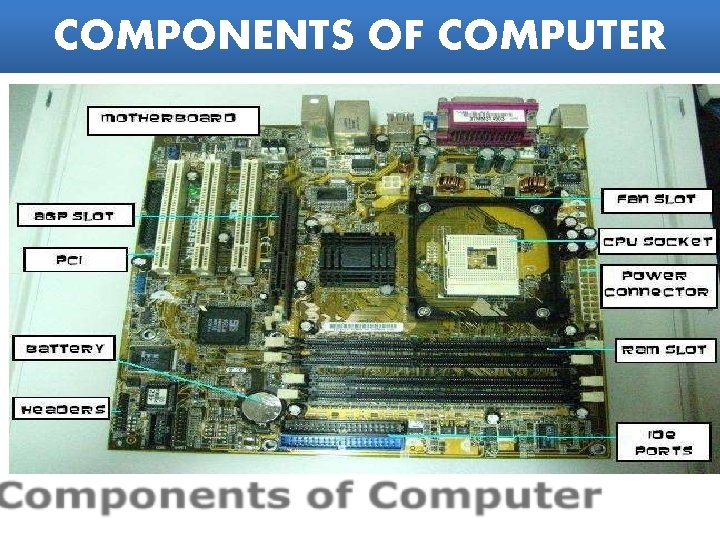
COMPONENTS OF COMPUTER
WHAT IS PROCESSOR • A processor is the logic circuitry that responds to and processes the basic instructions that drive a computer. • The term processor has generally replaced the term central processing unit (CPU). The processor in a personal computer or embedded in small devices is often called a microprocessor.
COMPUTER MEMORY • There are two categories of memory: • Primary memory and Secondary memory (or external memory). • Primary Memory is very fast as data and programs must be in the primary memory for execution. • Random Access Memory (RAM) and Read Only Memory (ROM) are both primary memory. • Random Access Memory refers to memory that can be selected and used randomly. The information stored here disappears the very moment the machine is turned off. It is also referred to as volatile memory.
PRIMARY MEMORY (RAM) • RAM are two types: 1) SRAM 2) DRAM • DRAM has become the mainstream in computer main memory despite being slower and more power hungry compared to SRAM. • SRAM memory is still used in a lot of devices where speed is more crucial than capacity. The most prominent use of SRAM is in the cache memory of processors where speed is very essential, and the low power consumption translates to less heat that needs to be dissipated.
SECONDARY MEMORY (HARD DISK DRIVE ) Secondary Memory or Auxiliary Memory: • The content on the RAM is erased when electric power is switched off. So, it becomes necessary to store this data for future use, somewhere else. Since, primary storage is expensive too; we need a relatively cheaper form of backup storage which can store vast quantities of information. Thus, Secondary Memory devices become an important part of the computer. • A hard disk is part of a unit, often called a "disk drive, " "hard drive, " or "hard disk drive, " that stores and provides relatively quick access to large amounts of data on an electromagnetically charged surface or set of surfaces.
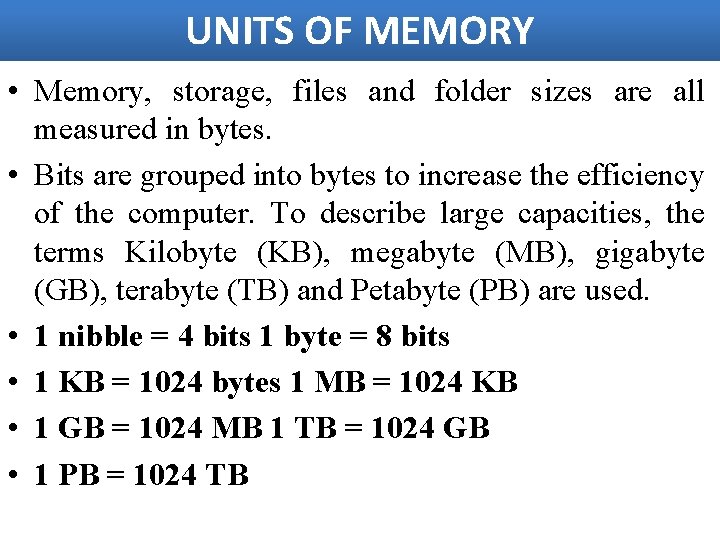
UNITS OF MEMORY • Memory, storage, files and folder sizes are all measured in bytes. • Bits are grouped into bytes to increase the efficiency of the computer. To describe large capacities, the terms Kilobyte (KB), megabyte (MB), gigabyte (GB), terabyte (TB) and Petabyte (PB) are used. • 1 nibble = 4 bits 1 byte = 8 bits • 1 KB = 1024 bytes 1 MB = 1024 KB • 1 GB = 1024 MB 1 TB = 1024 GB • 1 PB = 1024 TB
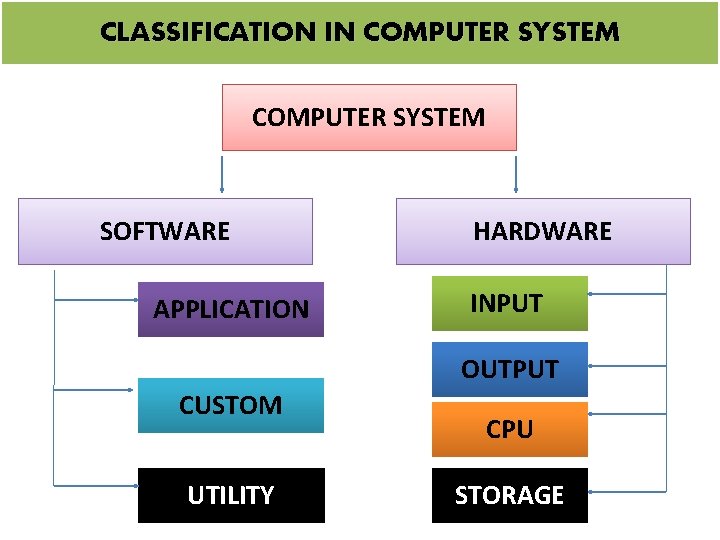
CLASSIFICATION IN COMPUTER SYSTEM SOFTWARE APPLICATION HARDWARE INPUT OUTPUT CUSTOM UTILITY CPU STORAGE
APPLICATION SOFTWARE • Application software consists of Programs that direct computers to perform specific information processing activities for end users. • It can be further subdivided into General-Purpose and Custom Software categories. • General-Purpose Software: Perform common information processing jobs for end users. • For example: Word processing programs. (MS Office) • Custom Software: Specially developed for some specific organization or other user. For example, schools use custom software to keep admission details of students. Example: (Library Information system, Inventory system)
SYSTEM SOFTWARE System software includes the programs that enable the computer’s hardware to work with and run the application software. System software is the interface between user and the other programs and the computer’s hardware Two categories of system software: Operating systems and system utilities.
OPERATING SYSTEMS • The operating system, also referred to as the OS, is a computer program that manages all the other programs on your computer, stores files in an organized manner, and coordinates the use of the computer hardware such as the keyboard and mouse. • The operating system frees one from having to interact directly with the hardware—other than clicking the mouse button or pressing keys on the keyboard— to complete tasks.
UTILITY SOFTWARE • UTILITY SOFTWARE is a form of system software. It is used to analyze, configure, optimize or maintain the computer. This software performs all the housekeeping functions. • • • Text Editors Compression Utilities Disk Fragmentation Scan Disk Encryption or Decryption
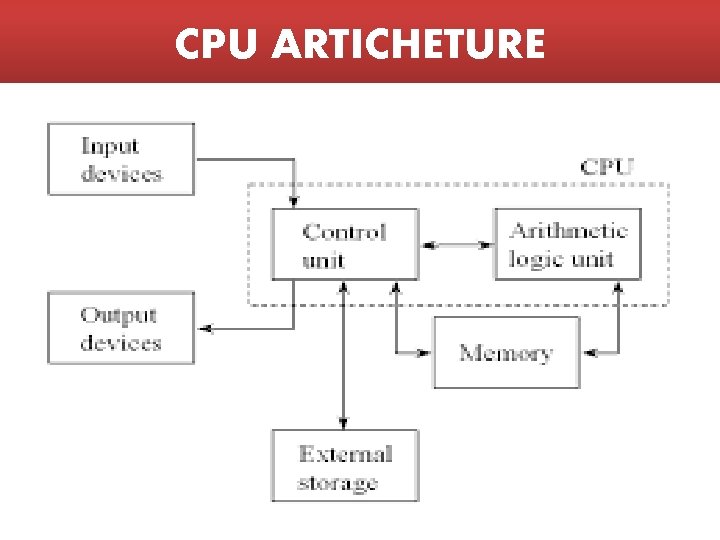
CPU ARTICHETURE
CPU(CENTRAL PROCESSING UNIT) • The system unit is the box that protects the internal electronic components from damage. • It contains the central processing unit (CPU) and memory. The CPU interprets and carries out the basic instructions that operate the computer. Memory is where data and instructions are held. • The heart of the computer system is the processor unit. It consists of the Arithmetic and Logic Unit (ALU) which executes most computer operations (arithmetic and logical) and the Control Unit which acts as the nerve centre that sends control signal to all other units. • The control unit and ALU are usually many times faster than other devices connected to a computer system.
INPUT DEVICES • • • Keyboard Mouse Joystick Electronic Pen Scanner OMR(Optical Mark Reader) Barcode reader Magnetic character Recognition(MICR) Electronic Card Reader BCR (Bar Code Reader)
OUTPUT DEVICES • • • Visual Display Units (Monitors) Printers- Impact & Non Impact Plotters. Projector Speaker Headphones
I/O (INPUT-OUTPUT INTERFACE) • Ports: A computer port is a type of electronic, software- or programming-related docking point through which information flows from a program on your computer or to your computer from the Internet or another computer in a network. • In computer terms, a computer or a program connects to somewhere or something else on the Internet via a port. Port numbers and the user's IP address combine into the "who does what" information kept by every Internet Service Provider.
Example of Ports • PS/2 Ports : The PS/2 Ports are simple, 6 -pin, low-speed serial connections commonly used to connect a keyboard and mouse. • VGA Monitor Port : Video Graphics Array is used to connect the monitor to the computer. VGA offers images at higher resolutions. The standard VGA can produce as many as 256 colors at a time from a palette of 262, 144 colors.
• Parallel Port • Printers and other devices are said to be either parallel or serial. • Parallel means the device is capable of receiving more than one bit at a time (Most modern printers are parallel). • Ethernet Port There is a built in Ethernet port on most computers to connect it to a wired network. Ethernet ports are also found on all popular broadband routers.
• Video Port Short for Super-Video, a technology for transmitting video signals over a cable by dividing the video information into two separate signals: one for color (chrominance), and the other for brightness (luminance). • USB Port Universal Serial Bus, a protocol for transferring data to and from digital devices. Many digital cameras and memory card readers connect to the USB port on a computer. .
• Fire. Wire IEEE 1394 Port : Fire. Wire is a cabling technology for transferring data to and from digital devices at high speeds. • Mini Audio Jack : Audio connectors are used to affix cables to other audio equipment, providing electronic signal transference and grounding protection.
APPLICATION AREAS • Information technology (IT) has become a vital and integral part of every business plan. • From multi-national corporations who maintain mainframe systems and databases to small businesses that own a single computer, IT plays a role. • Communication • Inventory Management • Data Management • Management Information Systems • Customer Relationship Management
COMMUNICATION • For many companies, email is the principal means of communication between employees, suppliers and customers. • Email was one of the early drivers of the Internet, providing a simple and inexpensive means to communicate. • Over the years, a number of other communications tools have also evolved, allowing staff to communicate using live chat systems, online meeting tools and video-conferencing systems.
INVENTORY SYSTEM • When it comes to managing inventory, organizations need to maintain enough stock to meet demand without investing in more than they require. • Inventory management systems track the quantity of each item a company maintains, triggering an order of additional stock when the quantities fall below a pre-determined amount. • These systems are best used when the inventory management system is connected to the point-of-sale (POS) system.
DATA MANAGEMENT • Companies are able to store and maintain a tremendous amount of historical data economically, and employees benefit from immediate access to the documents they need. • The role of the management information system (MIS) manager is to focus on the organization's information and technology systems. • The MIS manager typically analyzes business problems and then designs and maintains computer applications to solve the organization's problems.
EDUCATION SECTOR • • • Access to variety of learning resources Immediacy to information Any time learning Collaborative learning Multimedia approach to education Authentic and up to date information Online library Distance learning Better accesses to children with disabilities

Thank you
- Slides: 40