
Combining Stepwise Feature Introduction with UserCentric Design Heikki
Combining Stepwise Feature Introduction with User-Centric Design Heikki Anttila, Ralph-Johan Back, Pekka Ketola, Katja Konkka, Jyrki Leskelä, Erkki Rysä Nokia Mobile Phones Abo Akademi University and TUCS 1 4. 4. 2002 / Jyrki Leskelä
Contents • Introduction • The Ladder Process • Case: Teenage Girl Diary • Evaluating the Ladder Process • Related Work • Conclusions 2 4. 4. 2002 / Jyrki Leskelä
Introduction Context of the Study • Existing Techniques • Goals • 3 4. 4. 2002 / Jyrki Leskelä
Context of the Study • The environment of software construction getting turbulent User needs and technology changing unpredictably – Software is often an evolving artefact that needs continuous adaptation – It is necessary to provide an architecture and process to make the software evolution possible • Two recent techniques address the problem domain • Stepwise Feature Introduction (Back, 2002) – User-Centric Design (ISO 13407, 1999) – 4 4. 4. 2002 / Jyrki Leskelä
Existing Techniques • Stepwise Feature Introduction – Architecture for constructing software in very thin layers Each layer introduces one new feature in the system • Each layer forms a complete application that can be tested against requirements conformance • The structure of layers is maintained during updates • • User-Centric Design – Iterative approach for concept and design creation • • Understand users requirements and environment Identify users' tasks Define the success criteria for the product, per task Incorporate HCI knowledge (visual/interaction/usability) Produce design specification Evaluate the design specification against success criteria Repeat when the criteria are not met 5 4. 4. 2002 / Jyrki Leskelä
Goals Combine Stepwise Feature Introduction and User. Centric Design into a new incremental software development process called the Ladder Process. • Aim of the process: • • • The process is steered by continuous feedback from users Faster and more flexible response to end-user needs Thin increments feature by feature Improves flexibility of SW architecture Ease of SW maintenance Increased reliability through incremental testing Easy to make product variants Better co-operation between teams Evaluate and refine the Ladder Process by studying a concrete case. Teenage Girl Diary • For Nokia Communicator -like platform • 6 4. 4. 2002 / Jyrki Leskelä
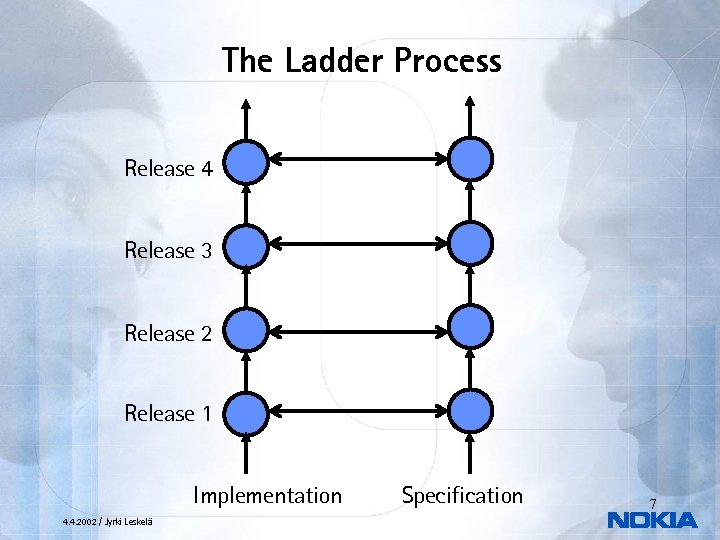
The Ladder Process Release 4 Release 3 Release 2 Release 1 Implementation 4. 4. 2002 / Jyrki Leskelä Specification 7
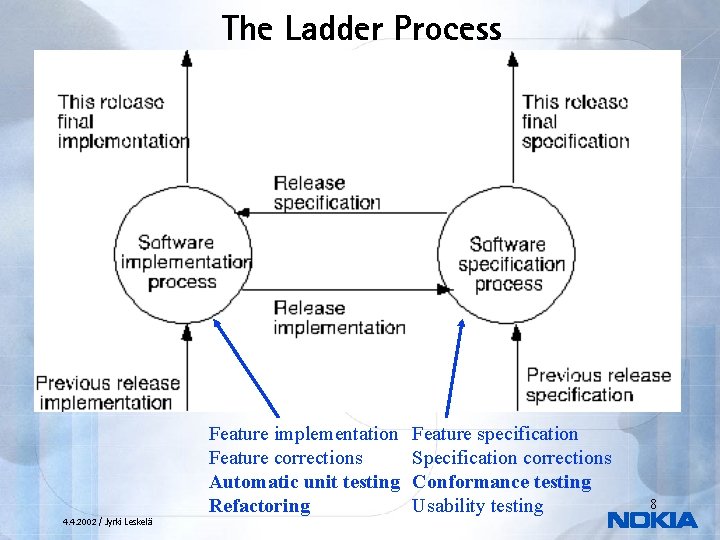
The Ladder Process 4. 4. 2002 / Jyrki Leskelä Feature implementation Feature corrections Automatic unit testing Refactoring Feature specification Specification corrections Conformance testing Usability testing 8
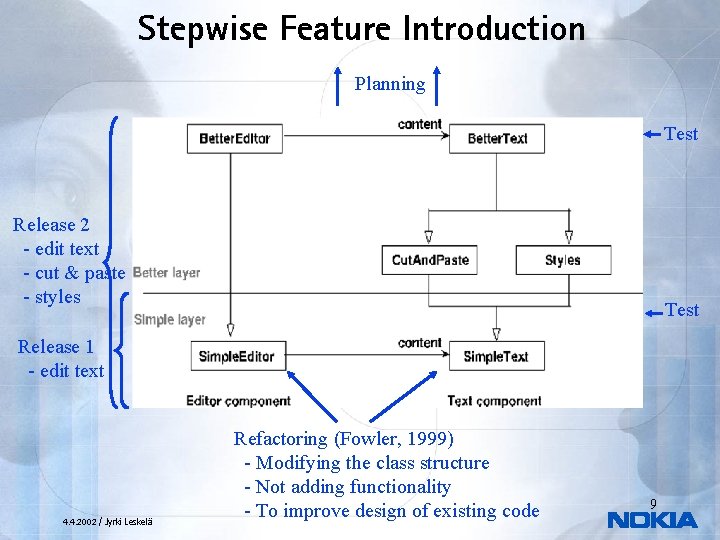
Stepwise Feature Introduction Planning Test Release 2 - edit text - cut & paste - styles Test Release 1 - edit text 4. 4. 2002 / Jyrki Leskelä Refactoring (Fowler, 1999) - Modifying the class structure - Not adding functionality - To improve design of existing code 9
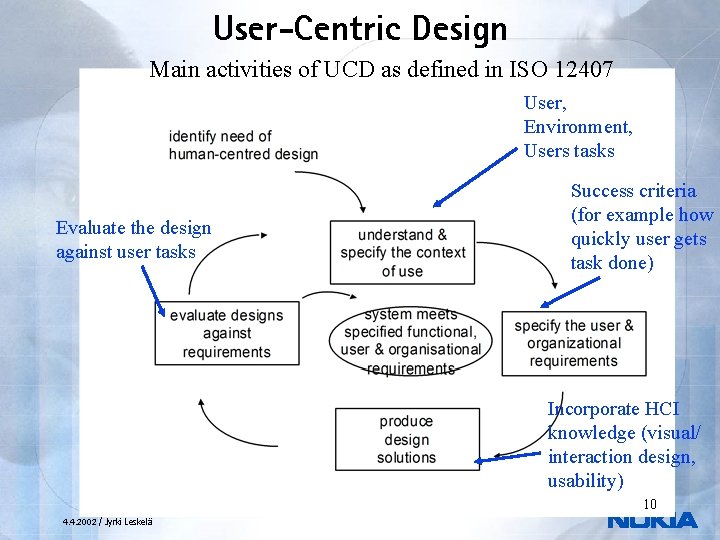
User-Centric Design Main activities of UCD as defined in ISO 12407 User, Environment, Users tasks Evaluate the design against user tasks Success criteria (for example how quickly user gets task done) Incorporate HCI knowledge (visual/ interaction design, usability) 10 4. 4. 2002 / Jyrki Leskelä
Application of User Centric Design UCD works best in the very early development, like concept definition • Continuous challenges in applying UCD in traditional sequenced SW development • Timetable pressures (separate design step not always possible) – Confidentiality limitations (involving real users) – Increasing complexity of systems (a lot of SW designed and implemented one-shot) – Complex and evolving user requirements – • Opportunity for Stepwise Feature Introduction – – – Design iteration easier with thin layers Easier to coordinate future release plan based on user feedback Iteration between releases is natural activity System complexity grows in small steps User requirements can be checked between each release 11 4. 4. 2002 / Jyrki Leskelä
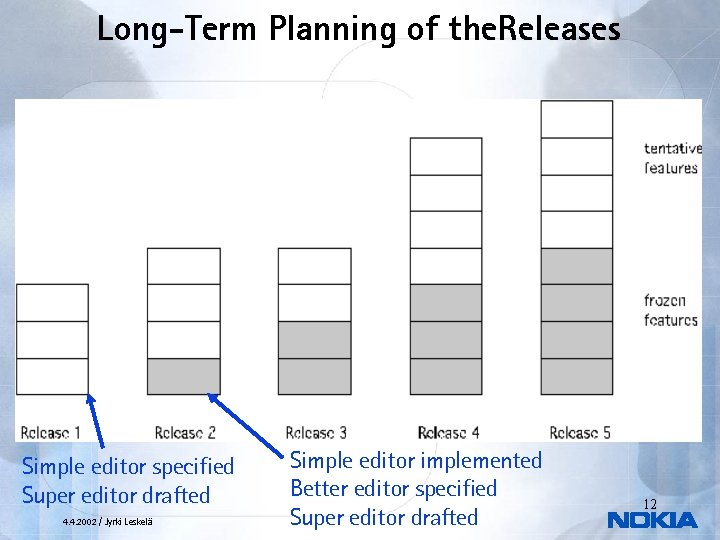
Long-Term Planning of the. Releases Simple editor specified Super editor drafted 4. 4. 2002 / Jyrki Leskelä Simple editor implemented Better editor specified Super editor drafted 12
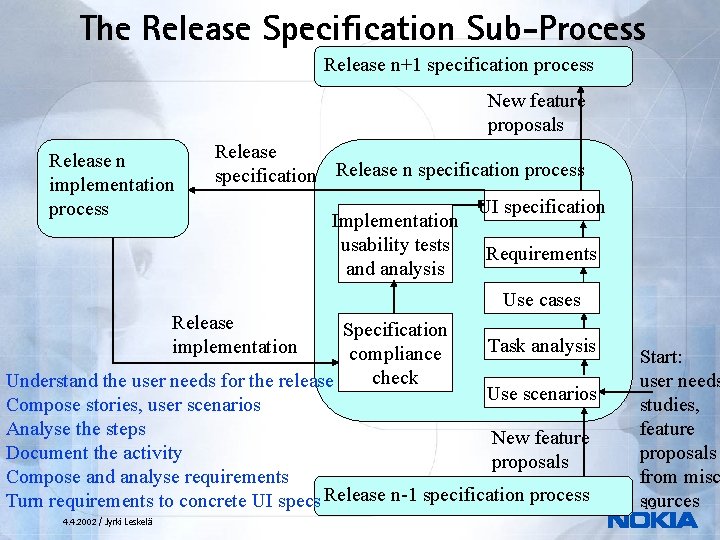
The Release Specification Sub-Process Release n+1 specification process New feature proposals Release n implementation process Release specification Release n specification process Implementation usability tests and analysis UI specification Requirements Use cases Release implementation Specification Task analysis compliance check Understand the user needs for the release Use scenarios Compose stories, user scenarios Analyse the steps New feature Document the activity proposals Compose and analyse requirements Turn requirements to concrete UI specs Release n-1 specification process 4. 4. 2002 / Jyrki Leskelä Start: user needs studies, feature proposals from misc sources 13
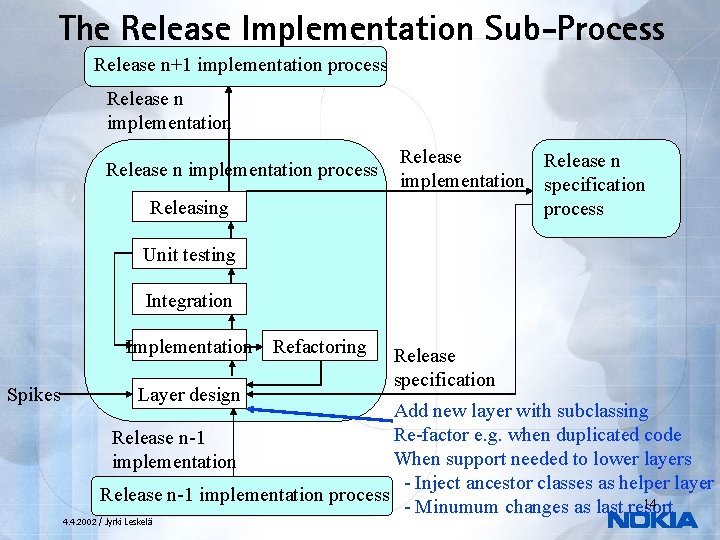
The Release Implementation Sub-Process Release n+1 implementation process Release n implementation process Releasing Release n implementation specification process Unit testing Integration Implementation Refactoring Spikes Layer design Release specification Add new layer with subclassing Re-factor e. g. when duplicated code Release n-1 When support needed to lower layers implementation - Inject ancestor classes as helper layer Release n-1 implementation process 14 - Minumum changes as last resort 4. 4. 2002 / Jyrki Leskelä
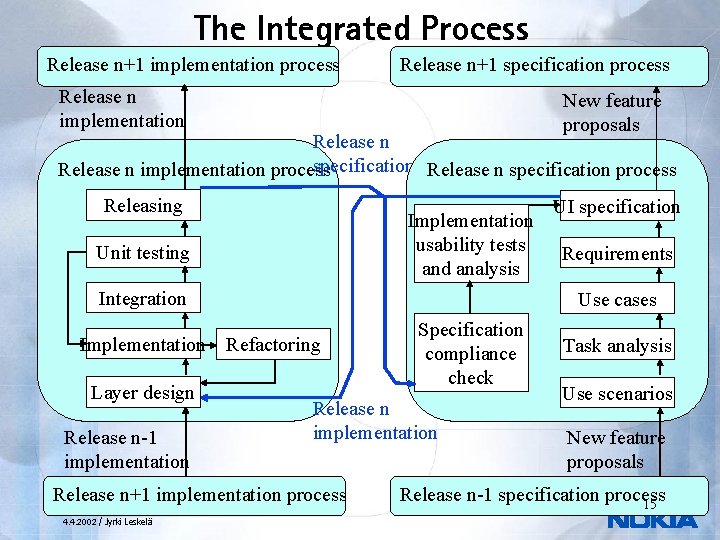
The Integrated Process Release n+1 implementation process Release n+1 specification process Release n implementation New feature proposals Release n specification process Release n implementation process Releasing Implementation usability tests and analysis Unit testing Integration Release n-1 implementation Specification compliance check Release n implementation Release n+1 implementation process 4. 4. 2002 / Jyrki Leskelä Requirements Use cases Implementation Refactoring Layer design UI specification Task analysis Use scenarios New feature proposals Release n-1 specification process 15
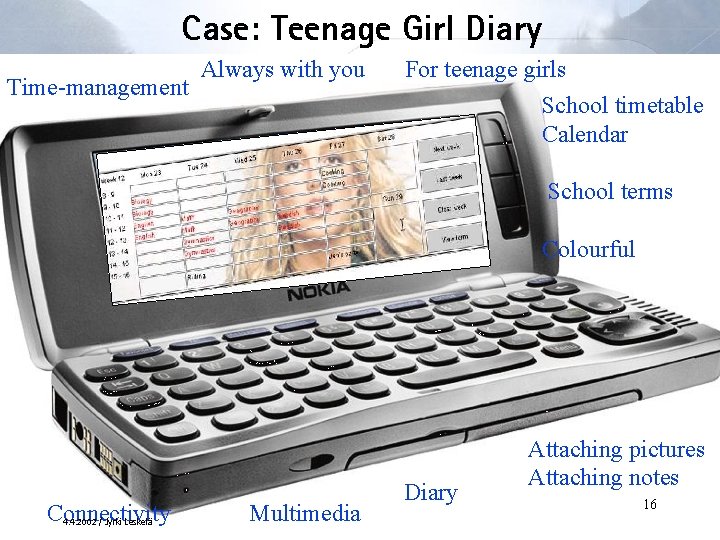
Case: Teenage Girl Diary Time-management Always with you For teenage girls School timetable Calendar School terms Colourful Connectivity 4. 4. 2002 / Jyrki Leskelä Multimedia Diary Attaching pictures Attaching notes 16
Running the Specification Process 17 4. 4. 2002 / Jyrki Leskelä
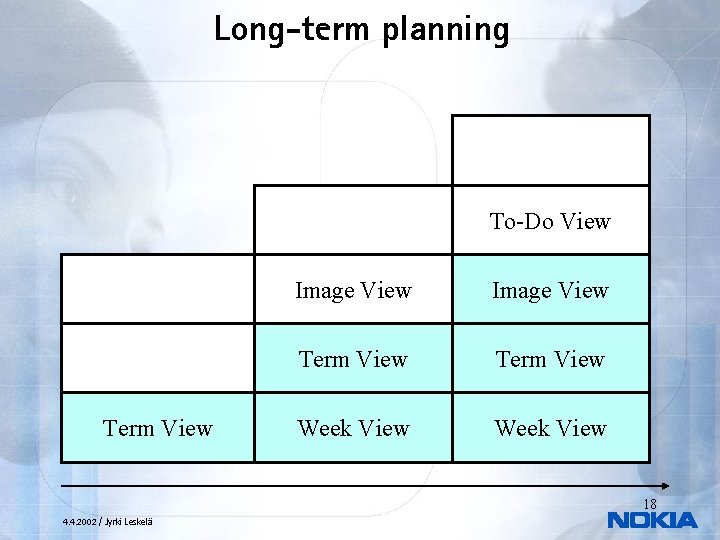
Long-term planning To-Do View Term View Image View Term View Week View 18 4. 4. 2002 / Jyrki Leskelä
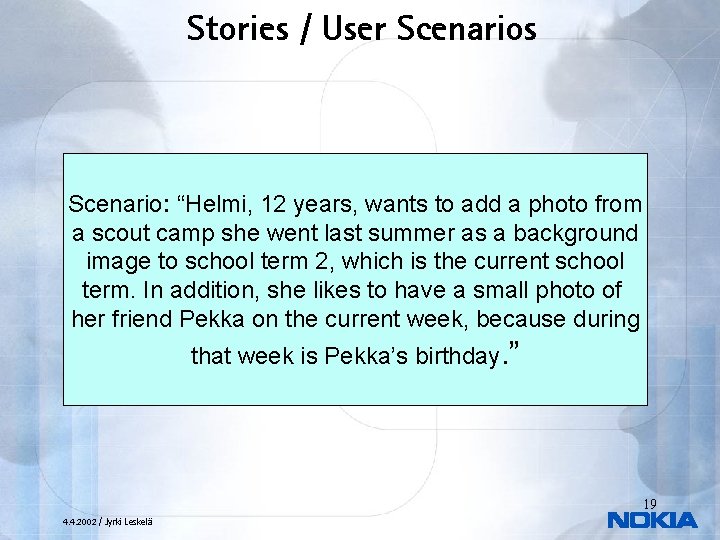
Stories / User Scenarios Scenario: “Helmi, 12 years, wants to add a photo from a scout camp she went last summer as a background image to school term 2, which is the current school term. In addition, she likes to have a small photo of her friend Pekka on the current week, because during that week is Pekka’s birthday. ” 19 4. 4. 2002 / Jyrki Leskelä
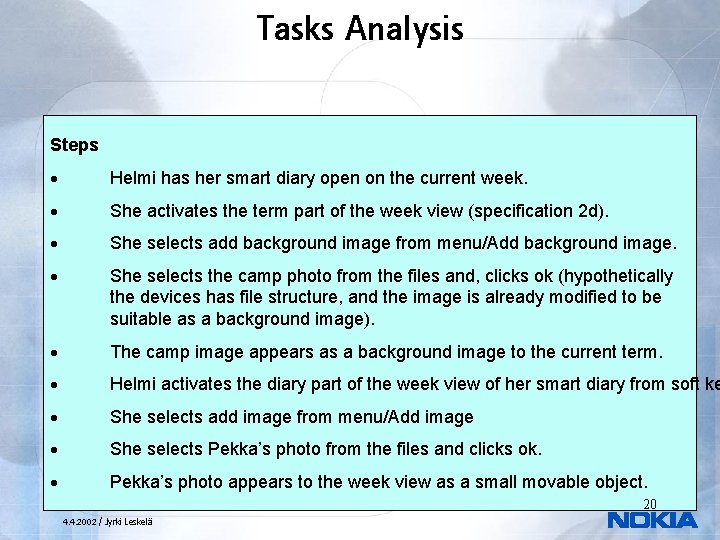
Tasks Analysis Steps · Helmi has her smart diary open on the current week. · She activates the term part of the week view (specification 2 d). · She selects add background image from menu/Add background image. · She selects the camp photo from the files and, clicks ok (hypothetically the devices has file structure, and the image is already modified to be suitable as a background image). · The camp image appears as a background image to the current term. · Helmi activates the diary part of the week view of her smart diary from soft ke · She selects add image from menu/Add image · She selects Pekka’s photo from the files and clicks ok. · Pekka’s photo appears to the week view as a small movable object. 20 4. 4. 2002 / Jyrki Leskelä
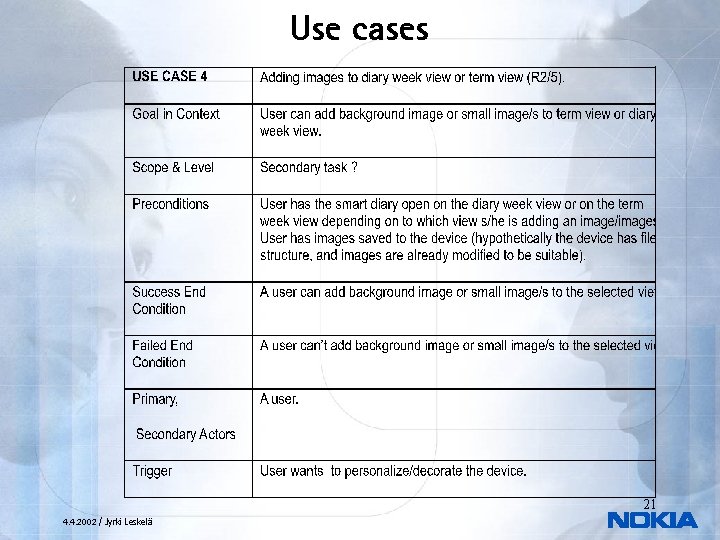
Use cases 21 4. 4. 2002 / Jyrki Leskelä
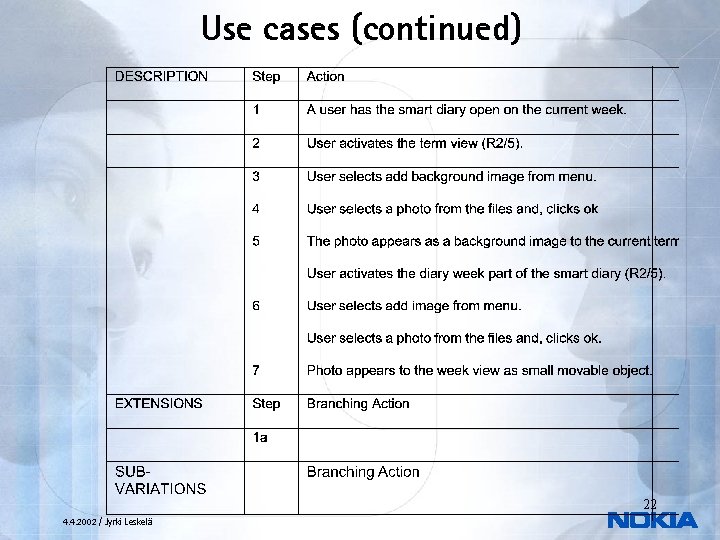
Use cases (continued) 22 4. 4. 2002 / Jyrki Leskelä
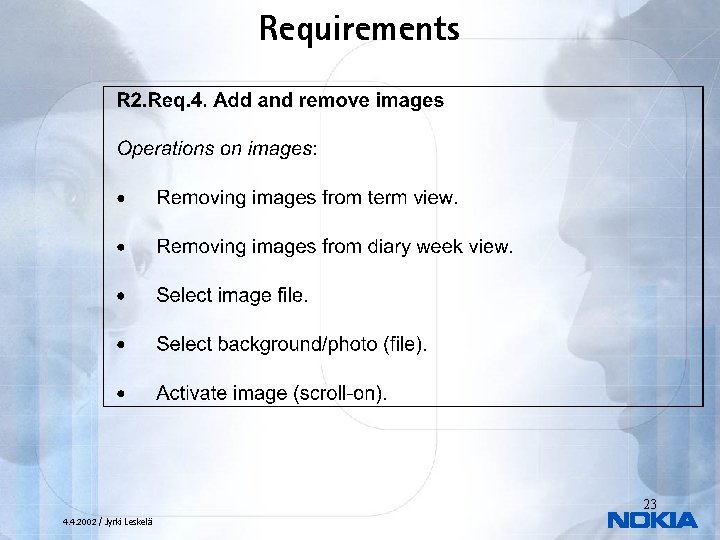
Requirements 23 4. 4. 2002 / Jyrki Leskelä
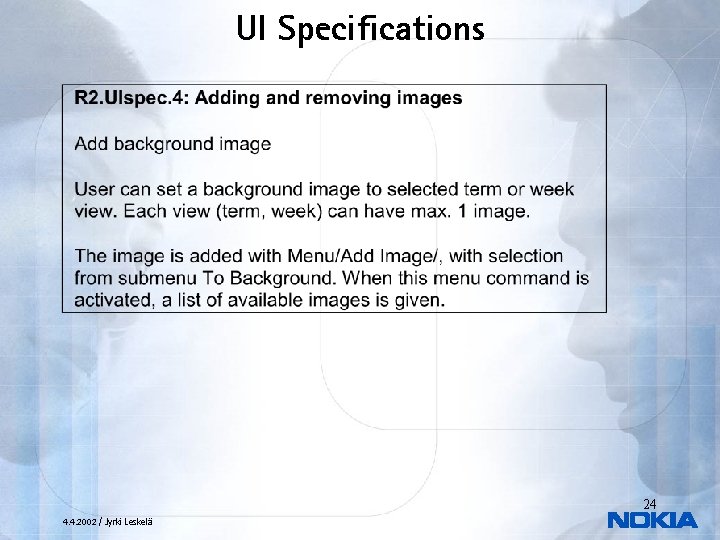
UI Specifications 24 4. 4. 2002 / Jyrki Leskelä
Running the Implementation Process 25 4. 4. 2002 / Jyrki Leskelä
Implementation Layers 26 4. 4. 2002 / Jyrki Leskelä
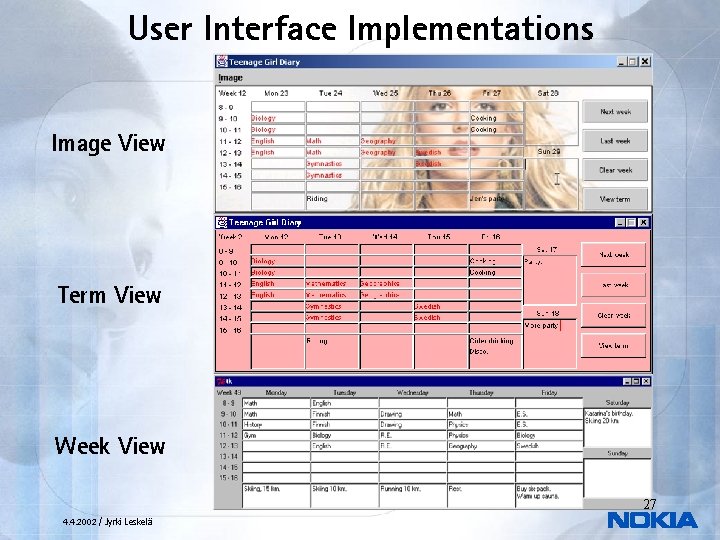
User Interface Implementations Image View Term View Week View 27 4. 4. 2002 / Jyrki Leskelä
Main Refactorings • Change from Python/TKinter to Java/Swing Need to work in familiar language and GUI – Java more realistic example for Nokia Mobile Phones – • Splitting the original Week Layer into a simplified Week Layer and Term Layer – • Introducing an auxiliary Image Helper Layer – • Improving structure of the software Simplify the introduction of images to the diary model Refactoring parallel development into strictly sequential layers Java supports only single inheritance – With multiple inheritance, parallel feature introduction would have been possible – 28 4. 4. 2002 / Jyrki Leskelä
Conclusions 29 4. 4. 2002 / Jyrki Leskelä
Pros and Cons • Pros Process is simple to follow – Parallel user testing – Reduced risk – Layered structure makes the overall architecture clear – • Cons Resulting code may be difficult to understand (due to inheritance) – Refactorings can be potentially quite large – Not optimised for embedded SW – • Improvements Extreme programming in the implementation process – Support for distributed development – 30 4. 4. 2002 / Jyrki Leskelä
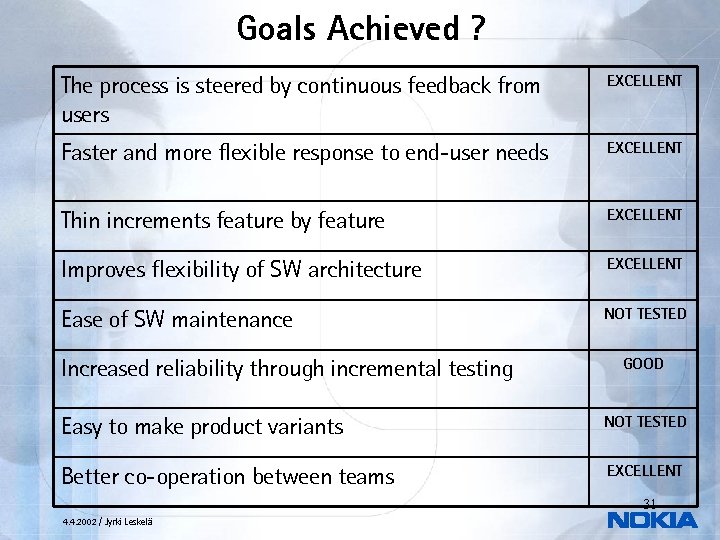
Goals Achieved ? The process is steered by continuous feedback from users EXCELLENT Faster and more flexible response to end-user needs EXCELLENT Thin increments feature by feature EXCELLENT Improves flexibility of SW architecture EXCELLENT Ease of SW maintenance NOT TESTED Increased reliability through incremental testing GOOD Easy to make product variants NOT TESTED Better co-operation between teams EXCELLENT 31 4. 4. 2002 / Jyrki Leskelä
Future Research Integrating Ladder Process with Extreme Programming. • More thorough case study how Ladder Process works for constructing software products for mobile terminals. • Study the construction of product variants in Ladders. Possibilities for open source development. • Deeper study of testing, verification and validation of the specification and implementation. • 32 4. 4. 2002 / Jyrki Leskelä

33 4. 4. 2002 / Jyrki Leskelä
Related work • Extreme programming (Beck, 2000) – – – • Aspect-oriented programming (Miller, 2001) – • short iteration cycles, planning game code as the main asset De-emphasises careful documentation and design striving for simplicity by avoidin planning far in future frequent autimatic testing and integration, tests first Refactor duplicate code: Not much more quidance how to structure the code. on-site customer: has much of the specification responsibility… that activity is not defined clearly Method for combining features but weaving them to the SW structure rather than clear layering. Layers in general common in SW systems – Stepwise feature introduction uses very thin layers, each layer introduces small increase of functionality 34 4. 4. 2002 / Jyrki Leskelä
![References 4. 4. 2002 / Jyrki Leskelä • [1] Back, R. J. R. :](http://slidetodoc.com/presentation_image_h2/dd8628e887022e040e2470bac7c3513d/image-35.jpg "References 4. 4. 2002 / Jyrki Leskelä • [1] Back, R. J. R. :")
References 4. 4. 2002 / Jyrki Leskelä • [1] Back, R. J. R. : Software Costruction by Stepwise Feature Introduction. In ZB 2002: Formal Specification and Development. In Z and B (eds. D. Bert, J. Bowen, M. Henson and K. Robinsons), pp. 162 -183. Springer Lecture Notes in Computer Science 2272, January 2002. • [2] Back, R. J. R, L. Milovanov, I. Porres and V. Preoteasa: XP as a Framework for Practical Software Engineering Experiments. To be presented at the Third International Conference on e. Xtreme Programming and Agile Processes in Software Engineering, May 2002, in Alghero, Sardinia, Italy • [3] Beck, K. : Extreme Programming explained. Addison Wesley 1999. • [4] Cockburn, A. : Writing effective use cases. Addison. Wesley 2000. 35
![References • [5] Fowler, M. : Refactoring: Improving the Design of Existing Code. Addison](http://slidetodoc.com/presentation_image_h2/dd8628e887022e040e2470bac7c3513d/image-36.jpg "References • [5] Fowler, M. : Refactoring: Improving the Design of Existing Code. Addison")
References • [5] Fowler, M. : Refactoring: Improving the Design of Existing Code. Addison Wesley, 1999. • [6] ISO 13407: . Human-centred Design Processes for Interactive Systems. International Organisation for Standardization, Genève, Switzerland. 1999. • [7] Kasesniemi E-L. and Rautiainen P. : Kännyssä piilevät sanomat (Embedded messages in mobile phones, In Finnish). Tampere University Press. Tampere, Finland, 2001 • [8] Miller, S. K. : Aspect-oriented Programming Takes Aim at Software Complexity, Computer, April 2001. 36 4. 4. 2002 / Jyrki Leskelä
Appendix 1 • Experiences from the Diary Specification Data is mainly platform independent – Platform elements not defined in the process (for example how common menu functionality works) – Guessing things in the implementation • Corrected by selecting 9210 as reference UI • – There was a trade off when cursor keys were very costly to implement as pointing device for Swing UI 37 4. 4. 2002 / Jyrki Leskelä
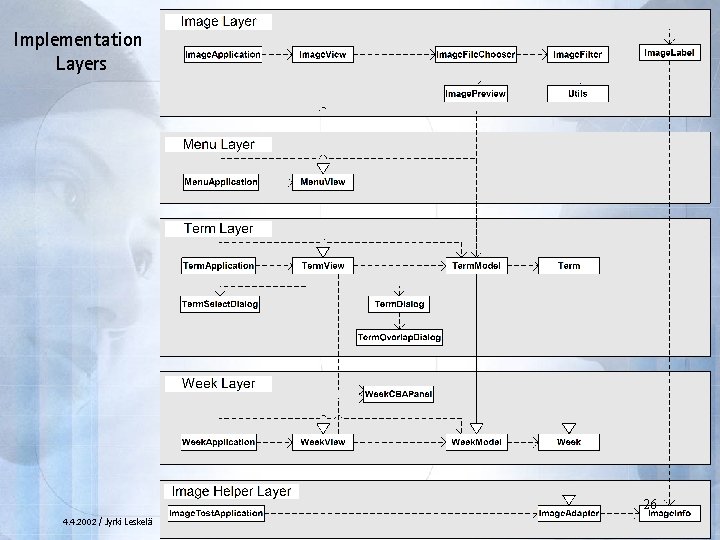
Appendix 2 • Experiences from the Diary Implementation – Week Layer implementation Basic application structure • Separate tracer and tester classes for application model • – Term Layer implementation First experiences on layering • Model and view were extended significantly, dialogs added • Run-time flexibility of GUI (Swing) was needed • Data structures of layers kept separate when possible • – Menu layer implementation Menu was added as extension layer for the view • The UI components installed in lower layers slightly moved • – Image layer implementation New layer derived from view to add and remove images • Injecting image storage support into existing data elements with helper layer at the bottom (model not derived) • Entirely new classes such as image file selection • 38 4. 4. 2002 / Jyrki Leskelä
- Slides: 38