
College of Nursing Masters Degree and Certificate Programs



- Slides: 24
College of Nursing Master’s Degree and Certificate Programs Welcome! Orientation 2020 Fall, 2020
WELCOME This presentation will help to orient you to the College of Nursing and University.
Orientation to Graduate School • https: //www. umass. edu/graduate-school-orientation-2020 • Click on this link for an overall orientation to UMASS Graduate School and lots of information on resources.
Getting Started As a new incoming master’s level student, there a few important items that must be attended to in order to start the program. They are: • Getting your UMass student email address • Signing and returning your Plan of Study (Degree Students) • Learning how to access and use SPIRE student system • Registering for courses • Reviewing online tutorials as needed (IT, BBLearn, etc)
First Steps - Accept offer for admission from the graduate school (Don’t forget to do this!) - Packet and Letter from the University Graduate Admissions office - Communication from the UMass Information Technology Department. - These items will be found in your Spire account where you applied.
Email • Your admission packet/IT information will tell you how to set up your email account. • Set up your account as soon as possible. • Your student email address will be the ONLY one we use once you are matriculated. • Keep this account separate from your regular, personal email and be sure to check it daily.
EMAIL • As an Online Program, EMAIL is the most critical form of communication. • You MUST check it daily! • And you MUST have a UMass student email account. Please read the UMass Communication Policy • Once you have your student email account, you will be included in the College of Nursing listserv, which is the list of current students and how we will communicate to you as a group.
Master’s Degree Tracks As a newly matriculated student in the Master’s Degree Program, you have chosen to complete a specific track while completing the program. Details about each track is available in the CON Graduate Student Handbook. You can also contact your faculty advisor for more details. • • Master of Science (MS) Clinical Nurse Leader (CNL) Master of Science in Nursing Education (MSNE) Certificate in Nursing Education
Plan of Study • Your Plan of Study that was mailed to you in your acceptance packet will be THE PLAN that you follow as indicated. • Most nursing courses are offered in specific semesters and many have pre-requisite courses. • Any change to the plan of study must be approved through the department director. • Please sign the plan, send back and keep a copy for your files. An electronic copy will be sent once you signed the paper copy.
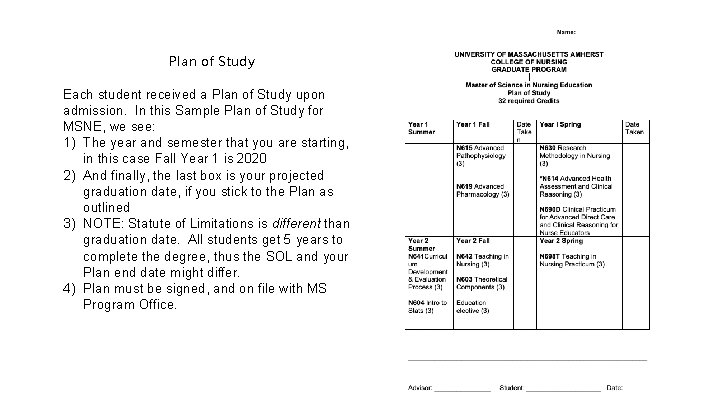
Plan of Study Each student received a Plan of Study upon admission. In this Sample Plan of Study for MSNE, we see: 1) The year and semester that you are starting, in this case Fall Year 1 is 2020 2) And finally, the last box is your projected graduation date, if you stick to the Plan as outlined 3) NOTE: Statute of Limitations is different than graduation date. All students get 5 years to complete the degree, thus the SOL and your Plan end date might differ. 4) Plan must be signed, and on file with MS Program Office.
Spire • SPIRE is the student portal for academics. • You can access your registration, grades, billing information and much more. • Please familiarize yourself with the functions in SPIRE and make any updates to information as needed. • You can learn how to navigate in SPIRE through this link: • https: //www. umass. edu/it/support/spire/students-learn-hownavigate-spire
Registering for Courses • Once you have matriculated, set up your email account and sent back your plan of study, you will be ready to register. • Registration will be done on SPIRE • Information is sent to you each semester about registration dates and deadlines.
Reviewing Tutorials Prepare for Online Learning & Navigation by viewing this tutorial: • This site provides advice and information about taking online classes as well as an overview of Blackboard Learn. First-time students should read through all the material on the orientation site at least once. Experienced students can use it as a reference. • https: //confluence. umassonline. net/pages/viewpage. action? page. Id =116687605 Please copy and paste this link into your browser
Accessing Resources Library system http: //www. library. umass. edu/ • Receipt of UCard (university ID card) http: //www. umass. edu/ucard/content/how-get-ucard • Health Services & health insurance http: //www. umass. edu/uhs/insurance/shbp • Health Services http: //www. umass. edu/uhs/aboutus • Graduate School resources http: //www. umass. edu/gradschool/ • Writing Center: Virtual appointments are offered as well as walk in for distance learning students. Students may be assigned a consistent writing coach through the Writing Center. http: //www. umass. edu/writingcenter/
Completing the Your Master’s Degree In the Spring of your final semester, you will be instructed to complete a “Degree Eligibility Form” in order to prepare for graduation. Details come from the MS Program Office. Students will also receive instruction about sitting for certification exams (CNL, CNE) in their final courses. Students who are completing Certificates will need to contact the MS Program Office and complete the Certificate Eligibility Form If applicable, students will also receive information about Graduate Scholarship Day, and Graduate School Commencement. All of this timely information will come to your student email account. *A note about final transcripts: The UMass Graduate School processes thousands of transcripts and diplomas after the May commencement. Transcripts are typically ready about mid June. Please do not order transcripts for Certification exams until you are certain your degree is posted. You can check this in SPIRE.
Library Information • https: //youtu. be/-0 r. E-j 2 i. La. I
Some Information on Writing • Graduate School involves a lot of writing and good writing takes practice. • It is important to plan for writing multiple drafts of papers, having others proofread and correct your work, and spending time looking up and using correct APA format.
Avoiding Plagiarism Most courses use Safe. Assign or Turnitin, anti-plagerism software to check student’s work. Plagiarism is defined as copying someone else’s work and presenting it as your own. The digital age has made it easy to copy and paste and every effort must be made to give credit to the original author and reference correctly. Make sure you get the 7 th edition of the Publication manual of the American Psychological Association to help guide you. Purdue OWL also has a great site online on APA formatting and Writing Style.
Resources • The Academic Honesty policy and procedures created by the Ombud’s Office and sponsored by the Dean of Students were revised in 2007. Under no circumstance should you share papers or test results with fellow students! • Below are some great resources to help you understand plagiarism. • https: //www. umass. edu/academichonesty/How. Do. IKnow. html
Turnitin and Safe Assign • Turnitin and Safe. Assign are antiplagiarism software tools used to detect plagiarism in written assignments. • Students using Turnitin and Safe Assign to submit assignments for their Blackboard Learn course can review helpful resources created by the e. Learning group at University Without Walls (UWW) here: • https: //confluence. umassonline. net/pages/viewpage. action? page. Id =116687764
Avoid Plagiarism- Using Turn it in, Safe Assign Most courses use Safe. Assign or Turnitin, antiplagerism software to check student’s work. Plagiarism is defined as copying someone else’s work and presenting it as your own. The digital age has made it easy to copy and paste and every effort must be made to give credit to the original author and reference correctly. Make sure you get the 7 th edition of the Publication manual of the American Psychological Association to help guide you. Purdue OWL also has a great site online on APA formatting and Writing Style. The use of both Safe Assign and Turnitin are covered in the Blackboard Orientation. Also check out links below: Student Use of Turnitin Students using Turnitin to submit assignments for their Blackboard Learn course can review helpful resources created by the e. Learning group at University Without Walls (UWW). Academic Honesty Policy The Academic Honesty policy and procedures created by the Ombud’s Office and sponsored by the Dean of Students were revised in 2007. Under no circumstance should you share papers or test results with fellow students!
Participation in the College of Nursing • As Master’s Students, your voices and input is important to us. • We would like to have a student represented from each of the tracks; MSNE, CNL, NE to be representatives to our MS Academic Matters Committee. • The Committee currently meets for about 1. 5 hours once a month and will be virtual. • If you are interested in being a representative, please email Dr. Mary Ellen Burke • mburke@nursing. umass. edu
Conclusion • We hope that these slides, the • We, the faculty and staff look Handbooks and the Checklist forward to working directly with help provide you a guide to you in your success and explore the College of Nursing completion of the program. We and specifically the Master’s hope that you contact us Degree and Certificate Programs. regularly with questions! Check email regularly for opportunities to jump in, help out, and be involved.