
Coding and Billing for Optometrists Relative Value Units
Coding and Billing for Optometrists: Relative Value Units (RVUs) in VHA Part 2: DSS, Labor Mapping & RVUs Keeping It All Together! VA Optometry IT Subcommittee

Authors • • • Ballinger, Rex OD- Baltimore, MD Cordes, Matthew OD- The Villages, FL Fuhr, Patti OD, PHD- Salisbury, NC Ihrig, Carolyn OD- Buffalo, NY Katzenberger, Ann OD- American Lake, WA Kawasaki, Brian OD- Las Vegas, NV Lazarou, Zoe OD- Baltimore, MD Ryan, Raymond OD- Eureka, CA Whitesell, Bethany- Fayetteville, AR Zimbalist, Richard OD- Columbia, MO

Background • Over the past several years, VHA has reviewed physician productivity that has been focused on the provision of physician specialty care services. • Methodologies used in determining productivity have been refined and now include specific data subsets. • A Relative Value Unit (RVU) based method has been adopted to measure physician productivity somewhat similar to that used in the private sector and Centers for Medicare & Medicaid Services (CMS). • As of FY 2012, Chiropractors, Optometrists, Podiatrists, and Psychologists are now included in this system.
Background • Optometry is now included in the Relative Value Unit (RVU) based analysis method: – DSS (Decision Support System) RVU (do not confuse with clinical decision support systems) – CMS RVU (Relative Value Unit) system (VA specific) • These systems are a costs accounting and clinical activity relational database system. • All patient services will need to be correctly and accurately documented to ensure proper resource allocation and utilization. • Resources include labor, equipment, support and other expenses.
Decision Support System (DSS) • DSS Identifiers (IDs) are the single & critical designation by which VHA defines clinical work units for costing purposes
DSS Identifiers The purpose of DSS Identifiers is to collect workload data that supports: • the continuity of patient care, • resource allocation, • performance measurement, • quality management, • third party collections, and • function of serving as guides to select DSS outpatient department structures.
Correct DSS Data • Workload data must be captured through electronic means including electronic encounter forms, CPRS, QUASAR, Event Capture, and the Laboratory, Radiology and Surgery packages. • DSS Identifiers are utilized during the clinic set-up process in all of these workload capture systems. • The codes selected for a clinic may ‘appear invisible’ to a provider, but they have been chosen for each clinic when the clinic was set-up.
DSS Identifiers Indicate the workgroup responsible for providing the specific set of clinic products. • Serve as a stable identification method that can be used to compare costs between facilities. A primary stop code and a secondary stop code compose the six digit DSS Identifier: • • • Primary Stop Code The first three numbers of the DSS Identifier represent the primary stop code. The primary stop code designates the main clinical group responsible for the care. Three numbers must always be in the first three characters of a DSS Identifier for it to be valid. Secondary Stop Code The last three numbers of the DSS Identifier contain the secondary stop code, or credit stop, which serves as a modifier to further define the primary work group. A VA medical center can use the secondary stop code as a modifier of the work provided in the primary clinical care work unit (identified by the primary stop code). Credit Pair A DSS ID Credit Pair is the common term used when two DSS Identifiers, a primary code and a secondary code, are utilized when establishing a clinic in the Vist. A software. Some specific credit pairs are listed in the DSS Identifier References.

Correct DSS Data • Responsibility for establishing clinic set-up is varied. • At some sites, the DSS Site Team may perform this function. • Other facilities may have the Hospital Administration Service or a Clinical Applications Coordinator assigned to complete this task. • Clinical programs should work with their local DSS Site team regularly to review and verify that the code associations for their programs are correct. • Provider mapping is closed out monthly!!!

DSS Codes are somewhat unique to your clinical setting (while universal, they are not the same for all possible optometry clinic settings) • The full definition of each code should be read before the code is used for a clinic set-up. • DSS Identifiers are used to measure the amount of staff productivity and workload. • If the provider’s encounter is not completed correctly, the result will be a reduced provider productivity level. • Also, future VERA funding for a station could be negatively impacted.
Productivity as Viewed in DSS Data derived from: • Account Level Budgeter Cost Center (ALBCC) • Labor Mapping • RVUs • Person Class Taxonomy
Account Level Budgeter Cost Center (ALBCC) Datasets Key Code utilized (feeder Key): • Dept (Product Dept, Intermed Prod. Dept. (IPD), or DCM) – First character- represents the Clinical Service • ALBCC: A unique code in DSS to identify a unique organizational unit – Data elements: All characters are alpha-numeric. No special characters are used. • The first three characters represent the VA cost center responsible for the service. • The fourth and fifth characters represent the production unit that identifies the clinical activity. • The sixth character represents the division where the ALBCC is located.
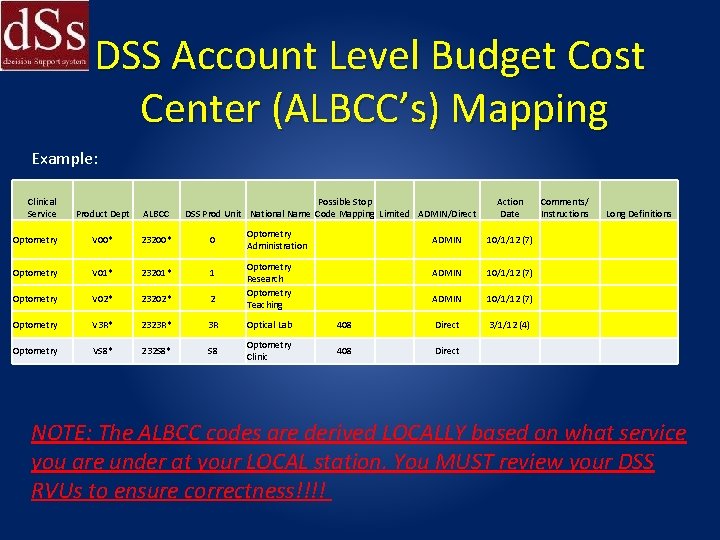
DSS Account Level Budget Cost Center (ALBCC’s) Mapping Example: Clinical Service Possible Stop DSS Prod Unit National Name Code Mapping Limited ADMIN/Direct Product Dept ALBCC Optometry V 00* 23200* 0 Optometry V 01* 23201* 1 Optometry V 02* 23202* 2 Optometry V 3 R* 2323 R* 3 R Optical Lab Optometry VS 8* 232 S 8* S 8 Optometry Clinic Optometry Administration Optometry Research Optometry Teaching Action Date Comments/ Instructions Long Definitions ADMIN 10/1/12 (7) 408 Direct 3/1/12 (4) 408 Direct NOTE: The ALBCC codes are derived LOCALLY based on what service you are under at your LOCAL station. You MUST review your DSS RVUs to ensure correctness!!!!
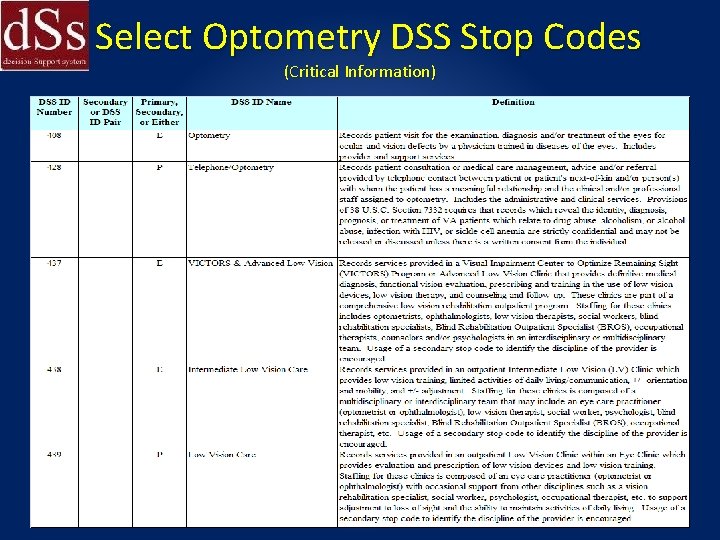
Select Optometry DSS Stop Codes (Critical Information)
Low Vision Stop Codes • Refer to Dr. Patti Fuhr’s module on low vision for this information
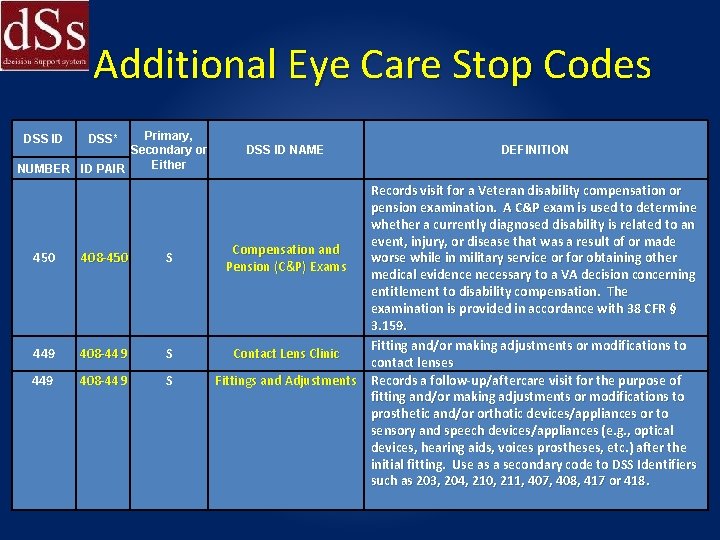
Additional Eye Care Stop Codes Primary, Secondary or Either NUMBER ID PAIR DSS ID DSS* 450 408 -450 S 449 408 -449 S 449 408 -449 S DSS ID NAME DEFINITION Records visit for a Veteran disability compensation or pension examination. A C&P exam is used to determine whether a currently diagnosed disability is related to an event, injury, or disease that was a result of or made Compensation and worse while in military service or for obtaining other Pension (C&P) Exams medical evidence necessary to a VA decision concerning entitlement to disability compensation. The examination is provided in accordance with 38 CFR § 3. 159. Fitting and/or making adjustments or modifications to Contact Lens Clinic contact lenses Fittings and Adjustments Records a follow-up/aftercare visit for the purpose of fitting and/or making adjustments or modifications to prosthetic and/or orthotic devices/appliances or to sensory and speech devices/appliances (e. g. , optical devices, hearing aids, voices prostheses, etc. ) after the initial fitting. Use as a secondary code to DSS Identifiers such as 203, 204, 210, 211, 407, 408, 417 or 418.
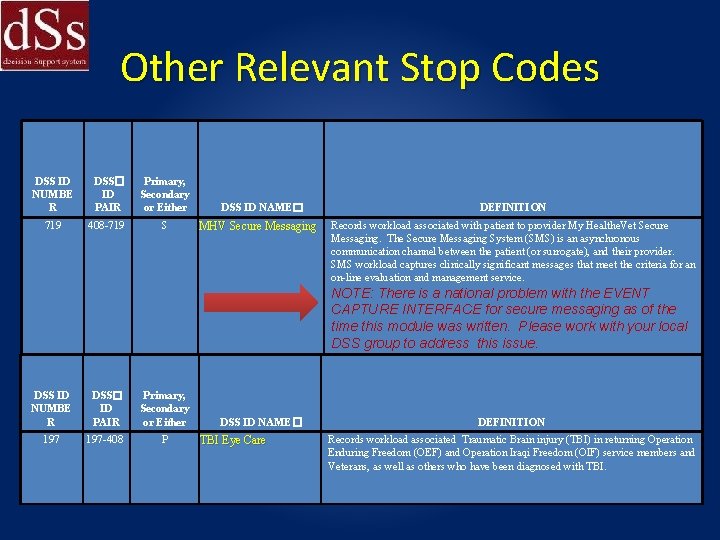
Other Relevant Stop Codes DSS ID NUMBE R DSS� ID PAIR Primary, Secondary or Either 719 408 -719 S DSS ID NAME� MHV Secure Messaging DEFINITION Records workload associated with patient to provider My Healthe. Vet Secure Messaging. The Secure Messaging System (SMS) is an asynchronous communication channel between the patient (or surrogate), and their provider. SMS workload captures clinically significant messages that meet the criteria for an on-line evaluation and management service. NOTE: There is a national problem with the EVENT CAPTURE INTERFACE for secure messaging as of the time this module was written. Please work with your local DSS group to address this issue. DSS ID NUMBE R DSS� ID PAIR Primary, Secondary or Either 197 -408 P DSS ID NAME� TBI Eye Care DEFINITION Records workload associated Traumatic Brain injury (TBI) in returning Operation Enduring Freedom (OEF) and Operation Iraqi Freedom (OIF) service members and Veterans, as well as others who have been diagnosed with TBI.
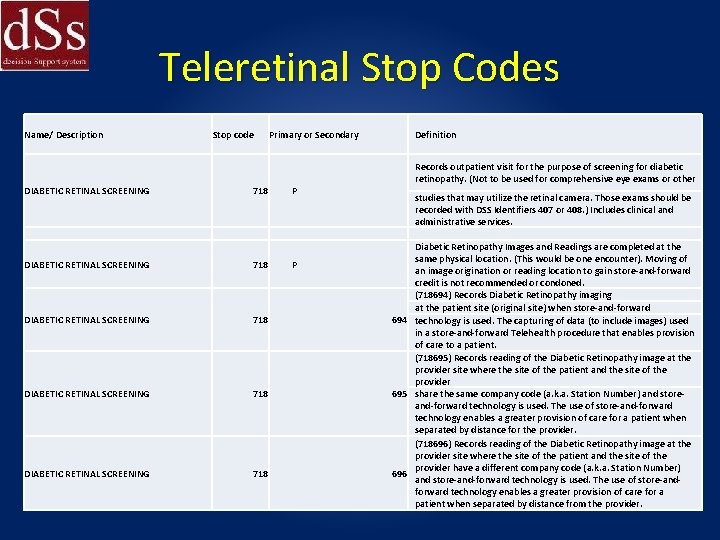
Teleretinal Stop Codes Name/ Description Stop code Primary or Secondary Definition Records outpatient visit for the purpose of screening for diabetic retinopathy. (Not to be used for comprehensive eye exams or other DIABETIC RETINAL SCREENING 718 P DIABETIC RETINAL SCREENING 718 studies that may utilize the retinal camera. Those exams should be recorded with DSS Identifiers 407 or 408. ) Includes clinical and administrative services. Diabetic Retinopathy Images and Readings are completed at the same physical location. (This would be one encounter). Moving of an image origination or reading location to gain store-and-forward credit is not recommended or condoned. (718694) Records Diabetic Retinopathy imaging at the patient site (original site) when store-and-forward 694 technology is used. The capturing of data (to include images) used in a store-and-forward Telehealth procedure that enables provision of care to a patient. (718695) Records reading of the Diabetic Retinopathy image at the provider site where the site of the patient and the site of the provider 695 share the same company code (a. k. a. Station Number) and storeand-forward technology is used. The use of store-and-forward technology enables a greater provision of care for a patient when separated by distance for the provider. (718696) Records reading of the Diabetic Retinopathy image at the provider site where the site of the patient and the site of the provider have a different company code (a. k. a. Station Number) 696 and store-and-forward technology is used. The use of store-andforward technology enables a greater provision of care for a patient when separated by distance from the provider.
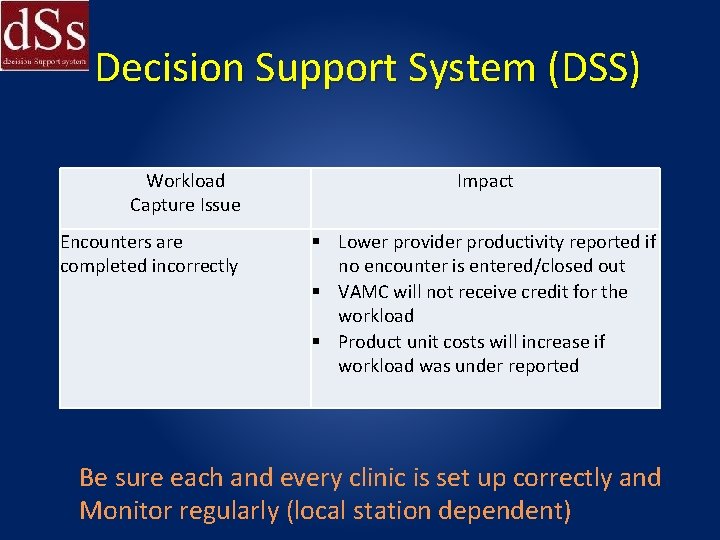
Decision Support System (DSS) Workload Capture Issue Encounters are completed incorrectly Impact Lower provider productivity reported if no encounter is entered/closed out VAMC will not receive credit for the workload Product unit costs will increase if workload was under reported Be sure each and every clinic is set up correctly and Monitor regularly (local station dependent)
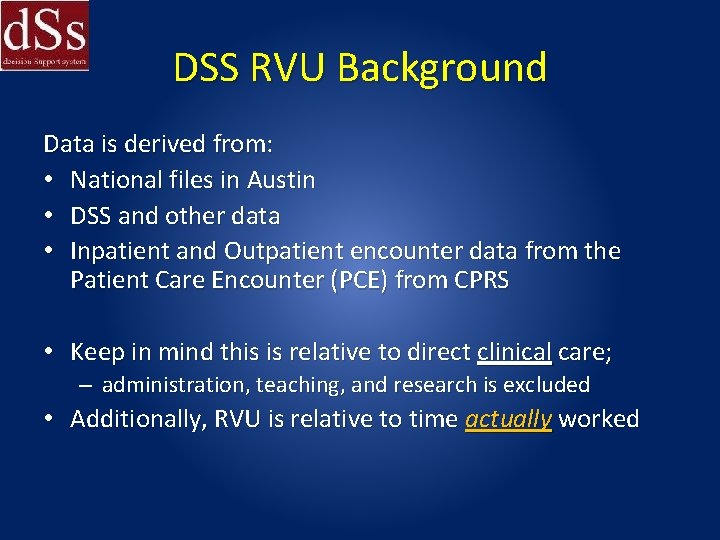
DSS RVU Background Data is derived from: • National files in Austin • DSS and other data • Inpatient and Outpatient encounter data from the Patient Care Encounter (PCE) from CPRS • Keep in mind this is relative to direct clinical care; – administration, teaching, and research is excluded • Additionally, RVU is relative to time actually worked
Patient Care Encounter (PCE) • PCE is the transmission mechanism of all encounter data for transmission of the data to the National Patient Care Database (NPCD)
Event Capture System (ECS) • ECS is a Vist. A workload entry package used in facilities when no other service specific automated data collection system is available. • The feeder keys may be a national standard code (i. e. , CPT-4 codes, HCPCS codes or International. • Classification of Diseases, 9 th edition, Clinical Modification (ICD-9 -CM) codes), or one of 250 locally defined codes to be used when neither a CPT code nor a national code exists. • Each code has a unique intermediate product number assigned.
Count versus Non-Count Clinics • In the creation of clinic profiles, clinics are designated as either count clinics or non-count clinics. • Count clinics are transmitted to PCE as encounters. • Non-count clinics are not transmitted to PCE. • There are generally two reasons why a clinic might be designated as non-count: If the clinic is administrative in nature and therefore not providing patient care; and if the workload associated with the clinic is transmitted to PCE automatically through another means (a Vist. A package other than Scheduling), then the clinic is setup as non-count to avoid sending duplicate workload to PCE.
Decision Support System (DSS) • At a minimum of once per year, new/inactivated/revised codes, definitions, and references will be posted on the DSS Identifier web page: http: //vaww. dss. med. va. gov/programdocs/pd_oident. asp • These references include: - Summary of Active DSS Identifiers (includes definitions) - DSS Identifier Frequently Asked Questions (FAQs) and Highlights - DSS Use Only Stop Codes NOTE: You can only modify/change your codes at the end of the fiscal year
DSS Labor Mapping for Direct Patient Care is defined as the time to prepare, to provide for, provide treatment and follow-up on the clinical care needs of patients by the treating provider and includes: a. Time spent in reviewing patient data for a patient that a provider is treating. b. Consulting about patient care with colleagues. c. Reviewing medical literature. d. Contacting the patient or caregivers to discuss their needs. e. The labor hours provided by a physician or dentist who is supervising house staff residents providing care in a clinical setting. (Use ‘ED’ ALBCCs) (Optometry does not use this education supervision code). Ref: DSS Decision Support System LABOR MAPPING GUIDELINES FY 2014 The actual pay period time Via DSS is used for calculations and are performed monthly.
DSS Labor Mapping • DSS labor mapping is a method of assigning labor costs and hours to the workgroup (ALBCC) where the work occurred. • An employee working in more than one workgroup (ALBCC) will have their time mapped in proportion to the time they work. • The labor costs and hours are matched up with the workload reported for the same workgroup. • If an employee works in more than one department, the % spent in each clinic with a different ALBCC must be mapped appropriately.
DSS Labor Mapping Guidelines for Resident Supervision • Physicians and dentists who supervise residents in a patient care setting (e. g. in a clinic or on a ward) will have the percentage of their paid hours spent in these activities mapped to the resident supervision ALBCCs. This does not apply to optometrists. • So non-MD eye clinic staff who supervise residents and students in a clinical setting is considered part of “direct patient care”. ALBCC xxxxx is the direct patient care DSS department for Optometry (actual code depends on the local station service that you fall under).
DSS Labor Mapping Guidelines for Education Support/Teaching • Any provider who is performing local station teaching conferences to students and residents can have his/her time mapped. This includes not only the time actually spent instructing at the conference, but also the time it takes for the provider’s preparation as a presenter.
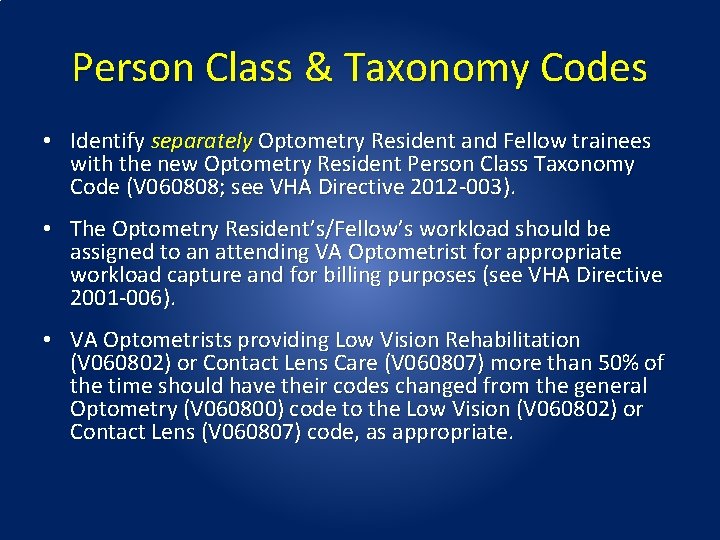
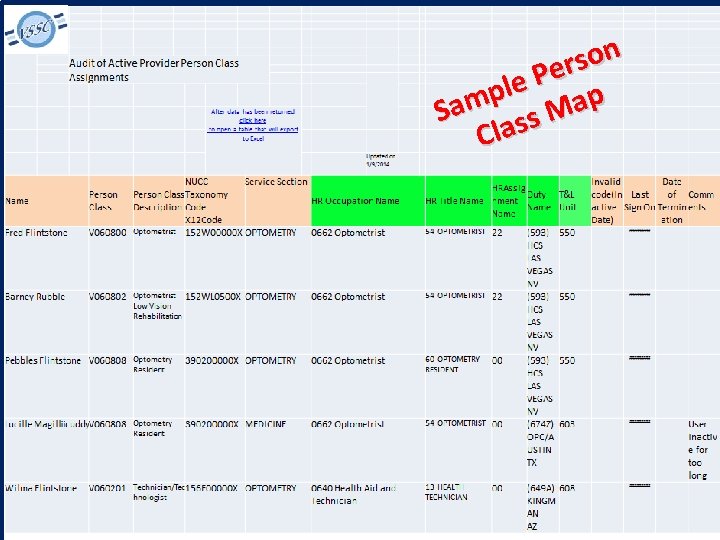
Person Class & Taxonomy Codes • Identify separately Optometry Resident and Fellow trainees with the new Optometry Resident Person Class Taxonomy Code (V 060808; see VHA Directive 2012 -003). • The Optometry Resident’s/Fellow’s workload should be assigned to an attending VA Optometrist for appropriate workload capture and for billing purposes (see VHA Directive 2001 -006). • VA Optometrists providing Low Vision Rehabilitation (V 060802) or Contact Lens Care (V 060807) more than 50% of the time should have their codes changed from the general Optometry (V 060800) code to the Low Vision (V 060802) or Contact Lens (V 060807) code, as appropriate.
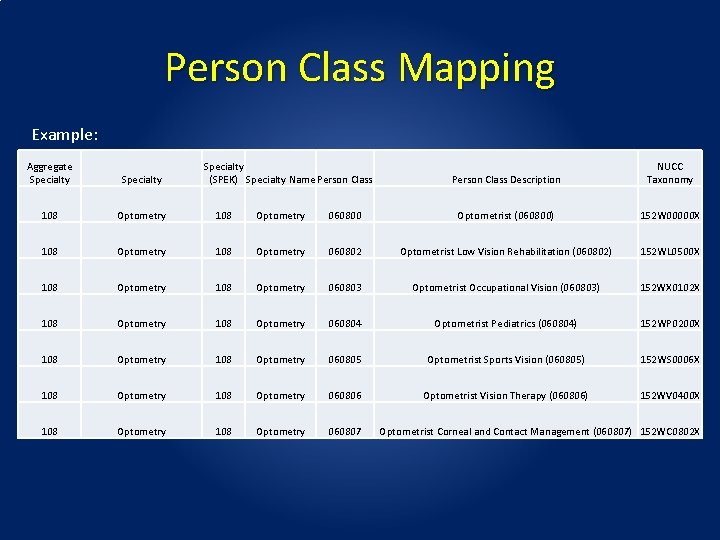
Person Class Mapping Example: Aggregate Specialty (SPEK) Specialty Name Person Class Description NUCC Taxonomy 108 Optometry 060800 Optometrist (060800) 152 W 00000 X 108 Optometry 060802 Optometrist Low Vision Rehabilitation (060802) 152 WL 0500 X 108 Optometry 060803 Optometrist Occupational Vision (060803) 152 WX 0102 X 108 Optometry 060804 Optometrist Pediatrics (060804) 152 WP 0200 X 108 Optometry 060805 Optometrist Sports Vision (060805) 152 WS 0006 X 108 Optometry 060806 Optometrist Vision Therapy (060806) 152 WV 0400 X 108 Optometry 060807 Optometrist Corneal and Contact Management (060807) 152 WC 0802 X
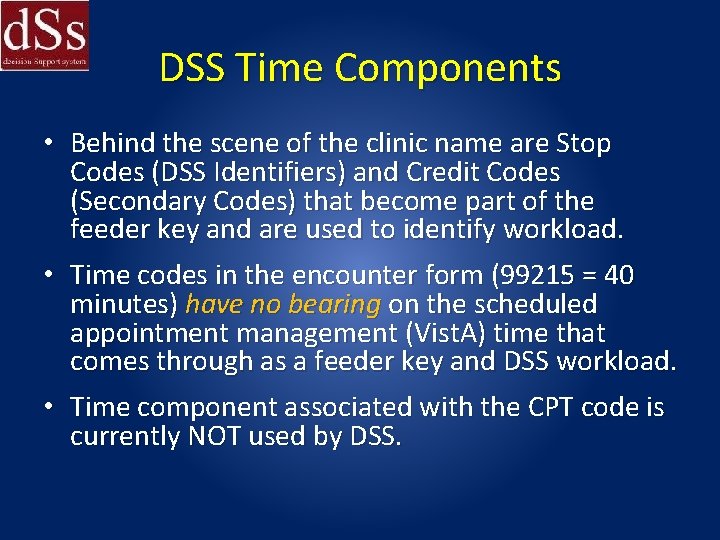
DSS Time Components • Behind the scene of the clinic name are Stop Codes (DSS Identifiers) and Credit Codes (Secondary Codes) that become part of the feeder key and are used to identify workload. • Time codes in the encounter form (99215 = 40 minutes) have no bearing on the scheduled appointment management (Vist. A) time that comes through as a feeder key and DSS workload. • Time component associated with the CPT code is currently NOT used by DSS.
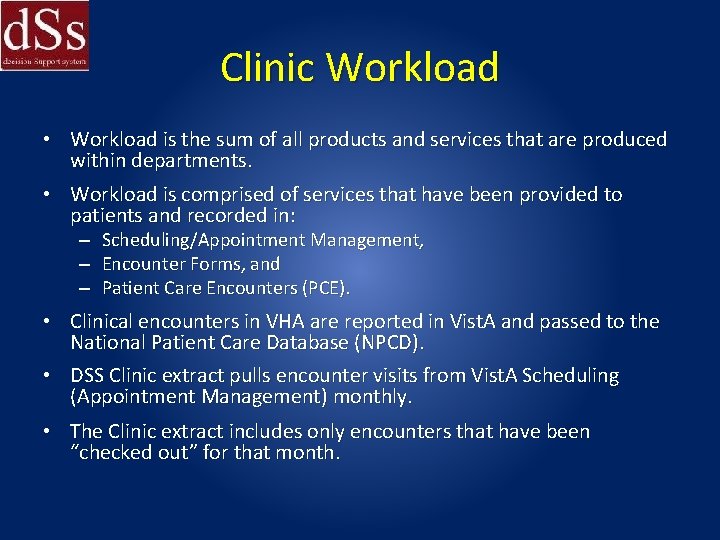
Clinic Workload • Workload is the sum of all products and services that are produced within departments. • Workload is comprised of services that have been provided to patients and recorded in: – Scheduling/Appointment Management, – Encounter Forms, and – Patient Care Encounters (PCE). • Clinical encounters in VHA are reported in Vist. A and passed to the National Patient Care Database (NPCD). • DSS Clinic extract pulls encounter visits from Vist. A Scheduling (Appointment Management) monthly. • The Clinic extract includes only encounters that have been “checked out” for that month.
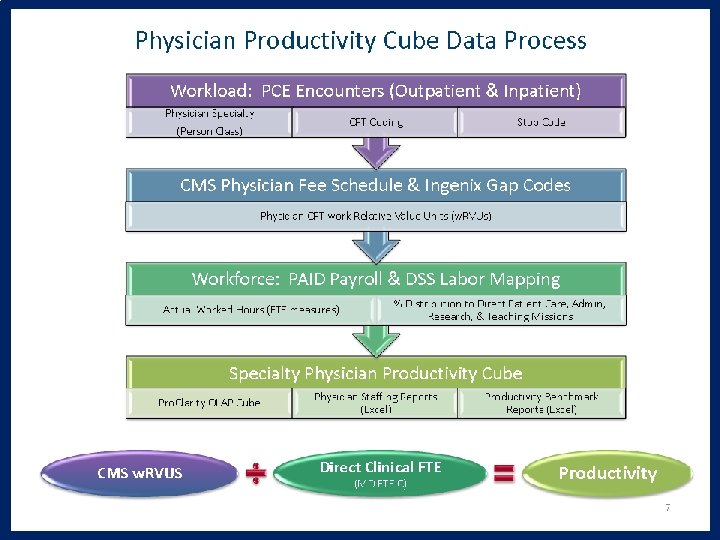
DSS, Labor Mapping and RVUs: Keeping It All Together! Now that you have had enough of DSS RVUs, let’s turn our attention to Specialty (Optometry) PRODUCTIVITY (CMS work RVUs (w. RVUs)): • Falls under Office of Productivity, Efficiency, and Staffing (OPES). • OPES examines, develops, and implements productivity standards and tools. • The tools developed include standardized business rules to ensure the consistent application of physician labor mapping processes, tools for identifying person class designations within specialties, and to evaluate specialty productivity, access, staffing, and efficiency.
DSS, Labor Mapping and RVUs: Keeping It All Together! • DSS has been in place for some time. • Last year, Optometry reviewed/refined the labor mapping and taxonomy codes used nationally. • It is imperative that you review your local taxonomy now (if you haven’t already done so) to be sure that the correct capture of data is made. This data is used in RVU productivity calculations. (see Person Class Tool in Related Links section at: http: //opes. vssc. med. va. gov/Pages/Practice. Man agement. aspx )
n o s r e P e l p p m a a S M s s Cla
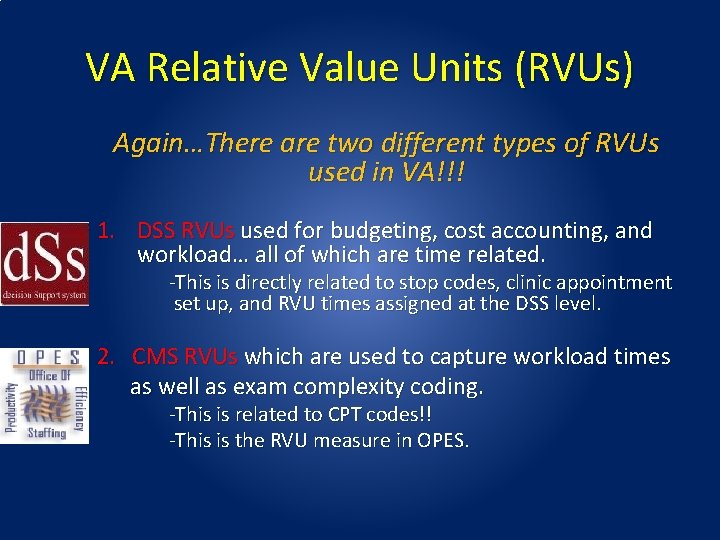
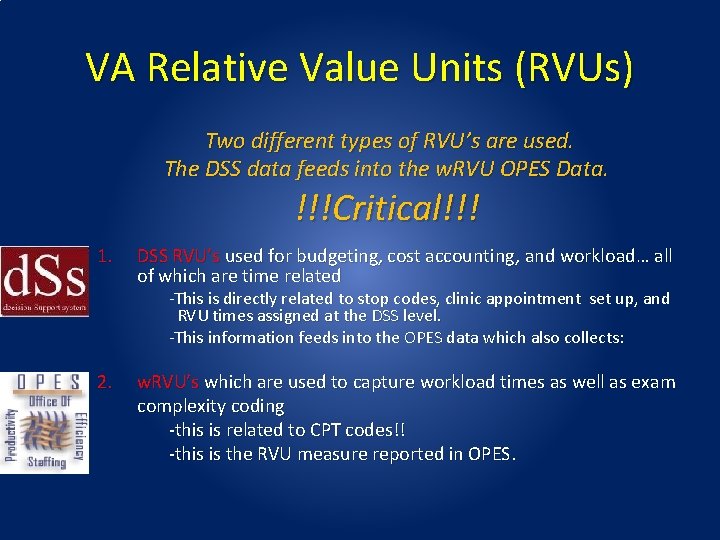
VA Relative Value Units (RVUs) Again…There are two different types of RVUs used in VA!!! 1. DSS RVUs used for budgeting, cost accounting, and workload… all of which are time related. -This is directly related to stop codes, clinic appointment set up, and RVU times assigned at the DSS level. 2. CMS RVUs which are used to capture workload times as well as exam complexity coding. -This is related to CPT codes!! -This is the RVU measure in OPES.
RVUs are the Key to It All!! • Will allow better accountability of personnel and resources providing patient care • Will better identify weaknesses in resources • You must make sure your DSS RVUs and clinics are correctly set up because the DSS data feeds into the OPES data.
VA CMS Relative Value Unit (w. RVU) • A Relative Value Unit (RVU) based method has been adopted to measure specialty physician productivity similar to that used in the private sector and Centers for Medicare & Medicaid Services (CMS). • Beginning in FY 2012, Optometry and other subspecialties have been added to this RVU based methodology OPES system.
Background • All optometrists who have outpatient and inpatient PCE (Patient Care Encounter) encounter workload with CPT coding is used in calculating physician productivity within VA. • However, this applies to paid clinicians only. • Productivity is expressed in Relative Value Units (RVUs) per physician provider FTEE that is dedicated to clinical duties.
Resource-based Relative Value Scale (CMS RVU) • Implemented in 1992 by Center for Medicare and Medicaid Services (CMS) • Sets reimbursement rate for each CPT code • Based on value of resources required to provide service- now being tracked within VA for each service • Assigned Relative Value Unit (RVU) linked to each CPT code • Each CPT code has 3 RVU values; – – – Physician effort/intensity RVU Practice expense RVU Malpractice RVU
CMS RVUs • Budget neutrality factor • Conversion Factor: converts RVUs to dollar amount • Ref: http: //www. cms. gov/Medicare -Fee-for-Service. Payment/Physician. Fee. Sched/PFS-Relative. Value-Files. Items/RVU 14 A. html? DLPage=1&DLSort=0&DL Sort. Dir=descending
CMS RVUs How to find RVU and GPCI values: • Go to: http: //www. cms. gov/Medicare-Feefor-Service. Payment/Physician. Fee. Sched/index. html? redir ect=/Physician. Fee. Sched • and select “PFS Relative Value Files. ” Then find the latest zip file.
VA Relative Value Units (Again 2 Types That Are Used) NOTE: RVUs in VA are a little different: • CMS RVUs that are used to determine payment fees for procedures in private practice settings (called work Relative Value Unit or w. RVU). • DSS RVUs are used a part of calculation for determining cost of products and ultimately the cost per patient encounter
VA w. RVU Data Sources and Methods • Physicians, chiropractors, optometrists, podiatrists, and psychologists who are transmitting outpatient and inpatient PCE (Patient Care Encounter) encounter workload with CPT coding which is used in calculating physician productivity. (w. RVU). • The database contains workload for VA PAID physicians, In-House FEE physicians, residents not assigned to providers on encounter forms, without compensation physician providers (WOCs), and contract physician providers. (DSS-RVU’s)

Understand Remember… YOU CAN’T BILL FOR WHAT YOU DO… YOU CAN ONLY BILL FOR WHAT IS DOCUMENTED • YOU CAN’T GET CREDIT FOR YOUR WORKLOAD UNLESS YOU CODE CORRECTLY and are MAPPED correctly. • YOUR CODING COMPLETION MUST BE TIMELY!! – Your DSS workload is captured monthly- your encounters must be in by the monthly deadline or your work is NOT captured and never will be!!!
VA Relative Value Units (RVUs) Two different types of RVU’s are used. The DSS data feeds into the w. RVU OPES Data. !!!Critical!!! 1. DSS RVU’s used for budgeting, cost accounting, and workload… all of which are time related -This is directly related to stop codes, clinic appointment set up, and RVU times assigned at the DSS level. -This information feeds into the OPES data which also collects: 2. w. RVU’s which are used to capture workload times as well as exam complexity coding -this is related to CPT codes!! -this is the RVU measure reported in OPES.
Productivity (CMS w. RVU) • Definition: Expressed in Relative Value Units (w. RVUs) per physician provider FTEE that is dedicated to clinical duties (MD FTE (c)) as reported in DSS labor mapping (DSS RVU)
OPES w. RVU Computation • RVU per MD FTE (C) = Sum (VA PAID MD workload + Resident workload where resident workload is assigned to an attending (DSS RVU) ÷ Adjusted MD FTE (C)* *Adjusted MD FTE (C): The total amount of physician FTE that is assigned to clinical duties in the specialty, excluding administration, teaching, research and inpatient bed days as defined in DSS databases.
For w. RVUs • Current procedural terminology (CPT) codes are critically important!!! • For all of eye care these codes are now constructed using Systemized Nomenclature of Medicine Clinical Terms (SNOMED-CT) terminology for all procedures in eye care. SNOMED structures are rigid and cannot be deviated from. (don’t bother to try to invent your own). • CPT codes will be discussed in an upcoming module.
Workload (Derived from Encounters (DSS RVU’s), CPT (w. RVU’s), & Unique Patients) • Note: CPT codes are converted to practice level work RVUs (w. RVUs) using the annual CMS and Ingenix files. • All encounter CPT coding from workload described above is merged with the annual Medicare RVU files obtained from CMS and Medicare gap code RVUs obtained from Ingenix.
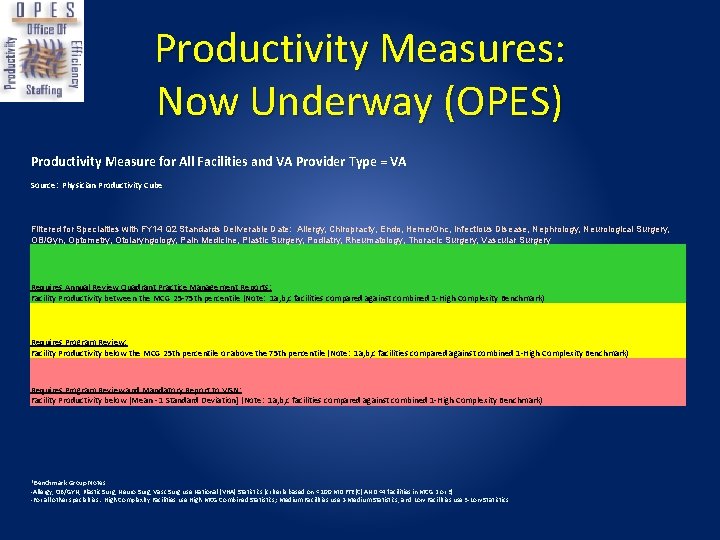
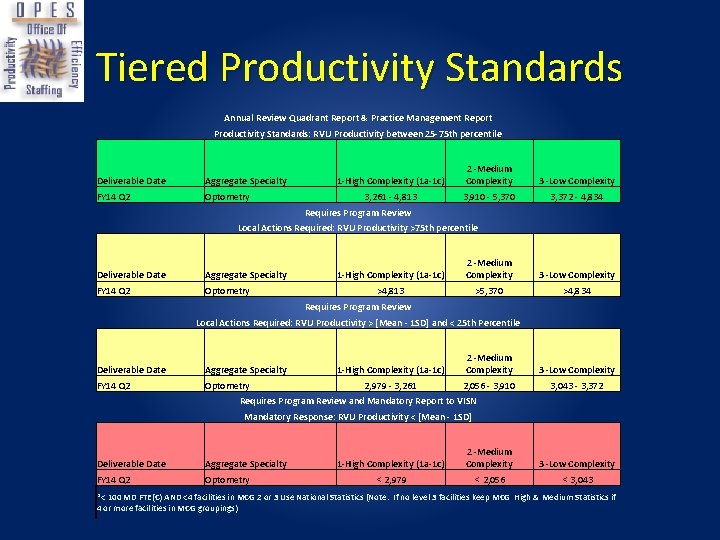
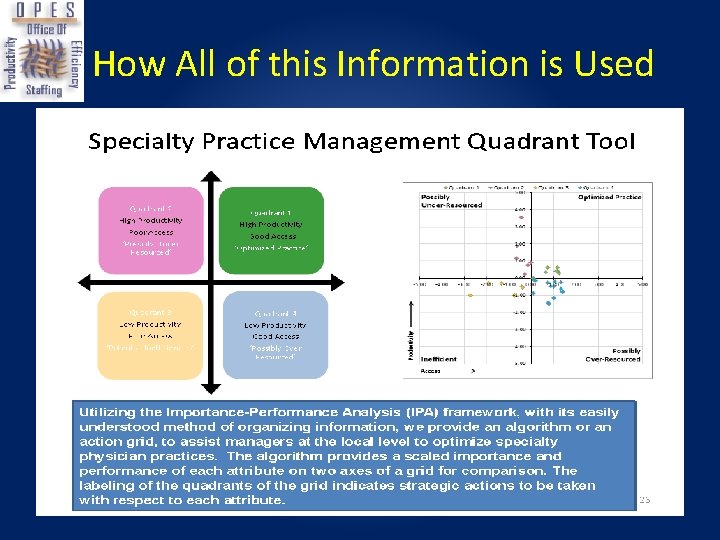
Physician Productivity Data • The Physician Productivity Benchmarking Reports are designed to provide a management tool for the systematic, longitudinal measurement and reporting of clinical productivity, efficiency and staffing in VHA. • The productivity benchmarking tool shows the average, range, and variation in productivity across specialties at the National, VISN, complexity group, and administrative parent level. • This information can be used to identify areas of need or improvement within relevant comparison groups. Hence, its accuracy is critical!
Productivity Calculation • MD FTE (C) is the sum of clinical hours for providers within a subspecialty divided by the total number of hours available to work for the FY to date. • Adjusted MD FTE (C) is the clinical hours worked in a given fiscal period. • So…. Your work RVU’s divided by your Worked Direct Clinical FTE is your productivity!
Productivity Measures: Now Underway (OPES) Productivity Measure for All Facilities and VA Provider Type = VA Source: Physician Productivity Cube Filtered for Specialties with FY 14 Q 2 Standards Deliverable Date: Allergy, Chiropracty, Endo, Heme/Onc, Infectious Disease, Nephrology, Neurological Surgery, OB/Gyn, Optometry, Otolaryngology, Pain Medicine, Plastic Surgery, Podiatry, Rheumatology, Thoracic Surgery, Vascular Surgery Requires Annual Review Quadrant Practice Management Reports: Facility Productivity between the MCG 25 -75 th percentile (Note: 1 a, b, c facilities compared against combined 1 -High Complexity Benchmark) Requires Program Review: Facility Productivity below the MCG 25 th percentile or above the 75 th percentile (Note: 1 a, b, c facilities compared against combined 1 -High Complexity Benchmark) Requires Program Review and Mandatory Report to VISN: Facility Productivity below [Mean - 1 Standard Deviation] (Note: 1 a, b, c facilities compared against combined 1 -High Complexity Benchmark) *Benchmark Group Notes: -Allergy, OB/GYN, Plastic Surg, Neuro Surg, Vasc Surg use National (VHA) Statistics (criteria based on < 100 MD FTE(C) AND <4 facilities in MCG 2 or 3) -For all other specialties: High Complexity Facilities use High MCG Combined Statistics; Medium Facilities use 2 -Medium Statistics, and Low Facilities use 3 -Low Statistics
Facility Complexity: Medical Center Complexity Group (as seen in productivity reports) Groupings allow comparisons of facilities with similar characteristics • 1 a- high complexity • 1 b- high complexity • 1 c- high complexity • 2 - medium complexity • 3 - low complexity • 98 -excluded
Tiered Productivity Standards Annual Review Quadrant Report & Practice Management Report Productivity Standards: RVU Productivity between 25 -75 th percentile Deliverable Date Aggregate Specialty FY 14 Q 2 Optometry 1 -High Complexity (1 a-1 c) 2 -Medium Complexity 3 -Low Complexity 3, 261 - 4, 813 3, 910 - 5, 370 3, 372 - 4, 834 Requires Program Review Local Actions Required: RVU Productivity >75 th percentile Deliverable Date Aggregate Specialty FY 14 Q 2 Optometry 1 -High Complexity (1 a-1 c) 2 -Medium Complexity 3 -Low Complexity >4, 813 >5, 370 >4, 834 Requires Program Review Local Actions Required: RVU Productivity > [Mean - 1 SD] and < 25 th Percentile Deliverable Date Aggregate Specialty FY 14 Q 2 Optometry 1 -High Complexity (1 a-1 c) 2 -Medium Complexity 3 -Low Complexity 2, 979 - 3, 261 2, 056 - 3, 910 3, 043 - 3, 372 Requires Program Review and Mandatory Report to VISN Mandatory Response: RVU Productivity < [Mean - 1 SD] Deliverable Date Aggregate Specialty FY 14 Q 2 Optometry 1 -High Complexity (1 a-1 c) 2 -Medium Complexity 3 -Low Complexity < 2, 979 < 2, 056 < 3, 043 *< 100 MD FTE(C) AND <4 facilities in MCG 2 or 3 Use National Statistics (Note: If no level 3 facilities keep MCG High & Medium Statistics if 4 or more facilities in MCG groupings)
How All of this Information is Used
In Summary • Review your Labor Mapping- it must be correct!! • DSS RVUs must be set up correctly for your station and clinic, also data must be documented correctly and Timely!! • w. RVU’s depend on CPT codes and all procedures must be documented in the encounter. • Review your OPES reports. • Specific encounter coding will be covered in the next few modules.
- Slides: 58