
COBOL BY JOSHUA THOMAS IGNATIUS TOWERS Overview What
COBOL BY: JOSHUA THOMAS IGNATIUS TOWERS
Overview �What is COBOL �History �Design �Implementations �What did it do �Program structure �Data types �Syntax �Sample �Evaluation
What is COBOL � COmmon Business Oriented Language
History �Progenitor FLOW-MATIC primary � Implemented in 1957 � For use in UNIVAC AIMACO � U. S. Air Force COMTRAN � IBM
History �Grace Hopper 1953 “Mathematical programs should be written in mathematical notation, data processing programs should be written in English statements” (Sebesta) �First Prototype used English, French, and the German
Design �Designed in a Committee �The Department of Defense sponsored
Design �Use as much English as possible �Easy to use even at the expense of power �Easy to read even for non programmers �Should not be restricted by implementation
Implementations �COBOL 60 �COBOL 74 �COBOL 85 �COBOL 2002
What Did It Do �DEFINE First high level construct for macros �Records First implemented in COBOL �Long names with connector characters �Data Description section
Program structure �Hierarchy Divisions, Sections, Paragraphs, Sentences, and Statements �Divisions Identification, Environment, Data, and Procedure
Data Types �Numeric ‘S’, ‘V’, ‘ 9’ �Alphabetic ‘A’ �Alpha. Numeric ‘X’, ‘S’, ‘V’, ‘ 9’, ‘A’ �Figurative Constants SPACE, ZERO
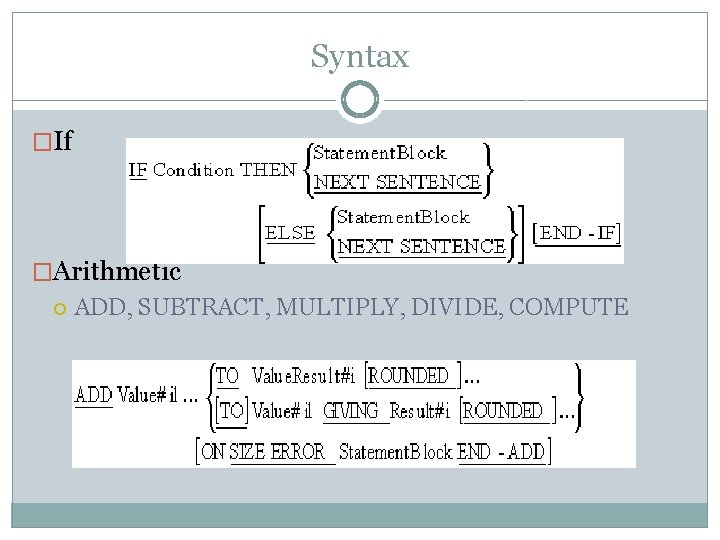
Syntax �If �Arithmetic ADD, SUBTRACT, MULTIPLY, DIVIDE, COMPUTE
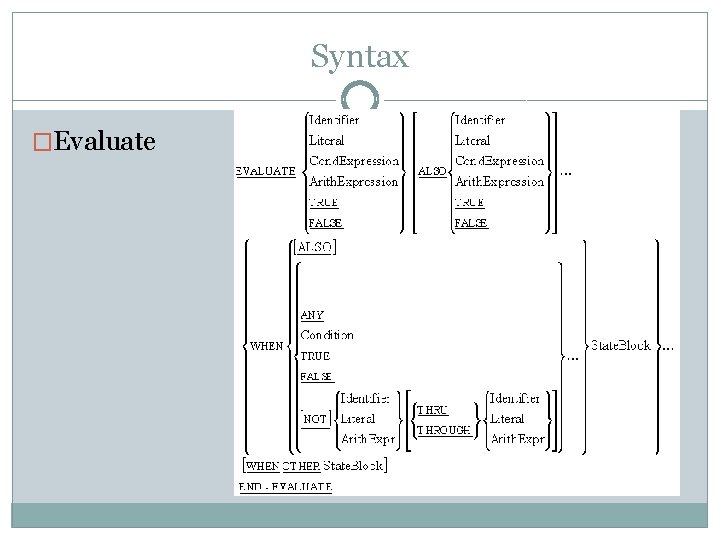
Syntax �Evaluate
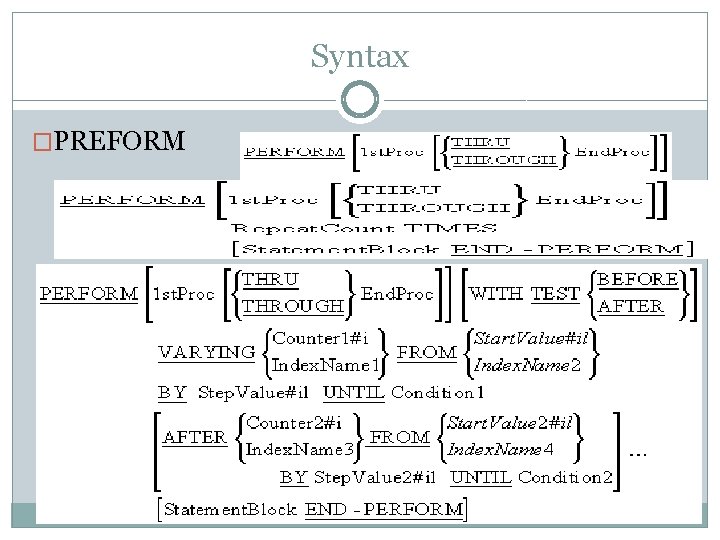
Syntax �PREFORM
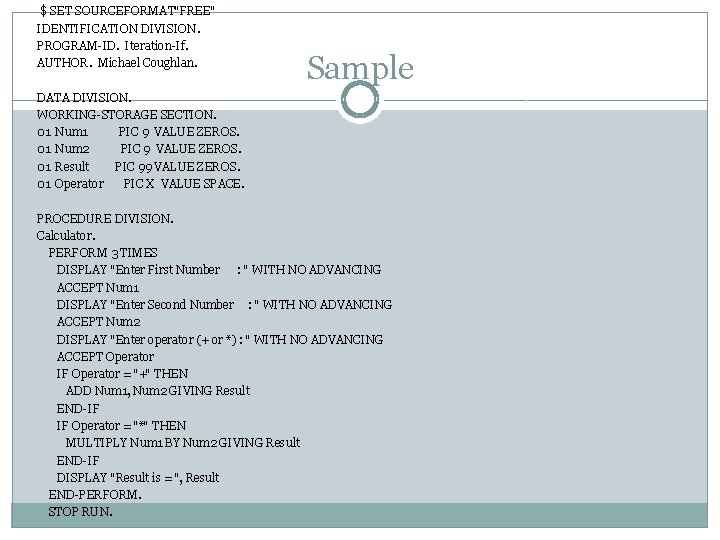
$ SET SOURCEFORMAT"FREE" IDENTIFICATION DIVISION. PROGRAM-ID. Iteration-If. AUTHOR. Michael Coughlan. Sample DATA DIVISION. WORKING-STORAGE SECTION. 01 Num 1 PIC 9 VALUE ZEROS. 01 Num 2 PIC 9 VALUE ZEROS. 01 Result PIC 99 VALUE ZEROS. 01 Operator PIC X VALUE SPACE. PROCEDURE DIVISION. Calculator. PERFORM 3 TIMES DISPLAY "Enter First Number : " WITH NO ADVANCING ACCEPT Num 1 DISPLAY "Enter Second Number : " WITH NO ADVANCING ACCEPT Num 2 DISPLAY "Enter operator (+ or *) : " WITH NO ADVANCING ACCEPT Operator IF Operator = "+" THEN ADD Num 1, Num 2 GIVING Result END-IF IF Operator = "*" THEN MULTIPLY Num 1 BY Num 2 GIVING Result END-IF DISPLAY "Result is = ", Result END-PERFORM. STOP RUN.
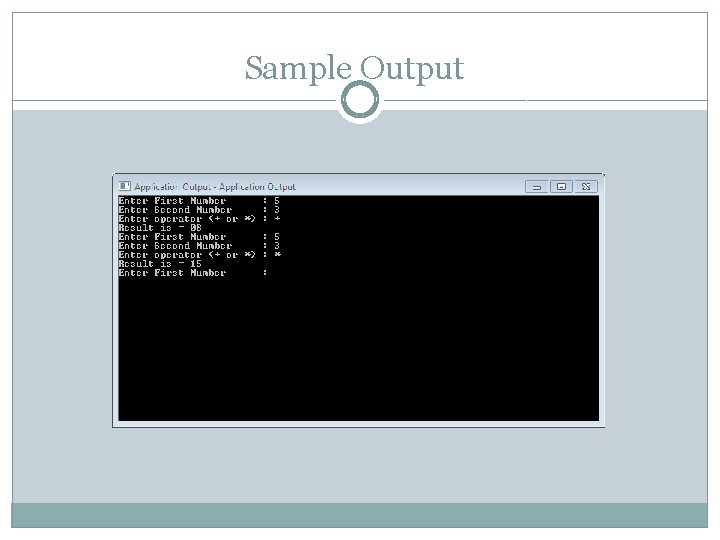
Sample Output
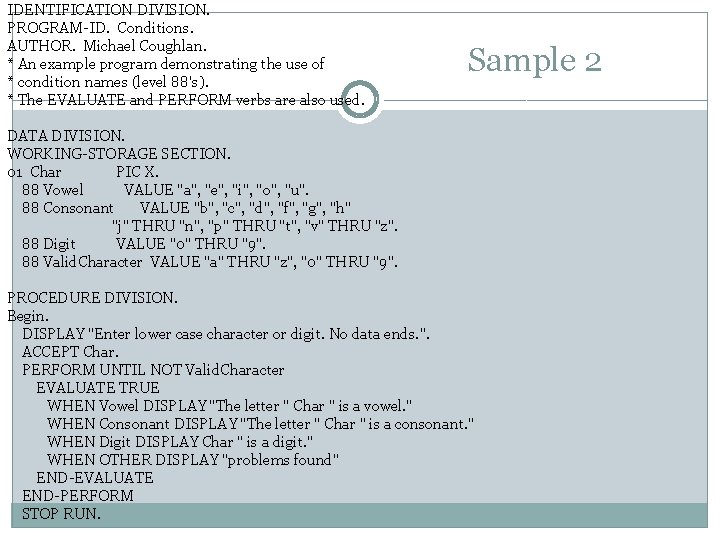
IDENTIFICATION DIVISION. PROGRAM-ID. Conditions. AUTHOR. Michael Coughlan. * An example program demonstrating the use of * condition names (level 88's). * The EVALUATE and PERFORM verbs are also used. Sample 2 DATA DIVISION. WORKING-STORAGE SECTION. 01 Char PIC X. 88 Vowel VALUE "a", "e", "i", "o", "u". 88 Consonant VALUE "b", "c", "d", "f", "g", "h" "j" THRU "n", "p" THRU "t", "v" THRU "z". 88 Digit VALUE "0" THRU "9". 88 Valid. Character VALUE "a" THRU "z", "0" THRU "9". PROCEDURE DIVISION. Begin. DISPLAY "Enter lower case character or digit. No data ends. ". ACCEPT Char. PERFORM UNTIL NOT Valid. Character EVALUATE TRUE WHEN Vowel DISPLAY "The letter " Char " is a vowel. " WHEN Consonant DISPLAY "The letter " Char " is a consonant. " WHEN Digit DISPLAY Char " is a digit. " WHEN OTHER DISPLAY "problems found" END-EVALUATE END-PERFORM STOP RUN.
Evaluation �Readability �Write ability �Reliability �Cost
Sources � Coughlan, Michael. Cobol Tutorial. March 1999. October 2011 � � � � � <http: //www. csis. ul. ie/cobol/course/Data. Declaration. htm>. Hodgson, Jonathan. Sample COBOL program. 7 February 2000. <http: //www. sju. edu/~jhodgson/cobol/sample. html>. IBM. "Language Reference Version 3 Release 3. " IBM, February 2004. Mc. Closkey, Robert. COBOL Subprograms. <http: //www. cs. uofs. edu/~mccloske/courses/cmps 340/lecture_notes/cobol_subpr ogs. html>. Merant. Programmer's Guide to Writing Programs. 1999. <http: //supportline. microfocus. com/documentation/books/oc 41 books/prconc. htm >. Reimann, Artur. COBOL 2000. San Jose: Fujitsu Software Corporation, 1999. —. "Object Oriented Programming in COBOL 2000. " Fujitsu Software Corporation, 1999. Sebesta, Robert W. Concept of Programming Languages. Boston: Pearson Education, 2009. Towers, William. Manager Data Storage Joshua Towers. November 2011. Coughlan. , M. (n. d. ). COBOL Example Programs. Retrieved from Department of CSIS: http: //www. csis. ul. ie/cobol/examples/default. htm#Selection
- Slides: 19