
CMVNET Chigo VRF Network Centralized Control System CHIGO

- Slides: 39
CMV-NET Chigo VRF Network Centralized Control System CHIGO CAC Technical Service Division
Contents 1. CMV-NET Introduction 2. Software Introduction 3. Hardware Introduction 4. BMS Gateway CHIGO CAC Technical Support Division
CMV-NET Introduction CHIGO CAC Technical Support Division
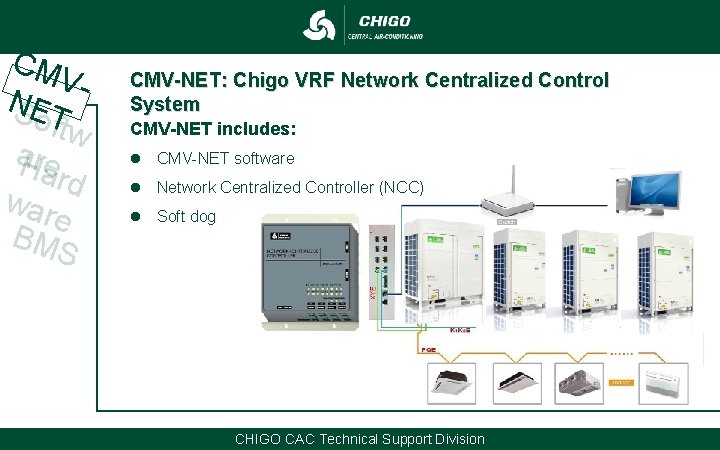
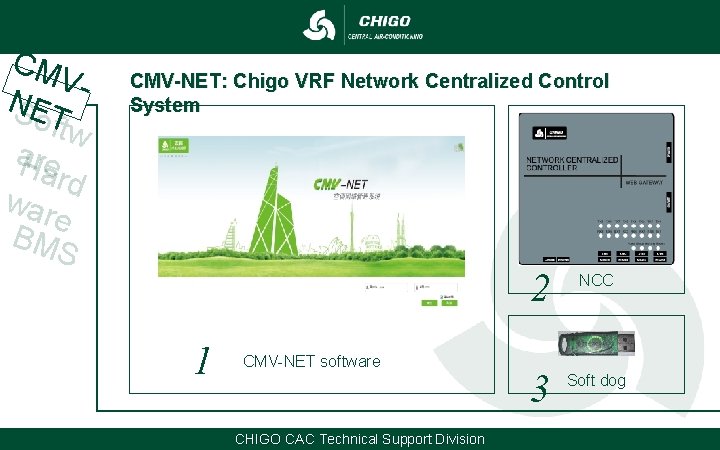
CM VNSET oftw a. Hre ard war e BM S CMV-NET: Chigo VRF Network Centralized Control System CMV-NET includes: l CMV-NET software l Network Centralized Controller (NCC) l Soft dog CHIGO CAC Technical Support Division
CM VNSET oftw a. Hre ard war e BM S CMV-NET: Chigo VRF Network Centralized Control System 1 CMV-NET software CHIGO CAC Technical Support Division 2 NCC 3 Soft dog
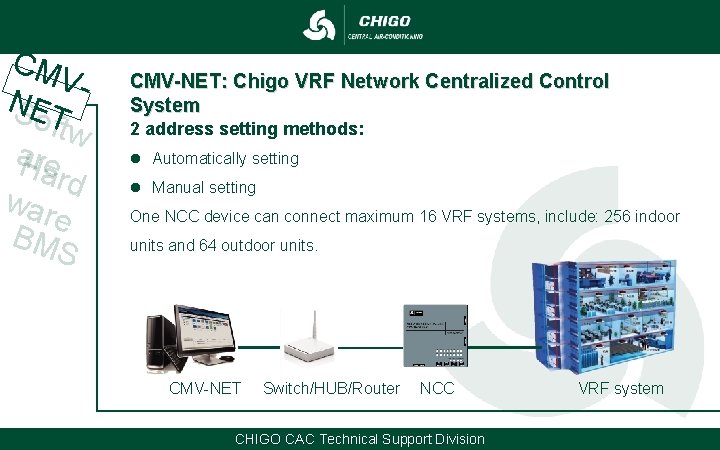
CM VNSET oftw a. Hre ard war e BM S CMV-NET: Chigo VRF Network Centralized Control System 2 address setting methods: l Automatically setting l Manual setting One NCC device can connect maximum 16 VRF systems, include: 256 indoor units and 64 outdoor units. CMV-NET Switch/HUB/Router NCC CHIGO CAC Technical Support Division VRF system
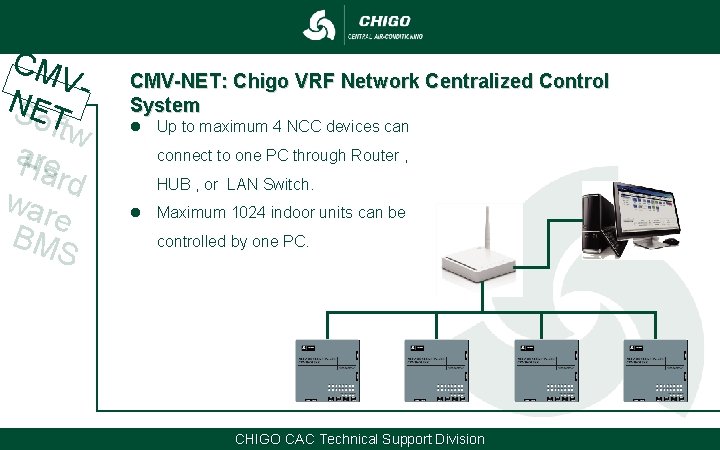
CM VNSET oftw a. Hre ard war e BM S CMV-NET: Chigo VRF Network Centralized Control System l Up to maximum 4 NCC devices can connect to one PC through Router , HUB , or LAN Switch. l Maximum 1024 indoor units can be controlled by one PC. CHIGO CAC Technical Support Division
Software Introduction CHIGO CAC Technical Support Division
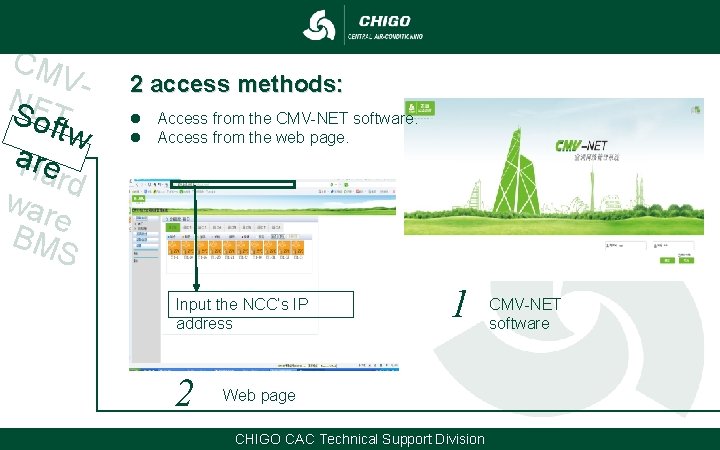
CM VN SE o. T ftw a. Hre ard war e BM S 2 access methods: l Access from the CMV-NET software. l Access from the web page. Input the NCC’s IP address 2 1 Web page CHIGO CAC Technical Support Division CMV-NET software
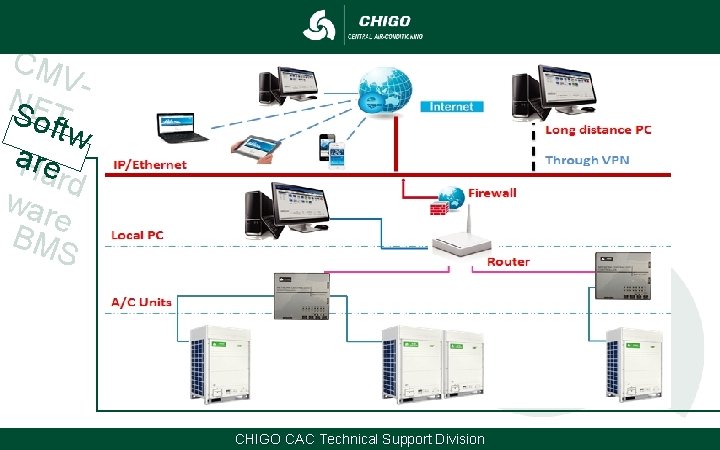
CM VN SE o. T ftw a. Hre ard war e BM S CHIGO CAC Technical Support Division
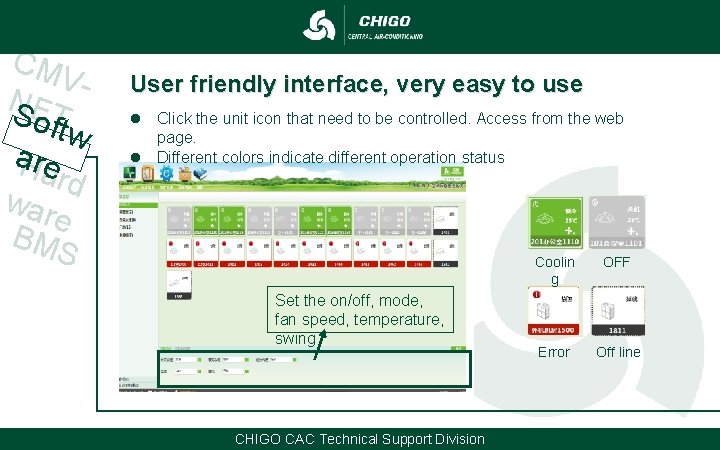
CM VN SE o. T ftw a. Hre ard war e BM S User friendly interface, very easy to use l Click the unit icon that need to be controlled. Access from the web page. l Different colors indicate different operation status Set the on/off, mode, fan speed, temperature, swing CHIGO CAC Technical Support Division Coolin g OFF Error Off line
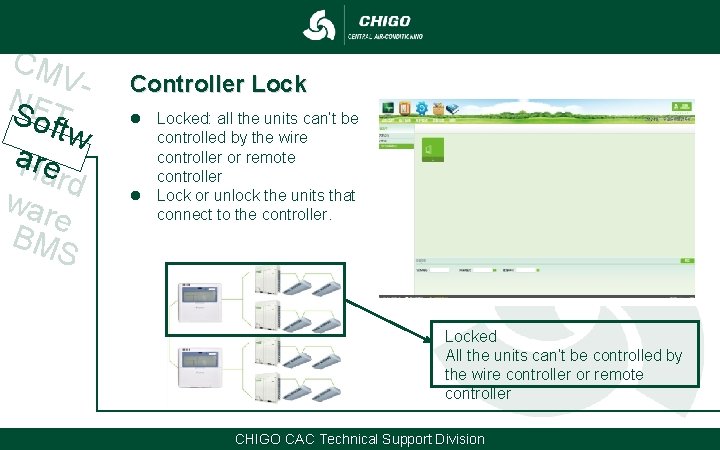
CM VN SE o. T ftw a. Hre ard war e BM S Controller Lock l Locked: all the units can’t be controlled by the wire controller or remote controller l Lock or unlock the units that connect to the controller. Locked All the units can’t be controlled by the wire controller or remote controller CHIGO CAC Technical Support Division
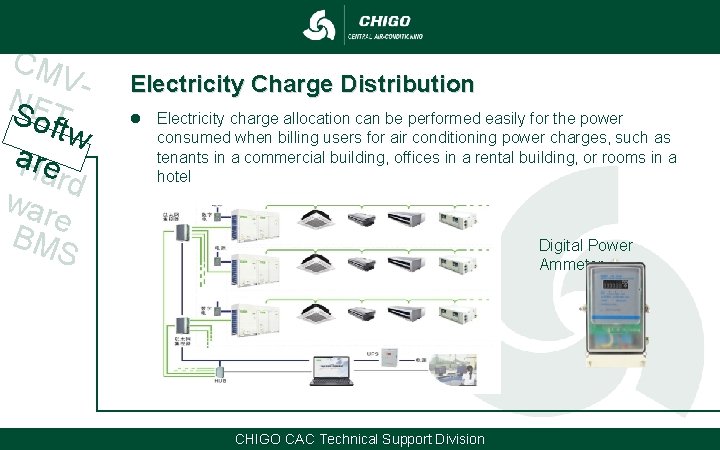
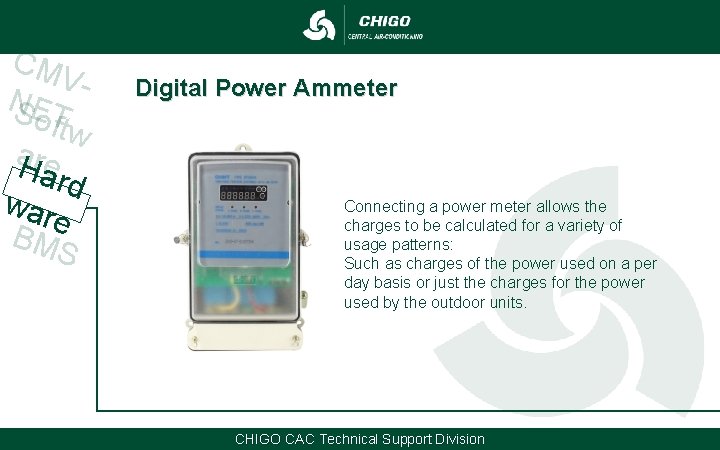
CM VN SE o. T ftw a. Hre ard war e BM S Electricity Charge Distribution l Electricity charge allocation can be performed easily for the power consumed when billing users for air conditioning power charges, such as tenants in a commercial building, offices in a rental building, or rooms in a hotel Digital Power Ammeter CHIGO CAC Technical Support Division
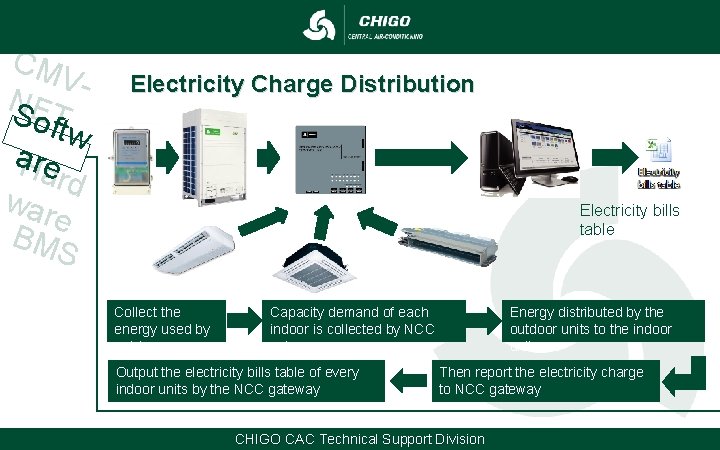
CM VN SE o. T ftw a. Hre ard war e BM S Electricity Charge Distribution Electricity bills table Collect the energy used by outdoors Capacity demand of each indoor is collected by NCC gateway Output the electricity bills table of every indoor units by the NCC gateway Energy distributed by the outdoor units to the indoor units Then report the electricity charge to NCC gateway CHIGO CAC Technical Support Division
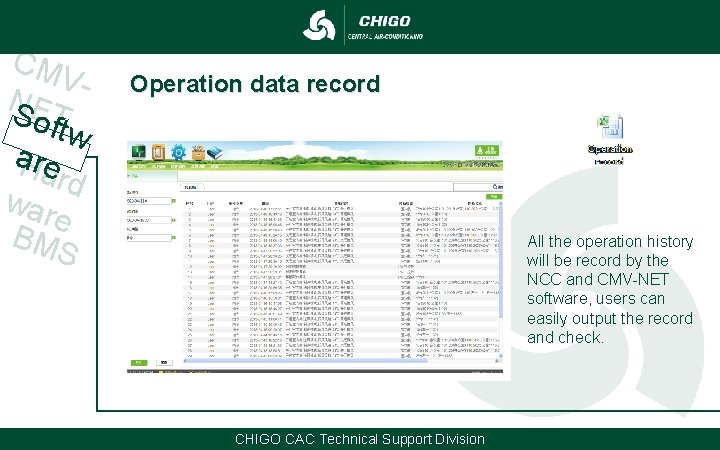
CM VN SE o. T ftw a. Hre ard war e BM S Operation data record All the operation history will be record by the NCC and CMV-NET software, users can easily output the record and check. CHIGO CAC Technical Support Division
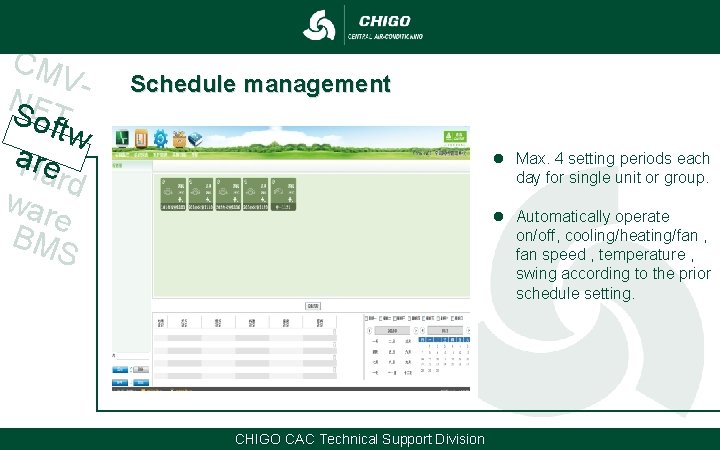
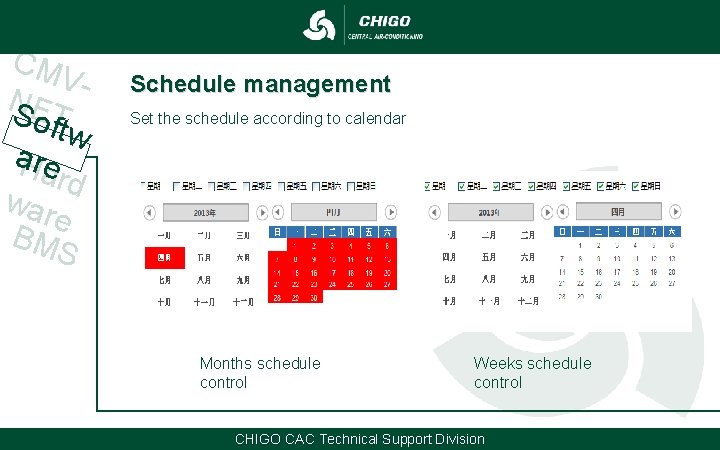
CM VN SE o. T ftw a. Hre ard war e BM S Schedule management l Max. 4 setting periods each day for single unit or group. l Automatically operate on/off, cooling/heating/fan , fan speed , temperature , swing according to the prior schedule setting. CHIGO CAC Technical Support Division
CM VN SE o. T ftw a. Hre ard war e BM S Schedule management Set the schedule according to calendar Months schedule control Weeks schedule control CHIGO CAC Technical Support Division
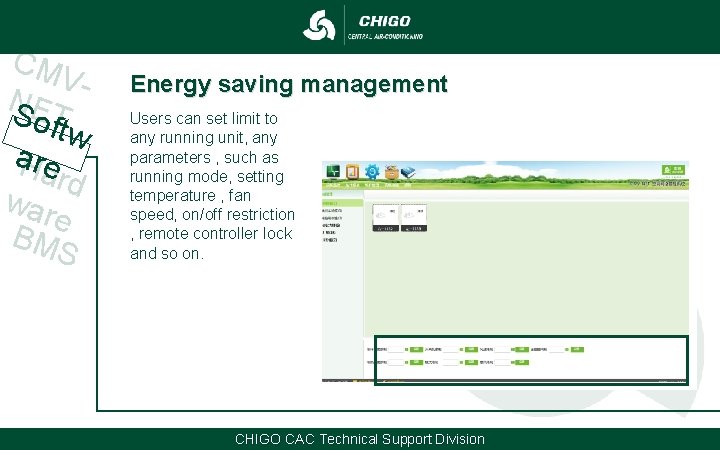
CM VN SE o. T ftw a. Hre ard war e BM S Energy saving management Users can set limit to any running unit, any parameters , such as running mode, setting temperature , fan speed, on/off restriction , remote controller lock and so on. CHIGO CAC Technical Support Division
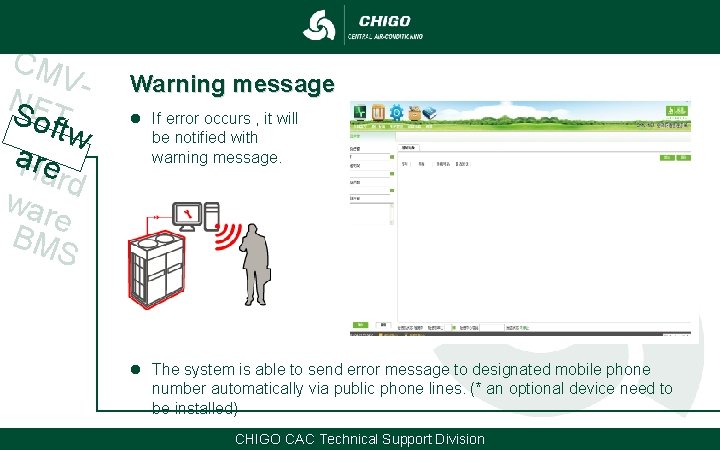
CM VN SE o. T ftw a. Hre ard war e BM S Warning message l If error occurs , it will be notified with warning message. l The system is able to send error message to designated mobile phone number automatically via public phone lines. (* an optional device need to be installed) CHIGO CAC Technical Support Division
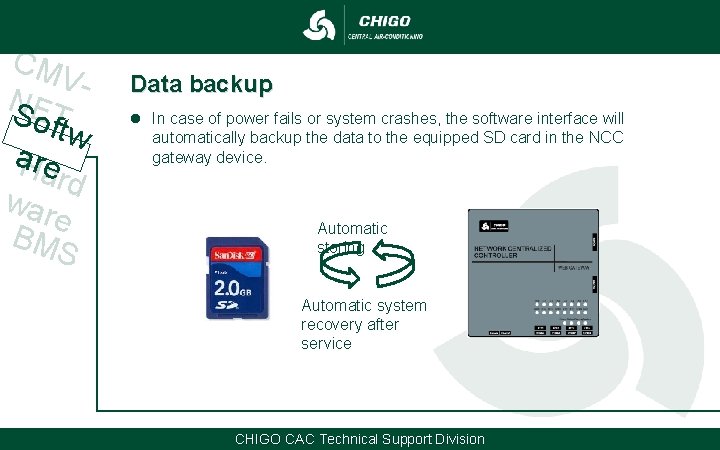
CM VN SE o. T ftw a. Hre ard war e BM S Data backup l In case of power fails or system crashes, the software interface will automatically backup the data to the equipped SD card in the NCC gateway device. Automatic storing Automatic system recovery after service CHIGO CAC Technical Support Division
Hardware Introduction CHIGO CAC Technical Support Division
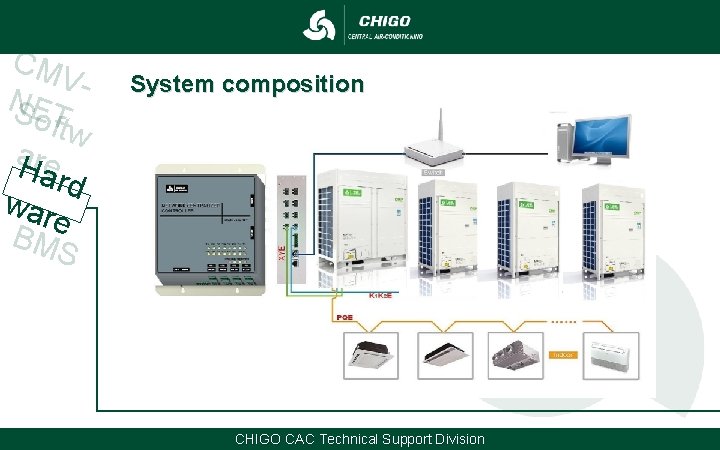
CM VNSET oftw a. Hre ard war e BM S System composition CHIGO CAC Technical Support Division
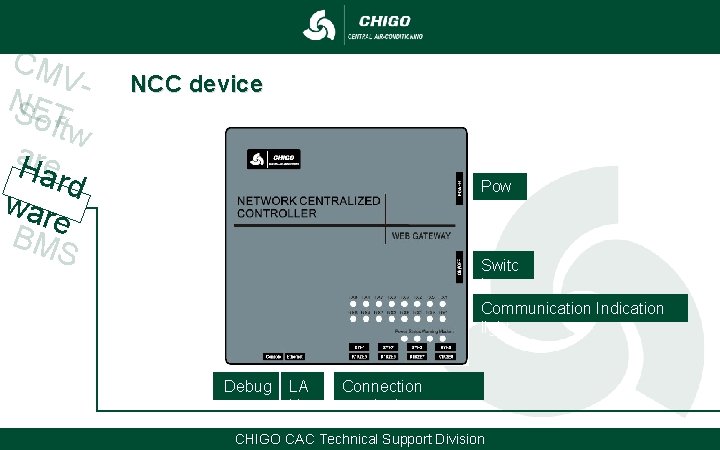
CM VNSET oftw a. Hre ard war e BM S NCC device Pow er Switc h Communication Indication light Debug LA N Connection terminals CHIGO CAC Technical Support Division
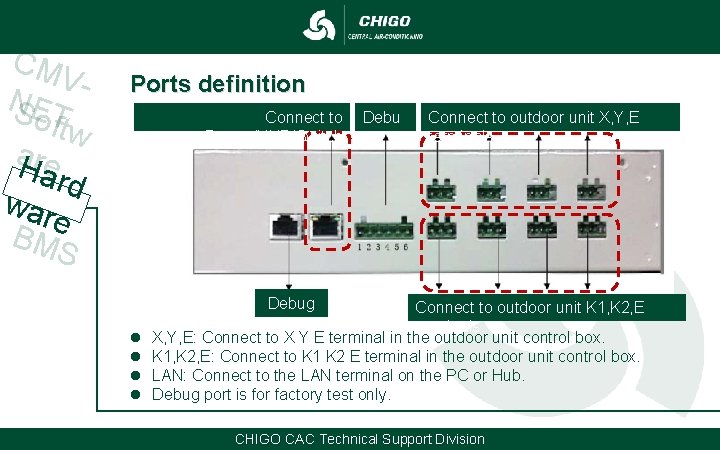
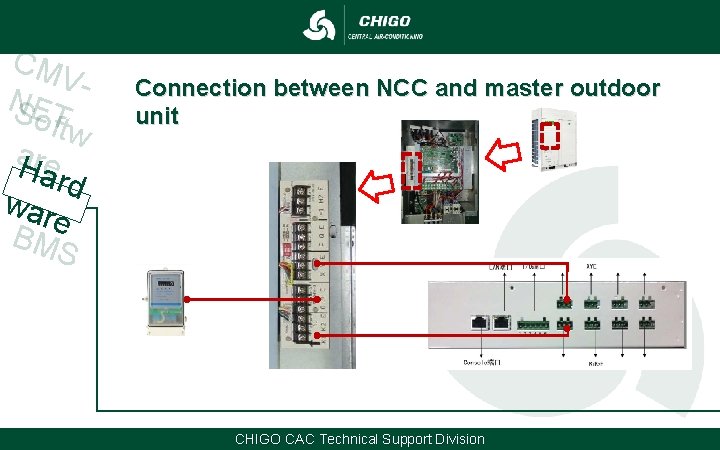
CM VNSET oftw a. Hre ard war e BM S Ports definition Connect to Router/HUB/Switch Debu g Connect to outdoor unit X, Y, E terminals Debug l l Connect to outdoor unit K 1, K 2, E terminals X, Y, E: Connect to X Y E terminal in the outdoor unit control box. K 1, K 2, E: Connect to K 1 K 2 E terminal in the outdoor unit control box. LAN: Connect to the LAN terminal on the PC or Hub. Debug port is for factory test only. CHIGO CAC Technical Support Division
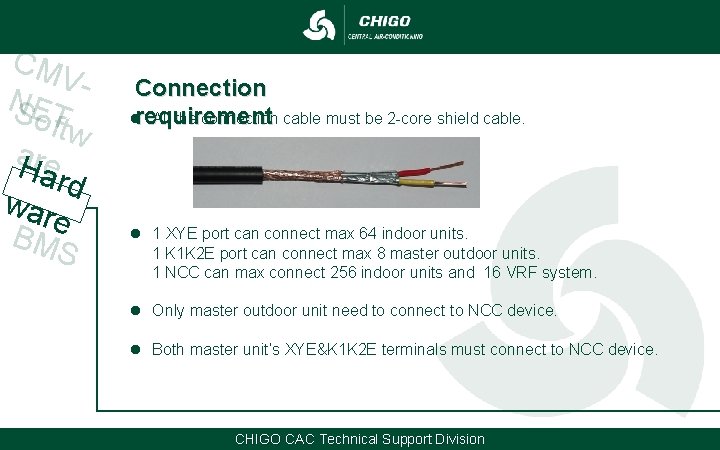
CM VNSET oftw a. Hre ard war e BM S Connection lrequirement All the connection cable must be 2 -core shield cable. l 1 XYE port can connect max 64 indoor units. 1 K 1 K 2 E port can connect max 8 master outdoor units. 1 NCC can max connect 256 indoor units and 16 VRF system. l Only master outdoor unit need to connect to NCC device. l Both master unit’s XYE&K 1 K 2 E terminals must connect to NCC device. CHIGO CAC Technical Support Division
CM VNSET oftw a. Hre ard war e BM S Connection between NCC and master outdoor unit CHIGO CAC Technical Support Division
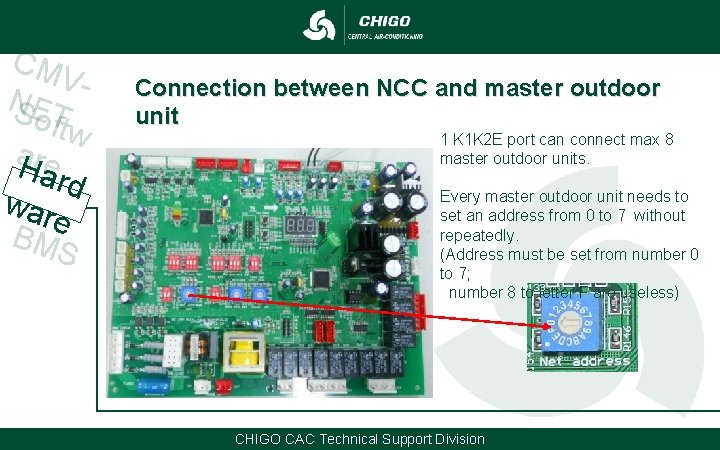
CM VNSET oftw a. Hre ard war e BM S Connection between NCC and master outdoor unit 1 K 1 K 2 E port can connect max 8 master outdoor units. Every master outdoor unit needs to set an address from 0 to 7 without repeatedly. (Address must be set from number 0 to 7; number 8 to letter F are useless) CHIGO CAC Technical Support Division
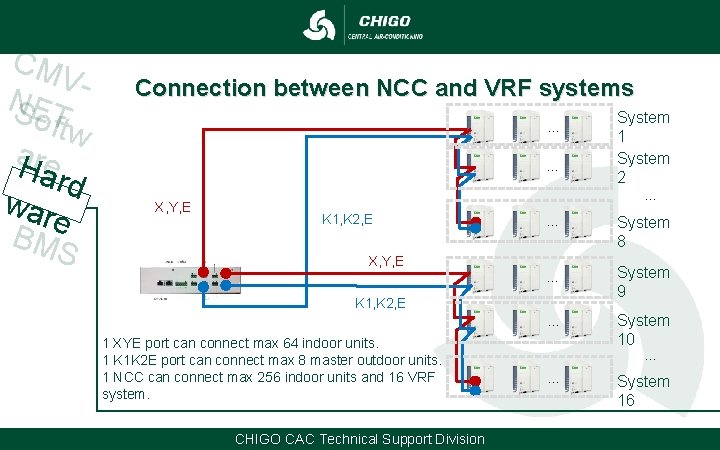
CM VNSET oftw a. Hre ard war e BM S Connection between NCC and VRF systems … … X, Y, E System 1 System 2 … K 1, K 2, E … System 8 … System 9 … System 10 X, Y, E K 1, K 2, E 1 XYE port can connect max 64 indoor units. 1 K 1 K 2 E port can connect max 8 master outdoor units. 1 NCC can connect max 256 indoor units and 16 VRF system. CHIGO CAC Technical Support Division … … System 16
CM VNSET oftw a. Hre ard war e BM S Digital Power Ammeter Connecting a power meter allows the charges to be calculated for a variety of usage patterns: Such as charges of the power used on a per day basis or just the charges for the power used by the outdoor units. CHIGO CAC Technical Support Division
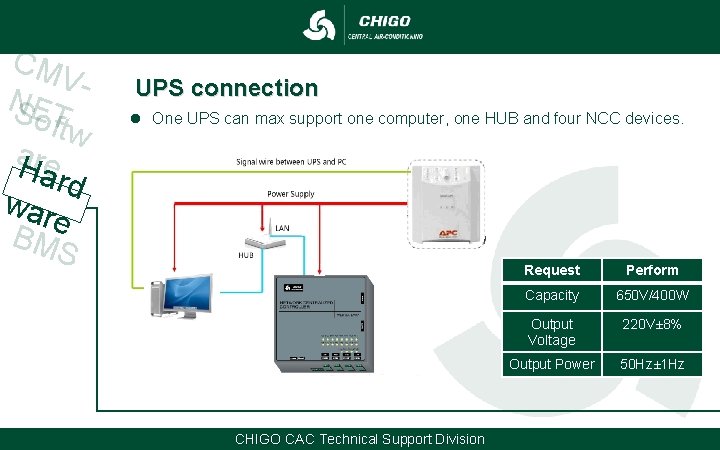
CM VNSET oftw a. Hre ard war e BM S UPS connection l One UPS can max support one computer, one HUB and four NCC devices. CHIGO CAC Technical Support Division Request Perform Capacity 650 V/400 W Output Voltage 220 V± 8% Output Power 50 Hz± 1 Hz
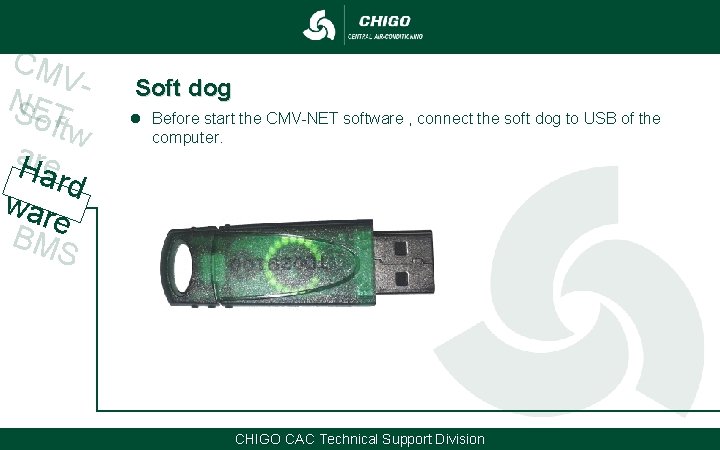
CM VNSET oftw a. Hre ard war e BM S Soft dog l Before start the CMV-NET software , connect the soft dog to USB of the computer. CHIGO CAC Technical Support Division
BMS Gateway CHIGO CAC Technical Support Division
CM VNSET oftw a. Hre ard war e BM S What is BMS ? l Building Management System = BMS l A kind of software developed by third-party professional software company l Used to control all the intelligent equipment in the building, such as air conditioner、alarm、fire protection、elevator、light、water supply and drainage and so on What is BMS Gateway ? l l BMS software use its own language from its company, for example “A” Every intelligent equipment use its own language, for example “B” “A” and “B” can’t communicate with each other because of different language BMS Gateway is kind of converter that used to transfer their language to each other CHIGO CAC Technical Support Division
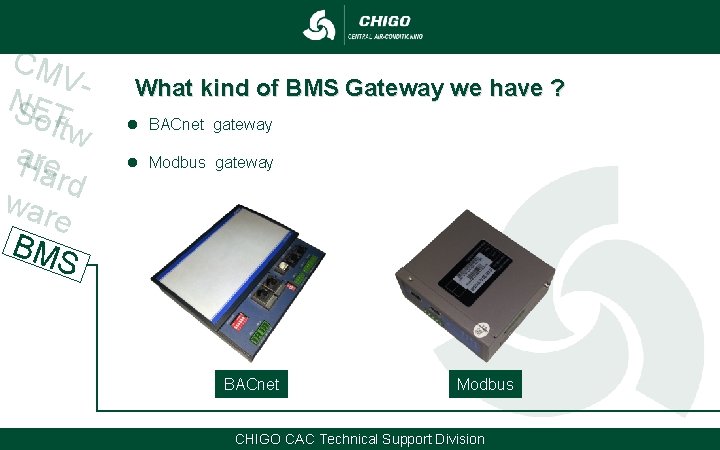
CM VNSET oftw a. Hre ard war e BM S What kind of BMS Gateway we have ? l BACnet gateway l Modbus gateway BACnet Modbus CHIGO CAC Technical Support Division
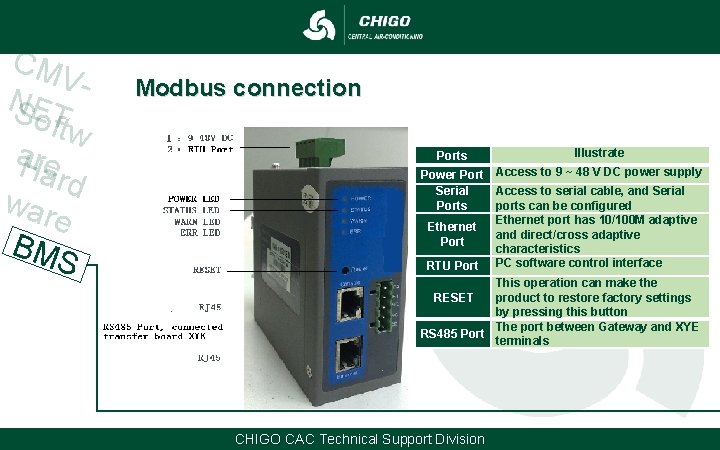
CM VNSET oftw a. Hre ard war e BM S Modbus connection Ports Illustrate Power Port Access to 9 ~ 48 V DC power supply Serial Access to serial cable, and Serial Ports ports can be configured Ethernet port has 10/100 M adaptive Ethernet and direct/cross adaptive Port characteristics RTU Port PC software control interface This operation can make the RESET product to restore factory settings by pressing this button The port between Gateway and XYE RS 485 Port terminals CHIGO CAC Technical Support Division
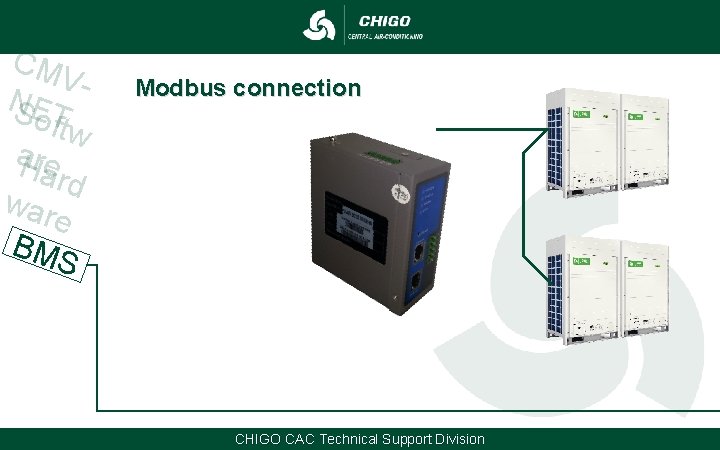
CM VNSET oftw a. Hre ard war e BM S Modbus connection CHIGO CAC Technical Support Division
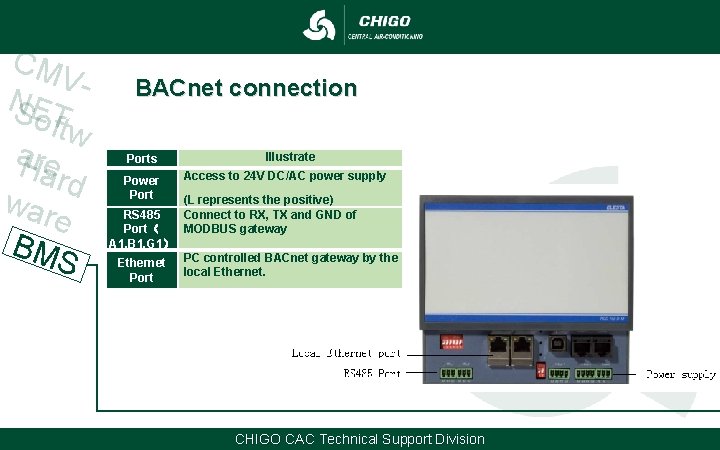
CM VNSET oftw a. Hre ard war e BM S BACnet connection Ports Power Port Illustrate Access to 24 V DC/AC power supply (L represents the positive) RS 485 Connect to RX, TX and GND of Port( MODBUS gateway A 1, B 1, G 1) Ethernet PC controlled BACnet gateway by the local Ethernet. Port CHIGO CAC Technical Support Division
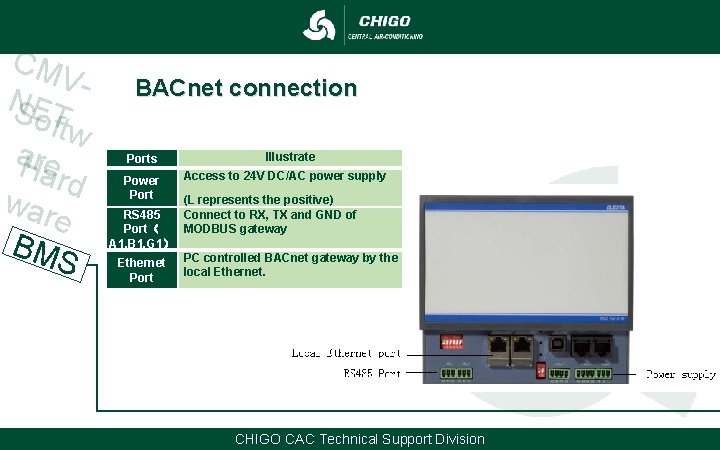
CM VNSET oftw a. Hre ard war e BM S BACnet connection Ports Power Port Illustrate Access to 24 V DC/AC power supply (L represents the positive) RS 485 Connect to RX, TX and GND of Port( MODBUS gateway A 1, B 1, G 1) Ethernet PC controlled BACnet gateway by the local Ethernet. Port CHIGO CAC Technical Support Division
Thank you!