
CMPE 226 Database Systems February 7 Class Meeting
CMPE 226 Database Systems February 7 Class Meeting Department of Computer Engineering San Jose State University Spring 2017 Instructor: Ron Mak www. cs. sjsu. edu/~mak
Some Sources of Data for Visualization o Google “datasets for data visualization” o http: //archive. ics. uci. edu/ml/ http: //www. kdnuggets. com/datasets/index. html https: //www. kaggle. com/competitions http: //www. visualizing. org/data/browse http: //datavisualization. ch/datasets/ http: //www. idvbook. com/teaching-aid/data-sets/ http: //blog. visual. ly/data-sources/ https: //www. google. com/publicdata/directory o o o o Computer Engineering Dept. Spring 2017: February 7 CMPE 226: Database Systems © R. Mak 2

Teams? Computer Engineering Dept. Spring 2017: February 7 CMPE 226: Database Systems © R. Mak 3
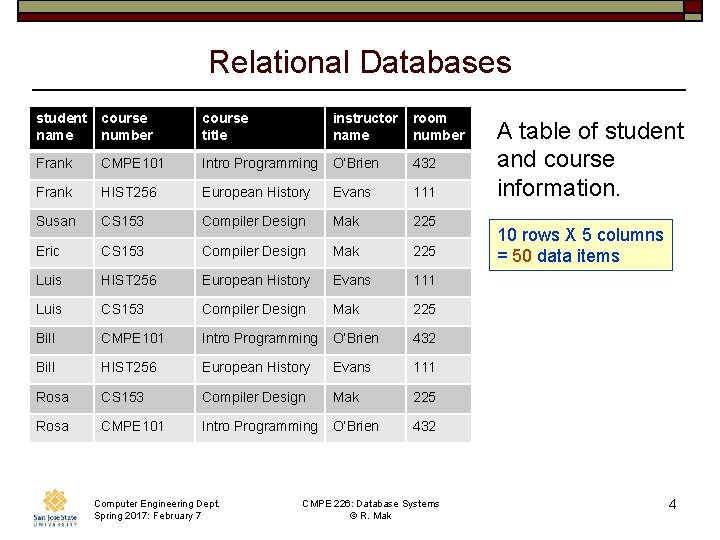
Relational Databases student name course number course title instructor name room number Frank CMPE 101 Intro Programming O’Brien 432 Frank HIST 256 European History Evans 111 Susan CS 153 Compiler Design Mak 225 Eric CS 153 Compiler Design Mak 225 Luis HIST 256 European History Evans 111 Luis CS 153 Compiler Design Mak 225 Bill CMPE 101 Intro Programming O’Brien 432 Bill HIST 256 European History Evans 111 Rosa CS 153 Compiler Design Mak 225 Rosa CMPE 101 Intro Programming O’Brien 432 Computer Engineering Dept. Spring 2017: February 7 CMPE 226: Database Systems © R. Mak A table of student and course information. 10 rows X 5 columns = 50 data items 4
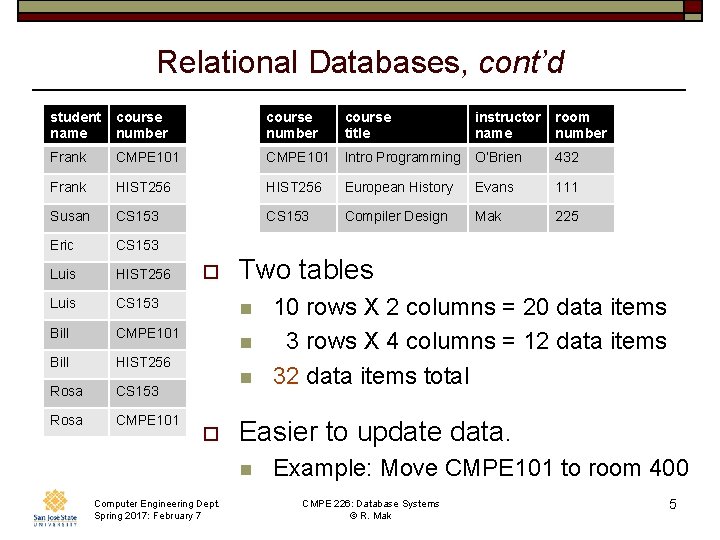
Relational Databases, cont’d student name course number course title instructor name room number Frank CMPE 101 Intro Programming O’Brien 432 Frank HIST 256 European History Evans 111 Susan CS 153 Compiler Design Mak 225 Eric CS 153 Luis HIST 256 Luis CS 153 Bill CMPE 101 Bill HIST 256 Rosa CS 153 Rosa CMPE 101 o Two tables n n n o Easier to update data. n Computer Engineering Dept. Spring 2017: February 7 10 rows X 2 columns = 20 data items 3 rows X 4 columns = 12 data items 32 data items total Example: Move CMPE 101 to room 400 CMPE 226: Database Systems © R. Mak 5
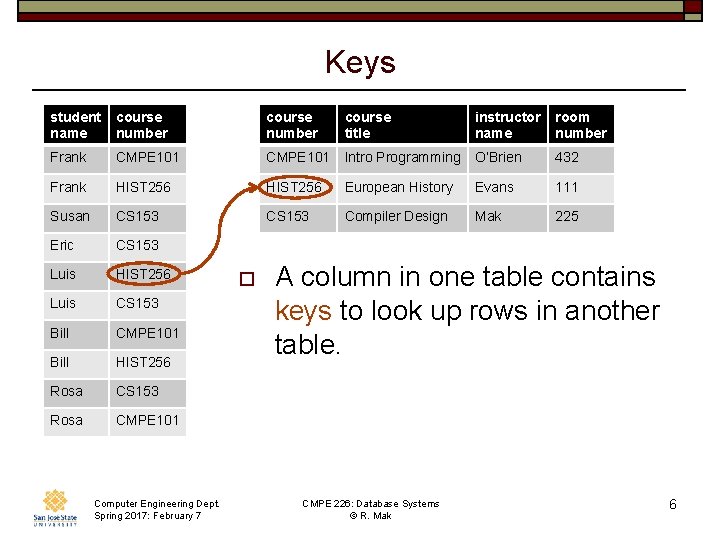
Keys student name course number course title instructor name room number Frank CMPE 101 Intro Programming O’Brien 432 Frank HIST 256 European History Evans 111 Susan CS 153 Compiler Design Mak 225 Eric CS 153 Luis HIST 256 Luis CS 153 Bill CMPE 101 Bill HIST 256 Rosa CS 153 Rosa CMPE 101 Computer Engineering Dept. Spring 2017: February 7 o A column in one table contains keys to look up rows in another table. CMPE 226: Database Systems © R. Mak 6
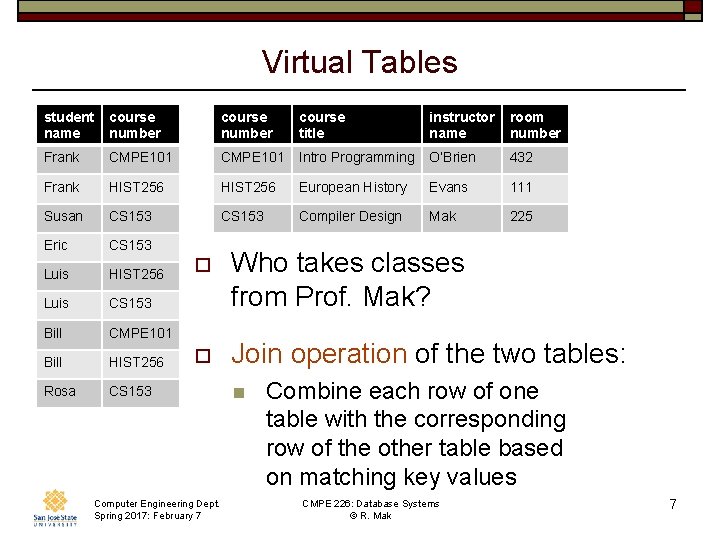
Virtual Tables student name course number course title instructor name room number Frank CMPE 101 Intro Programming O’Brien 432 Frank HIST 256 European History Evans 111 Susan CS 153 Compiler Design Mak 225 Eric CS 153 Luis HIST 256 Luis CS 153 Bill CMPE 101 Bill HIST 256 Rosa CS 153 o Who takes classes from Prof. Mak? o Join operation of the two tables: Computer Engineering Dept. Spring 2017: February 7 n Combine each row of one table with the corresponding row of the other table based on matching key values CMPE 226: Database Systems © R. Mak 7
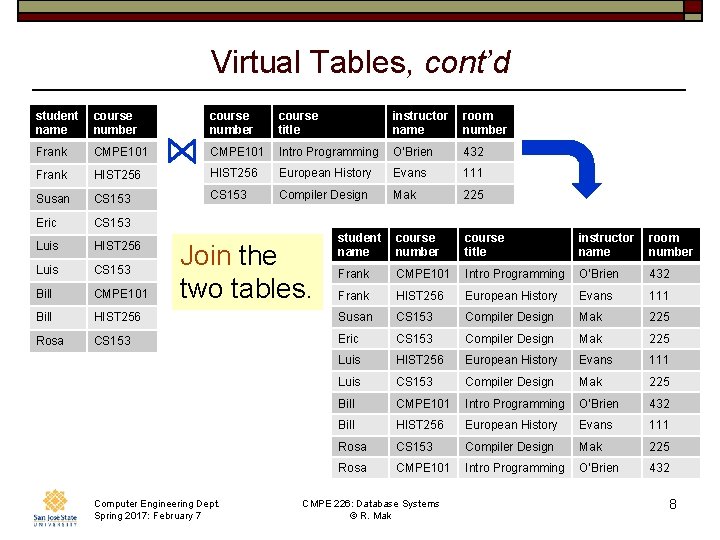
Virtual Tables, cont’d student name course number course title instructor name room number Frank CMPE 101 Intro Programming O’Brien 432 Frank HIST 256 European History Evans 111 Susan CS 153 Compiler Design Mak 225 Eric CS 153 Luis HIST 256 student name course number course title instructor name room number Luis CS 153 Frank CMPE 101 Intro Programming O’Brien 432 Bill CMPE 101 Frank HIST 256 European History Evans 111 Bill HIST 256 Susan CS 153 Compiler Design Mak 225 Rosa CS 153 Eric CS 153 Compiler Design Mak 225 Luis HIST 256 European History Evans 111 Luis CS 153 Compiler Design Mak 225 Bill CMPE 101 Intro Programming O’Brien 432 Bill HIST 256 European History Evans 111 Rosa CS 153 Compiler Design Mak 225 Rosa CMPE 101 Intro Programming O’Brien 432 Join the two tables. Computer Engineering Dept. Spring 2017: February 7 CMPE 226: Database Systems © R. Mak 8
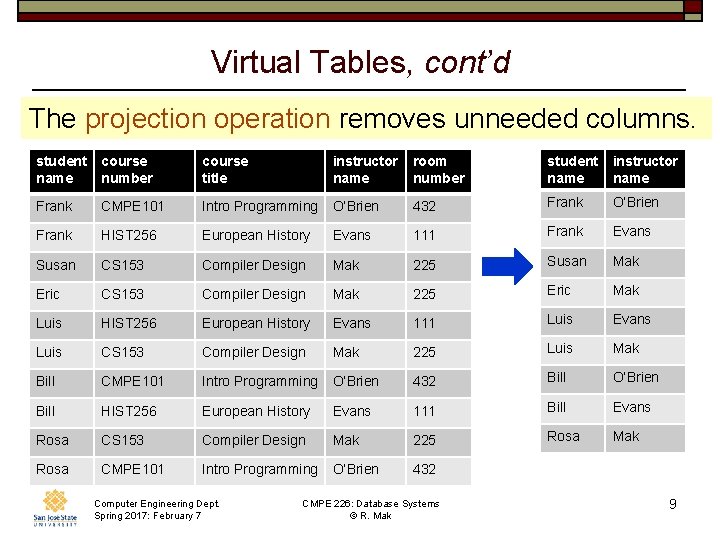
Virtual Tables, cont’d The projection operation removes unneeded columns. student name course number course title instructor name room number student name instructor name Frank CMPE 101 Intro Programming O’Brien 432 Frank O’Brien Frank HIST 256 European History Evans 111 Frank Evans Susan CS 153 Compiler Design Mak 225 Susan Mak Eric CS 153 Compiler Design Mak 225 Eric Mak Luis HIST 256 European History Evans 111 Luis Evans Luis CS 153 Compiler Design Mak 225 Luis Mak Bill CMPE 101 Intro Programming O’Brien 432 Bill O’Brien Bill HIST 256 European History Evans 111 Bill Evans Rosa CS 153 Compiler Design Mak 225 Rosa Mak Rosa CMPE 101 Intro Programming O’Brien 432 Computer Engineering Dept. Spring 2017: February 7 CMPE 226: Database Systems © R. Mak 9
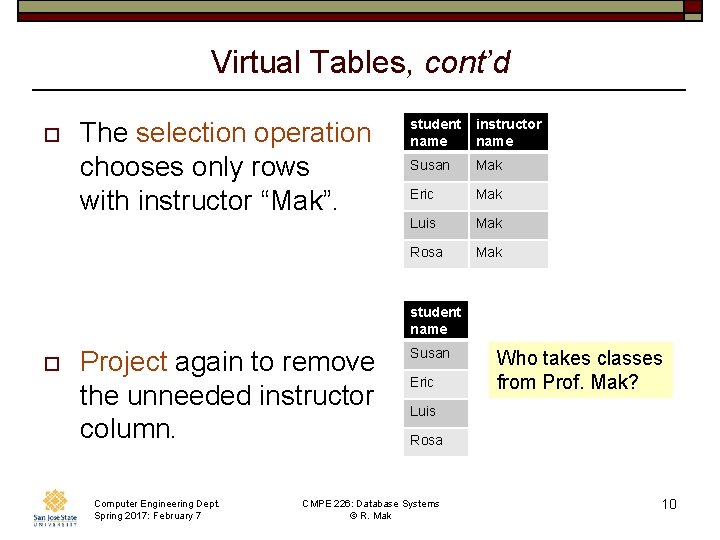
Virtual Tables, cont’d o The selection operation chooses only rows with instructor “Mak”. student name instructor name Susan Mak Eric Mak Luis Mak Rosa Mak student name o Project again to remove the unneeded instructor column. Computer Engineering Dept. Spring 2017: February 7 Susan Eric Who takes classes from Prof. Mak? Luis Rosa CMPE 226: Database Systems © R. Mak 10
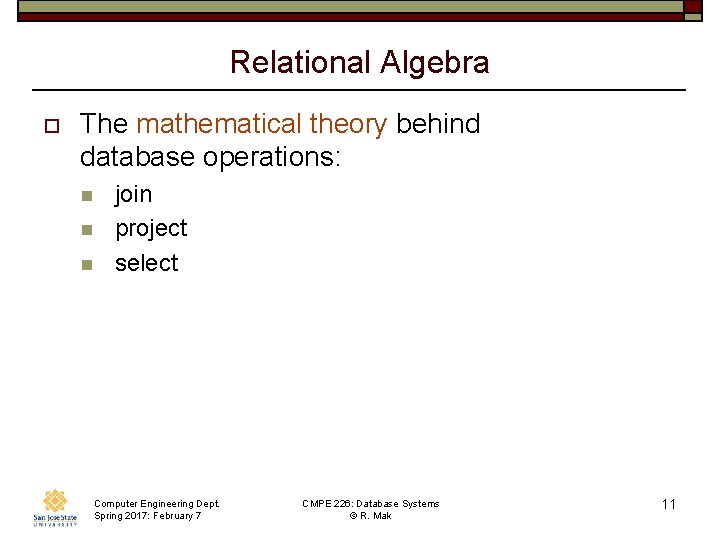
Relational Algebra o The mathematical theory behind database operations: n n n join project select Computer Engineering Dept. Spring 2017: February 7 CMPE 226: Database Systems © R. Mak 11
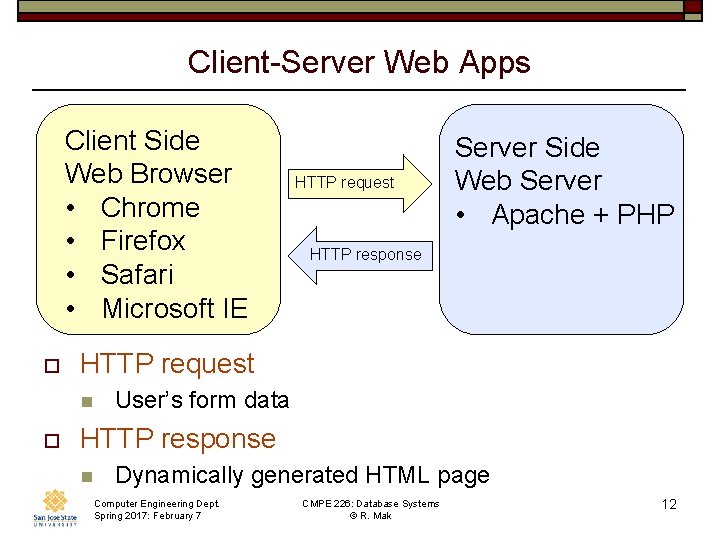
Client-Server Web Apps Client Side Web Browser • Chrome • Firefox • Safari • Microsoft IE o HTTP response HTTP request n o HTTP request Server Side Web Server • Apache + PHP User’s form data HTTP response n Dynamically generated HTML page Computer Engineering Dept. Spring 2017: February 7 CMPE 226: Database Systems © R. Mak 12
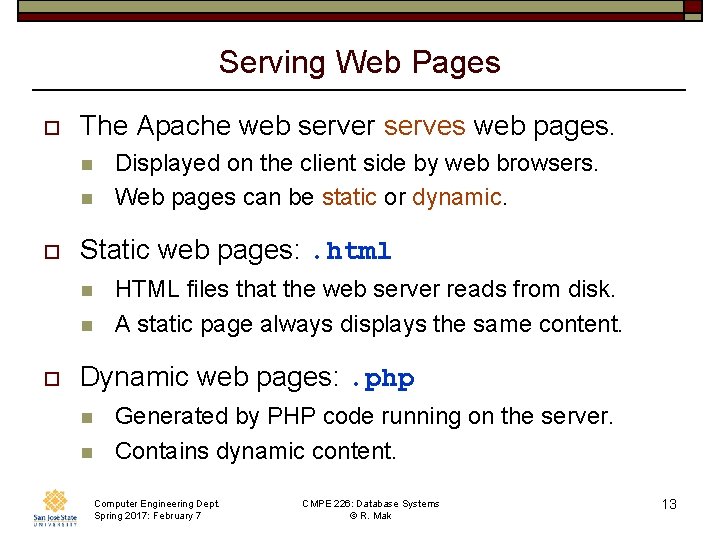
Serving Web Pages o The Apache web server serves web pages. n n o Static web pages: . html n n o Displayed on the client side by web browsers. Web pages can be static or dynamic. HTML files that the web server reads from disk. A static page always displays the same content. Dynamic web pages: . php n n Generated by PHP code running on the server. Contains dynamic content. Computer Engineering Dept. Spring 2017: February 7 CMPE 226: Database Systems © R. Mak 13
Basic “Naked” HTML o HTML specifies a web page’s n n n o Content Structure Semantics HTML should no longer specify formatting. n n Separate content from formatting. Formatting tags and attributes are deprecated. o o Font, color, alignment, etc. Formatting should be specified by CSS. n Cascading Style Sheets Computer Engineering Dept. Spring 2017: February 7 CMPE 226: Database Systems © R. Mak 14
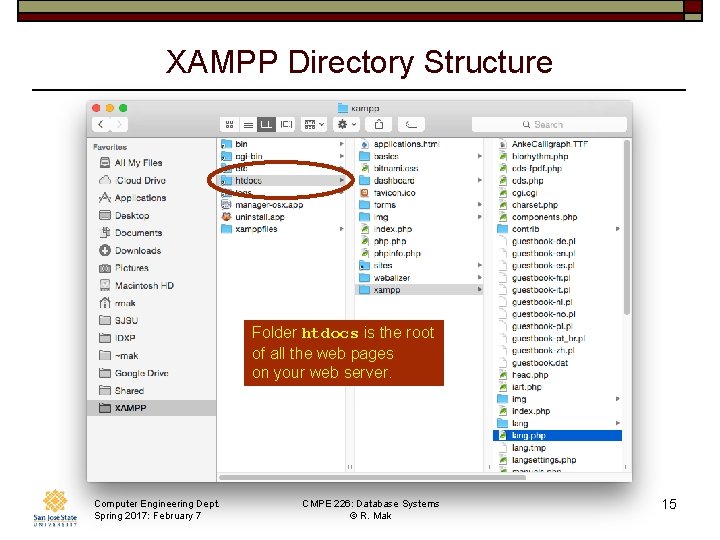
XAMPP Directory Structure Folder htdocs is the root of all the web pages on your web server. Computer Engineering Dept. Spring 2017: February 7 CMPE 226: Database Systems © R. Mak 15
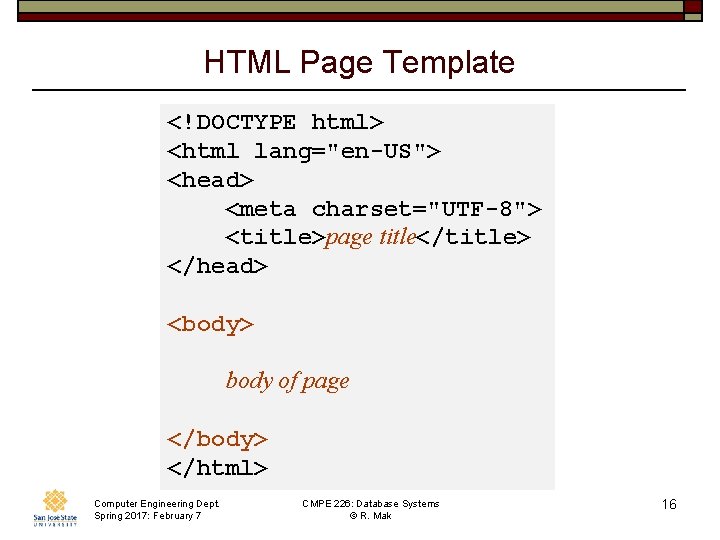
HTML Page Template <!DOCTYPE html> <html lang="en-US"> <head> <meta charset="UTF-8"> <title>page title</title> </head> <body> body of page </body> </html> Computer Engineering Dept. Spring 2017: February 7 CMPE 226: Database Systems © R. Mak 16
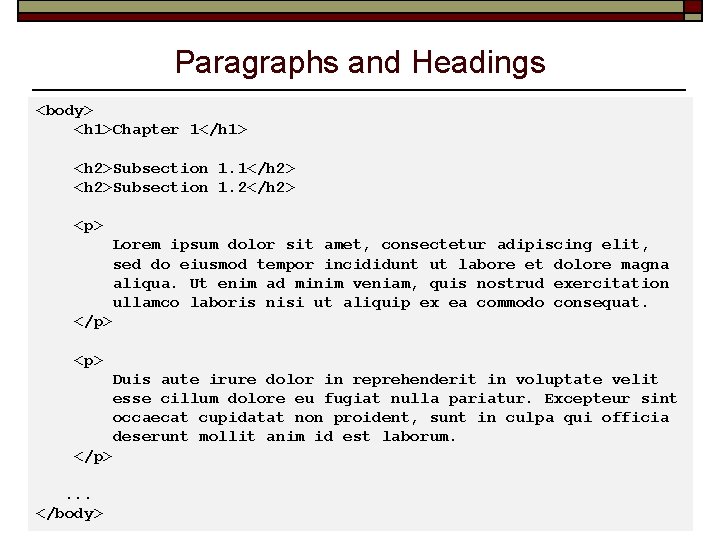
Paragraphs and Headings <body> <h 1>Chapter 1</h 1> <h 2>Subsection 1. 1</h 2> <h 2>Subsection 1. 2</h 2> <p> Lorem ipsum dolor sit amet, consectetur adipiscing elit, sed do eiusmod tempor incididunt ut labore et dolore magna aliqua. Ut enim ad minim veniam, quis nostrud exercitation ullamco laboris nisi ut aliquip ex ea commodo consequat. </p> <p> Duis aute irure dolor in reprehenderit in voluptate velit esse cillum dolore eu fugiat nulla pariatur. Excepteur sint occaecat cupidatat non proident, sunt in culpa qui officia deserunt mollit anim id est laborum. </p> . . . Computer Engineering Dept. CMPE 226: Database Systems 17 </body> Spring 2017: February 7 © R. Mak
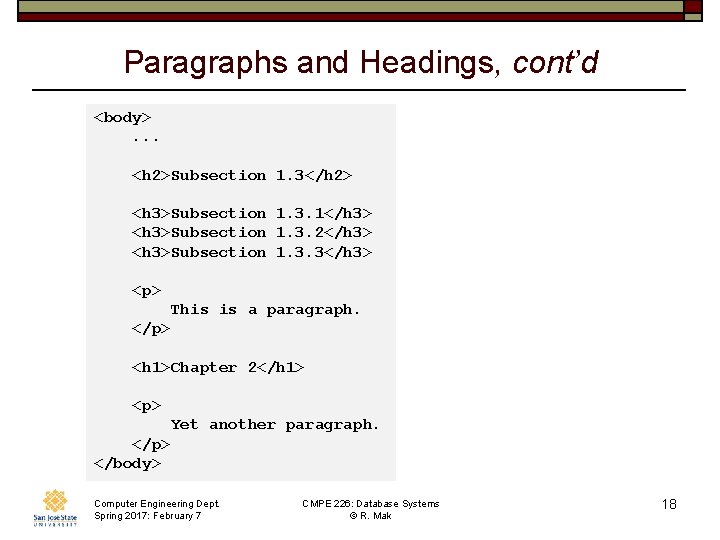
Paragraphs and Headings, cont’d <body> . . . <h 2>Subsection 1. 3</h 2> <h 3>Subsection 1. 3. 1</h 3> <h 3>Subsection 1. 3. 2</h 3> <h 3>Subsection 1. 3. 3</h 3> <p> This is a paragraph. </p> <h 1>Chapter 2</h 1> <p> Yet another paragraph. </p> </body> Computer Engineering Dept. Spring 2017: February 7 CMPE 226: Database Systems © R. Mak 18
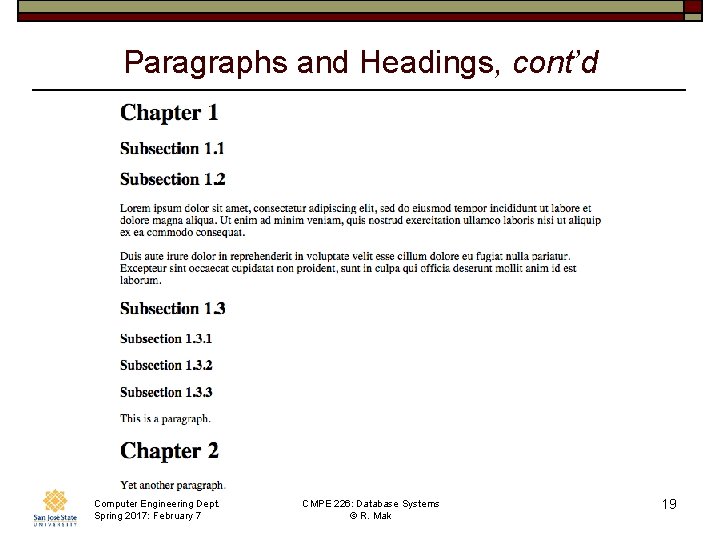
Paragraphs and Headings, cont’d Computer Engineering Dept. Spring 2017: February 7 CMPE 226: Database Systems © R. Mak 19
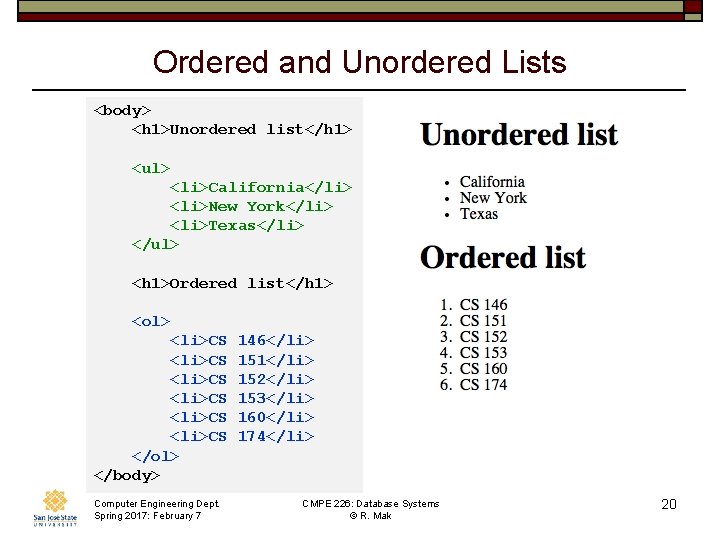
Ordered and Unordered Lists <body> <h 1>Unordered list</h 1> <ul> <li>California</li> <li>New York</li> <li>Texas</li> </ul> <h 1>Ordered list</h 1> <ol> <li>CS 146</li> <li>CS 151</li> <li>CS 152</li> <li>CS 153</li> <li>CS 160</li> <li>CS 174</li> </ol> </body> Computer Engineering Dept. Spring 2017: February 7 CMPE 226: Database Systems © R. Mak 20
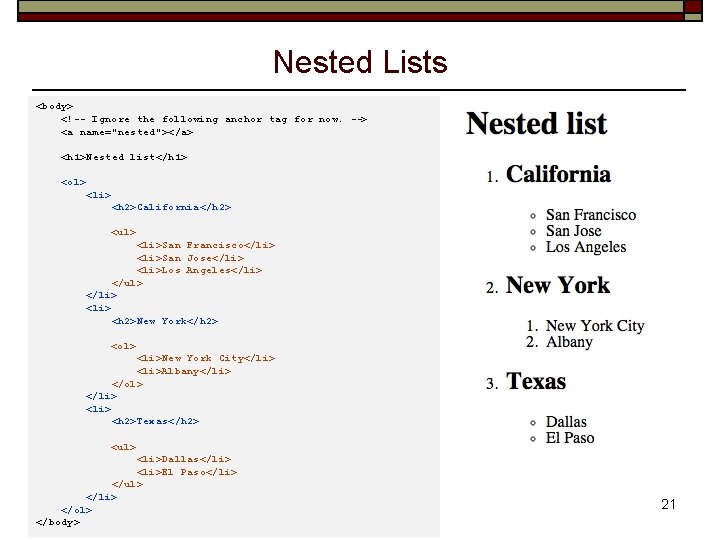
Nested Lists <body> <!-- Ignore the following anchor tag for now. --> <a name="nested"></a> <h 1>Nested list</h 1> <ol> <li> <h 2>California</h 2> <ul> <li>San Francisco</li> <li>San Jose</li> <li>Los Angeles</li> </ul> </li> <h 2>New York</h 2> <ol> <li>New York City</li> <li>Albany</li> </ol> </li> <h 2>Texas</h 2> <ul> <li>Dallas</li> <li>El Paso</li> </ul> </li> Computer Engineering Dept. CMPE 226: Database Systems </ol> Spring 2017: February 7 © R. Mak </body> 21
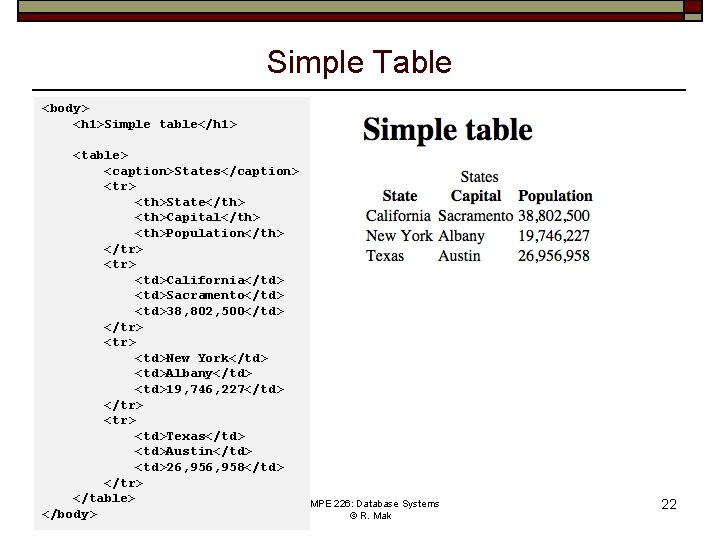
Simple Table <body> <h 1>Simple table</h 1> <table> <caption>States</caption> <tr> <th>State</th> <th>Capital</th> <th>Population</th> </tr> <td>California</td> <td>Sacramento</td> <td>38, 802, 500</td> </tr> <td>New York</td> <td>Albany</td> <td>19, 746, 227</td> </tr> <td>Texas</td> <td>Austin</td> <td>26, 958</td> </tr> </table> Computer Engineering Dept. CMPE 226: Database Systems </body>Spring 2017: February 7 © R. Mak 22
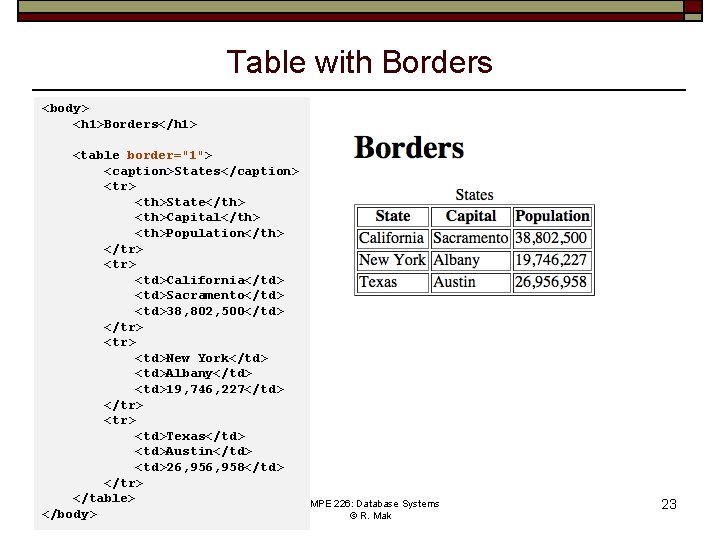
Table with Borders <body> <h 1>Borders</h 1> <table border="1"> <caption>States</caption> <tr> <th>State</th> <th>Capital</th> <th>Population</th> </tr> <td>California</td> <td>Sacramento</td> <td>38, 802, 500</td> </tr> <td>New York</td> <td>Albany</td> <td>19, 746, 227</td> </tr> <td>Texas</td> <td>Austin</td> <td>26, 958</td> </tr> </table> Computer Engineering Dept. CMPE 226: Database Systems </body>Spring 2017: February 7 © R. Mak 23
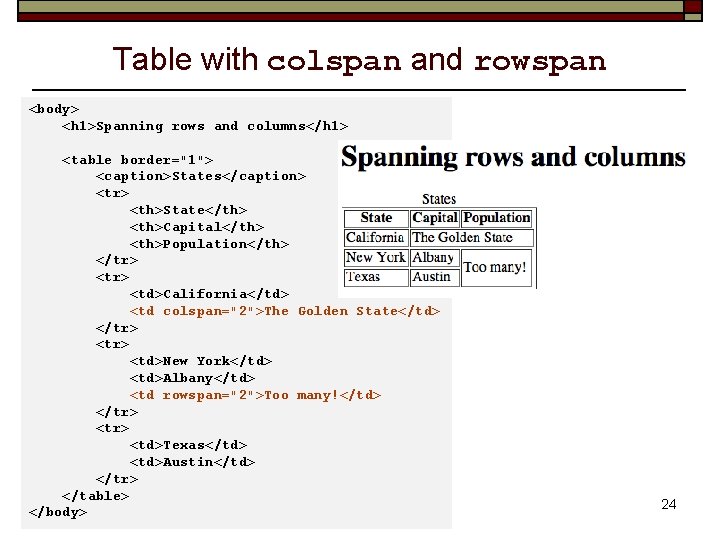
Table with colspan and rowspan <body> <h 1>Spanning rows and columns</h 1> <table border="1"> <caption>States</caption> <tr> <th>State</th> <th>Capital</th> <th>Population</th> </tr> <td>California</td> <td colspan="2">The Golden State</td> </tr> <td>New York</td> <td>Albany</td> <td rowspan="2">Too many!</td> </tr> <td>Texas</td> <td>Austin</td> </tr> </table> Computer Engineering Dept. CMPE 226: Database Systems </body> Spring 2017: February 7 © R. Mak 24
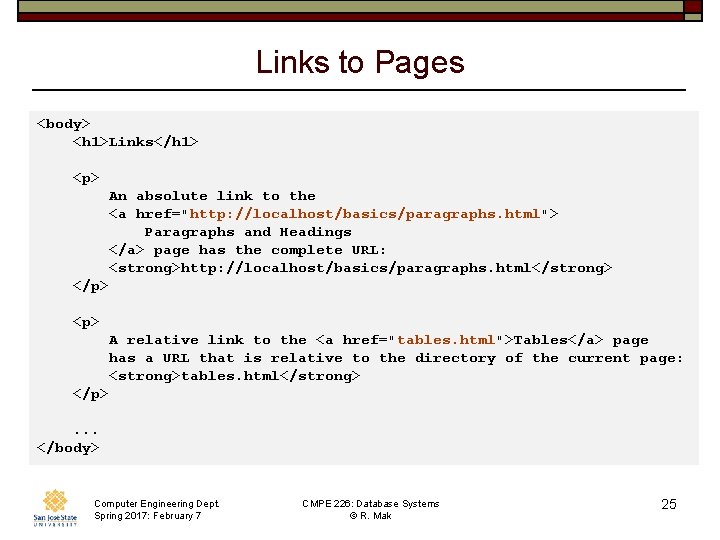
Links to Pages <body> <h 1>Links</h 1> <p> An absolute link to the <a href="http: //localhost/basics/paragraphs. html"> Paragraphs and Headings </a> page has the complete URL: <strong>http: //localhost/basics/paragraphs. html</strong> </p> <p> A relative link to the <a href="tables. html">Tables</a> page has a URL that is relative to the directory of the current page: <strong>tables. html</strong> </p> . . . </body> Computer Engineering Dept. Spring 2017: February 7 CMPE 226: Database Systems © R. Mak 25
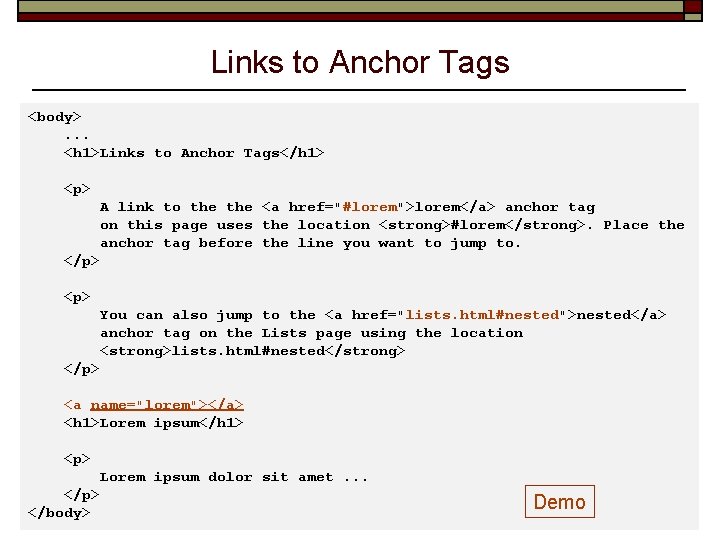
Links to Anchor Tags <body> . . . <h 1>Links to Anchor Tags</h 1> <p> A link to the <a href="#lorem">lorem</a> anchor tag on this page uses the location <strong>#lorem</strong>. Place the anchor tag before the line you want to jump to. </p> <p> You can also jump to the <a href="lists. html#nested">nested</a> anchor tag on the Lists page using the location <strong>lists. html#nested</strong> </p> <a name="lorem"></a> <h 1>Lorem ipsum</h 1> <p> Lorem ipsum dolor sit amet. . . </p> Computer Engineering Dept. CMPE 226: Database Systems Demo 26 </body> Spring 2017: February 7 © R. Mak
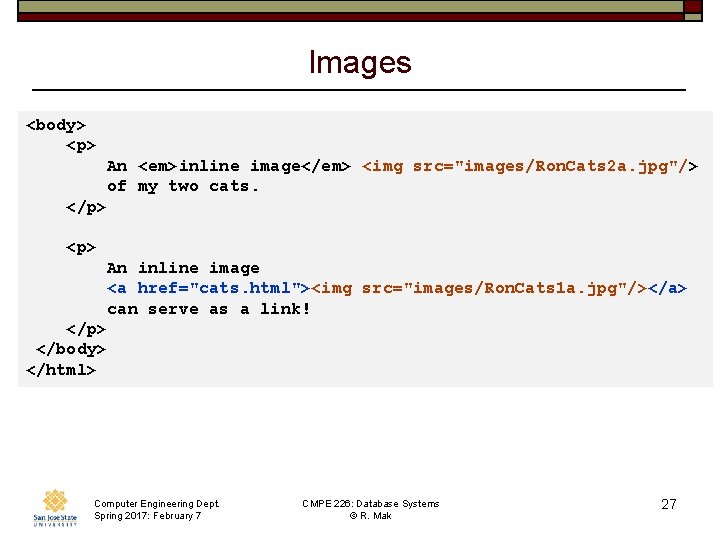
Images <body> <p> An <em>inline image</em> <img src="images/Ron. Cats 2 a. jpg"/> of my two cats. </p> <p> An inline image <a href="cats. html"><img src="images/Ron. Cats 1 a. jpg"/></a> can serve as a link! </p> </body> </html> Computer Engineering Dept. Spring 2017: February 7 CMPE 226: Database Systems © R. Mak 27
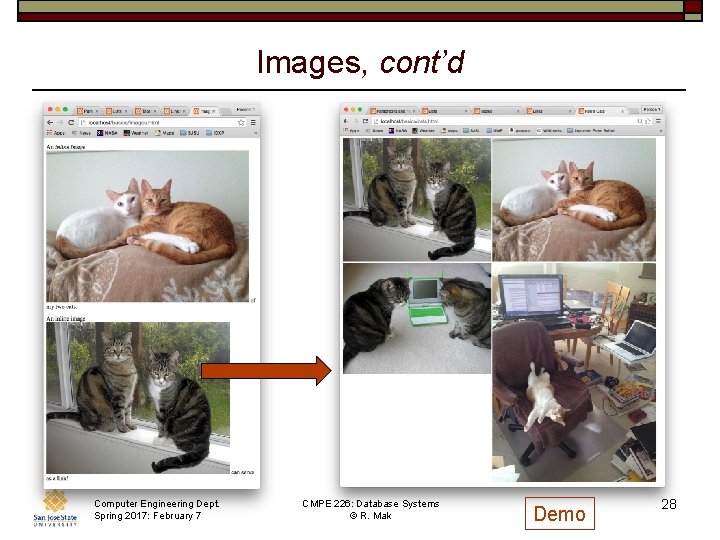
Images, cont’d Computer Engineering Dept. Spring 2017: February 7 CMPE 226: Database Systems © R. Mak Demo 28
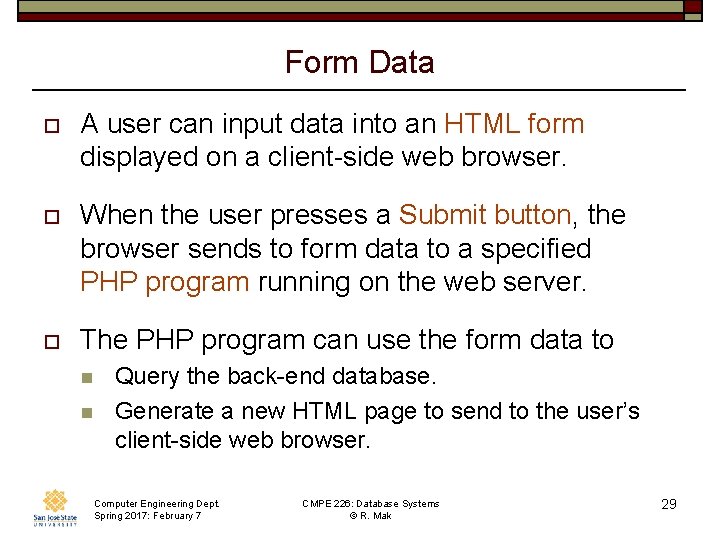
Form Data o A user can input data into an HTML form displayed on a client-side web browser. o When the user presses a Submit button, the browser sends to form data to a specified PHP program running on the web server. o The PHP program can use the form data to n n Query the back-end database. Generate a new HTML page to send to the user’s client-side web browser. Computer Engineering Dept. Spring 2017: February 7 CMPE 226: Database Systems © R. Mak 29
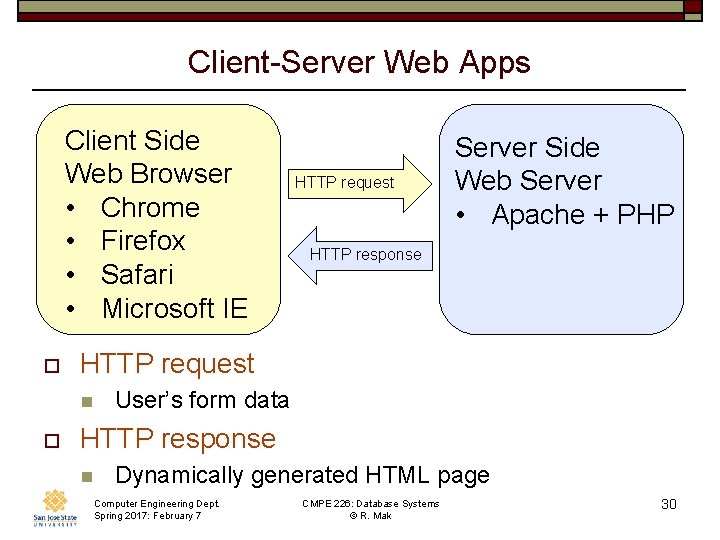
Client-Server Web Apps Client Side Web Browser • Chrome • Firefox • Safari • Microsoft IE o HTTP response HTTP request n o HTTP request Server Side Web Server • Apache + PHP User’s form data HTTP response n Dynamically generated HTML page Computer Engineering Dept. Spring 2017: February 7 CMPE 226: Database Systems © R. Mak 30
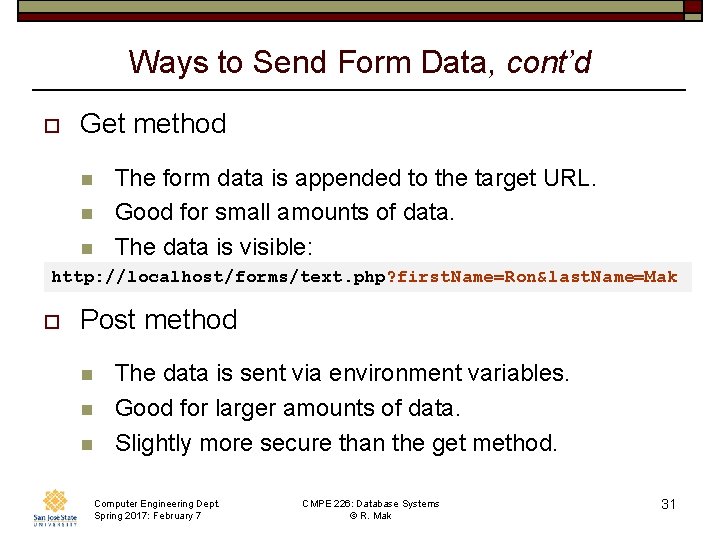
Ways to Send Form Data, cont’d o Get method n n The form data is appended to the target URL. Good for small amounts of data. The data is visible: n http: //localhost/forms/text. php? first. Name=Ron&last. Name=Mak o Post method n n n The data is sent via environment variables. Good for larger amounts of data. Slightly more secure than the get method. Computer Engineering Dept. Spring 2017: February 7 CMPE 226: Database Systems © R. Mak 31
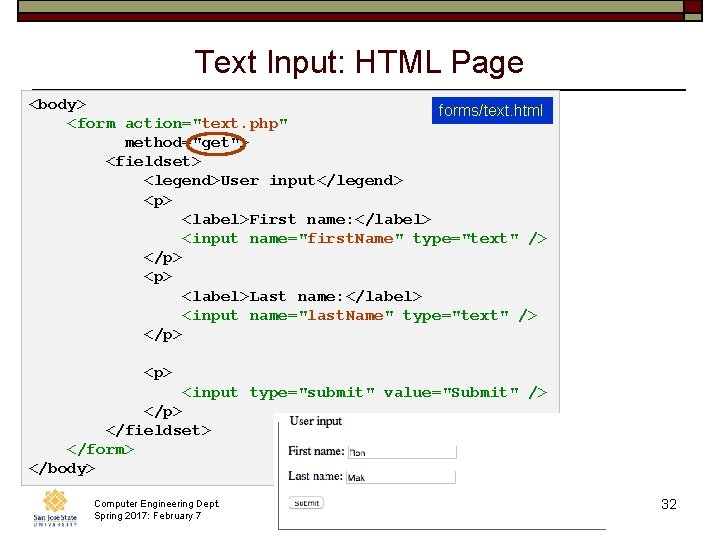
Text Input: HTML Page <body> forms/text. html <form action="text. php" method="get"> <fieldset> <legend>User input</legend> <p> <label>First name: </label> <input name="first. Name" type="text" /> </p> <label>Last name: </label> <input name="last. Name" type="text" /> </p> <p> <input type="submit" value="Submit" /> </p> </fieldset> </form> </body> Computer Engineering Dept. Spring 2017: February 7 CMPE 226: Database Systems © R. Mak 32
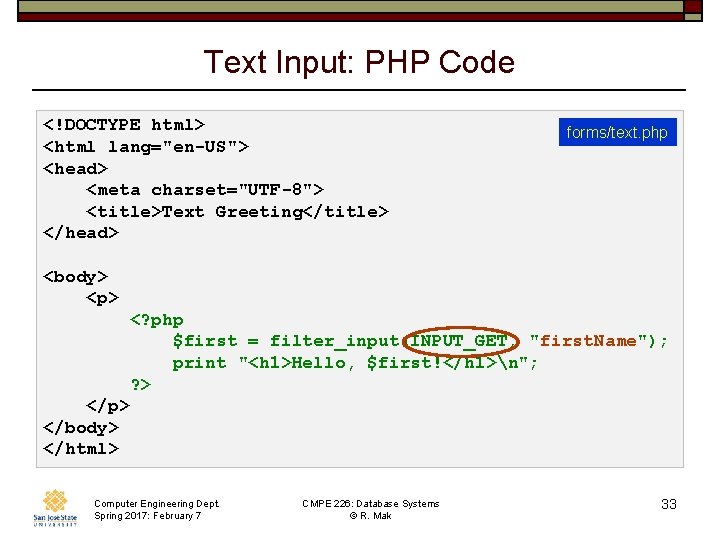
Text Input: PHP Code <!DOCTYPE html> <html lang="en-US"> <head> <meta charset="UTF-8"> <title>Text Greeting</title> </head> forms/text. php <body> <p> <? php $first = filter_input(INPUT_GET, "first. Name"); print "<h 1>Hello, $first!</h 1>n"; ? > </p> </body> </html> Computer Engineering Dept. Spring 2017: February 7 CMPE 226: Database Systems © R. Mak 33
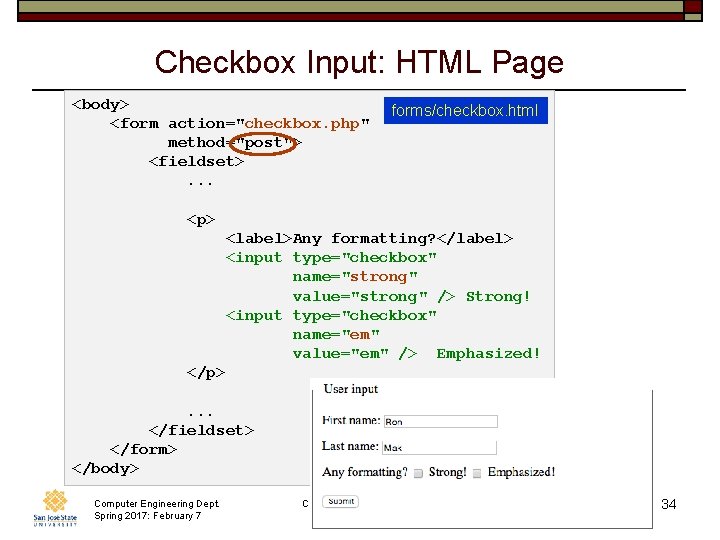
Checkbox Input: HTML Page <body> forms/checkbox. html <form action="checkbox. php" method="post"> <fieldset> . . . <p> <label>Any formatting? </label> <input type="checkbox" name="strong" value="strong" /> Strong! <input type="checkbox" name="em" value="em" /> Emphasized! </p> . . . </fieldset> </form> </body> Computer Engineering Dept. Spring 2017: February 7 CMPE 226: Database Systems © R. Mak 34
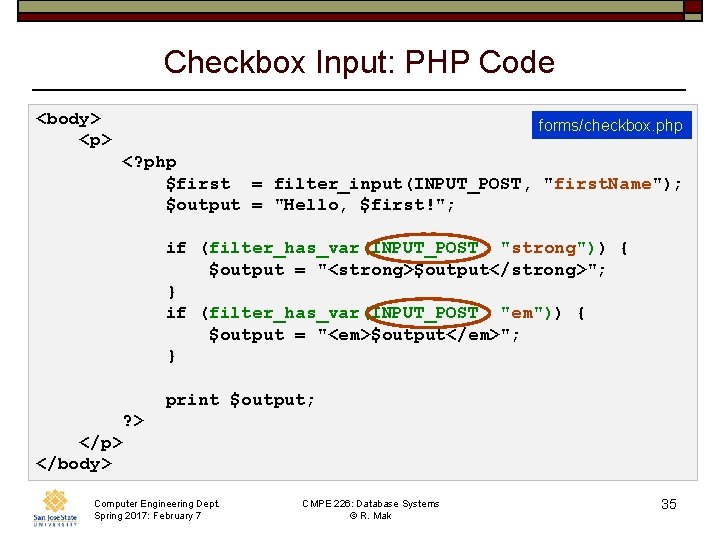
Checkbox Input: PHP Code <body> forms/checkbox. php <p> <? php $first = filter_input(INPUT_POST, "first. Name"); $output = "Hello, $first!"; if (filter_has_var(INPUT_POST, "strong")) { $output = "<strong>$output</strong>"; } if (filter_has_var(INPUT_POST, "em")) { $output = "<em>$output</em>"; } print $output; ? > </p> </body> Computer Engineering Dept. Spring 2017: February 7 CMPE 226: Database Systems © R. Mak 35
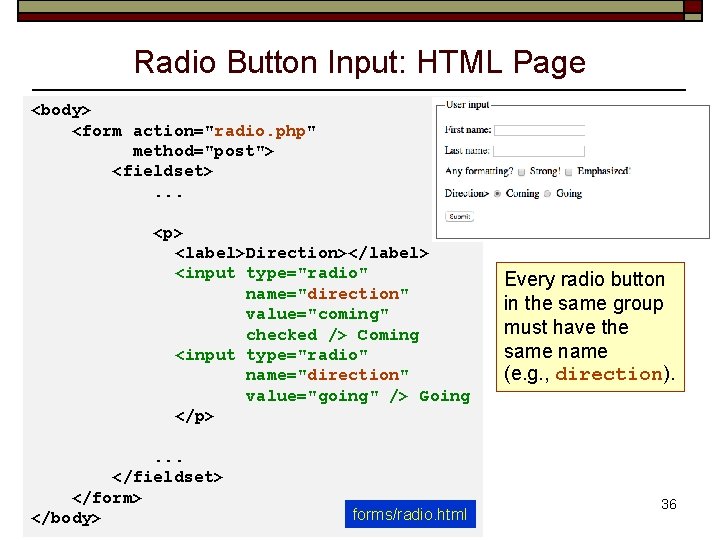
Radio Button Input: HTML Page <body> <form action="radio. php" method="post"> <fieldset> . . . <p> <label>Direction></label> <input type="radio" name="direction" value="coming" checked /> Coming <input type="radio" name="direction" value="going" /> Going </p> . . . </fieldset> </form> Computer Engineering Dept. CMPE 226: Database Systems Spring 2017: February 7 ©forms/radio. html R. Mak </body> Every radio button in the same group must have the same name (e. g. , direction). 36
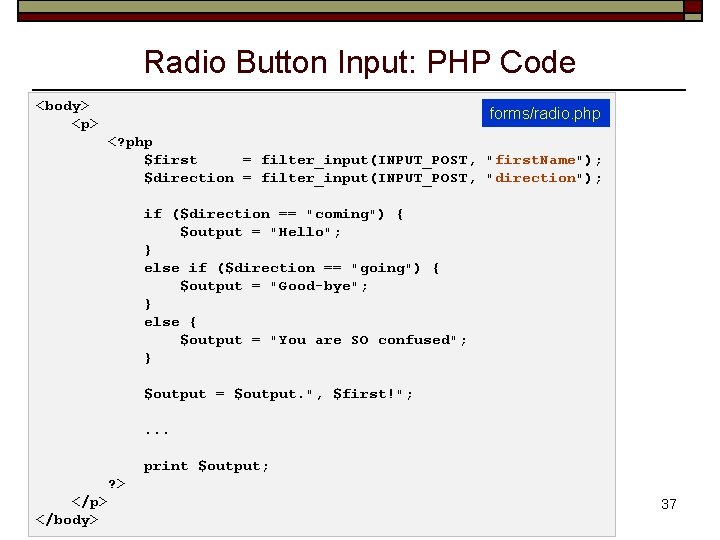
Radio Button Input: PHP Code <body> forms/radio. php <p> <? php $first = filter_input(INPUT_POST, "first. Name"); $direction = filter_input(INPUT_POST, "direction"); if ($direction == "coming") { $output = "Hello"; } else if ($direction == "going") { $output = "Good-bye"; } else { $output = "You are SO confused"; } $output = $output. ", $first!"; . . . print $output; ? > </p> Computer Engineering Dept. CMPE 226: Database Systems Spring 2017: February 7 © R. Mak </body> 37
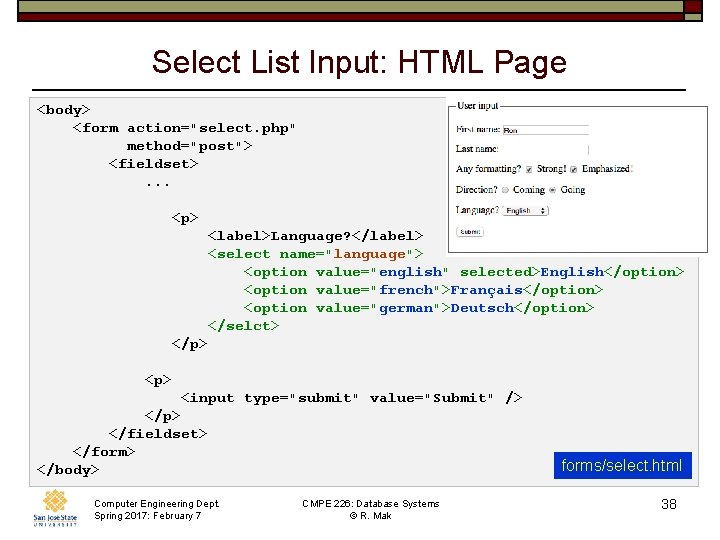
Select List Input: HTML Page <body> <form action="select. php" method="post"> <fieldset> . . . <p> <label>Language? </label> <select name="language"> <option value="english" selected>English</option> <option value="french">Français</option> <option value="german">Deutsch</option> </selct> </p> <p> <input type="submit" value="Submit" /> </p> </fieldset> </form> forms/select. html </body> Computer Engineering Dept. Spring 2017: February 7 CMPE 226: Database Systems © R. Mak 38
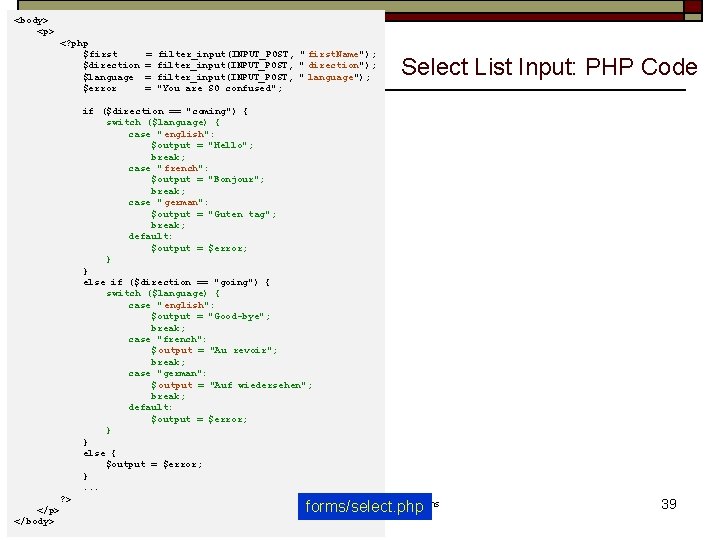
<body> <p> <? php $first = filter_input(INPUT_POST, " first. Name"); $direction = filter_input(INPUT_POST, " direction"); $language = filter_input(INPUT_POST, " language"); $error = "You are SO confused"; if ($direction == "coming") { switch ($language) { case " english": $output = "Hello"; break; case " french": $output = "Bonjour"; break; case " german": $output = "Guten tag"; break; default: $output = $error; } else if ($direction == "going") { switch ($language) { case " english": $output = "Good-bye"; break; case "french": $ output = "Au revoir"; break; case "german": $ output = "Auf wiedersehen"; break; default: $output = $error; } else { $output = $error; } . . . ? > Computer Engineering Dept. CMPE 226: Database Systems </p> Spring 2017: February 7 © R. Mak </body> Select List Input: PHP Code forms/select. php 39
Break Computer Engineering Dept. Spring 2017: February 7 CMPE 226: Database Systems © R. Mak 40
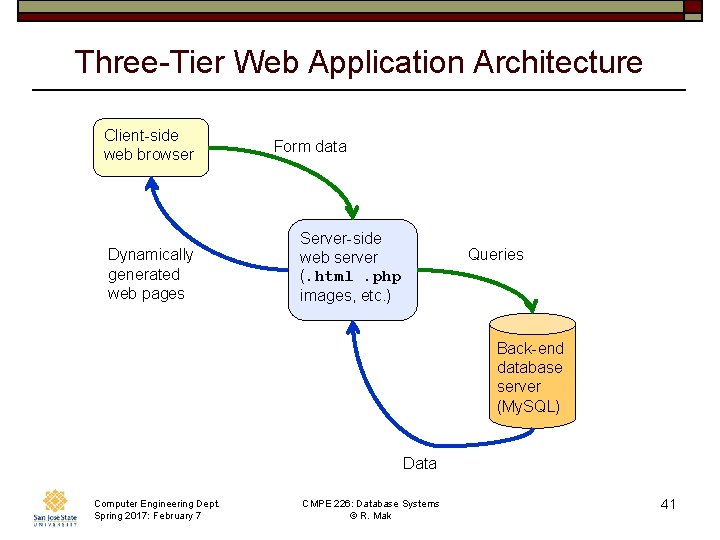
Three-Tier Web Application Architecture Client-side web browser Dynamically generated web pages Form data Server-side web server (. html. php images, etc. ) Queries Back-end database server (My. SQL) Data Computer Engineering Dept. Spring 2017: February 7 CMPE 226: Database Systems © R. Mak 41
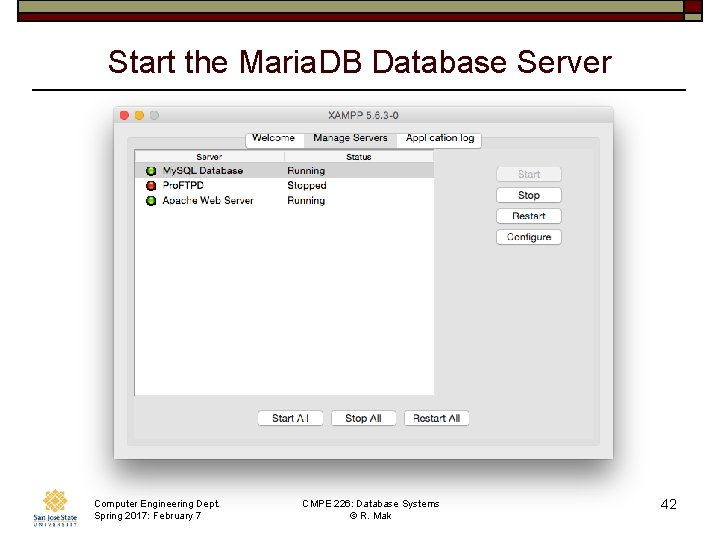
Start the Maria. DB Database Server Computer Engineering Dept. Spring 2017: February 7 CMPE 226: Database Systems © R. Mak 42
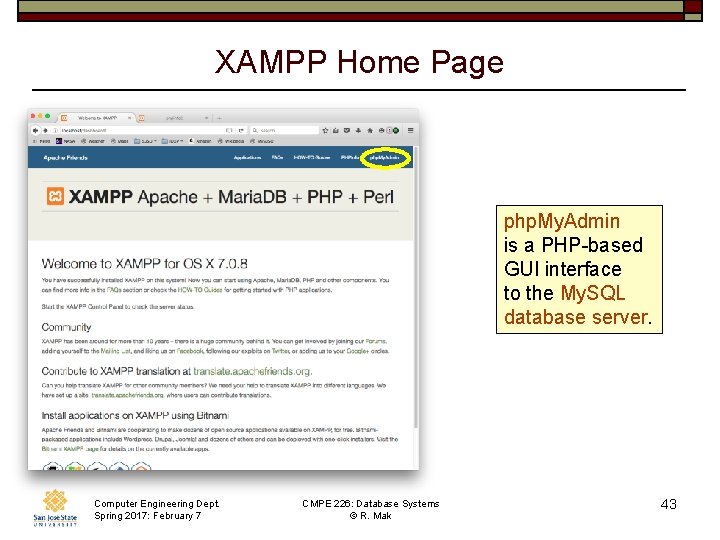
XAMPP Home Page php. My. Admin is a PHP-based GUI interface to the My. SQL database server. Computer Engineering Dept. Spring 2017: February 7 CMPE 226: Database Systems © R. Mak 43
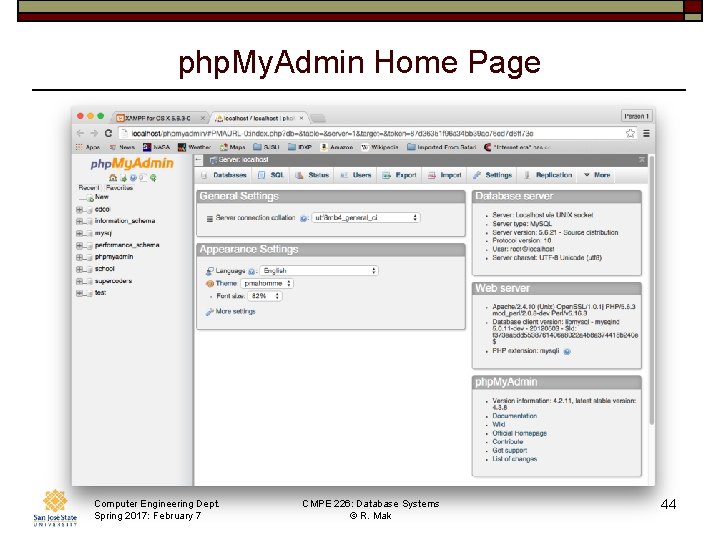
php. My. Admin Home Page Computer Engineering Dept. Spring 2017: February 7 CMPE 226: Database Systems © R. Mak 44
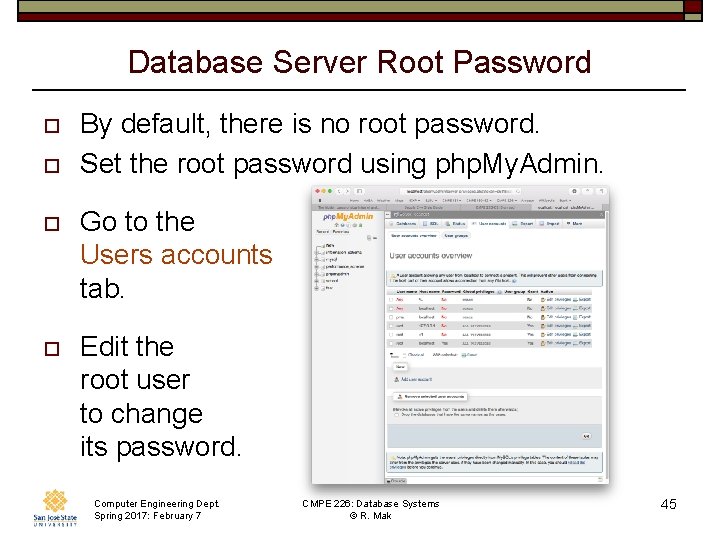
Database Server Root Password o o By default, there is no root password. Set the root password using php. My. Admin. o Go to the Users accounts tab. o Edit the root user to change its password. Computer Engineering Dept. Spring 2017: February 7 CMPE 226: Database Systems © R. Mak 45
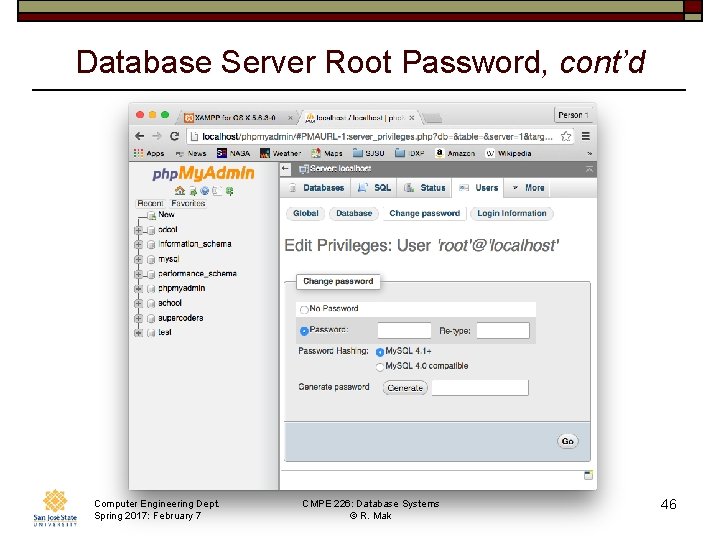
Database Server Root Password, cont’d Computer Engineering Dept. Spring 2017: February 7 CMPE 226: Database Systems © R. Mak 46
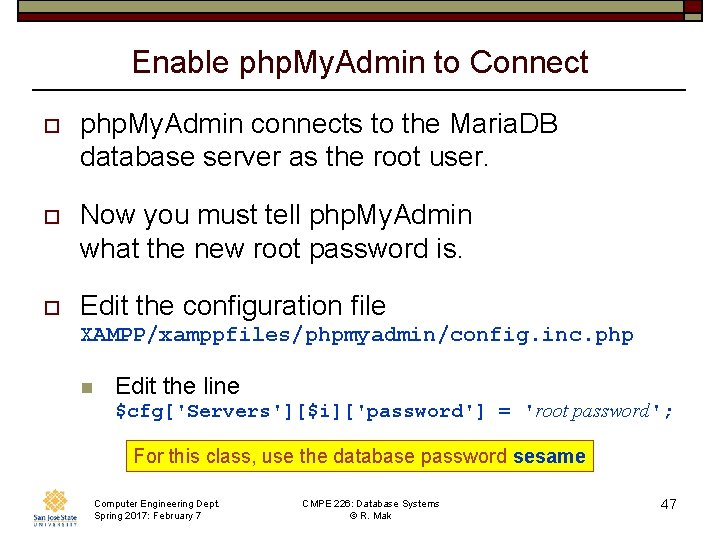
Enable php. My. Admin to Connect o php. My. Admin connects to the Maria. DB database server as the root user. o Now you must tell php. My. Admin what the new root password is. o Edit the configuration file XAMPP/xamppfiles/phpmyadmin/config. inc. php n Edit the line $cfg['Servers'][$i]['password'] = 'root password'; For this class, use the database password sesame Computer Engineering Dept. Spring 2017: February 7 CMPE 226: Database Systems © R. Mak 47
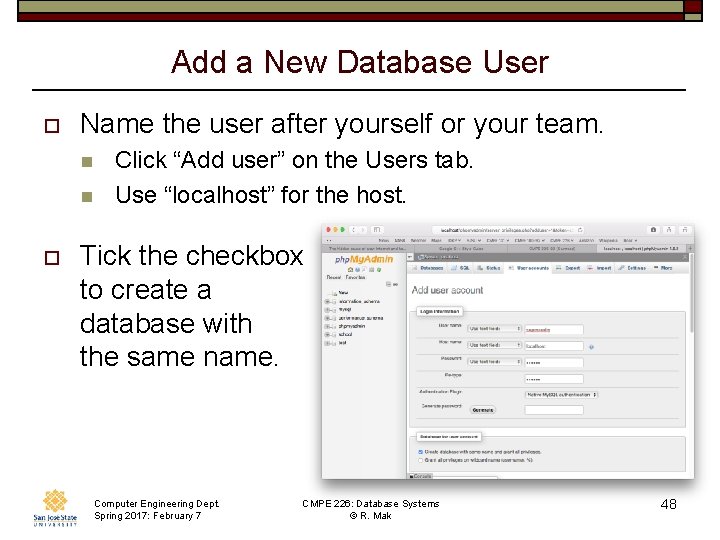
Add a New Database User o Name the user after yourself or your team. n n o Click “Add user” on the Users tab. Use “localhost” for the host. Tick the checkbox to create a database with the same name. Computer Engineering Dept. Spring 2017: February 7 CMPE 226: Database Systems © R. Mak 48
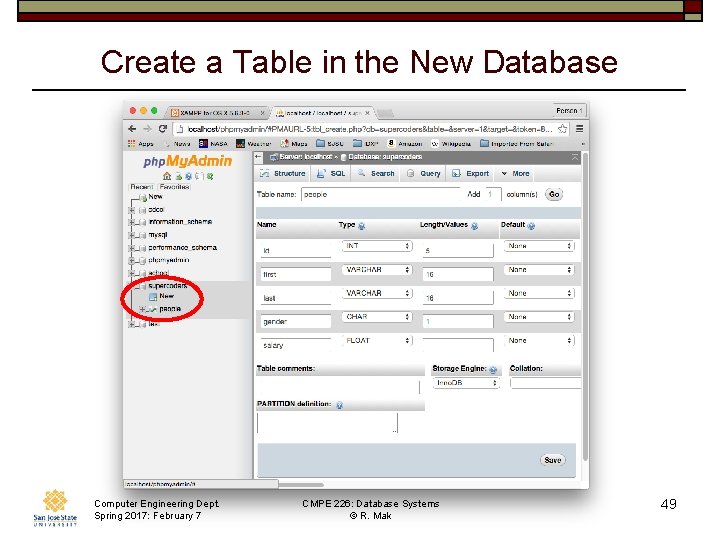
Create a Table in the New Database Computer Engineering Dept. Spring 2017: February 7 CMPE 226: Database Systems © R. Mak 49
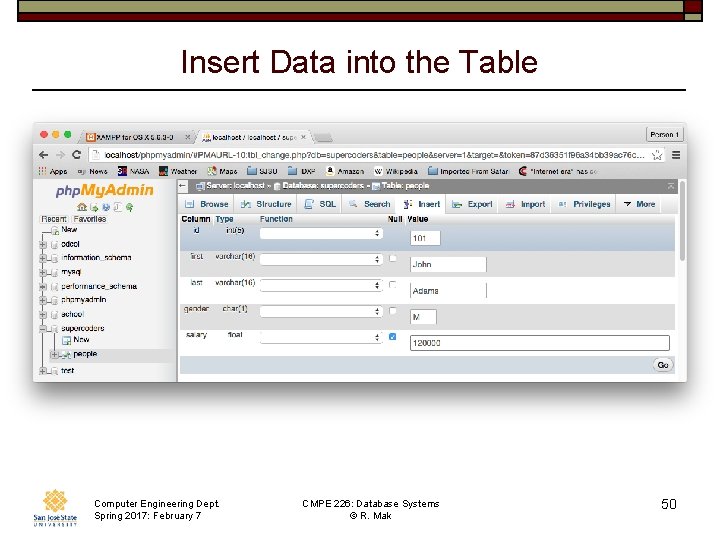
Insert Data into the Table Computer Engineering Dept. Spring 2017: February 7 CMPE 226: Database Systems © R. Mak 50
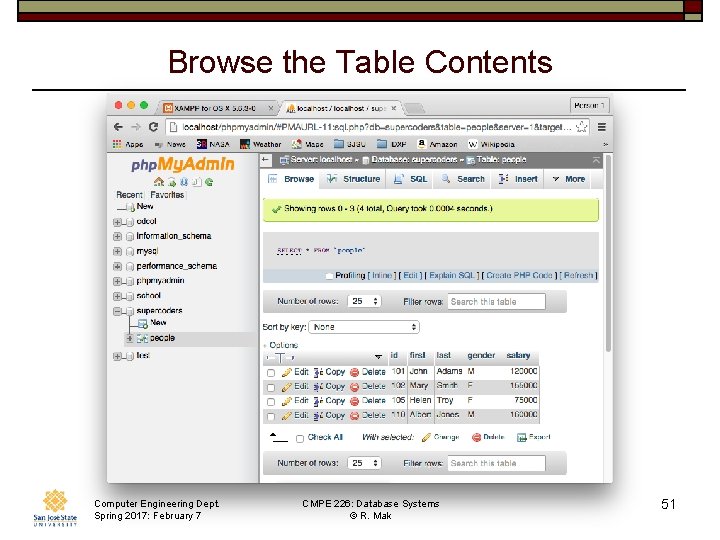
Browse the Table Contents Computer Engineering Dept. Spring 2017: February 7 CMPE 226: Database Systems © R. Mak 51
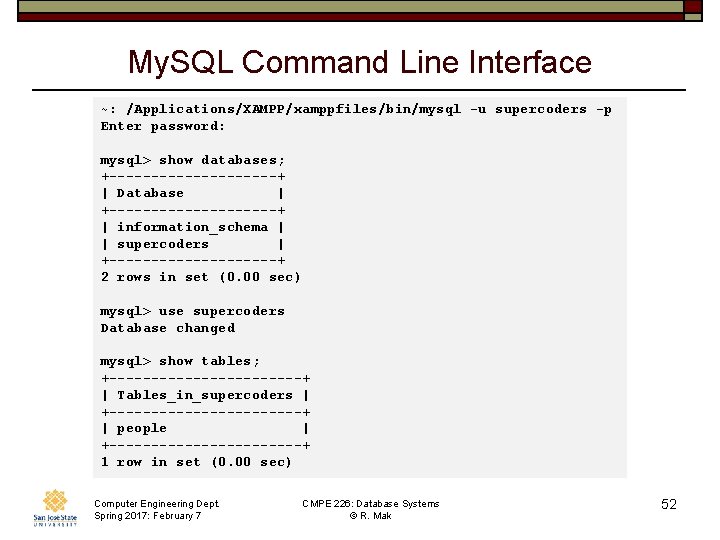
My. SQL Command Line Interface ~: /Applications/XAMPP/xamppfiles/bin/mysql -u supercoders -p Enter password: mysql> show databases; +----------+ | Database | +----------+ | information_schema | | supercoders | +----------+ 2 rows in set (0. 00 sec) mysql> use supercoders Database changed mysql> show tables; +------------+ | Tables_in_supercoders | +------------+ | people | +------------+ 1 row in set (0. 00 sec) Computer Engineering Dept. Spring 2017: February 7 CMPE 226: Database Systems © R. Mak 52
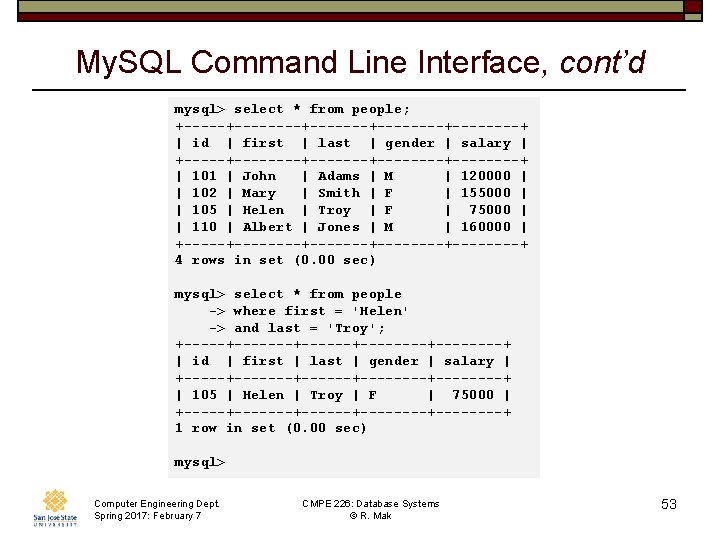
My. SQL Command Line Interface, cont’d mysql> select * from people; +--------+--------+----+ | id | first | last | gender | salary | +--------+--------+----+ | 101 | John | Adams | M | 120000 | | 102 | Mary | Smith | F | 155000 | | 105 | Helen | Troy | F | 75000 | | 110 | Albert | Jones | M | 160000 | +--------+--------+----+ 4 rows in set (0. 00 sec) mysql> select * from people -> where first = 'Helen' -> and last = 'Troy'; +-------+--------+----+ | id | first | last | gender | salary | +-------+--------+----+ | 105 | Helen | Troy | F | 75000 | +-------+--------+----+ 1 row in set (0. 00 sec) mysql> Computer Engineering Dept. Spring 2017: February 7 CMPE 226: Database Systems © R. Mak 53
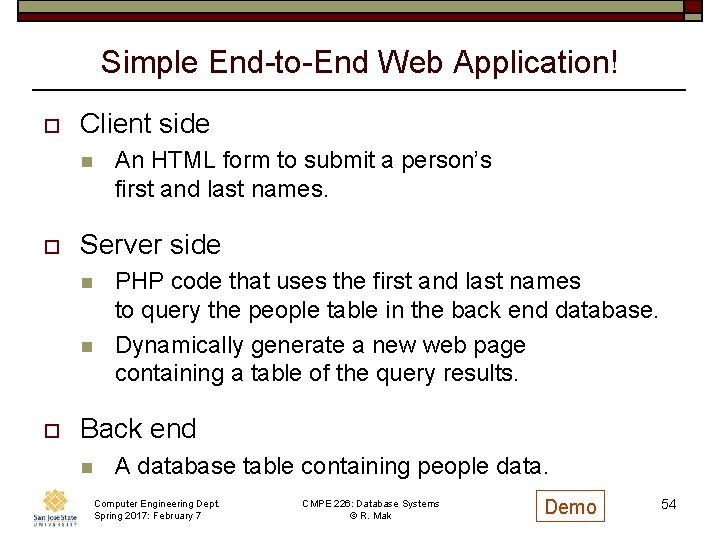
Simple End-to-End Web Application! o Client side n o Server side n n o An HTML form to submit a person’s first and last names. PHP code that uses the first and last names to query the people table in the back end database. Dynamically generate a new web page containing a table of the query results. Back end n A database table containing people data. Computer Engineering Dept. Spring 2017: February 7 CMPE 226: Database Systems © R. Mak Demo 54
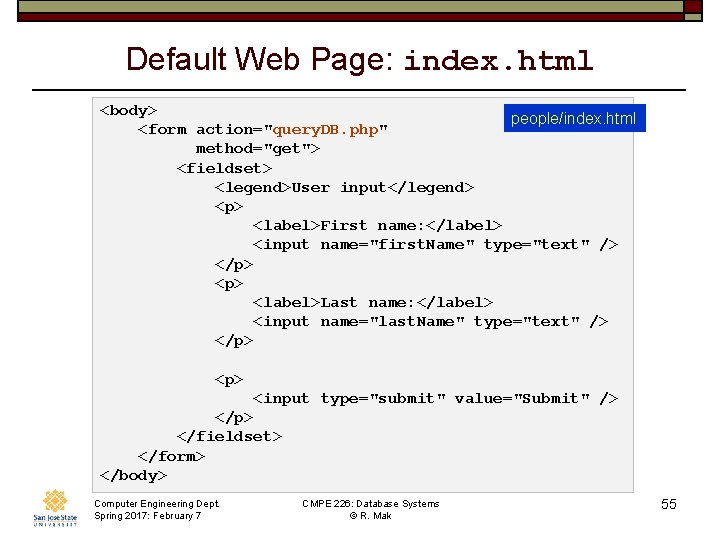
Default Web Page: index. html <body> people/index. html <form action="query. DB. php" method="get"> <fieldset> <legend>User input</legend> <p> <label>First name: </label> <input name="first. Name" type="text" /> </p> <label>Last name: </label> <input name="last. Name" type="text" /> </p> <p> <input type="submit" value="Submit" /> </p> </fieldset> </form> </body> Computer Engineering Dept. Spring 2017: February 7 CMPE 226: Database Systems © R. Mak 55
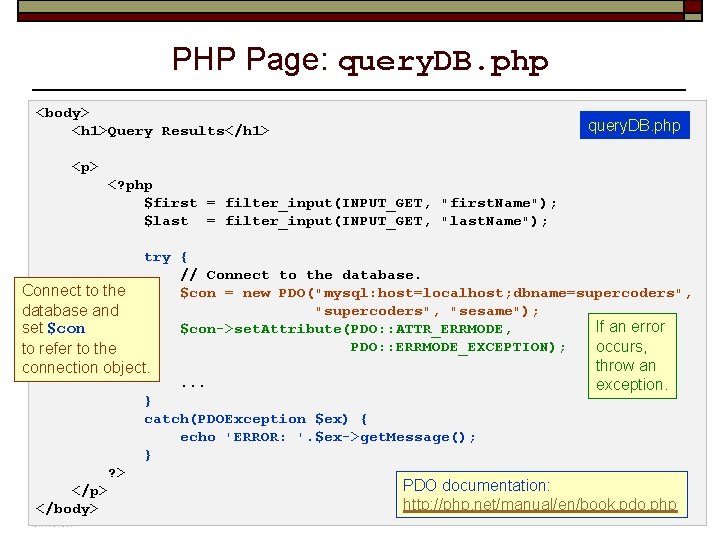
PHP Page: query. DB. php <body> query. DB. php <h 1>Query Results</h 1> <p> <? php $first = filter_input(INPUT_GET, "first. Name"); $last = filter_input(INPUT_GET, "last. Name"); try { // Connect to the database. Connect to the $con = new PDO("mysql: host=localhost; dbname=supercoders", "supercoders", "sesame"); database and If an error set $con->set. Attribute(PDO: : ATTR_ERRMODE, $con occurs, to PDO: : ERRMODE_EXCEPTION); refer to the connection object. throw an exception. . . . } catch(PDOException $ex) { echo 'ERROR: '. $ex->get. Message(); } ? > PDO documentation: </p> Engineering Dept. CMPE 226: Database Systems 56 http: //php. net/manual/en/book. pdo. php </body>Computer Spring 2017: February 7 © R. Mak
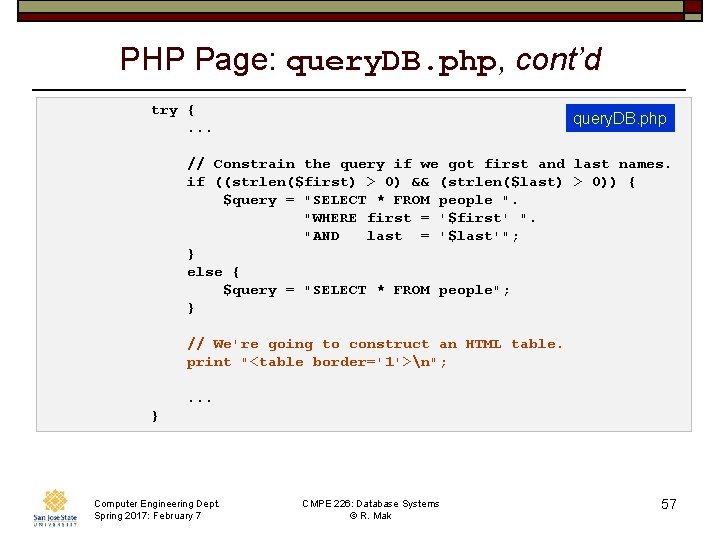
PHP Page: query. DB. php, cont’d try { . . . query. DB. php // Constrain the query if we got first and last names. if ((strlen($first) > 0) && (strlen($last) > 0)) { $query = "SELECT * FROM people ". "WHERE first = '$first' ". "AND last = '$last'"; } else { $query = "SELECT * FROM people"; } // We're going to construct an HTML table. print "<table border='1'>n"; . . . } Computer Engineering Dept. Spring 2017: February 7 CMPE 226: Database Systems © R. Mak 57
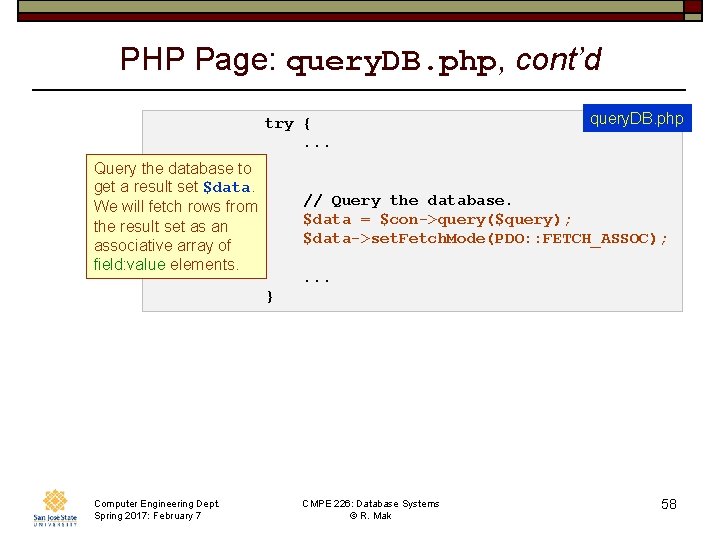
PHP Page: query. DB. php, cont’d try { . . . query. DB. php Query the database to get a result set $data. // Query the database. We will fetch rows from $data = $con->query($query); the result set as an $data->set. Fetch. Mode(PDO: : FETCH_ASSOC); associative array of field: value elements. . . . } Computer Engineering Dept. Spring 2017: February 7 CMPE 226: Database Systems © R. Mak 58
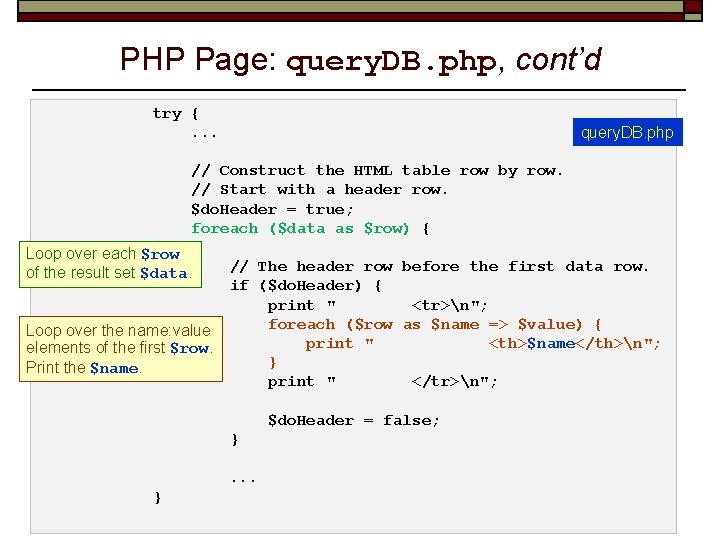
PHP Page: query. DB. php, cont’d try { . . . query. DB. php // Construct the HTML table row by row. // Start with a header row. $do. Header = true; foreach ($data as $row) { Loop over each $row // The header row before the first data row. of the result set $data. if ($do. Header) { print " <tr>n"; foreach ($row as $name => $value) { Loop over the name: value print " <th>$name</th>n"; elements of the first $row. } Print the $name. print " </tr>n"; $do. Header = false; } . . . } Computer Engineering Dept. Spring 2017: February 7 CMPE 226: Database Systems © R. Mak 59
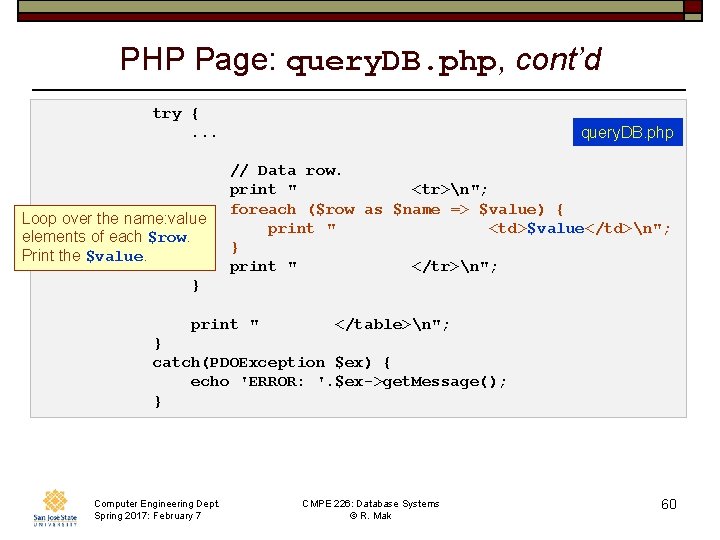
PHP Page: query. DB. php, cont’d try { . . . query. DB. php // Data row. print " <tr>n"; foreach ($row as $name => $value) { Loop over the name: value print " <td>$value</td>n"; elements of each $row. } Print the $value. print " </tr>n"; } print " </table>n"; } catch(PDOException $ex) { echo 'ERROR: '. $ex->get. Message(); } Computer Engineering Dept. Spring 2017: February 7 CMPE 226: Database Systems © R. Mak 60
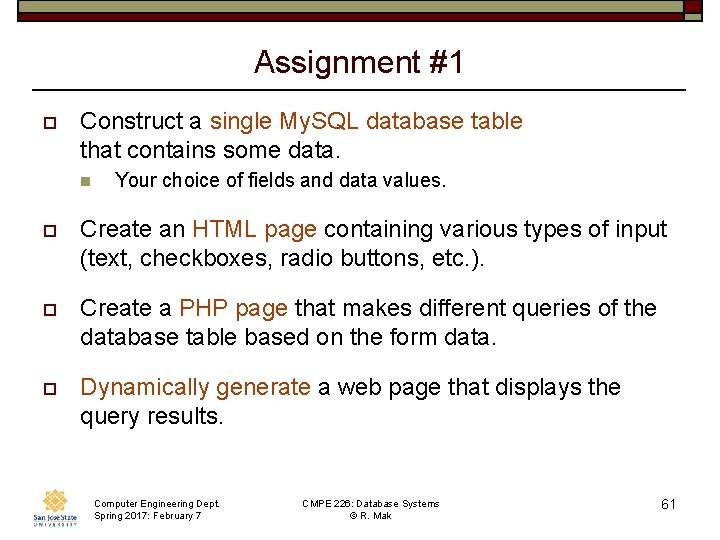
Assignment #1 o Construct a single My. SQL database table that contains some data. n Your choice of fields and data values. o Create an HTML page containing various types of input (text, checkboxes, radio buttons, etc. ). o Create a PHP page that makes different queries of the database table based on the form data. o Dynamically generate a web page that displays the query results. Computer Engineering Dept. Spring 2017: February 7 CMPE 226: Database Systems © R. Mak 61
Assignment #1, cont’d o Make screen shots of your web pages. o Create a “dump” of your database using php. My. Admin’s Export tab. n n n Choose SQL format. Press the Go button to create a. sql file named after your database. The grader will be able to import this file to recreate your database and its data. Computer Engineering Dept. Spring 2017: February 7 CMPE 226: Database Systems © R. Mak 62
Assignment #1, cont’d o Create a zip file named after your team (e. g. , supercoders. zip) containing: n Your. html and. php files. Your. sql database dump file. n Screen shots of your web pages. n o Submit into Canvas: Assignment #1 Computer Engineering Dept. Spring 2017: February 7 CMPE 226: Database Systems © R. Mak 63
Assignment #1, cont’d o This is a team assignment. n n o One submission per team. Each team member receives the same score. Due Tuesday, February 14 at 11: 59 PM. Computer Engineering Dept. Spring 2017: February 7 CMPE 226: Database Systems © R. Mak 64
- Slides: 64