
CMPD 223 CSNB 153 COMPUTER ORGANIZATION COMPUTER SYSTEM
CMPD 223 CSNB 153 COMPUTER ORGANIZATION COMPUTER SYSTEM Chapter 3: Operating System Overview
CMPD 223 CGMB 143 CSNB 153 COMPUTER ORGANIZATION COMPUTER SYSTEM Operating System • Definition: q. A program that controls the execution of application programs q. An interface between applications and hardware q. An OS is a program which acts as an interface between computer system users and the computer hardware. It provides a userfriendly environment in which a user may easily develop and execute programs. Otherwise, hardware knowledge would be mandatory for computer programming. So, it can be said that an OS hides the complexity of hardware from uninterested users.

CMPD 223 CSNB 153 COMPUTER ORGANIZATION COMPUTER SYSTEM Operating system Objectives • 1. Convenience §Makes the computer more convenient to be use – as a user/computer interface • 2. Efficiency §Allows computer system resources to be used in an efficient manner – as a resource manager • 3. Ability to evolve §Permit effective development, testing, and introduction of new system functions without interfering with service.
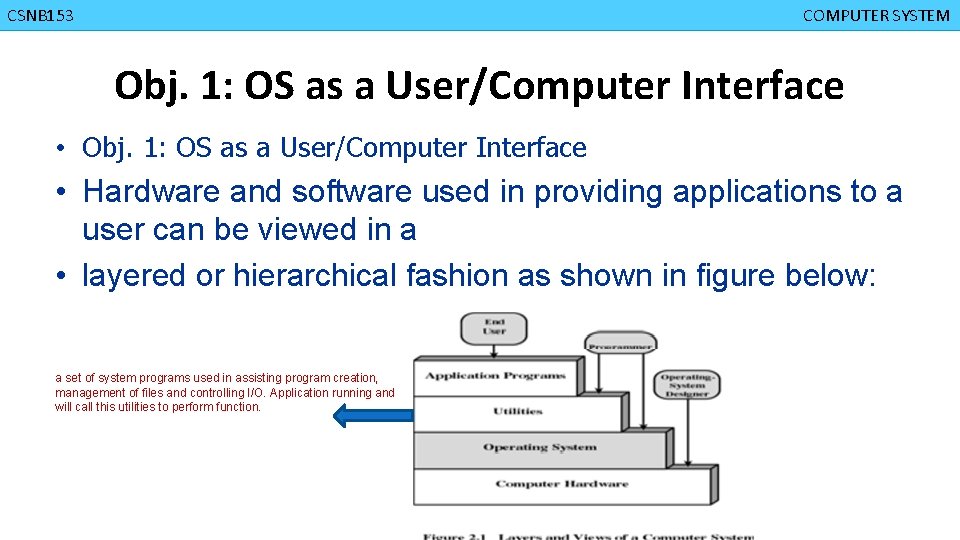
CMPD 223 CGMB 143 CSNB 153 COMPUTER ORGANIZATION COMPUTER SYSTEM Obj. 1: OS as a User/Computer Interface • Obj. 1: OS as a User/Computer Interface • Hardware and software used in providing applications to a user can be viewed in a • layered or hierarchical fashion as shown in figure below: a set of system programs used in assisting program creation, management of files and controlling I/O. Application running and will call this utilities to perform function.
CMPD 223 CGMB 143 CSNB 153 COMPUTER ORGANIZATION COMPUTER SYSTEM OS as a User/Computer Interface • OS in the 3 rd layer: v. Act as a mediator, making it easier for the programmer and for application programs to access and use those facilities and services.
CMPD 223 CGMB 143 CSNB 153 COMPUTER ORGANIZATION COMPUTER SYSTEM OS as a User/Computer Interface. . • OS typically provides services in the following areas: q Program development • Provides editors and debuggers (as utilities program) to assist programmer in creating programs. q Program execution • A number of steps need to be performed to execute a program; loaded data to memory, initializes the I/O devices and files, prepared the processor. OS will handled these scheduling duties for the user.
CMPD 223 CGMB 143 CSNB 153 COMPUTER ORGANIZATION COMPUTER SYSTEM OS as a User/Computer Interface. . q. Access to I/O devices • Provides a uniform interface where programmer can access the I/O using simple read and write q. Controlled access to files • Provide protection mechanisms to control access to the files. q. System access • For shared or public systems OS controls access to the system.
CMPD 223 CGMB 143 CSNB 153 COMPUTER ORGANIZATION COMPUTER SYSTEM OS as a User/Computer Interface. . q Error detection and response § Errors occur while computer run: • – Internal and external hardware errors • – Software errors • – OS cannot grant request of application §OS provide response that clear the error condition with least impact to running applications • – Ending program that cause error • – Retrying the operation • – Reporting error to application
CMPD 223 CGMB 143 CSNB 153 COMPUTER ORGANIZATION COMPUTER SYSTEM OS as a User/Computer Interface. . q. Accounting • -collect statistics • -monitor performance • -used to anticipate future enhancements
CMPD 223 CSNB 153 COMPUTER ORGANIZATION COMPUTER SYSTEM Obj. 2: OS as Resource Manager q A computer is a set of resources for the movement, storage and processing of data and for the control of these functions. q OS is responsible for managing the resources. q In the alternative view, the job of the operating system is to provide an orderly and controlled allocation of the processors, memories, and i/o devices among the various programs competing for them.
CMPD 223 CSNB 153 COMPUTER ORGANIZATION COMPUTER SYSTEM Obj. 3: Ease of Evolution of an OS q. OS will evolved over the time because: § Hardware upgrades and new types of hardware § New services § Fix faults
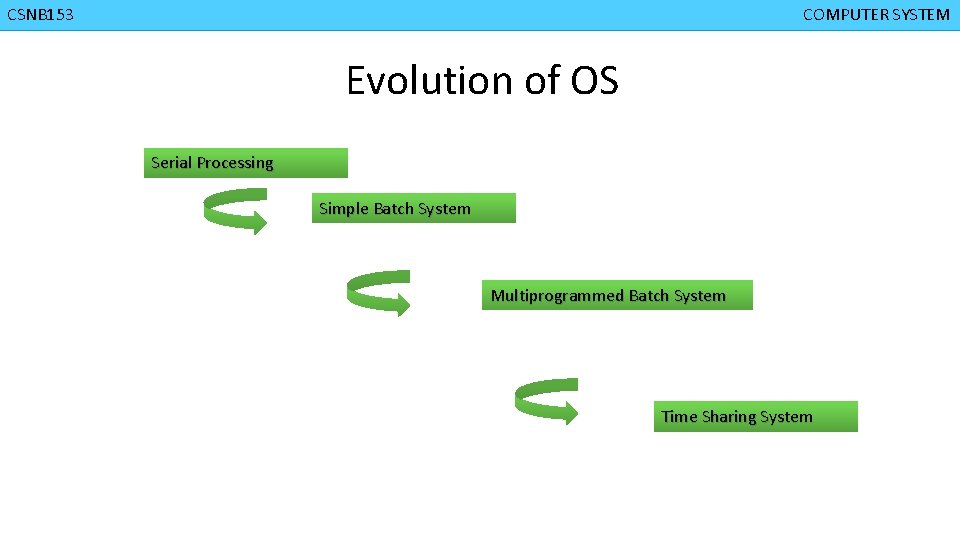
CMPD 223 CSNB 153 COMPUTER ORGANIZATION COMPUTER SYSTEM Evolution of OS Serial Processing Simple Batch System Multiprogrammed Batch System Time Sharing System

CMPD 223 CSNB 153 COMPUTER ORGANIZATION COMPUTER SYSTEM Serial Processing q No operating system q User interact directly with computer hardware. q Machines run from a console with display lights and toggle switches. q This mode of operation could be termed as serial processing because users have access to the computer in series.
CMPD 223 CSNB 153 COMPUTER ORGANIZATION COMPUTER SYSTEM Serial Processing. . q. How it works? § Programs in machine code were loaded via the input device (e. g. . Card Reader) § If there is an error (indicating by the lights) halt the program. § Then the programmer will proceed to examine processor registers and main memory to determine the cause of error. § If the program proceeds to normal completion, the output will be printed.
CMPD 223 CSNB 153 COMPUTER ORGANIZATION COMPUTER SYSTEM Serial Processing. . q. Has TWO main problems: 1. Scheduling 2. Setup Time qprocessor idle most of the time • » Doing nothing, waiting to execute a job
CMPD 223 CSNB 153 COMPUTER ORGANIZATION COMPUTER SYSTEM Serial Processing. . q Scheduling Ø How user “used” the machine Ø User reserve a machine time • – Used a hardcopy sign-up sheet ØProblem arise when user sign up more than the time needed or can’t complete their job with in the time reserved. • – Reserved for 1 hour, but completed execute job for 20 minutes 40 minutes is a processor idle time • – Reserved for 1 hour, but job did not completed. because of error occurs need to reserve another time
CMPD 223 CSNB 153 COMPUTER ORGANIZATION COMPUTER SYSTEM Serial Processing. . q Setup time ØMany steps involve in running a single program/job • – load the compiler + source program to memory • – saving the compiled program • – load and link the object program and common functions • – each of these steps involving mounting or dismounting tapes ØIf error occurred, user had to go back to the beginning setup step. ØMuch of the time is spending on setting up program.
CMPD 223 CSNB 153 COMPUTER ORGANIZATION COMPUTER SYSTEM Serial Processing. . q. Over the time, various system software tools were developed to attempt to make serial processing more efficient. § Libraries of common functions, linkers, loaders, debuggers and I/O driver routines.
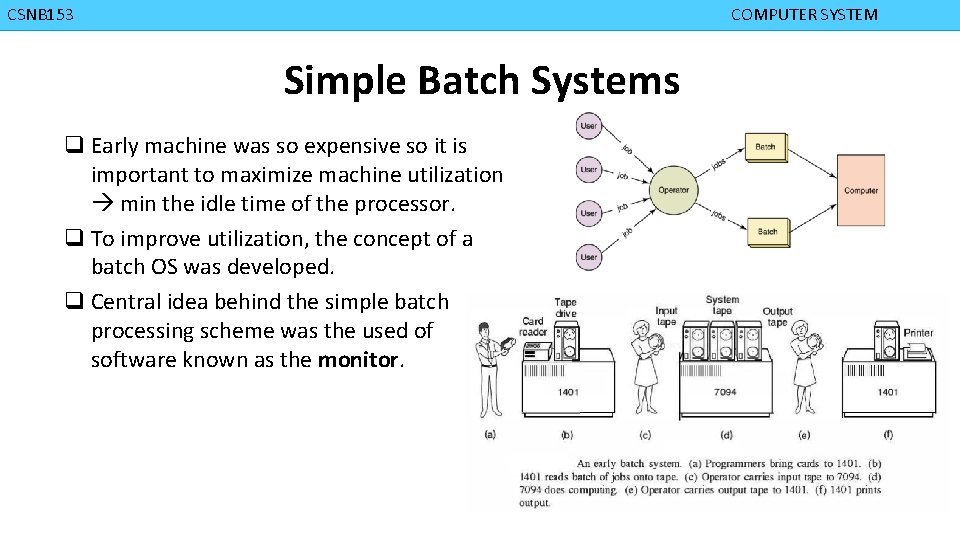
CMPD 223 CSNB 153 COMPUTER ORGANIZATION COMPUTER SYSTEM Simple Batch Systems q Early machine was so expensive so it is important to maximize machine utilization min the idle time of the processor. q To improve utilization, the concept of a batch OS was developed. q Central idea behind the simple batch processing scheme was the used of software known as the monitor.
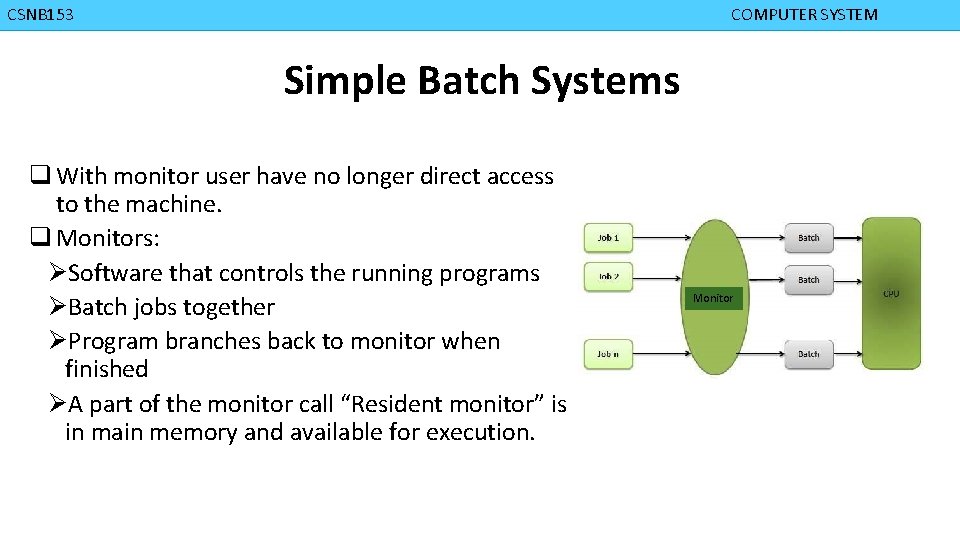
CMPD 223 CSNB 153 COMPUTER ORGANIZATION COMPUTER SYSTEM Simple Batch Systems q With monitor user have no longer direct access to the machine. q Monitors: ØSoftware that controls the running programs ØBatch jobs together ØProgram branches back to monitor when finished ØA part of the monitor call “Resident monitor” is in main memory and available for execution. Monitor
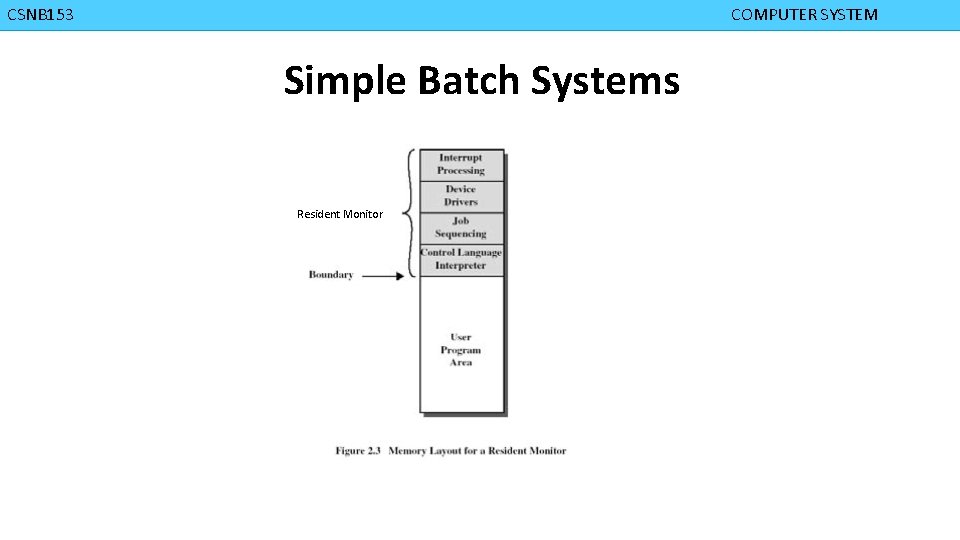
CMPD 223 CSNB 153 COMPUTER ORGANIZATION COMPUTER SYSTEM Simple Batch Systems Resident Monitor
CMPD 223 CSNB 153 COMPUTER ORGANIZATION COMPUTER SYSTEM Simple Batch Systems q How monitor works: ØMonitor reads jobs one at a time from the input device ØMonitor places a job in the user program area ØA monitor instruction branches to the start of the user program ØExecution of user program continues until § End of program occurs § Error occurs ØThis will cause the CPU to fetch its next instruction from monitor
CMPD 223 CSNB 153 COMPUTER ORGANIZATION COMPUTER SYSTEM Simple Batch Systems q. With each job, instructions are included in a primitive form of job control language (JCL) ØSpecial type of programming language used to provides instruction to the monitor § what compiler to use § what data to use
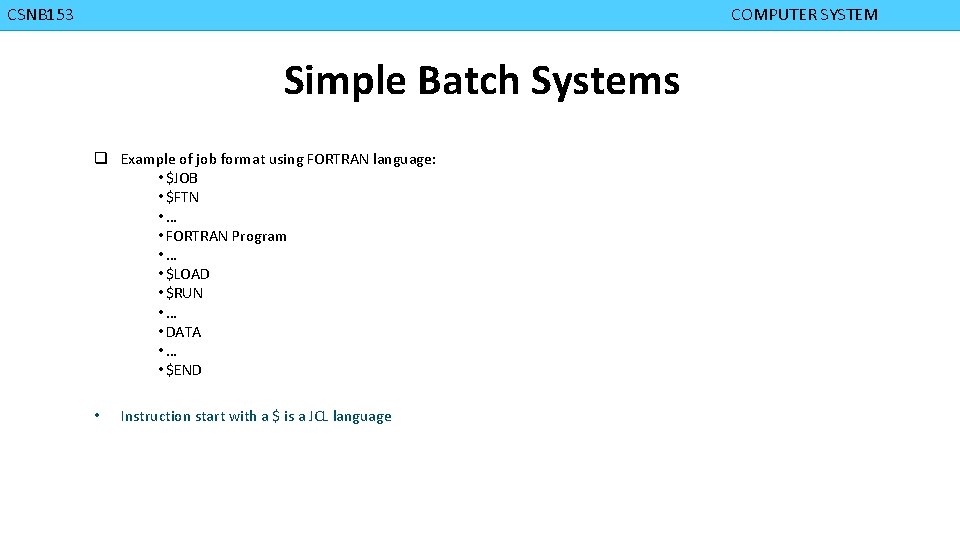
CMPD 223 CSNB 153 COMPUTER ORGANIZATION COMPUTER SYSTEM Simple Batch Systems q Example of job format using FORTRAN language: • $JOB • $FTN • … • FORTRAN Program • … • $LOAD • $RUN • … • DATA • … • $END • Instruction start with a $ is a JCL language
CMPD 223 CSNB 153 COMPUTER ORGANIZATION COMPUTER SYSTEM Simple Batch Systems q. With JCL: ØEach read instruction (in user program) causes one line of input to be read ØCauses input routine (OS) to be invoke §Checks for not reading JCL line §Skip to the next JCL line at completion of user program
CMPD 223 CSNB 153 COMPUTER ORGANIZATION COMPUTER SYSTEM Simple Batch Systems q In summary, the monitor or batch OS: ØIt is a computer program ØRelies on the: § ability of the processor to fetch instructions from the various portions of the main memory to alternately seize and relinquish control.
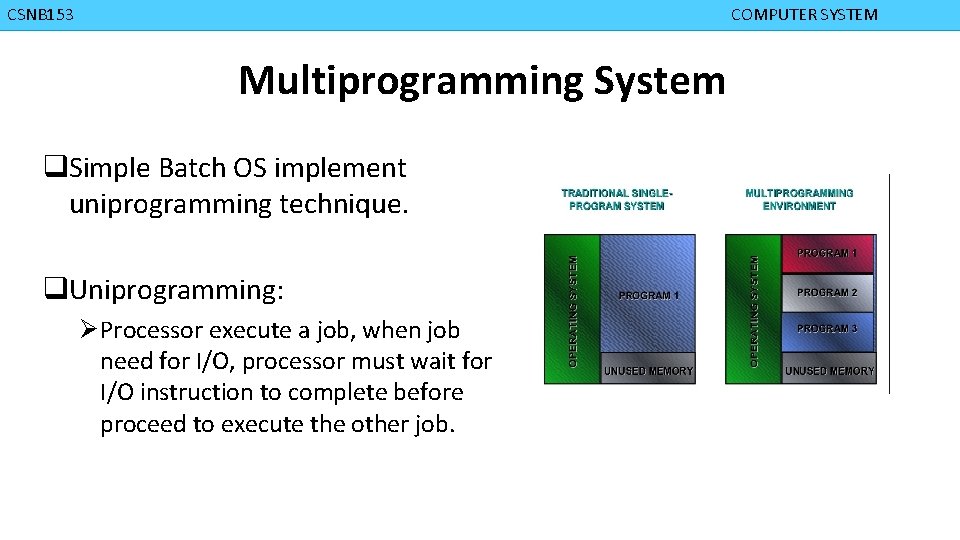
CMPD 223 CSNB 153 COMPUTER ORGANIZATION COMPUTER SYSTEM Multiprogramming System q. Simple Batch OS implement uniprogramming technique. q. Uniprogramming: Ø Processor execute a job, when job need for I/O, processor must wait for I/O instruction to complete before proceed to execute the other job.
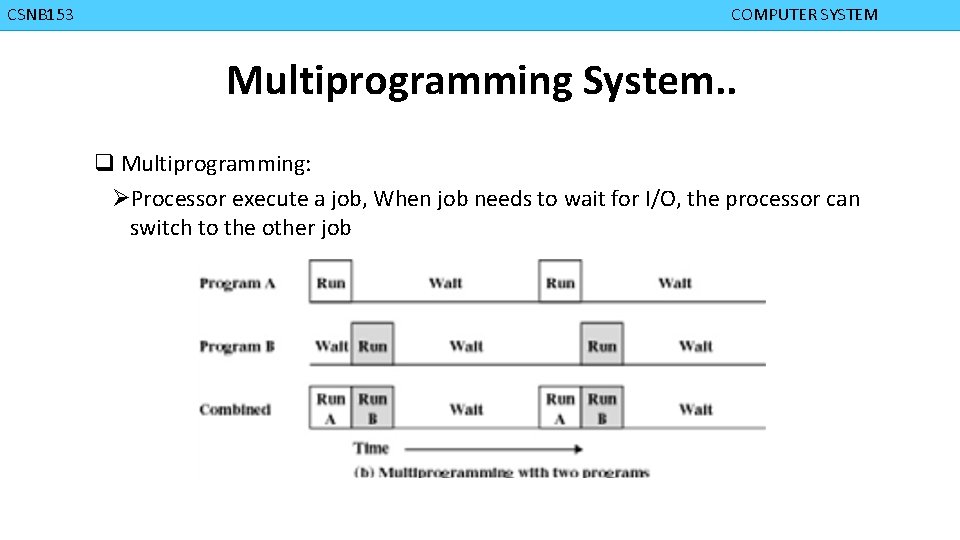
CMPD 223 CSNB 153 COMPUTER ORGANIZATION COMPUTER SYSTEM Multiprogramming System. . q Multiprogramming: ØProcessor execute a job, When job needs to wait for I/O, the processor can switch to the other job
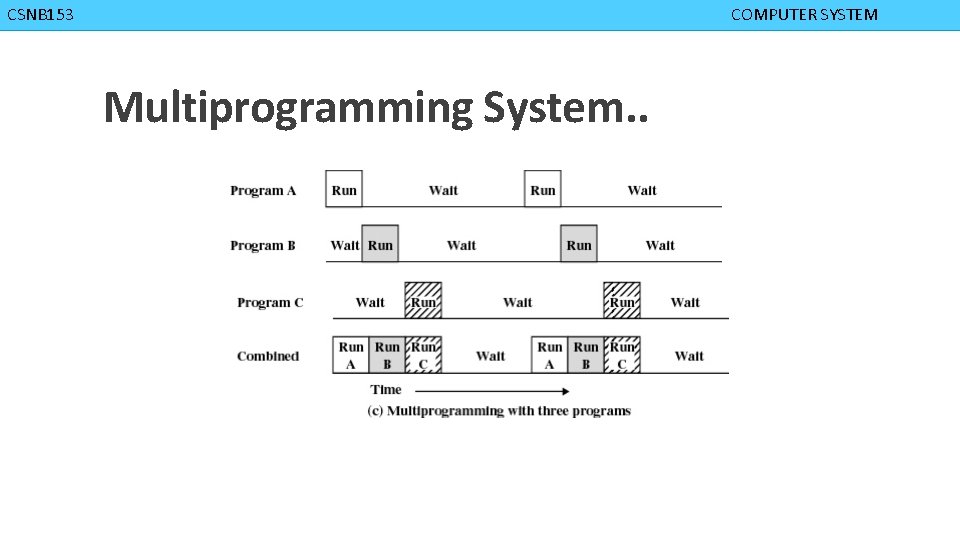
CMPD 223 CSNB 153 COMPUTER ORGANIZATION COMPUTER SYSTEM Multiprogramming System. .
CMPD 223 CSNB 153 COMPUTER ORGANIZATION COMPUTER SYSTEM Time Sharing q A need to provide a mode in which the user interacts directly with the computer. § Transaction processing q Batch multiprogramming does not support interactions with users. q Time sharing extends multiprogramming to handle multiple interactive jobs. q It is called time sharing because the processor’s time is shared among multiple users.
CMPD 223 CSNB 153 COMPUTER ORGANIZATION COMPUTER SYSTEM Evolution of Operating Systems. . q. Both batch OS and time sharing implement multiprogramming.
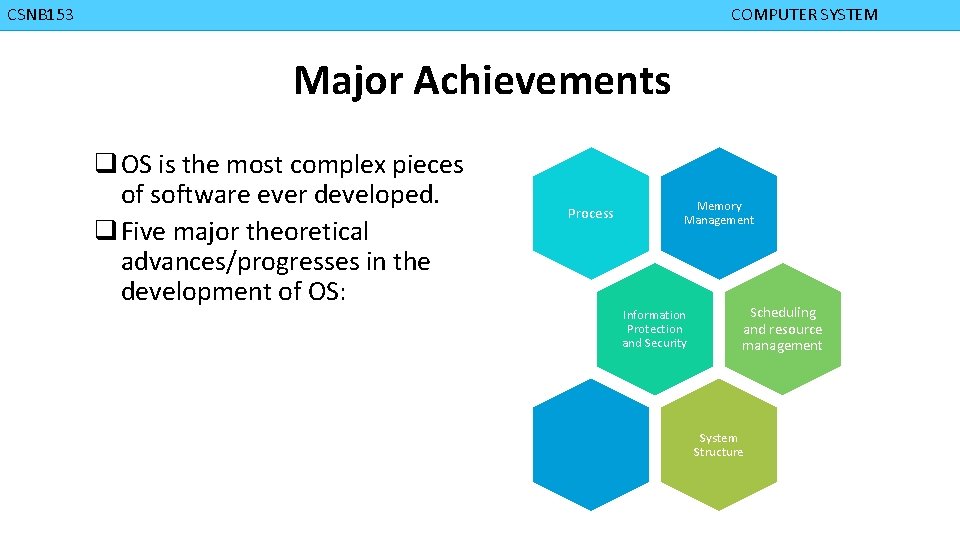
CMPD 223 CSNB 153 COMPUTER ORGANIZATION COMPUTER SYSTEM Major Achievements q OS is the most complex pieces of software ever developed. q Five major theoretical advances/progresses in the development of OS: Process Memory Management Information Protection and Security Scheduling and resource management System Structure
CMPD 223 CSNB 153 COMPUTER ORGANIZATION COMPUTER SYSTEM Major Achievements – Process q Introduced to obtain a systematic way of monitoring and controlling program execution. q Definitions of process: v. A program in execution v. An instance of a program running on a computer v. The entity that can be assigned to and executed on a processor v. A unit of activity characterized by a single sequential thread of execution, a current state, and an associated set of system resources
CMPD 223 CSNB 153 COMPUTER ORGANIZATION COMPUTER SYSTEM Major Achievements – Process. . q Difficulties with Designing OS (with regards to process) v. Improper synchronization § ensure a process waiting for an I/O device receives the signal v. Failed mutual exclusion § Must permit only one program at a time to perform a transaction on a portion of data. v. Non-determinate program operation § When program share memory , their execution is interleaved by the processor, they may interfere with each other by overwriting common memory area.
CMPD 223 CSNB 153 COMPUTER ORGANIZATION COMPUTER SYSTEM Major Achievements – Process. . v. Deadlocks • Two or more programs wait endlessly after each other to perform an operation. q Consists of three components v. An executable program v. Associated data needed by the program v. Execution context of the program • All information the CPU needs to execute the process • All information the operating system needs to manage the process
CMPD 223 CSNB 153 COMPUTER ORGANIZATION COMPUTER SYSTEM Major Achievements – Memory Management q Five principle storage management responsibilities: v Process isolation § The OS must prevent independent processes from interfering with each other’s memory, both data and instructions. v Automatic allocation and management § Programs should be dynamically allocated across the memory hierarchy as required. Allocation should be straightforward to the programmer. v Support for modular programming § Programmers should be able to define program modules, and to create, destroy, and alter the size of modules dynamically v Protection and access control § The OS must provide different ways to access memory by various users. v Long-term storage § Many application programs require means for storing information for extended periods of time, after the computer has been powered down.
CMPD 223 CSNB 153 COMPUTER ORGANIZATION COMPUTER SYSTEM Major Achievements – Information Protection and Security. . q Protection of information is needed since the growth in the use of timesharing systems and • computer network. q Work in security and protection as it relates to OS can be roughly grouped into four • categories. v. Availability • Protecting the system against interruption v. Confidentiality • Assures that user cannot read data for which access is unauthorized
CMPD 223 CSNB 153 COMPUTER ORGANIZATION COMPUTER SYSTEM Major Achievements – Information Protection and Security. . v. Data Integrity • Protection of data from unauthorized modification v. Authenticity • Proper verification of identity of users and the validity of messages or data
CMPD 223 CSNB 153 COMPUTER ORGANIZATION COMPUTER SYSTEM Major Achievements – Scheduling and Resource Management q A key task of the OS is to manage the various resources available and to schedule their use by the various active process. q Resource allocation and scheduling policy must consider three factors: v. Fairness • give equal and fair access to all processes v. Differential responsiveness • discriminate between different classes of jobs
CMPD 223 COMPUTER ORGANIZATION Major Achievements – Scheduling and Resource Management v. Efficiency • maximize output, minimize response time, and accommodate as many uses as possible
CMPD 223 CSNB 153 COMPUTER ORGANIZATION COMPUTER SYSTEM Major Achievements – System Structure q Because of it’s enormous complexity, the OS can be viewed as a series of levels q Each level performs a related subset of functions q Each level relies on the next lower level to perform more primitive functions q Well defined interfaces: one level can be modified without affecting other levels q This decomposes a problem into a number of more manageable sub problems
CMPD 223 CSNB 153 COMPUTER ORGANIZATION COMPUTER SYSTEM Characteristics of Modern OS q New design elements were introduced recently. q In response to new hardware development vmultiprocessor machines vhigh-speed networks vfaster processors and larger memory q In response to new software needs vmultimedia applications v. Internet and Web access v. Client/Server applications
CMPD 223 CSNB 153 COMPUTER ORGANIZATION COMPUTER SYSTEM Characteristics of Modern OS q. Changes not only in modification and enhancement to existing architectures but also in new ways of organizing the operating system. q Much of the works fits into: • 1. Microkernel architecture • 2. Multithreading • 3. Symmetric multiprocessing • 4. Distributed OS • 5. Object-oriented design.
CMPD 223 CSNB 153 COMPUTER ORGANIZATION COMPUTER SYSTEM Characteristics of Modern OS Microkernel Architecture q Only a few essential functions in the kernel vprimitive memory management (address space) v. Inter process communication (IPC) vbasic scheduling q Other OS services are provided by processes running in user mode Such as device drivers, file system, virtual memory q Provide more flexibility, extensibility, portability
CMPD 223 CSNB 153 COMPUTER ORGANIZATION COMPUTER SYSTEM Characteristics of Modern OS Multithreading q A process is a collection of one or more threads that can run simultaneously. q Useful when the application consists of several tasks that do not need to be serialized. q Gives the programmer a greater control over the timing of application-related events. q All threads within the same process share the same data and resources and a part of the process’s execution context
CMPD 223 CSNB 153 COMPUTER ORGANIZATION COMPUTER SYSTEM Characteristics of Modern OS Symmetric Multiprocessing q Refers to a computer hardware architecture and also to the operating system behavior q that reflects that architecture. q Standalone computer system with the following characteristics: v. A computer with multiple processors v. These processors share the same main memory and I/O facilities, interconnected by a communication bus or other internal connection scheme.
CMPD 223 CSNB 153 COMPUTER ORGANIZATION COMPUTER SYSTEM Characteristics of Modern OS Symmetric Multiprocessing. . v. All processor can perform the same functions. v. Existence of multiple processors is transparent to the user. q Advantages over uniprocessor architecture: • 1. Performance • 2. Availability • 3. Incremental Growth
CMPD 223 COMPUTER ORGANIZATION • Performance – If the work to be done by a computer can be organized so that some portions of the work can be done in parallel, then a system with multiple processor will yield a greater performance than one single processor • Availability – the failure of a single processor does not halt the system. • Incremental growth – A user can enhanced the performance of a system by adding an additional processor.
CMPD 223 CSNB 153 COMPUTER ORGANIZATION COMPUTER SYSTEM Characteristics of Modern OS Distributed OS q DOS is a collection of independent computers that appears to the users of the system as a single computer. q Provides the illusion of a single main memory and single secondary memory space, i. e. appearing as a single system. q E. g. . Cluster computer.
CMPD 223 CSNB 153 COMPUTER ORGANIZATION COMPUTER SYSTEM Characteristics of Modern OS Object Oriented Design q Used for adding modular extensions to a small kernel q Enables programmers to customize an operating system without disrupting system integrity
CMPD 223 CSNB 153 COMPUTER ORGANIZATION COMPUTER SYSTEM THE END
- Slides: 51