
Cloud Cruiser AWS to Azure Cloud Migration All

- Slides: 14
Cloud Cruiser AWS to Azure Cloud Migration All third party logos provided in the presentation are trademarked identities of the respective brands, and should not be shared, modified, or reused under any circumstances © Mindtree limited 2013 -14
Agenda 1 Background and Context 2 Mapping of AWS to Azure 3 Automated Deployment 4 Autoscaling with scalesets 5 Network Architecture 6 Access Control 2
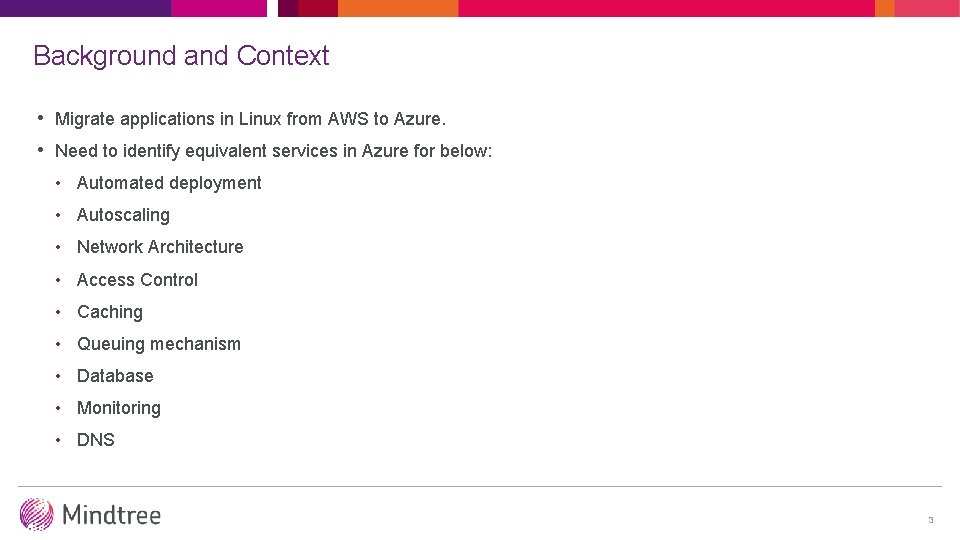
Background and Context • Migrate applications in Linux from AWS to Azure. • Need to identify equivalent services in Azure for below: • Automated deployment • Autoscaling • Network Architecture • Access Control • Caching • Queuing mechanism • Database • Monitoring • DNS 3
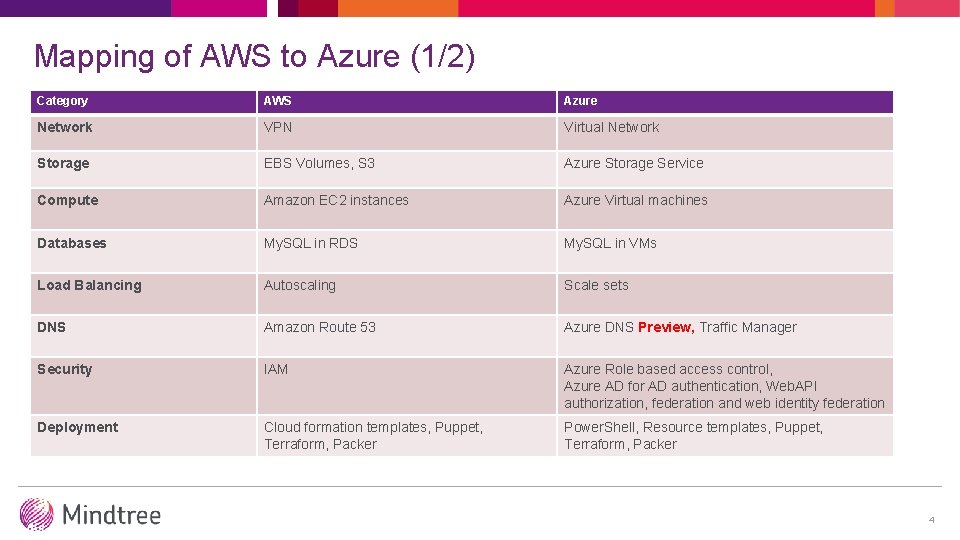
Mapping of AWS to Azure (1/2) Category AWS Azure Network VPN Virtual Network Storage EBS Volumes, S 3 Azure Storage Service Compute Amazon EC 2 instances Azure Virtual machines Databases My. SQL in RDS My. SQL in VMs Load Balancing Autoscaling Scale sets DNS Amazon Route 53 Azure DNS Preview, Traffic Manager Security IAM Azure Role based access control, Azure AD for AD authentication, Web. API authorization, federation and web identity federation Deployment Cloud formation templates, Puppet, Terraform, Packer Power. Shell, Resource templates, Puppet, Terraform, Packer 4
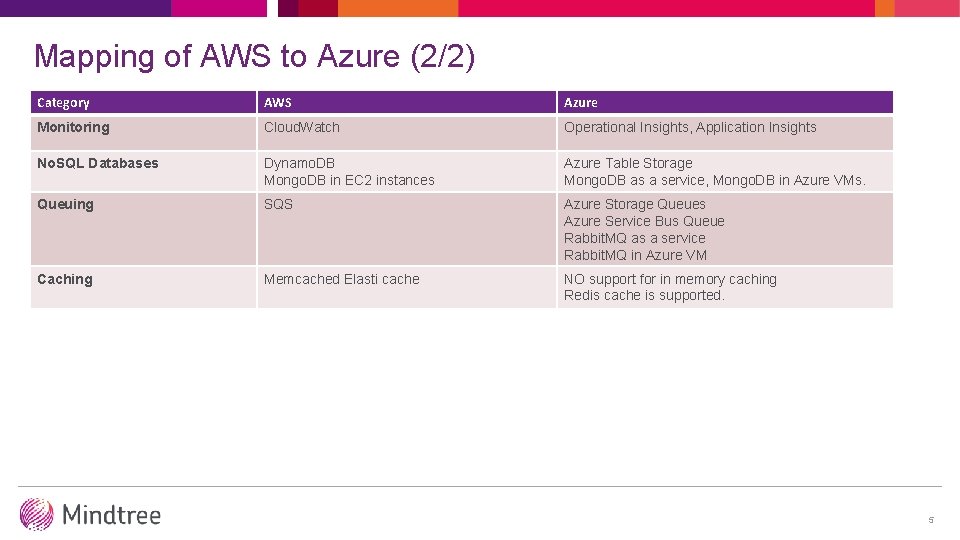
Mapping of AWS to Azure (2/2) Category AWS Azure Monitoring Cloud. Watch Operational Insights, Application Insights No. SQL Databases Dynamo. DB Mongo. DB in EC 2 instances Azure Table Storage Mongo. DB as a service, Mongo. DB in Azure VMs. Queuing SQS Azure Storage Queues Azure Service Bus Queue Rabbit. MQ as a service Rabbit. MQ in Azure VM Caching Memcached Elasti cache NO support for in memory caching Redis cache is supported. 5
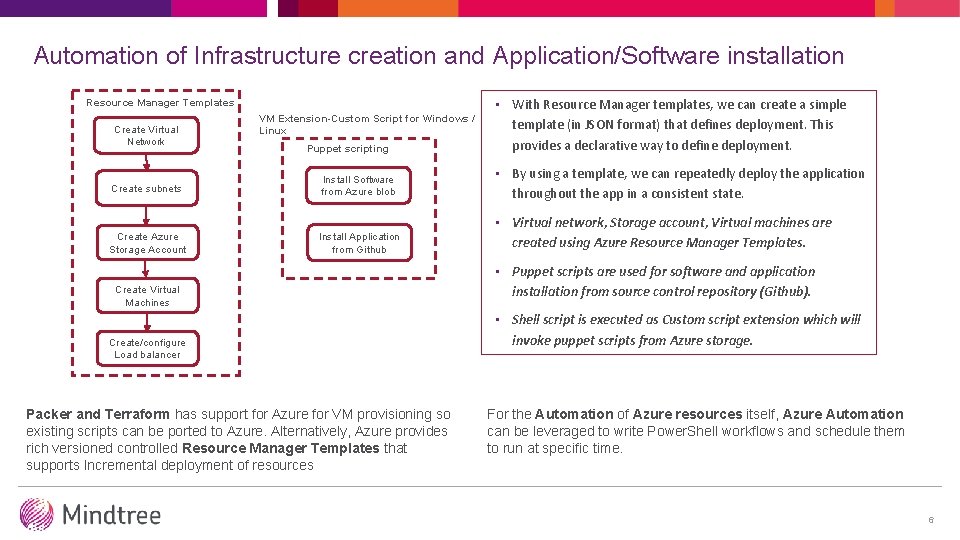
Automation of Infrastructure creation and Application/Software installation Resource Manager Templates Create Virtual Network Create subnets Create Azure Storage Account VM Extension-Custom Script for Windows / Linux Puppet scripting • With Resource Manager templates, we can create a simple template (in JSON format) that defines deployment. This provides a declarative way to define deployment. Install Software from Azure blob • By using a template, we can repeatedly deploy the application throughout the app in a consistent state. Install Application from Github • Virtual network, Storage account, Virtual machines are created using Azure Resource Manager Templates. Create Virtual Machines Create/configure Load balancer Packer and Terraform has support for Azure for VM provisioning so existing scripts can be ported to Azure. Alternatively, Azure provides rich versioned controlled Resource Manager Templates that supports Incremental deployment of resources • Puppet scripts are used for software and application installation from source control repository (Github). • Shell script is executed as Custom script extension which will invoke puppet scripts from Azure storage. For the Automation of Azure resources itself, Azure Automation can be leveraged to write Power. Shell workflows and schedule them to run at specific time. 6
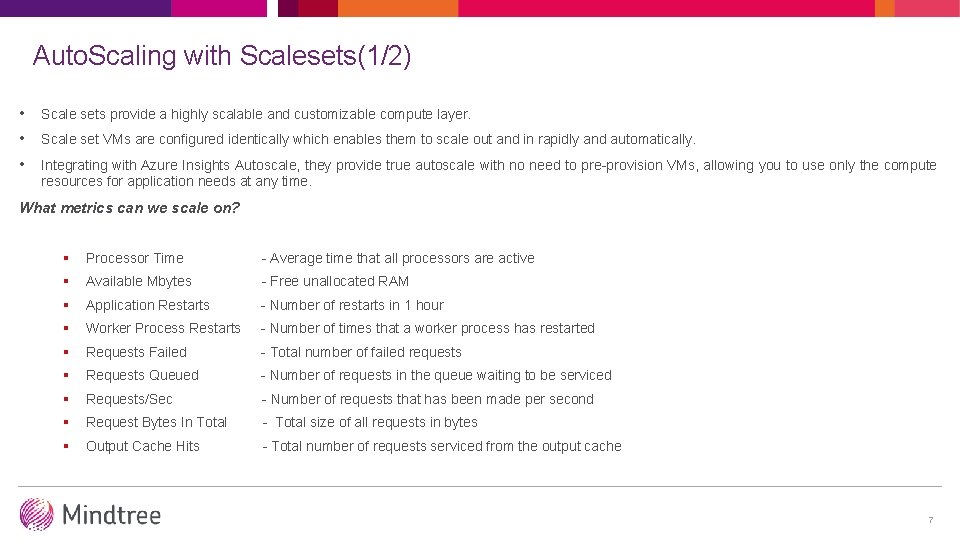
Auto. Scaling with Scalesets(1/2) • Scale sets provide a highly scalable and customizable compute layer. • Scale set VMs are configured identically which enables them to scale out and in rapidly and automatically. • Integrating with Azure Insights Autoscale, they provide true autoscale with no need to pre-provision VMs, allowing you to use only the compute resources for application needs at any time. What metrics can we scale on? § Processor Time - Average time that all processors are active § Available Mbytes - Free unallocated RAM § Application Restarts - Number of restarts in 1 hour § Worker Process Restarts - Number of times that a worker process has restarted § Requests Failed - Total number of failed requests § Requests Queued - Number of requests in the queue waiting to be serviced § Requests/Sec - Number of requests that has been made per second § Request Bytes In Total - Total size of all requests in bytes § Output Cache Hits - Total number of requests serviced from the output cache 7
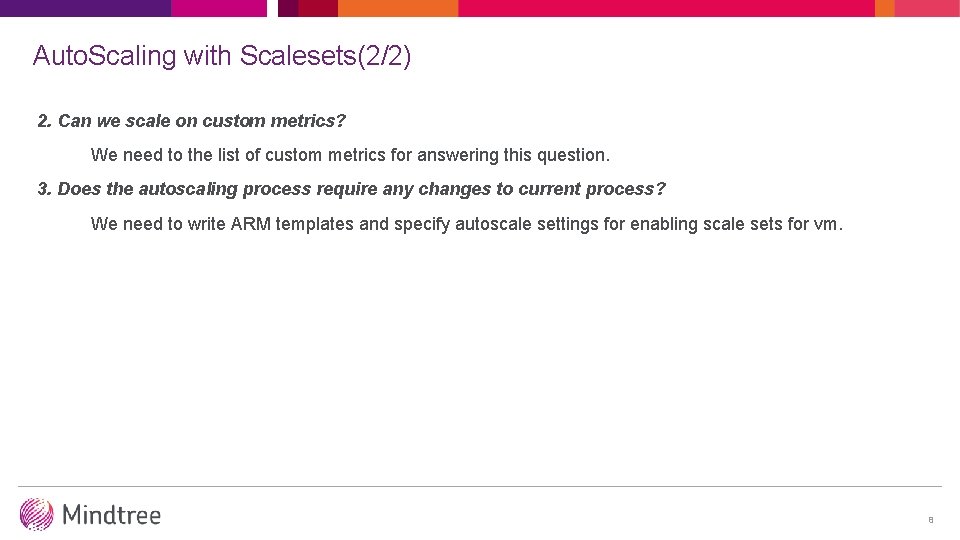
Auto. Scaling with Scalesets(2/2) 2. Can we scale on custom metrics? We need to the list of custom metrics for answering this question. 3. Does the autoscaling process require any changes to current process? We need to write ARM templates and specify autoscale settings for enabling scale sets for vm. 8
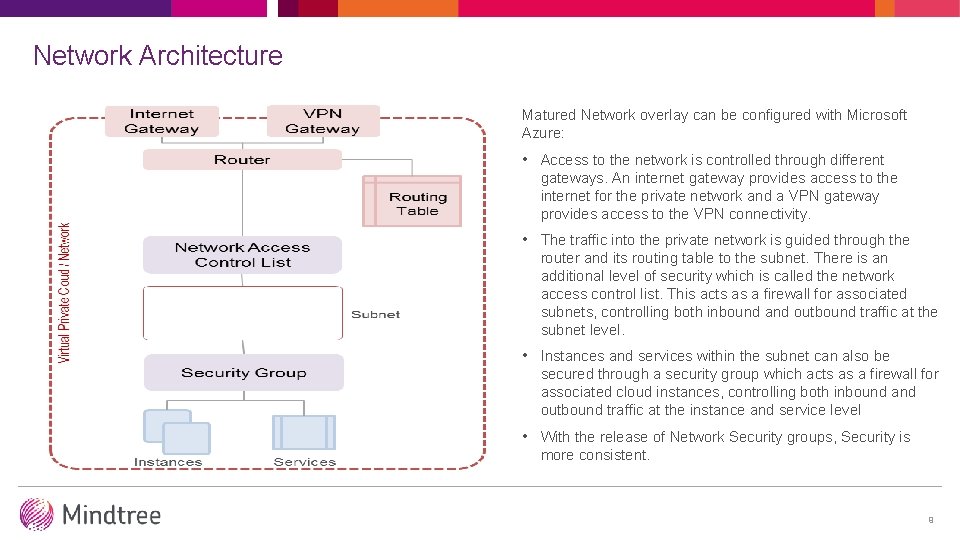
Network Architecture Matured Network overlay can be configured with Microsoft Azure: • Access to the network is controlled through different gateways. An internet gateway provides access to the internet for the private network and a VPN gateway provides access to the VPN connectivity. • The traffic into the private network is guided through the router and its routing table to the subnet. There is an additional level of security which is called the network access control list. This acts as a firewall for associated subnets, controlling both inbound and outbound traffic at the subnet level. • Instances and services within the subnet can also be secured through a security group which acts as a firewall for associated cloud instances, controlling both inbound and outbound traffic at the instance and service level • With the release of Network Security groups, Security is more consistent. 9
Access Control 10
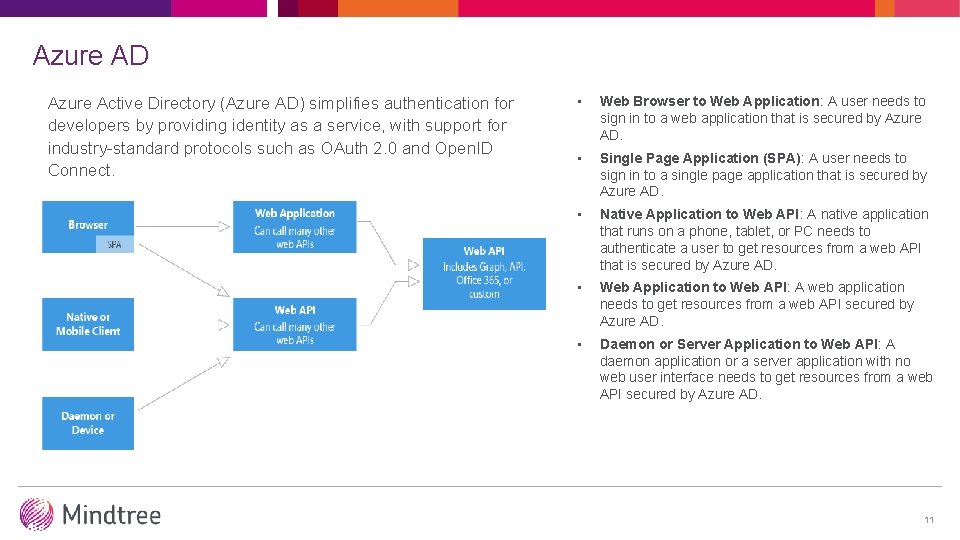
Azure AD Azure Active Directory (Azure AD) simplifies authentication for developers by providing identity as a service, with support for industry-standard protocols such as OAuth 2. 0 and Open. ID Connect. • Web Browser to Web Application: A user needs to sign in to a web application that is secured by Azure AD. • Single Page Application (SPA): A user needs to sign in to a single page application that is secured by Azure AD. • Native Application to Web API: A native application that runs on a phone, tablet, or PC needs to authenticate a user to get resources from a web API that is secured by Azure AD. • Web Application to Web API: A web application needs to get resources from a web API secured by Azure AD. • Daemon or Server Application to Web API: A daemon application or a server application with no web user interface needs to get resources from a web API secured by Azure AD. 11
Azure AD Premium Features 1. Branding and Customization 2. Group Based Access Control • Groups can be used to control access to applications federated with Azure AD 3. Multi- Factor Authentication • It includes second factor of authentication (SMS (text) message, voice call, or push notification to an app) 4. Advanced Reporting • It provides common IT security reports centered on application and device usage and security analytics that detect irregular and suspicious activity 12
Role based access control • Azure Role-Based Access Control (RBAC) enables fine-grained access management for Azure. • Using RBAC, you can segregate duties within your Dev. Ops team and grant only the amount of access to users that they need to perform their jobs. • Access is granted by assigning the appropriate RBAC role to users, groups, and applications, at the right scope. • To grant access to the entire subscription, assign a role at the subscription scope. • To grant access to a specific resource group within a subscription, assign a role at the resource group scope. • You may assign roles at specific resources too, like websites, virtual machines and subnets, to grant access only to a resource. 13
India | USA | UK | Germany | Sweden | Belgium | France | Switzerland | UAE | Singapore | Australia | Japan | China