
Cloud Architecture Characteristics of Cloud Computing The Industry
- Slides: 37
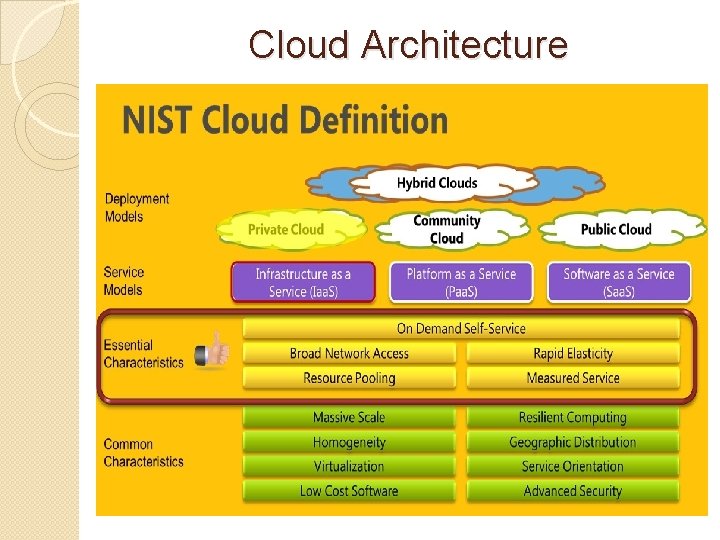
Cloud Architecture
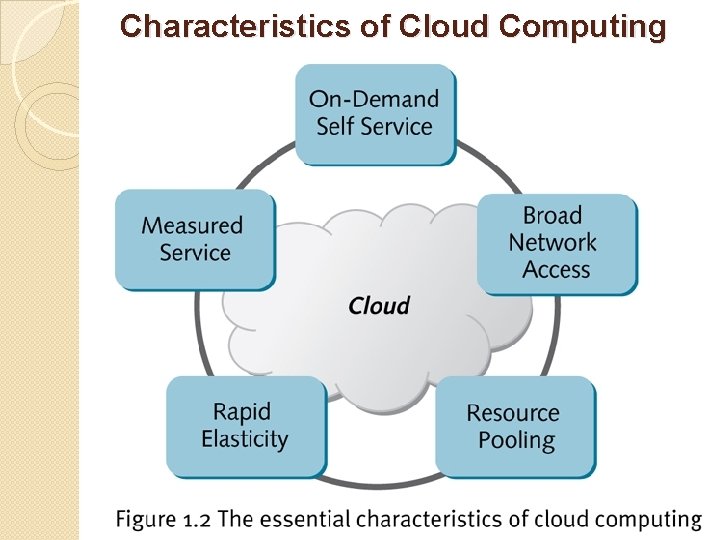
Characteristics of Cloud Computing
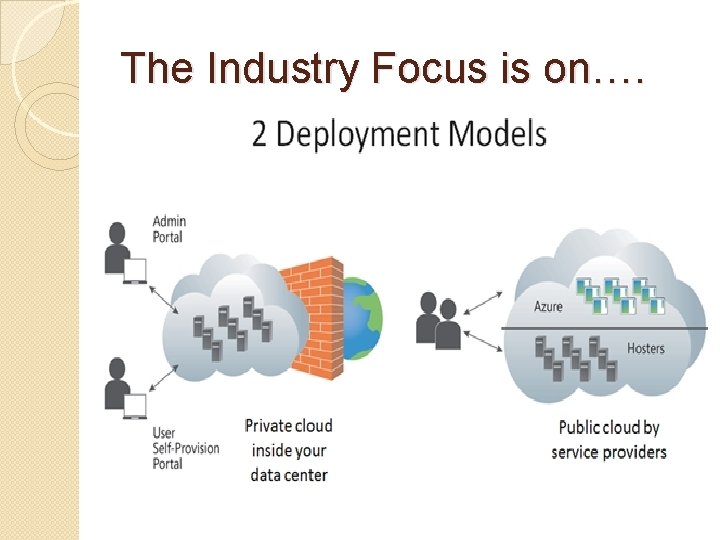
The Industry Focus is on….
Cloud Services The term services in cloud computing is the concept of being able to use reusable, fine-grained components across a vendor’s network. This is widely known as “as a service. ” Offerings with as a service as a suffix include traits like the following: • Low barriers to entry, making them available to small businesses • Large scalability • Multitenancy, which allows resources to be shared by many users • Device independence, which allows users to access the systems on different hardware
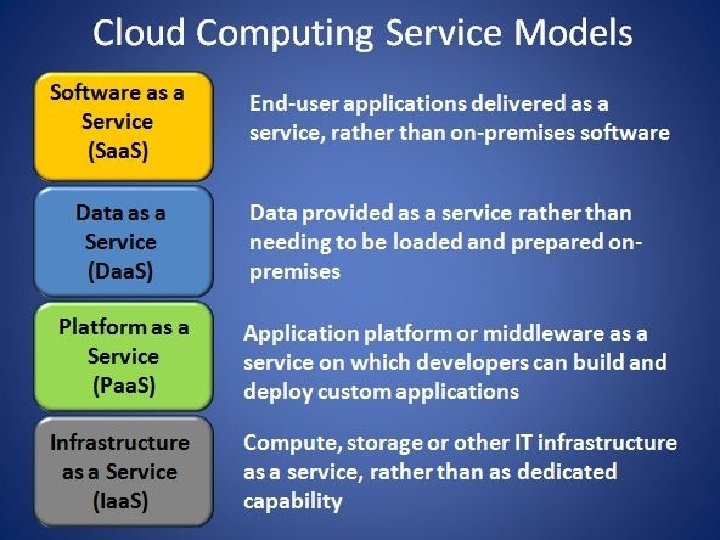
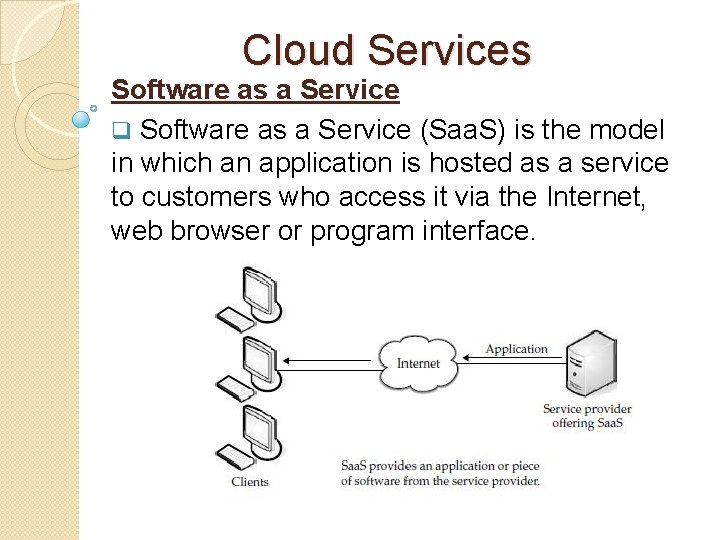
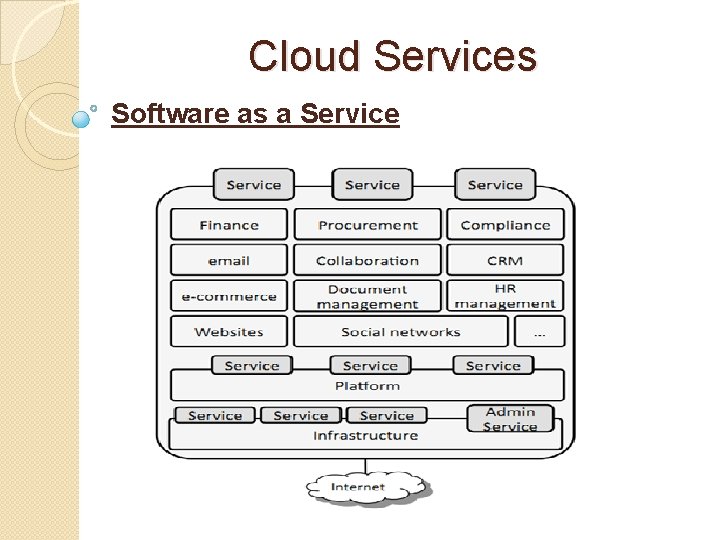
Cloud Services Software as a Service q Software as a Service (Saa. S) is the model in which an application is hosted as a service to customers who access it via the Internet, web browser or program interface.
Cloud Services Software as a Service ØIt is mainly accessed through a web portal and service oriented architectures based on web service technologies ØCosts can be sort of a double-edged sword. ØOn the one hand, costs for accessing the software can be an ongoing thing. Rather than pay for it once and be done with it, the more you use it, the more you’ll be billed. ØOn the other hand, in some cases you don’t have to pay as much up front and you are only billed based on
Cloud Services Software as a Service Ø Some of the Saa. S applications are not customizable such as an Office Suite. But Saa. S provides us Application Programming Interface (API), which allows the developer to develop a customized application. Ø Customers who are not inclined to perform software development but have need of high-powered applications can also benefit from Saa. S. Some of these applications include • Customer resource management (CRM) • Video conferencing • IT service management • Accounting • Web analytics • Web content management
Cloud Services Software as a Service
Cloud Services Software as a Service ØSaa. S applications differ from earlier distributed computing solutions in that Saa. S was developed specifically to use web tools, like the browser. ØThis makes them web-native. It was also built with a multitenant back end in mind, which enables multiple customers to use an application. ØSaa. S provides network-based access to commercially available software. Since the software is managed at a central location, customers can access their applications wherever they have web access.
Software as a Service Benefits: ØOne of the biggest benefits of Saa. S is, of course, costing less money than buying the application outright. ØThe service provider can offer cheaper, more reliable applications than organizations can by themselves. Some other benefits include the following: • Familiarity with the World Wide Web ØMost workers have access to a computer and know how to use it on the World Wide Web. As such, the learning curve for using external applications can be much smaller. • Smaller staff ØIT systems require the overhead of salaries, benefits, insurance, and building space. The ability to
Software as a Service Benefits: • Customization Ø Saa. S applications are much easier to customize and can give an organization exactly what they want. • Better marketing ØA provider who had developed an application for a very narrow market might have had problems marketing that application. However, with Saa. S, the entire world is open to the providers. • Web reliability ØWe talked earlier about how the World Wide Web can be seen as a source of failure. And while that is sporadically true, the fact of the matter is that the Web is generally quite reliable.
Software as a Service Benefits: • Security Ø Secure Sockets Layer (SSL) is widely used and trusted. Ø This allows customers to reach their applications securely without having to employ complex backend configurations, like virtual private networks (VPNs). • More bandwidth Ø Bandwidth has increased greatly in recent months and quality of service improvements are helping data flow. Ø This will allow organizations to trust that they can access their applications with low latencies and good speeds.
Software as a Service Obstacles: Like anything, Saa. S faces obstacles to its implementation and use. ØThe first is that an organization that has a very specific computational need might not be able to find the application available through Saa. S. ØIn that case, they may discover that they need to buy the software and install it on their local machines. That said, companies with unique needs may be able to find some of the components in a Saa. S.
Software as a Service Obstacles: ØThere is also an element of “lock-in” with vendors. That is, the customer might pay a provider to use an application, but once they do, they may be unable to port that application to a new vendor. Or, it might be possible to move to a new vendor, but the old vendor might charge a heavy moving fee. ØFinally, Saa. S also faces challenges from the availability of open source applications and cheaper hardware. If companies are so inclined, they can put their open source applications on hardware that performs better
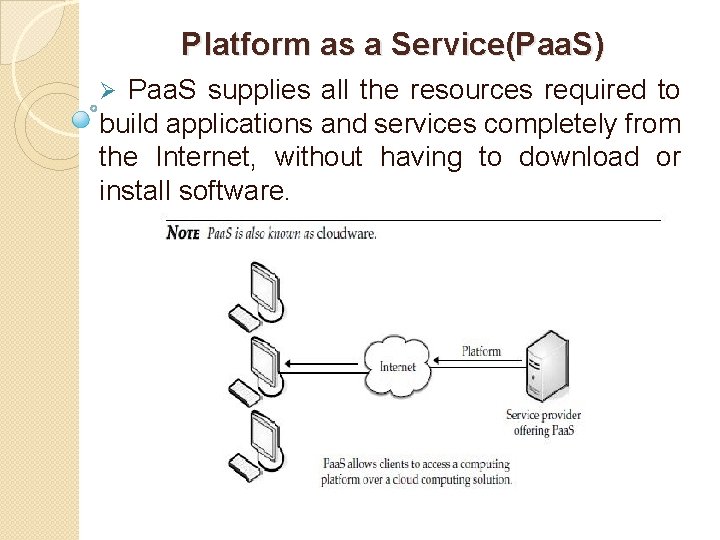
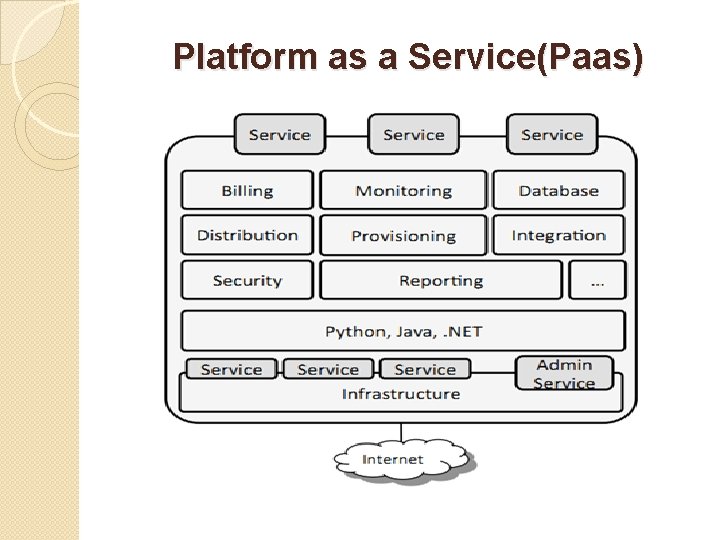
Platform as a Service(Paa. S) Ø Paa. S supplies all the resources required to build applications and services completely from the Internet, without having to download or install software.
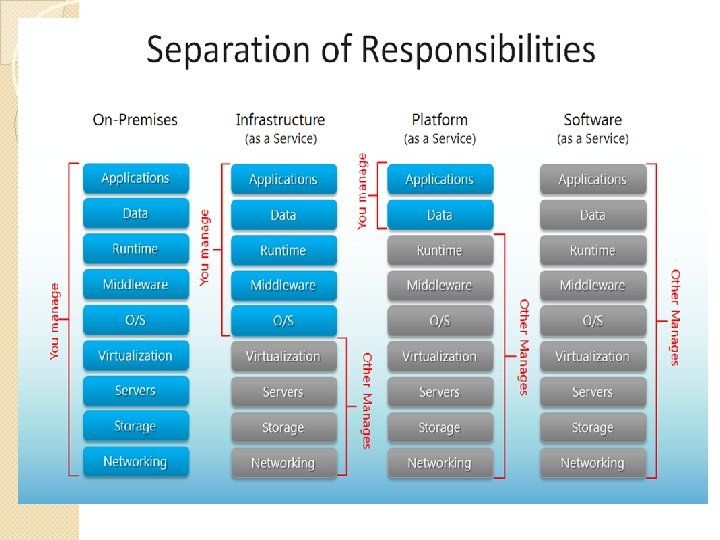
Platform as a Service(Paas) Ø Paa. S services include application design, development, testing, deployment, and hosting. ØOther services include team collaboration, web service integration, database integration, security, scalability, storage, state management, and versioning. ØA downfall to Paa. S is a lack of interoperability and portability among providers. That is, if you create an application with one cloud provider and decide to move to another provider, you may not be able to do so—or you’ll have to pay a high price. ØAlso, if the provider goes out of business, your applications and your data will be lost.
Platform as a Service(Paas)
Platform as a Service(Paas) Ø Paa. S generally offers some support to help the creation of user interfaces, and is normally based on HTML or Java. Script. ØIt provides automatic facilities for concurrency management, scalability, failover, and security. ØPaa. S also supports web development interfaces such as Simple Object Access Protocol (SOAP) and Representational State Transfer (REST), which allow the construction of multiple web services, sometimes called mashups.
Platform as a Service(Paas) Paa. S Options: Paa. S is found in one of three different types of systems: • Add-on development facilities ØThese allow existing Saa. S applications to be customized. Often, Paa. S developers and users are required to purchase subscriptions to the add-on Saa. S application. • Stand-alone environments ØThese environments do not include licensing, technical, or financial dependencies on specific Saa. S applications and are used for general developments.
Platform as a Service(Paas) Paa. S Options: • Application delivery-only environments These environments support hosting level services, like security and on-demand scalability. They do not include development, debugging, and test capabilities.
Platform as a Service(Paas) Below are some of the benefits of Paa. S to application developers: They don’t have to invest in physical infrastructure; ØBeing able to ‘rent’ virtual infrastructure has both cost benefits and practical benefits. ØThey don’t need to purchase hardware themselves or employ the expertise to manage it. . Makes development possible for ‘non-experts’; ØWith some Paa. S offerings anyone can develop an application. ØThey can simply do this through their web browser utilizing one-click functionality. ØSalient examples of this are one-click blog software installs such as Word. Press.
Platform as a Service(Paas) Flexibility; ØCustomers can have control over the tools that are installed within their platforms and can create a platform that suits their specific requirements. Adaptability; ØFeatures can be changed if circumstances dictate that they should. Teams in various locations can work together; ØAs an internet connection and web browser are all that is required, developers spread across several locations can work together on the same application build. Security; Øsecurity is provided, including data security and backup and recovery.
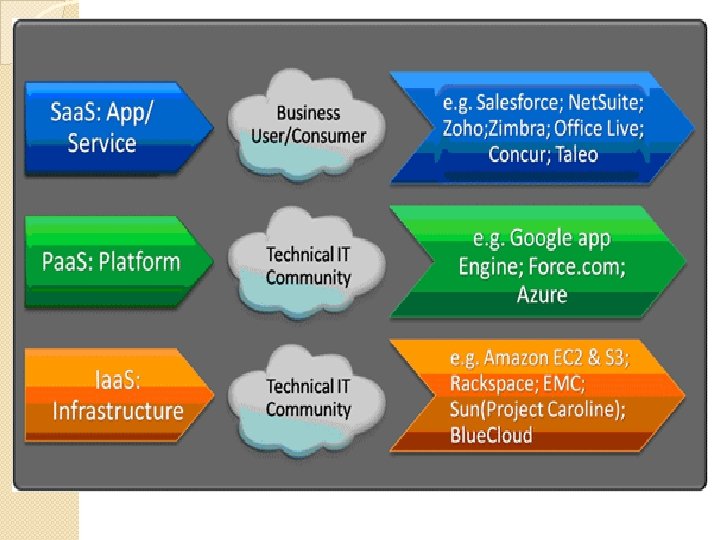
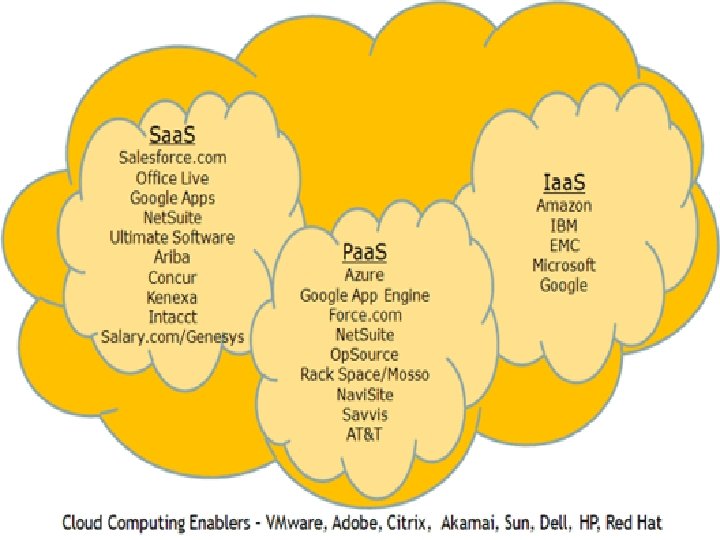
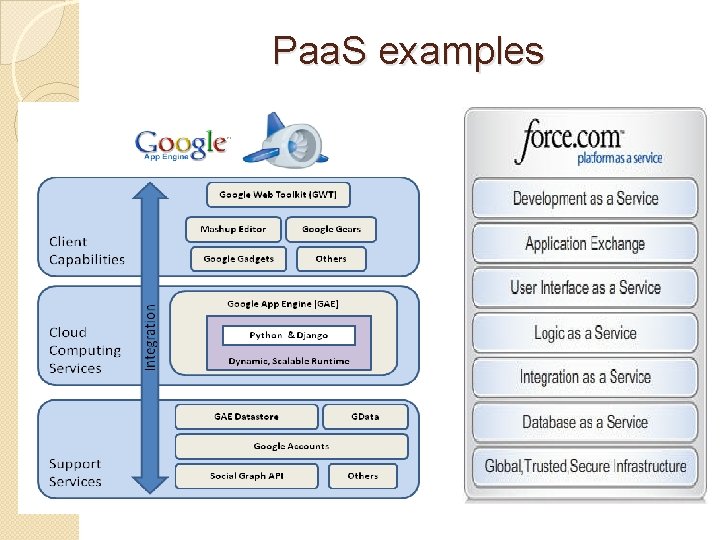
Paa. S examples
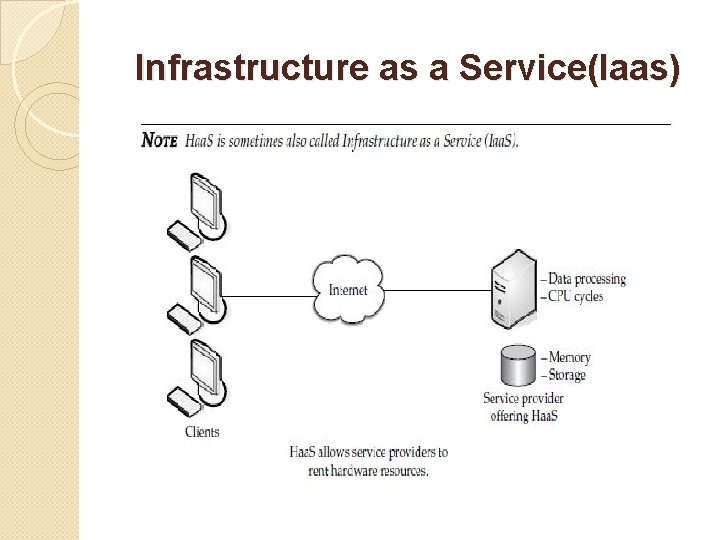
Infrastructure as a Service(Iaas) Hardware or Infrastructure as a Service: Ø Hardware as a Service (Haa. S) is the next form of service available in cloud computing. Ø Where Saa. S and Paa. S are providing applications to customers, Haa. S doesn’t. ØIt simply offers the hardware so that your organization can put whatever they want onto it. ØRather than purchase servers, software, racks, and having to pay for the datacenter space for them, the service provider rents those resources.
Infrastructure as a Service(Iaas)
Infrastructure as a Service(Iaas) Ø Haa. S allows you to “rent” such resources as • Server space • Network equipment • Memory • CPU cycles • Storage space Ø Additionally, the infrastructure can be dynamically scaled up or down, based on the application resource needs. Ø Further, multiple tenants can be on the equipment at the same time. Ø Resources are typically billed based on a utility computing basis, so providers charge by how many resources are consumed.
Infrastructure as a Service(Iaas)
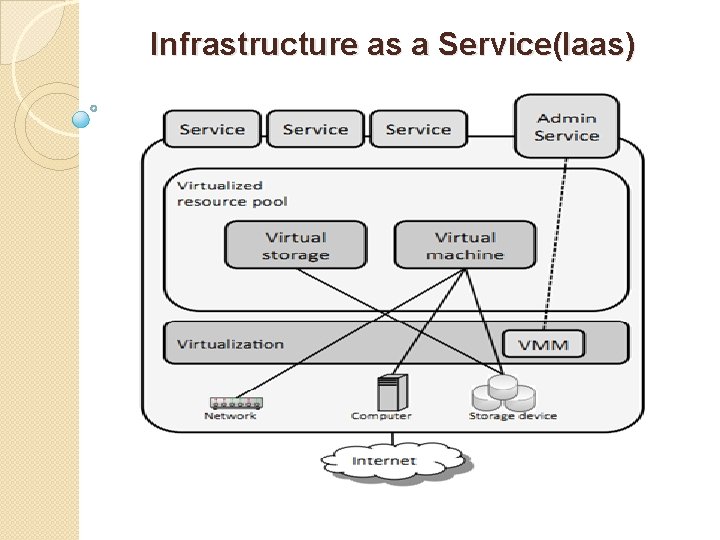
Infrastructure as a Service(Iaas) Iaa. S involves several pieces: • Service level agreements This is an agreement between the provider and client, guaranteeing a certain level of performance from the system. • Computer hardware These are the components whose resources will be rented out. Service providers often have this set up as a grid for easier scalability. • Network This includes hardware for firewalls, routers, load balancing, and so on. • Internet connectivity This allows clients to access the hardware from their own organizations. • Platform virtualization environment This allows the clients to run the virtual machines they want. • Utility computing billing Typically set up to bill customers based on how many system resources they use.
Infrastructure as a Service(Iaas) A typical Infrastructure as a Service offering can deliver the following features and benefits: Scalability; Resource is available as and when the client needs it and, therefore, there are no delays in expanding capacity or the wastage of unused capacity No investment in hardware; The underlying physical hardware that supports an Iaa. S service is set up and maintained by the cloud provider, saving the time and cost of doing so on the client side Utility style costing; The service can be accessed on demand the client only pays for the resource that they actually
Infrastructure as a Service(Iaas) Location independence; ØThe service can usually be accessed from any location as long as there is an internet connection and the security protocol of the cloud allows it Physical security of data centre locations; Ø Services available through a public cloud, or private clouds hosted externally with the cloud provider, benefit from the physical security afforded to the servers which are hosted within a data centre No single point of failure; Ø If one server or network switch, for example, were to fail, the broader service would be unaffected due to the remaining multitude of hardware resources and redundancy configurations. Ø For many services if one entire data center were to go offline, never mind one server, the Iaa. S service could still run successfully.
Infrastructure as a Service(Iaas) ISSUES: COMPATIBILITY VULNERABILITIES WITH LEGACY SECURITY Because Iaa. S offers the consumer to run legacy software in provider's infrastructure, therefore it exposes consumers to all of the security vulnerabilities of such legacy software. VIRTUAL MACHINE SPRAWL( COLLAPSE) The VM can become out of date with respect to security updates because Iaa. S allows the consumer to operate the virtual machines in running, suspended and off state. However, the provider can automatically update such VMs, but this mechanism is hard and complex.
Infrastructure as a Service(Iaas) ISSUES: ROBUSTNESS OF VM-LEVEL ISOLATION Iaa. S offers an isolated environment to individual consumers through hypervisor. Hypervisor is a software layer that includes hardware support for virtualization to split a physical computer into multiple virtual machines. DATA ERASE PRACTICES The consumer uses virtual machines that in turn uses the common disk resources provided by the cloud provider. When the consumer releases the resource, the cloud provider must ensure that next consumer to rent the resource does not observe data residue from previous consumer.