
Clearly Visual Basic Programming with Visual Basic 2010
Clearly Visual Basic: Programming with Visual Basic 2010 2 nd Edition Chapter 11 Testing, Testing … 1, 2, 3 (Selecting Test Data)
Objectives After studying Chapter 11, you should be able to: Select appropriate test data for an application Prevent the entry of unwanted characters in a text box Create a message box with the Message. Box. Show method Trim leading and trailing spaces from a string 2 Clearly Visual Basic: Programming with Visual Basic 2010, 2 nd Edition
Will Your Application Pass the Test? Last step in the problem-solving process Rigorous testing of the program Testing sample data should include: Valid data Ensure program produces correct results Invalid data Ensure program does not display erroneous results or end abruptly 3 Clearly Visual Basic: Programming with Visual Basic 2010, 2 nd Edition
Will Your Application Pass the Test? (cont’d. ) Invalid data Data the program is not expecting the user to enter Examples User making a typing error Entering the data in an incorrect format Neglecting to make a required entry Testing is an iterative process 4 Clearly Visual Basic: Programming with Visual Basic 2010, 2 nd Edition
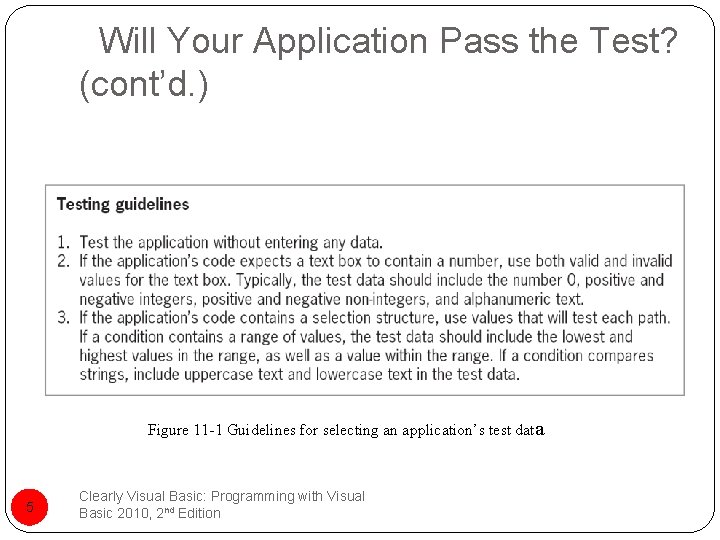
Will Your Application Pass the Test? (cont’d. ) Figure 11 -1 Guidelines for selecting an application’s test data 5 Clearly Visual Basic: Programming with Visual Basic 2010, 2 nd Edition
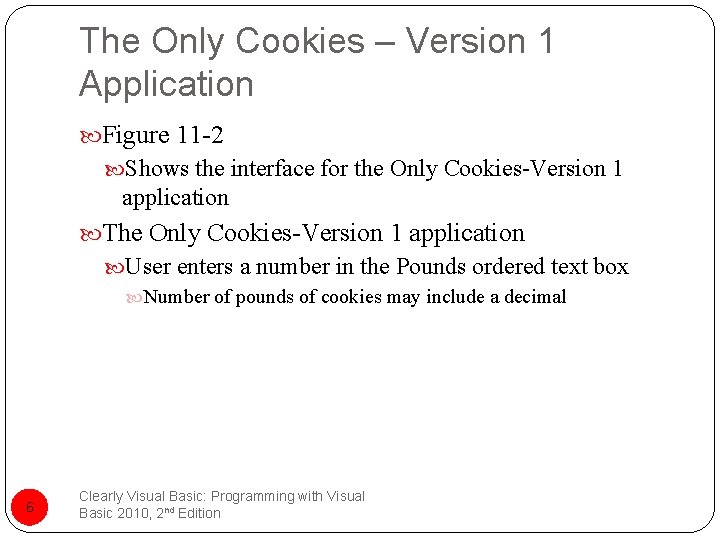
The Only Cookies – Version 1 Application Figure 11 -2 Shows the interface for the Only Cookies-Version 1 application The Only Cookies-Version 1 application User enters a number in the Pounds ordered text box Number of pounds of cookies may include a decimal 6 Clearly Visual Basic: Programming with Visual Basic 2010, 2 nd Edition
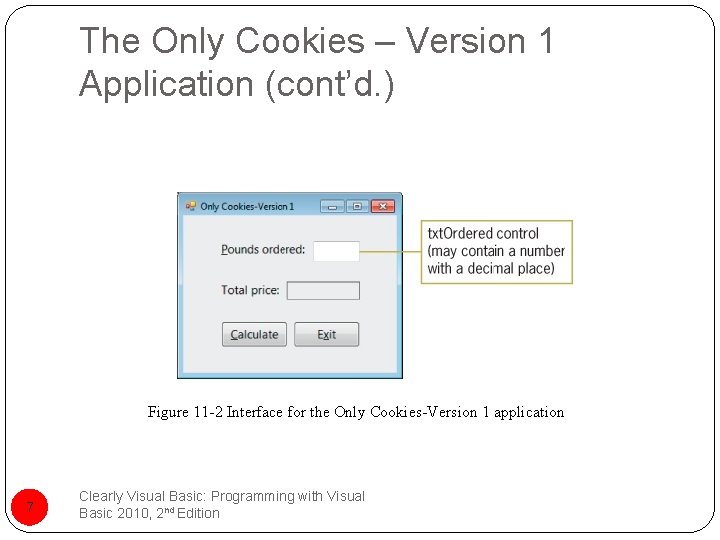
The Only Cookies – Version 1 Application (cont’d. ) Figure 11 -2 Interface for the Only Cookies-Version 1 application 7 Clearly Visual Basic: Programming with Visual Basic 2010, 2 nd Edition
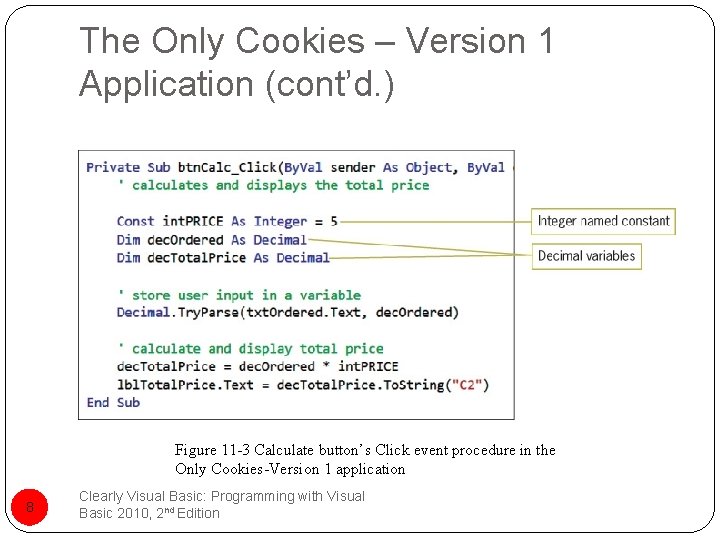
The Only Cookies – Version 1 Application (cont’d. ) Figure 11 -3 Calculate button’s Click event procedure in the Only Cookies-Version 1 application 8 Clearly Visual Basic: Programming with Visual Basic 2010, 2 nd Edition
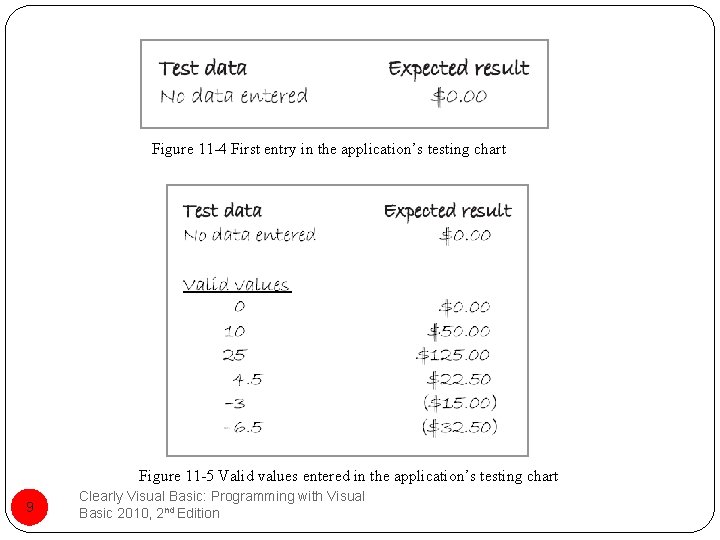
Figure 11 -4 First entry in the application’s testing chart Figure 11 -5 Valid values entered in the application’s testing chart 9 Clearly Visual Basic: Programming with Visual Basic 2010, 2 nd Edition
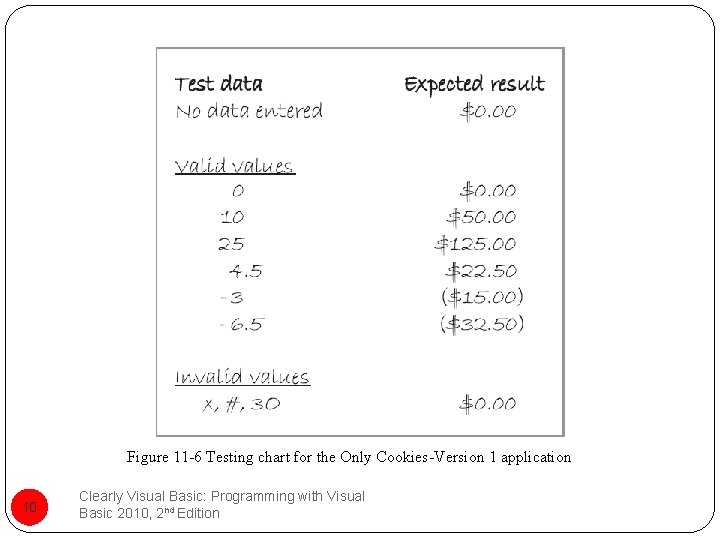
Figure 11 -6 Testing chart for the Only Cookies-Version 1 application 10 Clearly Visual Basic: Programming with Visual Basic 2010, 2 nd Edition
The Only Cookies – Version 2 Application Figure 11 -7 Shows the interface for the Only Cookies-Version 2 application Figure 11 -8 Shows the Calculate button’s Click event procedure Figure 11 -9 Shows the testing chart for the Only Cookies-Version 2 application 11 Clearly Visual Basic: Programming with Visual Basic 2010, 2 nd Edition
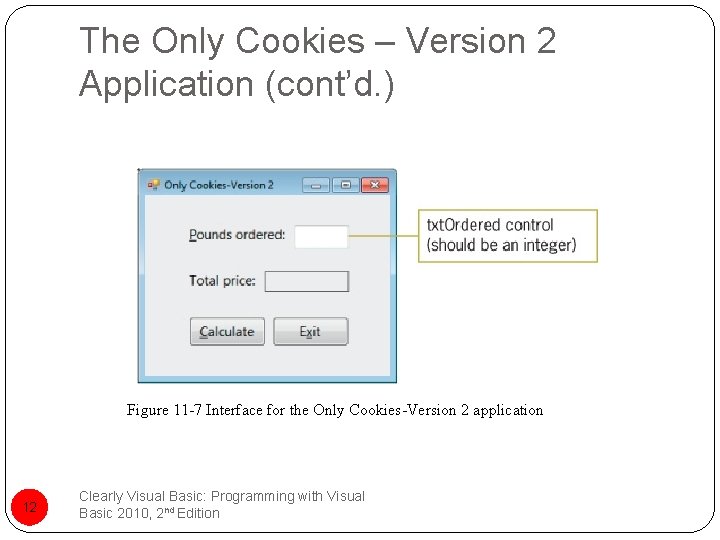
The Only Cookies – Version 2 Application (cont’d. ) Figure 11 -7 Interface for the Only Cookies-Version 2 application 12 Clearly Visual Basic: Programming with Visual Basic 2010, 2 nd Edition
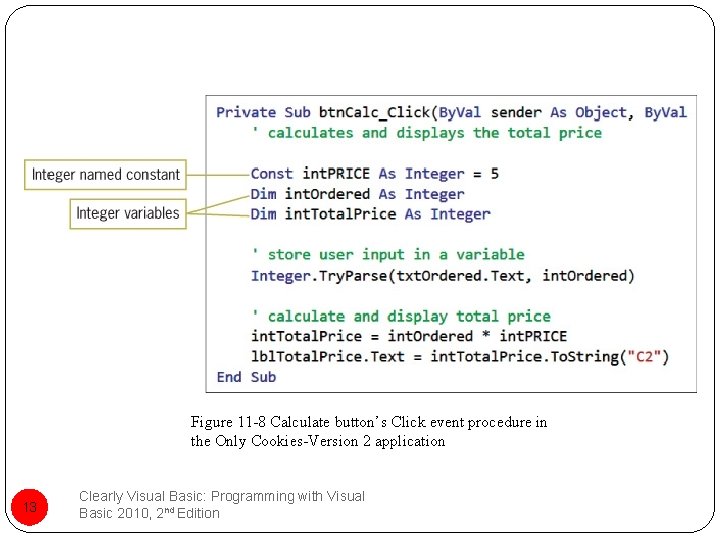
Figure 11 -8 Calculate button’s Click event procedure in the Only Cookies-Version 2 application 13 Clearly Visual Basic: Programming with Visual Basic 2010, 2 nd Edition
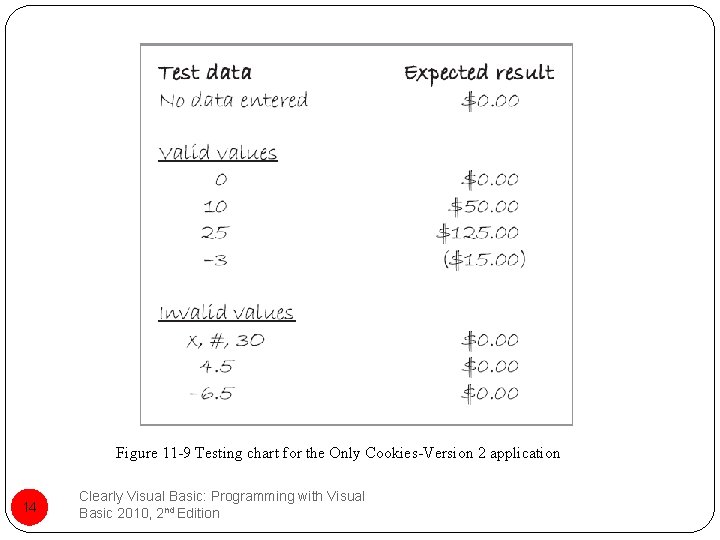
Figure 11 -9 Testing chart for the Only Cookies-Version 2 application 14 Clearly Visual Basic: Programming with Visual Basic 2010, 2 nd Edition
Stop! This Is a Restricted Area! Key. Press event Occurs each time the user presses a key while the control has the focus When the Key. Press event occurs: A character corresponding to the pressed key is sent to the Key. Press event’s e parameter To prevent a text box from accepting an inappropriate character: First use the e parameter’s Key. Char property to determine the pressed key 15 Clearly Visual Basic: Programming with Visual Basic 2010, 2 nd Edition
Stop! This Is a Restricted Area! (cont’d. ) e parameter’s Handled property Used to cancel the pressed key if it is an inappropriate one Control. Chars. Back constant Used to refer to the Backspace key Necessary for editing the text box entry 16 Clearly Visual Basic: Programming with Visual Basic 2010, 2 nd Edition
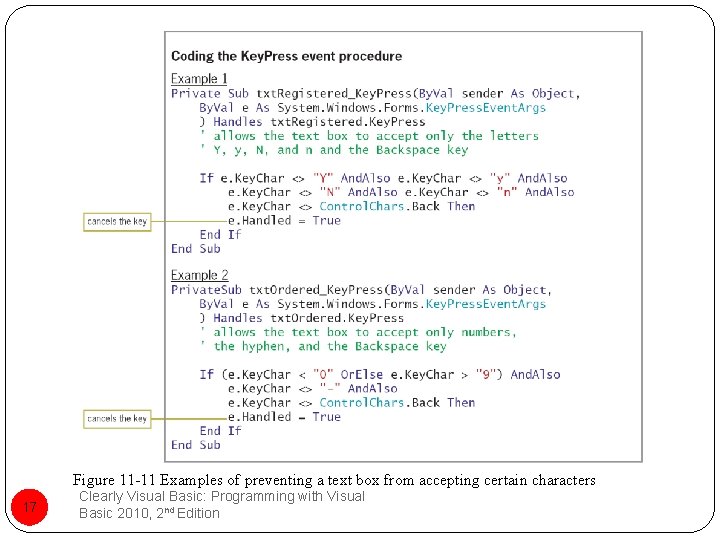
Figure 11 -11 Examples of preventing a text box from accepting certain characters 17 Clearly Visual Basic: Programming with Visual Basic 2010, 2 nd Edition
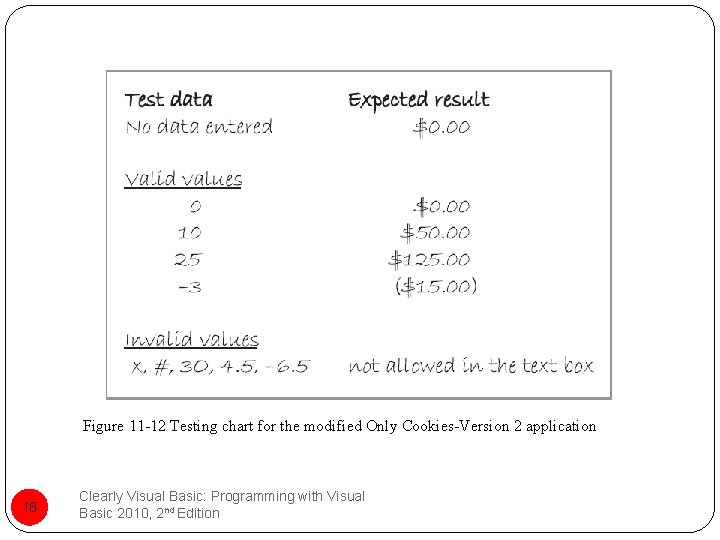
Figure 11 -12 Testing chart for the modified Only Cookies-Version 2 application 18 Clearly Visual Basic: Programming with Visual Basic 2010, 2 nd Edition
The Shady Hollow Hotel – Version 1 Application Figure 11 -13 Shows the interface for the Shady Hollow Hotel-Version 1 application Figure 11 -14 Shows the Click event procedure Figure 11 -15 Shows the application’s testing chart 19 Clearly Visual Basic: Programming with Visual Basic 2010, 2 nd Edition
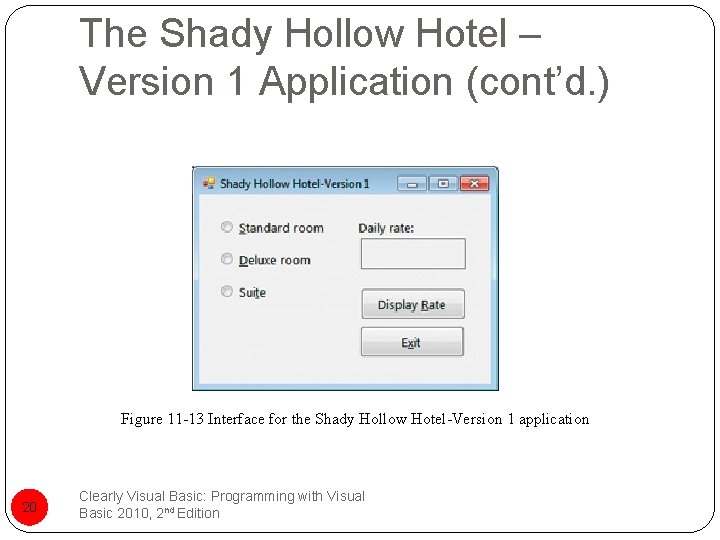
The Shady Hollow Hotel – Version 1 Application (cont’d. ) Figure 11 -13 Interface for the Shady Hollow Hotel-Version 1 application 20 Clearly Visual Basic: Programming with Visual Basic 2010, 2 nd Edition
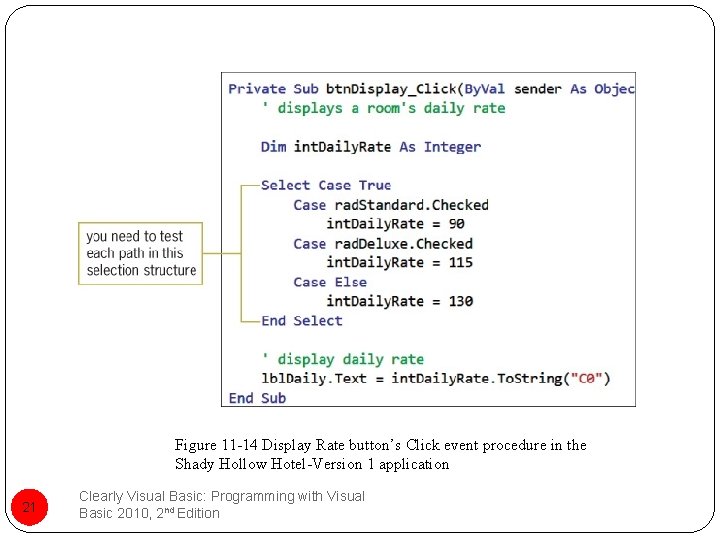
Figure 11 -14 Display Rate button’s Click event procedure in the Shady Hollow Hotel-Version 1 application 21 Clearly Visual Basic: Programming with Visual Basic 2010, 2 nd Edition
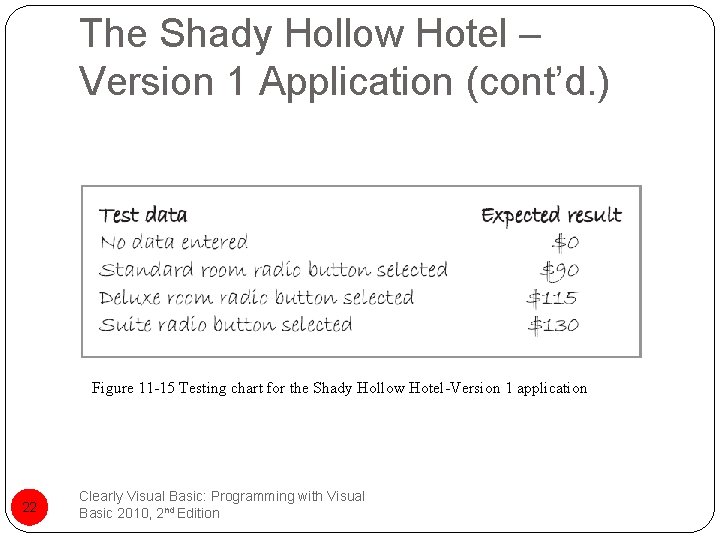
The Shady Hollow Hotel – Version 1 Application (cont’d. ) Figure 11 -15 Testing chart for the Shady Hollow Hotel-Version 1 application 22 Clearly Visual Basic: Programming with Visual Basic 2010, 2 nd Edition
The Shady Hollow Hotel – Version 2 Application Figure 11 -17 Shows the interface for the Shady Hollow Hotel-Version 2 application Interface uses a text box for the room type selection Figure 11 -18 Shows the Click event procedure In this application: User will be entering a string in the txt. Type control According to third guideline: You need to test each path in the selection structure 23 Clearly Visual Basic: Programming with Visual Basic 2010, 2 nd Edition
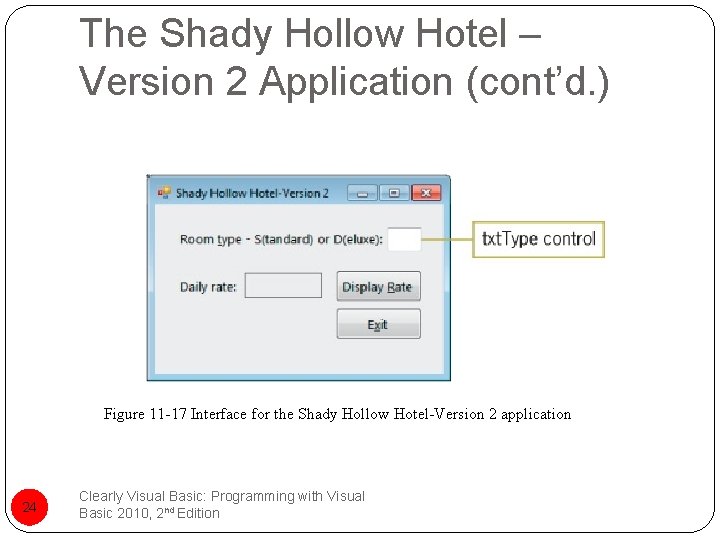
The Shady Hollow Hotel – Version 2 Application (cont’d. ) Figure 11 -17 Interface for the Shady Hollow Hotel-Version 2 application 24 Clearly Visual Basic: Programming with Visual Basic 2010, 2 nd Edition
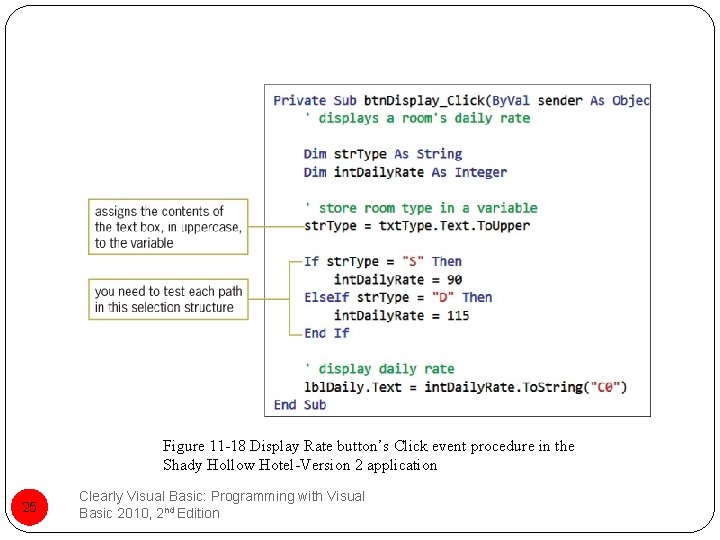
Figure 11 -18 Display Rate button’s Click event procedure in the Shady Hollow Hotel-Version 2 application 25 Clearly Visual Basic: Programming with Visual Basic 2010, 2 nd Edition
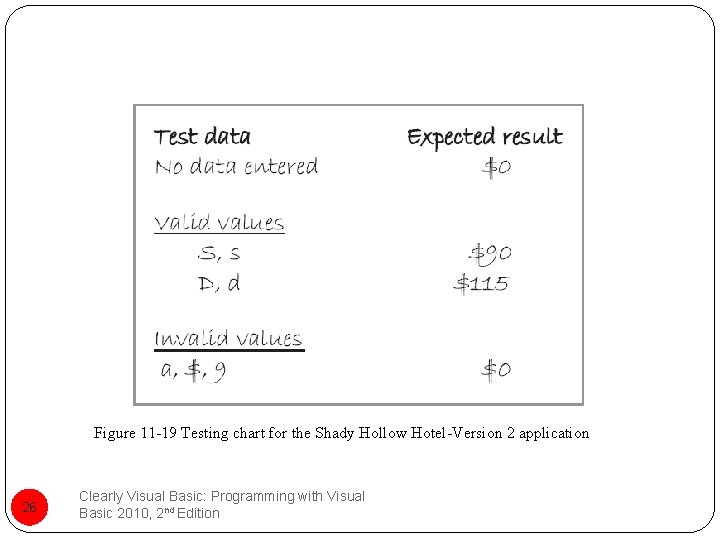
Figure 11 -19 Testing chart for the Shady Hollow Hotel-Version 2 application 26 Clearly Visual Basic: Programming with Visual Basic 2010, 2 nd Edition
I Need to Tell You Something Displaying messages Either in a label control in the interface or in a message box Figure 11 -20 Shows the basic syntax of the Message. Box. Show method Gives an example 27 Clearly Visual Basic: Programming with Visual Basic 2010, 2 nd Edition
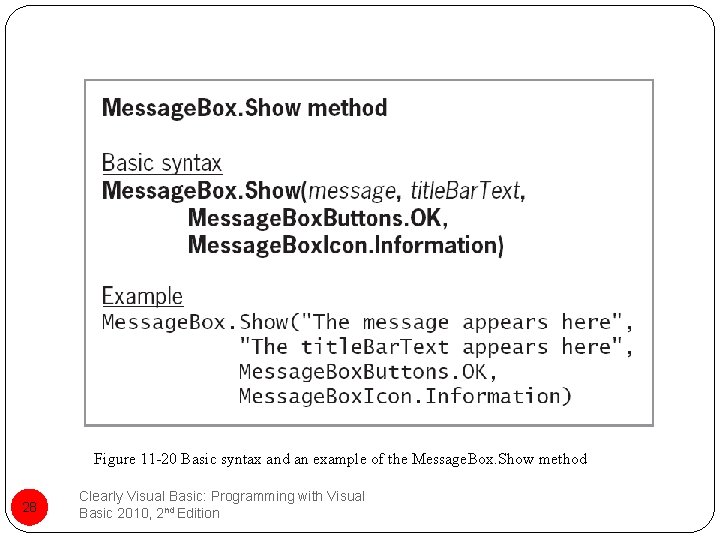
Figure 11 -20 Basic syntax and an example of the Message. Box. Show method 28 Clearly Visual Basic: Programming with Visual Basic 2010, 2 nd Edition
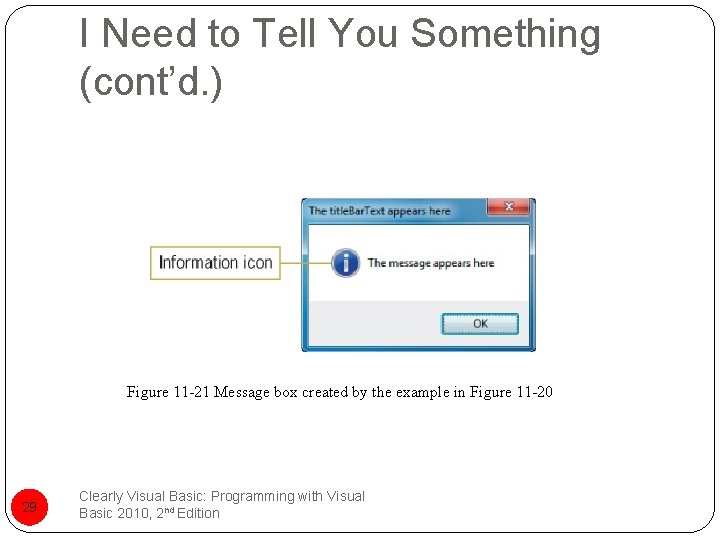
I Need to Tell You Something (cont’d. ) Figure 11 -21 Message box created by the example in Figure 11 -20 29 Clearly Visual Basic: Programming with Visual Basic 2010, 2 nd Edition
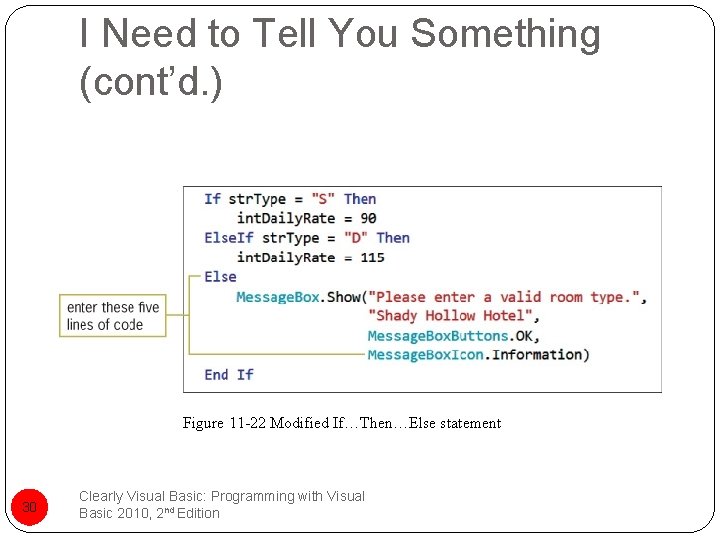
I Need to Tell You Something (cont’d. ) Figure 11 -22 Modified If…Then…Else statement 30 Clearly Visual Basic: Programming with Visual Basic 2010, 2 nd Edition
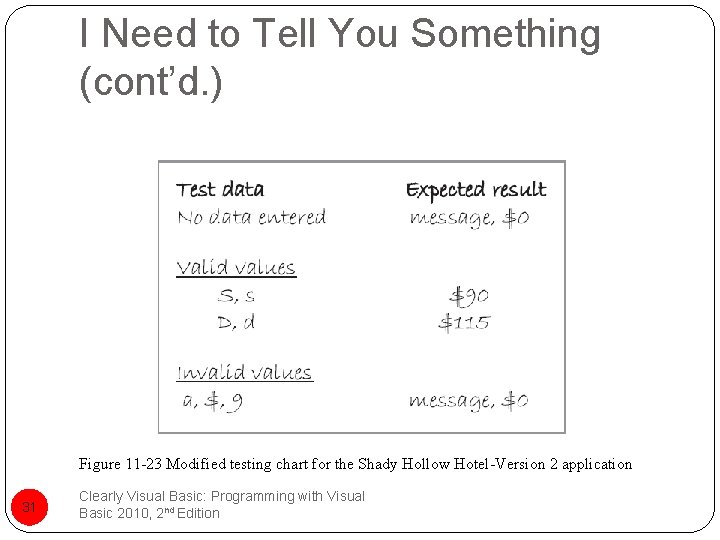
I Need to Tell You Something (cont’d. ) Figure 11 -23 Modified testing chart for the Shady Hollow Hotel-Version 2 application 31 Clearly Visual Basic: Programming with Visual Basic 2010, 2 nd Edition
Just When You Thought It Was Safe Bugs Errors in the application Number of bugs Directly related to the size and complexity of the application Beta testers Encouraged to use the application as often as possible because some bugs surface only after months of use 32 Clearly Visual Basic: Programming with Visual Basic 2010, 2 nd Edition
Just When You Thought It Was Safe (cont’d. ) Trim method Used to remove leading and trailing spaces Figure 11 -26 Shows the basic syntax of the Trim method Includes examples of using the method 33 Clearly Visual Basic: Programming with Visual Basic 2010, 2 nd Edition
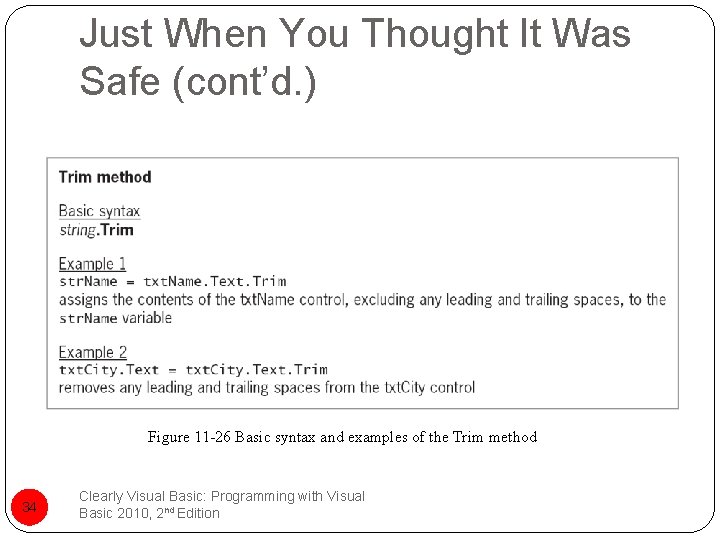
Just When You Thought It Was Safe (cont’d. ) Figure 11 -26 Basic syntax and examples of the Trim method 34 Clearly Visual Basic: Programming with Visual Basic 2010, 2 nd Edition
Summary Thoroughly test programs Before releasing them to the public Use both valid and invalid data Guidelines for selecting test data in Figure 11 -1 You can use a testing chart to: Record the test data and the expected results To prevent a text box from accepting a character: Code the text box’s Key. Press event procedure 35 Clearly Visual Basic: Programming with Visual Basic 2010, 2 nd Edition
Summary (cont’d. ) Whenever you make a change to an application’s code: Retest the application using the data listed in its testing chart Message. Box. Show method Used to display a message to the user while an application is running Trim method Makes a temporary copy of a string Performs the necessary trimming on the copy only 36 Clearly Visual Basic: Programming with Visual Basic 2010, 2 nd Edition
- Slides: 36