
Classifying Clinical Trials using NLP A Beginners Guide

Classifying Clinical Trials using NLP: A Beginner’s Guide to NLP in a Medical Context Robert Thombley, Data Scientist Philip R Lee Institute for Health Policy Studies 5/18/18
Clinical Trials Project • Today, we are going to start on a multiple month learning project. • Will use Python NLP tools to explore the clinicaltrials. ucsf. edu website • Develop a model for classifying a clinical trial, using its text description, into one of a set of trial categories. • Clinical trial descriptions are a great starting place for working with clinical text because they are deidentified and freely available. http: //clinicaltrials. ucsf. edu/browse 2 Absolute Beginner’s Guide to NLP
What is NLP? • NLP: Finding and exploiting patterns in unstructured text data. • Two approaches: • • Heuristic: Creating rules informed by the structure of language. Statistical/Machine Learning: Using lots of data to find the ”average” rule. • Both have their place, and a lot of the techniques I’ll show you today apply to both types of analyses. • Medical data often breaks these implied rules. • • 3 Can be tough to work with! But not always, it’s still mostly written by English speakers (at UCSF) Absolute Beginner’s Guide to NLP
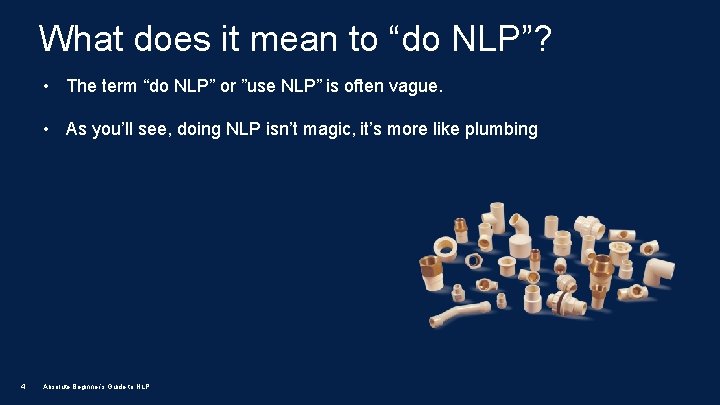
What does it mean to “do NLP”? • The term “do NLP” or ”use NLP” is often vague. • As you’ll see, doing NLP isn’t magic, it’s more like plumbing 4 Absolute Beginner’s Guide to NLP
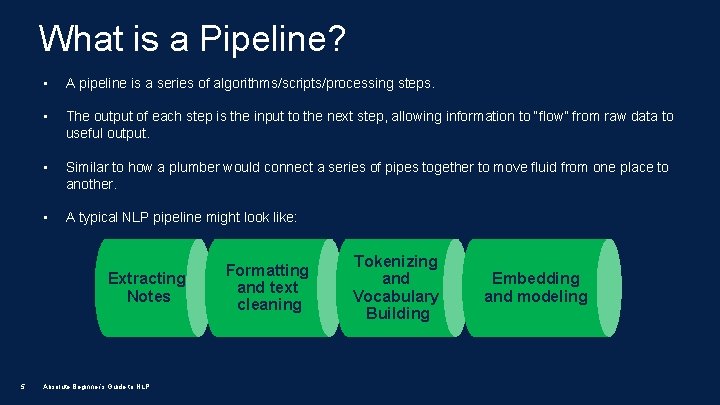
What is a Pipeline? • A pipeline is a series of algorithms/scripts/processing steps. • The output of each step is the input to the next step, allowing information to “flow” from raw data to useful output. • Similar to how a plumber would connect a series of pipes together to move fluid from one place to another. • A typical NLP pipeline might look like: Extracting Notes 5 Absolute Beginner’s Guide to NLP Formatting and text cleaning Tokenizing and Vocabulary Building Embedding and modeling
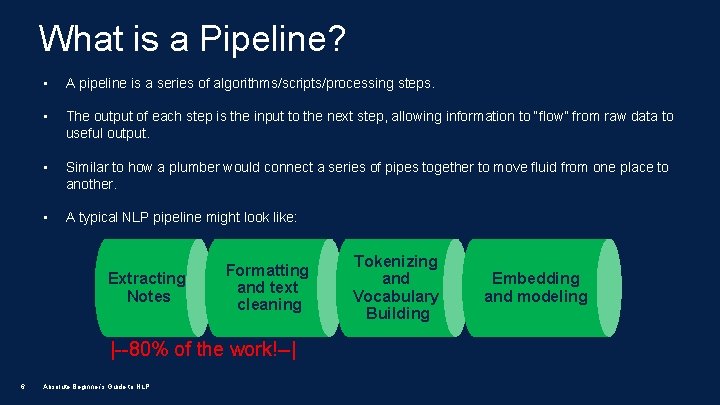
What is a Pipeline? • A pipeline is a series of algorithms/scripts/processing steps. • The output of each step is the input to the next step, allowing information to “flow” from raw data to useful output. • Similar to how a plumber would connect a series of pipes together to move fluid from one place to another. • A typical NLP pipeline might look like: Extracting Notes Formatting and text cleaning |--80% of the work!--| 6 Absolute Beginner’s Guide to NLP Tokenizing and Vocabulary Building Embedding and modeling
NLP Tools • There a number of tools available to accomplish each of the steps in the pipeline, each with advantages and disadvantages • I like the Python ecosystem, but it’s not right for every situation. Many of the clinical NLP tools use Java. • Python, however, the easiest to get started with, so I will focus on that throughout. • Going to do a quick run through of the basic building blocks of an NLP pipeline • No need to write down – see the code and more at http: //nlp. ucsf. edu 7 Absolute Beginner’s Guide to NLP
The Basic Pipeline: Extraction • Clinical text exists in a wide variety of formats: webpages text, social media posts, inside free text fields within data warehouses, etc. • We need a way to gather this text data and convert it into a consistent format that is accessible and convenient. • The first step in the pipeline is programmatically extracting the free text information using SQL, API calls, web scraping or some other means of harvesting text. • Best to store the extracted data in memory, or an easy to ingest text format (csv/json/pickle) along with other structured data. 8 Absolute Beginner’s Guide to NLP
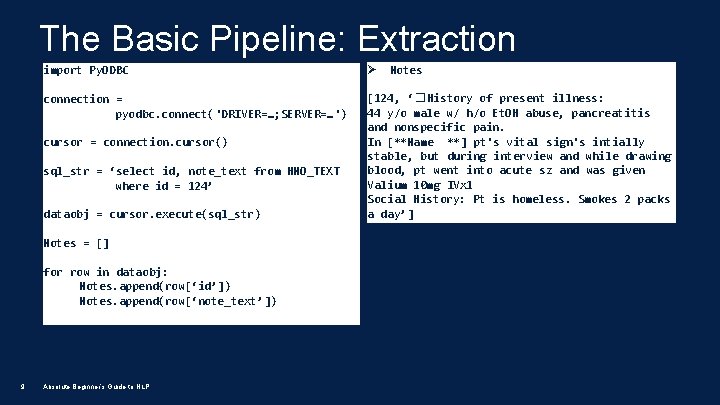
The Basic Pipeline: Extraction import Py. ODBC Ø connection = pyodbc. connect('DRIVER=…; SERVER=…') [124, ‘� History of present illness: 44 y/o male w/ h/o Et. OH abuse, pancreatitis and nonspecific pain. In [**Name **] pt's vital sign's intially stable, but during interview and while drawing blood, pt went into acute sz and was given Valium 10 mg IVx 1 Social History: Pt is homeless. Smokes 2 packs a day’] cursor = connection. cursor() sql_str = ‘select id, note_text from HNO_TEXT where id = 124’ dataobj = cursor. execute(sql_str) Notes = [] for row in dataobj: Notes. append(row[‘id’]) Notes. append(row[‘note_text’]) 9 Absolute Beginner’s Guide to NLP Notes
The Basic Pipeline: Formatting and Cleaning • The next step in the pipeline is to clean up any errors or problems with the text. Potential corrections in this step: • • • Correcting encoding issues (unicode/ascii) Normalizing punctuation and spacing Applying problem-specific logic • Clinical note text is often very dirty and this step is very important. Considerations for clinical note text: • • 10 Many abbreviations, implied tables, stray punctuation and spaces, omitted punctuation Thoroughly examine your text to see what you need to correct Absolute Beginner’s Guide to NLP
The Basic Pipeline: Regular Expressions • Text cleaning is extremely onerous without automated pattern matching: • This is mostly regular expressions (regex) • Every major programming language has support for them (Python: re library) • Allows you to define a search pattern and then determine what to do with search results: • Substitute one string for another, remove strings, split strings into parts • Seem daunting, but are actually logical and approachable. 11 Absolute Beginner’s Guide to NLP
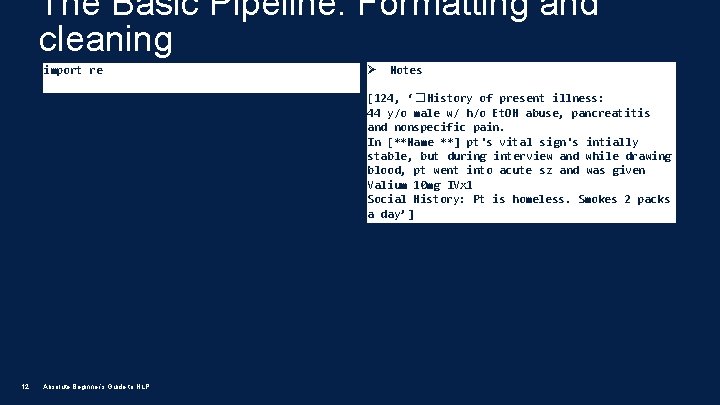
The Basic Pipeline: Formatting and cleaning import re Ø Notes [124, ‘� History of present illness: 44 y/o male w/ h/o Et. OH abuse, pancreatitis and nonspecific pain. In [**Name **] pt's vital sign's intially stable, but during interview and while drawing blood, pt went into acute sz and was given Valium 10 mg IVx 1 Social History: Pt is homeless. Smokes 2 packs a day’] 12 Absolute Beginner’s Guide to NLP
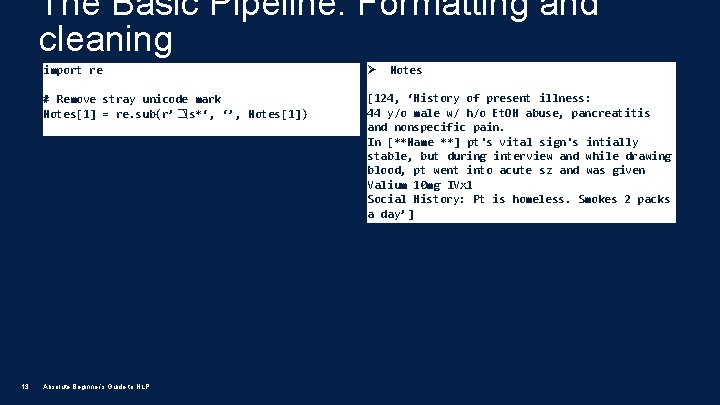
The Basic Pipeline: Formatting and cleaning 13 import re Ø # Remove stray unicode mark Notes[1] = re. sub(r’�s*‘, ‘’, Notes[1]) [124, ‘History of present illness: 44 y/o male w/ h/o Et. OH abuse, pancreatitis and nonspecific pain. In [**Name **] pt's vital sign's intially stable, but during interview and while drawing blood, pt went into acute sz and was given Valium 10 mg IVx 1 Social History: Pt is homeless. Smokes 2 packs a day’] Absolute Beginner’s Guide to NLP Notes
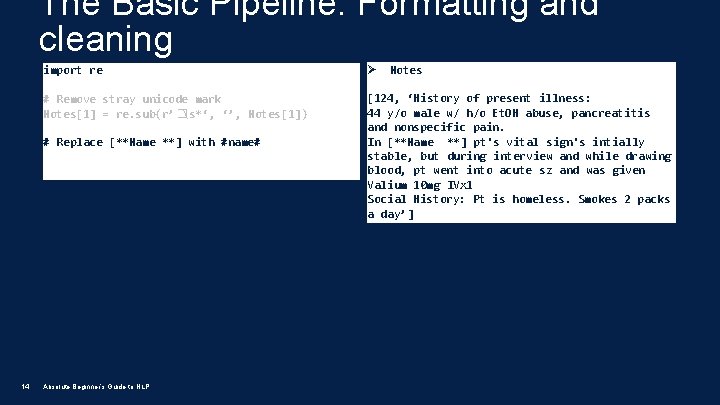
The Basic Pipeline: Formatting and cleaning import re Ø # Remove stray unicode mark Notes[1] = re. sub(r’�s*‘, ‘’, Notes[1]) [124, ‘History of present illness: 44 y/o male w/ h/o Et. OH abuse, pancreatitis and nonspecific pain. In [**Name **] pt's vital sign's intially stable, but during interview and while drawing blood, pt went into acute sz and was given Valium 10 mg IVx 1 Social History: Pt is homeless. Smokes 2 packs a day’] # Replace [**Name **] with #name# 14 Absolute Beginner’s Guide to NLP Notes
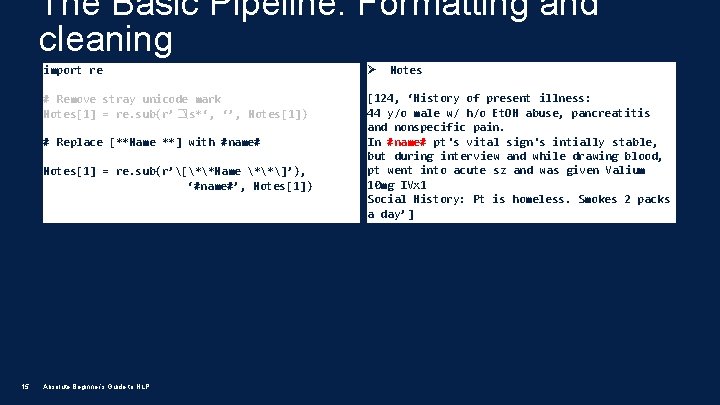
The Basic Pipeline: Formatting and cleaning import re Ø # Remove stray unicode mark Notes[1] = re. sub(r’�s*‘, ‘’, Notes[1]) [124, ‘History of present illness: 44 y/o male w/ h/o Et. OH abuse, pancreatitis and nonspecific pain. In #name# pt's vital sign's intially stable, but during interview and while drawing blood, pt went into acute sz and was given Valium 10 mg IVx 1 Social History: Pt is homeless. Smokes 2 packs a day’] # Replace [**Name **] with #name# Notes[1] = re. sub(r’[**Name **]’), ‘#name#’, Notes[1]) 15 Absolute Beginner’s Guide to NLP Notes
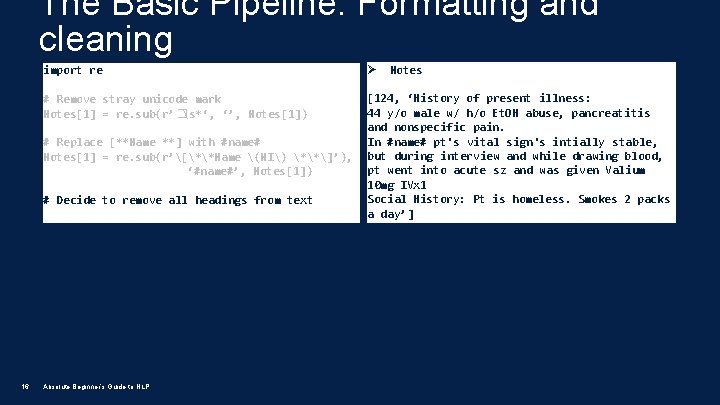
The Basic Pipeline: Formatting and cleaning import re Ø # Remove stray unicode mark Notes[1] = re. sub(r’�s*‘, ‘’, Notes[1]) [124, ‘History of present illness: 44 y/o male w/ h/o Et. OH abuse, pancreatitis and nonspecific pain. In #name# pt's vital sign's intially stable, but during interview and while drawing blood, pt went into acute sz and was given Valium 10 mg IVx 1 Social History: Pt is homeless. Smokes 2 packs a day’] # Replace [**Name **] with #name# Notes[1] = re. sub(r’[**Name (NI) **]’), ‘#name#’, Notes[1]) # Decide to remove all headings from text 16 Absolute Beginner’s Guide to NLP Notes
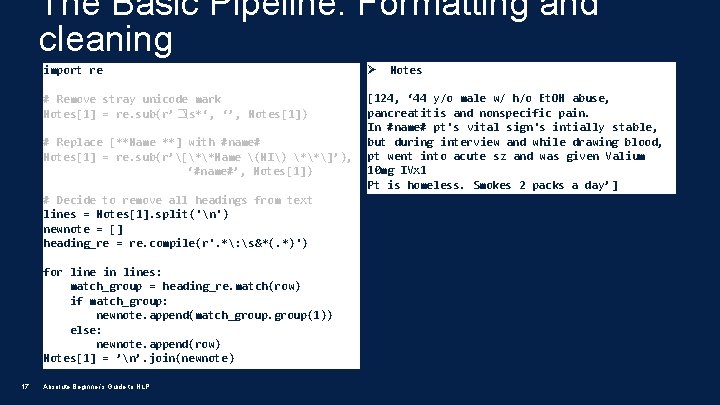
The Basic Pipeline: Formatting and cleaning import re Ø # Remove stray unicode mark Notes[1] = re. sub(r’�s*‘, ‘’, Notes[1]) [124, ‘ 44 y/o male w/ h/o Et. OH abuse, pancreatitis and nonspecific pain. In #name# pt's vital sign's intially stable, but during interview and while drawing blood, pt went into acute sz and was given Valium 10 mg IVx 1 Pt is homeless. Smokes 2 packs a day’] # Replace [**Name **] with #name# Notes[1] = re. sub(r’[**Name (NI) **]’), ‘#name#’, Notes[1]) # Decide to remove all headings from text lines = Notes[1]. split('n') newnote = [] heading_re = re. compile(r'. *: s&*(. *)') for line in lines: match_group = heading_re. match(row) if match_group: newnote. append(match_group(1)) else: newnote. append(row) Notes[1] = ’n’. join(newnote) 17 Absolute Beginner’s Guide to NLP Notes
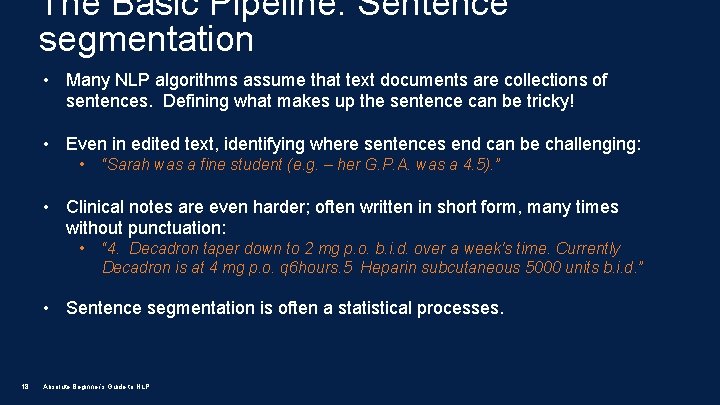
The Basic Pipeline: Sentence segmentation • Many NLP algorithms assume that text documents are collections of sentences. Defining what makes up the sentence can be tricky! • Even in edited text, identifying where sentences end can be challenging: • “Sarah was a fine student (e. g. – her G. P. A. was a 4. 5). ” • Clinical notes are even harder; often written in short form, many times without punctuation: • “ 4. Decadron taper down to 2 mg p. o. b. i. d. over a week's time. Currently Decadron is at 4 mg p. o. q 6 hours. 5 Heparin subcutaneous 5000 units b. i. d. ” • Sentence segmentation is often a statistical processes. 18 Absolute Beginner’s Guide to NLP
![The Basic Pipeline: Sentence Segmentation import nltk sent = nltk. tokenize. sent_tokenize(Notes[1]) for i,](http://slidetodoc.com/presentation_image_h2/94ff067e335464cac00c4351a292238b/image-19.jpg "The Basic Pipeline: Sentence Segmentation import nltk sent = nltk. tokenize. sent_tokenize(Notes[1]) for i,")
The Basic Pipeline: Sentence Segmentation import nltk sent = nltk. tokenize. sent_tokenize(Notes[1]) for i, s in enumerate(sent): print(str(i) + ‘=> ’ + s) 19 Absolute Beginner’s Guide to NLP 0=> ‘ 44 y/o male w/ h/o Et. OH abuse, pancreatitis and nonspecific pain. ’ 1=> ’In #name# pt's vital sign's intially stable, but during interview and while drawing blood, pt went into acute sz and was given Valium 10 mg IVx 1 Pt is homeless. ’ 2=> ‘Smokes 2 packs a day’
![The Basic Pipeline: Sentence Segmentation import nltk sent = nltk. tokenize. sent_tokenize(Notes[1]) for i,](http://slidetodoc.com/presentation_image_h2/94ff067e335464cac00c4351a292238b/image-20.jpg "The Basic Pipeline: Sentence Segmentation import nltk sent = nltk. tokenize. sent_tokenize(Notes[1]) for i,")
The Basic Pipeline: Sentence Segmentation import nltk sent = nltk. tokenize. sent_tokenize(Notes[1]) for i, s in enumerate(sent): print(str(i) + ‘=> ’ + s) 0=> ‘ 44 y/o male w/ h/o Et. OH abuse, pancreatitis and nonspecific pain. ’ 1=> ’In #name# pt's vital sign's intially stable, but during interview and while drawing blood, pt went into acute sz and was given Valium 10 mg IVx 1 Pt is homeless. ’ 2=> ‘Smokes 2 packs a day’ Oops! The NLTK sentence segmentation algorithm missed the end of this sentence, because it hasn’t been trained on data with this type of period-less sentence boundary! Let’s try using Spacy… 20 Absolute Beginner’s Guide to NLP
![The Basic Pipeline: Sentence Segmentation import nltk sent = nltk. tokenize. sent_tokenize(Notes[1]) for i,](http://slidetodoc.com/presentation_image_h2/94ff067e335464cac00c4351a292238b/image-21.jpg "The Basic Pipeline: Sentence Segmentation import nltk sent = nltk. tokenize. sent_tokenize(Notes[1]) for i,")
The Basic Pipeline: Sentence Segmentation import nltk sent = nltk. tokenize. sent_tokenize(Notes[1]) for i, s in enumerate(sent): print(str(i) + ‘=> ’ + s) 0=> ‘ 44 y/o male w/ h/o Et. OH abuse, pancreatitis and nonspecific pain. ’ 1=> ’In #name# pt's vital sign's intially stable, but during interview and while drawing blood, pt went into acute sz and was given Valium 10 mg IVx 1 Pt is homeless. ’ 2=> ‘Smokes 2 packs a day’ import spacy # load the english language model nlp = spacy. load(‘en_core_web_en’) 0=> ‘ 44 y/o male w/ h/o Et. OH abuse, pancreatitis and nonspecific pain. ’ 1=> ’In #name# pt's vital sign's intially stable, but during interview and while drawing blood, pt went into acute sz and was given Valium 10 mg IVx 1’ 2=> 'Pt is homeless. ’ 3=> ‘Smokes 2 packs a day’ # define the document model using our note doc = nlp(Notes[1]) # list the segmented sentences for i, s in enumerate(doc. sents): print(str(i) + ‘=> ’ + s. text. strip()) 21 Absolute Beginner’s Guide to NLP
![The Basic Pipeline: Sentence Segmentation import nltk sent = nltk. tokenize. sent_tokenize(Notes[1]) for i,](http://slidetodoc.com/presentation_image_h2/94ff067e335464cac00c4351a292238b/image-22.jpg "The Basic Pipeline: Sentence Segmentation import nltk sent = nltk. tokenize. sent_tokenize(Notes[1]) for i,")
The Basic Pipeline: Sentence Segmentation import nltk sent = nltk. tokenize. sent_tokenize(Notes[1]) for i, s in enumerate(sent): print(str(i) + ‘=> ’ + s) 0=> ‘ 44 y/o male w/ h/o Et. OH abuse, pancreatitis and nonspecific pain. ’ 1=> ’In #name# pt's vital sign's intially stable, but during interview and while drawing blood, pt went into acute sz and was given Valium 10 mg IVx 1 Pt is homeless. ’ 2=> ‘Smokes 2 packs a day’ import spacy # load the english language model nlp = spacy. load(‘en_core_web_en’) 0=> ‘ 44 y/o male w/ h/o Et. OH abuse, pancreatitis and nonspecific pain. ’ 1=> ’In #name# pt's vital sign's intially stable, but during interview and while drawing blood, pt went into acute sz and was given Valium 10 mg IVx 1’ 2=> 'Pt is homeless. ’ 3=> ‘Smokes 2 packs a day’ # define the document model using our note doc = nlp(Notes[1]) # list the segmented sentences for i, s in enumerate(doc. sents): print(str(i) + ‘=> ’ + s. text. strip()) 22 Absolute Beginner’s Guide to NLP �� ��
The Basic Pipeline: Tokenization • Most NLP approaches rely on the idea that a document is simply a collection of sentences, and that each sentence is simply a collection of tokens. • A token can be: • a word or word like structure (‘ 245’ or ”the”) (unigram) • a collection of n words (n-gram) • ”yellow dog” (bigram) • “right frontal anaplastic” (trigram) • A tokenizer takes a sentence and splits it into a collection of n-word length tokens. 23 Absolute Beginner’s Guide to NLP
![The Basic Pipeline: Tokenization 24 import nltk tokens = nltk. tokenize. word_tokenize(Notes[1]) ['44', 'y/o',](http://slidetodoc.com/presentation_image_h2/94ff067e335464cac00c4351a292238b/image-24.jpg "The Basic Pipeline: Tokenization 24 import nltk tokens = nltk. tokenize. word_tokenize(Notes[1]) ['44', 'y/o',")
The Basic Pipeline: Tokenization 24 import nltk tokens = nltk. tokenize. word_tokenize(Notes[1]) ['44', 'y/o', 'male', 'w/', 'h/o', 'Et. OH', 'abuse', ', ', 'pancreatitis', 'and', 'nonspecific', 'pain', 'In', '#', 'name', '#', 'pt', "'s", 'vital', 'sign', "'s", 'intially', 'stable’…] Absolute Beginner’s Guide to NLP
![The Basic Pipeline: Tokenization import nltk tokens = nltk. tokenize. word_tokenize(Notes[1]) ['44', 'y/o', 'male',](http://slidetodoc.com/presentation_image_h2/94ff067e335464cac00c4351a292238b/image-25.jpg "The Basic Pipeline: Tokenization import nltk tokens = nltk. tokenize. word_tokenize(Notes[1]) ['44', 'y/o', 'male',")
The Basic Pipeline: Tokenization import nltk tokens = nltk. tokenize. word_tokenize(Notes[1]) ['44', 'y/o', 'male', 'w/', 'h/o', 'Et. OH', 'abuse', ', ', 'pancreatitis', 'and', 'nonspecific', 'pain', 'In', '#', 'name', '#', 'pt', "'s", 'vital', 'sign', "'s", 'intially', 'stable’…] Note: Tokenization works a little differently than you would expect. Contractions and possessives are split into two tokens (pt’s -> pt & ‘s) and punctuation is retained as a token. This is by design! 25 Absolute Beginner’s Guide to NLP
The Basic Pipeline: Complexity Reduction 26 • When attempting to extract meaning from a sentence, there are often many tokens that are redundant. • Additionally, human languages have many morphological forms of the same concept (plurals, tenses, synonyms, etc. ) • There a number of algorithms that can be employed to reduce the overall complexity of a set of tokens. • Complexity reduction techniques: • Spelling and abbreviation correction • Lemmatizing/stemming (converting words to their root forms) • Stop word removal (removing common words like ’a’, ‘the’, ’to’) • Punctuation and number removal Absolute Beginner’s Guide to NLP
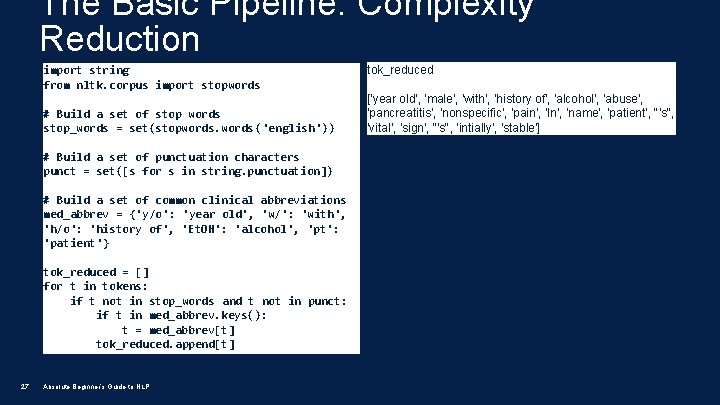
The Basic Pipeline: Complexity Reduction import string from nltk. corpus import stopwords # Build a set of stop words stop_words = set(stopwords('english')) # Build a set of punctuation characters punct = set([s for s in string. punctuation]) # Build a set of common clinical abbreviations med_abbrev = {'y/o': 'year old', 'w/': 'with', 'h/o': 'history of', 'Et. OH': 'alcohol', 'pt': 'patient'} tok_reduced = [] for t in tokens: if t not in stop_words and t not in punct: if t in med_abbrev. keys(): t = med_abbrev[t] tok_reduced. append[t] 27 Absolute Beginner’s Guide to NLP tok_reduced ['year old', 'male', 'with', 'history of', 'alcohol', 'abuse', 'pancreatitis', 'nonspecific', 'pain', 'In', 'name', 'patient', "'s", 'vital', 'sign', "'s", 'intially', 'stable']
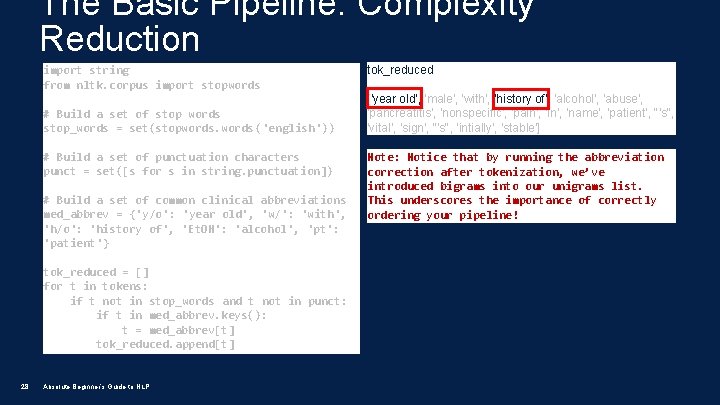
The Basic Pipeline: Complexity Reduction import string from nltk. corpus import stopwords # Build a set of stop words stop_words = set(stopwords('english')) # Build a set of punctuation characters punct = set([s for s in string. punctuation]) # Build a set of common clinical abbreviations med_abbrev = {'y/o': 'year old', 'w/': 'with', 'h/o': 'history of', 'Et. OH': 'alcohol', 'pt': 'patient'} tok_reduced = [] for t in tokens: if t not in stop_words and t not in punct: if t in med_abbrev. keys(): t = med_abbrev[t] tok_reduced. append[t] 28 Absolute Beginner’s Guide to NLP tok_reduced ['year old', 'male', 'with', 'history of', 'alcohol', 'abuse', 'pancreatitis', 'nonspecific', 'pain', 'In', 'name', 'patient', "'s", 'vital', 'sign', "'s", 'intially', 'stable'] Note: Notice that by running the abbreviation correction after tokenization, we’ve introduced bigrams into our unigrams list. This underscores the importance of correctly ordering your pipeline!
Extending the Basic Pipeline: POS Tagging • As we get more advanced in our analysis, we can begin to think about how the words are used. • The first step in understanding this is identifying the word’s part of speech. • POS Tagging is an NLP algorithm that is used to identify each token as “noun”, “verb”, “adverb”, etc. • POS Tagging can be done in multiple ways: • • 29 Token by token using dictionary of the word’s POS Statistical approaches using entire sentence Absolute Beginner’s Guide to NLP
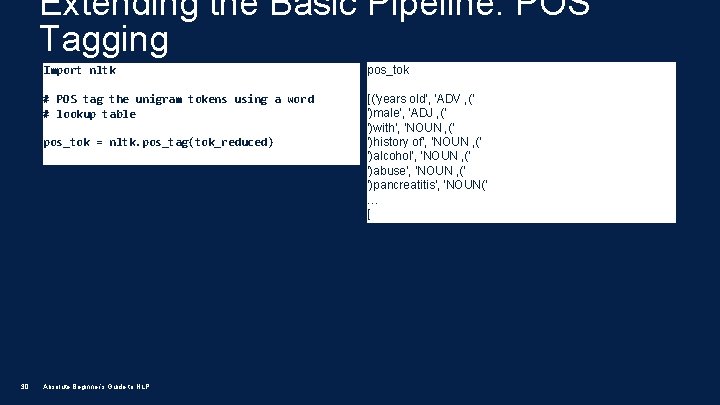
Extending the Basic Pipeline: POS Tagging Import nltk pos_tok # POS tag the unigram tokens using a word # lookup table [('years old', 'ADV , (' ')male', 'ADJ , (' ')with', 'NOUN , (' ')history of', 'NOUN , (' ')alcohol', 'NOUN , (' ')abuse', 'NOUN , (' ')pancreatitis', 'NOUN(' … [ pos_tok = nltk. pos_tag(tok_reduced) 30 Absolute Beginner’s Guide to NLP
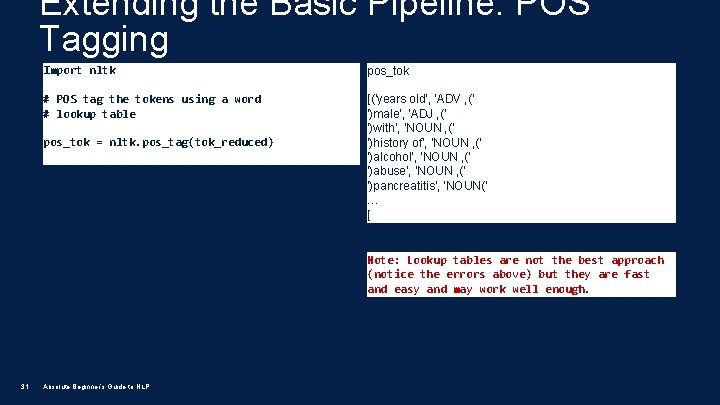
Extending the Basic Pipeline: POS Tagging Import nltk pos_tok # POS tag the tokens using a word # lookup table [('years old', 'ADV , (' ')male', 'ADJ , (' ')with', 'NOUN , (' ')history of', 'NOUN , (' ')alcohol', 'NOUN , (' ')abuse', 'NOUN , (' ')pancreatitis', 'NOUN(' … [ pos_tok = nltk. pos_tag(tok_reduced) Note: Lookup tables are not the best approach (notice the errors above) but they are fast and easy and may work well enough. 31 Absolute Beginner’s Guide to NLP
Extending the Basic Pipeline: NER • NER = Named Entity Recognition or Concept Mapping • This is the central focus of many clinical NLP pipelines: • How do we identify the important clinical concepts within a document? • Concepts/Named entities are usually noun phrases like: • “abdominal pain” • “left side” • Algorithm uses “chunks” which are collections of tagged tokens that make up phrases that conform to linguistic rules. • Very common example of an NER tool is Meta. Map, but there are many others. 32 Absolute Beginner’s Guide to NLP
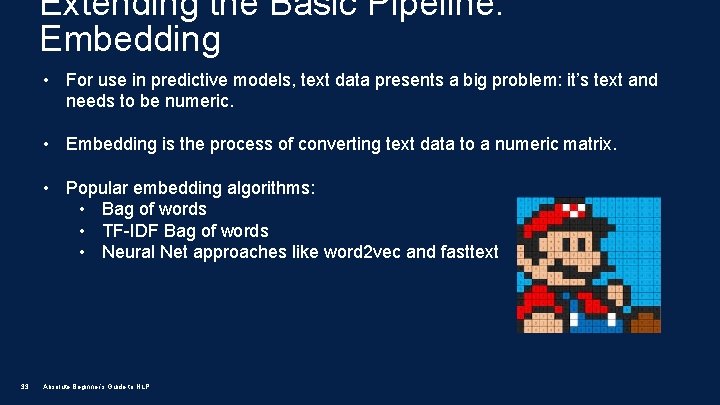
Extending the Basic Pipeline: Embedding • For use in predictive models, text data presents a big problem: it’s text and needs to be numeric. • Embedding is the process of converting text data to a numeric matrix. • Popular embedding algorithms: • Bag of words • TF-IDF Bag of words • Neural Net approaches like word 2 vec and fasttext 33 Absolute Beginner’s Guide to NLP
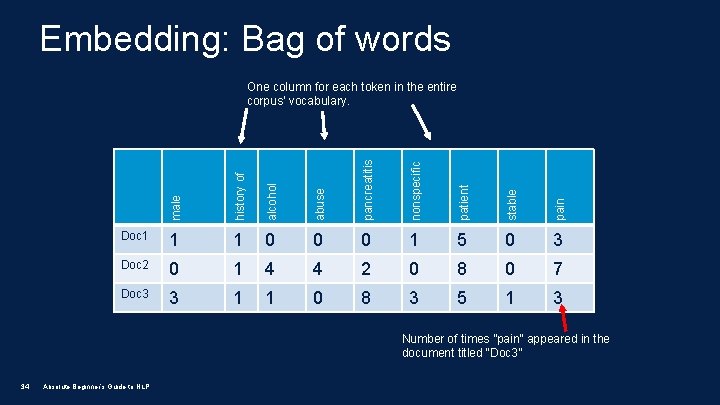
Embedding: Bag of words male history of alcohol abuse pancreatitis nonspecific patient stable pain One column for each token in the entire corpus’ vocabulary. Doc 1 1 1 0 0 0 1 5 0 3 Doc 2 0 1 4 4 2 0 8 0 7 Doc 3 3 1 1 0 8 3 5 1 3 Number of times ”pain” appeared in the document titled “Doc 3” 34 Absolute Beginner’s Guide to NLP
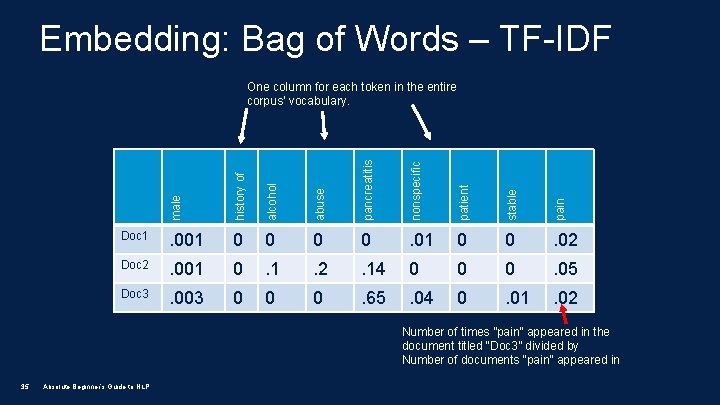
Embedding: Bag of Words – TF-IDF male history of alcohol abuse pancreatitis nonspecific patient stable pain One column for each token in the entire corpus’ vocabulary. Doc 1 . 001 0 0 . 02 Doc 2 . 001 0 . 1 . 2 . 14 0 0 0 . 05 Doc 3 . 003 0 0 0 . 65 . 04 0 . 01 . 02 Number of times ”pain” appeared in the document titled “Doc 3” divided by Number of documents “pain” appeared in 35 Absolute Beginner’s Guide to NLP
Extending the Basic Pipeline: Modeling • Once you’ve done all of the hard work to process the text and building a robust numeric representation of the text, you need to do something with that text! • Examples of modeling applications: • Are these two sample documents written by the same person? [similarity measure] • We would like to classify which of these notes are likely about patients with lymphoma? [document classifier] • We would like to convert this description of a medical procedure into simple language that a layperson could understand. [machine translation] 36 Absolute Beginner’s Guide to NLP
Clinical Trials Project • Given what you just learned, what do you think the steps for building our clinical trials project would be? • Turn to your neighbor and spend the next 2 minutes or so discussing what you think pipeline should look like. 37 Absolute Beginner’s Guide to NLP
Clinical Trials Project: Estimated Timeline 1. Introduction to Clinical Trials Project, NLP Concepts and raw data extraction. 2. Data cleaning and preparation 3. Embedding and modeling 4. Model refinement and pipeline improvements 38 Absolute Beginner’s Guide to NLP
Pipelines in Practice 39 • Each of these pipeline components can be pieced together to form a full NLP processing pipeline. • The research question at hand will inform which of these building blocks are used for a given pipeline. • As an example, in work done by our team (Adams Dudley et al) we built a mortality prediction model in Python by using the following NLP pipeline. Absolute Beginner’s Guide to NLP
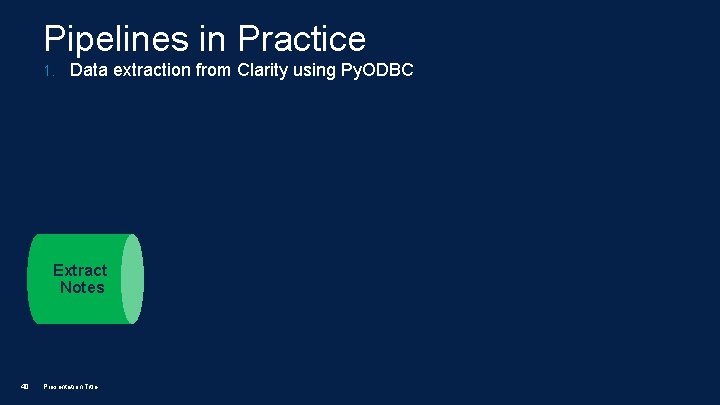
Pipelines in Practice 1. Data extraction from Clarity using Py. ODBC Extract Notes 40 Presentation Title
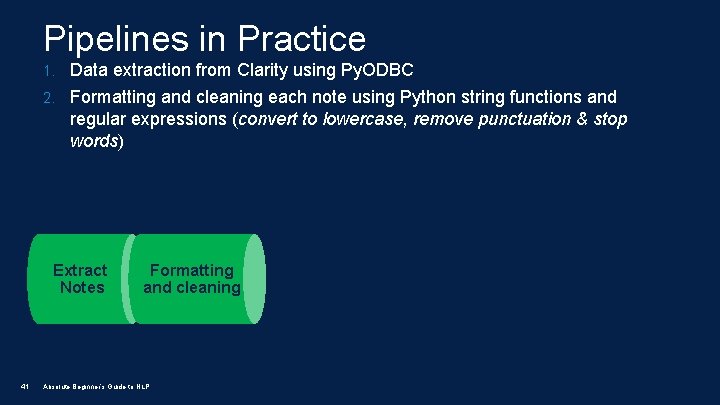
Pipelines in Practice 1. Data extraction from Clarity using Py. ODBC 2. Formatting and cleaning each note using Python string functions and regular expressions (convert to lowercase, remove punctuation & stop words) Extract Notes 41 Formatting and cleaning Absolute Beginner’s Guide to NLP
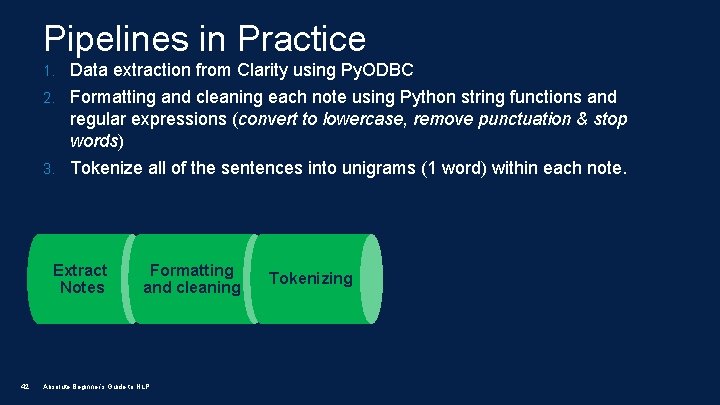
Pipelines in Practice 1. Data extraction from Clarity using Py. ODBC 2. Formatting and cleaning each note using Python string functions and regular expressions (convert to lowercase, remove punctuation & stop words) 3. Tokenize all of the sentences into unigrams (1 word) within each note. Extract Notes 42 Formatting and cleaning Absolute Beginner’s Guide to NLP Tokenizing
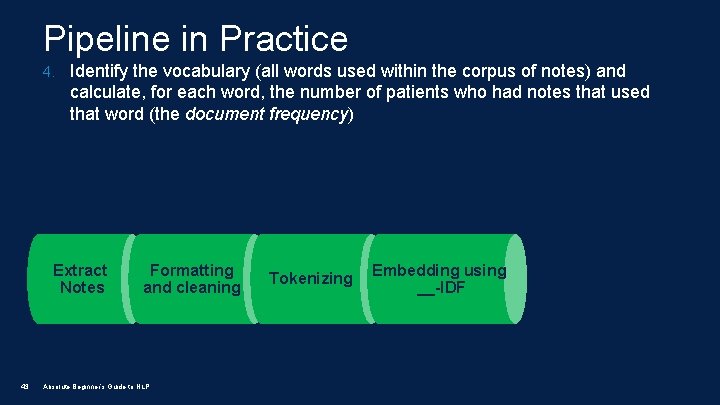
Pipeline in Practice 4. Identify the vocabulary (all words used within the corpus of notes) and calculate, for each word, the number of patients who had notes that used that word (the document frequency) Extract Notes 43 Formatting and cleaning Absolute Beginner’s Guide to NLP Tokenizing Embedding using __-IDF
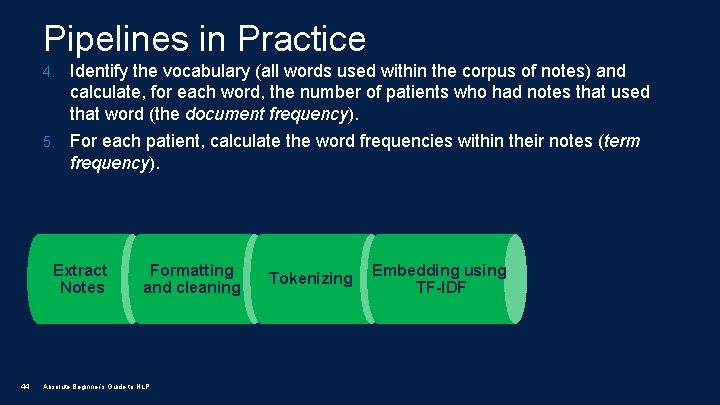
Pipelines in Practice 4. Identify the vocabulary (all words used within the corpus of notes) and calculate, for each word, the number of patients who had notes that used that word (the document frequency). 5. For each patient, calculate the word frequencies within their notes (term frequency). Extract Notes 44 Formatting and cleaning Absolute Beginner’s Guide to NLP Tokenizing Embedding using TF-IDF
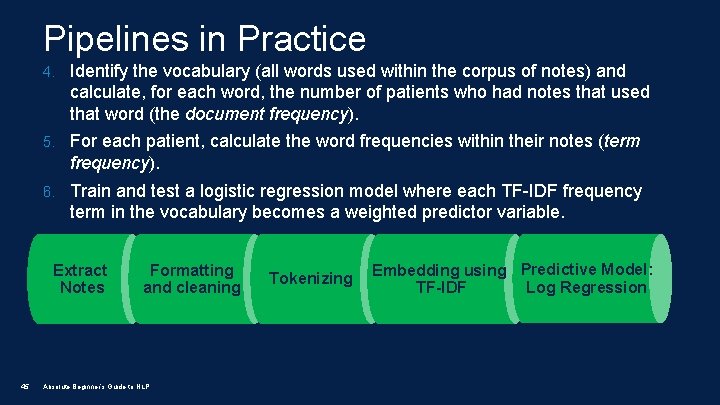
Pipelines in Practice 4. Identify the vocabulary (all words used within the corpus of notes) and calculate, for each word, the number of patients who had notes that used that word (the document frequency). 5. For each patient, calculate the word frequencies within their notes (term frequency). 6. Train and test a logistic regression model where each TF-IDF frequency term in the vocabulary becomes a weighted predictor variable. Extract Notes 45 Formatting and cleaning Absolute Beginner’s Guide to NLP Tokenizing Embedding using Predictive Model: Log Regression TF-IDF
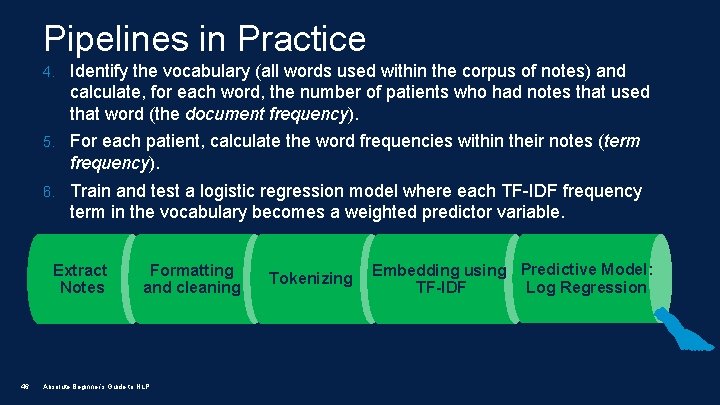
Pipelines in Practice 4. Identify the vocabulary (all words used within the corpus of notes) and calculate, for each word, the number of patients who had notes that used that word (the document frequency). 5. For each patient, calculate the word frequencies within their notes (term frequency). 6. Train and test a logistic regression model where each TF-IDF frequency term in the vocabulary becomes a weighted predictor variable. Extract Notes 46 Formatting and cleaning Absolute Beginner’s Guide to NLP Tokenizing Embedding using Predictive Model: Log Regression TF-IDF
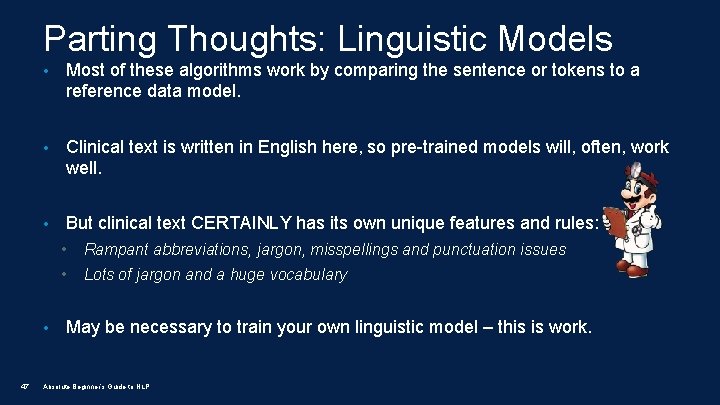
Parting Thoughts: Linguistic Models • Most of these algorithms work by comparing the sentence or tokens to a reference data model. • Clinical text is written in English here, so pre-trained models will, often, work well. • But clinical text CERTAINLY has its own unique features and rules: • 47 • Rampant abbreviations, jargon, misspellings and punctuation issues • Lots of jargon and a huge vocabulary May be necessary to train your own linguistic model – this is work. Absolute Beginner’s Guide to NLP
Parting Thoughts: Linguistic Models • Much work has been done building standalone tools and APIs that incorporate clinically-specific linguistic models. Unfortunately, most of them are implemented in Java. • Depending upon your desired outcome, it’s often not necessary to use these tools to accomplish many NLP tasks. • Example tools: 48 • NER: Meta. Map (UMLS) / Noble. Coder / Quick. UMLS • Pipeline Development: c. Takes / CLAMP Absolute Beginner’s Guide to NLP
Parting Thoughts: Design Considerations 49 • Simpler is better! Basic bag-of-words models often work very well! • Each step in the pipeline doesn’t have to be perfect to be effective - small errors in output along the way may not be catastrophic. • Try different algorithms, approaches and pre-trained linguistic models before trying to train your own linguistic models. • Even at it’s best, NLP should still only be one tool in the research toolbox - it can’t and won’t solve every text processing problem. Absolute Beginner’s Guide to NLP
Parting Thoughts: My NLP Toolkit • My Python library list: • Extraction from Sql Server: Py. ODBC • Extract from RESTful APIs: Requests • NLP Specific Tasks: NLTK (gold standard for Python, but aging) • NLP Specific Tasks: Spacy (fast modern alt to NLTK) • High Level, abstractions for NLP tasks: textacy • This is very cool stuff, entire pipelines with a single function call. • Data structure management: Pandas • Modeling: Scikit-Learn 50 Absolute Beginner’s Guide to NLP
Thank you! • Super Mario is a trademark of the Nintendo Corporation • For more NLP action – join our NLP@UCSF meetup, we meet monthly! • Email me at robert. thombley@ucsf. edu • Head to http: //nlp. ucsf. edu to keep up to date on everything that’s happening in the community! • Look at nlp. ucsf. edu and github. com/rthomble for more code 51 Absolute Beginner’s Guide to NLP
- Slides: 51