
Class website http kurose cslash net kurosecs umass
Class website: http: //kurose. cslash. net kurose@cs. umass. edu Today (12/8/20): § week in review • • EVPN, VXLANs MPLS Data center networks Wireless networks § looking ahead
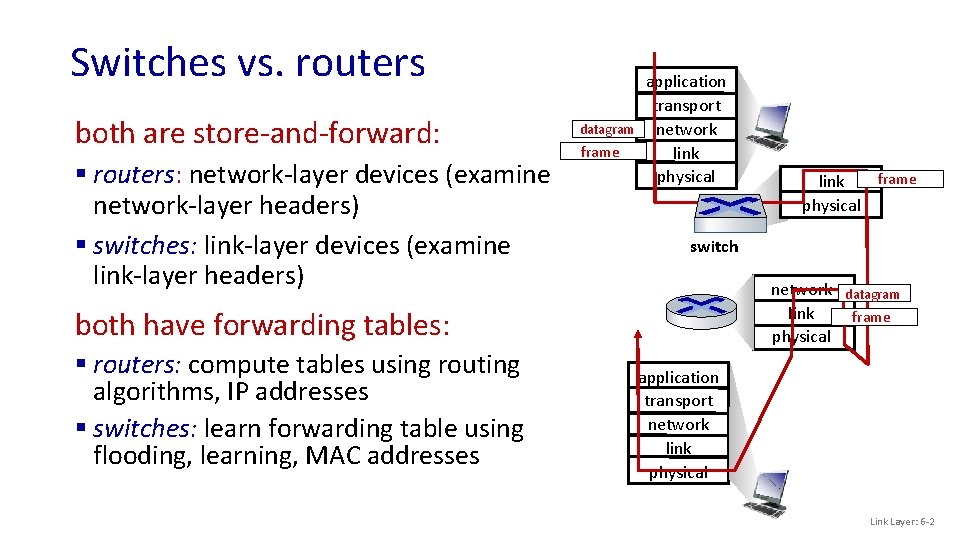
Switches vs. routers both are store-and-forward: § routers: network-layer devices (examine network-layer headers) § switches: link-layer devices (examine link-layer headers) datagram frame application transport network link physical switch network link physical both have forwarding tables: § routers: compute tables using routing algorithms, IP addresses § switches: learn forwarding table using flooding, learning, MAC addresses frame link physical datagram frame application transport network link physical Link Layer: 6 -2
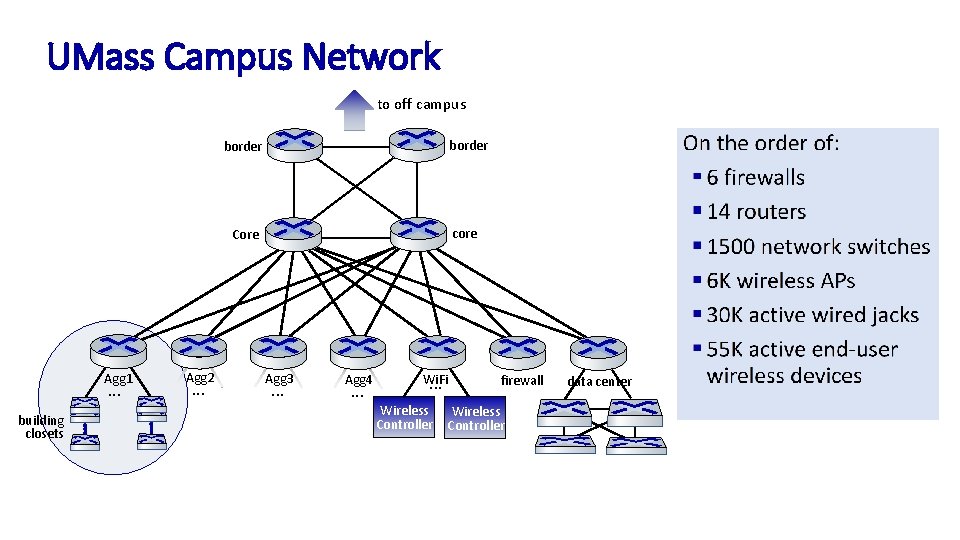
UMass Campus Network Protocols to off campus core Core Agg 1 . . . building closets Agg 2 . . . Agg 3 . . . Agg 4 . . . Wi. Fi. . . Wireless Controller e. BGP 10 G; 100 G pending i. BGP IS-IS 40 G & 100 G IS-IS 40 G inter-domain routing border Link Speeds intra-domain routing firewall Wireless Controller data center layer-2 Ethernet switching 10 G & 1 G
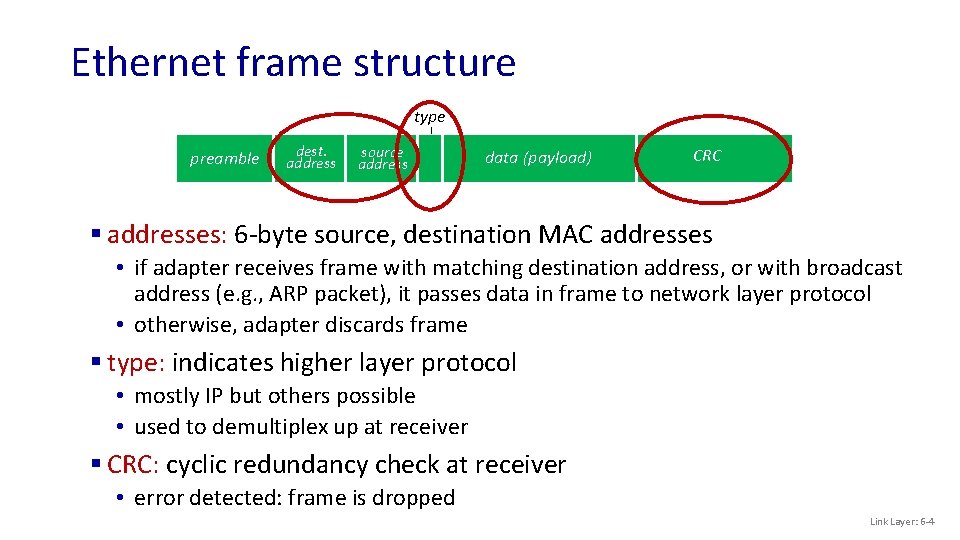
Ethernet frame structure type preamble dest. address source address data (payload) CRC § addresses: 6 -byte source, destination MAC addresses • if adapter receives frame with matching destination address, or with broadcast address (e. g. , ARP packet), it passes data in frame to network layer protocol • otherwise, adapter discards frame § type: indicates higher layer protocol • mostly IP but others possible • used to demultiplex up at receiver § CRC: cyclic redundancy check at receiver • error detected: frame is dropped Link Layer: 6 -4

Port-based VLANs Virtual Local Area Network (VLAN) switch(es) supporting VLAN capabilities can be configured to define multiple virtual LANS over single physical LAN infrastructure. port-based VLAN: switch ports grouped (by switch management software) so that single physical switch …… 1 7 9 15 2 8 10 16 … … EE (VLAN ports 1 -8) CS (VLAN ports 9 -15) … operates as multiple virtual switches 1 7 9 15 2 8 10 16 … EE (VLAN ports 1 -8) … CS (VLAN ports 9 -15) Link Layer: 6 -5
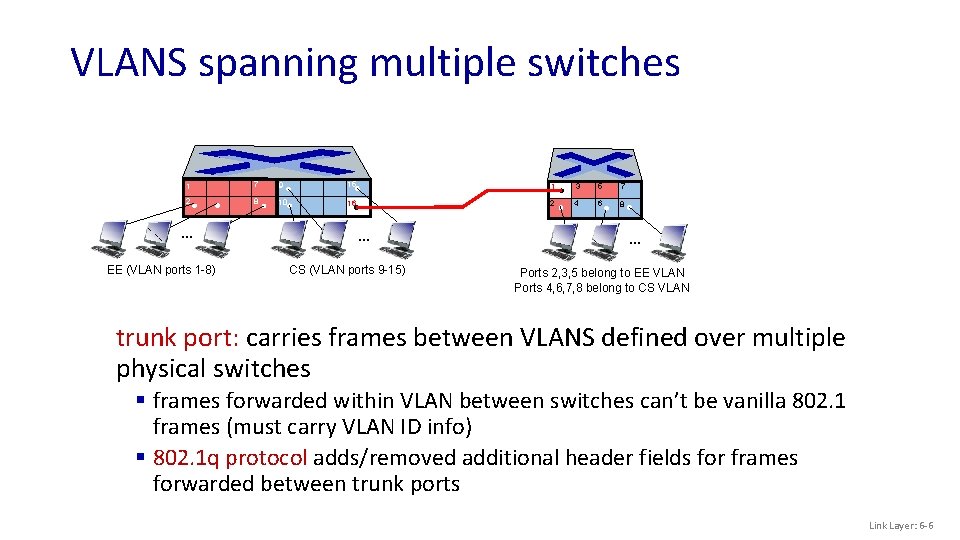
VLANS spanning multiple switches 1 7 9 15 1 3 5 7 2 8 10 16 2 4 6 8 … EE (VLAN ports 1 -8) … CS (VLAN ports 9 -15) … Ports 2, 3, 5 belong to EE VLAN Ports 4, 6, 7, 8 belong to CS VLAN trunk port: carries frames between VLANS defined over multiple physical switches § frames forwarded within VLAN between switches can’t be vanilla 802. 1 frames (must carry VLAN ID info) § 802. 1 q protocol adds/removed additional header fields for frames forwarded between trunk ports Link Layer: 6 -6

802. 1 Q VLAN frame format type preamble dest. address source address data (payload) CRC 802. 1 Ethernet frame type preamble dest. address source address 2 -byte Tag Protocol Identifier (value: 81 -00) data (payload) Tag Control Information CRC 802. 1 Q frame Recomputed CRC (12 bit VLAN ID field, 3 bit priority field like IP TOS) Link Layer: 6 -7
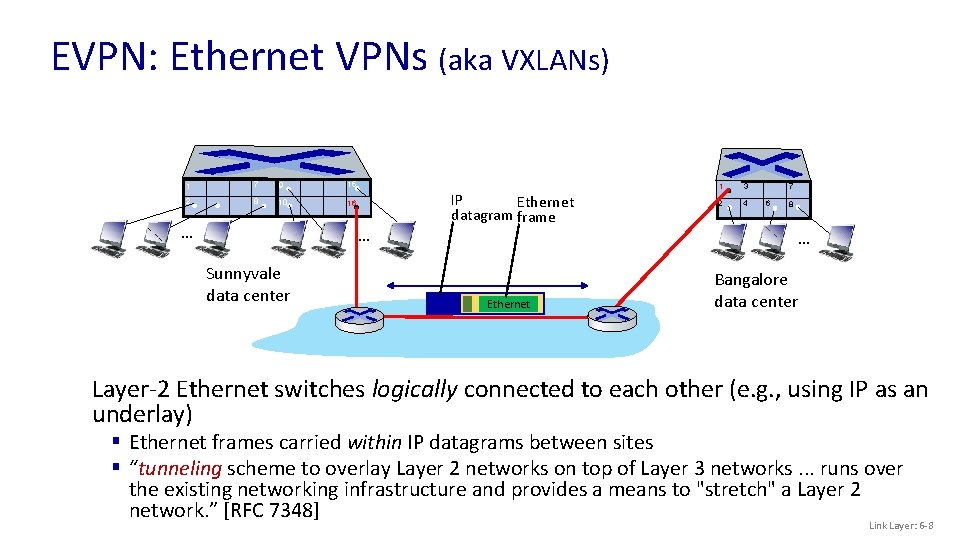
EVPN: Ethernet VPNs (aka VXLANs) 1 7 9 15 2 8 10 16 … 5 … Sunnyvale data center IP Ethernet datagram frame 1 3 2 4 7 6 8 … Ethernet Bangalore data center Layer-2 Ethernet switches logically connected to each other (e. g. , using IP as an underlay) § Ethernet frames carried within IP datagrams between sites § “tunneling scheme to overlay Layer 2 networks on top of Layer 3 networks. . . runs over the existing networking infrastructure and provides a means to "stretch" a Layer 2 network. ” [RFC 7348] Link Layer: 6 -8
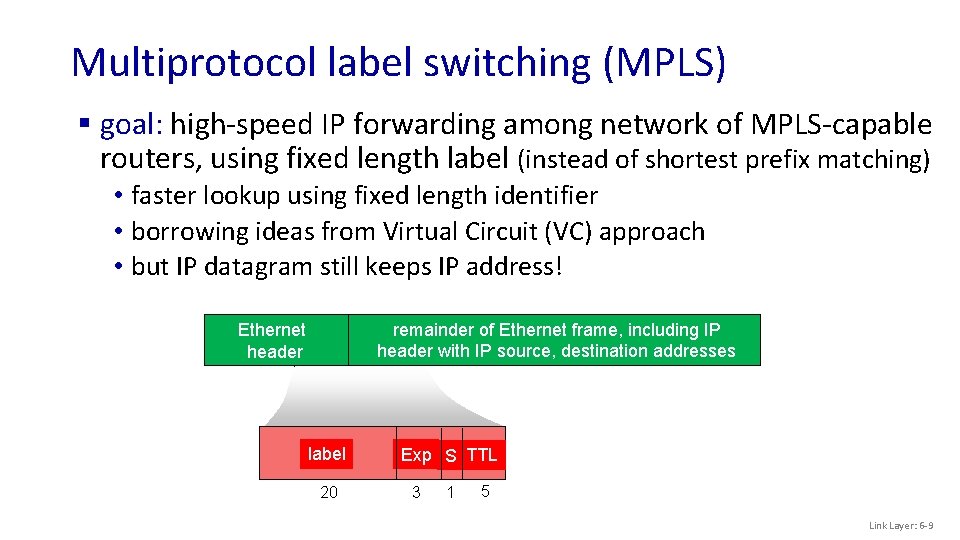
Multiprotocol label switching (MPLS) § goal: high-speed IP forwarding among network of MPLS-capable routers, using fixed length label (instead of shortest prefix matching) • faster lookup using fixed length identifier • borrowing ideas from Virtual Circuit (VC) approach • but IP datagram still keeps IP address! remainder of Ethernet frame, including IP Ethernet remainder of Ethernet frame, including IP MPLS header with IP source, destination addresses label 20 Exp S TTL 3 1 5 Link Layer: 6 -9
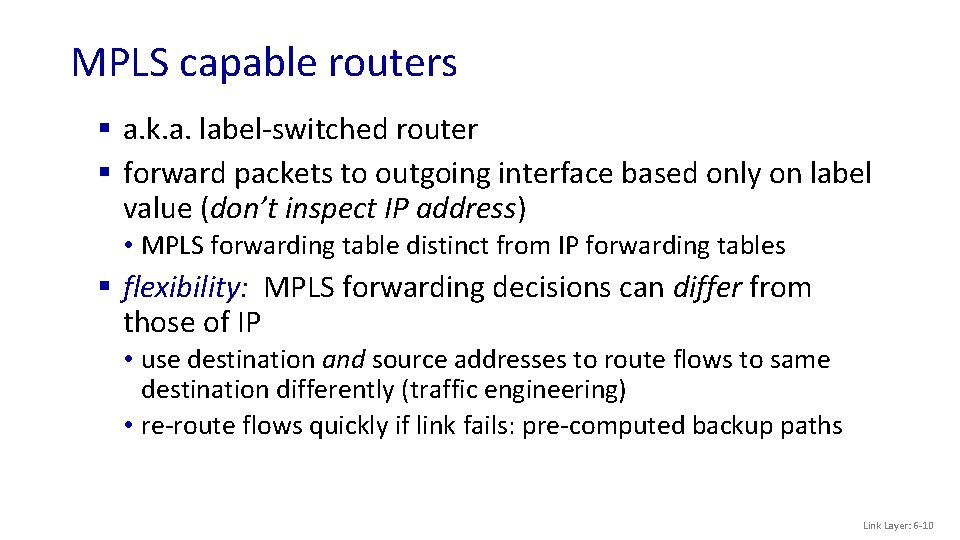
MPLS capable routers § a. k. a. label-switched router § forward packets to outgoing interface based only on label value (don’t inspect IP address) • MPLS forwarding table distinct from IP forwarding tables § flexibility: MPLS forwarding decisions can differ from those of IP • use destination and source addresses to route flows to same destination differently (traffic engineering) • re-route flows quickly if link fails: pre-computed backup paths Link Layer: 6 -10
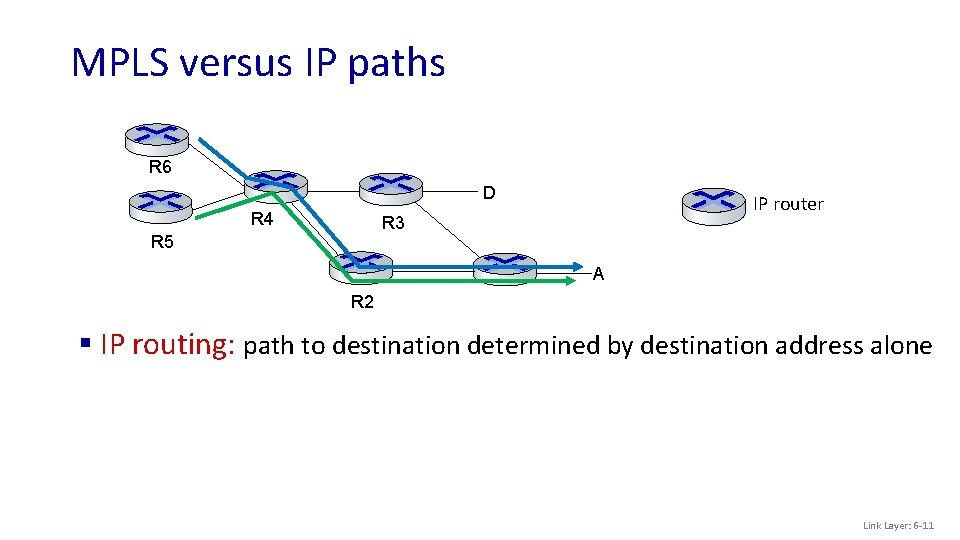
MPLS versus IP paths R 6 D R 4 IP router R 3 R 5 A R 2 § IP routing: path to destination determined by destination address alone Link Layer: 6 -11
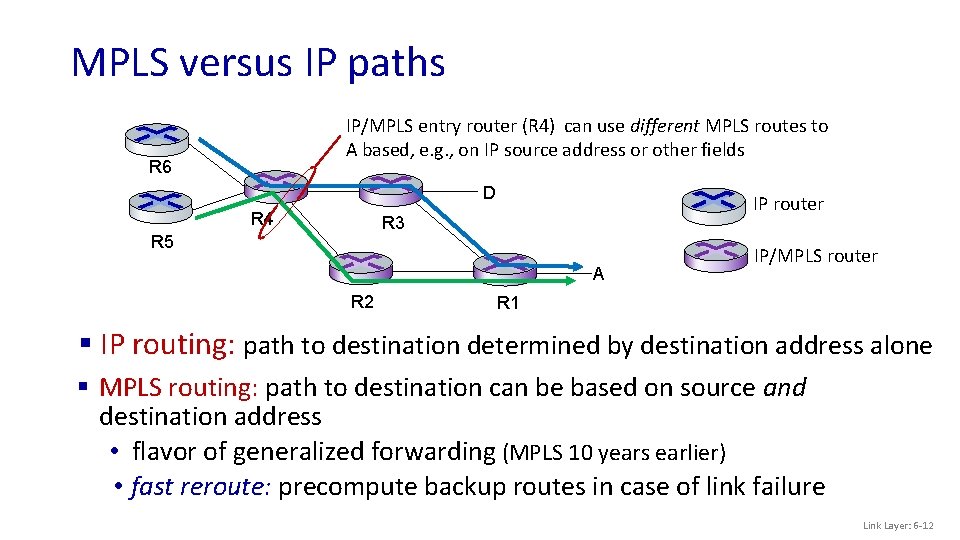
MPLS versus IP paths IP/MPLS entry router (R 4) can use different MPLS routes to A based, e. g. , on IP source address or other fields R 6 D R 4 IP router R 3 R 5 A R 2 IP/MPLS router R 1 § IP routing: path to destination determined by destination address alone § MPLS routing: path to destination can be based on source and destination address • flavor of generalized forwarding (MPLS 10 years earlier) • fast reroute: precompute backup routes in case of link failure Link Layer: 6 -12
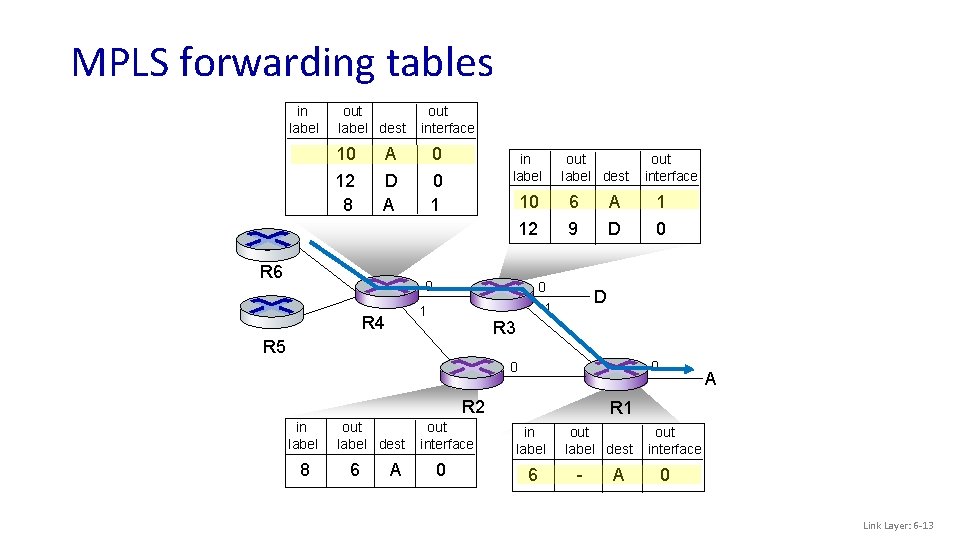
MPLS forwarding tables in label out label dest 10 12 8 out interface A D A R 6 0 0 1 in label 6 A 1 12 9 D 0 0 D 1 1 R 3 R 5 0 0 R 2 in label 8 out label dest 6 A out interface 10 0 R 4 out label dest out interface 0 A R 1 in label 6 out label dest - A out interface 0 Link Layer: 6 -13
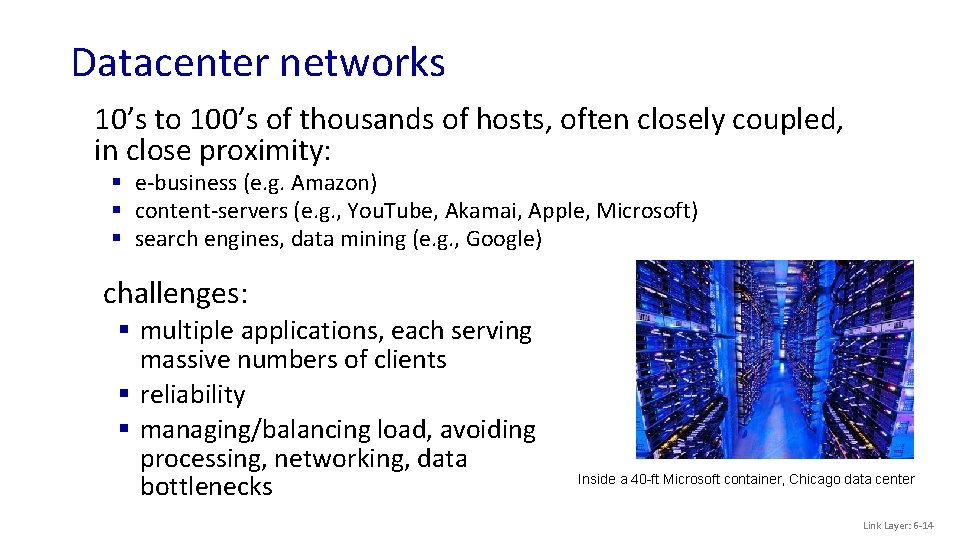
Datacenter networks 10’s to 100’s of thousands of hosts, often closely coupled, in close proximity: § e-business (e. g. Amazon) § content-servers (e. g. , You. Tube, Akamai, Apple, Microsoft) § search engines, data mining (e. g. , Google) challenges: § multiple applications, each serving massive numbers of clients § reliability § managing/balancing load, avoiding processing, networking, data bottlenecks Inside a 40 -ft Microsoft container, Chicago data center Link Layer: 6 -14
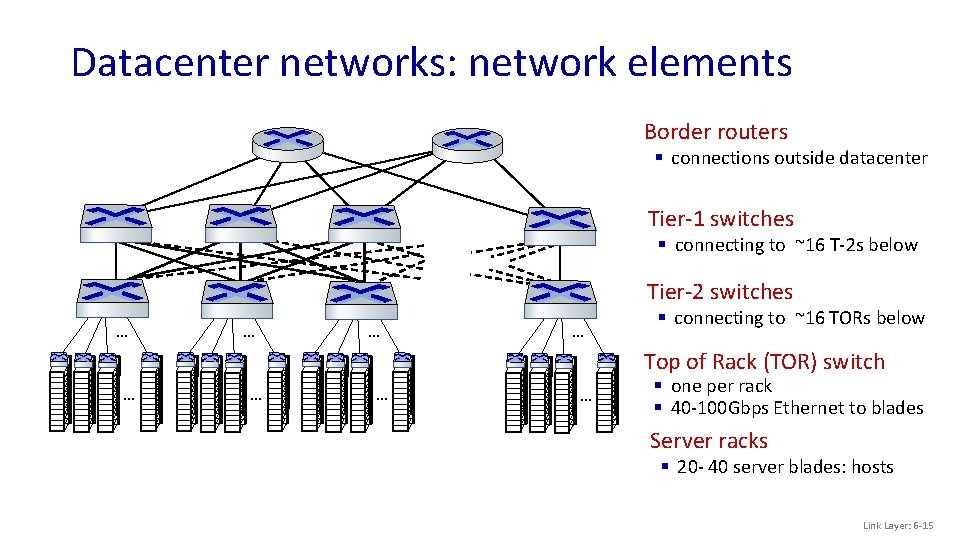
Datacenter networks: network elements Border routers § connections outside datacenter Tier-1 switches § connecting to ~16 T-2 s below Tier-2 switches … … § connecting to ~16 TORs below Top of Rack (TOR) switch … … § one per rack § 40 -100 Gbps Ethernet to blades Server racks § 20 - 40 server blades: hosts Link Layer: 6 -15
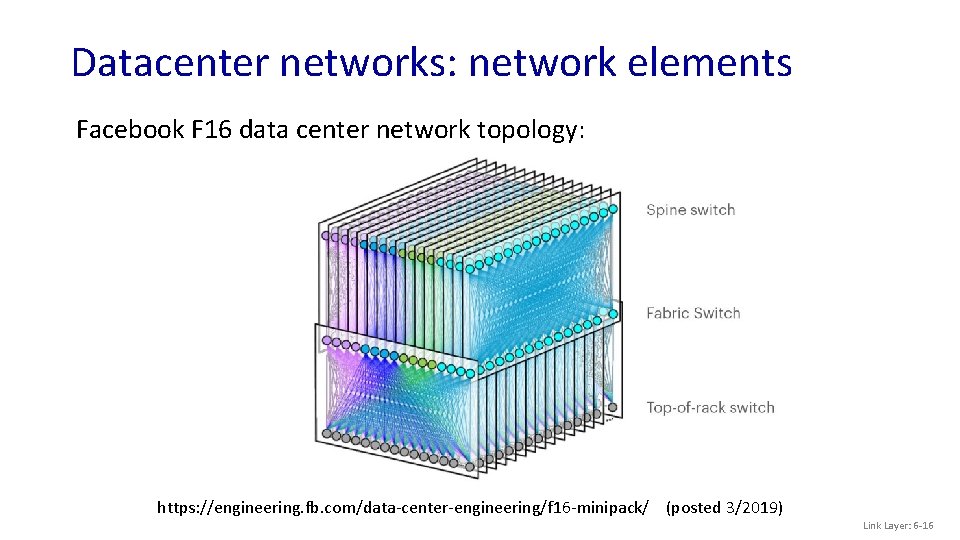
Datacenter networks: network elements Facebook F 16 data center network topology: https: //engineering. fb. com/data-center-engineering/f 16 -minipack/ (posted 3/2019) Link Layer: 6 -16
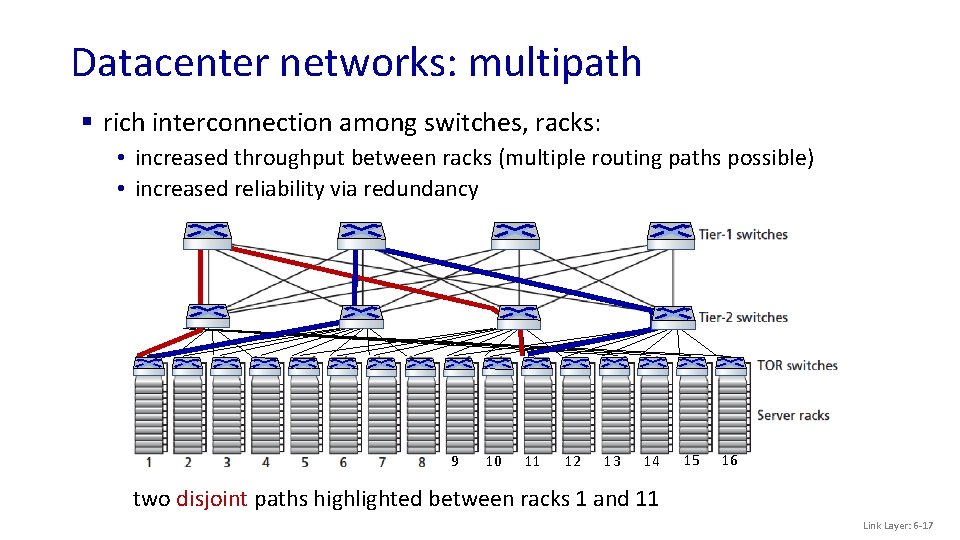
Datacenter networks: multipath § rich interconnection among switches, racks: • increased throughput between racks (multiple routing paths possible) • increased reliability via redundancy 9 10 11 12 13 14 15 16 two disjoint paths highlighted between racks 1 and 11 Link Layer: 6 -17
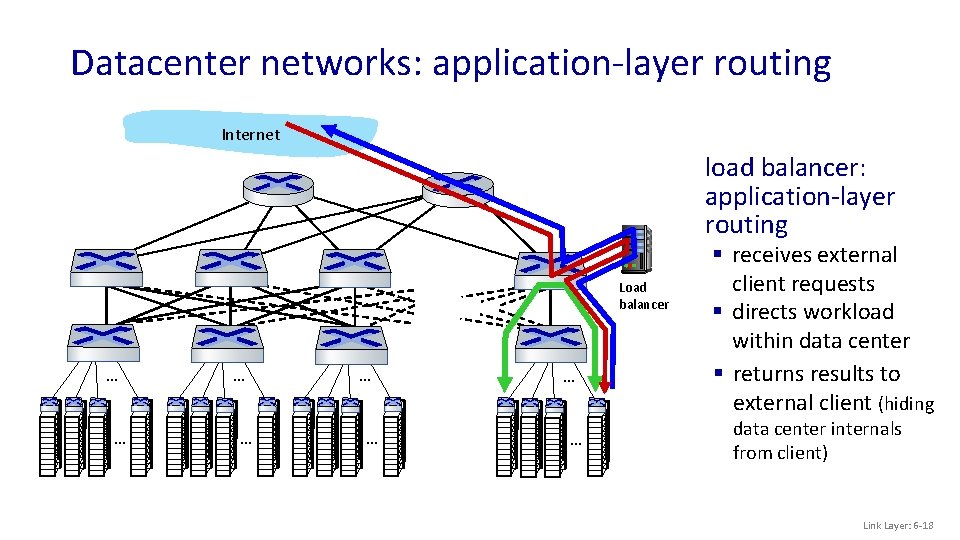
Datacenter networks: application-layer routing Internet load balancer: application-layer routing Load balancer … … … … § receives external client requests § directs workload within data center § returns results to external client (hiding data center internals from client) Link Layer: 6 -18
Datacenter networks: protocol innovations § link layer: • Ro. CE: remote DMA (RDMA) over Converged Ethernet § transport layer: • ECN (explicit congestion notification) used in transport-layer congestion control (DCTCP, DCQCN) • experimentation with hop-by-hop (backpressure) congestion control § routing, management: • SDN widely used within/among organizations’ datacenters • place related services, data as close as possible (e. g. , in same rack or nearby rack) to minimize tier-2, tier-1 communication Link Layer: 6 -19
Wireless and Mobile Networks: context § more wireless (mobile) phone subscribers than fixed (wired) phone subscribers (10 -to-1 in 2019)! § more mobile-broadband-connected devices than fixed-broadbandconnected devices (5 -1 in 2019)! • 4 G/5 G cellular networks now embracing Internet protocol stack, including SDN § two important (but different) challenges • wireless: communication over wireless link • mobility: handling the mobile user who changes point of attachment to network Wireless and Mobile Networks: 7 -20
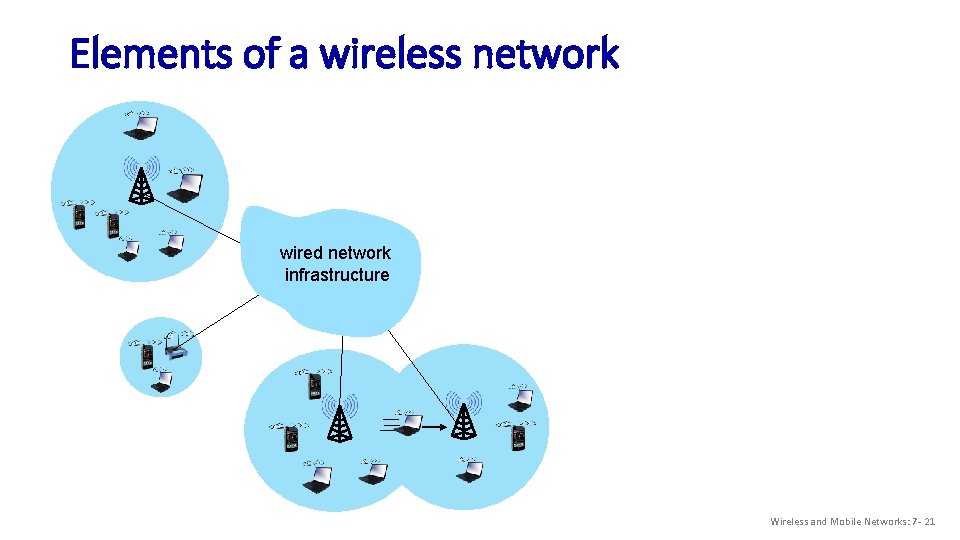
Elements of a wireless network wired network infrastructure Wireless and Mobile Networks: 7 - 21
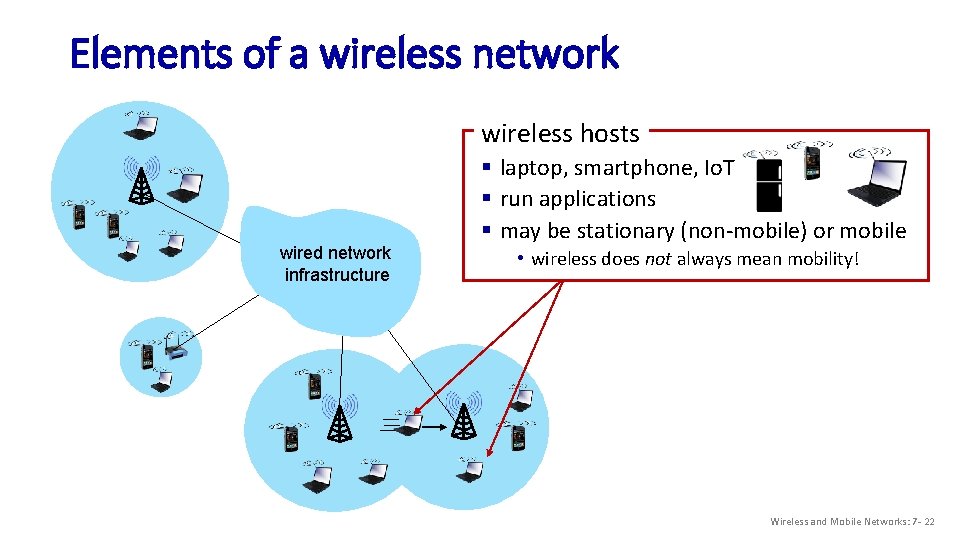
Elements of a wireless network wireless hosts wired network infrastructure § laptop, smartphone, Io. T § run applications § may be stationary (non-mobile) or mobile • wireless does not always mean mobility! Wireless and Mobile Networks: 7 - 22
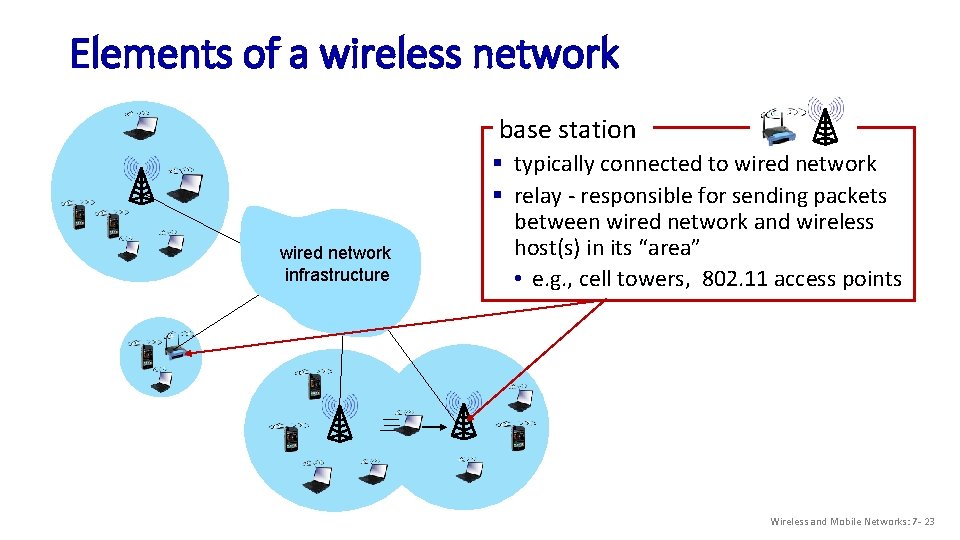
Elements of a wireless network base station wired network infrastructure § typically connected to wired network § relay - responsible for sending packets between wired network and wireless host(s) in its “area” • e. g. , cell towers, 802. 11 access points Wireless and Mobile Networks: 7 - 23
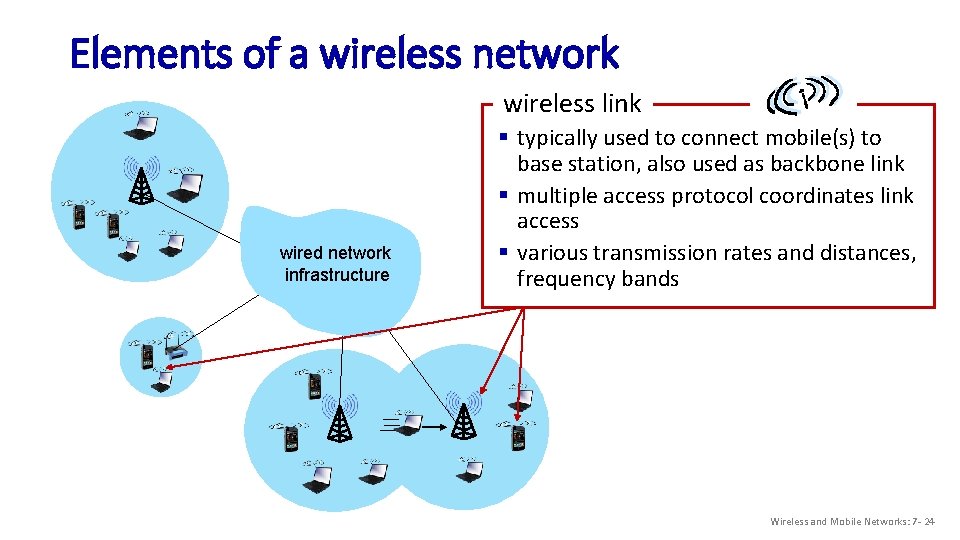
Elements of a wireless network wireless link wired network infrastructure § typically used to connect mobile(s) to base station, also used as backbone link § multiple access protocol coordinates link access § various transmission rates and distances, frequency bands Wireless and Mobile Networks: 7 - 24
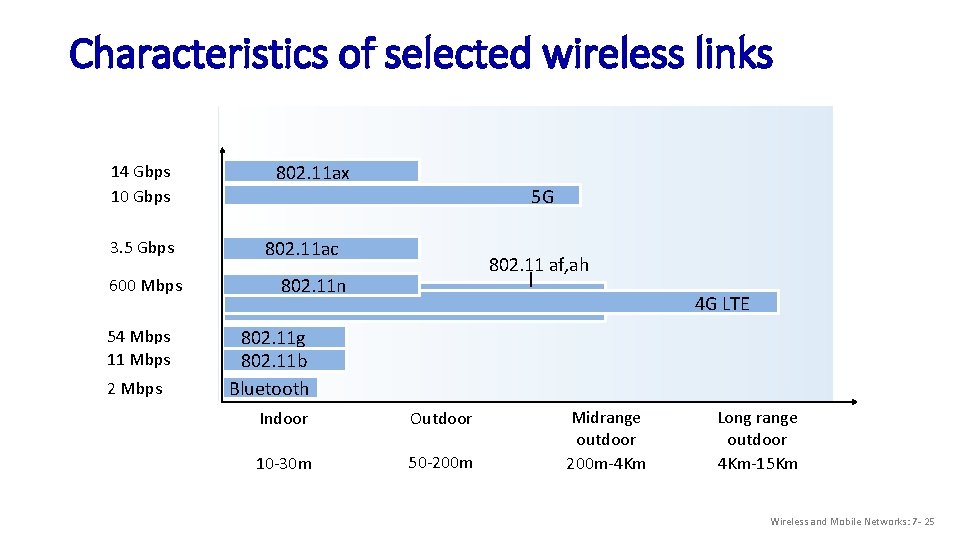
Characteristics of selected wireless links 14 Gbps 10 Gbps 3. 5 Gbps 600 Mbps 54 Mbps 11 Mbps 2 Mbps 802. 11 ax 5 G 802. 11 ac 802. 11 af, ah 802. 11 n 4 G LTE 802. 11 g 802. 11 b Bluetooth Indoor Outdoor 10 -30 m 50 -200 m Midrange outdoor 200 m-4 Km Long range outdoor 4 Km-15 Km Wireless and Mobile Networks: 7 - 25
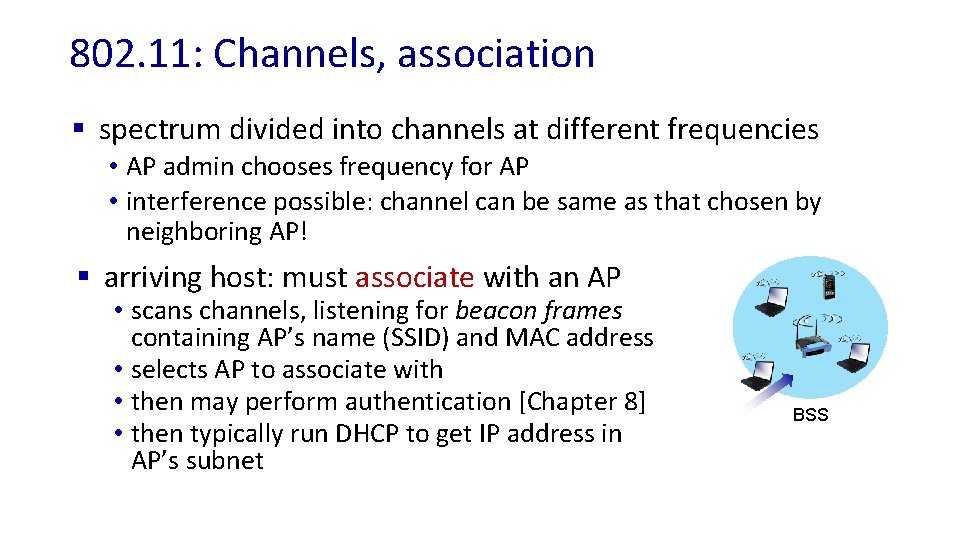
802. 11: Channels, association § spectrum divided into channels at different frequencies • AP admin chooses frequency for AP • interference possible: channel can be same as that chosen by neighboring AP! § arriving host: must associate with an AP • scans channels, listening for beacon frames containing AP’s name (SSID) and MAC address • selects AP to associate with • then may perform authentication [Chapter 8] • then typically run DHCP to get IP address in AP’s subnet BSS
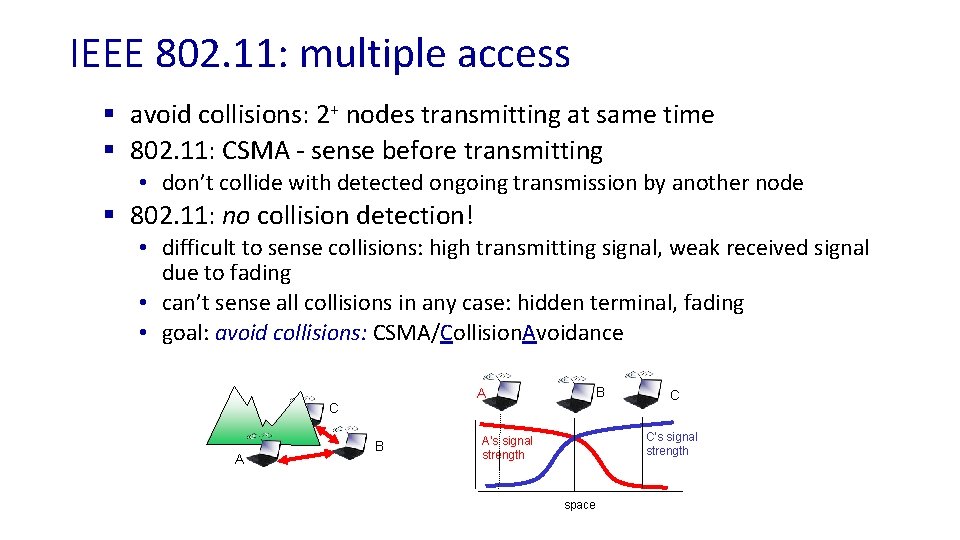
IEEE 802. 11: multiple access § avoid collisions: 2+ nodes transmitting at same time § 802. 11: CSMA - sense before transmitting • don’t collide with detected ongoing transmission by another node § 802. 11: no collision detection! • difficult to sense collisions: high transmitting signal, weak received signal due to fading • can’t sense all collisions in any case: hidden terminal, fading • goal: avoid collisions: CSMA/Collision. Avoidance C A B C C’s signal strength A’s signal strength space
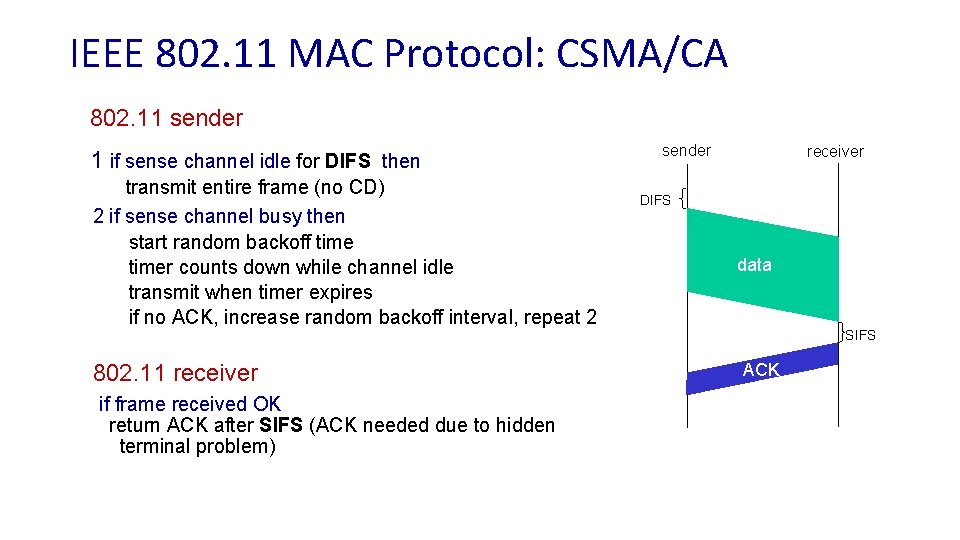
IEEE 802. 11 MAC Protocol: CSMA/CA 802. 11 sender 1 if sense channel idle for DIFS then transmit entire frame (no CD) 2 if sense channel busy then start random backoff timer counts down while channel idle transmit when timer expires if no ACK, increase random backoff interval, repeat 2 802. 11 receiver if frame received OK return ACK after SIFS (ACK needed due to hidden terminal problem) sender receiver DIFS data SIFS ACK
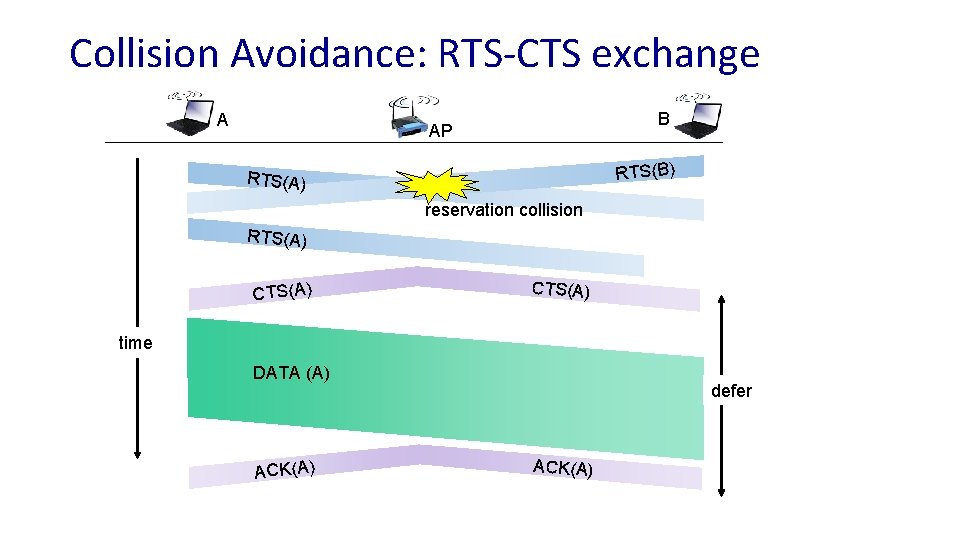
Collision Avoidance: RTS-CTS exchange A B AP RTS(B) RTS(A) reservation collision RTS(A) CTS(A) time DATA (A) ACK(A) defer ACK(A)
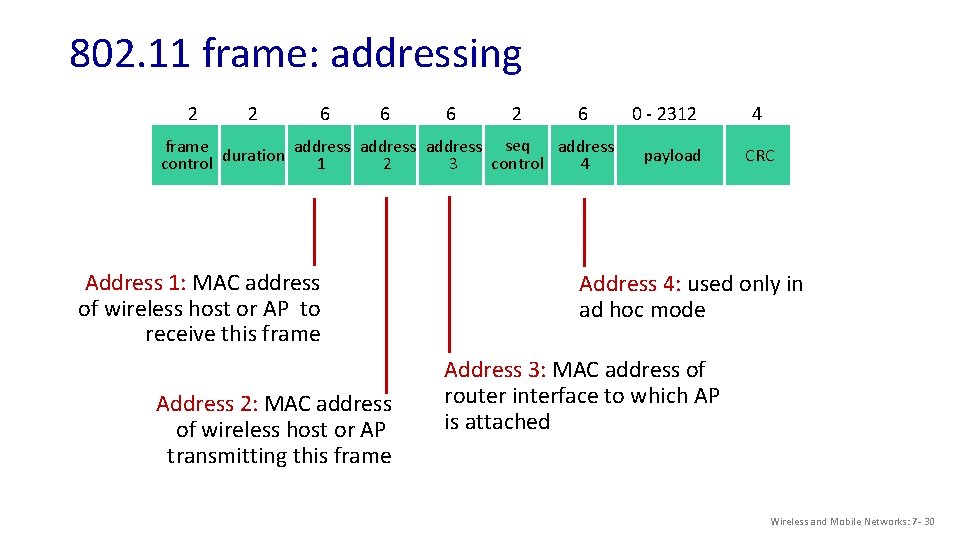
802. 11 frame: addressing 2 2 6 6 6 2 6 frame duration address seq address control 1 2 3 4 Address 1: MAC address of wireless host or AP to receive this frame Address 2: MAC address of wireless host or AP transmitting this frame 0 - 2312 payload 4 CRC Address 4: used only in ad hoc mode Address 3: MAC address of router interface to which AP is attached Wireless and Mobile Networks: 7 - 30
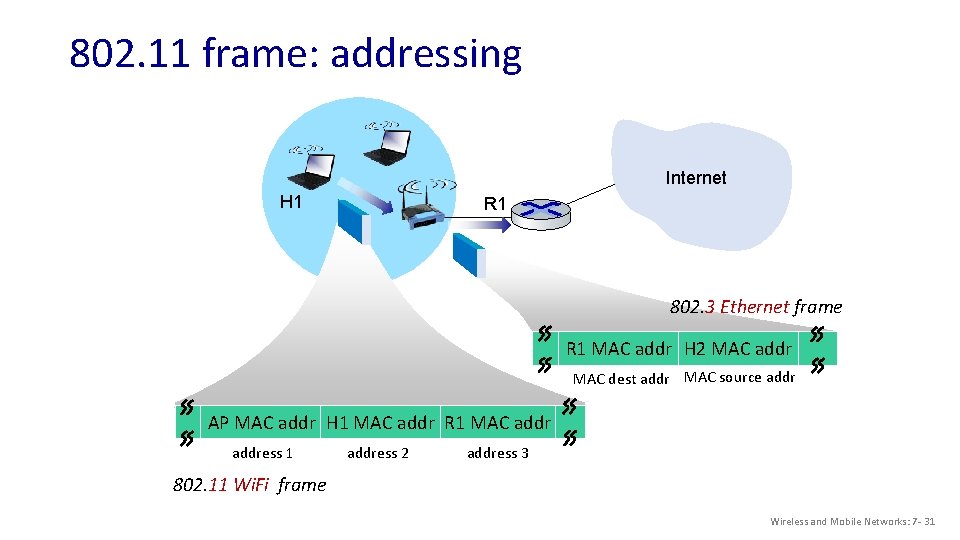
802. 11 frame: addressing Internet H 1 R 1 802. 3 Ethernet frame R 1 MAC addr H 2 MAC addr MAC dest addr MAC source addr AP MAC addr H 1 MAC addr R 1 MAC address 1 address 2 address 3 802. 11 Wi. Fi frame Wireless and Mobile Networks: 7 - 31
Looking ahead: § 4 G LTE § discussion
Easy: § Smart. NIC § MPLS § Network slicing § VNF versus NFV § EVPN/VXLAN § Leaf-spine (datacenter) A bit of prep: § SR IOV § SNAT § XMPP § DPDK
- Slides: 33