
ClaimsBased Identity An Overview of Microsoft Code Name
Claims-Based Identity: An Overview of Microsoft Code Name "Geneva" David Chappell & Associates www. davidchappell. com ARC 206
Agenda Introducing “Geneva” and Claims-Based Identity Using “Geneva”: Scenarios A Closer Look at the “Geneva” Technologies
Introducing "Geneva" and Claims-Based Identity
What is "Geneva"? Three related technologies: The “Geneva” Server The next release of Active Directory Federation Services (AD FS) Card. Space “Geneva” The next release of Card. Space The “Geneva” Framework The goal of “Geneva” is to help make claimsbased identity real
What is Identity? An identity is a set of information about some entity, such as a user Most applications work with identity Identity information drives important aspects of an application’s behavior, such as: Determining what a user is allowed to do Controlling how the application interacts with the user
Defining the Problem Working with identity is too hard Applications must use different identity technologies in different situations: Active Directory (Kerberos) inside a Windows domain Username/password on the Internet WS-Federation and the Security Assertion Markup Language (SAML) between organizations Why not define one approach that can be used in all of these cases? Claims-based identity allows this It can make life simpler for developers
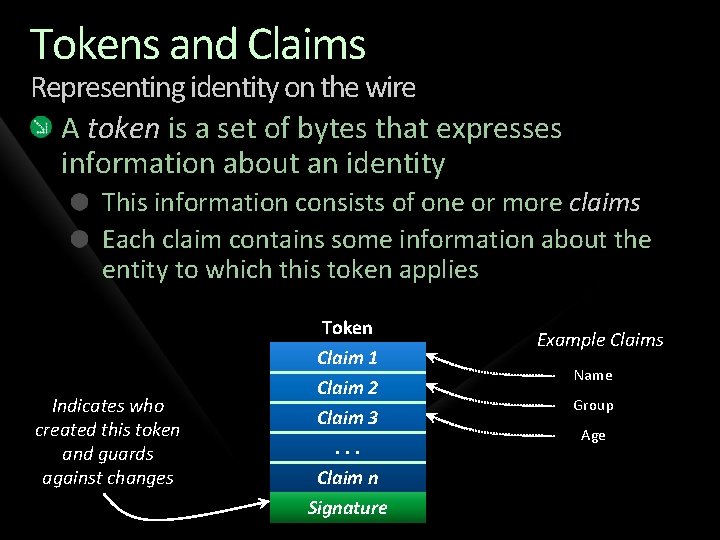
Tokens and Claims Representing identity on the wire A token is a set of bytes that expresses information about an identity This information consists of one or more claims Each claim contains some information about the entity to which this token applies Indicates who created this token and guards against changes Token Claim 1 Claim 2 Claim 3. . . Claim n Signature Example Claims Name Group Age
Identity Providers and STSs An identity provider is an authority that makes claims about an entity Common identity providers today: On your company’s network: Your employer On the Internet: Most often, you An identity provider implements a security token service (STS) It’s software that issues tokens Requests for tokens are made via WS-Trust Many token formats can be used The SAML format is increasingly popular
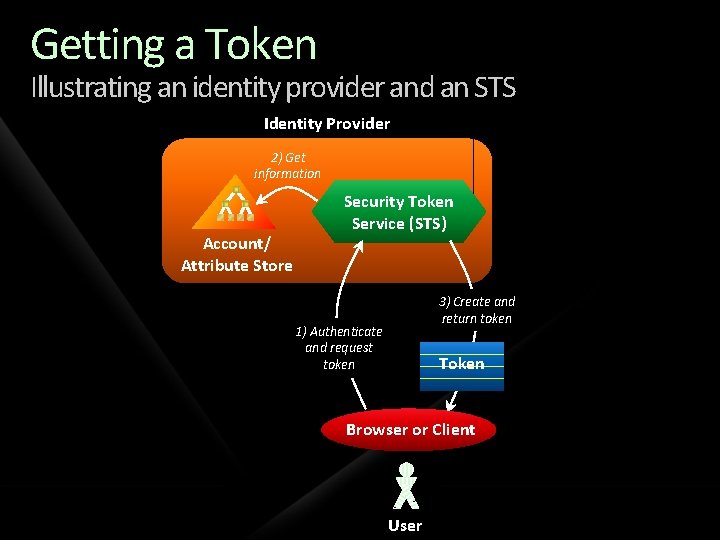
Getting a Token Illustrating an identity provider and an STS Identity Provider 2) Get information Account/ Attribute Store Security Token Service (STS) 3) Create and return token 1) Authenticate and request token Token Browser or Client User
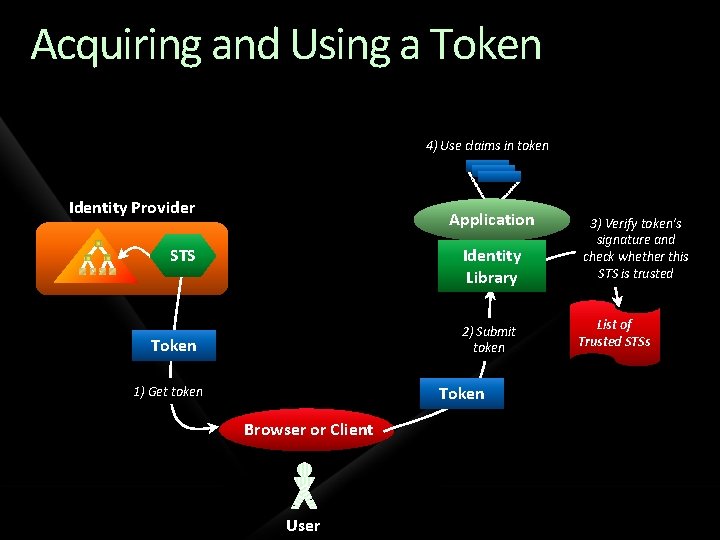
Acquiring and Using a Token 4) Use claims in token Identity Provider Application Identity Library STS 2) Submit token Token 1) Get token Browser or Client User 3) Verify token’s signature and check whether this STS is trusted List of Trusted STSs
Why Claims Are an Improvement In today’s world, an application typically gets only simple identity information Such as a user’s name To get more, the application must query: A remote database, e. g. , a directory service A local database With claims-based identity, each application can ask for exactly the claims that it needs The STS puts these in the token it creates
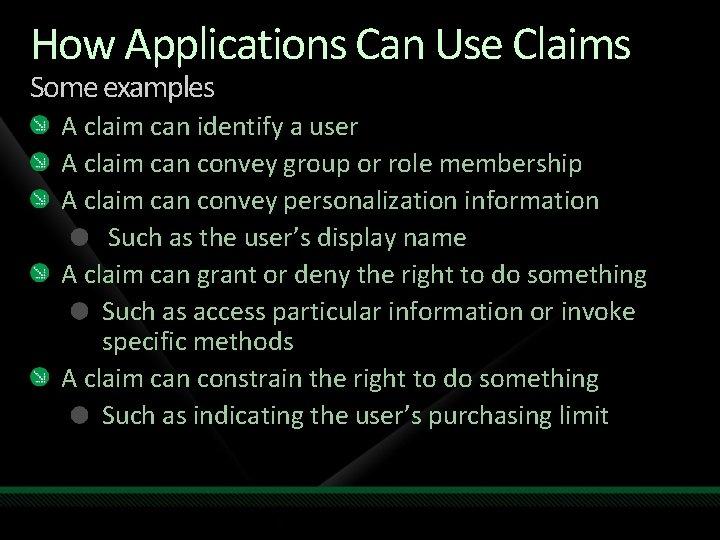
How Applications Can Use Claims Some examples A claim can identify a user A claim can convey group or role membership A claim can convey personalization information Such as the user’s display name A claim can grant or deny the right to do something Such as access particular information or invoke specific methods A claim can constrain the right to do something Such as indicating the user’s purchasing limit
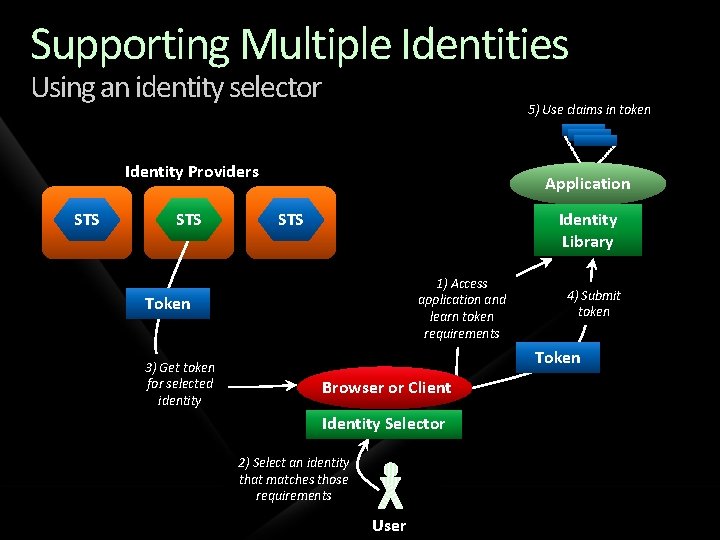
Supporting Multiple Identities Using an identity selector 5) Use claims in token Identity Providers STS Application STS Identity Library 1) Access application and learn token requirements Token 3) Get token for selected identity 4) Submit token Token Browser or Client Identity Selector 2) Select an identity that matches those requirements User
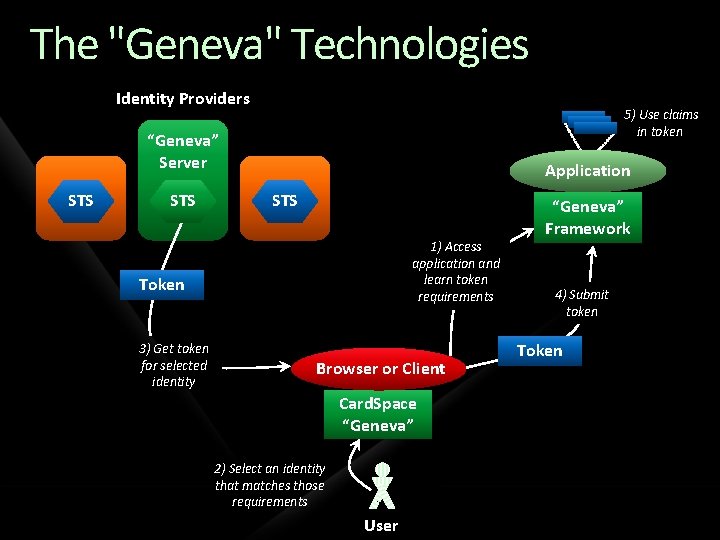
The "Geneva" Technologies Identity Providers 5) Use claims in token “Geneva” Server STS Application STS 1) Access application and learn token requirements Token 3) Get token for selected identity Browser or Client Card. Space “Geneva” 2) Select an identity that matches those requirements User “Geneva” Framework 4) Submit token Token
Using "Geneva": Scenarios
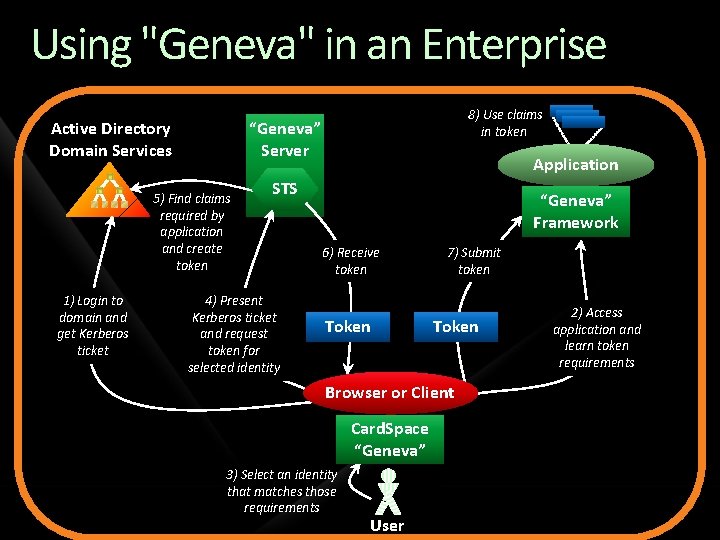
Using "Geneva" in an Enterprise Active Directory Domain Services “Geneva” Server 5) Find claims required by application and create token 1) Login to domain and get Kerberos ticket 8) Use claims in token Application STS 4) Present Kerberos ticket and request token for selected identity “Geneva” Framework 6) Receive token Token 7) Submit token Token Browser or Client Card. Space “Geneva” 3) Select an identity that matches those requirements User 2) Access application and learn token requirements
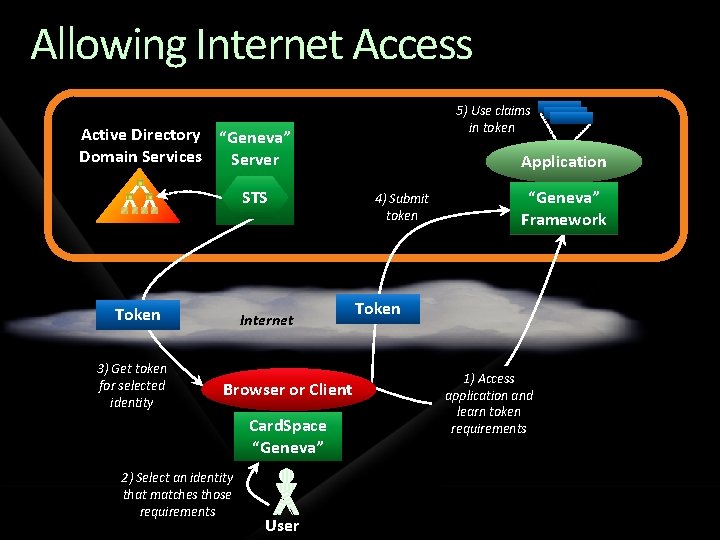
Allowing Internet Access 5) Use claims in token Active Directory “Geneva” Domain Services Server STS Token 3) Get token for selected identity Internet Browser or Client Card. Space “Geneva” 2) Select an identity that matches those requirements User Application 4) Submit token “Geneva” Framework Token 1) Access application and learn token requirements
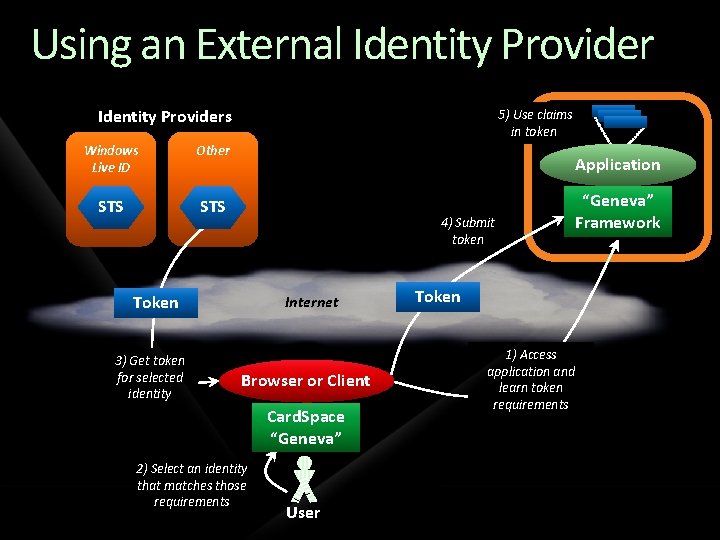
Using an External Identity Providers Windows Live ID Other STS 5) Use claims in token Application 4) Submit token Token 3) Get token for selected identity Internet Browser or Client Card. Space “Geneva” 2) Select an identity that matches those requirements User Token 1) Access application and learn token requirements “Geneva” Framework
Identity Across Organizations Describing the problem A user in one Windows forest must access an application in another Windows forest A user in a non-Windows world must access an application in a Windows forest (or vice-versa)
Identity Across Organizations Possible solutions One option: duplicate accounts Requires separate login, extra administration A better approach: identity federation One organizations accepts identities provided by the other No duplicate accounts Single sign-on for users
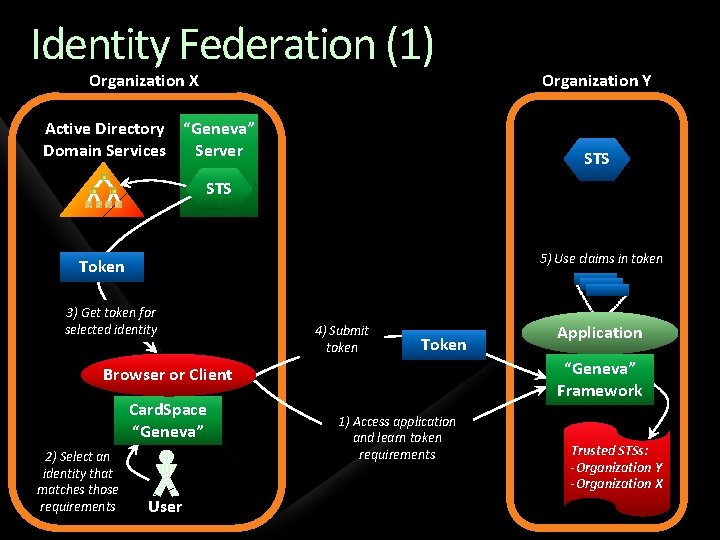
Identity Federation (1) Organization X Organization Y Active Directory “Geneva” Domain Services Server STS 5) Use claims in token Token 3) Get token for selected identity 4) Submit token Token “Geneva” Framework Browser or Client Card. Space “Geneva” 2) Select an identity that matches those requirements User Application 1) Access application and learn token requirements Trusted STSs: -Organization Y -Organization X
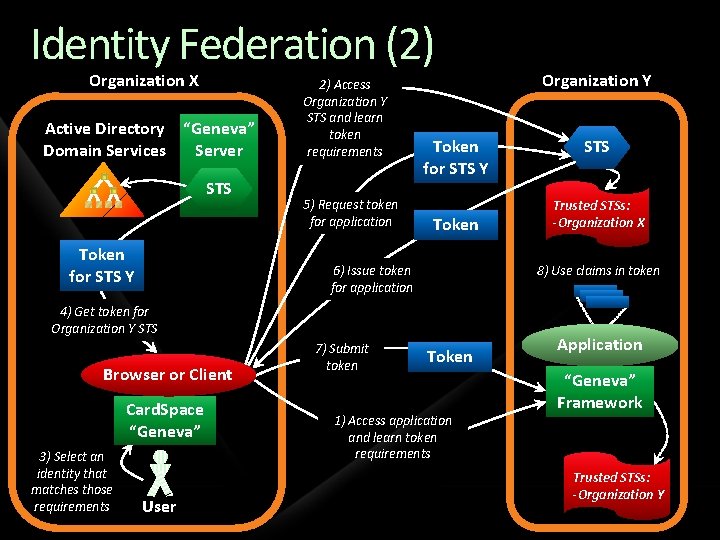
Identity Federation (2) Organization X Active Directory “Geneva” Domain Services Server STS Token for STS Y 2) Access Organization Y STS and learn token requirements 5) Request token for application Token for STS Y Token 6) Issue token for application Browser or Client Card. Space “Geneva” 3) Select an identity that matches those requirements User STS Trusted STSs: -Organization X 8) Use claims in token 4) Get token for Organization Y STS 7) Submit token Organization Y Token 1) Access application and learn token requirements Application “Geneva” Framework Trusted STSs: -Organization Y
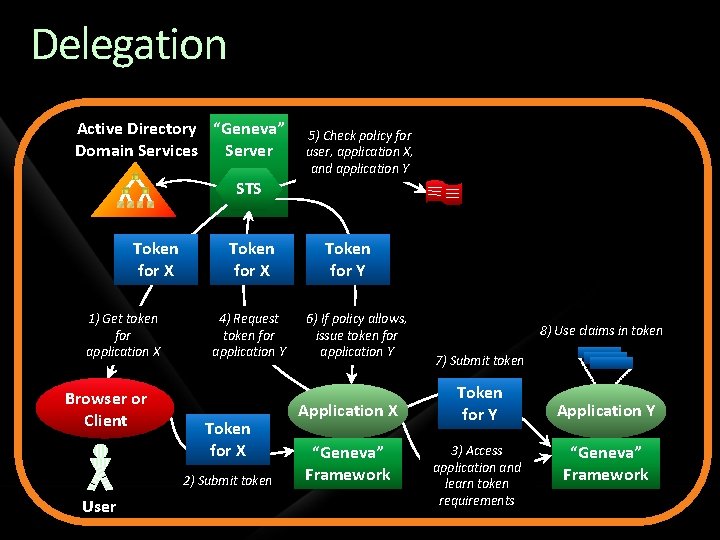
Delegation Active Directory “Geneva” Domain Services Server 5) Check policy for user, application X, and application Y STS Token for X 1) Get token for application X Browser or Client Token for X 4) Request token for application Y Token for X 2) Submit token User Token for Y 6) If policy allows, issue token for application Y Application X “Geneva” Framework 8) Use claims in token 7) Submit token Token for Y 3) Access application and learn token requirements Application Y “Geneva” Framework
A Closer Look at the "Geneva" Technologies
Changes in the "Geneva" Server From AD FS today supports only passive clients (i. e. , browsers) using WS-Federation And it doesn’t provide an STS The “Geneva” Server: Supports both active and passive clients Provides an STS Supports both WS-Federation and the SAML 2. 0 protocol Improves management of trust relationships By automating some exchanges
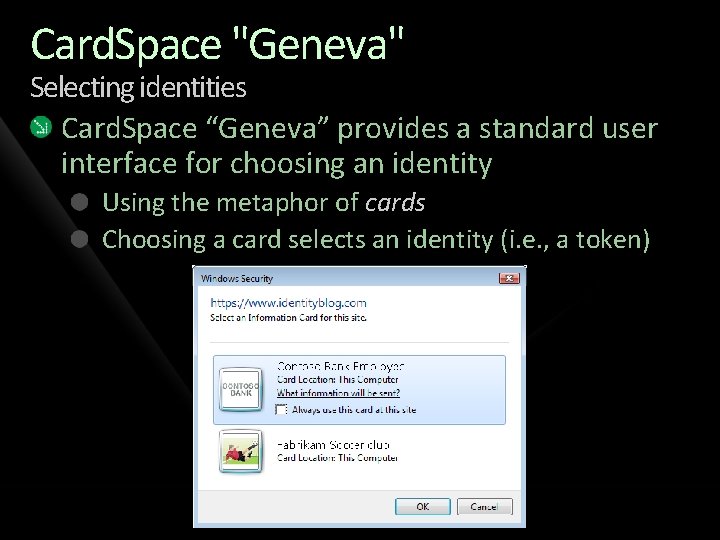
Card. Space "Geneva" Selecting identities Card. Space “Geneva” provides a standard user interface for choosing an identity Using the metaphor of cards Choosing a card selects an identity (i. e. , a token)
Information Cards Behind each card a user sees is an information card It’s an XML file that represents a relationship with an identity provider It contains what’s needed to request a token for a particular identity Information cards don’t contain: Claims for the identity Whatever is required to authenticate to the identity provider’s STS
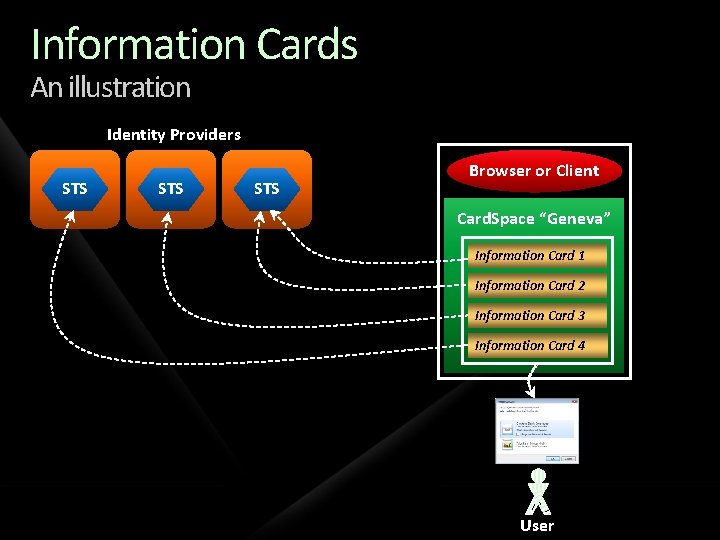
Information Cards An illustration Identity Providers STS STS Browser or Client Card. Space “Geneva” Information Card 1 Information Card 2 Information Card 3 Information Card 4 User
Creating Industry Agreement The Information Card Foundation is a multivendor group dedicated to making this technology successful Its board members include Google, Microsoft, Novell, Oracle, and Pay. Pal A Web site can display a standard icon to indicate that it accepts card-based logins:
Changes in Card. Space "Geneva" From the first Card. Space release Card. Space “Geneva” is available separately from the. NET Framework It’s smaller and faster Card. Space “Geneva” contains optimizations for applications that users visit repeatedly A Web site can display the card you last used to log in the site The Card. Space “Geneva” screen needn’t appear The self-issued identity provider has been dropped
The "Geneva" Framework The goal: Make it easier for developers to create claims-aware applications Originally known as “Zermatt” The “Geneva” Framework provides: Support for verifying a token’s signature and extracting its claims Classes for working with claims Support for creating a custom STS More
Conclusions Changing how applications (and people) work with identity is not a small thing Widespread adoption of claims-based identity will take time Yet all of the pieces required to make claimsbased identity real on Windows are coming: The “Geneva” Server Card. Space “Geneva” The “Geneva” Framework
References Introducing “Geneva”: An Overview of the “Geneva” Server, Card. Space “Geneva”, and the “Geneva” Framework http: //download. microsoft. com/download/7/d/0/7 d 0 b 5166 -6 a 8 a-418 a -addd-95 ee 9 b 046994/Geneva. Beta 1_Whitepaper_Chappell. docx Keith Brown’s “Geneva” Framework White Paper for Developers http: //download. microsoft. com/download/7/d/0/7 d 0 b 5166 -6 a 8 a-418 a -addd-95 ee 9 b 046994/Geneva. Framework. Whitepaper. For. Developers. pdf
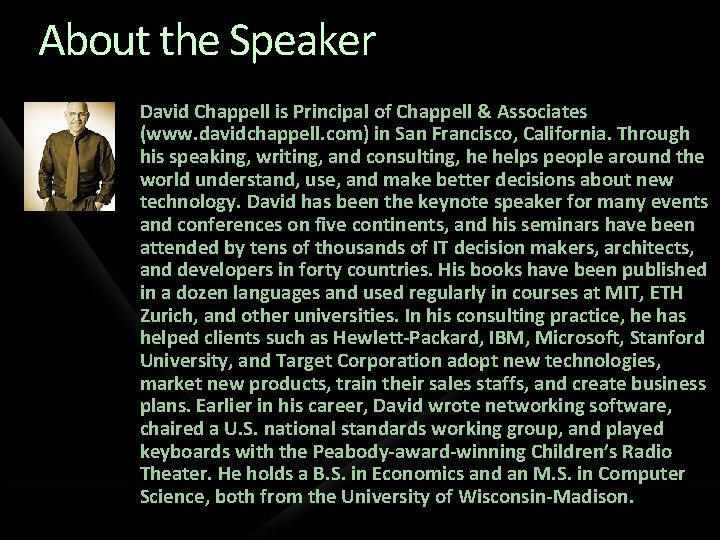
About the Speaker David Chappell is Principal of Chappell & Associates (www. davidchappell. com) in San Francisco, California. Through his speaking, writing, and consulting, he helps people around the world understand, use, and make better decisions about new technology. David has been the keynote speaker for many events and conferences on five continents, and his seminars have been attended by tens of thousands of IT decision makers, architects, and developers in forty countries. His books have been published in a dozen languages and used regularly in courses at MIT, ETH Zurich, and other universities. In his consulting practice, he has helped clients such as Hewlett-Packard, IBM, Microsoft, Stanford University, and Target Corporation adopt new technologies, market new products, train their sales staffs, and create business plans. Earlier in his career, David wrote networking software, chaired a U. S. national standards working group, and played keyboards with the Peabody-award-winning Children’s Radio Theater. He holds a B. S. in Economics and an M. S. in Computer Science, both from the University of Wisconsin-Madison.
question & answer
Resources www. microsoft. com/teched www. microsoft. com/learning http: //microsoft. com/technet http: //microsoft. com/msdn Resources for IT Professionals Resources for Developers Sessions On-Demand & Community Microsoft Certification & Training Resources www. microsoft. com/learning Microsoft Certification and Training Resources
Complete an evaluation on Comm. Net and enter to win!
© 2009 Microsoft Corporation. All rights reserved. Microsoft, Windows Vista and other product names are or may be registered trademarks and/or trademarks in the U. S. and/or other countries. The information herein is for informational purposes only and represents the current view of Microsoft Corporation as of the date of this presentation. Because Microsoft must respond to changing market conditions, it should not be interpreted to be a commitment on the part of Microsoft, and Microsoft cannot guarantee the accuracy of any information provided after the date of this presentation. MICROSOFT MAKES NO WARRANTIES, EXPRESS, IMPLIED OR STATUTORY, AS TO THE INFORMATION IN THIS PRESENTATION.
- Slides: 39