
CIT 140 Introduction to IT Shell Programming CIT
![Exporting Environment export [name-list] Purpose: Export the names and copies of the current values](https://slidetodoc.com/presentation_image_h2/b751997d77ba06319b234057ab16383e/image-13.jpg "Exporting Environment export [name-list] Purpose: Export the names and copies of the current values")
![Resetting Variables unset [name-list] Purpose Reset or remove the variable or function corresponding to](https://slidetodoc.com/presentation_image_h2/b751997d77ba06319b234057ab16383e/image-14.jpg "Resetting Variables unset [name-list] Purpose Reset or remove the variable or function corresponding to")
![Example: fileinfo. sh #!/bin/sh if [ $# -ne 1 ]; then echo "Usage: fileinfo](https://slidetodoc.com/presentation_image_h2/b751997d77ba06319b234057ab16383e/image-24.jpg "Example: fileinfo. sh #!/bin/sh if [ $# -ne 1 ]; then echo \"Usage: fileinfo")
![Shell Example: Filetype #!/bin/sh if [ $# -ne 1 ]; then echo "Usage: filetype](https://slidetodoc.com/presentation_image_h2/b751997d77ba06319b234057ab16383e/image-26.jpg "Shell Example: Filetype #!/bin/sh if [ $# -ne 1 ]; then echo \"Usage: filetype")
![Case Example: Little. Sh #!/bin/sh while [ 1 ] do echo -n "littleshell> "](https://slidetodoc.com/presentation_image_h2/b751997d77ba06319b234057ab16383e/image-36.jpg "Case Example: Little. Sh #!/bin/sh while [ 1 ] do echo -n \"littleshell> \"")
- Slides: 37
CIT 140: Introduction to IT Shell Programming CIT 140: Introduction to IT 1
Topics 1. 2. 3. 4. 5. 6. 7. 8. 9. 10. Shell Programming Shell Variables Command Substitution Command Line Arguments Reading from the User Control Flow if/else for loops while loops case statements CIT 140: Introduction to IT 2
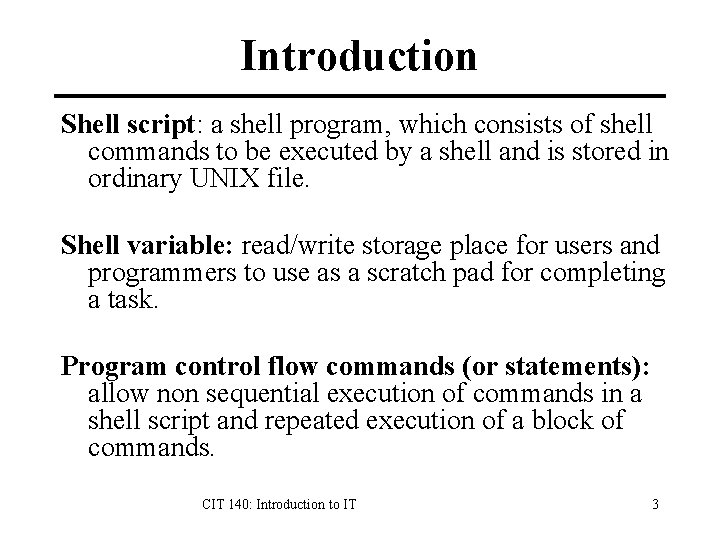
Introduction Shell script: a shell program, which consists of shell commands to be executed by a shell and is stored in ordinary UNIX file. Shell variable: read/write storage place for users and programmers to use as a scratch pad for completing a task. Program control flow commands (or statements): allow non sequential execution of commands in a shell script and repeated execution of a block of commands. CIT 140: Introduction to IT 3
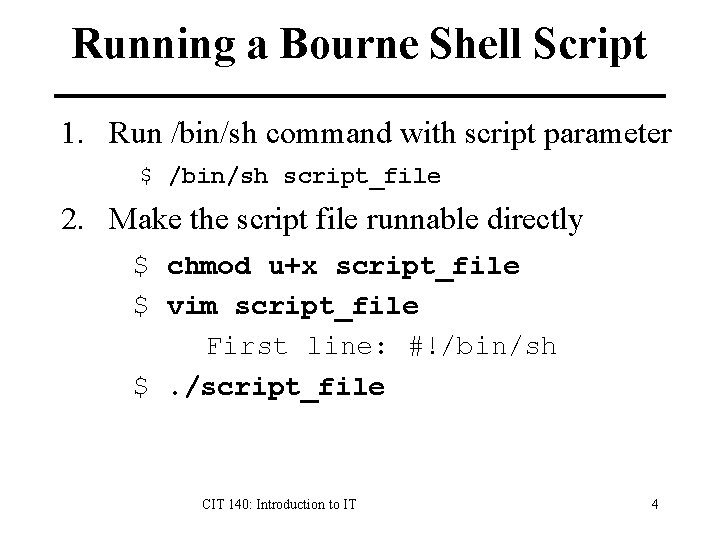
Running a Bourne Shell Script 1. Run /bin/sh command with script parameter $ /bin/sh script_file 2. Make the script file runnable directly $ chmod u+x script_file $ vim script_file First line: #!/bin/sh $. /script_file CIT 140: Introduction to IT 4
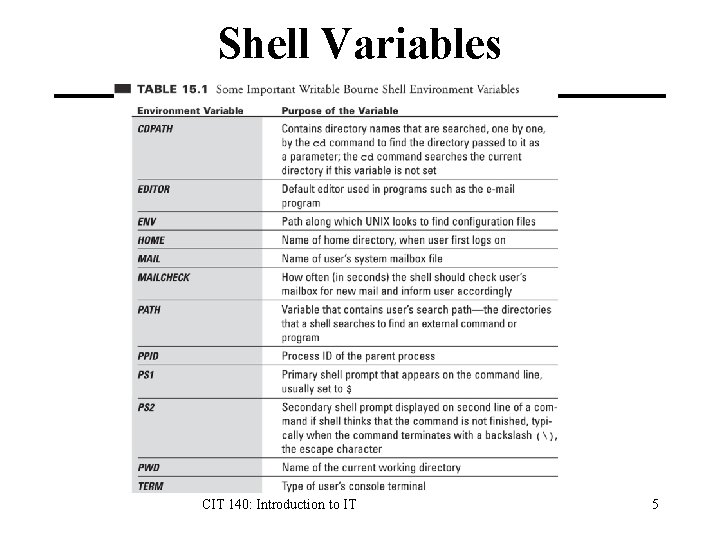
Shell Variables CIT 140: Introduction to IT 5
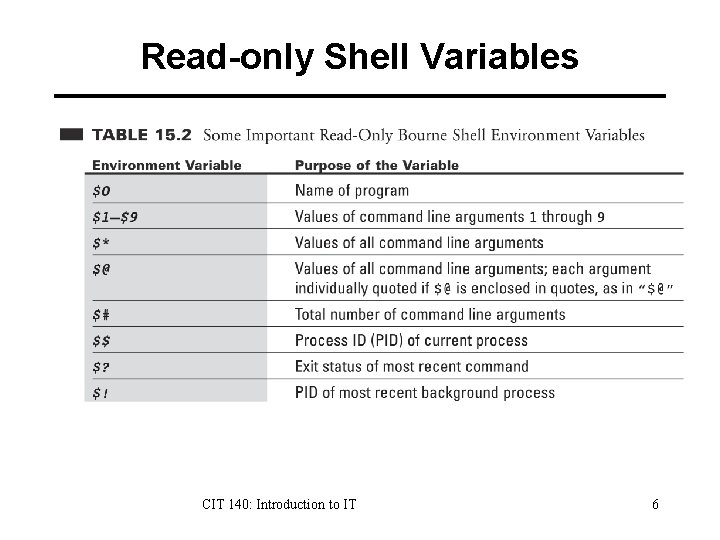
Read-only Shell Variables CIT 140: Introduction to IT 6
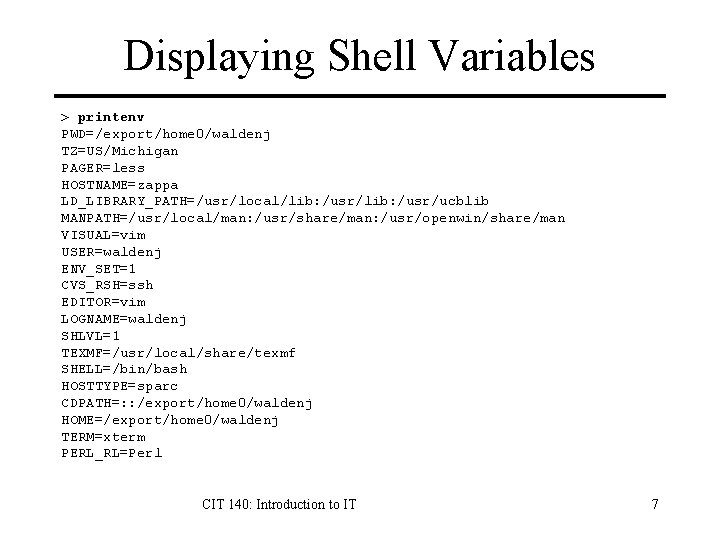
Displaying Shell Variables > printenv PWD=/export/home 0/waldenj TZ=US/Michigan PAGER=less HOSTNAME=zappa LD_LIBRARY_PATH=/usr/local/lib: /usr/ucblib MANPATH=/usr/local/man: /usr/share/man: /usr/openwin/share/man VISUAL=vim USER=waldenj ENV_SET=1 CVS_RSH=ssh EDITOR=vim LOGNAME=waldenj SHLVL=1 TEXMF=/usr/local/share/texmf SHELL=/bin/bash HOSTTYPE=sparc CDPATH=: : /export/home 0/waldenj HOME=/export/home 0/waldenj TERM=xterm PERL_RL=Perl CIT 140: Introduction to IT 7
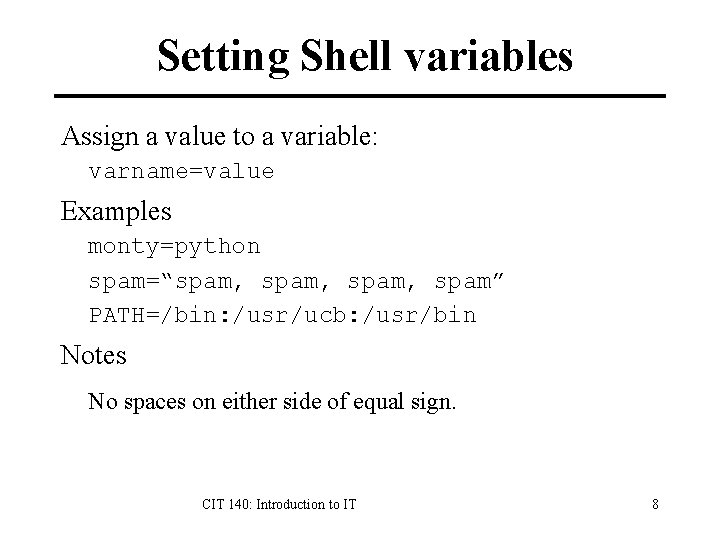
Setting Shell variables Assign a value to a variable: varname=value Examples monty=python spam=“spam, spam” PATH=/bin: /usr/ucb: /usr/bin Notes No spaces on either side of equal sign. CIT 140: Introduction to IT 8
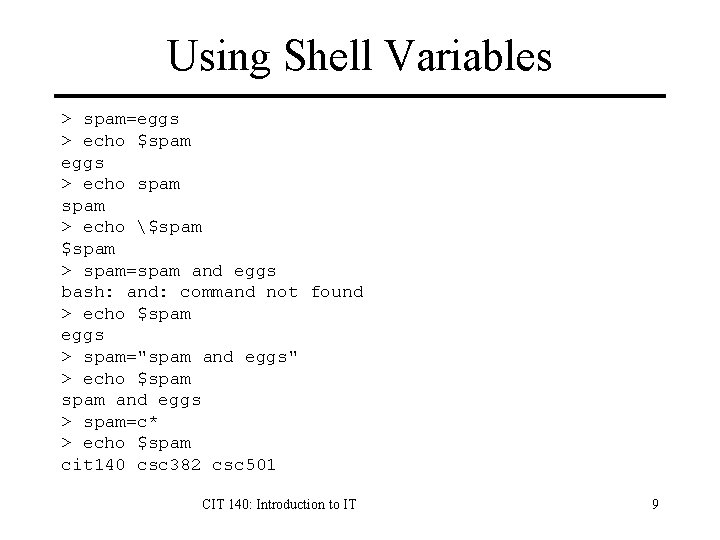
Using Shell Variables > spam=eggs > echo $spam eggs > echo spam > echo $spam > spam=spam and eggs bash: and: command not found > echo $spam eggs > spam="spam and eggs" > echo $spam and eggs > spam=c* > echo $spam cit 140 csc 382 csc 501 CIT 140: Introduction to IT 9
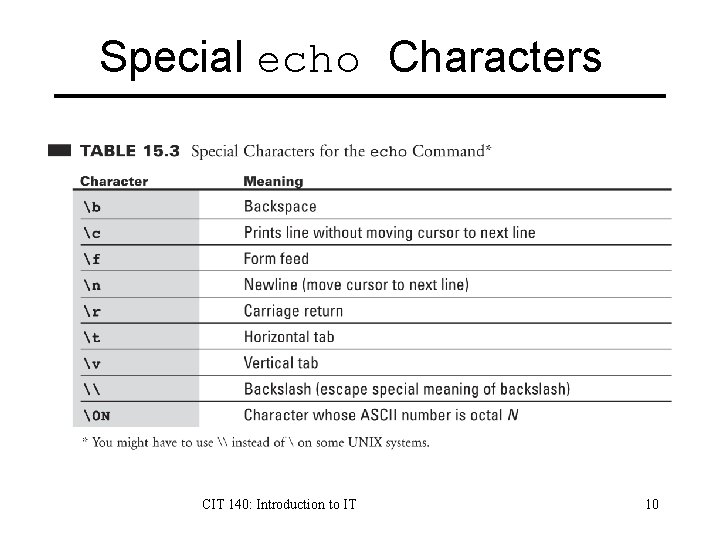
Special echo Characters CIT 140: Introduction to IT 10
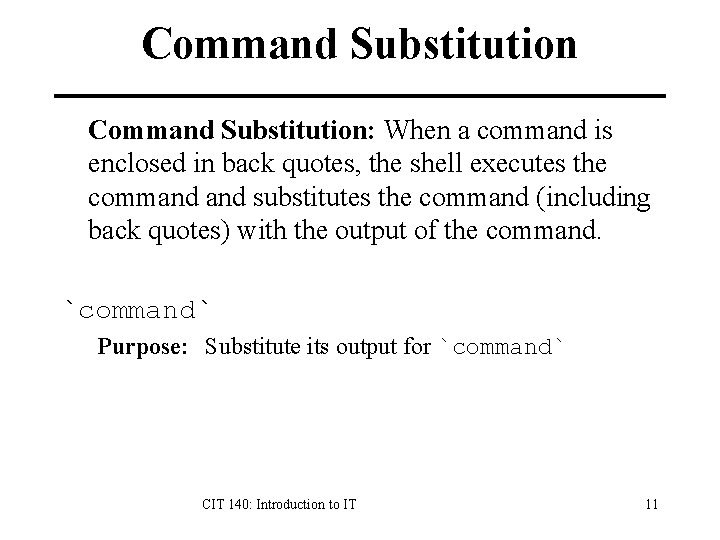
Command Substitution: When a command is enclosed in back quotes, the shell executes the command substitutes the command (including back quotes) with the output of the command. `command` Purpose: Substitute its output for `command` CIT 140: Introduction to IT 11
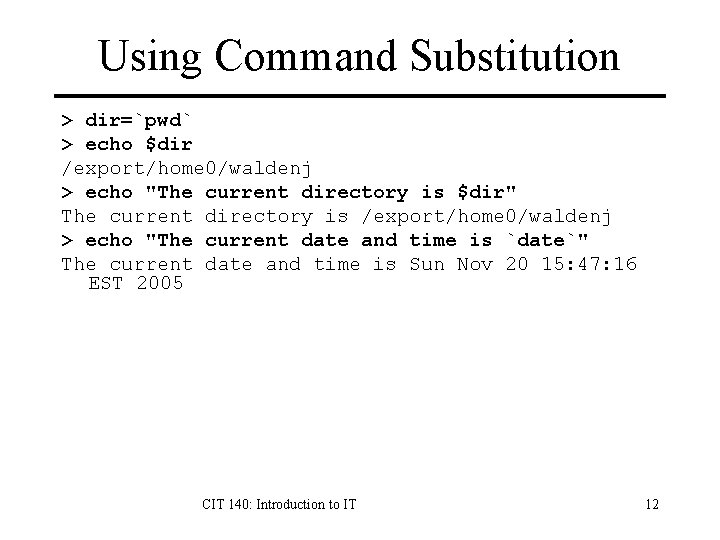
Using Command Substitution > dir=`pwd` > echo $dir /export/home 0/waldenj > echo "The current directory is $dir" The current directory is /export/home 0/waldenj > echo "The current date and time is `date`" The current date and time is Sun Nov 20 15: 47: 16 EST 2005 CIT 140: Introduction to IT 12
Exporting Environment export [name-list] Purpose: Export the names and copies of the current values in the ‘name-list’ to every command executed from this point on. Example: > grep PATH. bashrc PATH=/bin: /usr/local/bin: /usr/ucb MANPATH=/usr/local/man: /usr/X 11 R 6/man export PATH MANPATH CIT 140: Introduction to IT 13
Resetting Variables unset [name-list] Purpose Reset or remove the variable or function corresponding to the names in ‘name-list’, where ‘namelist’ is a list of names separated by spaces. > > > I food 1=spam food 2=eggs echo "I like $food 1 and $food 2" like spam and eggs unset food 1 food 2 echo "I like $food 1 and $food 2" like and CIT 140: Introduction to IT 14
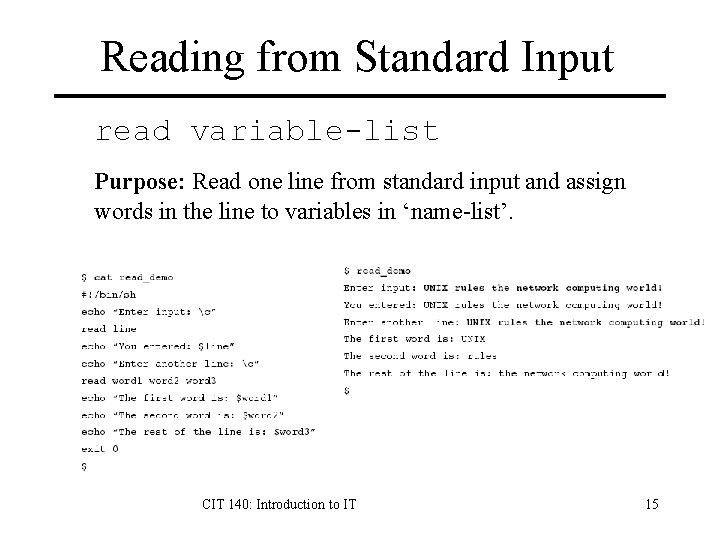
Reading from Standard Input read variable-list Purpose: Read one line from standard input and assign words in the line to variables in ‘name-list’. CIT 140: Introduction to IT 15
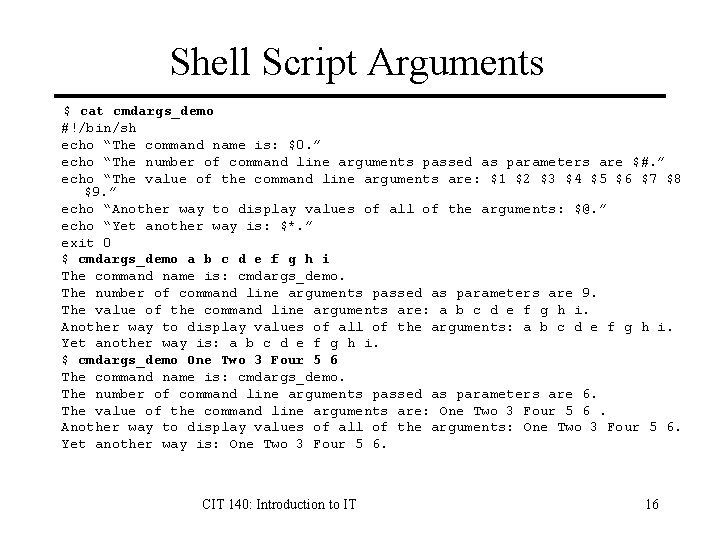
Shell Script Arguments $ cat cmdargs_demo #!/bin/sh echo “The command name is: $0. ” echo “The number of command line arguments passed as parameters are $#. ” echo “The value of the command line arguments are: $1 $2 $3 $4 $5 $6 $7 $8 $9. ” echo “Another way to display values of all of the arguments: $@. ” echo “Yet another way is: $*. ” exit 0 $ cmdargs_demo a b c d e f g h i The command name is: cmdargs_demo. The number of command line arguments passed as parameters are 9. The value of the command line arguments are: a b c d e f g h i. Another way to display values of all of the arguments: a b c d e f g h i. Yet another way is: a b c d e f g h i. $ cmdargs_demo One Two 3 Four 5 6 The command name is: cmdargs_demo. The number of command line arguments passed as parameters are 6. The value of the command line arguments are: One Two 3 Four 5 6. Another way to display values of all of the arguments: One Two 3 Four 5 6. Yet another way is: One Two 3 Four 5 6. CIT 140: Introduction to IT 16
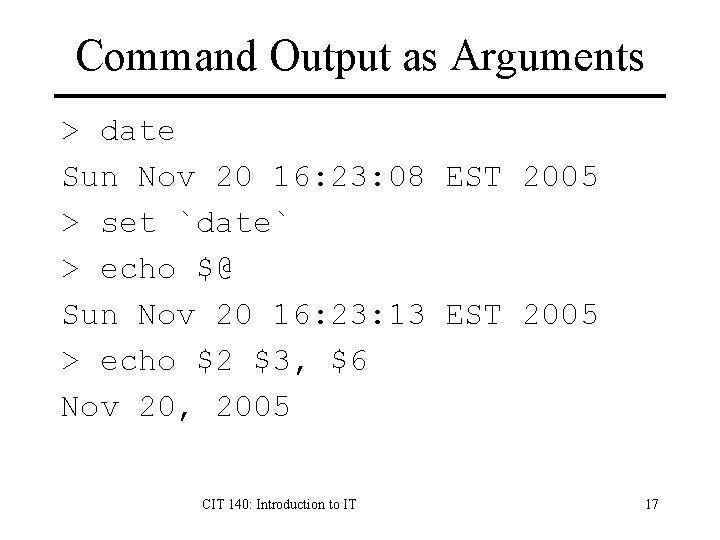
Command Output as Arguments > date Sun Nov 20 16: 23: 08 EST 2005 > set `date` > echo $@ Sun Nov 20 16: 23: 13 EST 2005 > echo $2 $3, $6 Nov 20, 2005 CIT 140: Introduction to IT 17
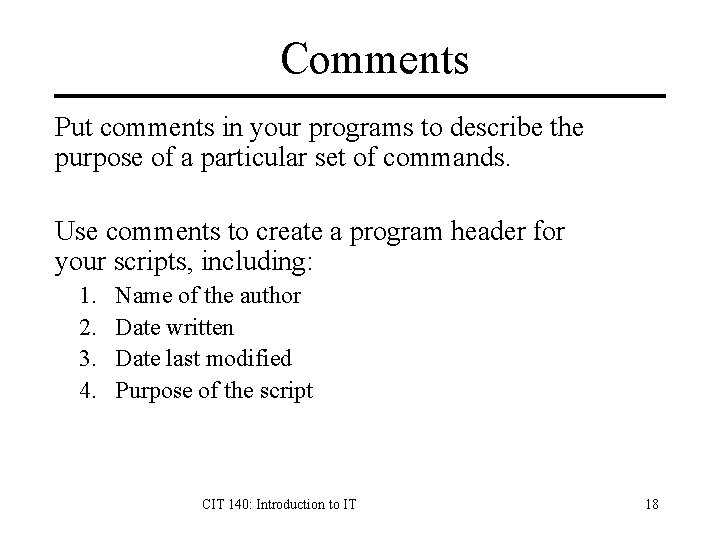
Comments Put comments in your programs to describe the purpose of a particular set of commands. Use comments to create a program header for your scripts, including: 1. 2. 3. 4. Name of the author Date written Date last modified Purpose of the script CIT 140: Introduction to IT 18
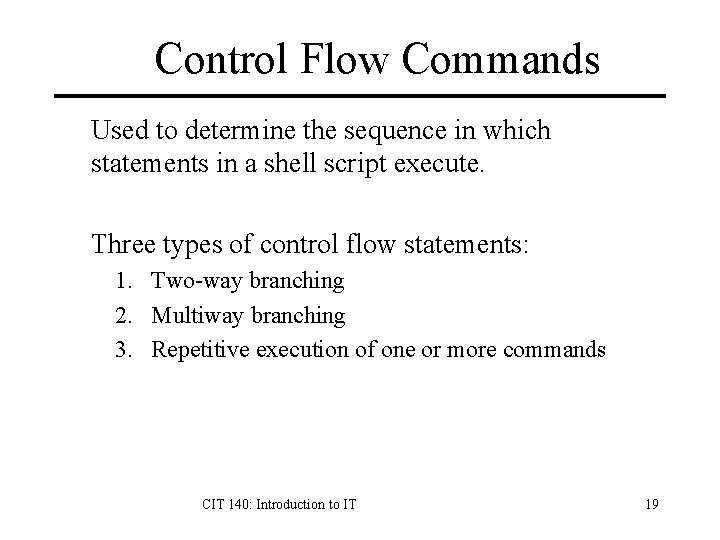
Control Flow Commands Used to determine the sequence in which statements in a shell script execute. Three types of control flow statements: 1. Two-way branching 2. Multiway branching 3. Repetitive execution of one or more commands CIT 140: Introduction to IT 19
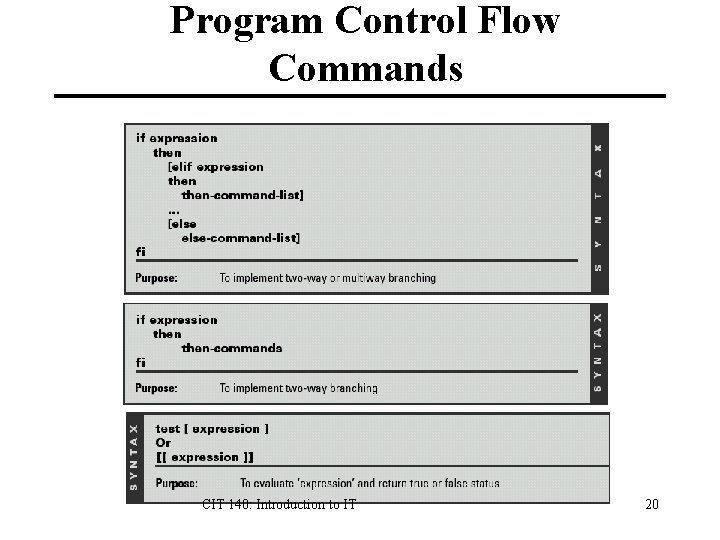
Program Control Flow Commands CIT 140: Introduction to IT 20
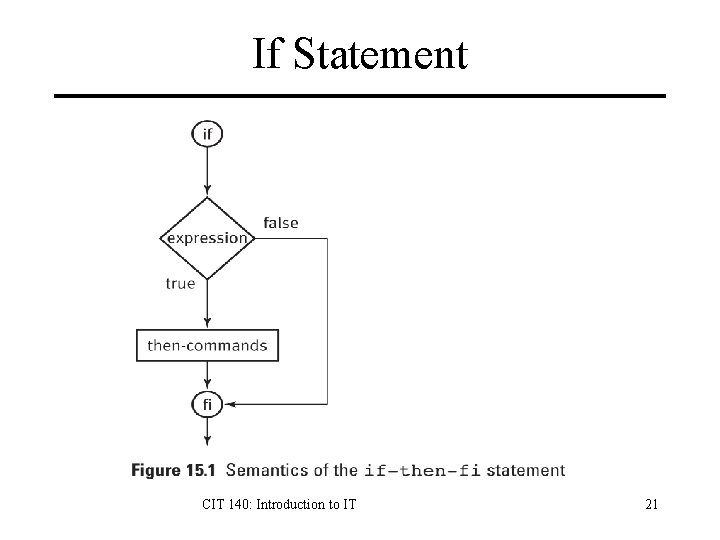
If Statement CIT 140: Introduction to IT 21
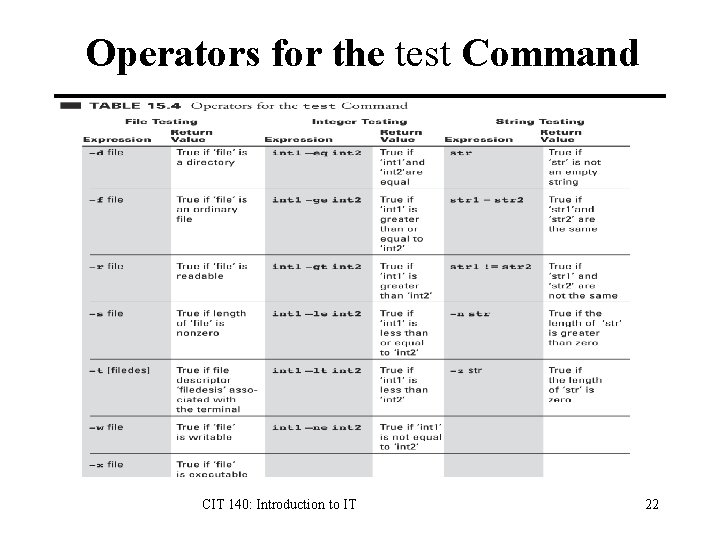
Operators for the test Command CIT 140: Introduction to IT 22
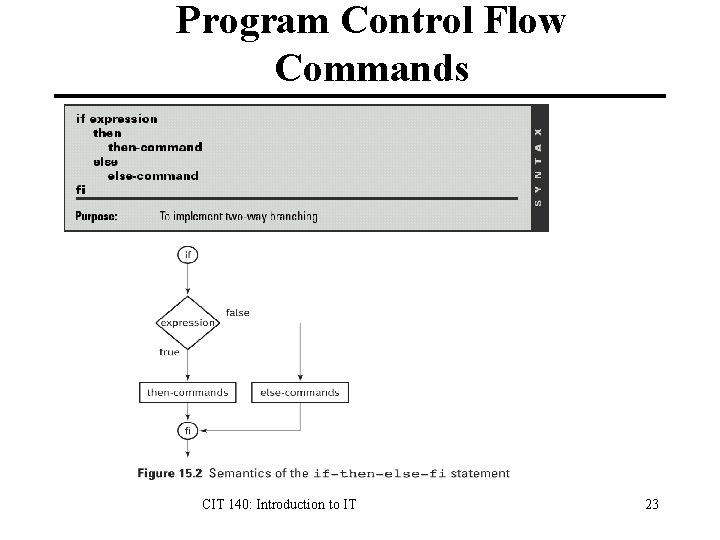
Program Control Flow Commands CIT 140: Introduction to IT 23
Example: fileinfo. sh #!/bin/sh if [ $# -ne 1 ]; then echo "Usage: fileinfo filename" fi file=$1 if [ -f $file ]; then set -- `ls -lg $file` >. /fileinfo. sh owner=$3 Owner: waldenj group=$4 Group: students echo "Owner: $3" Permissions: Read Write Execute echo "Group: $4" echo -n "Permissions: " if [ -r $file ]; then echo -n "Read " fi if [ -w $file ]; then echo -n "Write " fi if [ -x $file ]; then echo -n "Execute " fi echo else echo "File $file is not a regular file. " CIT 140: Introduction to IT 24 fi
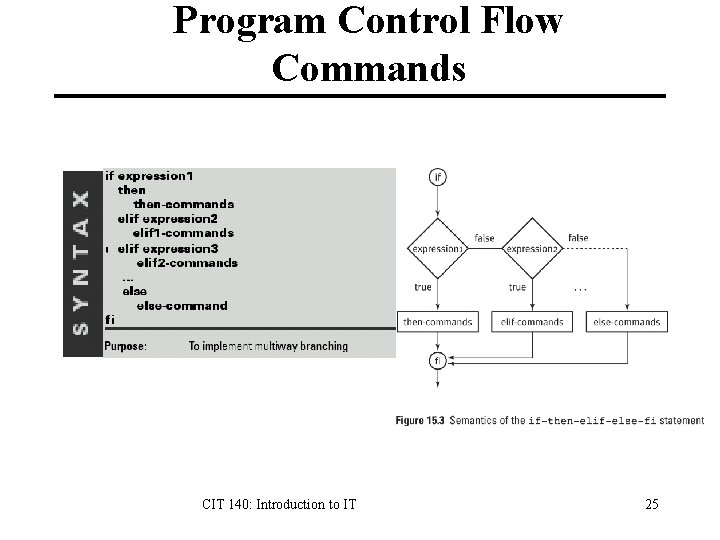
Program Control Flow Commands CIT 140: Introduction to IT 25
Shell Example: Filetype #!/bin/sh if [ $# -ne 1 ]; then echo "Usage: filetype filename" fi filename=$1 if [ -L $filename ]; then echo "File $filename is a symbolic link. " elif [ -f $filename ]; then echo "File $filename is a regular file. " elif [ -d $filename ]; then echo "File $filename is a directory. " else echo "I don't know what file $filename is. " fi CIT 140: Introduction to IT 26
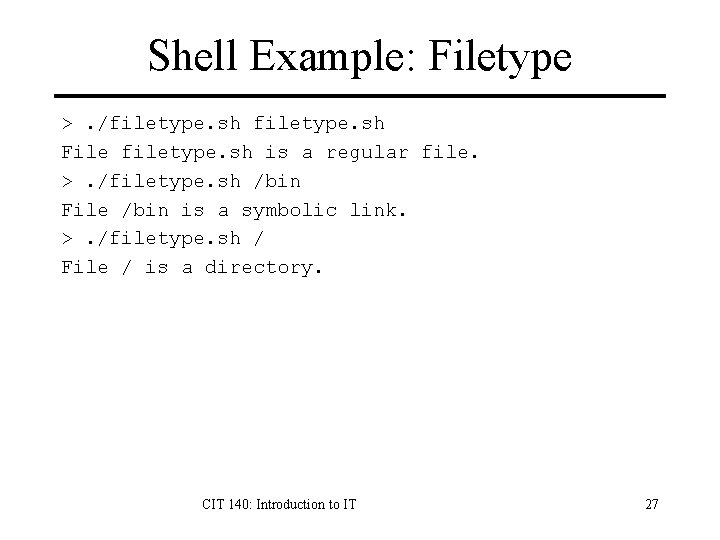
Shell Example: Filetype >. /filetype. sh File filetype. sh is a regular file. >. /filetype. sh /bin File /bin is a symbolic link. >. /filetype. sh / File / is a directory. CIT 140: Introduction to IT 27
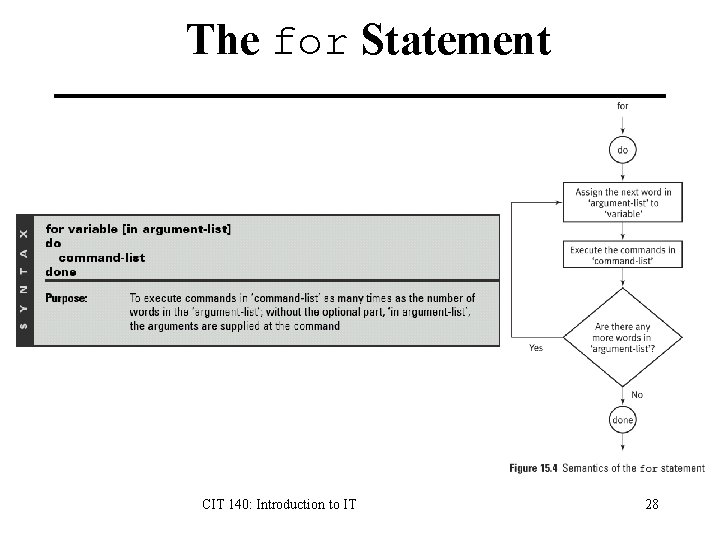
The for Statement CIT 140: Introduction to IT 28
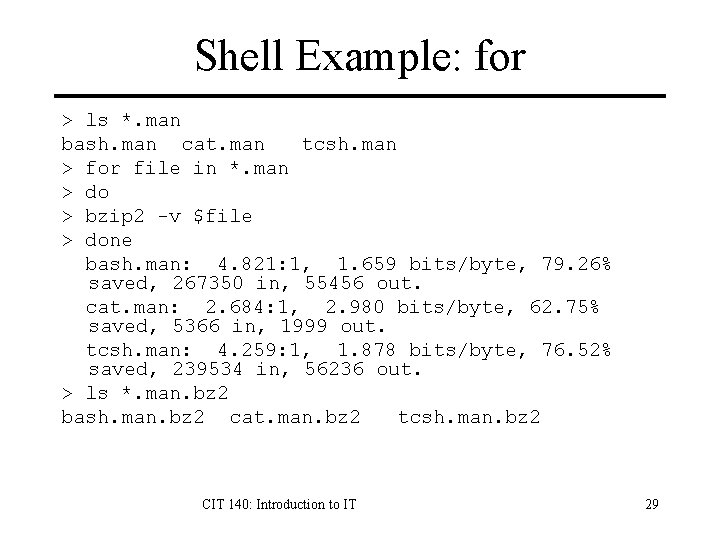
Shell Example: for > ls *. man bash. man cat. man tcsh. man > for file in *. man > do > bzip 2 -v $file > done bash. man: 4. 821: 1, 1. 659 bits/byte, 79. 26% saved, 267350 in, 55456 out. cat. man: 2. 684: 1, 2. 980 bits/byte, 62. 75% saved, 5366 in, 1999 out. tcsh. man: 4. 259: 1, 1. 878 bits/byte, 76. 52% saved, 239534 in, 56236 out. > ls *. man. bz 2 bash. man. bz 2 cat. man. bz 2 tcsh. man. bz 2 CIT 140: Introduction to IT 29
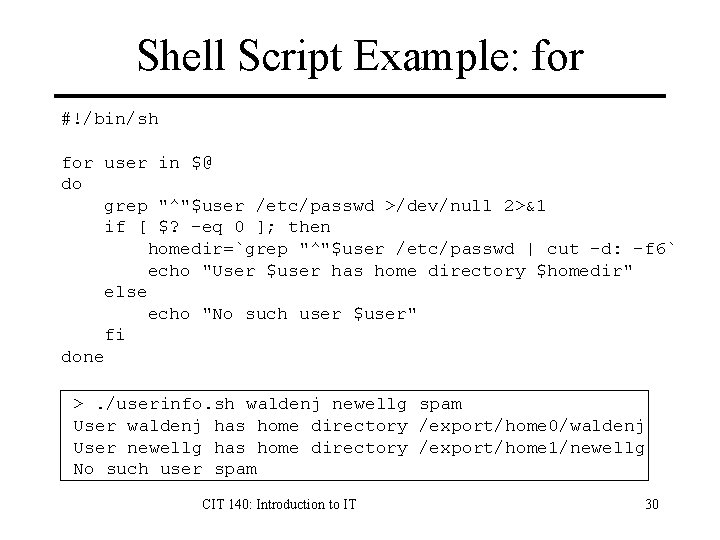
Shell Script Example: for #!/bin/sh for user in $@ do grep "^"$user /etc/passwd >/dev/null 2>&1 if [ $? -eq 0 ]; then homedir=`grep "^"$user /etc/passwd | cut -d: -f 6` echo "User $user has home directory $homedir" else echo "No such user $user" fi done >. /userinfo. sh waldenj newellg spam User waldenj has home directory /export/home 0/waldenj User newellg has home directory /export/home 1/newellg No such user spam CIT 140: Introduction to IT 30
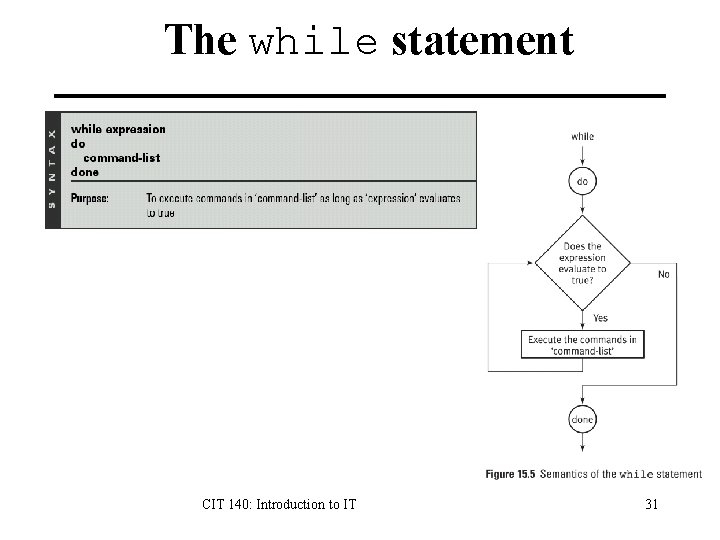
The while statement CIT 140: Introduction to IT 31
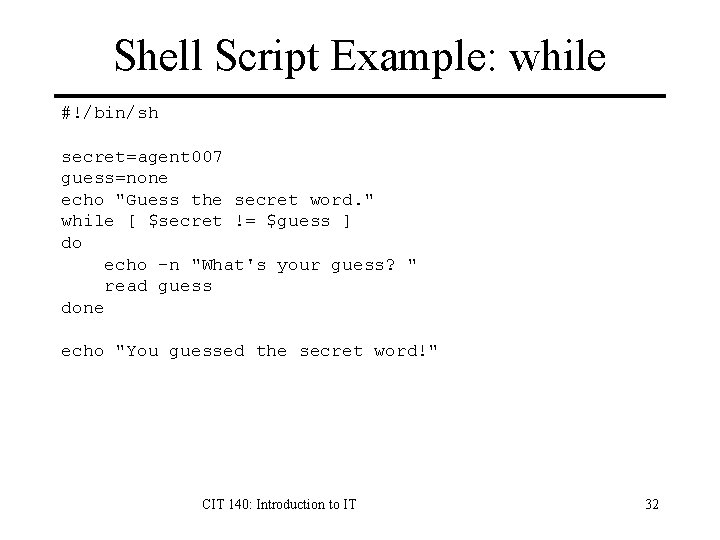
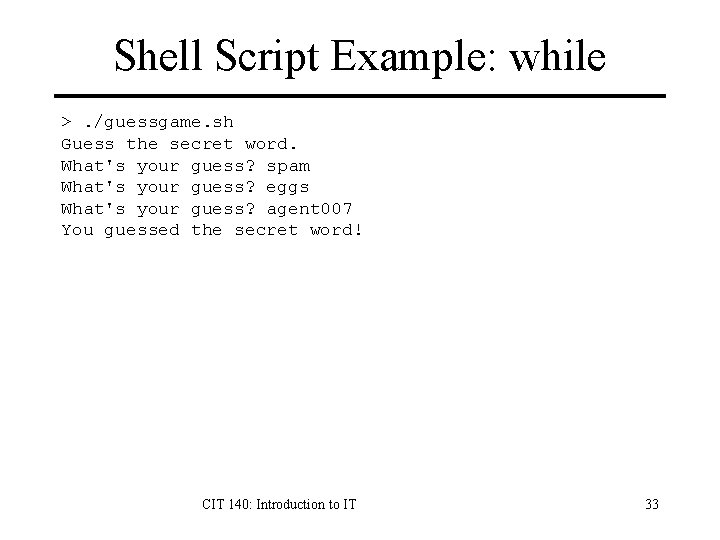
Shell Script Example: while #!/bin/sh secret=agent 007 guess=none echo "Guess the secret word. " while [ $secret != $guess ] do echo -n "What's your guess? " read guess done echo "You guessed the secret word!" CIT 140: Introduction to IT 32
Shell Script Example: while >. /guessgame. sh Guess the secret word. What's your guess? spam What's your guess? eggs What's your guess? agent 007 You guessed the secret word! CIT 140: Introduction to IT 33
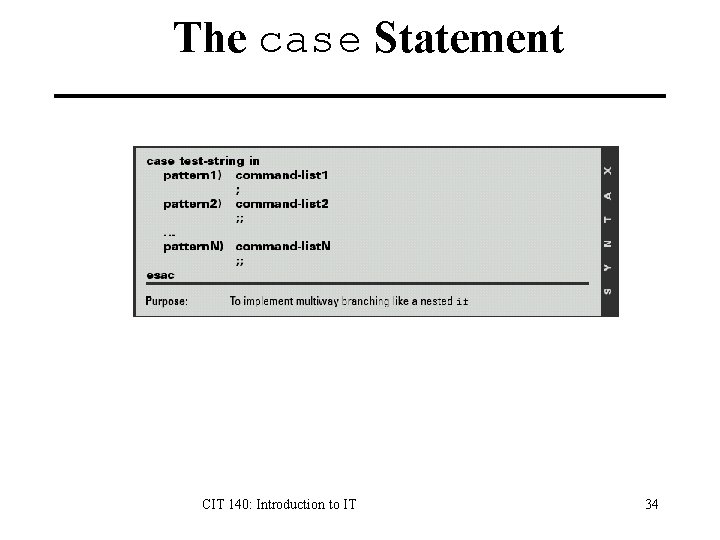
The case Statement CIT 140: Introduction to IT 34
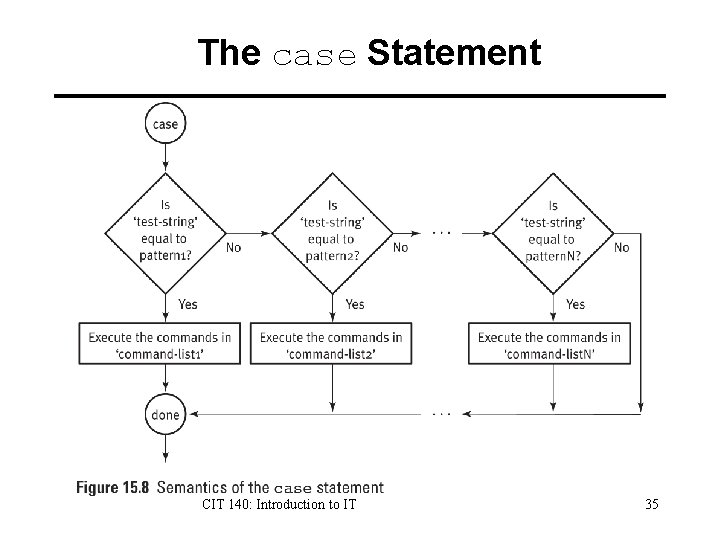
The case Statement CIT 140: Introduction to IT 35
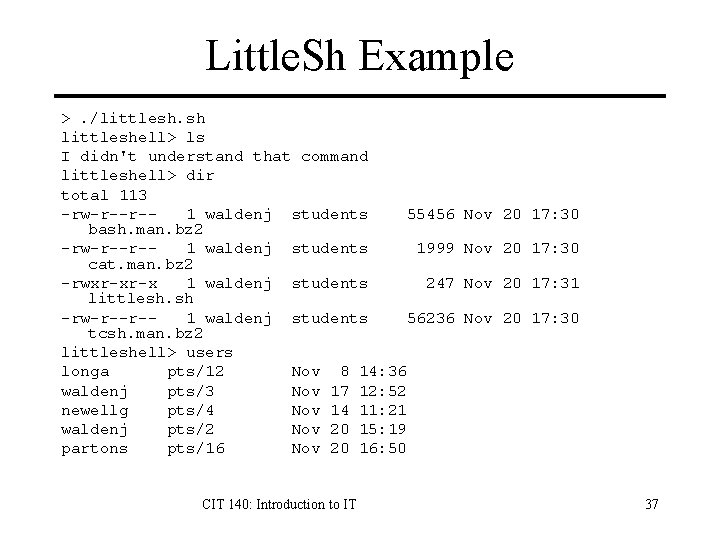
Case Example: Little. Sh #!/bin/sh while [ 1 ] do echo -n "littleshell> " read command case $command in 'dir' ) ls -lg ; ; 'users' ) who ; ; 'quit' ) exit ; ; * ) echo "I didn't understand that command" ; ; esac done CIT 140: Introduction to IT 36
Little. Sh Example >. /littlesh. sh littleshell> ls I didn't understand that command littleshell> dir total 113 -rw-r--r-1 waldenj students 55456 bash. man. bz 2 -rw-r--r-1 waldenj students 1999 cat. man. bz 2 -rwxr-xr-x 1 waldenj students 247 littlesh. sh -rw-r--r-1 waldenj students 56236 tcsh. man. bz 2 littleshell> users longa pts/12 Nov 8 14: 36 waldenj pts/3 Nov 17 12: 52 newellg pts/4 Nov 14 11: 21 waldenj pts/2 Nov 20 15: 19 partons pts/16 Nov 20 16: 50 CIT 140: Introduction to IT Nov 20 17: 30 Nov 20 17: 31 Nov 20 17: 30 37