
Cisco Support Community Expert Series Webcast Cisco TMSXE
Cisco Support Community Expert Series Webcast: Cisco TMSXE 3. 0 Installation/Troubleshooting Training Speaker Name: Tim Walker Speaker Title: TSG Escalation Engineer Date: June 26 th, 2012 © 2011 Cisco and/or its affiliates. All rights reserved. Cisco Confidential 1
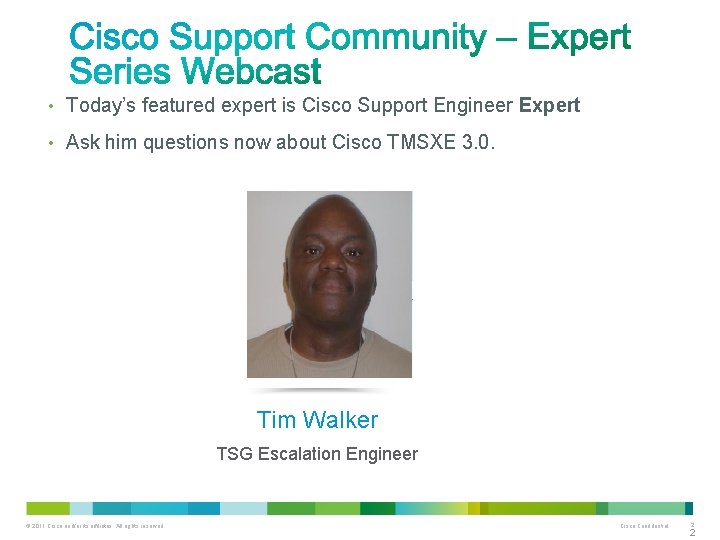
• Today’s featured expert is Cisco Support Engineer Expert • Ask him questions now about Cisco TMSXE 3. 0. Tim Walker TSG Escalation Engineer © 2011 Cisco and/or its affiliates. All rights reserved. Cisco Confidential 2 2

Today’s presentation will include audience polling questions We encourage you to participate! © 2011 Cisco and/or its affiliates. All rights reserved. Cisco Confidential 3
If you would like a copy of the presentation slides, click the PDF link in the chat box on the right or go to https: //supportforums. cisco. com/docs/DOC-25186 © 2011 Cisco and/or its affiliates. All rights reserved. Cisco Confidential 4
What is your level of experience with Outlook Resource Scheduling? a) I have heard that it can be done. b) I have scheduled resources through Outlook in the past. c) I schedule resources through Outlook all of the time, it’s part of my normal daily operations. d) What is a resource? © 2011 Cisco and/or its affiliates. All rights reserved. Cisco Confidential 5

Use the Q&A panel to submit your questions. Experts will start responding those © 2011 Cisco and/or its affiliates. All rights reserved. Cisco Confidential 6
Cisco TMSXE 3. 0 Installation and Troubleshooting Training Speaker Name: Tim Walker Speaker Title: TSG Escalation Engineer Date: June 26 th, 2012 © 2011 Cisco and/or its affiliates. All rights reserved. Cisco Confidential 7
• System Overview • System Requirements • Migration process • Uninstalling Cisco TMSXE 2. 2 or 2. 3. x • Disabling Outlook Direct Booking • Installation/ Migration • Performing a Clean installation • Deploying the Cisco form • The Booking Process • Troubleshooting • Other Errors • References © 2011 Cisco and/or its affiliates. All rights reserved. Cisco Confidential 8
© 2011 Cisco and/or its affiliates. All rights reserved. Cisco Confidential 9
© 2011 Cisco and/or its affiliates. All rights reserved. Cisco Confidential 10
© 2011 Cisco and/or its affiliates. All rights reserved. Cisco Confidential 11
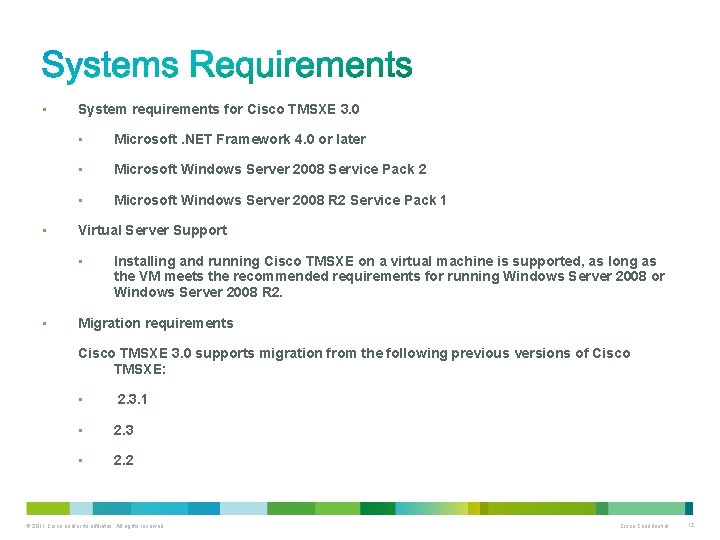
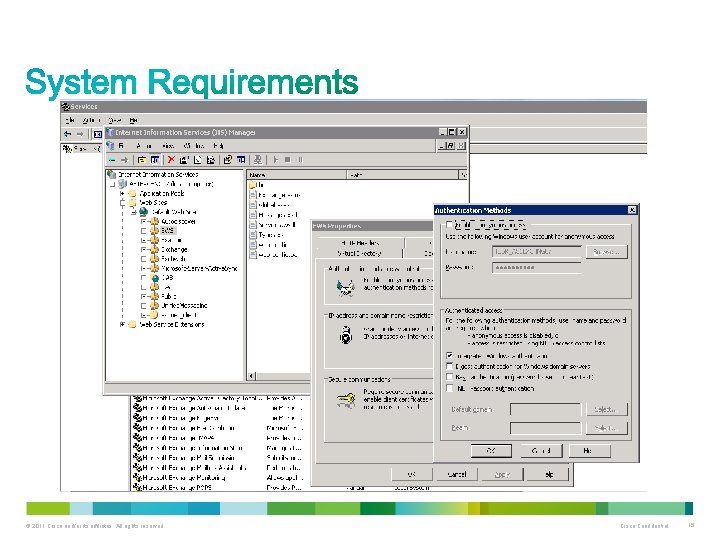
• • System requirements for Cisco TMSXE 3. 0 • Microsoft. NET Framework 4. 0 or later • Microsoft Windows Server 2008 Service Pack 2 • Microsoft Windows Server 2008 R 2 Service Pack 1 Virtual Server Support • • Installing and running Cisco TMSXE on a virtual machine is supported, as long as the VM meets the recommended requirements for running Windows Server 2008 or Windows Server 2008 R 2. Migration requirements Cisco TMSXE 3. 0 supports migration from the following previous versions of Cisco TMSXE: • 2. 3. 1 • 2. 3 • 2. 2 © 2011 Cisco and/or its affiliates. All rights reserved. Cisco Confidential 12
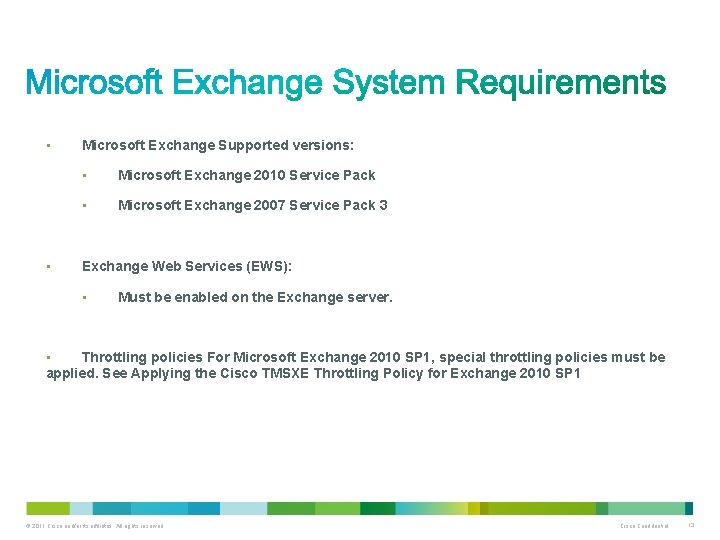
• • Microsoft Exchange Supported versions: • Microsoft Exchange 2010 Service Pack • Microsoft Exchange 2007 Service Pack 3 Exchange Web Services (EWS): • Must be enabled on the Exchange server. Throttling policies For Microsoft Exchange 2010 SP 1, special throttling policies must be applied. See Applying the Cisco TMSXE Throttling Policy for Exchange 2010 SP 1 • © 2011 Cisco and/or its affiliates. All rights reserved. Cisco Confidential 13
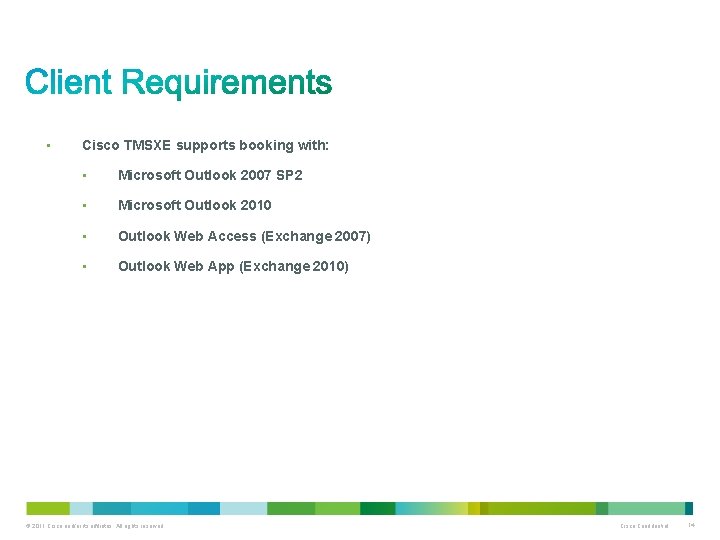
• Cisco TMSXE supports booking with: • Microsoft Outlook 2007 SP 2 • Microsoft Outlook 2010 • Outlook Web Access (Exchange 2007) • Outlook Web App (Exchange 2010) © 2011 Cisco and/or its affiliates. All rights reserved. Cisco Confidential 14
© 2011 Cisco and/or its affiliates. All rights reserved. Cisco Confidential 15
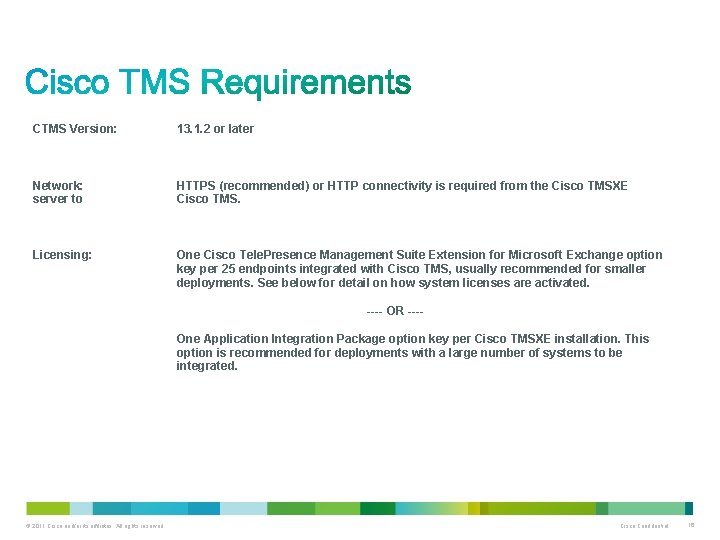
CTMS Version: 13. 1. 2 or later Network: server to HTTPS (recommended) or HTTP connectivity is required from the Cisco TMSXE Cisco TMS. Licensing: One Cisco Tele. Presence Management Suite Extension for Microsoft Exchange option key per 25 endpoints integrated with Cisco TMS, usually recommended for smaller deployments. See below for detail on how system licenses are activated. ---- OR ---One Application Integration Package option key per Cisco TMSXE installation. This option is recommended for deployments with a large number of systems to be integrated. © 2011 Cisco and/or its affiliates. All rights reserved. Cisco Confidential 16
© 2011 Cisco and/or its affiliates. All rights reserved. Cisco Confidential 17
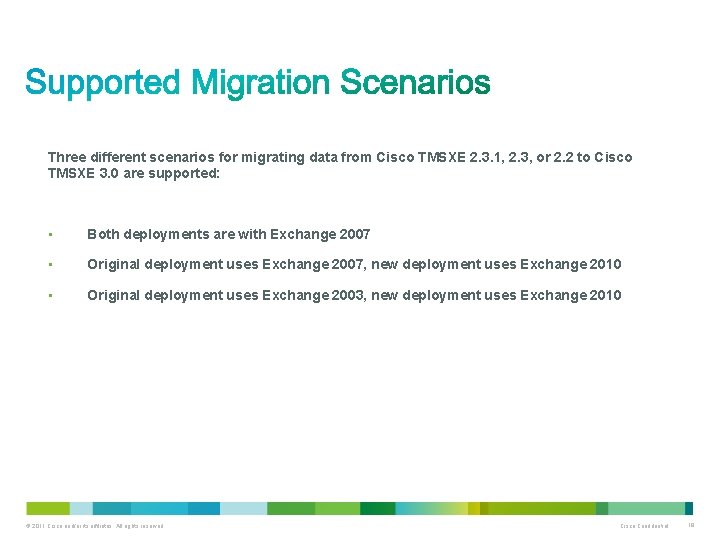
Three different scenarios for migrating data from Cisco TMSXE 2. 3. 1, 2. 3, or 2. 2 to Cisco TMSXE 3. 0 are supported: • Both deployments are with Exchange 2007 • Original deployment uses Exchange 2007, new deployment uses Exchange 2010 • Original deployment uses Exchange 2003, new deployment uses Exchange 2010 © 2011 Cisco and/or its affiliates. All rights reserved. Cisco Confidential 18
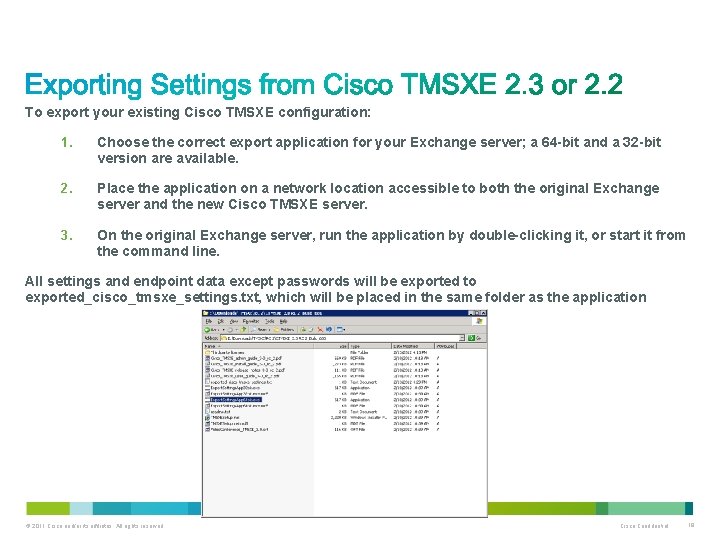
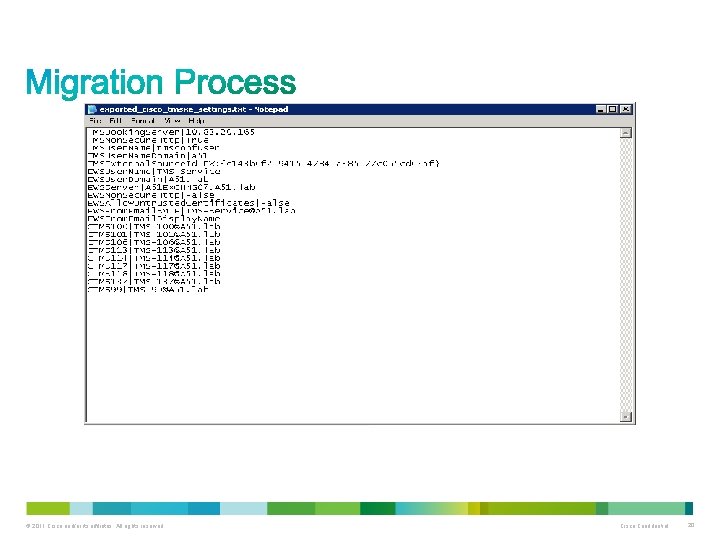
To export your existing Cisco TMSXE configuration: 1. Choose the correct export application for your Exchange server; a 64 -bit and a 32 -bit version are available. 2. Place the application on a network location accessible to both the original Exchange server and the new Cisco TMSXE server. 3. On the original Exchange server, run the application by double-clicking it, or start it from the command line. All settings and endpoint data except passwords will be exported to exported_cisco_tmsxe_settings. txt, which will be placed in the same folder as the application. © 2011 Cisco and/or its affiliates. All rights reserved. Cisco Confidential 19
© 2011 Cisco and/or its affiliates. All rights reserved. Cisco Confidential 20
© 2011 Cisco and/or its affiliates. All rights reserved. Cisco Confidential 21
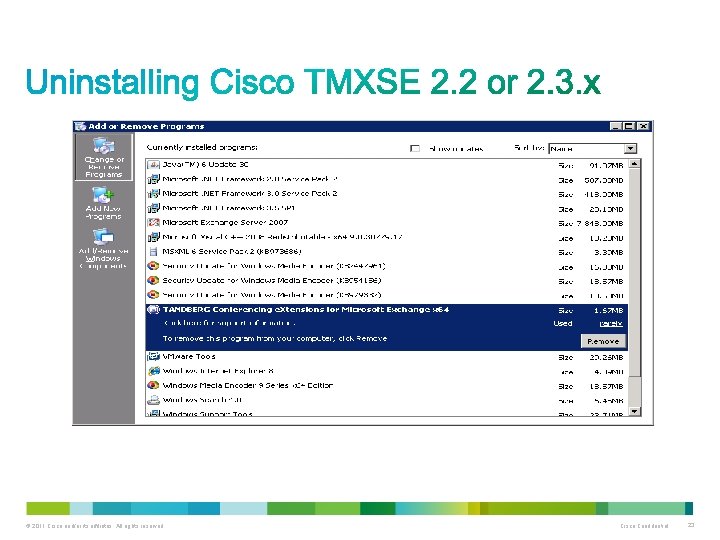
To uninstall the product, either: • Select Uninstall from the product's Start menu group on the Exchange Server. • Use Add/Remove programs from the server's Control Panel of the server. The program will leave its log folder, registry keys, and associated accounts in place to accommodate future installations or upgrades. Removing remaining files and data If an administrator wishes to remove remaining elements of the installation, the following must be deleted after uninstalling: • The Registry key at HKEY_LOCAL_MACHINESOFTWARETANDBERG Management Suite Exchange Integration. Suggest searching the registry for ”C: Program FilesTANDBERG ” this will capture all registry keys. • © 2011 Cisco and/or its affiliates. All rights reserved. Cisco Confidential 22
© 2011 Cisco and/or its affiliates. All rights reserved. Cisco Confidential 23
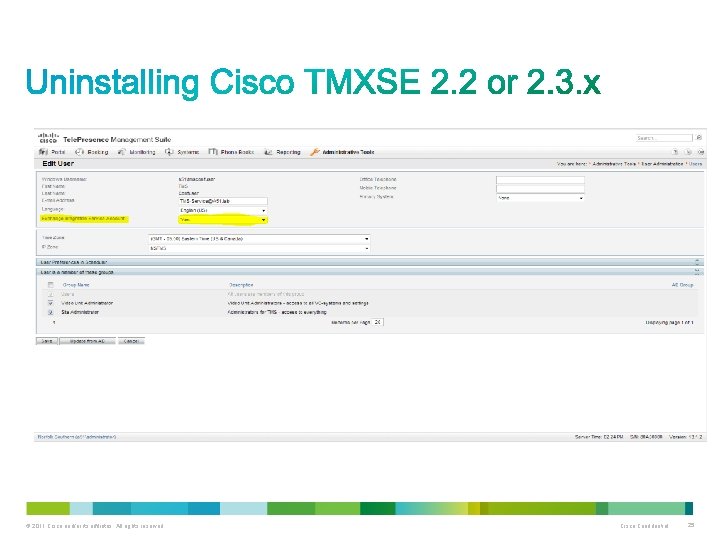
This setting was used by previous versions of Cisco TMSXE, but is no longer in use. In Cisco TMS: 1. Go to Administrative Tools > User Administration > Users. 2. Search or browse to locate the service user for Cisco TMSXE. 3. Hover the list entry and click the dropdown arrow to display the menu. 4. Select Edit. 5. Change the setting Exchange Integration Service Account to No. 6. Save the change. © 2011 Cisco and/or its affiliates. All rights reserved. Cisco Confidential 24
© 2011 Cisco and/or its affiliates. All rights reserved. Cisco Confidential 25
© 2011 Cisco and/or its affiliates. All rights reserved. Cisco Confidential 26
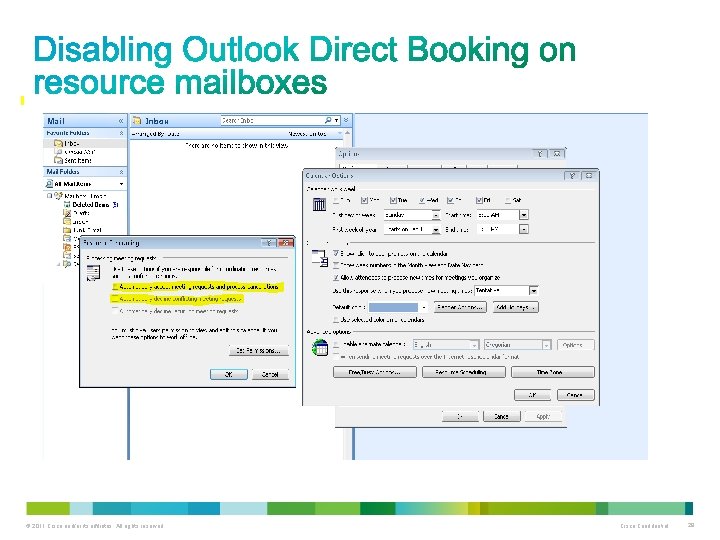
Due to changes in the architecture and technologies of both Cisco TMSXE and Exchange, the direct booking model used with previous versions of Cisco TMSXE on Exchange 2003 and some deployments of Exchange 2007 is no longer available. Outlook Direct Booking is incompatible with the automatic accept feature for room mailboxes in Exchange 2010 and will create conflicts if not disabled prior to migration. Before moving the mailboxes to Exchange 2010, do the following: • 1. Log into Outlook as the resource mailbox to be converted. 2. Go to Tools > Options. . . > Calendar Options. . . > Resource Scheduling. . . 3. Uncheck Automatically accept meeting requests and process cancellations. Repeat these steps for each mailbox before proceeding to Moving mailboxes. © 2011 Cisco and/or its affiliates. All rights reserved. Cisco Confidential 27
© 2011 Cisco and/or its affiliates. All rights reserved. Cisco Confidential 28
© 2011 Cisco and/or its affiliates. All rights reserved. Cisco Confidential 29
© 2011 Cisco and/or its affiliates. All rights reserved. Cisco Confidential 30
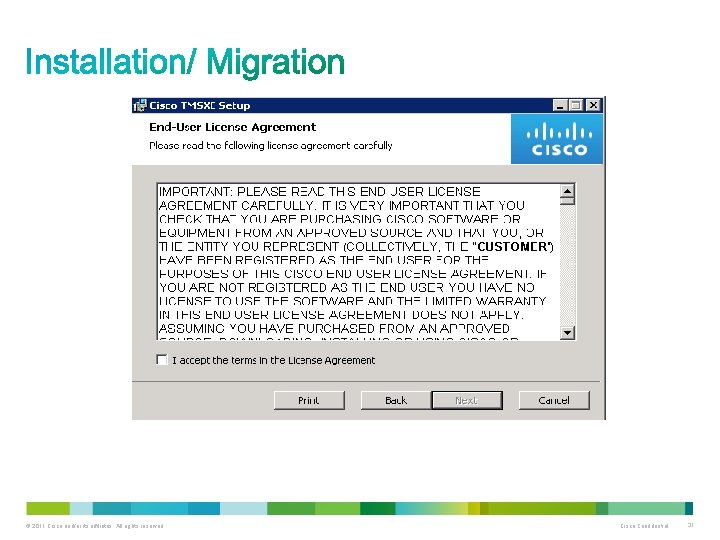
© 2011 Cisco and/or its affiliates. All rights reserved. Cisco Confidential 31
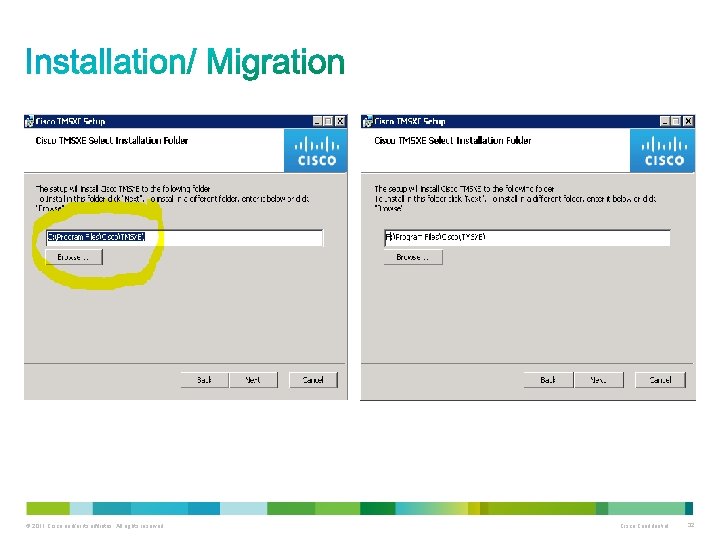
© 2011 Cisco and/or its affiliates. All rights reserved. Cisco Confidential 32
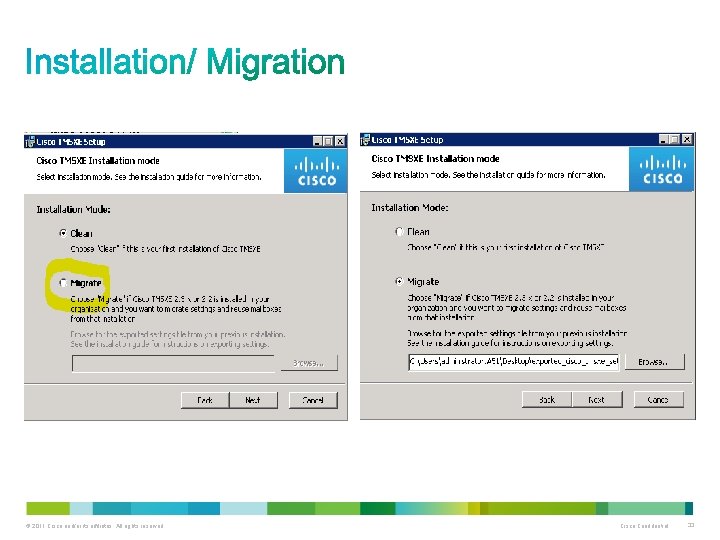
© 2011 Cisco and/or its affiliates. All rights reserved. Cisco Confidential 33
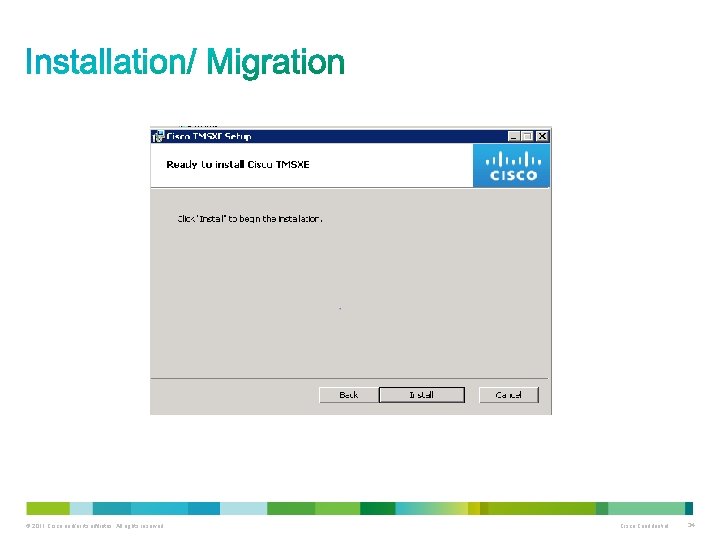
© 2011 Cisco and/or its affiliates. All rights reserved. Cisco Confidential 34
© 2011 Cisco and/or its affiliates. All rights reserved. Cisco Confidential 35
© 2011 Cisco and/or its affiliates. All rights reserved. Cisco Confidential 36
© 2011 Cisco and/or its affiliates. All rights reserved. Cisco Confidential 37
© 2011 Cisco and/or its affiliates. All rights reserved. Cisco Confidential 38
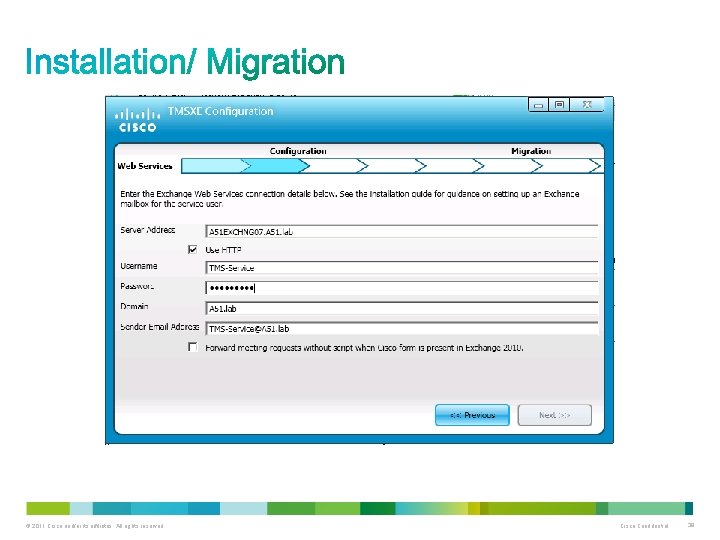
© 2011 Cisco and/or its affiliates. All rights reserved. Cisco Confidential 39
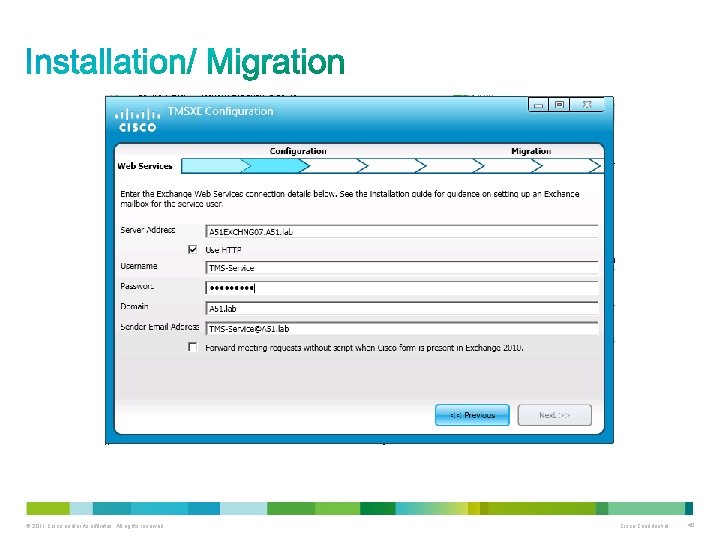
© 2011 Cisco and/or its affiliates. All rights reserved. Cisco Confidential 40
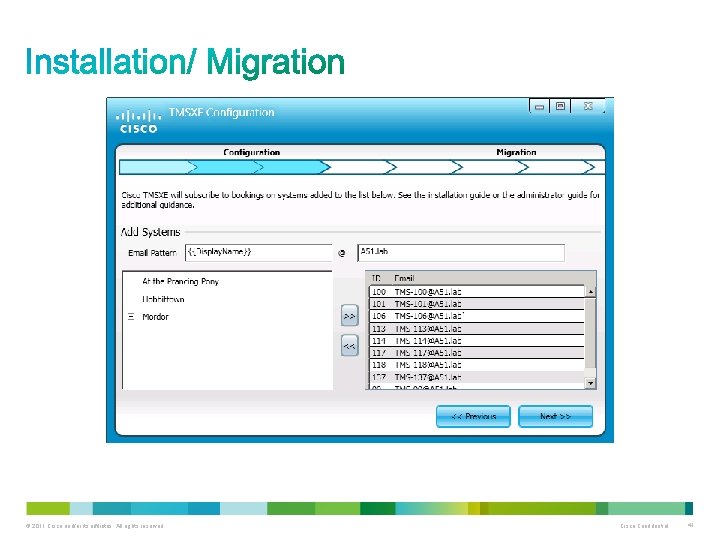
© 2011 Cisco and/or its affiliates. All rights reserved. Cisco Confidential 41
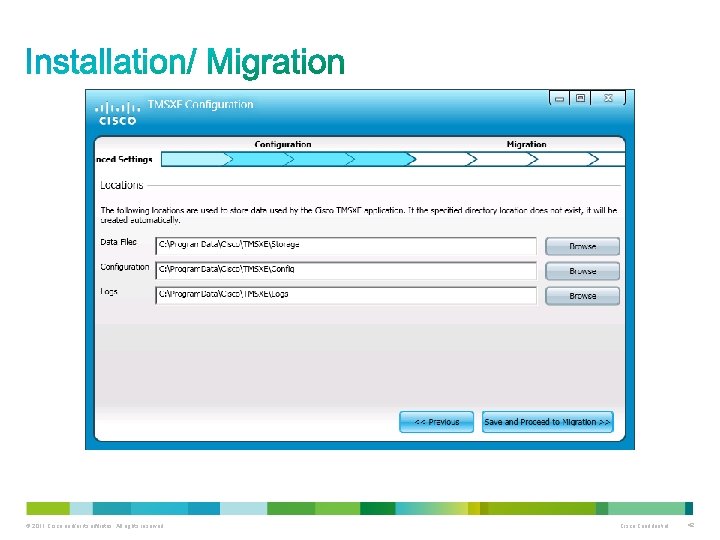
© 2011 Cisco and/or its affiliates. All rights reserved. Cisco Confidential 42
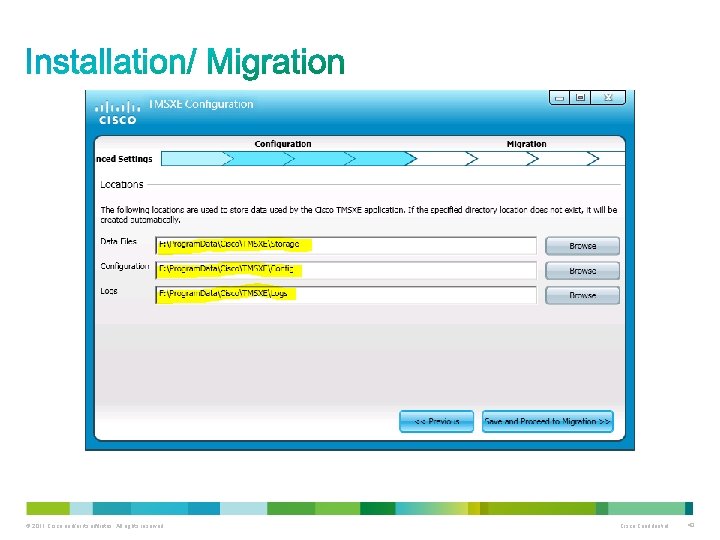
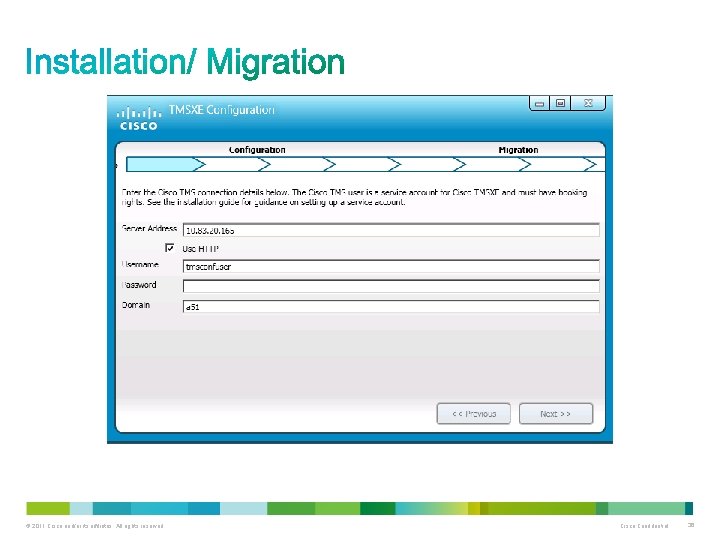
The local tmsconfuser is the user which the export application recognizes as the TMSXE 3. 0 user during the export process. You could also use the TMS-Service domain user here. © 2011 Cisco and/or its affiliates. All rights reserved. Cisco Confidential 43
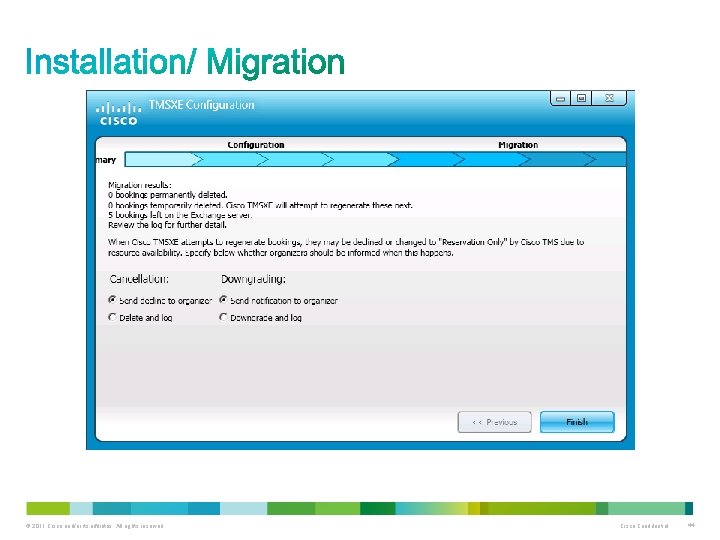
The local tmsconfuser is the user which the export application recognizes as the TMSXE 3. 0 user during the export process. You could also use the TMS-Service domain user here. © 2011 Cisco and/or its affiliates. All rights reserved. Cisco Confidential 44
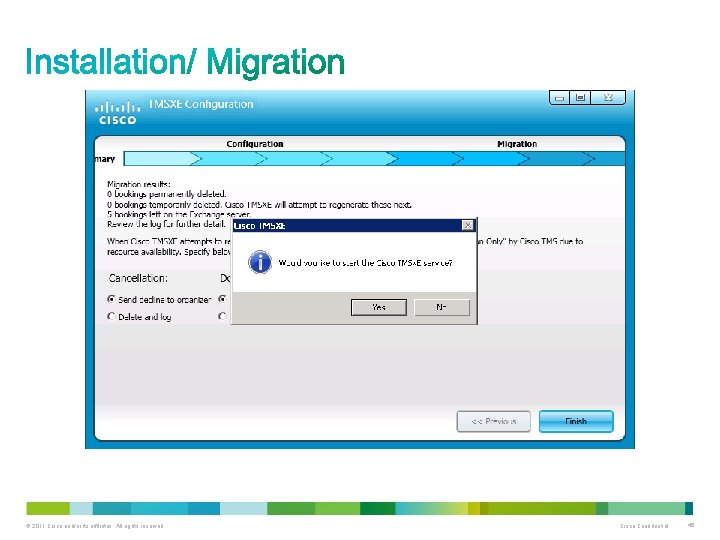
The local tmsconfuser is the user which the export application recognizes as the TMSXE 3. 0 user during the export process. You could also use the TMS-Service domain user here. © 2011 Cisco and/or its affiliates. All rights reserved. Cisco Confidential 45
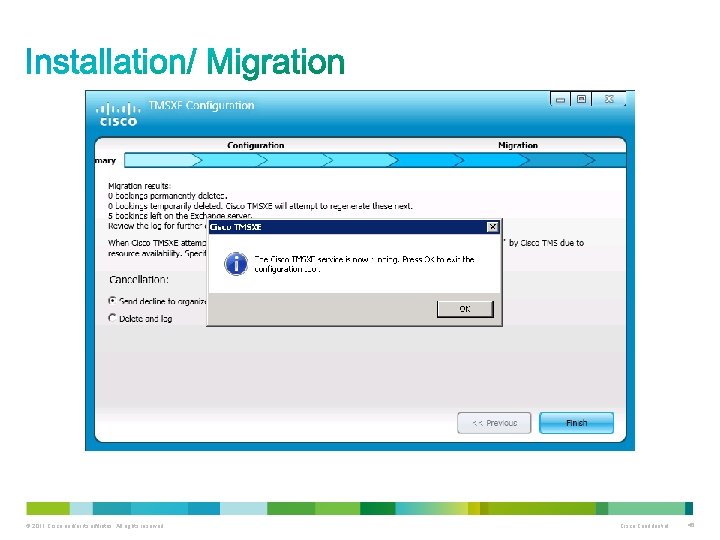
The local tmsconfuser is the user which the export application recognizes as the TMSXE 3. 0 user during the export process. You could also use the TMS-Service domain user here. © 2011 Cisco and/or its affiliates. All rights reserved. Cisco Confidential 46
How familiar are you with Cisco Tele. Presence Systems Scheduling? a) What is Tele. Presence Scheduling? b) I have minimal hands on with Tele. Presence system scheduling but is not running in my production network. c) We are planning to deploy Cisco Tele. Presence Systems in our network environment. d) I have Cisco Tele. Presence Systems in my network and schedule them on a daily basis. © 2011 Cisco and/or its affiliates. All rights reserved. Cisco Confidential 47

Use the Q&A panel to submit your questions. Experts will start responding those © 2011 Cisco and/or its affiliates. All rights reserved. Cisco Confidential 48
© 2011 Cisco and/or its affiliates. All rights reserved. Cisco Confidential 49
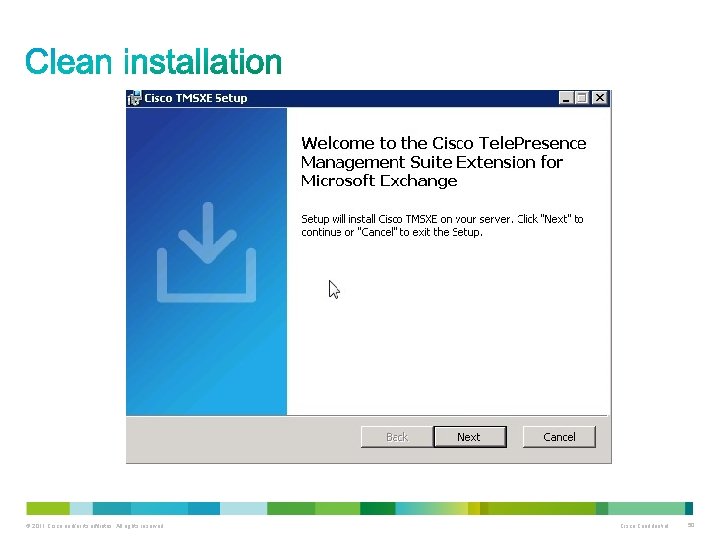
© 2011 Cisco and/or its affiliates. All rights reserved. Cisco Confidential 50
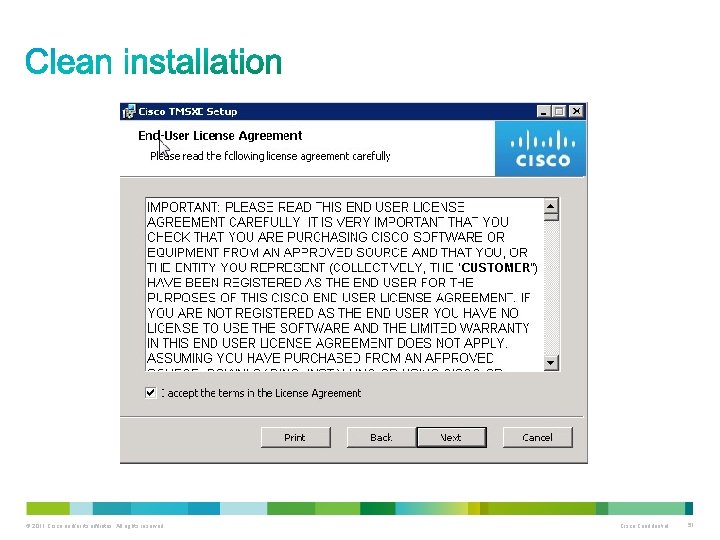
© 2011 Cisco and/or its affiliates. All rights reserved. Cisco Confidential 51
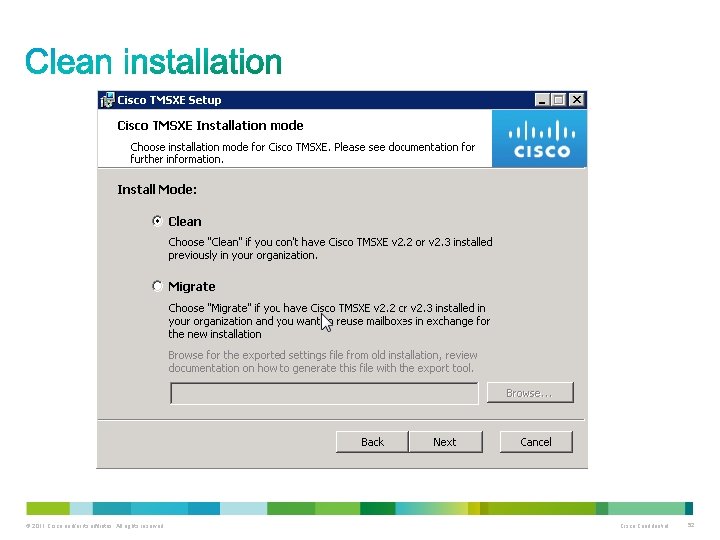
© 2011 Cisco and/or its affiliates. All rights reserved. Cisco Confidential 52
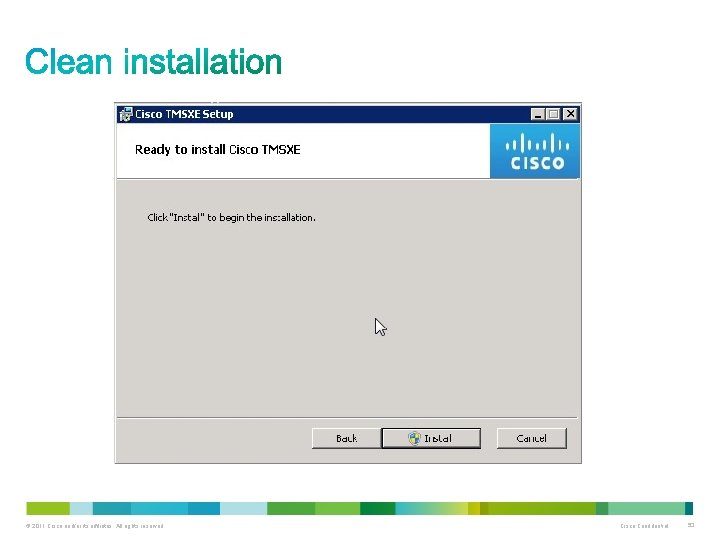
© 2011 Cisco and/or its affiliates. All rights reserved. Cisco Confidential 53
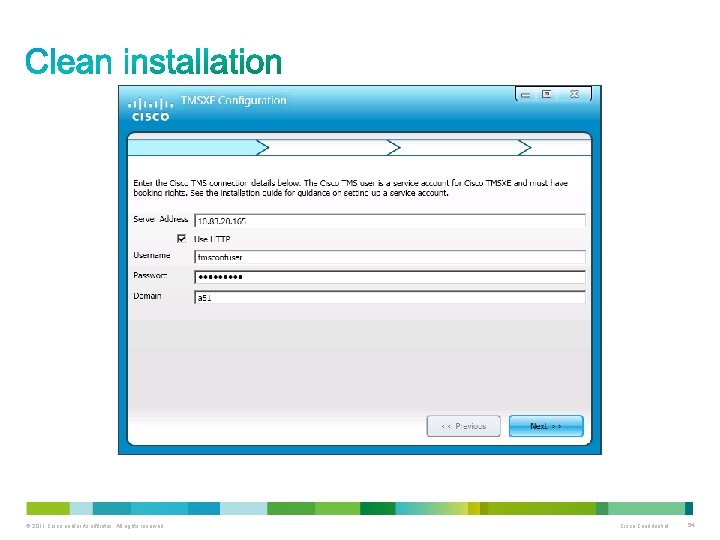
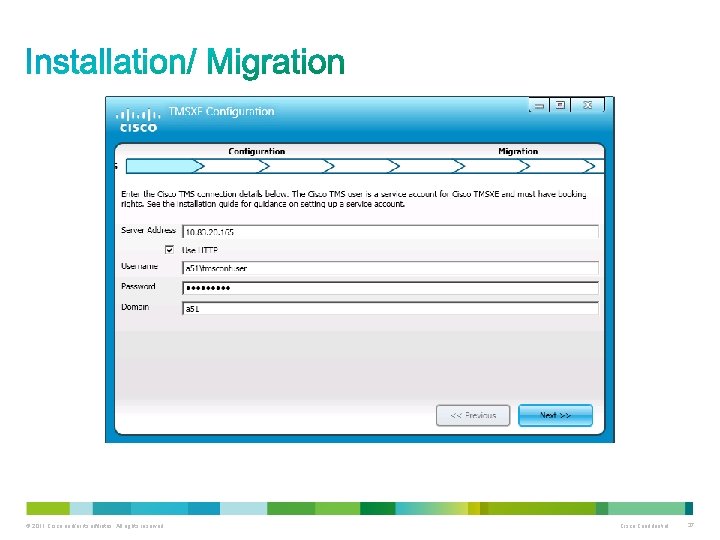
Here we use the domain user which was created and configured for the TMSXE 3. 0 integration. © 2011 Cisco and/or its affiliates. All rights reserved. Cisco Confidential 54
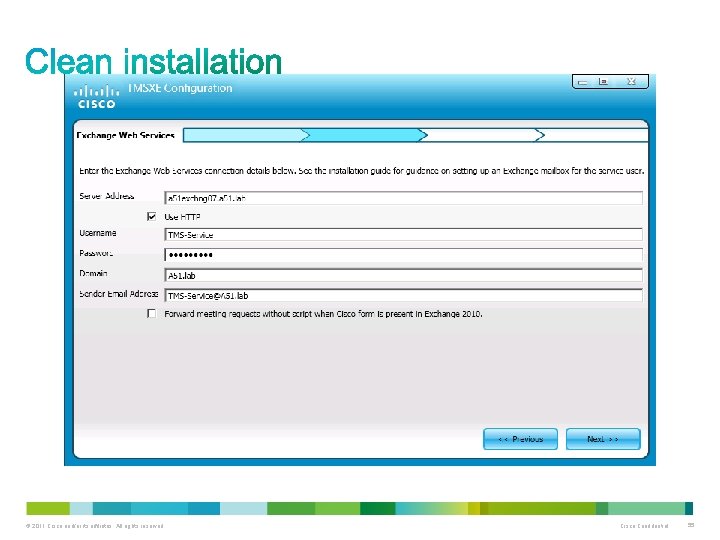
We use the same user here. © 2011 Cisco and/or its affiliates. All rights reserved. Cisco Confidential 55
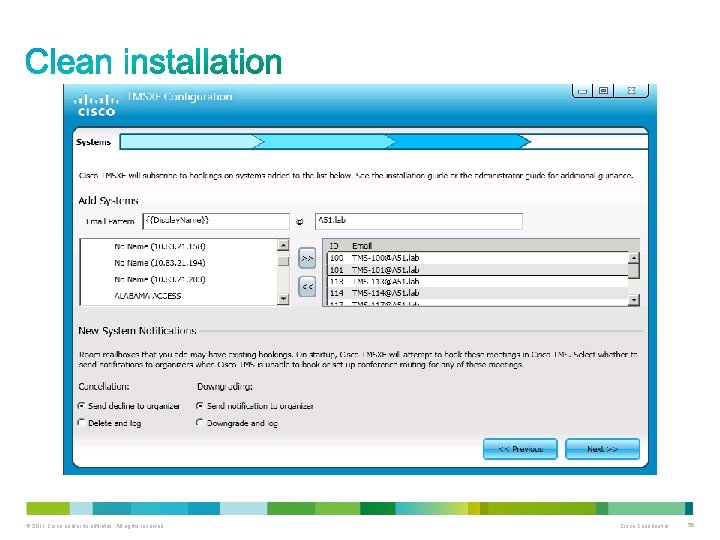
© 2011 Cisco and/or its affiliates. All rights reserved. Cisco Confidential 56
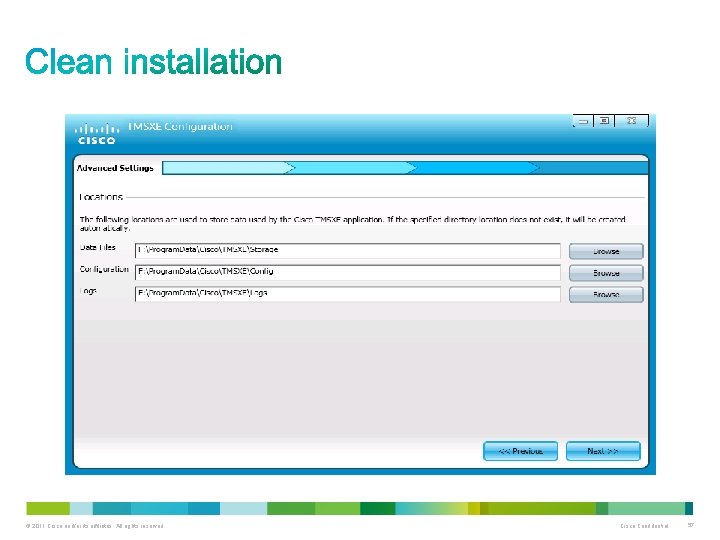
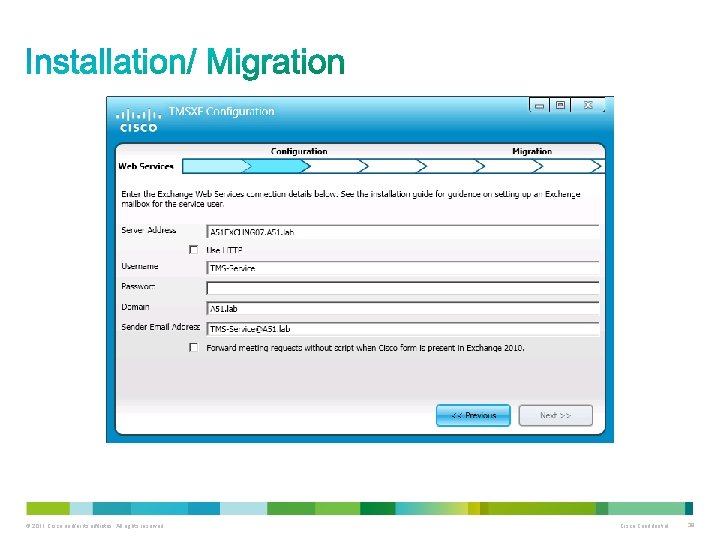
This screen was already discussed. © 2011 Cisco and/or its affiliates. All rights reserved. Cisco Confidential 57
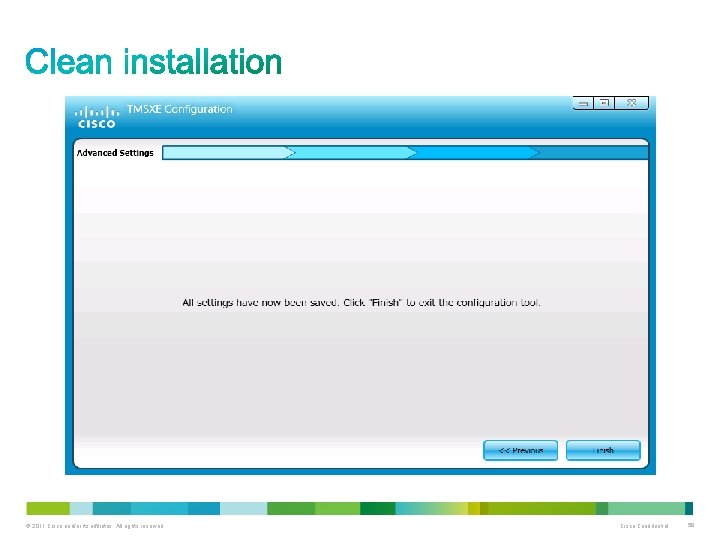
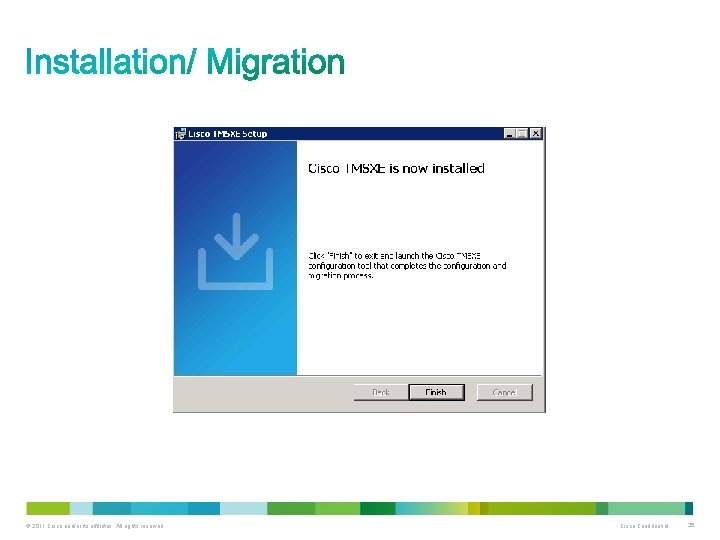
This is the final screen of the installation. © 2011 Cisco and/or its affiliates. All rights reserved. Cisco Confidential 58
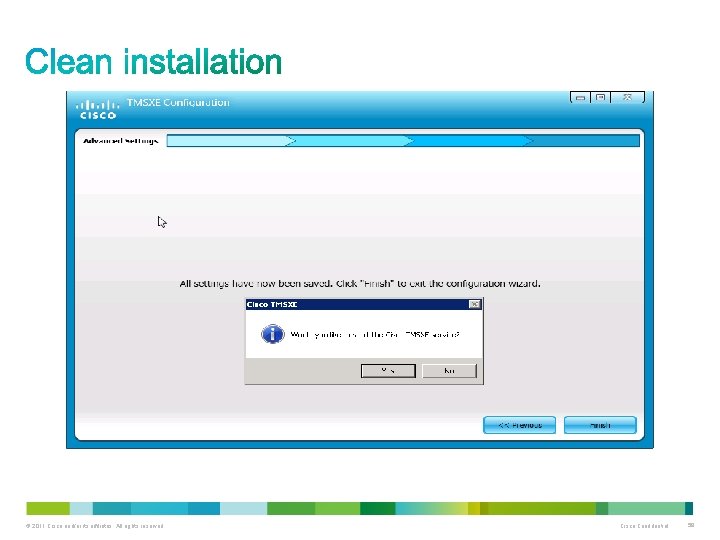
This is the final screen of the installation. © 2011 Cisco and/or its affiliates. All rights reserved. Cisco Confidential 59
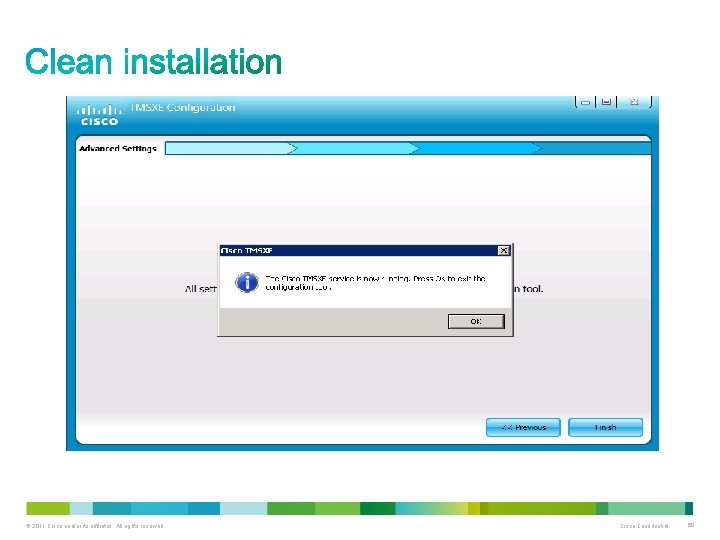
This is the final screen of the installation. © 2011 Cisco and/or its affiliates. All rights reserved. Cisco Confidential 60
© 2011 Cisco and/or its affiliates. All rights reserved. Cisco Confidential 61
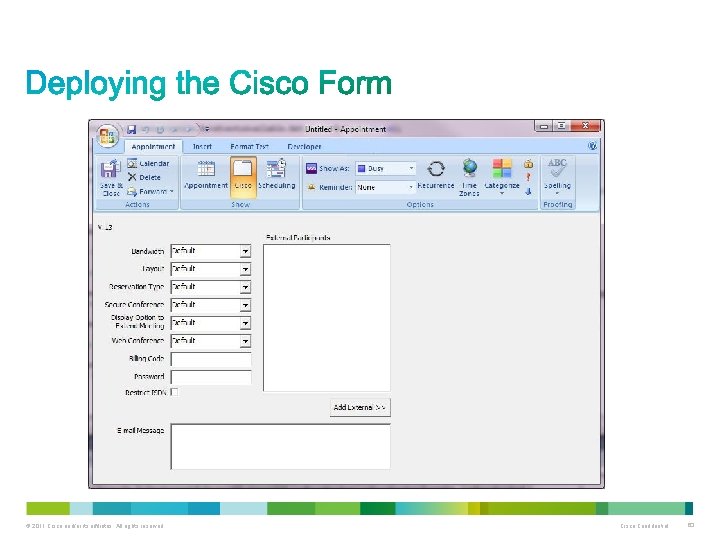
Cisco TMSXE includes a custom form that can be used to add functionality to Outlook clients when creating or modifying videoconference meetings. Available settings include specifying conference parameters and adding external participants The deployment and use of this form is optional. The form can also be added to an installation at any time in the future. If opting to use the Cisco form, we recommend that it be placed in the Organizational Forms Library, which makes for simple distribution to all users and will automate any future updates to the form. You must either use an existing Organizational Forms Library on your Exchange server, or create a new one before the custom form can be imported into the library. http: //technet. microsoft. com/en-us/library/cc 540468%28 EXCHG. 80%29. aspx Exchange 2007 http: //technet. microsoft. com/en-us/library/gg 236889. aspx Exchange 2010 © 2011 Cisco and/or its affiliates. All rights reserved. Cisco Confidential 62
© 2011 Cisco and/or its affiliates. All rights reserved. Cisco Confidential 63
© 2011 Cisco and/or its affiliates. All rights reserved. Cisco Confidential 64
1. The organizer creates a meeting request using Outlook containing one or more video resources, then hits Send. 2. Exchange checks resource calendars for availability and does one of the following: • Sends an initial confirmation to the organizer that the resources are now booked and passes requests on to Cisco TMSXE. • Notifies the organizer that none of the resources are available. In this scenario, Cisco TMSXE is not contacted, and the organizer must re-initiate a booking (step 1). • Notifies the organizer that one or more resources are unavailable and sends an initial confirmation that some of the resources are now booked. The requests for these resources are passed on to Cisco TMSXE. • In this scenario, the organizer must either change the meeting time or find other resources that are available at the desired time, and modify the booking using Outlook. © 2011 Cisco and/or its affiliates. All rights reserved. Cisco Confidential 65
3. Cisco TMSXE gathers up requests from Exchange and passes them on to Cisco TMS. 4. Cisco TMS checks system availability. If the default setting for conferences is Automatic Connect, One Button to Push, Manual Connect, or No Connect, Cisco TMS will also attempt to book routing resources for the conference. It then notifies Cisco TMSXE. 5. On receiving the results of the booking requests, Cisco TMSXE does one of the following: • Notifies the organizer that all desired resources are available. • Notifies the organizer that none of the desired resources are available (step 1). If Cisco TMS determines that routing resources are not available, Cisco TMSXE will request that Cisco TMS book the systems without routing. © 2011 Cisco and/or its affiliates. All rights reserved. Cisco Confidential 66
© 2011 Cisco and/or its affiliates. All rights reserved. Cisco Confidential 67
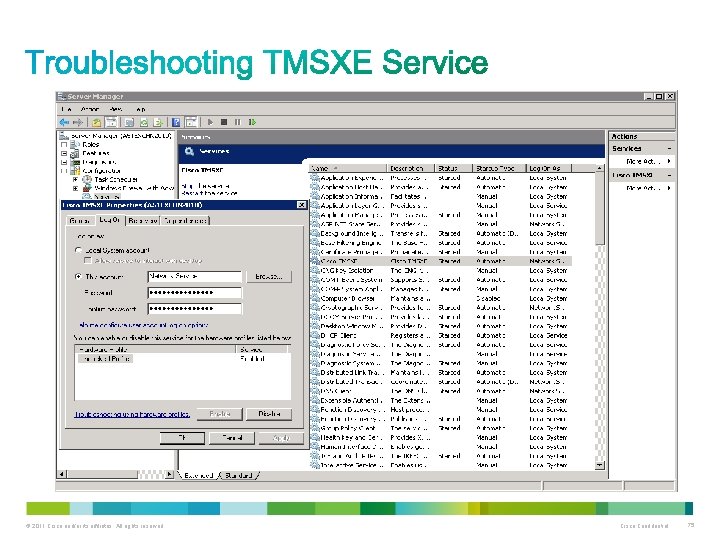
When experiencing problems with bookings, the first thing to check is state of the Cisco TMSXE service. Verify that it is in a “Started” state or restart the service. If a booking is successful, but doesn’t appear to be what they were attempting to book, it is best to ask the process the scheduler followed to schedule the resources in Outlook, and try to reproduce the issue. © 2011 Cisco and/or its affiliates. All rights reserved. Cisco Confidential 68
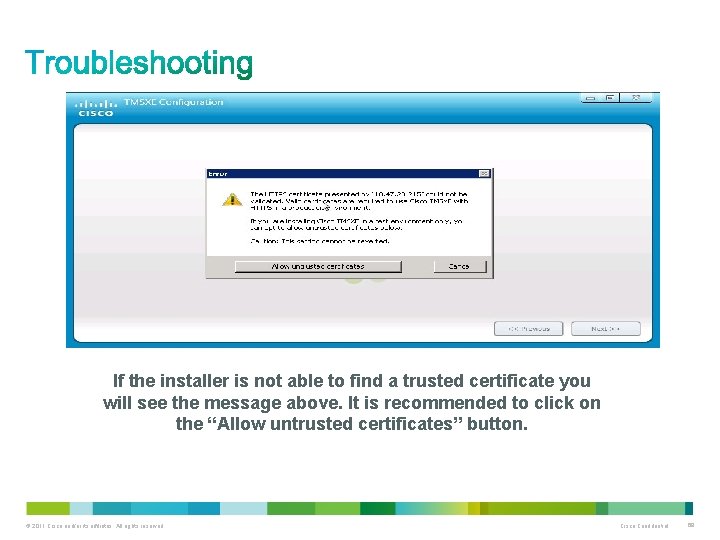
If the installer is not able to find a trusted certificate you will see the message above. It is recommended to click on the “Allow untrusted certificates” button. © 2011 Cisco and/or its affiliates. All rights reserved. Cisco Confidential 69
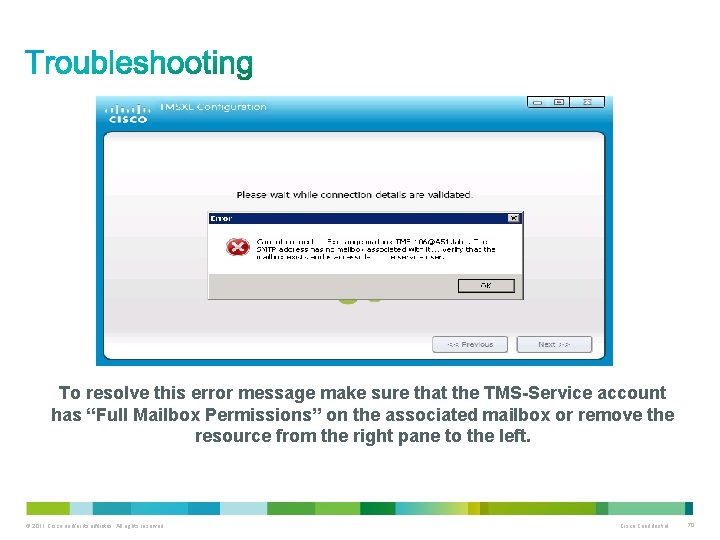
To resolve this error message make sure that the TMS-Service account has “Full Mailbox Permissions” on the associated mailbox or remove the resource from the right pane to the left. © 2011 Cisco and/or its affiliates. All rights reserved. Cisco Confidential 70
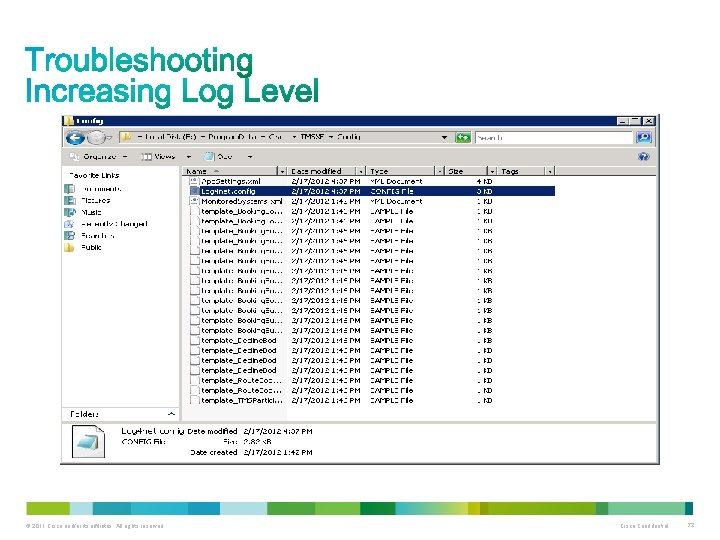
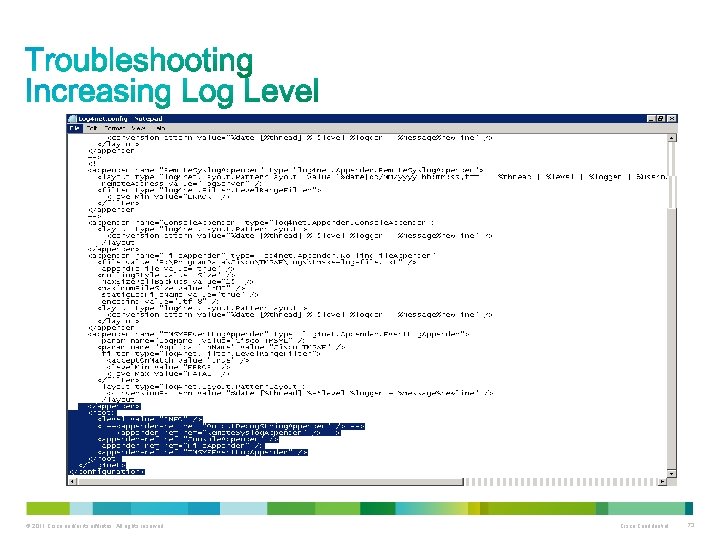
Reading the event log 1. Right-click on Computer in the Start menu, Desktop or Explorer, and select Manage. 2. Go to Computer Management > System Tools > Event Viewer > Applications and Services Logs> TMSXEEvent. Log 3. Press F 5 to update the log pane, which lists information about startup, errors, and location of logs. The Cisco TMSXE log Cisco TMSXE creates a log to assist in troubleshooting. The file is called tmsxe-logfile. txt, with the default location. C: Program. DataCiscoTMSXELogs. The location can be reconfigured using the configuration tool during or after installation. The log file has a size limit of 5 Mb. When this limit is reached: • A new tmsxe-log-file. txt file is created. • The old log file is renamed to include the suffix. 1. • If a. 1 file already exists, that file is renamed to. 2 and so on. The maximum number of log files to store is 15. When a log file reaches the suffix. 15, it will be deleted the next time the current log file reaches 5 Mb. In order to enable debug logging , open a notepad as Administrator , browse to C: Program. DataCiscoTMSXEConfig and open Log 4 net. config file and find the following lines in it, change INFO with DEBUG and save the file. <root> <level value="INFO" /> <!--<appender-ref ref="Output. Debug. String. Appender" /> --> <appender-ref ref="Console. Appender" /> <appender-ref ref="File. Appender" /> <appender-ref ref="TMSXEEvent. Log. Appender" /> </root> © 2011 Cisco and/or its affiliates. All rights reserved. Cisco Confidential 71
© 2011 Cisco and/or its affiliates. All rights reserved. Cisco Confidential 72
© 2011 Cisco and/or its affiliates. All rights reserved. Cisco Confidential 73
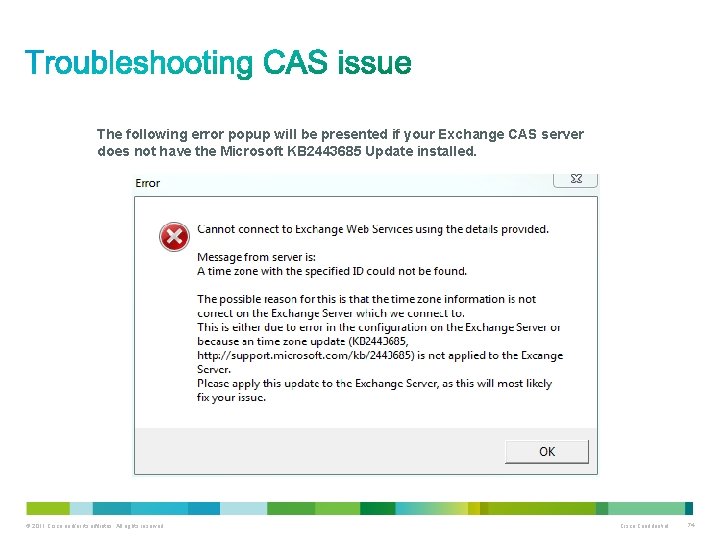
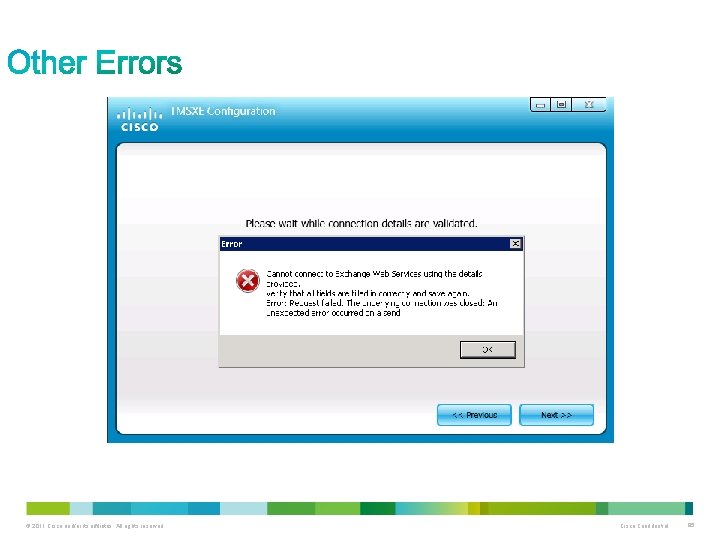
The following error popup will be presented if your Exchange CAS server does not have the Microsoft KB 2443685 Update installed. © 2011 Cisco and/or its affiliates. All rights reserved. Cisco Confidential 74
© 2011 Cisco and/or its affiliates. All rights reserved. Cisco Confidential 75
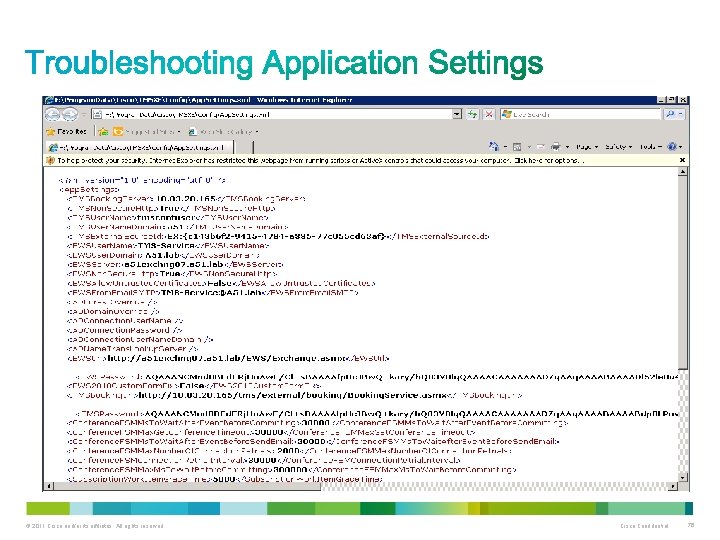
© 2011 Cisco and/or its affiliates. All rights reserved. Cisco Confidential 76
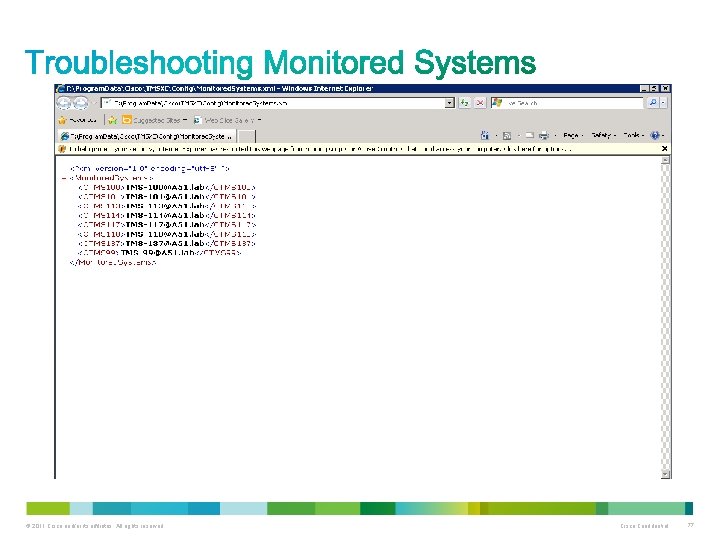
© 2011 Cisco and/or its affiliates. All rights reserved. Cisco Confidential 77
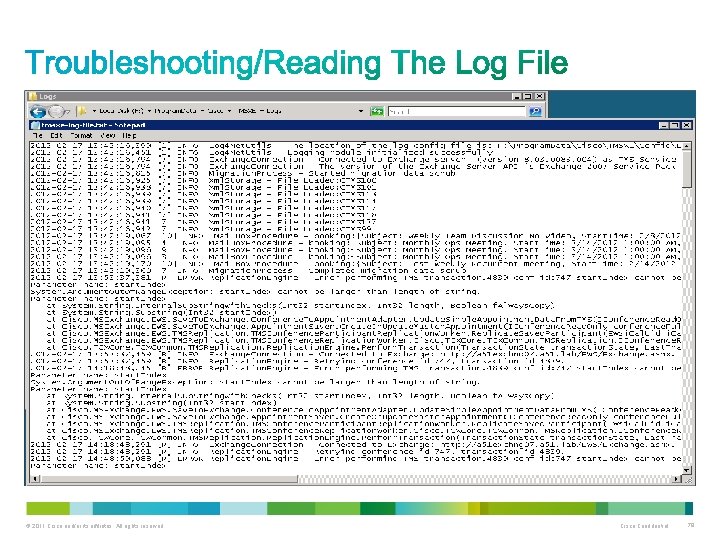
© 2011 Cisco and/or its affiliates. All rights reserved. Cisco Confidential 78
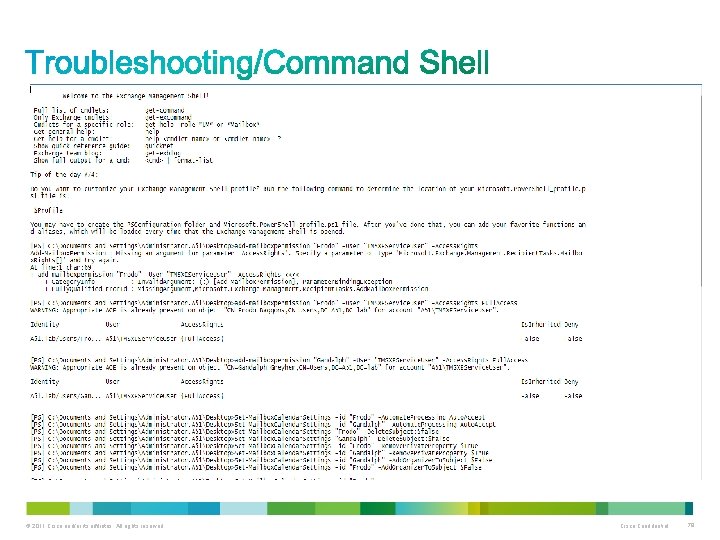
© 2011 Cisco and/or its affiliates. All rights reserved. Cisco Confidential 79
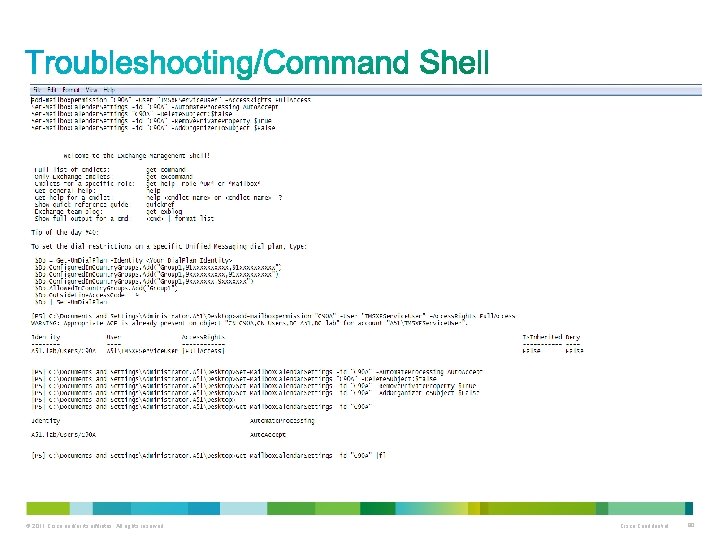
© 2011 Cisco and/or its affiliates. All rights reserved. Cisco Confidential 80
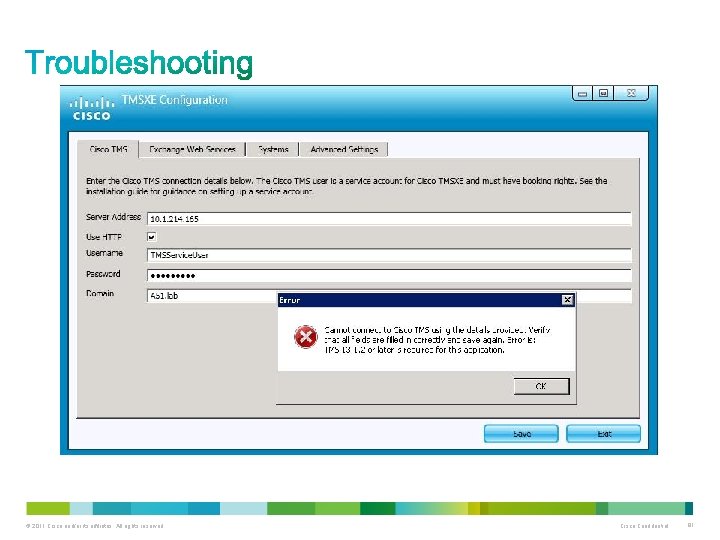
© 2011 Cisco and/or its affiliates. All rights reserved. Cisco Confidential 81
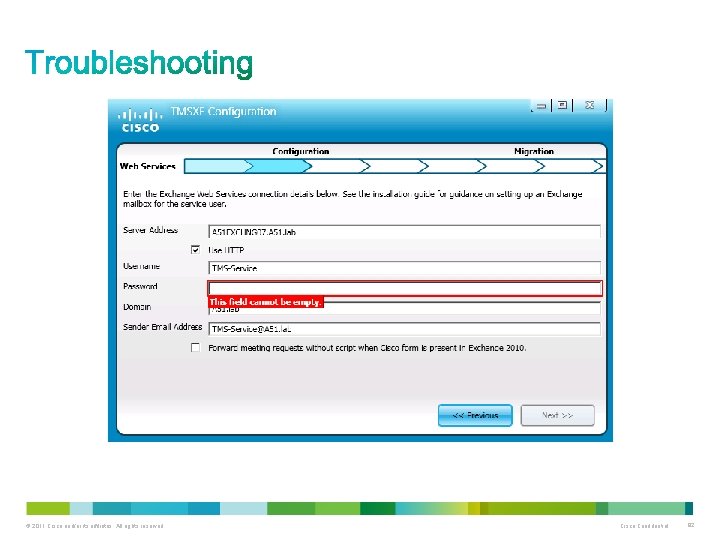
© 2011 Cisco and/or its affiliates. All rights reserved. Cisco Confidential 82
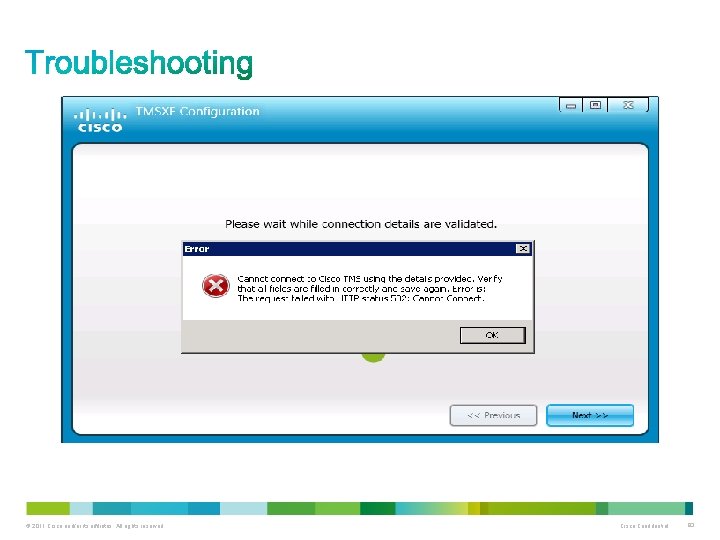
© 2011 Cisco and/or its affiliates. All rights reserved. Cisco Confidential 83
© 2011 Cisco and/or its affiliates. All rights reserved. Cisco Confidential 84
© 2011 Cisco and/or its affiliates. All rights reserved. Cisco Confidential 85
© 2011 Cisco and/or its affiliates. All rights reserved. Cisco Confidential 86
© 2011 Cisco and/or its affiliates. All rights reserved. Cisco Confidential 87
• Cisco Support Community https: //supportforums. cisco. com/community/netpro/collaboration-voice-video/telepresence • Support pages: http: //www. cisco. com/en/US/docs/telepresence/infrastructure/tmsxe/admin_guide/Cisco_T MSXE_admin_guide_3 -0. pdf • http: //www. cisco. com/en/US/docs/telepresence/infrastructure/tmsxe/release_note/Cisco_T MSXE_release_notes_3 -0 -1. pdf • http: //www. cisco. com/en/US/prod/collateral/ps 7060/ps 11305/ps 11316/ps 11338/data_shee t_c 78 -704865. html • http: //www. cisco. com/en/US/docs/telepresence/infrastructure/tms/install_guide/Cisco_TM S_install_guide_13 -2. pdf • http: //www. cisco. com/en/US/docs/telepresence/infrastructure/tmsba/Cisco_TMSBA_API_ guide_13 -2. pdf © 2011 Cisco and/or its affiliates. All rights reserved. Cisco Confidential 88
What other Cisco Telepresence training would you be interested in attending? a) Cisco Tele. Presence Video Communication Server b) Adding CUCM and CTS Systems into TMS c) Cisco Tele. Presence Management Suite Provisioning Extensions d) Cisco Tele. Presence Management Suite Extension for IBM Lotus Notes e) Other © 2011 Cisco and/or its affiliates. All rights reserved. Cisco Confidential 89
In 2006, i. Tunes sold its 1 billionth song. Twitter tweeted for the first time and Cisco Tele. Presence was born. © 2011 Cisco and/or its affiliates. All rights reserved. Cisco Confidential 90

Use the Q&A panel to continue asking your questions © 2011 Cisco and/or its affiliates. All rights reserved. Cisco Confidential 91

Those who fill out the Evaluation Survey will enter a raffle for a free: $20 USD Gift Certificate To complete the evaluation, please click on link provided in the chat or in the pop-up once the event is closed. © 2011 Cisco and/or its affiliates. All rights reserved. Cisco Confidential 92
If you have additional questions, you can ask them to the expert. He will be answering questions from June 26 th to July 6 th. https: //supportforums. cisco. com/community/netpro/ask-the-expert You can watch the video or read the Q&A 5 business days after the event at https: //supportforums. cisco. com/community/netpro/ask-theexpert/webcasts © 2011 Cisco and/or its affiliates. All rights reserved. Cisco Confidential 93
Topic: Cisco Smart Call. Connector and New Mobile Clients Tuesday, July 10, at 8: 00 a. m. Pacific Time 5: 00 p. m. Paris 11: 00 a. m. New York Join Cisco Expert: Shahryar Talukder During the live event you will get a better understanding of the Cisco Call. Connector suite. Cisco expert Shahryar Talukder will explain how the Call. Connector suite delivers productivity improvements for main answering positions and employee desktops with click-to-dial and click-to-send from presence-enabled directories, as well as integration with Microsoft Outlook and Internet Explorer. Register for this live Webcast at http: //tinyurl. com/smartcallconnectwebcast © 2011 Cisco and/or its affiliates. All rights reserved. Cisco Confidential 94
Topic: Cisco Firewall Services Module (FWSM): Configuration and Troubleshooting Tuesday, July 17, at 7: 00 a. m. Pacific Time 10: 00 a. m. New York 4: 00 p. m. Madrid Join Cisco Expert: Itzcoatl Espinosa During this live event you will learn about the Firewall Services Module (FWSM) architecture, basic configurations, types of NAT (Network Address Translation), multiple context configuration, failover (active/standby & active/active), as well as troubleshooting tips of the most common problems. Registration for this live Webcast opens next Thursday June 28 at https: //supportforums. cisco. com/community/netpro/expertcorner#view=webcasts © 2011 Cisco and/or its affiliates. All rights reserved. Cisco Confidential 95
Topic: Cisco Unified Border Element for PSTN SIP Trunks Join Cisco Expert: Randy Wu Learn best practices on how to configure and troubleshoot Cisco UBE for the public switched telephone network Session Initiation Protocol trunks. Topic: Troubleshooting Nexus 5000/2000 series switches Join Cisco Expert: Prashanth Krishnappa Learn how to troubleshoot the Nexus 5000/2000 series switches. Join the discussions for one or both of these Ask The Expert Events at: https: //supportforums. cisco. com/community/netpro/expe rt-corner#view=ask-the-experts (Both events run until June 29 th) © 2011 Cisco and/or its affiliates. All rights reserved. Cisco Confidential 96
Topic: Integrating VCS with Microsoft OCS/Lync using B 2 BUA Join Cisco Expert: Andreas Wintervold Ask questions about design, best practices and troubleshooting tips for Video Communication Server and Microsoft Office Communications Server/Lync integrations using back to back user agent. Topic: Security on IOS Router Devices (ZBFW, IPS, CBAC) Join Cisco Expert: Julio Carvajal Ask questions and learn how to make your IOS router devices (Zone-Base Firewall, Intrusion Prevention Systems, & Context-Base Access Control) more secure. Topic: Configuring, Troubleshooting & Best Practices on ASA & FWSM Failover. Join Cisco Expert: Prashanth Goutham R. Ask questions about Cisco Adaptative Security Appliances (ASA) and Firewall Services Modules (FWSM) Join the discussions starting July 2 nd for one or both of these Ask The Expert Events at: https: //supportforums. cisco. com/community/netpro/expert-corner#view=ask-the-experts (Both events run until July 13 th) © 2011 Cisco and/or its affiliates. All rights reserved. Cisco Confidential 97
https: //supportforms. cisco. com http: //www. facebook. com/Cisco. Support. Community http: //twitter. com/#!/cisco_support http: //www. youtube. com/user/ciscosupportchannel https: //plus. google. com/110418616513822966153? prsrc=3#11041861651 3822966153/posts http: //itunes. apple. com/us/app/cisco-technical-support/id 398104252? mt=8 https: //play. google. com/store/apps/details? id=com. cisco. swtg_android http: //www. linkedin. com/groups/CSC-Cisco-Support-Community-3210019 Newsletter Subscription: https: //tools. cisco. com/gdrp/coiga/showsurvey. do? survey. Code=589&key. Code=14629 8_2&PHYSICAL%20 FULFILLMENT%20 Y/N=NO&SUBSCRIPTION%20 CENTER=YES © 2011 Cisco and/or its affiliates. All rights reserved. Cisco Confidential 98
If you speak Spanish, Portuguese, Japanese, Polish or Russian, we invite you to ask your questions and collaborate in your language: • Spanish https: //supportforums. cisco. com/community/spanish • Portuguese https: //supportforums. cisco. com/community/portuguese • Japanese https: //supportforums. cisco. com/community/csc-japan • Polish https: //supportforums. cisco. com/community/etc/netpro-polska • Russian https: //supportforums. cisco. com/community/russian © 2011 Cisco and/or its affiliates. All rights reserved. Cisco Confidential 99

Thank You for Your Time Please Take a Moment to Complete the Evaluation
Thank you.
- Slides: 101