
Cisco Device Hardening Securing Management and Reporting Features


![Configuring Syslog Router(config)# logging [host-name | ip-address] 1. Sets the destination logging host Router(config)#](https://slidetodoc.com/presentation_image_h/116b86f2be8ec0eb6bb23c9a76ddd972/image-17.jpg "Configuring Syslog Router(config)# logging [host-name | ip-address] 1. Sets the destination logging host Router(config)#")
![Configuring the SNMP-Server Engine ID Router(config)# snmp-server engine. ID [local engineid-string] | [remote ip-address](https://slidetodoc.com/presentation_image_h/116b86f2be8ec0eb6bb23c9a76ddd972/image-29.jpg "Configuring the SNMP-Server Engine ID Router(config)# snmp-server engine. ID [local engineid-string] | [remote ip-address")
![Configuring the SNMP-Server Users Router(config)# snmp-server username groupname [remote ip-address [udp-port]] {v 1 |](https://slidetodoc.com/presentation_image_h/116b86f2be8ec0eb6bb23c9a76ddd972/image-31.jpg "Configuring the SNMP-Server Users Router(config)# snmp-server username groupname [remote ip-address [udp-port]] {v 1 |")
![Configuring the SNMP-Server Hosts Router(config)# snmp-server host-address [traps | informs] [version {1 | 2](https://slidetodoc.com/presentation_image_h/116b86f2be8ec0eb6bb23c9a76ddd972/image-32.jpg "Configuring the SNMP-Server Hosts Router(config)# snmp-server host-address [traps | informs] [version {1 | 2")
![Configuring NTP Associations Router(config)# ntp server {ip-address | hostname} [version number] [key keyid] [source](https://slidetodoc.com/presentation_image_h/116b86f2be8ec0eb6bb23c9a76ddd972/image-37.jpg "Configuring NTP Associations Router(config)# ntp server {ip-address | hostname} [version number] [key keyid] [source")
![Configuring NTP Server Router(config)# ntp peer ip-address [normal-sync][version number] [key keyid] [source interface] [prefer]](https://slidetodoc.com/presentation_image_h/116b86f2be8ec0eb6bb23c9a76ddd972/image-40.jpg "Configuring NTP Server Router(config)# ntp peer ip-address [normal-sync][version number] [key keyid] [source interface] [prefer]")

- Slides: 42
Cisco Device Hardening Securing Management and Reporting Features
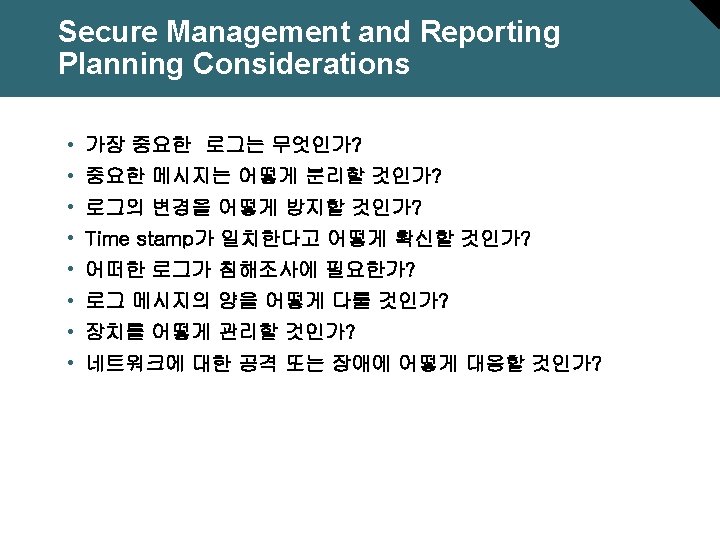
Secure Management and Reporting Planning Considerations
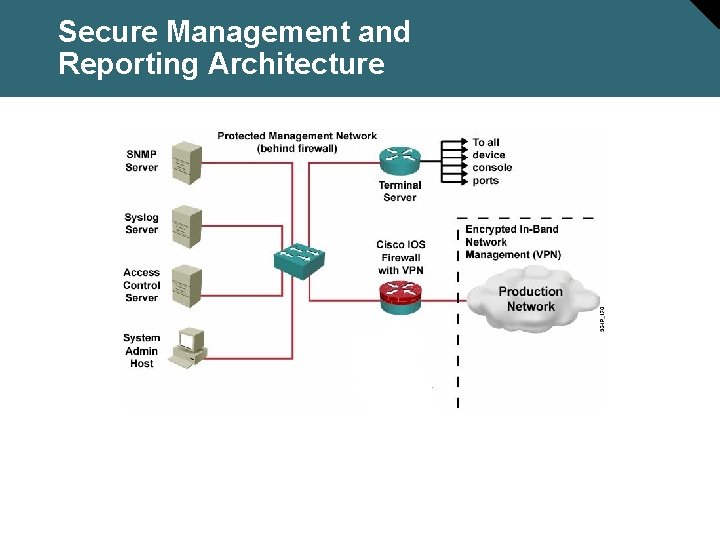
Secure Management and Reporting Architecture
Secure Management and Reporting Architecture
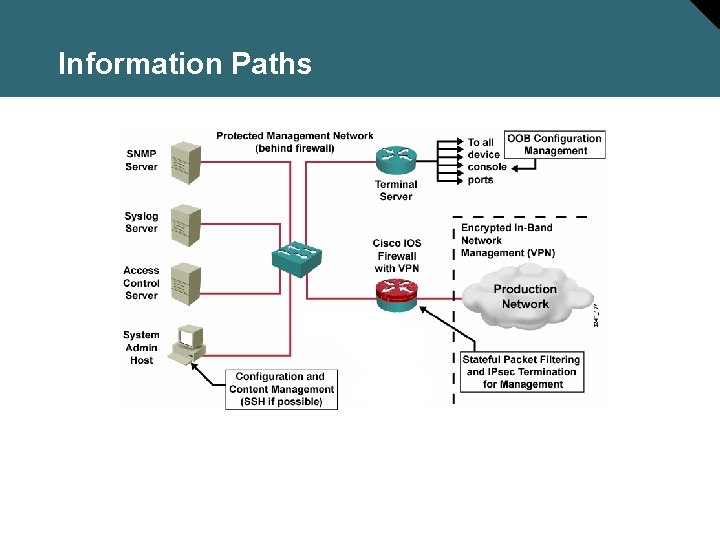
Information Paths
Configuring an SSH Server for Secure Management and Reporting
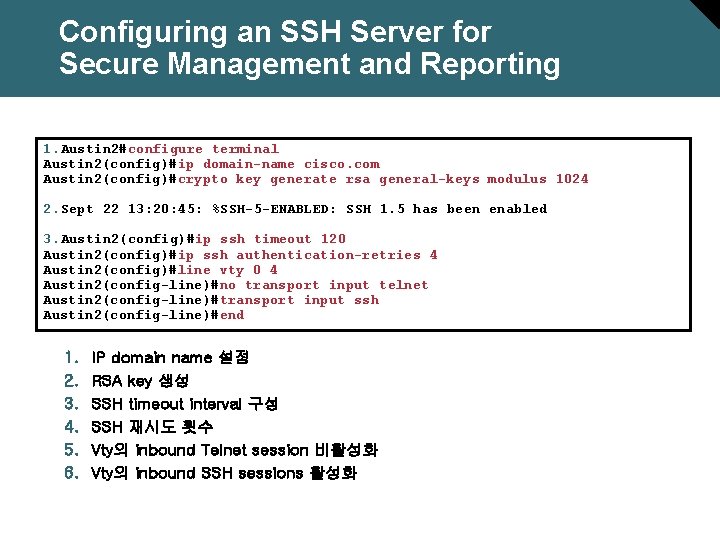
Configuring an SSH Server for Secure Management and Reporting 1. Austin 2#configure terminal Austin 2(config)#ip domain-name cisco. com Austin 2(config)#crypto key generate rsa general-keys modulus 1024 2. Sept 22 13: 20: 45: %SSH-5 -ENABLED: SSH 1. 5 has been enabled 3. Austin 2(config)#ip ssh timeout 120 Austin 2(config)#ip ssh authentication-retries 4 Austin 2(config)#line vty 0 4 Austin 2(config-line)#no transport input telnet Austin 2(config-line)#transport input ssh Austin 2(config-line)#end 1. 2. 3. 4. 5. 6. IP domain name 설정 RSA key 생성 SSH timeout interval 구성 SSH 재시도 횟수 Vty의 inbound Telnet session 비활성화 Vty의 inbound SSH sessions 활성화
Using Syslog Logging for Network Security
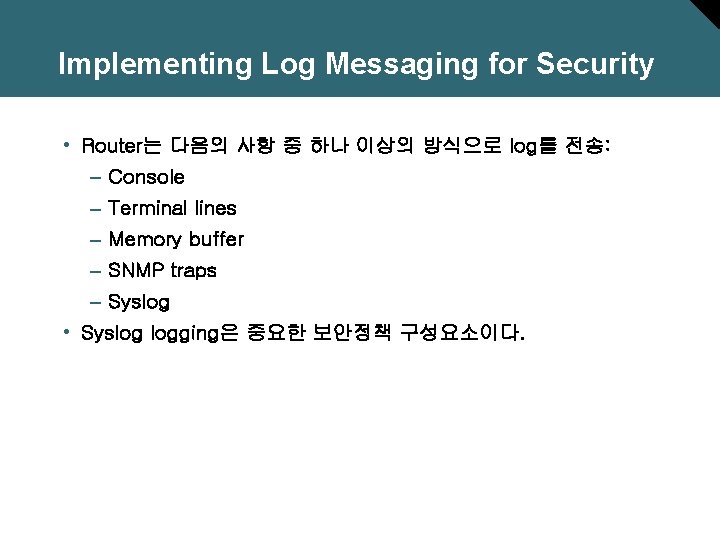
Implementing Log Messaging for Security • Router는 다음의 사항 중 하나 이상의 방식으로 log를 전송: – Console – Terminal lines – Memory buffer – SNMP traps – Syslog • Syslog logging은 중요한 보안정책 구성요소이다.
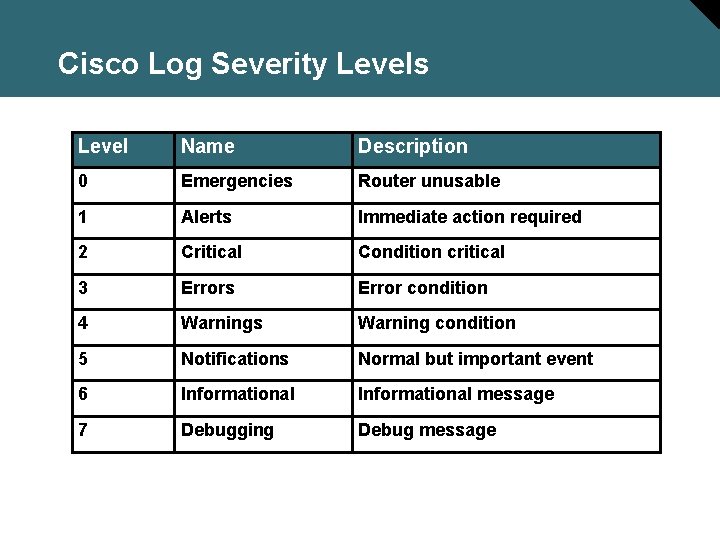
Cisco Log Severity Levels Level Name Description 0 Emergencies Router unusable 1 Alerts Immediate action required 2 Critical Condition critical 3 Errors Error condition 4 Warnings Warning condition 5 Notifications Normal but important event 6 Informational message 7 Debugging Debug message
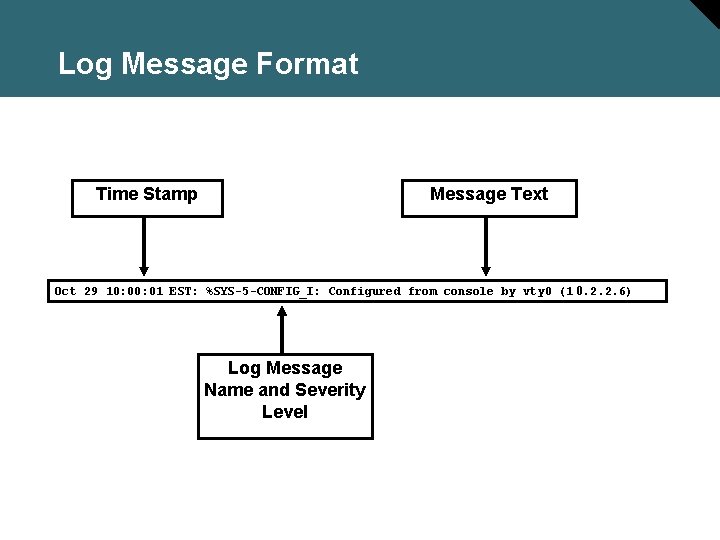
Log Message Format Time Stamp Message Text Oct 29 10: 01 EST: %SYS-5 -CONFIG_I: Configured from console by vty 0 (1 0. 2. 2. 6) Log Message Name and Severity Level
Configuring Syslog Logging
Configuring Syslog Router(config)# logging [host-name | ip-address] 1. Sets the destination logging host Router(config)# logging trap level 2. (Optional) Sets the log severity (trap) level Router(config)# logging facility-type 3. (Optional) Sets the syslog facility
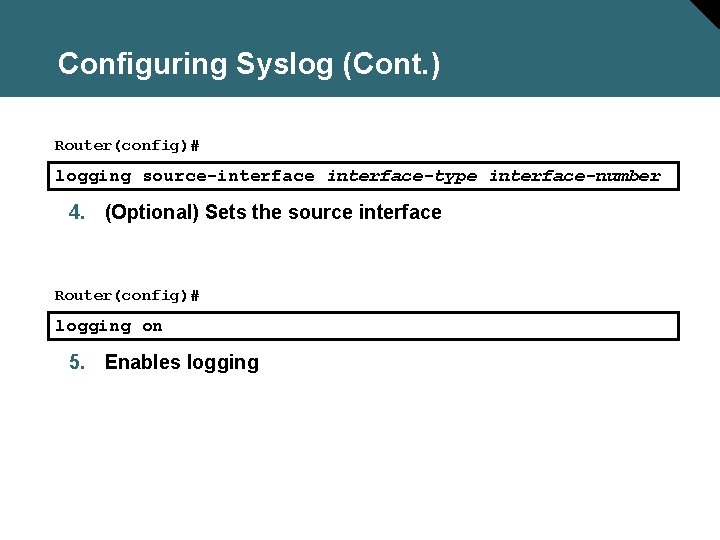
Configuring Syslog (Cont. ) Router(config)# logging source-interface-type interface-number 4. (Optional) Sets the source interface Router(config)# logging on 5. Enables logging
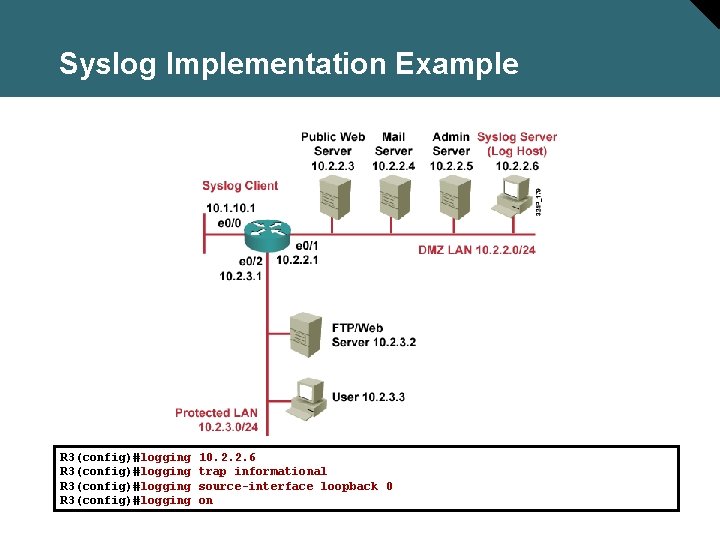
Syslog Implementation Example R 3(config)#logging 10. 2. 2. 6 trap informational source-interface loopback 0 on
SNMP Version 3
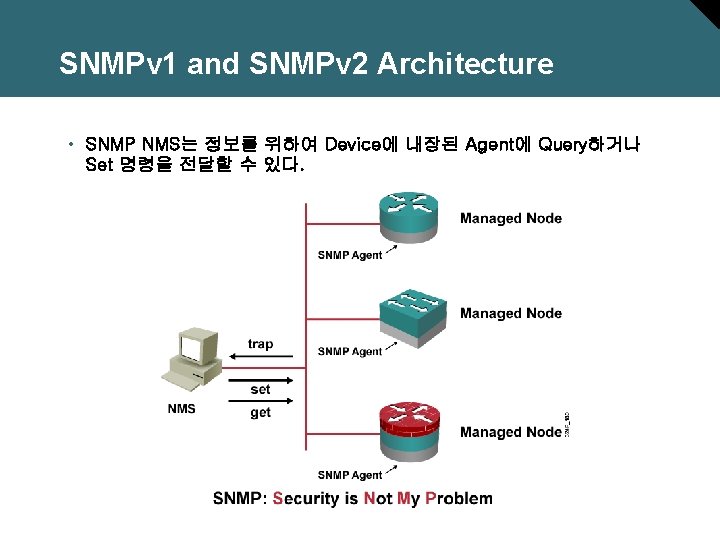
SNMPv 1 and SNMPv 2 Architecture • SNMP NMS는 정보를 위하여 Device에 내장된 Agent에 Query하거나 Set 명령을 전달할 수 있다.
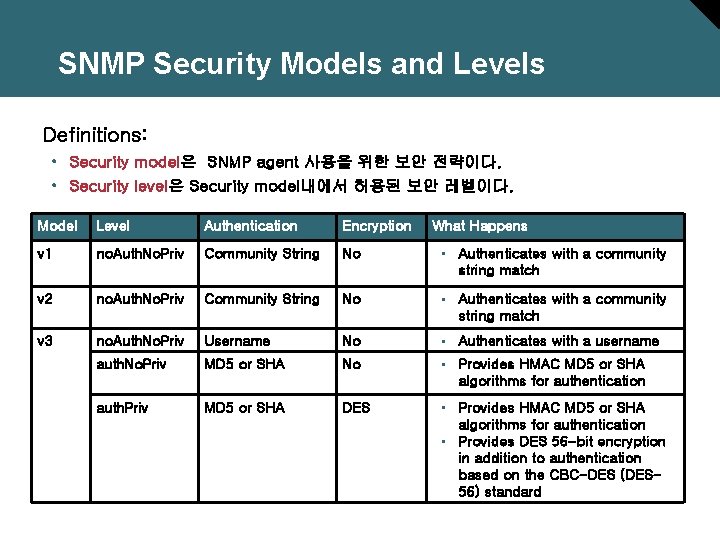
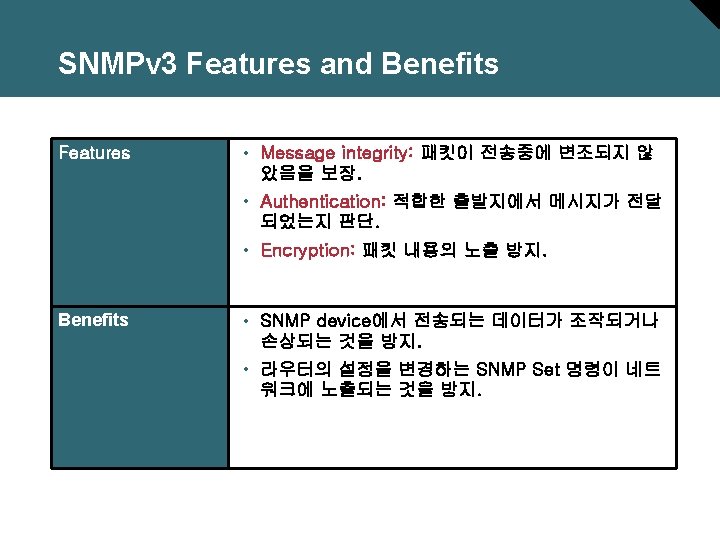
SNMP Security Models and Levels Definitions: • Security model은 SNMP agent 사용을 위한 보안 전략이다. • Security level은 Security model내에서 허용된 보안 레벨이다. Model Level Authentication Encryption What Happens v 1 no. Auth. No. Priv Community String No • Authenticates with a community string match v 2 no. Auth. No. Priv Community String No • Authenticates with a community string match v 3 no. Auth. No. Priv Username No • Authenticates with a username auth. No. Priv MD 5 or SHA No • Provides HMAC MD 5 or SHA algorithms for authentication auth. Priv MD 5 or SHA DES • Provides HMAC MD 5 or SHA algorithms for authentication • Provides DES 56 -bit encryption in addition to authentication based on the CBC-DES (DES 56) standard
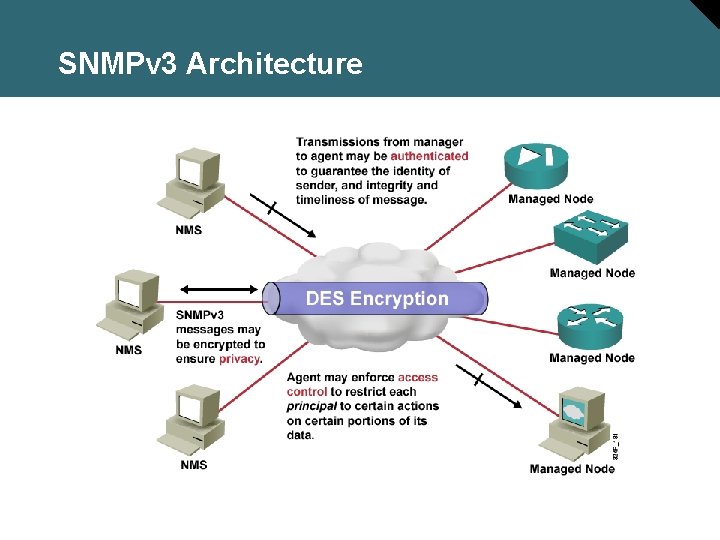
SNMPv 3 Architecture
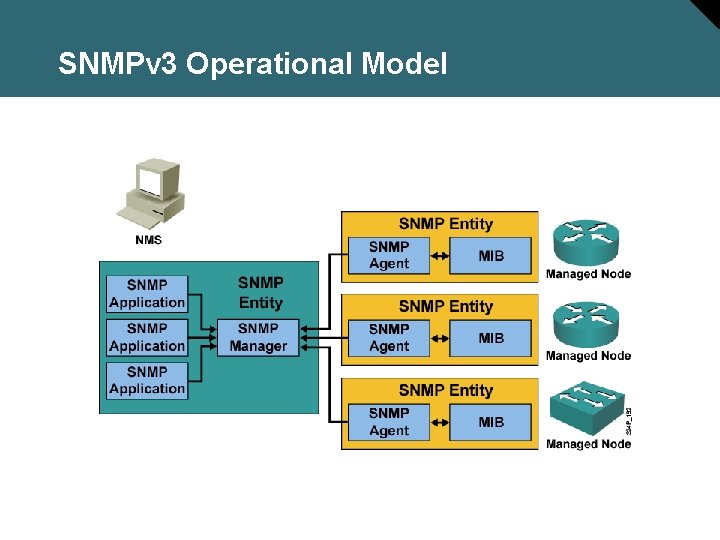
SNMPv 3 Operational Model
Configuring an SNMP Managed Node
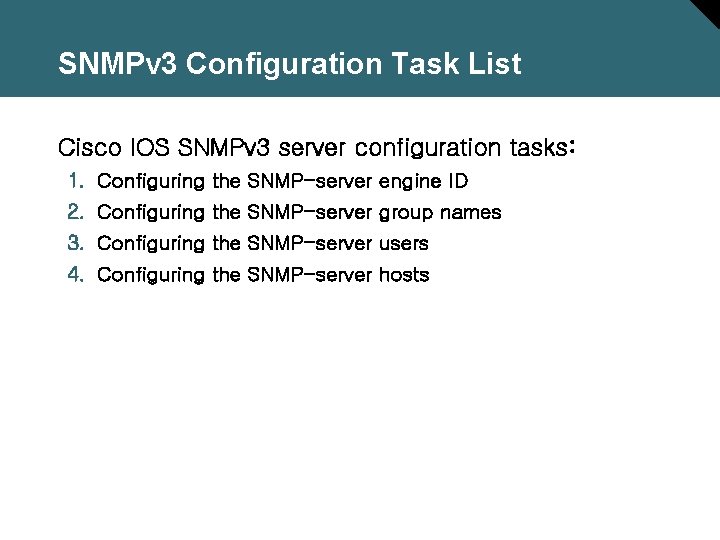
SNMPv 3 Configuration Task List Cisco IOS SNMPv 3 server configuration tasks: 1. Configuring the SNMP-server engine ID 2. Configuring the SNMP-server group names 3. Configuring the SNMP-server users 4. Configuring the SNMP-server hosts
Configuring the SNMP-Server Engine ID Router(config)# snmp-server engine. ID [local engineid-string] | [remote ip-address udp-port-number engineid-string] • Configures names for both the local and remote SNMP engine (or copy of SNMP) on the router PR 1(config)#snmp-server engine. ID local 1234
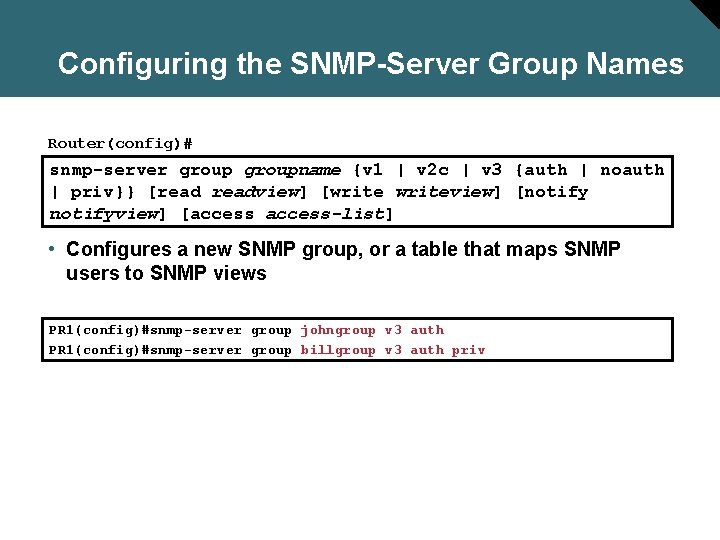
Configuring the SNMP-Server Group Names Router(config)# snmp-server groupname {v 1 | v 2 c | v 3 {auth | noauth | priv}} [readview] [writeview] [notifyview] [access-list] • Configures a new SNMP group, or a table that maps SNMP users to SNMP views PR 1(config)#snmp-server group johngroup v 3 auth PR 1(config)#snmp-server group billgroup v 3 auth priv
Configuring the SNMP-Server Users Router(config)# snmp-server username groupname [remote ip-address [udp-port]] {v 1 | v 2 c | v 3 [encrypted] [auth {md 5 | sha} auth-password [priv des 56 priv-password]]} [access-list] • Configures a new user to an SNMP group PR 1(config)#snmp-server password 2 PR 1(config)#snmp-server user John johngroup v 3 auth md 5 john 2 passwd user Bill billgroup v 3 auth md 5 bill 3 passwd des 56 group johngroup v 3 auth group billgroup v 3 auth priv
Configuring the SNMP-Server Hosts Router(config)# snmp-server host-address [traps | informs] [version {1 | 2 c | 3 [auth | noauth | priv]}] community-string [udp-port] [notification-type] • Configures the recipient of an SNMP trap operation. PR 1(config)#snmp-server PR 1(config)#snmp-server engine. ID remote 10. 1. 1. 1 1234 user billgroup remote 10. 1. 1. 1 v 3 group billgroup v 3 noauth enable traps host 10. 1. 1. 1 inform version 3 noauth bill manager
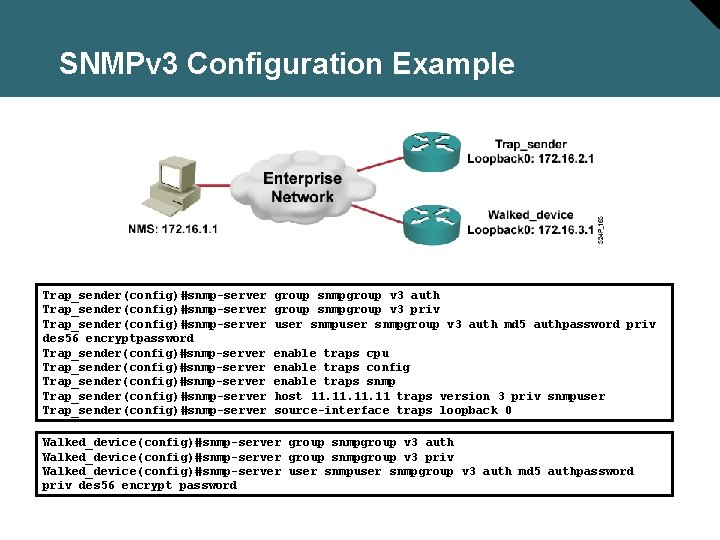
SNMPv 3 Configuration Example Trap_sender(config)#snmp-server des 56 encryptpassword Trap_sender(config)#snmp-server Trap_sender(config)#snmp-server group snmpgroup v 3 auth group snmpgroup v 3 priv user snmpgroup v 3 auth md 5 authpassword priv enable traps cpu enable traps config enable traps snmp host 11. 11. 11 traps version 3 priv snmpuser source-interface traps loopback 0 Walked_device(config)#snmp-server group snmpgroup v 3 auth Walked_device(config)#snmp-server group snmpgroup v 3 priv Walked_device(config)#snmp-server user snmpgroup v 3 auth md 5 authpassword priv des 56 encrypt password
Configuring NTP Client
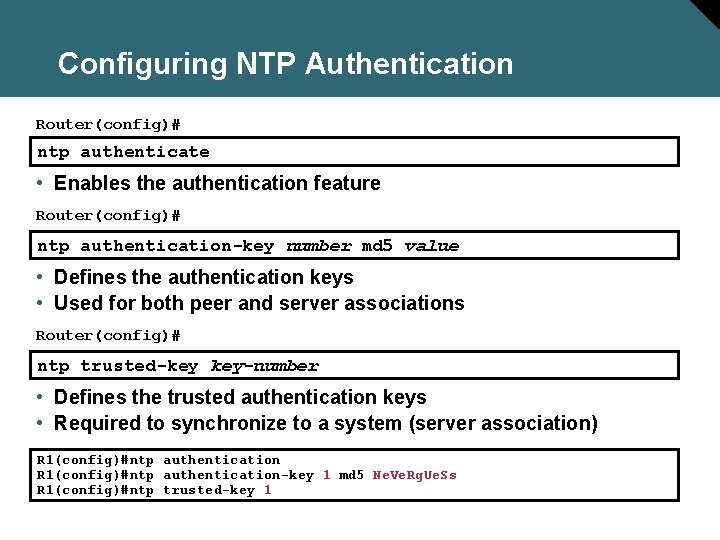
Configuring NTP Authentication Router(config)# ntp authenticate • Enables the authentication feature Router(config)# ntp authentication-key number md 5 value • Defines the authentication keys • Used for both peer and server associations Router(config)# ntp trusted-key key-number • Defines the trusted authentication keys • Required to synchronize to a system (server association) R 1(config)#ntp authentication-key 1 md 5 Ne. Ve. Rg. Ue. Ss R 1(config)#ntp trusted-key 1
Configuring NTP Associations Router(config)# ntp server {ip-address | hostname} [version number] [key keyid] [source interface] [prefer] • Forms a server association with another system Router(config-if)# ntp broadcast client • Receives NTP broadcast packets R 1(config)#ntp server 10. 1. 1. 1 key 1 R 1(config)#ntp server 10. 2. 2. 2 key 2 prefer R 1(config)#interface Fastethernet 0/1 R 1(config-if)#ntp broadcast client
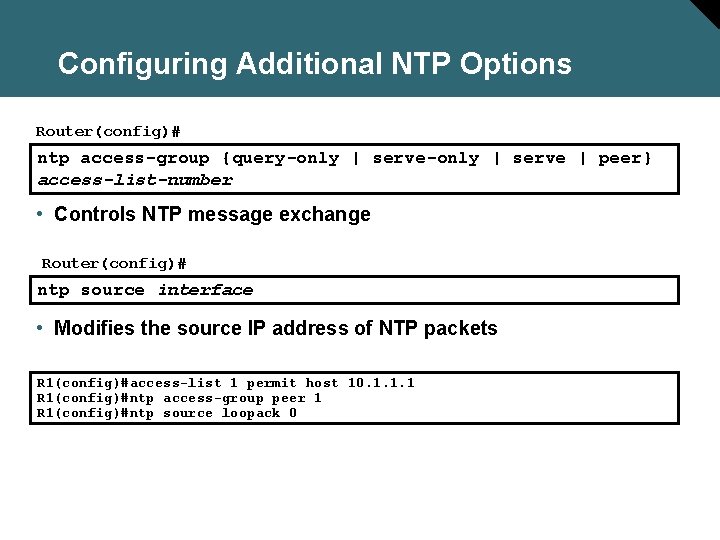
Configuring Additional NTP Options Router(config)# ntp access-group {query-only | serve | peer} access-list-number • Controls NTP message exchange Router(config)# ntp source interface • Modifies the source IP address of NTP packets R 1(config)#access-list 1 permit host 10. 1. 1. 1 R 1(config)#ntp access-group peer 1 R 1(config)#ntp source loopack 0
Configuring NTP Server
Configuring NTP Server Router(config)# ntp peer ip-address [normal-sync][version number] [key keyid] [source interface] [prefer] • Forms a peer association with another system Router(config)# ntp master [stratum] • Makes the system an authoritative NTP server Router(config-int)# ntp broadcast [version number][destination address][key keyid] • Configures an interface to send NTP broadcast packets R 2(config)#ntp peer 10. 1. 1. 1 key 1 R 2(config)#ntp master 3 R 2(config)#interface Fastethernet 0/0 R 2(config-int)#ntp broadcast
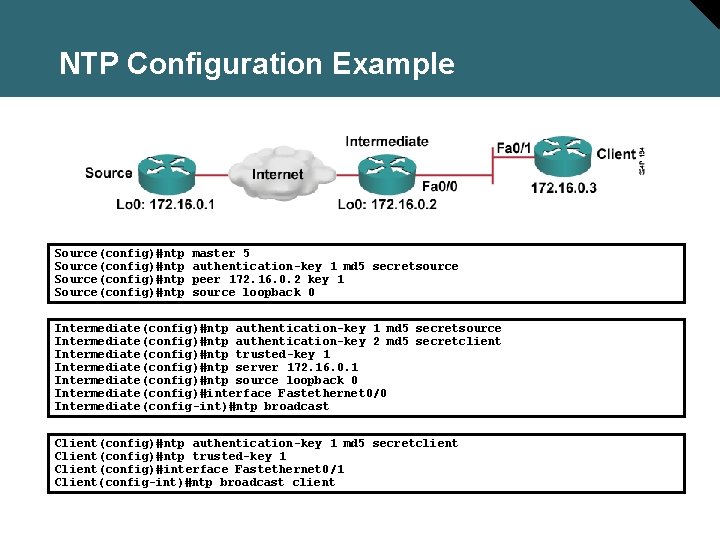
NTP Configuration Example Source(config)#ntp master 5 authentication-key 1 md 5 secretsource peer 172. 16. 0. 2 key 1 source loopback 0 Intermediate(config)#ntp authentication-key 1 md 5 secretsource Intermediate(config)#ntp authentication-key 2 md 5 secretclient Intermediate(config)#ntp trusted-key 1 Intermediate(config)#ntp server 172. 16. 0. 1 Intermediate(config)#ntp source loopback 0 Intermediate(config)#interface Fastethernet 0/0 Intermediate(config-int)#ntp broadcast Client(config)#ntp authentication-key 1 md 5 secretclient Client(config)#ntp trusted-key 1 Client(config)#interface Fastethernet 0/1 Client(config-int)#ntp broadcast client