
Cisco and VMware Virtualizing the Data Center VMware
- Slides: 38
Cisco and VMware: Virtualizing the Data Center VMware v. Sphere™ 4. 0 Nexus 1000 V and v. Center Management Products © 2008 Cisco Systems, Inc. and VMware 1
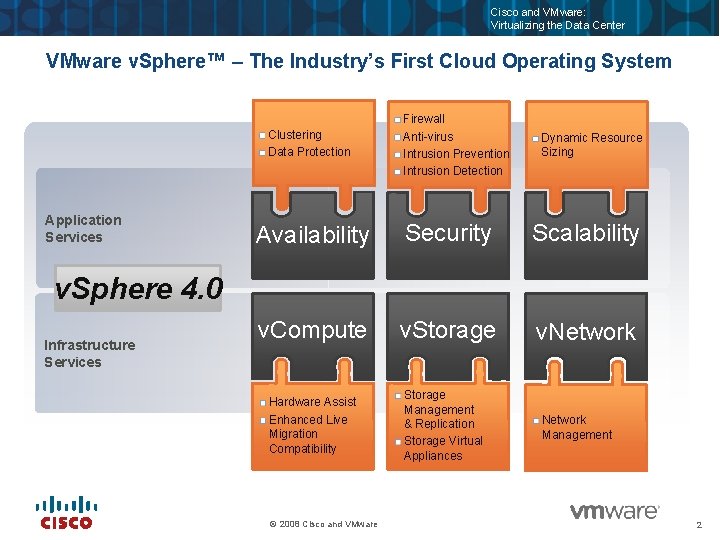
Cisco and VMware: Virtualizing the Data Center VMware v. Sphere™ – The Industry’s First Cloud Operating System Clustering Data Protection Application Services Firewall Anti-virus Intrusion Prevention Intrusion Detection Dynamic Resource Sizing Availability Security Scalability v. Compute v. Storage v. Network Hardware Assist Enhanced Live Migration Compatibility Storage Management & Replication Storage Virtual Appliances v. Sphere 4. 0 Infrastructure Services © 2008 Cisco and VMware Network Management 2
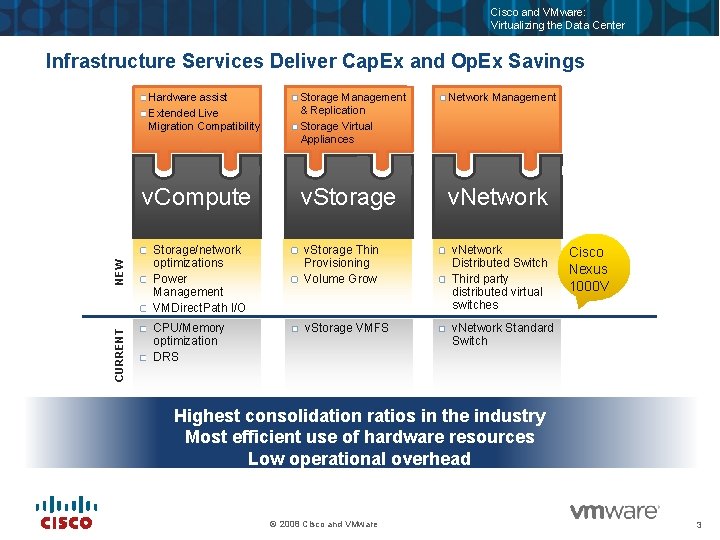
Cisco and VMware: Virtualizing the Data Center Infrastructure Services Deliver Cap. Ex and Op. Ex Savings Hardware assist Extended Live Migration Compatibility CURRENT NEW v. Compute Storage Management & Replication Storage Virtual Appliances Network Management v. Storage v. Network Storage/network optimizations Power Management VMDirect. Path I/O v. Storage Thin Provisioning Volume Grow v. Network Distributed Switch Third party distributed virtual switches CPU/Memory optimization DRS v. Storage VMFS v. Network Standard Switch Cisco Nexus 1000 V Highest consolidation ratios in the industry Most efficient use of hardware resources Low operational overhead © 2008 Cisco and VMware 3
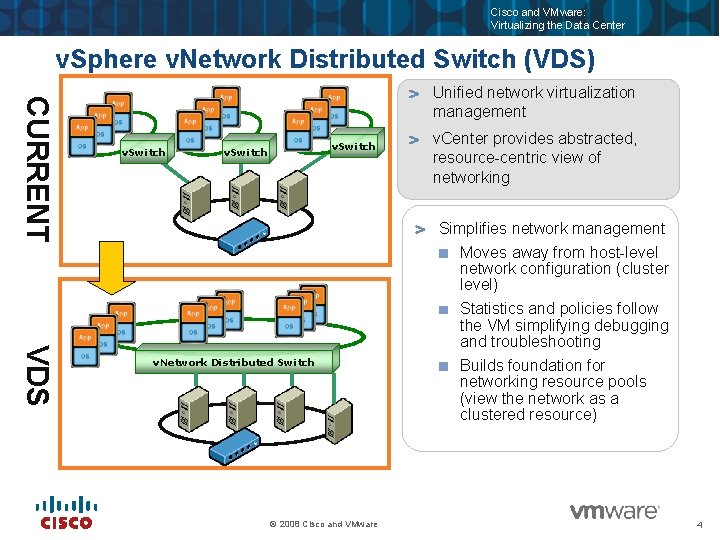
Cisco and VMware: Virtualizing the Data Center v. Sphere v. Network Distributed Switch (VDS) CURRENT Unified network virtualization management v. Switch v. Center provides abstracted, resource-centric view of networking Simplifies network management VDS v. Network Distributed Switch © 2008 Cisco and VMware Moves away from host-level network configuration (cluster level) Statistics and policies follow the VM simplifying debugging and troubleshooting Builds foundation for networking resource pools (view the network as a clustered resource) 4
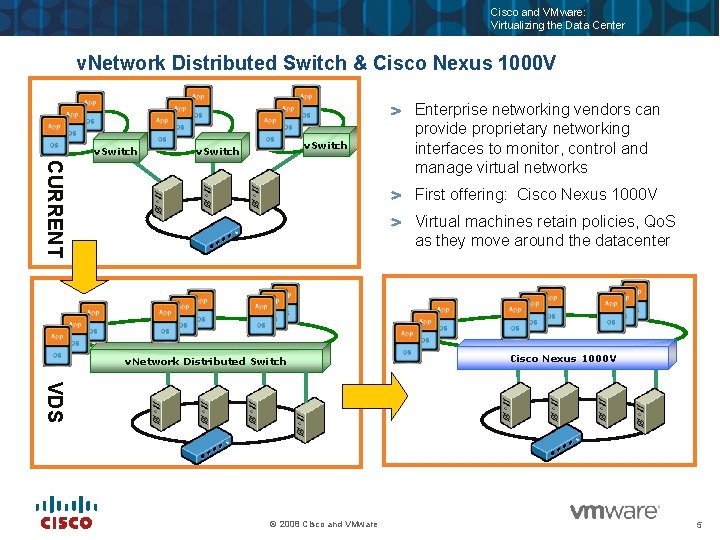
Cisco and VMware: Virtualizing the Data Center v. Network Distributed Switch & Cisco Nexus 1000 V v. Switch CURRENT Enterprise networking vendors can provide proprietary networking interfaces to monitor, control and manage virtual networks First offering: Cisco Nexus 1000 V Virtual machines retain policies, Qo. S as they move around the datacenter v. Network Distributed Switch Cisco Nexus 1000 V VDS © 2008 Cisco and VMware 5
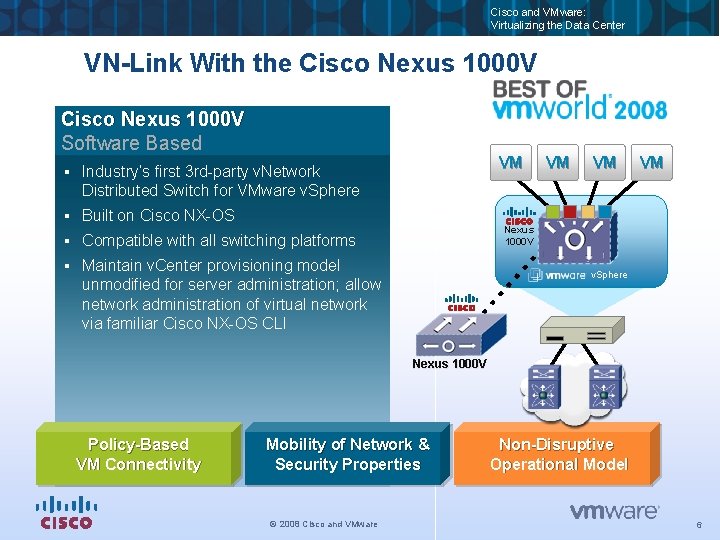
Cisco and VMware: Virtualizing the Data Center VN-Link With the Cisco Nexus 1000 V Software Based § Industry’s first 3 rd-party v. Network Distributed Switch for VMware v. Sphere § Built on Cisco NX-OS § Compatible with all switching platforms § Maintain v. Center provisioning model unmodified for server administration; allow network administration of virtual network via familiar Cisco NX-OS CLI VM VM Nexus 1000 V v. Sphere Nexus 1000 V Policy-Based VM Connectivity Mobility of Network & Security Properties © 2008 Cisco and VMware Non-Disruptive Operational Model 6
Cisco and VMware: Virtualizing the Data Center VMware products and the Cisco Nexus 1000 V Are there any issues? – In general, all VMware product can operate on a system with the Nexus 1000 V – There may be some features that are different / missing Over the following slides we will cover the top products / features and compatibility © 2008 Cisco and VMware 7
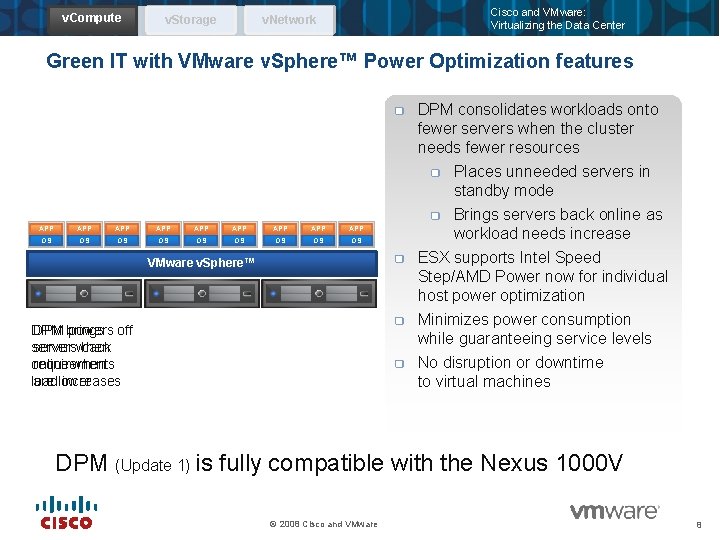
v. Compute v. Storage Cisco and VMware: Virtualizing the Data Center v. Network Green IT with VMware v. Sphere™ Power Optimization features APP APP APP OS OS OS VMware v. Sphere™ DPM brings DPM powers off servers back server when online when requirements load increases are lower DPM consolidates workloads onto fewer servers when the cluster needs fewer resources Places unneeded servers in standby mode Brings servers back online as workload needs increase ESX supports Intel Speed Step/AMD Power now for individual host power optimization Minimizes power consumption while guaranteeing service levels No disruption or downtime to virtual machines DPM (Update 1) is fully compatible with the Nexus 1000 V © 2008 Cisco and VMware 8
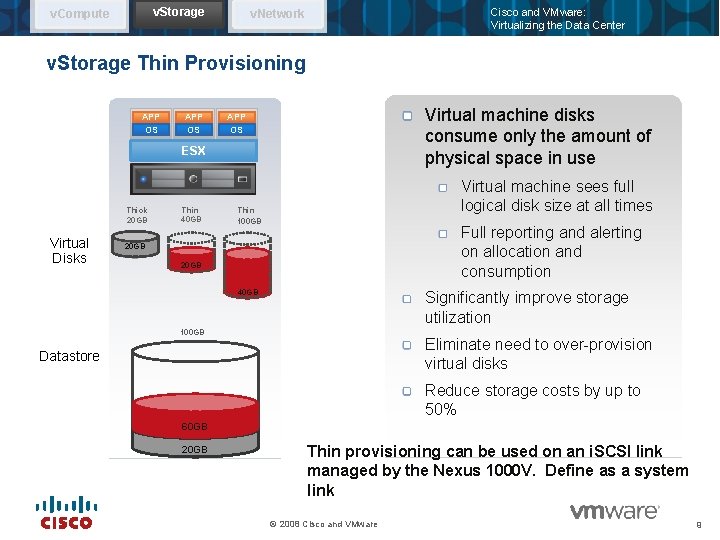
v. Storage v. Compute Cisco and VMware: Virtualizing the Data Center v. Network v. Storage Thin Provisioning APP OS Virtual machine disks consume only the amount of physical space in use APP OS ESX Thick 20 GB Virtual Disks Thin 40 GB Virtual machine sees full logical disk size at all times Thin 100 GB Full reporting and alerting on allocation and consumption 20 GB 40 GB Significantly improve storage utilization 100 GB Eliminate need to over-provision virtual disks Datastore Reduce storage costs by up to 50% 60 GB 20 GB Thin provisioning can be used on an i. SCSI link managed by the Nexus 1000 V. Define as a system link © 2008 Cisco and VMware 9
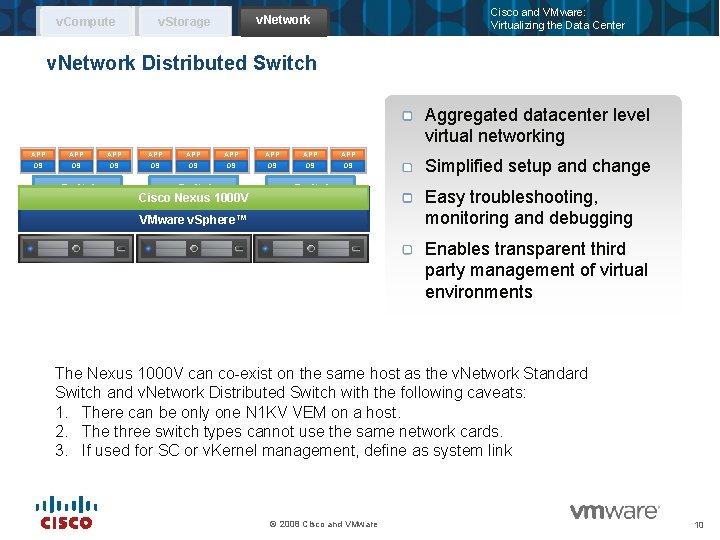
v. Compute Cisco and VMware: Virtualizing the Data Center v. Network v. Storage v. Network Distributed Switch Aggregated datacenter level virtual networking APP APP APP OS OS OS v. Switch Cisco. Distributed Nexus 1000 V v. Network Switch v. Switch VMware v. Sphere™ Simplified setup and change Easy troubleshooting, monitoring and debugging Enables transparent third party management of virtual environments The Nexus 1000 V can co-exist on the same host as the v. Network Standard Switch and v. Network Distributed Switch with the following caveats: 1. There can be only one N 1 KV VEM on a host. 2. The three switch types cannot use the same network cards. 3. If used for SC or v. Kernel management, define as system link © 2008 Cisco and VMware 10
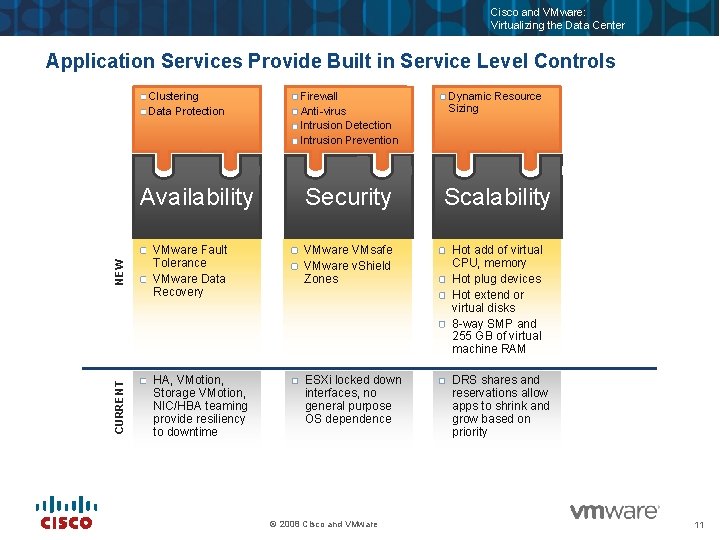
Cisco and VMware: Virtualizing the Data Center Firewall Anti-virus Intrusion Detection Intrusion Prevention Dynamic Resource Sizing Security Scalability NEW VMware Fault Tolerance VMware Data Recovery VMware VMsafe VMware v. Shield Zones Hot add of virtual CPU, memory Hot plug devices Hot extend or virtual disks 8 -way SMP and 255 GB of virtual machine RAM CURRENT Application Services Provide Built in Service Level Controls Clustering Data Protection HA, VMotion, Storage VMotion, NIC/HBA teaming provide resiliency to downtime ESXi locked down interfaces, no general purpose OS dependence DRS shares and reservations allow apps to shrink and grow based on priority Availability © 2008 Cisco and VMware 11
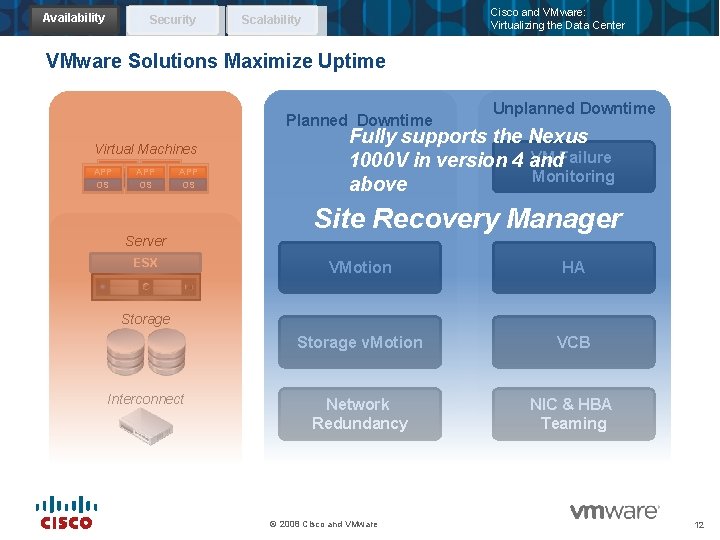
Availability Security Cisco and VMware: Virtualizing the Data Center Scalability VMware Solutions Maximize Uptime Planned Downtime Virtual Machines APPAPP OS OS APP OS Unplanned Downtime Fully supports the Nexus VM Failure 1000 V in version 4 and Monitoring above Site Recovery Manager Server ESX VMotion HA Storage v. Motion VCB Network Redundancy NIC & HBA Teaming Storage Interconnect © 2008 Cisco and VMware 12
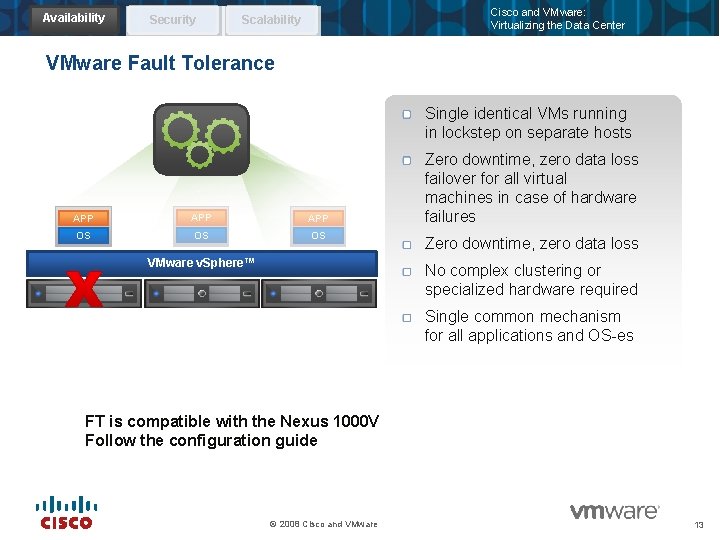
Availability Security Cisco and VMware: Virtualizing the Data Center Scalability VMware Fault Tolerance Single identical VMs running in lockstep on separate hosts APP APP OS OS OS VMware v. Sphere™ Zero downtime, zero data loss failover for all virtual machines in case of hardware failures Zero downtime, zero data loss No complex clustering or specialized hardware required Single common mechanism for all applications and OS-es FT is compatible with the Nexus 1000 V Follow the configuration guide © 2008 Cisco and VMware 13
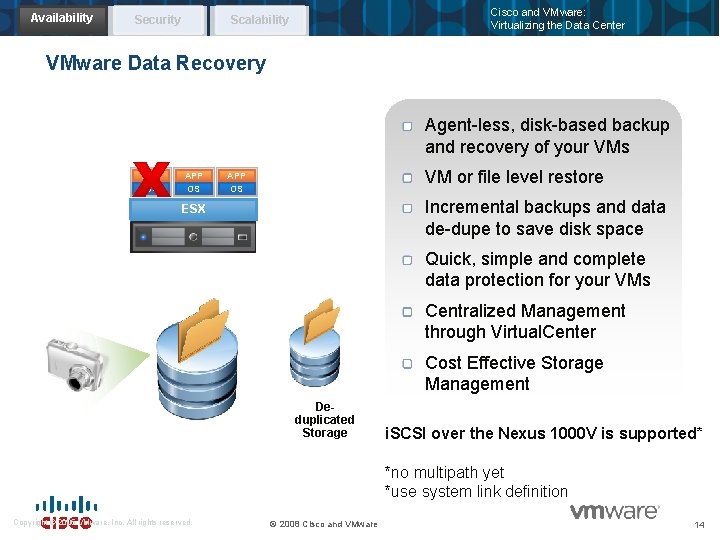
Availability Security Cisco and VMware: Virtualizing the Data Center Scalability VMware Data Recovery Agent-less, disk-based backup and recovery of your VMs APP OS VM or file level restore APP OS Incremental backups and data de-dupe to save disk space ESX Quick, simple and complete data protection for your VMs Centralized Management through Virtual. Center Cost Effective Storage Management Deduplicated Storage i. SCSI over the Nexus 1000 V is supported* *no multipath yet *use system link definition Copyright © 2005 VMware, Inc. All rights reserved. © 2008 Cisco and VMware 14
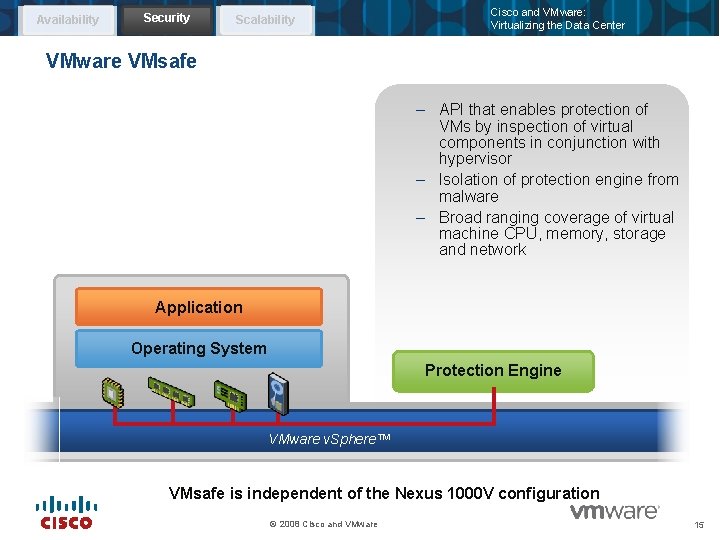
Availability Security Scalability Cisco and VMware: Virtualizing the Data Center VMware VMsafe – API that enables protection of VMs by inspection of virtual components in conjunction with hypervisor – Isolation of protection engine from malware – Broad ranging coverage of virtual machine CPU, memory, storage and network Application Operating System Protection Engine VMware v. Sphere™ VMsafe is independent of the Nexus 1000 V configuration © 2008 Cisco and VMware 15
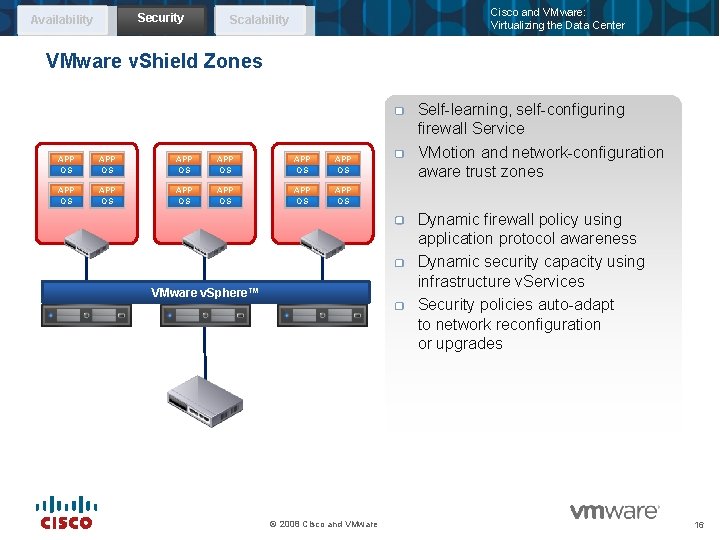
Security Availability Cisco and VMware: Virtualizing the Data Center Scalability VMware v. Shield Zones APP OS APP OS APP OS Self-learning, self-configuring firewall Service VMotion and network-configuration aware trust zones Dynamic firewall policy using application protocol awareness Dynamic security capacity using infrastructure v. Services Security policies auto-adapt to network reconfiguration or upgrades VMware v. Sphere™ © 2008 Cisco and VMware 16
Cisco and VMware: Virtualizing the Data Center v. Shield Zones and the Nexus 1000 V v. Shield Zones is integrated into the v. DS or v. SS through the creation of two virtual switch instances—one trusted instance with guest virtual machine Portgroups connecting through the v. Shield Zones agent to the untrusted instance supporting the physical network adapters (vmnics). This is implemented on each host requiring v. Shield Zones protection. © 2008 Cisco and VMware 17
Cisco and VMware: Virtualizing the Data Center v. Shield Zones and the Nexus 1000 V (cont) The Cisco Nexus 1000 virtual switch fully supports the v. Shield Zones module as of the VMware v. Sphere 4 Update 1 release using a new Cisco Nexus “service-port” feature that allows redirection of traffic to security virtual appliances for processing. © 2008 Cisco and VMware 18
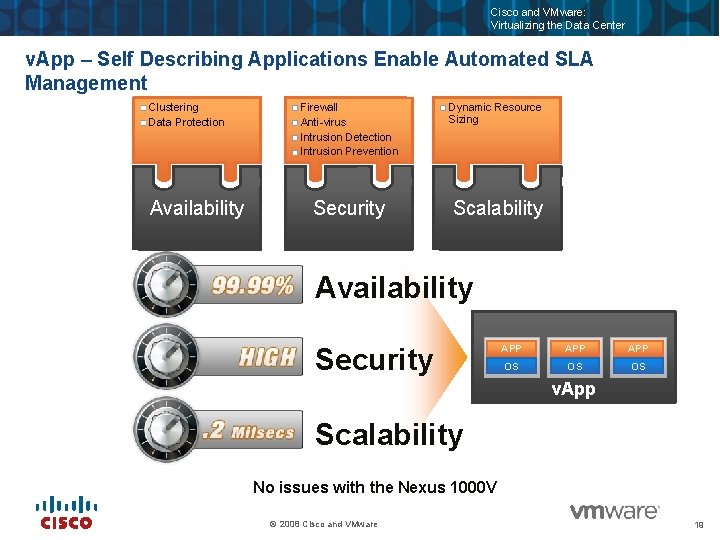
Cisco and VMware: Virtualizing the Data Center v. App – Self Describing Applications Enable Automated SLA Management Clustering Data Protection Availability Firewall Anti-virus Intrusion Detection Intrusion Prevention Dynamic Resource Sizing Security Scalability Availability Security APP APP OS OS OS v. App Scalability No issues with the Nexus 1000 V © 2008 Cisco and VMware 19
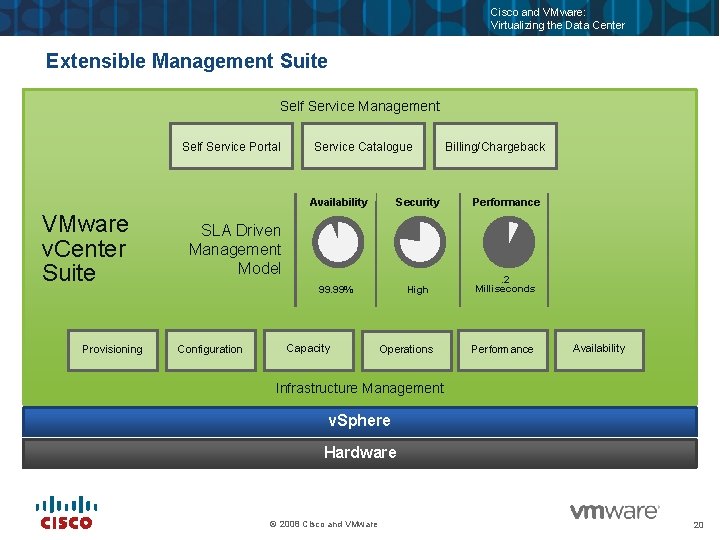
Cisco and VMware: Virtualizing the Data Center Extensible Management Suite Self Service Management Self Service Portal VMware v. Center Suite Provisioning Service Catalogue Availability Security Performance 99. 99% High . 2 Milliseconds SLA Driven Management Model Configuration Billing/Chargeback Capacity Operations Performance Availability Infrastructure Management v. Sphere Hardware © 2008 Cisco and VMware 20
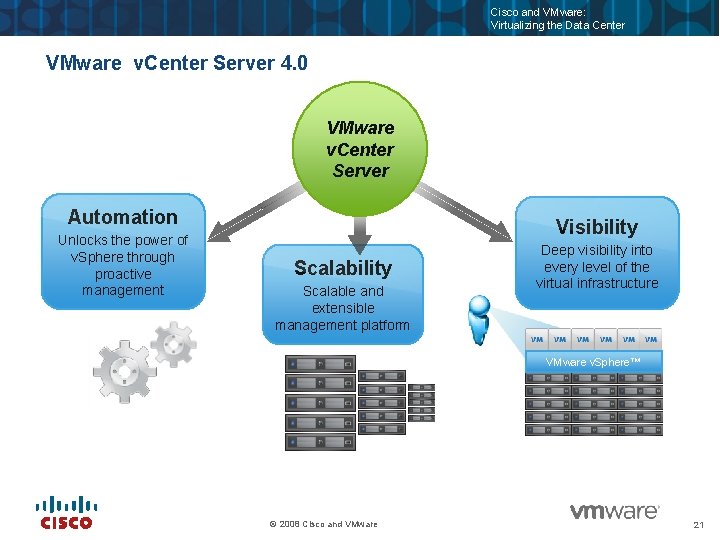
Cisco and VMware: Virtualizing the Data Center VMware v. Center Server 4. 0 VMware v. Center Server Automation Unlocks the power of v. Sphere through proactive management Visibility Scalable and extensible management platform Deep visibility into every level of the virtual infrastructure VMware v. Sphere™ © 2008 Cisco and VMware 21
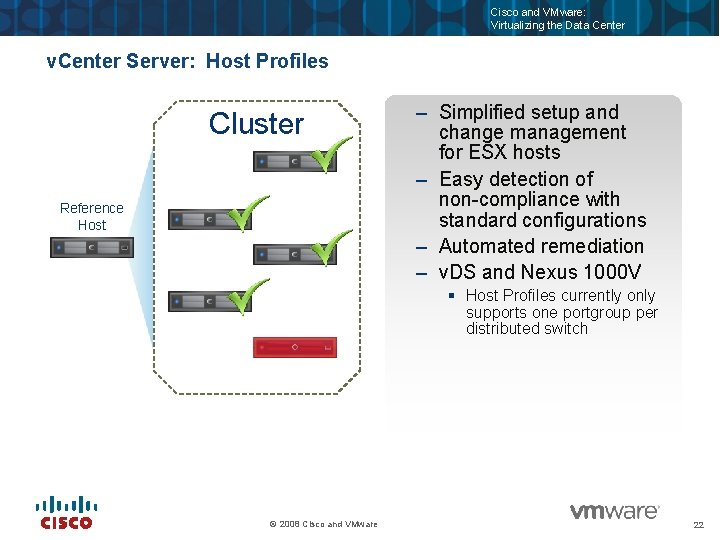
Cisco and VMware: Virtualizing the Data Center v. Center Server: Host Profiles Cluster Reference Host – Simplified setup and change management for ESX hosts – Easy detection of non-compliance with standard configurations – Automated remediation – v. DS and Nexus 1000 V § Host Profiles currently only supports one portgroup per distributed switch © 2008 Cisco and VMware 22
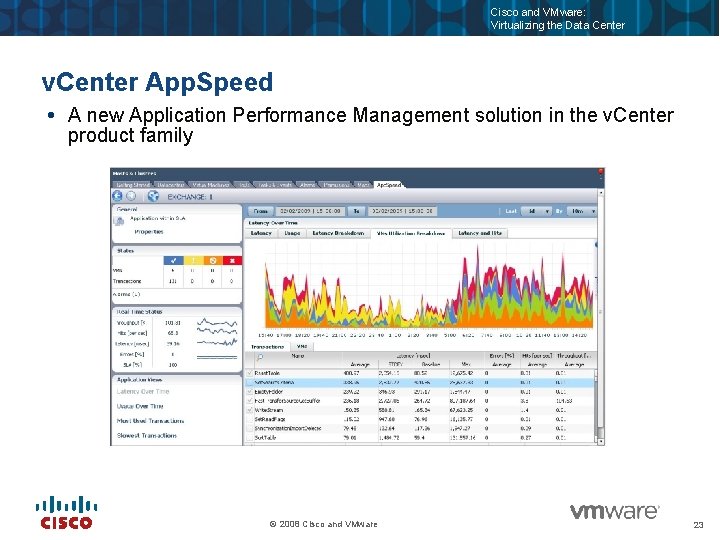
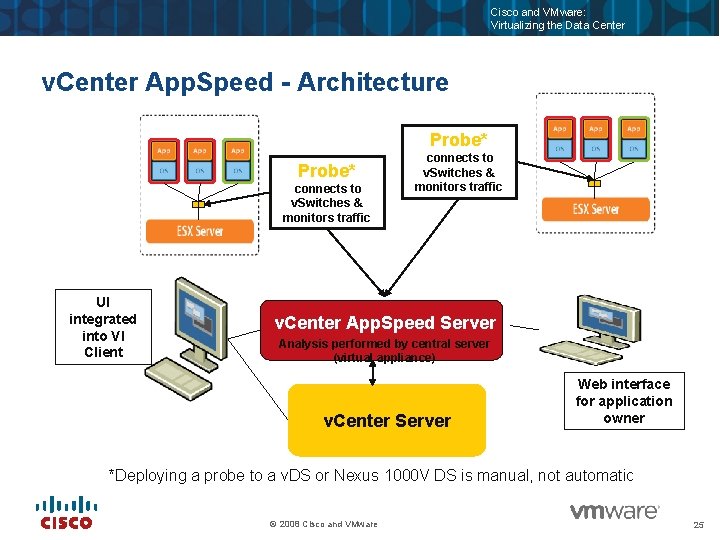
Cisco and VMware: Virtualizing the Data Center v. Center App. Speed A new Application Performance Management solution in the v. Center product family © 2008 Cisco and VMware 23
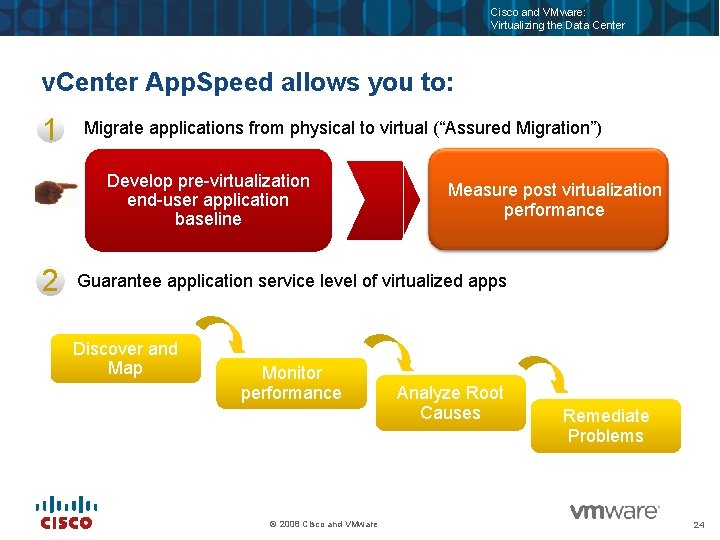
Cisco and VMware: Virtualizing the Data Center v. Center App. Speed allows you to: 1 Migrate applications from physical to virtual (“Assured Migration”) Develop pre-virtualization end-user application baseline Measure post virtualization performance 2 Guarantee application service level of virtualized apps Discover and Map Monitor performance © 2008 Cisco and VMware Analyze Root Causes Remediate Problems 24
Cisco and VMware: Virtualizing the Data Center v. Center App. Speed - Architecture Probe* connects to v. Switches & monitors traffic UI integrated into VI Client connects to v. Switches & monitors traffic v. Center App. Speed Server Analysis performed by central server (virtual appliance) v. Center Server Web interface for application owner *Deploying a probe to a v. DS or Nexus 1000 V DS is manual, not automatic © 2008 Cisco and VMware 25
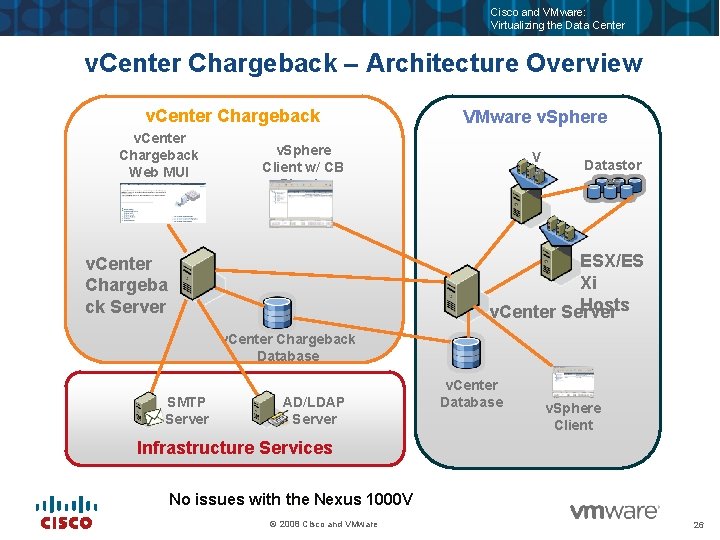
Cisco and VMware: Virtualizing the Data Center v. Center Chargeback – Architecture Overview v. Center Chargeback Web MUI VMware v. Sphere Client w/ CB Plug-in V M Datastor es ESX/ES Xi Hosts v. Center Server v. Center Chargeba ck Server v. Center Chargeback Database SMTP Server AD/LDAP Server v. Center Database v. Sphere Client Infrastructure Services No issues with the Nexus 1000 V © 2008 Cisco and VMware 26
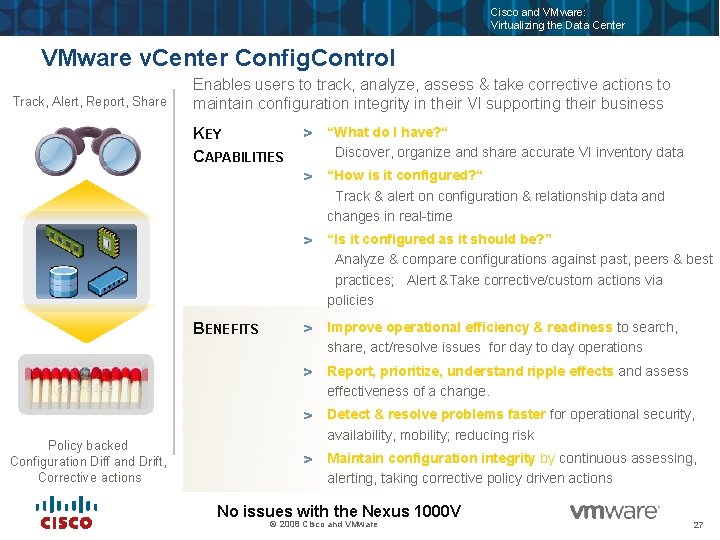
Cisco and VMware: Virtualizing the Data Center VMware v. Center Config. Control Track, Alert, Report, Share Enables users to track, analyze, assess & take corrective actions to maintain configuration integrity in their VI supporting their business KEY CAPABILITIES “What do I have? “ Discover, organize and share accurate VI inventory data “How is it configured? “ Track & alert on configuration & relationship data and changes in real-time “Is it configured as it should be? ” Analyze & compare configurations against past, peers & best practices; Alert &Take corrective/custom actions via policies BENEFITS Improve operational efficiency & readiness to search, share, act/resolve issues for day to day operations Report, prioritize, understand ripple effects and assess effectiveness of a change. Policy backed Configuration Diff and Drift, Corrective actions Detect & resolve problems faster for operational security, availability, mobility; reducing risk Maintain configuration integrity by continuous assessing, alerting, taking corrective policy driven actions No issues with the Nexus 1000 V © 2008 Cisco and VMware 27
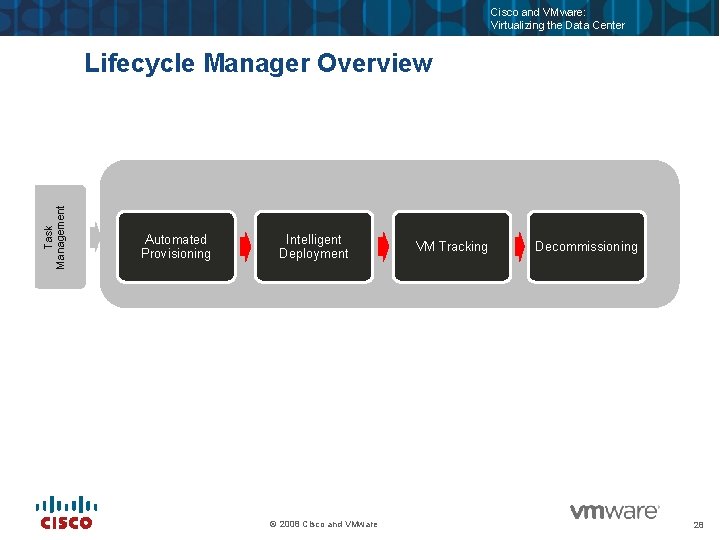
Cisco and VMware: Virtualizing the Data Center Task Management Lifecycle Manager Overview Automated Provisioning Intelligent Deployment © 2008 Cisco and VMware VM Tracking Decommissioning 28
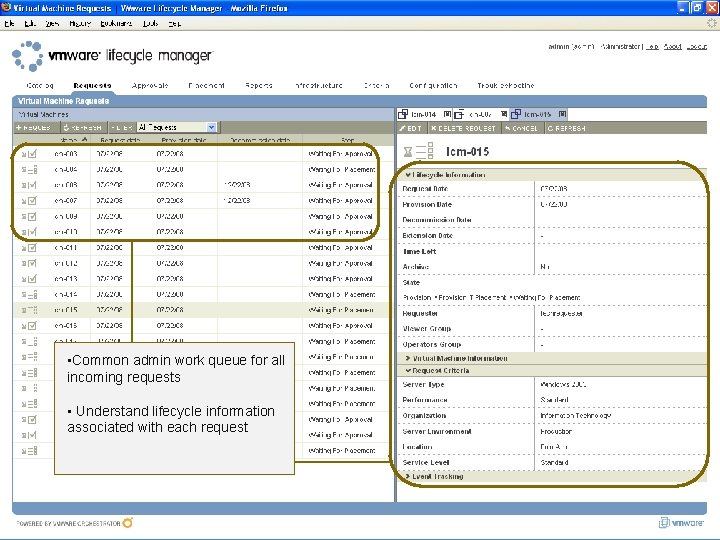
Cisco and VMware: Virtualizing the Data Center • Common admin work queue for all incoming requests • Understand lifecycle information associated with each request © 2008 Cisco Systems, Inc. and VMware 29
Cisco and VMware: Virtualizing the Data Center Lifecycle Manager and Nexus 1000 V Life. Cycle manager incorrectly names v. DS ports – If you try to place a virtual machine in a dv. Port. Group network on an LCM instance that uses v. Center with a dv. Switch configuration, the virtual machine is placed incorrectly. The virtual machine is not placed in the dv. Port. Group under dv. Switch, but is instead placed in a network named dv. Port. Group. Also, the network label of the virtual machine is incorrect. You will need to edit the name manually. © 2008 Cisco and VMware 30
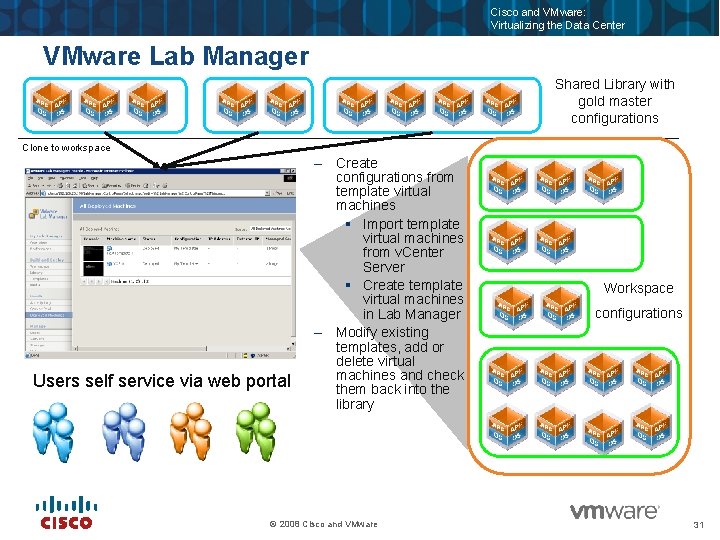
Cisco and VMware: Virtualizing the Data Center VMware Lab Manager Shared Library with gold master configurations Clone to workspace Users self service via web portal – Create configurations from template virtual machines § Import template virtual machines from v. Center Server § Create template virtual machines in Lab Manager – Modify existing templates, add or delete virtual machines and check them back into the library © 2008 Cisco and VMware Workspace configurations 31
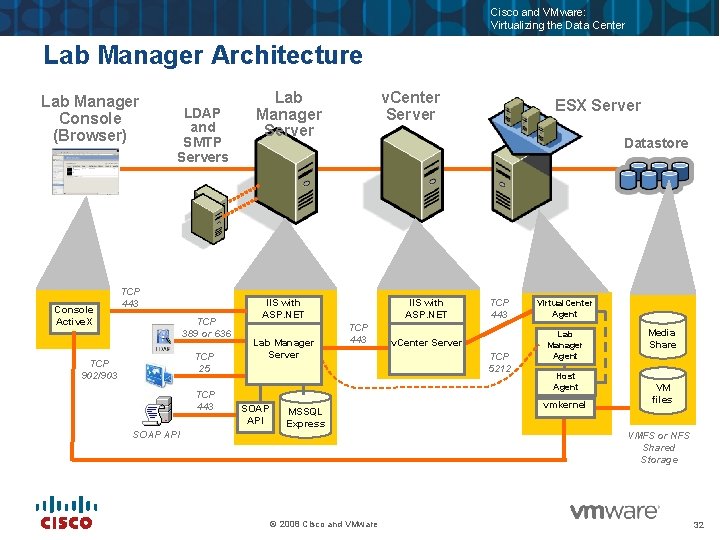
Cisco and VMware: Virtualizing the Data Center Lab Manager Architecture Lab Manager Console (Browser) Console Active. X LDAP and SMTP Servers TCP 443 TCP 389 or 636 TCP 25 TCP 902/903 TCP 443 SOAP API Lab Manager Server v. Center Server Datastore IIS with ASP. NET Lab Manager Server SOAP API ESX Server IIS with ASP. NET TCP 443 MSSQL Express TCP 443 v. Center Server TCP 5212 Virtual. Center Agent Lab Manager Agent Host Agent vmkernel Media Share VM files VMFS or NFS Shared Storage © 2008 Cisco and VMware 32
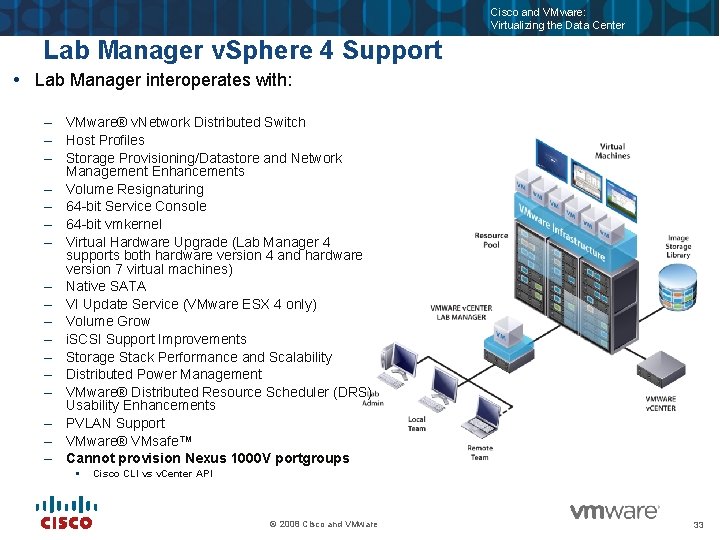
Cisco and VMware: Virtualizing the Data Center Lab Manager v. Sphere 4 Support Lab Manager interoperates with: – VMware® v. Network Distributed Switch – Host Profiles – Storage Provisioning/Datastore and Network Management Enhancements – Volume Resignaturing – 64 -bit Service Console – 64 -bit vmkernel – Virtual Hardware Upgrade (Lab Manager 4 supports both hardware version 4 and hardware version 7 virtual machines) – Native SATA – VI Update Service (VMware ESX 4 only) – Volume Grow – i. SCSI Support Improvements – Storage Stack Performance and Scalability – Distributed Power Management – VMware® Distributed Resource Scheduler (DRS) Usability Enhancements – PVLAN Support – VMware® VMsafe™ – Cannot provision Nexus 1000 V portgroups § Cisco CLI vs v. Center API © 2008 Cisco and VMware 33
Cisco and VMware: Virtualizing the Data Center Lab Manager and the Nexus 1000 V Lab Manager dynamically provisions network switches and portgroups via v. Center Server, it does not connect to the Nexus 1000 V VSM Nexus 1000 V dynamically provisions networks via the VSM (virtual supervisor module) to v. Center connection LM and N 1 KV can be on the same server, just not share the same NICs © 2008 Cisco and VMware 34
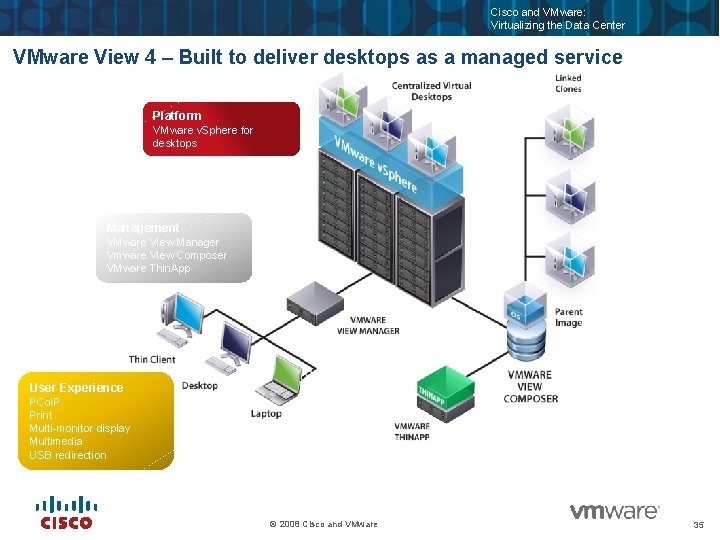
Cisco and VMware: Virtualizing the Data Center VMware View 4 – Built to deliver desktops as a managed service Platform VMware v. Sphere for desktops Management VMware View Manager Vmware View Composer VMware Thin. App User Experience PCo. IP Print Multi-monitor display Multimedia USB redirection © 2008 Cisco and VMware 35
Cisco and VMware: Virtualizing the Data Center View 4 and Nexus 1000 V View 4 supports the Nexus 1000 V except for: – Linked clone desktops in a persistent pool will fail to refresh or recompose on hosts when using v. DS (includes N 1 KV). The error message reports the clone is trying to use the v. DS port that is assigned to the replica. – Fixed in future release of View © 2008 Cisco and VMware 36
Cisco and VMware: Virtualizing the Data Center Summary The vast majority of VMware products work with and can leverage the Cisco Nexus 1000 V Where issues do exist they are in products that directly manipulate network connections via v. Center Server Issue are of the “can’t use feature”, not “can’t be on same system” The Cisco Nexus 1000 V should be a first choice on production systems © 2008 Cisco and VMware 37
Cisco and VMware: Virtualizing the Data Center Thank you © 2008 Cisco Systems, Inc. and VMware 38