
CIS 90 Lesson 5 Lesson Module Status Slides



![CIS 90 - Lesson 2 Example program to process: echo command [rsimms@opus ~]$ echo](https://slidetodoc.com/presentation_image_h2/7738a7d67750b214adcb0ece637331b8/image-32.jpg "CIS 90 - Lesson 2 Example program to process: echo command [rsimms@opus ~]$ echo")
- Slides: 52
CIS 90 - Lesson 5 Lesson Module Status • Slides – • Properties - done • Flash cards – Lessons 1 -4 • quiz – NA • Web Calendar summary – done • Web book pages • Commands – NA • Lab – NA
CIS 90 - Lesson 5 Quiz Please close your books, turn off your monitor, take out a blank piece of paper and answer the following questions: • What are three elements of a UNIX file? • What are two commands you can use to read through long text files? • How do you distinguish between relative and absolute paths?
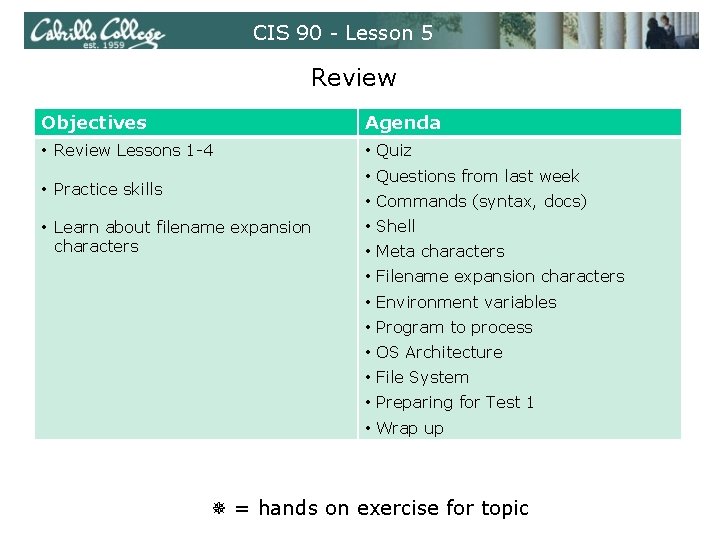
CIS 90 - Lesson 5 Review Objectives Agenda • Review Lessons 1 -4 • Quiz • Questions from last week • Practice skills • Commands (syntax, docs) • Learn about filename expansion characters • Shell • Meta characters • Filename expansion characters • Environment variables • Program to process • OS Architecture • File System • Preparing for Test 1 • Wrap up = hands on exercise for topic
CIS 90 - Lesson 5 Housekeeping
CIS 90 - Lesson 5 Previous material and assignment 1. Questions on previous material or labs? 2. Return graded material 3. Review Grades web page 4. Review Extra Credit page 5. Lab 4 due today 6. Survey VTEA/Perkins Survey - today
CIS 90 - Lesson 5 Coming up next week 1. Instructional Planning Survey 2. No lab assignment so you can prepare for the test 3. First test next week !! • 30 questions, 30 points, plus some extra credit • 15 questions taken from CIS 90 Lesson 1 -5 flashcards • 15 operational questions based on using commands used in labs 1 -4 • 1 double-sided crib sheet allowed, and can use command line on Opus and RH 9 VM.
CIS 90 - Lesson 5 First Test 1. Example flash card question: What is the program called that prompts you for a command, then locates that command executes it? 2. Example operational question: From your home directory change to the Poems/Yeats/ directory. What one -liner (one ore more commands followed by Enter) would clear the screen and print the last line of all three Yeats poems without having to type the names of each individual poem file name?
CIS 90 - Lesson 5 First test – recommended preparation 1. Use flashcards till you know the answers and the ones you have mental blocks on add to your crib sheet 2. Do labs 1 -4 over again and use the forum to ask and answer questions as well as clarify confusing material. 3. Scan through the textbook sections referenced on the Calendar page for another perspective on weaving all this information together.
CIS 90 - Lesson 5 Command Review
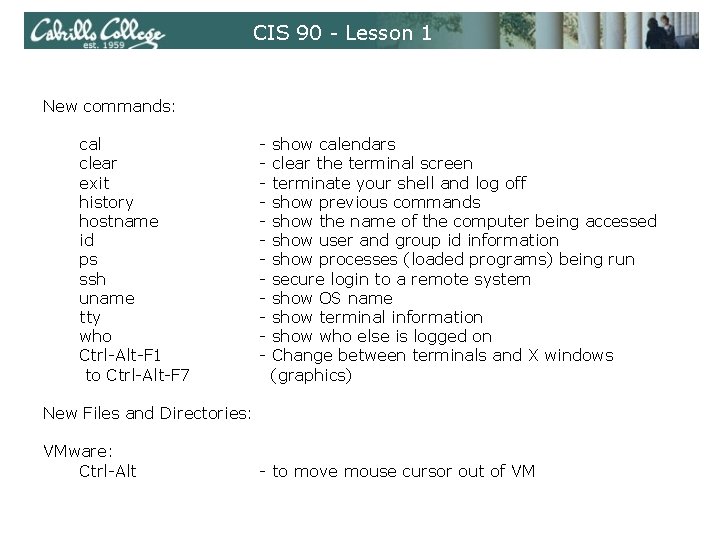
CIS 90 - Lesson 1 New commands: cal clear exit history hostname id ps ssh uname tty who Ctrl-Alt-F 1 to Ctrl-Alt-F 7 - show calendars clear the terminal screen terminate your shell and log off show previous commands show the name of the computer being accessed show user and group id information show processes (loaded programs) being run secure login to a remote system show OS name show terminal information show who else is logged on Change between terminals and X windows (graphics) New Files and Directories: VMware: Ctrl-Alt - to move mouse cursor out of VM
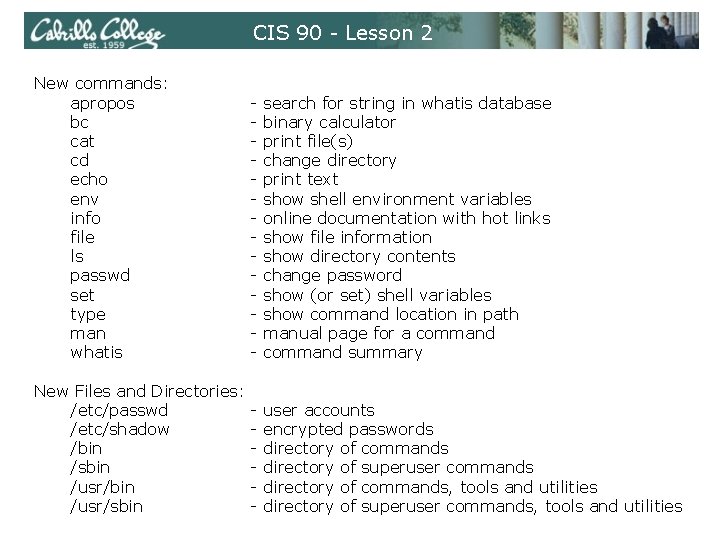
CIS 90 - Lesson 2 New commands: apropos bc cat cd echo env info file ls passwd set type man whatis - search for string in whatis database binary calculator print file(s) change directory print text show shell environment variables online documentation with hot links show file information show directory contents change password show (or set) shell variables show command location in path manual page for a command summary New Files and Directories: /etc/passwd /etc/shadow /bin /sbin /usr/sbin - user accounts encrypted passwords directory of commands directory of superuser commands directory of commands, tools and utilities directory of superuser commands, tools and utilities
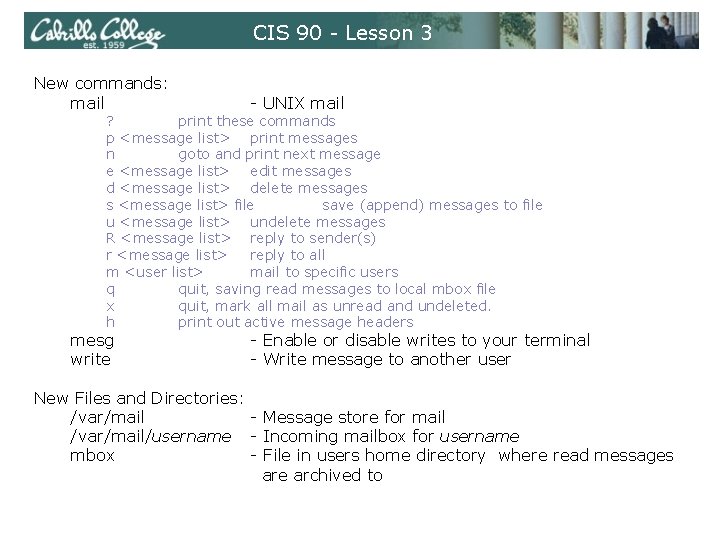
CIS 90 - Lesson 3 New commands: mail - UNIX mail ? print these commands p <message list> print messages n goto and print next message e <message list> edit messages d <message list> delete messages s <message list> file save (append) messages to file u <message list> undelete messages R <message list> reply to sender(s) r <message list> reply to all m <user list> mail to specific users q quit, saving read messages to local mbox file x quit, mark all mail as unread and undeleted. h print out active message headers mesg write - Enable or disable writes to your terminal - Write message to another user New Files and Directories: /var/mail - Message store for mail /var/mail/username - Incoming mailbox for username mbox - File in users home directory where read messages are archived to
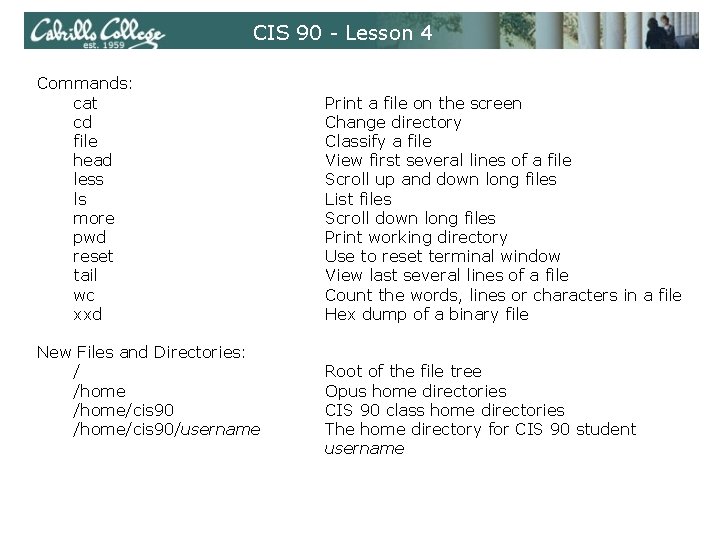
CIS 90 - Lesson 4 Commands: cat cd file head less ls more pwd reset tail wc xxd New Files and Directories: / /home/cis 90/username Print a file on the screen Change directory Classify a file View first several lines of a file Scroll up and down long files List files Scroll down long files Print working directory Use to reset terminal window View last several lines of a file Count the words, lines or characters in a file Hex dump of a binary file Root of the file tree Opus home directories CIS 90 class home directories The home directory for CIS 90 student username
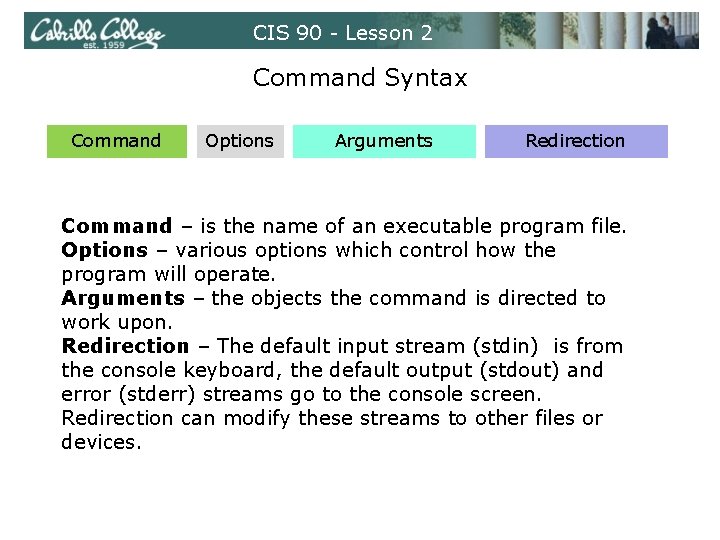
CIS 90 - Lesson 2 Command Syntax Command Options Arguments Redirection Command – is the name of an executable program file. Options – various options which control how the program will operate. Arguments – the objects the command is directed to work upon. Redirection – The default input stream (stdin) is from the console keyboard, the default output (stdout) and error (stderr) streams go to the console screen. Redirection can modify these streams to other files or devices.
CIS 90 - Lesson 5 Class Exercise Flashcards • Lesson 1 • Lesson 2
CIS 90 - Lesson 5 Shell
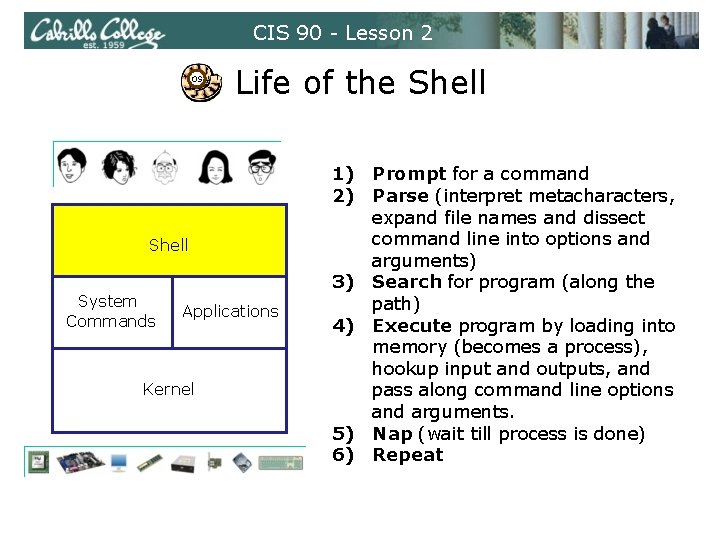
CIS 90 - Lesson 2 OS Life of the Shell System Commands Applications Kernel 1) Prompt for a command 2) Parse (interpret metacharacters, expand file names and dissect command line into options and arguments) 3) Search for program (along the path) 4) Execute program by loading into memory (becomes a process), hookup input and outputs, and pass along command line options and arguments. 5) Nap (wait till process is done) 6) Repeat
CIS 90 - Lesson 5 Meta characters
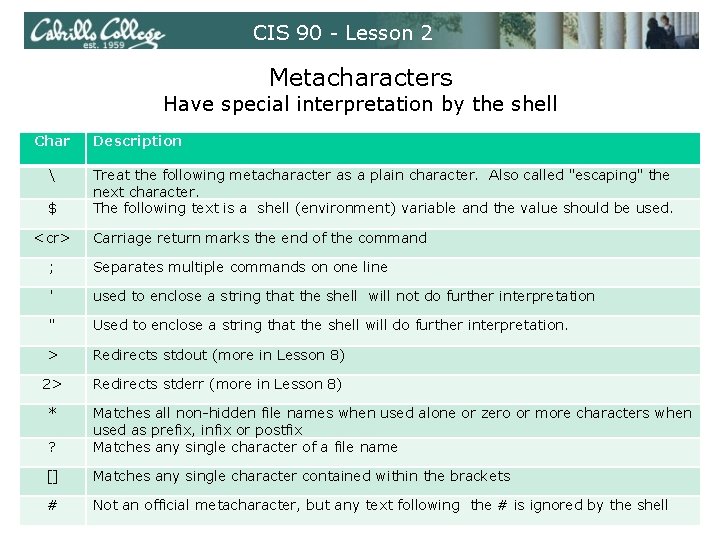
CIS 90 - Lesson 2 Metacharacters Have special interpretation by the shell Char $ <cr> Description Treat the following metacharacter as a plain character. Also called "escaping" the next character. The following text is a shell (environment) variable and the value should be used. Carriage return marks the end of the command ; Separates multiple commands on one line ' used to enclose a string that the shell will not do further interpretation " Used to enclose a string that the shell will do further interpretation. > Redirects stdout (more in Lesson 8) 2> Redirects stderr (more in Lesson 8) * ? Matches all non-hidden file names when used alone or zero or more characters when used as prefix, infix or postfix Matches any single character of a file name [] Matches any single character contained within the brackets # Not an official metacharacter, but any text following the # is ignored by the shell
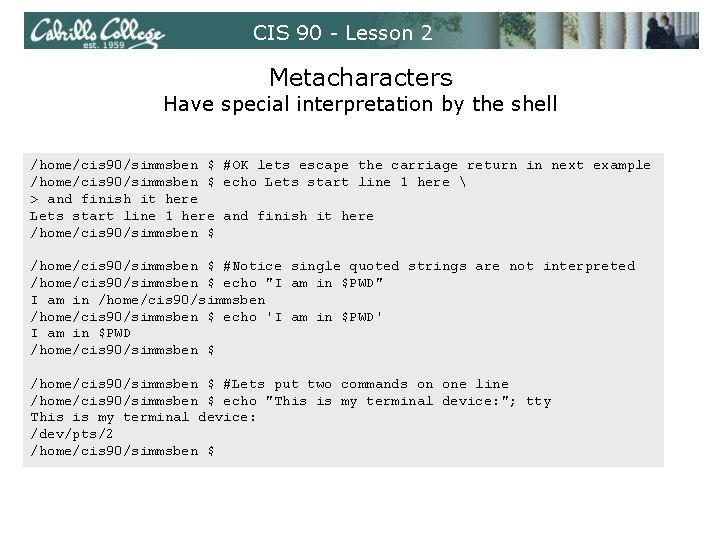
CIS 90 - Lesson 2 Metacharacters Have special interpretation by the shell /home/cis 90/simmsben $ #OK lets escape the carriage return in next example /home/cis 90/simmsben $ echo Lets start line 1 here > and finish it here Lets start line 1 here and finish it here /home/cis 90/simmsben $ #Notice single quoted strings are not interpreted /home/cis 90/simmsben $ echo "I am in $PWD" I am in /home/cis 90/simmsben $ echo 'I am in $PWD' I am in $PWD /home/cis 90/simmsben $ #Lets put two commands on one line /home/cis 90/simmsben $ echo "This is my terminal device: "; tty This is my terminal device: /dev/pts/2 /home/cis 90/simmsben $
CIS 90 - Lesson 5 File Name Expansion
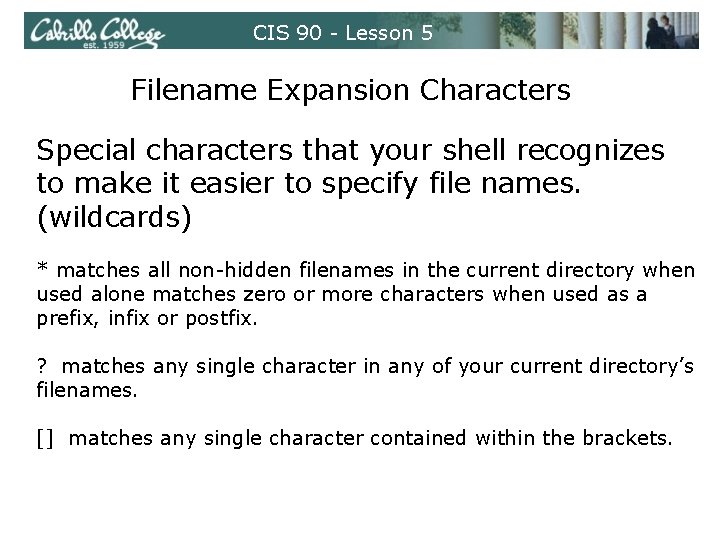
CIS 90 - Lesson 5 Filename Expansion Characters Special characters that your shell recognizes to make it easier to specify file names. (wildcards) * matches all non-hidden filenames in the current directory when used alone matches zero or more characters when used as a prefix, infix or postfix. ? matches any single character in any of your current directory’s filenames. [] matches any single character contained within the brackets.
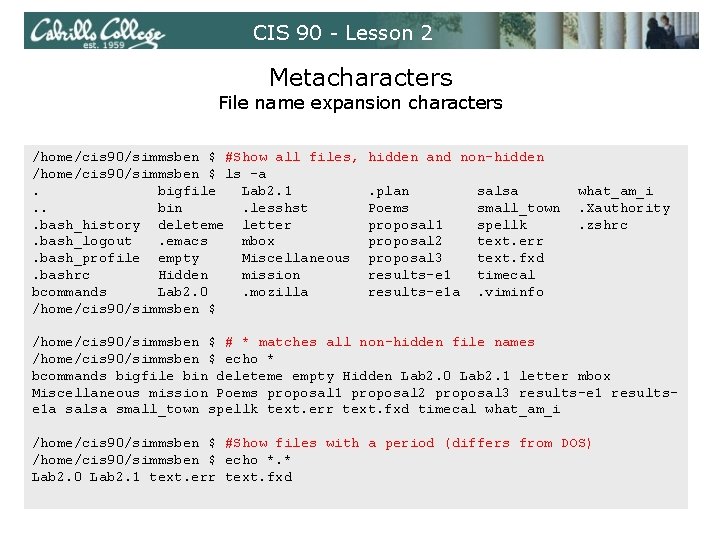
CIS 90 - Lesson 2 Metacharacters File name expansion characters /home/cis 90/simmsben $ #Show all files, /home/cis 90/simmsben $ ls -a. bigfile Lab 2. 1. . bin. lesshst. bash_history deleteme letter. bash_logout. emacs mbox. bash_profile empty Miscellaneous. bashrc Hidden mission bcommands Lab 2. 0. mozilla /home/cis 90/simmsben $ hidden and non-hidden. plan Poems proposal 1 proposal 2 proposal 3 results-e 1 a salsa small_town spellk text. err text. fxd timecal. viminfo what_am_i. Xauthority. zshrc /home/cis 90/simmsben $ # * matches all non-hidden file names /home/cis 90/simmsben $ echo * bcommands bigfile bin deleteme empty Hidden Lab 2. 0 Lab 2. 1 letter mbox Miscellaneous mission Poems proposal 1 proposal 2 proposal 3 results-e 1 resultse 1 a salsa small_town spellk text. err text. fxd timecal what_am_i /home/cis 90/simmsben $ #Show files with a period (differs from DOS) /home/cis 90/simmsben $ echo *. * Lab 2. 0 Lab 2. 1 text. err text. fxd
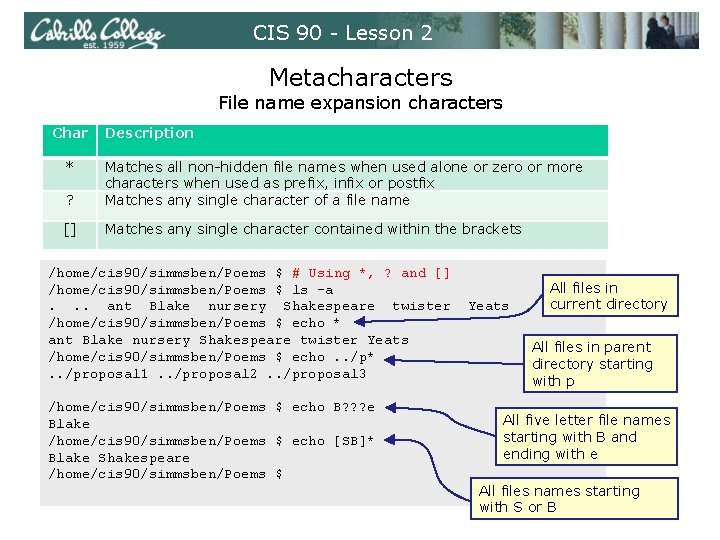
CIS 90 - Lesson 2 Metacharacters File name expansion characters Char * Description ? Matches all non-hidden file names when used alone or zero or more characters when used as prefix, infix or postfix Matches any single character of a file name [] Matches any single character contained within the brackets /home/cis 90/simmsben/Poems $ # Using *, ? and [] /home/cis 90/simmsben/Poems $ ls -a. . . ant Blake nursery Shakespeare twister /home/cis 90/simmsben/Poems $ echo * ant Blake nursery Shakespeare twister Yeats /home/cis 90/simmsben/Poems $ echo. . /p*. . /proposal 1. . /proposal 2. . /proposal 3 /home/cis 90/simmsben/Poems $ echo B? ? ? e Blake /home/cis 90/simmsben/Poems $ echo [SB]* Blake Shakespeare /home/cis 90/simmsben/Poems $ Yeats All files in current directory All files in parent directory starting with p All five letter file names starting with B and ending with e All files names starting with S or B
CIS 90 - Lesson 5 Environment Variables
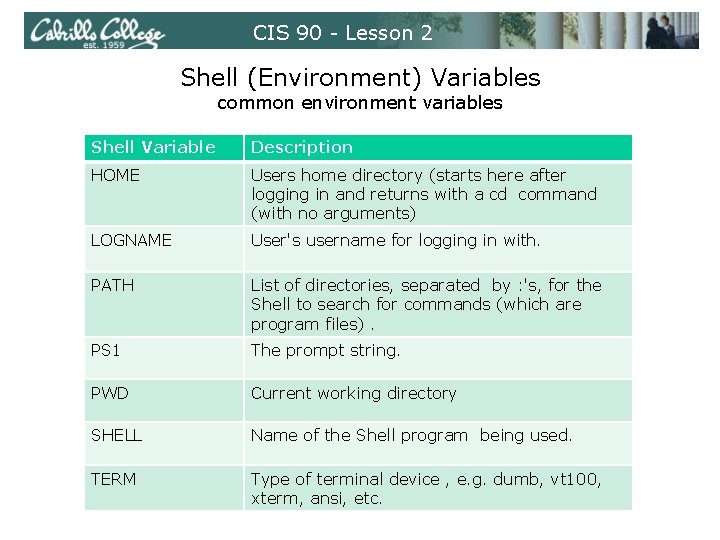
CIS 90 - Lesson 2 Shell (Environment) Variables common environment variables Shell Variable Description HOME Users home directory (starts here after logging in and returns with a cd command (with no arguments) LOGNAME User's username for logging in with. PATH List of directories, separated by : 's, for the Shell to search for commands (which are program files). PS 1 The prompt string. PWD Current working directory SHELL Name of the Shell program being used. TERM Type of terminal device , e. g. dumb, vt 100, xterm, ansi, etc.
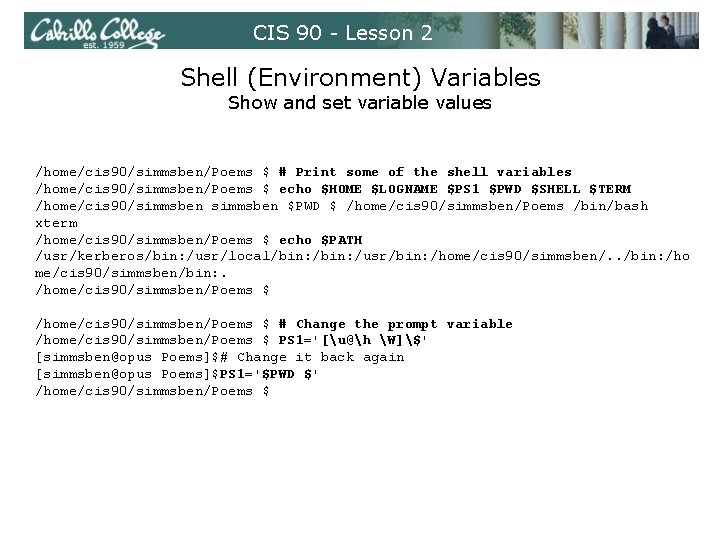
CIS 90 - Lesson 2 Shell (Environment) Variables Show and set variable values /home/cis 90/simmsben/Poems $ # Print some of the shell variables /home/cis 90/simmsben/Poems $ echo $HOME $LOGNAME $PS 1 $PWD $SHELL $TERM /home/cis 90/simmsben $PWD $ /home/cis 90/simmsben/Poems /bin/bash xterm /home/cis 90/simmsben/Poems $ echo $PATH /usr/kerberos/bin: /usr/local/bin: /usr/bin: /home/cis 90/simmsben/. . /bin: /ho me/cis 90/simmsben/bin: . /home/cis 90/simmsben/Poems $ # Change the prompt variable /home/cis 90/simmsben/Poems $ PS 1='[u@h W]$' [simmsben@opus Poems]$# Change it back again [simmsben@opus Poems]$PS 1='$PWD $' /home/cis 90/simmsben/Poems $
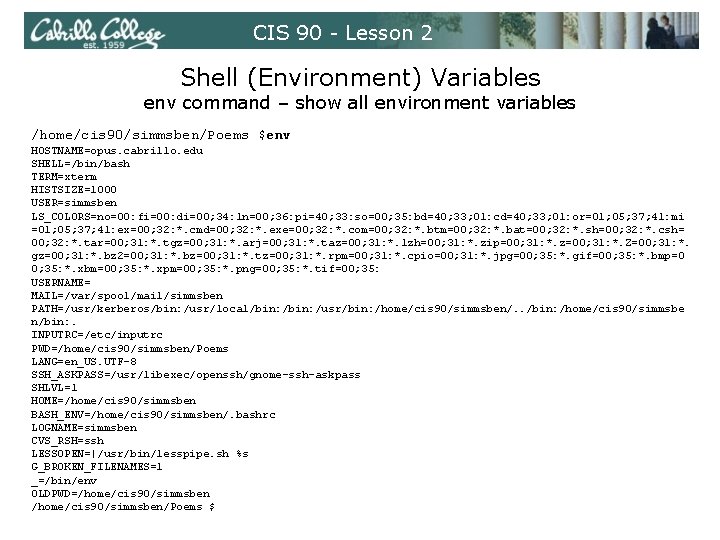
CIS 90 - Lesson 2 Shell (Environment) Variables env command – show all environment variables /home/cis 90/simmsben/Poems $env HOSTNAME=opus. cabrillo. edu SHELL=/bin/bash TERM=xterm HISTSIZE=1000 USER=simmsben LS_COLORS=no=00: fi=00: di=00; 34: ln=00; 36: pi=40; 33: so=00; 35: bd=40; 33; 01: cd=40; 33; 01: or=01; 05; 37; 41: mi =01; 05; 37; 41: ex=00; 32: *. cmd=00; 32: *. exe=00; 32: *. com=00; 32: *. btm=00; 32: *. bat=00; 32: *. sh=00; 32: *. csh= 00; 32: *. tar=00; 31: *. tgz=00; 31: *. arj=00; 31: *. taz=00; 31: *. lzh=00; 31: *. zip=00; 31: *. z=00; 31: *. Z=00; 31: *. gz=00; 31: *. bz 2=00; 31: *. bz=00; 31: *. tz=00; 31: *. rpm=00; 31: *. cpio=00; 31: *. jpg=00; 35: *. gif=00; 35: *. bmp=0 0; 35: *. xbm=00; 35: *. xpm=00; 35: *. png=00; 35: *. tif=00; 35: USERNAME= MAIL=/var/spool/mail/simmsben PATH=/usr/kerberos/bin: /usr/local/bin: /usr/bin: /home/cis 90/simmsben/. . /bin: /home/cis 90/simmsbe n/bin: . INPUTRC=/etc/inputrc PWD=/home/cis 90/simmsben/Poems LANG=en_US. UTF-8 SSH_ASKPASS=/usr/libexec/openssh/gnome-ssh-askpass SHLVL=1 HOME=/home/cis 90/simmsben BASH_ENV=/home/cis 90/simmsben/. bashrc LOGNAME=simmsben CVS_RSH=ssh LESSOPEN=|/usr/bin/lesspipe. sh %s G_BROKEN_FILENAMES=1 _=/bin/env OLDPWD=/home/cis 90/simmsben/Poems $
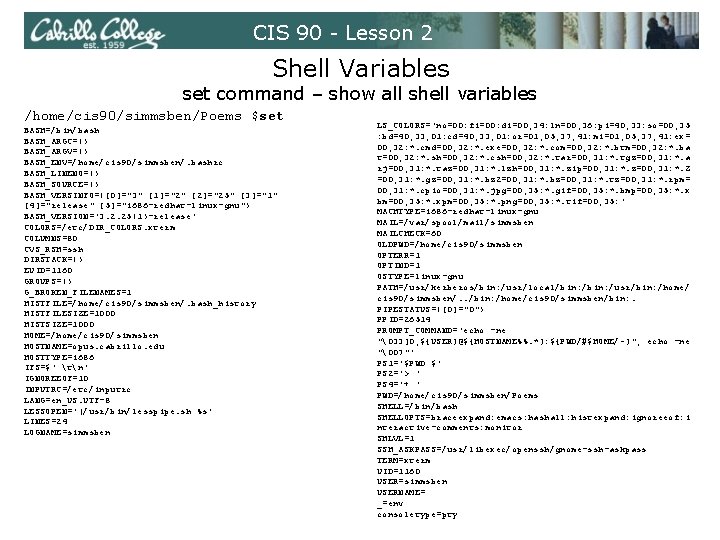
CIS 90 - Lesson 2 Shell Variables set command – show all shell variables /home/cis 90/simmsben/Poems $set BASH=/bin/bash BASH_ARGC=() BASH_ARGV=() BASH_ENV=/home/cis 90/simmsben/. bashrc BASH_LINENO=() BASH_SOURCE=() BASH_VERSINFO=([0]="3" [1]="2" [2]="25" [3]="1" [4]="release" [5]="i 686 -redhat-linux-gnu") BASH_VERSION='3. 2. 25(1)-release' COLORS=/etc/DIR_COLORS. xterm COLUMNS=80 CVS_RSH=ssh DIRSTACK=() EUID=1160 GROUPS=() G_BROKEN_FILENAMES=1 HISTFILE=/home/cis 90/simmsben/. bash_history HISTFILESIZE=1000 HISTSIZE=1000 HOME=/home/cis 90/simmsben HOSTNAME=opus. cabrillo. edu HOSTTYPE=i 686 IFS=$' tn' IGNOREEOF=10 INPUTRC=/etc/inputrc LANG=en_US. UTF-8 LESSOPEN='|/usr/bin/lesspipe. sh %s' LINES=24 LOGNAME=simmsben LS_COLORS='no=00: fi=00: di=00; 34: ln=00; 36: pi=40; 33: so=00; 35 : bd=40; 33; 01: cd=40; 33; 01: or=01; 05; 37; 41: mi=01; 05; 37; 41: ex= 00; 32: *. cmd=00; 32: *. exe=00; 32: *. com=00; 32: *. btm=00; 32: *. ba t=00; 32: *. sh=00; 32: *. csh=00; 32: *. tar=00; 31: *. tgz=00; 31: *. a rj=00; 31: *. taz=00; 31: *. lzh=00; 31: *. zip=00; 31: *. z=00; 31: *. Z =00; 31: *. gz=00; 31: *. bz 2=00; 31: *. bz=00; 31: *. tz=00; 31: *. rpm= 00; 31: *. cpio=00; 31: *. jpg=00; 35: *. gif=00; 35: *. bmp=00; 35: *. x bm=00; 35: *. xpm=00; 35: *. png=00; 35: *. tif=00; 35: ' MACHTYPE=i 686 -redhat-linux-gnu MAIL=/var/spool/mail/simmsben MAILCHECK=60 OLDPWD=/home/cis 90/simmsben OPTERR=1 OPTIND=1 OSTYPE=linux-gnu PATH=/usr/kerberos/bin: /usr/local/bin: /usr/bin: /home/ cis 90/simmsben/. . /bin: /home/cis 90/simmsben/bin: . PIPESTATUS=([0]="0") PPID=26514 PROMPT_COMMAND='echo -ne "33]0; ${USER}@${HOSTNAME%%. *}: ${PWD/#$HOME/~}"; echo -ne "07"' PS 1='$PWD $' PS 2='> ' PS 4='+ ' PWD=/home/cis 90/simmsben/Poems SHELL=/bin/bash SHELLOPTS=braceexpand: emacs: hashall: histexpand: ignoreeof: i nteractive-comments: monitor SHLVL=1 SSH_ASKPASS=/usr/libexec/openssh/gnome-ssh-askpass TERM=xterm UID=1160 USER=simmsben USERNAME= _=env consoletype=pty
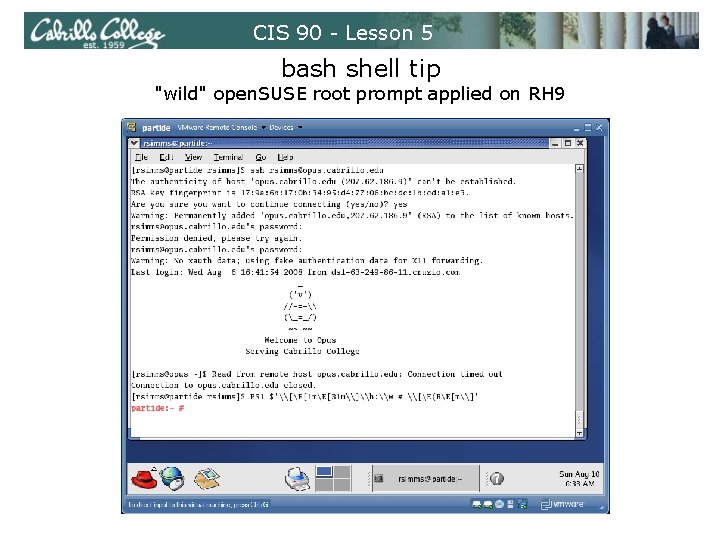
CIS 90 - Lesson 5 bash shell tip "wild" open. SUSE root prompt applied on RH 9
CIS 90 - Lesson 5 Program to Process
CIS 90 - Lesson 2 Example program to process: echo command [rsimms@opus ~]$ echo Always in motion is the future [rsimms@opus ~]$ /dev/pts/1 stdout Inputs: Command line Outputs: stdout Options: NA Args: Always in motion is the future 0 echo Always in motion is the future 1 2 stdin stderr
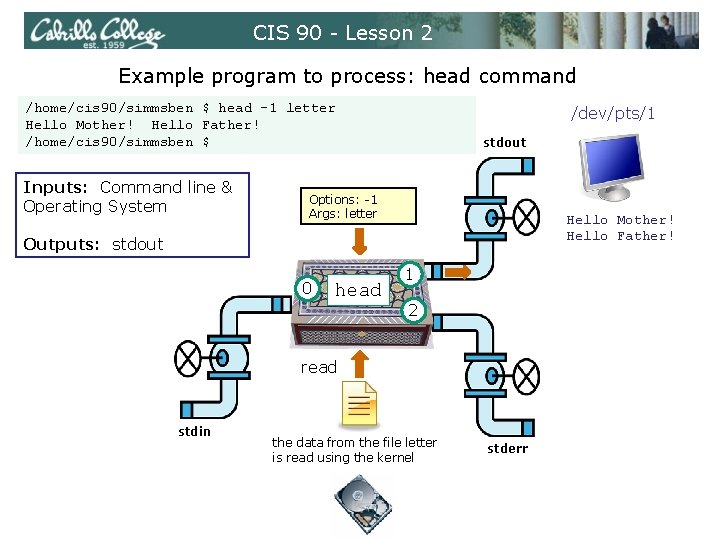
CIS 90 - Lesson 2 Example program to process: head command /home/cis 90/simmsben $ head -1 letter Hello Mother! Hello Father! /home/cis 90/simmsben $ Inputs: Command line & Operating System /dev/pts/1 stdout Options: -1 Args: letter Hello Mother! Hello Father! Outputs: stdout 0 head 1 2 read stdin the data from the file letter is read using the kernel stderr
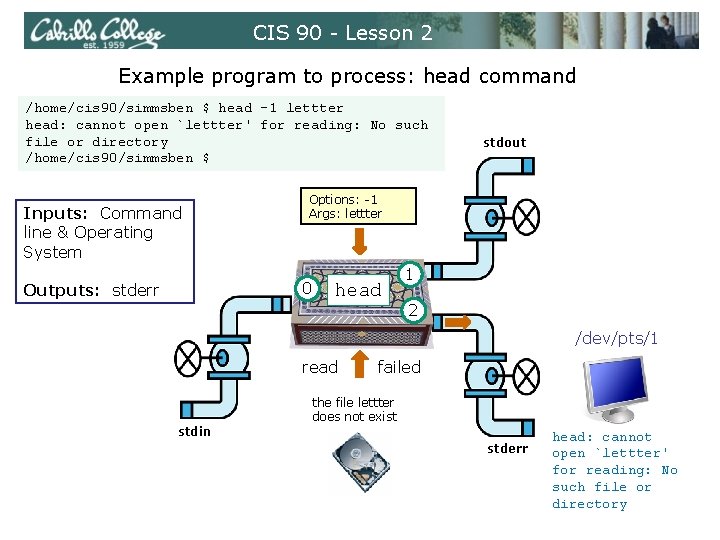
CIS 90 - Lesson 2 Example program to process: head command /home/cis 90/simmsben $ head -1 lettter head: cannot open `lettter' for reading: No such file or directory /home/cis 90/simmsben $ Inputs: Command line & Operating System Options: -1 Args: lettter 0 Outputs: stderr stdout head 1 2 /dev/pts/1 read failed the file lettter does not exist stdin stderr head: cannot open `lettter' for reading: No such file or directory
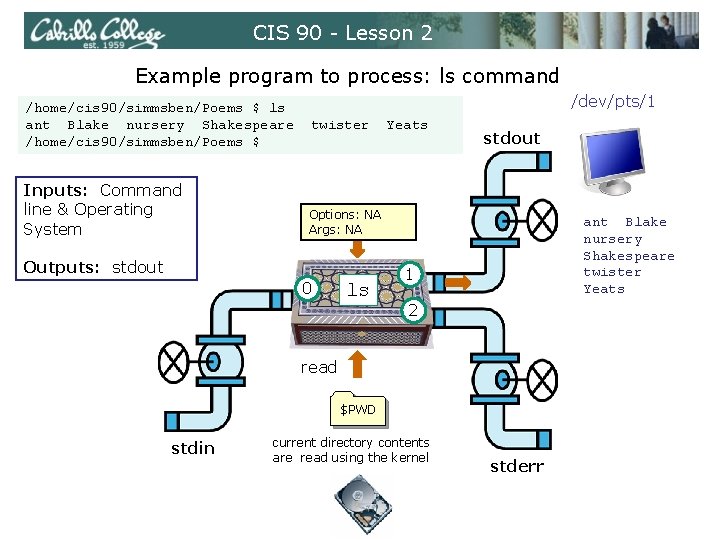
CIS 90 - Lesson 2 Example program to process: ls command /home/cis 90/simmsben/Poems $ ls ant Blake nursery Shakespeare /home/cis 90/simmsben/Poems $ Inputs: Command line & Operating System /dev/pts/1 twister Yeats stdout Options: NA Args: NA Outputs: stdout 0 ls ant Blake nursery Shakespeare twister Yeats 1 2 read $PWD stdin current directory contents are read using the kernel stderr
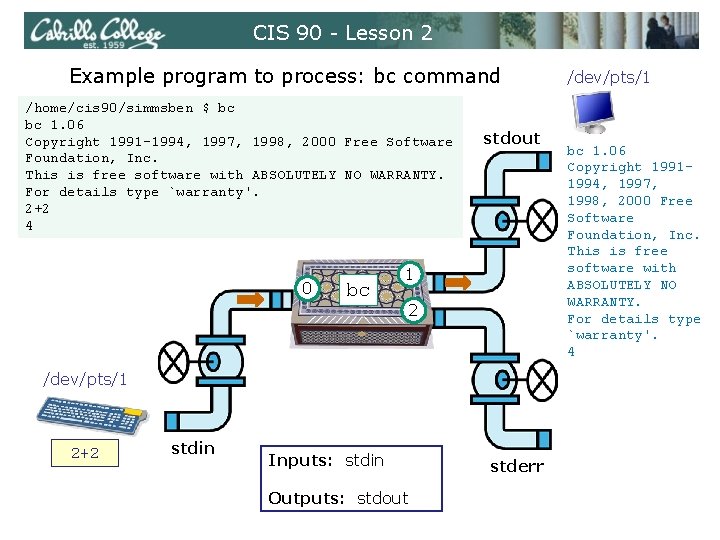
CIS 90 - Lesson 2 Example program to process: bc command /home/cis 90/simmsben $ bc bc 1. 06 Copyright 1991 -1994, 1997, 1998, 2000 Free Software Foundation, Inc. This is free software with ABSOLUTELY NO WARRANTY. For details type `warranty'. 2+2 4 0 bc stdout 1 2 /dev/pts/1 2+2 stdin Inputs: stdin Outputs: stdout stderr /dev/pts/1 bc 1. 06 Copyright 19911994, 1997, 1998, 2000 Free Software Foundation, Inc. This is free software with ABSOLUTELY NO WARRANTY. For details type `warranty'. 4
CIS 90 - Lesson 5 Architecture
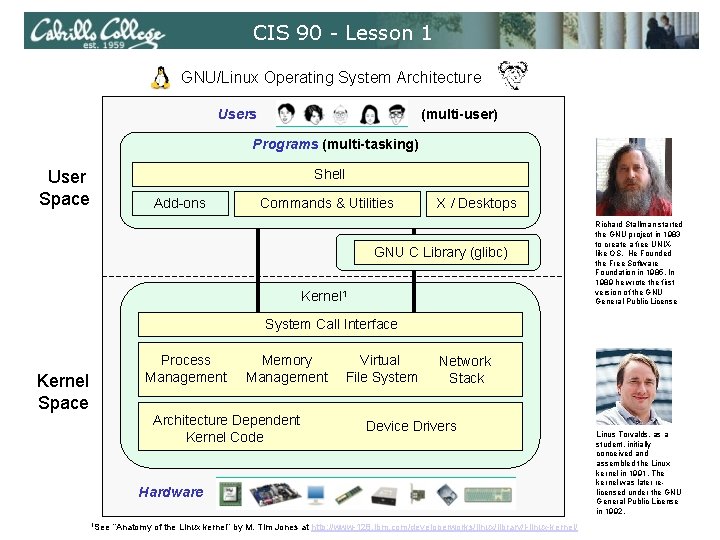
CIS 90 - Lesson 1 GNU/Linux Operating System Architecture Users (multi-user) Programs (multi-tasking) Shell User Space Add-ons Commands & Utilities X / Desktops GNU C Library (glibc) Kernel 1 Richard Stallman started the GNU project in 1983 to create a free UNIXlike OS. He Founded the Free Software Foundation in 1985. In 1989 he wrote the first version of the GNU General Public License System Call Interface Process Management Kernel Space Memory Management Architecture Dependent Kernel Code Virtual File System Network Stack Device Drivers Hardware 1 See “Anatomy of the Linux kernel” by M. Tim Jones at http: //www-128. ibm. com/developerworks/linux/library/l-linux-kernel/ Linus Torvalds, as a student, initially conceived and assembled the Linux kernel in 1991. The kernel was later relicensed under the GNU General Public License in 1992.
CIS 90 - Lesson 5 File System
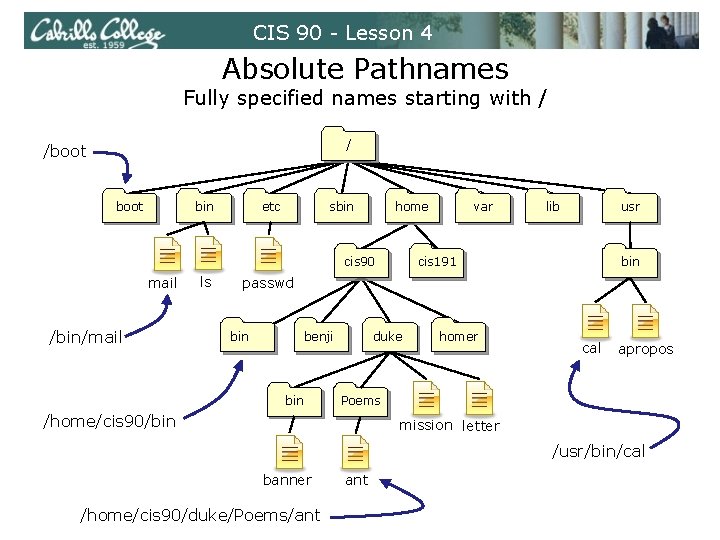
CIS 90 - Lesson 4 Absolute Pathnames Fully specified names starting with / / /boot bin etc sbin home cis 90 mail /bin/mail ls var lib usr cis 191 bin passwd bin benji bin duke homer cal apropos Poems /home/cis 90/bin mission letter /usr/bin/cal banner /home/cis 90/duke/Poems/ant
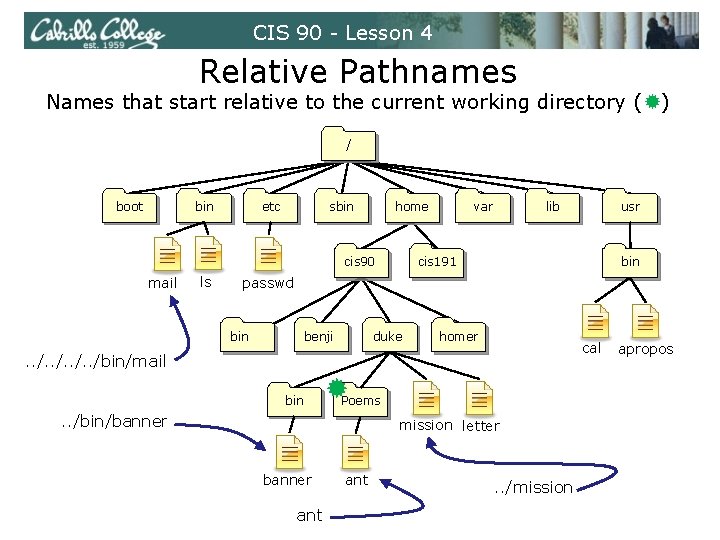
CIS 90 - Lesson 4 Relative Pathnames Names that start relative to the current working directory ( ) / boot bin etc sbin home cis 90 mail ls var lib usr cis 191 bin passwd bin benji duke homer cal . . /bin/mail bin Poems . . /bin/banner mission letter banner ant . . /mission apropos
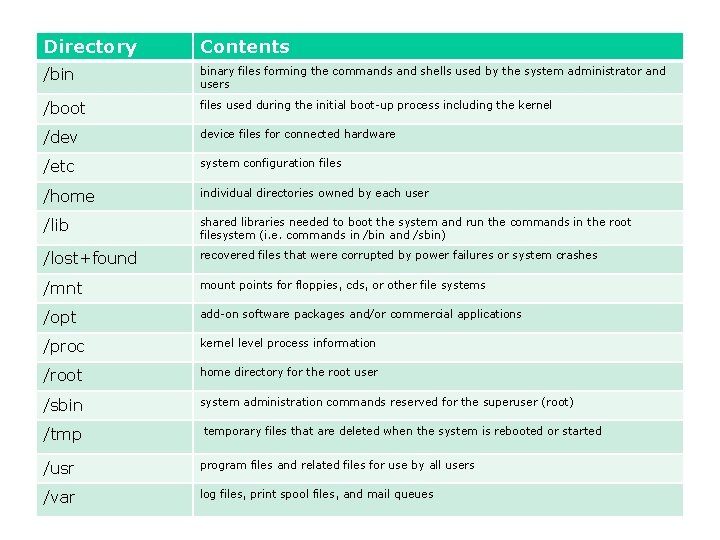
Directory Contents /bin binary files forming the commands and shells used by the system administrator and users /boot files used during the initial boot-up process including the kernel /dev device files for connected hardware /etc system configuration files /home individual directories owned by each user /lib shared libraries needed to boot the system and run the commands in the root filesystem (i. e. commands in /bin and /sbin) /lost+found recovered files that were corrupted by power failures or system crashes /mnt mount points for floppies, cds, or other file systems /opt add-on software packages and/or commercial applications /proc kernel level process information /root home directory for the root user /sbin system administration commands reserved for the superuser (root) /tmp temporary files that are deleted when the system is rebooted or started /usr program files and related files for use by all users /var log files, print spool files, and mail queues
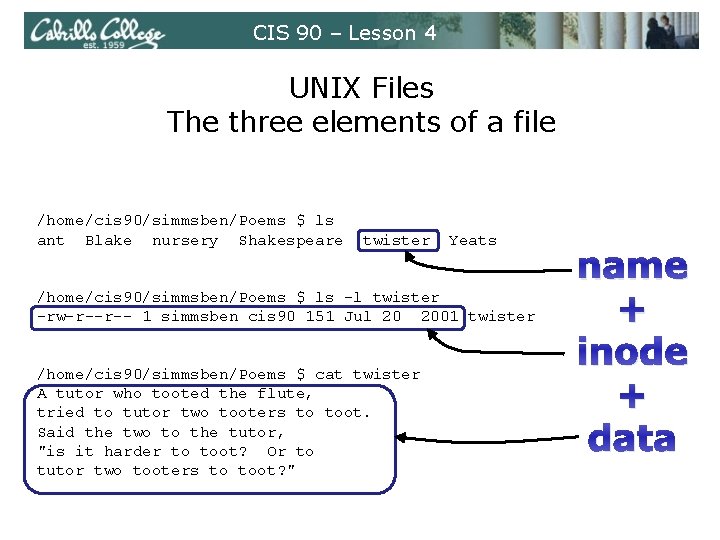
CIS 90 – Lesson 4 UNIX Files The three elements of a file /home/cis 90/simmsben/Poems $ ls ant Blake nursery Shakespeare twister Yeats /home/cis 90/simmsben/Poems $ ls -l twister -rw-r--r-- 1 simmsben cis 90 151 Jul 20 2001 twister /home/cis 90/simmsben/Poems $ cat twister A tutor who tooted the flute, tried to tutor two tooters to toot. Said the two to the tutor, "is it harder to toot? Or to tutor two tooters to toot? " name + inode + data
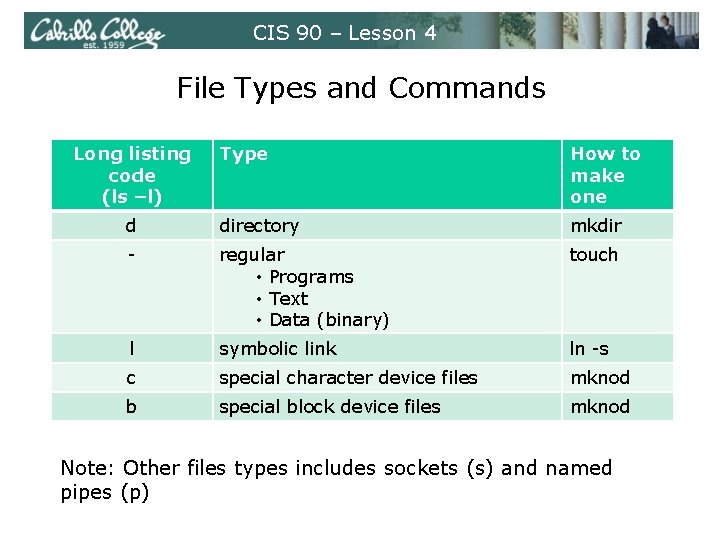
CIS 90 – Lesson 4 File Types and Commands Long listing code (ls –l) Type How to make one d directory mkdir - regular • Programs • Text • Data (binary) touch l symbolic link ln -s c special character device files mknod b special block device files mknod Note: Other files types includes sockets (s) and named pipes (p)
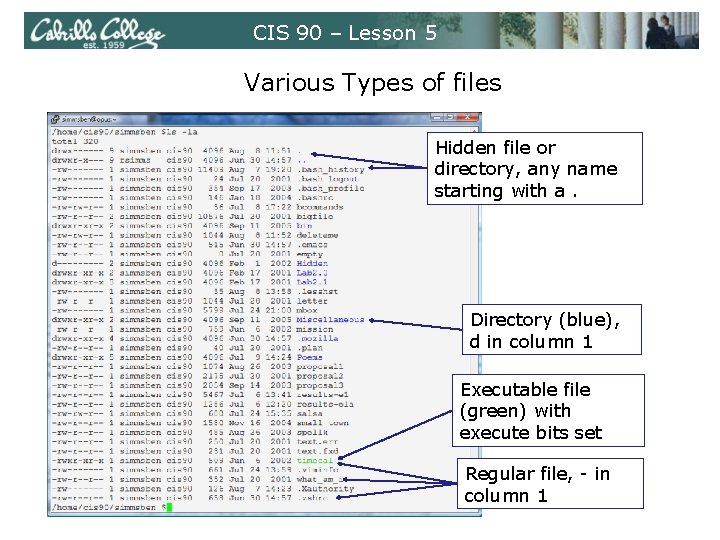
CIS 90 – Lesson 5 Various Types of files Hidden file or directory, any name starting with a. Directory (blue), d in column 1 Executable file (green) with execute bits set Regular file, - in column 1
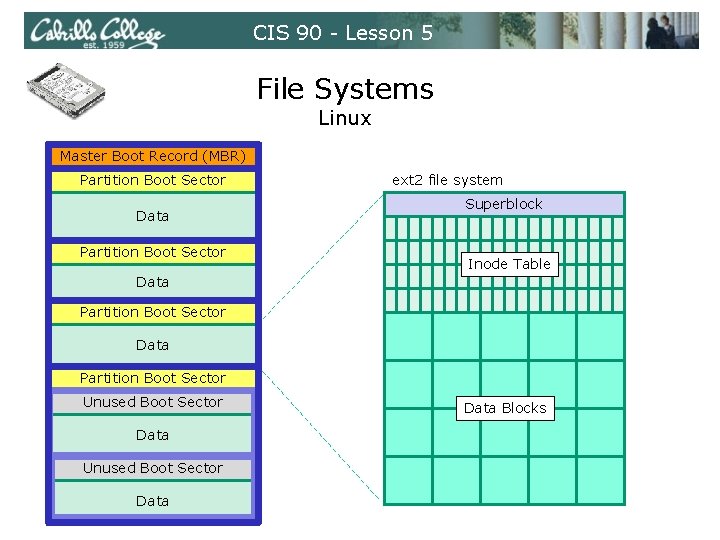
CIS 90 - Lesson 5 File Systems Linux Master Boot Record (MBR) Partition Boot Sector Data Partition Boot Sector ext 2 file system Superblock Inode Table Data Partition Boot Sector Unused Boot Sector Data Blocks
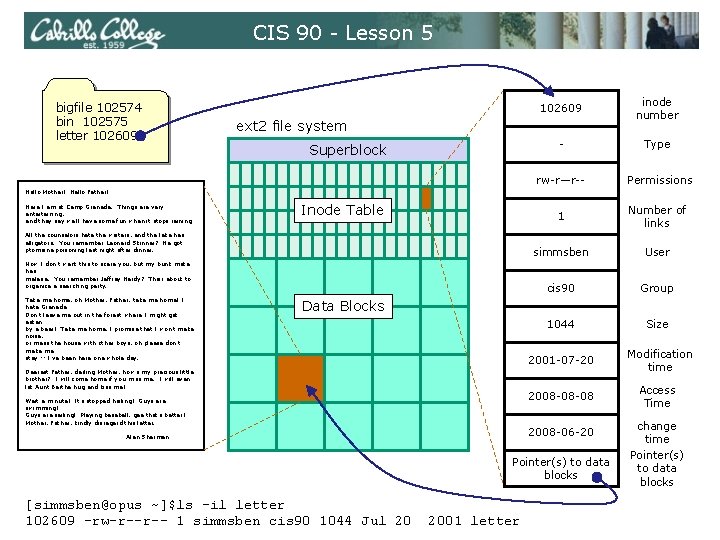
CIS 90 - Lesson 5 bigfile 102574 bin 102575 letter 102609 inode number - Type rw-r—r-- Permissions 1 Number of links simmsben User cis 90 Group 1044 Size 2001 -07 -20 Modification time 2008 -08 -08 Access Time ext 2 file system Superblock Hello Mother! Hello Father! Here I am at Camp Granada. Things are very entertaining, and they say we'll have some fun when it stops raining. Inode Table All the counselors hate the waiters, and the lake has alligators. You remember Leonard Skinner? He got ptomaine poisoning last night after dinner. Now I don't want this to scare you, but my bunk mate has malaria. You remember Jeffrey Hardy? Their about to organize a searching party. Take me home, oh Mother, Father, take me home! I hate Granada. Don't leave me out in the forest where I might get eaten by a bear! Take me home, I promise that I won't make noise, or mess the house with other boys, oh please don't make me stay -- I've been here one whole day. Data Blocks Dearest Father, darling Mother, how's my precious little brother? I will come home if you miss me. I will even let Aunt Bertha hug and kiss me! Wait a minute! It's stopped hailing! Guys are swimming! Guys are sailing! Playing baseball, gee that's better! Mother, Father, kindly disregard this letter. 2008 -06 -20 Alan Sherman Pointer(s) to data blocks [simmsben@opus ~]$ls -il letter 102609 -rw-r--r-- 1 simmsben cis 90 1044 Jul 20 2001 letter change time Pointer(s) to data blocks
CIS 90 - Lesson 5 Class Exercise Flashcards • Lesson 3 • Lesson 4 • Lesson 5
CIS 90 - Lesson 5 Wrap up
CIS 191 - Lesson 5 New commands: NA NA New Files and Directories: NA NA
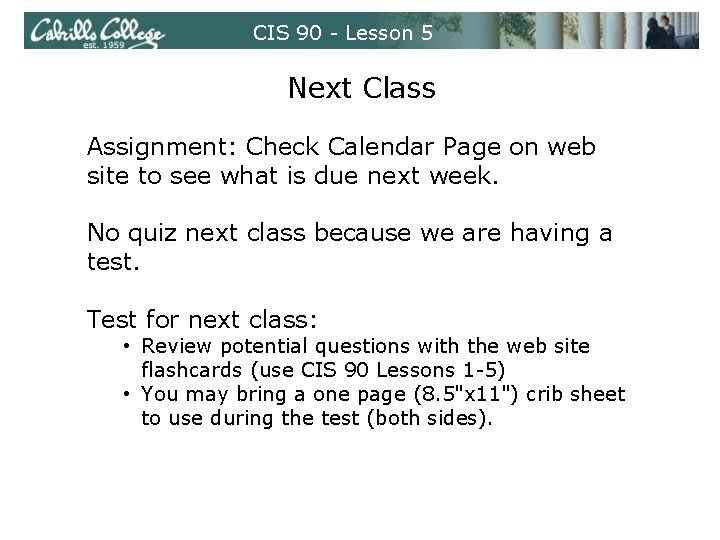
CIS 90 - Lesson 5 Next Class Assignment: Check Calendar Page on web site to see what is due next week. No quiz next class because we are having a test. Test for next class: • Review potential questions with the web site flashcards (use CIS 90 Lessons 1 -5) • You may bring a one page (8. 5"x 11") crib sheet to use during the test (both sides).
CIS 90 - Lesson 5 Backup