
CIS 90 Lesson 10 Lesson Module Status Slides
![CIS 90 - Lesson 10 Example program to process: sort command [rsimms@opus ~]$ type](https://slidetodoc.com/presentation_image_h2/a97c086416195a565d69c8925d850102/image-11.jpg "CIS 90 - Lesson 10 Example program to process: sort command [rsimms@opus ~]$ type")
![CIS 90 - Lesson 10 Process Information [rsimms@opus ~]$ ps PID TTY TIME CMD](https://slidetodoc.com/presentation_image_h2/a97c086416195a565d69c8925d850102/image-21.jpg "CIS 90 - Lesson 10 Process Information [rsimms@opus ~]$ ps PID TTY TIME CMD")
![CIS 90 - Lesson 10 Process Information [rsimms@opus ~]$ ps -a PID TTY TIME](https://slidetodoc.com/presentation_image_h2/a97c086416195a565d69c8925d850102/image-22.jpg "CIS 90 - Lesson 10 Process Information [rsimms@opus ~]$ ps -a PID TTY TIME")
![CIS 90 - Lesson 10 Process Information [rsimms@opus ~]$ cat /etc/passwd | grep Marcos](https://slidetodoc.com/presentation_image_h2/a97c086416195a565d69c8925d850102/image-23.jpg "CIS 90 - Lesson 10 Process Information [rsimms@opus ~]$ cat /etc/passwd | grep Marcos")
![CIS 90 - Lesson 10 Process Information [rsimms@opus ~]$ cat /etc/passwd | grep Marcos](https://slidetodoc.com/presentation_image_h2/a97c086416195a565d69c8925d850102/image-24.jpg "CIS 90 - Lesson 10 Process Information [rsimms@opus ~]$ cat /etc/passwd | grep Marcos")
![CIS 90 - Lesson 10 Process Information [rsimms@opus ~]$ F S UID PID 0](https://slidetodoc.com/presentation_image_h2/a97c086416195a565d69c8925d850102/image-25.jpg "CIS 90 - Lesson 10 Process Information [rsimms@opus ~]$ F S UID PID 0")
![CIS 90 - Lesson 10 Process Information [rsimms@opus ~]$ ps -ef UID PPID C](https://slidetodoc.com/presentation_image_h2/a97c086416195a565d69c8925d850102/image-26.jpg "CIS 90 - Lesson 10 Process Information [rsimms@opus ~]$ ps -ef UID PPID C")
- Slides: 68
CIS 90 - Lesson 10 Lesson Module Status • Slides – draft • Properties - done • Flash cards – • No-stress quiz – done • Web calendar summary – done • Web book pages – done • Commands – done • Lab – done • Supplies () - na • Class PC's – na • Scripts () – done
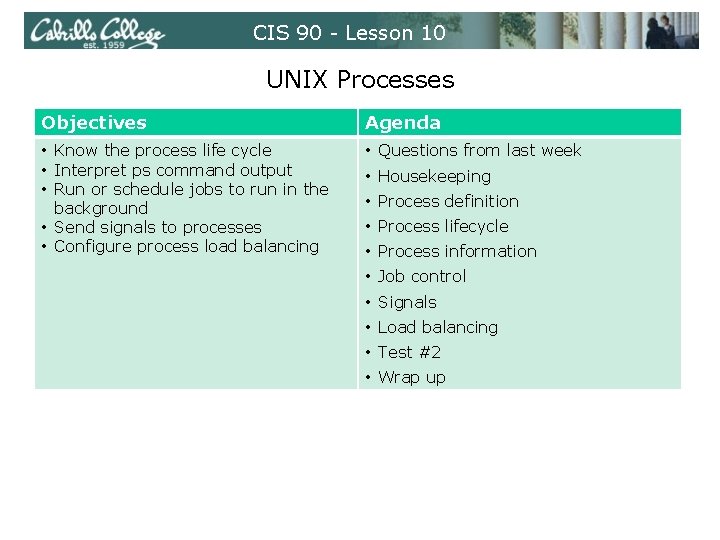
CIS 90 - Lesson 10 UNIX Processes Objectives Agenda • Know the process life cycle • Interpret ps command output • Run or schedule jobs to run in the background • Send signals to processes • Configure process load balancing • Questions from last week • Housekeeping • Process definition • Process lifecycle • Process information • Job control • Signals • Load balancing • Test #2 • Wrap up
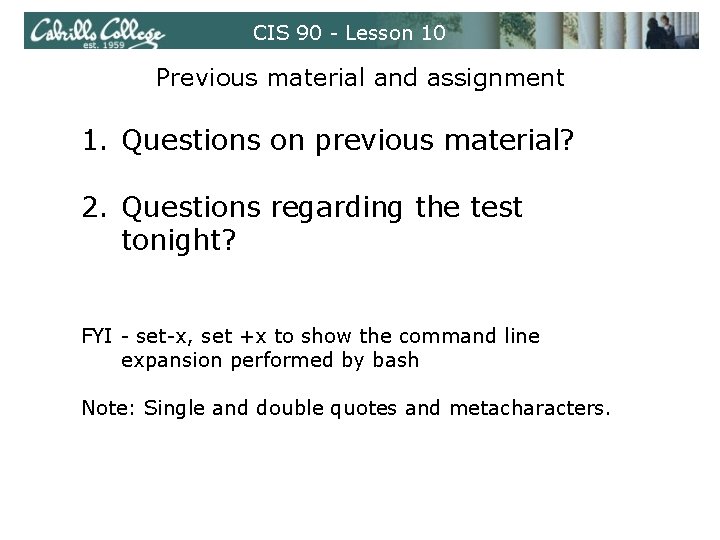
CIS 90 - Lesson 10 Previous material and assignment 1. Questions on previous material? 2. Questions regarding the test tonight? FYI - set-x, set +x to show the command line expansion performed by bash Note: Single and double quotes and metacharacters.
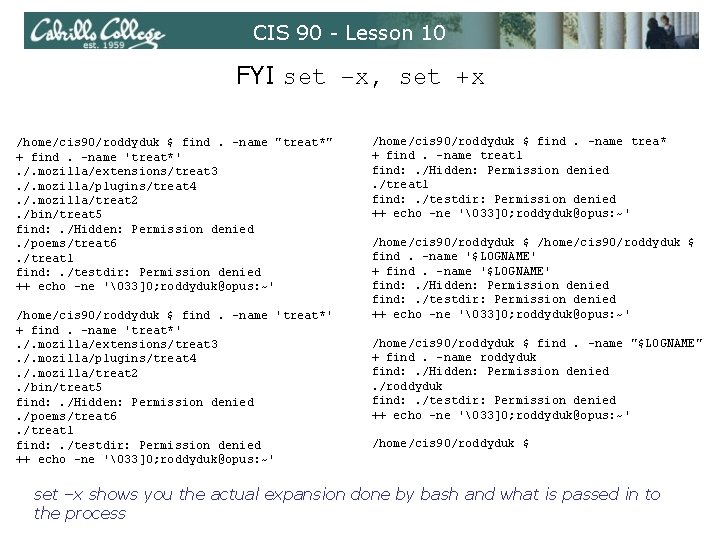
CIS 90 - Lesson 10 FYI set –x, set +x /home/cis 90/roddyduk $ find. -name "treat*" + find. -name 'treat*'. /. mozilla/extensions/treat 3. /. mozilla/plugins/treat 4. /. mozilla/treat 2. /bin/treat 5 find: . /Hidden: Permission denied. /poems/treat 6. /treat 1 find: . /testdir: Permission denied ++ echo -ne '33]0; roddyduk@opus: ~' /home/cis 90/roddyduk $ find. -name 'treat*' + find. -name 'treat*'. /. mozilla/extensions/treat 3. /. mozilla/plugins/treat 4. /. mozilla/treat 2. /bin/treat 5 find: . /Hidden: Permission denied. /poems/treat 6. /treat 1 find: . /testdir: Permission denied ++ echo -ne '33]0; roddyduk@opus: ~' /home/cis 90/roddyduk $ find. -name trea* + find. -name treat 1 find: . /Hidden: Permission denied. /treat 1 find: . /testdir: Permission denied ++ echo -ne '33]0; roddyduk@opus: ~' /home/cis 90/roddyduk $ find. -name '$LOGNAME' + find. -name '$LOGNAME' find: . /Hidden: Permission denied find: . /testdir: Permission denied ++ echo -ne '33]0; roddyduk@opus: ~' /home/cis 90/roddyduk $ find. -name "$LOGNAME" + find. -name roddyduk find: . /Hidden: Permission denied. /roddyduk find: . /testdir: Permission denied ++ echo -ne '33]0; roddyduk@opus: ~' /home/cis 90/roddyduk $ set –x shows you the actual expansion done by bash and what is passed in to the process
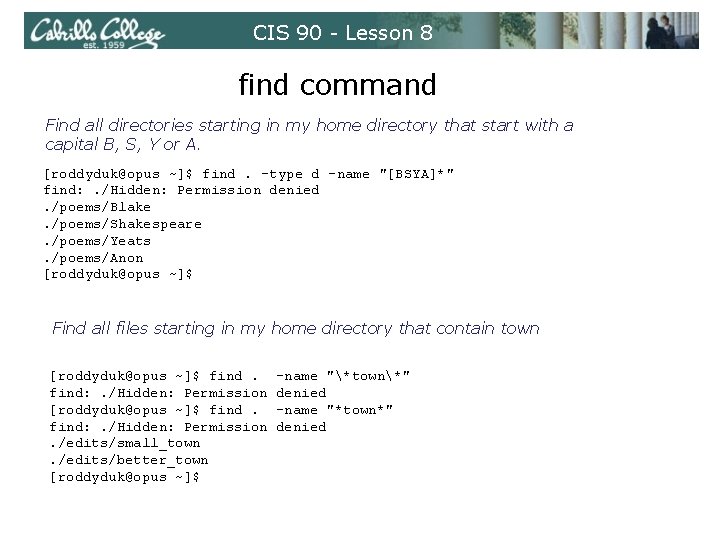
CIS 90 - Lesson 8 find command Find all directories starting in my home directory that start with a capital B, S, Y or A. [roddyduk@opus ~]$ find. -type d -name "[BSYA]*" find: . /Hidden: Permission denied. /poems/Blake. /poems/Shakespeare. /poems/Yeats. /poems/Anon [roddyduk@opus ~]$ Find all files starting in my home directory that contain town [roddyduk@opus ~]$ find: . /Hidden: Permission. /edits/small_town. /edits/better_town [roddyduk@opus ~]$ -name "*town*" denied -name "*town*" denied
CIS 90 - Lesson 10 Process Definition
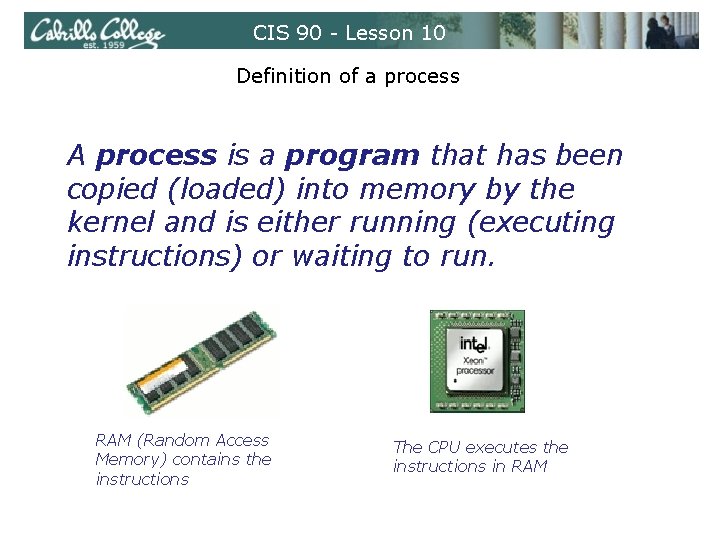
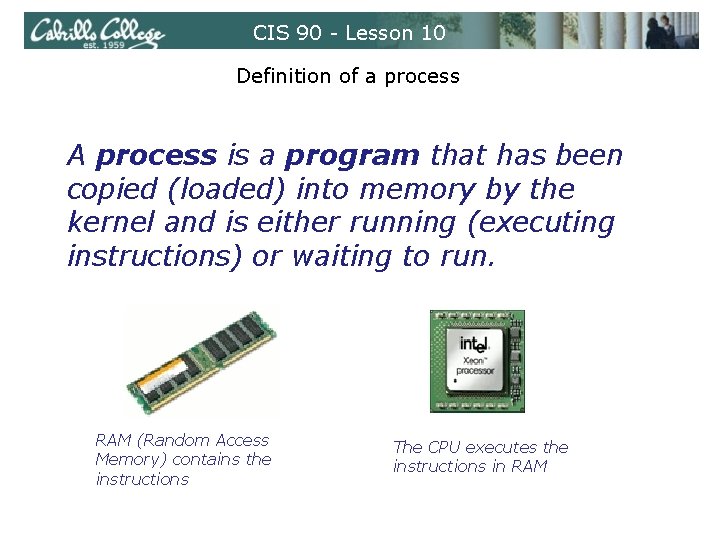
CIS 90 - Lesson 10 Definition of a process A process is a program that has been copied (loaded) into memory by the kernel and is either running (executing instructions) or waiting to run. RAM (Random Access Memory) contains the instructions The CPU executes the instructions in RAM
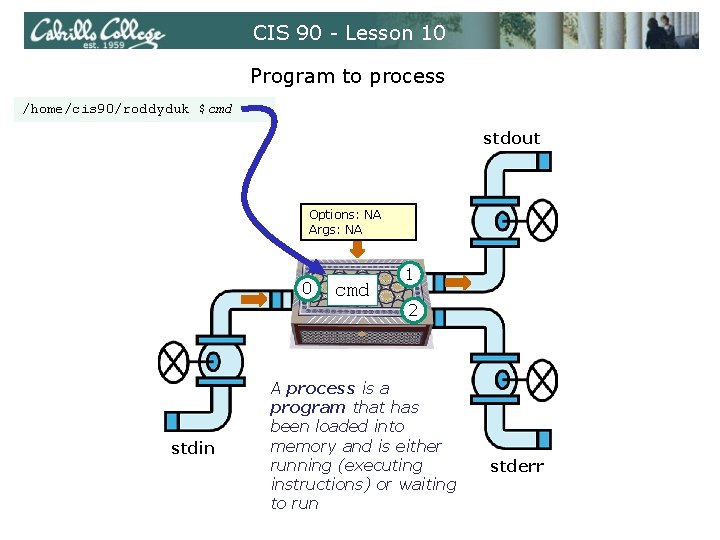
CIS 90 - Lesson 10 Program to process /home/cis 90/roddyduk $cmd stdout Options: NA Args: NA 0 stdin cmd 1 2 A process is a program that has been loaded into memory and is either running (executing instructions) or waiting to run stderr
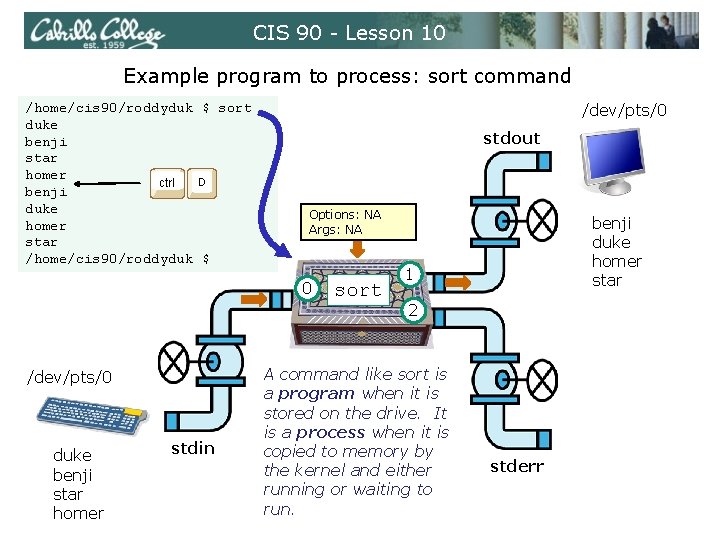
CIS 90 - Lesson 10 Example program to process: sort command /home/cis 90/roddyduk $ sort duke benji star homer D ctrl benji duke homer star /home/cis 90/roddyduk $ /dev/pts/0 stdout Options: NA Args: NA 0 /dev/pts/0 duke benji star homer stdin sort benji duke homer star 1 2 A command like sort is a program when it is stored on the drive. It is a process when it is copied to memory by the kernel and either running or waiting to run. stderr
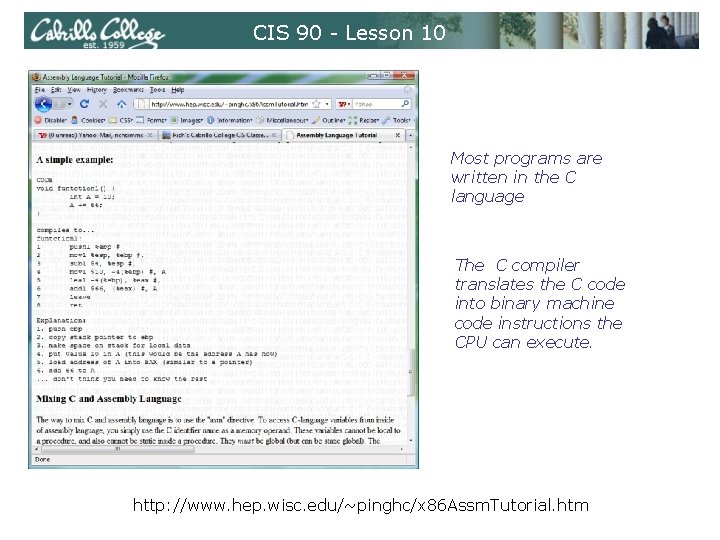
CIS 90 - Lesson 10 Most programs are written in the C language The C compiler translates the C code into binary machine code instructions the CPU can execute. http: //www. hep. wisc. edu/~pinghc/x 86 Assm. Tutorial. htm
CIS 90 - Lesson 10 Example program to process: sort command [rsimms@opus ~]$ type sort is /bin/sort [rsimms@opus ~]$ file /bin/sort: ELF 32 -bit LSB executable, Intel 80386, version 1 (SYSV), for GNU/Linux 2. 6. 9, dynamically linked (uses shared libs), for GNU/Linux 2. 6. 9, stripped [rsimms@opus ~]$ xxd /bin/sort | more 0000000: 0000010: 0000020: 0000030: 0000040: 0000050: 0000060: 0000070: 0000080: 0000090: 00000 a 0: 00000 b 0: 7 f 45 0200 2 cdb 1 f 00 3480 0400 3481 0100 0080 0010 0050 0010 4 c 46 0300 0000 1 e 00 0408 0000 0508 0000 0101 0100 0000 0600 0001 0300 1300 0100 caca 0100 9404 0200 0100 0000 0000 0000 e 093 3400 0001 3401 1300 0000 caca 00 d 0 e 80 a a 0 d 1 0000 0408 2000 0000 0000 0000 3400 0800 3480 0500 3481 0400 0080 0500 0050 0600 a 051 0000 2800 0408 0000 0508 . ELF. . . 4. . . , . . . . 4. . (. . . . 4. . . . . P. . . . Q. . A command like sort is a program when it is stored on the drive. It is a process when it is copied to memory by the kernel and either running or waiting to run by the CPU
CIS 90 - Lesson 10 Definition of a process A process is a program that has been copied (loaded) into memory by the kernel and is either running (executing instructions) or waiting to run. RAM (Random Access Memory) contains the instructions The CPU executes the instructions in RAM
CIS 90 - Lesson 10 Process Life Cycle
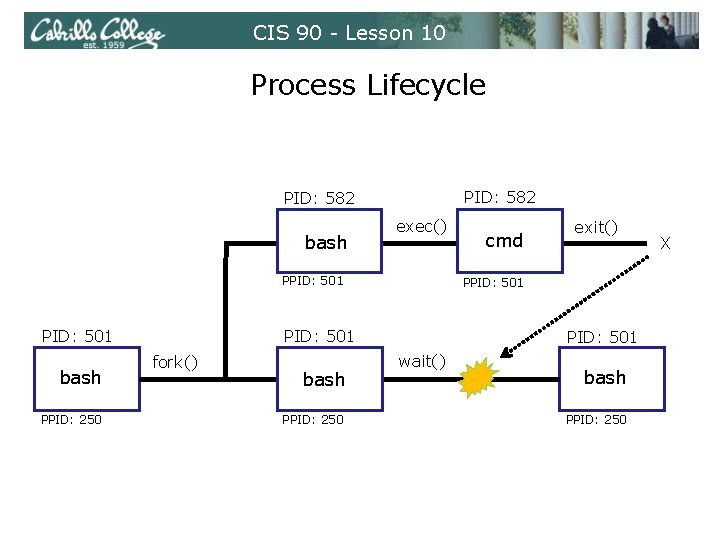
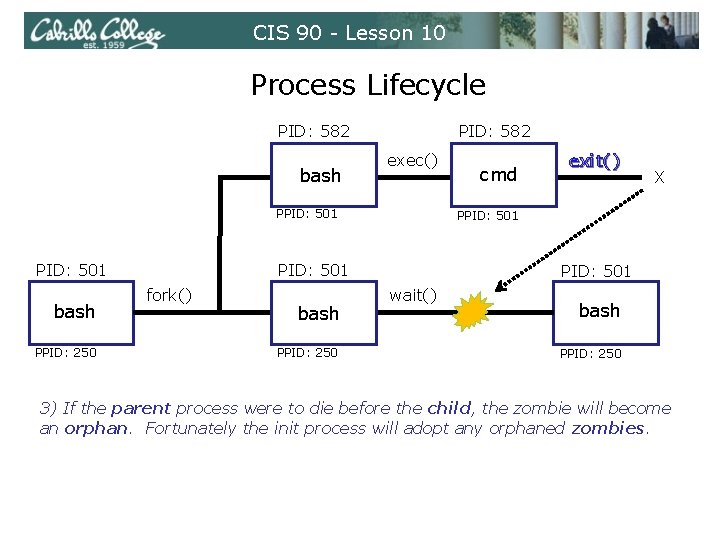
CIS 90 - Lesson 10 Process Lifecycle PID: 582 exec() bash PPID: 501 bash PPID: 250 PID: 501 wait() bash PPID: 250 exit() PPID: 501 fork() cmd / bash PPID: 250 X
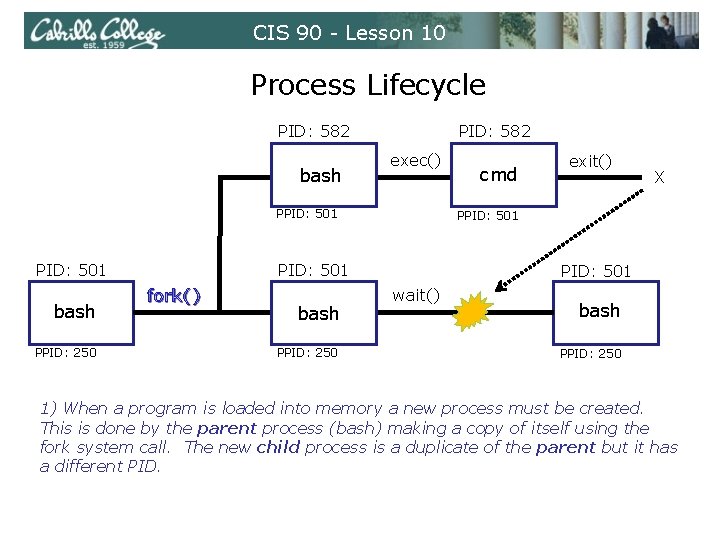
CIS 90 - Lesson 10 Process Lifecycle PID: 582 exec() bash PPID: 501 bash PPID: 250 PID: 501 wait() bash PPID: 250 X PPID: 501 fork() cmd exit() / bash PPID: 250 1) When a program is loaded into memory a new process must be created. This is done by the parent process (bash) making a copy of itself using the fork system call. The new child process is a duplicate of the parent but it has a different PID.
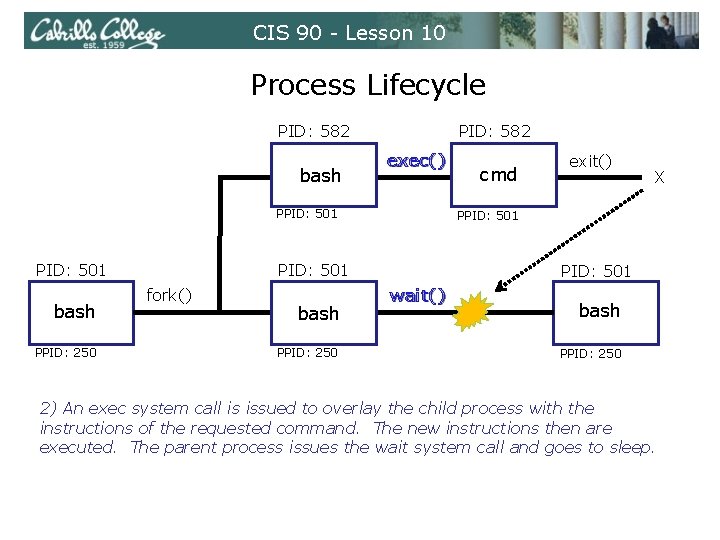
CIS 90 - Lesson 10 Process Lifecycle PID: 582 exec() bash PPID: 501 bash PPID: 250 PID: 501 wait() bash PPID: 250 X PPID: 501 fork() cmd exit() / bash PPID: 250 2) An exec system call is issued to overlay the child process with the instructions of the requested command. The new instructions then are executed. The parent process issues the wait system call and goes to sleep.
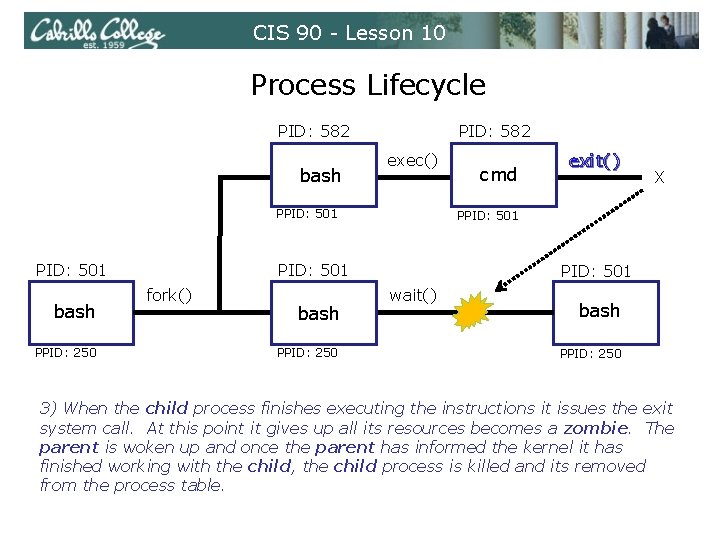
CIS 90 - Lesson 10 Process Lifecycle PID: 582 exec() bash PPID: 501 bash PPID: 250 PID: 501 wait() bash PPID: 250 X PPID: 501 fork() cmd exit() / bash PPID: 250 3) When the child process finishes executing the instructions it issues the exit system call. At this point it gives up all its resources becomes a zombie. The parent is woken up and once the parent has informed the kernel it has finished working with the child, the child process is killed and its removed from the process table.
CIS 90 - Lesson 10 Process Lifecycle PID: 582 exec() bash PPID: 501 bash PPID: 250 PID: 501 wait() bash PPID: 250 X PPID: 501 fork() cmd exit() / bash PPID: 250 3) If the parent process were to die before the child, the zombie will become an orphan. Fortunately the init process will adopt any orphaned zombies.
CIS 90 - Lesson 10 Process Information
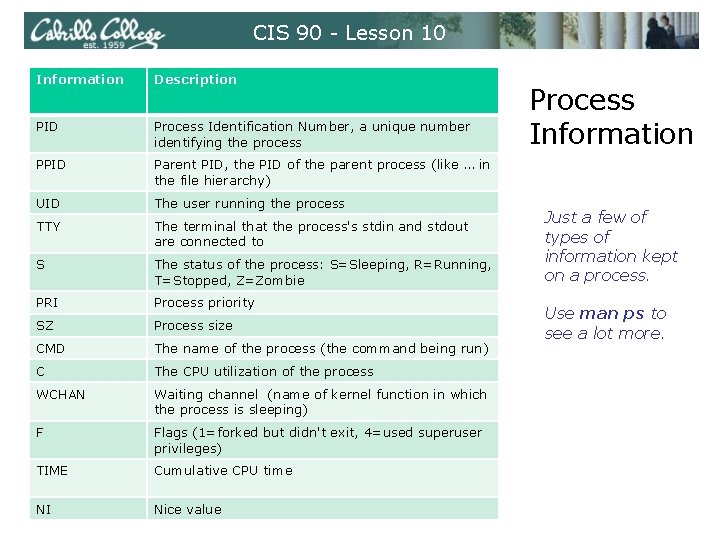
CIS 90 - Lesson 10 Information Description PID Process Identification Number, a unique number identifying the process PPID Parent PID, the PID of the parent process (like … in the file hierarchy) UID The user running the process TTY The terminal that the process's stdin and stdout are connected to S The status of the process: S=Sleeping, R=Running, T=Stopped, Z=Zombie PRI Process priority SZ Process size CMD The name of the process (the command being run) C The CPU utilization of the process WCHAN Waiting channel (name of kernel function in which the process is sleeping) F Flags (1=forked but didn't exit, 4=used superuser privileges) TIME Cumulative CPU time NI Nice value Process Information Just a few of types of information kept on a process. Use man ps to see a lot more.
CIS 90 - Lesson 10 Process Information [rsimms@opus ~]$ ps PID TTY TIME CMD 6204 pts/6 00: 00 bash 6285 pts/6 00: 00 ps [rsimms@opus ~]$ ps -a PID TTY TIME 6173 pts/0 00: 00 6176 pts/0 00: 00 6177 pts/0 00: 00 6182 pts/0 00: 00 6294 pts/6 00: 00 [rsimms@opus ~]$ CMD man sh sh less ps Show just my processes Show all processes with a tty
CIS 90 - Lesson 10 Process Information [rsimms@opus ~]$ ps -a PID TTY TIME 6173 pts/0 00: 00 6176 pts/0 00: 00 6177 pts/0 00: 00 6182 pts/0 00: 00 6294 pts/6 00: 00 [rsimms@opus ~]$ CMD man sh sh less ps -a show processes with a terminal x option shows full commands being run and states (most are asleep). [rsimms@opus ~]$ ps x PID TTY STAT TIME COMMAND 5368 ? S 0: 00 sshd: rsimms@pts/0 5369 pts/0 Ss 0: 00 -bash 6173 pts/0 S+ 0: 00 man ps 6176 pts/0 S+ 0: 00 sh -c (cd /usr/share/man && (echo ". ll 7. 5 i"; echo ". nr L 6177 pts/0 S+ 0: 00 sh -c (cd /usr/share/man && (echo ". ll 7. 5 i"; echo ". nr L 6182 pts/0 S+ 0: 00 /usr/bin/less -is 6203 ? S 0: 00 sshd: rsimms@pts/6 6204 pts/6 Ss 0: 00 -bash 6312 pts/6 R+ 0: 00 ps x [rsimms@opus ~]$ I'm using two Putty sessions, in one session I have the man page open for ps, the other I'm issuing ps commands
CIS 90 - Lesson 10 Process Information [rsimms@opus ~]$ cat /etc/passwd | grep Marcos valdemar: x: 1200: 103: Marcos Valdebenito: /home/cis 90/valdemar: /bin/bash [rsimms@opus ~]$ ps -u 1200 PID TTY TIME CMD 5971 ? 00: 00 sshd 5972 pts/5 00: 00 bash [rsimms@opus ~]$ ps -u dymesdia PID TTY TIME CMD 6418 ? 00: 00 sshd 6419 pts/1 00: 00 bash [rsimms@opus ~]$ ps -u rsimms PID TTY TIME CMD 5368 ? 00: 00 sshd 5369 pts/0 00: 00 bash 6173 pts/0 00: 00 man 6176 pts/0 00: 00 sh 6177 pts/0 00: 00 sh 6182 pts/0 00: 00 less 6203 ? 00: 00 sshd 6204 pts/6 00: 00 bash 6510 pts/6 00: 00 ps [rsimms@opus ~]$ Use the u option to look at processes owned by a specific user
CIS 90 - Lesson 10 Process Information [rsimms@opus ~]$ cat /etc/passwd | grep Marcos valdemar: x: 1200: 103: Marcos Valdebenito: /home/cis 90/valdemar: /bin/bash [rsimms@opus ~]$ ps -u 1200 PID TTY TIME CMD 5971 ? 00: 00 sshd 5972 pts/5 00: 00 bash [rsimms@opus ~]$ ps -u dymesdia PID TTY TIME CMD 6418 ? 00: 00 sshd 6419 pts/1 00: 00 bash [rsimms@opus ~]$ ps -u rsimms PID TTY TIME CMD 5368 ? 00: 00 sshd 5369 pts/0 00: 00 bash 6173 pts/0 00: 00 man 6176 pts/0 00: 00 sh 6177 pts/0 00: 00 sh 6182 pts/0 00: 00 less 6203 ? 00: 00 sshd 6204 pts/6 00: 00 bash 6510 pts/6 00: 00 ps [rsimms@opus ~]$ Use the u option to look at processes owned by a specific user
CIS 90 - Lesson 10 Process Information [rsimms@opus ~]$ F S UID PID 0 S 201 6204 0 R 201 6521 [rsimms@opus ~]$ ps -l PPID C PRI 6203 0 75 6204 0 77 NI ADDR SZ WCHAN 0 - 1165 wait 0 - 1050 - TTY pts/6 TIME CMD 00: 00 bash 00: 00 ps Use –l for additional options
CIS 90 - Lesson 10 Process Information [rsimms@opus ~]$ ps -ef UID PPID C STIME root 1 0 0 Sep 10 root 2 1 0 Sep 10 root 3 1 0 Sep 10 root 4 1 0 Sep 10 root 5 1 0 Sep 10 root 6 1 0 Sep 10 root 7 1 0 Sep 10 root 8 1 0 Sep 10 root 9 1 0 Sep 10 root 10 1 0 Sep 10 root 11 1 0 Sep 10 root 15 11 0 Sep 10 root 16 11 0 Sep 10 root 17 11 0 Sep 10 root 109 11 0 Sep 10 root 110 11 0 Sep 10 root 113 11 0 Sep 10 root 115 11 0 Sep 10 root 181 11 0 Sep 10 root 182 11 0 Sep 10 root 183 11 0 Sep 10 root 184 11 0 Sep 10 root 185 11 0 Sep 10 root 341 11 0 Sep 10 root 371 11 0 Sep 10 TTY ? ? ? ? ? ? ? TIME 00: 05 00: 00: 00 00: 02 00: 00: 00 00: 00: 00 00: 00: 00 00: 00: 00 00: 07 00: 01 00: 00: 00 CMD init [3] [migration/0] [ksoftirqd/0] [watchdog/0] [migration/1] [ksoftirqd/1] [watchdog/1] [events/0] [events/1] [khelper] [kthread] [kblockd/0] [kblockd/1] [kacpid] [cqueue/0] [cqueue/1] [khubd] [kseriod] [pdflush] [kswapd 0] [aio/1] [kpsmoused] [ata/0]
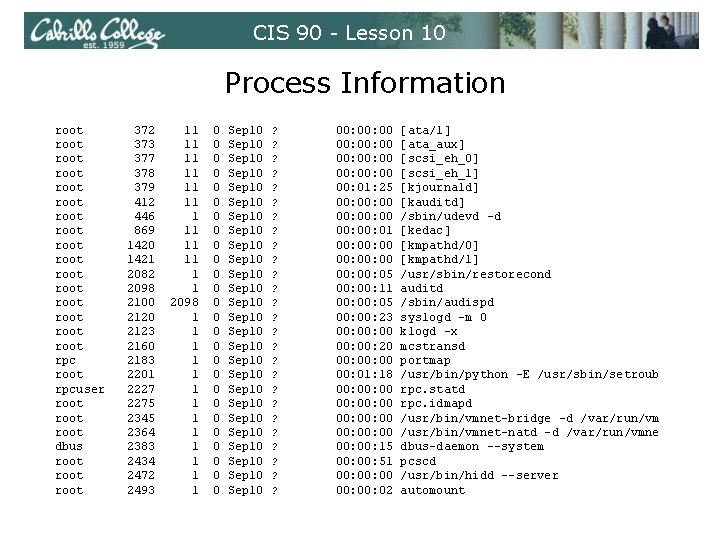
CIS 90 - Lesson 10 Process Information root root root root rpc root rpcuser root dbus root 372 373 377 378 379 412 446 869 1420 1421 2082 2098 2100 2123 2160 2183 2201 2227 2275 2345 2364 2383 2434 2472 2493 11 11 11 1 1 2098 1 1 1 1 0 0 0 0 0 0 0 Sep 10 Sep 10 Sep 10 Sep 10 Sep 10 Sep 10 Sep 10 ? ? ? ? ? ? ? 00: 00: 00 00: 01: 25 00: 00: 00 00: 01 00: 00: 00 00: 05 00: 11 00: 05 00: 23 00: 00 00: 20 00: 00 00: 01: 18 00: 00: 00 00: 15 00: 51 00: 00 00: 02 [ata/1] [ata_aux] [scsi_eh_0] [scsi_eh_1] [kjournald] [kauditd] /sbin/udevd -d [kedac] [kmpathd/0] [kmpathd/1] /usr/sbin/restorecond auditd /sbin/audispd syslogd -m 0 klogd -x mcstransd portmap /usr/bin/python -E /usr/sbin/setroub rpc. statd rpc. idmapd /usr/bin/vmnet-bridge -d /var/run/vm /usr/bin/vmnet-natd -d /var/run/vmne dbus-daemon --system pcscd /usr/bin/hidd --server automount
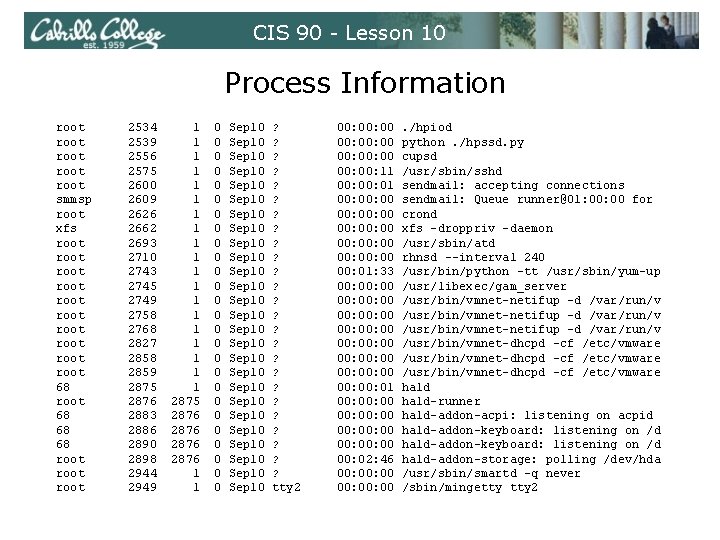
CIS 90 - Lesson 10 Process Information root root smmsp root xfs root root root 68 68 68 root 2534 2539 2556 2575 2600 2609 2626 2662 2693 2710 2743 2745 2749 2758 2768 2827 2858 2859 2875 2876 2883 2886 2890 2898 2944 2949 1 1 1 1 1 2875 2876 1 1 0 0 0 0 0 0 0 Sep 10 Sep 10 Sep 10 Sep 10 Sep 10 Sep 10 Sep 10 ? ? ? ? ? ? ? tty 2 00: 00: 00 00: 11 00: 00: 00 00: 00: 00 00: 01: 33 00: 00: 00 00: 00: 00 00: 01 00: 00: 00 00: 02: 46 00: 00: 00 . /hpiod python. /hpssd. py cupsd /usr/sbin/sshd sendmail: accepting connections sendmail: Queue runner@01: 00 for crond xfs -droppriv -daemon /usr/sbin/atd rhnsd --interval 240 /usr/bin/python -tt /usr/sbin/yum-up /usr/libexec/gam_server /usr/bin/vmnet-netifup -d /var/run/v /usr/bin/vmnet-dhcpd -cf /etc/vmware hald-runner hald-addon-acpi: listening on acpid hald-addon-keyboard: listening on /d hald-addon-storage: polling /dev/hda /usr/sbin/smartd -q never /sbin/mingetty 2
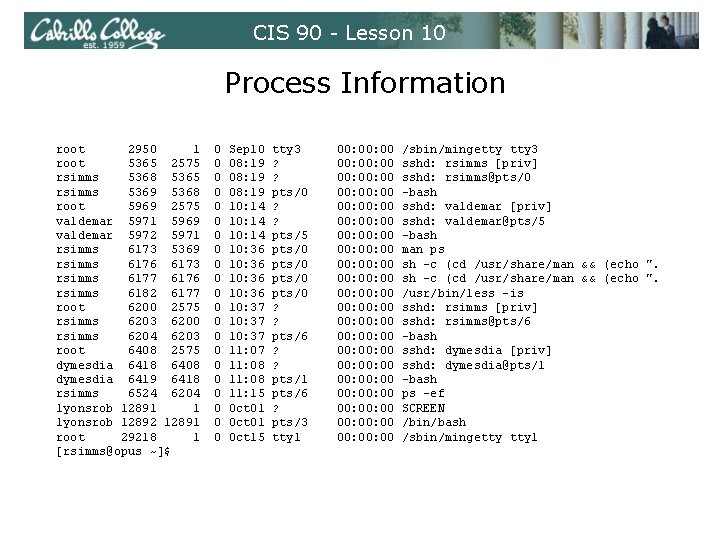
CIS 90 - Lesson 10 Process Information root 2950 1 root 5365 2575 rsimms 5368 5365 rsimms 5369 5368 root 5969 2575 valdemar 5971 5969 valdemar 5972 5971 rsimms 6173 5369 rsimms 6176 6173 rsimms 6177 6176 rsimms 6182 6177 root 6200 2575 rsimms 6203 6200 rsimms 6204 6203 root 6408 2575 dymesdia 6418 6408 dymesdia 6419 6418 rsimms 6524 6204 lyonsrob 12891 1 lyonsrob 12892 12891 root 29218 1 [rsimms@opus ~]$ 0 0 0 0 0 0 Sep 10 08: 19 10: 14 10: 36 10: 37 11: 08 11: 15 Oct 01 Oct 15 tty 3 ? ? pts/0 ? ? pts/5 pts/0 ? ? pts/6 ? ? pts/1 pts/6 ? pts/3 tty 1 00: 00: 00 00: 00: 00 00: 00: 00 00: 00: 00 00: 00: 00 00: 00 /sbin/mingetty 3 sshd: rsimms [priv] sshd: rsimms@pts/0 -bash sshd: valdemar [priv] sshd: valdemar@pts/5 -bash man ps sh -c (cd /usr/share/man && (echo ". /usr/bin/less -is sshd: rsimms [priv] sshd: rsimms@pts/6 -bash sshd: dymesdia [priv] sshd: dymesdia@pts/1 -bash ps -ef SCREEN /bin/bash /sbin/mingetty 1
CIS 90 - Lesson 10 Job Control
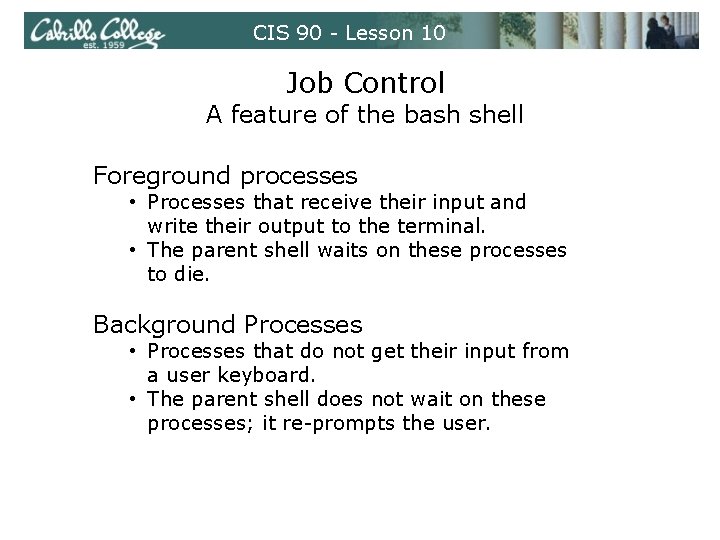
CIS 90 - Lesson 10 Job Control A feature of the bash shell Foreground processes • Processes that receive their input and write their output to the terminal. • The parent shell waits on these processes to die. Background Processes • Processes that do not get their input from a user keyboard. • The parent shell does not wait on these processes; it re-prompts the user.
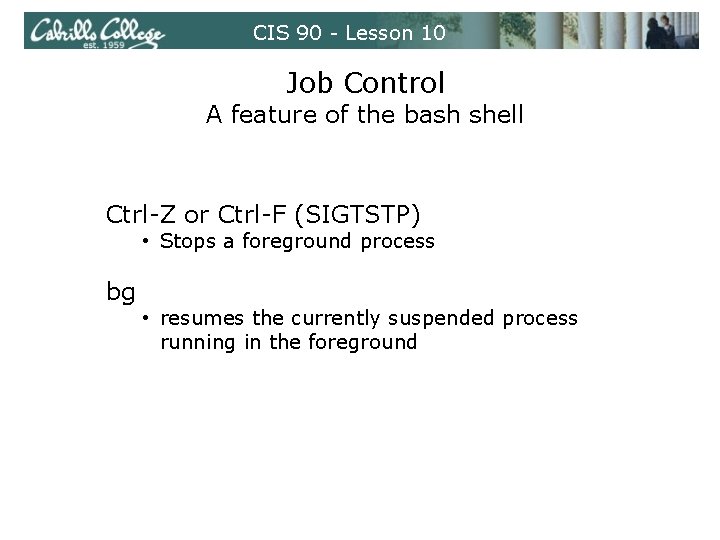
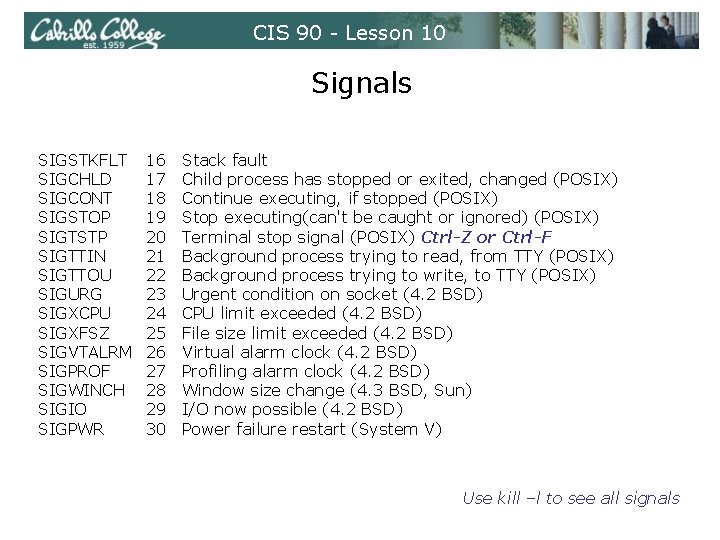
CIS 90 - Lesson 10 Job Control A feature of the bash shell Ctrl-Z or Ctrl-F (SIGTSTP) • Stops a foreground process bg • resumes the currently suspended process running in the foreground
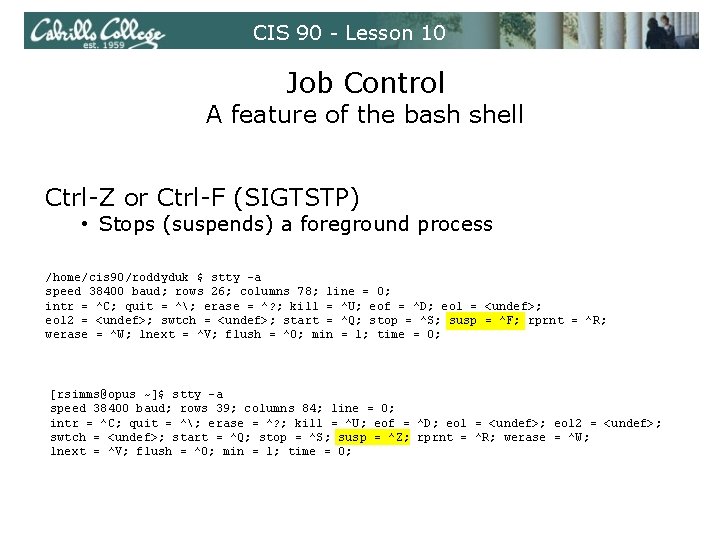
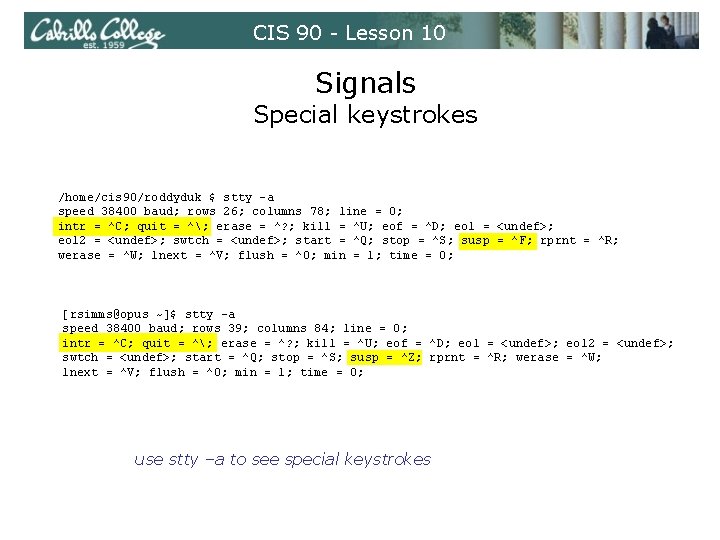
CIS 90 - Lesson 10 Job Control A feature of the bash shell Ctrl-Z or Ctrl-F (SIGTSTP) • Stops (suspends) a foreground process /home/cis 90/roddyduk $ stty -a speed 38400 baud; rows 26; columns 78; line = 0; intr = ^C; quit = ^; erase = ^? ; kill = ^U; eof = ^D; eol = <undef>; eol 2 = <undef>; swtch = <undef>; start = ^Q; stop = ^S; susp = ^F; rprnt = ^R; werase = ^W; lnext = ^V; flush = ^O; min = 1; time = 0; [rsimms@opus ~]$ stty -a speed 38400 baud; rows 39; columns 84; line = 0; intr = ^C; quit = ^; erase = ^? ; kill = ^U; eof = ^D; eol = <undef>; eol 2 = <undef>; swtch = <undef>; start = ^Q; stop = ^S; susp = ^Z; rprnt = ^R; werase = ^W; lnext = ^V; flush = ^O; min = 1; time = 0;
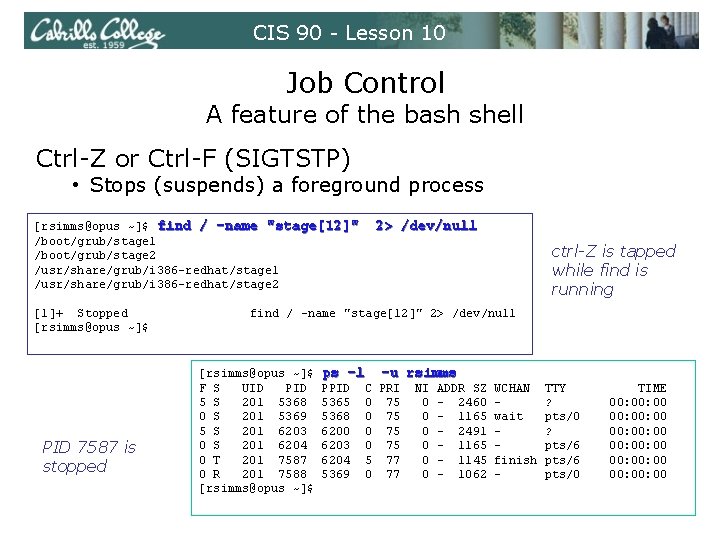
CIS 90 - Lesson 10 Job Control A feature of the bash shell Ctrl-Z or Ctrl-F (SIGTSTP) • Stops (suspends) a foreground process [rsimms@opus ~]$ find / -name "stage[12]" /boot/grub/stage 1 /boot/grub/stage 2 /usr/share/grub/i 386 -redhat/stage 1 /usr/share/grub/i 386 -redhat/stage 2 [1]+ Stopped [rsimms@opus ~]$ PID 7587 is stopped 2> /dev/null ctrl-Z is tapped while find is running find / -name "stage[12]" 2> /dev/null [rsimms@opus ~]$ F S UID PID 5 S 201 5368 0 S 201 5369 5 S 201 6203 0 S 201 6204 0 T 201 7587 0 R 201 7588 [rsimms@opus ~]$ ps -l PPID 5365 5368 6200 6203 6204 5369 -u rsimms C PRI 0 75 5 77 0 77 NI 0 0 0 ADDR SZ - 2460 - 1165 - 2491 - 1165 - 1145 - 1062 WCHAN wait finish - TTY ? pts/0 ? pts/6 pts/0 TIME 00: 00: 00 00: 00: 00
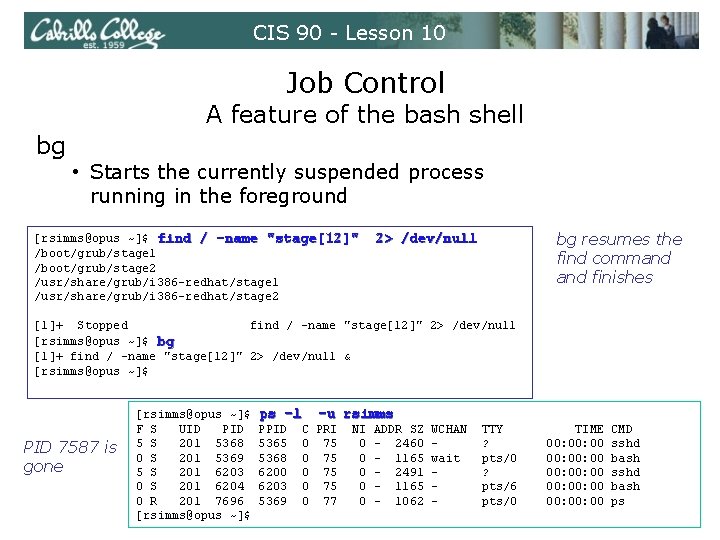
CIS 90 - Lesson 10 Job Control A feature of the bash shell bg • Starts the currently suspended process running in the foreground [rsimms@opus ~]$ find / -name "stage[12]" /boot/grub/stage 1 /boot/grub/stage 2 /usr/share/grub/i 386 -redhat/stage 1 /usr/share/grub/i 386 -redhat/stage 2 bg resumes the find command finishes 2> /dev/null [1]+ Stopped find / -name "stage[12]" 2> /dev/null [rsimms@opus ~]$ bg [1]+ find / -name "stage[12]" 2> /dev/null & [rsimms@opus ~]$ PID 7587 is gone [rsimms@opus ~]$ F S UID PID 5 S 201 5368 0 S 201 5369 5 S 201 6203 0 S 201 6204 0 R 201 7696 [rsimms@opus ~]$ ps -l PPID 5365 5368 6200 6203 5369 -u rsimms C PRI 0 75 0 77 NI 0 0 0 ADDR SZ - 2460 - 1165 - 2491 - 1165 - 1062 WCHAN wait - TTY ? pts/0 ? pts/6 pts/0 TIME 00: 00: 00 00: 00 CMD sshd bash ps
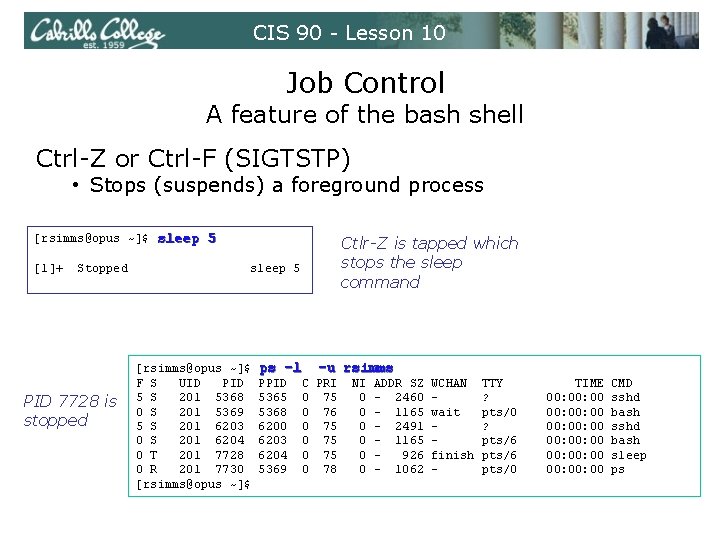
CIS 90 - Lesson 10 Job Control A feature of the bash shell Ctrl-Z or Ctrl-F (SIGTSTP) • Stops (suspends) a foreground process [rsimms@opus ~]$ sleep 5 [1]+ Stopped PID 7728 is stopped Ctlr-Z is tapped which stops the sleep command sleep 5 [rsimms@opus ~]$ F S UID PID 5 S 201 5368 0 S 201 5369 5 S 201 6203 0 S 201 6204 0 T 201 7728 0 R 201 7730 [rsimms@opus ~]$ ps -l PPID 5365 5368 6200 6203 6204 5369 -u rsimms C PRI 0 75 0 76 0 75 0 78 NI 0 0 0 ADDR SZ - 2460 - 1165 - 2491 - 1165 926 - 1062 WCHAN wait finish - TTY ? pts/0 ? pts/6 pts/0 TIME 00: 00: 00 00: 00: 00 CMD sshd bash sleep ps
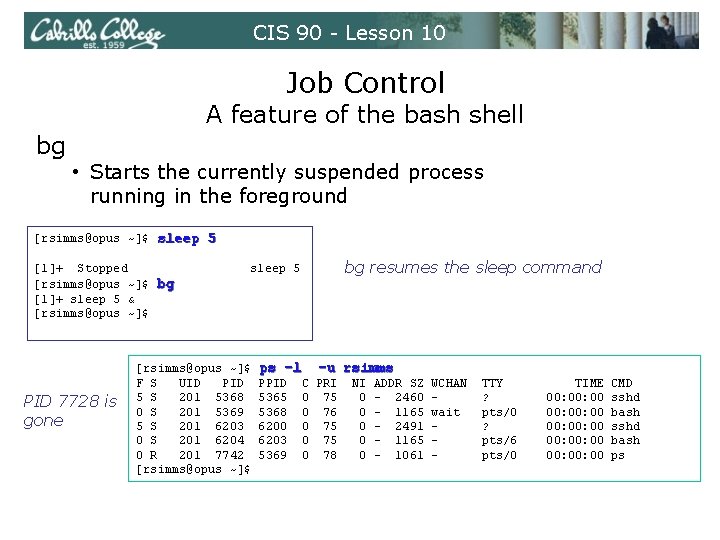
CIS 90 - Lesson 10 Job Control A feature of the bash shell bg • Starts the currently suspended process running in the foreground [rsimms@opus ~]$ sleep 5 [1]+ Stopped [rsimms@opus ~]$ bg [1]+ sleep 5 & [rsimms@opus ~]$ PID 7728 is gone bg resumes the sleep command sleep 5 [rsimms@opus ~]$ F S UID PID 5 S 201 5368 0 S 201 5369 5 S 201 6203 0 S 201 6204 0 R 201 7742 [rsimms@opus ~]$ ps -l PPID 5365 5368 6200 6203 5369 -u rsimms C PRI 0 75 0 76 0 75 0 78 NI 0 0 0 ADDR SZ - 2460 - 1165 - 2491 - 1165 - 1061 WCHAN wait - TTY ? pts/0 ? pts/6 pts/0 TIME 00: 00: 00 00: 00 CMD sshd bash ps
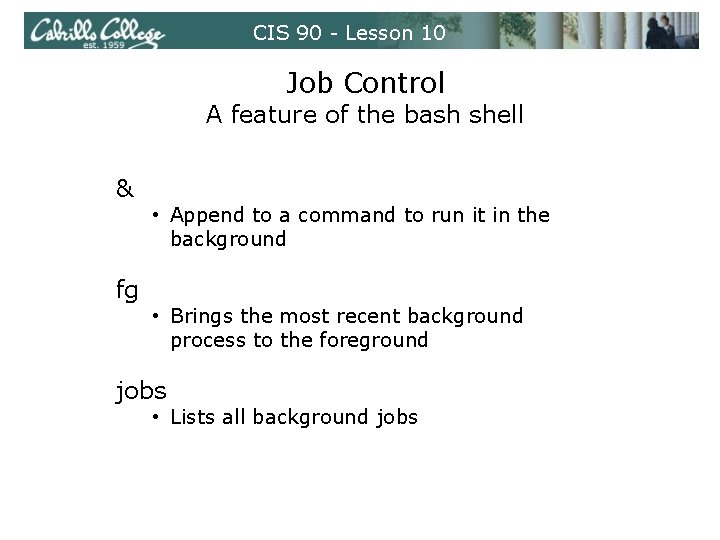
CIS 90 - Lesson 10 Job Control A feature of the bash shell & fg • Append to a command to run it in the background • Brings the most recent background process to the foreground jobs • Lists all background jobs
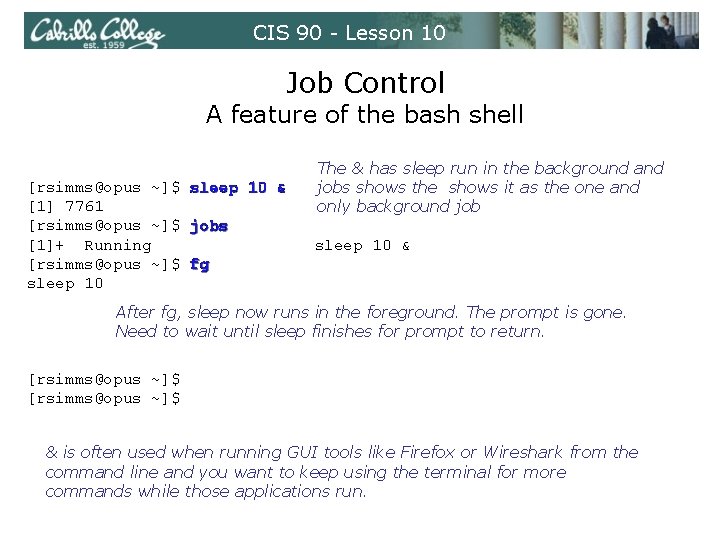
CIS 90 - Lesson 10 Job Control A feature of the bash shell [rsimms@opus ~]$ sleep 10 & [1] 7761 [rsimms@opus ~]$ jobs [1]+ Running [rsimms@opus ~]$ fg sleep 10 The & has sleep run in the background and jobs shows the shows it as the one and only background job sleep 10 & After fg, sleep now runs in the foreground. The prompt is gone. Need to wait until sleep finishes for prompt to return. [rsimms@opus ~]$ & is often used when running GUI tools like Firefox or Wireshark from the command line and you want to keep using the terminal for more commands while those applications run.
CIS 90 - Lesson 10 Signals
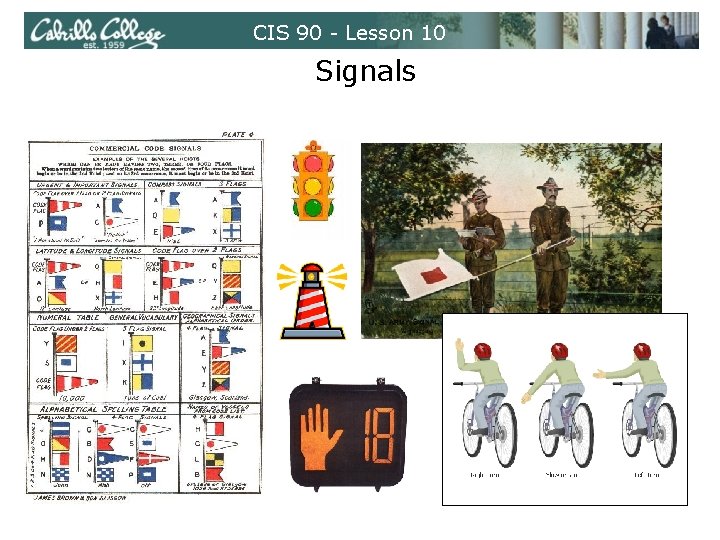
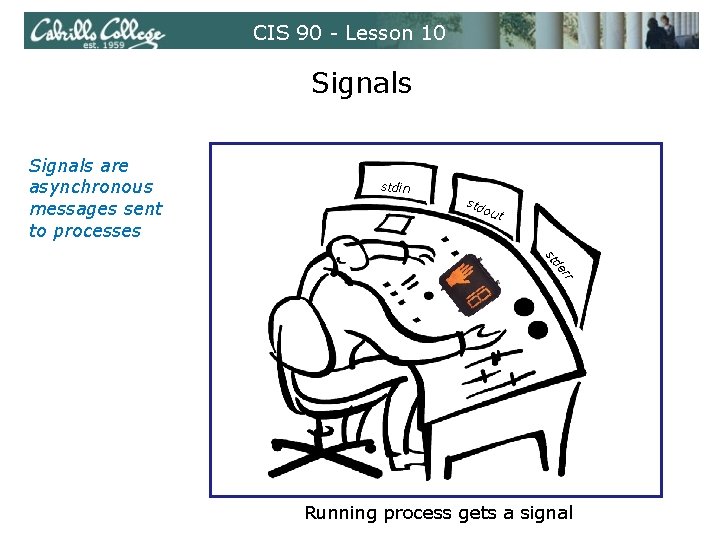
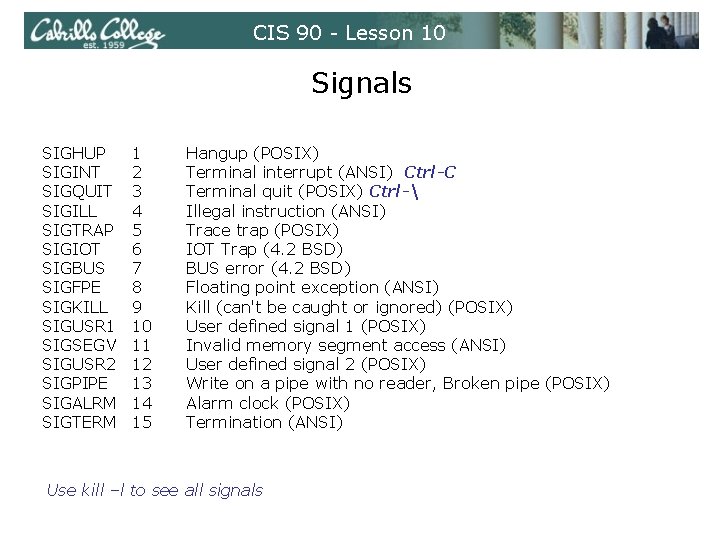
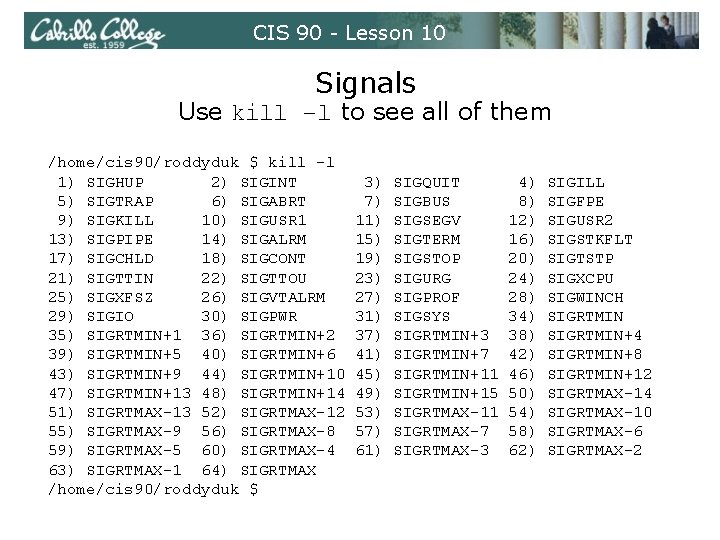
CIS 90 - Lesson 10 Signals are asynchronous messages sent to processes They can result in one of three courses of action: 1. be ignored, 2. default action (die) 3. execute some predefined function. Signals are sent: • Using the kill command: $ kill -# PID • Where # is the signal number and PID is the process id. • if no number is specified, SIGTERM is sent. • Using special keystrokes • limited to just a few signals Use kill –l to see all signals
CIS 90 - Lesson 10 Signals
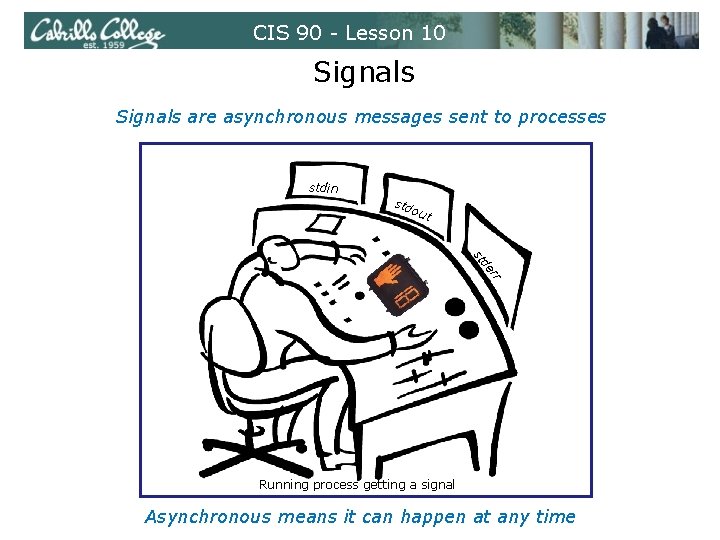
CIS 90 - Lesson 10 Signals are asynchronous messages sent to processes stdin std out de st rr Running process getting a signal Asynchronous means it can happen at any time
CIS 90 - Lesson 10 Signals are asynchronous messages sent to processes stdin std out de st rr Running process gets a signal
CIS 90 - Lesson 10 Signals SIGHUP SIGINT SIGQUIT SIGILL SIGTRAP SIGIOT SIGBUS SIGFPE SIGKILL SIGUSR 1 SIGSEGV SIGUSR 2 SIGPIPE SIGALRM SIGTERM 1 2 3 4 5 6 7 8 9 10 11 12 13 14 15 Hangup (POSIX) Terminal interrupt (ANSI) Ctrl-C Terminal quit (POSIX) Ctrl- Illegal instruction (ANSI) Trace trap (POSIX) IOT Trap (4. 2 BSD) BUS error (4. 2 BSD) Floating point exception (ANSI) Kill (can't be caught or ignored) (POSIX) User defined signal 1 (POSIX) Invalid memory segment access (ANSI) User defined signal 2 (POSIX) Write on a pipe with no reader, Broken pipe (POSIX) Alarm clock (POSIX) Termination (ANSI) Use kill –l to see all signals
CIS 90 - Lesson 10 Signals SIGSTKFLT SIGCHLD SIGCONT SIGSTOP SIGTSTP SIGTTIN SIGTTOU SIGURG SIGXCPU SIGXFSZ SIGVTALRM SIGPROF SIGWINCH SIGIO SIGPWR 16 17 18 19 20 21 22 23 24 25 26 27 28 29 30 Stack fault Child process has stopped or exited, changed (POSIX) Continue executing, if stopped (POSIX) Stop executing(can't be caught or ignored) (POSIX) Terminal stop signal (POSIX) Ctrl-Z or Ctrl-F Background process trying to read, from TTY (POSIX) Background process trying to write, to TTY (POSIX) Urgent condition on socket (4. 2 BSD) CPU limit exceeded (4. 2 BSD) File size limit exceeded (4. 2 BSD) Virtual alarm clock (4. 2 BSD) Profiling alarm clock (4. 2 BSD) Window size change (4. 3 BSD, Sun) I/O now possible (4. 2 BSD) Power failure restart (System V) Use kill –l to see all signals
CIS 90 - Lesson 10 Signals Use kill –l to see all of them /home/cis 90/roddyduk $ kill -l 1) SIGHUP 2) SIGINT 5) SIGTRAP 6) SIGABRT 9) SIGKILL 10) SIGUSR 1 13) SIGPIPE 14) SIGALRM 17) SIGCHLD 18) SIGCONT 21) SIGTTIN 22) SIGTTOU 25) SIGXFSZ 26) SIGVTALRM 29) SIGIO 30) SIGPWR 35) SIGRTMIN+1 36) SIGRTMIN+2 39) SIGRTMIN+5 40) SIGRTMIN+6 43) SIGRTMIN+9 44) SIGRTMIN+10 47) SIGRTMIN+13 48) SIGRTMIN+14 51) SIGRTMAX-13 52) SIGRTMAX-12 55) SIGRTMAX-9 56) SIGRTMAX-8 59) SIGRTMAX-5 60) SIGRTMAX-4 63) SIGRTMAX-1 64) SIGRTMAX /home/cis 90/roddyduk $ 3) 7) 11) 15) 19) 23) 27) 31) 37) 41) 45) 49) 53) 57) 61) SIGQUIT SIGBUS SIGSEGV SIGTERM SIGSTOP SIGURG SIGPROF SIGSYS SIGRTMIN+3 SIGRTMIN+7 SIGRTMIN+11 SIGRTMIN+15 SIGRTMAX-11 SIGRTMAX-7 SIGRTMAX-3 4) 8) 12) 16) 20) 24) 28) 34) 38) 42) 46) 50) 54) 58) 62) SIGILL SIGFPE SIGUSR 2 SIGSTKFLT SIGTSTP SIGXCPU SIGWINCH SIGRTMIN+4 SIGRTMIN+8 SIGRTMIN+12 SIGRTMAX-14 SIGRTMAX-10 SIGRTMAX-6 SIGRTMAX-2
CIS 90 - Lesson 10 Signals Special keystrokes /home/cis 90/roddyduk $ stty -a speed 38400 baud; rows 26; columns 78; line = 0; intr = ^C; quit = ^; erase = ^? ; kill = ^U; eof = ^D; eol = <undef>; eol 2 = <undef>; swtch = <undef>; start = ^Q; stop = ^S; susp = ^F; rprnt = ^R; werase = ^W; lnext = ^V; flush = ^O; min = 1; time = 0; [rsimms@opus ~]$ stty -a speed 38400 baud; rows 39; columns 84; line = 0; intr = ^C; quit = ^; erase = ^? ; kill = ^U; eof = ^D; eol = <undef>; eol 2 = <undef>; swtch = <undef>; start = ^Q; stop = ^S; susp = ^Z; rprnt = ^R; werase = ^W; lnext = ^V; flush = ^O; min = 1; time = 0; use stty –a to see special keystrokes
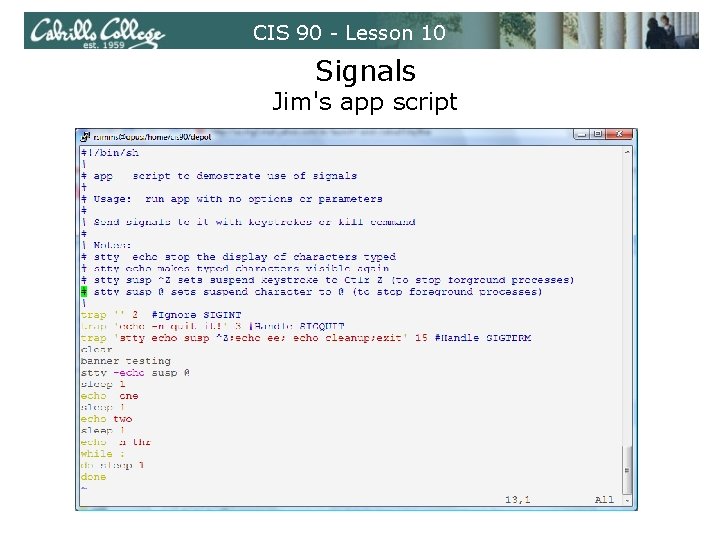
CIS 90 - Lesson 10 Signals Jim's app script
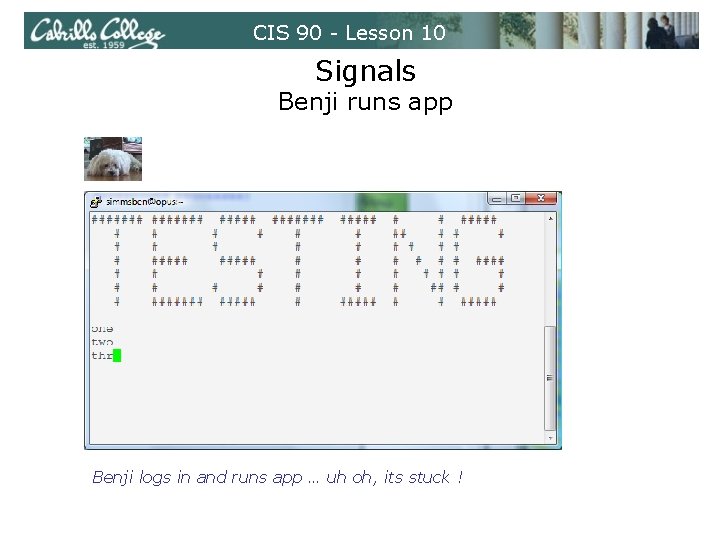
CIS 90 - Lesson 10 Signals Benji runs app Benji logs in and runs app … uh oh, its stuck !
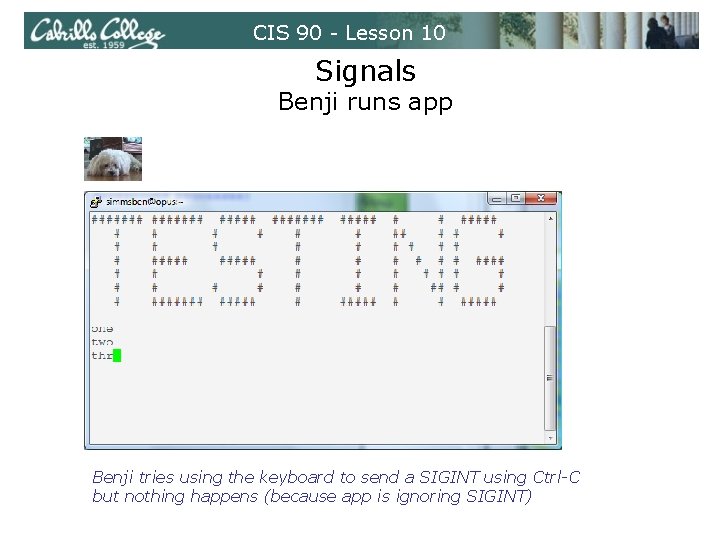
CIS 90 - Lesson 10 Signals Benji runs app Benji tries using the keyboard to send a SIGINT using Ctrl-C but nothing happens (because app is ignoring SIGINT)
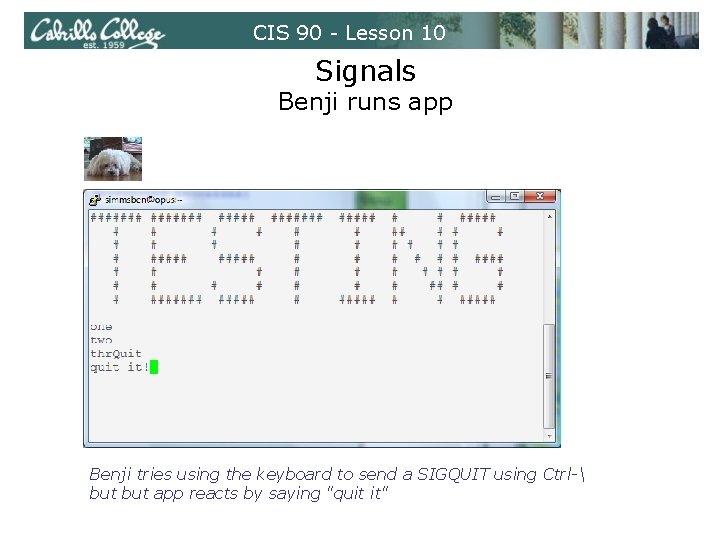
CIS 90 - Lesson 10 Signals Benji runs app Benji tries using the keyboard to send a SIGQUIT using Ctrl- but app reacts by saying "quit it"
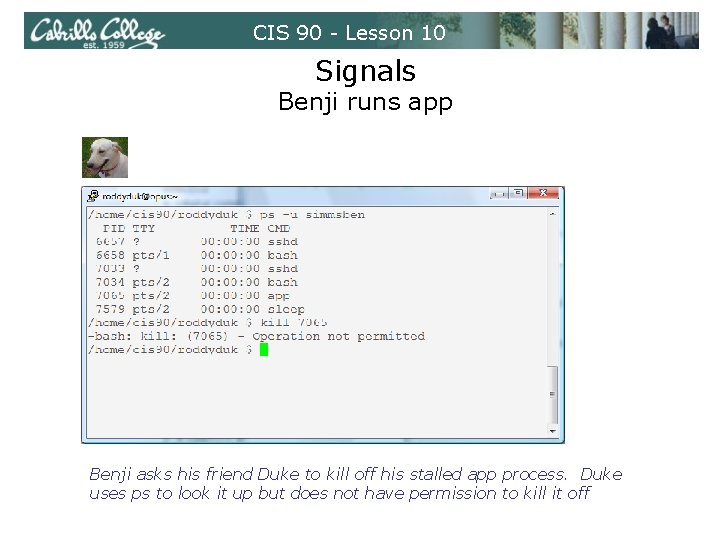
CIS 90 - Lesson 10 Signals Benji runs app Benji asks his friend Duke to kill off his stalled app process. Duke uses ps to look it up but does not have permission to kill it off
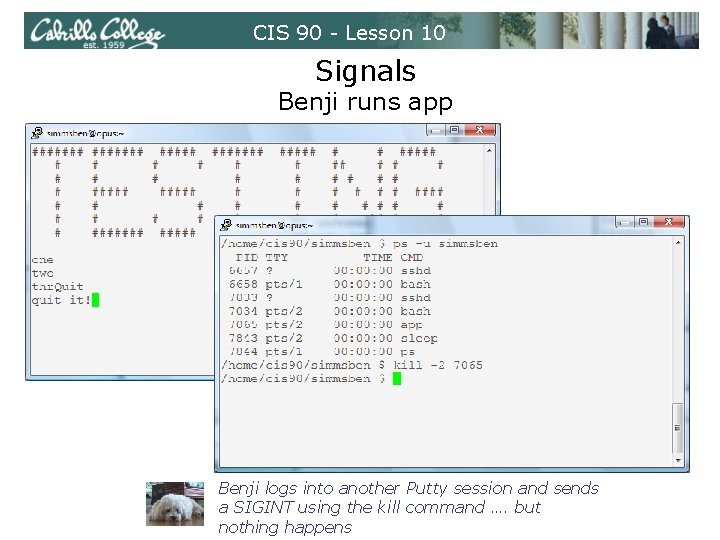
CIS 90 - Lesson 10 Signals Benji runs app Benji logs into another Putty session and sends a SIGINT using the kill command …. but nothing happens
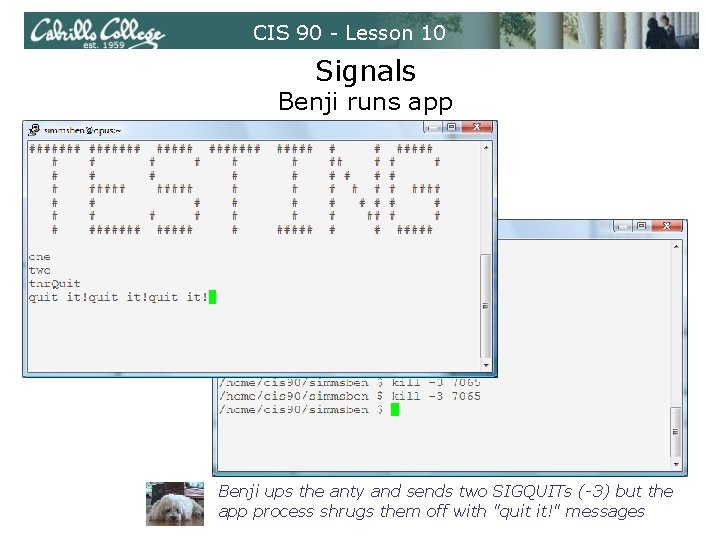
CIS 90 - Lesson 10 Signals Benji runs app Benji ups the anty and sends two SIGQUITs (-3) but the app process shrugs them off with "quit it!" messages
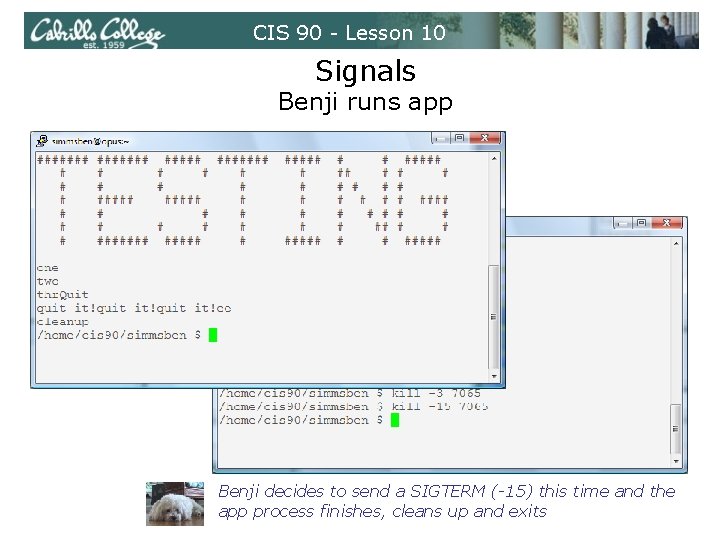
CIS 90 - Lesson 10 Signals Benji runs app Benji decides to send a SIGTERM (-15) this time and the app process finishes, cleans up and exits
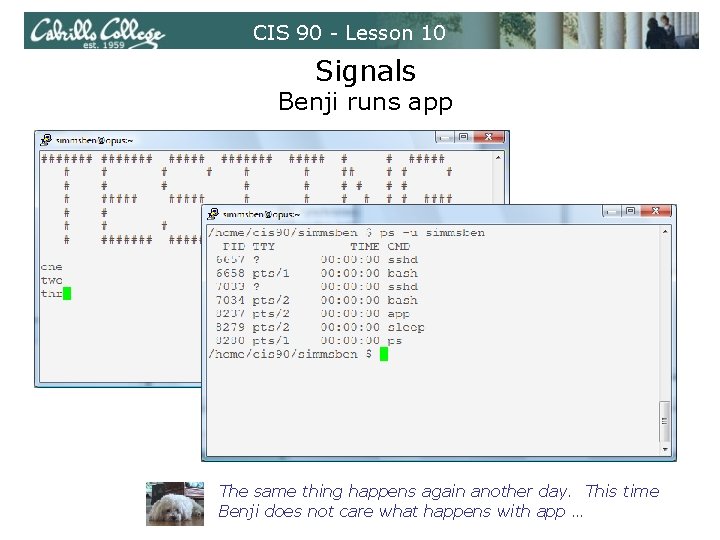
CIS 90 - Lesson 10 Signals Benji runs app The same thing happens again another day. This time Benji does not care what happens with app …
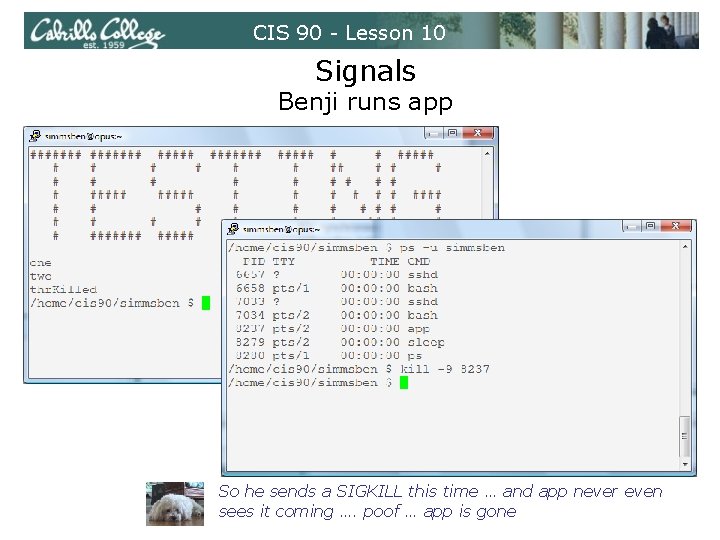
CIS 90 - Lesson 10 Signals Benji runs app So he sends a SIGKILL this time … and app never even sees it coming …. poof … app is gone
CIS 90 - Lesson 10 Signals Class Exercise • View the. . /depot/app program • Look for the three trap handlers • Signal 2 (SIGINT) • Signal 3 (SIGQUIT) • Signal 15 (SIGTERM) • Run app • Try sending it a SIGINT from the keyboard (Ctrol-C) • Try sending it a SIGQUIT from the keyboard (Ctrl-) • Login to another Putty session • Use the ps –u $LOGNAME to find the app PID • Send it a SIGINT (kill -2 PID) • Send it a SIGQUIT (kill -3 PID) • Now send either a SIGKILL (9) or SIGTERM (15) but first decide if app can clean up or not when it gets your signal.
CIS 90 - Lesson 10 Load Balancing
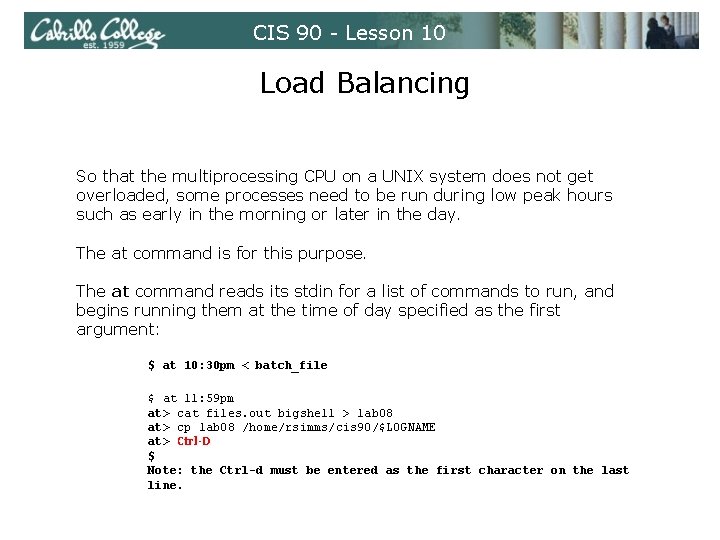
CIS 90 - Lesson 10 Load Balancing So that the multiprocessing CPU on a UNIX system does not get overloaded, some processes need to be run during low peak hours such as early in the morning or later in the day. The at command is for this purpose. The at command reads its stdin for a list of commands to run, and begins running them at the time of day specified as the first argument: $ at 10: 30 pm < batch_file $ at 11: 59 pm at> cat files. out bigshell > lab 08 at> cp lab 08 /home/rsimms/cis 90/$LOGNAME at> Ctrl-D $ Note: the Ctrl-d must be entered as the first character on the last line.
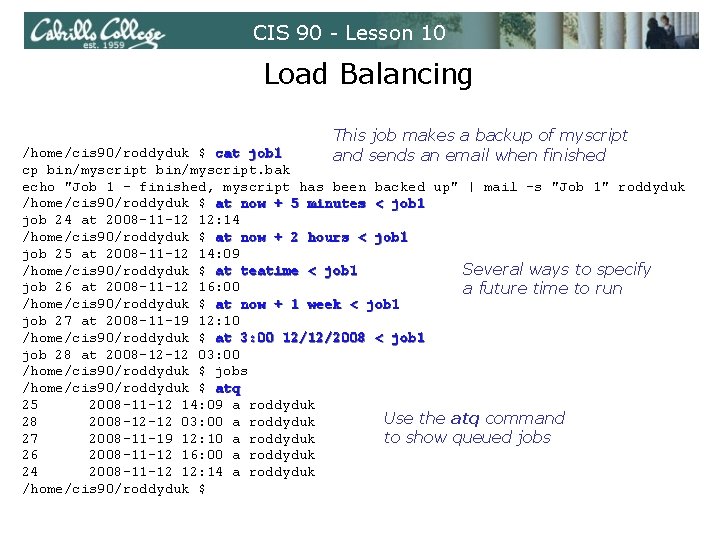
CIS 90 - Lesson 10 Load Balancing This job makes a backup of myscript and sends an email when finished /home/cis 90/roddyduk $ cat job 1 cp bin/myscript. bak echo "Job 1 - finished, myscript has been backed up" | mail -s "Job 1" roddyduk /home/cis 90/roddyduk $ at now + 5 minutes < job 1 job 24 at 2008 -11 -12 12: 14 /home/cis 90/roddyduk $ at now + 2 hours < job 1 job 25 at 2008 -11 -12 14: 09 /home/cis 90/roddyduk $ at teatime < job 1 Several ways to specify job 26 at 2008 -11 -12 16: 00 a future time to run /home/cis 90/roddyduk $ at now + 1 week < job 1 job 27 at 2008 -11 -19 12: 10 /home/cis 90/roddyduk $ at 3: 00 12/12/2008 < job 1 job 28 at 2008 -12 -12 03: 00 /home/cis 90/roddyduk $ jobs /home/cis 90/roddyduk $ atq 25 2008 -11 -12 14: 09 a roddyduk Use the atq command 28 2008 -12 -12 03: 00 a roddyduk 27 2008 -11 -19 12: 10 a roddyduk to show queued jobs 26 2008 -11 -12 16: 00 a roddyduk 24 2008 -11 -12 12: 14 a roddyduk /home/cis 90/roddyduk $
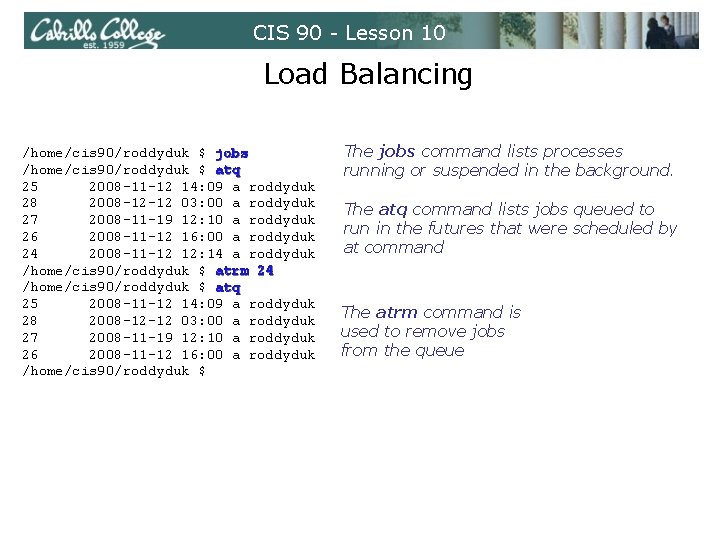
CIS 90 - Lesson 10 Load Balancing /home/cis 90/roddyduk $ jobs /home/cis 90/roddyduk $ atq 25 2008 -11 -12 14: 09 a roddyduk 28 2008 -12 -12 03: 00 a roddyduk 27 2008 -11 -19 12: 10 a roddyduk 26 2008 -11 -12 16: 00 a roddyduk 24 2008 -11 -12 12: 14 a roddyduk /home/cis 90/roddyduk $ atrm 24 /home/cis 90/roddyduk $ atq 25 2008 -11 -12 14: 09 a roddyduk 28 2008 -12 -12 03: 00 a roddyduk 27 2008 -11 -19 12: 10 a roddyduk 26 2008 -11 -12 16: 00 a roddyduk /home/cis 90/roddyduk $ The jobs command lists processes running or suspended in the background. The atq command lists jobs queued to run in the futures that were scheduled by at command The atrm command is used to remove jobs from the queue
CIS 90 - Lesson 10 The Test
CIS 90 - Lesson 10 Wrap up
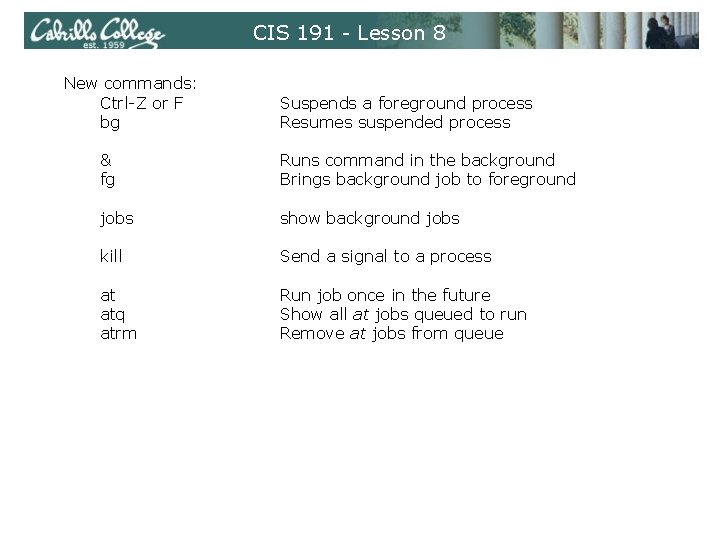
CIS 191 - Lesson 8 New commands: Ctrl-Z or F bg Suspends a foreground process Resumes suspended process & fg Runs command in the background Brings background job to foreground jobs show background jobs kill Send a signal to a process at atq atrm Run job once in the future Show all at jobs queued to run Remove at jobs from queue
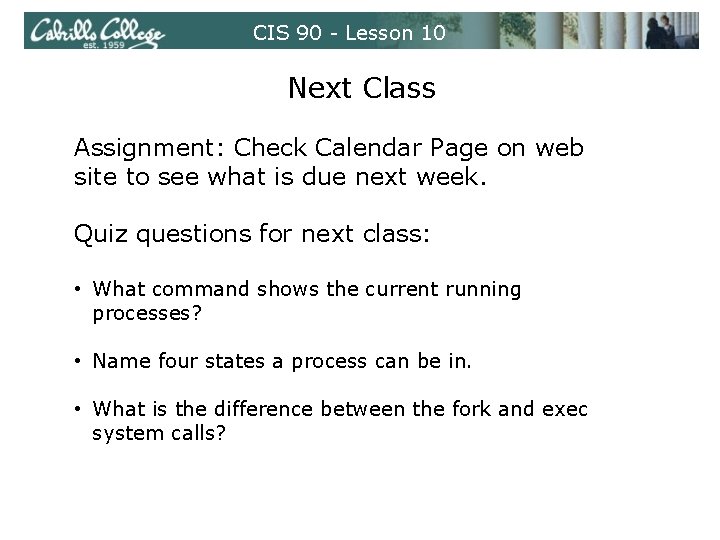
CIS 90 - Lesson 10 Next Class Assignment: Check Calendar Page on web site to see what is due next week. Quiz questions for next class: • What command shows the current running processes? • Name four states a process can be in. • What is the difference between the fork and exec system calls?
CIS 90 - Lesson 10 Backup