
Chilln with Windchill and other Object Associations Magic

Chill'n with Windchill and other Object Associations Magic Windchill 10. 1 M 040 Jay Nallani Lead Business Analyst
Biography Jay Nallani • 1996 - 2009 : Dana Corporation (Pro/E User, Intralink, Design Engineer, Project Manager, System Admin) • 2007 - 2009 : Ingersoll Rand PLM (Admin, Architect, Project Manager) • 2010 - Present : Tyco Electronics Corporation (Intralink – PDMLink done, Enhancing PDMLink & aligning with engineering technology) • Email - Jay. Nallani@te. com • TE Connectivity - http: //www. te. com/en/home. html page 2 TE Connectivity Confidential & Proprietary. Do Not Reproduce or Distribute
Agenda • About TE Connectivity • Windchill 10 cool stuff • Object Associations page 3

A WORLD LEADER IN CONNECTIVITY • Solving connectivity challenges with the broadest range of products • Engineering driven, customer focused • Leveraging technology innovations across industries page 4 TE Connectivity Confidential & Proprietary. Do Not Reproduce or Distribute
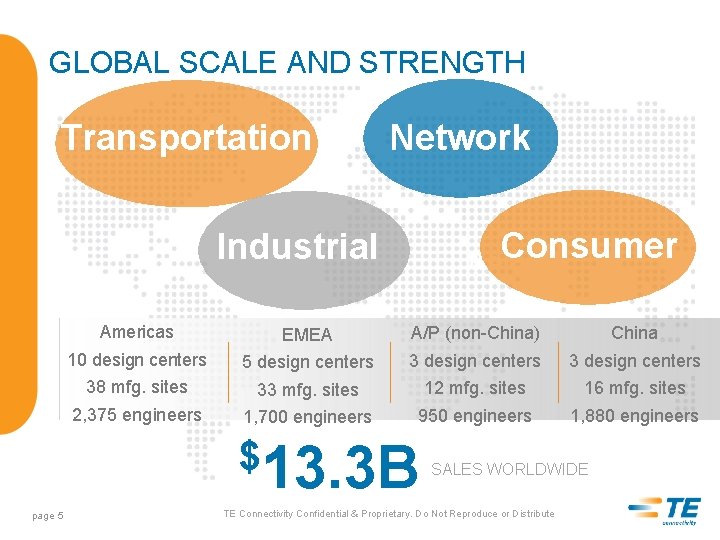
GLOBAL SCALE AND STRENGTH Transportation Industrial Network Consumer ASIA Americas EMEA A/P (non-China) China 10 design centers 5 design centers 38 mfg. sites 33 mfg. sites 12 mfg. sites 16 mfg. sites 2, 375 engineers 1, 700 engineers 950 engineers 1, 880 engineers $13. 3 B SALES WORLDWIDE page 5 TE Connectivity Confidential & Proprietary. Do Not Reproduce or Distribute

7, 000 LEADING WITH INNOVATION For the third consecutive year, Thomson Reuters recognized TE as a Top 100 Global Innovator. This distinction recognizes our commitment to innovation. 2013 THOMSON REUTERS TOP 100 ENGINEERS AROUND THE GLOBE 18, 000+ PATENTS GRANTED OR PENDING 24% OF SALES FROM NEW PRODUCTS INTRODUCED OVER THE LAST THREE FISCALYEARS GLOBAL INNOVATORS $675 M MILLION INVESTED IN R&D AND ENGINEERING IN FISCAL YEAR 2013 page 6 TE Connectivity Confidential & Proprietary. Do Not Reproduce or Distribute
Windchill 10 Cool Stuff – Blue Line Effect page 7
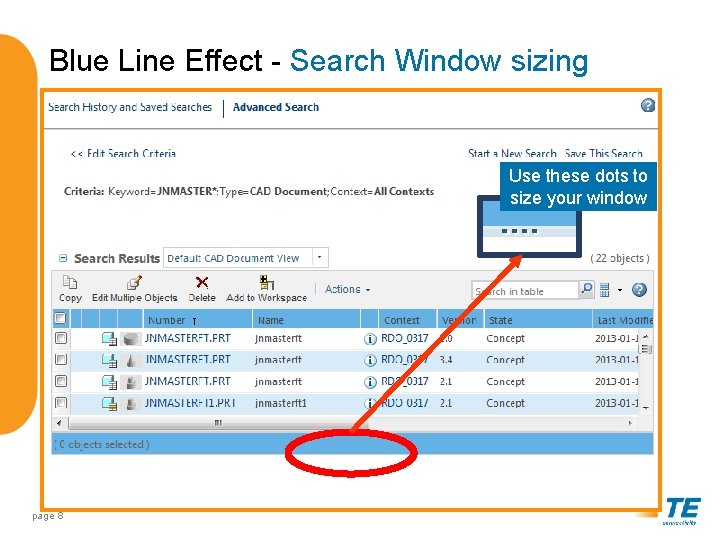
Blue Line Effect - Search Window sizing Use these dots to size your window page 8
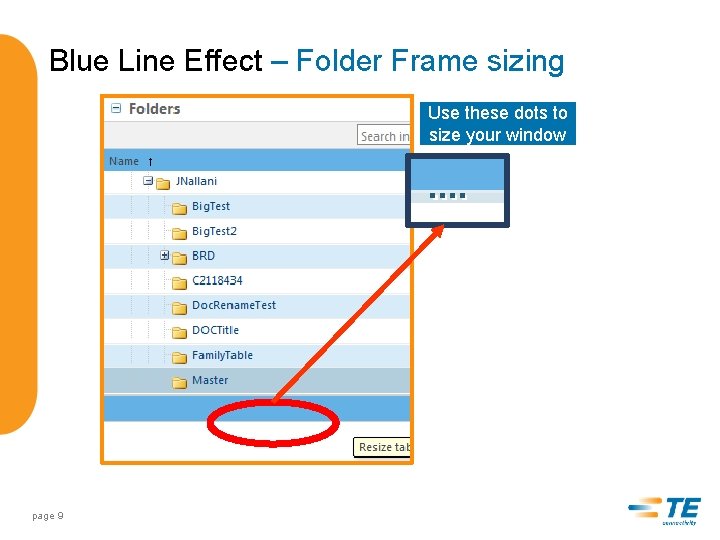
Blue Line Effect – Folder Frame sizing Use these dots to size your window page 9
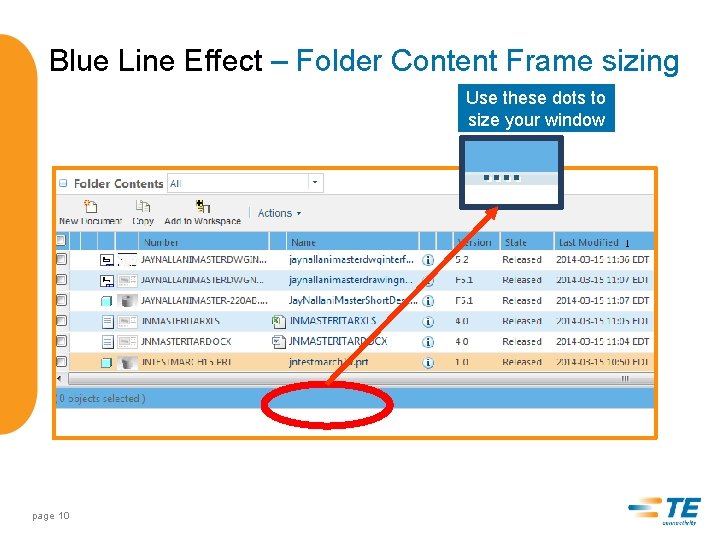
Blue Line Effect – Folder Content Frame sizing Use these dots to size your window page 10
Windchill 10 Cool Stuff – Family Table Data page 11
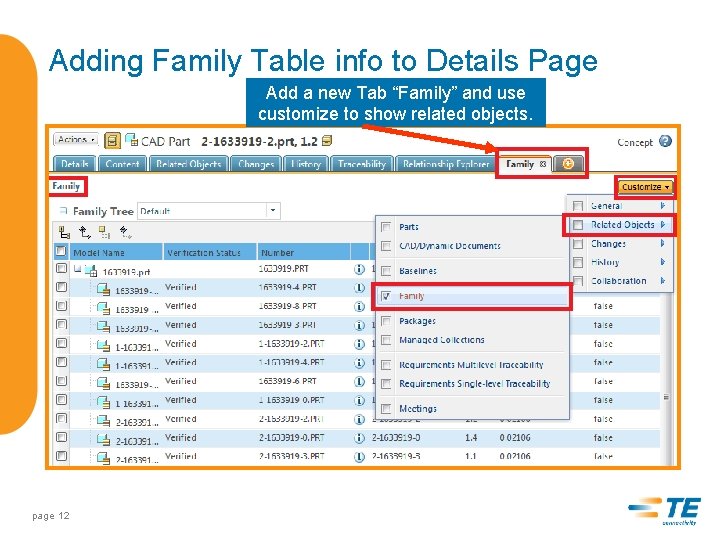
Adding Family Table info to Details Page Add a new Tab “Family” and use customize to show related objects. page 12

Windchill 10 Cool Stuff – Move a Specific version to a different folder page 13
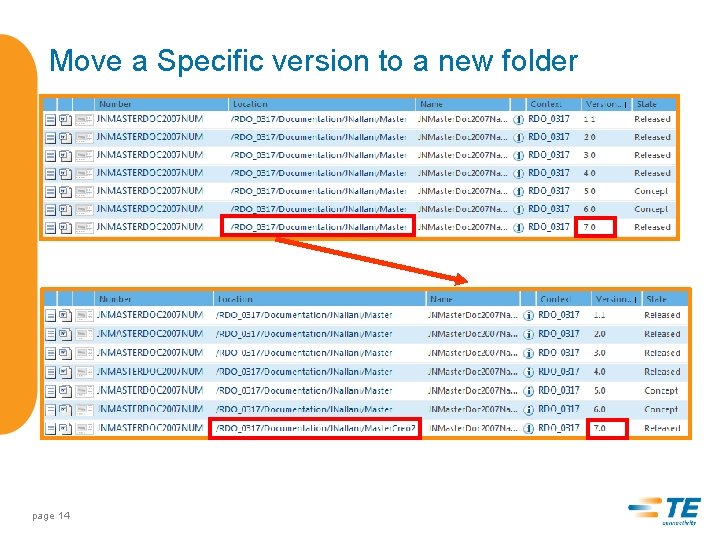
Move a Specific version to a new folder page 14
Windchill 10 Cool Stuff – Set State Enhancement page 15
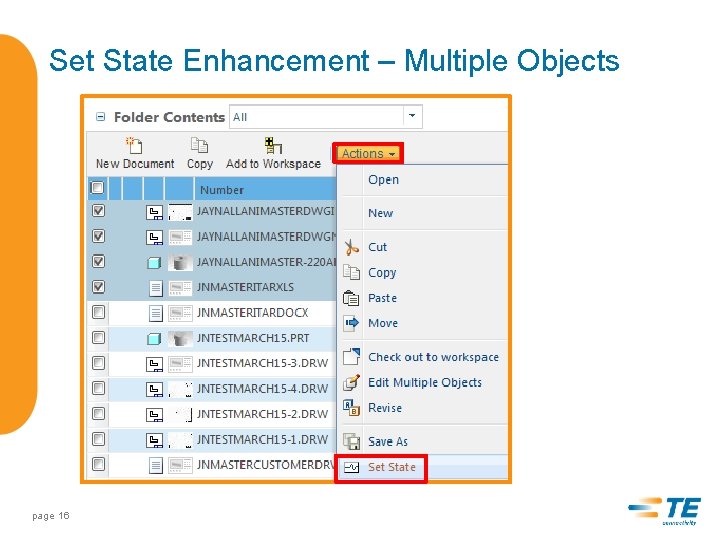
Set State Enhancement – Multiple Objects page 16
Object Associations page 17
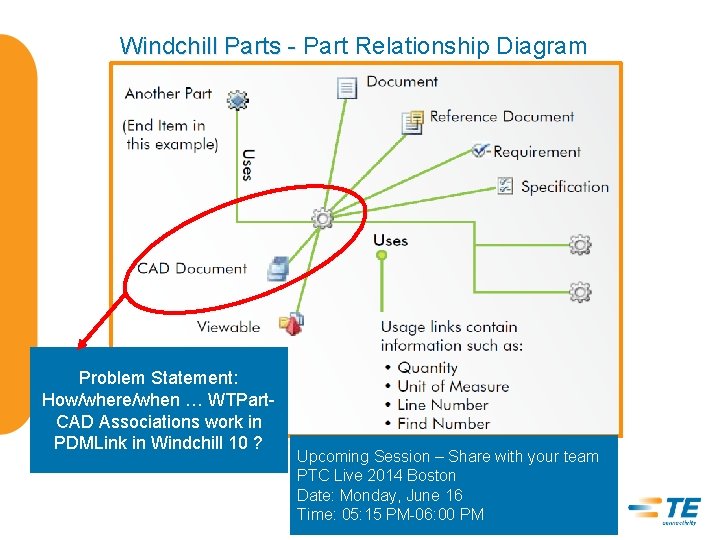
Windchill Parts - Part Relationship Diagram Problem Statement: How/where/when … WTPart. CAD Associations work in PDMLink in Windchill 10 ? Upcoming Session – Share with your team PTC Live 2014 Boston Date: Monday, June 16 Time: 05: 15 PM-06: 00 PM
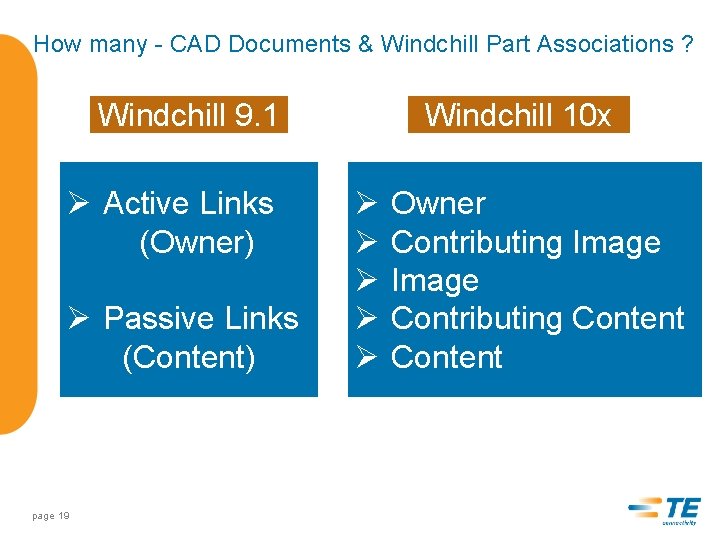
How many - CAD Documents & Windchill Part Associations ? Windchill 9. 1 Ø Active Links (Owner) Ø Passive Links (Content) page 19 Windchill 10 x Ø Ø Ø Owner Contributing Image Contributing Content
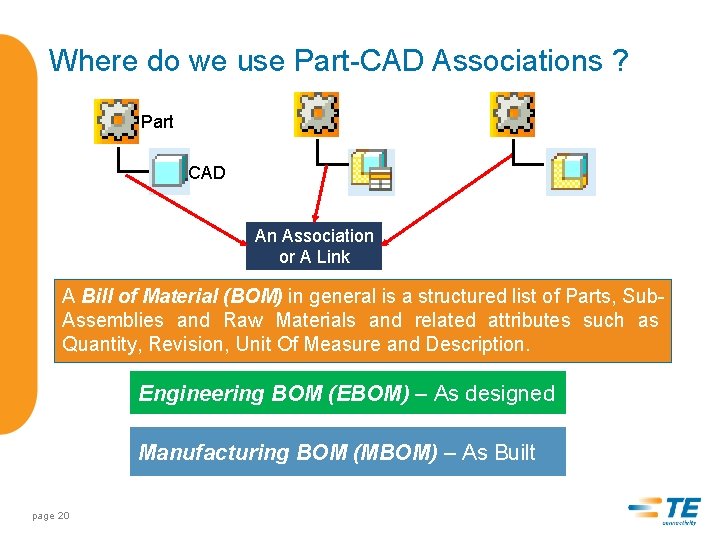
Where do we use Part-CAD Associations ? Part CAD An Association or A Link A Bill of Material (BOM) in general is a structured list of Parts, Sub. Assemblies and Raw Materials and related attributes such as Quantity, Revision, Unit Of Measure and Description. Engineering BOM (EBOM) – As designed Manufacturing BOM (MBOM) – As Built page 20
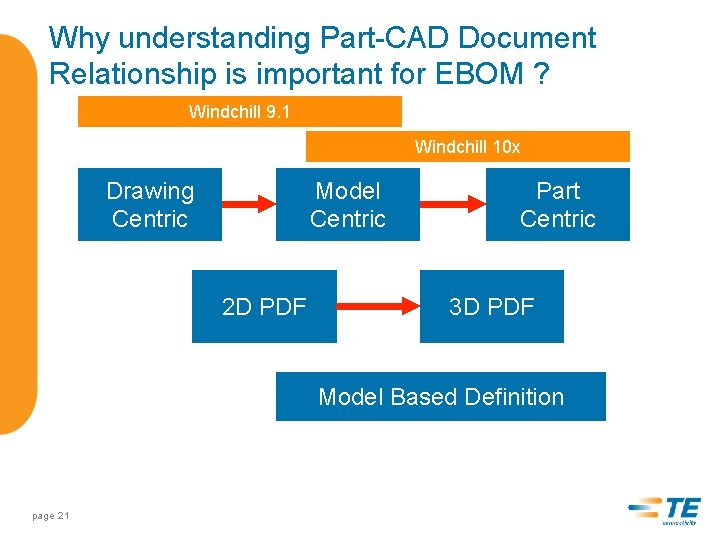
Why understanding Part-CAD Document Relationship is important for EBOM ? Windchill 9. 1 Windchill 10 x Drawing Centric Model Centric 2 D PDF Part Centric 3 D PDF Model Based Definition page 21
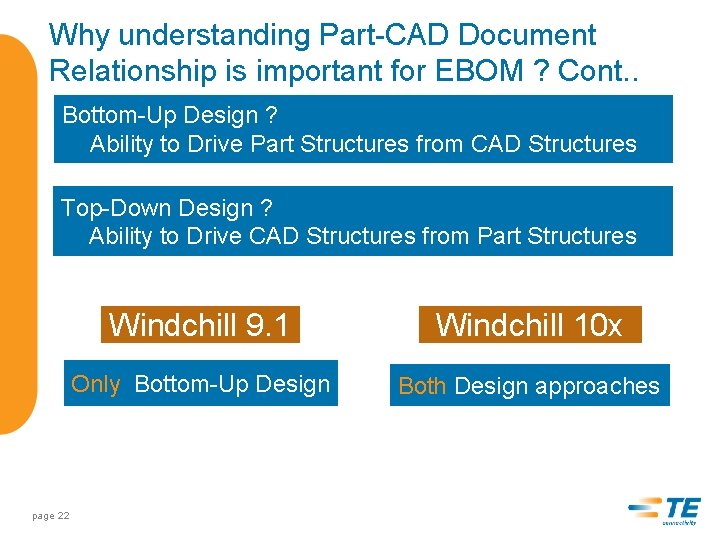
Why understanding Part-CAD Document Relationship is important for EBOM ? Cont. . Bottom-Up Design ? Ability to Drive Part Structures from CAD Structures Top-Down Design ? Ability to Drive CAD Structures from Part Structures page 22 Windchill 9. 1 Windchill 10 x Only Bottom-Up Design Both Design approaches
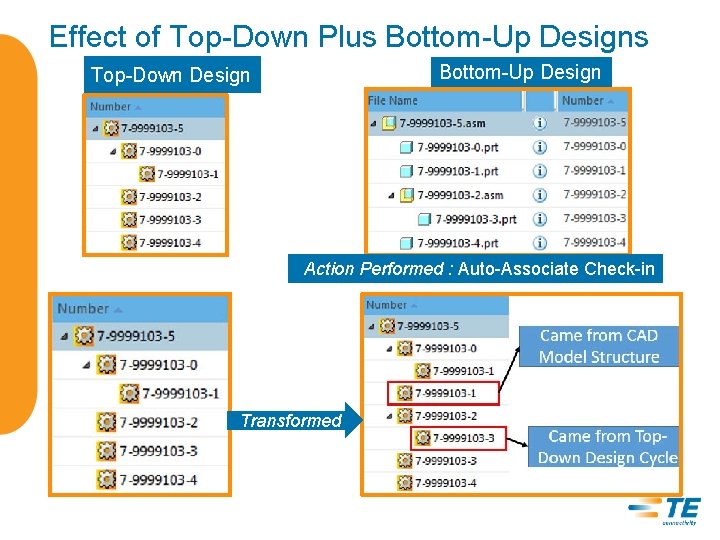
Effect of Top-Down Plus Bottom-Up Design Top-Down Design Action Performed : Auto-Associate Check-in Transformed
How the Association (EBOMs) are created? Using Creo-Windchill Functionality
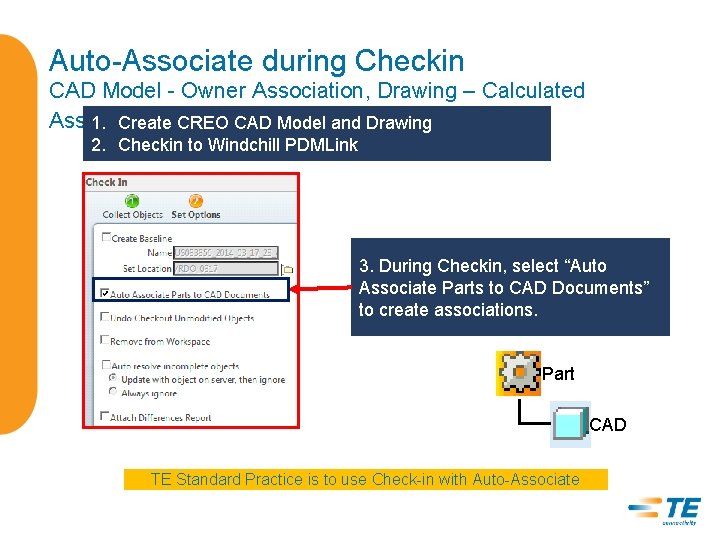
Auto-Associate during Checkin CAD Model - Owner Association, Drawing – Calculated Association 1. Create CREO CAD Model and Drawing 2. Checkin to Windchill PDMLink 3. During Checkin, select “Auto Associate Parts to CAD Documents” to create associations. Part CAD TE Standard Practice is to use Check-in with Auto-Associate
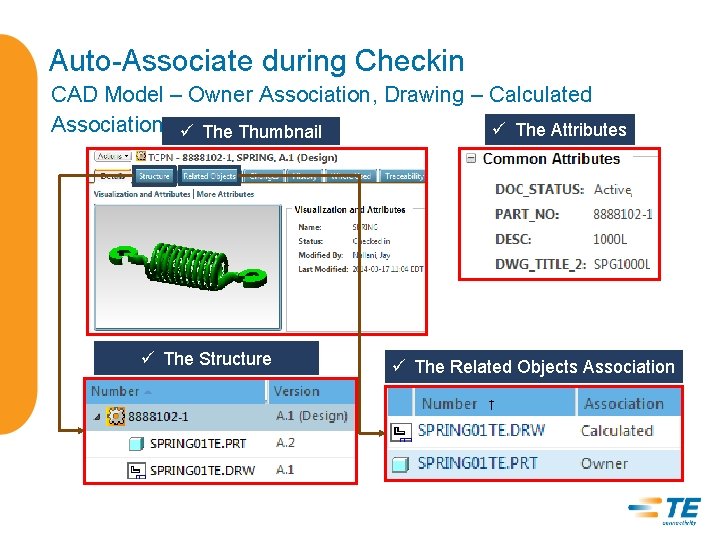
Auto-Associate during Checkin CAD Model – Owner Association, Drawing – Calculated Association ü The Thumbnail ü The Attributes ü The Structure ü The Related Objects Association
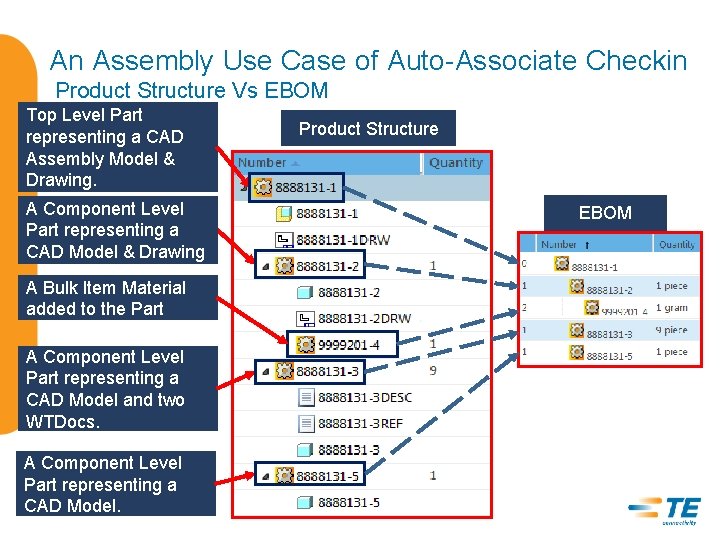
An Assembly Use Case of Auto-Associate Checkin Product Structure Vs EBOM Top Level Part representing a CAD Assembly Model & Drawing. A Component Level Part representing a CAD Model & Drawing A Bulk Item Material added to the Part A Component Level Part representing a CAD Model and two WTDocs. A Component Level Part representing a CAD Model. Product Structure EBOM
Life is happy, so far with Owner Links What challenges user faces during Associations ?
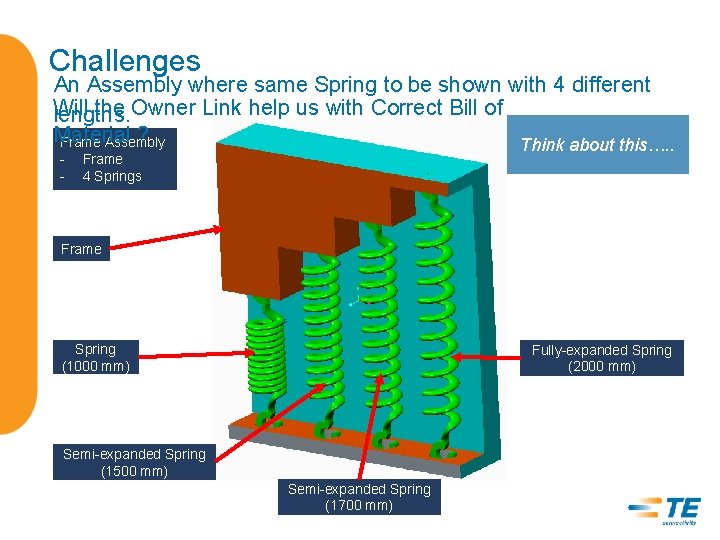
Challenges An Assembly where same Spring to be shown with 4 different Will the Owner Link help us with Correct Bill of lengths. Material ? Frame Assembly Think about this…. . - Frame 4 Springs Frame Spring (1000 mm) Fully-expanded Spring (2000 mm) Semi-expanded Spring (1500 mm) Semi-expanded Spring (1700 mm)
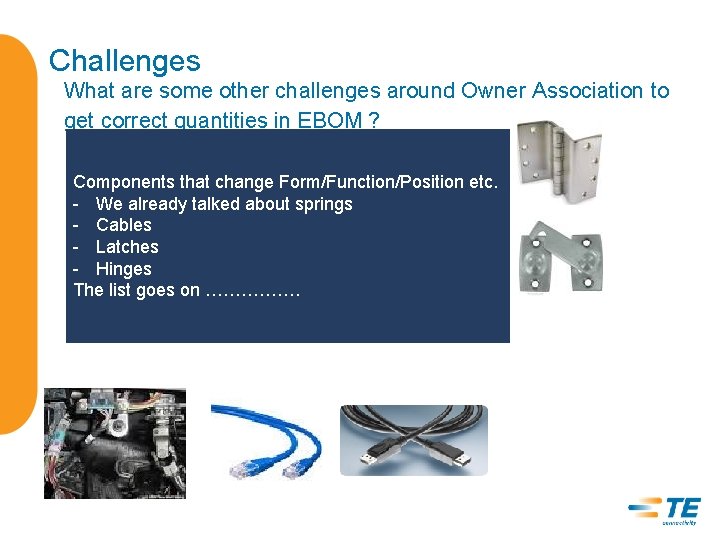
Challenges What are some other challenges around Owner Association to get correct quantities in EBOM ? Components that change Form/Function/Position etc. - We already talked about springs - Cables - Latches - Hinges The list goes on …………….
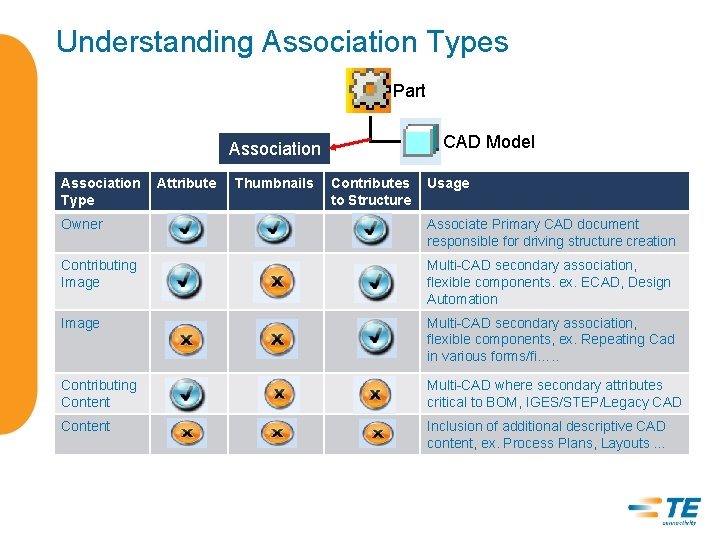
Understanding Association Types Part CAD Model Association Type Attribute Thumbnails Contributes to Structure Usage Owner Associate Primary CAD document responsible for driving structure creation Contributing Image Multi-CAD secondary association, flexible components. ex. ECAD, Design Automation Image Multi-CAD secondary association, flexible components, ex. Repeating Cad in various forms/fi…. . Contributing Content Multi-CAD where secondary attributes critical to BOM, IGES/STEP/Legacy CAD Content Inclusion of additional descriptive CAD content, ex. Process Plans, Layouts …

Exercise: How many different CAD Models can you associate to a Single Part? Only One WTPart Many CAD Models
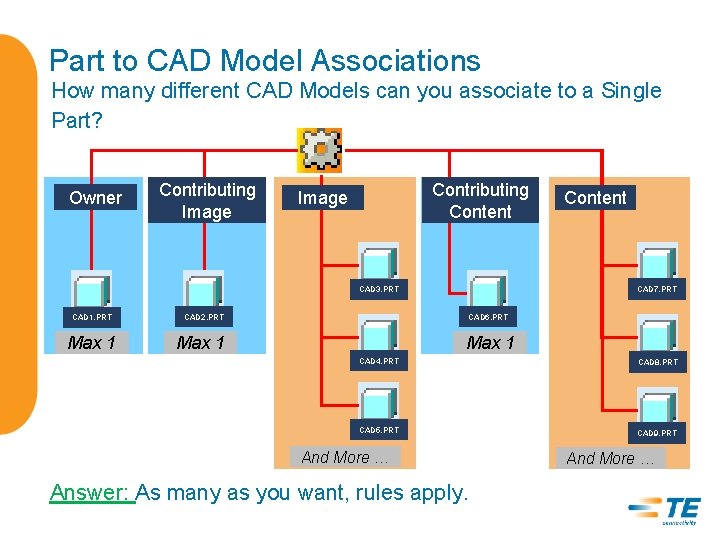
Part to CAD Model Associations How many different CAD Models can you associate to a Single Part? Owner Contributing Image Contributing Content Image CAD 7. PRT CAD 3. PRT CAD 1. PRT Max 1 Content CAD 6. PRT CAD 2. PRT Max 1 CAD 4. PRT CAD 8. PRT CAD 5. PRT CAD 9. PRT And More … Answer: As many as you want, rules apply. And More …
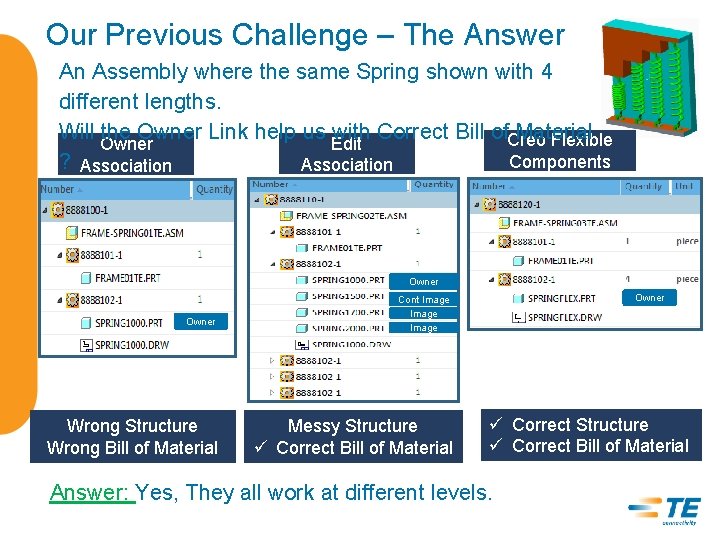
Our Previous Challenge – The Answer An Assembly where the same Spring shown with 4 different lengths. Will the Owner Link help us Edit with Correct Bill of. Creo Material Flexible Owner Components ? Association Owner Wrong Structure Wrong Bill of Material Owner Cont Image Messy Structure ü Correct Bill of Material ü Correct Structure ü Correct Bill of Material Answer: Yes, They all work at different levels.
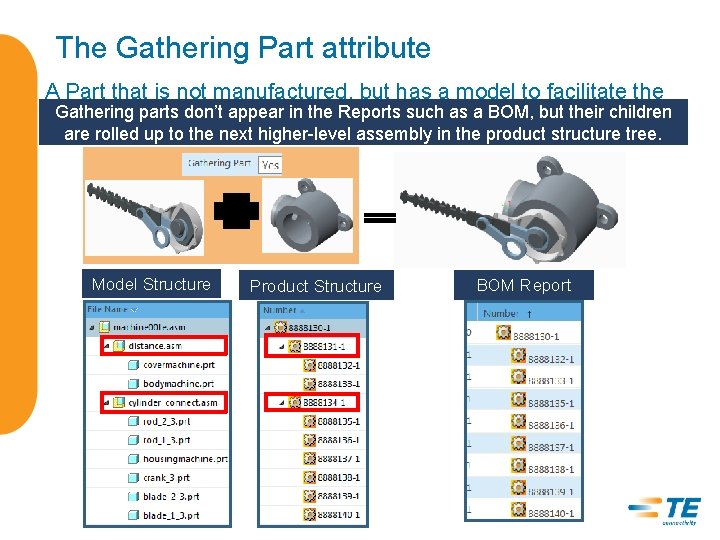
The Gathering Part attribute A Part that is not manufactured, but has a model to facilitate the Gathering parts don’t appear in the Reports such as a BOM, but their children CAD design. are rolled up to the next higher-level assembly in the product structure tree. Model Structure Product Structure BOM Report

Windchill Tools available Part to CAD Association check Lot of good tools in Windchill 10. 1

Compare Part and CAD Model Structure Compare Reports Export
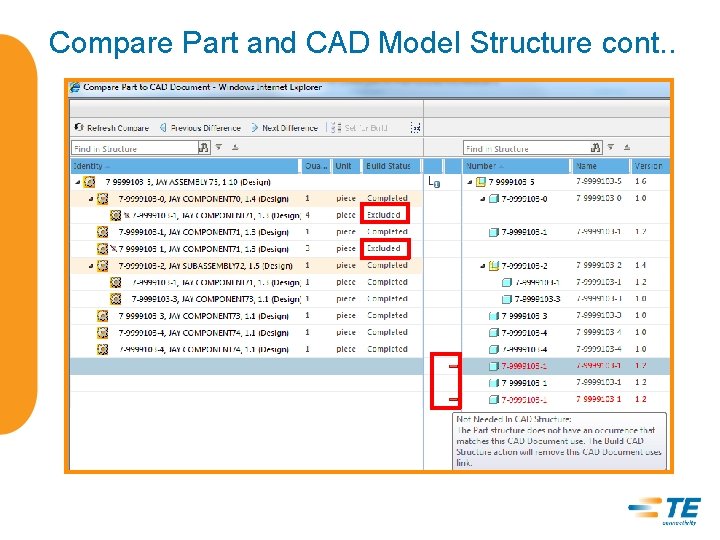
Compare Part and CAD Model Structure cont. .
Summary - Object Associations Windchill 10. 1 M 040 Part-To-Doc EBOM Speed to Market page 39
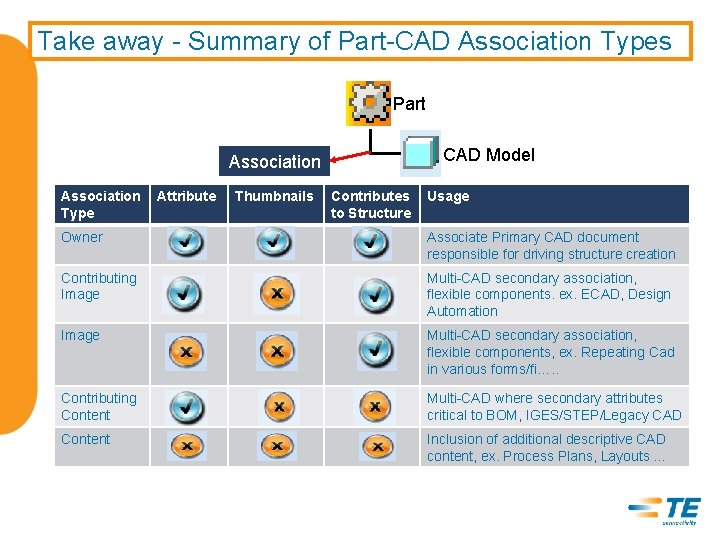
Take away - Summary of Part-CAD Association Types Part CAD Model Association Type Attribute Thumbnails Contributes to Structure Usage Owner Associate Primary CAD document responsible for driving structure creation Contributing Image Multi-CAD secondary association, flexible components. ex. ECAD, Design Automation Image Multi-CAD secondary association, flexible components, ex. Repeating Cad in various forms/fi…. . Contributing Content Multi-CAD where secondary attributes critical to BOM, IGES/STEP/Legacy CAD Content Inclusion of additional descriptive CAD content, ex. Process Plans, Layouts …

EVERY CONNECTION COUNTS 41
- Slides: 41