
Checkpointing and Restarting Jobs with DMTCP User Training
Checkpointing and Restarting Jobs with DMTCP User Training on Checkpoint/Restart (I) Zhengji Zhao User Engagement Group NERSC User Training, Berkeley CA November 6, 2019
Outline ● ● ● Introduction DMTCP overview Checkpoint/restart serial and threaded applications on Cori Automatic job resubmission of checkpoint/restart jobs with DMTCP Summary

Introduction
What is Checkpointing/Restarting? ● Checkpointing is the action of saving the state of a running process to a checkpoint image file ○ Dump a running process’s memory, state, etc. into a file ● The process can be restarted later from the checkpoint file: continuing the execution from where it left off, on the same or different computer
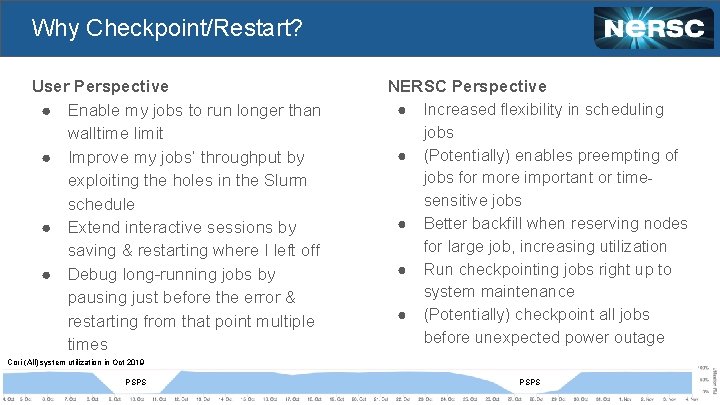
Why Checkpoint/Restart? User Perspective ● Enable my jobs to run longer than walltime limit ● Improve my jobs’ throughput by exploiting the holes in the Slurm schedule ● Extend interactive sessions by saving & restarting where I left off ● Debug long-running jobs by pausing just before the error & restarting from that point multiple times NERSC Perspective ● Increased flexibility in scheduling jobs ● (Potentially) enables preempting of jobs for more important or timesensitive jobs ● Better backfill when reserving nodes for large job, increasing utilization ● Run checkpointing jobs right up to system maintenance ● (Potentially) checkpoint all jobs before unexpected power outage Cori (All) system utilization in Oct 2019 PSPS
Checkpoint/Restart: A Great Idea, Hard to Implement ● Requires extensive effort to create transparent-to-users implementation ○ MPI support is especially challenging: combination of MPI implementations (e. g. , MPICH, Open. MPI) & networks (e. g. , ethernet, Cray Aries) means multiple versions required (Mx. N problem) ● Earlier checkpoint/restart project, BLCR, shifted development/ maintenance burdens to MPI developers, OS kernels, and batch system developers ○ Required cooperation from all these entities ○ No longer being developed
Checkpoint/Restart: A Great Idea, Hard to Implement ● DMTCP (topic of today’s training) takes a different approach & lives completely in user space ○ No kernel modifications or hooks into MPI or lower communication layers are required ● A new implementation of DMTCP, MANA, has addressed the MPI Mx. N maintainability issue, and proven to be scalable to large number of processes ○ Work in progress: need to experiment with production workloads at NERSC to further harden the code ○ Subject of future training
Schedule of NERSC User Trainings on Checkpoint/Restart ● A series of user training sessions on C/R are planned in November, January, and February ○ November (today): focus on using DMTCP with serial/threaded applications ○ January: focus on applications with internal C/R support - get good job throughput with variable-time jobs ○ February: Checkpoint/restart MPI applications with DMTCP (MANA)

DMTCP: Distributed Multi. Threaded Check. Pointing DMTCP website, http: //dmtcp. sourceforge. net/index. html This work was partially supported by National Science Foundation Grants OAC-1740218 and ACI-1440788. -9 -
DMTCP: Distributed Multi. Threaded Check. Pointing ● DMTCP transparently checkpoints a single-host or distributed computation in user-space -- with no modifications to user code or to the O/S. ● DMTCP supports a variety of applications, including MPI (various implementations over TCP/IP or Infini. Band), Open. MP, MATLAB, Python, and many programming languages including C/C++/Fortran, shell scripting languages, and resource managers (e. g. , Slurm)
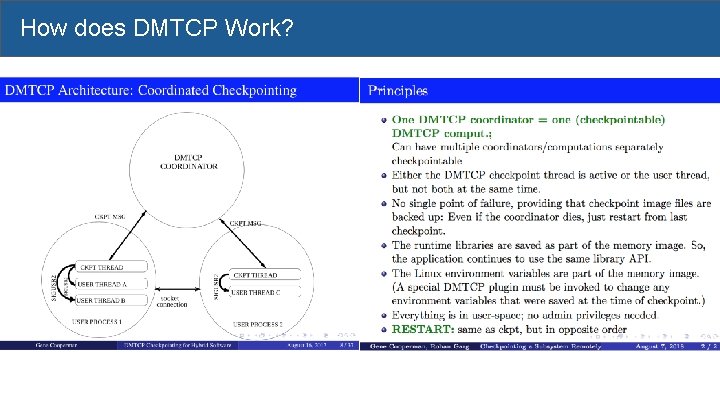
How does DMTCP Work?
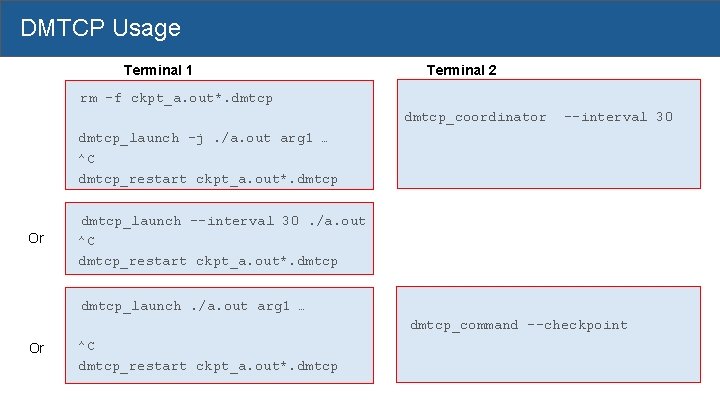
DMTCP Usage Terminal 1 Terminal 2 rm -f ckpt_a. out*. dmtcp_coordinator --interval 30 dmtcp_launch -j. /a. out arg 1 … ^C dmtcp_restart ckpt_a. out*. dmtcp Or dmtcp_launch --interval 30. /a. out ^C dmtcp_restart ckpt_a. out*. dmtcp_launch. /a. out arg 1 … dmtcp_command --checkpoint Or ^C dmtcp_restart ckpt_a. out*. dmtcp
![DMTCP Commands dmtcp_coordinator -- coordinates checkpoints between multiple processes. Usage: dmtcp_coordinator [OPTIONS] [port] Options:](http://slidetodoc.com/presentation_image_h2/d2caff6747e8a3f72a54bd3dd1209c06/image-13.jpg "DMTCP Commands dmtcp_coordinator -- coordinates checkpoints between multiple processes. Usage: dmtcp_coordinator [OPTIONS] [port] Options:")
DMTCP Commands dmtcp_coordinator -- coordinates checkpoints between multiple processes. Usage: dmtcp_coordinator [OPTIONS] [port] Options: -p, --coord-port PORT_NUM (env DMTCP_COORD_PORT), Port to listen on (default: 7779) --port-filename, File to write listener port number. (Useful with '--port 0', which is used to assign a random port) --exit-on-last, Exit automatically when last client disconnects --exit-after-ckpt, Kill peer processes of computation after first checkpoint is created --daemon, Run silently in the background after detaching from the parent process. -i, --interval (env DMTCP_CHECKPOINT_INTERVAL): Time in seconds between automatic checkpoints (default: 0, disabled) COMMANDS: type '? <return>' at runtime for list
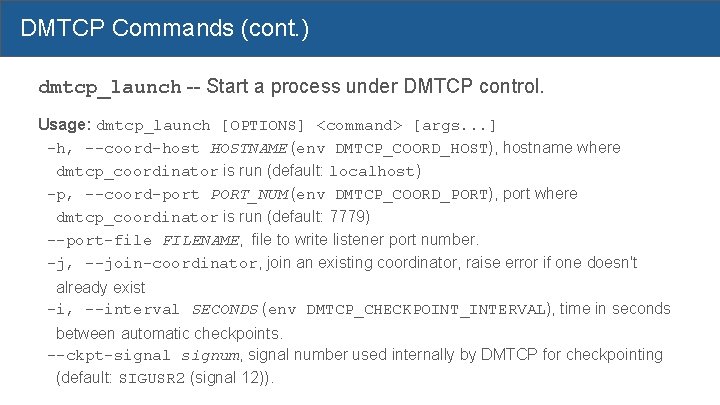
DMTCP Commands (cont. ) dmtcp_launch -- Start a process under DMTCP control. Usage: dmtcp_launch [OPTIONS] <command> [args. . . ] -h, --coord-host HOSTNAME (env DMTCP_COORD_HOST), hostname where dmtcp_coordinator is run (default: localhost) -p, --coord-port PORT_NUM (env DMTCP_COORD_PORT), port where dmtcp_coordinator is run (default: 7779) --port-file FILENAME, file to write listener port number. -j, --join-coordinator, join an existing coordinator, raise error if one doesn't already exist -i, --interval SECONDS (env DMTCP_CHECKPOINT_INTERVAL), time in seconds between automatic checkpoints. --ckpt-signal signum, signal number used internally by DMTCP for checkpointing (default: SIGUSR 2 (signal 12)).
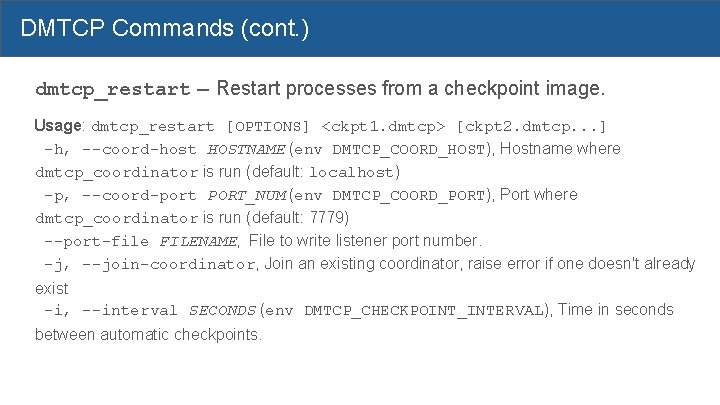
DMTCP Commands (cont. ) dmtcp_restart -- Restart processes from a checkpoint image. Usage: dmtcp_restart [OPTIONS] <ckpt 1. dmtcp> [ckpt 2. dmtcp. . . ] -h, --coord-host HOSTNAME (env DMTCP_COORD_HOST), Hostname where dmtcp_coordinator is run (default: localhost) -p, --coord-port PORT_NUM (env DMTCP_COORD_PORT), Port where dmtcp_coordinator is run (default: 7779) --port-file FILENAME, File to write listener port number. -j, --join-coordinator, Join an existing coordinator, raise error if one doesn't already exist -i, --interval SECONDS (env DMTCP_CHECKPOINT_INTERVAL), Time in seconds between automatic checkpoints.
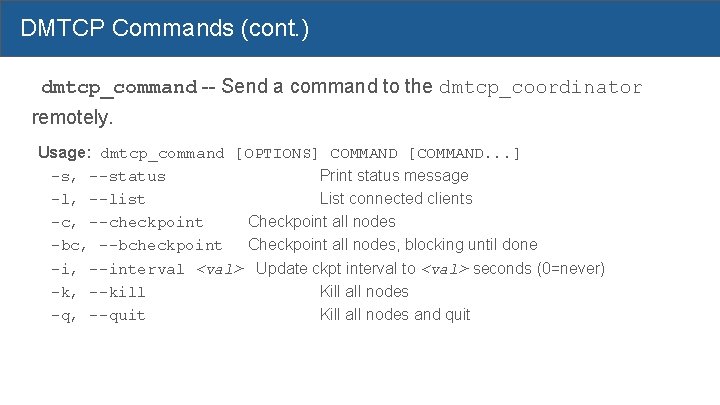
DMTCP Commands (cont. ) dmtcp_command -- Send a command to the dmtcp_coordinator remotely. Usage: dmtcp_command [OPTIONS] COMMAND [COMMAND. . . ] -s, --status Print status message -l, --list List connected clients -c, --checkpoint Checkpoint all nodes -bc, --bcheckpoint Checkpoint all nodes, blocking until done -i, --interval <val> Update ckpt interval to <val> seconds (0=never) -k, --kill Kill all nodes -q, --quit Kill all nodes and quit
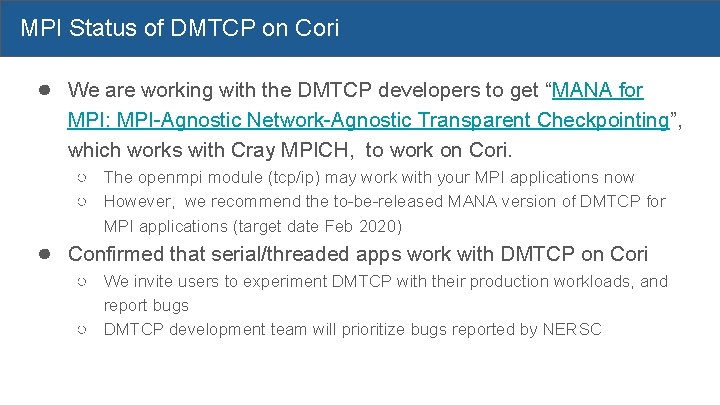
MPI Status of DMTCP on Cori ● We are working with the DMTCP developers to get “MANA for MPI: MPI-Agnostic Network-Agnostic Transparent Checkpointing”, which works with Cray MPICH, to work on Cori. ○ The openmpi module (tcp/ip) may work with your MPI applications now ○ However, we recommend the to-be-released MANA version of DMTCP for MPI applications (target date Feb 2020) ● Confirmed that serial/threaded apps work with DMTCP on Cori ○ We invite users to experiment DMTCP with their production workloads, and report bugs ○ DMTCP development team will prioritize bugs reported by NERSC
Checkpoint/Restart Serial/Threaded Applications with DMTCP on Cori - 18 -
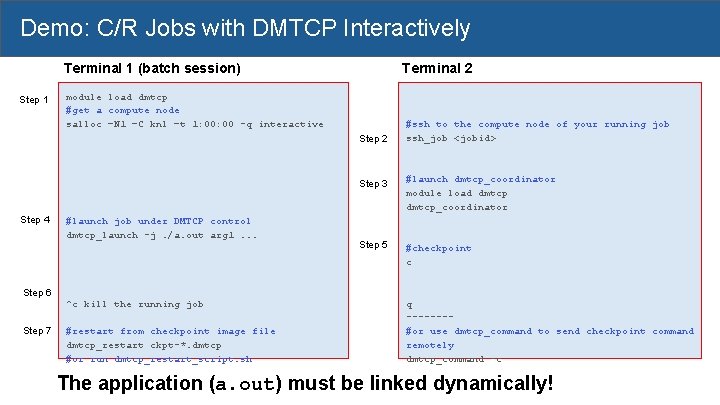
Demo: C/R Jobs with DMTCP Interactively Terminal 2 Terminal 1 (batch session) Step 1 module load dmtcp #get a compute node salloc –N 1 –C knl –t 1: 00 -q interactive Step 2 Step 4 #launch job under DMTCP control dmtcp_launch -j. /a. out arg 1. . . #ssh to the compute node of your running job ssh_job <jobid> Step 3 #launch dmtcp_coordinator module load dmtcp_coordinator Step 5 #checkpoint c Step 6 ^c kill the running job Step 7 #restart from checkpoint image file dmtcp_restart ckpt-*. dmtcp #or run dmtcp_restart_script. sh q -------#or use dmtcp_command to send checkpoint command remotely dmtcp_command -c The application (a. out) must be linked dynamically!
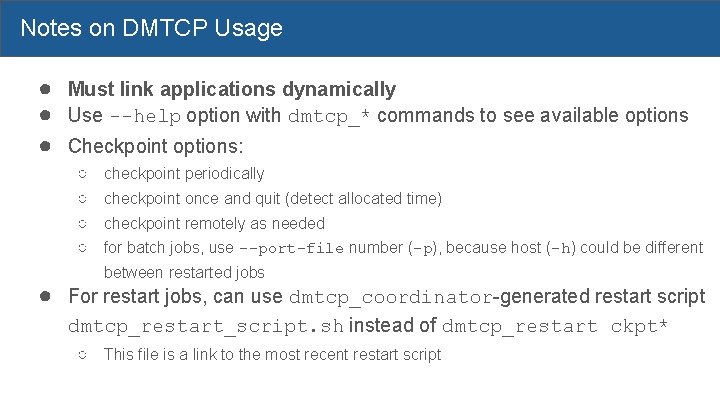
Notes on DMTCP Usage ● Must link applications dynamically ● Use --help option with dmtcp_* commands to see available options ● Checkpoint options: ○ ○ checkpoint periodically checkpoint once and quit (detect allocated time) checkpoint remotely as needed for batch jobs, use --port-file number (-p), because host (-h) could be different between restarted jobs ● For restart jobs, can use dmtcp_coordinator-generated restart script dmtcp_restart_script. sh instead of dmtcp_restart ckpt* ○ This file is a link to the most recent restart script
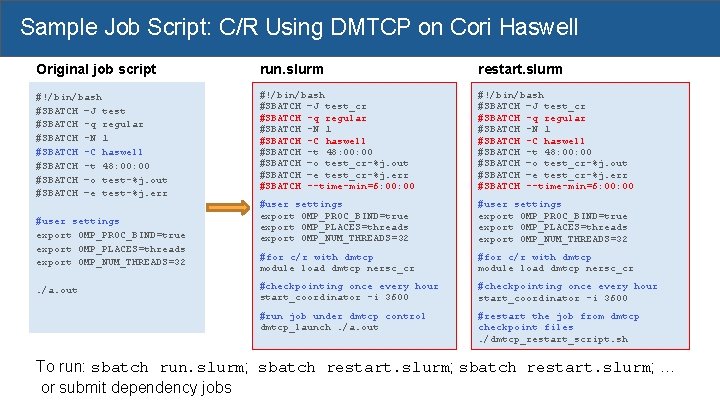
Sample Job Script: C/R Using DMTCP on Cori Haswell Original job script run. slurm restart. slurm #!/bin/bash #SBATCH –J test #SBATCH -q regular #SBATCH -N 1 #SBATCH -C haswell #SBATCH -t 48: 00 #SBATCH –o test-%j. out #SBATCH –e test-%j. err #!/bin/bash #SBATCH –J test_cr #SBATCH -q regular #SBATCH -N 1 #SBATCH -C haswell #SBATCH -t 48: 00: 00 #SBATCH –o test_cr-%j. out #SBATCH –e test_cr-%j. err #SBATCH --time-min=6: 00: 00 #user settings export OMP_PROC_BIND=true export OMP_PLACES=threads export OMP_NUM_THREADS=32 #for c/r with dmtcp module load dmtcp nersc_cr #checkpointing once every hour start_coordinator -i 3600 #run job under dmtcp control dmtcp_launch. /a. out #restart the job from dmtcp checkpoint files. /dmtcp_restart_script. sh #user settings export OMP_PROC_BIND=true export OMP_PLACES=threads export OMP_NUM_THREADS=32. /a. out To run: sbatch run. slurm; sbatch restart. slurm; … or submit dependency jobs
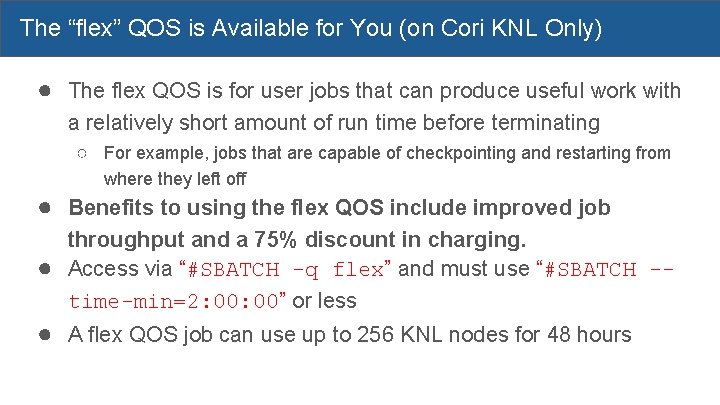
The “flex” QOS is Available for You (on Cori KNL Only) ● The flex QOS is for user jobs that can produce useful work with a relatively short amount of run time before terminating ○ For example, jobs that are capable of checkpointing and restarting from where they left off ● Benefits to using the flex QOS include improved job throughput and a 75% discount in charging. ● Access via “#SBATCH -q flex” and must use “#SBATCH -time-min=2: 00” or less ● A flex QOS job can use up to 256 KNL nodes for 48 hours
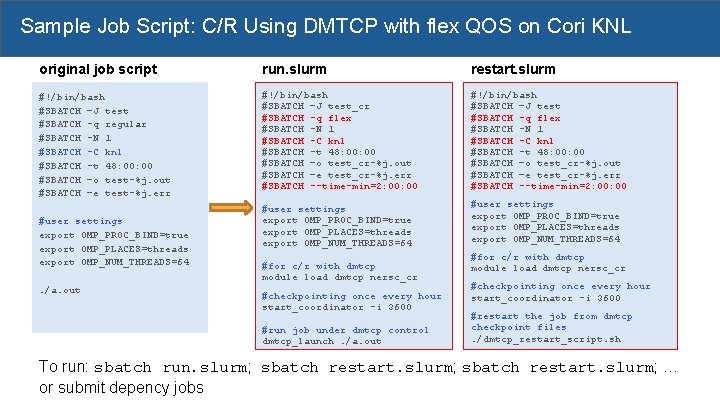
Sample Job Script: C/R Using DMTCP with flex QOS on Cori KNL original job script run. slurm restart. slurm #!/bin/bash #SBATCH –J test #SBATCH -q regular #SBATCH -N 1 #SBATCH -C knl #SBATCH -t 48: 00 #SBATCH –o test-%j. out #SBATCH –e test-%j. err #!/bin/bash #SBATCH –J test_cr #SBATCH -q flex #SBATCH -N 1 #SBATCH -C knl #SBATCH -t 48: 00 #SBATCH –o test_cr-%j. out #SBATCH –e test_cr-%j. err #SBATCH --time-min=2: 00 #!/bin/bash #SBATCH –J test #SBATCH -q flex #SBATCH -N 1 #SBATCH -C knl #SBATCH -t 48: 00 #SBATCH –o test_cr-%j. out #SBATCH –e test_cr-%j. err #SBATCH --time-min=2: 00 #user settings export OMP_PROC_BIND=true export OMP_PLACES=threads export OMP_NUM_THREADS=64. /a. out #for c/r with dmtcp module load dmtcp nersc_cr #checkpointing once every hour start_coordinator -i 3600 #run job under dmtcp control dmtcp_launch. /a. out #for c/r with dmtcp module load dmtcp nersc_cr #checkpointing once every hour start_coordinator -i 3600 #restart the job from dmtcp checkpoint files. /dmtcp_restart_script. sh To run: sbatch run. slurm; sbatch restart. slurm; … or submit depency jobs
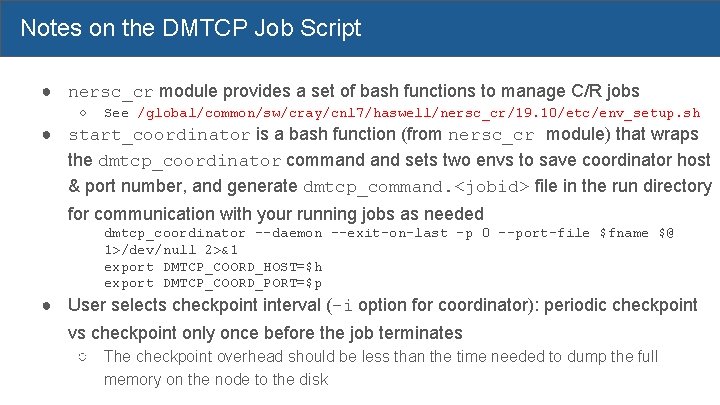
Notes on the DMTCP Job Script ● nersc_cr module provides a set of bash functions to manage C/R jobs ○ See /global/common/sw/cray/cnl 7/haswell/nersc_cr/19. 10/etc/env_setup. sh ● start_coordinator is a bash function (from nersc_cr module) that wraps the dmtcp_coordinator command sets two envs to save coordinator host & port number, and generate dmtcp_command. <jobid> file in the run directory for communication with your running jobs as needed dmtcp_coordinator --daemon --exit-on-last -p 0 --port-file $fname $@ 1>/dev/null 2>&1 export DMTCP_COORD_HOST=$h export DMTCP_COORD_PORT=$p ● User selects checkpoint interval (-i option for coordinator): periodic checkpoint vs checkpoint only once before the job terminates ○ The checkpoint overhead should be less than the time needed to dump the full memory on the node to the disk
Automatic Resubmission of Checkpoint/Restart Jobs with DMTCP - 25 -
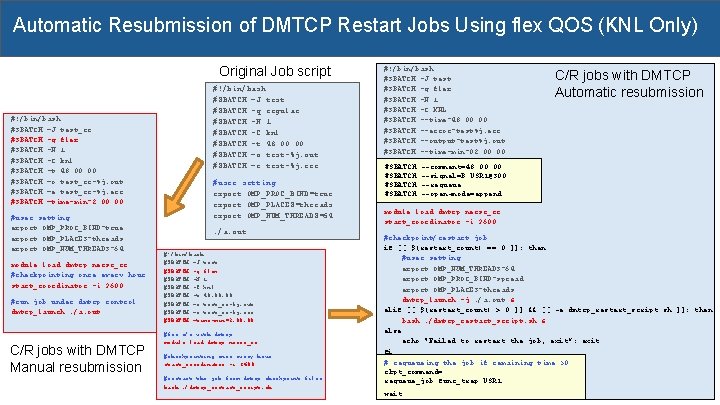
Automatic Resubmission of DMTCP Restart Jobs Using flex QOS (KNL Only) Original Job script #!/bin/bash #SBATCH –J test_cr #SBATCH -q flex #SBATCH -N 1 #SBATCH -C knl #SBATCH -t 48: 00 #SBATCH –o test_cr-%j. out #SBATCH –e test_cr-%j. err #SBATCH –time-min=2: 00 #user setting export OMP_PROC_BIND=true export OMP_PLACES=threads export OMP_NUM_THREADS=64 module load dmtcp nersc_cr #checkpointing once every hour start_coordinator -i 3600 #run job under dmtcp control dmtcp_launch. /a. out C/R jobs with DMTCP Manual resubmission #!/bin/bash #SBATCH –J test #SBATCH -q regular #SBATCH -N 1 #SBATCH -C knl #SBATCH -t 48: 00 #SBATCH –o test-%j. out #SBATCH –e test-%j. err #user setting export OMP_PROC_BIND=true export OMP_PLACES=threads export OMP_NUM_THREADS=64. /a. out #!/bin/bash #SBATCH –J test #SBATCH -q flex #SBATCH -N 1 #SBATCH -C knl #SBATCH -t 48: 00 #SBATCH –o test_cr-%j. out #SBATCH –e test_cr-%j. err #SBATCH –time-min=2: 00 #for c/r with dmtcp module load dmtcp nersc_cr #checkpointing once every hour start_coordinator -i 3600 #restart the job from dmtcp checkpoint files bash. /dmtcp_restart_script. sh #!/bin/bash #SBATCH -J test #SBATCH -q flex #SBATCH -N 1 #SBATCH -C KNL #SBATCH --time=48: 00 #SBATCH --error=test%j. err #SBATCH --output=test%j. out #SBATCH --time-min=02: 00 #SBATCH C/R jobs with DMTCP Automatic resubmission --comment=48: 00 --signal=B: USR 1@300 --requeue --open-mode=append module load dmtcp nersc_cr start_coordinator -i 3600 #checkpoint/restart job if [[ $(restart_count) == 0 ]]; then #user setting export OMP_NUM_THREADS=64 export OMP_PROC_BIND=spread export OMP_PLACES=threads dmtcp_launch -j. /a. out & elif [[ $(restart_count) > 0 ]] && [[ -e dmtcp_restart_script. sh ]]; then bash. /dmtcp_restart_script. sh & else echo "Failed to restart the job, exit”; exit fi # requeueing the job if remaining time >0 ckpt_command= requeue_job func_trap USR 1 wait
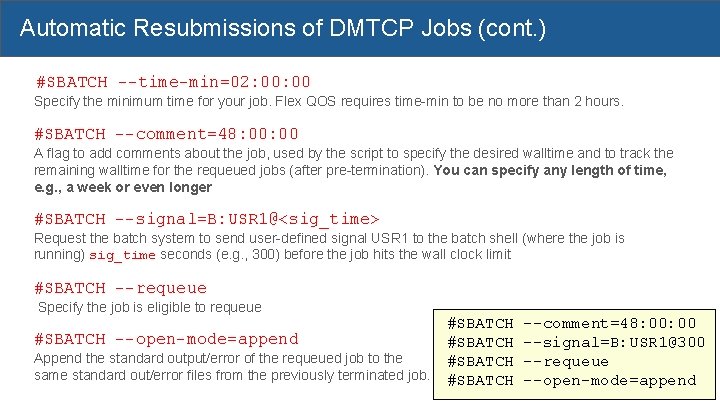
Automatic Resubmissions of DMTCP Jobs (cont. ) #SBATCH --time-min=02: 00 Specify the minimum time for your job. Flex QOS requires time-min to be no more than 2 hours. #SBATCH --comment=48: 00 A flag to add comments about the job, used by the script to specify the desired walltime and to track the remaining walltime for the requeued jobs (after pre-termination). You can specify any length of time, e. g. , a week or even longer #SBATCH --signal=B: USR 1@<sig_time> Request the batch system to send user-defined signal USR 1 to the batch shell (where the job is running) sig_time seconds (e. g. , 300) before the job hits the wall clock limit #SBATCH --requeue Specify the job is eligible to requeue #SBATCH --open-mode=append Append the standard output/error of the requeued job to the same standard out/error files from the previously terminated job. #SBATCH --comment=48: 00 --signal=B: USR 1@300 --requeue --open-mode=append
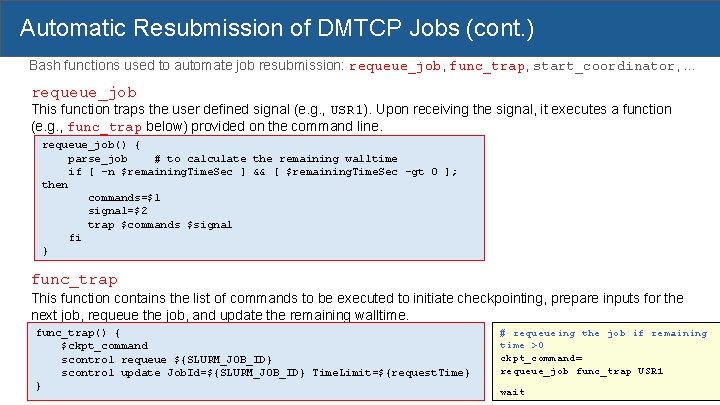
Automatic Resubmission of DMTCP Jobs (cont. ) Bash functions used to automate job resubmission: requeue_job, func_trap, start_coordinator, . . . requeue_job This function traps the user defined signal (e. g. , USR 1). Upon receiving the signal, it executes a function (e. g. , func_trap below) provided on the command line. requeue_job() { parse_job # to calculate the remaining walltime if [ -n $remaining. Time. Sec ] && [ $remaining. Time. Sec -gt 0 ]; then commands=$1 signal=$2 trap $commands $signal fi } func_trap This function contains the list of commands to be executed to initiate checkpointing, prepare inputs for the next job, requeue the job, and update the remaining walltime. func_trap() { $ckpt_command scontrol requeue ${SLURM_JOB_ID} scontrol update Job. Id=${SLURM_JOB_ID} Time. Limit=${request. Time} } # requeueing the job if remaining time >0 ckpt_command= requeue_job func_trap USR 1 wait
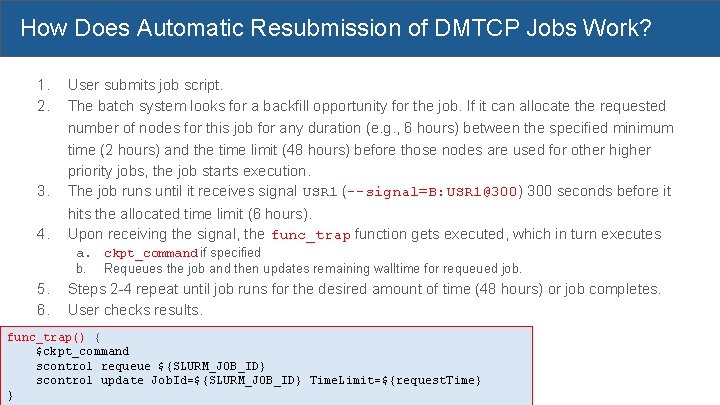
How Does Automatic Resubmission of DMTCP Jobs Work? 1. 2. 3. User submits job script. The batch system looks for a backfill opportunity for the job. If it can allocate the requested number of nodes for this job for any duration (e. g. , 6 hours) between the specified minimum time (2 hours) and the time limit (48 hours) before those nodes are used for other higher priority jobs, the job starts execution. The job runs until it receives signal USR 1 (--signal=B: USR 1@300) 300 seconds before it 4. hits the allocated time limit (6 hours). Upon receiving the signal, the func_trap function gets executed, which in turn executes a. ckpt_command if specified b. Requeues the job and then updates remaining walltime for requeued job. 5. 6. Steps 2 -4 repeat until job runs for the desired amount of time (48 hours) or job completes. User checks results. func_trap() { $ckpt_command scontrol requeue ${SLURM_JOB_ID} scontrol update Job. Id=${SLURM_JOB_ID} Time. Limit=${request. Time} }
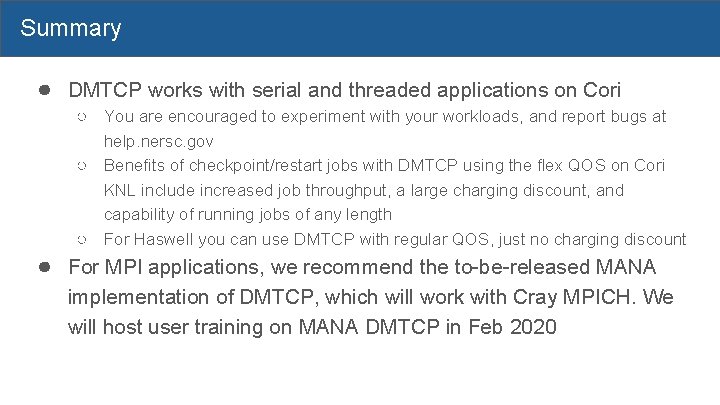
Summary ● DMTCP works with serial and threaded applications on Cori ○ You are encouraged to experiment with your workloads, and report bugs at help. nersc. gov ○ Benefits of checkpoint/restart jobs with DMTCP using the flex QOS on Cori KNL include increased job throughput, a large charging discount, and capability of running jobs of any length ○ For Haswell you can use DMTCP with regular QOS, just no charging discount ● For MPI applications, we recommend the to-be-released MANA implementation of DMTCP, which will work with Cray MPICH. We will host user training on MANA DMTCP in Feb 2020
Resources ● DMTCP website, http: //dmtcp. sourceforge. net/index. html ● DMTCP github site https: //github. com/dmtcp/blob/master/QUICKSTART. md ● NERSC website, https: //docs. nersc. gov/development/checkpoint-restart/ ○ will be available on Nov 7, 2019 ● Presentation slides will be posted in our training site after the training ● Our dmtcp module used Twinkle Jain’s DMTCP fork, https: //github. com/Jain. Twinkle/dmtcp. git (branch: spades-v 2)
Acknowledgements ● ● ● ● Rebecca Hartman-Baker for her vision on C/R, leading the C/R effort at NERSC ○ worked with a summer student (Tiffany Connors, now NERSC staff) developed the variable-time job script, automated the job resubmissions ○ Initiated the collaboration with DMTCP team Steve Leak - for working on improving/rewriting the variable-time job scripts (work in progress) Gene Cooperman, Twinkle Jain, and Rohan Garg for collaborations on getting DMTCP into production at NERSC (technical support, quick bug fixes, etc. ) JGI SPADES team to adopt DMTCP in their workflow, resulting in multiple bug fixes NERSC team members, Chris Samuel, Eric Roman for helping system side debugging, batch system incorporation, etc. Thanks Rebecca, Gene and Twinkle help with preparing the training slides DMTCP work (Gene Cooperman’s research group at Northeastern Univ. ) was partially supported by National Science Foundation Grants OAC-1740218 and ACI-1440788.

Thank You!
Backup slides - 34 -
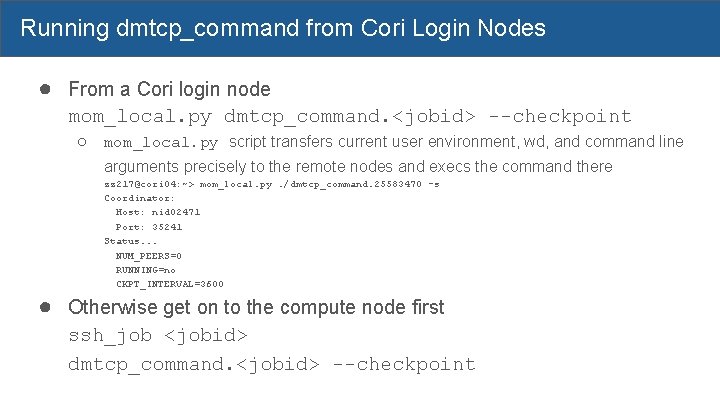
Running dmtcp_command from Cori Login Nodes ● From a Cori login node mom_local. py dmtcp_command. <jobid> --checkpoint ○ mom_local. py script transfers current user environment, wd, and command line arguments precisely to the remote nodes and execs the command there zz 217@cori 04: ~> mom_local. py. /dmtcp_command. 25583470 -s Coordinator: Host: nid 02471 Port: 35241 Status. . . NUM_PEERS=0 RUNNING=no CKPT_INTERVAL=3600 ● Otherwise get on to the compute node first ssh_job <jobid> dmtcp_command. <jobid> --checkpoint
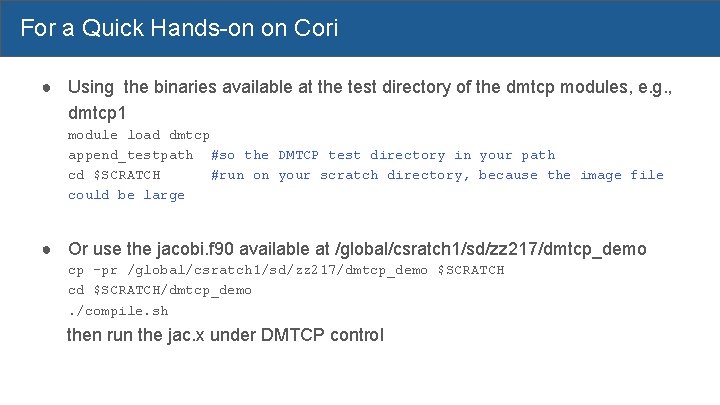
For a Quick Hands-on on Cori ● Using the binaries available at the test directory of the dmtcp modules, e. g. , dmtcp 1 module load dmtcp append_testpath #so the DMTCP test directory in your path cd $SCRATCH #run on your scratch directory, because the image file could be large ● Or use the jacobi. f 90 available at /global/csratch 1/sd/zz 217/dmtcp_demo cp -pr /global/csratch 1/sd/zz 217/dmtcp_demo $SCRATCH cd $SCRATCH/dmtcp_demo. /compile. sh then run the jac. x under DMTCP control
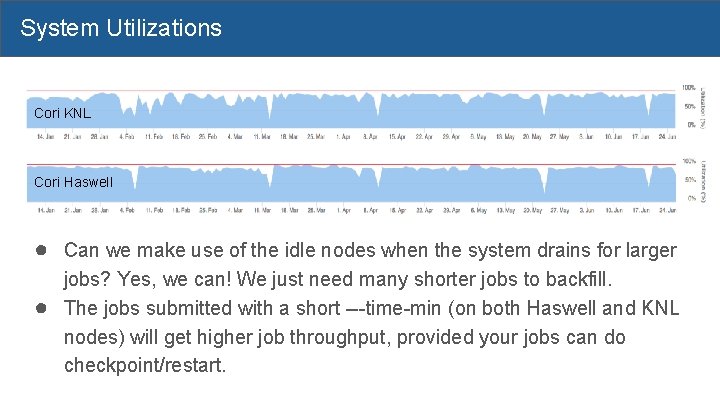
System Utilizations Cori KNL Cori Haswell ● Can we make use of the idle nodes when the system drains for larger ● jobs? Yes, we can! We just need many shorter jobs to backfill. The jobs submitted with a short ---time-min (on both Haswell and KNL nodes) will get higher job throughput, provided your jobs can do checkpoint/restart.
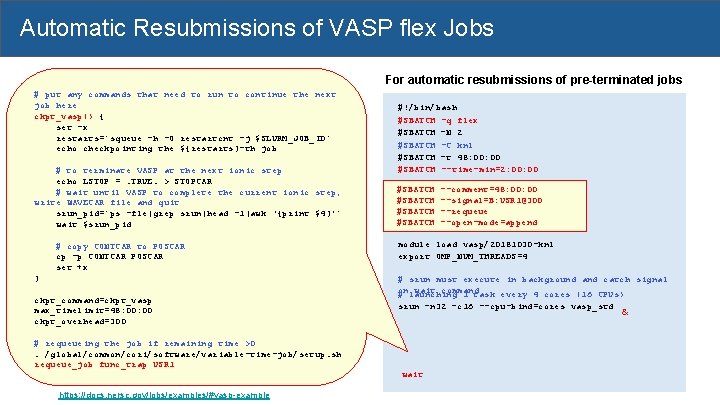
Automatic Resubmissions of VASP flex Jobs For automatic resubmissions of pre-terminated jobs Regular QOS VASP jobs # put any commands that need to run to continue the next #!/bin/bash job here #SBATCH -q regular #SBATCH -N ckpt_vasp() {2 #SBATCH set -x -C knl #SBATCH -t 48: 00 restarts=`squeue -h -O restartcnt -j $SLURM_JOB_ID` echo checkpointing the ${restarts}-th job module load vasp/20181030 -knl export # to OMP_NUM_THREADS=4 terminate VASP at the next ionic step echo LSTOP =. TRUE. > STOPCAR # launching 1 task every 4 cores (16 CPUs) # wait until VASP to complete the current ionic step, srun –n 32 –c 16 --cpu_bind=cores vasp_std write WAVECAR file and quit srun_pid=`ps -fle|grep srun|head -1|awk '{print $4}’` wait $srun_pid } QOS VASP jobs #!/bin/bash # copy CONTCAR to Flex POSCAR #SBATCH -q flex (manual resubmissions) cp -p CONTCAR POSCAR #SBATCH set +x –N 2 #SBATCH -C knl #SBATCH –t 48: 00 #SBATCH --time-min=2: 00 ckpt_command=ckpt_vasp max_timelimit=48: 00 module load vasp/20181030 -knl ckpt_overhead=300 export OMP_NUM_THREADS=4 # requeueing job 4 if remaining # launching 1 the task every cores (16 CPUs) time >0. /global/common/cori/software/variable-time-job/setup. sh srun –n 32 –c 16 --cpu_bind=cores vasp_std requeue_job func_trap USR 1 https: //docs. nersc. gov/jobs/examples/#vasp-example #!/bin/bash #SBATCH -q flex #SBATCH –N 2 #SBATCH -C knl #SBATCH –t 48: 00 #SBATCH --time-min=2: 00 #SBATCH --comment=48: 00 --signal=B: USR 1@300 --requeue --open-mode=append module load vasp/20181030 -knl export OMP_NUM_THREADS=4 # srun must execute in background and catch signal onlaunching wait command # 1 task every 4 cores (16 CPUs) srun –n 32 –c 16 --cpu-bind=cores vasp_std wait &
- Slides: 38