
CHARON storage options and clustering Paris October 11
CHARON storage options and clustering Paris, October 11 th – 12 th, 2011 Stromasys Product Management
Contents • Modern storage concepts and layout examples • Storage layers relevant to CHARON configuration • Legacy storage technologies and their representation in CHARON • Controller emulation, Bypass, and Pass Through modes • CHARON virtual disks (tapes, CD/DVD) representation • Container files, Physical. Drives, and direct LUN access • Clustering • Appendix: AXP console operations with KGPSA in Pass Through mode
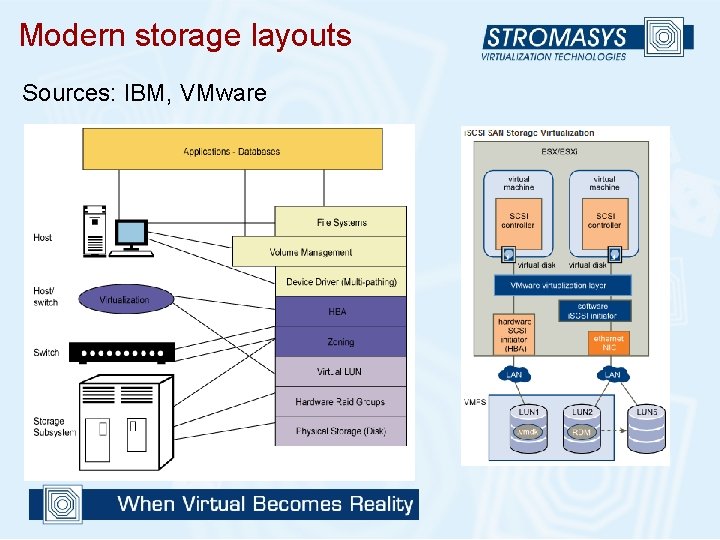
Modern storage layouts Sources: IBM, VMware
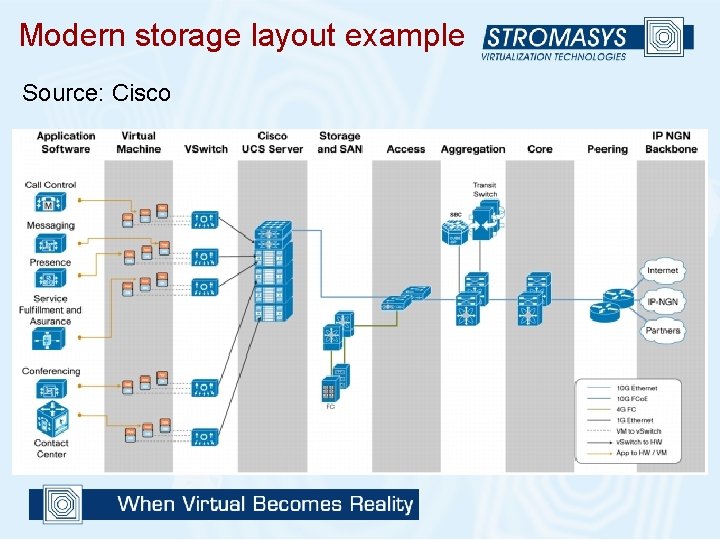
Modern storage layout example Source: Cisco
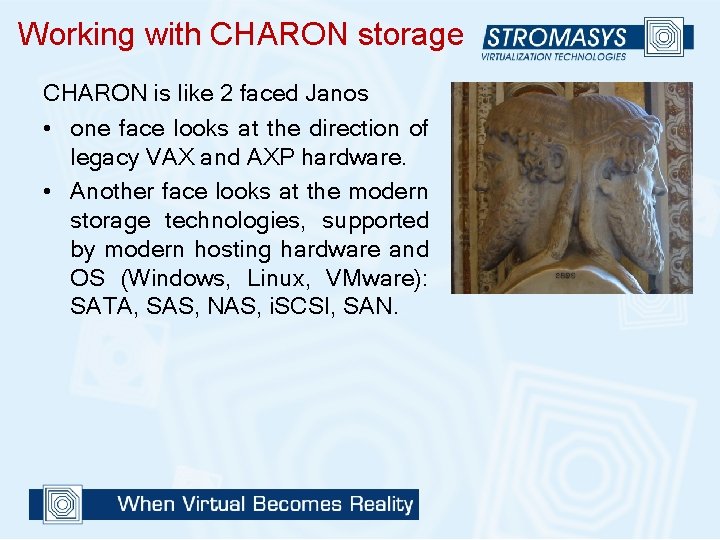
Working with CHARON storage CHARON is like 2 faced Janos • one face looks at the direction of legacy VAX and AXP hardware. • Another face looks at the modern storage technologies, supported by modern hosting hardware and OS (Windows, Linux, VMware): SATA, SAS, NAS, i. SCSI, SAN.
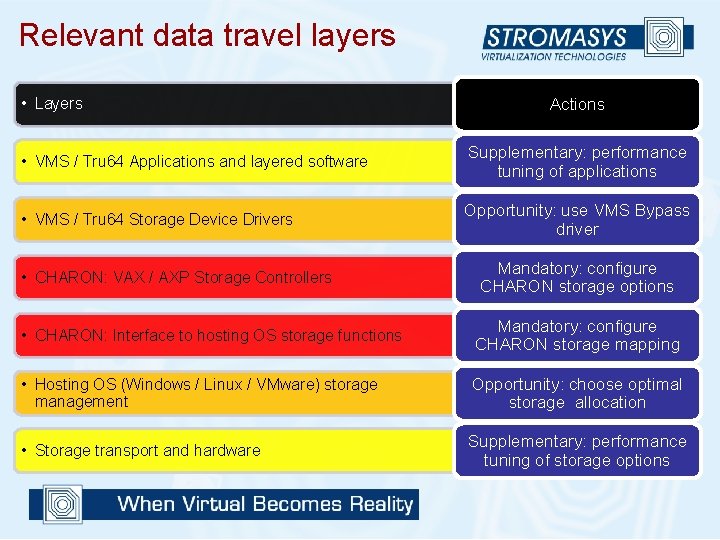
Relevant data travel layers • Layers Actions • VMS / Tru 64 Applications and layered software Supplementary: performance tuning of applications • VMS / Tru 64 Storage Device Drivers Opportunity: use VMS Bypass driver • CHARON: VAX / AXP Storage Controllers Mandatory: configure CHARON storage options • CHARON: Interface to hosting OS storage functions Mandatory: configure CHARON storage mapping • Hosting OS (Windows / Linux / VMware) storage management Opportunity: choose optimal storage allocation • Storage transport and hardware Supplementary: performance tuning of storage options
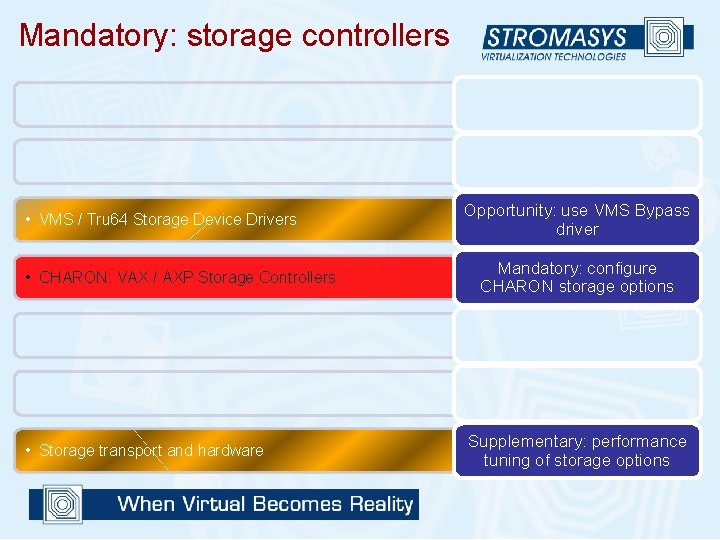
Mandatory: storage controllers • VMS / Tru 64 Storage Device Drivers • CHARON: VAX / AXP Storage Controllers • Storage transport and hardware Opportunity: use VMS Bypass driver Mandatory: configure CHARON storage options Supplementary: performance tuning of storage options
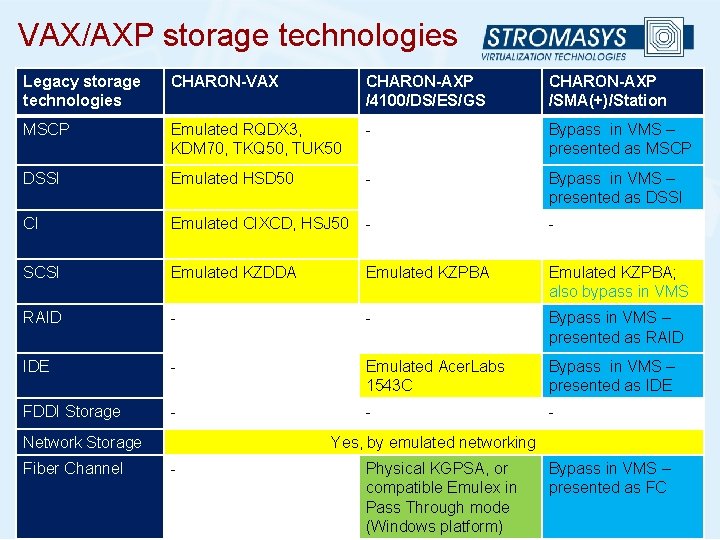
VAX/AXP storage technologies Legacy storage technologies CHARON-VAX CHARON-AXP /4100/DS/ES/GS CHARON-AXP /SMA(+)/Station MSCP Emulated RQDX 3, KDM 70, TKQ 50, TUK 50 - Bypass in VMS – presented as MSCP DSSI Emulated HSD 50 - Bypass in VMS – presented as DSSI CI Emulated CIXCD, HSJ 50 - - SCSI Emulated KZDDA Emulated KZPBA; also bypass in VMS RAID - - Bypass in VMS – presented as RAID IDE - Emulated Acer. Labs 1543 C Bypass in VMS – presented as IDE FDDI Storage - - - Network Storage Fiber Channel Yes, by emulated networking - Physical KGPSA, or compatible Emulex in Pass Through mode (Windows platform) Bypass in VMS – presented as FC
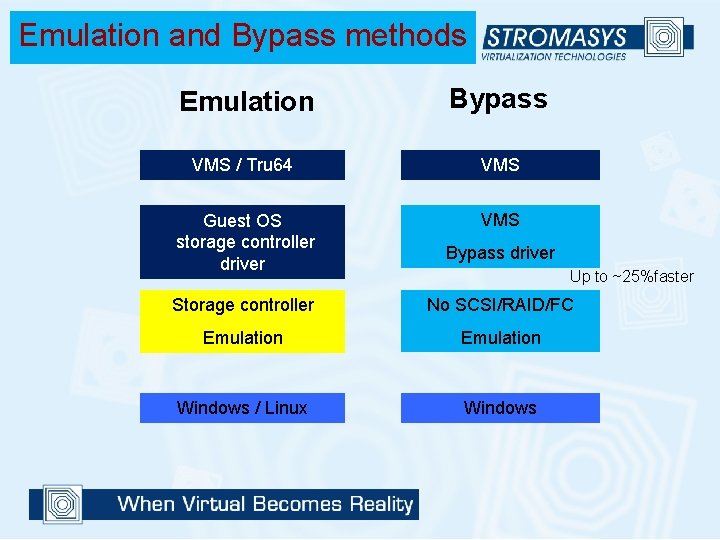
Emulation and Bypass methods Emulation Bypass VMS / Tru 64 VMS Guest OS storage controller driver VMS Bypass driver Up to ~25%faster Storage controller No SCSI/RAID/FC Emulation Windows / Linux Windows
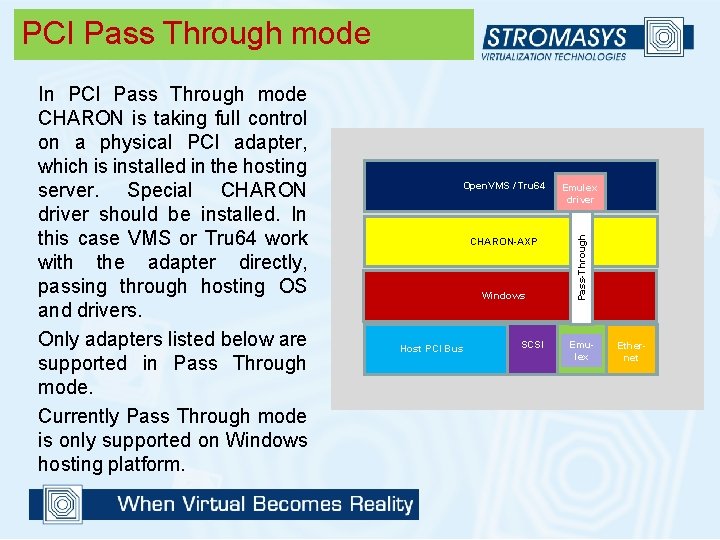
PCI Pass Through mode Open. VMS / Tru 64 CHARON-AXP Windows Host PCI Bus SCSI Emulex driver Pass-Through In PCI Pass Through mode CHARON is taking full control on a physical PCI adapter, which is installed in the hosting server. Special CHARON driver should be installed. In this case VMS or Tru 64 work with the adapter directly, passing through hosting OS and drivers. Only adapters listed below are supported in Pass Through mode. Currently Pass Through mode is only supported on Windows hosting platform. Emulex Ethernet
Hints • Configuration is usually defined based on the original VAX/AXP hardware layout, in order to avoid or minimize a need to intervene in the VMS / Tru 64 settings • Some user configurations does not provide flexibility in selecting the storage method – only one will fit. Go for it • If there is flexibility, Pass Through provides the best performance (for a price of additional HBA controller(s) and relatively complex setup and configuration). Recommended (sometimes a must) for high performance system replacements • Bypass is a really nice feature of CHARON-AXP/SMA(+) family (provided that requirements are met: Windows hosting platform, supported VMS version, etc. )
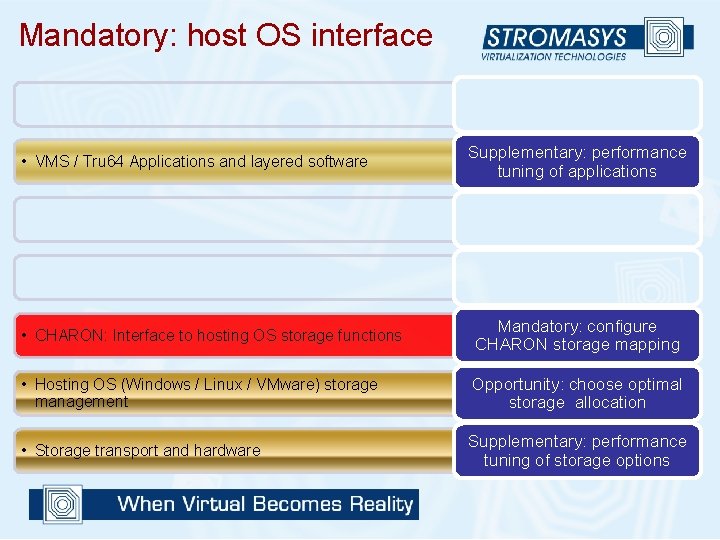
Mandatory: host OS interface • VMS / Tru 64 Applications and layered software Supplementary: performance tuning of applications • CHARON: Interface to hosting OS storage functions Mandatory: configure CHARON storage mapping • Hosting OS (Windows / Linux / VMware) storage management Opportunity: choose optimal storage allocation • Storage transport and hardware Supplementary: performance tuning of storage options
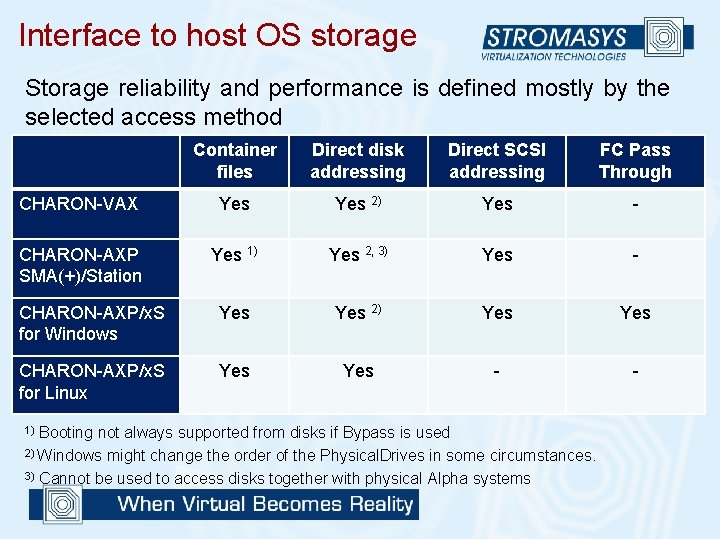
Interface to host OS storage Storage reliability and performance is defined mostly by the selected access method Container files Direct disk addressing Direct SCSI addressing FC Pass Through CHARON-VAX Yes 2) Yes - CHARON-AXP SMA(+)/Station Yes 1) Yes 2, 3) Yes - CHARON-AXP/x. S for Windows Yes 2) Yes CHARON-AXP/x. S for Linux Yes - - Booting not always supported from disks if Bypass is used 2) Windows might change the order of the Physical. Drives in some circumstances. 3) Cannot be used to access disks together with physical Alpha systems 1)
![Container files set dka[0]=“DCHARONsystem. vdisk” set dka[0]=/opt/charon/disks/system. vdisk” Simple and fast to configure. Host](http://slidetodoc.com/presentation_image_h/00f04366c20b99991ed2dcdbbdf64f89/image-14.jpg "Container files set dka[0]=“DCHARONsystem. vdisk” set dka[0]=/opt/charon/disks/system. vdisk” Simple and fast to configure. Host")
Container files set dka[0]=“DCHARONsystem. vdisk” set dka[0]=/opt/charon/disks/system. vdisk” Simple and fast to configure. Host OS takes care of the I/O, so any technology could be used: SATA, SAS, SAN, NAS, (i)SCSI Charon Host OS NTFS/ext file system Disk controller emulation: MSCP, SCSI, DSSI, … Storage Array CF. vdisk i. SCSI or FC Adapter i. SCSI or FC network Disk Volume Containerfile. vdisk
![Directly addressing the disks set dka[0]=“\. Physical. Drive 0” set dka[0]=/dev/sd 0” Important! Host](http://slidetodoc.com/presentation_image_h/00f04366c20b99991ed2dcdbbdf64f89/image-15.jpg "Directly addressing the disks set dka[0]=“\. Physical. Drive 0” set dka[0]=/dev/sd 0” Important! Host")
Directly addressing the disks set dka[0]=“\. Physical. Drive 0” set dka[0]=/dev/sd 0” Important! Host OS should not access those disk(s) CHARON talks to SCSI subsystem on the host OS. Charon Emulation Disk controller emulation: MSCP, SCSI, DSSI, … Windows OS Storage Array Physical Disk: \. Physical. Drive 0 Logical Disk i. SCSI or FC Adapter i. SCSI or FC Network Disk Volume \. Physicaldrive 1
![Direct SCSI addressing set dka[0]=\. SCSIa: b: c: d Not recommended for disks (designed](http://slidetodoc.com/presentation_image_h/00f04366c20b99991ed2dcdbbdf64f89/image-16.jpg "Direct SCSI addressing set dka[0]=\. SCSIa: b: c: d Not recommended for disks (designed")
Direct SCSI addressing set dka[0]=\. SCSIa: b: c: d Not recommended for disks (designed for generic SCSI devices) CHARON talks to SCSI subsystem on the host OS. Charon Emulation Disk controller emulation: MSCP, SCSI, DSSI, … Windows OS Storage Array Physical Disk: \. SCSIa: b: c: d Logical Disk i. SCSI or FC Adapter i. SCSI or FC Network Disk Volume \. SCSIe: f: g: h
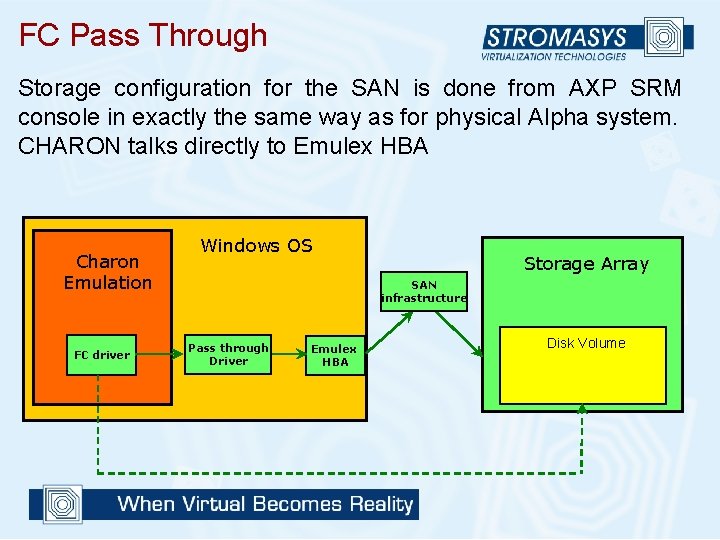
FC Pass Through Storage configuration for the SAN is done from AXP SRM console in exactly the same way as for physical Alpha system. CHARON talks directly to Emulex HBA Charon Emulation FC driver Windows OS Storage Array SAN infrastructure Pass through Driver Emulex HBA Disk Volume
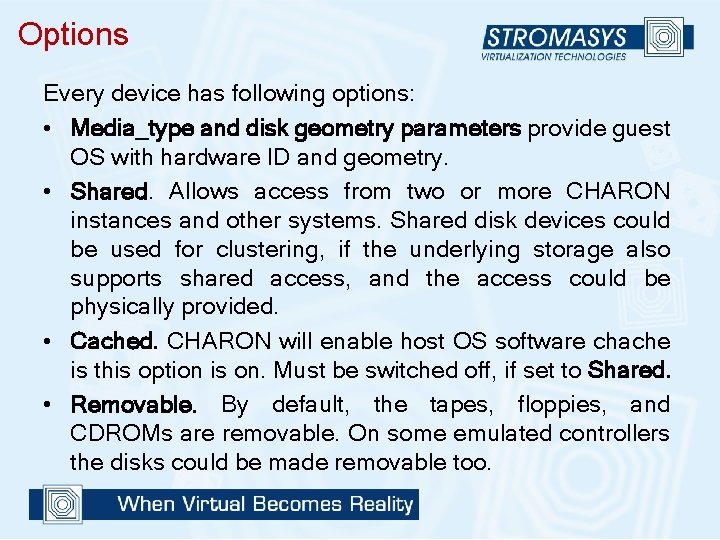
Options Every device has following options: • Media_type and disk geometry parameters provide guest OS with hardware ID and geometry. • Shared. Allows access from two or more CHARON instances and other systems. Shared disk devices could be used for clustering, if the underlying storage also supports shared access, and the access could be physically provided. • Cached. CHARON will enable host OS software chache is this option is on. Must be switched off, if set to Shared. • Removable. By default, the tapes, floppies, and CDROMs are removable. On some emulated controllers the disks could be made removable too.
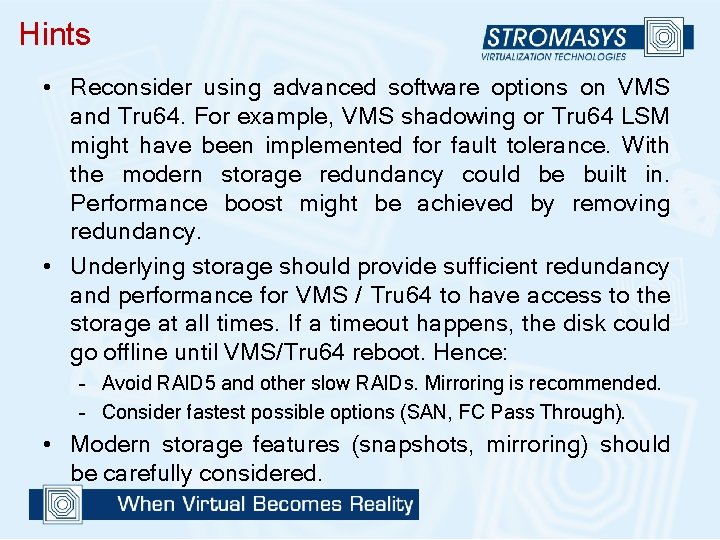
Hints • Reconsider using advanced software options on VMS and Tru 64. For example, VMS shadowing or Tru 64 LSM might have been implemented for fault tolerance. With the modern storage redundancy could be built in. Performance boost might be achieved by removing redundancy. • Underlying storage should provide sufficient redundancy and performance for VMS / Tru 64 to have access to the storage at all times. If a timeout happens, the disk could go offline until VMS/Tru 64 reboot. Hence: – Avoid RAID 5 and other slow RAIDs. Mirroring is recommended. – Consider fastest possible options (SAN, FC Pass Through). • Modern storage features (snapshots, mirroring) should be carefully considered.
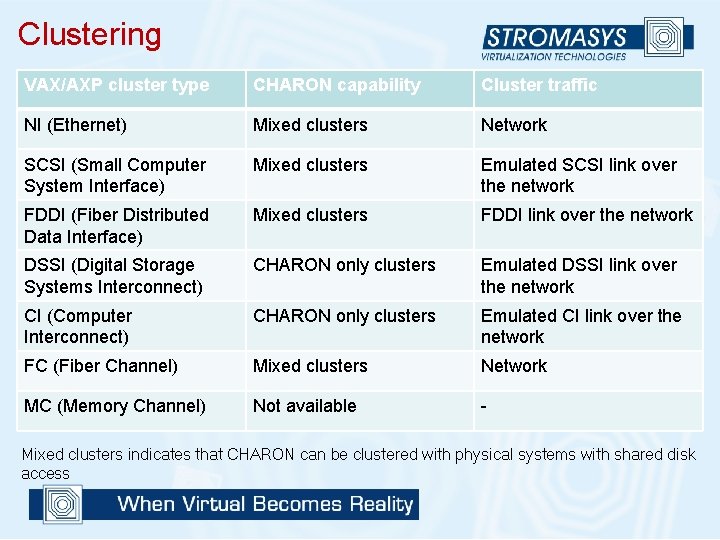
Clustering VAX/AXP cluster type CHARON capability Cluster traffic NI (Ethernet) Mixed clusters Network SCSI (Small Computer System Interface) Mixed clusters Emulated SCSI link over the network FDDI (Fiber Distributed Data Interface) Mixed clusters FDDI link over the network DSSI (Digital Storage Systems Interconnect) CHARON only clusters Emulated DSSI link over the network CI (Computer Interconnect) CHARON only clusters Emulated CI link over the network FC (Fiber Channel) Mixed clusters Network MC (Memory Channel) Not available - Mixed clusters indicates that CHARON can be clustered with physical systems with shared disk access
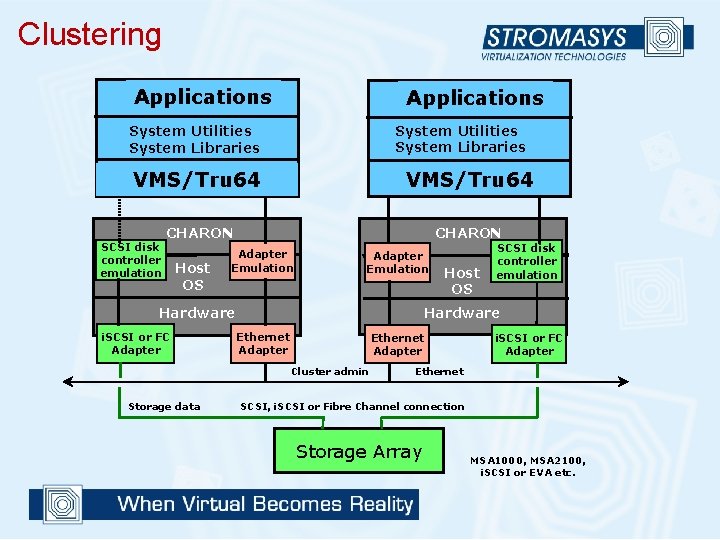
Clustering Applications System Utilities System Libraries VMS/Tru 64 CHARON SCSI disk controller emulation Host OS Adapter Emulation Hardware i. SCSI or FC Adapter Ethernet Adapter Cluster admin Storage data Host OS SCSI disk controller emulation i. SCSI or FC Adapter Ethernet SCSI, i. SCSI or Fibre Channel connection Storage Array MSA 1000, MSA 2100, i. SCSI or EVA etc.
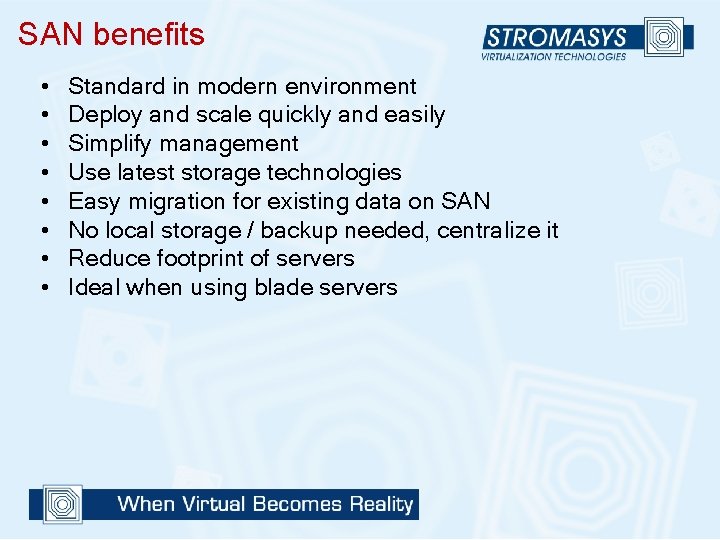
SAN benefits • • Standard in modern environment Deploy and scale quickly and easily Simplify management Use latest storage technologies Easy migration for existing data on SAN No local storage / backup needed, centralize it Reduce footprint of servers Ideal when using blade servers
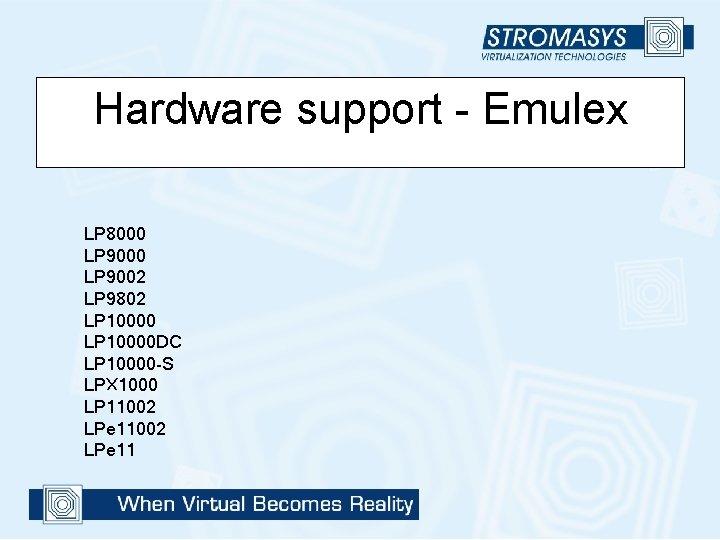
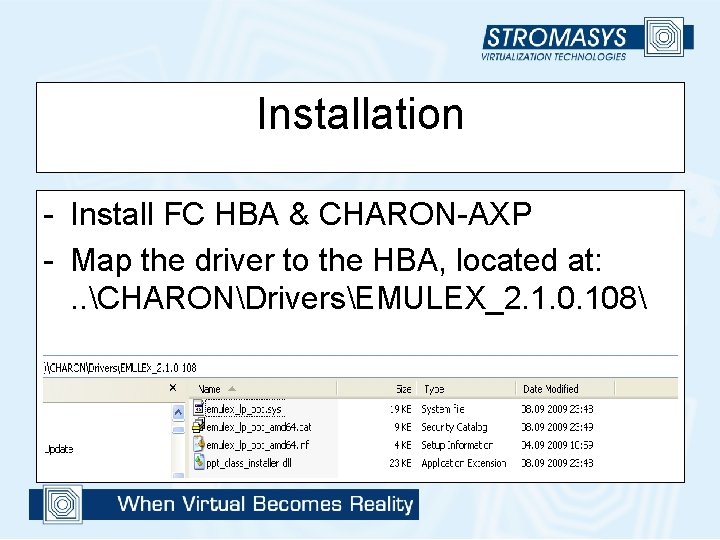
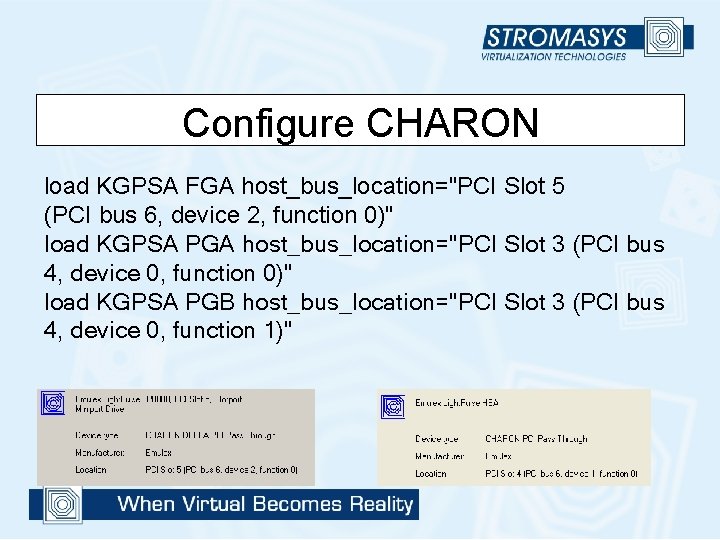
Appendix Fibre Channel PCI Pass Thruogh • Avalable since CHARON-AXP/x. S 2. 3. 108
Hardware support - Emulex LP 8000 LP 9002 LP 9802 LP 10000 DC LP 10000 -S LPX 1000 LP 11002 LPe 11
Installation - Install FC HBA & CHARON-AXP - Map the driver to the HBA, located at: . . CHARONDriversEMULEX_2. 1. 0. 108
Configure CHARON load KGPSA FGA host_bus_location="PCI Slot 5 (PCI bus 6, device 2, function 0)" load KGPSA PGA host_bus_location="PCI Slot 3 (PCI bus 4, device 0, function 0)" load KGPSA PGB host_bus_location="PCI Slot 3 (PCI bus 4, device 0, function 1)"
HSG 80 • • • • • • HSG 80_1 L > sho this full Controller: HSG 80 ZG 04404014 Software V 88 F-2, Hardware E 12 NODE_ID = 5000 -1 FE 1 -000 B-6 BF 0 ALLOCATION_CLASS = 0 SCSI_VERSION = SCSI-3 Configured for MULTIBUS_FAILOVER with ZG 90811283 In dual-redundant configuration Device Port SCSI address 6 Time: 27 -OCT-2009 22: 35: 00 Command Console LUN is lun 0 (IDENTIFIER = 98) Host Connection Table is NOT locked Smart Error Eject Disabled Host PORT_1: Reported PORT_ID = 5000 -1 FE 1 -000 B-6 BF 1 PORT_1_TOPOLOGY = FABRIC (fabric up) Address = 021400 Host PORT_2: Reported PORT_ID = 5000 -1 FE 1 -000 B-6 BF 2 PORT_2_TOPOLOGY = FABRIC (fabric up) Address = 011400 NOREMOTE_COPY • • • • • • HSG 80_1 L > sho other full Controller: HSG 80 ZG 90811283 Software V 88 F-2, Hardware E 09 NODE_ID = 5000 -1 FE 1 -000 B-6 BF 0 ALLOCATION_CLASS = 0 SCSI_VERSION = SCSI-3 Configured for MULTIBUS_FAILOVER with ZG 04404014 In dual-redundant configuration Device Port SCSI address 7 Time: 27 -OCT-2009 22: 35: 11 Command Console LUN is lun 0 (IDENTIFIER = 98) Host Connection Table is NOT locked Smart Error Eject Disabled Host PORT_1: Reported PORT_ID = 5000 -1 FE 1 -000 B-6 BF 3 PORT_1_TOPOLOGY = FABRIC (fabric up) Address = 011500 Host PORT_2: Reported PORT_ID = 5000 -1 FE 1 -000 B-6 BF 4 PORT_2_TOPOLOGY = FABRIC (fabric up) Address = 021500 NOREMOTE_COPY
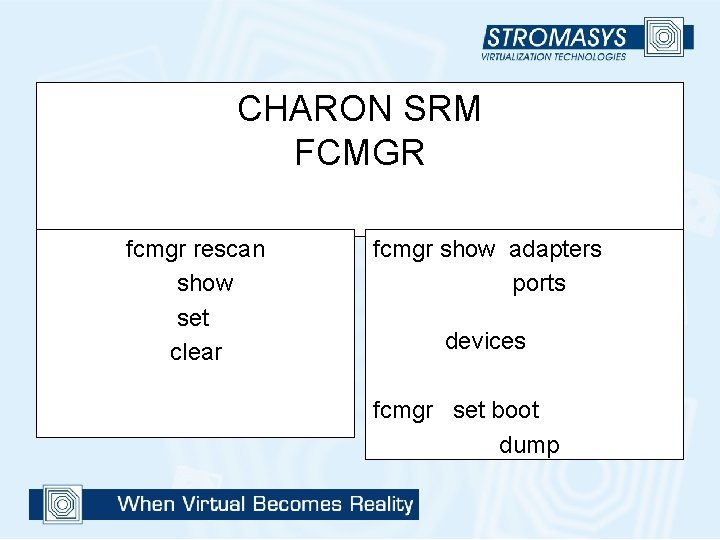
CHARON SRM FCMGR fcmgr rescan show set clear fcmgr show adapters ports devices fcmgr set boot dump
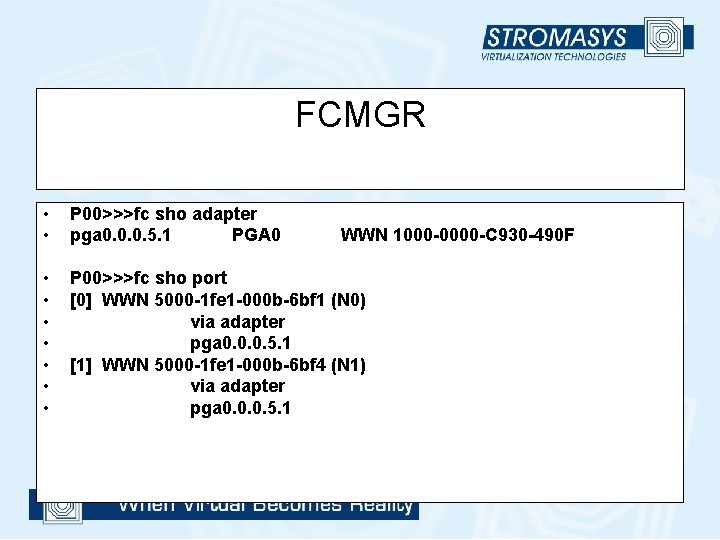
FCMGR • • P 00>>>fc sho adapter pga 0. 0. 0. 5. 1 PGA 0 • • P 00>>>fc sho port [0] WWN 5000 -1 fe 1 -000 b-6 bf 1 (N 0) via adapter pga 0. 0. 0. 5. 1 [1] WWN 5000 -1 fe 1 -000 b-6 bf 4 (N 1) via adapter pga 0. 0. 0. 5. 1 WWN 1000 -0000 -C 930 -490 F
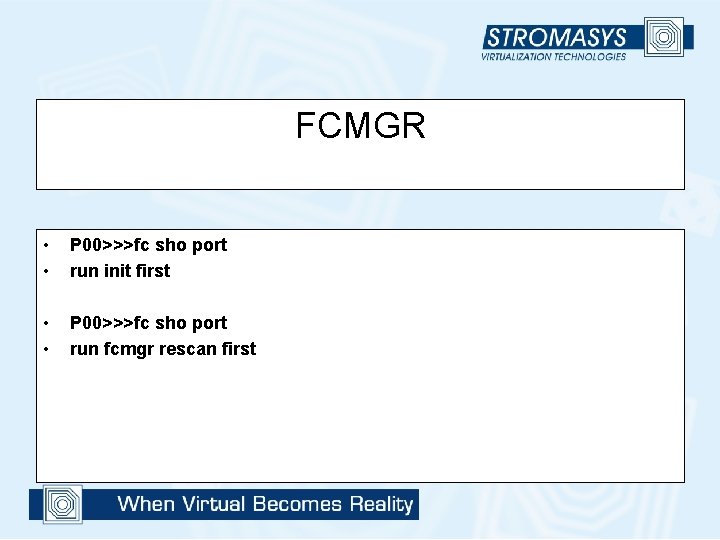
FCMGR • • P 00>>>fc sho port run init first • • P 00>>>fc sho port run fcmgr rescan first
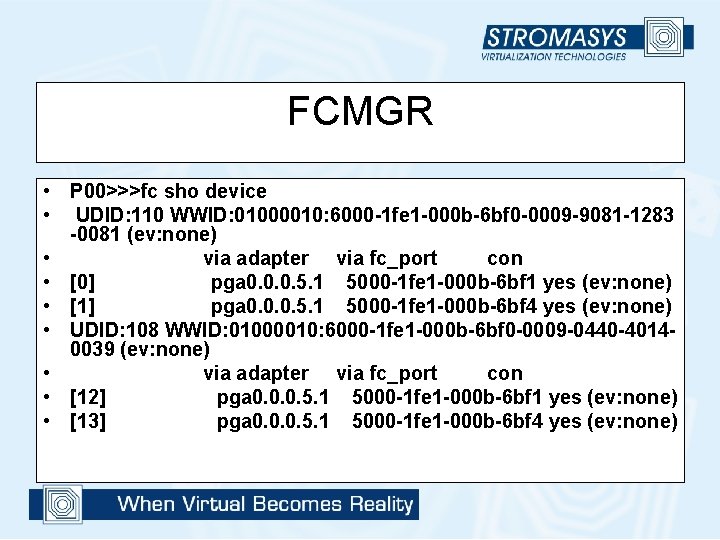
FCMGR • P 00>>>fc sho device • UDID: 110 WWID: 01000010: 6000 -1 fe 1 -000 b-6 bf 0 -0009 -9081 -1283 -0081 (ev: none) • via adapter via fc_port con • [0] pga 0. 0. 0. 5. 1 5000 -1 fe 1 -000 b-6 bf 1 yes (ev: none) • [1] pga 0. 0. 0. 5. 1 5000 -1 fe 1 -000 b-6 bf 4 yes (ev: none) • UDID: 108 WWID: 01000010: 6000 -1 fe 1 -000 b-6 bf 0 -0009 -0440 -40140039 (ev: none) • via adapter via fc_port con • [12] pga 0. 0. 0. 5. 1 5000 -1 fe 1 -000 b-6 bf 1 yes (ev: none) • [13] pga 0. 0. 0. 5. 1 5000 -1 fe 1 -000 b-6 bf 4 yes (ev: none)
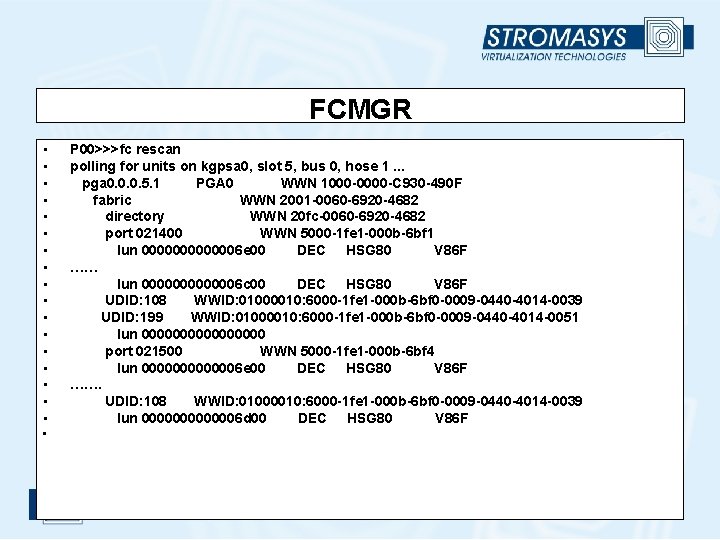
FCMGR • • • • • P 00>>>fc rescan polling for units on kgpsa 0, slot 5, bus 0, hose 1. . . pga 0. 0. 0. 5. 1 PGA 0 WWN 1000 -0000 -C 930 -490 F fabric WWN 2001 -0060 -6920 -4682 directory WWN 20 fc-0060 -6920 -4682 port 021400 WWN 5000 -1 fe 1 -000 b-6 bf 1 lun 0000006 e 00 DEC HSG 80 V 86 F …… lun 0000006 c 00 DEC HSG 80 V 86 F UDID: 108 WWID: 01000010: 6000 -1 fe 1 -000 b-6 bf 0 -0009 -0440 -4014 -0039 UDID: 199 WWID: 01000010: 6000 -1 fe 1 -000 b-6 bf 0 -0009 -0440 -4014 -0051 lun 00000000 port 021500 WWN 5000 -1 fe 1 -000 b-6 bf 4 lun 0000006 e 00 DEC HSG 80 V 86 F ……. UDID: 108 WWID: 01000010: 6000 -1 fe 1 -000 b-6 bf 0 -0009 -0440 -4014 -0039 lun 0000006 d 00 DEC HSG 80 V 86 F
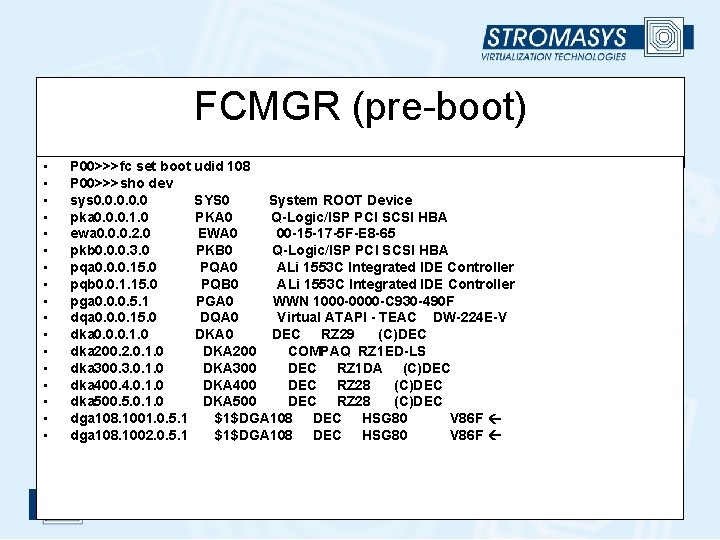
FCMGR (pre-boot) • • • • • P 00>>>fc set boot udid 108 P 00>>>sho dev sys 0. 0. 0 SYS 0 System ROOT Device pka 0. 0. 0. 1. 0 PKA 0 Q-Logic/ISP PCI SCSI HBA ewa 0. 0. 0. 2. 0 EWA 0 00 -15 -17 -5 F-E 8 -65 pkb 0. 0. 0. 3. 0 PKB 0 Q-Logic/ISP PCI SCSI HBA pqa 0. 0. 0. 15. 0 PQA 0 ALi 1553 C Integrated IDE Controller pqb 0. 0. 1. 15. 0 PQB 0 ALi 1553 C Integrated IDE Controller pga 0. 0. 0. 5. 1 PGA 0 WWN 1000 -0000 -C 930 -490 F dqa 0. 0. 0. 15. 0 DQA 0 Virtual ATAPI - TEAC DW-224 E-V dka 0. 0. 0. 1. 0 DKA 0 DEC RZ 29 (C)DEC dka 200. 2. 0. 1. 0 DKA 200 COMPAQ RZ 1 ED-LS dka 300. 3. 0. 1. 0 DKA 300 DEC RZ 1 DA (C)DEC dka 400. 4. 0. 1. 0 DKA 400 DEC RZ 28 (C)DEC dka 500. 5. 0. 1. 0 DKA 500 DEC RZ 28 (C)DEC dga 108. 1001. 0. 5. 1 $1$DGA 108 DEC HSG 80 V 86 F dga 108. 1002. 0. 5. 1 $1$DGA 108 DEC HSG 80 V 86 F
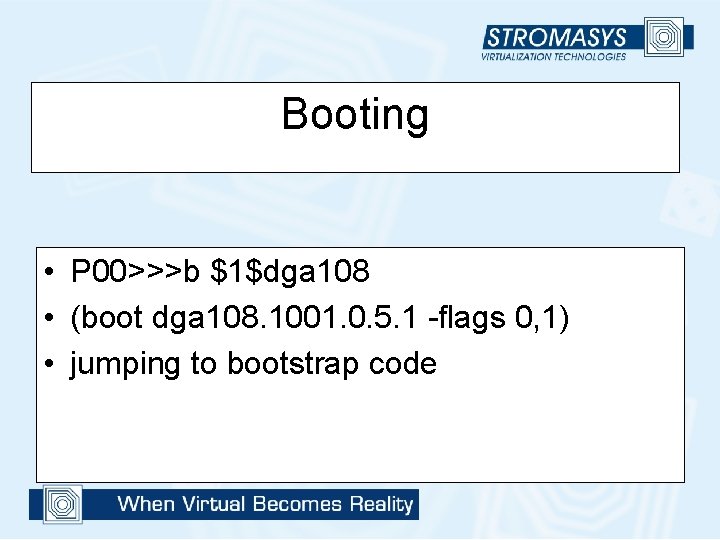
Booting • P 00>>>b $1$dga 108 • (boot dga 108. 1001. 0. 5. 1 -flags 0, 1) • jumping to bootstrap code
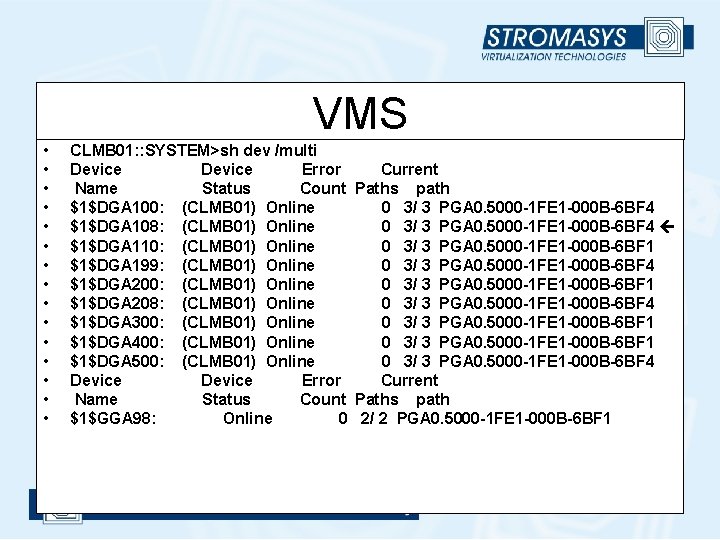
VMS • • • • CLMB 01: : SYSTEM>sh dev /multi Device Error Current Name Status Count Paths path $1$DGA 100: (CLMB 01) Online 0 3/ 3 PGA 0. 5000 -1 FE 1 -000 B-6 BF 4 $1$DGA 108: (CLMB 01) Online 0 3/ 3 PGA 0. 5000 -1 FE 1 -000 B-6 BF 4 $1$DGA 110: (CLMB 01) Online 0 3/ 3 PGA 0. 5000 -1 FE 1 -000 B-6 BF 1 $1$DGA 199: (CLMB 01) Online 0 3/ 3 PGA 0. 5000 -1 FE 1 -000 B-6 BF 4 $1$DGA 200: (CLMB 01) Online 0 3/ 3 PGA 0. 5000 -1 FE 1 -000 B-6 BF 1 $1$DGA 208: (CLMB 01) Online 0 3/ 3 PGA 0. 5000 -1 FE 1 -000 B-6 BF 4 $1$DGA 300: (CLMB 01) Online 0 3/ 3 PGA 0. 5000 -1 FE 1 -000 B-6 BF 1 $1$DGA 400: (CLMB 01) Online 0 3/ 3 PGA 0. 5000 -1 FE 1 -000 B-6 BF 1 $1$DGA 500: (CLMB 01) Online 0 3/ 3 PGA 0. 5000 -1 FE 1 -000 B-6 BF 4 Device Error Current Name Status Count Paths path $1$GGA 98: Online 0 2/ 2 PGA 0. 5000 -1 FE 1 -000 B-6 BF 1
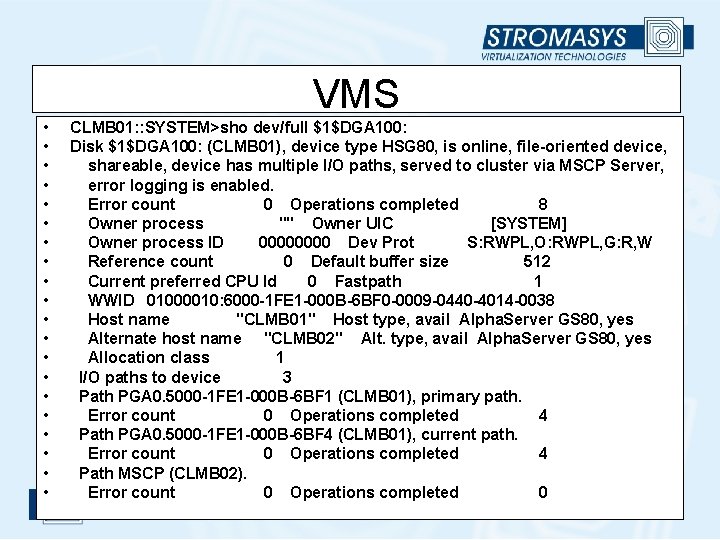
VMS • • • • • CLMB 01: : SYSTEM>sho dev/full $1$DGA 100: Disk $1$DGA 100: (CLMB 01), device type HSG 80, is online, file-oriented device, shareable, device has multiple I/O paths, served to cluster via MSCP Server, error logging is enabled. Error count 0 Operations completed 8 Owner process "" Owner UIC [SYSTEM] Owner process ID 0000 Dev Prot S: RWPL, O: RWPL, G: R, W Reference count 0 Default buffer size 512 Current preferred CPU Id 0 Fastpath 1 WWID 01000010: 6000 -1 FE 1 -000 B-6 BF 0 -0009 -0440 -4014 -0038 Host name "CLMB 01" Host type, avail Alpha. Server GS 80, yes Alternate host name "CLMB 02" Alt. type, avail Alpha. Server GS 80, yes Allocation class 1 I/O paths to device 3 Path PGA 0. 5000 -1 FE 1 -000 B-6 BF 1 (CLMB 01), primary path. Error count 0 Operations completed 4 Path PGA 0. 5000 -1 FE 1 -000 B-6 BF 4 (CLMB 01), current path. Error count 0 Operations completed 4 Path MSCP (CLMB 02). Error count 0 Operations completed 0
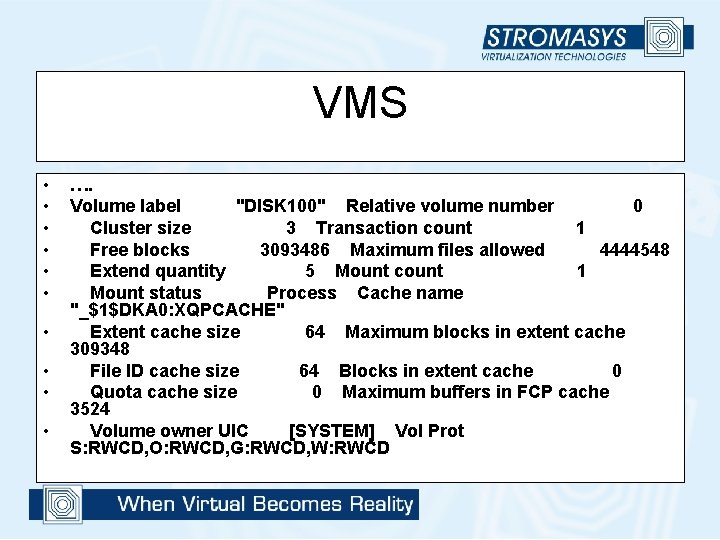
VMS • • • …. Volume label "DISK 100" Relative volume number 0 Cluster size 3 Transaction count 1 Free blocks 3093486 Maximum files allowed 4444548 Extend quantity 5 Mount count 1 Mount status Process Cache name "_$1$DKA 0: XQPCACHE" Extent cache size 64 Maximum blocks in extent cache 309348 File ID cache size 64 Blocks in extent cache 0 Quota cache size 0 Maximum buffers in FCP cache 3524 Volume owner UIC [SYSTEM] Vol Prot S: RWCD, O: RWCD, G: RWCD, W: RWCD
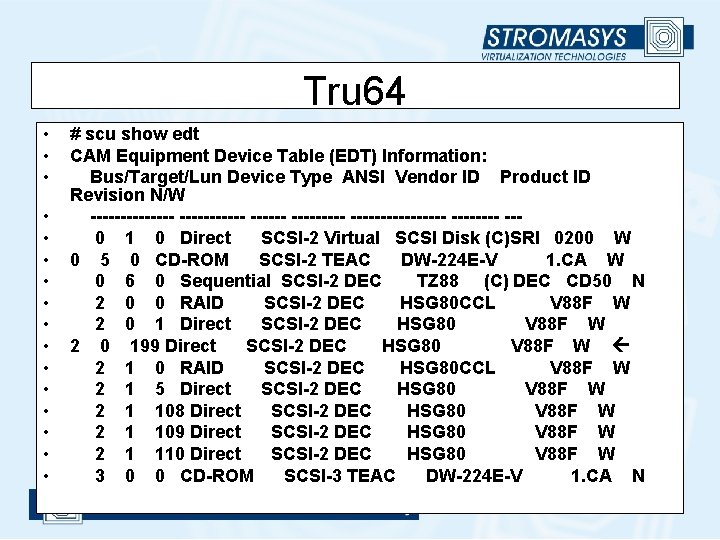
Tru 64 • • • • # scu show edt CAM Equipment Device Table (EDT) Information: Bus/Target/Lun Device Type ANSI Vendor ID Product ID Revision N/W ------- --------- ---- --0 1 0 Direct SCSI-2 Virtual SCSI Disk (C)SRI 0200 W 0 5 0 CD-ROM SCSI-2 TEAC DW-224 E-V 1. CA W 0 6 0 Sequential SCSI-2 DEC TZ 88 (C) DEC CD 50 N 2 0 0 RAID SCSI-2 DEC HSG 80 CCL V 88 F W 2 0 1 Direct SCSI-2 DEC HSG 80 V 88 F W 2 0 199 Direct SCSI-2 DEC HSG 80 V 88 F W 2 1 0 RAID SCSI-2 DEC HSG 80 CCL V 88 F W 2 1 5 Direct SCSI-2 DEC HSG 80 V 88 F W 2 1 108 Direct SCSI-2 DEC HSG 80 V 88 F W 2 1 109 Direct SCSI-2 DEC HSG 80 V 88 F W 2 1 110 Direct SCSI-2 DEC HSG 80 V 88 F W 3 0 0 CD-ROM SCSI-3 TEAC DW-224 E-V 1. CA N
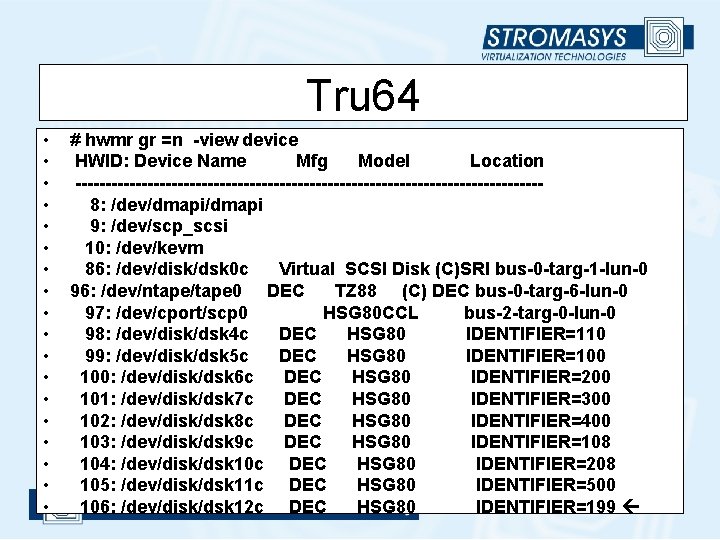
Tru 64 • • • • • # hwmr gr =n -view device HWID: Device Name Mfg Model Location ---------------------------------------8: /dev/dmapi 9: /dev/scp_scsi 10: /dev/kevm 86: /dev/disk/dsk 0 c Virtual SCSI Disk (C)SRI bus-0 -targ-1 -lun-0 96: /dev/ntape/tape 0 DEC TZ 88 (C) DEC bus-0 -targ-6 -lun-0 97: /dev/cport/scp 0 HSG 80 CCL bus-2 -targ-0 -lun-0 98: /dev/disk/dsk 4 c DEC HSG 80 IDENTIFIER=110 99: /dev/disk/dsk 5 c DEC HSG 80 IDENTIFIER=100 100: /dev/disk/dsk 6 c DEC HSG 80 IDENTIFIER=200 101: /dev/disk/dsk 7 c DEC HSG 80 IDENTIFIER=300 102: /dev/disk/dsk 8 c DEC HSG 80 IDENTIFIER=400 103: /dev/disk/dsk 9 c DEC HSG 80 IDENTIFIER=108 104: /dev/disk/dsk 10 c DEC HSG 80 IDENTIFIER=208 105: /dev/disk/dsk 11 c DEC HSG 80 IDENTIFIER=500 106: /dev/disk/dsk 12 c DEC HSG 80 IDENTIFIER=199
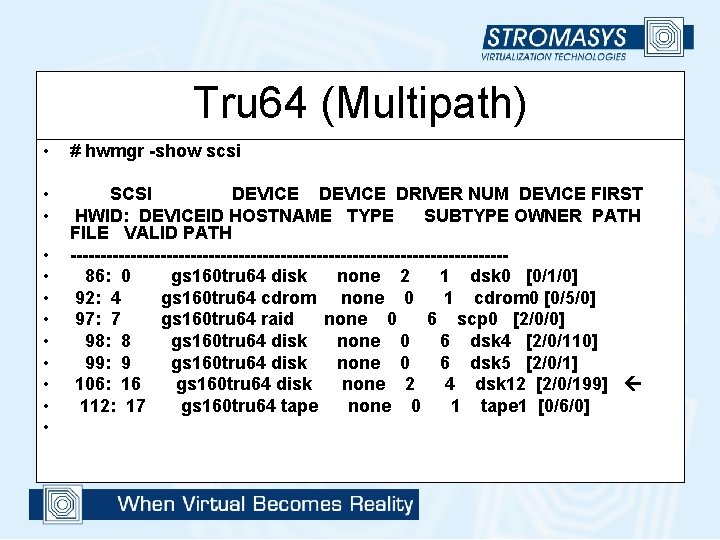
Tru 64 (Multipath) • # hwmgr -show scsi • • SCSI DEVICE DRIVER NUM DEVICE FIRST HWID: DEVICEID HOSTNAME TYPE SUBTYPE OWNER PATH FILE VALID PATH ------------------------------------86: 0 gs 160 tru 64 disk none 2 1 dsk 0 [0/1/0] 92: 4 gs 160 tru 64 cdrom none 0 1 cdrom 0 [0/5/0] 97: 7 gs 160 tru 64 raid none 0 6 scp 0 [2/0/0] 98: 8 gs 160 tru 64 disk none 0 6 dsk 4 [2/0/110] 99: 9 gs 160 tru 64 disk none 0 6 dsk 5 [2/0/1] 106: 16 gs 160 tru 64 disk none 2 4 dsk 12 [2/0/199] 112: 17 gs 160 tru 64 tape none 0 1 tape 1 [0/6/0] • • •
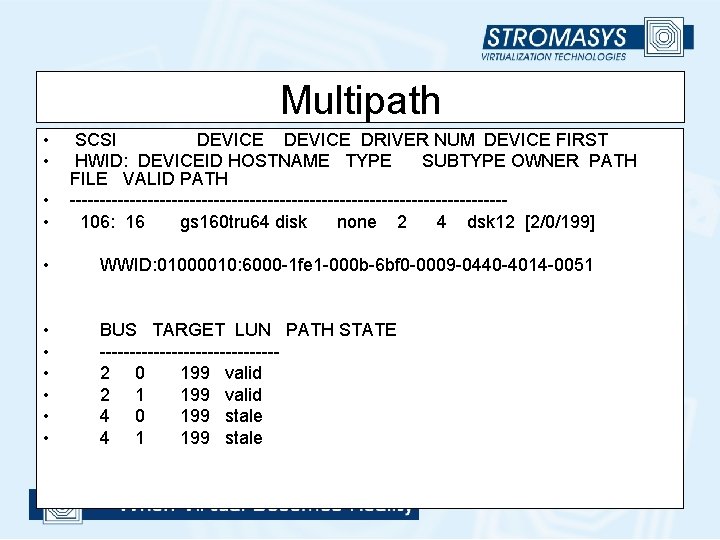
Multipath • • SCSI DEVICE DRIVER NUM DEVICE FIRST HWID: DEVICEID HOSTNAME TYPE SUBTYPE OWNER PATH FILE VALID PATH ------------------------------------106: 16 gs 160 tru 64 disk none 2 4 dsk 12 [2/0/199] • WWID: 01000010: 6000 -1 fe 1 -000 b-6 bf 0 -0009 -0440 -4014 -0051 • • • BUS TARGET LUN PATH STATE ---------------2 0 199 valid 2 1 199 valid 4 0 199 stale 4 1 199 stale
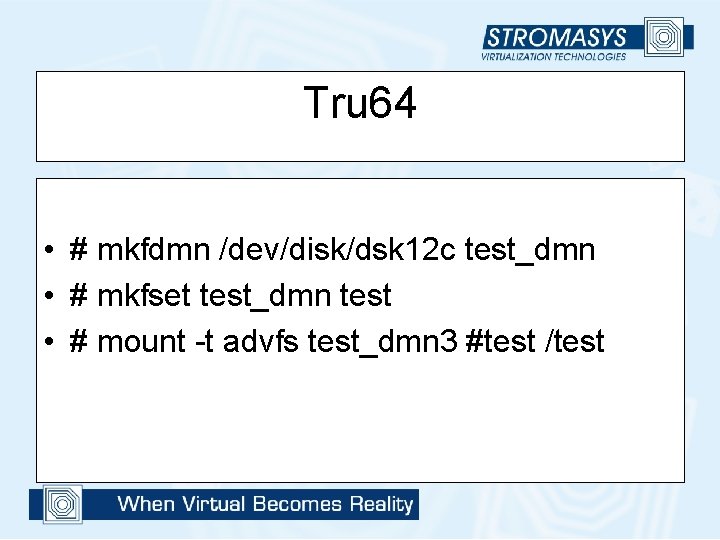
Tru 64 • # mkfdmn /dev/disk/dsk 12 c test_dmn • # mkfset test_dmn test • # mount -t advfs test_dmn 3 #test /test
- Slides: 42