
Chapter X Output Merger Introduction to Computer Graphics
![Alpha Blending § The alpha channel in the range of [0, 1] § §](https://slidetodoc.com/presentation_image/5cfed94e1fd1b78ba6bee682852bd8eb/image-8.jpg "Alpha Blending § The alpha channel in the range of [0, 1] § §")
- Slides: 9
Chapter X Output Merger Introduction to Computer Graphics with Open. GL ES (J. Han)
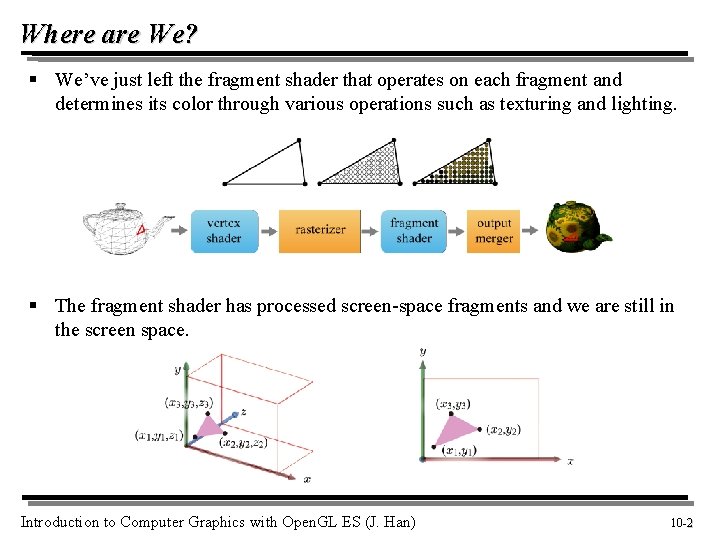
Where are We? § We’ve just left the fragment shader that operates on each fragment and determines its color through various operations such as texturing and lighting. § The fragment shader has processed screen-space fragments and we are still in the screen space. Introduction to Computer Graphics with Open. GL ES (J. Han) 10 -2 2
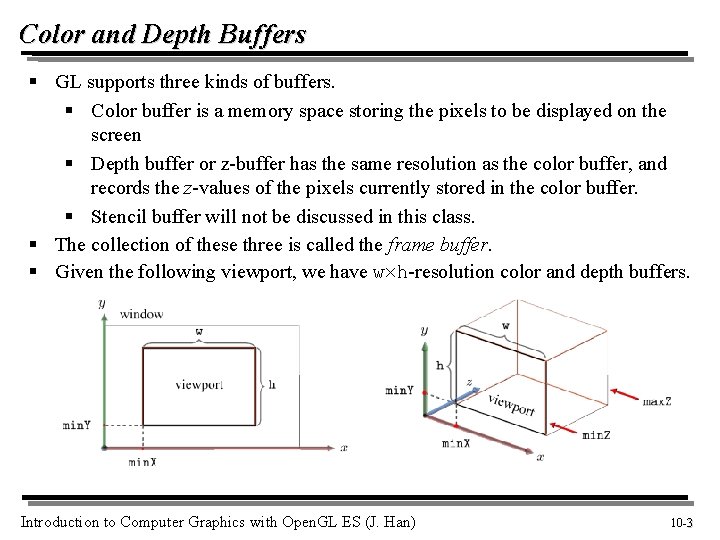
Color and Depth Buffers § GL supports three kinds of buffers. § Color buffer is a memory space storing the pixels to be displayed on the screen § Depth buffer or z-buffer has the same resolution as the color buffer, and records the z-values of the pixels currently stored in the color buffer. § Stencil buffer will not be discussed in this class. § The collection of these three is called the frame buffer. § Given the following viewport, we have w h-resolution color and depth buffers. Introduction to Computer Graphics with Open. GL ES (J. Han) 10 -3 3
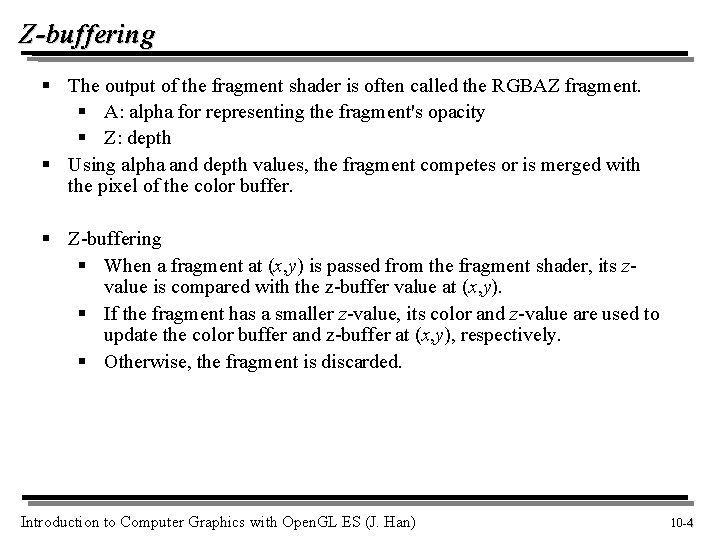
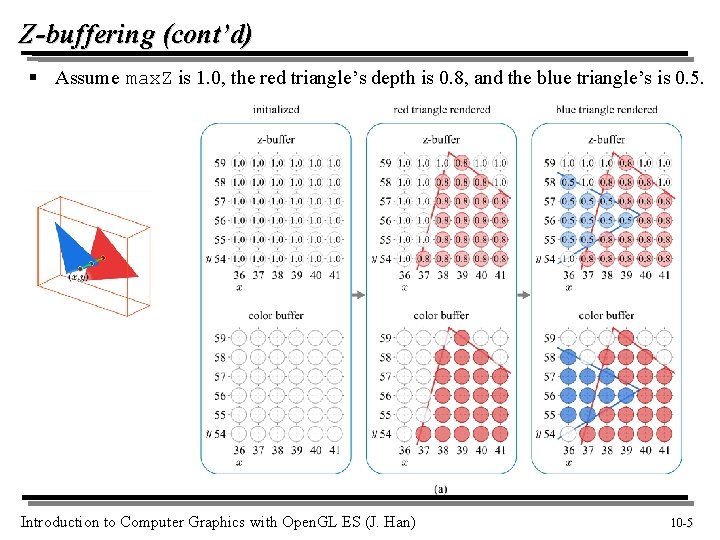
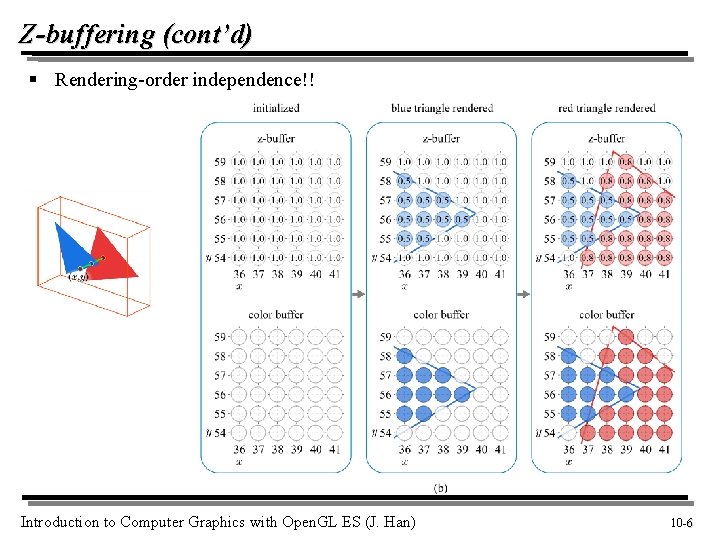
Z-buffering § The output of the fragment shader is often called the RGBAZ fragment. § A: alpha for representing the fragment's opacity § Z: depth § Using alpha and depth values, the fragment competes or is merged with the pixel of the color buffer. § Z-buffering § When a fragment at (x, y) is passed from the fragment shader, its zvalue is compared with the z-buffer value at (x, y). § If the fragment has a smaller z-value, its color and z-value are used to update the color buffer and z-buffer at (x, y), respectively. § Otherwise, the fragment is discarded. Introduction to Computer Graphics with Open. GL ES (J. Han) 10 -4 4
Z-buffering (cont’d) § Assume max. Z is 1. 0, the red triangle’s depth is 0. 8, and the blue triangle’s is 0. 5. Introduction to Computer Graphics with Open. GL ES (J. Han) 10 -5 5
Z-buffering (cont’d) § Rendering-order independence!! Introduction to Computer Graphics with Open. GL ES (J. Han) 10 -6 6
Z-buffering in GL § By calling gl. Clear once per frame, three buffers are simultaneously cleared with the default values selected by the following: § gl. Clear. Color § gl. Clear. Depthf § gl. Clear. Stencil § All tests and operations on fragments are disabled by default and are enabled by calling gl. Enable with the following arguments, for example: § GL_DEPTH_TEST § GL_BLEND (for blending fragments with colors stored in the color buffer) § gl. Depth. Func(GLenum func) § func specifies the conditions under which the fragment is drawn. § The default is GL_LESS, which means that the fragment is drawn if its depth is less than that of the pixel. Introduction to Computer Graphics with Open. GL ES (J. Han) 10 -7 7
Alpha Blending § The alpha channel in the range of [0, 1] § § 0 denotes “fully transparent. ” 1 denotes “fully opaque. ” § A typical blending equation is described as follows: § For alpha blending, the primitives cannot be rendered in an arbitrary order. They must be rendered after all opaque primitives, and in back-to-front order. Therefore, the partially transparent objects should be sorted. Introduction to Computer Graphics with Open. GL ES (J. Han) 10 -8 8
Alpha Blending in GL § gl. Blend. Func(GLenum sfactor, GLenum dfactor); § sfactor specifies the blending coefficient for the incoming (source) fragment § dfactor specifies the blending coefficient for the destination pixel § Many values such as GL_ZERO and GL_ONE can be assigned to sfactor and dfactor, but GL_SRC_ALPHA may best fit to sfactor and GL_ONE_MINUS_SRC_ALPHA to dfactor. § Once the fragment and pixel color are multiplied by sfactor and dfactor, respectively, they are combined using the operator specified by gl. Blend. Equation. § Its argument can be GL_FUNC_ADD, GL_FUNC_SUBTRACT, GL_FUNC_REVERSE_SUBTRACT, GL_MIN, or GL_MAX. § The default is GL_FUNC_ADD. Introduction to Computer Graphics with Open. GL ES (J. Han) 10 -9 9