
Chapter Two Introduction to Structured Query Language Part


- Slides: 37
Chapter Two: Introduction to Structured Query Language Part 2: Multiple Table Queries
Chapter Objectives • To understand the use of extracted data sets in business intelligence (BI) systems • To understand the use of ad-hoc queries in business intelligence (BI) systems • To understand the history and significance of Structured Query Language (SQL) • To understand the SQL SELECT/FROM/WHERE framework as the basis for database queries • To create SQL queries to retrieve data from a single table 2 -2
Coverage • This Microsoft Power. Point Slide Show covers multiple table queries and the last four chapter objectives (from the previous slide) • The material in the Microsoft Power. Point Slide Show for Chapter Two Part One on single table queries must by covered before discussing the material in this Slide Show. • A review of the Cape Codd Outdoor Sports database is included for continuity. 2 -3
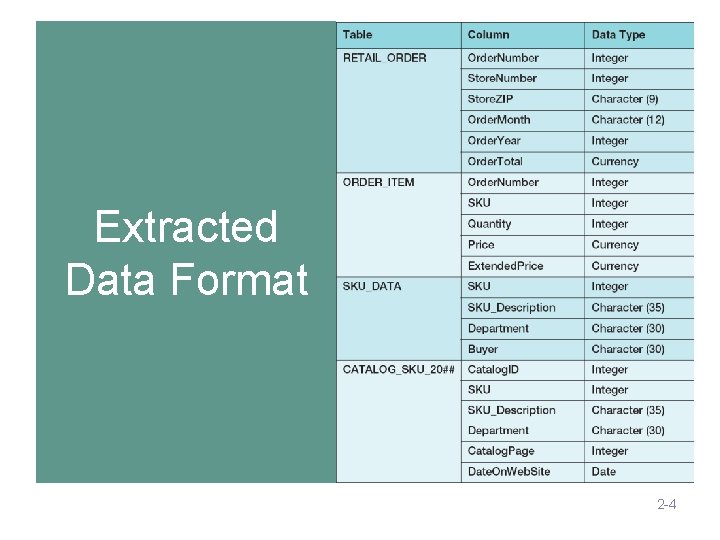
Extracted Data Format 2 -4
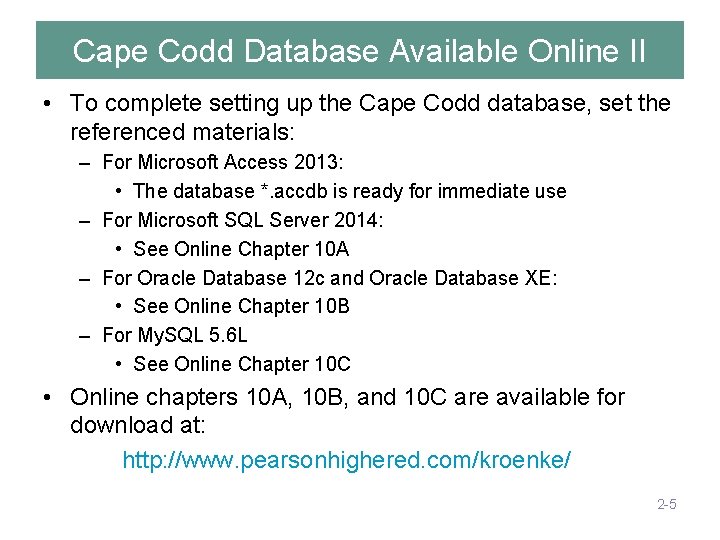
Cape Codd Database Available Online II • To complete setting up the Cape Codd database, set the referenced materials: – For Microsoft Access 2013: • The database *. accdb is ready for immediate use – For Microsoft SQL Server 2014: • See Online Chapter 10 A – For Oracle Database 12 c and Oracle Database XE: • See Online Chapter 10 B – For My. SQL 5. 6 L • See Online Chapter 10 C • Online chapters 10 A, 10 B, and 10 C are available for download at: http: //www. pearsonhighered. com/kroenke/ 2 -5
Querying Two or More Tables with SQL provides two different techniques for querying data from multiple tables: ■ The SQL subquery ■ The SQL join 2 -6
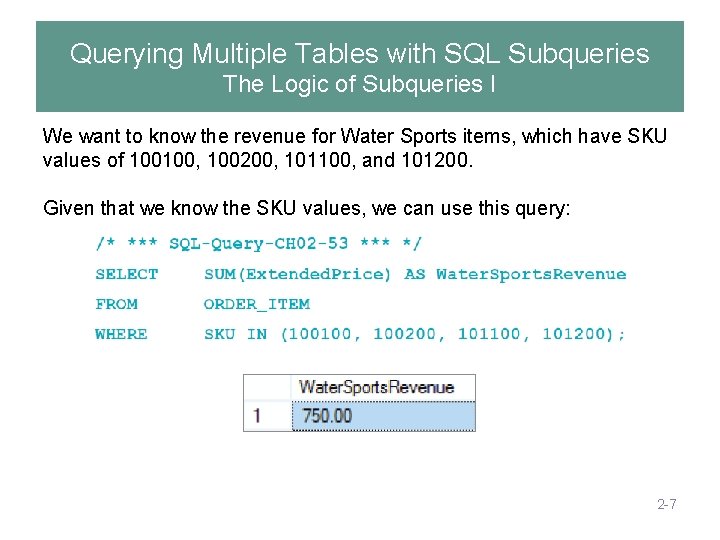
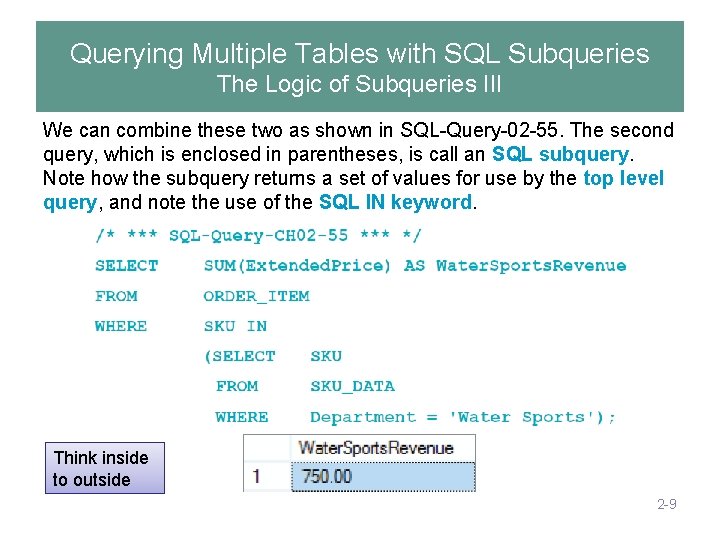
Querying Multiple Tables with SQL Subqueries The Logic of Subqueries I We want to know the revenue for Water Sports items, which have SKU values of 100100, 100200, 101100, and 101200. Given that we know the SKU values, we can use this query: 2 -7
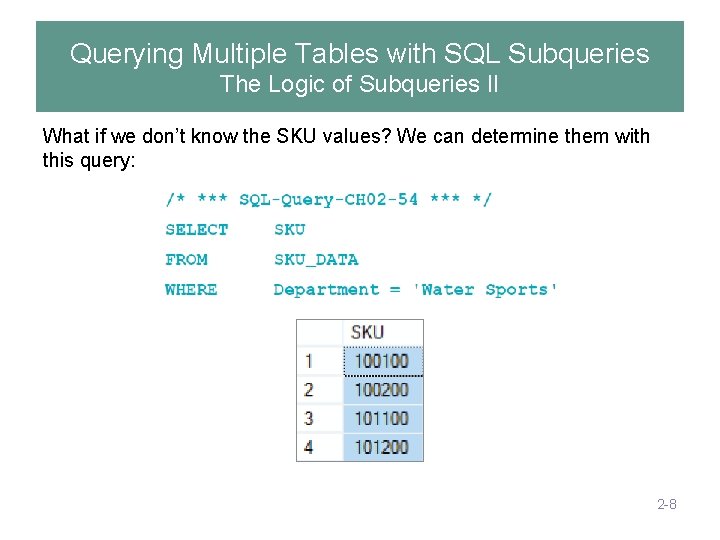
Querying Multiple Tables with SQL Subqueries The Logic of Subqueries II What if we don’t know the SKU values? We can determine them with this query: 2 -8
Querying Multiple Tables with SQL Subqueries The Logic of Subqueries III We can combine these two as shown in SQL-Query-02 -55. The second query, which is enclosed in parentheses, is call an SQL subquery. Note how the subquery returns a set of values for use by the top level query, and note the use of the SQL IN keyword. Think inside to outside 2 -9
Querying Multiple Tables with SQL Subqueries The Logic of Subqueries IV • An SQL subquery is often described as: • a nested query • A query within a query • Note that SQL queries using subqueries are still effectively single table queries in the sense that only the columns of the top level query can be displayed in the query results! • Multiple subqueries can be used to process three or even more tables. • All parts if the SQL SELECT statement syntax can be applied to the table displaying the results of an SQL query using subqueries. 2 -10
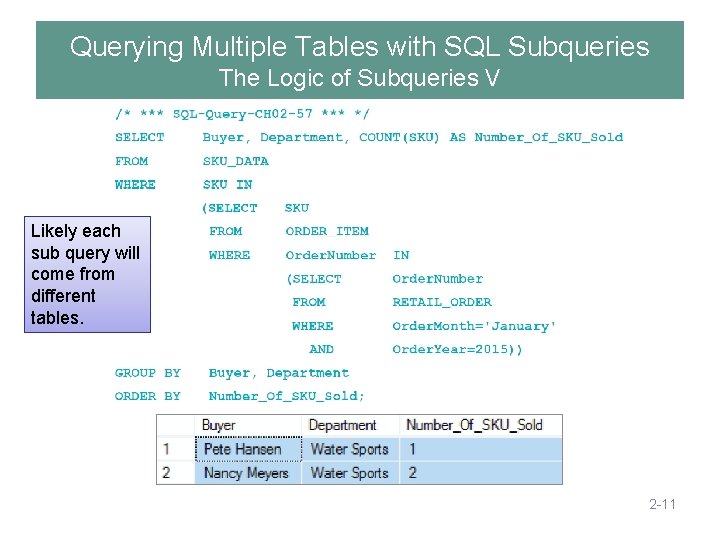
Querying Multiple Tables with SQL Subqueries The Logic of Subqueries V Likely each sub query will come from different tables. 2 -11
Querying Multiple Tables with SQL Joins The Logic of Joins I • In an SQL join operation, the SQL JOIN operator is used to combine parts or all of two or more tables. • Explicit join ─ the SQL JOIN operator is used as part of the SQL statement. • Implicit join ─ the SQL JOIN operator is not used as part of the SQL statement. 2 -12
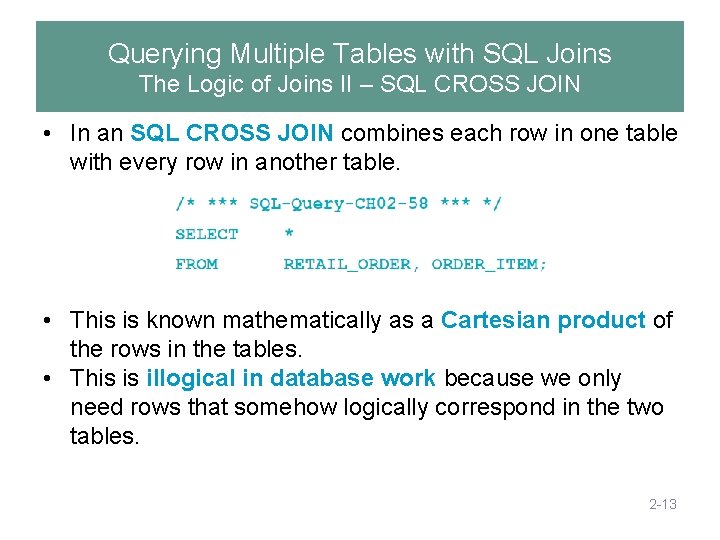
Querying Multiple Tables with SQL Joins The Logic of Joins II – SQL CROSS JOIN • In an SQL CROSS JOIN combines each row in one table with every row in another table. • This is known mathematically as a Cartesian product of the rows in the tables. • This is illogical in database work because we only need rows that somehow logically correspond in the two tables. 2 -13
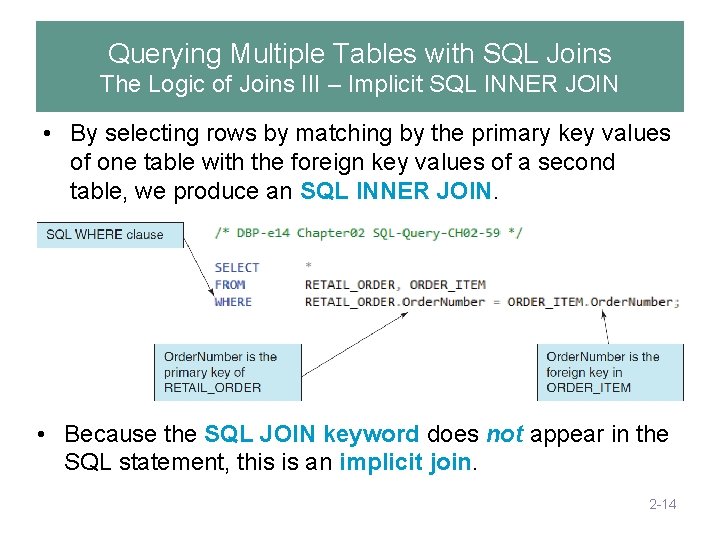
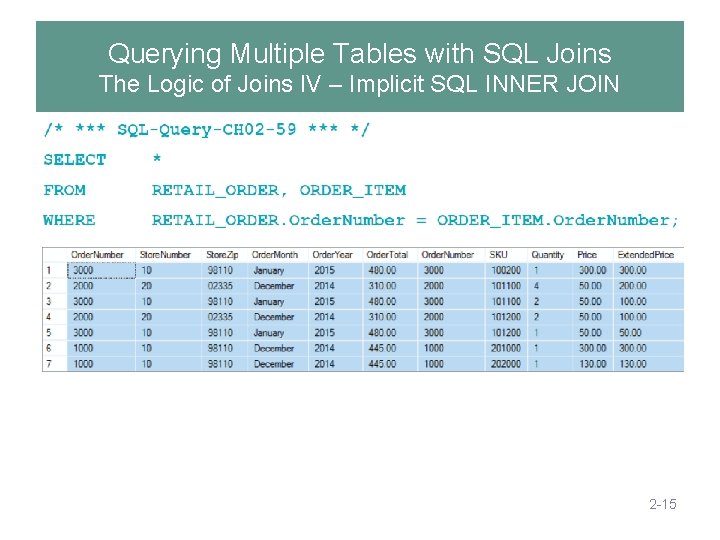
Querying Multiple Tables with SQL Joins The Logic of Joins III – Implicit SQL INNER JOIN • By selecting rows by matching by the primary key values of one table with the foreign key values of a second table, we produce an SQL INNER JOIN. • Because the SQL JOIN keyword does not appear in the SQL statement, this is an implicit join. 2 -14
Querying Multiple Tables with SQL Joins The Logic of Joins IV – Implicit SQL INNER JOIN 2 -15
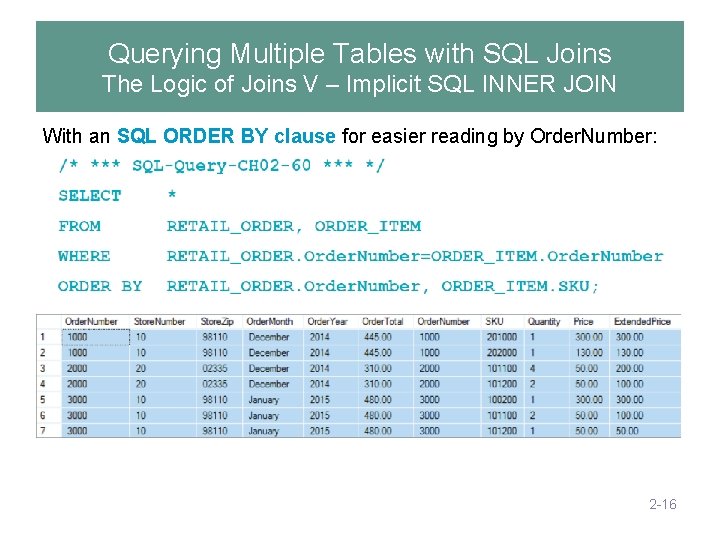
Querying Multiple Tables with SQL Joins The Logic of Joins V – Implicit SQL INNER JOIN With an SQL ORDER BY clause for easier reading by Order. Number: 2 -16
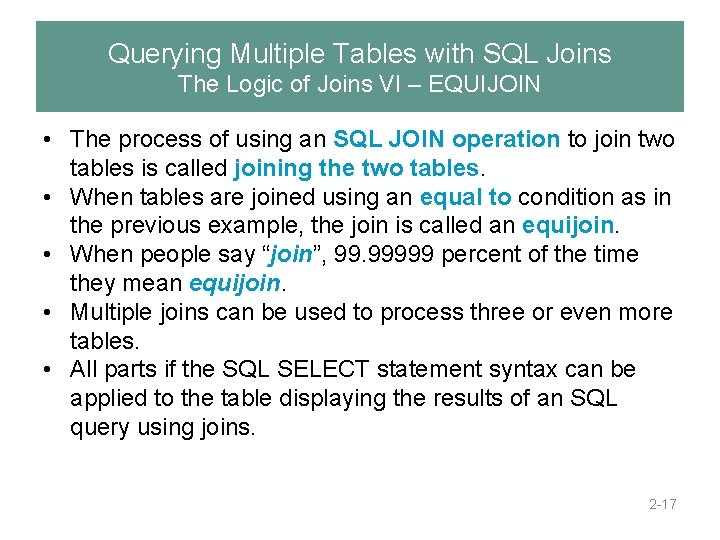
Querying Multiple Tables with SQL Joins The Logic of Joins VI – EQUIJOIN • The process of using an SQL JOIN operation to join two tables is called joining the two tables. • When tables are joined using an equal to condition as in the previous example, the join is called an equijoin. • When people say “join”, 99. 99999 percent of the time they mean equijoin. • Multiple joins can be used to process three or even more tables. • All parts if the SQL SELECT statement syntax can be applied to the table displaying the results of an SQL query using joins. 2 -17
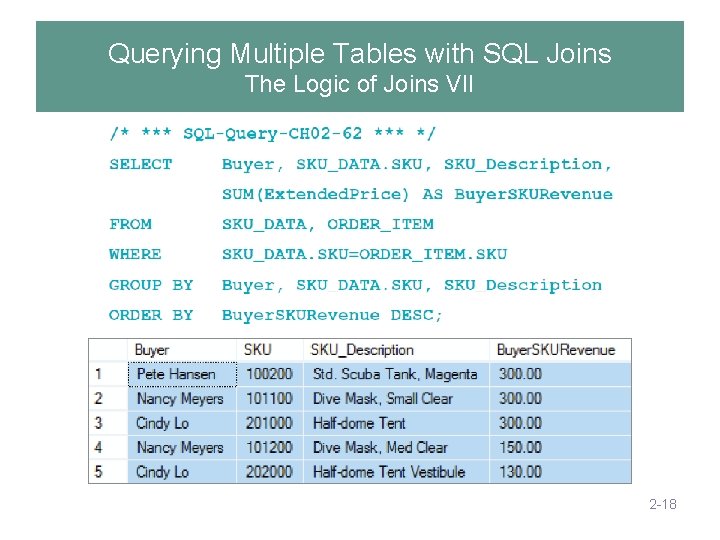
Querying Multiple Tables with SQL Joins The Logic of Joins VII 2 -18
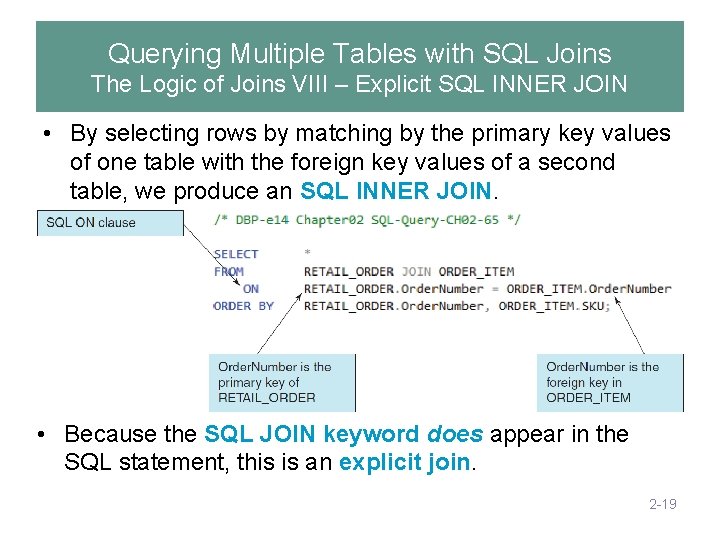
Querying Multiple Tables with SQL Joins The Logic of Joins VIII – Explicit SQL INNER JOIN • By selecting rows by matching by the primary key values of one table with the foreign key values of a second table, we produce an SQL INNER JOIN. • Because the SQL JOIN keyword does appear in the SQL statement, this is an explicit join. 2 -19
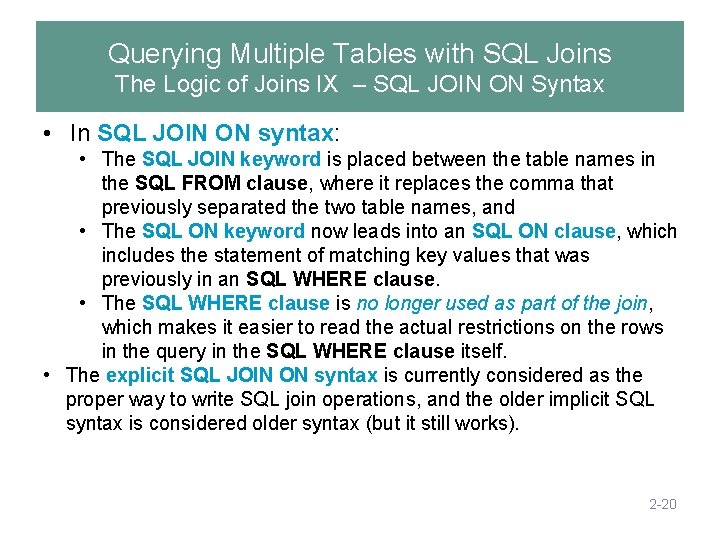
Querying Multiple Tables with SQL Joins The Logic of Joins IX – SQL JOIN ON Syntax • In SQL JOIN ON syntax: • The SQL JOIN keyword is placed between the table names in the SQL FROM clause, where it replaces the comma that previously separated the two table names, and • The SQL ON keyword now leads into an SQL ON clause, which includes the statement of matching key values that was previously in an SQL WHERE clause. • The SQL WHERE clause is no longer used as part of the join, which makes it easier to read the actual restrictions on the rows in the query in the SQL WHERE clause itself. • The explicit SQL JOIN ON syntax is currently considered as the proper way to write SQL join operations, and the older implicit SQL syntax is considered older syntax (but it still works). 2 -20
Querying Multiple Tables with SQL Joins The Logic of Joins X – SQL JOIN ON Syntax 2 -21
SQL Subqueries versus SQL Joins • SQL subqueries and SQL joins both process multiple tables. • An SQL subquery can only be used to retrieve data from the “top table”. – It can be an independent query • An SQL join can be used to obtain data from any number of tables, including the “top table” of the subquery. • In Chapter 8, we will study the correlated subquery. That kind of subquery can do work that is not possible with joins. – Outer query is run for each result of the sub query, the outer depends on the sub query 2 -22
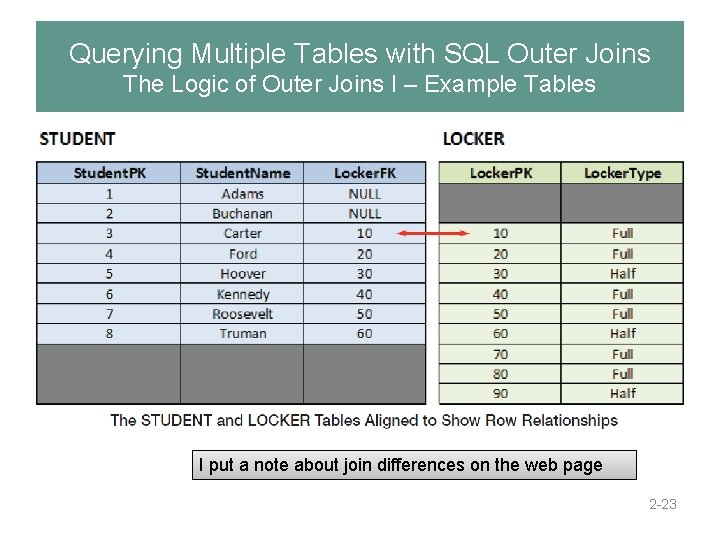
Querying Multiple Tables with SQL Outer Joins The Logic of Outer Joins I – Example Tables I put a note about join differences on the web page 2 -23
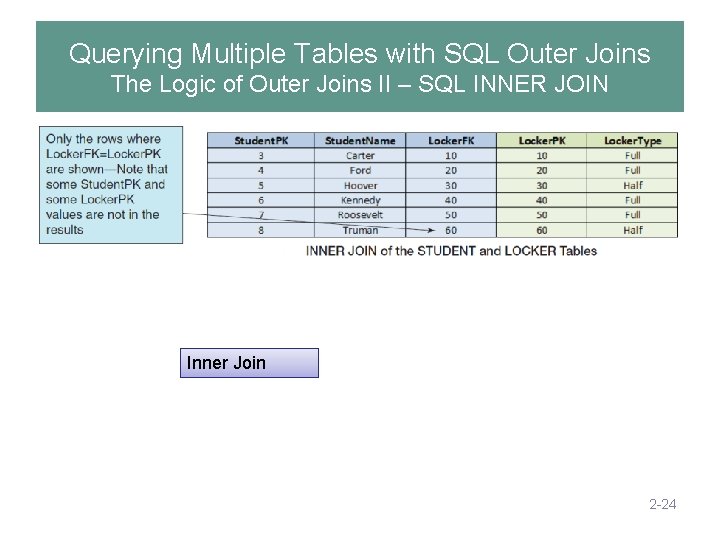
Querying Multiple Tables with SQL Outer Joins The Logic of Outer Joins II – SQL INNER JOIN Inner Join 2 -24
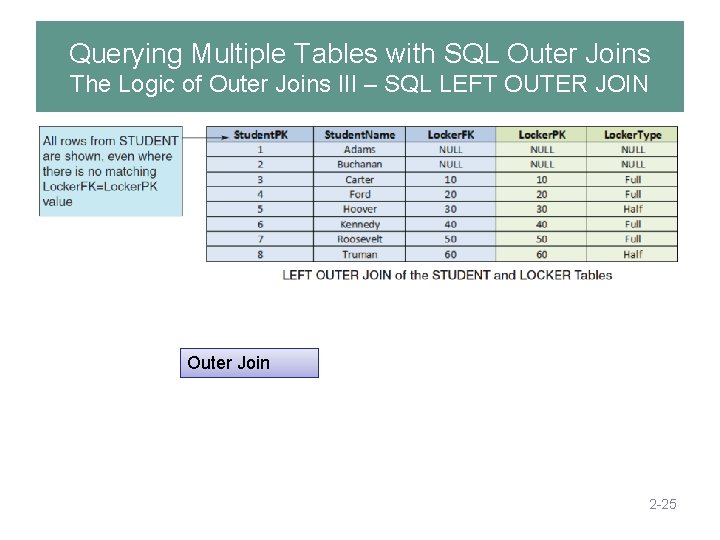
Querying Multiple Tables with SQL Outer Joins The Logic of Outer Joins III – SQL LEFT OUTER JOIN Outer Join 2 -25
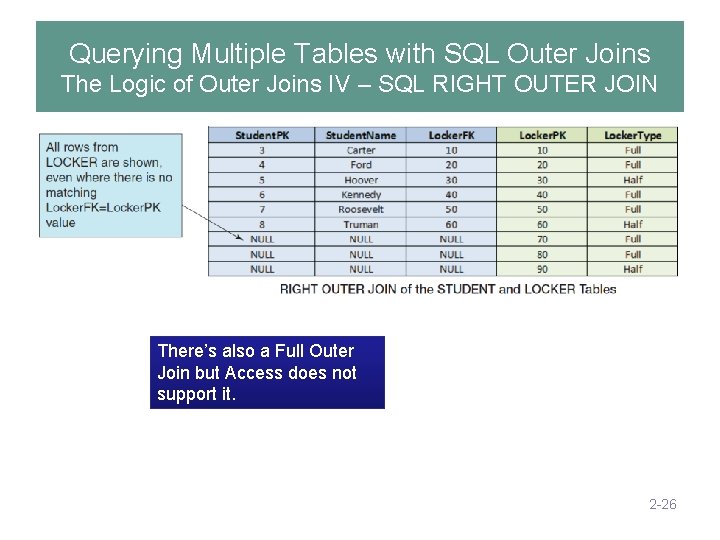
Querying Multiple Tables with SQL Outer Joins The Logic of Outer Joins IV – SQL RIGHT OUTER JOIN There’s also a Full Outer Join but Access does not support it. 2 -26
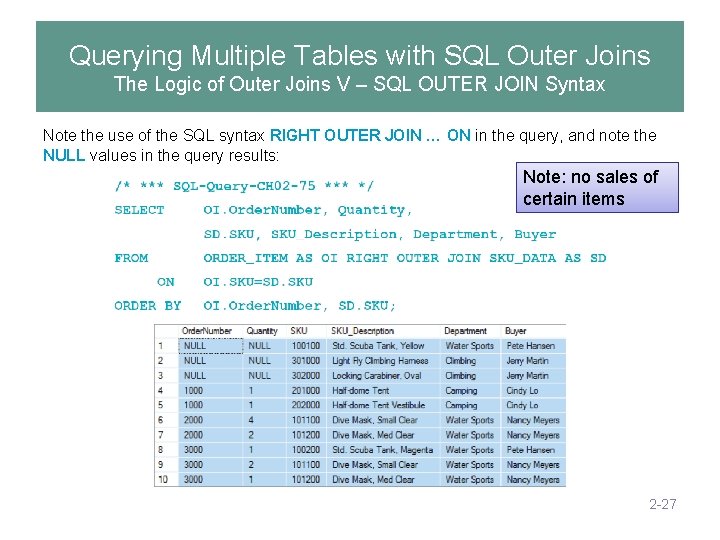
Querying Multiple Tables with SQL Outer Joins The Logic of Outer Joins V – SQL OUTER JOIN Syntax Note the use of the SQL syntax RIGHT OUTER JOIN … ON in the query, and note the NULL values in the query results: Note: no sales of certain items 2 -27
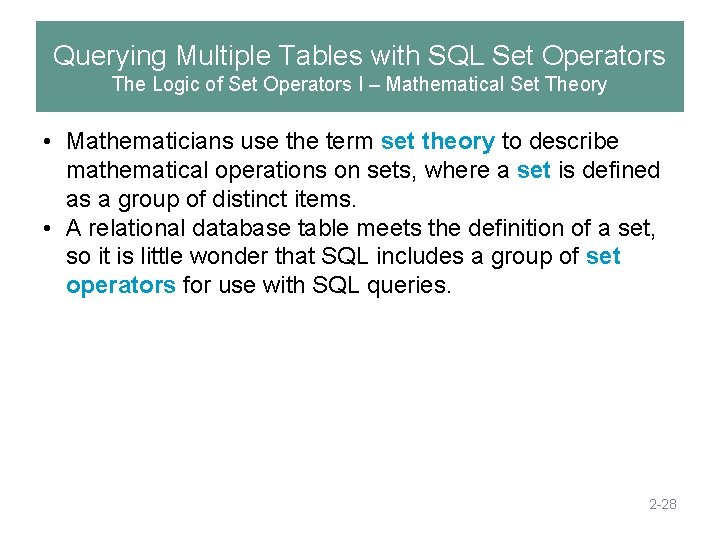
Querying Multiple Tables with SQL Set Operators The Logic of Set Operators I – Mathematical Set Theory • Mathematicians use the term set theory to describe mathematical operations on sets, where a set is defined as a group of distinct items. • A relational database table meets the definition of a set, so it is little wonder that SQL includes a group of set operators for use with SQL queries. 2 -28
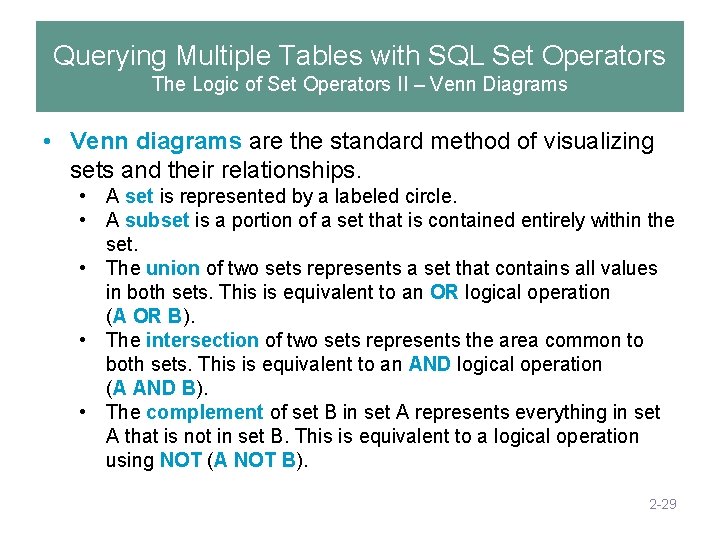
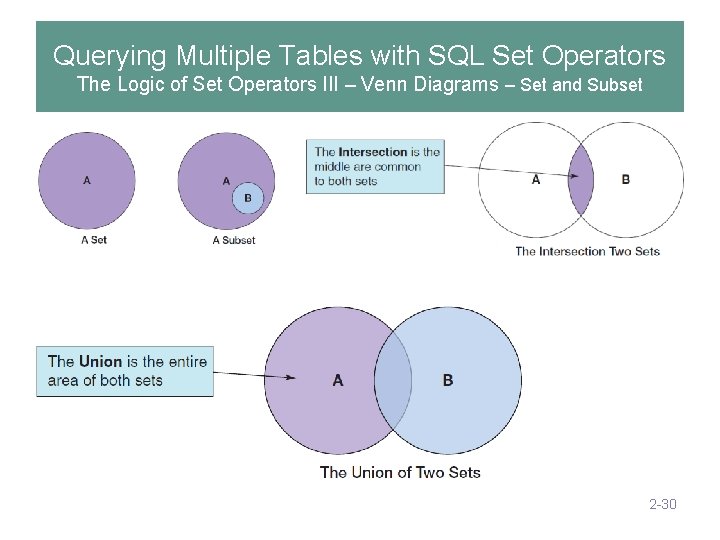
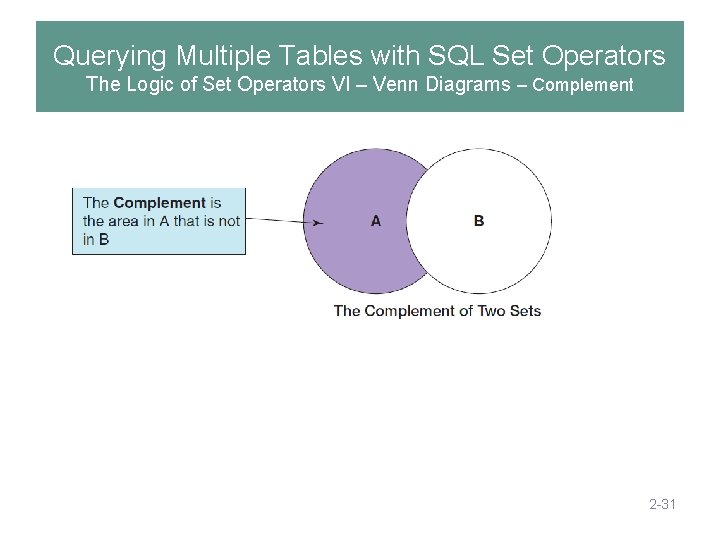
Querying Multiple Tables with SQL Set Operators The Logic of Set Operators II – Venn Diagrams • Venn diagrams are the standard method of visualizing sets and their relationships. • A set is represented by a labeled circle. • A subset is a portion of a set that is contained entirely within the set. • The union of two sets represents a set that contains all values in both sets. This is equivalent to an OR logical operation (A OR B). • The intersection of two sets represents the area common to both sets. This is equivalent to an AND logical operation (A AND B). • The complement of set B in set A represents everything in set A that is not in set B. This is equivalent to a logical operation using NOT (A NOT B). 2 -29
Querying Multiple Tables with SQL Set Operators The Logic of Set Operators III – Venn Diagrams – Set and Subset 2 -30
Querying Multiple Tables with SQL Set Operators The Logic of Set Operators VI – Venn Diagrams – Complement 2 -31
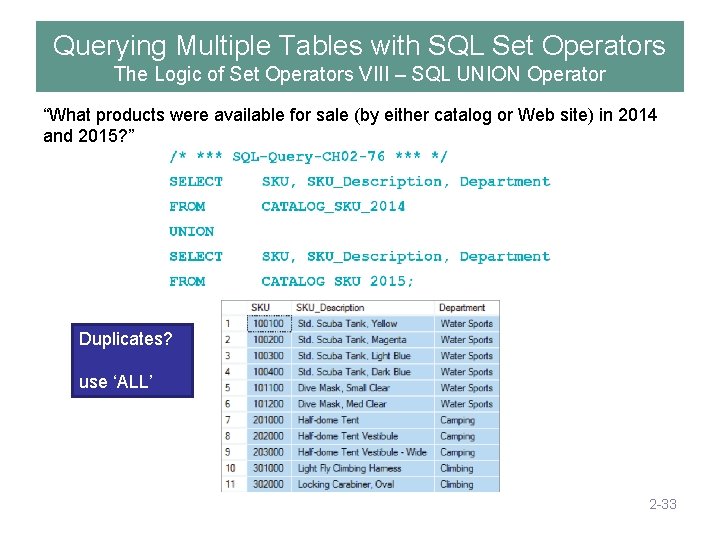
Querying Multiple Tables with SQL Set Operators The Logic of Set Operators VII – SQL Set Operators Note that in order to use SQL set operators, the table columns involved in the operations must be the same number in each SELECT component, and corresponding columns must have the same or compatible (e. g. , CHAR and VARCHAR) data types! 2 -32
Querying Multiple Tables with SQL Set Operators The Logic of Set Operators VIII – SQL UNION Operator “What products were available for sale (by either catalog or Web site) in 2014 and 2015? ” Duplicates? use ‘ALL’ 2 -33
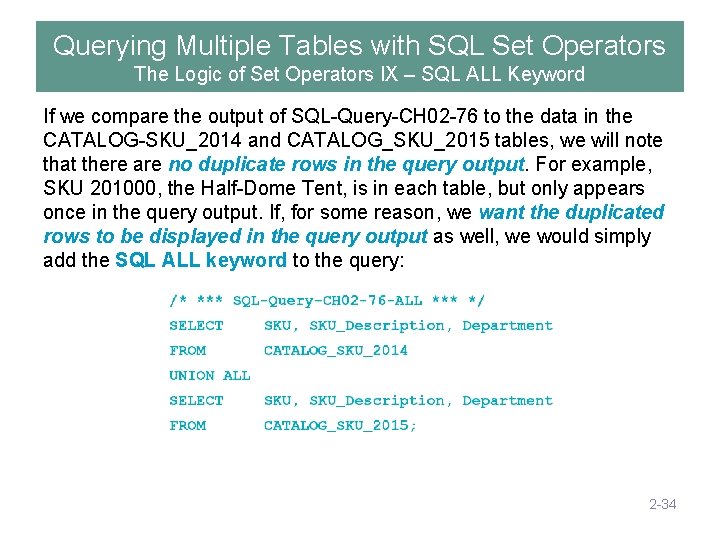
Querying Multiple Tables with SQL Set Operators The Logic of Set Operators IX – SQL ALL Keyword If we compare the output of SQL-Query-CH 02 -76 to the data in the CATALOG-SKU_2014 and CATALOG_SKU_2015 tables, we will note that there are no duplicate rows in the query output. For example, SKU 201000, the Half-Dome Tent, is in each table, but only appears once in the query output. If, for some reason, we want the duplicated rows to be displayed in the query output as well, we would simply add the SQL ALL keyword to the query: 2 -34
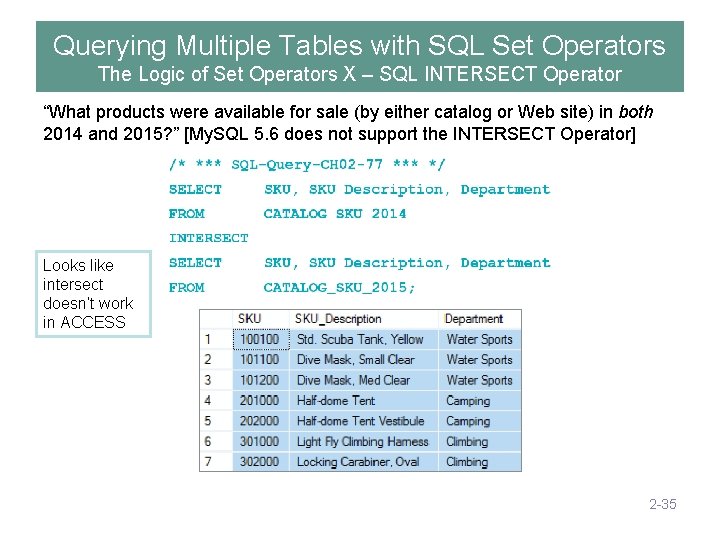
Querying Multiple Tables with SQL Set Operators The Logic of Set Operators X – SQL INTERSECT Operator “What products were available for sale (by either catalog or Web site) in both 2014 and 2015? ” [My. SQL 5. 6 does not support the INTERSECT Operator] Looks like intersect doesn’t work in ACCESS 2 -35
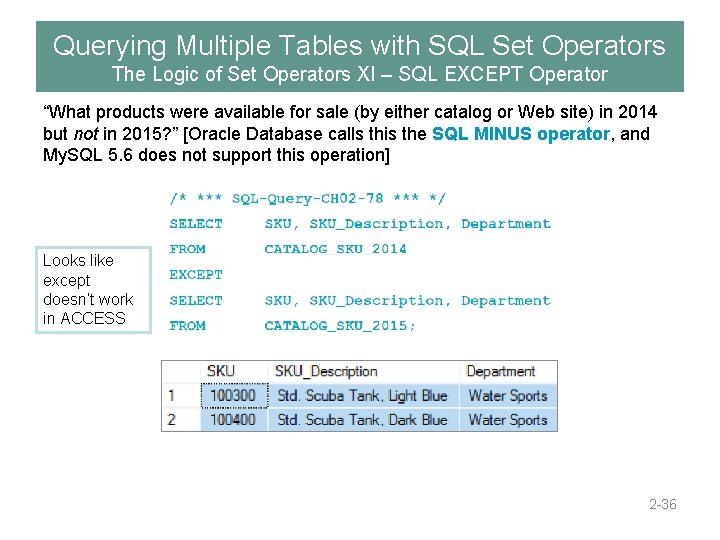
Querying Multiple Tables with SQL Set Operators The Logic of Set Operators XI – SQL EXCEPT Operator “What products were available for sale (by either catalog or Web site) in 2014 but not in 2015? ” [Oracle Database calls this the SQL MINUS operator, and My. SQL 5. 6 does not support this operation] Looks like except doesn’t work in ACCESS 2 -36
End of Presentation: Chapter Two Part Two KROENKE AND AUER - DATABASE PROCESSING, 14 th Edition © 2016 Pearson Education, Inc. 2 -37