
CHAPTER TWO How Businesses Use Information Systems Oleh
CHAPTER TWO How Businesses Use Information Systems Oleh : Kundang K Juman Copyright © 2013 Pearson Canada Inc. 2 -1
Management Information Systems Chapter 2 How Businesses Use Information Systems LEARNING OBJECTIVES After reading this chapter, you will be able to answer the following questions: 1. What are business processes? How are they related to information systems? 2. How do information systems serve the different management groups in a business? 3. How do systems that link the enterprise improve organizational performance? Continued … Copyright © 2013 Pearson Canada Inc. 2 -2
Management Information Systems Chapter 2 How Businesses Use Information Systems LEARNING OBJECTIVES (continued) 4. Why are systems for collaboration and teamwork so important, and what technologies do they use? 5. What is the role of the information systems function in a business? Copyright © 2013 Pearson Canada Inc. 2 -3
Management Information Systems Chapter 2 How Businesses Use Information Systems Black. Berrys Enable Intermodal Transfers at CN • Problem: Dispatch system was expensive and inefficient, and was being discontinued. • Solutions: hired Genetec to help them develop new dispatch system using the Black. Berry Enterprise Solution as a platform • The Black. Berry dispatch system makes it easier to schedule drivers and drivers can communicate with customers about delivery times. The system is also connected to the driver payroll system. • Demonstrates IT’s role in improving performance and remaining competitive. • Illustrates the benefits of information systems – reducing costs and growing profits Copyright © 2013 Pearson Canada Inc. 2 -4
Management Information Systems Chapter 2 How Businesses Use Information Systems Business Processes and Information Systems Business processes • The manner in which work is organized, coordinated, and focused to produce a valuable product or service • Every business is a collection of business processes Information technology enhances business processes • increase efficiency of existing processes • enable new processes that can transform the business Copyright © 2013 Pearson Canada Inc. 2 -5
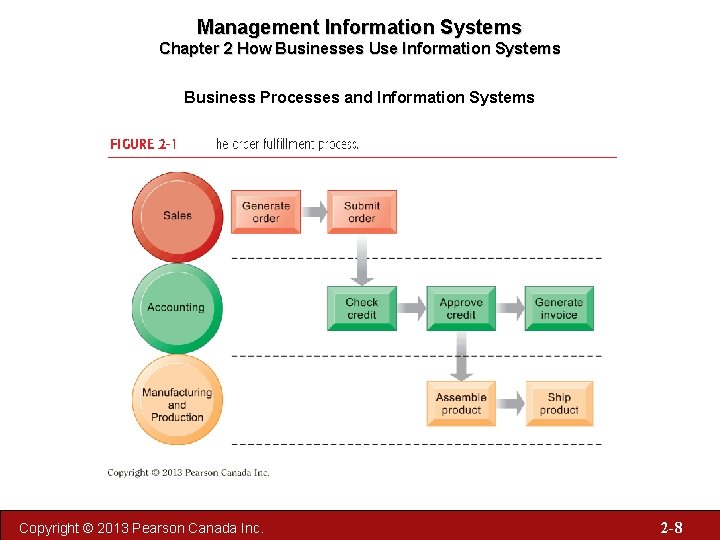
Management Information Systems Chapter 2 How Businesses Use Information Systems Business Processes and Information Systems • Business processes: – Workflows of material, information, knowledge – Sets of activities, steps – May be tied to functional area or be crossfunctional • Businesses: Can be seen as collection of business processes • Business processes may be assets or liabilities Copyright © 2013 Pearson Canada Inc. 2 -6

Management Information Systems Chapter 2 How Businesses Use Information Systems Business Processes and Information Systems Examples of functional business processes – Manufacturing and production • Assembling the product – Sales and marketing • Identifying customers – Finance and accounting • Creating financial statements – Human resources • Hiring employees Copyright © 2013 Pearson Canada Inc. 2 -7
Management Information Systems Chapter 2 How Businesses Use Information Systems Business Processes and Information Systems Copyright © 2013 Pearson Canada Inc. 2 -8
Management Information Systems Chapter 2 How Businesses Use Information Systems Business Processes and Information Systems Information technology enhances business processes in two main ways: 1. Increasing efficiency of existing processes • Automating steps that were manual 2. Enabling entirely new processes that are capable of transforming the businesses • Change flow of information • Replace sequential steps with parallel steps • Eliminate delays in decision making Copyright © 2013 Pearson Canada Inc. 2 -9

Management Information Systems Chapter 2 How Businesses Use Information Systems Types of Information Systems Transaction processing systems • • Perform and record daily routine transactions necessary to conduct business • Examples: sales order entry, payroll, shipping Allow managers to monitor status of operations and relations with external environment Serve operational levels Serve predefined, structured goals and decision making Copyright © 2013 Pearson Canada Inc. 2 -10
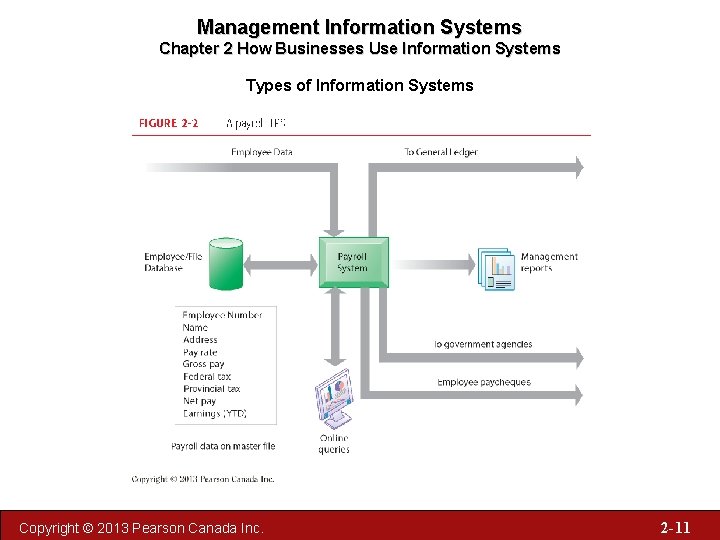
Management Information Systems Chapter 2 How Businesses Use Information Systems Types of Information Systems Copyright © 2013 Pearson Canada Inc. 2 -11
Management Information Systems Chapter 2 How Businesses Use Information Systems Types of Information Systems Business Intelligence Systems for Decision Support • Support middle management with monitoring, controlling, decision making, and administrative activities • Management Information Systems (MIS) • Decision Support Systems (DSS) • Executive Support Systems (ESS) Copyright © 2013 Pearson Canada Inc. 2 -12
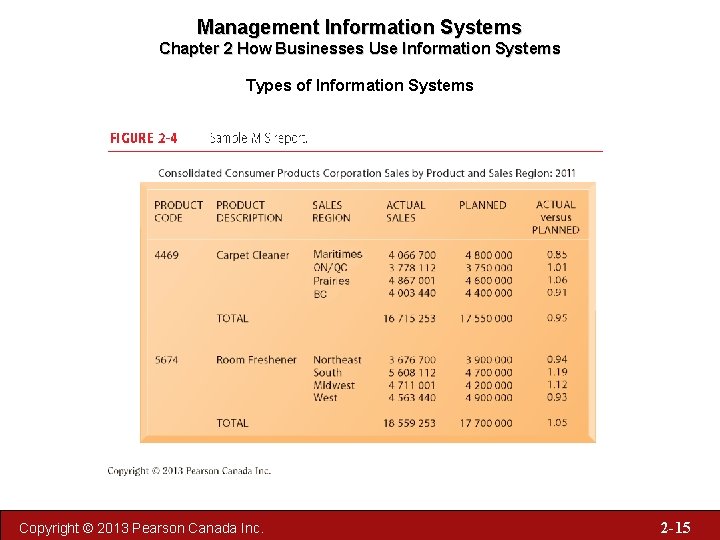
Management Information Systems Chapter 2 How Businesses Use Information Systems Types of Information Systems Management information systems • Serve middle management • Provide reports on firm’s current performance, based on data from TPS • Provide answers to routine questions with predefined procedure for answering them • Typically have little analytic capability Copyright © 2013 Pearson Canada Inc. 2 -13
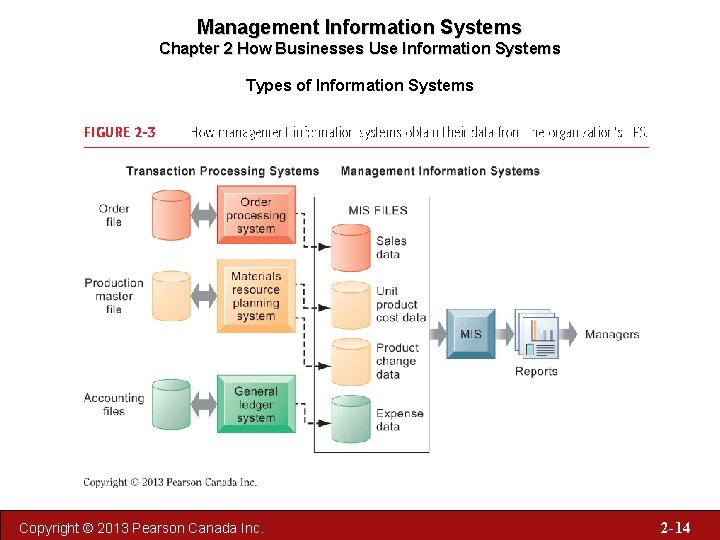
Management Information Systems Chapter 2 How Businesses Use Information Systems Types of Information Systems Copyright © 2013 Pearson Canada Inc. 2 -14
Management Information Systems Chapter 2 How Businesses Use Information Systems Types of Information Systems Copyright © 2013 Pearson Canada Inc. 2 -15
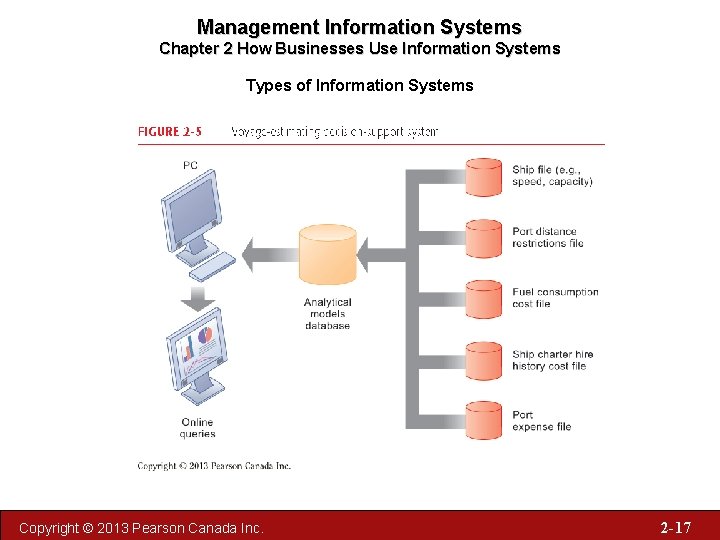
Management Information Systems Chapter 2 How Businesses Use Information Systems Types of Information Systems Decision support systems • Serve middle management • Support nonroutine decision making − Example: What is impact on production schedule if December sales doubled? • Often use external information as well as information from TPS and MIS • Model driven DSS − E. g. , Voyage-estimating systems • Data driven DSS − E. g. , Intrawest’s marketing analysis systems Copyright © 2013 Pearson Canada Inc. 2 -16
Management Information Systems Chapter 2 How Businesses Use Information Systems Types of Information Systems Copyright © 2013 Pearson Canada Inc. 2 -17
Management Information Systems Chapter 2 How Businesses Use Information Systems Types of Information Systems Executive support systems • Support senior management • Address nonroutine decisions requiring judgment, evaluation, and insight • Incorporate data about external events (e. g. new tax laws or competitors) as well as summarized information from internal MIS and DSS − Example: ESS that provides minute-to-minute view of firm’s financial performance as measured by working capital, accounts receivable, accounts payable, cash flow, and inventory Copyright © 2013 Pearson Canada Inc. 2 -18
Management Information Systems Chapter 2 How Businesses Use Information Systems Types of Information Systems Domino’s Sizzles with Pizza Tracker Read the Window on Organizations, and then discuss the following questions: 1. What kinds of systems are described in this case? Identify and describe the business processes each supports. Describe the inputs, processes, and outputs of these systems. 2. How do these systems help Domino’s improve its business performance? 3. How did the online pizza ordering system improve the process of ordering a Domino’s pizza? 4. How effective are these systems in giving Domino’s a competitive edge? Explain your answer. Copyright © 2013 Pearson Canada Inc. 2 -19
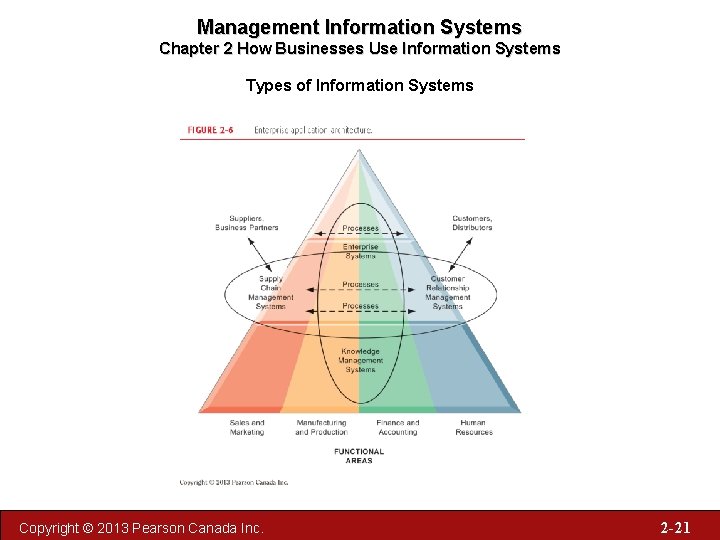
Management Information Systems Chapter 2 How Businesses Use Information Systems Types of Information Systems for Linking the Enterprise • Enterprise applications − Enterprise systems (ERP) − Supply Chain Management Systems (SCM) − Customer Relationship Management Systems (CRM) − Knowledge Management Systems (KMS) − Intranets and Extranets Copyright © 2013 Pearson Canada Inc. 2 -20
Management Information Systems Chapter 2 How Businesses Use Information Systems Types of Information Systems Copyright © 2013 Pearson Canada Inc. 2 -21
Management Information Systems Chapter 2 How Businesses Use Information Systems Types of Information Systems Enterprise systems • Also known as enterprise resource planning (ERP) systems • Collect data from different functions and store data in single central data repository • Resolve problem of fragmented, redundant data • Enable: − Coordination of daily activities − Efficient response to customer orders − Use of valuable information for improved management decision making Copyright © 2013 Pearson Canada Inc. 2 -22
Management Information Systems Chapter 2 How Businesses Use Information Systems Types of Information Systems Supply chain management (SCM) systems • Manage firm’s relationships with suppliers • Interorganizational systems • Share information about − Orders, production, inventory levels, delivery of products and services • Goal: Right amount of products to destination with least amount of time and lowest cost Copyright © 2013 Pearson Canada Inc. 2 -23
Management Information Systems Chapter 2 How Businesses Use Information Systems Types of Information Systems Customer relationship management (CRM) systems: • Provide information to coordinate all of the business processes that deal with customers in sales, marketing, and service to optimize revenue, customer satisfaction, and customer retention • Integrate firm’s customer-related processes and consolidate customer information from multiple communication channels Copyright © 2013 Pearson Canada Inc. 2 -24
Management Information Systems Chapter 2 How Businesses Use Information Systems Types of Information Systems Knowledge management systems (KMS) • Support processes for acquiring, creating, storing, distributing, applying, integrating knowledge • Collect internal knowledge and link to external knowledge • Include enterprise-wide systems for: • Managing documents, graphics and other digital knowledge objects • Directories of employees with expertise Copyright © 2013 Pearson Canada Inc. 2 -25
Management Information Systems Chapter 2 How Businesses Use Information Systems Types of Information Systems Intranets and Extranets • Internal networks built with same tools and standards as Internet • Used for internal distribution of information to employees • Typically utilize private portal providing single point of access to several systems • May connect to company’s transaction systems Copyright © 2013 Pearson Canada Inc. 2 -26
Management Information Systems Chapter 2 How Businesses Use Information Systems Types of Information Systems E-business, e-commerce, and egovernment E-business Use of digital technology and Internet to drive major business processes E-commerce Subset of e-business Buying and selling goods and services through Internet E-government: Using Internet technology to deliver information and services to citizens, employees, and businesses Copyright © 2013 Pearson Canada Inc. 2 -27
Management Information Systems Chapter 2 How Businesses Use Information Systems for Collaboration and Teamwork Collaboration and communication systems • ‘Interaction’ jobs a major part of global economy • Methods include: • Internet-based collaboration environments • E-mail and instant messaging (IM) • Cell phones and smartphones • Social networking • Wikis • Virtual worlds Copyright © 2013 Pearson Canada Inc. 2 -28
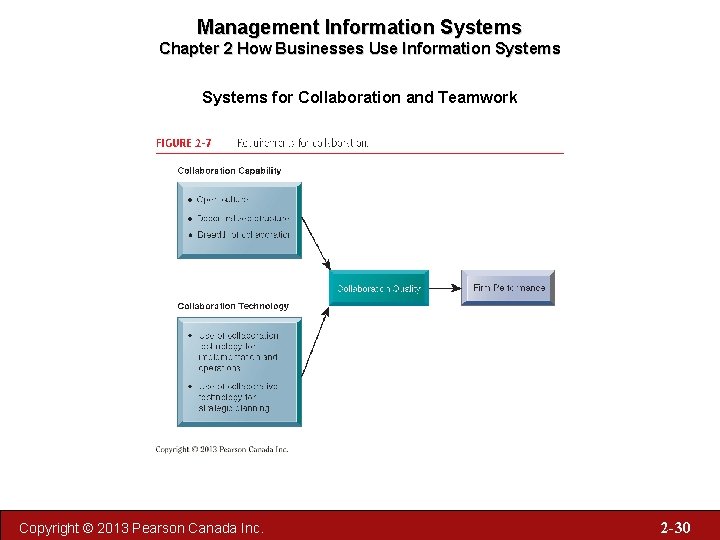
Management Information Systems Chapter 2 How Businesses Use Information Systems for Collaboration and Teamwork Business benefits of collaboration and teamwork – Investments in collaboration technology can produce organizational improvements returning high ROI – Benefits: • • • Productivity Quality Innovation Customer service Financial performance – Profitability, sales growth Copyright © 2013 Pearson Canada Inc. 2 -29
Management Information Systems Chapter 2 How Businesses Use Information Systems for Collaboration and Teamwork Copyright © 2013 Pearson Canada Inc. 2 -30
Management Information Systems Chapter 2 How Businesses Use Information Systems for Collaboration and Teamwork Building a collaborative culture and business processes – “Command control” organizations • No value placed on teamwork or lower-level participation in decisions – Collaborative business culture • Senior managers rely on teams of employees • Policies, products, designs, processes, systems rely on teams • Managers purpose is to build teams Copyright © 2013 Pearson Canada Inc. 2 -31
Management Information Systems Chapter 2 How Businesses Use Information Systems for Collaboration and Teamwork Technology for collaboration and teamwork 15 categories of collaborative software tools Email and instant messaging Collaborative writing Collaborative reviewing Event scheduling File sharing Screen sharing Audio conferencing Video conferencing Copyright © 2013 Pearson Canada Inc. White boarding Web presenting Work scheduling Document sharing / wikis Mind mapping Webinars Co-browsing Continued… 2 -32
Management Information Systems Chapter 2 How Businesses Use Information Systems for Collaboration and Teamwork Technology for collaboration and teamwork (cont. ) – Social Networking – Wikis – Virtual Worlds – Internet-Based Collaboration Environments • • Virtual meeting systems (telepresence) Google Apps/Google sites Microsoft Share. Point Lotus Notes Copyright © 2013 Pearson Canada Inc. 2 -33
Management Information Systems Chapter 2 How Businesses Use Information Systems for Collaboration and Teamwork Virtual Meetings: Smart Management Read the Window on Management, and then discuss the following questions: 1. One consulting firm has predicted that video and Web conferencing will make business travel extinct. Do you agree? Why or why not? 2. What is the distinction between videoconferencing and telepresence? Continued … Copyright © 2013 Pearson Canada Inc. 2 -34
Management Information Systems Chapter 2 How Businesses Use Information Systems for Collaboration and Teamwork Virtual Meetings: Smart Management (cont’d) 3. What are the ways in which videoconferencing provides value to a business? Would you consider it smart management? Explain your answer. 4. If you were in charge of a small business, would you choose to implement videoconferencing? What factors would you consider in your decision? Copyright © 2013 Pearson Canada Inc. 2 -35
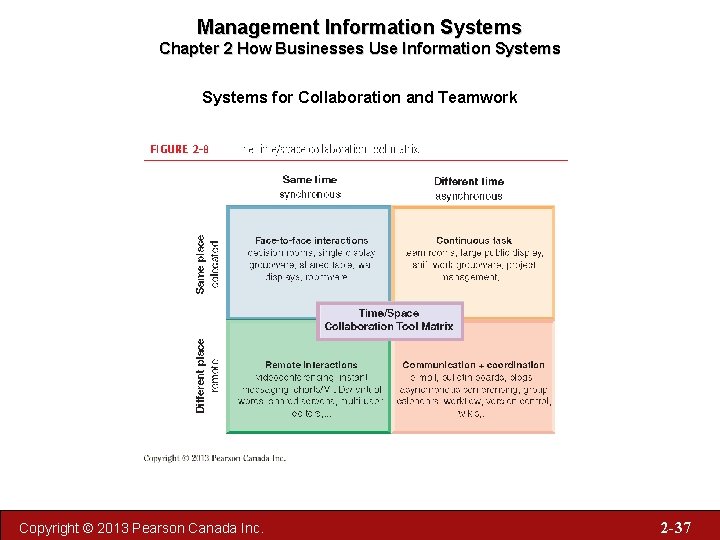
Management Information Systems Chapter 2 How Businesses Use Information Systems for Collaboration and Teamwork Two dimensions of collaboration technologies – Space (or location) – remote or colocated – Time – synchronous or asynchronous Six steps in evaluating software tools 1. What are your firm’s collaboration challenges? 2. What kinds of solutions are available? 3. Analyze available products’ cost and benefits 4. Evaluate security risks 5. Consult users for implementation and training issues 6. Evaluate product vendors Copyright © 2013 Pearson Canada Inc. 2 -36
Management Information Systems Chapter 2 How Businesses Use Information Systems for Collaboration and Teamwork Copyright © 2013 Pearson Canada Inc. 2 -37
Management Information Systems Chapter 2 How Businesses Use Information Systems The Information Systems Function in Business Information systems department: • Formal organizational unit responsible for information technology services • Often headed by chief information officer (CIO) • Other senior positions include chief security officer (CSO), chief knowledge officer (CKO), chief privacy officer (CPO) • Programmers • Systems analysts • Information systems managers Copyright © 2013 Pearson Canada Inc. 2 -38
Management Information Systems Chapter 2 How Businesses Use Information Systems The Information Systems Function in Business End users • Representatives of other departments for whom applications are developed • Increasing role in system design, development Copyright © 2013 Pearson Canada Inc. 2 -39
Management Information Systems Chapter 2 How Businesses Use Information Systems The Information Systems Function in Business IT Governance: • Strategies and policies for using IT in the organization • Decision rights • Accountability • Organization of information systems function • Centralized, decentralized, etc. Copyright © 2013 Pearson Canada Inc. 2 -40
CHAPTER TWO How Businesses Use Information Systems Copyright © 2013 Pearson Canada Inc. 2 -41
- Slides: 41