
Chapter Test 1 Marks 20 1 Define batch

Chapter Test 1 Marks: 20 1. Define batch, hard real time system, degree of multiprogramming , background job, quantum 2. Draw diagram of OS, Batch OS, Distributed OS 3. Explain generations of computer 4. Define OS and list out any 8 services BEST OF LUCK
SSS Foundation Course Operating System(17512) PPT Created and Developed by: Prof. Suyog S. Dhoot Lecturer (Information Technology), K. K. Wagh Polytechnic, Nashik Mobile No: 9762424330 Email id: sdhoots@gmail. com Website: sssdhootkkwp. wordpress. com Prof. Suyog S. Dhoot 3
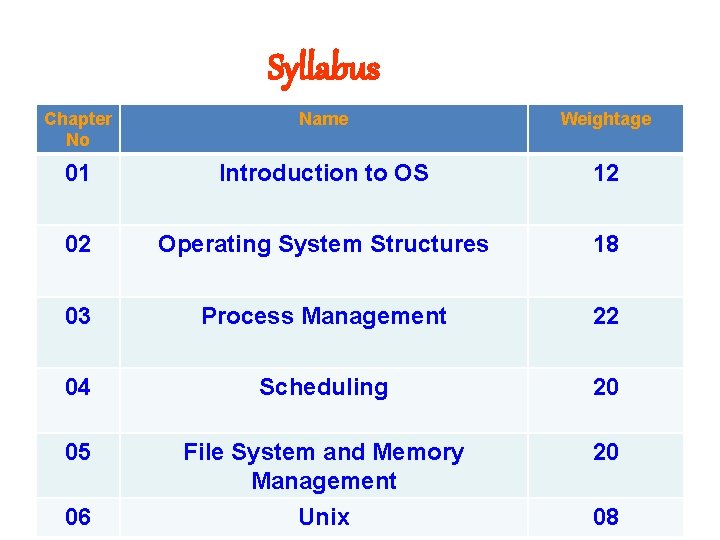
Syllabus Chapter No Name Weightage 01 Introduction to OS 12 02 Operating System Structures 18 03 Process Management 22 04 Scheduling 20 05 File System and Memory Management 20 06 Unix 08
Objectives v Definition of OS v Functions of OS v Generations of OS v Evolution of OS v Types of OS
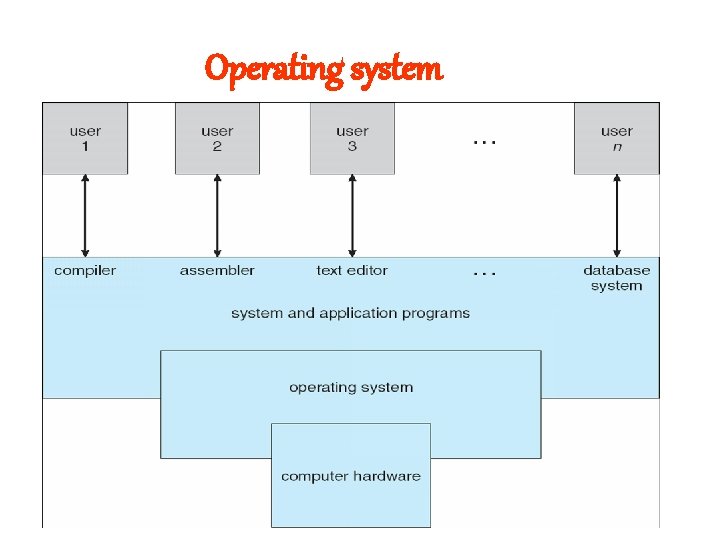
Operating system
Operating system v An operating system act as an intermediary between the user of a computer and computer hardware. v The purpose of an operating system is to provide an environment in which a user can execute programs in a convenient and efficient manner. v An operating system is a software that manages the computer hardware. v An Operating system is concerned with the allocation of resources and services, such as memory, processors, devices and information.
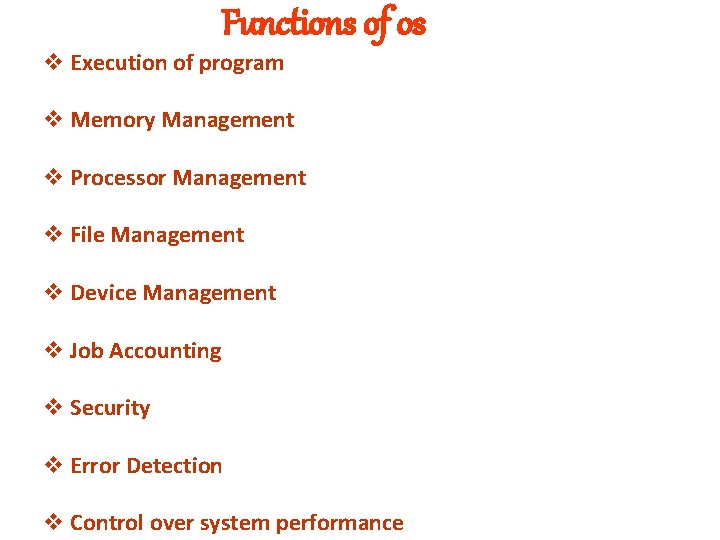
Functions of os v Execution of program v Memory Management v Processor Management v File Management v Device Management v Job Accounting v Security v Error Detection v Control over system performance
Functions of os v Job Accounting : Time and Resources use by jobs and users v Security : Providing unauthorized access to data v Error Detection : Error message and debugging v Control over system performance : Delay between request of service and response from system v Device Management : i/o controller v Processor Management: traffic controller
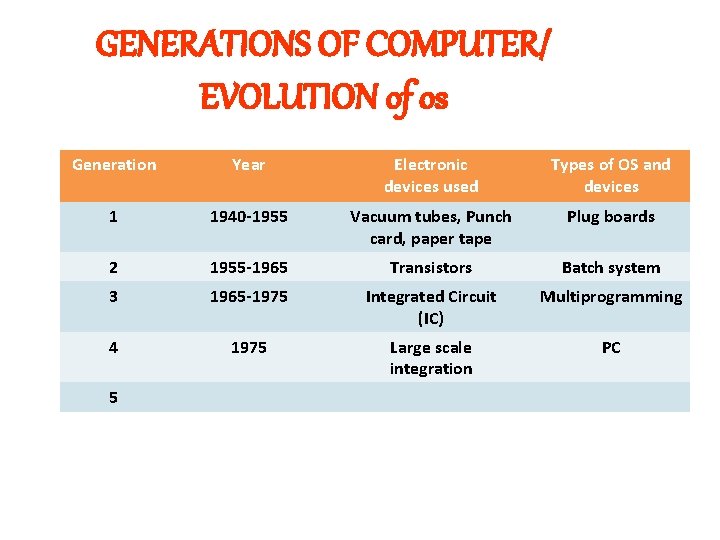
GENERATIONS OF COMPUTER/ EVOLUTION of os Generation Year Electronic devices used Types of OS and devices 1 1940 -1955 Vacuum tubes, Punch card, paper tape Plug boards 2 1955 -1965 Transistors Batch system 3 1965 -1975 Integrated Circuit (IC) Multiprogramming 4 1975 Large scale integration PC 5
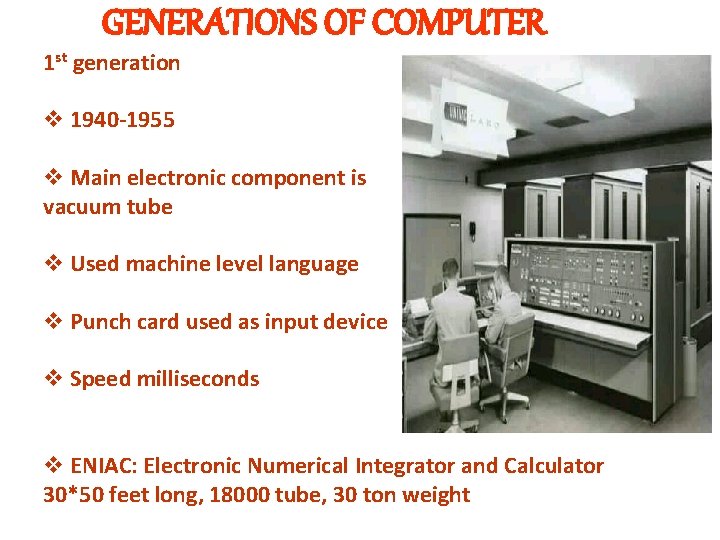
GENERATIONS OF COMPUTER 1 st generation v 1940 -1955 v Main electronic component is vacuum tube v Used machine level language v Punch card used as input device v Speed milliseconds v ENIAC: Electronic Numerical Integrator and Calculator 30*50 feet long, 18000 tube, 30 ton weight
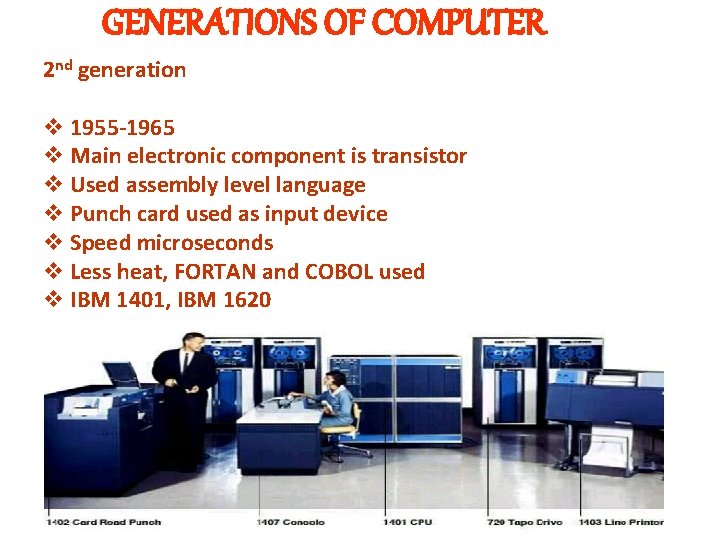
GENERATIONS OF COMPUTER 2 nd generation v 1955 -1965 v Main electronic component is transistor v Used assembly level language v Punch card used as input device v Speed microseconds v Less heat, FORTAN and COBOL used v IBM 1401, IBM 1620
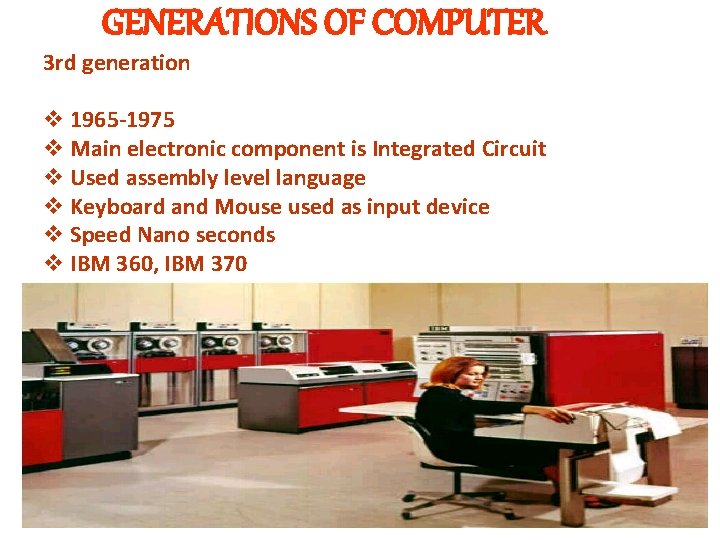
GENERATIONS OF COMPUTER 3 rd generation v 1965 -1975 v Main electronic component is Integrated Circuit v Used assembly level language v Keyboard and Mouse used as input device v Speed Nano seconds v IBM 360, IBM 370
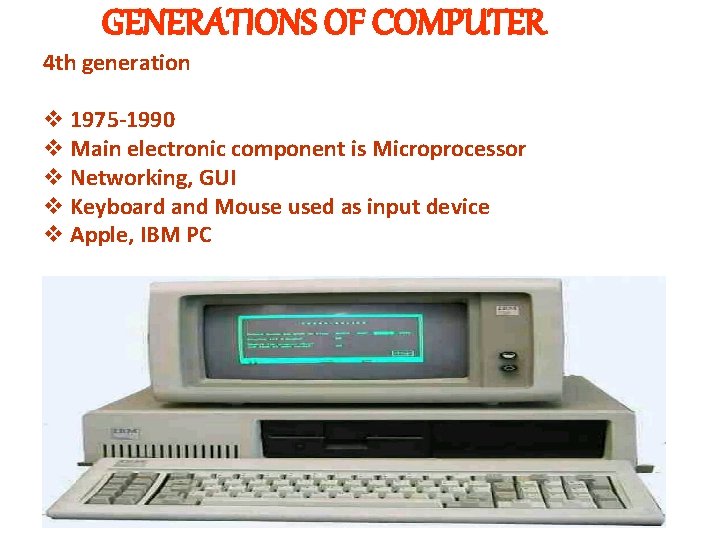
GENERATIONS OF COMPUTER 4 th generation v 1975 -1990 v Main electronic component is Microprocessor v Networking, GUI v Keyboard and Mouse used as input device v Apple, IBM PC
GENERATIONS OF COMPUTER 5 th generation v 1990 v Artificial intelligence v Expert system v Nano technology
Batch OS v Program and Input data is called job where as group of similar job called as batch. v Executing jobs in batch , reduce setup operation to once and multiple programs can be executed with same setup v User do not intereact with computer directly. It will submit job to software which reside in memory called as monitor. v Functions of monitor: ü Accepting jobs from user ü Set up for first job ü At end of job, terminate process and transfer to next job ü At end of batch, terminate batch and transfer to new batch
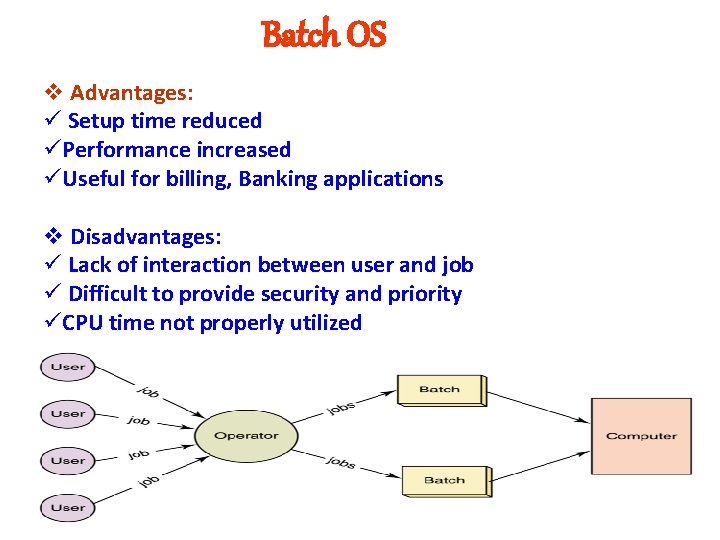
Batch OS v Advantages: ü Setup time reduced üPerformance increased üUseful for billing, Banking applications v Disadvantages: ü Lack of interaction between user and job ü Difficult to provide security and priority üCPU time not properly utilized
Real Time System v a system must produce output for given input within specific given amount of time v Real time systems are usually dedicated embedded systems. v. They typically read from and react to sensor data. v. The system must guarantee response to events within fixed periods of time to ensure correct performance. v. Types: ü Hard: Response time is absolute value and task must finish within deadline. ü Soft: Response time is average and task may finish within deadline or it may take more time.
Real Time System Applications: v Medical Applications v Robotics and Automation v Web based applications v Virtual Reality Direct interaction between user and application Can lead to faults and security
Multiprogrammed os v In this multiple number simultaneously but one at a time. of programs v User interaction is not possible v. To reduce uniprogramming drawback an attempt was made to keep cpu busy for all time v. Numbers of programs executing simultaneously is called as degree of multiprogramming
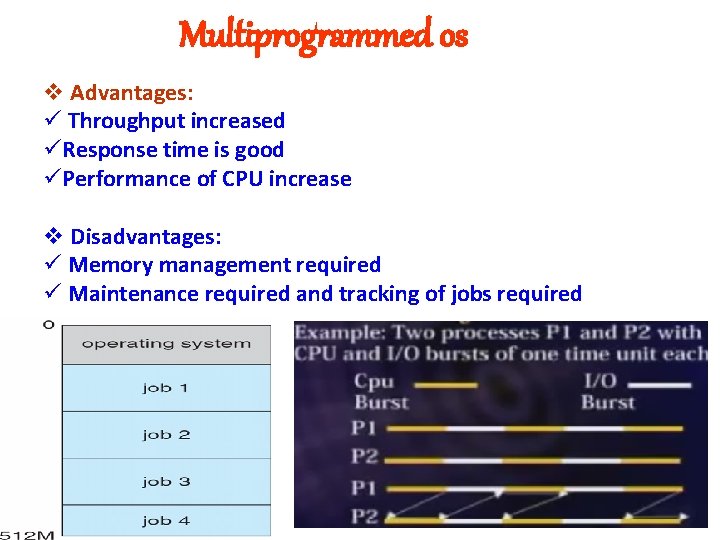
Multiprogrammed os v Advantages: ü Throughput increased üResponse time is good üPerformance of CPU increase v Disadvantages: ü Memory management required ü Maintenance required and tracking of jobs required
multitasking v In this more than one program or task get executed at same time or simultaneously v User interaction is possible v a task may be to watch movie, print document, compile program etc. v It execute one job in foreground and many job in background v. Foreground job requires human interaction while background jobs not required interaction v. E. g. editing of document file along with printing of another document file v. Not reliable, not secure but cpu, i/o utilization is good
multiprocessor v It use two or more CPU within single computer system. v. All cpu shares system bus, memory and other resources v. Maximum work done in shorter period v. Data in memory share by multiple processor instead of making copies v. Cpu communicate with each other as one cpu fails , system does not halt or fail v. Symmetric : Same Processor share memory v. Asymmetric: Different processor not share memory
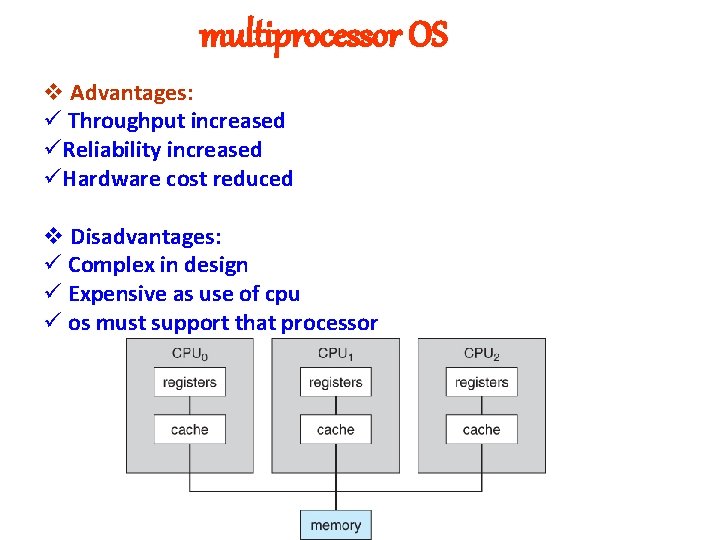
multiprocessor OS v Advantages: ü Throughput increased üReliability increased üHardware cost reduced v Disadvantages: ü Complex in design ü Expensive as use of cpu ü os must support that processor
Distributed os v In this number of computers connected to each other using cables for sharing and communication data among each other. v. Different applications, process or program avaliable on different system. v It use to overcome centralized OS concept v. Applications: ü Student Information system ü rain Reservation system v Types: ü Vertical: Various levels of functionality and send information to high level ü Horizontal: All computer system at same level
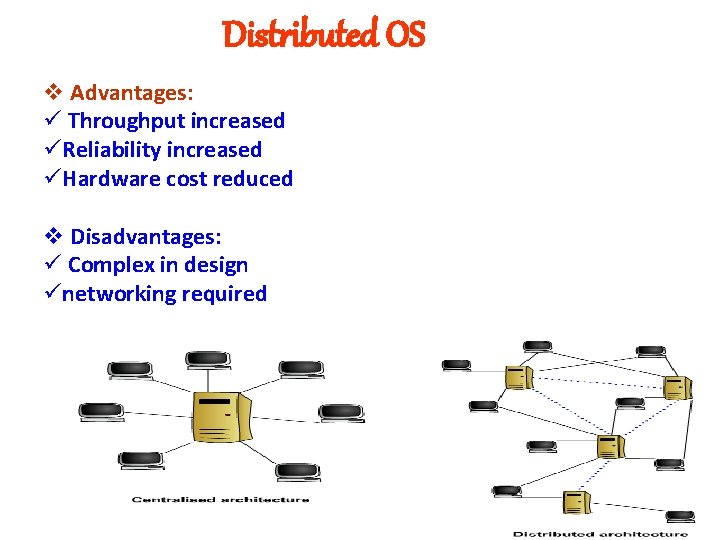
Distributed OS v Advantages: ü Throughput increased üReliability increased üHardware cost reduced v Disadvantages: ü Complex in design ünetworking required
Time share OS v A time sharing system allows many users to share the computer resources simultaneously. v Time sharing refers to the allocation of computer resources in time slots to several programs simultaneously. v. Equal time slots are provided to user for execution of programs which also leads to the context switching, in which process shifts control from one to another v. In case any process does not complete its working within time slot then extra time slot will not be given to it. v. For example- you are running a process with a time slot of 5 seconds and in case process does not complete in 5 second and requires 1 extra second then it will be executed in next execution cycle but time slot will not be extended. vshort period of time during that a user gets attention of the CPU is known as a time slice or a quantum
Services of os v Program Execution v I/O operation v File Manipulation v Error detection v Communication v Resource allocation v Accounting v Protection/ Security
Services of os v Program Execution ü OS provide facility to user to create program then it loads in memory and finally get executed. ü After successful execution, program get terminated successfully ü After unsuccessful execution , program terminated abnormally by indicating errors v I/O operation ü It provide facility to perform input/output operation with hardware or different process. ü e. g read or write data on I/O device.
Services of os v File Manipulation ü Program needs to read a file or write a file. ü The operating system gives the permission to the program for operation on file. ü Permission varies from read-only, read-write, denied and so on. ü Operating System provides an interface to the user to create/delete files/directories. ü Operating System provides an interface to create the backup of file system.
Services of os v Error Detection ü An error is one part of the system may cause malfunctioning of the complete system. To avoid such a situation the operating system constantly monitors the system for detecting the errors. ü Errors may occur in CPU, Memory, I/O devices or programs ü For each type of error, OS must take corrective step to recover from that.
Services of os v Communication ü exchange of information between processes executing either on the same computer or on different syste. ms tied together by a network. ü Implemented via shared memory or message passing. ü Specific hardware or user program used for this. v Protection ü Protection refers to mechanism or a way to control the access of programs, processes, or users to the resources defined by a computer systems. ü OS ensures that external I/O devices are protected from invalid access attempts. ü OS provides authentication feature for each user by means of a password.
Services of os v Resource Allocation ü Allocating resources to multiple users or multiple jobs running at the same time. ü Resource may be hardware – CPU, Memory, I/O Device or software- Programs ü It must handle situation in such manner that all user get resources whenever they demand v Accounting ü keep track of and record which users use how much and what kinds of compute resources for account billing. ü It can be use to detect error or to add some resources or for protection purpose.
System component activities ü OS breaks into modules or parts which perform specific task ü Process Management ü Memory Management ü File Management ü I/O System Management ü Secondary Storage Management ü Networking Managment
System component activities v Process Management Ø Process: Program in Execution state Ø Activities involve in handling process called process management Ø Process is active entity which require resources for execution Ø Activities: ü Creation of user and system process ü Suspending and resuming process ü Mechanism for process communication, synchronization, deadlock handling
System component activities v Main Memory Management Ø RAM is main memory present in CPU Ø Activities involve in handling memory called memory management Ø Memory management require for smooth functioning of System Ø Activities: ü Tracking of memory ü Deciding priority to allocate memory ü Allocation and DEallocation of memory
System component activities v File Management Ø File: Collection of programs and data Ø Activities involve in handling Files called File management Ø Directory: Collection of Files Ø Activities: ü Creation, deletion, updation of files and directories ü Backup to secondary storage ü File Manipulation
System component activities v I/O System Management Ø It includes Hardware Ø Activities involve in handling I/O device called I/O device management Ø Drivers required to operate I/O device Ø Activities: ü Performing Buffering, Caching and Spooling ü Memory management to devices ü Effective utilization ü Driver Support and hiding complexity of hardware
System component activities v Networking Management Ø Computers are connected to each other for sharing information is called network Ø Activities involve in networking called networking management Ø Protocol used Ø Activities: ü Mechanism to share data or resource ü Mechanism to connect computers to each other ü Providing security and permissions ü Mechanism to detect fault
System component activities v Secondary Storage Management Ø It includes CD, DVD, Flopy, Pen. Drive, Hard. Disk Ø Activities involve in handling device called management Ø Security mechanism required Ø Activities:
System call v The mechanism used by an application program to request service from the operating system v System call available in assembly level or high level language v System call are access using API v users do not need to write their own environment for program development (editors, compilers) and program execution.
Types System call v System calls for ü Process or Job control ü File Manipulation ü Device management ü Information management ü Communication
Types System call v Process or Job control ü ü ü End Abort Load Execute Create Terminate Suspend Resume Get and Set process attributes: id, state, priority Wait for time, Event Change the priority of process
Types System call v File manipulation ü ü ü ü ü Create File Delete File Open File Close Read Write Reposition Get File Attributes Set File Attributes
Types System call v Device Management ü ü ü Request device Release device Read Write Reposition Get and Set device attributes: id, name, type, speed
Types System call v Information Management ü ü ü Get Time Set Time Get system data Set system data Get and Set Process, File or Device attributes
Types System call v Communication ü ü ü Create connection Delete connection Send message Receive message Transfer status information Logically attach and detach remote device
Process state Different process states are v New ü Newly created process ü Memory is not available so not ready for execution ü Once called in life time v Ready ü Process ready for execution waiting for cpu time ü After getting cpu time it start execution v Running ü Process which hold cpu time and start execution ü In this program becomes process
Process state Different process states are v Blocked ü Process stop execution due to unavailability of I/O device or event ü Memory space occupied by process is released ü After block state it goes to ready state v Terminated / Halted ü After successful completion of process it enters into terminated state ü Unsuccessful completion also turns into terminated state by indicating errors ü After getting cpu time it start execution
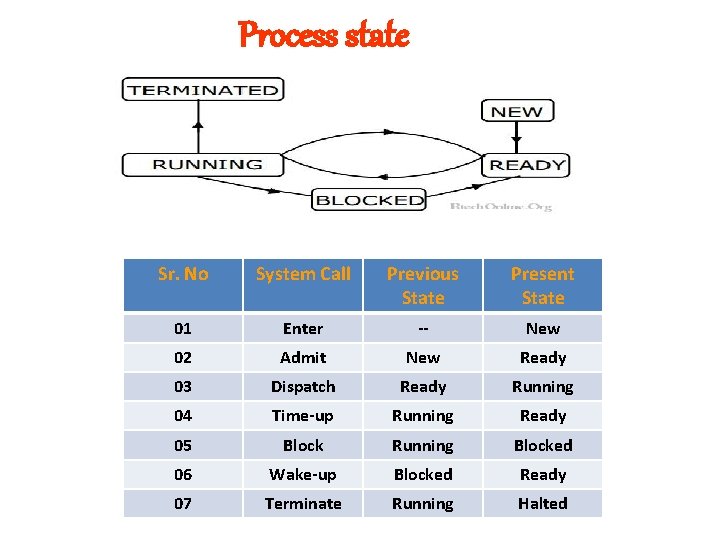
Process state Sr. No System Call Previous State Present State 01 Enter -- New 02 Admit New Ready 03 Dispatch Ready Running 04 Time-up Running Ready 05 Block Running Blocked 06 Wake-up Blocked Ready 07 Terminate Running Halted
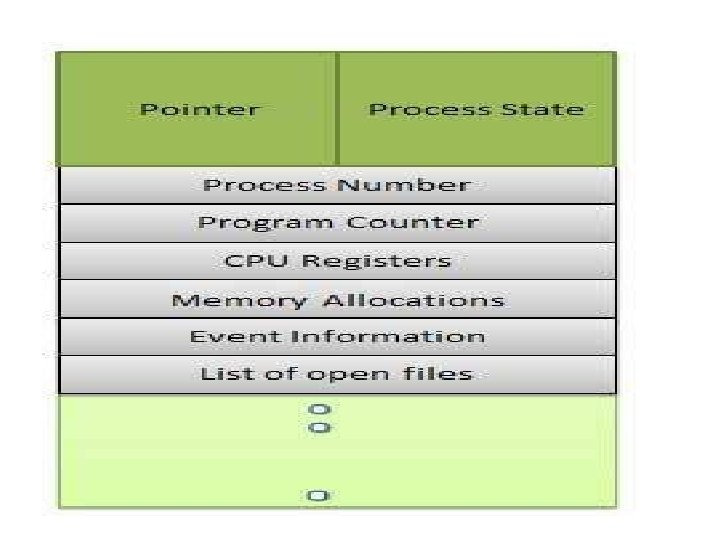
Process CONTROL BLOCK v Process Control block is used for storing the collection of information about the Processes and this is also called as the Data Structure which Stores the information about the process. v It created when process created and removed from memory when process terminated. v Fields: Process id , Process State, Process Priority Register Save Area , Pointer to process memory Pointer to other process, List of open files, Accounting information, Pointer to other PCB
Scheduling queues v Ready Process Queue v Blocked and Swapped out ready process queue
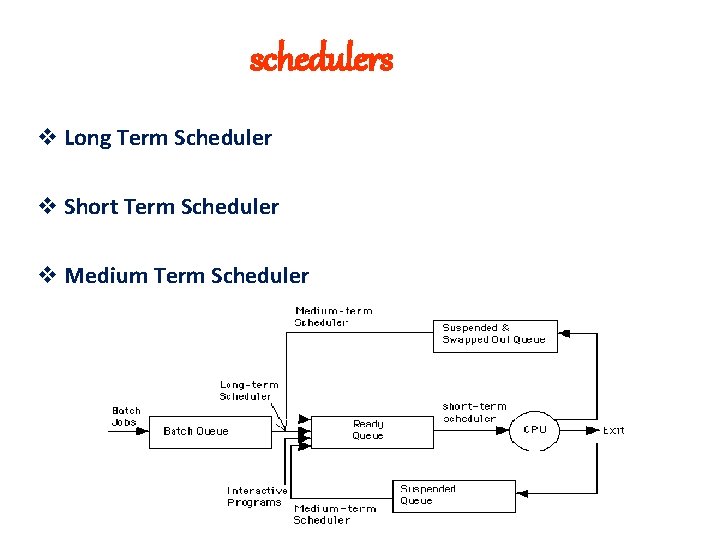
schedulers v Long Term Scheduler v Short Term Scheduler v Medium Term Scheduler
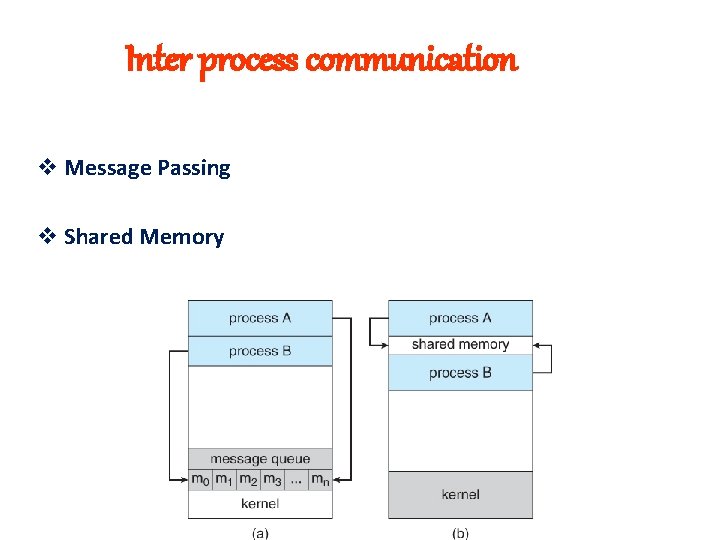
Inter process communication v Message Passing v Shared Memory
Context Switch v Transferring CPU control of one process to another process v All information must be stored in PCB
Operation on process v Process Creation ü Initially process is created and 1 process can create another process. ü It form parent-child structure that looks like process tree ü fork system call use to create process which create exact duplicate copy ü fork system call return integer number on successful creation of process i. e 0 for child and >0 for parent ü Each child process share address space of its parent ü Each child process has its process id and parent process id ü The exec call is a way to basically replace the entire current process with a new program. It loads the program into the current process space and runs it from the entry point.
Operation on process v Process Termination ü Process can terminate its execution successfully or by indicating errors ü end, abort or exit system call use ü Parent may terminate or killed child process due to § Child process use resources beyond limit § Parent not allowed to create process due to limit § Parent want to terminate ü Parent process wait for its child to be get executed ü Even if parent process terminate, child process continue its execution
Operation on process v ü ü ü v v v Process Suspension Execution of process stop for some amount of time May be insufficient memory May be stop for some correction Resume Process Block Process Wake-up Process Dispatch Process Destroy Process
threads ü Light weight process which has separate path of execution ü Single process contains as many threads ü Threads executed simultaneously ü Multithreading: Multiple threads running simultaneously ü Each thread has thread ID, Register and Program Counter ü E. g. MS Word, Web Browser etc
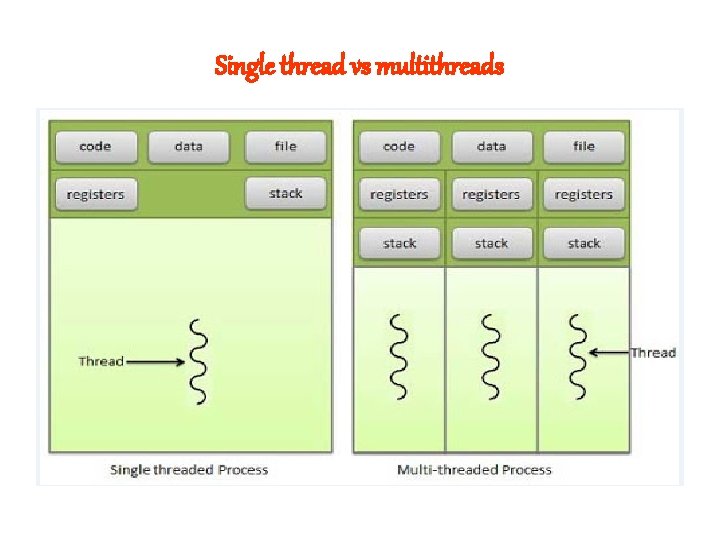
Single thread vs multithreads
Benefits of thread v Responsiveness- Interactive System v Resource Sharing- Share resources of process v Economy- Cost effective as compare to process v Full Utilization- CPU utilization
types of thread v Kernel Thread ü Kernel is program which connect application program to I/O device, CPU or memory ü Supported by OS ü Kernel perform thread creation, scheduling and management ü Speed of creation is slow ü Calling system call not affect entire process ü E. g Windows NT, Linux
types of thread v User Thread ü Supported by user and kernel not aware ü user perform thread creation, scheduling and management using thread libraries ü Speed of creation is fast ü Calling system call affect entire process ü E. g Solaris
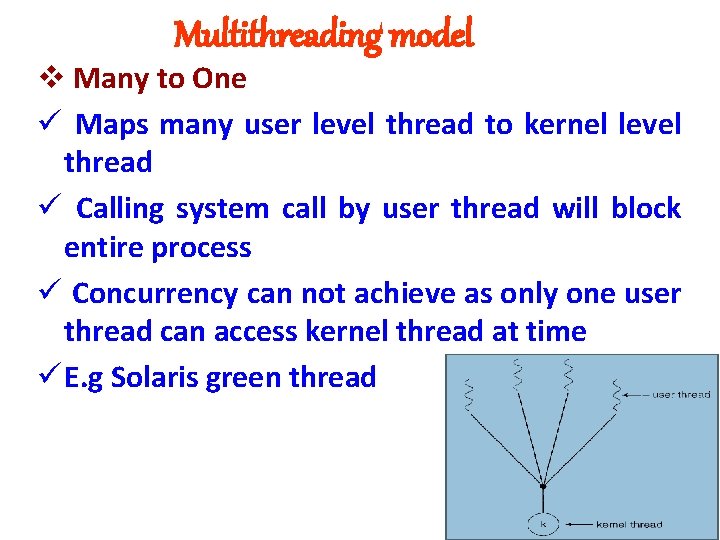
Multithreading model v Many to One ü Maps many user level thread to kernel level thread ü Calling system call by user thread will block entire process ü Concurrency can not achieve as only one user thread can access kernel thread at time ü E. g Solaris green thread
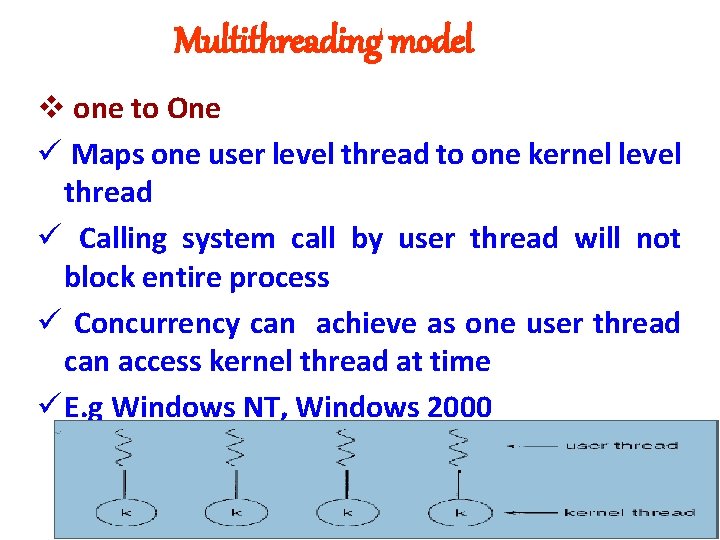
Multithreading model v one to One ü Maps one user level thread to one kernel level thread ü Calling system call by user thread will not block entire process ü Concurrency can achieve as one user thread can access kernel thread at time ü E. g Windows NT, Windows 2000
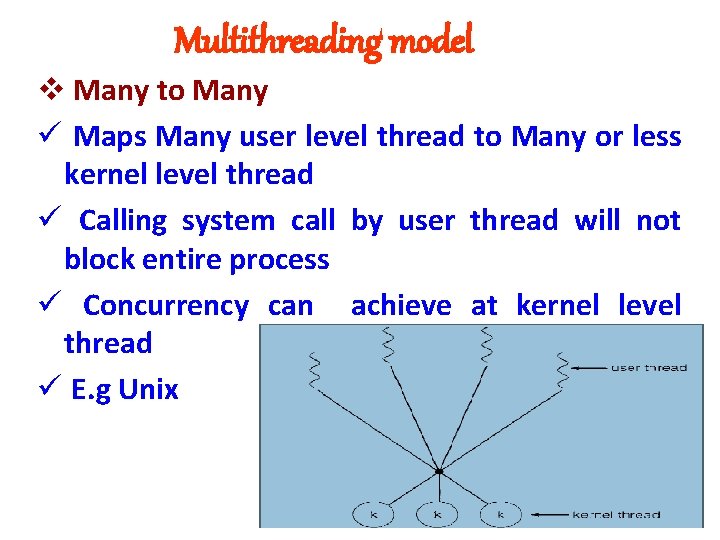
Multithreading model v Many to Many ü Maps Many user level thread to Many or less kernel level thread ü Calling system call by user thread will not block entire process ü Concurrency can achieve at kernel level thread ü E. g Unix
scheduling v Process of allocating CPU to process known as scheduling v Short term scheduler used for this v Main objective is that to kept CPU busy and full utilization of CPU v All resourced must be scheduled before they use v It used for CPU and I/O device v Types: Preemptive Scheduling Non Preemptive Scheduling
CPU & I/O burst cycle v Process execution is cycle of CPU execution and I/O operation. v Process execution begins with CPU burst followed by I/O burst upto process termination v At last it will use CPU burst v e. g Online Activities
CPU & I/O bound process v I/O bound process: ü Process has very large I/O burst cycle and less CPU burst cycle ü Response time, Waiting time o execution time is longer v I/O bound process: ü Process has very large CPU burst cycle and less I/O burst cycle ü Response time, Waiting time o execution time is small
CPU Scheduling decision v When a process switches from the running state to the waiting state (for example, as the result of an I/0 request v When a process switches from the running state to the ready state v When a process switches from the waiting state to the ready state (for example, at completion of I/0) v When a process terminates
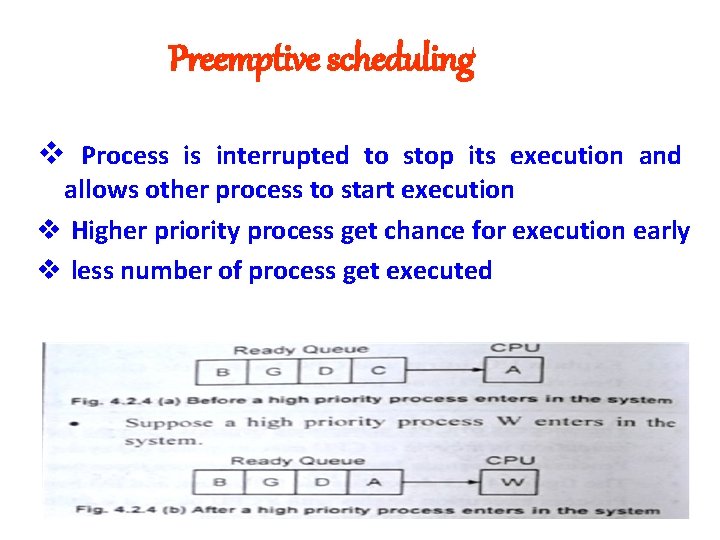
Preemptive scheduling v Process is interrupted to stop its execution and allows other process to start execution v Higher priority process get chance for execution early v less number of process get executed
Non Preemptive scheduling v Process continue there execution even if high priority process arrives v Process may stop because of I/O request or terminate or time slice end. v Not suitable for real time system v Large number of process get executed
Scheduling Criteria v CPU Utilization: CPU must be busy for all time and will be utilized upto 100% v Throughput: Total process executed in particular time or amount of work done by CPU. It must be high for using scheduling algorithm Turnaround Time: Time difference between submission of process and completion of process. TA time= Time on Waiting queue + Time on I/O v request queue + Time required for execution
Scheduling Criteria v. Waiting time: amount of time process spend in ready queue v Response time: time difference between submission of job and first response time v Deadline: Amount of time given to process called as deadline
deadlock v A set of blocked processes each holding resource and waiting to acquire resource held by another process in set. v In multiprogramming system it occur v E. g 2 tape drive v Dinning philosopher problem v Bridge v River v Job and experience
System model v Resource types (R 1, R 2……Rn) e. g. cpu cycle, memory, I/O device v Each resource has Wi instances v each process utilize resources as follows: Request -- Use -- Release v types of resources: ü Non preemptable ü preemptable
Conditions for deadlock v Mutual Exclusion: Process do not share resources mutually and only 1 process can use resource at time v Hold and Wait: Process holding at least resource and waiting to acquire another resource held by other process v No preemtion: Resource can be released only voluntarily by the process holding it, after that process completed its task v Circular wait: There must exist a set {P 0, P 1, . . . , Pn } of waiting processes such that P 0 is waiting for a resource that is held by P 1, P 1 is waiting for a resource that is held by P 2, …. , Pn-1 is waiting for a resource that is held by Pn, and Pn is waiting for a resource that is held by P 0. v All 4 conditions are executed simultaneously to occur deadlock
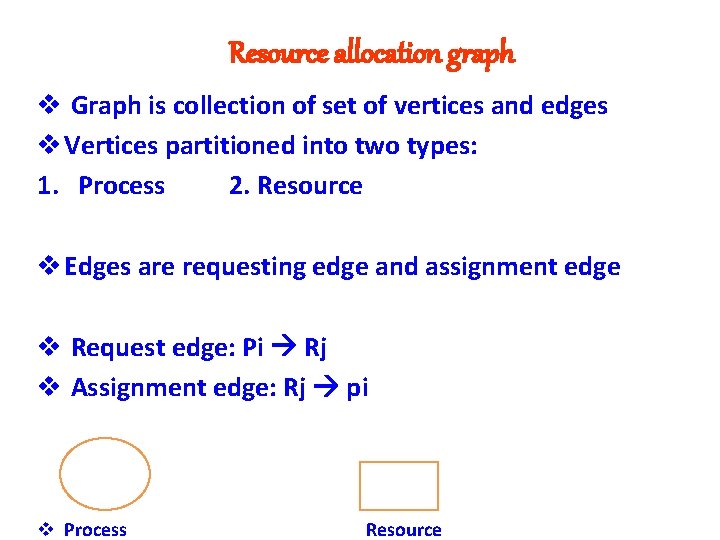
Resource allocation graph v Graph is collection of set of vertices and edges v Vertices partitioned into two types: 1. Process 2. Resource v Edges are requesting edge and assignment edge v Request edge: Pi Rj v Assignment edge: Rj pi v Process Resource
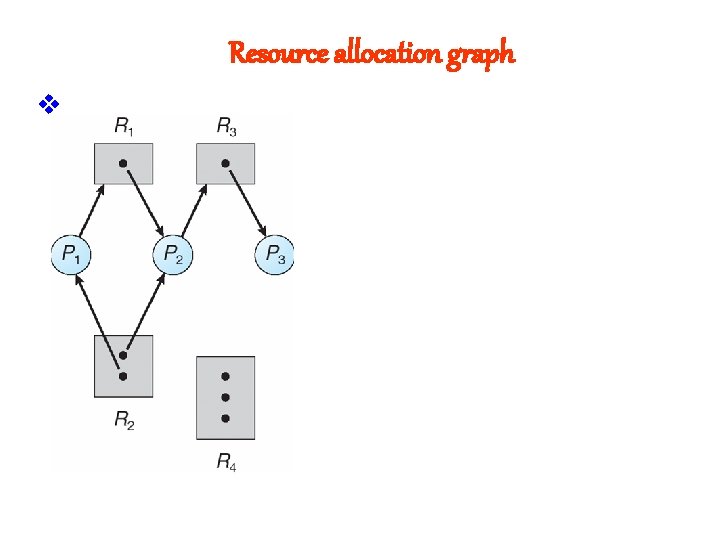
Resource allocation graph v
Deadlock handling v Deadlock Avoidance v Deadlock Detection v Deadlock Prevention v Deadlock Recovery v Deadlock Ignorance
Deadlock prevention v To prevent from deadlock at least any 1 condition of deadlock must be false v Mutual Exclusion: If every resource in the system can be shared by multiple process. v Hold and Wait: Deadlock can be prevent by prohibiting a process to wait for more resources while already holding some resources. At starting process must declare how many resource it want and if all resources are available then OS allocate resources.
Deadlock prevention v No preemption : If resource taken out forcibly from process then deadlock can be prevent. v Circular Wait: A integer number allocated to resource and in circular wait a process which requesting resource must have resource with smaller number as compare to number of resource that he want.
Deadlock avoidance v Additional prior information regarding resources of process required v Process must give information regarding resources at starting v Bankers / safety algorithm used to avoid deadlock
Bankers algorithm v New Process enters into system, it must declare maximum number of instances of each resource type that it may need. v OS must allocate resources if system is in safe state otherwise process has to wait for allocation v let n be number of process and m be number of resources
Bankers algorithm v Date Structure Requirement: A. Available: A vector of length m indicate total number of available resources of each type B. Max: an n*m matrix define maximum demand of each resource. C. Allocation: an n*m matrix indicates number of resources of each type currently allocated to each process D. Need: an n*m matrix indicates remaining resources need of each process
Bankers algorithm 1. When request for resource made by process pi then perform following actions: 2. If Request i<= Need i then got o step 3 otherwise raise error 3. If Request i<= Available, go to step 4 otherwise wait for resource 4. Available= Available- Request Allocation: Allocation + Request Need = Need - Request 5. If resulting resource allocation state is true then resources allocated
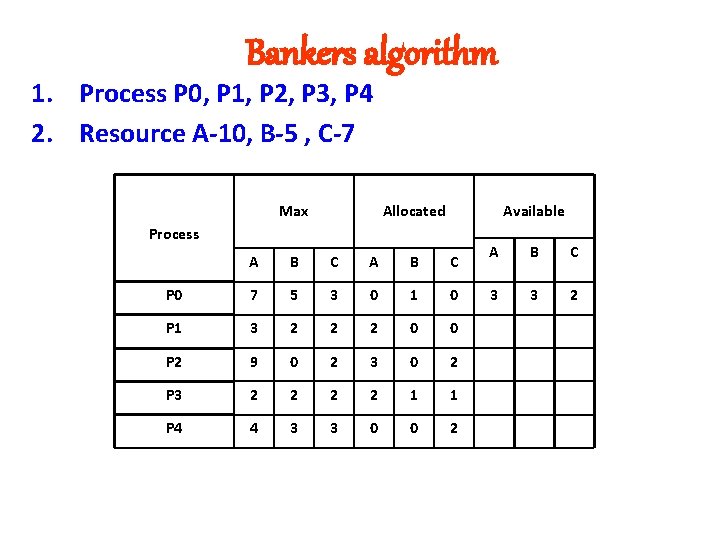
Bankers algorithm 1. Process P 0, P 1, P 2, P 3, P 4 2. Resource A-10, B-5 , C-7 Max Allocated Available Process A B C P 0 7 5 3 0 1 0 P 1 3 2 2 2 0 0 P 2 9 0 2 3 0 2 P 3 2 2 1 1 P 4 4 3 3 0 0 2 A B C 3 3 2
File v File is collection of related information that stored in secondary storage such as magnetic tape, magnetic disk etc. v File is sequence of bits, bytes, lines or records whose meaning and type defined by user or creator v Each file has attributes which vary from one OS to other OS
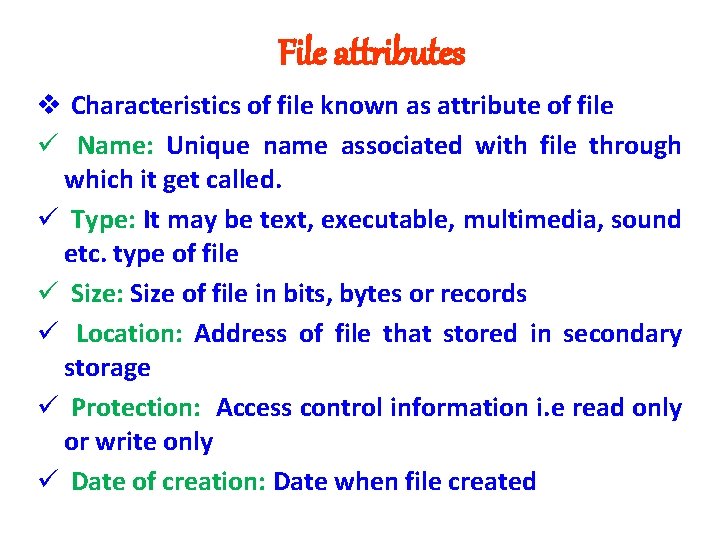
File attributes v Characteristics of file known as attribute of file ü Name: Unique name associated with file through which it get called. ü Type: It may be text, executable, multimedia, sound etc. type of file ü Size: Size of file in bits, bytes or records ü Location: Address of file that stored in secondary storage ü Protection: Access control information i. e read only or write only ü Date of creation: Date when file created
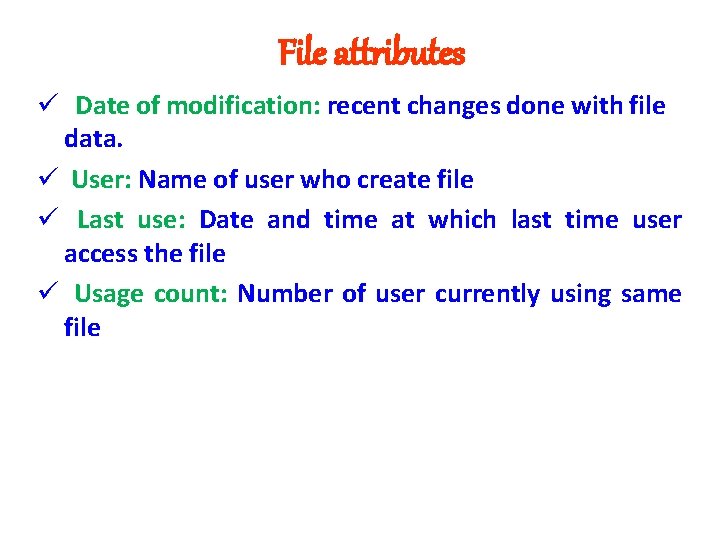
File attributes ü Date of modification: recent changes done with file data. ü User: Name of user who create file ü Last use: Date and time at which last time user access the file ü Usage count: Number of user currently using same file
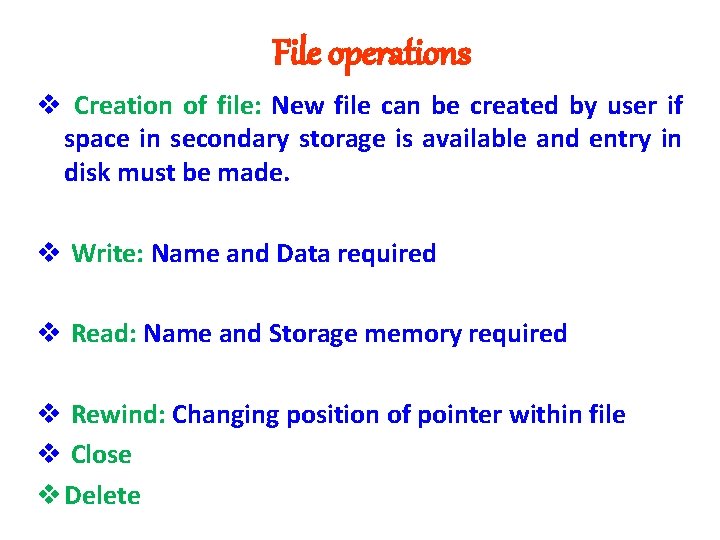
File operations v Creation of file: New file can be created by user if space in secondary storage is available and entry in disk must be made. v Write: Name and Data required v Read: Name and Storage memory required v Rewind: Changing position of pointer within file v Close v Delete
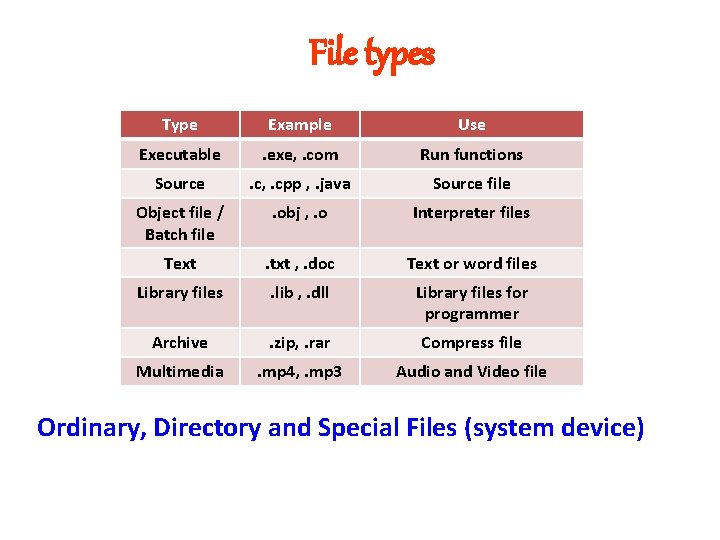
File types Type Example Use Executable . exe, . com Run functions Source . c, . cpp , . java Source file Object file / Batch file . obj , . o Interpreter files Text . txt , . doc Text or word files Library files . lib , . dll Library files for programmer Archive . zip, . rar Compress file Multimedia . mp 4, . mp 3 Audio and Video file Ordinary, Directory and Special Files (system device)
File system structure v Organization of file in OS to interact of files with users and applications v
ACCESS METHOD v Method which are used to access files are known as access method. v Searching of file can be done through access method v Different access method: ü Sequential Access ü Direct Access
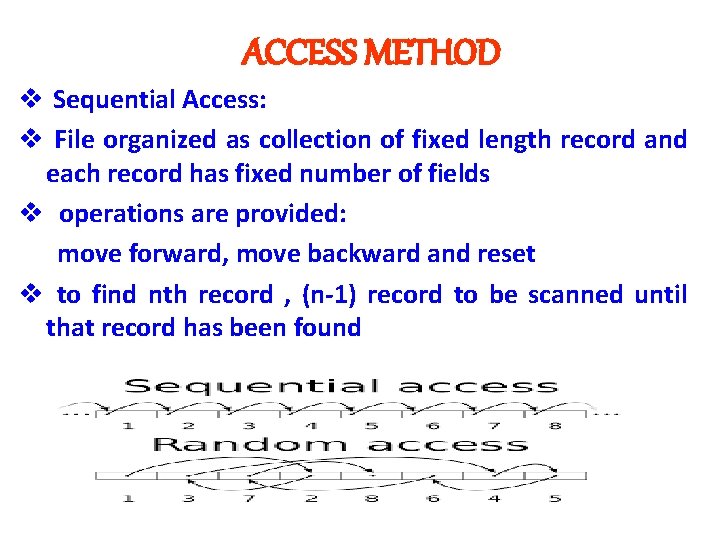
ACCESS METHOD v Sequential Access: v File organized as collection of fixed length record and each record has fixed number of fields v operations are provided: move forward, move backward and reset v to find nth record , (n-1) record to be scanned until that record has been found
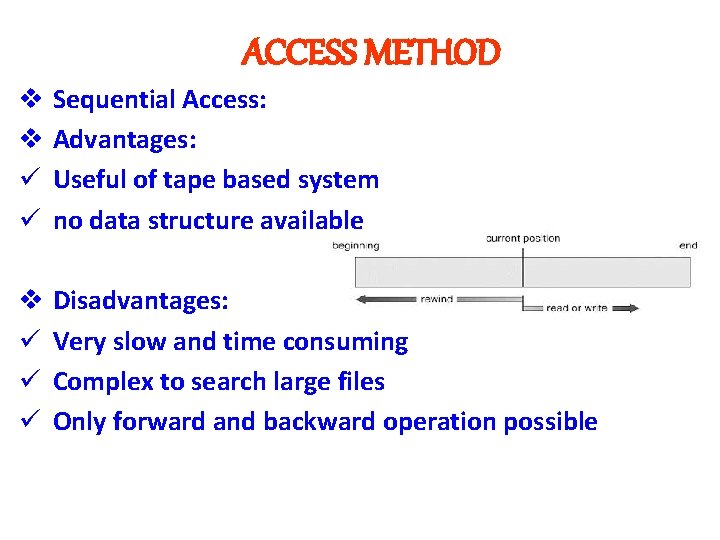
ACCESS METHOD v Sequential Access: v Advantages: ü Useful of tape based system ü no data structure available v Disadvantages: ü Very slow and time consuming ü Complex to search large files ü Only forward and backward operation possible
ACCESS METHOD v Direct access: v Based on random access device in which file consider as collection of block. v Block is logical quantity which is of size multiple of 512 bytes. v Files are access using blocks without any head movement and head movement require only when head moves from last block to first block v Operation: read n, write n, rewind n v Accessing time is fast and require less time for operation
swapping v Removing suspend or preempted process from memory and bringing back is called swapping v Transferring process from memory to disk called as swapping out v Transferring process again from disk to memory called as swapping in v Swapping used for priority based scheduling algorithm. If higher priority process arrives and want memory then memory manager swap out lower priority process v Again lower priority can swap back and its execution get continued v Swapping algorithm coordinate amongst information, process and memory management.
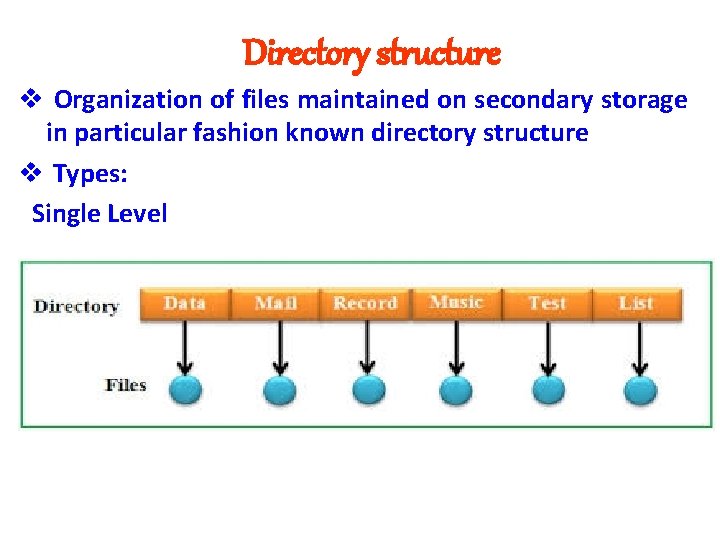
Directory structure v Organization of files maintained on secondary storage in particular fashion known directory structure v Types: Single Level
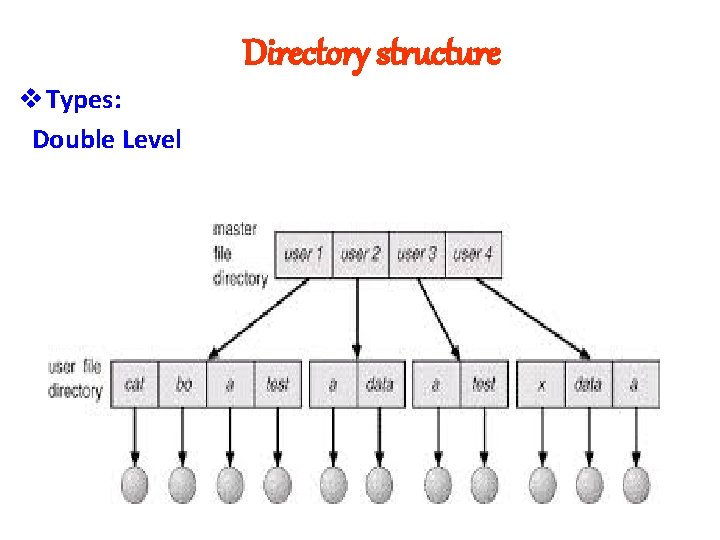
Directory structure v Types: Double Level
Free space managment v Technics Bitmap Vector Linked List
partitioning v Dividing memory into multiple sections of same or different size v It done at time of system generation and then can not be changed v System generation means specifying requirements of OS v Memory used by OS and User v Types: ü Static or Fixed ü Dynamic or Variable
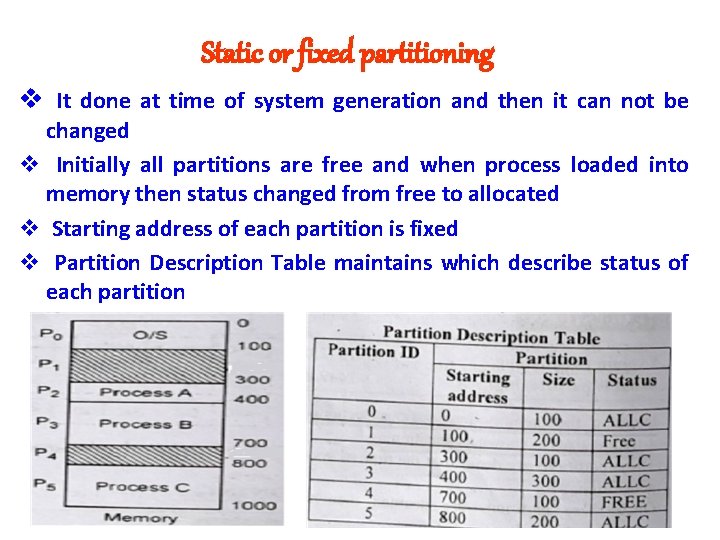
Static or fixed partitioning v It done at time of system generation and then it can not be changed v Initially all partitions are free and when process loaded into memory then status changed from free to allocated v Starting address of each partition is fixed v Partition Description Table maintains which describe status of each partition
Static or fixed partitioning v Allocation of partition to process done in 2 ways Ø Multiple Queue: Depending on number of partition, number of queues are maintained. For n partition, n queues are maintained ü Each queue maintain size of process and based on size process transferred to queue and then partition Ø Single Queue: Only one queue is maintained and based on size it transferred to partition ü Static partitioning works fast but memory wastage occur as some part of partition will not be use by otger process. It called as internal fragmentation
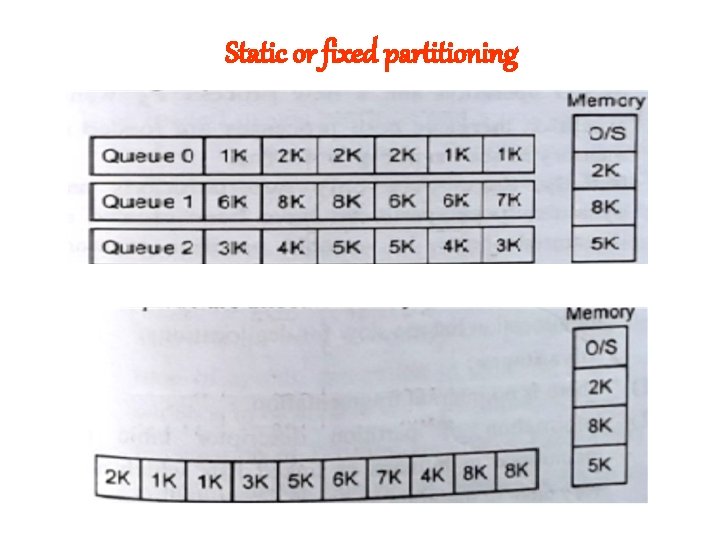
Static or fixed partitioning
Dynamic or variable partitioning v It done at running time of creation of process and then it can be changed v Whenever process wants memory then its equal size partition created v Starting address of each partition is not fixed v Partition Description Table can not be maintains but bitmap or linked list describe status of each partition v No internal fragmentation
- Slides: 107