
Chapter No 5 Application Layer 20 Marks Introduction

- Slides: 58
Chapter No. 5 Application Layer (20 Marks)
Introduction of Application Layer • The application layer is present at the top of the TCP/IP model. • It is the layer through which users interact. • It provides services to the user. • We give a general picture of how a client-server program is designed and give some simple codes of their implementation.
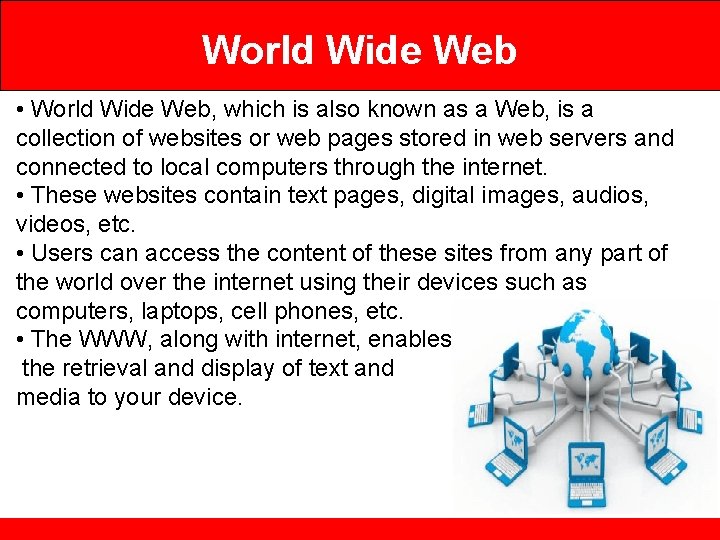
World Wide Web • World Wide Web, which is also known as a Web, is a collection of websites or web pages stored in web servers and connected to local computers through the internet. • These websites contain text pages, digital images, audios, videos, etc. • Users can access the content of these sites from any part of the world over the internet using their devices such as computers, laptops, cell phones, etc. • The WWW, along with internet, enables the retrieval and display of text and media to your device.
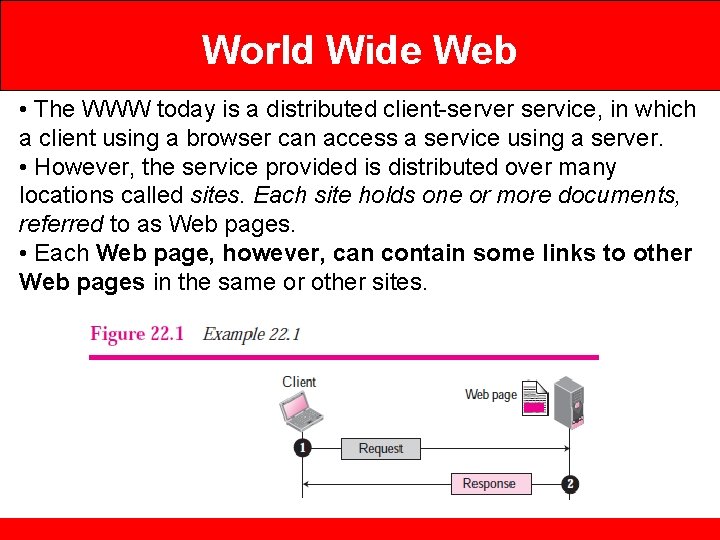
World Wide Web • The WWW today is a distributed client-server service, in which a client using a browser can access a service using a server. • However, the service provided is distributed over many locations called sites. Each site holds one or more documents, referred to as Web pages. • Each Web page, however, can contain some links to other Web pages in the same or other sites.
HTTP • The Hypertext Transfer Protocol (HTTP) is a protocol used mainly to access data on the World Wide Web. • HTTP functions like a combination of FTP and SMTP. • It is similar to FTP because it transfers files and uses the services of TCP. • However, it is much simpler than FTP because it uses only one TCP connection. • There is no separate control connection; only data are transferred between the client and the server. • HTTP is like SMTP because the data transferred between the client and the server look like SMTP messages. • HTTP uses the services of TCP on well-known port 80.
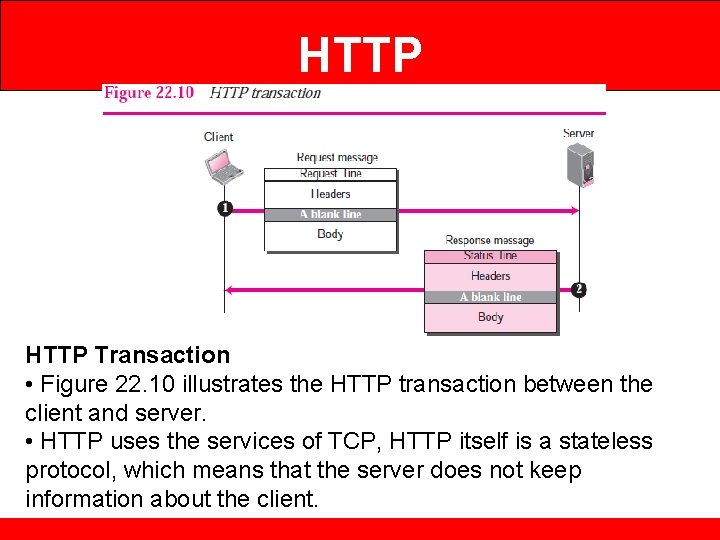
HTTP Transaction • Figure 22. 10 illustrates the HTTP transaction between the client and server. • HTTP uses the services of TCP, HTTP itself is a stateless protocol, which means that the server does not keep information about the client.
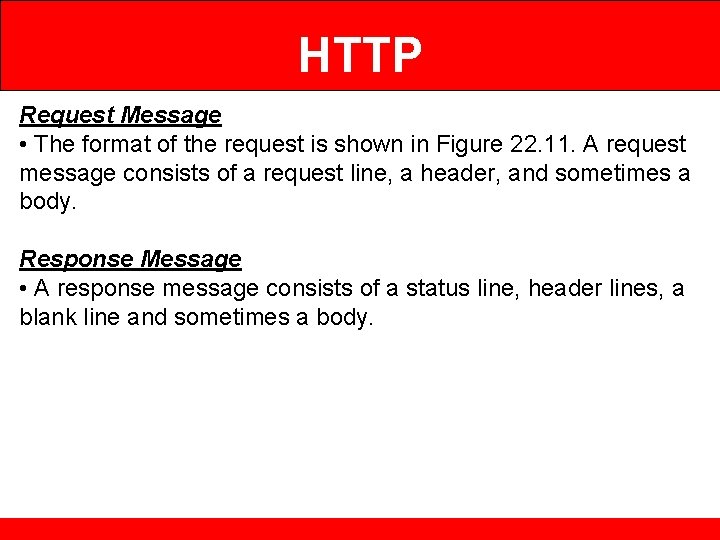
HTTP Request Message • The format of the request is shown in Figure 22. 11. A request message consists of a request line, a header, and sometimes a body. Response Message • A response message consists of a status line, header lines, a blank line and sometimes a body.
FTP • Transferring files from one computer to another is one of the most common tasks expected from a networking or internetworking environment. • File Transfer Protocol (FTP) is the standard mechanism provided by TCP/IP for copying a file from one host to another. • Although transferring files from one system to another seems simple and straightforward. • For example, two systems may use different file name conventions. Two systems may have different ways to represent text and data. • Two systems may have different directory structures. All of these problems have been solved by FTP in a very simple and elegant approach.
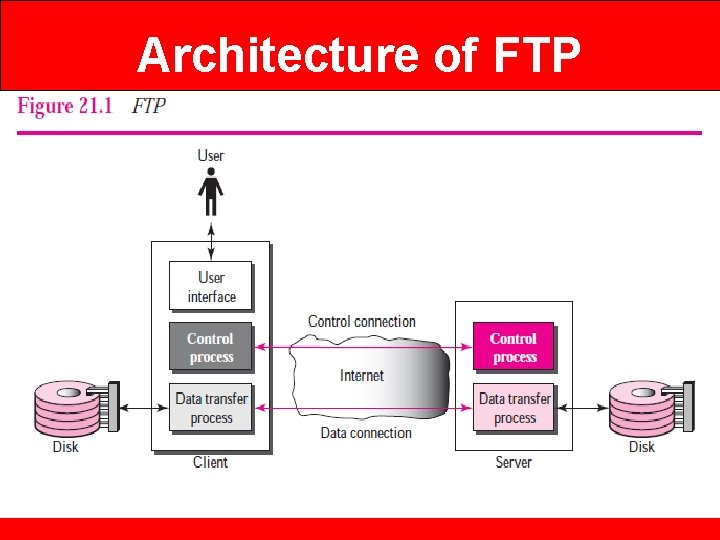
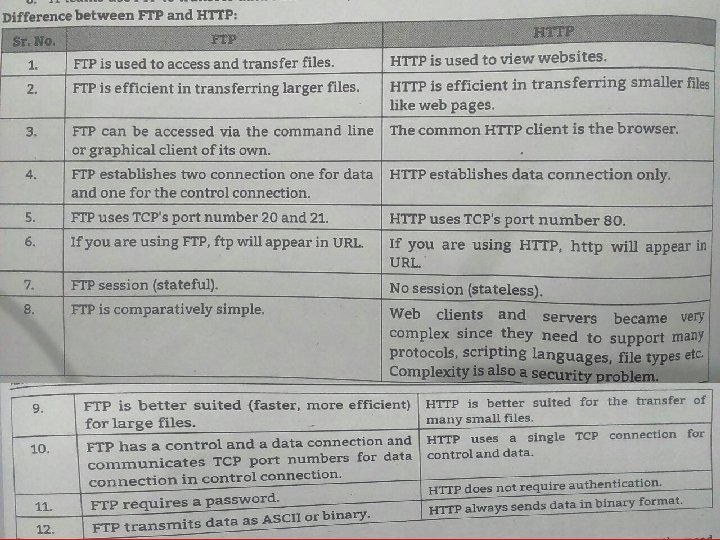
FTP • FTP differs from other client-server applications in that it establishes two connections between the hosts. • One connection is used for data transfer, the other for control information (commands and responses). • Separation of commands and data transfer makes FTP more efficient. • FTP uses two well-known TCP ports: Port 21 is used for the control connection, and port 20 is used for the data connection.
Architecture of FTP
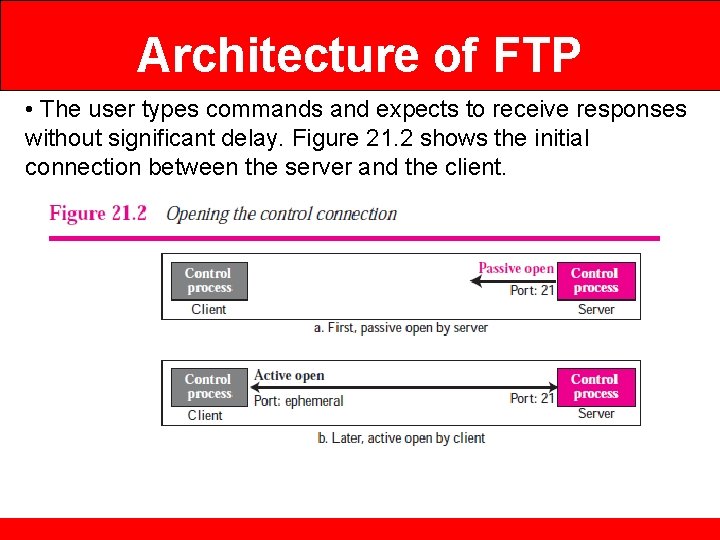
Architecture of FTP • When a user starts an FTP session, the control connection opens. • While the control connection is open, the data connection can be opened and closed multiple times if several files are transferred. Control Connection The control connection is created in the same way as other application programs described so far. There are two steps: 1. The server issues a passive open on the well-known port 21 and waits for a client. 2. The client uses an ephemeral port and issues an active open. The connection remains open during the entire process. The service type, used by the IP protocol, is minimize delay because this is an interactive connection between a user (human) and a server.
Architecture of FTP • The user types commands and expects to receive responses without significant delay. Figure 21. 2 shows the initial connection between the server and the client.
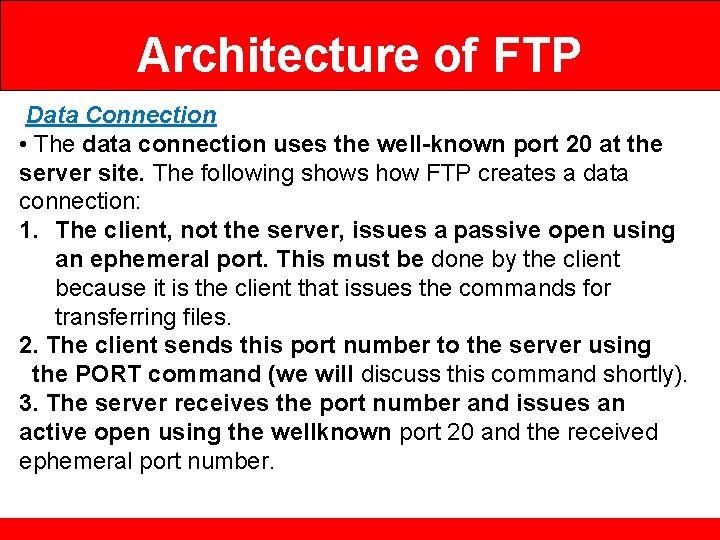
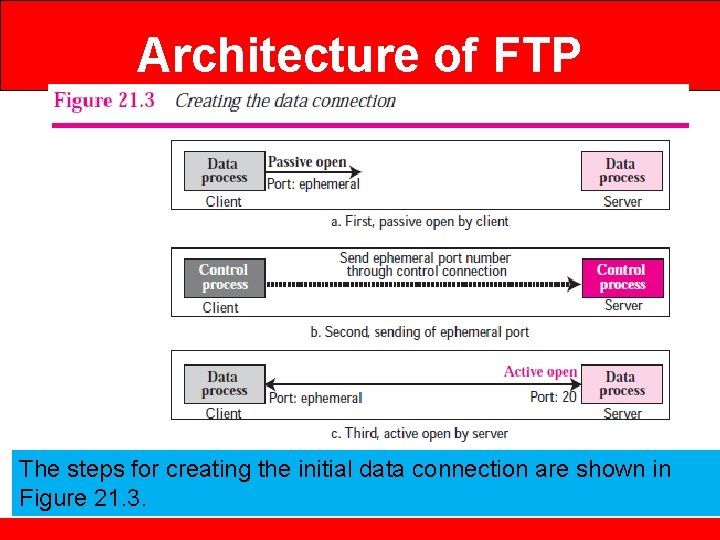
Architecture of FTP Data Connection • The data connection uses the well-known port 20 at the server site. The following shows how FTP creates a data connection: 1. The client, not the server, issues a passive open using an ephemeral port. This must be done by the client because it is the client that issues the commands for transferring files. 2. The client sends this port number to the server using the PORT command (we will discuss this command shortly). 3. The server receives the port number and issues an active open using the wellknown port 20 and the received ephemeral port number.
Architecture of FTP The steps for creating the initial data connection are shown in Figure 21. 3.
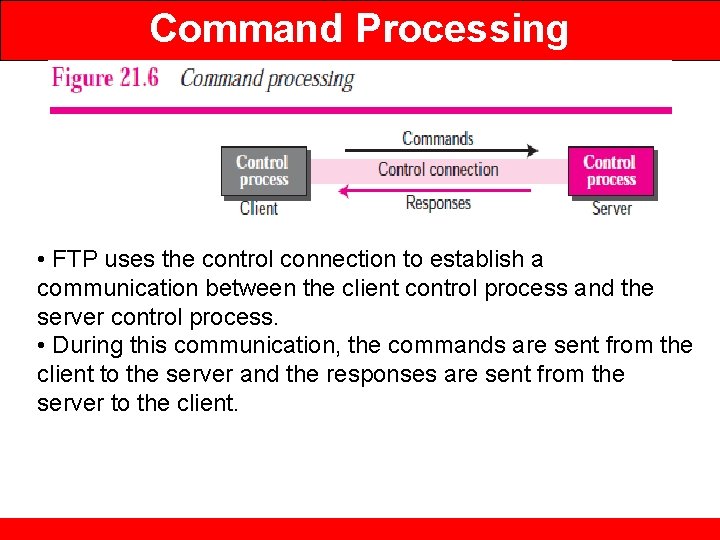
Command Processing • FTP uses the control connection to establish a communication between the client control process and the server control process. • During this communication, the commands are sent from the client to the server and the responses are sent from the server to the client.
Command Processing
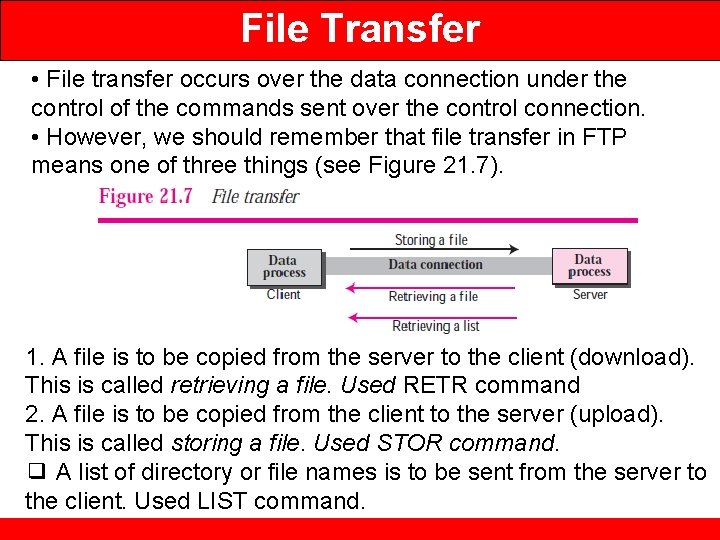
File Transfer • File transfer occurs over the data connection under the control of the commands sent over the control connection. • However, we should remember that file transfer in FTP means one of three things (see Figure 21. 7). 1. A file is to be copied from the server to the client (download). This is called retrieving a file. Used RETR command 2. A file is to be copied from the client to the server (upload). This is called storing a file. Used STOR command. ❑ A list of directory or file names is to be sent from the server to the client. Used LIST command.
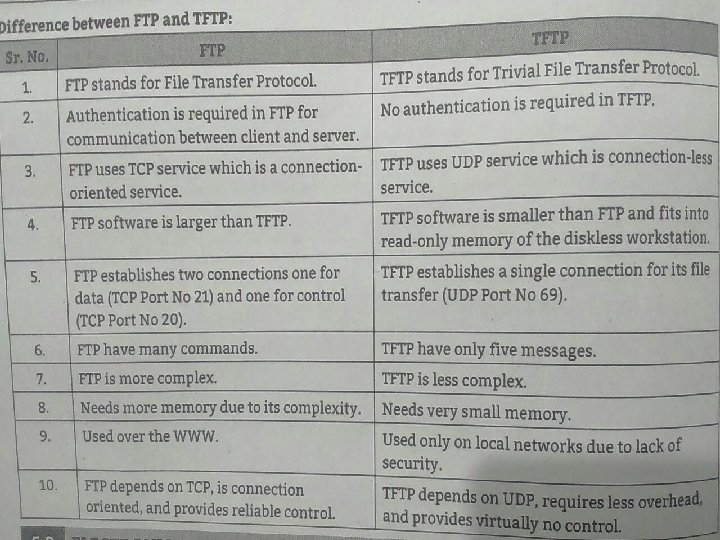
Trivial File Transfer Protocol (TFTP) • There are occasions when we need to simply copy a file without the need for all of the features of the FTP protocol. • For example, when a diskless workstation or a router is booted, we need to download the bootstrap and configuration files. • Here we do not need all of the sophistication provided in FTP. We just need a protocol that quickly copies the files. • Trivial File Transfer Protocol (TFTP) is designed for these types of file transfer. • It is so simple that the software package can fit into the readonly memory of a diskless workstation. • TFTP can read or write a file for the client. Reading means copying a file from the server site to the client site. Writing means copying a file from the client site to the server site.
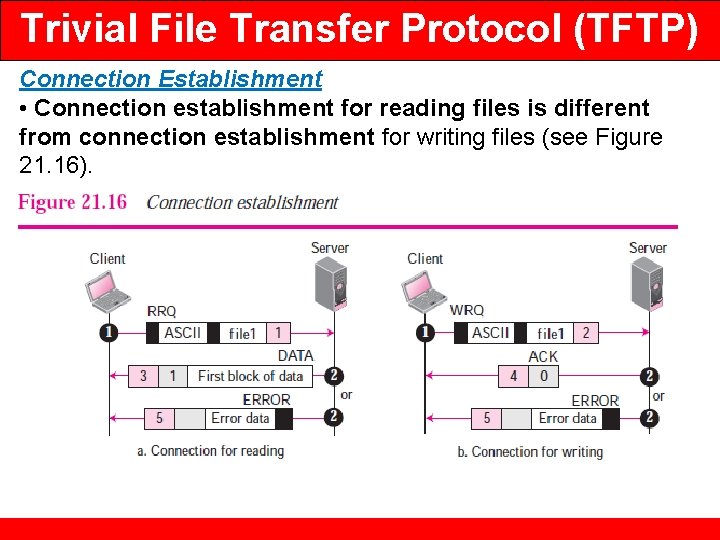
Trivial File Transfer Protocol (TFTP) Connection Establishment • Connection establishment for reading files is different from connection establishment for writing files (see Figure 21. 16).
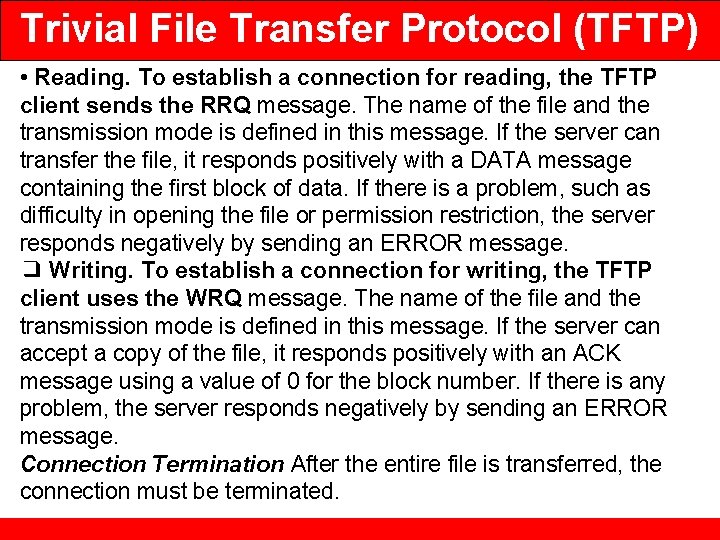
Trivial File Transfer Protocol (TFTP) • Reading. To establish a connection for reading, the TFTP client sends the RRQ message. The name of the file and the transmission mode is defined in this message. If the server can transfer the file, it responds positively with a DATA message containing the first block of data. If there is a problem, such as difficulty in opening the file or permission restriction, the server responds negatively by sending an ERROR message. ❑ Writing. To establish a connection for writing, the TFTP client uses the WRQ message. The name of the file and the transmission mode is defined in this message. If the server can accept a copy of the file, it responds positively with an ACK message using a value of 0 for the block number. If there is any problem, the server responds negatively by sending an ERROR message. Connection Termination After the entire file is transferred, the connection must be terminated.
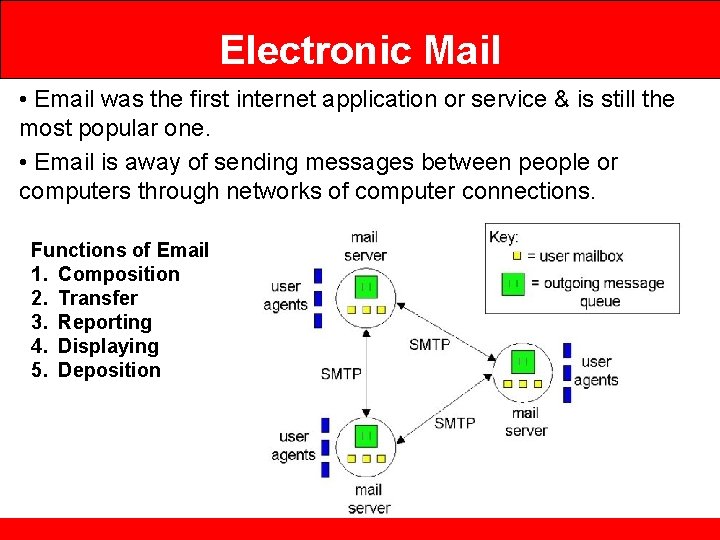
Electronic Mail • Email was the first internet application or service & is still the most popular one. • Email is away of sending messages between people or computers through networks of computer connections. Functions of Email 1. Composition 2. Transfer 3. Reporting 4. Displaying 5. Deposition
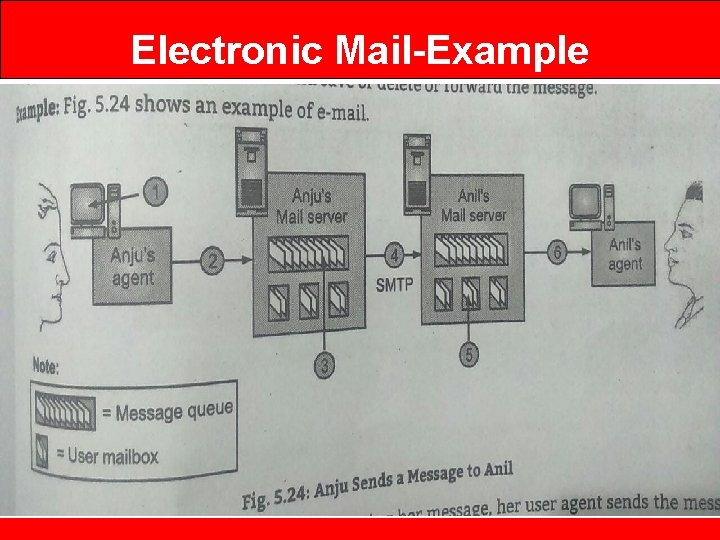
Electronic Mail-Example
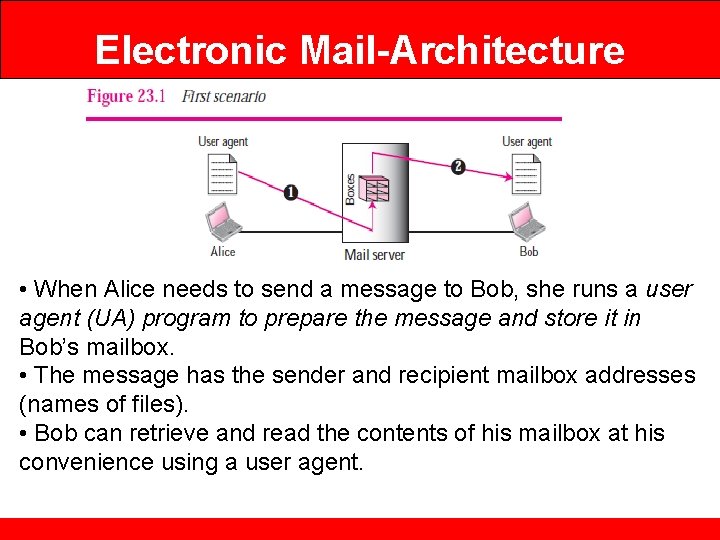
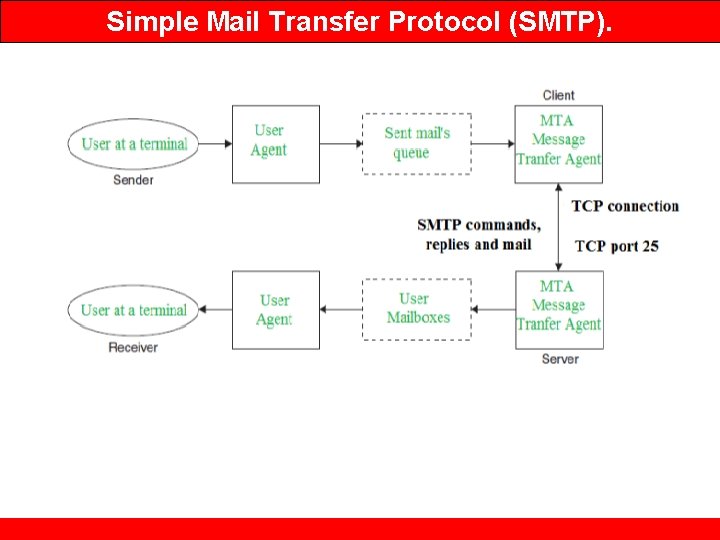
Electronic Mail-Architecture • When Alice needs to send a message to Bob, she runs a user agent (UA) program to prepare the message and store it in Bob’s mailbox. • The message has the sender and recipient mailbox addresses (names of files). • Bob can retrieve and read the contents of his mailbox at his convenience using a user agent.
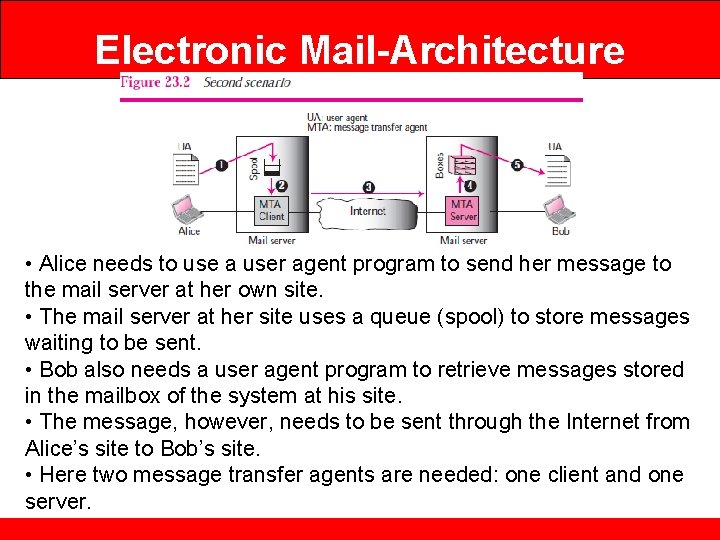
Electronic Mail-Architecture • Alice needs to use a user agent program to send her message to the mail server at her own site. • The mail server at her site uses a queue (spool) to store messages waiting to be sent. • Bob also needs a user agent program to retrieve messages stored in the mailbox of the system at his site. • The message, however, needs to be sent through the Internet from Alice’s site to Bob’s site. • Here two message transfer agents are needed: one client and one server.
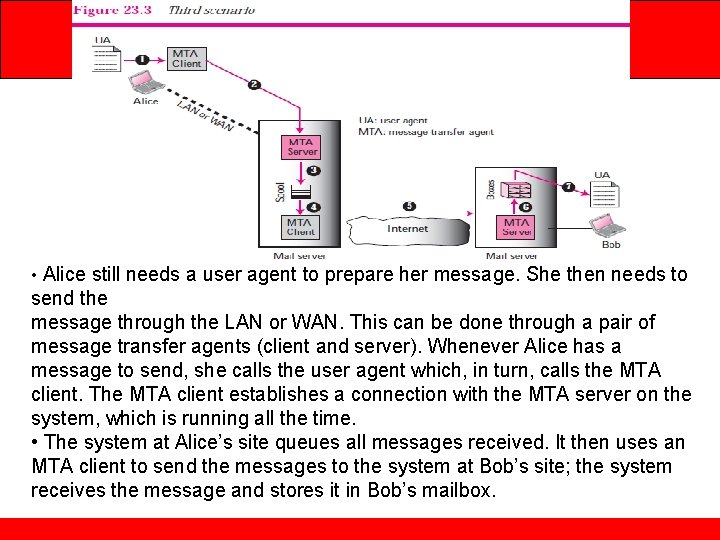
Electronic Mail-Architecture • Alice still needs a user agent to prepare her message. She then needs to send the message through the LAN or WAN. This can be done through a pair of message transfer agents (client and server). Whenever Alice has a message to send, she calls the user agent which, in turn, calls the MTA client. The MTA client establishes a connection with the MTA server on the system, which is running all the time. • The system at Alice’s site queues all messages received. It then uses an MTA client to send the messages to the system at Bob’s site; the system receives the message and stores it in Bob’s mailbox.
Electronic Mail-Architecture
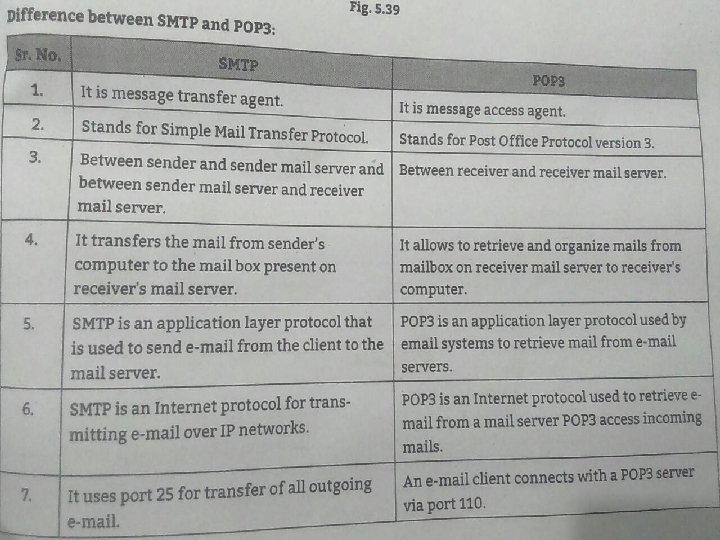
Simple Mail Transfer Protocol (SMTP). • SMTP stands for Simple Mail Transfer Protocol. • SMTP is a set of communication guidelines that allow software to transmit an electronic mail over the internet is called Simple Mail Transfer Protocol. • It is a program used for sending messages to other computer users based on e-mail addresses. • It provides a mail exchange between users on the same or different computers, and it also supports: • It can send a single message to one or more recipients. • Sending message can include text, voice, video or graphics. • It can also send the messages on networks outside the internet. • The main purpose of SMTP is used to set up communication rules between servers.
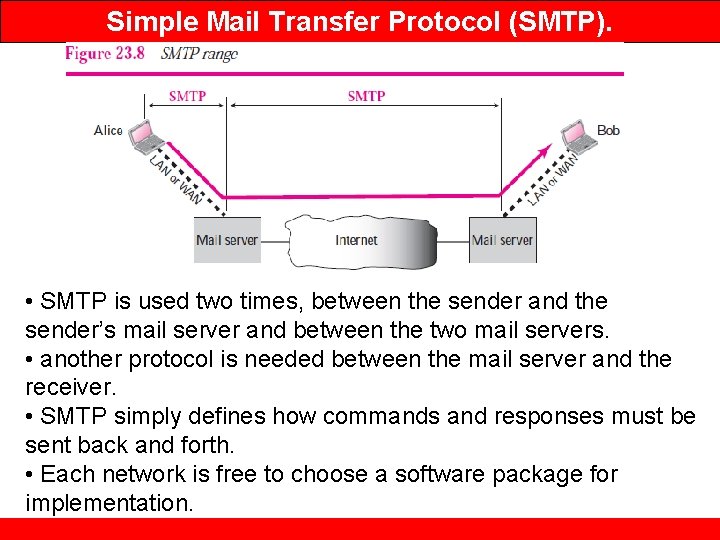
Simple Mail Transfer Protocol (SMTP). • SMTP is used two times, between the sender and the sender’s mail server and between the two mail servers. • another protocol is needed between the mail server and the receiver. • SMTP simply defines how commands and responses must be sent back and forth. • Each network is free to choose a software package for implementation.
Simple Mail Transfer Protocol (SMTP).
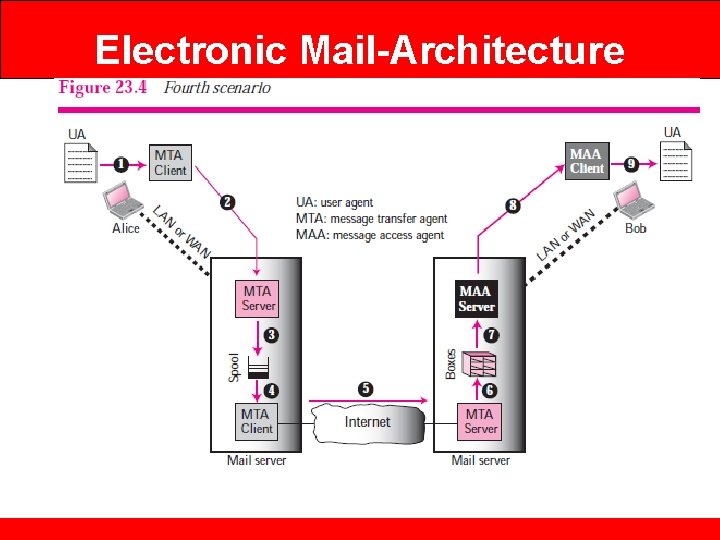
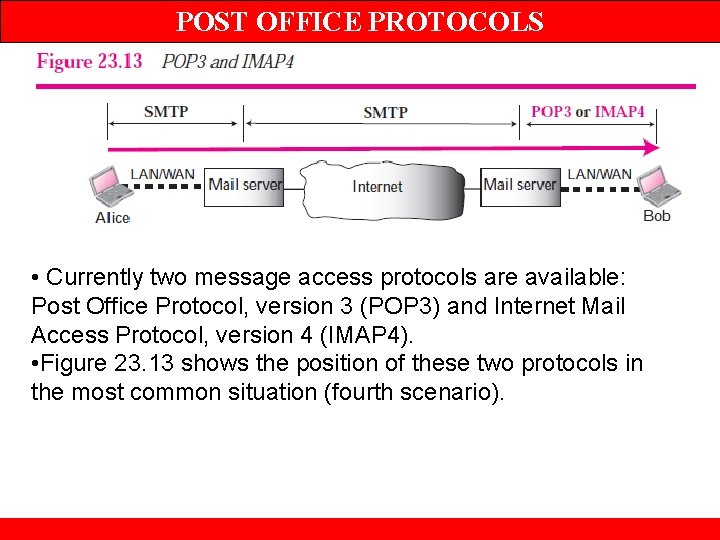
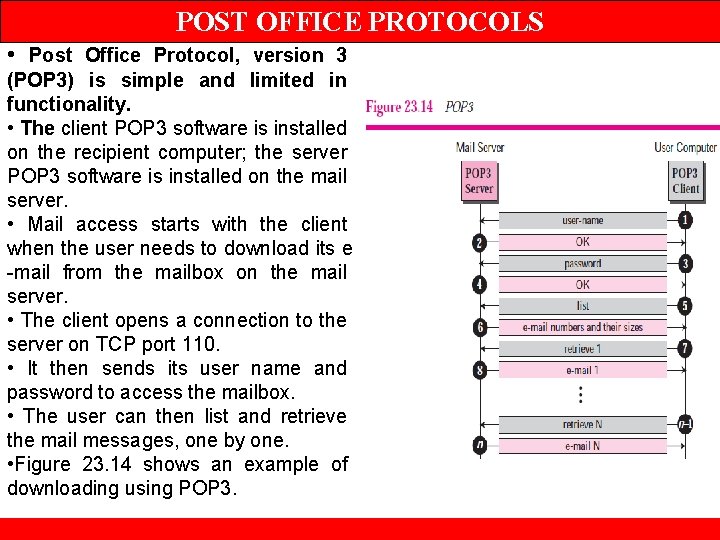
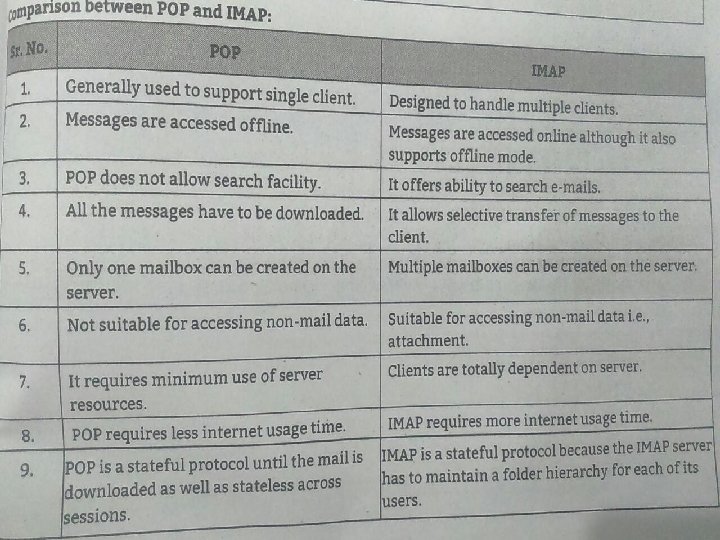
POST OFFICE PROTOCOLS • Currently two message access protocols are available: Post Office Protocol, version 3 (POP 3) and Internet Mail Access Protocol, version 4 (IMAP 4). • Figure 23. 13 shows the position of these two protocols in the most common situation (fourth scenario).
POST OFFICE PROTOCOLS • Post Office Protocol, version 3 (POP 3) is simple and limited in functionality. • The client POP 3 software is installed on the recipient computer; the server POP 3 software is installed on the mail server. • Mail access starts with the client when the user needs to download its e -mail from the mailbox on the mail server. • The client opens a connection to the server on TCP port 110. • It then sends its user name and password to access the mailbox. • The user can then list and retrieve the mail messages, one by one. • Figure 23. 14 shows an example of downloading using POP 3.
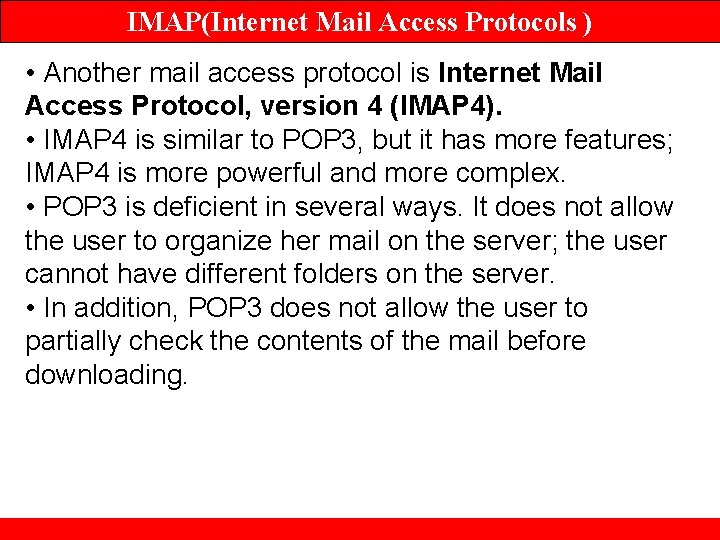
IMAP(Internet Mail Access Protocols ) • Another mail access protocol is Internet Mail Access Protocol, version 4 (IMAP 4). • IMAP 4 is similar to POP 3, but it has more features; IMAP 4 is more powerful and more complex. • POP 3 is deficient in several ways. It does not allow the user to organize her mail on the server; the user cannot have different folders on the server. • In addition, POP 3 does not allow the user to partially check the contents of the mail before downloading.
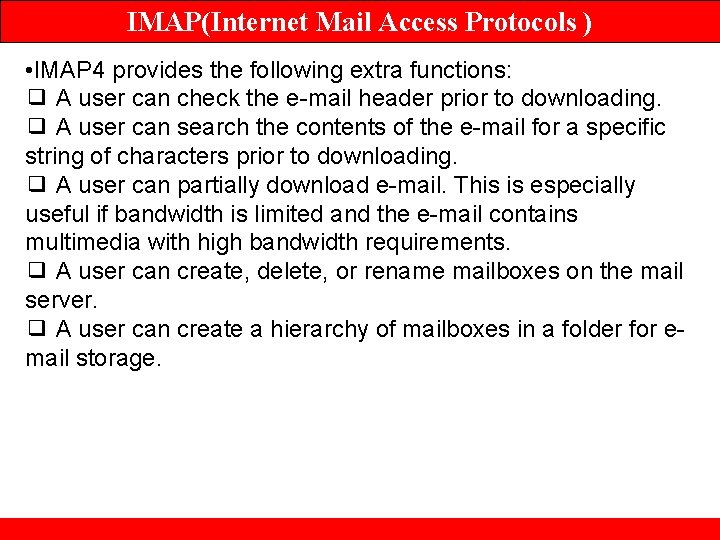
IMAP(Internet Mail Access Protocols ) • IMAP 4 provides the following extra functions: ❑ A user can check the e-mail header prior to downloading. ❑ A user can search the contents of the e-mail for a specific string of characters prior to downloading. ❑ A user can partially download e-mail. This is especially useful if bandwidth is limited and the e-mail contains multimedia with high bandwidth requirements. ❑ A user can create, delete, or rename mailboxes on the mail server. ❑ A user can create a hierarchy of mailboxes in a folder for email storage.
IMAP(Internet Mail Access Protocols )
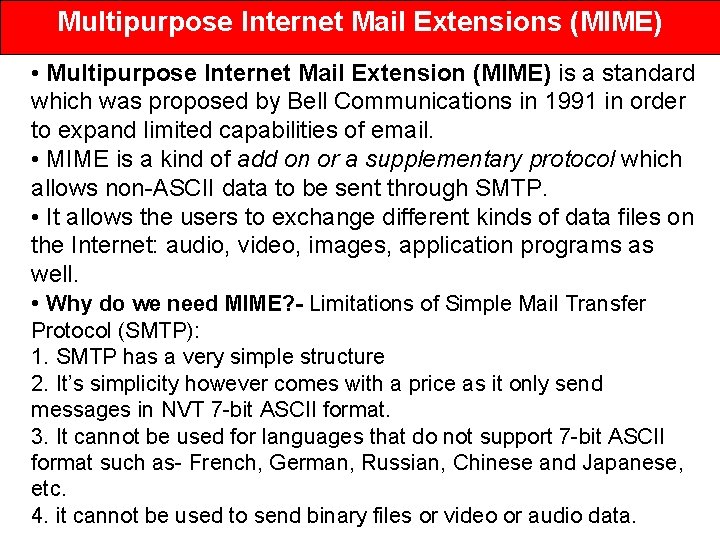
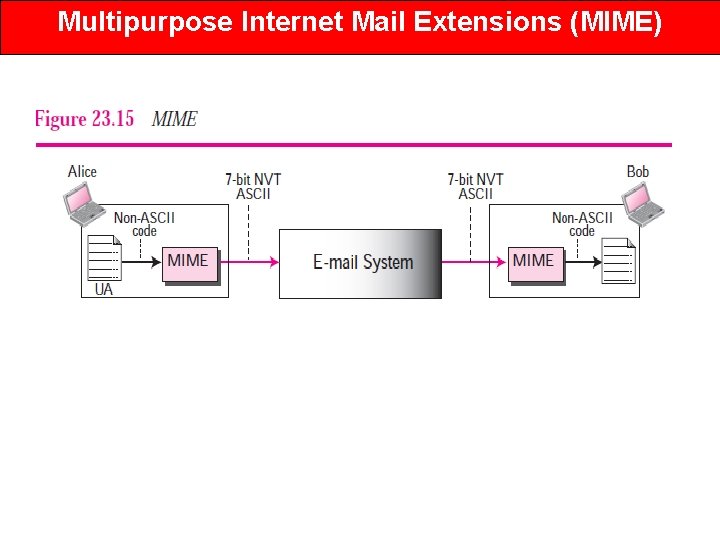
Multipurpose Internet Mail Extensions (MIME) • Multipurpose Internet Mail Extension (MIME) is a standard which was proposed by Bell Communications in 1991 in order to expand limited capabilities of email. • MIME is a kind of add on or a supplementary protocol which allows non-ASCII data to be sent through SMTP. • It allows the users to exchange different kinds of data files on the Internet: audio, video, images, application programs as well. • Why do we need MIME? - Limitations of Simple Mail Transfer Protocol (SMTP): 1. SMTP has a very simple structure 2. It’s simplicity however comes with a price as it only send messages in NVT 7 -bit ASCII format. 3. It cannot be used for languages that do not support 7 -bit ASCII format such as- French, German, Russian, Chinese and Japanese, etc. 4. it cannot be used to send binary files or video or audio data.
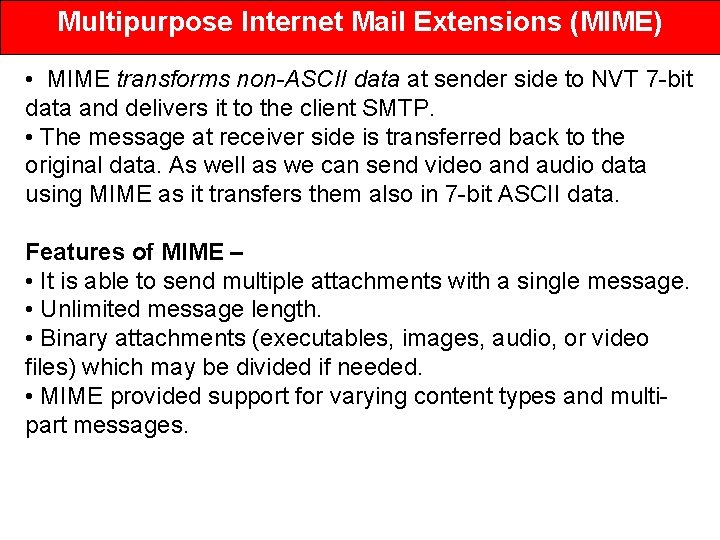
Multipurpose Internet Mail Extensions (MIME) • MIME transforms non-ASCII data at sender side to NVT 7 -bit data and delivers it to the client SMTP. • The message at receiver side is transferred back to the original data. As well as we can send video and audio data using MIME as it transfers them also in 7 -bit ASCII data. Features of MIME – • It is able to send multiple attachments with a single message. • Unlimited message length. • Binary attachments (executables, images, audio, or video files) which may be divided if needed. • MIME provided support for varying content types and multipart messages.
Multipurpose Internet Mail Extensions (MIME)
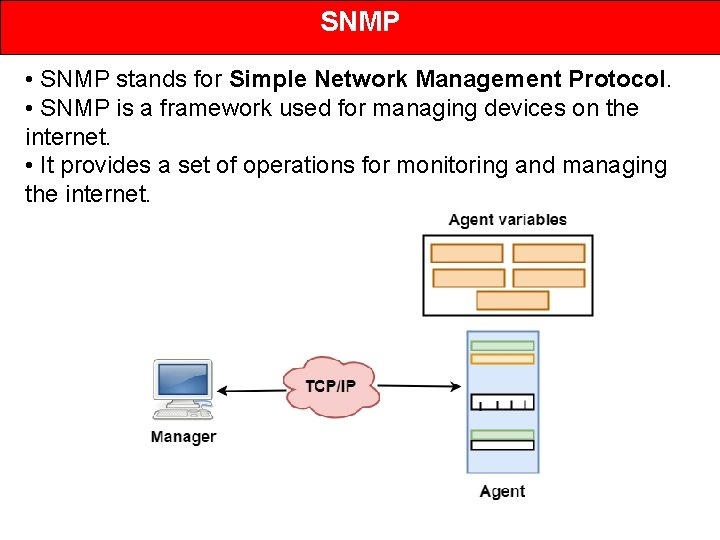
SNMP • SNMP stands for Simple Network Management Protocol. • SNMP is a framework used for managing devices on the internet. • It provides a set of operations for monitoring and managing the internet.
SNMP • SNMP has two components Manager and agent. • The manager is a host that controls and monitors a set of agents such as routers. • It is an application layer protocol in which a few manager stations can handle a set of agents. • The protocol designed at the application level can monitor the devices made by different manufacturers and installed on different physical networks. • It is used in a heterogeneous network made of different LANs and WANs connected by routers or gateways. Management with SNMP has three basic ideas: • A manager checks the agent by requesting the information that reflects the behavior of the agent. • A manager also forces the agent to perform a certain function by resetting values in the agent database. • An agent also contributes to the management process by warning the manager regarding an unusual condition.
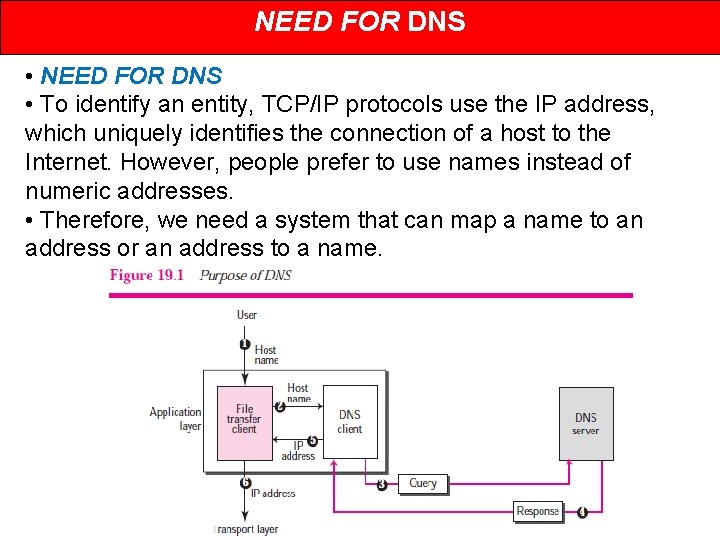
NEED FOR DNS • To identify an entity, TCP/IP protocols use the IP address, which uniquely identifies the connection of a host to the Internet. However, people prefer to use names instead of numeric addresses. • Therefore, we need a system that can map a name to an address or an address to a name.
Purpose of DNS The following six steps map the host name to an IP address. 1. The user passes the host name to the file transfer client. 2. The file transfer client passes the host name to the DNS client. 3. We know from Chapter 18 that each computer, after being booted, knows the address of one DNS server. The DNS client sends a message to a DNS server with a query that gives the file transfer server name using the known IP address of the DNS server. 4. The DNS server responds with the IP address of the desired file transfer server. 5. The DNS client passes the IP address to the file transfer server. 6. The file transfer client now uses the received IP address to access the file transfer server.
Concept of Domain Name Space • The names must be unique because the addresses are unique. • A name space that maps each address to a unique name can be organized in two ways: flat or hierarchical. 1. Flat Name Space • In a flat name space, a name is assigned to an address. • A name in this space is a sequence of characters without structure. • The names may or may not have a common section; if they do, it has no meaning. • The main disadvantage of a flat name space is that it cannot be used in a large system such as the Internet because it must be centrally controlled to avoid ambiguity and duplication. 2. Hierarchical Name Space • In a hierarchical name space, each name is made of several parts. • The first part can define the nature of the organization, the second part can define the name of an organization, the third part can define departments in the organization, and so on. • In this case, the authority to assign and control the name spaces can be decentralized.
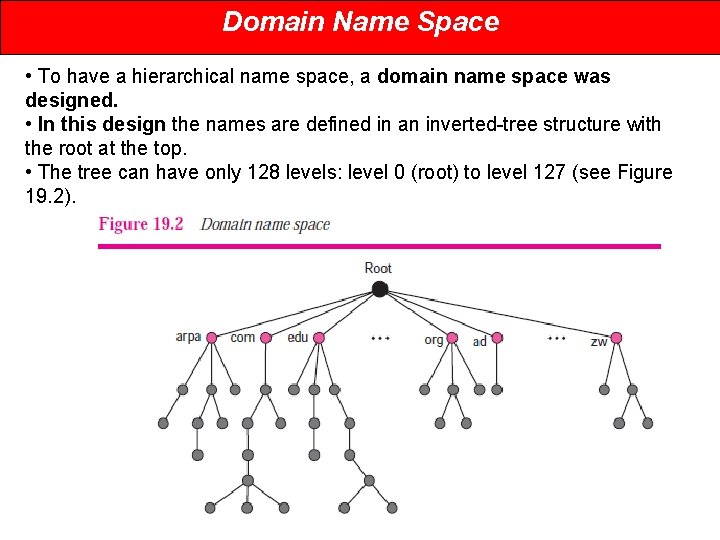
Domain Name Space • To have a hierarchical name space, a domain name space was designed. • In this design the names are defined in an inverted-tree structure with the root at the top. • The tree can have only 128 levels: level 0 (root) to level 127 (see Figure 19. 2).
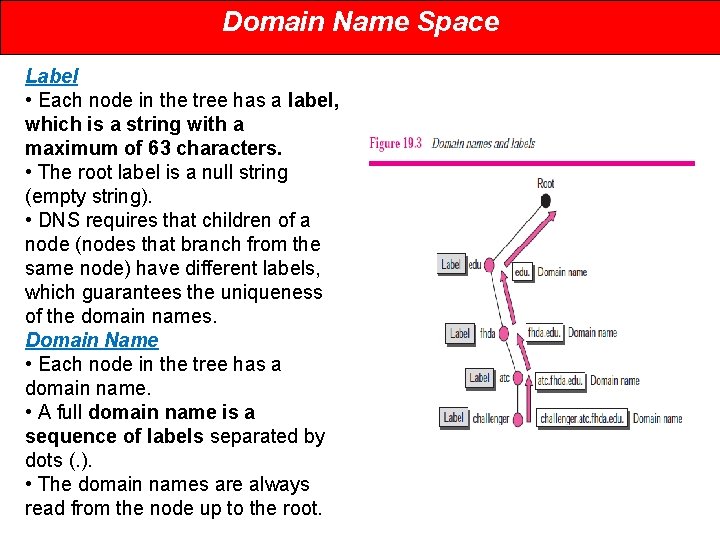
Domain Name Space Label • Each node in the tree has a label, which is a string with a maximum of 63 characters. • The root label is a null string (empty string). • DNS requires that children of a node (nodes that branch from the same node) have different labels, which guarantees the uniqueness of the domain names. Domain Name • Each node in the tree has a domain name. • A full domain name is a sequence of labels separated by dots (. ). • The domain names are always read from the node up to the root.
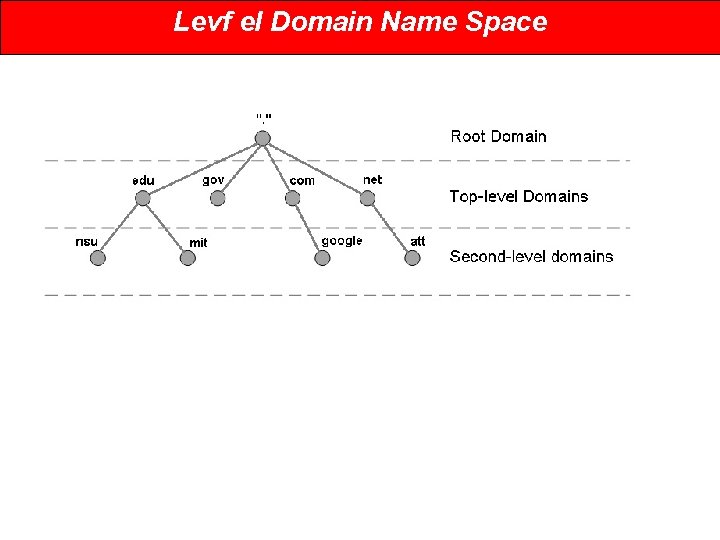
Levf el Domain Name Space
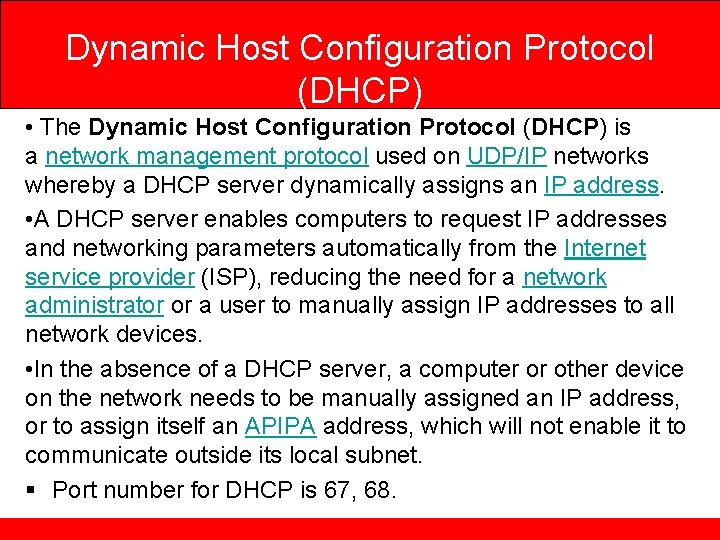
Dynamic Host Configuration Protocol (DHCP) • The Dynamic Host Configuration Protocol (DHCP) is a network management protocol used on UDP/IP networks whereby a DHCP server dynamically assigns an IP address. • A DHCP server enables computers to request IP addresses and networking parameters automatically from the Internet service provider (ISP), reducing the need for a network administrator or a user to manually assign IP addresses to all network devices. • In the absence of a DHCP server, a computer or other device on the network needs to be manually assigned an IP address, or to assign itself an APIPA address, which will not enable it to communicate outside its local subnet. § Port number for DHCP is 67, 68.
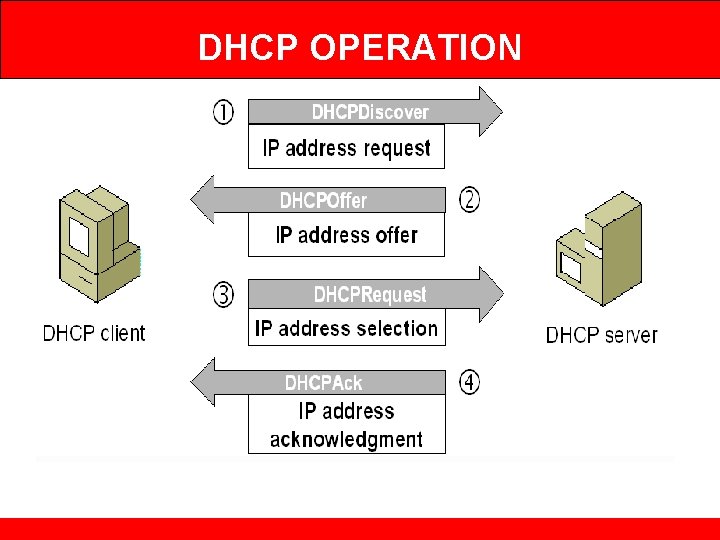
DHCP OPERATION
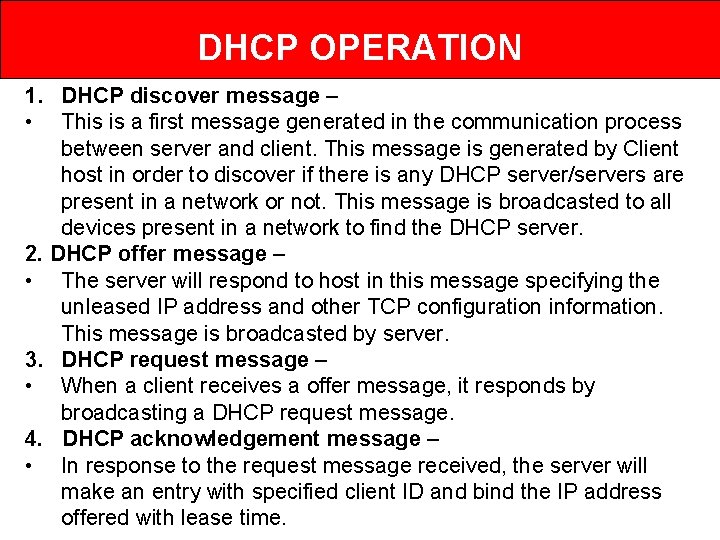
DHCP OPERATION 1. DHCP discover message – • This is a first message generated in the communication process between server and client. This message is generated by Client host in order to discover if there is any DHCP server/servers are present in a network or not. This message is broadcasted to all devices present in a network to find the DHCP server. 2. DHCP offer message – • The server will respond to host in this message specifying the unleased IP address and other TCP configuration information. This message is broadcasted by server. 3. DHCP request message – • When a client receives a offer message, it responds by broadcasting a DHCP request message. 4. DHCP acknowledgement message – • In response to the request message received, the server will make an entry with specified client ID and bind the IP address offered with lease time.
Remote Login • Remote access refers to the ability to access a computer, such as a home computer or an office network computer, from a remote location. • This allows employees to work offsite, such as at home or in another location, while still having access to a distant computer or network, such as the office network. • Remote access can be set up using a local area network (LAN), wide area network (WAN) or even a virtual private network (VPN) so that resources and systems can be accessed remotely. • Remote access is also known as remote login. • When a user wants to access an application program or utility located on a remote machine, he or she performs remote login.
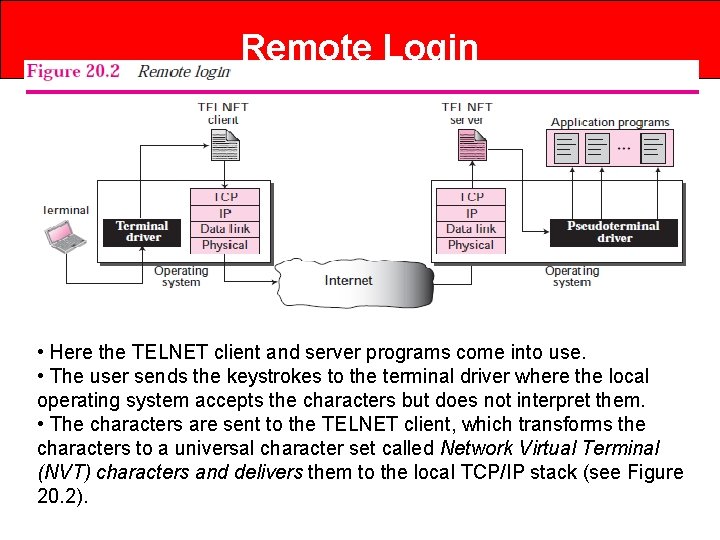
Remote Login • • Here the TELNET client and server programs come into use. • The user sends the keystrokes to the terminal driver where the local operating system accepts the characters but does not interpret them. • The characters are sent to the TELNET client, which transforms the characters to a universal character set called Network Virtual Terminal (NVT) characters and delivers them to the local TCP/IP stack (see Figure 20. 2).
Telnet • TELNET is an abbreviation for TErmina. L NETwork. • It is the standard TCP/IP protocol for virtual terminal service as proposed by ISO. • TELNET enables the establishment of a connection to a remote system in such a way that the local terminal appears to be a terminal at the remote system. • The main task of the internet is to provide services to users. • For example, users want to run different application programs at the remote site and transfers a result to the local site. • This requires a client-server program such as FTP, SMTP. But this would not allow us to create a specific program for each demand.
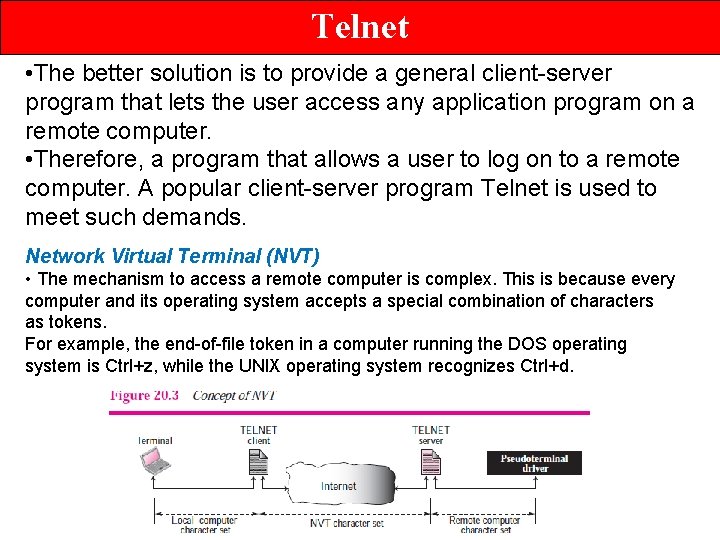
Telnet • The better solution is to provide a general client-server program that lets the user access any application program on a remote computer. • Therefore, a program that allows a user to log on to a remote computer. A popular client-server program Telnet is used to meet such demands. Network Virtual Terminal (NVT) • The mechanism to access a remote computer is complex. This is because every computer and its operating system accepts a special combination of characters as tokens. For example, the end-of-file token in a computer running the DOS operating system is Ctrl+z, while the UNIX operating system recognizes Ctrl+d.
SSH • Another popular remote login application program is Secure Shell (SSH). • SSH, like TELNET, uses TCP as the underlying transport protocol, but SSH is more secure and provides more services than TELNET. • SSH, also known as Secure Shell or Secure Socket Shell, is a network protocol that gives users, particularly system administrators, a secure way to access a computer over an unsecured network. • SSH also refers to the suite of utilities that implement the SSH protocol. • Secure Shell provides strong authentication and encrypted data communications between two computers connecting over an open network such as the internet.
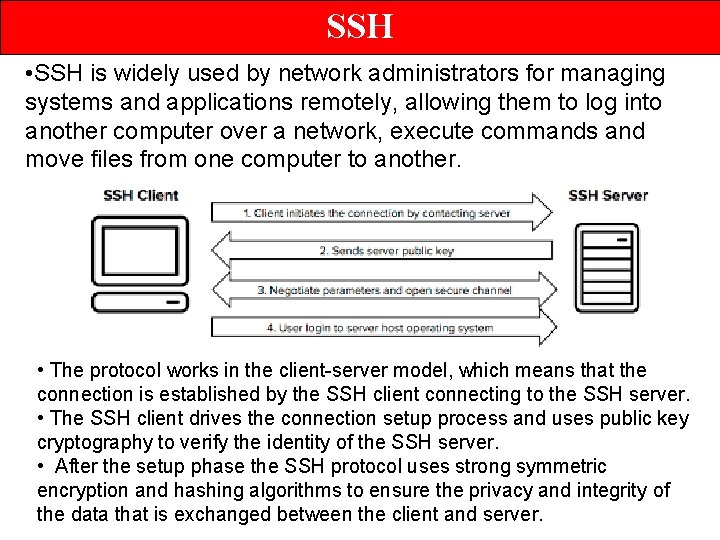
SSH • SSH is widely used by network administrators for managing systems and applications remotely, allowing them to log into another computer over a network, execute commands and move files from one computer to another. • The protocol works in the client-server model, which means that the connection is established by the SSH client connecting to the SSH server. • The SSH client drives the connection setup process and uses public key cryptography to verify the identity of the SSH server. • After the setup phase the SSH protocol uses strong symmetric encryption and hashing algorithms to ensure the privacy and integrity of the data that is exchanged between the client and server.
Thank you & All the best…