
Chapter Five Vibration Analysis Vibration Analysis Chapter Overview
Chapter Five Vibration Analysis
Vibration Analysis Chapter Overview Training Manual – It is assumed that the user has already covered Chapter 4 Linear Static Structural Analysis prior to this section. • The following will be covered: – Free Vibration Analysis Procedure – Free Vibration with Pre-Stress Analysis Procedure • The capabilities described in this section are generally applicable to ANSYS Design. Space Entra licenses and above. – Some options discussed in this chapter may require more advanced licenses, but these are noted accordingly. – Harmonic and nonlinear static structural analyses are not discussed here but in their respective chapters. ANSYS Workbench – Simulation • In this chapter, performing free vibration analyses in Simulation will be covered. In Simulation, performing a free vibration analysis is similar to a linear static analysis. March 29, 2005 Inventory #002215 5 -2

Vibration Analysis Basics of Free Vibration Analysis Training Manual This results in certain assumptions related to the analysis: – [K] and [M] are constant: • Linear elastic material behavior is assumed • Small deflection theory is used, and no nonlinearities included • [C] is not present, so damping is not included • {F} is not present, so no excitation of the structure is assumed • The structure can be unconstrained (rigid-body modes present) or partially/fully constrained, depending on the physical structure ANSYS Workbench – Simulation • For a free vibration analysis, the natural circular frequencies wi and mode shapes fi are calculated from: – Mode shapes {f} are relative values, not absolute • It is important to remember these assumptions related to performing free vibration analyses in Simulation. March 29, 2005 Inventory #002215 5 -3

Vibration Analysis A. Free Vibration Analysis Procedure Training Manual – Attach Geometry – Assign Material Properties – Define Contact Regions (if applicable) – Define Mesh Controls (optional) – Include Supports (if applicable) – Request Frequency Finder Results – Set Frequency Finder Options – Solve the Model ANSYS Workbench – Simulation • The free vibration analysis procedure is very similar to performing a linear static analysis, so not all steps will be covered in detail. The steps in yellow italics are specific to free vibration analyses. – Review Results March 29, 2005 Inventory #002215 5 -4
Vibration Analysis … Geometry and Point Mass Training Manual – Solid bodies – Surface bodies (with appropriate thickness defined) – Line bodies (with appropriate cross-sections defined) • For line bodies, only mode shapes and displacement results are available. • The Point Mass feature can be used: • Input for the Point Mass was described earlier in Chapter 4. • The Point Mass adds mass only in a free vibration analysis. It is connected to selected surfaces as if no stiffness is present, so the effect is to add only mass (not stiffness) to a structure. • Useful for including the effect of distributed weight on selected surfaces. Because of this, the Point Mass will decrease the natural frequency in free vibration analyses. ANSYS Workbench – Simulation • Similar to linear static analyses, any type of geometry supported by Simulation may be used: March 29, 2005 Inventory #002215 5 -5
Vibration Analysis … Material Properties Training Manual – Since no loading is assumed, no other material properties will be used, if defined ANSYS Workbench – Simulation • For material properties, Young’s Modulus, Poisson’s Ratio, and Mass Density are required March 29, 2005 Inventory #002215 5 -6
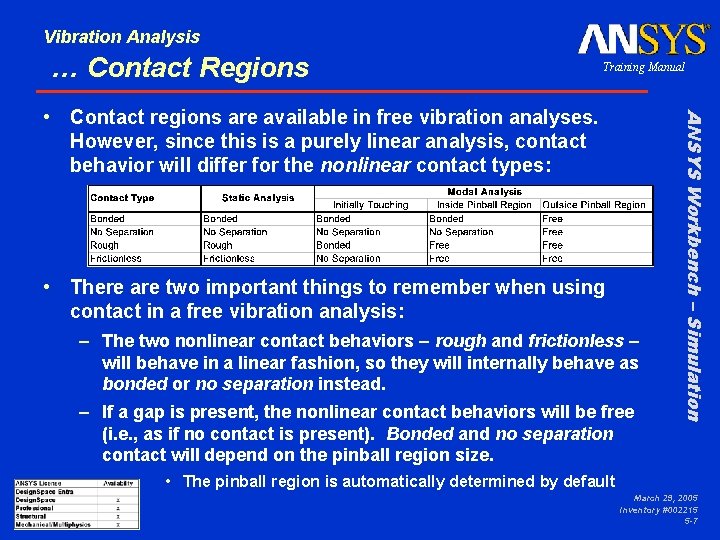
Vibration Analysis … Contact Regions Training Manual • There are two important things to remember when using contact in a free vibration analysis: – The two nonlinear contact behaviors – rough and frictionless – will behave in a linear fashion, so they will internally behave as bonded or no separation instead. – If a gap is present, the nonlinear contact behaviors will be free (i. e. , as if no contact is present). Bonded and no separation contact will depend on the pinball region size. ANSYS Workbench – Simulation • Contact regions are available in free vibration analyses. However, since this is a purely linear analysis, contact behavior will differ for the nonlinear contact types: • The pinball region is automatically determined by default March 29, 2005 Inventory #002215 5 -7
Vibration Analysis … Contact Regions Training Manual – For rough and frictionless contact, the “Interface Treatment” can be changed to “Adjusted to Touch, ” which will make the contact surfaces behave as bonded and no separation, respectively. (Even if a gap is present, the parts will behave as if they are initially touching if this option is set. ) – The size of the “Pinball Region” may be changed as well as viewed to ensure that bonded and no separation contact is established, even if a gap is present. • Please refer to Chapters 3 and 4 for discussions on the pinball region and how to define its size • For ANSYS Structural licenses and above, frictional contact will behave similar to bonded contact if surfaces are touching but act as free (no contact) if contact is open. • It is not recommended to use frictional contact in a free vibration analysis since it is nonlinear. ANSYS Workbench – Simulation • For ANSYS Professional licenses and above, additional contact options can be used in free vibration analyses: March 29, 2005 Inventory #002215 5 -8

Vibration Analysis … Loads and Supports Training Manual – See Section B later in this chapter for a discussion on free vibration with pre-stress analysis. In this situation, loads are considered but only for their pre-stress effects. • Supports can be used in free vibration analyses: – If no or partial supports are present, rigid-body modes can be detected and evaluated. These modes will be at 0 or near 0 Hz. Unlike static structural analyses, free vibration analyses do not require that rigid-body motion be prevented. – The boundary conditions are important, as they affect the mode shapes and frequencies of the part. Carefully consider how the model is constrained. – The compression only support is a nonlinear support and should not be used in the analysis. • If present, the compression only support will generally behave similar to a frictionless support. ANSYS Workbench – Simulation • Structural and thermal loads not used in free vibration March 29, 2005 Inventory #002215 5 -9
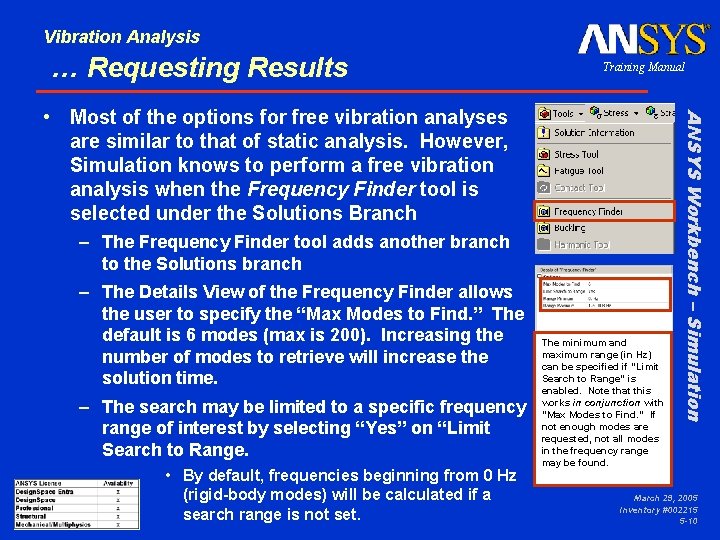
Vibration Analysis … Requesting Results Training Manual – The Frequency Finder tool adds another branch to the Solutions branch – The Details View of the Frequency Finder allows the user to specify the “Max Modes to Find. ” The default is 6 modes (max is 200). Increasing the number of modes to retrieve will increase the solution time. – The search may be limited to a specific frequency range of interest by selecting “Yes” on “Limit Search to Range. • By default, frequencies beginning from 0 Hz (rigid-body modes) will be calculated if a search range is not set. The minimum and maximum range (in Hz) can be specified if “Limit Search to Range” is enabled. Note that this works in conjunction with “Max Modes to Find. ” If not enough modes are requested, not all modes in the frequency range may be found. ANSYS Workbench – Simulation • Most of the options for free vibration analyses are similar to that of static analysis. However, Simulation knows to perform a free vibration analysis when the Frequency Finder tool is selected under the Solutions Branch March 29, 2005 Inventory #002215 5 -10

Vibration Analysis … Requesting Results – When toggling “Max Modes to Find” under the Frequency Finder branch, more mode shapes will automatically be added. The user does not need to request mode shapes from the Context toolbar. – If stress, strain, or directional displacements are to be requested, this can be done by adding the result from the Context toolbar. • For each stress, strain, or displacement result added, the user can specify which mode this corresponds to from the Details view, under “Mode. ” If relative stress or strain results are needed, ANSYS Workbench – Simulation • Under the Frequency Finder branch are the requests requested Training Manual be sure to add results under the Frequency Finder branch, not the Solution branch. Recall that mode shapes are relative values since no excitation is present. Hence, stresses and strains are also relative. March 29, 2005 Inventory #002215 5 -11

Vibration Analysis … Solution Options Training Manual – For a free vibration analysis, none of the options in the Details view of the Solution branch usually need to be changed. • In the majority of cases, “Solver Type” should be left on the default option of “Program Controlled”. • If the model is a very large one of solid elements, and only a few modes are to be requested, the “Solver Type, ” when changed to “Iterative, ” may be more efficient. – The “Analysis Type” will display “Free Vibration. ” ANSYS Workbench – Simulation • The solution branch provides details on the type of analysis being performed March 29, 2005 Inventory #002215 5 -12

Vibration Analysis … Solving the Model Training Manual – A free vibration analysis is generally more computationally expensive than a static analysis on the same model because of the equations solved. – If a “Solution Information” branch is requested under the Solution branch, detailed solution output, including the amount of memory used and solution progress, will be available in the Worksheet tab. – If stress or strain results or more frequencies/modes are requested after a solution is performed, a new solution is required. ANSYS Workbench – Simulation • After setting up the model, one can solve the free vibration analysis just like any other analysis by selecting the Solve button. March 29, 2005 Inventory #002215 5 -13
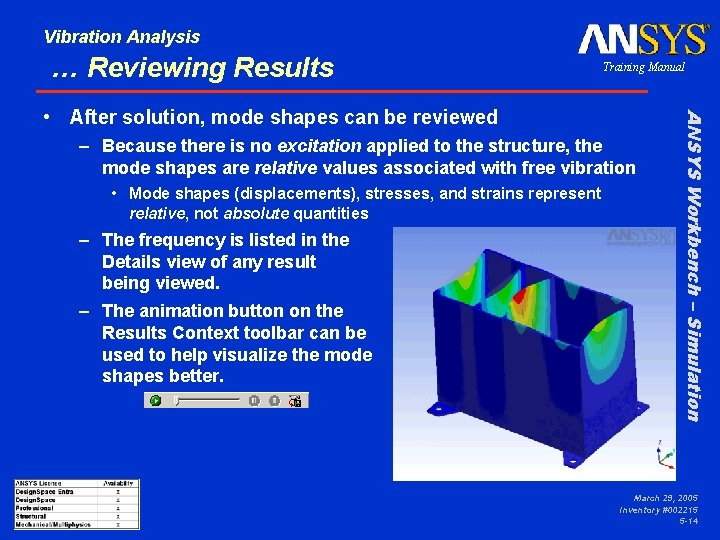
Vibration Analysis … Reviewing Results Training Manual – Because there is no excitation applied to the structure, the mode shapes are relative values associated with free vibration • Mode shapes (displacements), stresses, and strains represent relative, not absolute quantities – The frequency is listed in the Details view of any result being viewed. – The animation button on the Results Context toolbar can be used to help visualize the mode shapes better. ANSYS Workbench – Simulation • After solution, mode shapes can be reviewed March 29, 2005 Inventory #002215 5 -14
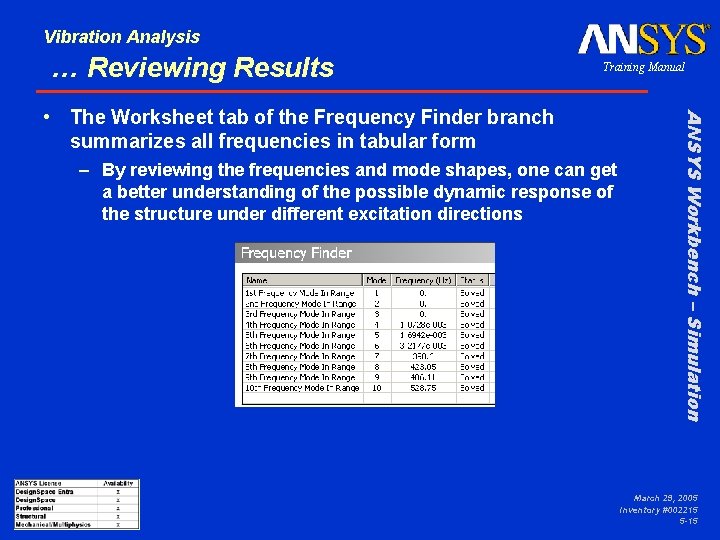
Vibration Analysis … Reviewing Results Training Manual – By reviewing the frequencies and mode shapes, one can get a better understanding of the possible dynamic response of the structure under different excitation directions ANSYS Workbench – Simulation • The Worksheet tab of the Frequency Finder branch summarizes all frequencies in tabular form March 29, 2005 Inventory #002215 5 -15
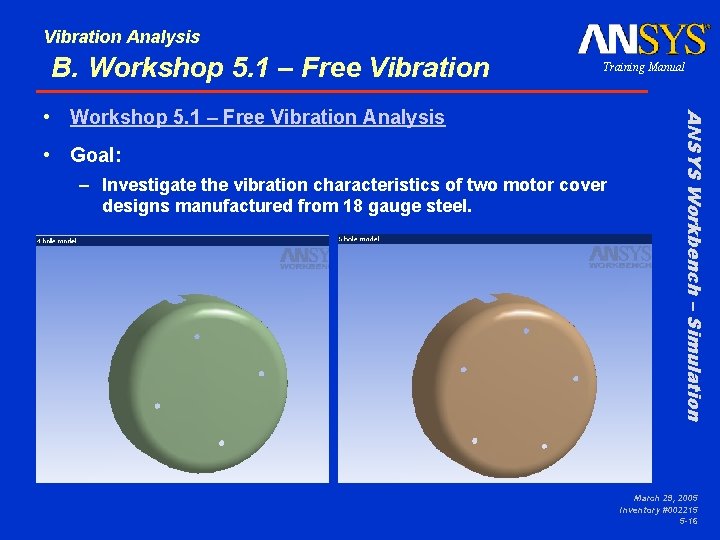
Vibration Analysis B. Workshop 5. 1 – Free Vibration Training Manual • Goal: – Investigate the vibration characteristics of two motor cover designs manufactured from 18 gauge steel. ANSYS Workbench – Simulation • Workshop 5. 1 – Free Vibration Analysis March 29, 2005 Inventory #002215 5 -16
Vibration Analysis C. Free Vibration with Pre-Stress Training Manual – The stress state of a structure under constant (static) loads may affect its natural frequencies. This can be important, especially for structures thin in one or two dimensions. – Consider a guitar string being tuned – as the axial load is increased (from tightening), the lateral frequencies increase. This is an example of the stress stiffening effect. ANSYS Workbench – Simulation • In some cases, one may want to consider prestress effects when performing a free vibration analysis. March 29, 2005 Inventory #002215 5 -17
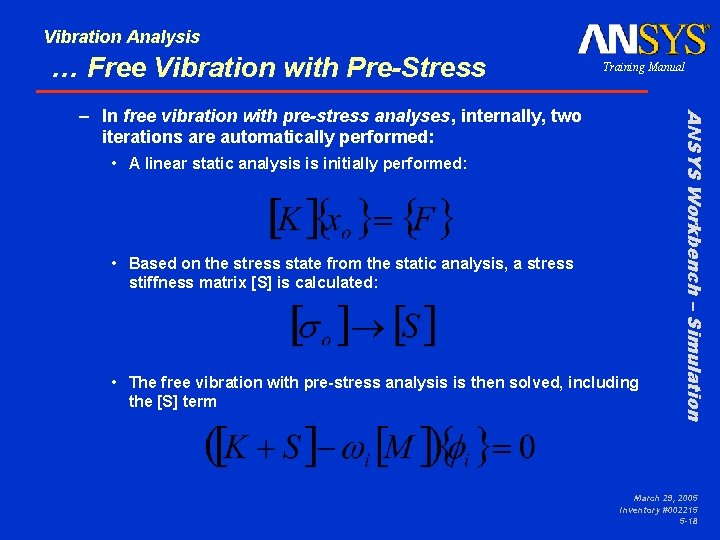
Vibration Analysis … Free Vibration with Pre-Stress Training Manual • A linear static analysis is initially performed: • Based on the stress state from the static analysis, a stress stiffness matrix [S] is calculated: • The free vibration with pre-stress analysis is then solved, including the [S] term ANSYS Workbench – Simulation – In free vibration with pre-stress analyses, internally, two iterations are automatically performed: March 29, 2005 Inventory #002215 5 -18
Vibration Analysis … Procedure w/ Pre-Stress Effects Training Manual – A load (structural and/or thermal) must be applied to determine what the initial stress state of the structure is. – Results for the linear static structural analysis may also be requested under the Solution branch, not the Frequency Finder branch • A stress or strain result requested under the Frequency Finder branch will be relative stress/strain values for a particular mode • A stress or strain (or displacement) result requested under the Solution branch will be absolute stress/strain/displacement values for the statically applied load ANSYS Workbench – Simulation • To perform a free vibration with pre-stress analysis (a. k. a. prestressed modal analysis), it is the same as running a regular free vibration analysis with the following exceptions: March 29, 2005 Inventory #002215 5 -19
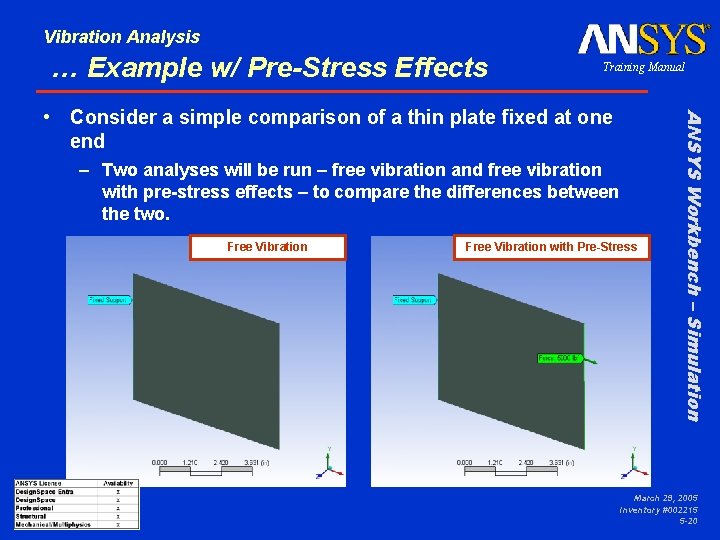
Vibration Analysis … Example w/ Pre-Stress Effects Training Manual – Two analyses will be run – free vibration and free vibration with pre-stress effects – to compare the differences between the two. Free Vibration with Pre-Stress ANSYS Workbench – Simulation • Consider a simple comparison of a thin plate fixed at one end March 29, 2005 Inventory #002215 5 -20
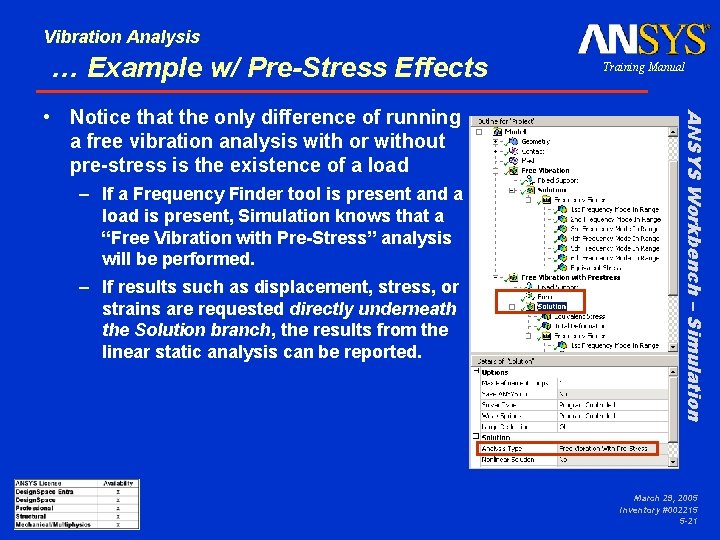
Vibration Analysis … Example w/ Pre-Stress Effects – If a Frequency Finder tool is present and a load is present, Simulation knows that a “Free Vibration with Pre-Stress” analysis will be performed. – If results such as displacement, stress, or strains are requested directly underneath the Solution branch, the results from the linear static analysis can be reported. ANSYS Workbench – Simulation • Notice that the only difference of running a free vibration analysis with or without pre-stress is the existence of a load Training Manual March 29, 2005 Inventory #002215 5 -21
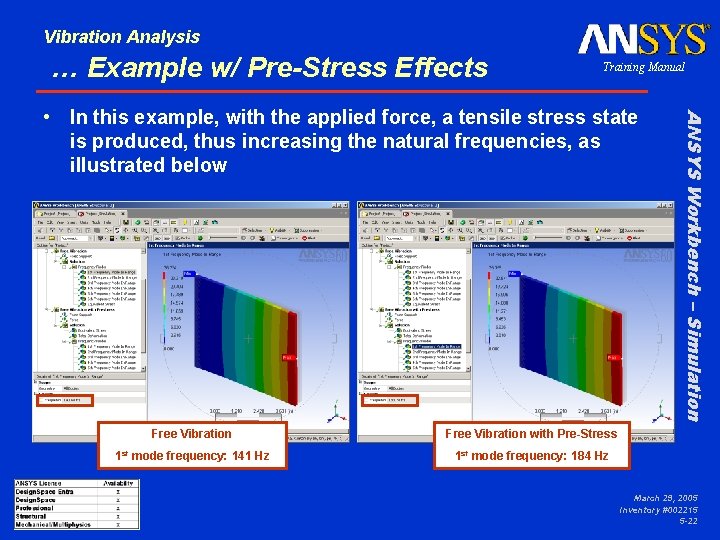
Vibration Analysis … Example w/ Pre-Stress Effects Training Manual Free Vibration with Pre-Stress 1 st mode frequency: 141 Hz 1 st mode frequency: 184 Hz ANSYS Workbench – Simulation • In this example, with the applied force, a tensile stress state is produced, thus increasing the natural frequencies, as illustrated below March 29, 2005 Inventory #002215 5 -22
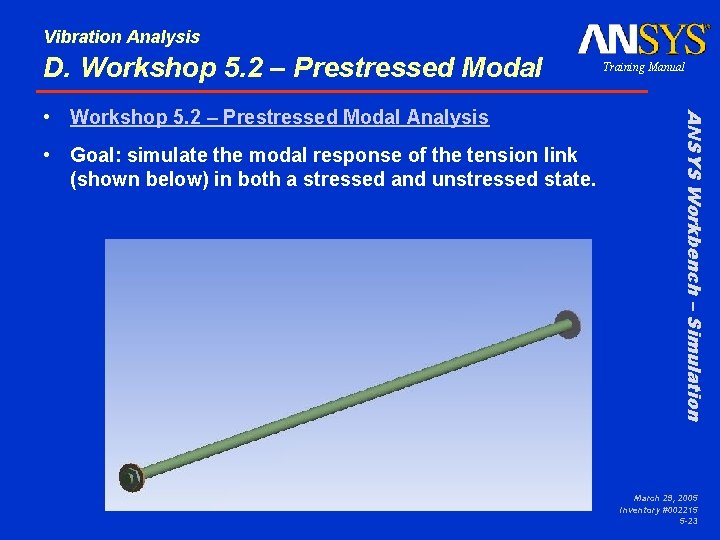
Vibration Analysis D. Workshop 5. 2 – Prestressed Modal • Goal: simulate the modal response of the tension link (shown below) in both a stressed and unstressed state. ANSYS Workbench – Simulation • Workshop 5. 2 – Prestressed Modal Analysis Training Manual March 29, 2005 Inventory #002215 5 -23

March 29, 2005 Inventory #002215 5 -24
- Slides: 24