
CHAPTER Computer Basics 1 Computer Basics ParsonsOja 1
CHAPTER Computer Basics 1 Computer, Basics Parsons/Oja 1
Computer Basics Chapter 1 Chapter PREVIEW After this chapter, you should be able to: } Define the term computer and identify the components of a personal computer system } Compare the computing capabilities of the computer categories } Describe operating systems Parsons/Oja 2
Computer Basics Chapter 1 What is a computer? u A computer system includes a computer, peripheral devices, and software u Computer refers to a device that accepts data as input, processes data, stores data, and produces output u Input means to feed information into a computer } words and symbols in a document } Numbers for a calculation } pictures Parsons/Oja 3
Computer Basics Chapter 1 What is a computer? u Data refers to the symbols that represent facts, ideas and objects u Processing is the way that a computer manipulates data } performing calculations } sorting lists and numbers } drawing graphs u A computer processes data in a device called the central processing unit (CPU) Parsons/Oja 4
Computer Basics Chapter 1 What is a computer? u A computer stores data so that it will be available for processing u Memory is an area of a computer that holds data that is waiting to be processed and for later use u Storage is the area where data can be left on a permanent basis Parsons/Oja 5
Computer Basics Chapter 1 What is a computer? u Computer output is the results produced by the computer } reports } documents } music } graphs } pictures u An output device displays, prints or transmits the results of processing Parsons/Oja 6
Computer Basics Chapter 1 What is a computer? Parsons/Oja 7
Computer Basics Chapter 1 What’s so significant about a computer’s ability to store instructions? u A stored program means that a series of instructions for a computing task can be loaded into a computer’s memory u This concept allows you to use your computer for multiple tasks over and over again Parsons/Oja 8
Computer Basics Chapter 1 Computer Categories u Before: } Computers are categorized into three main categories from least to most powerful: • microcomputers • minicomputers • mainframe computers u Today: } A computer is categorized based on its technology, function, size, performance, and cost Parsons/Oja 9
Computer Basics Chapter 1 What is a personal computer? u A personal computer is a type of microcomputer designed to meet the computing needs of an individual } Desktop computers } Notebook computers } Cost starts at $500, but most spend $1000 to $1500 Parsons/Oja 10
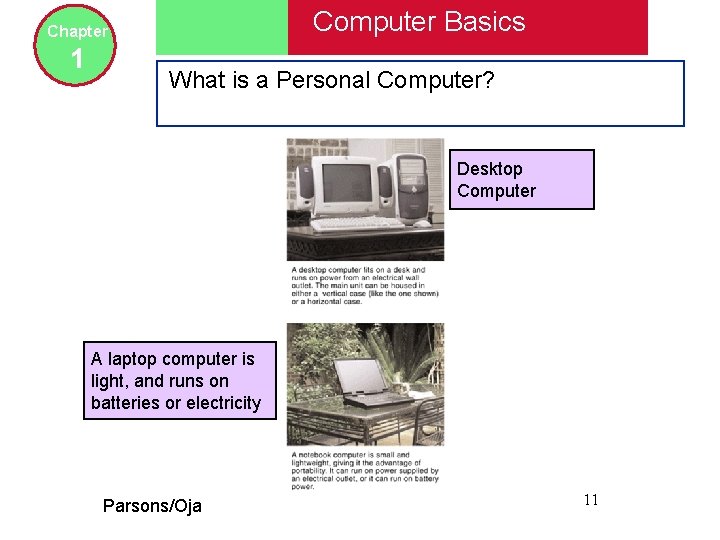
Computer Basics Chapter 1 What is a Personal Computer? Desktop Computer A laptop computer is light, and runs on batteries or electricity Parsons/Oja 11
Computer Basics Chapter 1 What is a handheld? u A handheld computer is one that is designed to fit into a pocket, run on batteries, and be used while you are holding it u Also called a PDA (Personal Digital Assistant) } Send and receive e-mail } Use maps and global positioning } Maintain expense account } Make voice calls using cellular service Parsons/Oja 12
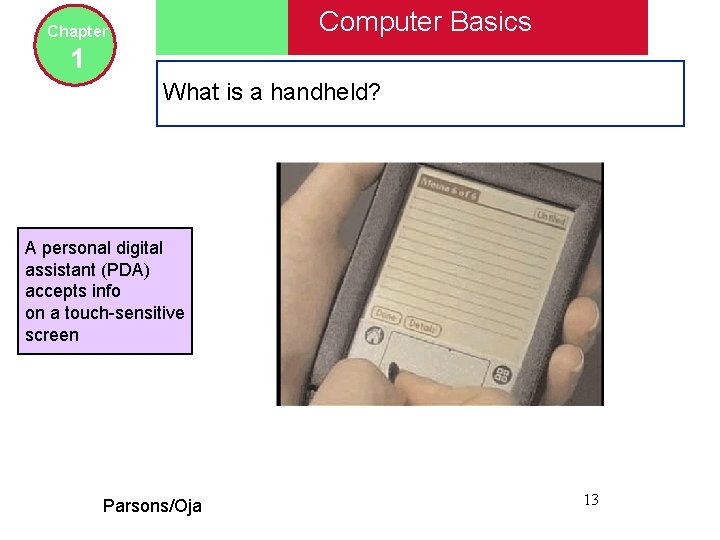
Computer Basics Chapter 1 What is a handheld? A personal digital assistant (PDA) accepts info on a touch-sensitive screen Parsons/Oja 13
Computer Basics Chapter 1 Does the term “workstation” have more than one meaning? u The term “workstation” has two meanings } Powerful desktop models designed for specialized tasks } Ordinary personal computers connected to a local area network u A computer network is two or more computers and other devices that are connected for the purpose of sharing data and programs Parsons/Oja 14
Computer Basics Chapter 1 Does the term “workstation” have more than one meaning? u LAN (local area network) is simply a computer network that is located within a limited geographical area Parsons/Oja 15
Text Course Files u Course Downloads } http: //www. course. com/downloads/ newperspectives/officexp/ u Course Power. Points } http: //www. course. com/downloads/ newperspectives/officexp/ppt_pres entations. html Parsons/Oja 16
Web FX u The local area network is Web FX u Requires: } Username } Password Parsons/Oja 17
Web FX Assignment u You are to log in to Web FX u Install a printer (Note the room you are in) } Printing costs Parsons/Oja 18
Home Assignment u Read the text Chapter 1 pgs 1 -33 u Do the review multiple choice questions pgs 3435 u As a new University student at St FX what would you purchase for a computer system? Be able to explain the reasons why you made this selection. Parsons/Oja 19
Next Day u Ethical Use of Computer Resources u St FX Policy Parsons/Oja 20
- Slides: 20