
Chapter 9 Servlets Outline 9 1 9 2

- Slides: 28
Chapter 9: Servlets Outline 9. 1 9. 2. 2 9. 2. 3 9. 2. 4 9. 3 9. 4 9. 5 Introduction Servlet Overview and Architecture Interface Servlet and the Servlet Life Cycle Http. Servlet Class Http. Servlet. Request Interface Http. Servlet. Response Interface Handling HTTP get Requests Containing Data Handling HTTP post Requests 2002 Prentice Hall. All rights reserved.
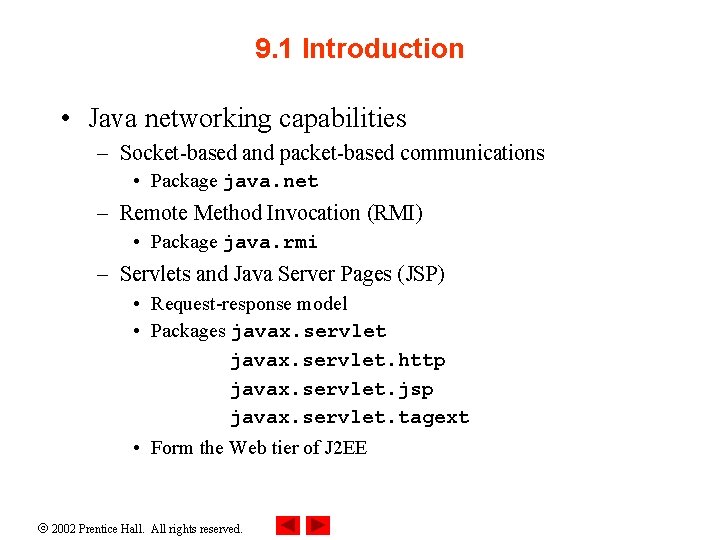
9. 1 Introduction • Java networking capabilities – Socket-based and packet-based communications • Package java. net – Remote Method Invocation (RMI) • Package java. rmi – Servlets and Java Server Pages (JSP) • Request-response model • Packages javax. servlet. http javax. servlet. jsp javax. servlet. tagext • Form the Web tier of J 2 EE 2002 Prentice Hall. All rights reserved.
9. 1 Introduction (Cont. ) • Servlets – – Thin clients Request/response mechanism Session-tracking capabilities redirection 2002 Prentice Hall. All rights reserved.
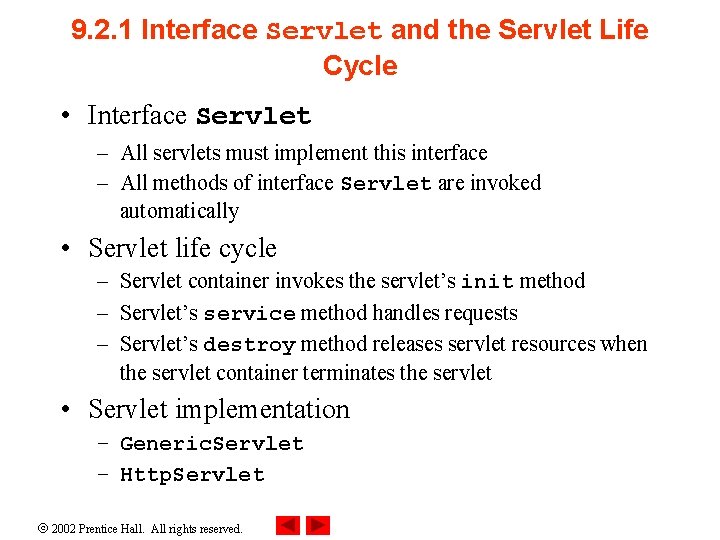
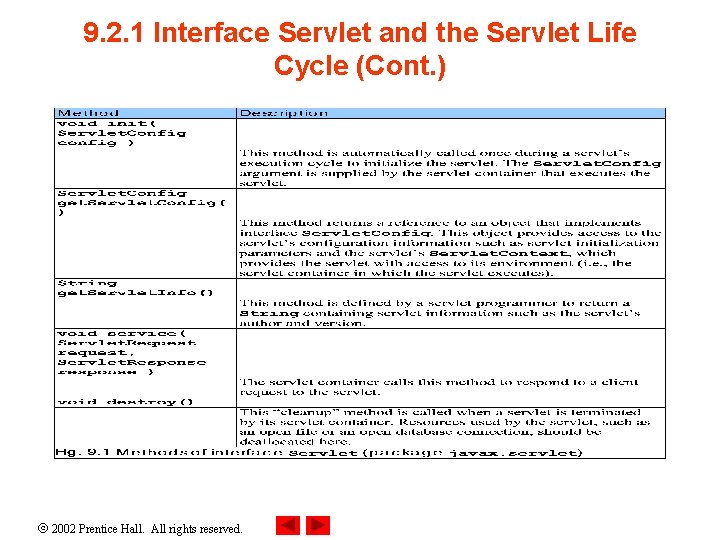
9. 2. 1 Interface Servlet and the Servlet Life Cycle • Interface Servlet – All servlets must implement this interface – All methods of interface Servlet are invoked automatically • Servlet life cycle – Servlet container invokes the servlet’s init method – Servlet’s service method handles requests – Servlet’s destroy method releases servlet resources when the servlet container terminates the servlet • Servlet implementation – Generic. Servlet – Http. Servlet 2002 Prentice Hall. All rights reserved.
9. 2. 1 Interface Servlet and the Servlet Life Cycle (Cont. ) 2002 Prentice Hall. All rights reserved.
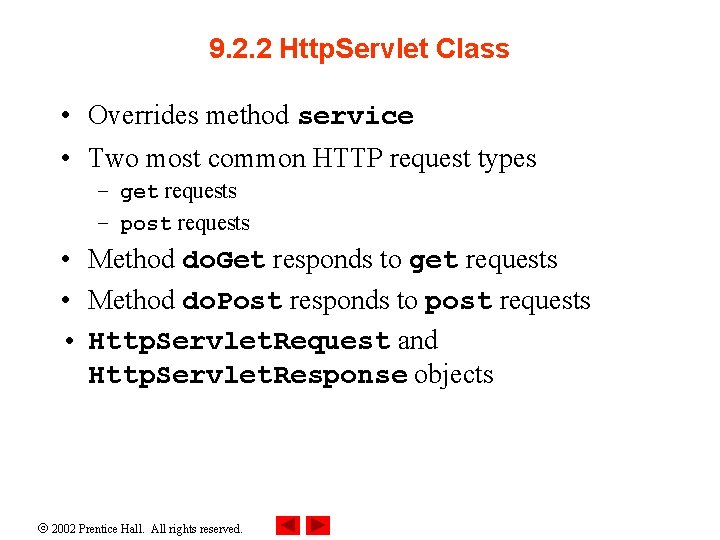
9. 2. 2 Http. Servlet Class • Overrides method service • Two most common HTTP request types – get requests – post requests • Method do. Get responds to get requests • Method do. Post responds to post requests • Http. Servlet. Request and Http. Servlet. Response objects 2002 Prentice Hall. All rights reserved.
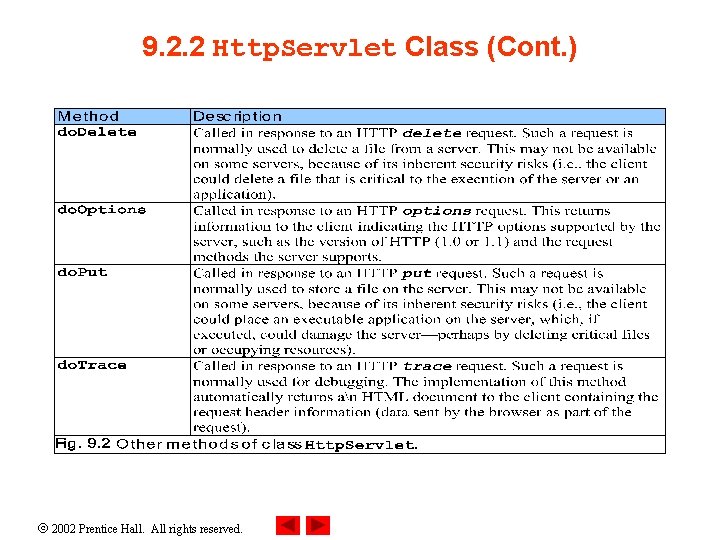
9. 2. 2 Http. Servlet Class (Cont. ) 2002 Prentice Hall. All rights reserved.
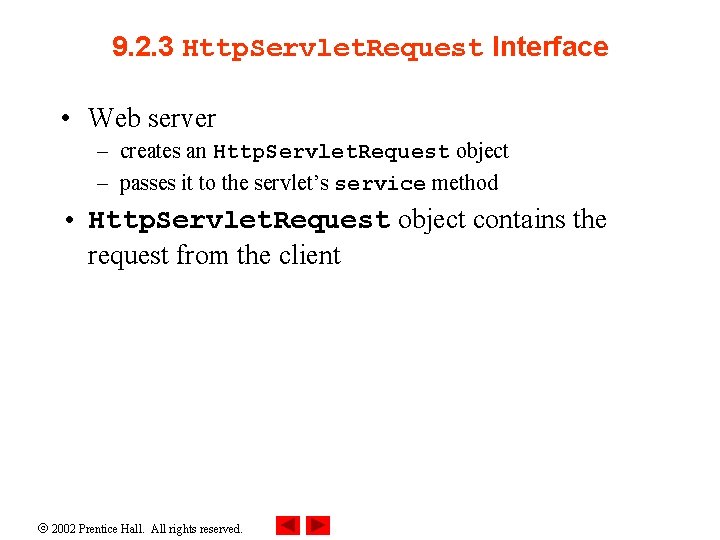
9. 2. 3 Http. Servlet. Request Interface • Web server – creates an Http. Servlet. Request object – passes it to the servlet’s service method • Http. Servlet. Request object contains the request from the client 2002 Prentice Hall. All rights reserved.
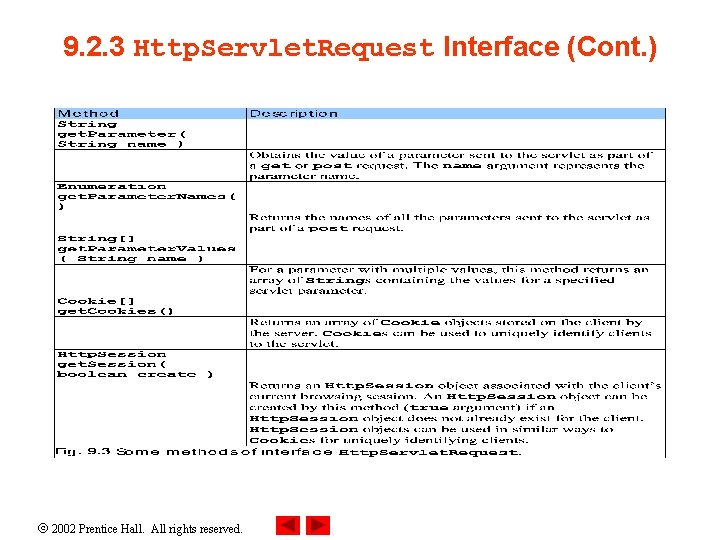
9. 2. 3 Http. Servlet. Request Interface (Cont. ) 2002 Prentice Hall. All rights reserved.
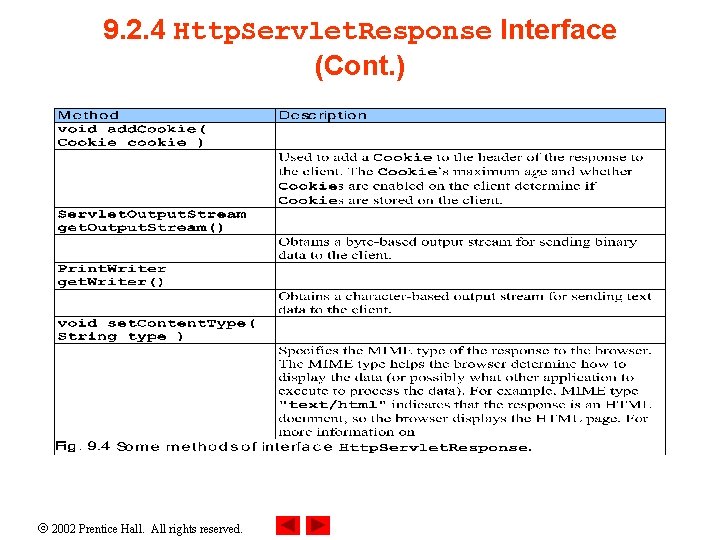
9. 2. 4 Http. Servlet. Response Interface • Web server – creates an Http. Servlet. Response object – passes it to the servlet’s service method 2002 Prentice Hall. All rights reserved.
9. 2. 4 Http. Servlet. Response Interface (Cont. ) 2002 Prentice Hall. All rights reserved.
9. 3 Handling HTTP get Requests • get request – Retrieve the content of a URL • Example: Welcome. Servlet – a servlet handles HTTP get requests 2002 Prentice Hall. All rights reserved.
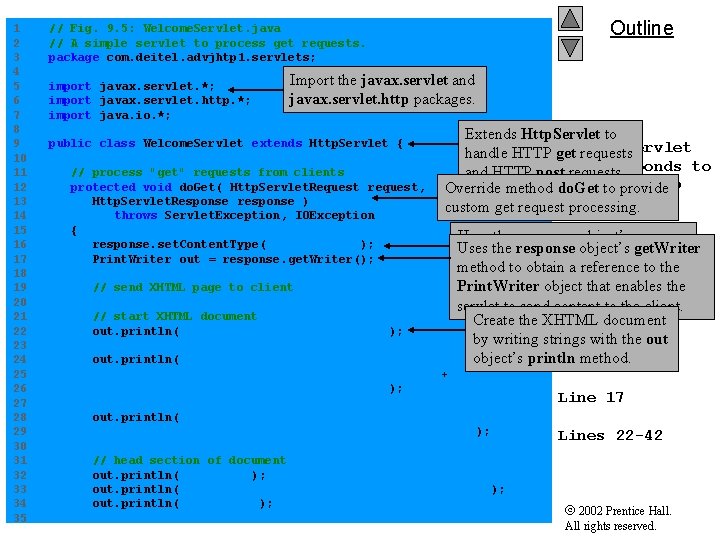
1 2 3 4 5 6 7 8 9 10 11 12 13 14 15 16 17 18 19 20 21 22 23 24 25 26 27 28 29 30 31 32 33 34 35 Outline // Fig. 9. 5: Welcome. Servlet. java // A simple servlet to process get requests. package com. deitel. advjhtp 1. servlets; import javax. servlet. *; import javax. servlet. http. *; import java. io. *; Import the javax. servlet and javax. servlet. http packages. public class Welcome. Servlet extends Http. Servlet { // process "get" requests from clients protected void do. Get( Http. Servlet. Request request, Http. Servlet. Response response ) throws Servlet. Exception, IOException { response. set. Content. Type( "text/html" ); Print. Writer out = response. get. Writer(); Fig. to 9. 5 Extends Http. Servlet Welcome. Servlet handle HTTP get requests that responds to and HTTP post requests. a simple HTTP Override method do. Get to provide request. custom get requestget processing. // send XHTML page to client // start XHTML document out. println( "<? xml version = "1. 0"? >" ); out. println( "<!DOCTYPE html PUBLIC "-//W 3 C//DTD "XHTML 1. 0 Strict//EN" "http: //www. w 3. org" + "/TR/xhtml 1/DTD/xhtml 1 -strict. dtd">" ); Uses the response object’s Lines 5 -6 Uses the response object’s set. Content. Type method toget. Writer specify method to obtain a reference the content type. Line of the data totobethe 9 Print. Writer object that enables sent as the response to the client. the servlet to send content to the client. Linesdocument 12 -44 Create the XHTML by writing strings with the out Line 16 " +object’s println method. out. println( "<html xmlns = "http: //www. w 3. org/1999/ xhtml">" ); // head section of document out. println( "<head>" ); out. println( "<title>A Simple Servlet Example</title>" ); out. println( "</head>" ); Line 17 Lines 22 -42 2002 Prentice Hall. All rights reserved.
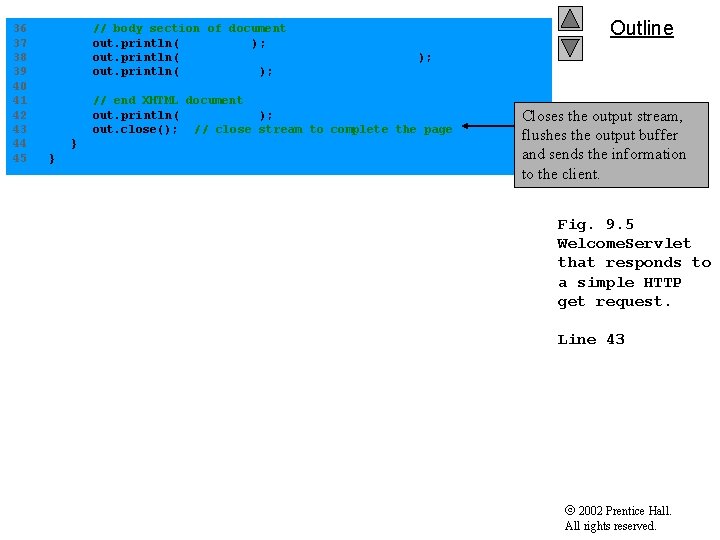
36 37 38 39 40 41 42 43 44 45 // body section of document out. println( "<body>" ); out. println( "<h 1>Welcome to Servlets!</h 1>" ); out. println( "</body>" ); // end XHTML document out. println( "</html>" ); out. close(); // close stream to complete the page } } Outline Closes the output stream, flushes the output buffer and sends the information to the client. Fig. 9. 5 Welcome. Servlet that responds to a simple HTTP get request. Line 43 2002 Prentice Hall. All rights reserved.
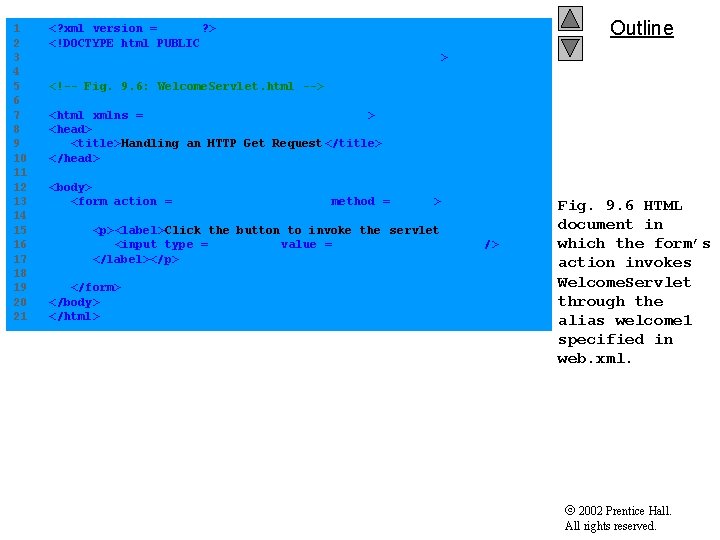
1 2 3 4 5 6 7 8 9 10 11 12 13 14 15 16 17 18 19 20 21 <? xml version = "1. 0"? > <!DOCTYPE html PUBLIC "-//W 3 C//DTD XHTML 1. 0 Strict//EN" "http: //www. w 3. org/TR/xhtml 1/DTD/xhtml 1 -strict. dtd"> Outline <!-- Fig. 9. 6: Welcome. Servlet. html --> <html xmlns = "http: //www. w 3. org/1999/ xhtml"> <head> <title>Handling an HTTP Get Request </title> </head> <body> <form action = "/advjhtp 1/welcome 1" method = "get"> <p><label>Click the button to invoke the servlet <input type = "submit" value = "Get HTML Document" /> </label></p> </form> </body> </html> Fig. 9. 6 HTML document in which the form’s action invokes Welcome. Servlet through the alias welcome 1 specified in web. xml. 2002 Prentice Hall. All rights reserved.
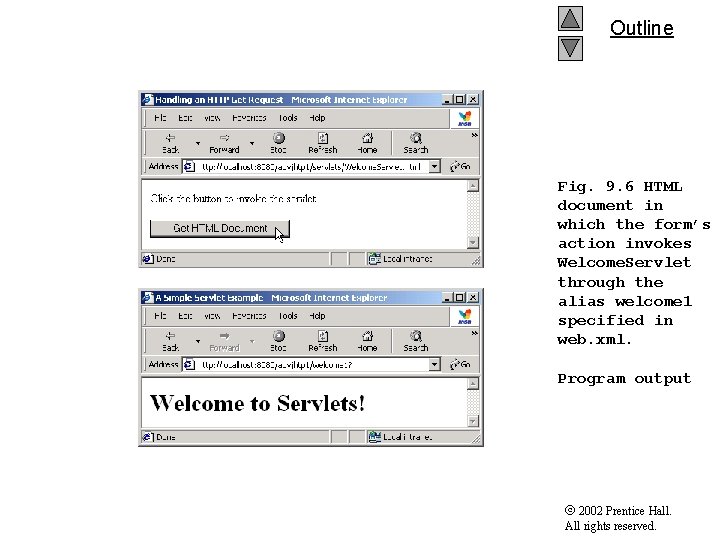
Outline Fig. 9. 6 HTML document in which the form’s action invokes Welcome. Servlet through the alias welcome 1 specified in web. xml. Program output 2002 Prentice Hall. All rights reserved.
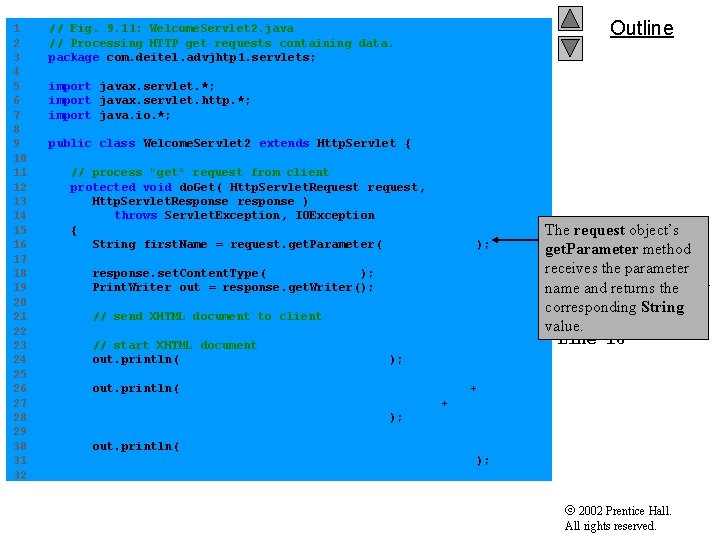
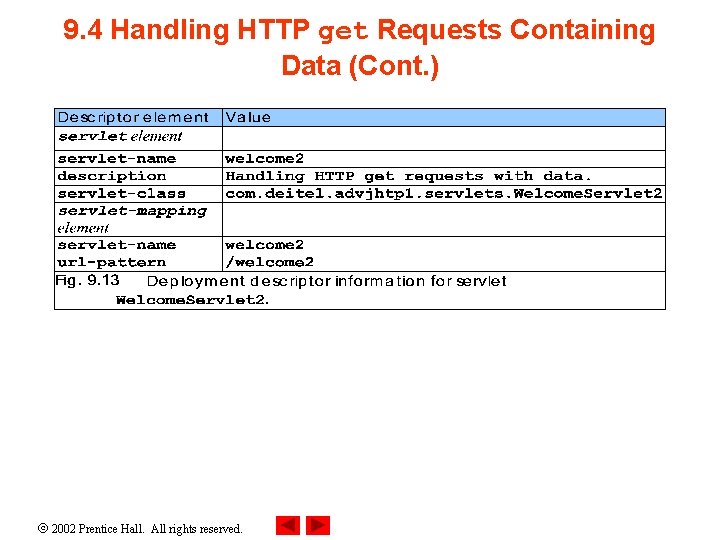
9. 4 Handling HTTP get Requests Containing Data • Servlet Welcome. Servlet 2 – Responds to a get request that contains data 2002 Prentice Hall. All rights reserved.
1 2 3 4 5 6 7 8 9 10 11 12 13 14 15 16 17 18 19 20 21 22 23 24 25 26 27 28 29 30 31 32 // Fig. 9. 11: Welcome. Servlet 2. java // Processing HTTP get requests containing data. package com. deitel. advjhtp 1. servlets; Outline import javax. servlet. *; import javax. servlet. http. *; import java. io. *; public class Welcome. Servlet 2 extends Http. Servlet { // process "get" request from client protected void do. Get( Http. Servlet. Request request, Http. Servlet. Response response ) throws Servlet. Exception, IOException { String first. Name = request. get. Parameter( "firstname" ); response. set. Content. Type( "text/html" ); Print. Writer out = response. get. Writer(); // send XHTML document to client // start XHTML document out. println( "<? xml version = "1. 0"? >" ); Fig. 9. 11 The request object’s Welcome. Servlet 2 get. Parameter method responds to a receives the parameter getand request name returns thethat contains String data. corresponding value. Line 16 out. println( "<!DOCTYPE html PUBLIC "-//W 3 C//DTD " + "XHTML 1. 0 Strict//EN" "http: //www. w 3. org" + "/TR/xhtml 1/DTD/xhtml 1 -strict. dtd">" ); out. println( "<html xmlns = "http: //www. w 3. org/1999/ xhtml">" ); 2002 Prentice Hall. All rights reserved.
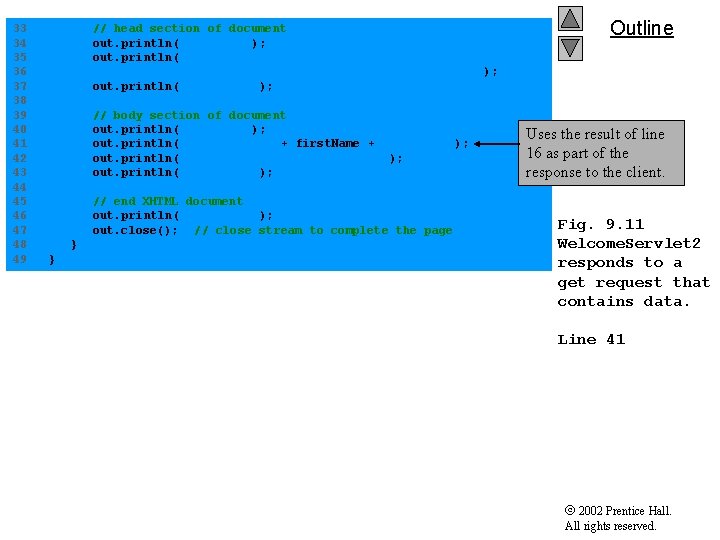
33 34 35 36 37 38 39 40 41 42 43 44 45 46 47 48 49 // head section of document out. println( "<head>" ); out. println( "<title>Processing get requests with data</title>" ); out. println( "</head>" ); // body section of document out. println( "<body>" ); out. println( "<h 1>Hello " + first. Name + ", " ); out. println( "Welcome to Servlets!</h 1>" ); out. println( "</body>" ); // end XHTML document out. println( "</html>" ); out. close(); // close stream to complete the page } } Outline Uses the result of line 16 as part of the response to the client. Fig. 9. 11 Welcome. Servlet 2 responds to a get request that contains data. Line 41 2002 Prentice Hall. All rights reserved.
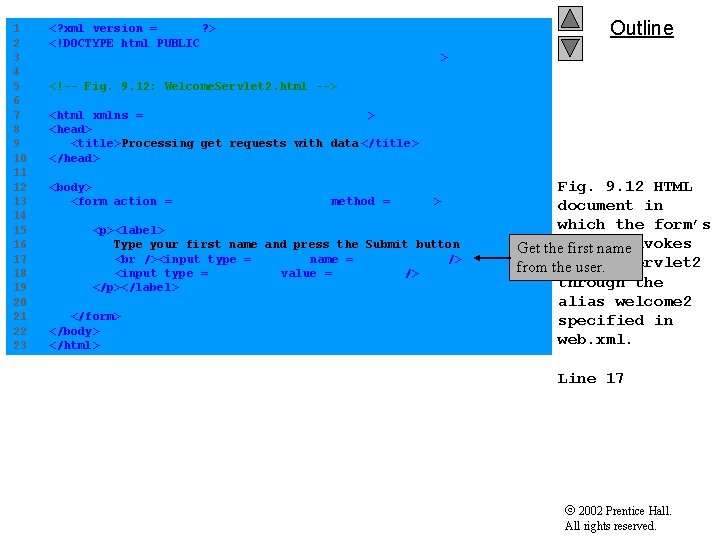
1 2 3 4 5 6 7 8 9 10 11 12 13 14 15 16 17 18 19 20 21 22 23 <? xml version = "1. 0"? > <!DOCTYPE html PUBLIC "-//W 3 C//DTD XHTML 1. 0 Strict//EN" "http: //www. w 3. org/TR/xhtml 1/DTD/xhtml 1 -strict. dtd"> Outline <!-- Fig. 9. 12: Welcome. Servlet 2. html --> <html xmlns = "http: //www. w 3. org/1999/ xhtml"> <head> <title>Processing get requests with data </title> </head> <body> <form action = "/advjhtp 1/welcome 2" method = "get"> <p><label> Type your first name and press the Submit button <input type = "text" name = "firstname" /> <input type = "submit" value = "Submit" /> </p></label> </form> </body> </html> Fig. 9. 12 HTML document in which the form’s Get theaction first nameinvokes Welcome. Servlet 2 from the user. through the alias welcome 2 specified in web. xml. Line 17 2002 Prentice Hall. All rights reserved.
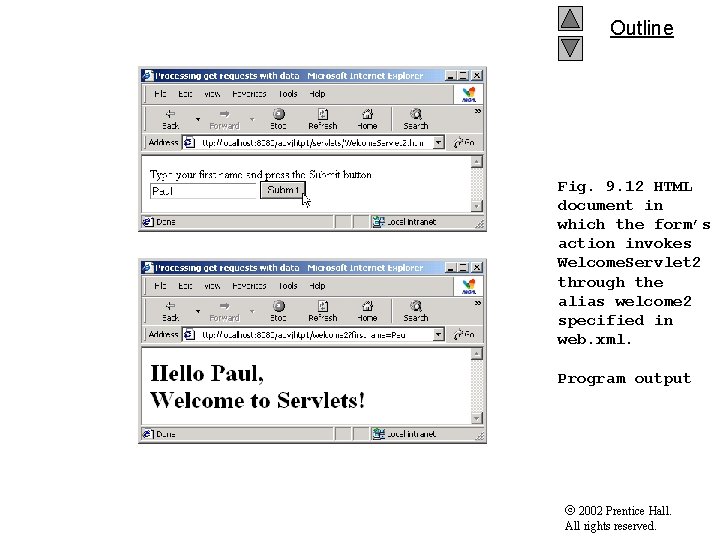
Outline Fig. 9. 12 HTML document in which the form’s action invokes Welcome. Servlet 2 through the alias welcome 2 specified in web. xml. Program output 2002 Prentice Hall. All rights reserved.
9. 4 Handling HTTP get Requests Containing Data (Cont. ) 2002 Prentice Hall. All rights reserved.
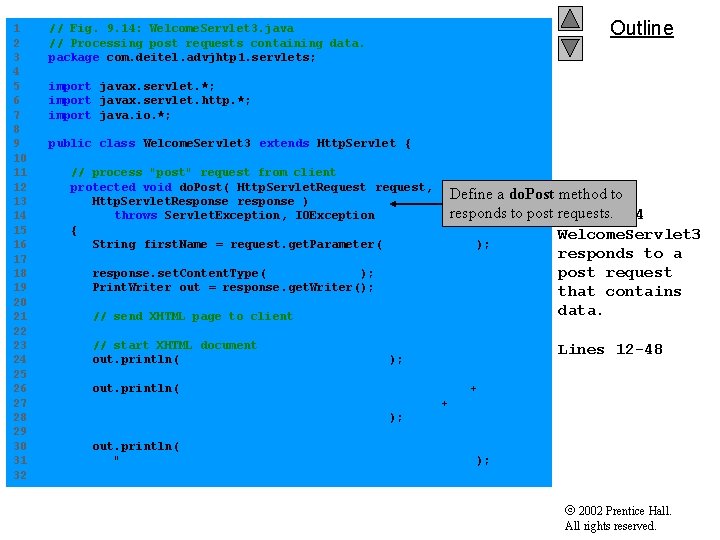
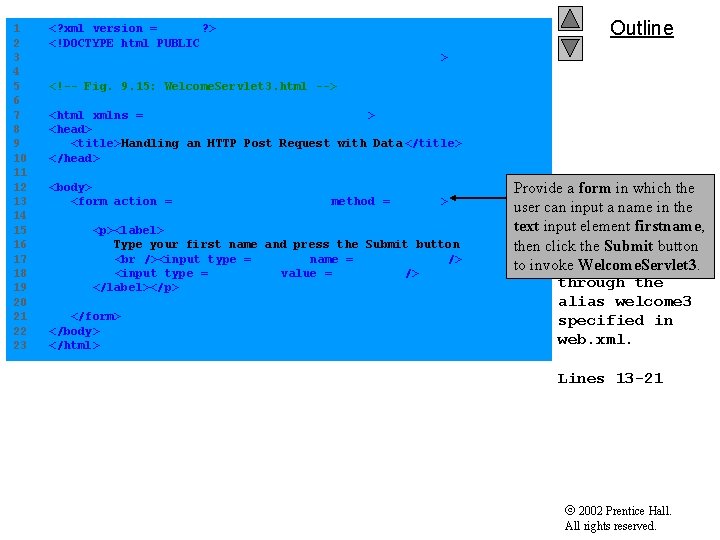
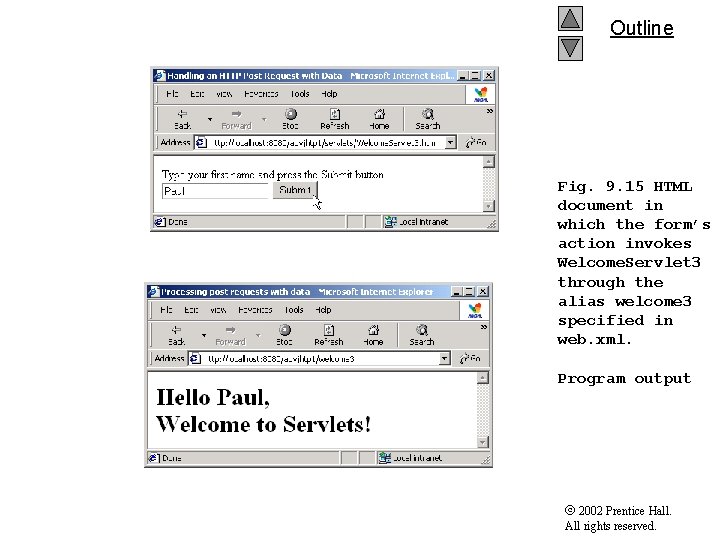
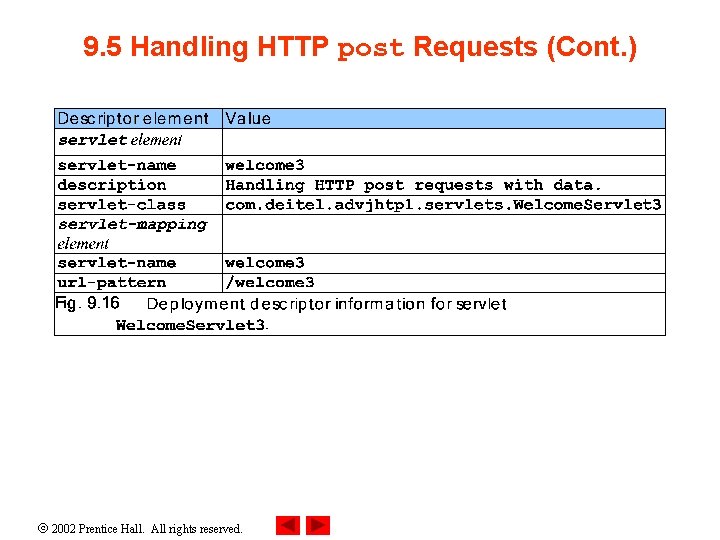
9. 5 Handling HTTP post Requests • HTTP post request – Post data from an HTML form to a server-side form handler – Browsers cache Web pages • Servlet Welcome. Servlet 3 – Responds to a post request that contains data 2002 Prentice Hall. All rights reserved.
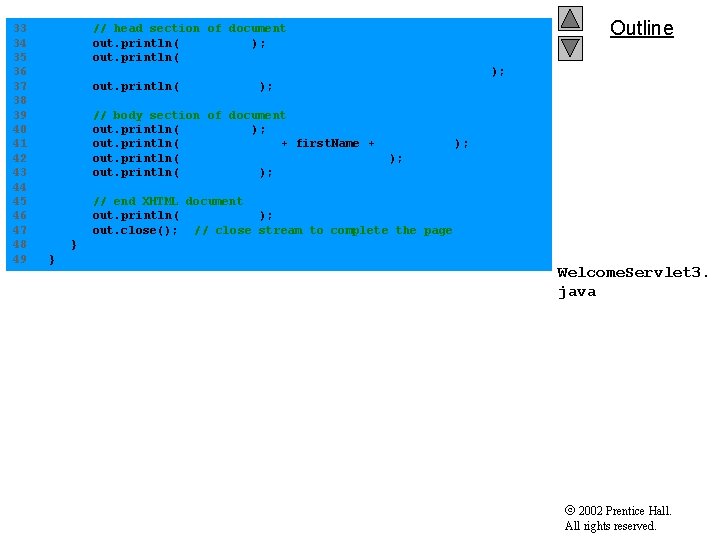
1 2 3 4 5 6 7 8 9 10 11 12 13 14 15 16 17 18 19 20 21 22 23 24 25 26 27 28 29 30 31 32 // Fig. 9. 14: Welcome. Servlet 3. java // Processing post requests containing data. package com. deitel. advjhtp 1. servlets; Outline import javax. servlet. *; import javax. servlet. http. *; import java. io. *; public class Welcome. Servlet 3 extends Http. Servlet { // process "post" request from client protected void do. Post( Http. Servlet. Request request, Define a do. Post method to Http. Servlet. Response response ) responds to post requests. Fig. 9. 14 throws Servlet. Exception, IOException { Welcome. Servlet 3 String first. Name = request. get. Parameter( "firstname" ); response. set. Content. Type( "text/html" ); Print. Writer out = response. get. Writer(); // send XHTML page to client // start XHTML document out. println( "<? xml version = "1. 0"? >" ); responds to a post request that contains data. Lines 12 -48 out. println( "<!DOCTYPE html PUBLIC "-//W 3 C//DTD " + "XHTML 1. 0 Strict//EN" "http: //www. w 3. org" + "/TR/xhtml 1/DTD/xhtml 1 -strict. dtd">" ); out. println( "<html xmlns = "http: //www. w 3. org/1999/ xhtml">" ); 2002 Prentice Hall. All rights reserved.
33 34 35 36 37 38 39 40 41 42 43 44 45 46 47 48 49 // head section of document out. println( "<head>" ); out. println( "<title>Processing post requests with data</title>" ); out. println( "</head>" ); Outline // body section of document out. println( "<body>" ); out. println( "<h 1>Hello " + first. Name + ", " ); out. println( "Welcome to Servlets!</h 1>" ); out. println( "</body>" ); // end XHTML document out. println( "</html>" ); out. close(); // close stream to complete the page } } Welcome. Servlet 3. java 2002 Prentice Hall. All rights reserved.
1 2 3 4 5 6 7 8 9 10 11 12 13 14 15 16 17 18 19 20 21 22 23 <? xml version = "1. 0"? > <!DOCTYPE html PUBLIC "-//W 3 C//DTD XHTML 1. 0 Strict//EN" "http: //www. w 3. org/TR/xhtml 1/DTD/xhtml 1 -strict. dtd"> Outline <!-- Fig. 9. 15: Welcome. Servlet 3. html --> <html xmlns = "http: //www. w 3. org/1999/ xhtml"> <head> <title>Handling an HTTP Post Request with Data </title> </head> <body> <form action = "/advjhtp 1/welcome 3" method = "post"> <p><label> Type your first name and press the Submit button <input type = "text" name = "firstname" /> <input type = "submit" value = "Submit" /> </label></p> </form> </body> </html> HTML Provide. Fig. a form 9. 15 in which the document inin the user can input a name which the form’s text input element firstname, action invokes then click the Submit button Welcome. Servlet 3 to invoke Welcome. Servlet 3. through the alias welcome 3 specified in web. xml. Lines 13 -21 2002 Prentice Hall. All rights reserved.
Outline Fig. 9. 15 HTML document in which the form’s action invokes Welcome. Servlet 3 through the alias welcome 3 specified in web. xml. Program output 2002 Prentice Hall. All rights reserved.
9. 5 Handling HTTP post Requests (Cont. ) 2002 Prentice Hall. All rights reserved.