
Chapter 9 Relational Database Design by ER and
Chapter 9 Relational Database Design by ER- and EER-to-Relational Mapping Copyright © 2011 Pearson Education, Inc. Publishing as Pearson Addison-Wesley
Chapter 9 Relational Database Design by ER- and EER-to-Relational Mapping Copyright © 2011 Pearson Education, Inc. Publishing as Pearson Addison-Wesley
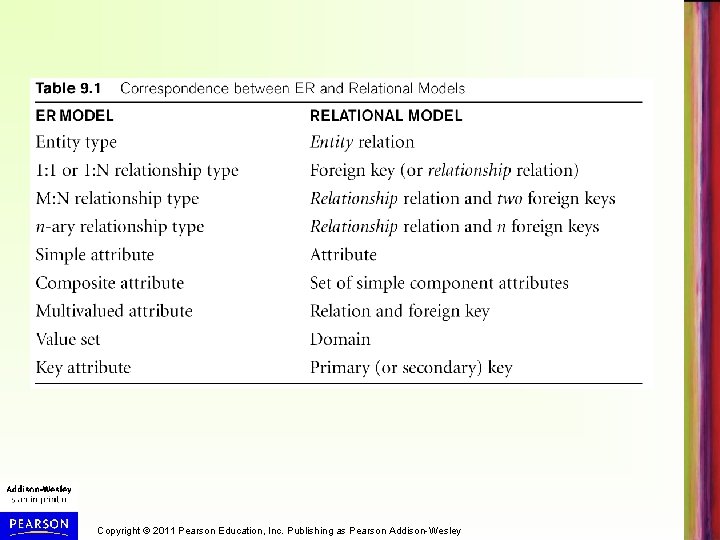
Chapter 9 Outline • Schema Mapping (Logical Database Design) step of Database Design • ER-to-Relational Mapping Algorithm – – – – Step 1: Mapping of Regular Entity Types Step 2: Mapping of Weak Entity Types Step 3: Mapping of Binary 1: 1 Relation Types Step 4: Mapping of Binary 1: N Relationship Types. Step 5: Mapping of Binary M: N Relationship Types. Step 6: Mapping of Multivalued attributes. Step 7: Mapping of N-ary Relationship Types. • Mapping EER Model Constructs – Step 8: Options for Mapping Specialization or Generalization. – Step 9: Mapping of Union Types (Categories). Copyright © 2011 Pearson Education, Inc. Publishing as Pearson Addison-Wesley
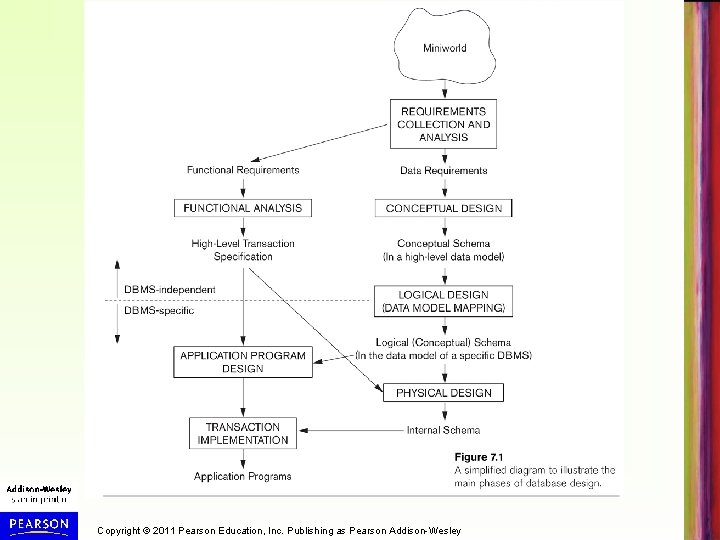
Data Model Mapping Phase of Relational DB Design • DB designers use ER/EER or other conceptual data model to produce a conceptual schema design (independent from any specific DBMS) during the Conceptual Database Design phase • In Logical Database Design Phase (see Figure 7. 1, next slide) conceptual schema design is converted (Mapped) to the data model of the DBMS – Typically relational model (see Chapters 3 -6), or object/objectrelational models (see Chapter 11) – Data model mapping is usually automated or semi-automated in many database design tools • In this chapter, we study the various options for mapping ER/EER model constructs to relational model constructs – Object and object-relational mapping discussed in Chapter 11 Copyright © 2011 Pearson Education, Inc. Publishing as Pearson Addison-Wesley
Copyright © 2011 Pearson Education, Inc. Publishing as Pearson Addison-Wesley
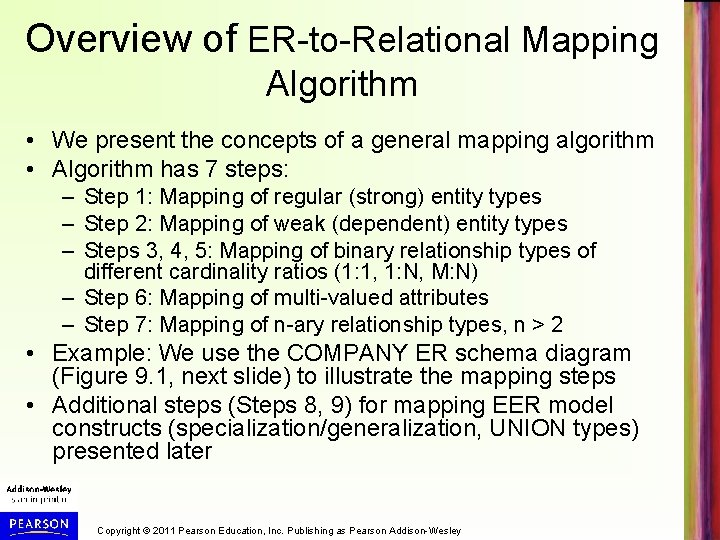
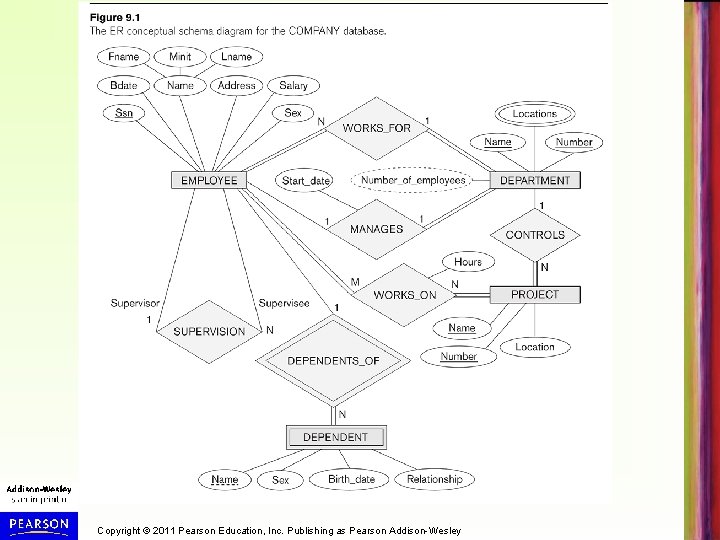
Overview of ER-to-Relational Mapping Algorithm • We present the concepts of a general mapping algorithm • Algorithm has 7 steps: – Step 1: Mapping of regular (strong) entity types – Step 2: Mapping of weak (dependent) entity types – Steps 3, 4, 5: Mapping of binary relationship types of different cardinality ratios (1: 1, 1: N, M: N) – Step 6: Mapping of multi-valued attributes – Step 7: Mapping of n-ary relationship types, n > 2 • Example: We use the COMPANY ER schema diagram (Figure 9. 1, next slide) to illustrate the mapping steps • Additional steps (Steps 8, 9) for mapping EER model constructs (specialization/generalization, UNION types) presented later Copyright © 2011 Pearson Education, Inc. Publishing as Pearson Addison-Wesley
Copyright © 2011 Pearson Education, Inc. Publishing as Pearson Addison-Wesley
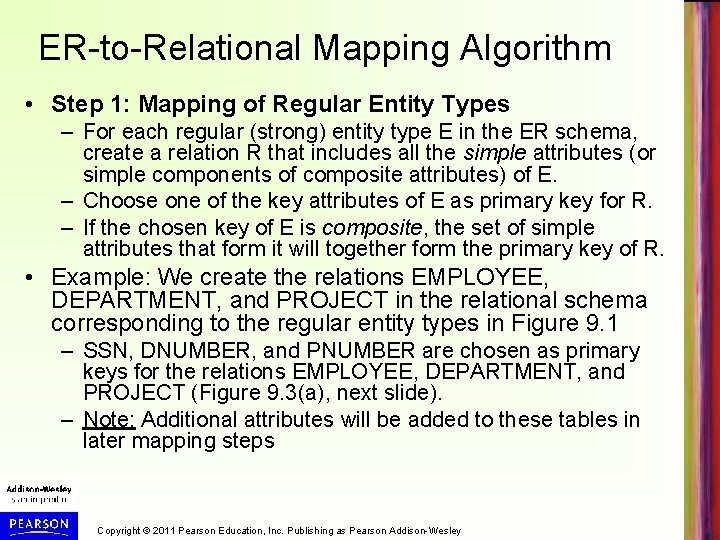
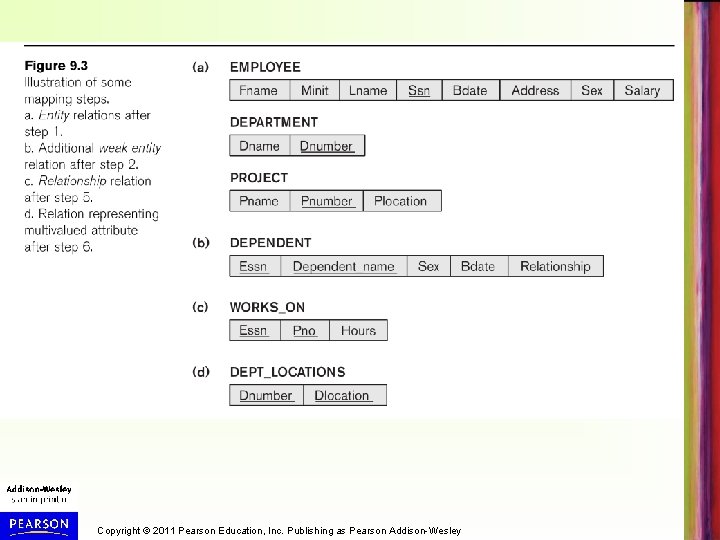
ER-to-Relational Mapping Algorithm • Step 1: Mapping of Regular Entity Types – For each regular (strong) entity type E in the ER schema, create a relation R that includes all the simple attributes (or simple components of composite attributes) of E. – Choose one of the key attributes of E as primary key for R. – If the chosen key of E is composite, the set of simple attributes that form it will together form the primary key of R. • Example: We create the relations EMPLOYEE, DEPARTMENT, and PROJECT in the relational schema corresponding to the regular entity types in Figure 9. 1 – SSN, DNUMBER, and PNUMBER are chosen as primary keys for the relations EMPLOYEE, DEPARTMENT, and PROJECT (Figure 9. 3(a), next slide). – Note: Additional attributes will be added to these tables in later mapping steps Copyright © 2011 Pearson Education, Inc. Publishing as Pearson Addison-Wesley
Copyright © 2011 Pearson Education, Inc. Publishing as Pearson Addison-Wesley
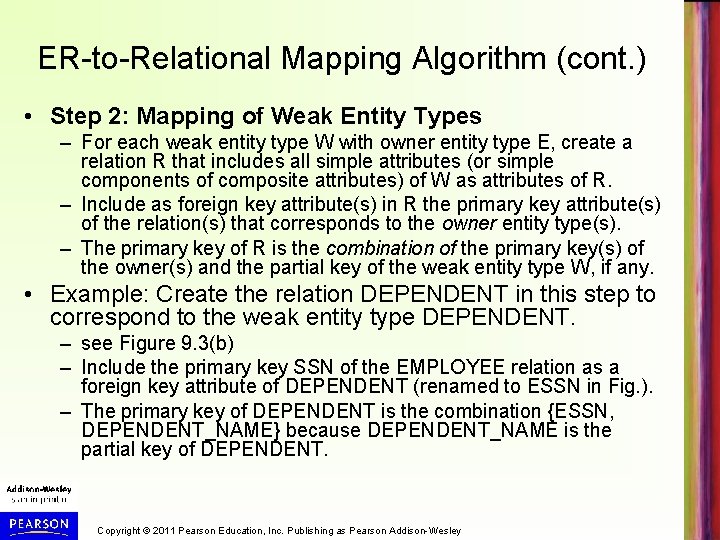
ER-to-Relational Mapping Algorithm (cont. ) • Step 2: Mapping of Weak Entity Types – For each weak entity type W with owner entity type E, create a relation R that includes all simple attributes (or simple components of composite attributes) of W as attributes of R. – Include as foreign key attribute(s) in R the primary key attribute(s) of the relation(s) that corresponds to the owner entity type(s). – The primary key of R is the combination of the primary key(s) of the owner(s) and the partial key of the weak entity type W, if any. • Example: Create the relation DEPENDENT in this step to correspond to the weak entity type DEPENDENT. – see Figure 9. 3(b) – Include the primary key SSN of the EMPLOYEE relation as a foreign key attribute of DEPENDENT (renamed to ESSN in Fig. ). – The primary key of DEPENDENT is the combination {ESSN, DEPENDENT_NAME} because DEPENDENT_NAME is the partial key of DEPENDENT. Copyright © 2011 Pearson Education, Inc. Publishing as Pearson Addison-Wesley
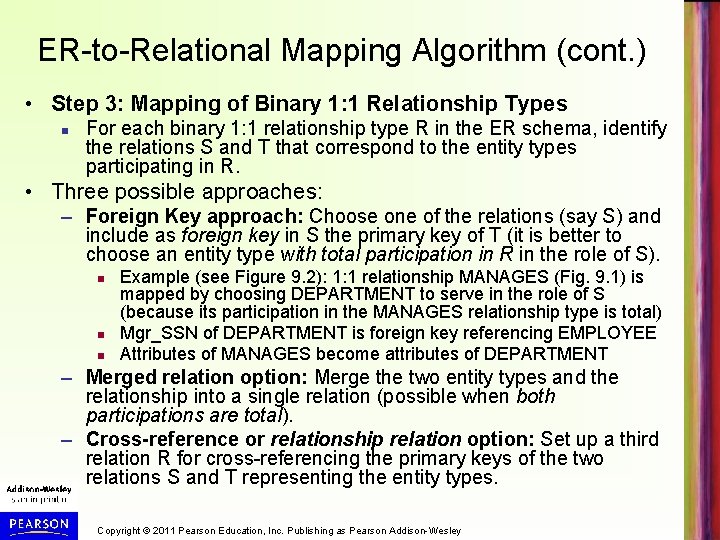
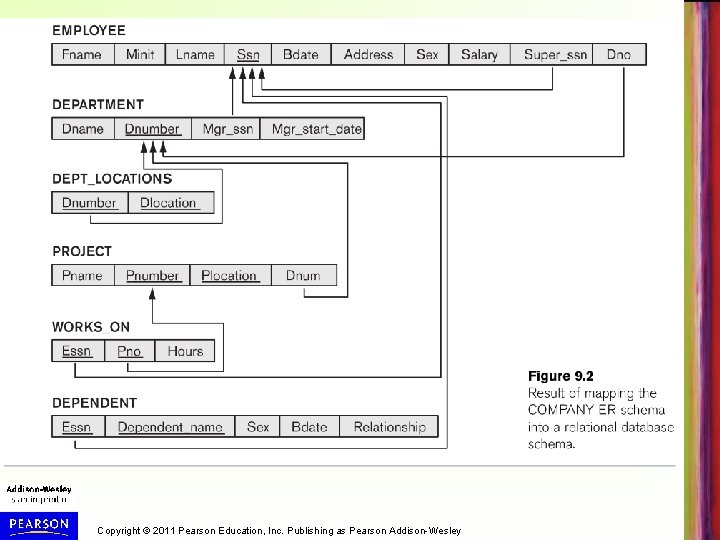
ER-to-Relational Mapping Algorithm (cont. ) • Step 3: Mapping of Binary 1: 1 Relationship Types For each binary 1: 1 relationship type R in the ER schema, identify the relations S and T that correspond to the entity types participating in R. • Three possible approaches: – Foreign Key approach: Choose one of the relations (say S) and include as foreign key in S the primary key of T (it is better to choose an entity type with total participation in R in the role of S). Example (see Figure 9. 2): 1: 1 relationship MANAGES (Fig. 9. 1) is mapped by choosing DEPARTMENT to serve in the role of S (because its participation in the MANAGES relationship type is total) Mgr_SSN of DEPARTMENT is foreign key referencing EMPLOYEE Attributes of MANAGES become attributes of DEPARTMENT – Merged relation option: Merge the two entity types and the relationship into a single relation (possible when both participations are total). – Cross-reference or relationship relation option: Set up a third relation R for cross-referencing the primary keys of the two relations S and T representing the entity types. Copyright © 2011 Pearson Education, Inc. Publishing as Pearson Addison-Wesley
Copyright © 2011 Pearson Education, Inc. Publishing as Pearson Addison-Wesley
ER-to-Relational Mapping Algorithm (cont. ) • Step 4: Mapping of Binary 1: N Relationship Types – For each regular binary 1: N relationship type R, identify the relation S that represent the participating entity type at the N -side of the relationship type. – Include as foreign key in S the primary key of the relation T that represents the other entity type participating in R. – Include any simple attributes of the 1: N relation type as attributes of S. • Examples (Figures 9. 1, 9. 2): 1: N relationship types are WORKS_FOR, CONTROLS, and SUPERVISION. – For WORKS_FOR we include the primary key DNUMBER of the DEPARTMENT relation as foreign key in the EMPLOYEE relation and call it DNO – (cont. on next slide) Copyright © 2011 Pearson Education, Inc. Publishing as Pearson Addison-Wesley
ER-to-Relational Mapping Algorithm (cont. ) • Examples (cont. ): – For CONTROLS, we include the primary key DNUMBER of DEPARTMENT as foreign key in PROJECT and call it DNUM. – For SUPERVISION, we include the primary key SSN of EMPLOYEE as foreign key in EMPLOYEE itself and call it Super. SSN (this is a recursive relationship) • All three 1: N relationship examples (Figures 9. 1, WORKS_FOR, CONTROLS, and SUPERVISION) are mapped using the foreign key option in Figure 9. 2 – Can also use the cross-reference option (create a separate relation that has the primary keys of both relations as foreign keys). Copyright © 2011 Pearson Education, Inc. Publishing as Pearson Addison-Wesley
ER-to-Relational Mapping Algorithm (cont. ) • Step 5: Mapping of Binary M: N Relationship Types – For each regular binary M: N relationship type R, create a new relation S to represent R. – Include as foreign key attributes in S the primary keys of the relations that represent the participating entity types; their combination will form the primary key of S. – Also include any simple attributes of the M: N relationship type (or simple components of composite attributes) as attributes of S. • Example: The M: N relationship type WORKS_ON (Figure 9. 1) is mapped by creating a relation WORKS_ON in the relational database schema (Figure 9. 3(c), Figure 9. 2). – The primary keys of PROJECT and EMPLOYEE are foreign keys in WORKS_ON and renamed PNO and ESSN, respectively. – Attribute HOURS in WORKS_ON represents the HOURS attribute of the relation type. – The primary key of WORKS_ON is the combination {ESSN, PNO}. Copyright © 2011 Pearson Education, Inc. Publishing as Pearson Addison-Wesley
ER-to-Relational Mapping Algorithm (cont. ) • Discussion of Mapping of Binary Relationship Types (steps 3, 4, and 5): – Foreign key option is preferred for 1: 1 and 1: N relationships, but cannot be used for M: N relationships. – Relationship relation option can be used for any cardinality ratio, but the primary key will be different: • Combination of both foreign keys for M: N • Either foreign key for 1: 1 • Foreign key in the N-side relation for 1: N – Attributes of relationship type are included in the relationship relation (for cross-referencing option), or in the relation that includes the foreign key (for foreign key option). Copyright © 2011 Pearson Education, Inc. Publishing as Pearson Addison-Wesley
ER-to-Relational Mapping Algorithm (cont. ) • Step 6: Mapping of Multivalued attributes. – For each multivalued attribute A, create a new relation R. – This relation R will include an attribute corresponding to A, plus the primary key attribute K (as a foreign key in R) of the relation that represents the entity type that has A as an attribute. – The primary key of R is the combination of A and K. If the multivalued attribute is composite, we include its simple components. • Example (Figure 9. 3(d)): The relation DEPT_LOCATIONS is created. – The attribute DLOCATION represents the multivalued attribute Locations of DEPARTMENT (Figure 9. 1), while DNUMBER is foreign key to the DEPARTMENT relation (Figure 9. 2). – The primary key of DEPT_LOCATIONS is the combination of {DNUMBER, DLOCATION}. Copyright © 2011 Pearson Education, Inc. Publishing as Pearson Addison-Wesley
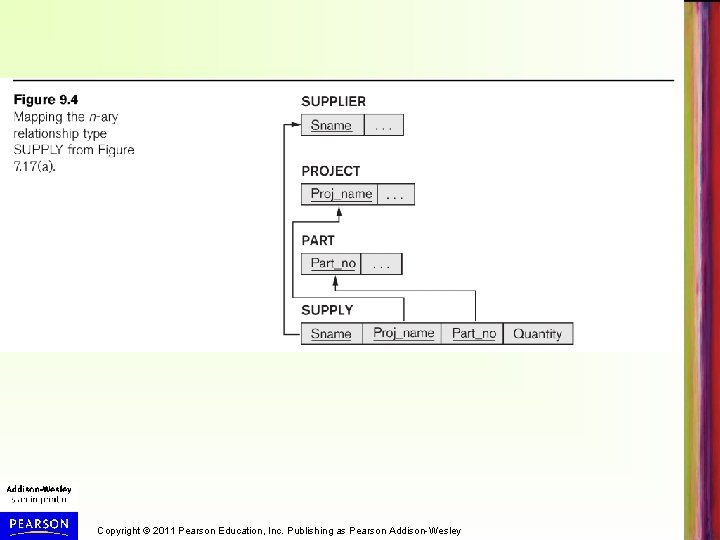
ER-to-Relational Mapping Algorithm (cont. ) • Step 7: Mapping of N-ary Relationship Types. – For each n-ary relationship type R, where n>2, create a new relationship relation S to represent R. – Include as foreign key attributes in S the primary keys of the relations that represent the participating entity types. – Also include any simple attributes of the n-ary relationship type (or simple components of composite attributes) as attributes of S. • Example: The relationship type SUPPLY (Figure 7. 17(a), next slide) – This can be mapped to the relation SUPPLY (Figure 9. 4, following slide), whose primary key is the combination of the three foreign keys {SNAME, PARTNO, PROJNAME} Copyright © 2011 Pearson Education, Inc. Publishing as Pearson Addison-Wesley

Copyright © 2011 Pearson Education, Inc. Publishing as Pearson Addison-Wesley
Copyright © 2011 Pearson Education, Inc. Publishing as Pearson Addison-Wesley
Copyright © 2011 Pearson Education, Inc. Publishing as Pearson Addison-Wesley
Mapping EER Model Constructs to Relations • We add two steps 8 and 9 to map EER model constructs – Step 8 is for mapping specialization/generalization and subclasses – Several options exist in step 8 – Step 9 is for mapping categories (UNION types) – Step 9 can involve creating surrogate (artificial) key attributes for the relation representing the UNION type Copyright © 2011 Pearson Education, Inc. Publishing as Pearson Addison-Wesley
Mapping EER Model Constructs to Relations (cont. ) • Step 8: Options for Mapping Specialization (or Generalization) – Convert each specialization with m subclasses {S 1, S 2, …. , Sm} and generalized superclass C, where the attributes of C are {k, a 1, …an} and k is the (primary) key, into relational schemas using one of the four following options: • • Option 8 A: Multiple relations-Superclass and subclasses Option 8 B: Multiple relations-Subclass relations only Option 8 C: Single relation with one type attribute Option 8 D: Single relation with multiple type (or mapping) attributes Copyright © 2011 Pearson Education, Inc. Publishing as Pearson Addison-Wesley
Mapping EER Model Constructs to Relations (cont. ) • Option 8 A: Multiple relations-Superclass and subclasses (see Figure 9. 5(a), next slide) – Create a relation L for superclass C with attributes Attrs(L) = {k, a 1, …an} and PK(L) = k. Create a relation Li for each subclass Si, 1 < i < m, with the attributes Attrs(Li) = {k} U {attributes of Si} and PK(Li)=k. This option works for any specialization (total or partial, disjoint of over-lapping). • Option 8 B: Multiple relations-Subclass relations only (see Figure 9. 5(b), next slide) – Create a relation Li for each subclass Si, 1 < i < m, with the attributes Attr(Li) = {attributes of Si} U {k, a 1…, an} and PK(Li) = k. This option only works for a specialization whose subclasses are total (every entity in the superclass must belong to (at least) one of the subclasses) – Works best if subclasses are also disjoint Copyright © 2011 Pearson Education, Inc. Publishing as Pearson Addison-Wesley

Copyright © 2011 Pearson Education, Inc. Publishing as Pearson Addison-Wesley

Copyright © 2011 Pearson Education, Inc. Publishing as Pearson Addison-Wesley

Copyright © 2011 Pearson Education, Inc. Publishing as Pearson Addison-Wesley
Mapping EER Model Constructs to Relations (cont. ) • Option 8 C: Single relation with one type attribute – Create a single relation L with attributes Attrs(L) = {k, a 1, …an} U {attributes of S 1} U…U {attributes of Sm} U {t} and PK(L) = k. The attribute t is called a type (or discriminating) attribute that indicates the subclass to which each tuple belongs – Works for disjoint subclasses (see Figure 9. 5(c)) • Option 8 D: Single relation with multiple type attributes – Create a single relation schema L with attributes Attrs(L) = {k, a 1, …an} U {attributes of S 1} U…U {attributes of Sm} U {t 1, t 2, …, tm} and PK(L) = k. Each ti, 1 < I < m, is a Boolean type attribute indicating whether or not a tuple belongs to the subclass Si. – Works for overlapping subclasses (see Figure 9. 5(d)) Copyright © 2011 Pearson Education, Inc. Publishing as Pearson Addison-Wesley

Copyright © 2011 Pearson Education, Inc. Publishing as Pearson Addison-Wesley
Mapping EER Model Constructs to Relations (cont. ) • Mapping of Shared Subclasses (Multiple Inheritance) – A shared subclass, such as STUDENT_ASSISTANT, is a subclass of several classes, indicating multiple inheritance. – These classes must all have the same key attribute; otherwise, the shared subclass would be a category. – We can apply any of the options discussed in Step 8 to a shared subclass, subject to the restriction discussed in Step 8 of the mapping algorithm. – In Figure 9. 6 (next slide), option 8 D is used for the shared subclass STUDENT_ASSISTANT (from Figure 8. 7). Copyright © 2011 Pearson Education, Inc. Publishing as Pearson Addison-Wesley

Copyright © 2011 Pearson Education, Inc. Publishing as Pearson Addison-Wesley

Copyright © 2011 Pearson Education, Inc. Publishing as Pearson Addison-Wesley
Mapping EER Model Constructs to Relations (cont. ) • Step 9: Mapping of Union Types (Categories). – For mapping a category whose defining superclasses have different keys, it is customary to specify a new (artificial) key attribute, called a surrogate key, when creating a relation to correspond to the category. – In Figure 9. 7 (next slide), the relation OWNER corresponds to the OWNER category (from Figure 8. 8). The primary key of the OWNER relation is the surrogate key, which we called Owner. Id. – Unique values of Owner. Id can be created by the system (similar to Object. Id in Object databases, see Chapter 11) – Useful to add an attribute Owner. Type to OWNER relation to indicate if a record represents a BANK, COMPANY, or PERSON (not shown in Figure 9. 7) Copyright © 2011 Pearson Education, Inc. Publishing as Pearson Addison-Wesley

Copyright © 2011 Pearson Education, Inc. Publishing as Pearson Addison-Wesley

Copyright © 2011 Pearson Education, Inc. Publishing as Pearson Addison-Wesley
Chapter Summary • ER-to-Relational Mapping Algorithm – – – – Step 1: Mapping of Regular Entity Types Step 2: Mapping of Weak Entity Types Step 3: Mapping of Binary 1: 1 Relation Types Step 4: Mapping of Binary 1: N Relationship Types. Step 5: Mapping of Binary M: N Relationship Types. Step 6: Mapping of Multivalued attributes. Step 7: Mapping of N-ary Relationship Types. • Mapping EER Model Constructs to Relations – Step 8: Options for Mapping Specialization or Generalization. – Step 9: Mapping of Union Types (Categories). Copyright © 2011 Pearson Education, Inc. Publishing as Pearson Addison-Wesley
Possible In-Class Exercises • Apply the ER-to-Relational Mapping Algorithm to the SHIP_TRACKING ER Schema in Figure 9. 8 (next slide) • Apply the ER and EER Mapping Algorithm to the UNIVERSITY EER database schema in Figure 8. (following slide) Copyright © 2011 Pearson Education, Inc. Publishing as Pearson Addison-Wesley

Copyright © 2011 Pearson Education, Inc. Publishing as Pearson Addison-Wesley

Copyright © 2011 Pearson Education, Inc. Publishing as Pearson Addison-Wesley
- Slides: 39