
CHAPTER 9 NETWORK MANAGEMENT Introduction to Telecommunications by
CHAPTER 9 NETWORK MANAGEMENT Introduction to Telecommunications by Gokhale

Introduction • Network Management encompasses both human and automated tasks that support the creation, operation and evolution of a network • For a network to be effective and efficient over a long period of time, a network management plan must have two goals: • Prevent problems where possible • Prepare for problems that will mostly likely occur 2
Responsibilities of a Network Manager • • • Policy Management Evaluation of Hardware and Software Network Administration & Maintenance Network Security Configuration Management 3
Policy Management • Policy management is an implementation of a set of rules or policies to dictate user connectivity and network resource priorities. It includes three fundamental functions: – Configuring network switches and routers – Verifying (or auditing) network operation – Enforcing the policies, especially technology standards 4
Evaluation of Network Hardware • Client/Server Environment Critical Issues – Server response time • Dedicated server • Remote access server – Server’s ancillary storage: RAID • RAID 0 (Striping) • RAID 1 (Mirroring) • RAID 3, 4, or 5 (Parity-checking RAID) – Server downtime (for upgrades or maintenance) – Server utilization rate • Network administrators are often called on to advise users about ergonomic design of a workstation 5
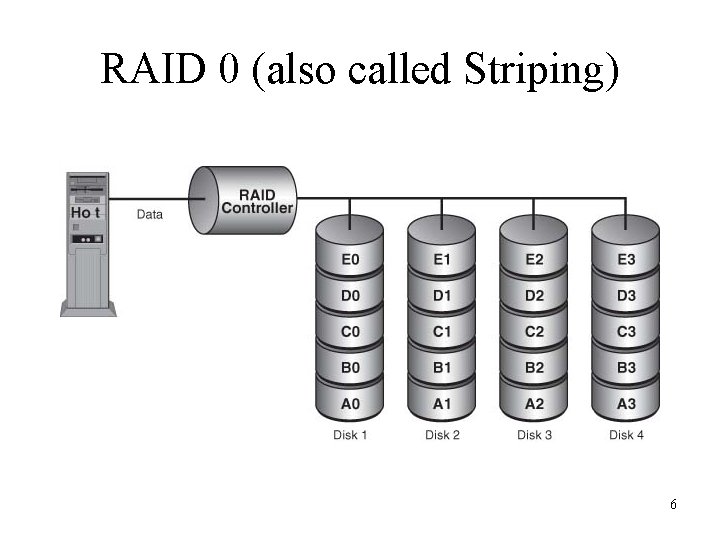
RAID 0 (also called Striping) 6
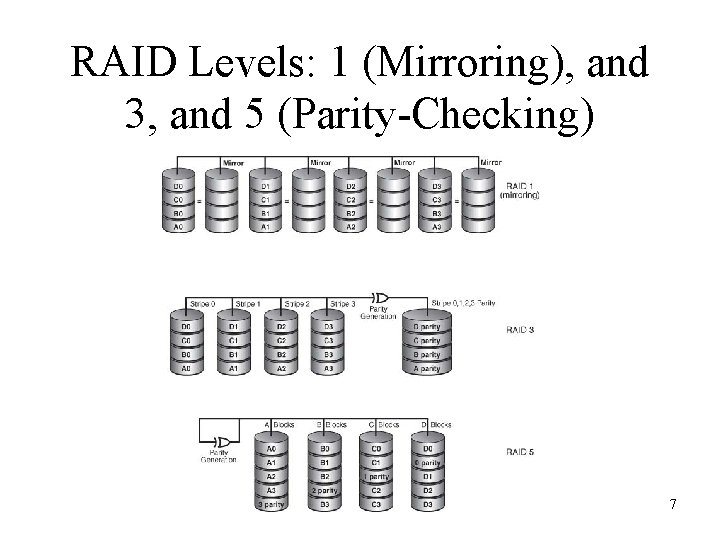
RAID Levels: 1 (Mirroring), and 3, and 5 (Parity-Checking) 7
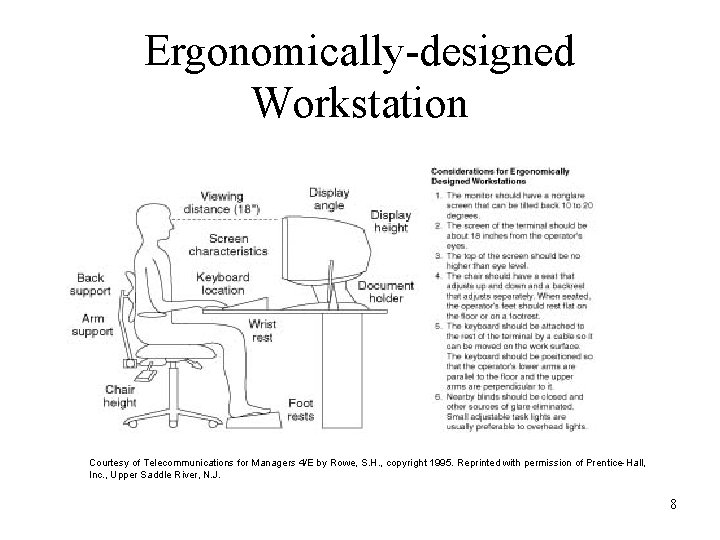
Ergonomically-designed Workstation Courtesy of Telecommunications for Managers 4/E by Rowe, S. H. , copyright 1995. Reprinted with permission of Prentice-Hall, Inc. , Upper Saddle River, N. J. 8
Network Software • Network software must be chosen based on needs ― present and future ― and a careful comparison of the capabilities of the existing product, as well as on the vendor’s capabilities to deliver future upgrades – Platform • Underlying system on which applications run • Consists of an operating system and a microprocessor • Example: Windows XP, Mac OS X, Linux – Network Operating System (NOS) • Provides centralized administration of the entire network 9
Evaluation Characteristics of NOS • • Architecture Functionality, Reliability, Scalability Broad Network Media and Client Support Network Services and Applications Support for Different Network Protocols Server Management Application Development Tools 10
Network Administration and Maintenance • Network administration and maintenance – An infrastructure of techniques and procedures that assure the proper day-to-day operation of the network – Detect failures and degraded performance – Take corrective action before services are effected – Manage network changes to minimize disruption – Keep abreast of emerging technologies 11
Network Operations Center (NOC) • NOC is usually a separate room from which a telecommunications network is managed, monitored, and maintained to endure uninterrupted service for its users • NOC is the focal point for troubleshooting, software distribution and update, and performance monitoring 12
Day-to-Day Maintenance Tasks of a Network Administrator • Provide timely communications • Monitor and control disk space • Add to and maintain user login information and workstation information • Setup e-mail and Internet access accounts • Manage resource and file access • Monitor and reset network devices • Update security software • Install software upgrades for servers and workstations • Maintain records of user accounting and billing 13
Implementing Virtual LANs • VLAN is a switched network that is logically segmented by functions, project teams, or applications, rather than on a physical or geographical basis • Network is reconfigured through software rather than by physically moving devices • VLAN software is mostly proprietary • VLAN implements the corollary: switch when you can, route when you must 14
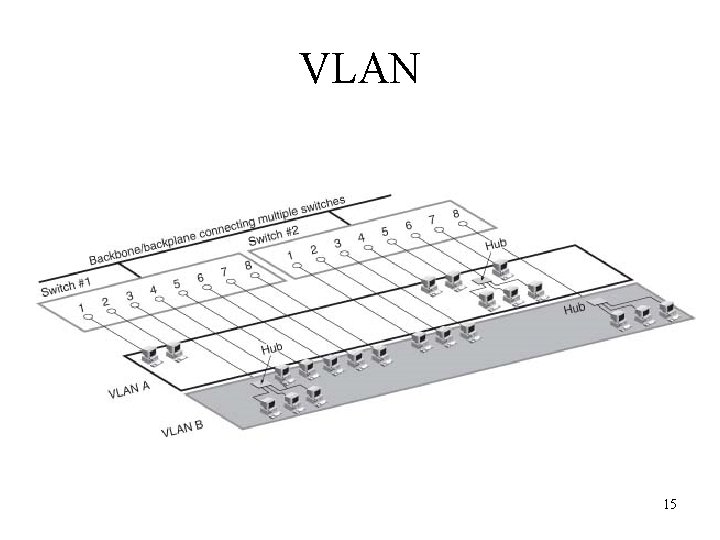
VLAN 15
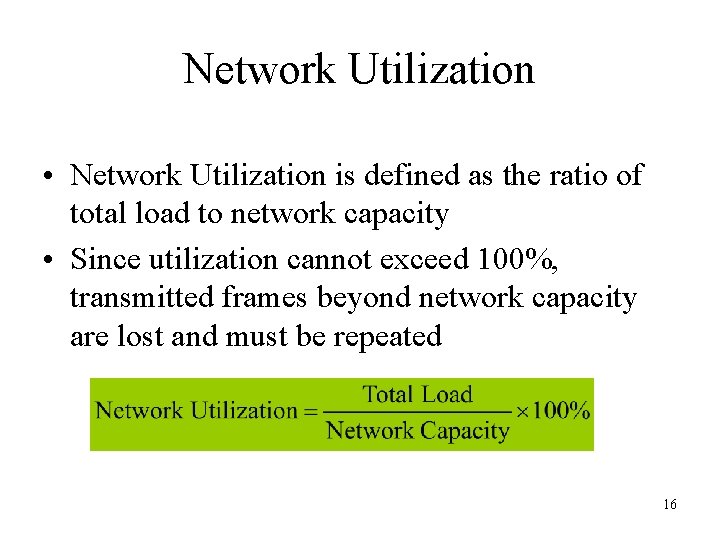
Network Utilization • Network Utilization is defined as the ratio of total load to network capacity • Since utilization cannot exceed 100%, transmitted frames beyond network capacity are lost and must be repeated 16
Network Security • Computer and Network Security can be defined as the protection of networkconnected resources against unauthorized disclosure, modification, utilization, restriction, incapacitation, or destruction • Computer security – Tools to support stored data • Network security – Tools to support data during its transmission 17
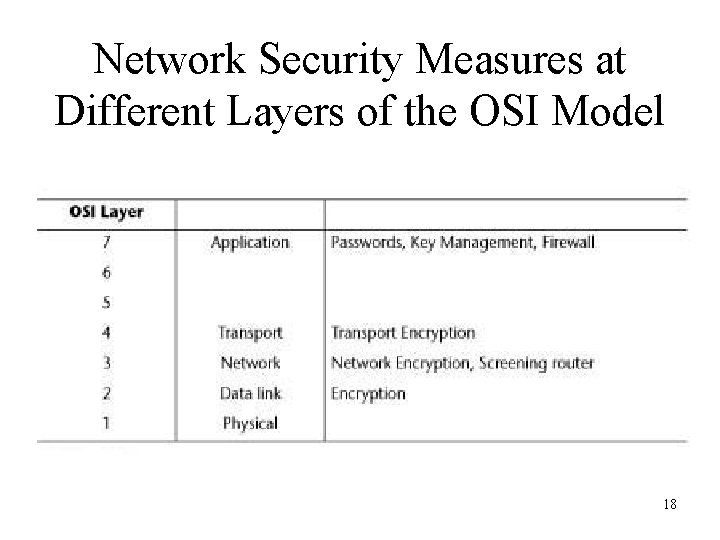
Network Security Measures at Different Layers of the OSI Model 18
Types of Security Threats • Security threats divided into two categories: – Passive threats • Involve monitoring the transmission data of an organization. These threats are difficult to detect because they do not involve alteration of the data – Active threats • Involve some modification of the data stream or the creation of a false stream. These threats are most successful when directed at the weakest link in the overall system, namely, at the host level 19
Viruses and Worms • Virus – A program that affects other programs by modifying them; the modified program includes a copy of the virus program, which can then go on to infect other programs • Worm – A program that makes use of networking software to replicate itself and move from system to system; it performs some detrimental activity on the system it gains access to 20
Vulnerability Assessment • Vulnerability assessment – Identifies points of exposures in the network • Internal assessment – Internal audits • External assessment – May require outsourcing security services to perform penetration tests 21
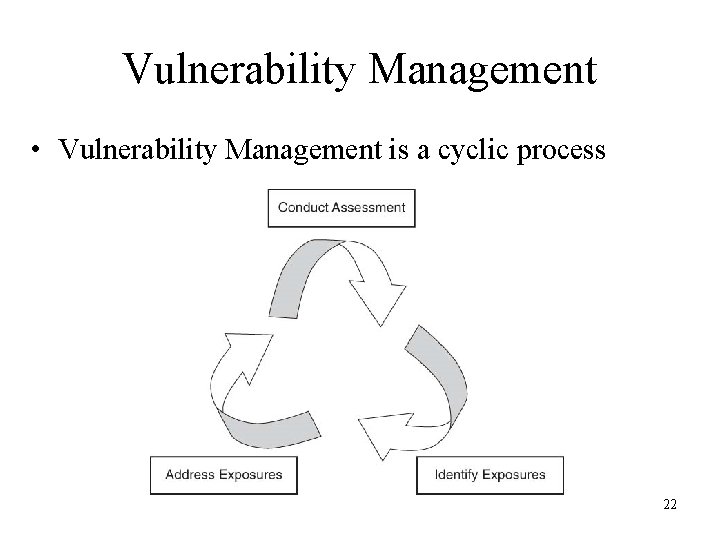
Vulnerability Management • Vulnerability Management is a cyclic process 22
Security Measures • Authorization – user ID and password • Encryption – Hash functions – Private Key – Public Key • Authentication – Certificate Authority (CA) • Intrusion Detection Systems (IDS) • Firewall 23
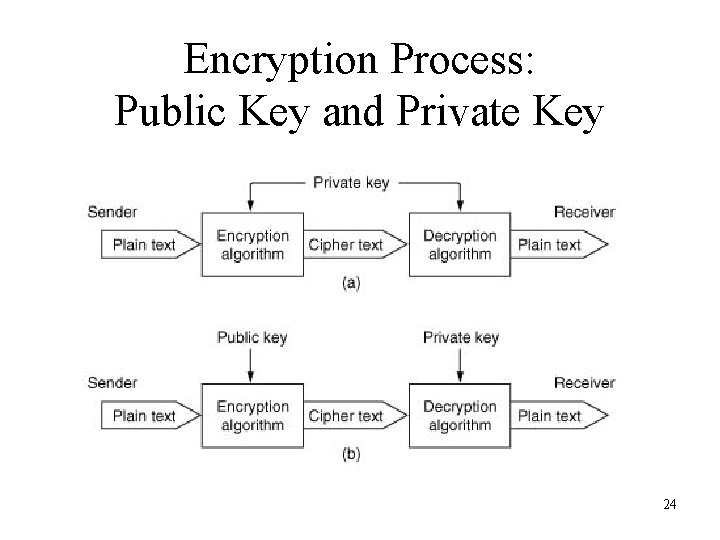
Encryption Process: Public Key and Private Key 24
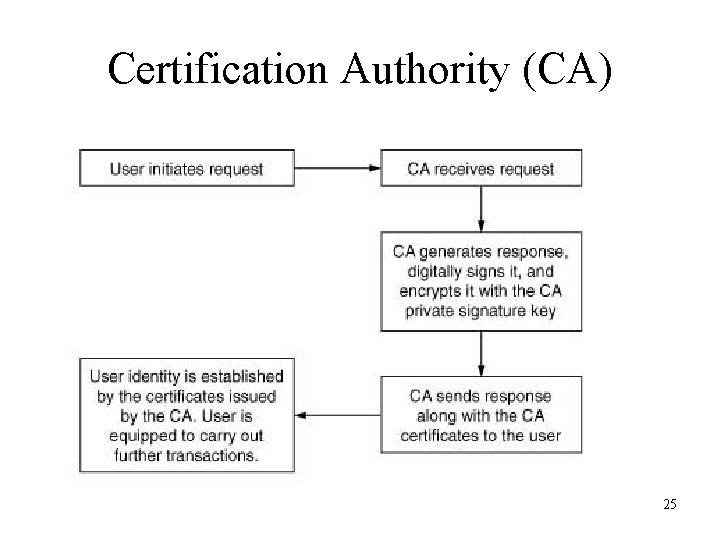
Certification Authority (CA) 25
Intrusion Detection Systems (IDS) • Monitoring/analysis tools – Active monitoring • Notifies administrator whenever an incident occurs – Passive monitoring • Keeps a log of each activity for review later • Port Mirroring – Mirrors the switched traffic to an analyzer – May drop packets due to buffer overflow, and filters anomalies like corrupt network packets • In-line Taps – Sees 100% of the traffic 26
Firewall • Firewall is a piece of hardware and software that allows limited access into and out of one’s network from the Internet • Firewalls are classified into three categories: – Packet filters – Application-level gateways – Proxy servers 27

Security Provisions in a VPN • Security gateways • Security policy servers • Certification Authorities (CA) 28
Network Applications and Services: Storage – Direct Attached Storage (DAS) • Attached directly to a server, most secure • Supports only a homogeneous network environment – Network Attached Storage (NAS) • Disk storage that is set up with its own network address rather than being attached to the server • Support heterogeneous data sharing • Provide file access services – Storage Area Network • Composed of servers and storage devices that are connected by a network infrastructure • Provides block-access • Supports only a homogeneous network environment 29
Network Applications and Services • Network Application Software – Three-tier versus two-tier application • Business Continuance: processes and procedures put in place to ensure that essential functions can continue during and after a disaster – Asynchronous replication • Enables fast recovery • Not appropriate for critical applications – Synchronous replication • Also called “mirroring” • Maintains complete data integrity • Expensive and slow 30
Telecommunications Management Network (TMN) • TMN architecture has three parts: – Logical • Specifies the management functions and reference points for data exchange between the functions – Physical • Defines how management functions are implemented on real systems and the interfaces between them – Information • Defines the data structures 31
- Slides: 31