
Chapter 9 Enhanced Interior Gateway Routing Protocol EIGRP
- Slides: 40
Chapter 9 Enhanced Interior Gateway Routing Protocol (EIGRP) Part II CCNA 2 -1 Chapter 9 -2
Note for Instructors • These presentations are the result of a collaboration among the instructors at St. Clair College in Windsor, Ontario. • Thanks must go out to Rick Graziani of Cabrillo College. His material and additional information was used as a reference in their creation. • If anyone finds any errors or omissions, please let me know at: • tdame@stclaircollege. ca. CCNA 2 -2 Chapter 9 -2
EIGRP DUAL CCNA 2 -3 Chapter 9 -2
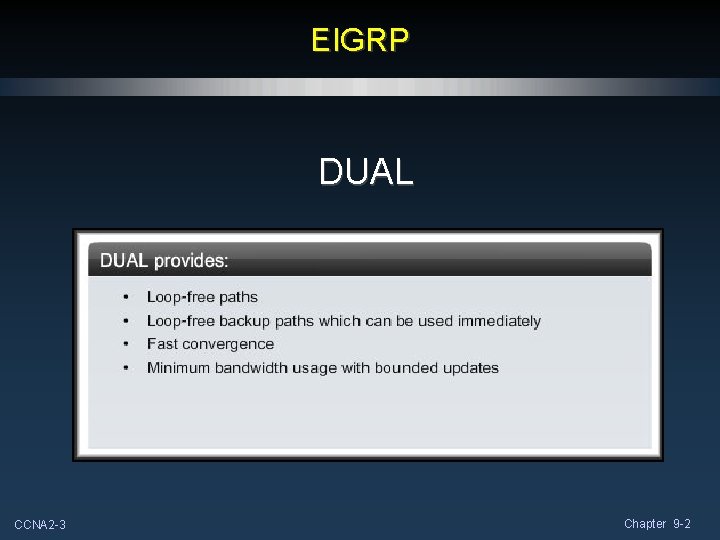
DUAL Concepts • Diffusing Update ALgorithm (DUAL) provides the following: • Loop-free paths. • Loop-free backup paths which can be used immediately. • Fast convergence. • Minimum bandwidth usage with bounded updates. CCNA 2 -4 Chapter 9 -2
DUAL Concepts • Diffusing Update ALgorithm (DUAL) uses several terms that we will discuss in more detail throughout this section: • Successor. • Feasible distance. • Feasible successor. • Reported distance or advertised distance. • Feasible condition or feasibility condition. CCNA 2 -5 Chapter 9 -2
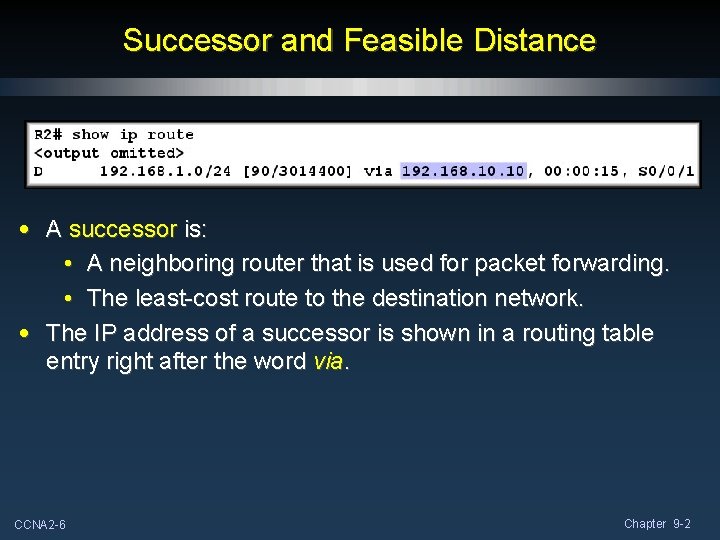
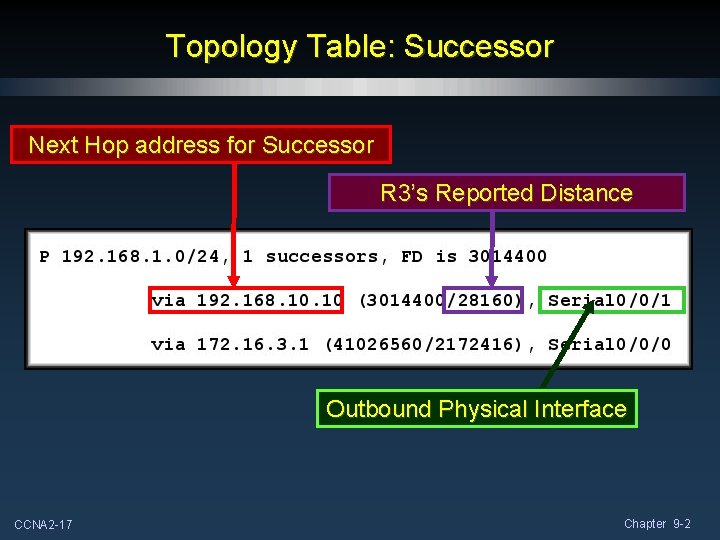
Successor and Feasible Distance • A successor is: • A neighboring router that is used for packet forwarding. • The least-cost route to the destination network. • The IP address of a successor is shown in a routing table entry right after the word via. CCNA 2 -6 Chapter 9 -2
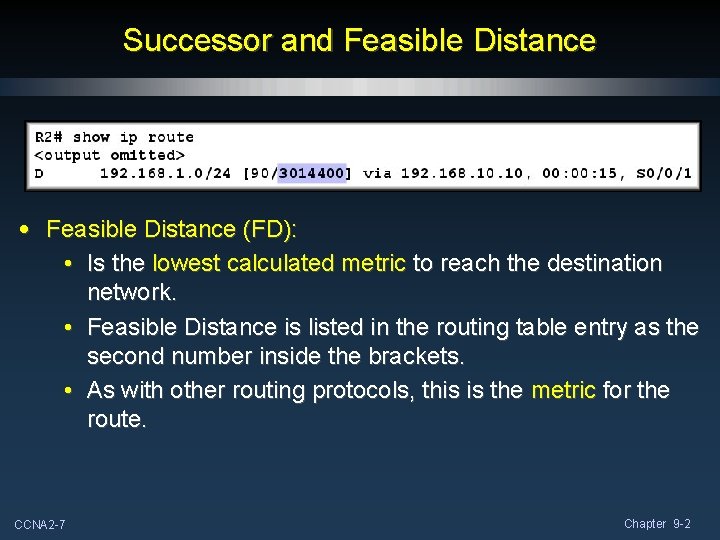
Successor and Feasible Distance • Feasible Distance (FD): • Is the lowest calculated metric to reach the destination network. • Feasible Distance is listed in the routing table entry as the second number inside the brackets. • As with other routing protocols, this is the metric for the route. CCNA 2 -7 Chapter 9 -2
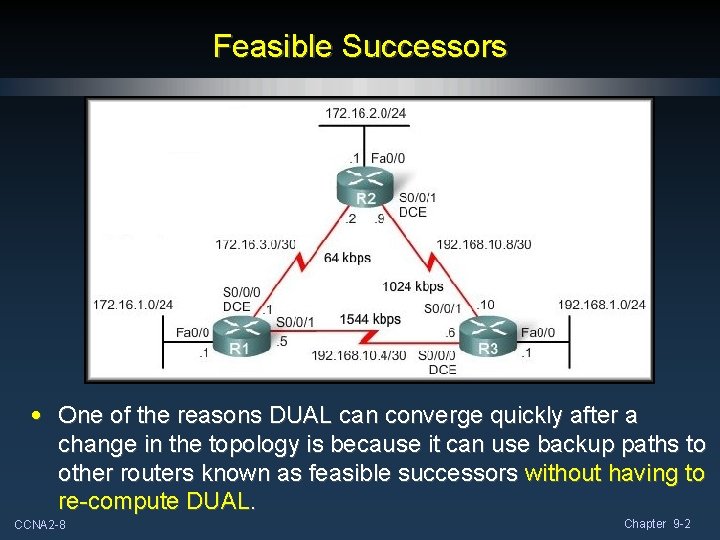
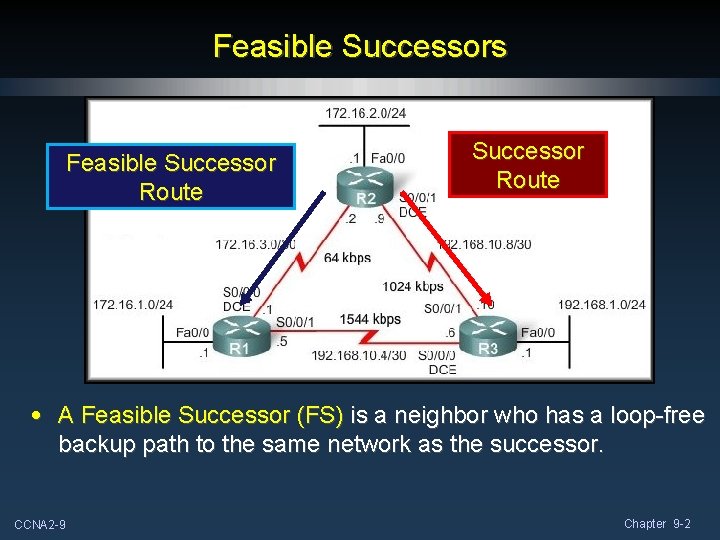
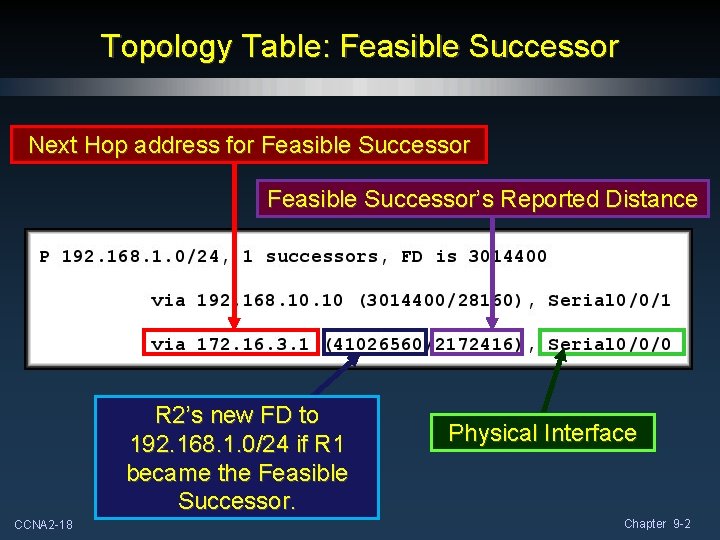
Feasible Successors • One of the reasons DUAL can converge quickly after a change in the topology is because it can use backup paths to other routers known as feasible successors without having to re-compute DUAL. CCNA 2 -8 Chapter 9 -2
Feasible Successors Feasible Successor Route • A Feasible Successor (FS) is a neighbor who has a loop-free backup path to the same network as the successor. CCNA 2 -9 Chapter 9 -2
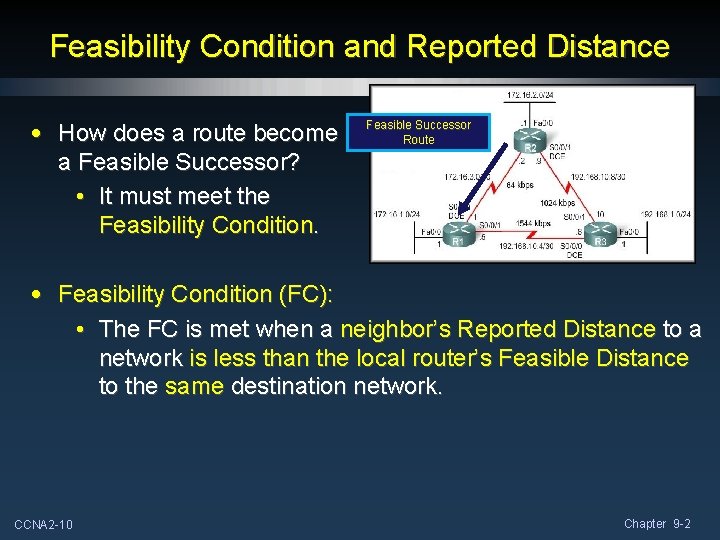
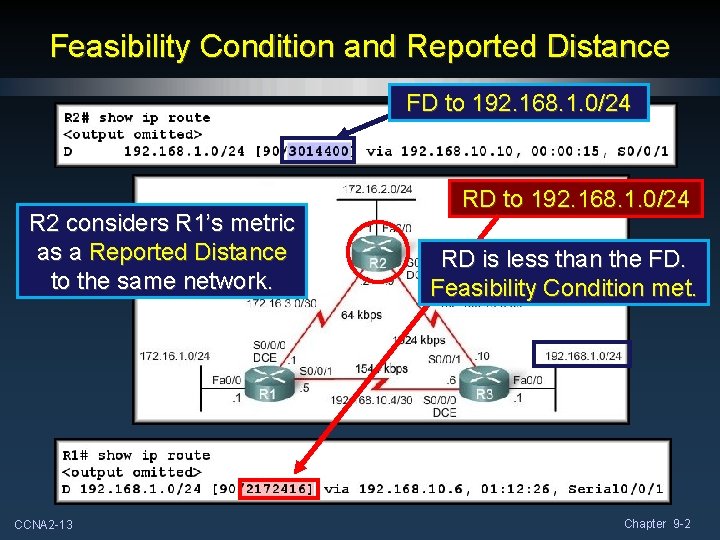
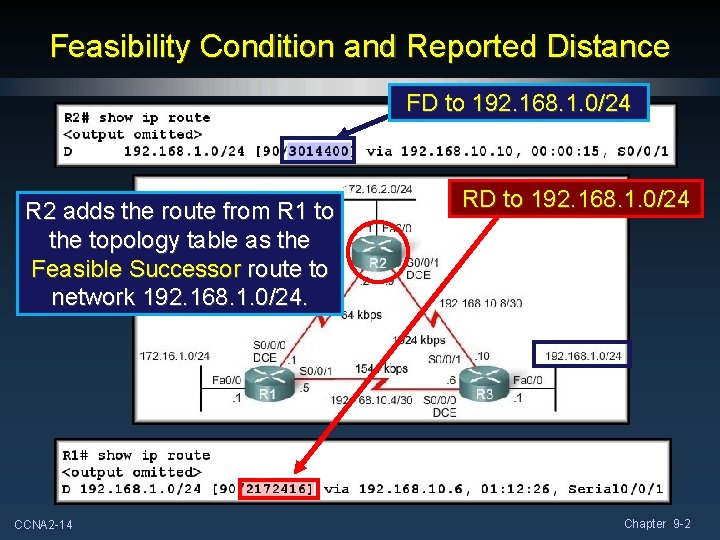
Feasibility Condition and Reported Distance • How does a route become a Feasible Successor? • It must meet the Feasibility Condition. Feasible Successor Route • Feasibility Condition (FC): • The FC is met when a neighbor’s Reported Distance to a network is less than the local router’s Feasible Distance to the same destination network. CCNA 2 -10 Chapter 9 -2
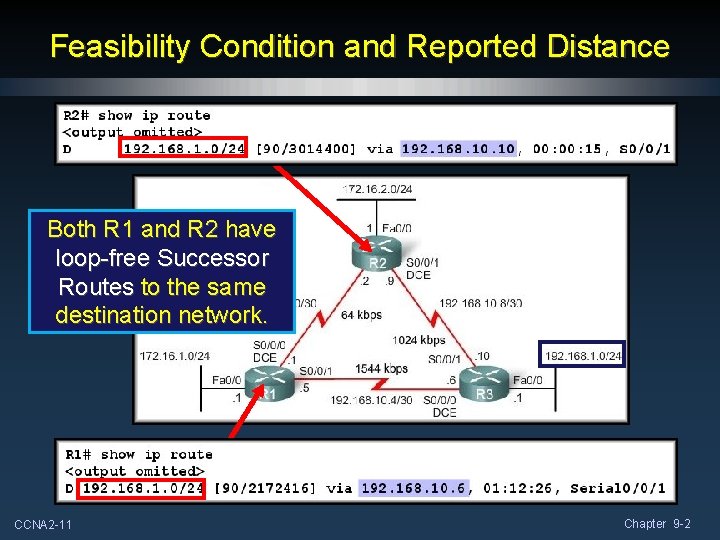
Feasibility Condition and Reported Distance Both R 1 and R 2 have loop-free Successor Routes to the same destination network. CCNA 2 -11 Chapter 9 -2
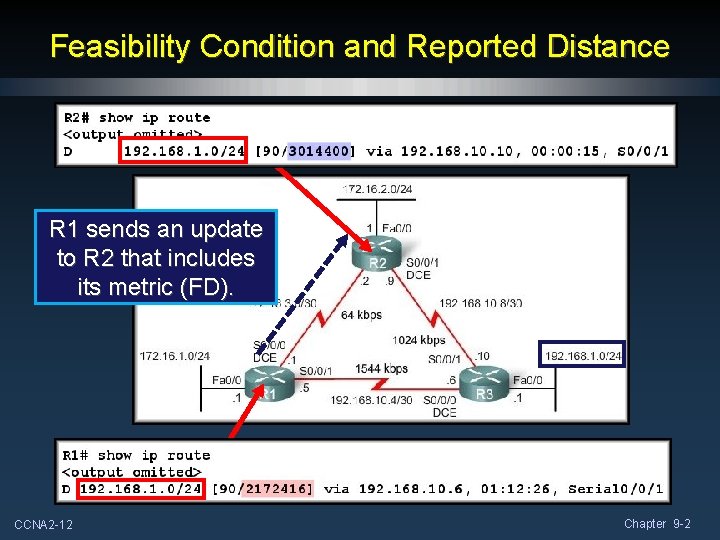
Feasibility Condition and Reported Distance R 1 sends an update to R 2 that includes its metric (FD). CCNA 2 -12 Chapter 9 -2
Feasibility Condition and Reported Distance FD to 192. 168. 1. 0/24 R 2 considers R 1’s metric as a Reported Distance to the same network. CCNA 2 -13 RD to 192. 168. 1. 0/24 RD is less than the FD. Feasibility Condition met. Chapter 9 -2
Feasibility Condition and Reported Distance FD to 192. 168. 1. 0/24 R 2 adds the route from R 1 to the topology table as the Feasible Successor route to network 192. 168. 1. 0/24. CCNA 2 -14 RD to 192. 168. 1. 0/24 Chapter 9 -2
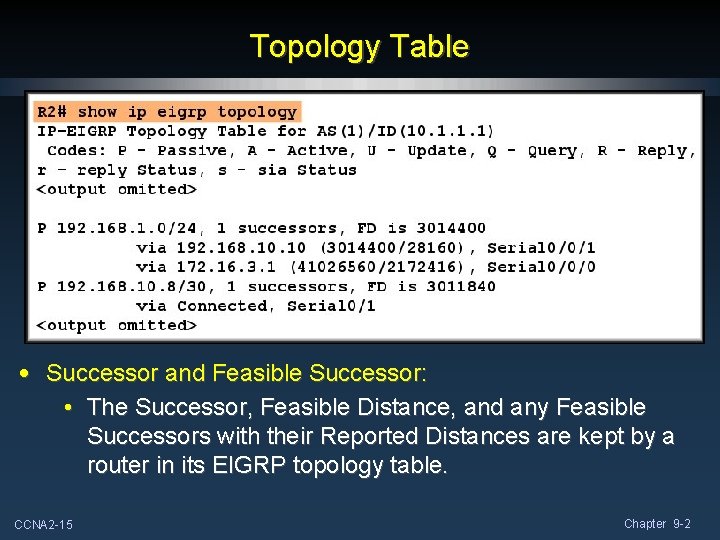
Topology Table • Successor and Feasible Successor: • The Successor, Feasible Distance, and any Feasible Successors with their Reported Distances are kept by a router in its EIGRP topology table. CCNA 2 -15 Chapter 9 -2
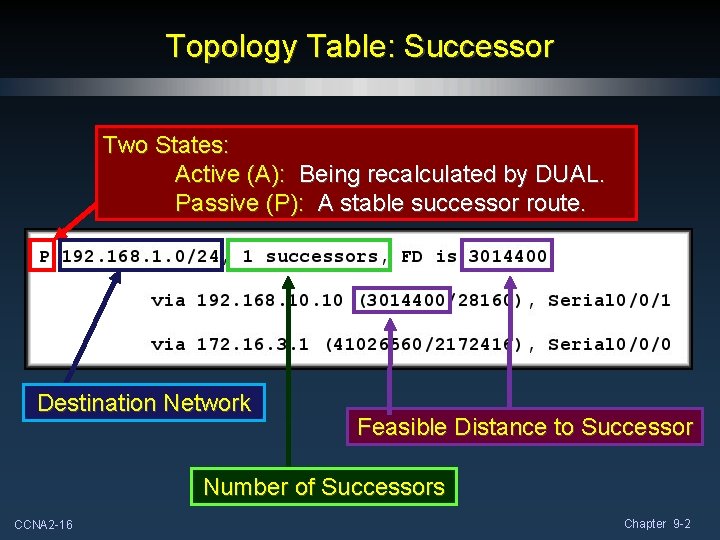
Topology Table: Successor Two States: Active (A): Being recalculated by DUAL. Passive (P): A stable successor route. Destination Network Feasible Distance to Successor Number of Successors CCNA 2 -16 Chapter 9 -2
Topology Table: Successor Next Hop address for Successor R 3’s Reported Distance Outbound Physical Interface CCNA 2 -17 Chapter 9 -2
Topology Table: Feasible Successor Next Hop address for Feasible Successor’s Reported Distance R 2’s new FD to 192. 168. 1. 0/24 if R 1 became the Feasible Successor. CCNA 2 -18 Physical Interface Chapter 9 -2
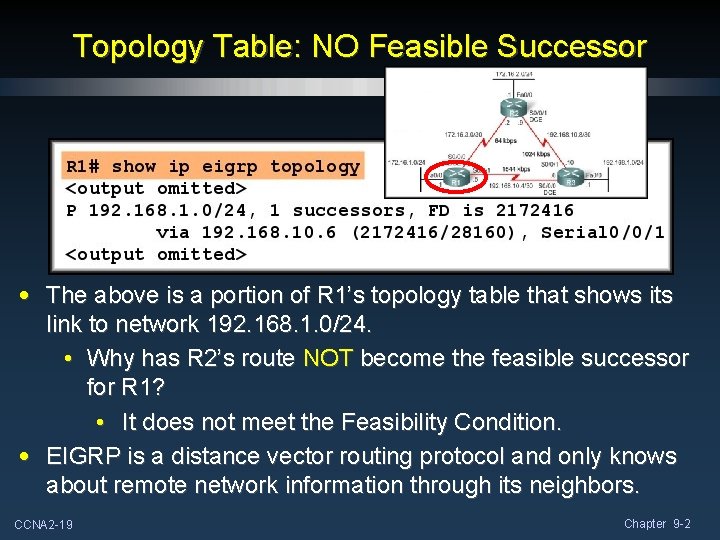
Topology Table: NO Feasible Successor • The above is a portion of R 1’s topology table that shows its link to network 192. 168. 1. 0/24. • Why has R 2’s route NOT become the feasible successor for R 1? • It does not meet the Feasibility Condition. • EIGRP is a distance vector routing protocol and only knows about remote network information through its neighbors. CCNA 2 -19 Chapter 9 -2
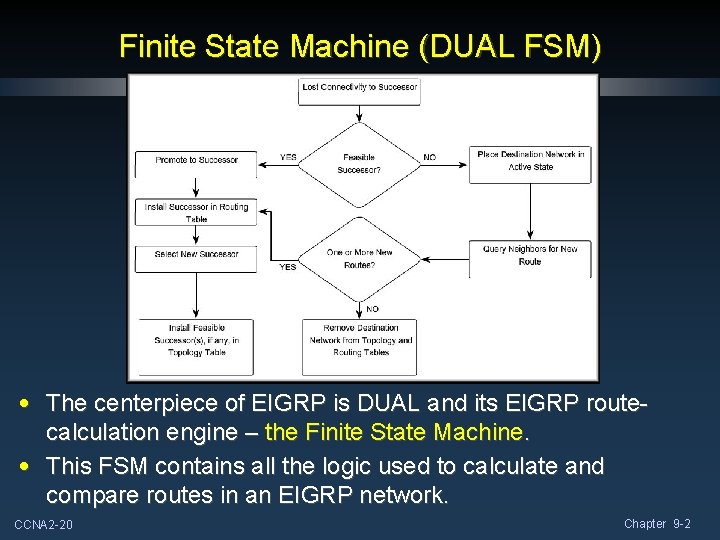
Finite State Machine (DUAL FSM) • The centerpiece of EIGRP is DUAL and its EIGRP routecalculation engine – the Finite State Machine. • This FSM contains all the logic used to calculate and compare routes in an EIGRP network. CCNA 2 -20 Chapter 9 -2
Finite State Machine (DUAL FSM) • What is FSM? • An FSM is an abstract machine, not a mechanical device with moving parts. • FSMs define a set of possible states something can go through, what events causes those states, and what events result from those states. • Designers use FSMs to describe how a device, computer program, or routing algorithm will react to a set of input events. CCNA 2 -21 Chapter 9 -2
EIGRP More EIGRP Configurations Null 0 Summary Route Disable Automatic Summarization Manual Summarization EIGRP Default Route CCNA 2 -22 Chapter 9 -2
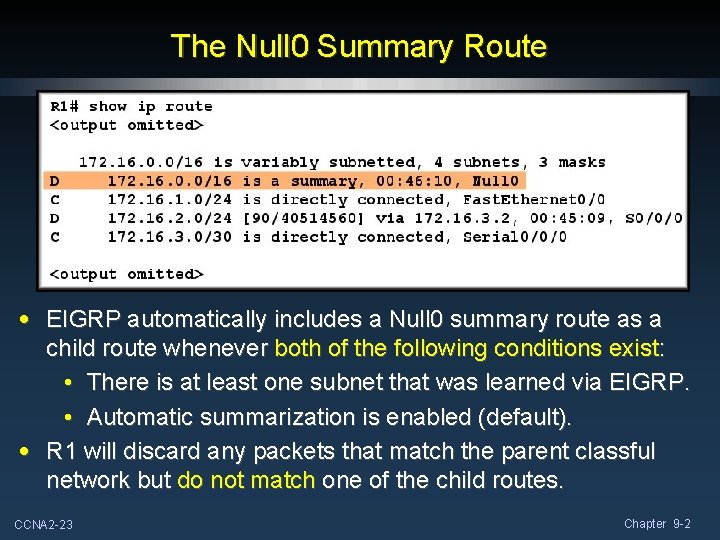
The Null 0 Summary Route • EIGRP automatically includes a Null 0 summary route as a child route whenever both of the following conditions exist: • There is at least one subnet that was learned via EIGRP. • Automatic summarization is enabled (default). • R 1 will discard any packets that match the parent classful network but do not match one of the child routes. CCNA 2 -23 Chapter 9 -2
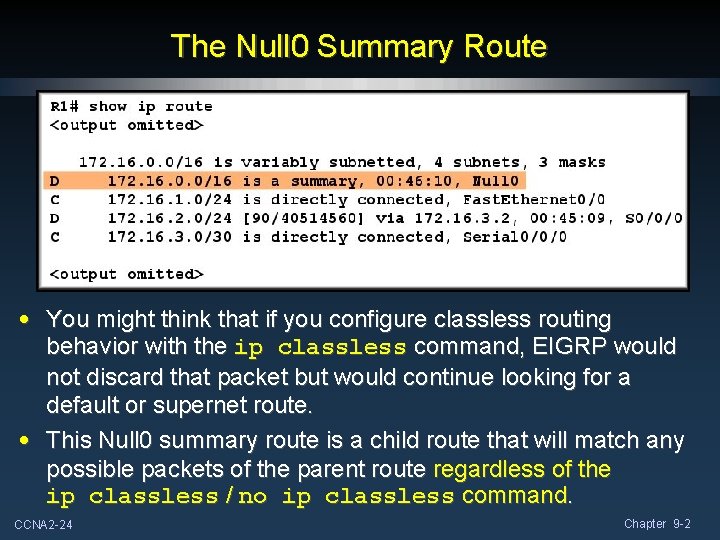
The Null 0 Summary Route • You might think that if you configure classless routing behavior with the ip classless command, EIGRP would not discard that packet but would continue looking for a default or supernet route. • This Null 0 summary route is a child route that will match any possible packets of the parent route regardless of the ip classless / no ip classless command. CCNA 2 -24 Chapter 9 -2
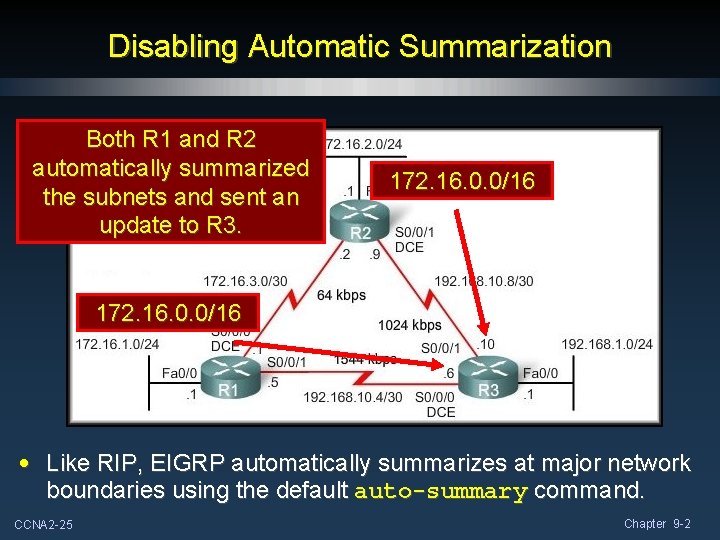
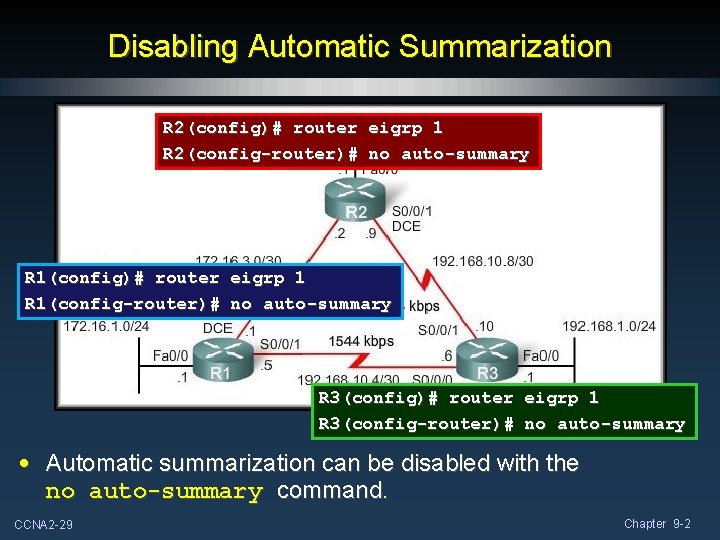
Disabling Automatic Summarization Both R 1 and R 2 automatically summarized the subnets and sent an update to R 3. 172. 16. 0. 0/16 • Like RIP, EIGRP automatically summarizes at major network boundaries using the default auto-summary command. CCNA 2 -25 Chapter 9 -2
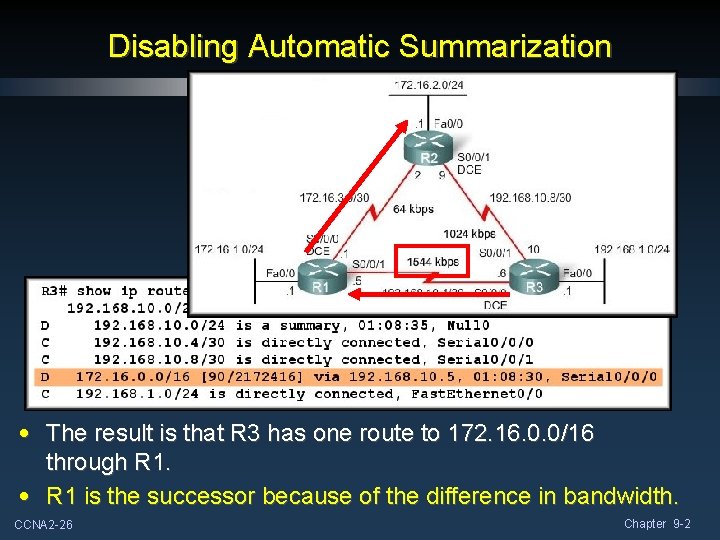
Disabling Automatic Summarization • The result is that R 3 has one route to 172. 16. 0. 0/16 through R 1. • R 1 is the successor because of the difference in bandwidth. CCNA 2 -26 Chapter 9 -2
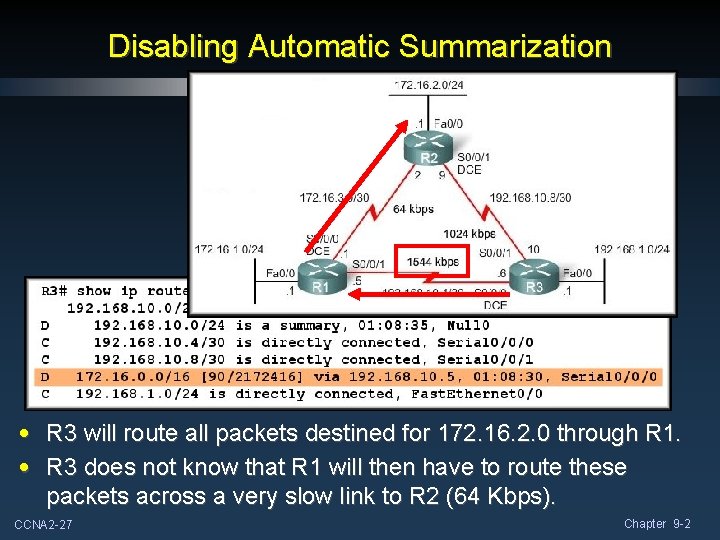
Disabling Automatic Summarization • R 3 will route all packets destined for 172. 16. 2. 0 through R 1. • R 3 does not know that R 1 will then have to route these packets across a very slow link to R 2 (64 Kbps). CCNA 2 -27 Chapter 9 -2
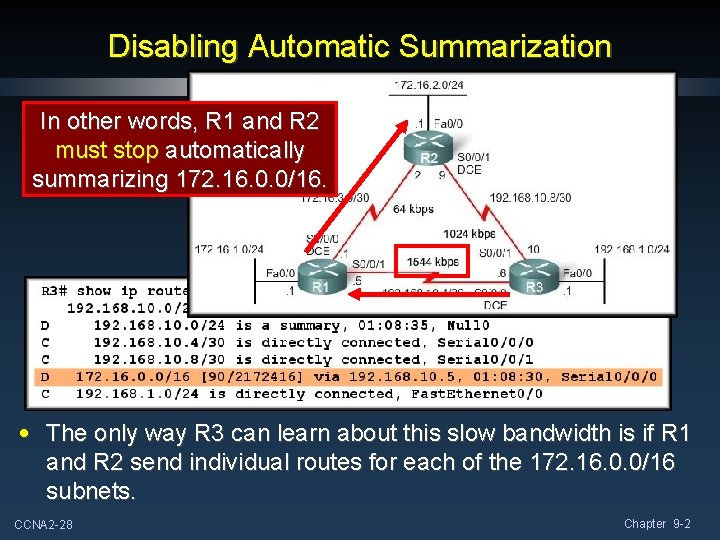
Disabling Automatic Summarization In other words, R 1 and R 2 must stop automatically summarizing 172. 16. 0. 0/16. • The only way R 3 can learn about this slow bandwidth is if R 1 and R 2 send individual routes for each of the 172. 16. 0. 0/16 subnets. CCNA 2 -28 Chapter 9 -2
Disabling Automatic Summarization R 2(config)# router eigrp 1 R 2(config-router)# no auto-summary R 1(config)# router eigrp 1 R 1(config-router)# no auto-summary R 3(config)# router eigrp 1 R 3(config-router)# no auto-summary • Automatic summarization can be disabled with the no auto-summary command. CCNA 2 -29 Chapter 9 -2
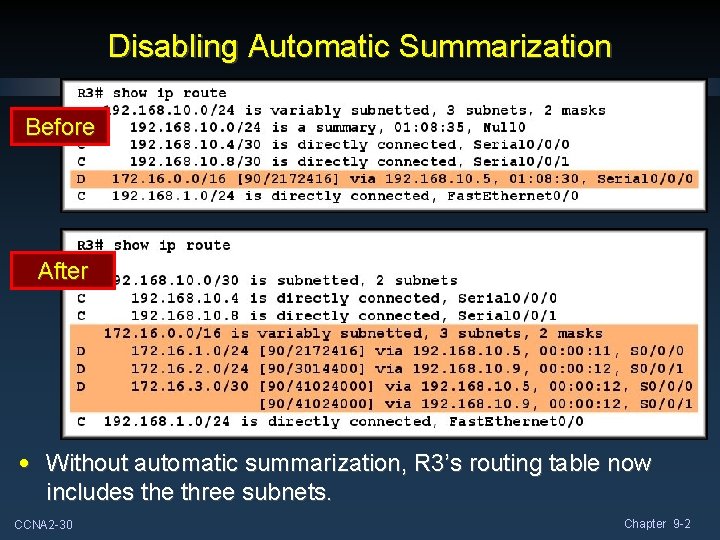
Disabling Automatic Summarization Before After • Without automatic summarization, R 3’s routing table now includes the three subnets. CCNA 2 -30 Chapter 9 -2
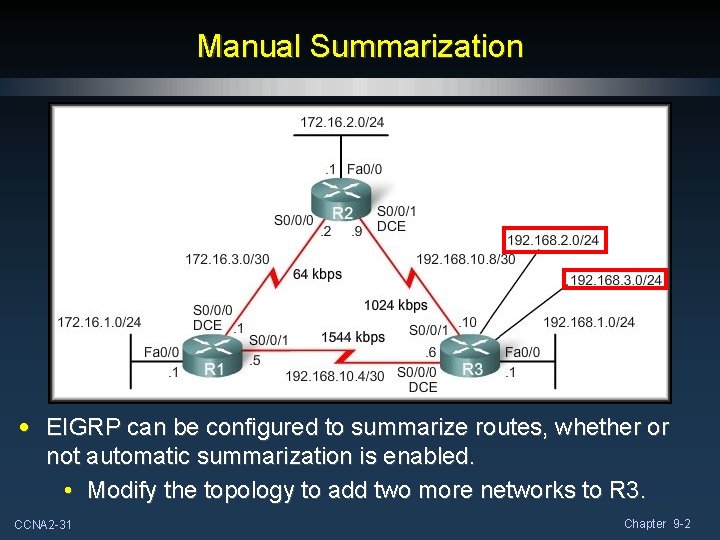
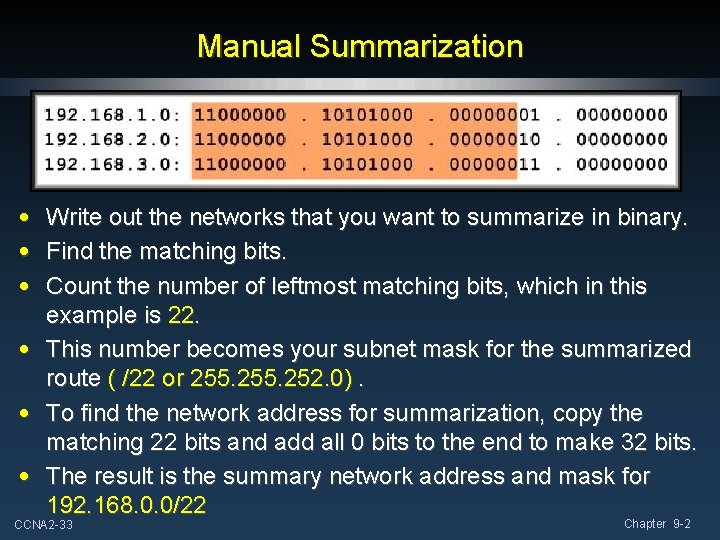
Manual Summarization • EIGRP can be configured to summarize routes, whether or not automatic summarization is enabled. • Modify the topology to add two more networks to R 3. CCNA 2 -31 Chapter 9 -2
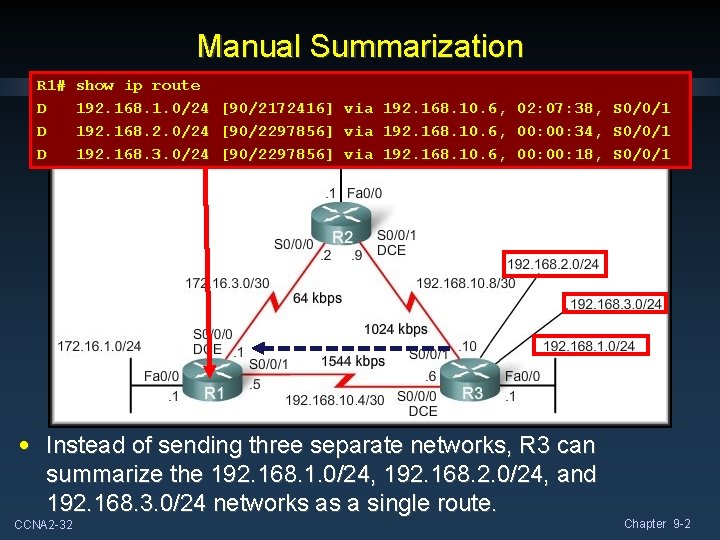
Manual Summarization R 1# D D D show ip route 192. 168. 1. 0/24 192. 168. 2. 0/24 192. 168. 3. 0/24 [90/2172416] [90/2297856] via via 192. 168. 10. 6, 02: 07: 38, 00: 34, 00: 18, S 0/0/1 • Instead of sending three separate networks, R 3 can summarize the 192. 168. 1. 0/24, 192. 168. 2. 0/24, and 192. 168. 3. 0/24 networks as a single route. CCNA 2 -32 Chapter 9 -2
Manual Summarization • • • Write out the networks that you want to summarize in binary. Find the matching bits. Count the number of leftmost matching bits, which in this example is 22. • This number becomes your subnet mask for the summarized route ( /22 or 255. 252. 0). • To find the network address for summarization, copy the matching 22 bits and add all 0 bits to the end to make 32 bits. • The result is the summary network address and mask for 192. 168. 0. 0/22 CCNA 2 -33 Chapter 9 -2
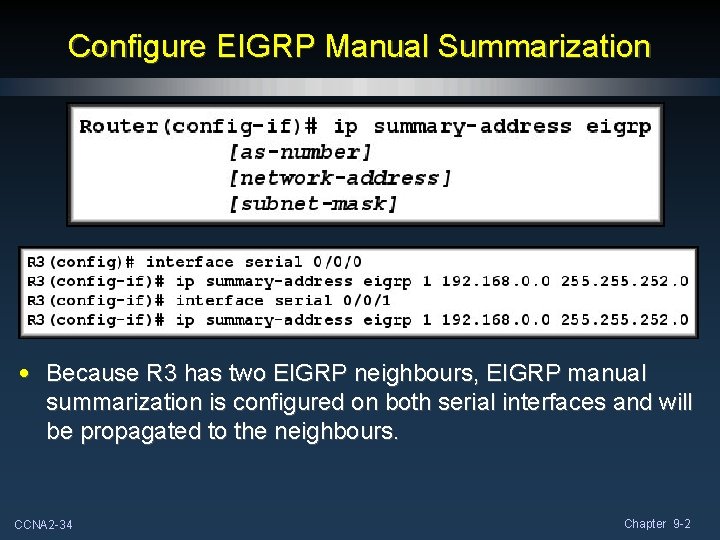
Configure EIGRP Manual Summarization • Because R 3 has two EIGRP neighbours, EIGRP manual summarization is configured on both serial interfaces and will be propagated to the neighbours. CCNA 2 -34 Chapter 9 -2
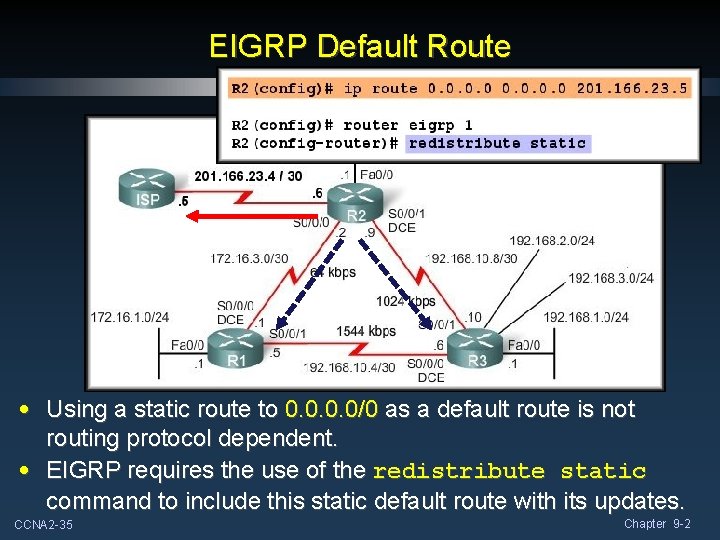
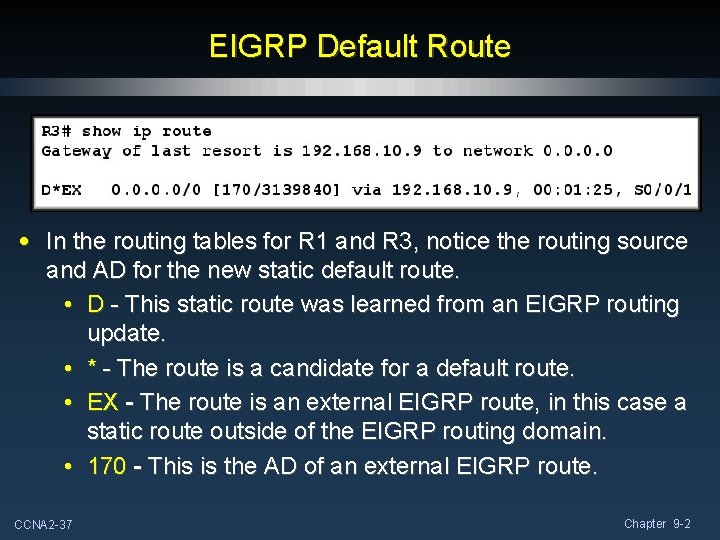
EIGRP Default Route • Using a static route to 0. 0/0 as a default route is not routing protocol dependent. • EIGRP requires the use of the redistribute static command to include this static default route with its updates. CCNA 2 -35 Chapter 9 -2
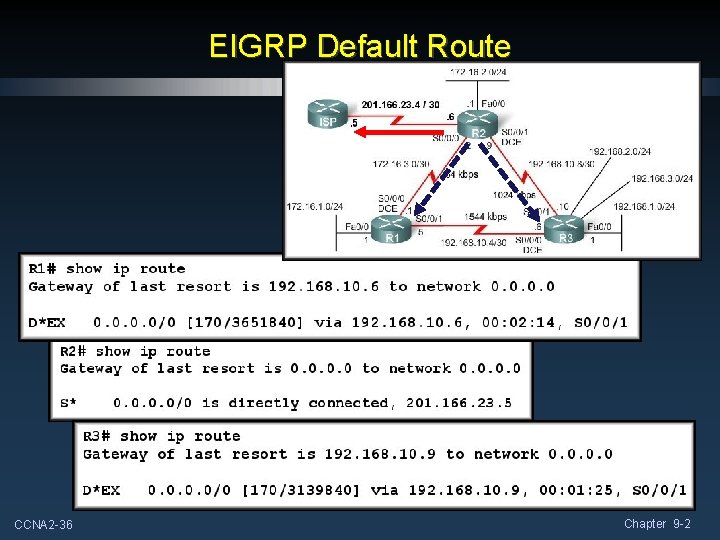
EIGRP Default Route CCNA 2 -36 Chapter 9 -2
EIGRP Default Route • In the routing tables for R 1 and R 3, notice the routing source and AD for the new static default route. • D - This static route was learned from an EIGRP routing update. • * - The route is a candidate for a default route. • EX - The route is an external EIGRP route, in this case a static route outside of the EIGRP routing domain. • 170 - This is the AD of an external EIGRP route. CCNA 2 -37 Chapter 9 -2
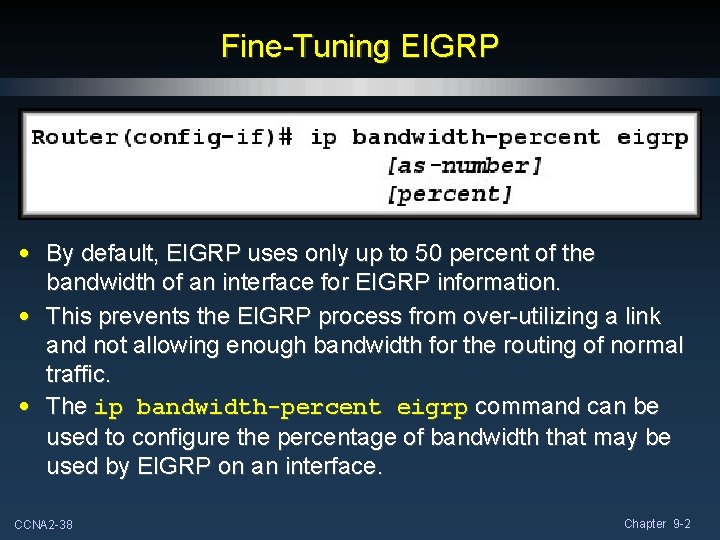
Fine-Tuning EIGRP • By default, EIGRP uses only up to 50 percent of the bandwidth of an interface for EIGRP information. • This prevents the EIGRP process from over-utilizing a link and not allowing enough bandwidth for the routing of normal traffic. • The ip bandwidth-percent eigrp command can be used to configure the percentage of bandwidth that may be used by EIGRP on an interface. CCNA 2 -38 Chapter 9 -2
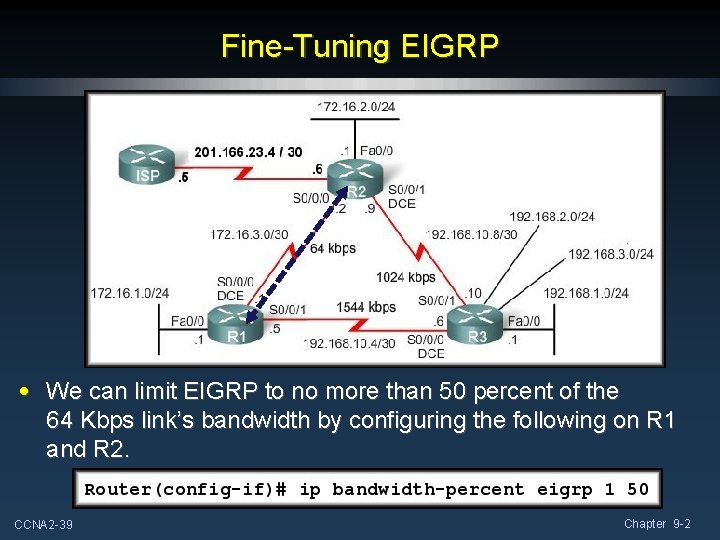
Fine-Tuning EIGRP • We can limit EIGRP to no more than 50 percent of the 64 Kbps link’s bandwidth by configuring the following on R 1 and R 2. CCNA 2 -39 Chapter 9 -2
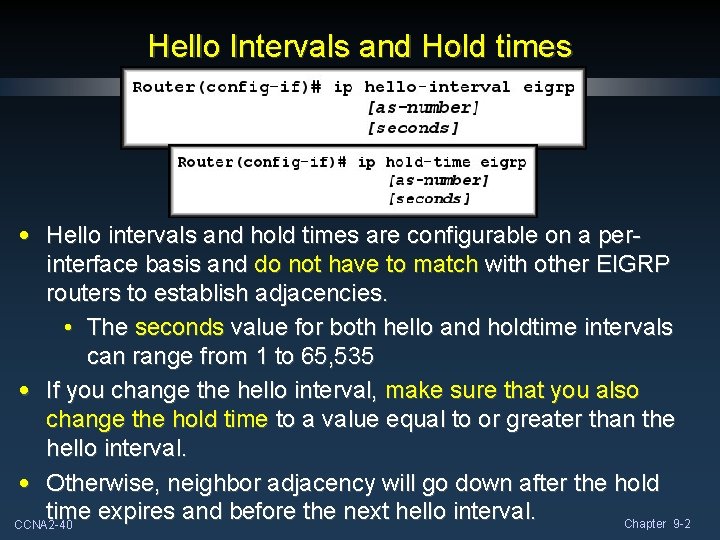
Hello Intervals and Hold times • Hello intervals and hold times are configurable on a perinterface basis and do not have to match with other EIGRP routers to establish adjacencies. • The seconds value for both hello and holdtime intervals can range from 1 to 65, 535 • If you change the hello interval, make sure that you also change the hold time to a value equal to or greater than the hello interval. • Otherwise, neighbor adjacency will go down after the hold time expires and before the next hello interval. Chapter 9 -2 CCNA 2 -40