
Chapter 9 Building a Secure Operating System for

Chapter 9 Building a Secure Operating System for Linux
Chapter Overview • • Linux Security Modules – History – Implementation Se. Linux – Reference Monitor – Protection State – Labeling State – Transition State – Administration – Trusted Programs – Security Evaluation
Linux Security Modules • Reference Monitor System for the Linux kernel. • Consists of two parts: – – Reference Monitor Interface Reference Monitor Module (LSM) • Several LSM's have been implemented. • Have covered App. Armor • Will try to cover SELinux
LSM History • Lots of early security work on Linux: – Argus Pit. Bull – LIDS – Subdomain (App. Armor) – RSBAC – GRSecurity – DTE for Linux – Medusa DS 9 – Open Wall – HP's initiative – Flask (SELinux)
LSM History (II) • Obviously, (2001) a reference monitor was necessary for Linux; everybody was reinventing the wheel! But: – Linus Torvalds was not a security expert, could not decide on an approach – There was no real agreement as to which was the “best” approach. • Result was a design basde on kernel modules with a single interface for all the necessary modules. • LSM framework
LSM Requirements: • The reference monitor must be truly generic, so that switching to a different security model was simply a matter of loading a different kernel module. • The interfaces must be “conceptually simple, minimally invasive, and efficient. ” • Must support the POSIX. 1 e capabilities mechanism as an “optional security module”.
Design of the reference monitor • Formed union of all projects to date. • Restricted number of authorization queries to prevent redundant authorizations. • Manual design, source code analysis tools were used to verify completeness and consistency, finding six bugs. • Most of the interface had negligible performance impact except for the CIPSO implementation. Network security is now supported inoe of two ways: – Labeled IPSec – New implementation of CIPSO called Netlabel
LSM History, final details • LSM framework was officially added to Linux kernel in version 2. 6. • SELinux and POSIX capabilities were included with the release of LSM • Novell bought the company that supported App. Armor, so App. Armor is also available.
LSM Implementation • LSM Framework implemetation has three parts: – – – Reference monitor interface definition Reference monitor interface placement Reference monitor implementation
LSM Reference Monitor definition • Specifies the way the kernel can invoke the LSM reference monitor. • The description is in the file include/linux/security. h in the kernel sources. It defines a structure security_operations with all the LSM function pointers. They are called LSM hooks. • 150 hoks for authorizations, plus other hooks for labels, label transitions. And label maintenance.
LSM Reference Monitor placement • Where to place the hook? – – – • At the entrance to the system call? What about TOCTTOU attacks? What about the “open” system call? The hooks were placed using in-line function declarations.
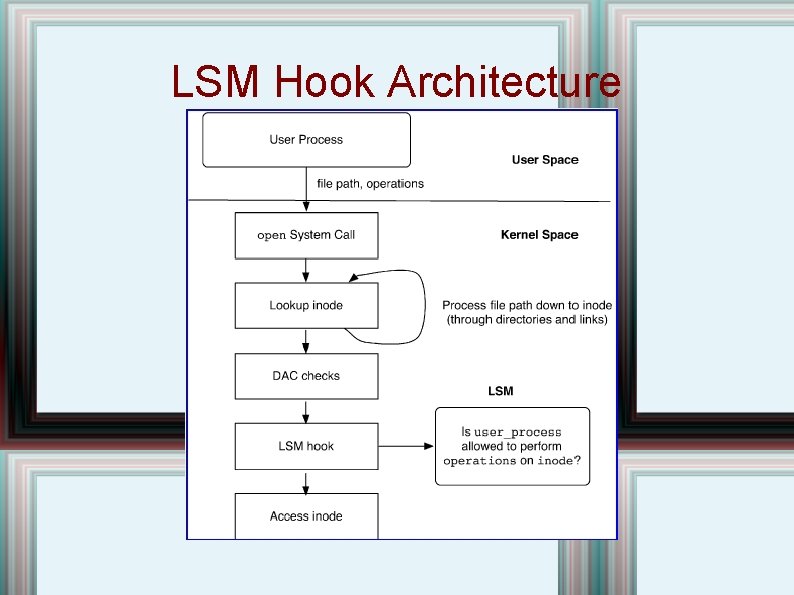
LSM Hook Architecture
LSM Reference Monitor Implementation • Each LSM reference monitor is different. • However, most security enhanced versions of Linux use the same hooks. • Exception is RSBAC
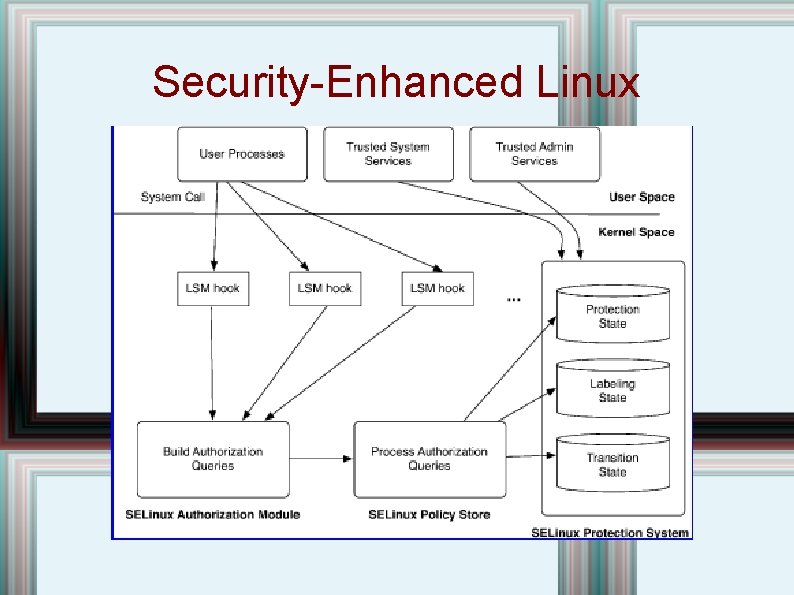
Security-Enhanced Linux
SELinux Reference Monitor • Two distinct processing steps. : – Convert input values from the LSM hooks into one or more authorization queries. – Check against SELinux protection system. • Subjects and objects have labels, called contexts • These contexts are checked. The authorization checker has four arguments: – – Subject context Objects data type Requested operation
SELinux Protection State
SELinux Contexts
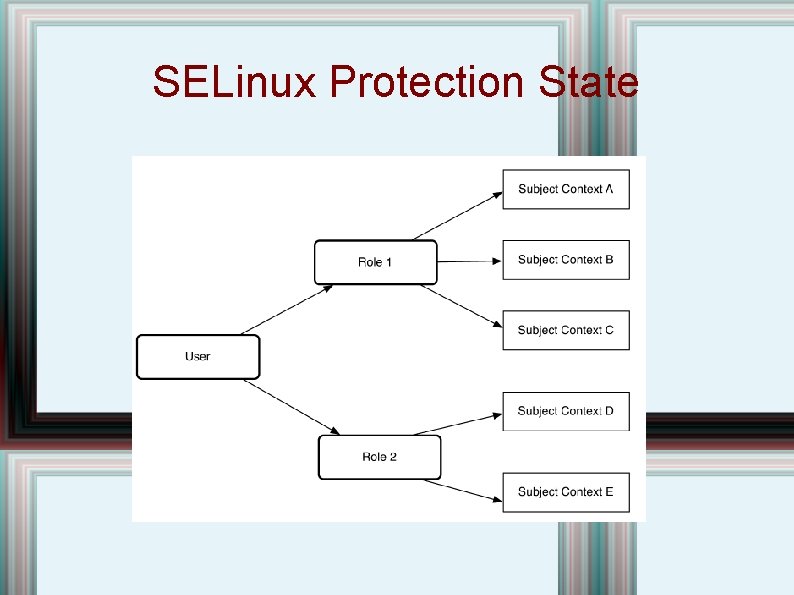
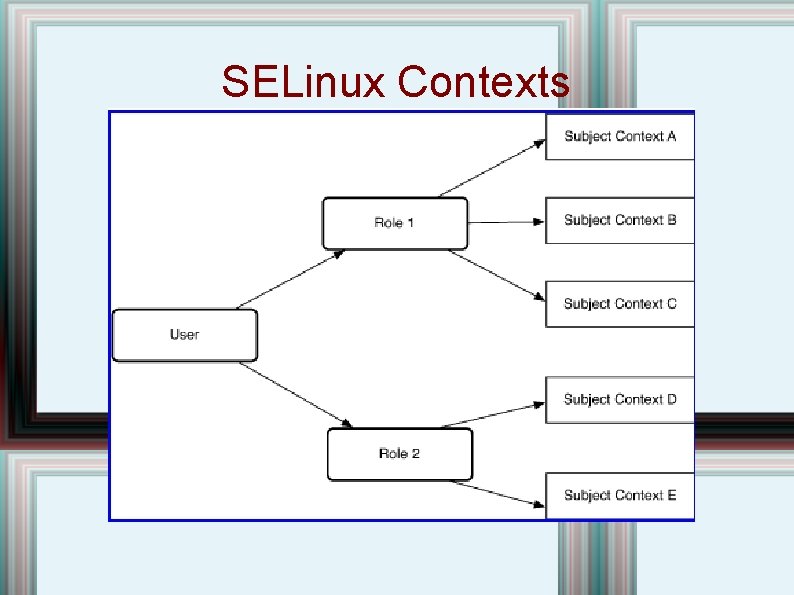
SELinux Contexts • Previous diagram gave idea of user labels; ; each context has permissions assigned to it. • There is also an MLS policy, but, though it allows read down, it only allows write level. • Both type labels and MLS labels are checked. • 20 different object data types, and many operations, including read, write, execute, create, ioctl, fcntl, extended attributes, . . • Over 1000 state labels. • Very complex administration!
SELinux Labeling State • Files/objects are labeled (by default) based on their location in the file system, but file contexts can be used to override the defaults. • Labels are inherited. For files, the label of a file is inherited from the label of its parent directed, some processes may have permission to relabel them.
SELinux Transition State • Rather than SUID programs, a label transition is only allowed at execution; the transition only gives limited privileges; also, not all programs can run a transitioning prtogram. • Instead of gatekeepers, SELinux relies onprogrammers to keep program safe.
SELinux Administration • Different kinds of policies: – – • Monolithic Modular Policy development: – – – Strict policy Targeted (like App. Armor) Reference Policy
SELinux Trusted Programs
SELinux Security Evaluation
- Slides: 23