
Chapter 8 UserDefined Functions Introductory FLUENT Training ANSYS



- Slides: 25
Chapter 8 User-Defined Functions Introductory FLUENT Training ANSYS, Inc. Proprietary © 2009 ANSYS, Inc. All rights reserved. 8 -1 April 28, 2009 Inventory #002600
User-Defined Functions Outline Training Manual • A brief introduction to FLUENT user-defined functions • Overview of FLUENT Data Structure and Macros • Two Examples • Where to get more information and help • UDF Support ANSYS, Inc. Proprietary © 2009 ANSYS, Inc. All rights reserved. 8 -2 April 28, 2009 Inventory #002600
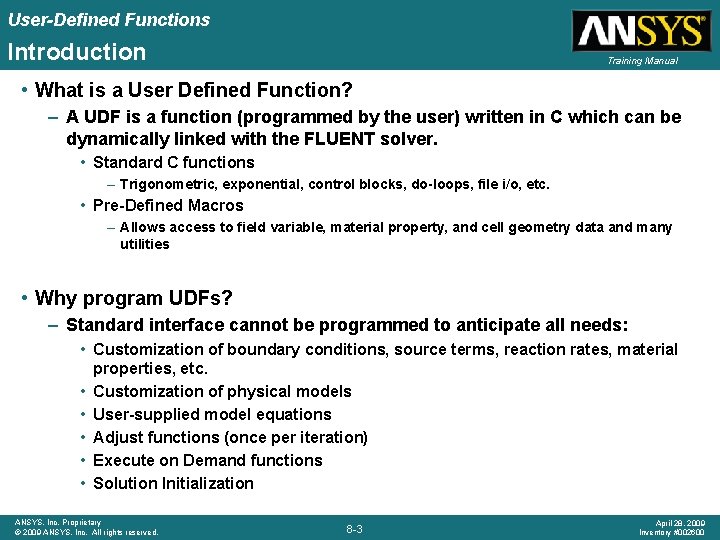
User-Defined Functions Introduction Training Manual • What is a User Defined Function? – A UDF is a function (programmed by the user) written in C which can be dynamically linked with the FLUENT solver. • Standard C functions – Trigonometric, exponential, control blocks, do-loops, file i/o, etc. • Pre-Defined Macros – Allows access to field variable, material property, and cell geometry data and many utilities • Why program UDFs? – Standard interface cannot be programmed to anticipate all needs: • Customization of boundary conditions, source terms, reaction rates, material properties, etc. • Customization of physical models • User-supplied model equations • Adjust functions (once per iteration) • Execute on Demand functions • Solution Initialization ANSYS, Inc. Proprietary © 2009 ANSYS, Inc. All rights reserved. 8 -3 April 28, 2009 Inventory #002600
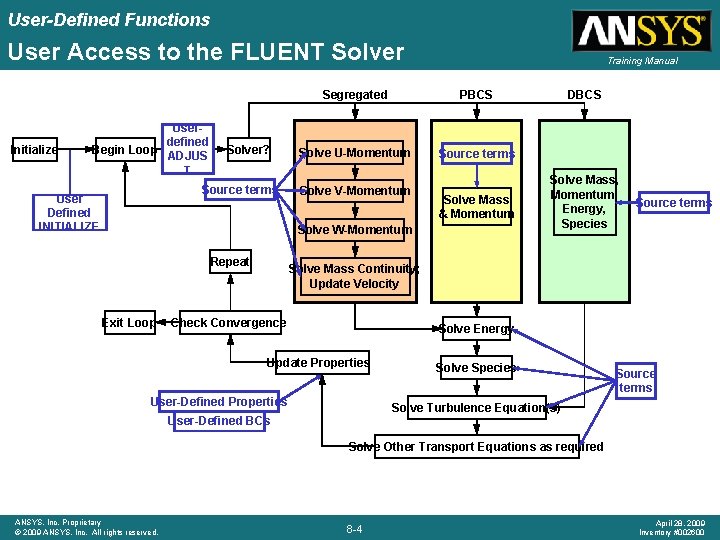
User-Defined Functions User Access to the FLUENT Solver Initialize Userdefined Begin Loop ADJUS T Solver? Source terms User Defined INITIALIZE Training Manual Segregated PBCS Solve U-Momentum Source terms Solve V-Momentum Solve Mass & Momentum Solve W-Momentum Repeat Exit Loop DBCS Solve Mass, Momentum, Energy, Species Source terms Solve Mass Continuity; Update Velocity Check Convergence Solve Energy Update Properties User-Defined Properties Solve Species Source terms Solve Turbulence Equation(s) User-Defined BCs Solve Other Transport Equations as required ANSYS, Inc. Proprietary © 2009 ANSYS, Inc. All rights reserved. 8 -4 April 28, 2009 Inventory #002600
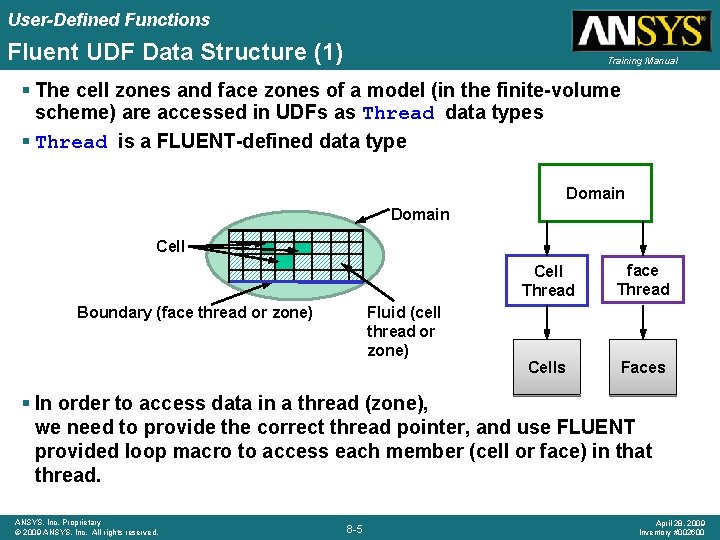
User-Defined Functions Fluent UDF Data Structure (1) Training Manual § The cell zones and face zones of a model (in the finite-volume scheme) are accessed in UDFs as Thread data types § Thread is a FLUENT-defined data type Domain Cell Fluid (cell thread or zone) Boundary (face thread or zone) Cell Thread face Thread Cells Faces § In order to access data in a thread (zone), we need to provide the correct thread pointer, and use FLUENT provided loop macro to access each member (cell or face) in that thread. ANSYS, Inc. Proprietary © 2009 ANSYS, Inc. All rights reserved. 8 -5 April 28, 2009 Inventory #002600
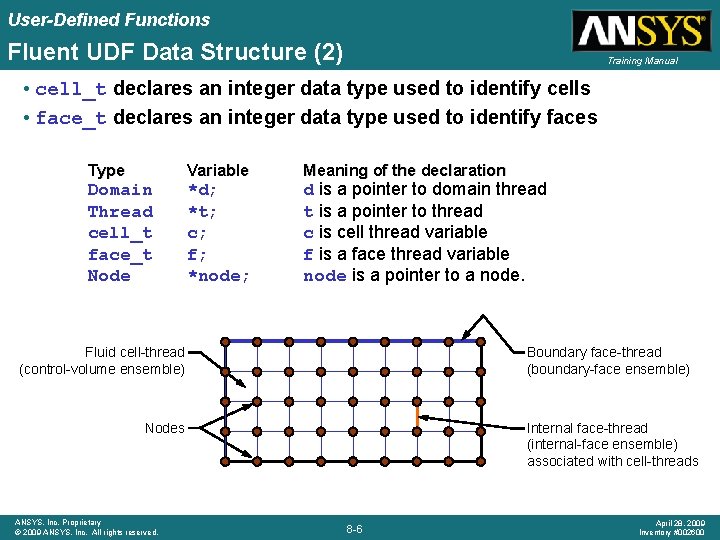
User-Defined Functions Fluent UDF Data Structure (2) Training Manual • cell_t declares an integer data type used to identify cells • face_t declares an integer data type used to identify faces Type Variable Domain Thread cell_t face_t Node *d; *t; c; f; *node; Meaning of the declaration d is a pointer to domain thread t is a pointer to thread c is cell thread variable f is a face thread variable node is a pointer to a node. Fluid cell-thread (control-volume ensemble) Boundary face-thread (boundary-face ensemble) Nodes ANSYS, Inc. Proprietary © 2009 ANSYS, Inc. All rights reserved. Internal face-thread (internal-face ensemble) associated with cell-threads 8 -6 April 28, 2009 Inventory #002600
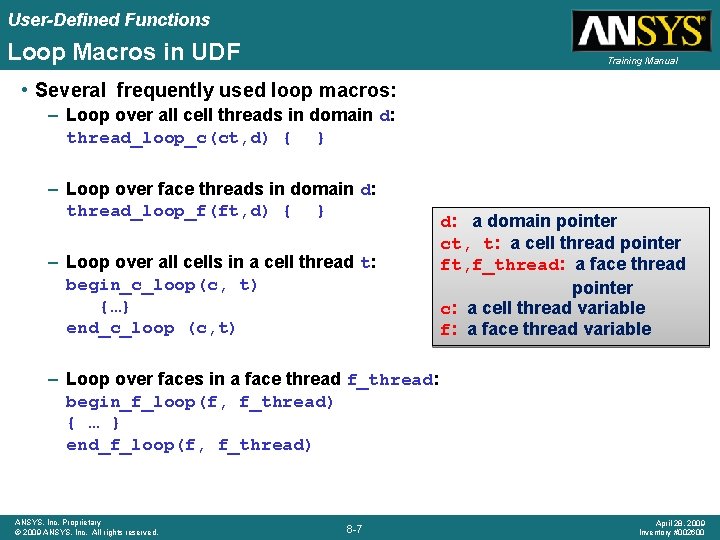
User-Defined Functions Loop Macros in UDF Training Manual • Several frequently used loop macros: – Loop over all cell threads in domain d: thread_loop_c(ct, d) { } – Loop over face threads in domain d: thread_loop_f(ft, d) { } – Loop over all cells in a cell thread t: begin_c_loop(c, t) {…} end_c_loop (c, t) d: a domain pointer ct, t: a cell thread pointer ft, f_thread: a face thread pointer c: a cell thread variable f: a face thread variable – Loop over faces in a face thread f_thread: begin_f_loop(f, f_thread) { … } end_f_loop(f, f_thread) ANSYS, Inc. Proprietary © 2009 ANSYS, Inc. All rights reserved. 8 -7 April 28, 2009 Inventory #002600
User-Defined Functions Example – Parabolic Inlet Velocity Profile Training Manual • We would like to impose a parabolic inlet velocity to the 2 D elbow shown. • The x velocity is to be specified as • We need to know the centroids of the inlet faces via a macro, and another macro to perform the boundary condition assignment. ANSYS, Inc. Proprietary © 2009 ANSYS, Inc. All rights reserved. 8 -8 April 28, 2009 Inventory #002600
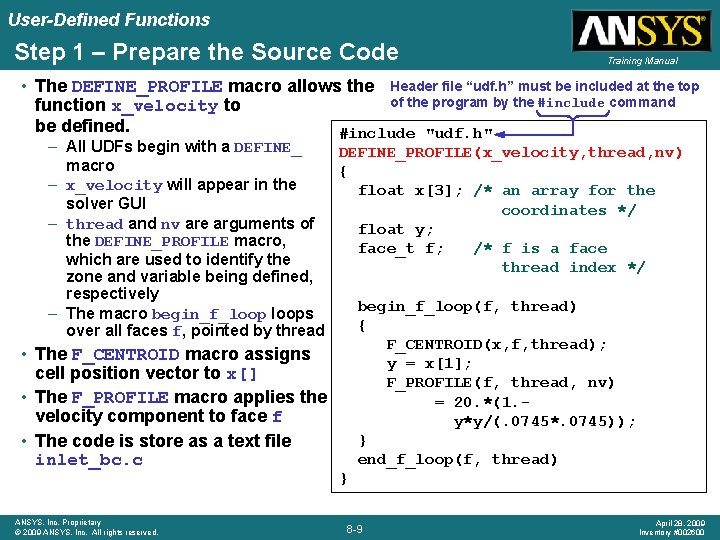
User-Defined Functions Step 1 – Prepare the Source Code Training Manual • The DEFINE_PROFILE macro allows the Header file “udf. h” must be included at the top of the program by the #include command function x_velocity to be defined. #include "udf. h" – All UDFs begin with a DEFINE_PROFILE(x_velocity, thread, nv) macro { – x_velocity will appear in the float x[3]; /* an array for the solver GUI coordinates */ – thread and nv are arguments of float y; the DEFINE_PROFILE macro, face_t f; /* f is a face which are used to identify the thread index */ zone and variable being defined, respectively begin_f_loop(f, thread) – The macro begin_f_loops { over all faces f, pointed by thread F_CENTROID(x, f, thread); • The F_CENTROID macro assigns y = x[1]; cell position vector to x[] F_PROFILE(f, thread, nv) • The F_PROFILE macro applies the = 20. *(1. velocity component to face f y*y/(. 0745*. 0745)); } • The code is store as a text file end_f_loop(f, thread) inlet_bc. c } ANSYS, Inc. Proprietary © 2009 ANSYS, Inc. All rights reserved. 8 -9 April 28, 2009 Inventory #002600
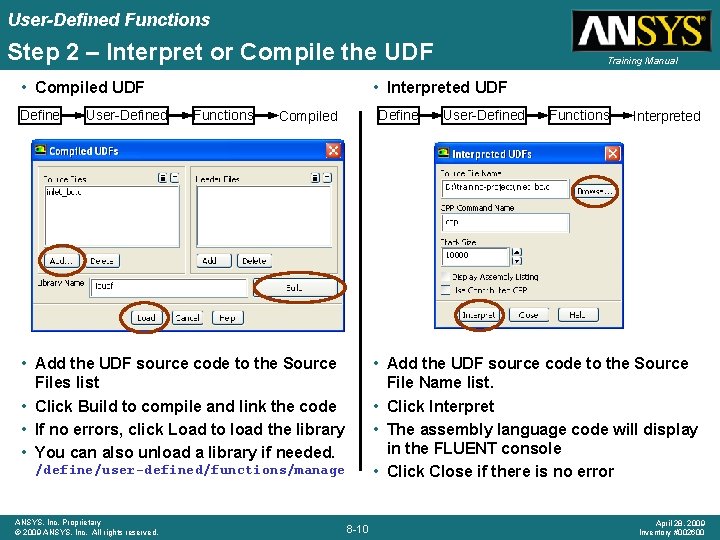
User-Defined Functions Step 2 – Interpret or Compile the UDF • Compiled UDF Define User-Defined • Interpreted UDF Functions Define Compiled • Add the UDF source code to the Source Files list • Click Build to compile and link the code • If no errors, click Load to load the library • You can also unload a library if needed. User-Defined Functions Interpreted • Add the UDF source code to the Source File Name list. • Click Interpret • The assembly language code will display in the FLUENT console • Click Close if there is no error /define/user-defined/functions/manage ANSYS, Inc. Proprietary © 2009 ANSYS, Inc. All rights reserved. Training Manual 8 -10 April 28, 2009 Inventory #002600
User-Defined Functions Interpreted vs. Compiled UDFs Training Manual • Functions can either be read and interpreted at run time or compiled and grouped into a shared library that is linked with the standard FLUENT executable. • Interpreted code vs. compiled code – Interpreted • • Interpreter is a large program that sits in the computer’s memory. Executes code on a “line by line” basis instantaneously. Advantage – Does not require a third-party compiler. Disadvantage – Interpreter is slow and takes up memory. – Compiled (refer to the FLUENT User’s Guide for instructions) • • UDF code is translated once into machine language (object modules). Efficient way to run UDFs. Creates shared libraries which are linked with the rest of the solver. Overcomes many interpreter limitations such as mixed mode arithmetic, structure references, etc. • Interpretation of your code should only be considered before the C/C++ compiler is installed on your system. ANSYS, Inc. Proprietary © 2009 ANSYS, Inc. All rights reserved. 8 -11 April 28, 2009 Inventory #002600
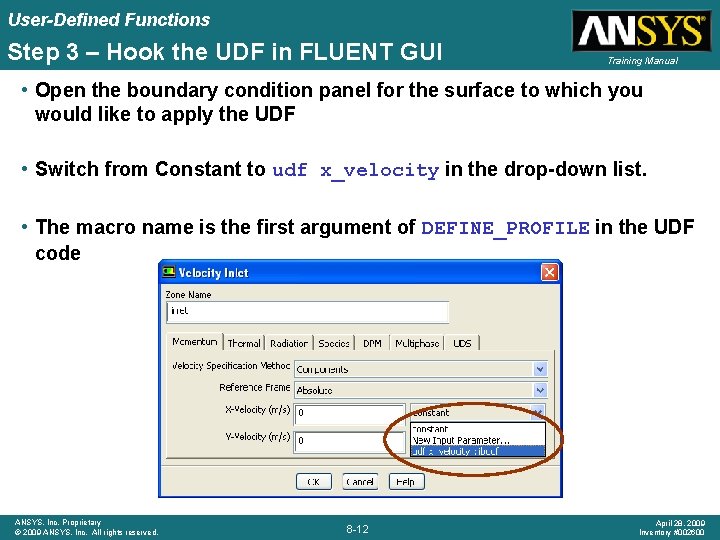
User-Defined Functions Step 3 – Hook the UDF in FLUENT GUI Training Manual • Open the boundary condition panel for the surface to which you would like to apply the UDF • Switch from Constant to udf x_velocity in the drop-down list. • The macro name is the first argument of DEFINE_PROFILE in the UDF code ANSYS, Inc. Proprietary © 2009 ANSYS, Inc. All rights reserved. 8 -12 April 28, 2009 Inventory #002600
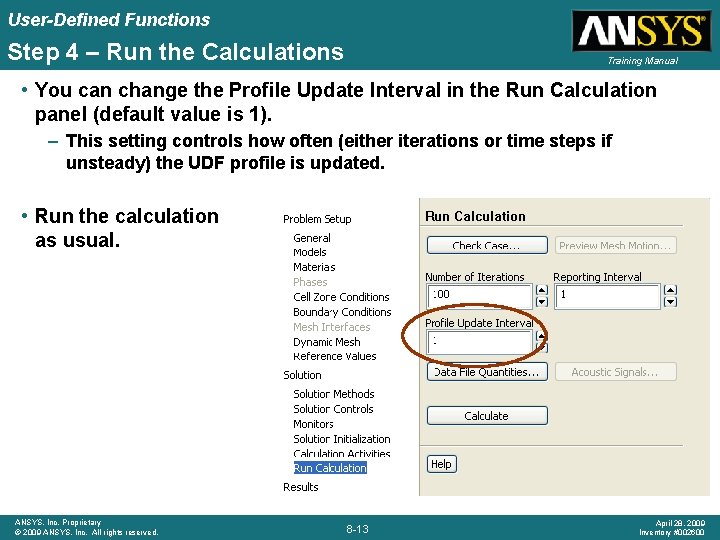
User-Defined Functions Step 4 – Run the Calculations Training Manual • You can change the Profile Update Interval in the Run Calculation panel (default value is 1). – This setting controls how often (either iterations or time steps if unsteady) the UDF profile is updated. • Run the calculation as usual. ANSYS, Inc. Proprietary © 2009 ANSYS, Inc. All rights reserved. 8 -13 April 28, 2009 Inventory #002600
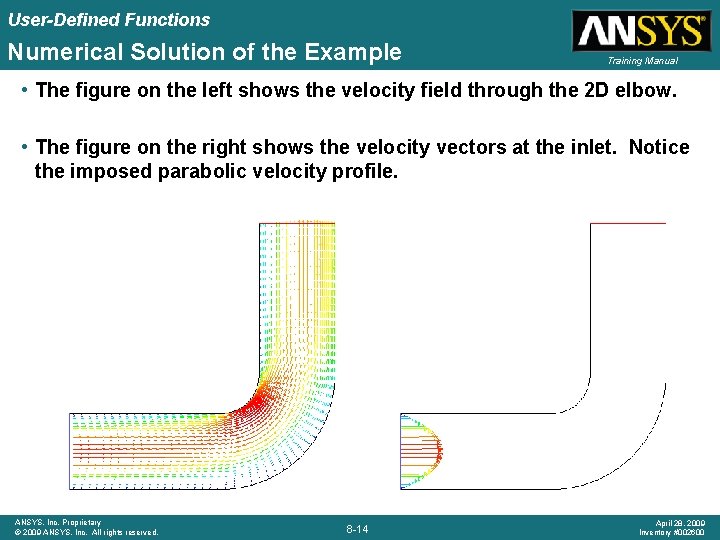
User-Defined Functions Numerical Solution of the Example Training Manual • The figure on the left shows the velocity field through the 2 D elbow. • The figure on the right shows the velocity vectors at the inlet. Notice the imposed parabolic velocity profile. ANSYS, Inc. Proprietary © 2009 ANSYS, Inc. All rights reserved. 8 -14 April 28, 2009 Inventory #002600
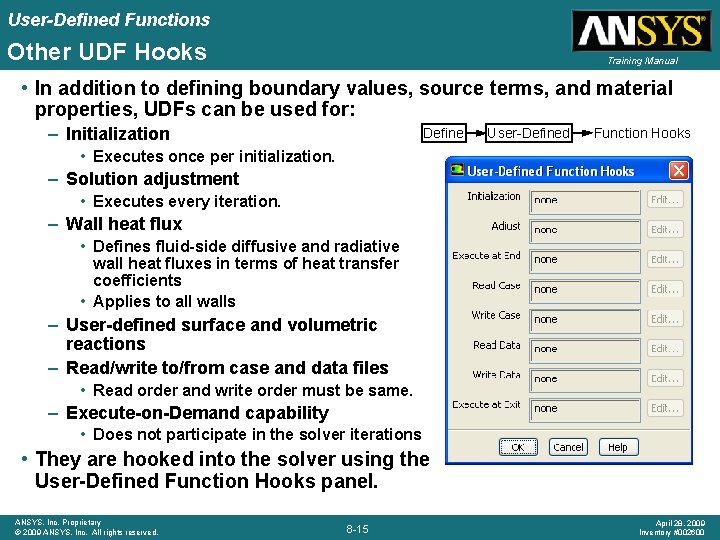
User-Defined Functions Other UDF Hooks Training Manual • In addition to defining boundary values, source terms, and material properties, UDFs can be used for: – Initialization Define User-Defined Function Hooks • Executes once per initialization. – Solution adjustment • Executes every iteration. – Wall heat flux • Defines fluid-side diffusive and radiative wall heat fluxes in terms of heat transfer coefficients • Applies to all walls – User-defined surface and volumetric reactions – Read/write to/from case and data files • Read order and write order must be same. – Execute-on-Demand capability • Does not participate in the solver iterations • They are hooked into the solver using the User-Defined Function Hooks panel. ANSYS, Inc. Proprietary © 2009 ANSYS, Inc. All rights reserved. 8 -15 April 28, 2009 Inventory #002600
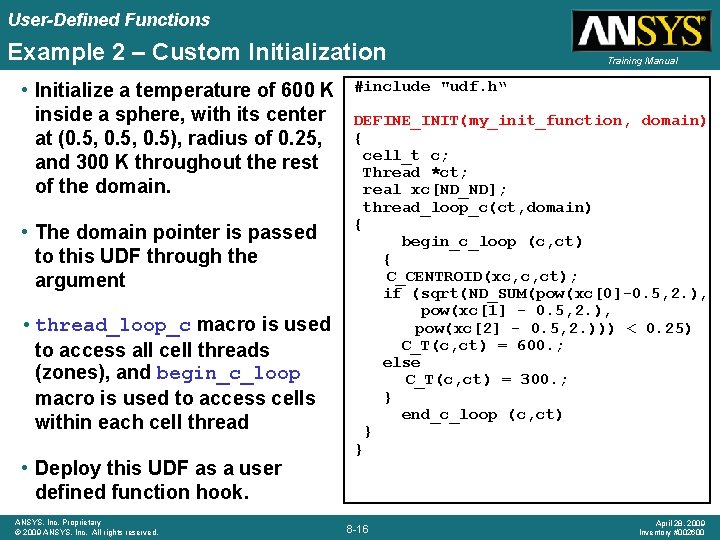
User-Defined Functions Example 2 – Custom Initialization • Initialize a temperature of 600 K inside a sphere, with its center at (0. 5, 0. 5), radius of 0. 25, and 300 K throughout the rest of the domain. • The domain pointer is passed to this UDF through the argument • thread_loop_c macro is used to access all cell threads (zones), and begin_c_loop macro is used to access cells within each cell thread • Deploy this UDF as a user defined function hook. ANSYS, Inc. Proprietary © 2009 ANSYS, Inc. All rights reserved. Training Manual #include "udf. h“ DEFINE_INIT(my_init_function, domain) { cell_t c; Thread *ct; real xc[ND_ND]; thread_loop_c(ct, domain) { begin_c_loop (c, ct) { C_CENTROID(xc, c, ct); if (sqrt(ND_SUM(pow(xc[0]-0. 5, 2. ), pow(xc[1] - 0. 5, 2. ), pow(xc[2] - 0. 5, 2. ))) < 0. 25) C_T(c, ct) = 600. ; else C_T(c, ct) = 300. ; } end_c_loop (c, ct) } } 8 -16 April 28, 2009 Inventory #002600
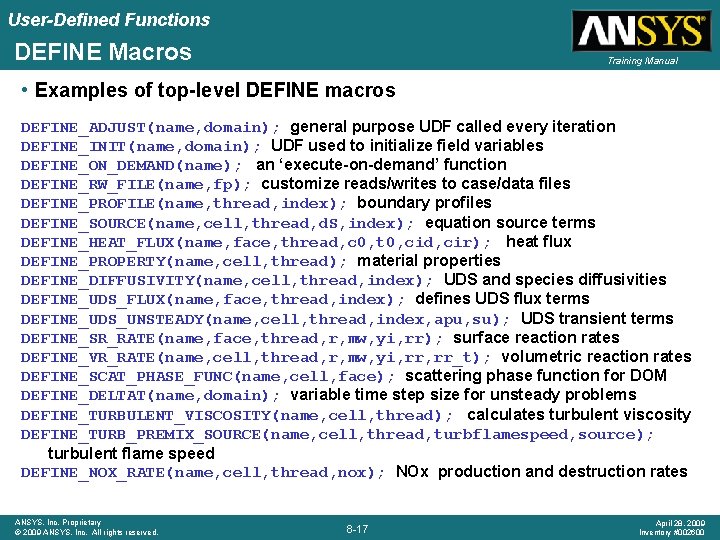
User-Defined Functions DEFINE Macros Training Manual • Examples of top-level DEFINE macros DEFINE_ADJUST(name, domain); general purpose UDF called every iteration DEFINE_INIT(name, domain); UDF used to initialize field variables DEFINE_ON_DEMAND(name); an ‘execute-on-demand’ function DEFINE_RW_FILE(name, fp); customize reads/writes to case/data files DEFINE_PROFILE(name, thread, index); boundary profiles DEFINE_SOURCE(name, cell, thread, d. S, index); equation source terms DEFINE_HEAT_FLUX(name, face, thread, c 0, t 0, cid, cir); heat flux DEFINE_PROPERTY(name, cell, thread); material properties DEFINE_DIFFUSIVITY(name, cell, thread, index); UDS and species diffusivities DEFINE_UDS_FLUX(name, face, thread, index); defines UDS flux terms DEFINE_UDS_UNSTEADY(name, cell, thread, index, apu, su); UDS transient terms DEFINE_SR_RATE(name, face, thread, r, mw, yi, rr); surface reaction rates DEFINE_VR_RATE(name, cell, thread, r, mw, yi, rr_t); volumetric reaction rates DEFINE_SCAT_PHASE_FUNC(name, cell, face); scattering phase function for DOM DEFINE_DELTAT(name, domain); variable time step size for unsteady problems DEFINE_TURBULENT_VISCOSITY(name, cell, thread); calculates turbulent viscosity DEFINE_TURB_PREMIX_SOURCE(name, cell, thread, turbflamespeed, source); turbulent flame speed DEFINE_NOX_RATE(name, cell, thread, nox); NOx production and destruction rates ANSYS, Inc. Proprietary © 2009 ANSYS, Inc. All rights reserved. 8 -17 April 28, 2009 Inventory #002600
User-Defined Functions Geometry and Time Macros Training Manual Returns nodes/cell Returns faces/cell Returns nodes/face Returns coordinates of cell centroid in array x[] F_CENTROID(x, f, t); Returns coordinates of face centroid in array x[] F_AREA(A, f, t); Returns area vector in array A[] C_VOLUME(c, t); Returns cell volume C_VOLUME_2 D(c, t); Returns cell volume (axisymmetric domain) C_NNODES(c, t); C_NFACES(c, t); F_NNODES(f, t); C_CENTROID(x, c, t); real flow_time(); Returns actual time int time_step; Returns time step number RP_Get_Real(“physical-time-step”); Returns time step size ANSYS, Inc. Proprietary © 2009 ANSYS, Inc. All rights reserved. 8 -18 April 28, 2009 Inventory #002600
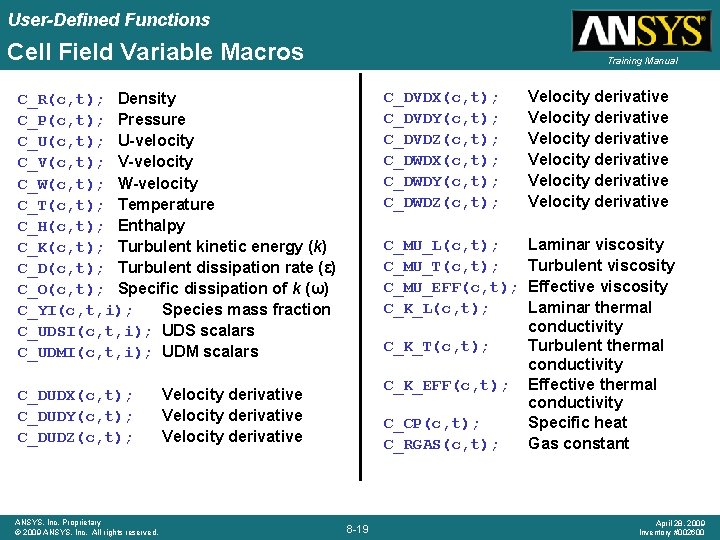
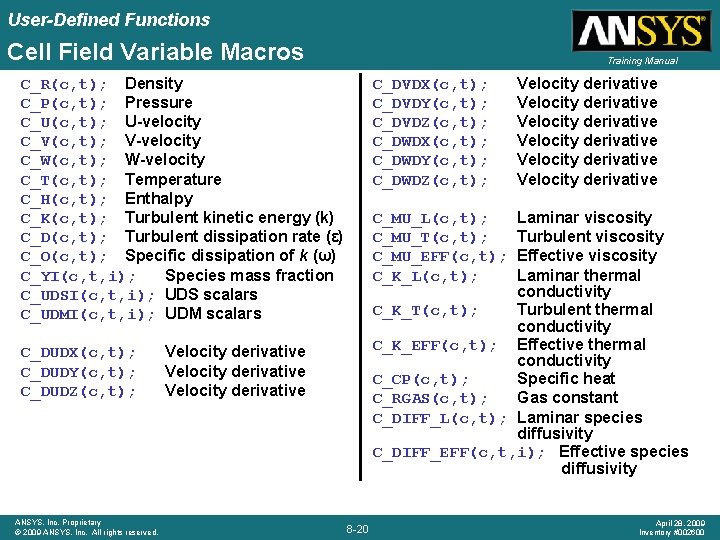
User-Defined Functions Cell Field Variable Macros Training Manual C_R(c, t); Density C_P(c, t); Pressure C_U(c, t); U-velocity C_V(c, t); V-velocity C_W(c, t); W-velocity C_T(c, t); Temperature C_H(c, t); Enthalpy C_K(c, t); Turbulent kinetic energy (k) C_D(c, t); Turbulent dissipation rate (ε) C_O(c, t); Specific dissipation of k (ω) C_YI(c, t, i); Species mass fraction C_UDSI(c, t, i); UDS scalars C_UDMI(c, t, i); UDM scalars C_DUDX(c, t); C_DUDY(c, t); C_DUDZ(c, t); ANSYS, Inc. Proprietary © 2009 ANSYS, Inc. All rights reserved. C_DVDX(c, t); C_DVDY(c, t); C_DVDZ(c, t); C_DWDX(c, t); C_DWDY(c, t); C_DWDZ(c, t); Velocity derivative Velocity derivative C_MU_L(c, t); C_MU_T(c, t); C_MU_EFF(c, t); C_K_L(c, t); Laminar viscosity Turbulent viscosity Effective viscosity Laminar thermal conductivity Turbulent thermal conductivity Effective thermal conductivity Specific heat Gas constant C_K_T(c, t); C_K_EFF(c, t); Velocity derivative C_CP(c, t); C_RGAS(c, t); 8 -19 April 28, 2009 Inventory #002600
User-Defined Functions Cell Field Variable Macros Training Manual C_R(c, t); Density C_P(c, t); Pressure C_U(c, t); U-velocity C_V(c, t); V-velocity C_W(c, t); W-velocity C_T(c, t); Temperature C_H(c, t); Enthalpy C_K(c, t); Turbulent kinetic energy (k) C_D(c, t); Turbulent dissipation rate (ε) C_O(c, t); Specific dissipation of k (ω) C_YI(c, t, i); Species mass fraction C_UDSI(c, t, i); UDS scalars C_UDMI(c, t, i); UDM scalars C_DUDX(c, t); C_DUDY(c, t); C_DUDZ(c, t); ANSYS, Inc. Proprietary © 2009 ANSYS, Inc. All rights reserved. C_DVDX(c, t); C_DVDY(c, t); C_DVDZ(c, t); C_DWDX(c, t); C_DWDY(c, t); C_DWDZ(c, t); Velocity derivative Velocity derivative Laminar viscosity Turbulent viscosity Effective viscosity Laminar thermal conductivity C_K_T(c, t); Turbulent thermal conductivity C_K_EFF(c, t); Effective thermal conductivity C_CP(c, t); Specific heat C_RGAS(c, t); Gas constant C_DIFF_L(c, t); Laminar species diffusivity C_DIFF_EFF(c, t, i); Effective species diffusivity C_MU_L(c, t); C_MU_T(c, t); C_MU_EFF(c, t); C_K_L(c, t); Velocity derivative 8 -20 April 28, 2009 Inventory #002600
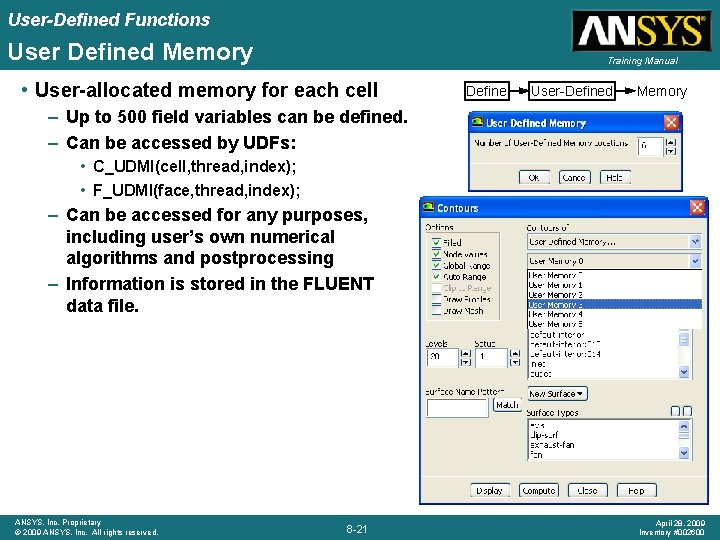
User-Defined Functions User Defined Memory Training Manual • User-allocated memory for each cell Define User-Defined Memory – Up to 500 field variables can be defined. – Can be accessed by UDFs: • C_UDMI(cell, thread, index); • F_UDMI(face, thread, index); – Can be accessed for any purposes, including user’s own numerical algorithms and postprocessing – Information is stored in the FLUENT data file. ANSYS, Inc. Proprietary © 2009 ANSYS, Inc. All rights reserved. 8 -21 April 28, 2009 Inventory #002600
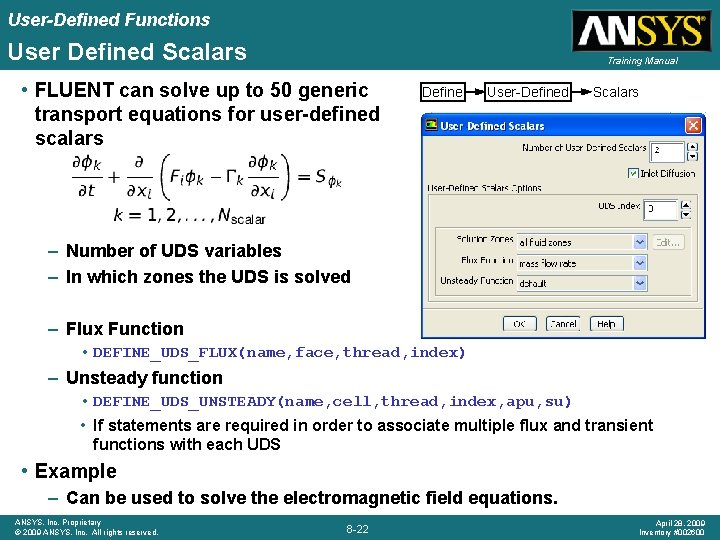
User-Defined Functions User Defined Scalars Training Manual • FLUENT can solve up to 50 generic transport equations for user-defined scalars Define User-Defined Scalars – Number of UDS variables – In which zones the UDS is solved – Flux Function • DEFINE_UDS_FLUX(name, face, thread, index) – Unsteady function • DEFINE_UDS_UNSTEADY(name, cell, thread, index, apu, su) • If statements are required in order to associate multiple flux and transient functions with each UDS • Example – Can be used to solve the electromagnetic field equations. ANSYS, Inc. Proprietary © 2009 ANSYS, Inc. All rights reserved. 8 -22 April 28, 2009 Inventory #002600
User-Defined Functions Additional Macros Training Manual • Still many more macros are available in the following categories and are documented in UDF Manual: – – – Turbulence Models Multiphase models Reacting flows Dynamic mesh Input/Output ANSYS, Inc. Proprietary © 2009 ANSYS, Inc. All rights reserved. 8 -23 April 28, 2009 Inventory #002600
User-Defined Functions Where to Get More Information and Help Training Manual • UDF User Guide – A very readable document which should serve as the main source of information. – Contains macro definitions, numerous code examples and code fragments. – New users of UDFs should quickly go through the UDF manual as a pre-requisite for UDF programming • FLUENT’s UDF Archive accessible through www. fluentusers. com • Start your own UDF program by modifying an existing UDF program which is close to what you want to do, then step by step add your own code to the program. • Attend the Advanced UDF Programming course • Submit your help requests through the ANSYS technical support ANSYS, Inc. Proprietary © 2009 ANSYS, Inc. All rights reserved. 8 -24 April 28, 2009 Inventory #002600
User-Defined Functions UDF Technical Support Training Manual • Because UDFs can be very complicated, ANSYS does not assume responsibility for the accuracy or stability of solutions obtained using user-generated UDFs. • Support will be generally be limited to guidance related to communication between UDFs and the FLUENT solver. • A consulting project provided by the ANSYS technical services engineers is an option to jumpstart your project. ANSYS, Inc. Proprietary © 2009 ANSYS, Inc. All rights reserved. 8 -25 April 28, 2009 Inventory #002600