
Chapter 8 Software Testing 30102014 Chapter 8 Software
- Slides: 64
Chapter 8 – Software Testing 30/10/2014 Chapter 8 Software Testing 1
Topics covered ² Development testing ² Test-driven development ² Release testing ² User testing 30/10/2014 Chapter 8 Software Testing 2
Program testing ² Testing is intended to show that a program does what it is intended to do and to discover program defects before it is put into use. ² When you test software, you execute a program using artificial data. ² You check the results of the test run for errors, anomalies or information about the program’s non-functional attributes. ² Can reveal the presence of errors NOT their absence. ² Testing is part of a more general verification and validation process, which also includes static validation techniques. 30/10/2014 Chapter 8 Software Testing 3
Program testing goals ² When you test software, you are trying to do two things: ² To demonstrate to the developer and the customer that the software meets its requirements. ----validation testing § For custom software, this means that there should be at least one test for every requirement in the requirements document. For generic software products, it means that there should be tests for all of the system features, plus combinations of these features, that will be incorporated in the product release. ² To discover situations in which the behavior of the software is incorrect, undesirable or does not conform to its specification. ---defect testing § Defect testing is concerned with rooting out undesirable system behavior such as system crashes, unwanted interactions with other systems, incorrect computations and data corruption. 30/10/2014 Chapter 8 Software Testing 4
Validation and defect testing ² The first goal leads to validation testing § You expect the system to perform correctly using a given set of test cases that reflect the system’s expected use. ² The second goal leads to defect testing § The test cases are designed to expose defects. The test cases in defect testing can be deliberately obscure and need not reflect how the system is normally used. 30/10/2014 Chapter 8 Software Testing 5
Testing process goals ² Validation testing § To demonstrate to the developer and the system customer that the software meets its requirements § A successful test shows that the system operates as intended. ² Defect testing § To discover faults or defects in the software where its behaviour is incorrect or not in conformance with its specification § A successful test is a test that makes the system perform incorrectly and so exposes a defect in the system. 30/10/2014 Chapter 8 Software Testing 6
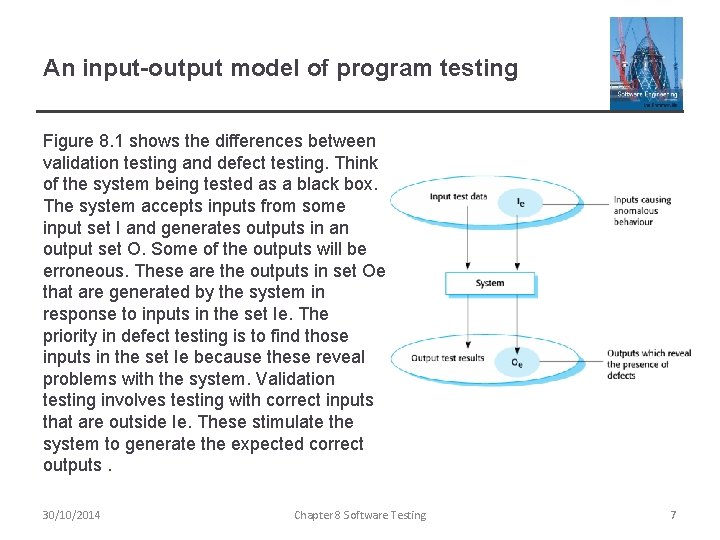
An input-output model of program testing Figure 8. 1 shows the differences between validation testing and defect testing. Think of the system being tested as a black box. The system accepts inputs from some input set I and generates outputs in an output set O. Some of the outputs will be erroneous. These are the outputs in set Oe that are generated by the system in response to inputs in the set Ie. The priority in defect testing is to find those inputs in the set Ie because these reveal problems with the system. Validation testing involves testing with correct inputs that are outside Ie. These stimulate the system to generate the expected correct outputs. 30/10/2014 Chapter 8 Software Testing 7
Verification vs validation ² Testing is part of a broader process of software verification and validation. Verification and validation are not the same thing, although they are often confused. ² Verification: "Are we building the product right”. ² The software should conform to its specification. ² Validation: "Are we building the right product”. ² The software should do what the user really requires. 30/10/2014 Chapter 8 Software Testing 8
V & V confidence ² Aim of V & V is to establish confidence that the system is ‘fit for purpose’. ² Depends on system’s purpose, user expectations and marketing environment § Software purpose • The level of confidence depends on how critical the software is to an organisation. § User expectations • Users may have low expectations of certain kinds of software. § Marketing environment • Getting a product to market early may be more important than finding defects in the program. 30/10/2014 Chapter 8 Software Testing 9
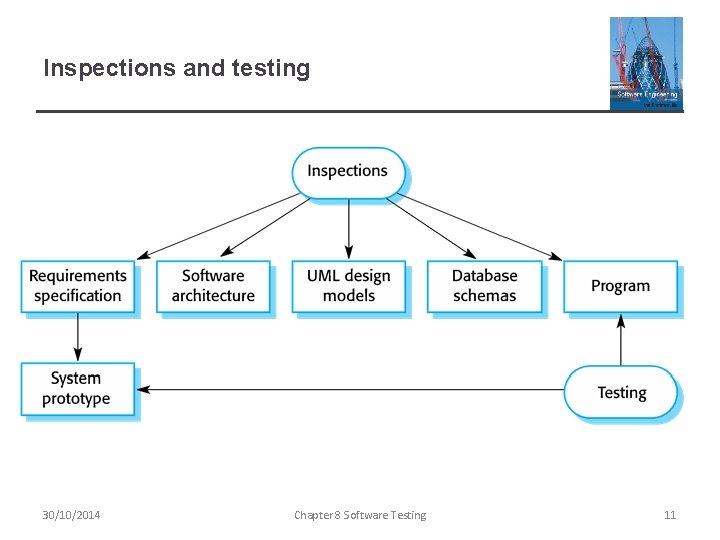
Inspections and testing ² As well as software testing, the verification and validation process may involve software inspections and reviews. Inspections and reviews analyze and check the system requirements, design models, the program source code, and even proposed system tests. ² Software inspections Concerned with analysis of the static system representation to discover problems (static verification) § May be supplement by tool-based document and code analysis. Discussed in Chapter 15. ² Software testing Concerned with exercising and observing product behaviour (dynamic verification) § The system is executed with test data and its operational behaviour is observed. 30/10/2014 Chapter 8 Software Testing 10
Inspections and testing 30/10/2014 Chapter 8 Software Testing 11
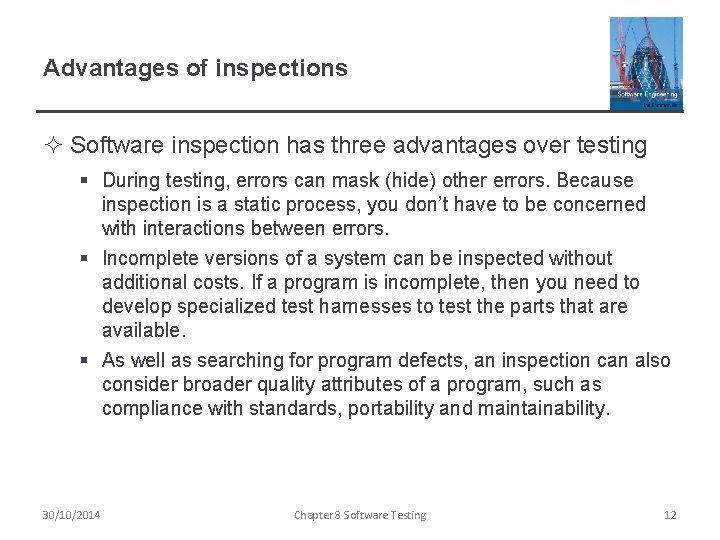
Advantages of inspections ² Software inspection has three advantages over testing § During testing, errors can mask (hide) other errors. Because inspection is a static process, you don’t have to be concerned with interactions between errors. § Incomplete versions of a system can be inspected without additional costs. If a program is incomplete, then you need to develop specialized test harnesses to test the parts that are available. § As well as searching for program defects, an inspection can also consider broader quality attributes of a program, such as compliance with standards, portability and maintainability. 30/10/2014 Chapter 8 Software Testing 12
Inspections and testing ² Inspections and testing are complementary and not opposing verification techniques. ² Both should be used during the V & V process. ² Inspections can check conformance with a specification but not conformance with the customer’s real requirements. ² Inspections cannot check non-functional characteristics such as performance, usability, etc. ² Inspections are discussed in more detail in Chapter 24. This chapter focuses on testing. 30/10/2014 Chapter 8 Software Testing 13
Stages of testing ² Typically, a commercial software system has to go through three stages of testing: § Development testing, where the system is tested during development to discover bugs and defects. § Release testing, where a separate testing team test a complete version of the system before it is released to users. § User testing, where users or potential users of a system test the system in their own environment. 30/10/2014 Chapter 8 Software Testing 14
Development testing 30/10/2014 Chapter 8 Software Testing 15
Development testing ² Development testing includes all testing activities that are carried out by the team developing the system. ² There are three stages of development testing: § Unit testing, where individual program units or object classes are tested. Unit testing should focus on testing the functionality of objects or methods. § Component testing, where several individual units are integrated to create composite components. Component testing should focus on testing component interfaces. § System testing, where some or all of the components in a system are integrated and the system is tested as a whole. System testing should focus on testing component interactions. 30/10/2014 Chapter 8 Software Testing 16
1. Unit testing ² Unit testing is the process of testing individual components in isolation. ² It is a defect testing process. ² Units may be: § Individual functions or methods within an object § Object classes with several attributes and methods § Composite components with defined interfaces used to access their functionality. 30/10/2014 Chapter 8 Software Testing 17
Object class testing ² Complete test coverage of a class involves § Testing all operations associated with an object § Setting and interrogating all object attributes § Exercising the object in all possible states. ² Inheritance makes it more difficult to design object class tests as the information to be tested is not localised. 30/10/2014 Chapter 8 Software Testing 18
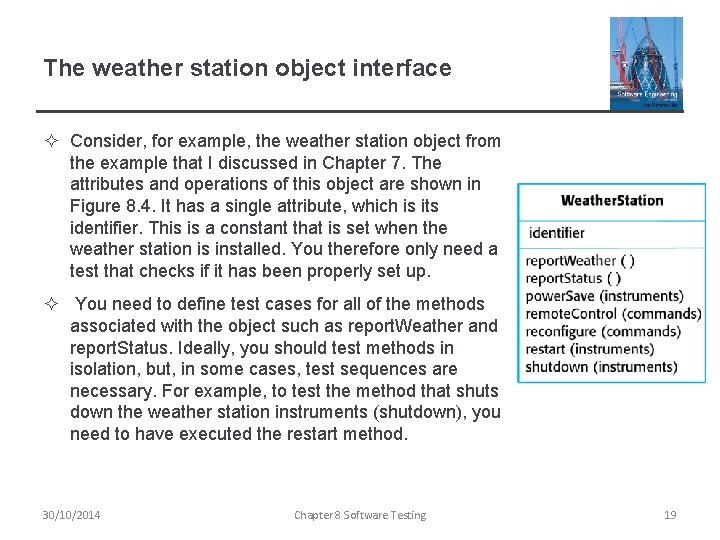
The weather station object interface ² Consider, for example, the weather station object from the example that I discussed in Chapter 7. The attributes and operations of this object are shown in Figure 8. 4. It has a single attribute, which is its identifier. This is a constant that is set when the weather station is installed. You therefore only need a test that checks if it has been properly set up. ² You need to define test cases for all of the methods associated with the object such as report. Weather and report. Status. Ideally, you should test methods in isolation, but, in some cases, test sequences are necessary. For example, to test the method that shuts down the weather station instruments (shutdown), you need to have executed the restart method. 30/10/2014 Chapter 8 Software Testing 19
Weather station testing ² To test the states of the weather station, you can use a state model. ² Using a state model, you identify sequences of state transitions that have to be tested and define event sequences to force these transitions. In principle, you should test every possible state transition sequence, although in practice this may be too expensive. ² Examples of state sequences that should be tested in the weather station include: § Shutdown -> Running-> Shutdown § Configuring-> Running-> Testing -> Transmitting -> Running § Running-> Collecting-> Running-> Summarizing -> Transmitting > Running 30/10/2014 Chapter 8 Software Testing 20
Automated testing ² Whenever possible, unit testing should be automated so that tests are run and checked without manual intervention. ² In automated unit testing, you make use of a test automation framework (such as JUnit) to write and run your program tests. ² Unit testing frameworks provide generic test classes that you extend to create specific test cases. They can then run all of the tests that you have implemented and report, often through some GUI, on the success or otherwise of the tests. 30/10/2014 Chapter 8 Software Testing 21
Automated test components ² An automated test has three parts: § A setup part, where you initialize the system with the test case, namely the inputs and expected outputs. § A call part, where you call the object or method to be tested. § An assertion part where you compare the result of the call with the expected result. If the assertion evaluates to true, the test has been successful if false, then it has failed. 30/10/2014 Chapter 8 Software Testing 22
2. Choosing unit test cases ² The test cases should show that, when used as expected, the component that you are testing does what it is supposed to do. ² If there are defects in the component, these should be revealed by test cases. ² This leads to 2 types of unit test case: § The first of these should reflect normal operation of a program and should show that the component works as expected. § The other kind of test case should be based on testing experience of where common problems arise. It should use abnormal inputs to check that these are properly processed and do not crash the component. 30/10/2014 Chapter 8 Software Testing 23
Testing strategies ² Two strategies that can be effective in helping you choose test cases are: § Partition testing, where you identify groups of inputs that have common characteristics and should be processed in the same way. • You should choose tests from within each of these groups. § Guideline-based testing, where you use testing guidelines to choose test cases. • These guidelines reflect previous experience of the kinds of errors that programmers often make when developing components. 30/10/2014 Chapter 8 Software Testing 24
Partition testing ² Input data and output results often fall into different classes where all members of a class are related. ² Each of these classes is an equivalence partition or domain where the program behaves in an equivalent way for each class member. ² Test cases should be chosen from each partition. 30/10/2014 Chapter 8 Software Testing 25
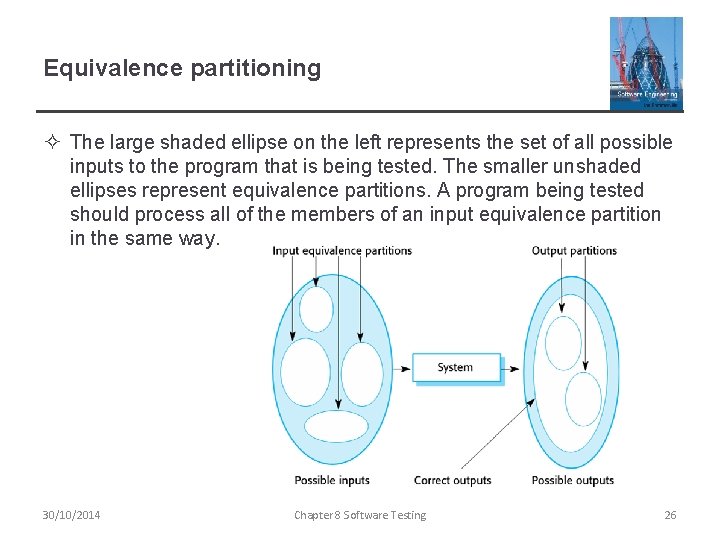
Equivalence partitioning ² The large shaded ellipse on the left represents the set of all possible inputs to the program that is being tested. The smaller unshaded ellipses represent equivalence partitions. A program being tested should process all of the members of an input equivalence partition in the same way. 30/10/2014 Chapter 8 Software Testing 26
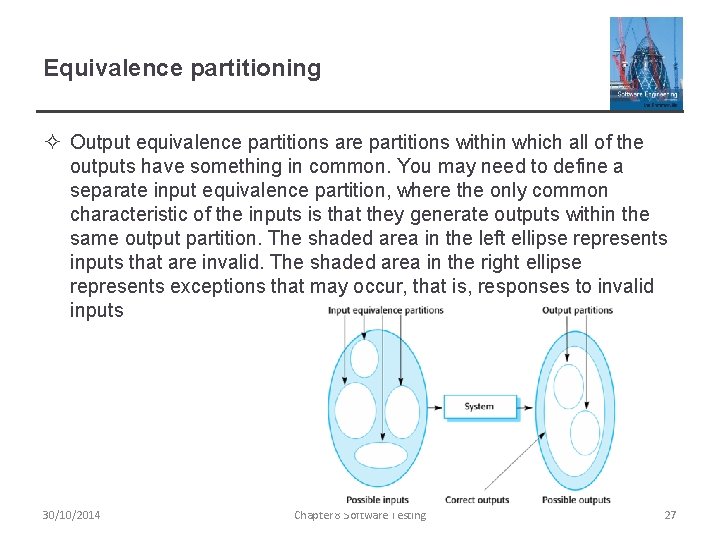
Equivalence partitioning ² Output equivalence partitions are partitions within which all of the outputs have something in common. You may need to define a separate input equivalence partition, where the only common characteristic of the inputs is that they generate outputs within the same output partition. The shaded area in the left ellipse represents inputs that are invalid. The shaded area in the right ellipse represents exceptions that may occur, that is, responses to invalid inputs 30/10/2014 Chapter 8 Software Testing 27
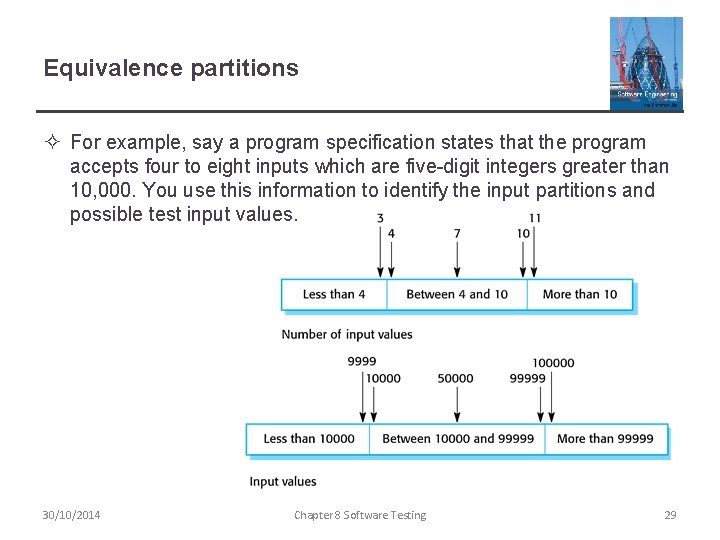
Equivalence partitioning ² Once you have identified a set of partitions, you choose test cases from each of these partitions. A good rule of thumb for test-case selection is to choose test cases on the boundaries of the partitions, plus cases close to the midpoint of the partition. ² The reason for this is that designers and programmers tend to consider typical values of inputs when developing a system. You test these by choosing the midpoint of the partition. ² Boundary values are often atypical (e. g. , zero may behave differently from other non-negative numbers) and so are sometimes overlooked by developers. Program failures often occur when processing these atypical values. ² You identify partitions by using the program specification or user documentation and from experience where you predict the classes of input value that are likely to detect errors. 30/10/2014 Chapter 8 Software Testing 28
Equivalence partitions ² For example, say a program specification states that the program accepts four to eight inputs which are five-digit integers greater than 10, 000. You use this information to identify the input partitions and possible test input values. 30/10/2014 Chapter 8 Software Testing 29
Testing guidelines (sequences) ² You can also use testing guidelines to help choose test cases. Guidelines encapsulate knowledge of what kinds of test cases are effective for discovering errors. For example, when you are testing programs with sequences, arrays, or lists, guidelines that could help reveal defects include: § Test software with sequences which have only a single value. § Use sequences of different sizes in different tests. § Derive tests so that the first, middle and last elements of the sequence are accessed. § Test with sequences of zero length. 30/10/2014 Chapter 8 Software Testing 30
General testing guidelines ² Choose inputs that force the system to generate all error messages ² Design inputs that cause input buffers to overflow ² Repeat the same input or series of inputs numerous times ² Force invalid outputs to be generated ² Force computation results to be too large or too small. 30/10/2014 Chapter 8 Software Testing 31
3. Component testing ² Software components are often composite components that are made up of several interacting objects. § For example, in the weather station system, the reconfiguration component includes objects that deal with each aspect of the reconfiguration. ² You access the functionality of these objects through the defined component interface. ² Testing composite components should therefore focus on showing that the component interface behaves according to its specification. § You can assume that unit tests on the individual objects within the component have been completed. 30/10/2014 Chapter 8 Software Testing 32
Interface testing ² Objectives are to detect faults due to interface errors or invalid assumptions about interfaces. ² Interface types § Parameter interfaces Data passed from one method or procedure to another. § Shared memory interfaces Block of memory is shared between procedures or functions. § Procedural interfaces Sub-system encapsulates a set of procedures to be called by other sub-systems. § Message passing interfaces Sub-systems request services from other sub-systems 30/10/2014 Chapter 8 Software Testing 33
Interface errors ² Interface errors are one of the most common forms of error in complex systems These errors fall into three classes: ² Interface misuse § A calling component calls another component and makes an error in its use of its interface e. g. parameters in the wrong order. ² Interface misunderstanding § A calling component embeds assumptions about the behaviour of the called component which are incorrect. ² Timing errors § The called and the calling component operate at different speeds and out-of-date information is accessed. 30/10/2014 Chapter 8 Software Testing 34
Interface testing guidelines ² Some general guidelines for interface testing are: § Design tests so that parameters to a called procedure at the extreme ends of their ranges. § Always test pointer parameters with null pointers. § Design tests which cause the component to fail. § Use stress testing in message passing systems. § In shared memory systems, vary the order in which components are activated. 30/10/2014 Chapter 8 Software Testing 35
4. System testing ² System testing during development involves integrating components to create a version of the system and then testing the integrated system. ² The focus in system testing is testing the interactions between components. ² System testing checks that components are compatible, interact correctly and transfer the right data at the right time across their interfaces. ² System testing tests the emergent behaviour of a system. 30/10/2014 Chapter 8 Software Testing 36
System and component testing ² System testing obviously overlaps with component testing, but there are two important differences: ² During system testing, reusable components that have been separately developed and off-the-shelf systems may be integrated with newly developed components. The complete system is then tested. ² Components developed by different team members or sub-teams may be integrated at this stage. System testing is a collective rather than an individual process. § In some companies, system testing may involve a separate testing team with no involvement from designers and programmers. 30/10/2014 Chapter 8 Software Testing 37
Use-case testing ² The use-cases developed to identify system interactions can be used as a basis for system testing. ² Each use case usually involves several system components so testing the use case forces these interactions to occur. ² The sequence diagrams associated with the use case documents the components and interactions that are being tested. 30/10/2014 Chapter 8 Software Testing 38
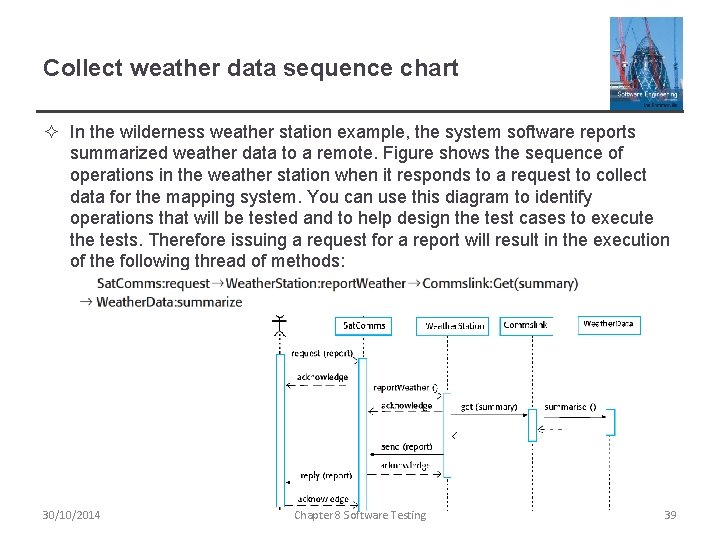
Collect weather data sequence chart ² In the wilderness weather station example, the system software reports summarized weather data to a remote. Figure shows the sequence of operations in the weather station when it responds to a request to collect data for the mapping system. You can use this diagram to identify operations that will be tested and to help design the test cases to execute the tests. Therefore issuing a request for a report will result in the execution of the following thread of methods: 30/10/2014 Chapter 8 Software Testing 39
Test cases derived from sequence diagram ² An input of a request for a report should have an associated acknowledgement. A report should ultimately be returned from the request. § You should create summarized data that can be used to check that the report is correctly organized. ² An input request for a report to Weather. Station results in a summarized report being generated. § Can be tested by creating raw data corresponding to the summary that you have prepared for the test of Sat. Comms and checking that the Weather. Station object correctly produces this summary. This raw data is also used to test the Weather. Data object. 30/10/2014 Chapter 8 Software Testing 40
Testing policies ² Exhaustive system testing is impossible so testing policies which define the required system test coverage may be developed. ² Examples of testing policies: § All system functions that are accessed through menus should be tested. § Combinations of functions (e. g. text formatting) that are accessed through the same menu must be tested. § Where user input is provided, all functions must be tested with both correct and incorrect input. 30/10/2014 Chapter 8 Software Testing 41
Test-driven development 30/10/2014 Chapter 8 Software Testing 42
Test-driven development ² Test-driven development (TDD) is an approach to program development in which you inter-leave testing and code development. ² Tests are written before code and ‘passing’ the tests is the critical driver of development. ² You develop code incrementally, along with a test for that increment. You don’t move on to the next increment until the code that you have developed passes its test. ² TDD was introduced as part of agile methods such as Extreme Programming. However, it can also be used in plan-driven development processes. 30/10/2014 Chapter 8 Software Testing 43
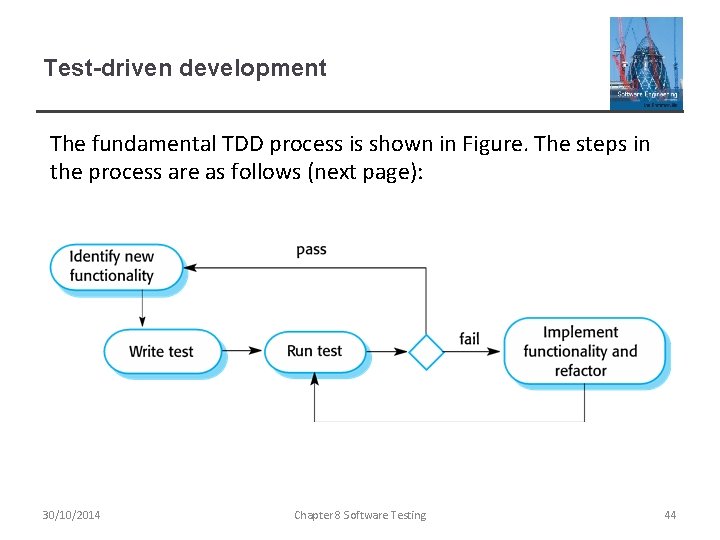
Test-driven development The fundamental TDD process is shown in Figure. The steps in the process are as follows (next page): 30/10/2014 Chapter 8 Software Testing 44
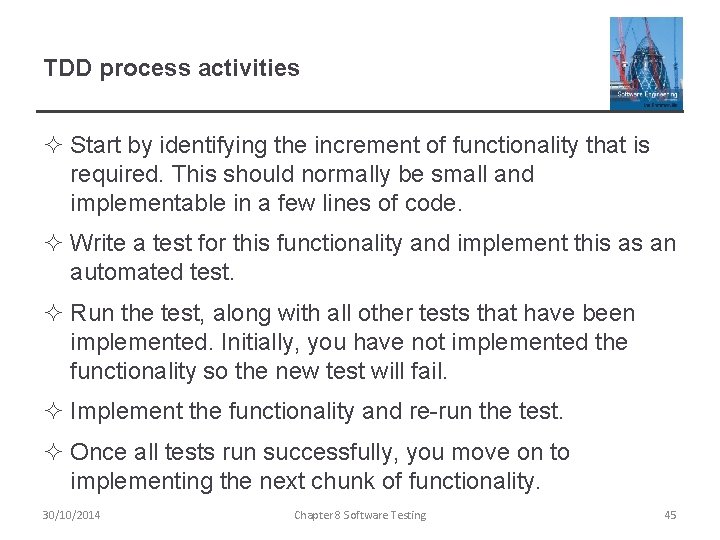
TDD process activities ² Start by identifying the increment of functionality that is required. This should normally be small and implementable in a few lines of code. ² Write a test for this functionality and implement this as an automated test. ² Run the test, along with all other tests that have been implemented. Initially, you have not implemented the functionality so the new test will fail. ² Implement the functionality and re-run the test. ² Once all tests run successfully, you move on to implementing the next chunk of functionality. 30/10/2014 Chapter 8 Software Testing 45
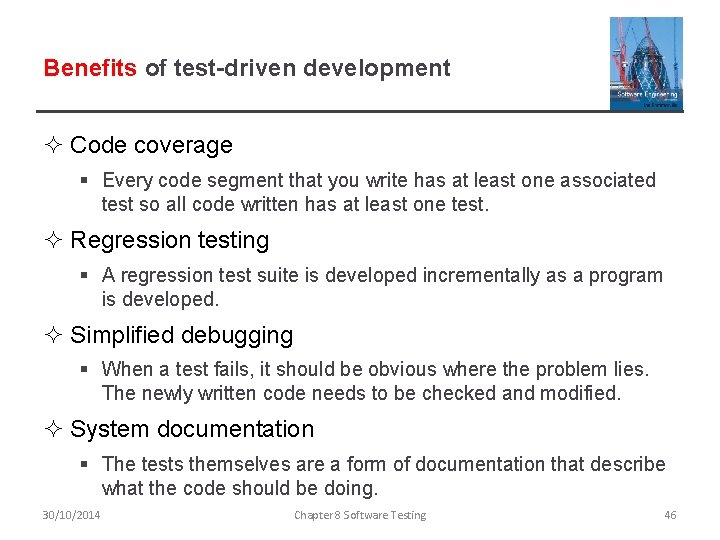
Benefits of test-driven development ² Code coverage § Every code segment that you write has at least one associated test so all code written has at least one test. ² Regression testing § A regression test suite is developed incrementally as a program is developed. ² Simplified debugging § When a test fails, it should be obvious where the problem lies. The newly written code needs to be checked and modified. ² System documentation § The tests themselves are a form of documentation that describe what the code should be doing. 30/10/2014 Chapter 8 Software Testing 46
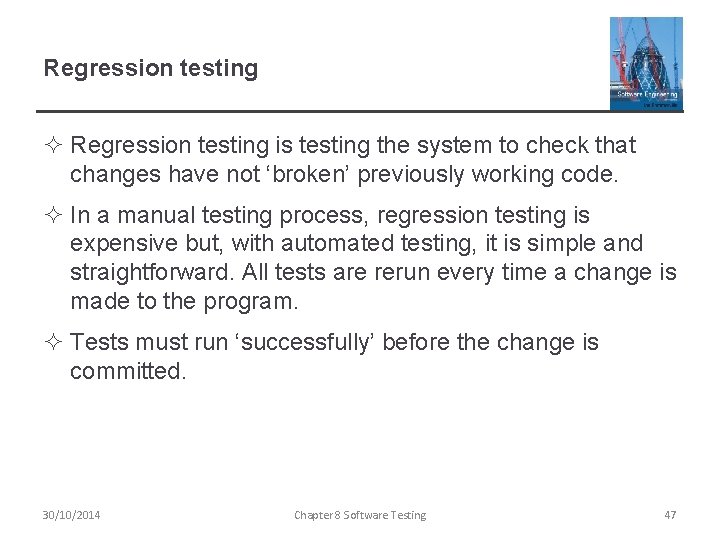
Regression testing ² Regression testing is testing the system to check that changes have not ‘broken’ previously working code. ² In a manual testing process, regression testing is expensive but, with automated testing, it is simple and straightforward. All tests are rerun every time a change is made to the program. ² Tests must run ‘successfully’ before the change is committed. 30/10/2014 Chapter 8 Software Testing 47
Release testing 30/10/2014 Chapter 8 Software Testing 48
Release testing ² Release testing is the process of testing a particular release of a system that is intended for use outside of the development team. ² The primary goal of the release testing process is to convince the supplier of the system that it is good enough for use. § Release testing, therefore, has to show that the system delivers its specified functionality, performance and dependability, and that it does not fail during normal use. ² Release testing is usually a black-box testing process where tests are only derived from the system specification. 30/10/2014 Chapter 8 Software Testing 49
Release testing and system testing ² Release testing is a form of system testing. ² Important differences: § A separate team that has not been involved in the system development, should be responsible for release testing. § System testing by the development team should focus on discovering bugs in the system (defect testing). The objective of release testing is to check that the system meets its requirements and is good enough for external use (validation testing). 30/10/2014 Chapter 8 Software Testing 50
1. Requirements based testing ² Requirements-based testing involves examining each requirement and developing a test or tests for it. ² Mentcare system requirements: § If a patient is known to be allergic to any particular medication, then prescription of that medication shall result in a warning message being issued to the system user. § If a prescriber chooses to ignore an allergy warning, they shall provide a reason why this has been ignored. 30/10/2014 Chapter 8 Software Testing 51
Requirements tests ² Set up a patient record with no known allergies. Prescribe medication for allergies that are known to exist. Check that a warning message is not issued by the system. ² Set up a patient record with a known allergy. Prescribe the medication to that the patient is allergic to, and check that the warning is issued by the system. ² Set up a patient record in which allergies to two or more drugs are recorded. Prescribe both of these drugs separately and check that the correct warning for each drug is issued. ² Prescribe two drugs that the patient is allergic to. Check that two warnings are correctly issued. ² Prescribe a drug that issues a warning and overrule that warning. Check that the system requires the user to provide information explaining why the warning was overruled. 30/10/2014 Chapter 8 Software Testing 52
2. Scenario testing ² Scenario testing is an approach to release testing whereby you devise typical scenarios of use and use these scenarios to develop test cases for the system. ² A scenario is a story that describes one way in which the system might be used. Scenarios should be realistic, and real system users should be able to relate to them. ² If you have used scenarios or user stories as part of the requirements engineering process,then you may be able to reuse them as testing scenarios. 30/10/2014 Chapter 8 Software Testing 53
A usage scenario for the Mentcare system George is a nurse who specializes in mental healthcare. One of his responsibilities is to visit patients at home to check that their treatment is effective and that they are not suffering from medication side effects. On a day for home visits, George logs into the Mentcare system and uses it to print his schedule of home visits for that day, along with summary information about the patients to be visited. He requests that the records for these patients be downloaded to his laptop. He is prompted for his key phrase to encrypt the records on the laptop. One of the patients that he visits is Jim, who is being treated with medication for depression. Jim feels that the medication is helping him but believes that it has the side effect of keeping him awake at night. George looks up Jim’s record and is prompted for his key phrase to decrypt the record. He checks the drug prescribed and queries its side effects. Sleeplessness is a known side effect so he notes the problem in Jim’s record and suggests that he visits the clinic to have his medication changed. Jim agrees so George enters a prompt to call him when he gets back to the clinic to make an appointment with a physician. George ends the consultation and the system re-encrypts Jim’s record. After, finishing his consultations, George returns to the clinic and uploads the records of patients visited to the database. The system generates a call list for George of those patients who He has to contact for follow-up information and make clinic appointments. 30/10/2014 Chapter 8 Software Testing 54
Features tested by scenario ² This scenario tests a number of features of the Mentcare system: § Authentication by logging on to the system. § Downloading and uploading of specified patient records to a laptop. § Home visit scheduling. § Encryption and decryption of patient records on a mobile device. § Record retrieval and modification. § Links with the drugs database that maintains side-effect information. § The system for call prompting. 30/10/2014 Chapter 8 Software Testing 55
3. Performance testing ² Part of release testing may involve testing the emergent properties of a system, such as performance and reliability. ² Tests should reflect the profile of use of the system. ² Performance tests usually involve planning a series of tests where the load is steadily increased until the system performance becomes unacceptable. ² Stress testing is a form of performance testing where the system is deliberately overloaded to test its failure behaviour. (Covered in Chapter 11) 30/10/2014 Chapter 8 Software Testing 56
User testing 30/10/2014 Chapter 8 Software Testing 57
User testing ² User or customer testing is a stage in the testing process in which users or customers provide input and advice on system testing. ² User testing is essential, even when comprehensive system and release testing have been carried out. § The reason for this is that influences from the user’s working environment have a major effect on the reliability, performance, usability and robustness of a system. These cannot be replicated in a testing environment. 30/10/2014 Chapter 8 Software Testing 58
Types of user testing ² Alpha testing § Users of the software work with the development team to test the software at the developer’s site. ² Beta testing § A release of the software is made available to users to allow them to experiment and to raise problems that they discover with the system developers. ² Acceptance testing § Customers test a system to decide whether or not it is ready to be accepted from the system developers and deployed in the customer environment. Primarily for custom systems. 30/10/2014 Chapter 8 Software Testing 59
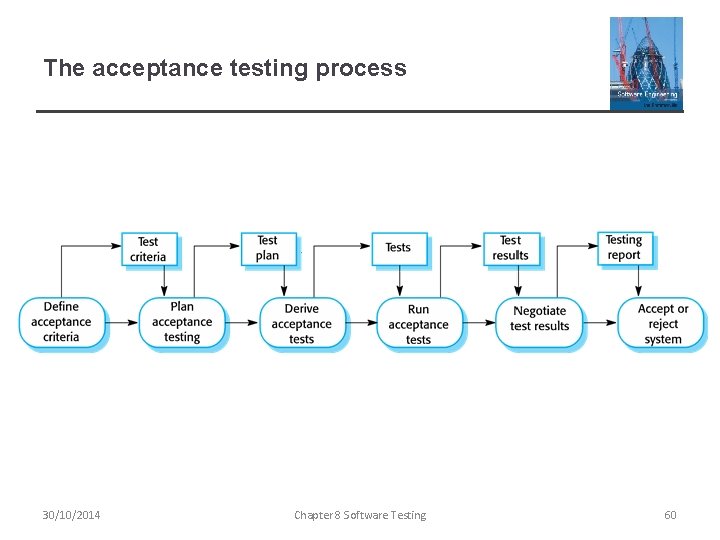
The acceptance testing process 30/10/2014 Chapter 8 Software Testing 60
Stages in the acceptance testing process ² Define acceptance criteria ² Plan acceptance testing ² Derive acceptance tests ² Run acceptance tests ² Negotiate test results ² Reject/accept system 30/10/2014 Chapter 8 Software Testing 61
Agile methods and acceptance testing ² In agile methods, the user/customer is part of the development team and is responsible for making decisions on the acceptability of the system. ² Tests are defined by the user/customer and are integrated with other tests in that they are run automatically when changes are made. ² There is no separate acceptance testing process. ² Main problem here is whether or not the embedded user is ‘typical’ and can represent the interests of all system stakeholders. 30/10/2014 Chapter 8 Software Testing 62
Key points ² Testing can only show the presence of errors in a program. It cannot demonstrate that there are no remaining faults. ² Development testing is the responsibility of the software development team. A separate team should be responsible for testing a system before it is released to customers. ² Development testing includes unit testing, in which you test individual objects and methods component testing in which you test related groups of objects and system testing, in which you test partial or complete systems. 30/10/2014 Chapter 8 Software Testing 63
Key points ² When testing software, you should try to ‘break’ the software by using experience and guidelines to choose types of test case that have been effective in discovering defects in other systems. ² Wherever possible, you should write automated tests. The tests are embedded in a program that can be run every time a change is made to a system. ² Test-first development is an approach to development where tests are written before the code to be tested. ² Scenario testing involves inventing a typical usage scenario and using this to derive test cases. ² Acceptance testing is a user testing process where the aim is to decide if the software is good enough to be deployed and used in its operational environment. 30/10/2014 Chapter 8 Software Testing 64