
Chapter 8 Multimedia Storage 1 Magnetic Media Magnetic
- Slides: 48
Chapter 8 Multimedia Storage 1
Magnetic Media Magnetic disks are: n Suitable for dynamic data that requires frequent changes. n Good access time and high transfer rate. n Used for data that must be kept online during data capturing and processing. n Suitable for video-on-demand applications where large amounts of time dependent information must be transferred at high bit rates. 2
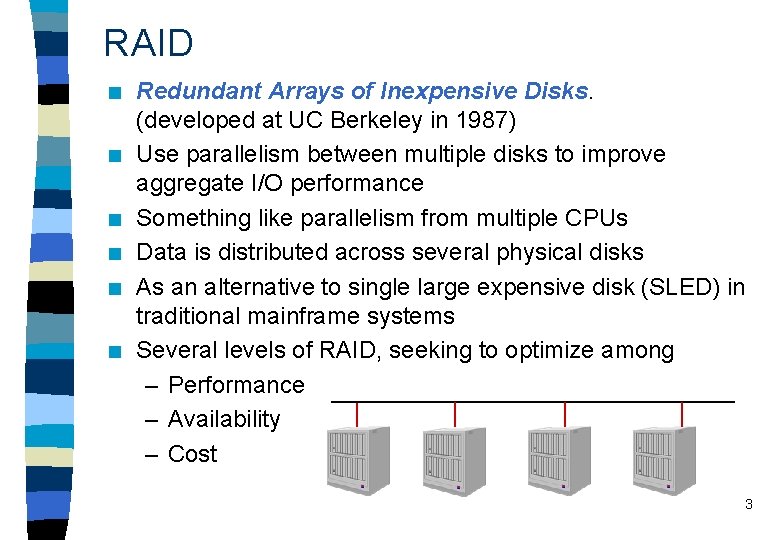
RAID n n n Redundant Arrays of Inexpensive Disks. (developed at UC Berkeley in 1987) Use parallelism between multiple disks to improve aggregate I/O performance Something like parallelism from multiple CPUs Data is distributed across several physical disks As an alternative to single large expensive disk (SLED) in traditional mainframe systems Several levels of RAID, seeking to optimize among – Performance – Availability – Cost 3
RAID (2) n Advantages: – high data transfer rate for large data accesses. – high I/O rates (short queuing time) on small data accesses. – uniform load balancing across all of the disks. n Disadvantages: – Large disk arrays are highly vulnerable to disk failures => Need to add redundancy for better availability => write overhead! 4
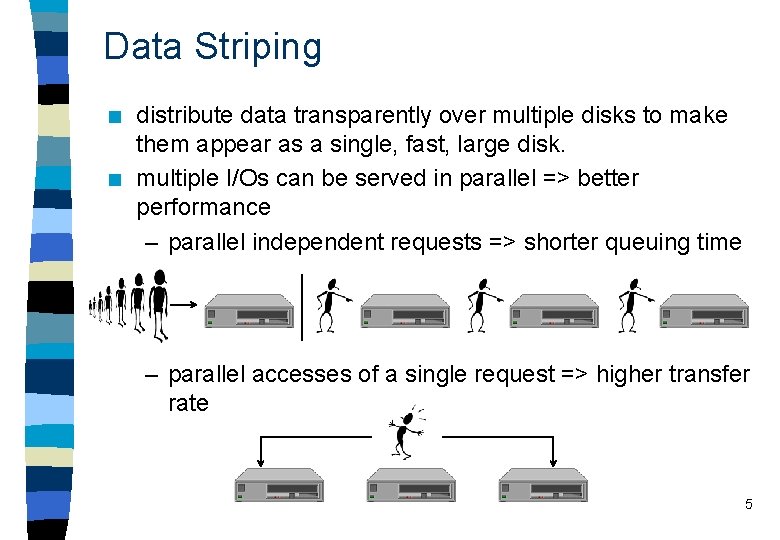
Data Striping n n distribute data transparently over multiple disks to make them appear as a single, fast, large disk. multiple I/Os can be served in parallel => better performance – parallel independent requests => shorter queuing time – parallel accesses of a single request => higher transfer rate 5
Data Striping (2) n granularity of data interleaving: – fine: distributes the data so that all of the array’s disks cooperate in servicing every request => high I/O transfer rate. Typical stripe size = 1 bit / 1 byte / 512 bytes. – 1 bit stripe size speed up every single disk access – 512 bytes stripe size sometimes may not have any sped up e. g small disk access of 100 bytes. So the disk access time is still bounded by the slowest disk in the group. 6
Redundancy n redundancy is needed to tolerate disk failures n data and parity distribution – how redundant information is computed? – where shall the redundant information reside? n Hamming error correction n XOR 7
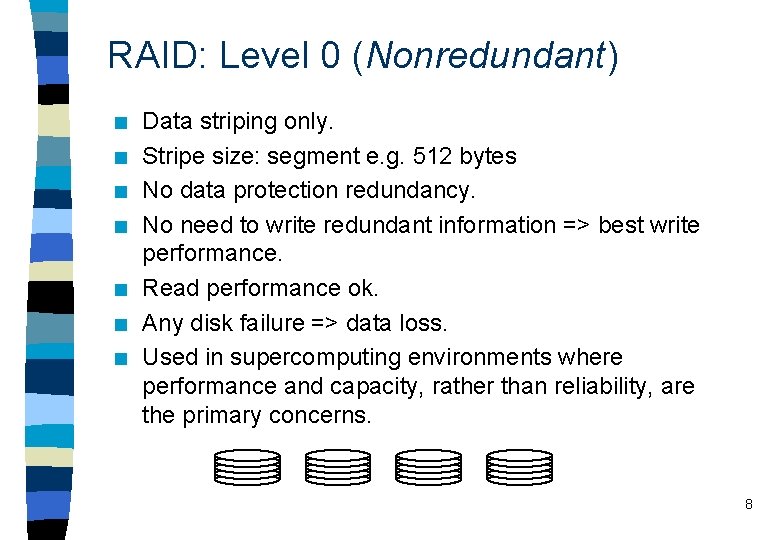
RAID: Level 0 (Nonredundant) n n n n Data striping only. Stripe size: segment e. g. 512 bytes No data protection redundancy. No need to write redundant information => best write performance. Read performance ok. Any disk failure => data loss. Used in supercomputing environments where performance and capacity, rather than reliability, are the primary concerns. 8
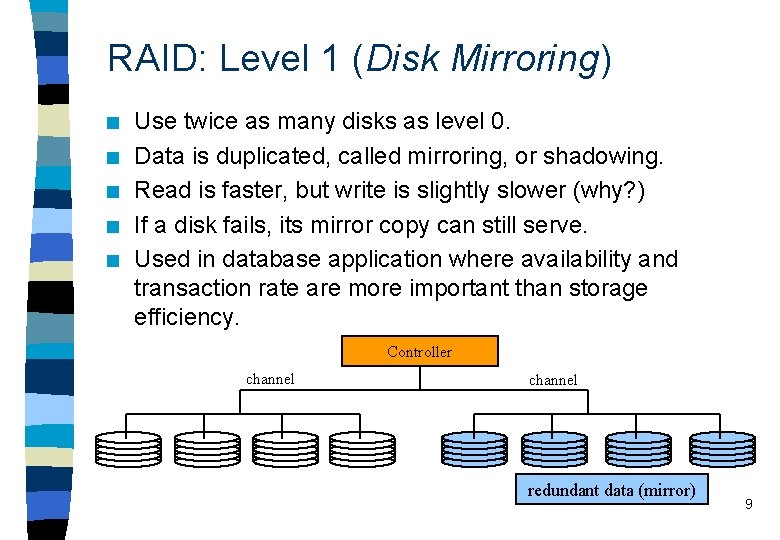
RAID: Level 1 (Disk Mirroring) n n n Use twice as many disks as level 0. Data is duplicated, called mirroring, or shadowing. Read is faster, but write is slightly slower (why? ) If a disk fails, its mirror copy can still serve. Used in database application where availability and transaction rate are more important than storage efficiency. Controller channel redundant data (mirror) 9
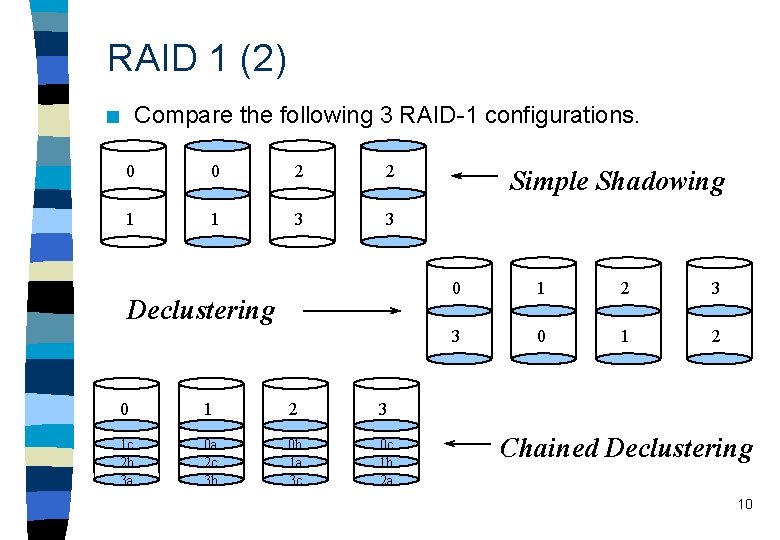
RAID 1 (2) Compare the following 3 RAID-1 configurations. n 0 0 2 2 1 1 3 3 Declustering 0 1 2 3 1 c 2 b 3 a 0 a 2 c 3 b 0 b 1 a 3 c 0 c 1 b 2 a Simple Shadowing 0 1 2 3 3 0 1 2 Chained Declustering 10
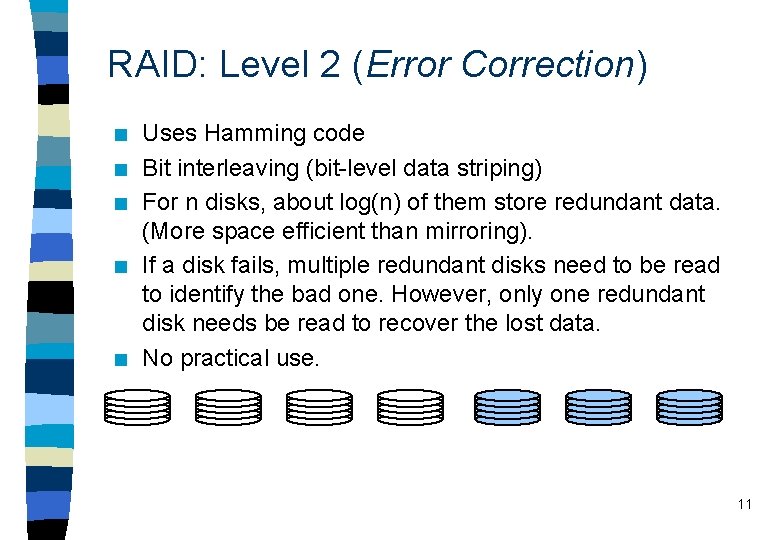
RAID: Level 2 (Error Correction) n n n Uses Hamming code Bit interleaving (bit-level data striping) For n disks, about log(n) of them store redundant data. (More space efficient than mirroring). If a disk fails, multiple redundant disks need to be read to identify the bad one. However, only one redundant disk needs be read to recover the lost data. No practical use. 11
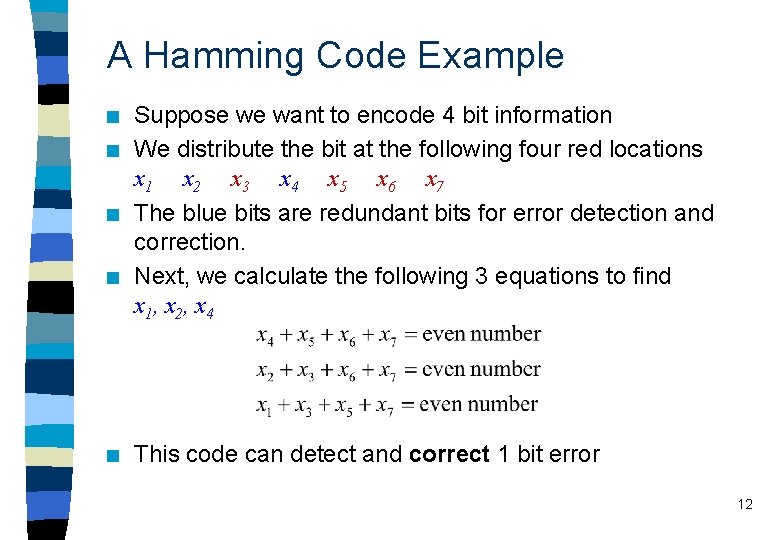
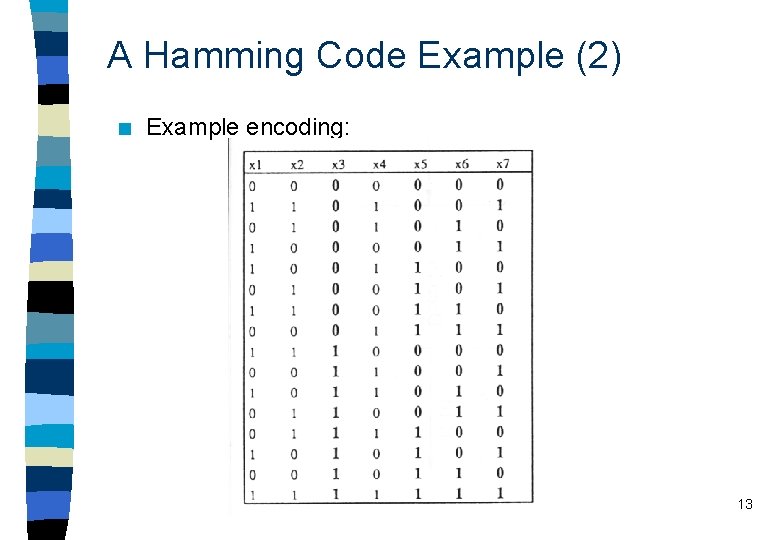
A Hamming Code Example n n n Suppose we want to encode 4 bit information We distribute the bit at the following four red locations x 1 x 2 x 3 x 4 x 5 x 6 x 7 The blue bits are redundant bits for error detection and correction. Next, we calculate the following 3 equations to find x 1, x 2, x 4 This code can detect and correct 1 bit error 12
A Hamming Code Example (2) n Example encoding: 13
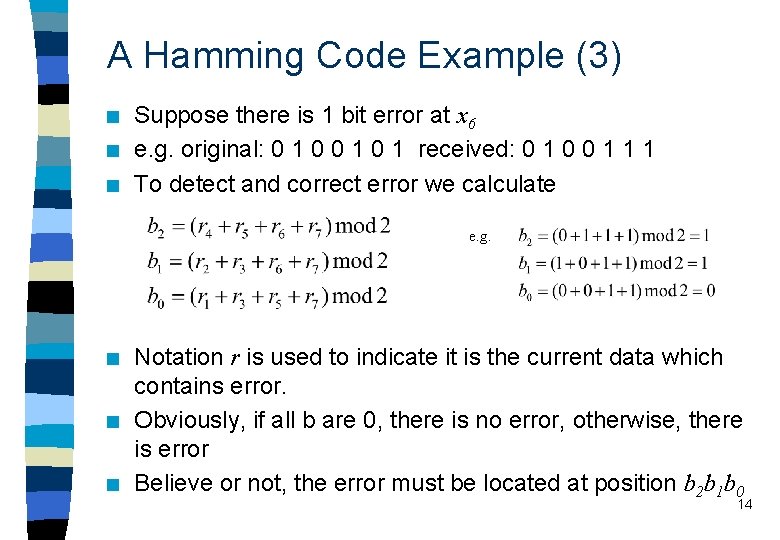
A Hamming Code Example (3) n n n Suppose there is 1 bit error at x 6 e. g. original: 0 1 0 1 received: 0 1 0 0 1 1 1 To detect and correct error we calculate e. g. n n n Notation r is used to indicate it is the current data which contains error. Obviously, if all b are 0, there is no error, otherwise, there is error Believe or not, the error must be located at position b 2 b 1 b 0 14
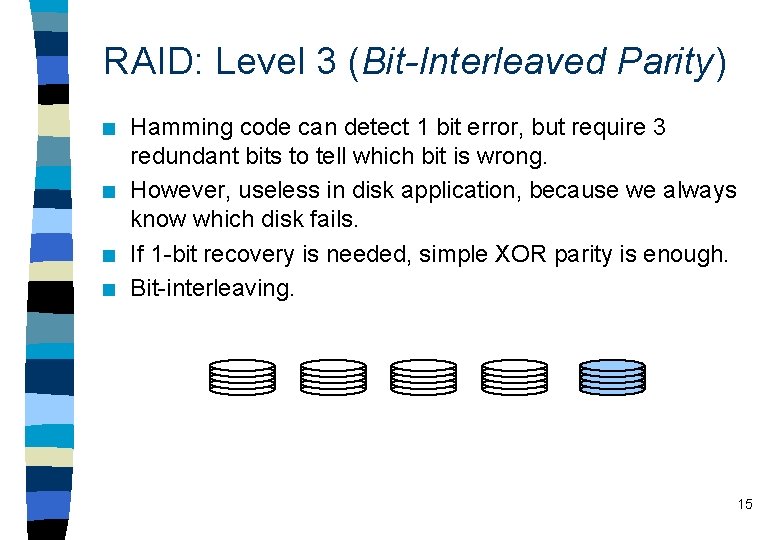
RAID: Level 3 (Bit-Interleaved Parity) n n Hamming code can detect 1 bit error, but require 3 redundant bits to tell which bit is wrong. However, useless in disk application, because we always know which disk fails. If 1 -bit recovery is needed, simple XOR parity is enough. Bit-interleaving. 15
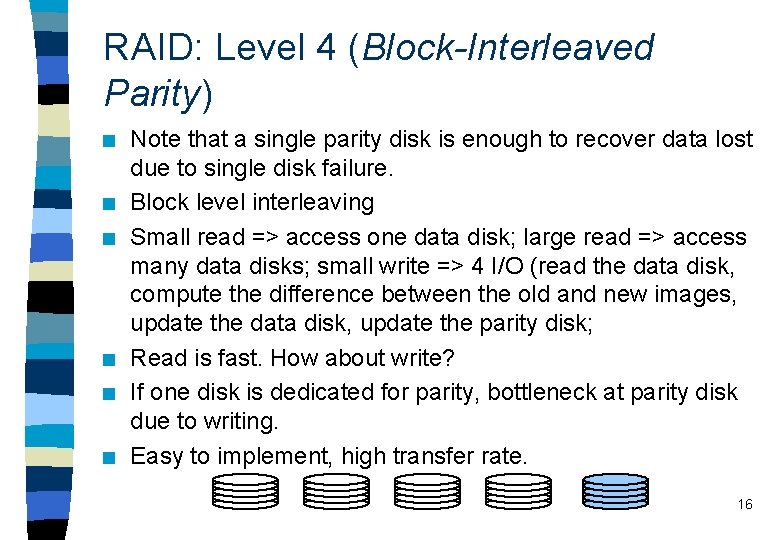
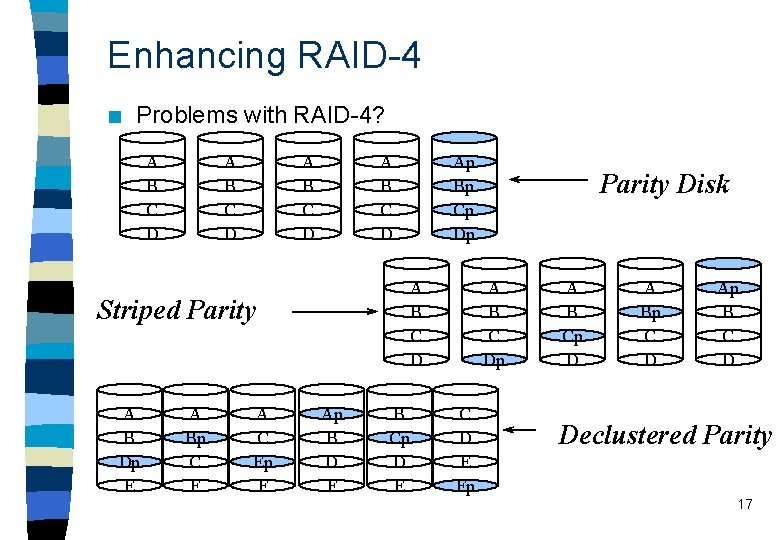
RAID: Level 4 (Block-Interleaved Parity) n n n Note that a single parity disk is enough to recover data lost due to single disk failure. Block level interleaving Small read => access one data disk; large read => access many data disks; small write => 4 I/O (read the data disk, compute the difference between the old and new images, update the data disk, update the parity disk; Read is fast. How about write? If one disk is dedicated for parity, bottleneck at parity disk due to writing. Easy to implement, high transfer rate. 16
Enhancing RAID-4 n Problems with RAID-4? A B C D A B C D Striped Parity A B Dp E A Bp C F A C Ep F Ap Bp Cp Dp Ap B D F B Cp D E Parity Disk A B C Dp C D E Fp A B Cp D A Bp C D Ap B C D Declustered Parity 17
Distributing Parity n n n Parity disk – simplify the mapping of logical addresses to disk addresses. – every write must update the associated bits on the single parity disk. (Fine for fine-grained data striping, bad for coarse. ) Striped parity – can perform parallel parity update Declustered parity – logically equivalent to combining several smaller arrays protected by striped parity into a large one. 18
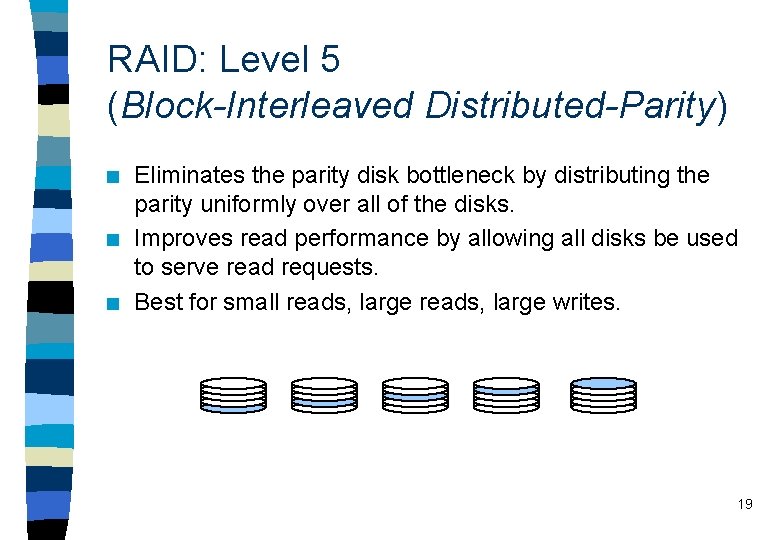
RAID: Level 5 (Block-Interleaved Distributed-Parity) n n n Eliminates the parity disk bottleneck by distributing the parity uniformly over all of the disks. Improves read performance by allowing all disks be used to serve read requests. Best for small reads, large writes. 19
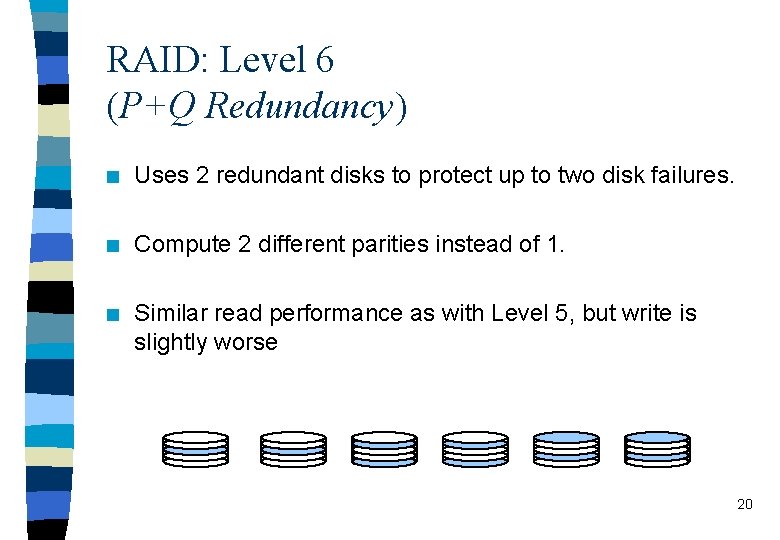
RAID: Level 6 (P+Q Redundancy) n Uses 2 redundant disks to protect up to two disk failures. n Compute 2 different parities instead of 1. n Similar read performance as with Level 5, but write is slightly worse 20
Optical Media n Well accepted because: – High storage capacity – Random access to data – Life span of more than 30 years (c. f. << 20 years for magnetic media) – Removable and portable 21
History of Optical Media n n Optical videodisk was invented by Friebus in 1929. Prototype using laser to record and read was demonstrated by Phillips and MCA in 1972. Videodisks developed by Philips has been commercially available since 1978. Then compact disk technology for digital audio (CDDA) came out in early 1980 s. The use of optical disks for digital data storage came with the introduction and improvement of CD-ROM during the 1980 s. 22
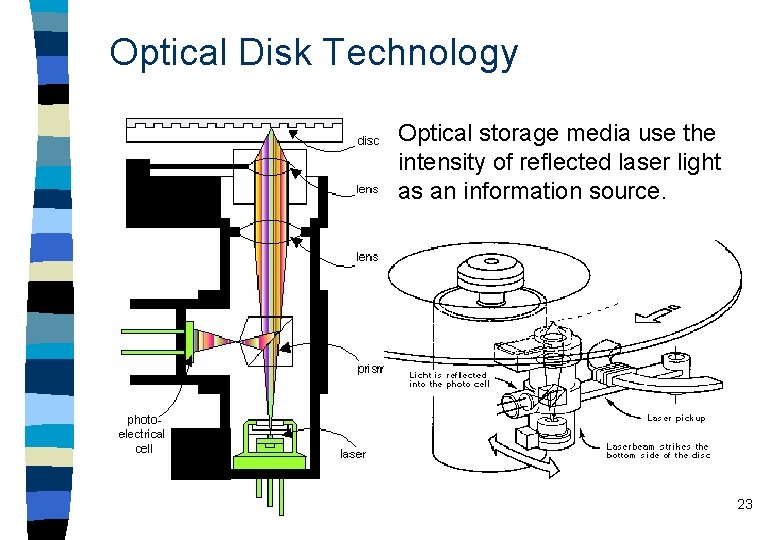
Optical Disk Technology n Optical storage media use the intensity of reflected laser light as an information source. 23
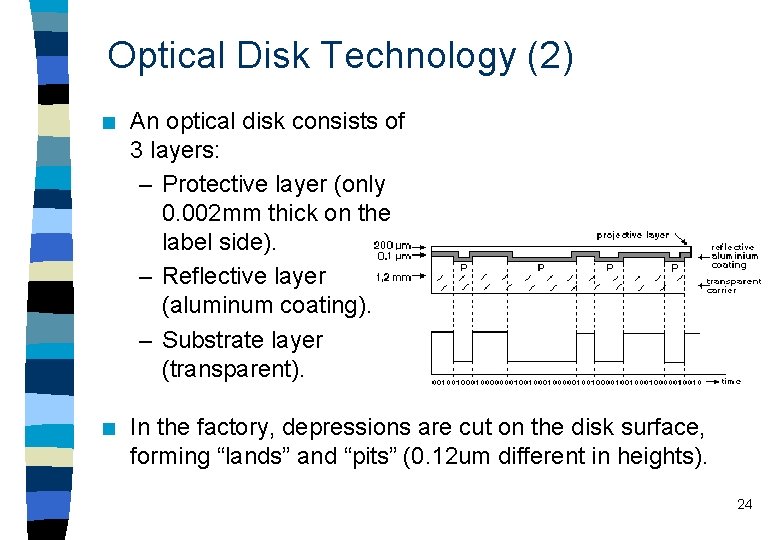
Optical Disk Technology (2) n An optical disk consists of 3 layers: – Protective layer (only 0. 002 mm thick on the label side). – Reflective layer (aluminum coating). – Substrate layer (transparent). n In the factory, depressions are cut on the disk surface, forming “lands” and “pits” (0. 12 um different in heights). 24
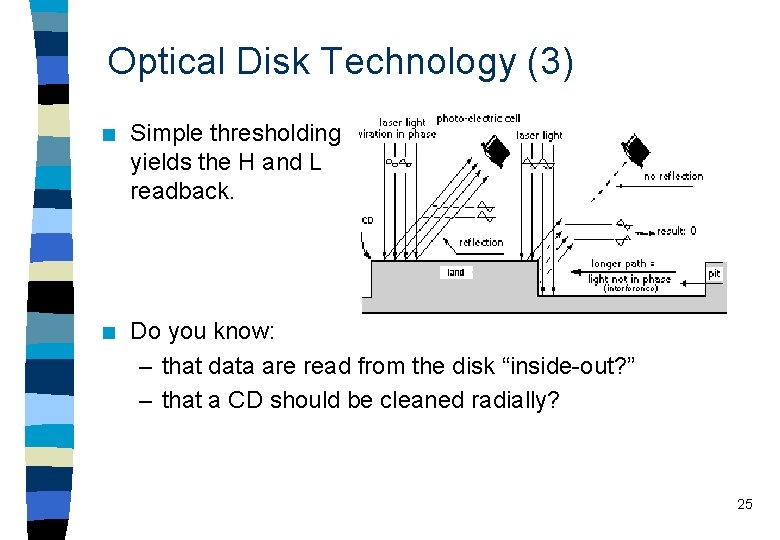
Optical Disk Technology (3) n Simple thresholding yields the H and L readback. n Do you know: – that data are read from the disk “inside-out? ” – that a CD should be cleaned radially? 25
Advantages of Optical Media n n Continuous data stream. Data stored in spiral or concentric tracks. For the spiral track storage, data can be easily played back in a continuous data stream. High density. Distance between tracks is 1. 6 um, each track is 0. 6 um wide, i. e. , 1 bit per sq. um or 1 Mb per sq. mm. Floppy disk has 96 tracks per inch, optical disk has 16000 tracks per inch. Long life. Magnetization can decrease over time. ‘Lands’ and ‘pits’ not changed unless physically damaged. Low wearing. Laser source in head can be positioned at 1 mm from disk surface. Does not have to be as close to the surface as with magnetic disks. It reduces friction and increases life span. 26
Digital Optical Disks n n n Audio CD was developed by Philips and Sony in 1982. Basic technology extended to 550 MB CD-ROM in 1985. When used for multimedia, storage capacity is inadequate for motion video, and data rate limited to 1. 5 Mbps. CD-ROM/XA and CD-I announced in 1986 and 87 to support applications of text, images, audio and FSFM video. Recent developments include WORM (write once read many), MO (magneto optical), CD Recordable disks, and DVD. 27
Digital Optical Disk (2) Why CD is slower than hard disk? n CD is originally designed for squeezing as much music data into the disk as possible. The density of data is same in inner and outer tracks. => The disk has to rotate slower when reading the outer track => Variable speed is slow to adjust for random access (as in computer-based multimedia application) n Optical disk head is heavier than magnetic heads. More inertia takes longer seek time for head movements. 28
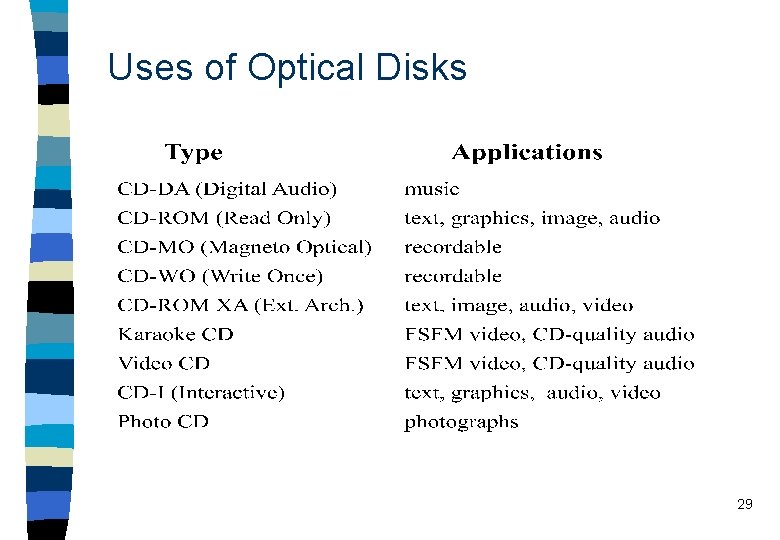
Uses of Optical Disks 29
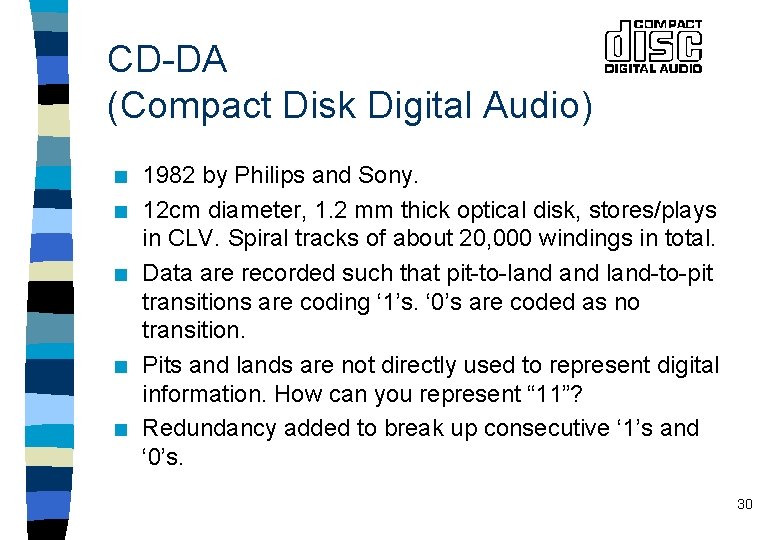
CD-DA (Compact Disk Digital Audio) n n n 1982 by Philips and Sony. 12 cm diameter, 1. 2 mm thick optical disk, stores/plays in CLV. Spiral tracks of about 20, 000 windings in total. Data are recorded such that pit-to-land-to-pit transitions are coding ‘ 1’s. ‘ 0’s are coded as no transition. Pits and lands are not directly used to represent digital information. How can you represent “ 11”? Redundancy added to break up consecutive ‘ 1’s and ‘ 0’s. 30
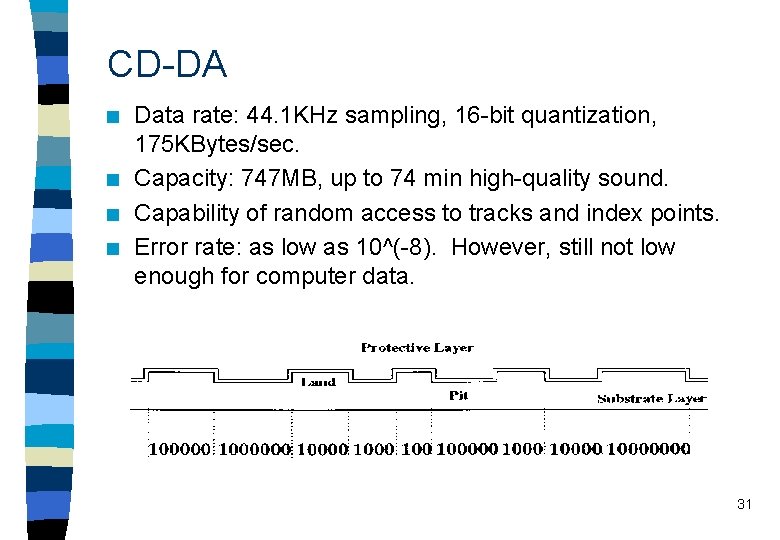
CD-DA n n Data rate: 44. 1 KHz sampling, 16 -bit quantization, 175 KBytes/sec. Capacity: 747 MB, up to 74 min high-quality sound. Capability of random access to tracks and index points. Error rate: as low as 10^(-8). However, still not low enough for computer data. 31
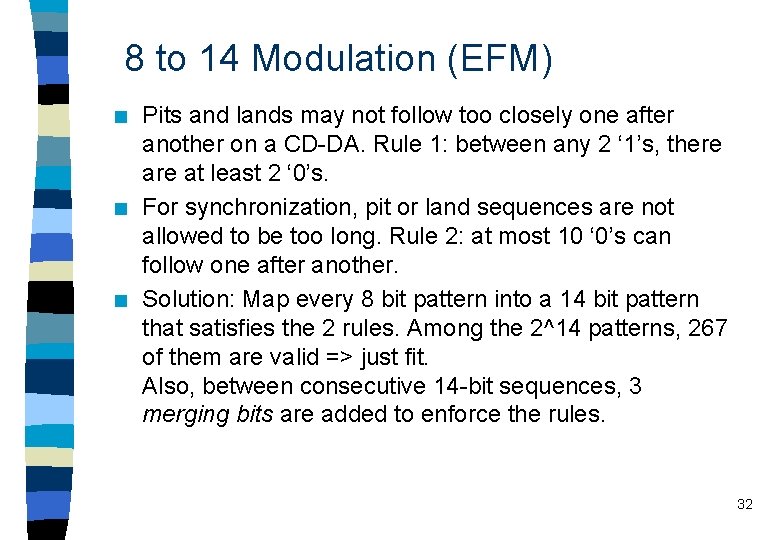
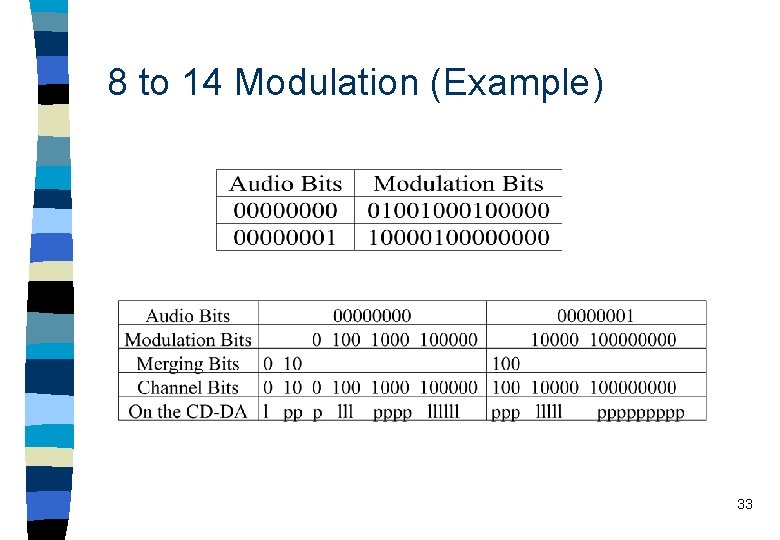
8 to 14 Modulation (EFM) n n n Pits and lands may not follow too closely one after another on a CD-DA. Rule 1: between any 2 ‘ 1’s, there at least 2 ‘ 0’s. For synchronization, pit or land sequences are not allowed to be too long. Rule 2: at most 10 ‘ 0’s can follow one after another. Solution: Map every 8 bit pattern into a 14 bit pattern that satisfies the 2 rules. Among the 2^14 patterns, 267 of them are valid => just fit. Also, between consecutive 14 -bit sequences, 3 merging bits are added to enforce the rules. 32
8 to 14 Modulation (Example) 33
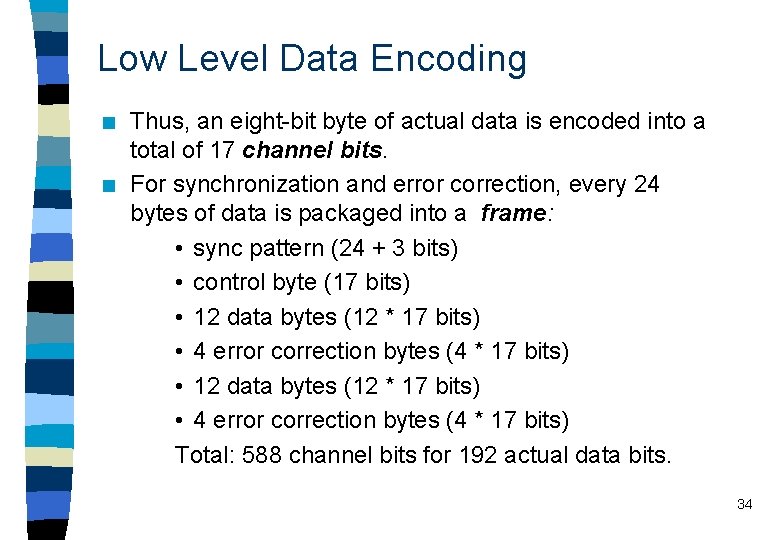
Low Level Data Encoding n n Thus, an eight-bit byte of actual data is encoded into a total of 17 channel bits. For synchronization and error correction, every 24 bytes of data is packaged into a frame: • sync pattern (24 + 3 bits) • control byte (17 bits) • 12 data bytes (12 * 17 bits) • 4 error correction bytes (4 * 17 bits) Total: 588 channel bits for 192 actual data bits. 34
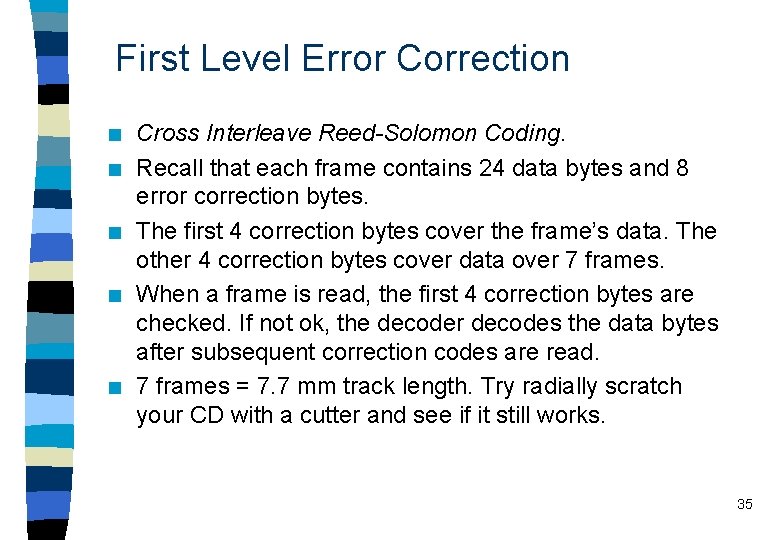
First Level Error Correction n n Cross Interleave Reed-Solomon Coding. Recall that each frame contains 24 data bytes and 8 error correction bytes. The first 4 correction bytes cover the frame’s data. The other 4 correction bytes cover data over 7 frames. When a frame is read, the first 4 correction bytes are checked. If not ok, the decoder decodes the data bytes after subsequent correction codes are read. 7 frames = 7. 7 mm track length. Try radially scratch your CD with a cutter and see if it still works. 35
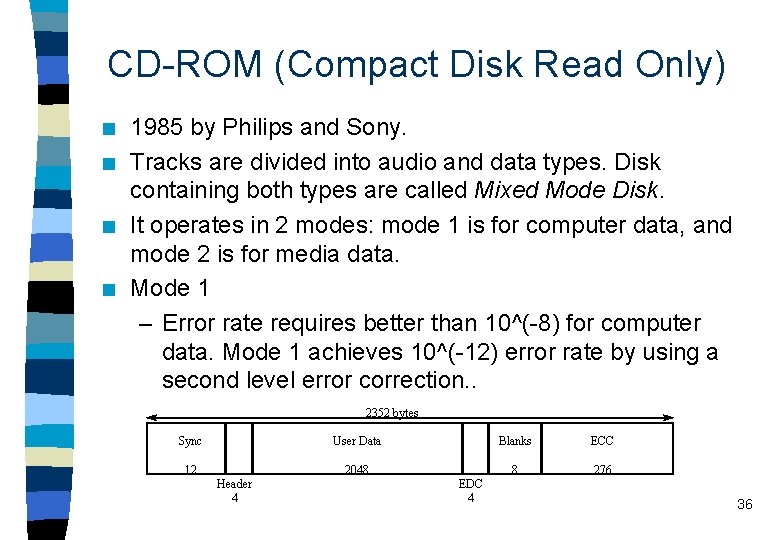
CD-ROM (Compact Disk Read Only) n n 1985 by Philips and Sony. Tracks are divided into audio and data types. Disk containing both types are called Mixed Mode Disk. It operates in 2 modes: mode 1 is for computer data, and mode 2 is for media data. Mode 1 – Error rate requires better than 10^(-8) for computer data. Mode 1 achieves 10^(-12) error rate by using a second level error correction. . 2352 bytes Sync User Data 12 2048 Header 4 EDC 4 Blanks ECC 8 276 36
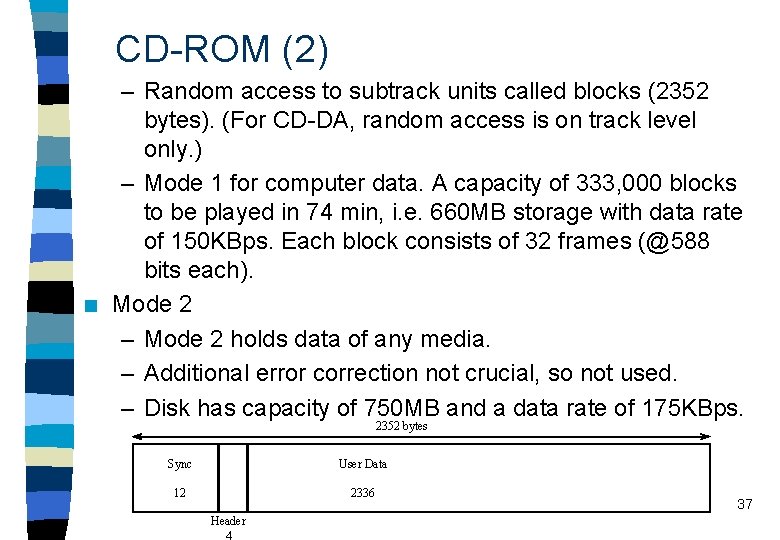
CD-ROM (2) n – Random access to subtrack units called blocks (2352 bytes). (For CD-DA, random access is on track level only. ) – Mode 1 for computer data. A capacity of 333, 000 blocks to be played in 74 min, i. e. 660 MB storage with data rate of 150 KBps. Each block consists of 32 frames (@588 bits each). Mode 2 – Mode 2 holds data of any media. – Additional error correction not crucial, so not used. – Disk has capacity of 750 MB and a data rate of 175 KBps. 2352 bytes Sync User Data 12 2336 Header 4 37
CD-ROM (3) n n CD-ROM is a very economic medium for publication and distribution. Limitations of CD-ROM: – Random access to a CD track can be anywhere from 200 ms up to 1 sec in access time. – Continuous media stored sequentially in CD-ROM tracks. Although important for multimedia applications, simultaneous playback of audio and other data is not possible. 38
CD-ROM/XA (Extended Architecture) n n n 1989, established by Microsoft, Philips and Sony. Based on CD-ROM and CD-I. Goal: concurrent output of several media. Within 1 track, blocks of different media can be stored. It allows interleaved storage and retrieval of multimedia data. A sub-header is added to each block to describe the block. CD-ROM/XA uses CD-ROM mode 2 to define actual blocks. Two forms: 39
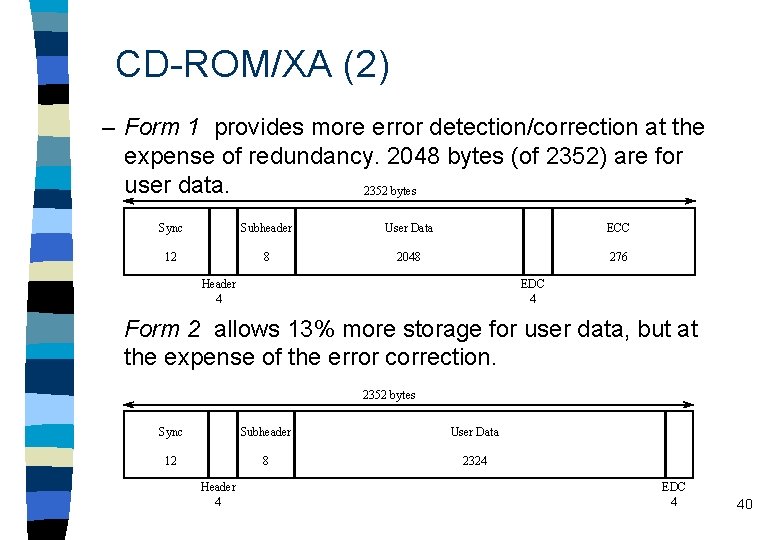
CD-ROM/XA (2) – Form 1 provides more error detection/correction at the expense of redundancy. 2048 bytes (of 2352) are for user data. 2352 bytes Sync Subheader User Data ECC 12 8 2048 276 Header 4 EDC 4 Form 2 allows 13% more storage for user data, but at the expense of the error correction. 2352 bytes Sync Subheader User Data 12 8 2324 Header 4 EDC 4 40
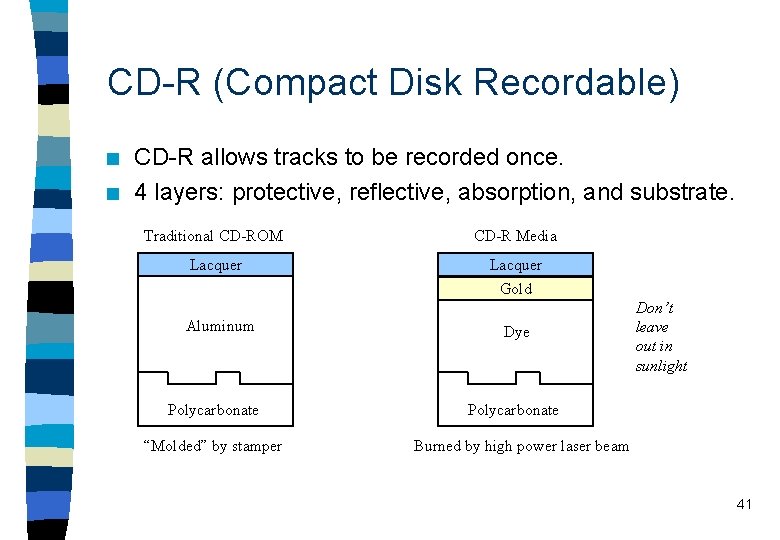
CD-R (Compact Disk Recordable) n n CD-R allows tracks to be recorded once. 4 layers: protective, reflective, absorption, and substrate. Traditional CD-ROM CD-R Media Lacquer Gold Aluminum Polycarbonate “Molded” by stamper Dye Don’t leave out in sunlight Polycarbonate Burned by high power laser beam 41
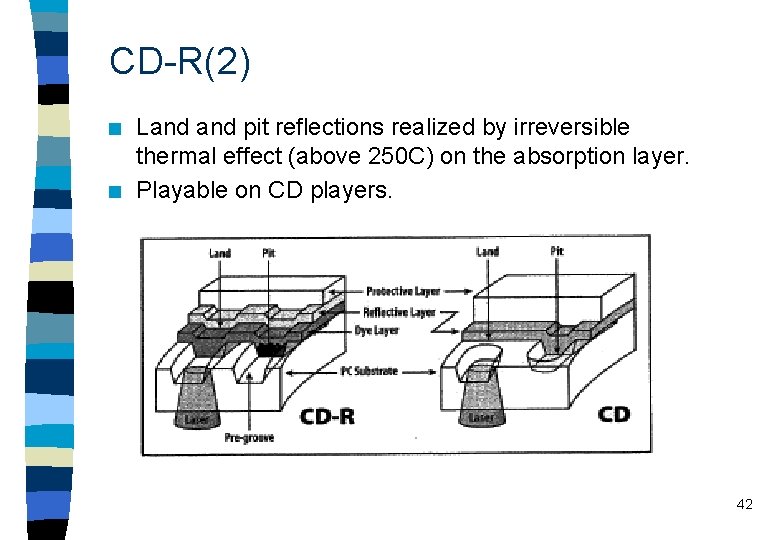
CD-R(2) n n Land pit reflections realized by irreversible thermal effect (above 250 C) on the absorption layer. Playable on CD players. 42
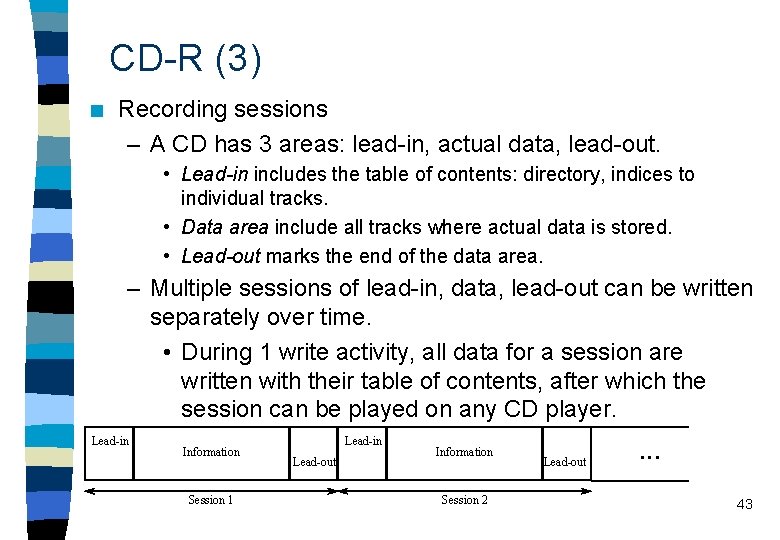
CD-R (3) n Recording sessions – A CD has 3 areas: lead-in, actual data, lead-out. • Lead-in includes the table of contents: directory, indices to individual tracks. • Data area include all tracks where actual data is stored. • Lead-out marks the end of the data area. – Multiple sessions of lead-in, data, lead-out can be written separately over time. • During 1 write activity, all data for a session are written with their table of contents, after which the session can be played on any CD player. Lead-in Information Session 1 Lead-in Lead-out Information Session 2 Lead-out . . . 43
CD-MO (Compact Disk Magneto Optical) n n Specification published by Philips and Sony in 1991. Working principle is different from other CD technologies. (Incompatible with other CD formats. ) – Based on the polarization of light by magnetic field. – Disk surface is light reflecting magnetic substrate. – During writing, surface is heated to above 150 C, and magnetic field polarizes individual dipoles. – During reading, surface is irradiated with a laser beam, polarization of laser light changed according to the magnetization. 44
Digital Versatile Disk (DVD) n n n Also called Digital Video Disk. Capacity: 4. 7 to 17 GB (25 CDs). Q: Is it a good idea to replace VHS tapes by DVD disks in video rental stores? Digital video can be stored and distributed more cheaply, also it allows interactivity. Can be used to store up to 133 minutes (8 -9 hrs for high capacity ones) of studio quality video and multichannel surround-sound audio, or 30 hours of CDquality audio. 45
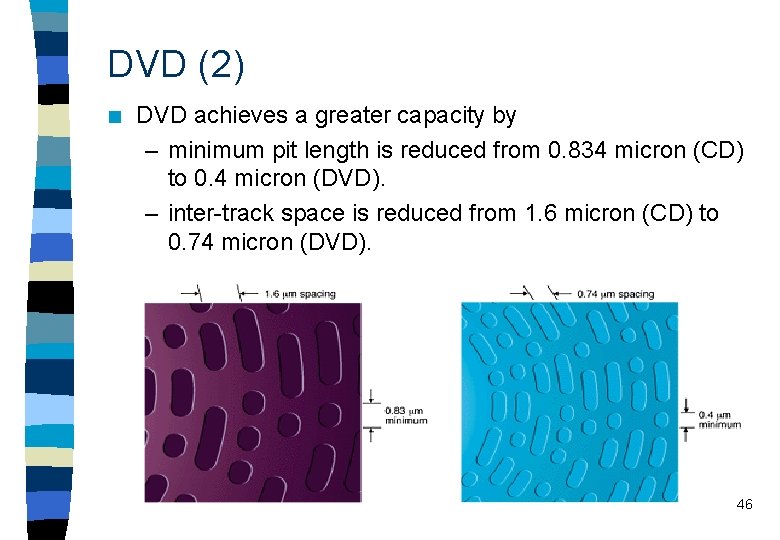
DVD (2) n DVD achieves a greater capacity by – minimum pit length is reduced from 0. 834 micron (CD) to 0. 4 micron (DVD). – inter-track space is reduced from 1. 6 micron (CD) to 0. 74 micron (DVD). 46
DVD (3) – To read the condensed pits, DVD uses a laser of shorter wavelength (635 -650 nm; for CD it is 780 nm). – Reducing the pit size and track distance increases the disc’s capacity to 4. 7 GB. – Dual layering. A semireflective layer (3. 8 GB) on top of a fully reflective layer (4. 7 GB) => 8. 5 GB total. – Double side. Two substrates bonded back-to-back. Each side could have one layer or two layers => capacity ranges from 9. 4 GB to 17 GB. 47
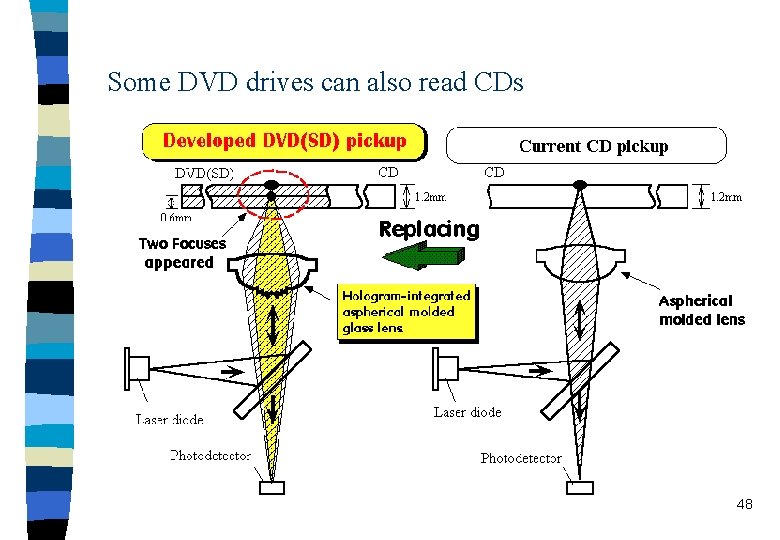
Some DVD drives can also read CDs 48