
Chapter 7 Technology and Information Competency Technology and
- Slides: 25
Chapter 7 Technology and Information Competency
Technology and Academics 7 -2 • Technology has revolutionized academic life – Course websites – Textbook CD-ROMs – Companion websites – Instructor podcasts and blogs – Wikis – Classroom presentation programs such as Power. Point – Individual response technology Mc. Graw-Hill © 2011 by The Mc. Graw-Hill Companies, Inc. All rights reserved.
Using the Internet and the Web 7 -3 • The World Wide Web – A graphical means of locating and accessing information on the internet • The Internet – The electronic network that connects millions of computers together – Common uses include: • • Mc. Graw-Hill Email Text and instant messaging Newsgroups and Listservs RSS feeds © 2011 by The Mc. Graw-Hill Companies, Inc. All rights reserved.
Using Email Effectively 7 -4 • Certain email providers enable users to access their email from anywhere in the world • Some schools require students to have a school email account – Check this account regularly – Have your mail from this account forwarded to your regular account or vice versa Mc. Graw-Hill © 2011 by The Mc. Graw-Hill Companies, Inc. All rights reserved.
Writing Effective Emails 7 -5 • Use an informative subject heading • Make sure the recipient knows who you are • Keep messages short and focused • Include only one major topic per email Mc. Graw-Hill © 2011 by The Mc. Graw-Hill Companies, Inc. All rights reserved.
Writing Effective Emails 7 -6 • Put requests near the beginning of the email • Keep attachments to a minimum • Avoid abbreviations and emoticons in formal emails • Be respectful and courteous Mc. Graw-Hill © 2011 by The Mc. Graw-Hill Companies, Inc. All rights reserved.
Netiquette: Civility on the Web 7 -7 • Don’t write anything in an email or text that you wouldn’t want everyone to see • Be careful of the tone you convey • Never write anything in an email or text that you wouldn’t say in person Mc. Graw-Hill © 2011 by The Mc. Graw-Hill Companies, Inc. All rights reserved.
Netiquette: Civility on the Web • Don’t use ALL CAPITAL LETTERS • Never send an email or text when you are angry • Be especially polite and professional when emailing instructors or work supervisors Mc. Graw-Hill © 2011 by The Mc. Graw-Hill Companies, Inc. All rights reserved.
In-Person Netiquette 7 -9 • Turn off your cell phone in formal settings, such as class or work • Don’t send texts or make calls while someone else is speaking • Stay on task, and not on Facebook, when taking notes on a laptop during class • It’s still cheating, and therefore wrong, to text or receive answers to problems during class Mc. Graw-Hill © 2011 by The Mc. Graw-Hill Companies, Inc. All rights reserved.
Spam Management and Safety 7 -10 • Tips for dealing with email spam: – Consider using two email addresses (one for personal email and another one for newsgroups and chat rooms) – Don’t use anything close to your name for a user name or screen name – Never give out your password and change it frequently Mc. Graw-Hill © 2011 by The Mc. Graw-Hill Companies, Inc. All rights reserved.
Spam Management and Safety 7 -11 • Never respond to emails that ask for personal information • Do not click on any links in an email until you are sure the email is from a legitimate source • Never open an email attachment from someone you don’t know • Be cautious with social networking sites Mc. Graw-Hill © 2011 by The Mc. Graw-Hill Companies, Inc. All rights reserved.
Spam Management and Safety 7 -12 • Keeping safe – Don’t give out personal information – Never send photos of yourself or family members to someone you don’t know – Don’t reply to emails that are offensive or weird – Don’t arrange to meet someone you’ve only met on the web – If problems do arise, contact your campus or local police Mc. Graw-Hill © 2011 by The Mc. Graw-Hill Companies, Inc. All rights reserved.
Distance Learning: Advantages 7 -13 • Distance learning courses offer tremendous convenience • May be more flexible than brick and mortar classes • Distance learning classes may be selfpaced Mc. Graw-Hill © 2011 by The Mc. Graw-Hill Companies, Inc. All rights reserved.
Distance Learning: Advantages 7 -14 • Contact with instructor may be greater • Shy students may find writing their responses easier than speaking them in front of a class • You can become a better writer Mc. Graw-Hill © 2011 by The Mc. Graw-Hill Companies, Inc. All rights reserved.
Distance Learning: Disadvantages 7 -15 • You are a prisoner of technology • You won’t have face-to-face contact with your instructor or classmates • You won’t get immediate feedback • You need to have discipline, personal responsibility, and time management skills Mc. Graw-Hill © 2011 by The Mc. Graw-Hill Companies, Inc. All rights reserved.
Distance Learning – Prepare 7 -16 • Identifying and preparing for distance learning course possibilities – Check your college – Do an internet search – Make sure your college will give you credit for the course – Consider if the course requirements will fit in your schedule – Get feedback from others who have taken the course, if possible Mc. Graw-Hill © 2011 by The Mc. Graw-Hill Companies, Inc. All rights reserved.
Distance Learning – Organize 7 -17 • Obtaining access to technology – You will need basic skills and an email account – Brush up on your computer skills before taking an online course – You will need dependable and regular access to a computer with internet access Mc. Graw-Hill © 2011 by The Mc. Graw-Hill Companies, Inc. All rights reserved.
Distance Learning – Work 7 -18 • Skill set for online courses are very different from traditional courses – Manage your time carefully – Check in frequently – Find an online partner – Make copies of everything – Have a technology backup plan Mc. Graw-Hill © 2011 by The Mc. Graw-Hill Companies, Inc. All rights reserved.
Distance Learning – Evaluate 7 -19 • Evaluate – Considering your “classroom” performance – Feedback comes from your instructor and classmates – Ensure your feedback to your classmates is polite Mc. Graw-Hill © 2011 by The Mc. Graw-Hill Companies, Inc. All rights reserved.
Distance Learning – Rethink 7 -20 • Rethink – Reflecting on what and how you have learned – Is distance learning for you? – Have you learned the objectives of the course? Have you learned as much as you think you would have in a traditional course? Mc. Graw-Hill © 2011 by The Mc. Graw-Hill Companies, Inc. All rights reserved.
Information Competency 7 -21 • Information competency is crucial • The ability to determine what information is needed, where to get it, and effectively use it • Libraries • • Mc. Graw-Hill Periodicals Indexes and online databases Encyclopedias Government documents Musical scores Reserve collections Use an interlibrary loan, if necessary © 2011 by The Mc. Graw-Hill Companies, Inc. All rights reserved.
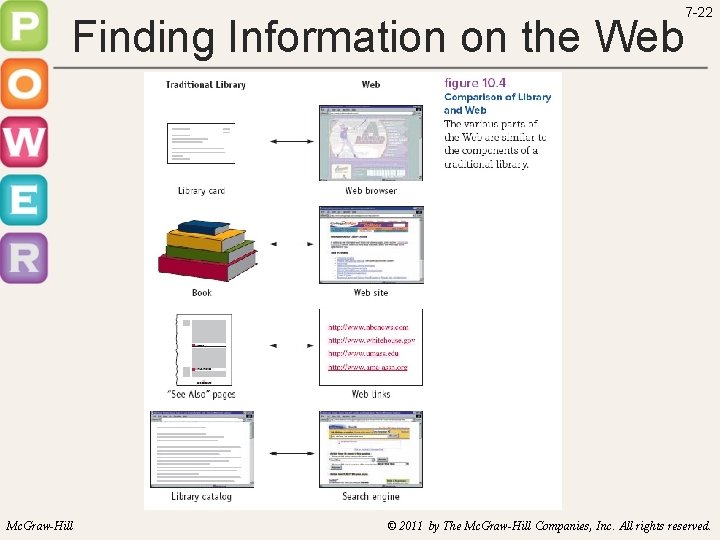
Finding Information on the Web Mc. Graw-Hill 7 -22 © 2011 by The Mc. Graw-Hill Companies, Inc. All rights reserved.
Finding Information on the Web 7 -23 • There is a great deal of information available on the web…and disinformation Mc. Graw-Hill – Browsers – a way of looking at information on the web (Microsoft Explorer, Mozilla Firefox, etc) – URL – identifies a unique location on the web – Web pages – a document that presents you with information – Links – embedded in web pages that take you to other locations on the web – Search engine – a computerized index of information available on the internet (Yahoo, Google, etc) © 2011 by The Mc. Graw-Hill Companies, Inc. All rights reserved.
Finding Information on the Web 7 -24 • Search tips • Type your search in the form of a question • Identify the important words in the question as well as synonyms • Go to your search engine and type in 2 or 3 words from your list • Open a new window and type in a new search using different terms • Compare results and find similarities • Determine if you have found the answer you’re looking for • Resist the temptation to cut and paste the information you found directly into your work Mc. Graw-Hill © 2011 by The Mc. Graw-Hill Companies, Inc. All rights reserved.
Evaluating Information 7 -25 • How authoritative is the information? – Remember, anyone can publish anything on the Web, whether it is correct or not • How current is the information? • How well are claims documented? Mc. Graw-Hill © 2011 by The Mc. Graw-Hill Companies, Inc. All rights reserved.