
Chapter 7 Advanced Shell Programming Guide To UNIX
- Slides: 41
Chapter 7: Advanced Shell Programming Guide To UNIX Using Linux Third Edition Guide to UNIX Using Linux, Third Edition
Objectives • Perform program design and analysis using flowcharts and pseudocode • Use techniques to ensure a script is employing the correct shell • Set the default shell • Configure Bash login and logout scripts Guide to UNIX Using Linux, Third Edition 2
Objectives (continued) • • Set defaults for the vi editor Use the test command for programming functions Format record output Delete records using a script Guide to UNIX Using Linux, Third Edition 3
Objectives (continued) • Set up a quick screen-clearing technique • Create a program algorithm to solve a cursorrepositioning problem • Develop and test a program to eliminate duplicate records • Create shell functions and use them in a program Guide to UNIX Using Linux, Third Edition 4
Understanding Program Design and Analysis • Program development cycle – Step 1: Program specification – Step 2: Design • Two popular and proven analysis tools: – Program flowchart – Pseudocode Guide to UNIX Using Linux, Third Edition 5
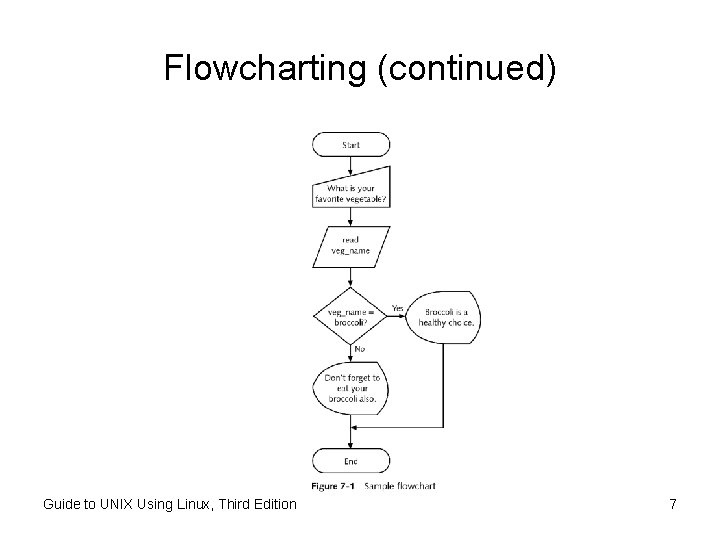
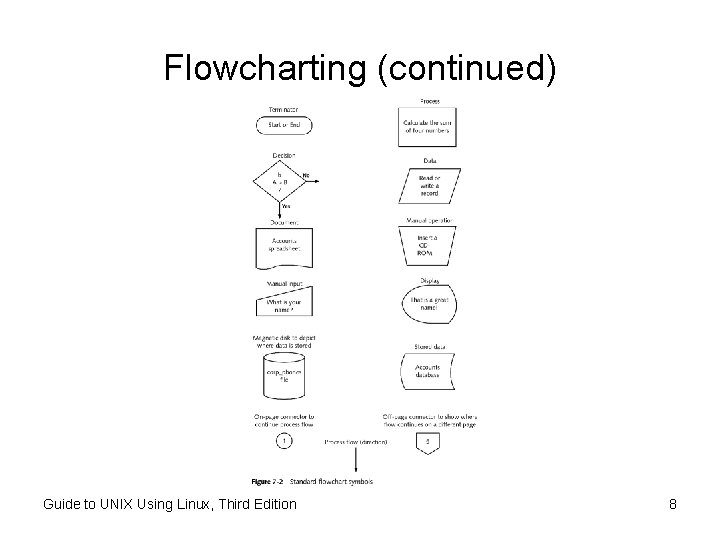
Flowcharting • Each step in the program is represented by a symbol in the flowchart • The shape of the symbol indicates the type of operation – Arrows connect the symbols and indicate the direction in which the program flows – Input and output: represented by trapezoids – Decision structures: represented by diamonds Guide to UNIX Using Linux, Third Edition 6
Flowcharting (continued) Guide to UNIX Using Linux, Third Edition 7
Flowcharting (continued) Guide to UNIX Using Linux, Third Edition 8
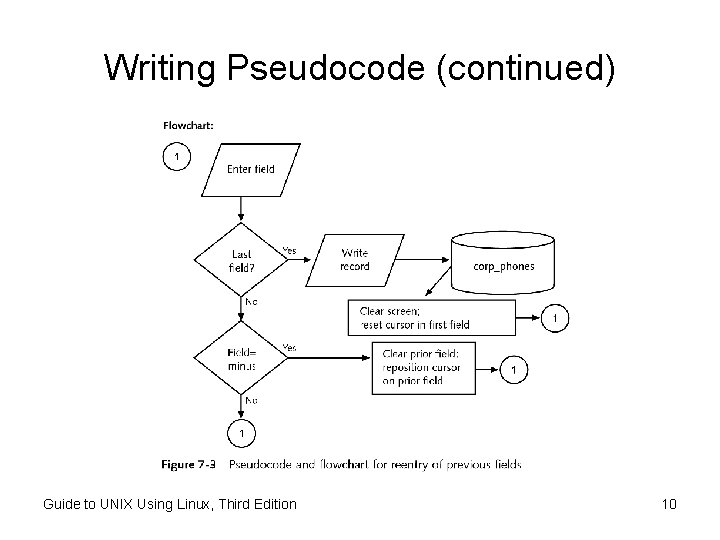
Writing Pseudocode • After flowcharting, the next step in designing a program is to write pseudocode • Similar to programming statements • A design tool only and never processed by the computer; no syntax issues Guide to UNIX Using Linux, Third Edition 9
Writing Pseudocode (continued) Guide to UNIX Using Linux, Third Edition 10
Ensuring the Correct Shell Runs the Script • Each UNIX/Linux user can choose which shell they use by default – Ensure the correct shell is used to run a script – Not all shells support the same commands and programming statements • The first line of a script should specify which shell to use Guide to UNIX Using Linux, Third Edition 11
Setting the Default Shell • System administrator establishes the default shell for a user account – In /etc/passwd file • File can only be edited (carefully!) by system administrator • Some systems provide management software to assist in setting default shells Guide to UNIX Using Linux, Third Edition 12
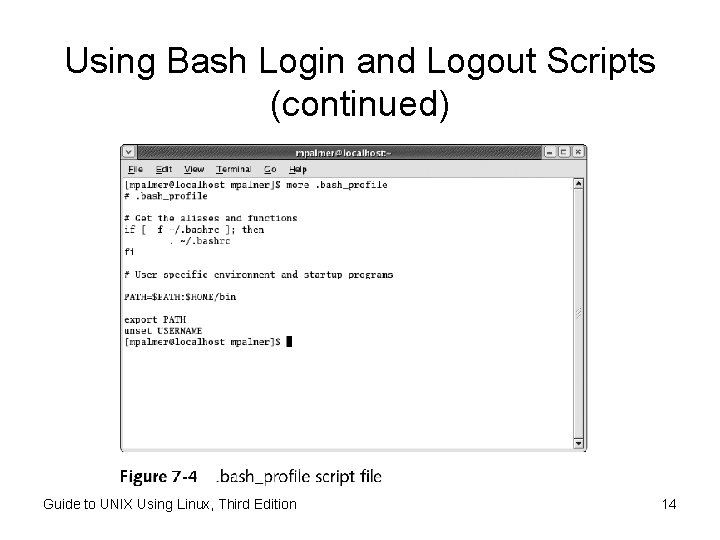
Using Bash Login and Logout Scripts • When Bash is your default shell, scripts run automatically upon login or re-entry –. bash_profile –. bashrc (also runs in a subshell) • Administrator controls /etc/bashrc and /etc/profile • . bash_logout runs when user logs out – Often used to clear the screen Guide to UNIX Using Linux, Third Edition 13
Using Bash Login and Logout Scripts (continued) Guide to UNIX Using Linux, Third Edition 14
Setting Defaults for Using the vi Editor • To use the vi editor for code development, configure. exrc in your home directory • Automatically sets up the vi environment – Set the number of tab spaces to use when nesting lines of code – Display line numbers Guide to UNIX Using Linux, Third Edition 15
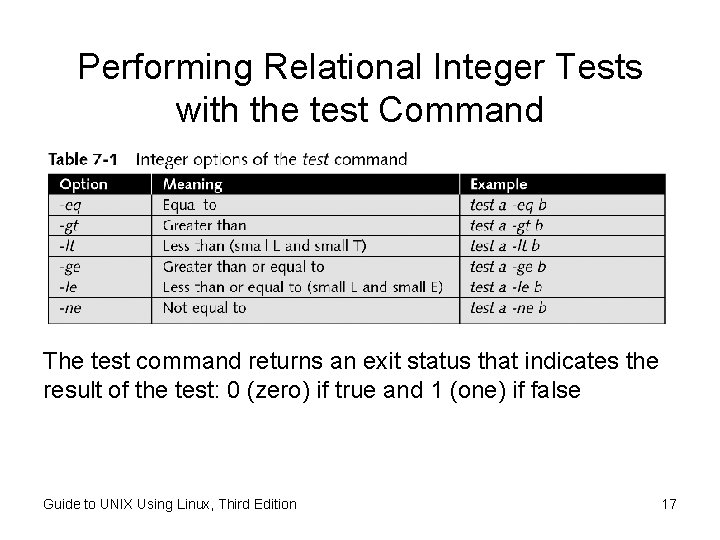
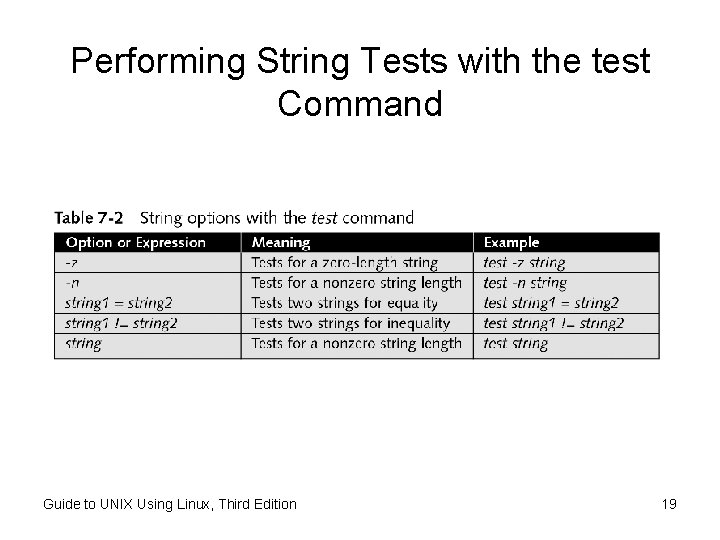
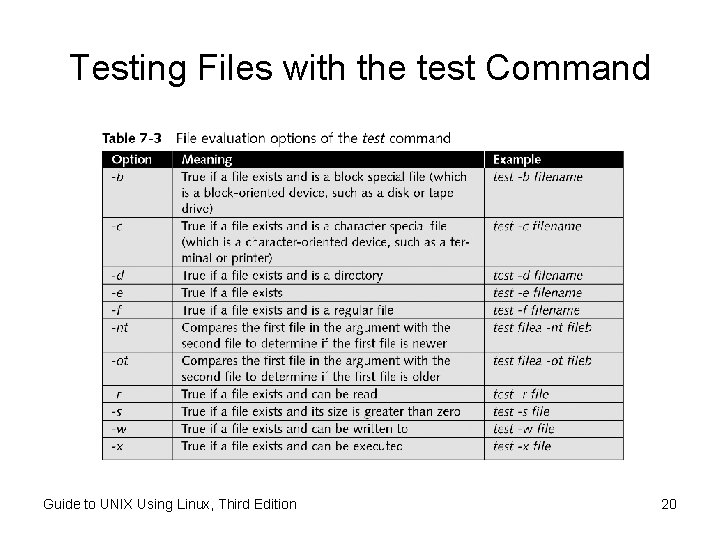
Using the test Command • Place the test command inside the shell script or execute it directly from the command line • Some uses of the test command are: – Perform relational tests with integers – Test strings – Determine if a file or directory exists and what type of file it is – Perform Boolean tests Guide to UNIX Using Linux, Third Edition 16
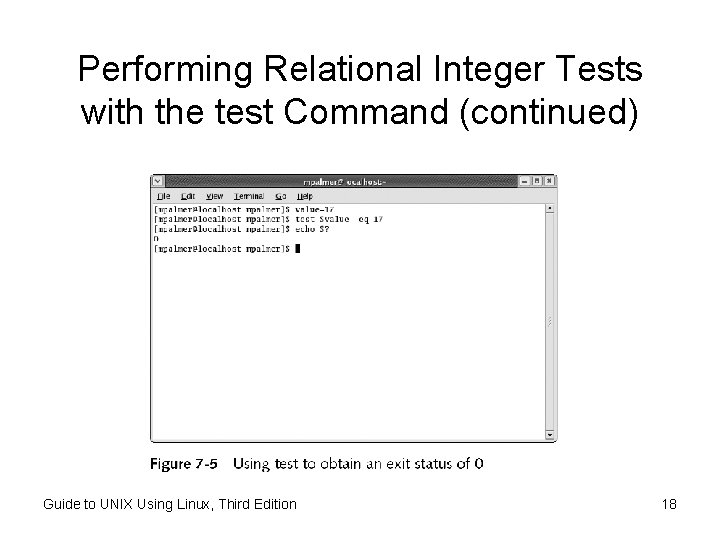
Performing Relational Integer Tests with the test Command The test command returns an exit status that indicates the result of the test: 0 (zero) if true and 1 (one) if false Guide to UNIX Using Linux, Third Edition 17
Performing Relational Integer Tests with the test Command (continued) Guide to UNIX Using Linux, Third Edition 18
Performing String Tests with the test Command Guide to UNIX Using Linux, Third Edition 19
Testing Files with the test Command Guide to UNIX Using Linux, Third Edition 20
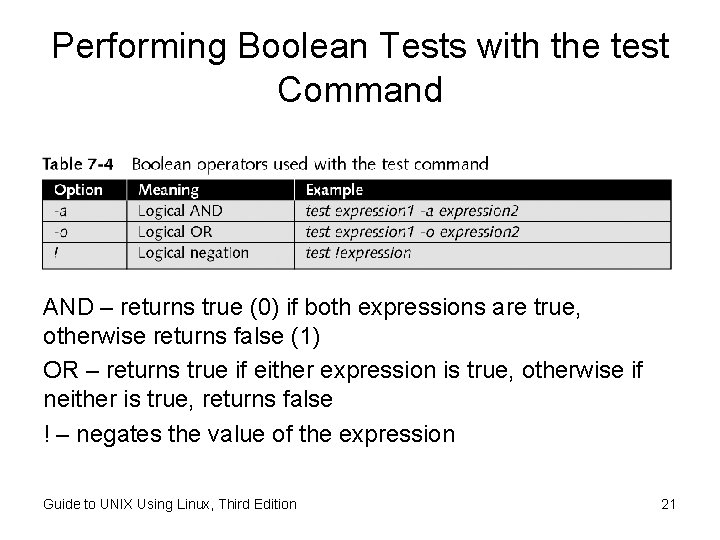
Performing Boolean Tests with the test Command AND – returns true (0) if both expressions are true, otherwise returns false (1) OR – returns true if either expression is true, otherwise if neither is true, returns false ! – negates the value of the expression Guide to UNIX Using Linux, Third Edition 21
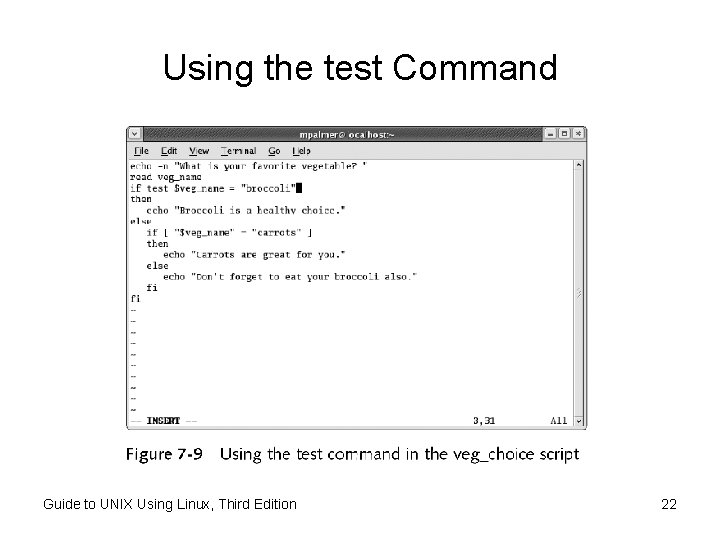
Using the test Command Guide to UNIX Using Linux, Third Edition 22
Formatting Record Output • Record output is formatted using the translate utility (tr) • Use tr to: – Change the characters typed at the keyboard, character by character – Work as a filter when the input comes from the output of another UNIX/Linux command – Redirect standard input to come from a file rather than the keyboard Guide to UNIX Using Linux, Third Edition 23
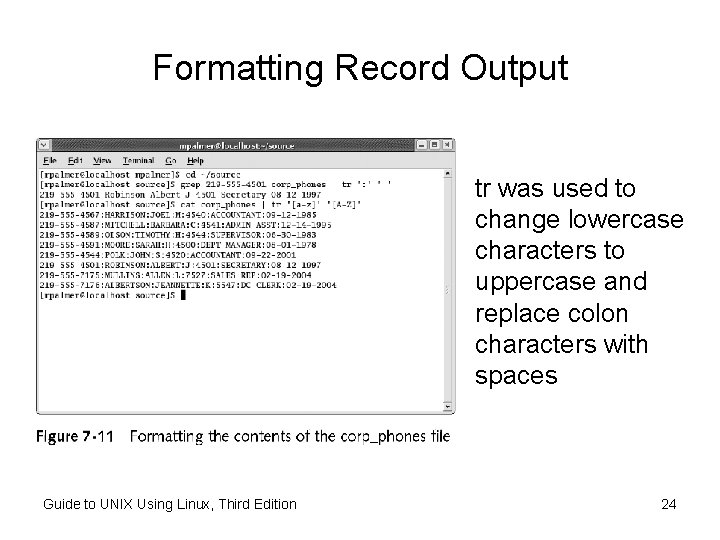
Formatting Record Output tr was used to change lowercase characters to uppercase and replace colon characters with spaces Guide to UNIX Using Linux, Third Edition 24
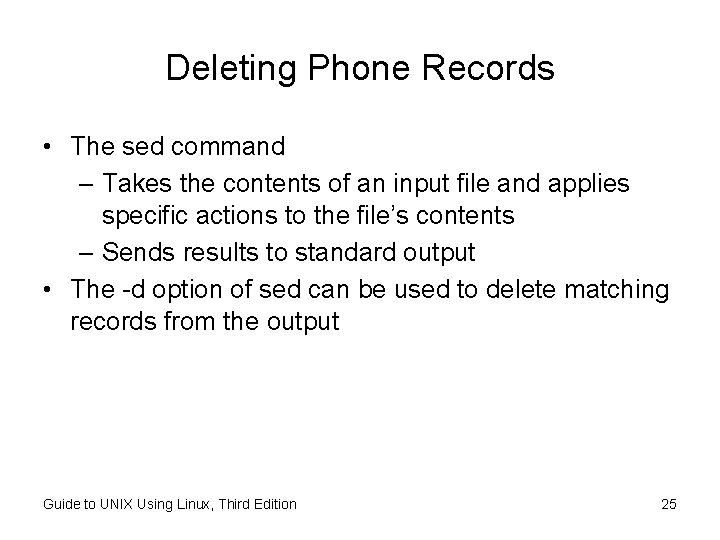
Deleting Phone Records • The sed command – Takes the contents of an input file and applies specific actions to the file’s contents – Sends results to standard output • The -d option of sed can be used to delete matching records from the output Guide to UNIX Using Linux, Third Edition 25
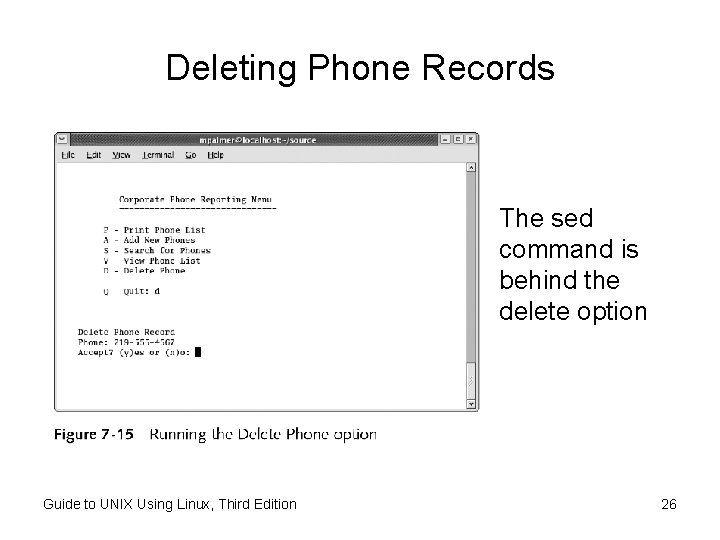
Deleting Phone Records The sed command is behind the delete option Guide to UNIX Using Linux, Third Edition 26
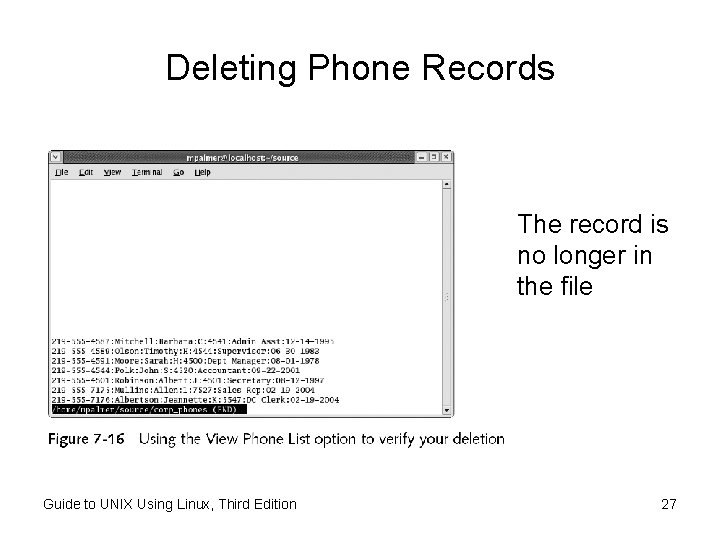
Deleting Phone Records The record is no longer in the file Guide to UNIX Using Linux, Third Edition 27
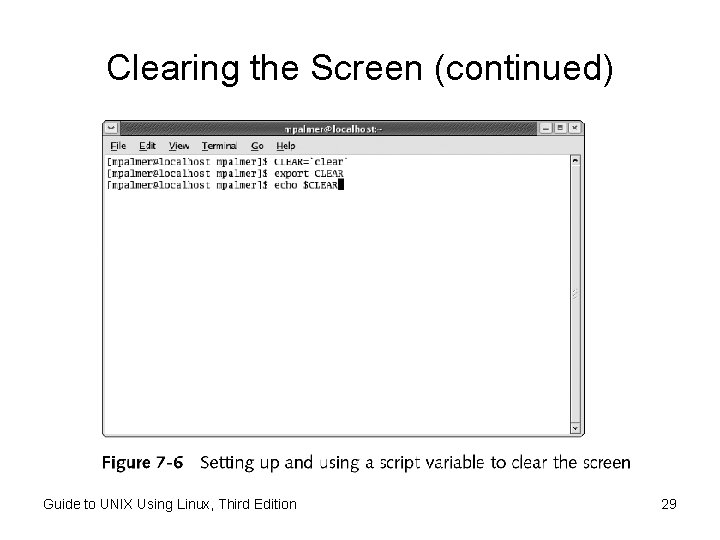
Clearing the Screen • The clear command is useful for clearing the screen, but there is a faster way – Store the output of the clear command in a variable and then echo the contents of the variable on the screen – About ten times faster than the actual command since the system does not have to locate and execute the clear command Guide to UNIX Using Linux, Third Edition 28
Clearing the Screen (continued) Guide to UNIX Using Linux, Third Edition 29
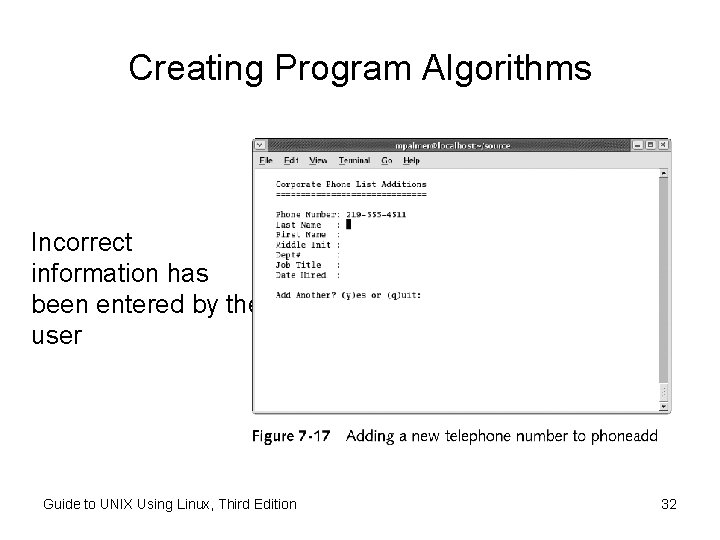
Creating an Algorithm to Place the Cursor • To correct data entered into a previous data entry field, move the cursor back to the erroneous field – If a user enters a minus and hits enter, the cursor is repositioned at the start of the previous field – To accomplish this, the first step is to create a program algorithm Guide to UNIX Using Linux, Third Edition 30
Creating an Algorithm to Place the Cursor (continued) • An algorithm is a sequence of commands or instructions that produces a desired result • A good practice for creating an algorithm is to develop both the logic shown in a flowchart and the conditions necessary to carry out the logic described in the pseudocode Guide to UNIX Using Linux, Third Edition 31
Creating Program Algorithms Incorrect information has been entered by the user Guide to UNIX Using Linux, Third Edition 32
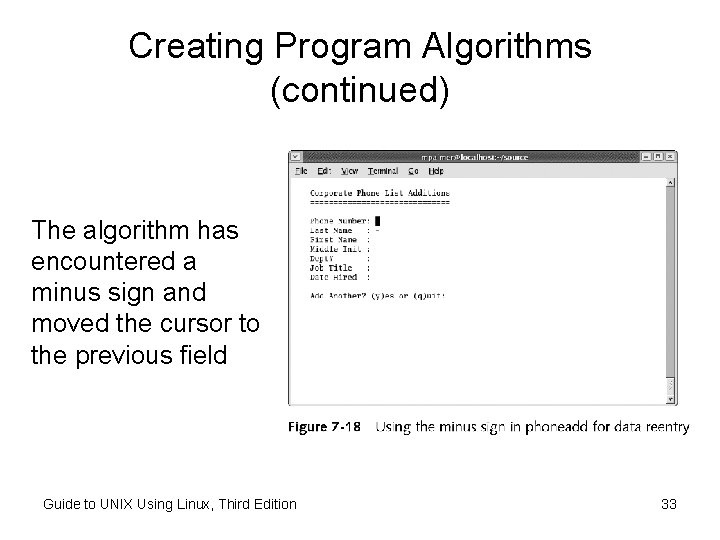
Creating Program Algorithms (continued) The algorithm has encountered a minus sign and moved the cursor to the previous field Guide to UNIX Using Linux, Third Edition 33
Protecting Against Entering Duplicate Data • Input validation is necessary because users don’t always enter valid data • Programs should always check to ensure that users enter acceptable information Guide to UNIX Using Linux, Third Edition 34
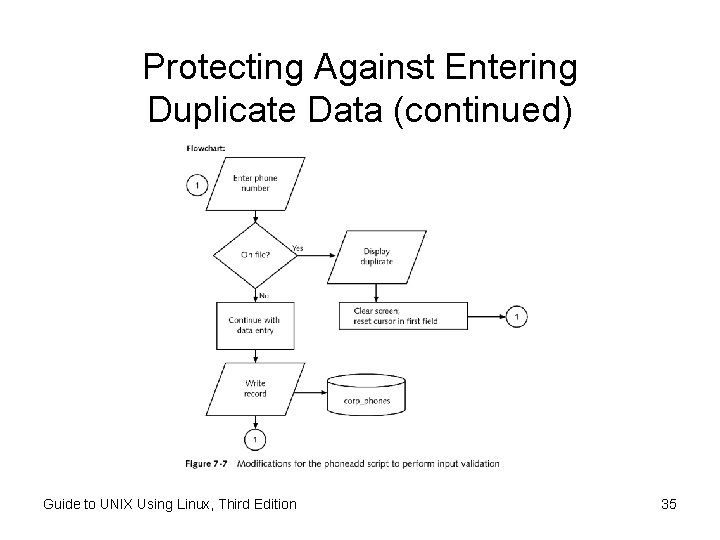
Protecting Against Entering Duplicate Data (continued) Guide to UNIX Using Linux, Third Edition 35
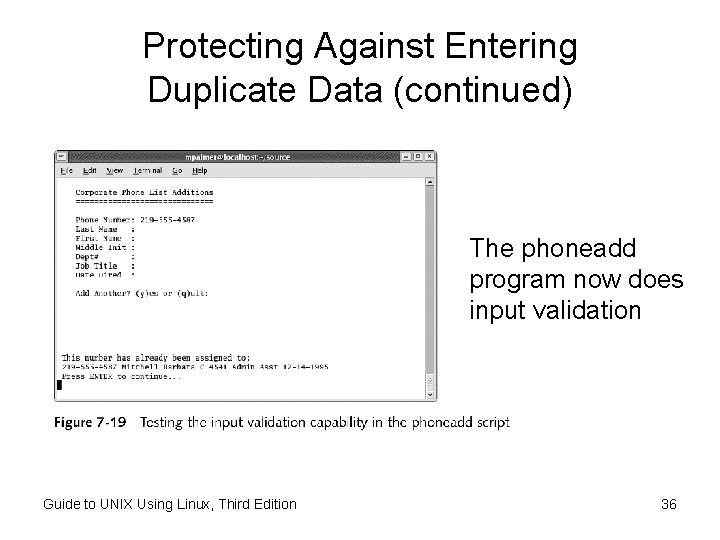
Protecting Against Entering Duplicate Data (continued) The phoneadd program now does input validation Guide to UNIX Using Linux, Third Edition 36
Using Shell Functions • A shell function is a group of commands stored in memory and assigned a name • Shell scripts can use function names to execute the commands • Shell functions isolate reusable code sections; no need to duplicate the same algorithm throughout your program Guide to UNIX Using Linux, Third Edition 37
Defining a Function from the Command Line • To enter a function from the command line – Enter the name of the function – Enter internal code in brackets • Shell will prompt with a > for next line until closing bracket } is entered • Arguments are positional ($1 - $9) Guide to UNIX Using Linux, Third Edition 38
Creating Functions Inside Shell Scripts • Creating a function inside a shell script supports code reuse • Functions can be automatically loaded or defined upon login using. bashrc or. bash_profile scripts Guide to UNIX Using Linux, Third Edition 39
Chapter Summary • Two popular analysis tools are the program flowchart and pseudocode • Use the first line in a script to tell the OS which shell to use with the script • test command validates the existence of directories and files and compares numeric and string values • sed reads a file as its input and outputs the file’s modified content Guide to UNIX Using Linux, Third Edition 40
Chapter Summary (continued) • translate (tr) changes characters typed at the keyboard and filters input from the output of another UNIX/Linux command • To speed clearing the screen, assign the output of the clear command to the shell variable CLEAR • Algorithm: a sequence of instructions or commands that produces a desired result • Shell functions can isolate program code to be reused in multiple programs Guide to UNIX Using Linux, Third Edition 41