
Chapter 6 Troubleshooting Addressing Services CCNP TSHOOT Maintaining
Chapter 6: Troubleshooting Addressing Services CCNP TSHOOT: Maintaining and Troubleshooting IP Networks TSHOOT v 6 Chapter 6 © 2007 – 2010, Cisco Systems, Inc. All rights reserved. Cisco Public 1
Chapter 6 Objectives § Describe common issues related to NAT/PAT and DHCP. § Identify common IPv 6 routing and tunneling issues. Chapter 6 © 2007 – 2010, Cisco Systems, Inc. All rights reserved. Cisco Public 2
Common IPv 4 Addressing Service Issues Chapter 6 © 2007 – 2010, Cisco Systems, Inc. All rights reserved. Cisco Public 3
NAT/PAT Operation Review § Network Address Translation (NAT) was designed for IP version 4 (IPv 4) address conservation. § Also used for address hiding, with security implications. § Usually operates at the border of a network and translates source address of exiting IP packets that are private addresses to public addresses before packets are forwarded out. § The packet header information and the corresponding translated IP address are kept in a NAT table. § NAT does the reverse for the destination address of the responding IP packets based on the content of the NAT table. § NAT can also be used to renumber global address space when switching between service providers. Chapter 6 © 2007 – 2010, Cisco Systems, Inc. All rights reserved. Cisco Public 4
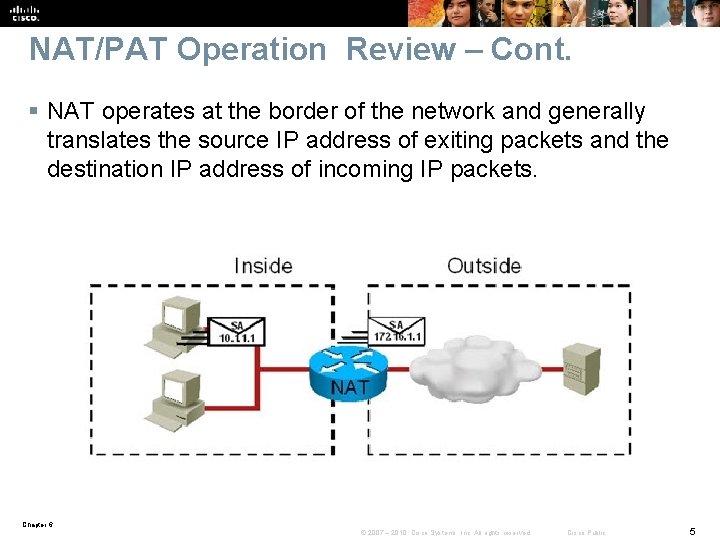
NAT/PAT Operation Review – Cont. § NAT operates at the border of the network and generally translates the source IP address of exiting packets and the destination IP address of incoming IP packets. Chapter 6 © 2007 – 2010, Cisco Systems, Inc. All rights reserved. Cisco Public 5
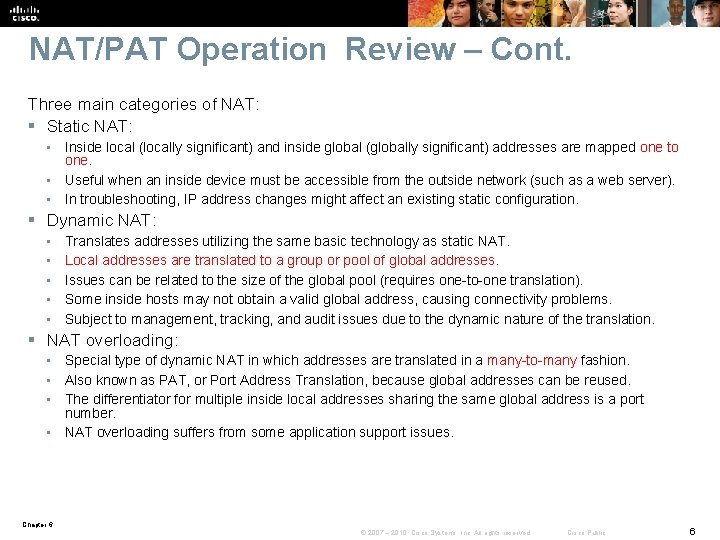
NAT/PAT Operation Review – Cont. Three main categories of NAT: § Static NAT: • Inside local (locally significant) and inside global (globally significant) addresses are mapped one to one. • Useful when an inside device must be accessible from the outside network (such as a web server). • In troubleshooting, IP address changes might affect an existing static configuration. § Dynamic NAT: • • • Translates addresses utilizing the same basic technology as static NAT. Local addresses are translated to a group or pool of global addresses. Issues can be related to the size of the global pool (requires one-to-one translation). Some inside hosts may not obtain a valid global address, causing connectivity problems. Subject to management, tracking, and audit issues due to the dynamic nature of the translation. § NAT overloading: • Special type of dynamic NAT in which addresses are translated in a many-to-many fashion. • Also known as PAT, or Port Address Translation, because global addresses can be reused. • The differentiator for multiple inside local addresses sharing the same global address is a port number. • NAT overloading suffers from some application support issues. Chapter 6 © 2007 – 2010, Cisco Systems, Inc. All rights reserved. Cisco Public 6
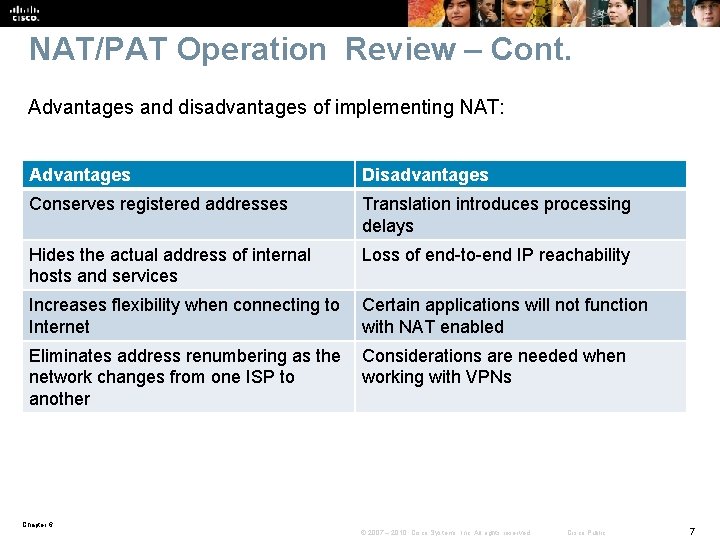
NAT/PAT Operation Review – Cont. Advantages and disadvantages of implementing NAT: Advantages Disadvantages Conserves registered addresses Translation introduces processing delays Hides the actual address of internal hosts and services Loss of end-to-end IP reachability Increases flexibility when connecting to Certain applications will not function Internet with NAT enabled Eliminates address renumbering as the Considerations are needed when network changes from one ISP to working with VPNs another Chapter 6 © 2007 – 2010, Cisco Systems, Inc. All rights reserved. Cisco Public 7
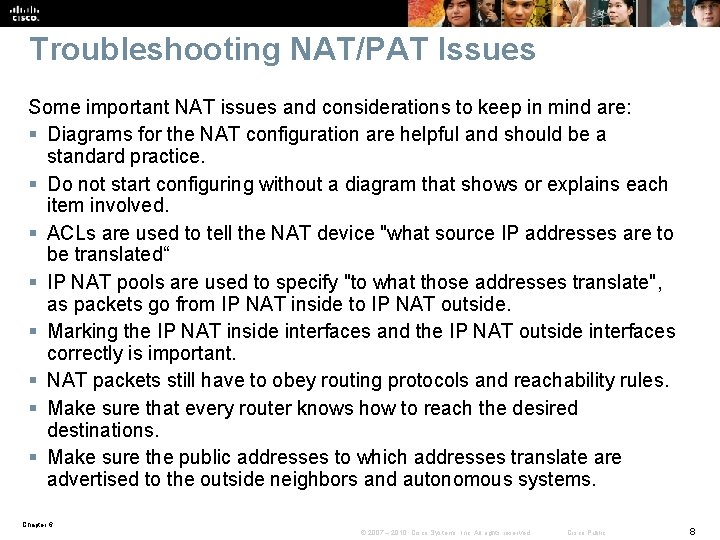
Troubleshooting NAT/PAT Issues Some important NAT issues and considerations to keep in mind are: § Diagrams for the NAT configuration are helpful and should be a standard practice. § Do not start configuring without a diagram that shows or explains each item involved. § ACLs are used to tell the NAT device "what source IP addresses are to be translated“ § IP NAT pools are used to specify "to what those addresses translate", as packets go from IP NAT inside to IP NAT outside. § Marking the IP NAT inside interfaces and the IP NAT outside interfaces correctly is important. § NAT packets still have to obey routing protocols and reachability rules. § Make sure that every router knows how to reach the desired destinations. § Make sure the public addresses to which addresses translate are advertised to the outside neighbors and autonomous systems. Chapter 6 © 2007 – 2010, Cisco Systems, Inc. All rights reserved. Cisco Public 8
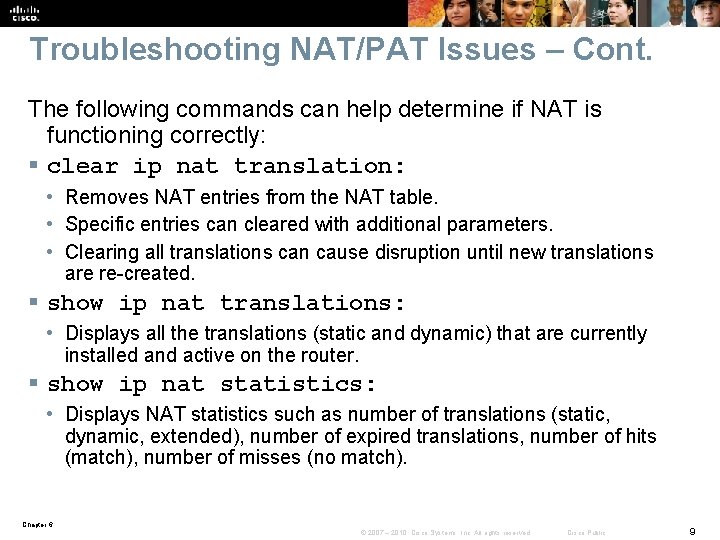
Troubleshooting NAT/PAT Issues – Cont. The following commands can help determine if NAT is functioning correctly: § clear ip nat translation: • Removes NAT entries from the NAT table. • Specific entries can cleared with additional parameters. • Clearing all translations can cause disruption until new translations are re-created. § show ip nat translations: • Displays all the translations (static and dynamic) that are currently installed and active on the router. § show ip nat statistics: • Displays NAT statistics such as number of translations (static, dynamic, extended), number of expired translations, number of hits (match), number of misses (no match). Chapter 6 © 2007 – 2010, Cisco Systems, Inc. All rights reserved. Cisco Public 9
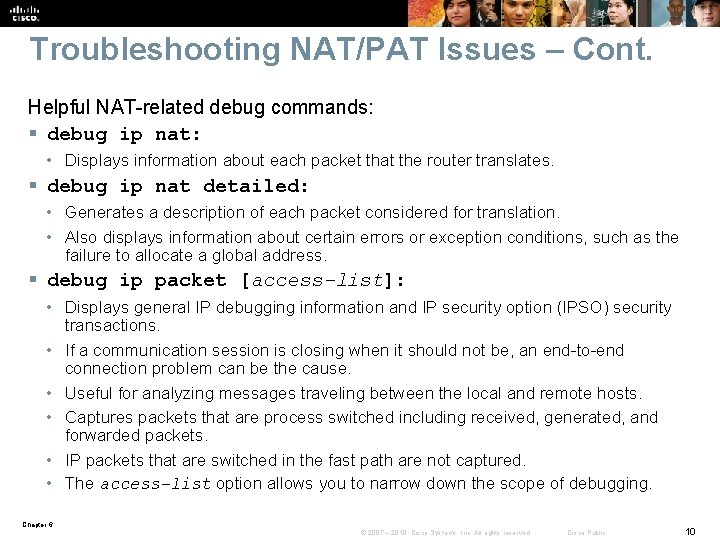
Troubleshooting NAT/PAT Issues – Cont. Helpful NAT-related debug commands: § debug ip nat: • Displays information about each packet that the router translates. § debug ip nat detailed: • Generates a description of each packet considered for translation. • Also displays information about certain errors or exception conditions, such as the failure to allocate a global address. § debug ip packet [access-list]: • Displays general IP debugging information and IP security option (IPSO) security transactions. • If a communication session is closing when it should not be, an end-to-end connection problem can be the cause. • Useful for analyzing messages traveling between the local and remote hosts. • Captures packets that are process switched including received, generated, and forwarded packets. • IP packets that are switched in the fast path are not captured. • The access-list option allows you to narrow down the scope of debugging. Chapter 6 © 2007 – 2010, Cisco Systems, Inc. All rights reserved. Cisco Public 10
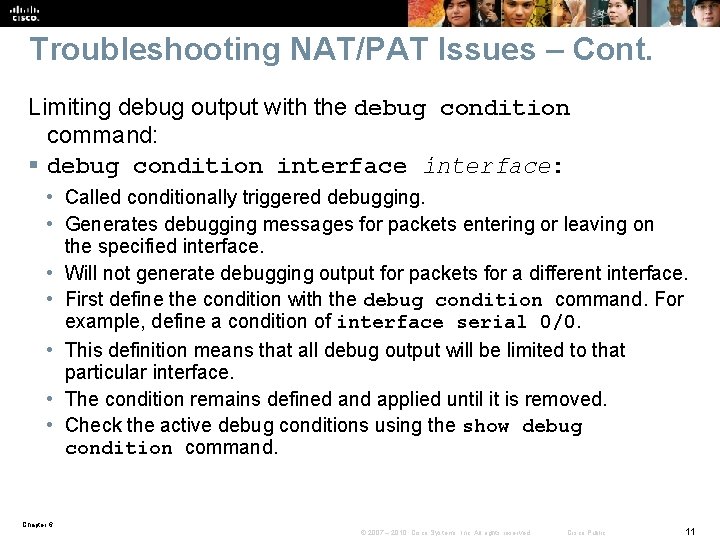
Troubleshooting NAT/PAT Issues – Cont. Limiting debug output with the debug condition command: § debug condition interface: • Called conditionally triggered debugging. • Generates debugging messages for packets entering or leaving on the specified interface. • Will not generate debugging output for packets for a different interface. • First define the condition with the debug condition command. For example, define a condition of interface serial 0/0. • This definition means that all debug output will be limited to that particular interface. • The condition remains defined and applied until it is removed. • Check the active debug conditions using the show debug condition command. Chapter 6 © 2007 – 2010, Cisco Systems, Inc. All rights reserved. Cisco Public 11
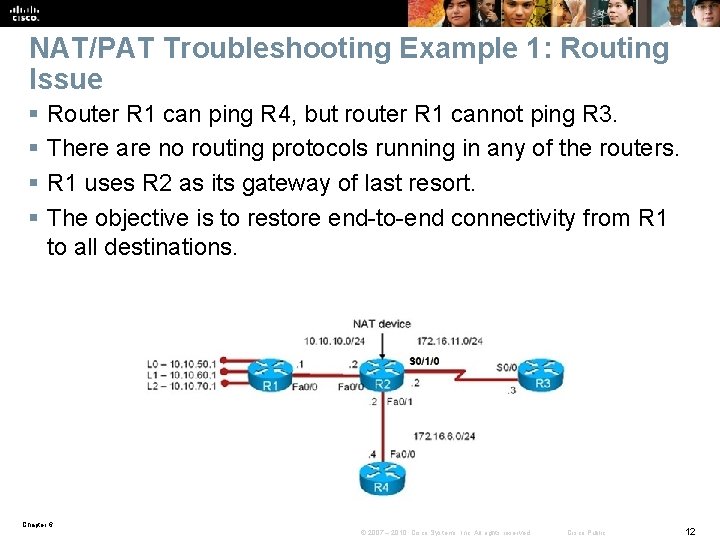
NAT/PAT Troubleshooting Example 1: Routing Issue § § Router R 1 can ping R 4, but router R 1 cannot ping R 3. There are no routing protocols running in any of the routers. R 1 uses R 2 as its gateway of last resort. The objective is to restore end-to-end connectivity from R 1 to all destinations. Chapter 6 © 2007 – 2010, Cisco Systems, Inc. All rights reserved. Cisco Public 12
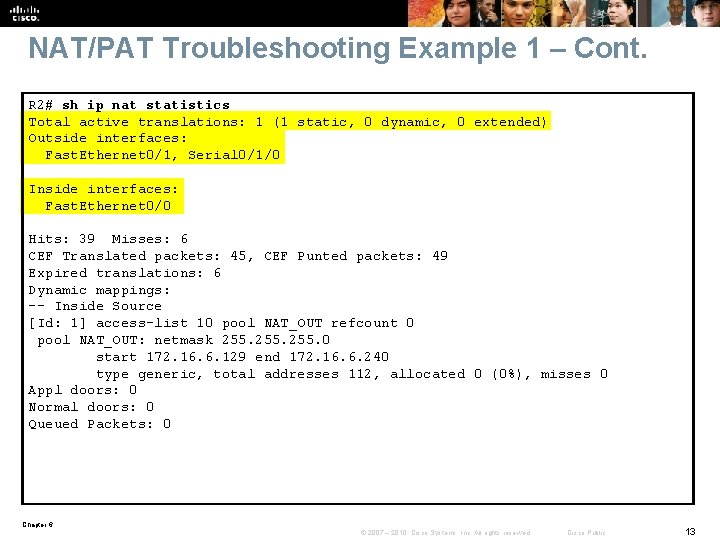
NAT/PAT Troubleshooting Example 1 – Cont. R 2# sh ip nat statistics Total active translations: 1 (1 static, 0 dynamic, 0 extended) Outside interfaces: Fast. Ethernet 0/1, Serial 0/1/0 Inside interfaces: Fast. Ethernet 0/0 Hits: 39 Misses: 6 CEF Translated packets: 45, CEF Punted packets: 49 Expired translations: 6 Dynamic mappings: -- Inside Source [Id: 1] access-list 10 pool NAT_OUT refcount 0 pool NAT_OUT: netmask 255. 0 start 172. 16. 6. 129 end 172. 16. 6. 240 type generic, total addresses 112, allocated 0 (0%), misses 0 Appl doors: 0 Normal doors: 0 Queued Packets: 0 Chapter 6 © 2007 – 2010, Cisco Systems, Inc. All rights reserved. Cisco Public 13
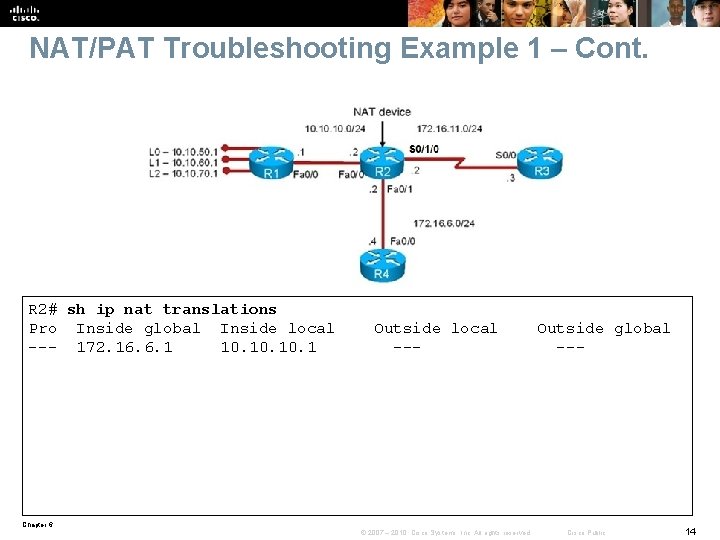
NAT/PAT Troubleshooting Example 1 – Cont. R 2# sh ip nat translations Pro Inside global Inside local --- 172. 16. 6. 1 10. 10. 1 Outside local --- Outside global --- Chapter 6 © 2007 – 2010, Cisco Systems, Inc. All rights reserved. Cisco Public 14
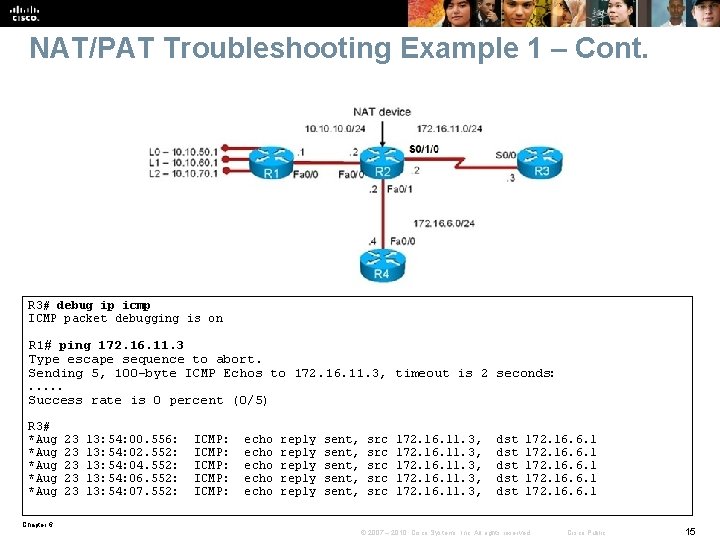
NAT/PAT Troubleshooting Example 1 – Cont. R 3# debug ip icmp ICMP packet debugging is on R 1# ping 172. 16. 11. 3 Type escape sequence to abort. Sending 5, 100 -byte ICMP Echos to 172. 16. 11. 3, timeout is 2 seconds: . . . Success rate is 0 percent (0/5) R 3# *Aug *Aug 23 23 23 13: 54: 00. 556: 13: 54: 02. 552: 13: 54: 04. 552: 13: 54: 06. 552: 13: 54: 07. 552: ICMP: ICMP: echo echo reply reply sent, sent, src src src 172. 16. 11. 3, dst dst dst 172. 16. 6. 1 Chapter 6 © 2007 – 2010, Cisco Systems, Inc. All rights reserved. Cisco Public 15
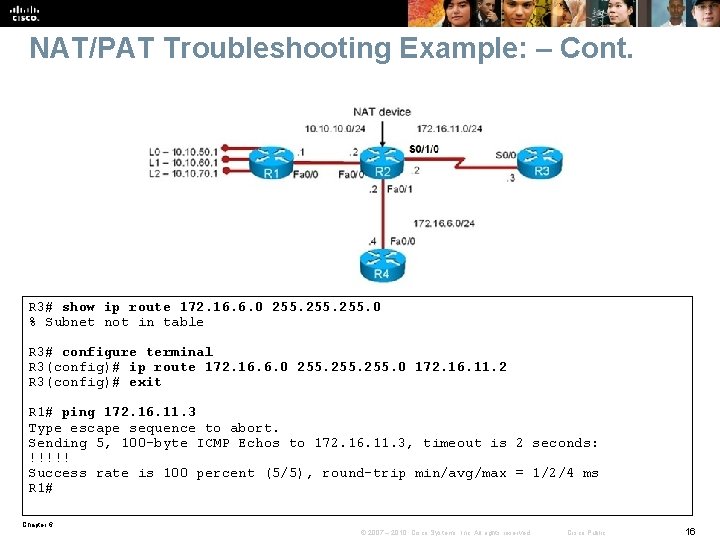
NAT/PAT Troubleshooting Example: – Cont. R 3# show ip route 172. 16. 6. 0 255. 0 % Subnet not in table R 3# configure terminal R 3(config)# ip route 172. 16. 6. 0 255. 0 172. 16. 11. 2 R 3(config)# exit R 1# ping 172. 16. 11. 3 Type escape sequence to abort. Sending 5, 100 -byte ICMP Echos to 172. 16. 11. 3, timeout is 2 seconds: !!!!! Success rate is 100 percent (5/5), round-trip min/avg/max = 1/2/4 ms R 1# Chapter 6 © 2007 – 2010, Cisco Systems, Inc. All rights reserved. Cisco Public 16
Reviewing DHCP Operation Chapter 6 © 2007 – 2010, Cisco Systems, Inc. All rights reserved. Cisco Public 17
DHCP Overview § DHCP is a client-server protocol. The DHCP client acquires IP configuration parameters such as IP address, subnet mask, and default gateway, from a DHCP server. § The DHCP server is typically centrally located and operated by the network administrator. § The DHCP client initially does not have an IP configuration and must find a DHCP server to obtain its IP configuration based on broadcast communication. § Most enterprise networks are divided into subnets. Each subnet usually maps to a virtual LAN (VLAN) and routers or multilayer switches route between the subnets. § Because routers do not pass broadcasts by default, a DHCP server would be needed on each subnet. § To address this issue, a router interface can be configured with a feature called DHCP Relay Agent, using the ip helper-address server-address command. § When configured with this command, the router interface will forward client DHCP messages to the configured server-address. When the server sends its reply back to the router interface, the router interface forwards it to the client subnet. Chapter 6 © 2007 – 2010, Cisco Systems, Inc. All rights reserved. Cisco Public 18
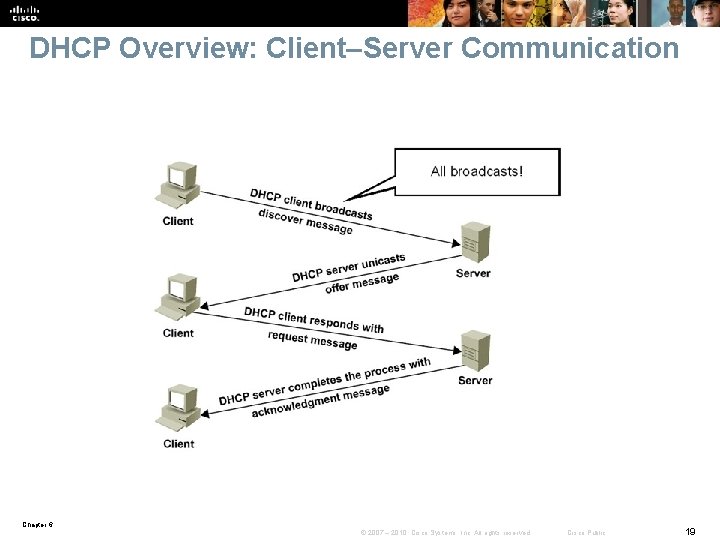
DHCP Overview: Client–Server Communication Chapter 6 © 2007 – 2010, Cisco Systems, Inc. All rights reserved. Cisco Public 19
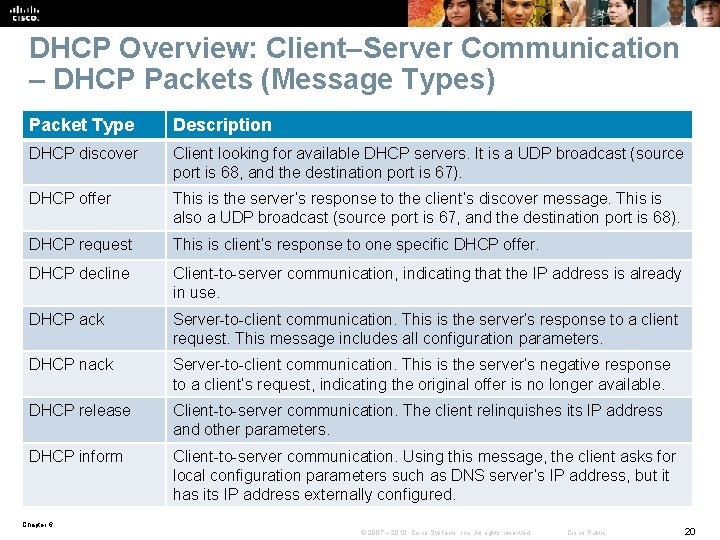
DHCP Overview: Client–Server Communication – DHCP Packets (Message Types) Packet Type Description DHCP discover Client looking for available DHCP servers. It is a UDP broadcast (source port is 68, and the destination port is 67). DHCP offer This is the server’s response to the client’s discover message. This is also a UDP broadcast (source port is 67, and the destination port is 68). DHCP request This is client’s response to one specific DHCP offer. DHCP decline Client-to-server communication, indicating that the IP address is already in use. DHCP ack Server-to-client communication. This is the server’s response to a client request. This message includes all configuration parameters. DHCP nack Server-to-client communication. This is the server’s negative response to a client’s request, indicating the original offer is no longer available. DHCP release Client-to-server communication. The client relinquishes its IP address and other parameters. DHCP inform Client-to-server communication. Using this message, the client asks for local configuration parameters such as DNS server’s IP address, but it has its IP address externally configured. Chapter 6 © 2007 – 2010, Cisco Systems, Inc. All rights reserved. Cisco Public 20
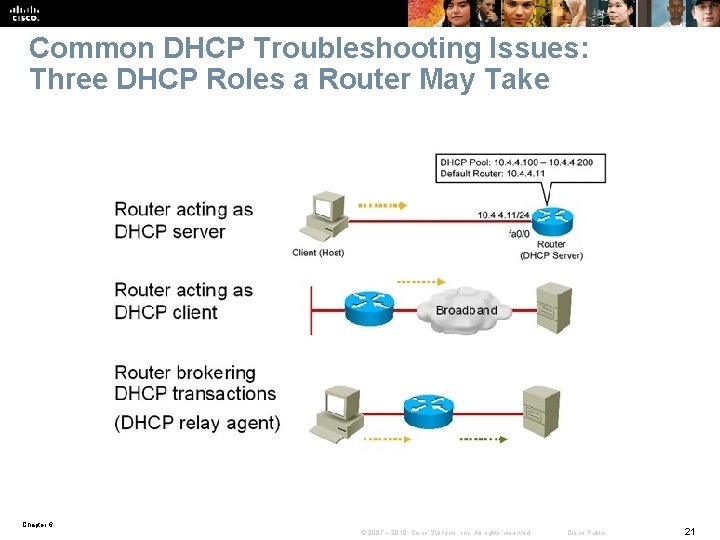
Common DHCP Troubleshooting Issues: Three DHCP Roles a Router May Take Chapter 6 © 2007 – 2010, Cisco Systems, Inc. All rights reserved. Cisco Public 21
DHCP Troubleshooting Issues – Cont. § Configuration issues can result in many symptoms: • Clients not obtaining IP information from the server • Client requests not reaching the server across a DHCP relay agent • Clients failing to obtain DHCP options and extensions § Address pool issues: • Poor capacity planning and security issues might result in DHCP scope exhaustion. • When using static and dynamic IP address assignments, an IP address that is already in use can be granted. • Multiple DHCP servers, or even rogue DHCP servers can result in duplicate IP addresses • assigned to hosts. § Management issues: • Due to the “pull” nature of DHCP. • There are no provisions in the protocol to allow the DHCP server to push configuration parameters or control messages to DHCP clients. • A good example, with critical implications in IP address renumbering, is that IP addresses must be renewed from the client side. There is no server-side, push-type renewal process. • This means that during renumbering, all clients would need to reboot or manually renew their IP addresses. Otherwise, you need to wait until the clients leases expire, which might not be a viable option. Chapter 6 © 2007 – 2010, Cisco Systems, Inc. All rights reserved. Cisco Public 22
DHCP Troubleshooting Issues: DHCP Relay Agent § The Cisco IOS command that makes a router a DHCP relay agent is ip helper-address. § This is an interface configuration command that makes the router forward the Boot. P/DHCP requests from clients to the DHCP server. § If the DHCP server's IP address changes, all interfaces of all routers must be reconfigured with the new IP helper-address (DHCP server's new IP address). § Enabling a router interface with the ip helper-address command makes the interface forward UDP broadcasts for six protocols (not just DHCP) to the IP address configured using the ip helper-address command. • TFTP (port 69) • DNS (port 53) • Time Service (port 37) • Net. BIOS Name Service and Datagram Service (ports 137 and 138) • TACACS (port 49) • DHCP/BOOTP Client and Server (ports 67 and 68) § If other protocols do not require this service, forwarding their requests must be disabled manually on all routers using the Cisco IOS no ip forward-protocol udp port-number command in global configuration mode. Chapter 6 © 2007 – 2010, Cisco Systems, Inc. All rights reserved. Cisco Public 23
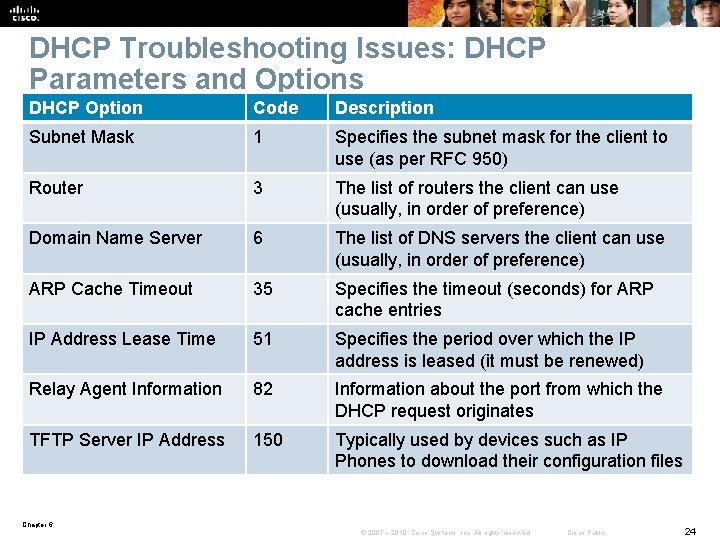
DHCP Troubleshooting Issues: DHCP Parameters and Options DHCP Option Code Description Subnet Mask 1 Specifies the subnet mask for the client to use (as per RFC 950) Router 3 The list of routers the client can use (usually, in order of preference) Domain Name Server 6 The list of DNS servers the client can use (usually, in order of preference) ARP Cache Timeout 35 Specifies the timeout (seconds) for ARP cache entries IP Address Lease Time 51 Specifies the period over which the IP address is leased (it must be renewed) Relay Agent Information 82 Information about the port from which the DHCP request originates TFTP Server IP Address 150 Typically used by devices such as IP Phones to download their configuration files Chapter 6 © 2007 – 2010, Cisco Systems, Inc. All rights reserved. Cisco Public 24
DHCP Troubleshooting Issues § § Troubleshooting can be related to DHCP security efforts. Automatic addressing is accomplished through DHCP. Security is accomplished through DHCP snooping. Some specific issues related to DHCP snooping: • • Improper configuration of the DHCP snooping trust boundaries Failure to configure DHCP snooping on certain VLANs Improper configuration of the DHCP snooping rate limits Performance degradation § Poor planning of DHCP snooping can result in DHCP transactions being blocked or affected. Chapter 6 © 2007 – 2010, Cisco Systems, Inc. All rights reserved. Cisco Public 25
DHCP Troubleshooting Issues – Cont. DHCP troubleshooting questions to ask: § Where are the DHCP servers and clients located? § Are DHCP relay agents configured? § What are the DHCP pool sizes? Are they sufficient? § Are there any DHCP option compatibility issues? § Are there any ACLs or firewalls filtering UDP port 67 or UDP port 68? § Are there any active DHCP Do. S attacks? § Is forwarding disabled on the router acting as DHCP Relay Agent for any UDP ports (using the Cisco IOS no ip forwardprotocol udp port command)? § Is the ip helper-address command applied to correct router interfaces? § Is DHCP snooping configured? Chapter 6 © 2007 – 2010, Cisco Systems, Inc. All rights reserved. Cisco Public 26
DHCP Troubleshooting Commands § show ip dhcp server statistics: Displays counts for server statistics and messages sent and received for an IOS-based DHCP server. § show ip dhcp binding: Displays DHCP binding information for IP address assignment and subnet allocation. § show ip dhcp conflict: Displays address conflicts found by a Cisco IOS DHCP server when addresses are offered to the client. § show ip dhcp pool name: Displays the subnets allocated and the current utilization level for the pool or all the pools if the name argument is not used. § show ip dhcp database: Displays server database agent information: • URL: Specifies the remote file used to store automatic DHCP bindings • Read/written: The last date and time bindings were read/written from the file • server • Status: Indication of whether the last read or write of host bindings was successful • Delay: The amount of time (in seconds) to wait before updating the database • Timeout: The amount of time (in seconds) before the file transfer is aborted • Failures/Successes: The number of failed/successful file transfers Chapter 6 © 2007 – 2010, Cisco Systems, Inc. All rights reserved. Cisco Public 27
DHCP Troubleshooting Commands – Cont. § debug ip udp: • Displays UDP packets sent and received. • Can use considerable CPU cycles on the device. § debug ip dhcp server [packets | events]: • Enables DHCP server debugging. • The events option reports server events such as address assignments and database updates. • The packets option decodes DHCP receptions and transmissions. § clear ip dhcp binding {* | address}: • Deletes an address binding from the DHCP server database. • The address denotes the IP address of the client. • If the asterisk (*) character is used as the address parameter, DHCP clears all automatic bindings. § clear ip dhcp conflict {* | address}: • Clears an address conflict for a specific entry with the address option. • Clears all address conflicts with the asterisk (*) option. Chapter 6 © 2007 – 2010, Cisco Systems, Inc. All rights reserved. Cisco Public 28
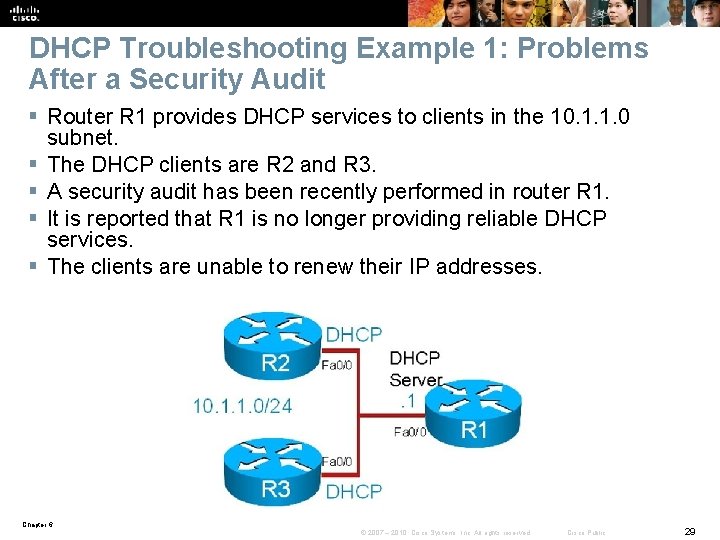
DHCP Troubleshooting Example 1: Problems After a Security Audit § Router R 1 provides DHCP services to clients in the 10. 1. 1. 0 subnet. § The DHCP clients are R 2 and R 3. § A security audit has been recently performed in router R 1. § It is reported that R 1 is no longer providing reliable DHCP services. § The clients are unable to renew their IP addresses. Chapter 6 © 2007 – 2010, Cisco Systems, Inc. All rights reserved. Cisco Public 29
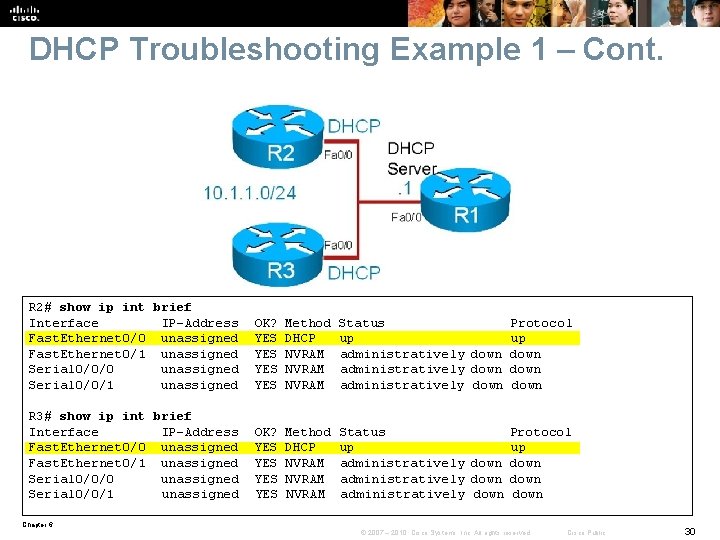
DHCP Troubleshooting Example 1 – Cont. R 2# show ip int brief Interface IP-Address Fast. Ethernet 0/0 unassigned Fast. Ethernet 0/1 unassigned Serial 0/0/0 unassigned Serial 0/0/1 unassigned OK? YES YES Method DHCP NVRAM Status Protocol up up administratively down administratively down R 3# show ip int brief Interface IP-Address Fast. Ethernet 0/0 unassigned Fast. Ethernet 0/1 unassigned Serial 0/0/0 unassigned Serial 0/0/1 unassigned OK? YES YES Method DHCP NVRAM Status Protocol up up administratively down administratively down Chapter 6 © 2007 – 2010, Cisco Systems, Inc. All rights reserved. Cisco Public 30
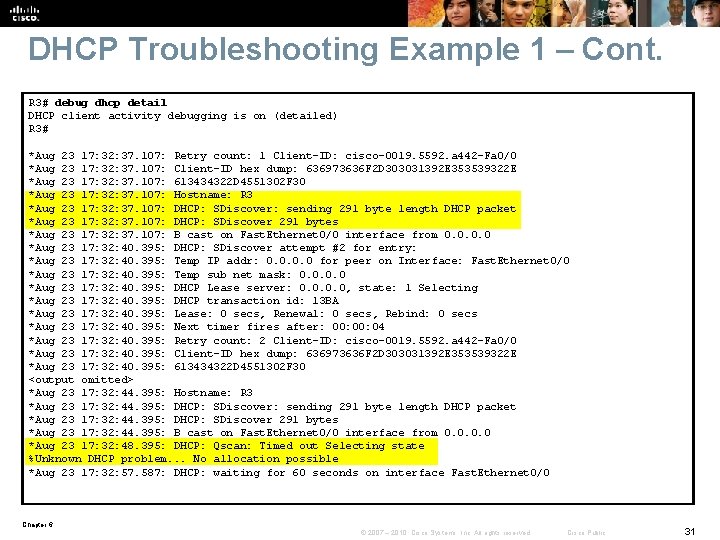
DHCP Troubleshooting Example 1 – Cont. R 3# debug dhcp detail DHCP client activity debugging is on (detailed) R 3# *Aug 23 17: 32: 37. 107: Retry count: 1 Client-ID: cisco-0019. 5592. a 442 -Fa 0/0 *Aug 23 17: 32: 37. 107: Client-ID hex dump: 636973636 F 2 D 303031392 E 353539322 E *Aug 23 17: 32: 37. 107: 613434322 D 4551302 F 30 *Aug 23 17: 32: 37. 107: Hostname: R 3 *Aug 23 17: 32: 37. 107: DHCP: SDiscover: sending 291 byte length DHCP packet *Aug 23 17: 32: 37. 107: DHCP: SDiscover 291 bytes *Aug 23 17: 32: 37. 107: B cast on Fast. Ethernet 0/0 interface from 0. 0 *Aug 23 17: 32: 40. 395: DHCP: SDiscover attempt #2 for entry: *Aug 23 17: 32: 40. 395: Temp IP addr: 0. 0 for peer on Interface: Fast. Ethernet 0/0 *Aug 23 17: 32: 40. 395: Temp sub net mask: 0. 0 *Aug 23 17: 32: 40. 395: DHCP Lease server: 0. 0, state: 1 Selecting *Aug 23 17: 32: 40. 395: DHCP transaction id: 13 BA *Aug 23 17: 32: 40. 395: Lease: 0 secs, Renewal: 0 secs, Rebind: 0 secs *Aug 23 17: 32: 40. 395: Next timer fires after: 00: 04 *Aug 23 17: 32: 40. 395: Retry count: 2 Client-ID: cisco-0019. 5592. a 442 -Fa 0/0 *Aug 23 17: 32: 40. 395: Client-ID hex dump: 636973636 F 2 D 303031392 E 353539322 E *Aug 23 17: 32: 40. 395: 613434322 D 4551302 F 30 <output omitted> *Aug 23 17: 32: 44. 395: Hostname: R 3 *Aug 23 17: 32: 44. 395: DHCP: SDiscover: sending 291 byte length DHCP packet *Aug 23 17: 32: 44. 395: DHCP: SDiscover 291 bytes *Aug 23 17: 32: 44. 395: B cast on Fast. Ethernet 0/0 interface from 0. 0 *Aug 23 17: 32: 48. 395: DHCP: Qscan: Timed out Selecting state %Unknown DHCP problem. . . No allocation possible *Aug 23 17: 32: 57. 587: DHCP: waiting for 60 seconds on interface Fast. Ethernet 0/0 Chapter 6 © 2007 – 2010, Cisco Systems, Inc. All rights reserved. Cisco Public 31
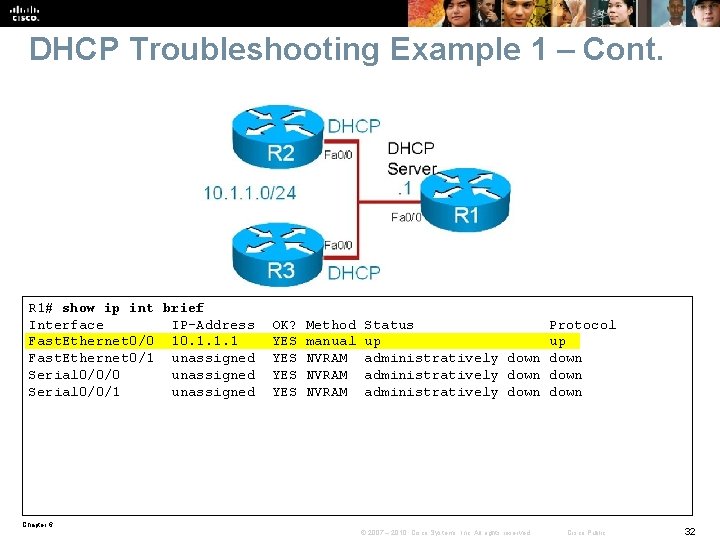
DHCP Troubleshooting Example 1 – Cont. R 1# show ip int brief Interface IP-Address Fast. Ethernet 0/0 10. 1. 1. 1 Fast. Ethernet 0/1 unassigned Serial 0/0/0 unassigned Serial 0/0/1 unassigned OK? YES YES Method manual NVRAM Status Protocol up up administratively down administratively down Chapter 6 © 2007 – 2010, Cisco Systems, Inc. All rights reserved. Cisco Public 32
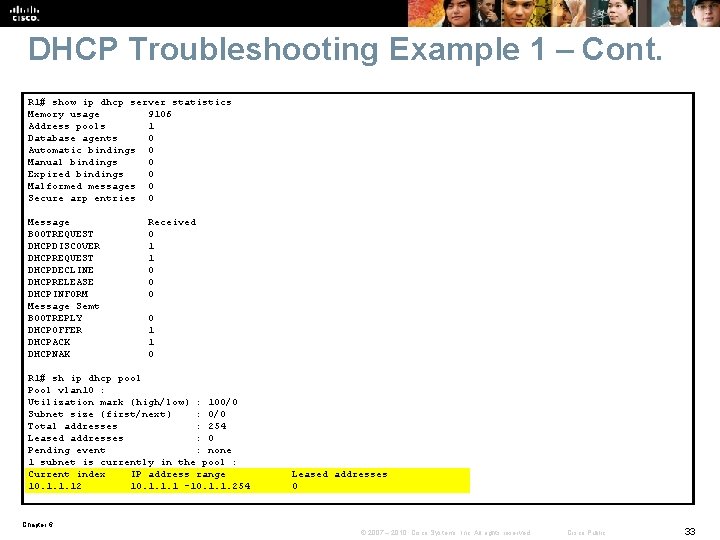
DHCP Troubleshooting Example 1 – Cont. R 1# show ip dhcp server statistics Memory usage 9106 Address pools 1 Database agents 0 Automatic bindings 0 Manual bindings 0 Expired bindings 0 Malformed messages 0 Secure arp entries 0 Message BOOTREQUEST DHCPDISCOVER DHCPREQUEST DHCPDECLINE DHCPRELEASE DHCPINFORM Message Semt BOOTREPLY DHCPOFFER DHCPACK DHCPNAK Received 0 1 1 0 R 1# sh ip dhcp pool Pool vlan 10 : Utilization mark (high/low) : 100/0 Subnet size (first/next) : 0/0 Total addresses : 254 Leased addresses : 0 Pending event : none 1 subnet is currently in the pool : Current index IP address range 10. 1. 1. 12 10. 1. 1. 1 -10. 1. 1. 254 Leased addresses 0 Chapter 6 © 2007 – 2010, Cisco Systems, Inc. All rights reserved. Cisco Public 33
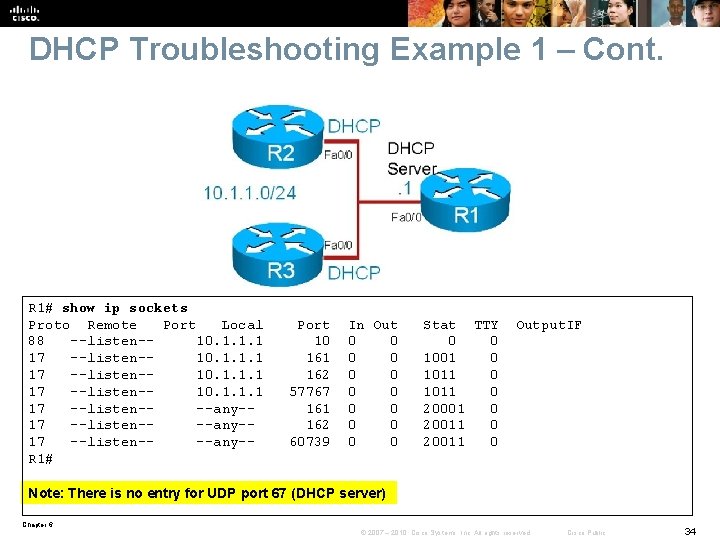
DHCP Troubleshooting Example 1 – Cont. R 1# show ip sockets Proto Remote Port Local 88 --listen-10. 1. 1. 1 17 --listen---any-17 --listen---any-R 1# Port 10 161 162 57767 161 162 60739 In Out 0 0 0 0 Stat TTY 0 0 1001 0 1011 0 20001 0 20011 0 Output. IF Note: There is no entry for UDP port 67 (DHCP server) Chapter 6 © 2007 – 2010, Cisco Systems, Inc. All rights reserved. Cisco Public 34
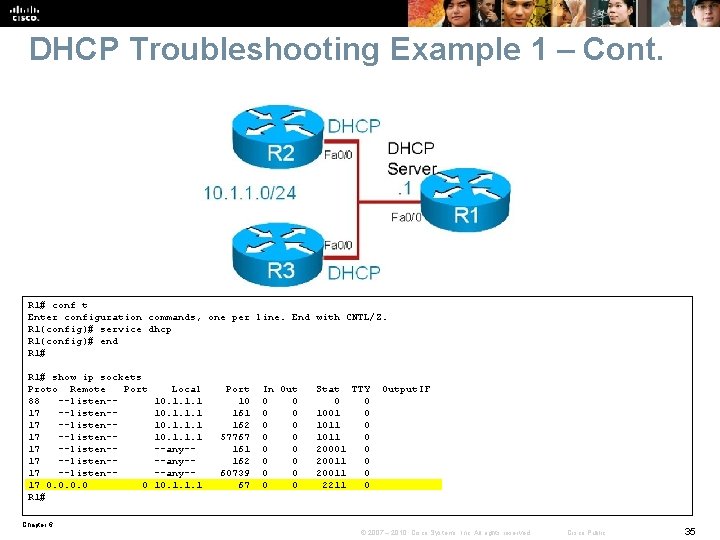
DHCP Troubleshooting Example 1 – Cont. R 1# conf t Enter configuration commands, one per line. End with CNTL/Z. R 1(config)# service dhcp R 1(config)# end R 1# show ip sockets Proto Remote Port 88 --listen-17 --listen-17 0. 0 0 R 1# Local 10. 1. 1. 1 --any---any-10. 1. 1. 1 Port 10 161 162 57767 161 162 60739 67 In Out 0 0 0 0 Stat TTY 0 0 1001 0 1011 0 20001 0 20011 0 2211 0 Output. IF Chapter 6 © 2007 – 2010, Cisco Systems, Inc. All rights reserved. Cisco Public 35
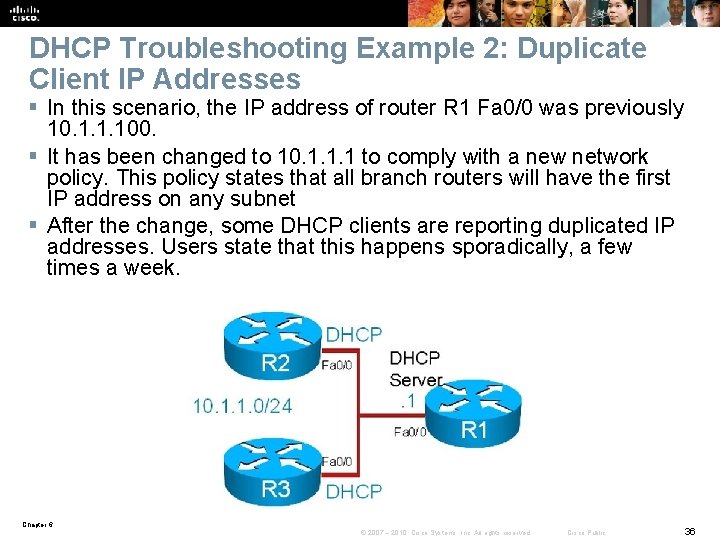
DHCP Troubleshooting Example 2: Duplicate Client IP Addresses § In this scenario, the IP address of router R 1 Fa 0/0 was previously 10. 1. 1. 100. § It has been changed to 10. 1. 1. 1 to comply with a new network policy. This policy states that all branch routers will have the first IP address on any subnet § After the change, some DHCP clients are reporting duplicated IP addresses. Users state that this happens sporadically, a few times a week. Chapter 6 © 2007 – 2010, Cisco Systems, Inc. All rights reserved. Cisco Public 36
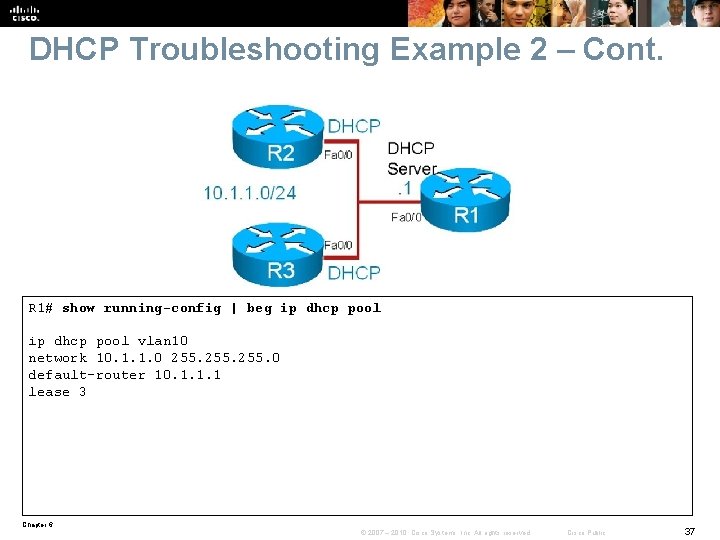
DHCP Troubleshooting Example 2 – Cont. R 1# show running-config | beg ip dhcp pool vlan 10 network 10. 1. 1. 0 255. 0 default-router 10. 1. 1. 1 lease 3 Chapter 6 © 2007 – 2010, Cisco Systems, Inc. All rights reserved. Cisco Public 37
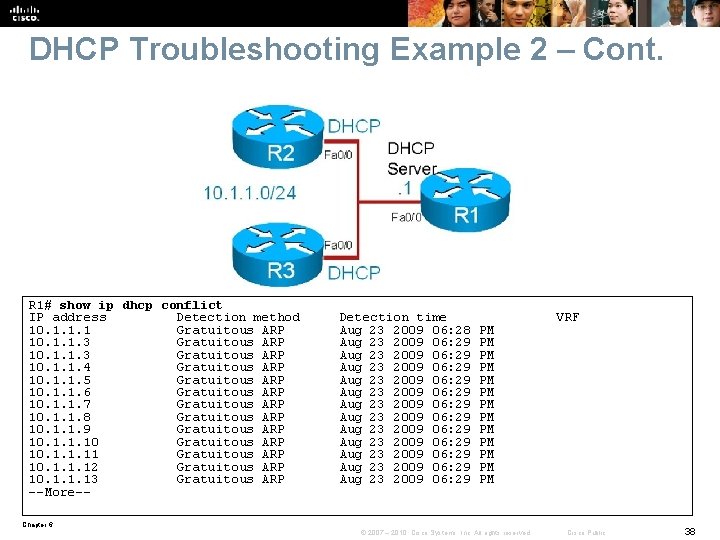
DHCP Troubleshooting Example 2 – Cont. R 1# show ip dhcp conflict IP address Detection method 10. 1. 1. 1 Gratuitous ARP 10. 1. 1. 3 Gratuitous ARP 10. 1. 1. 4 Gratuitous ARP 10. 1. 1. 5 Gratuitous ARP 10. 1. 1. 6 Gratuitous ARP 10. 1. 1. 7 Gratuitous ARP 10. 1. 1. 8 Gratuitous ARP 10. 1. 1. 9 Gratuitous ARP 10. 1. 1. 10 Gratuitous ARP 10. 1. 1. 11 Gratuitous ARP 10. 1. 1. 12 Gratuitous ARP 10. 1. 1. 13 Gratuitous ARP --More-- Detection time Aug 23 2009 06: 28 Aug 23 2009 06: 29 Aug 23 2009 06: 29 Aug 23 2009 06: 29 PM PM PM PM VRF Chapter 6 © 2007 – 2010, Cisco Systems, Inc. All rights reserved. Cisco Public 38
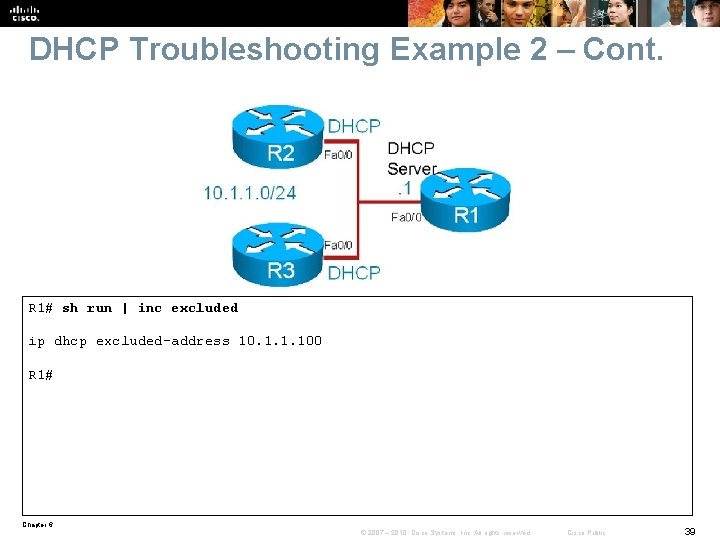
DHCP Troubleshooting Example 2 – Cont. R 1# sh run | inc excluded ip dhcp excluded-address 10. 1. 1. 100 R 1# Chapter 6 © 2007 – 2010, Cisco Systems, Inc. All rights reserved. Cisco Public 39
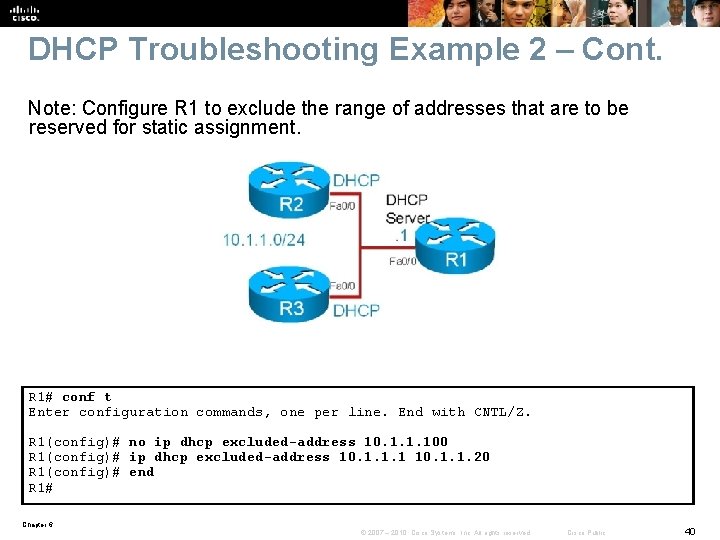
DHCP Troubleshooting Example 2 – Cont. Note: Configure R 1 to exclude the range of addresses that are to be reserved for static assignment. R 1# conf t Enter configuration commands, one per line. End with CNTL/Z. R 1(config)# no ip dhcp excluded-address 10. 1. 1. 100 R 1(config)# ip dhcp excluded-address 10. 1. 1. 1 10. 1. 1. 20 R 1(config)# end R 1# Chapter 6 © 2007 – 2010, Cisco Systems, Inc. All rights reserved. Cisco Public 40
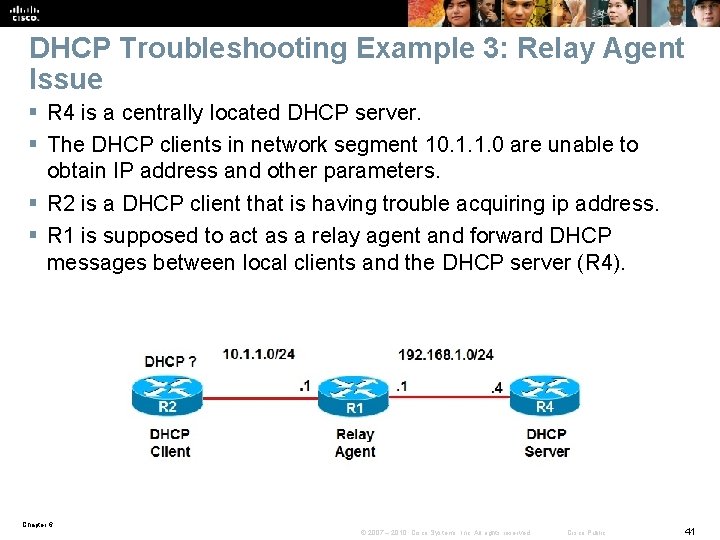
DHCP Troubleshooting Example 3: Relay Agent Issue § R 4 is a centrally located DHCP server. § The DHCP clients in network segment 10. 1. 1. 0 are unable to obtain IP address and other parameters. § R 2 is a DHCP client that is having trouble acquiring ip address. § R 1 is supposed to act as a relay agent and forward DHCP messages between local clients and the DHCP server (R 4). Chapter 6 © 2007 – 2010, Cisco Systems, Inc. All rights reserved. Cisco Public 41
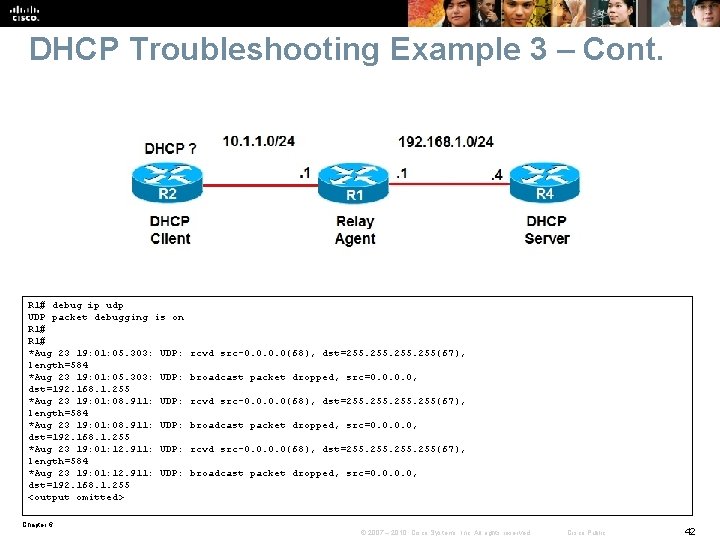
DHCP Troubleshooting Example 3 – Cont. R 1# debug ip udp UDP packet debugging is on R 1# *Aug 23 19: 01: 05. 303: UDP: length=584 *Aug 23 19: 01: 05. 303: UDP: dst=192. 168. 1. 255 *Aug 23 19: 01: 08. 911: UDP: length=584 *Aug 23 19: 01: 08. 911: UDP: dst=192. 168. 1. 255 *Aug 23 19: 01: 12. 911: UDP: length=584 *Aug 23 19: 01: 12. 911: UDP: dst=192. 168. 1. 255 <output omitted> rcvd src-0. 0(68), dst=255. 255(67), broadcast packet dropped, src=0. 0, rcvd src-0. 0(68), dst=255. 255(67), broadcast packet dropped, src=0. 0, Chapter 6 © 2007 – 2010, Cisco Systems, Inc. All rights reserved. Cisco Public 42
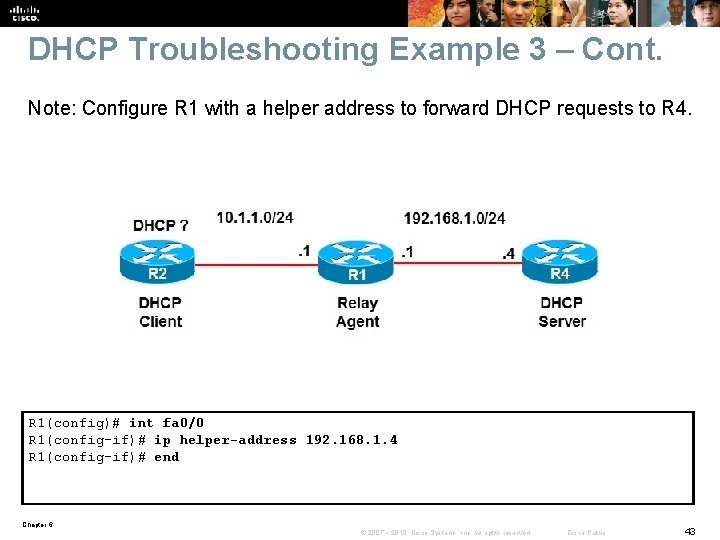
DHCP Troubleshooting Example 3 – Cont. Note: Configure R 1 with a helper address to forward DHCP requests to R 4. R 1(config)# int fa 0/0 R 1(config-if)# ip helper-address 192. 168. 1. 4 R 1(config-if)# end Chapter 6 © 2007 – 2010, Cisco Systems, Inc. All rights reserved. Cisco Public 43
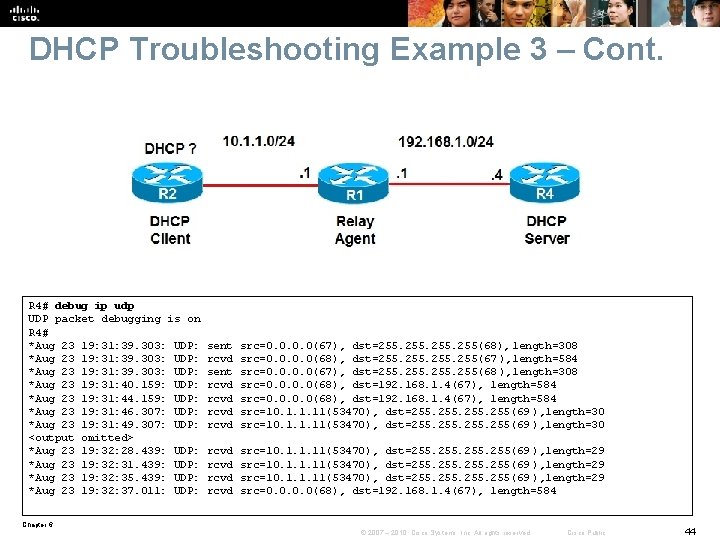
DHCP Troubleshooting Example 3 – Cont. R 4# debug ip udp UDP packet debugging is on R 4# *Aug 23 19: 31: 39. 303: UDP: *Aug 23 19: 31: 40. 159: UDP: *Aug 23 19: 31: 44. 159: UDP: *Aug 23 19: 31: 46. 307: UDP: *Aug 23 19: 31: 49. 307: UDP: <output omitted> *Aug 23 19: 32: 28. 439: UDP: *Aug 23 19: 32: 31. 439: UDP: *Aug 23 19: 32: 35. 439: UDP: *Aug 23 19: 32: 37. 011: UDP: sent rcvd rcvd src=0. 0(67), dst=255. 255(68), length=308 src=0. 0(68), dst=255. 255(67 ), length=584 src=0. 0(67), dst=255. 255(68 ), length=308 src=0. 0(68), dst=192. 168. 1. 4(67), length=584 src=10. 1. 1. 11(53470), dst=255. 255(69 ), length=30 rcvd src=10. 1. 1. 11(53470), dst=255. 255(69 ), length=29 src=10. 1. 1. 11(53470), dst=255. 255(69 ), length=29 src=0. 0(68), dst=192. 168. 1. 4(67), length=584 Chapter 6 © 2007 – 2010, Cisco Systems, Inc. All rights reserved. Cisco Public 44
- Slides: 44