
Chapter 6 The Internet 6 Chapter Contents Section














- Slides: 47
Chapter 6 The Internet
6 Chapter Contents ï Section A: Internet Technology ï Section B: Fixed Internet Access ï Section C: Portable and Mobile Internet Access ï Section D: Internet Services ï Section E: Internet Security Chapter 6: The Internet 2
6 Internet Technology SECTI ON A ï Background ï Internet Infrastructure ï Internet Protocols, Addresses, and Domains ï Connection Speed Chapter 6: The Internet 3
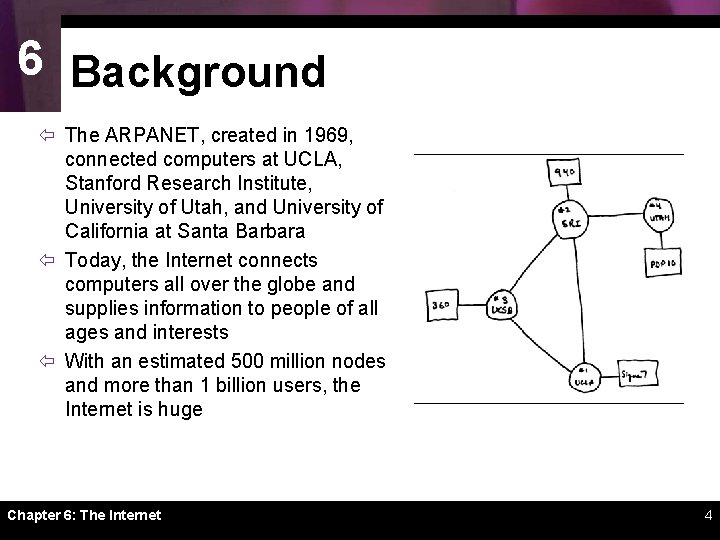
6 Background ï The ARPANET, created in 1969, connected computers at UCLA, Stanford Research Institute, University of Utah, and University of California at Santa Barbara ï Today, the Internet connects computers all over the globe and supplies information to people of all ages and interests ï With an estimated 500 million nodes and more than 1 billion users, the Internet is huge Chapter 6: The Internet 4
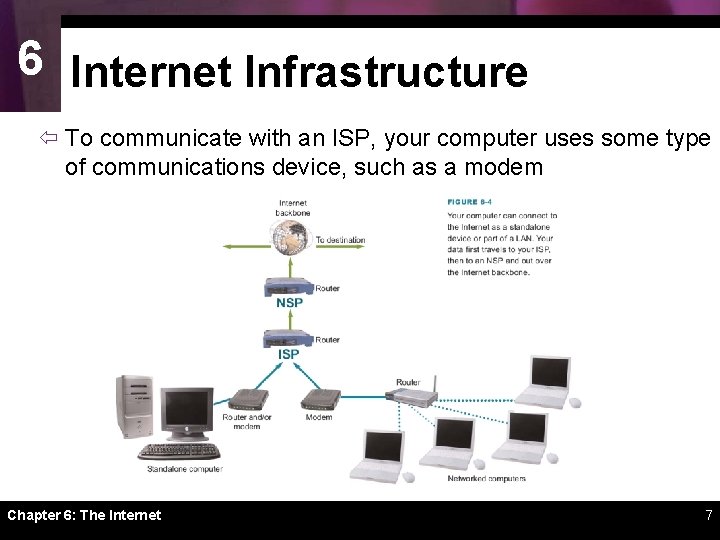
6 Internet Infrastructure ï The Internet is not owned or operated by any single corporation or government ï The Internet backbone is a network of high-capacity communications links that provides the main routes for data traffic across the Internet ï Backbone links and routers are maintained by network service providers (NSPs) ï NSP equipment and links are tied together by network access points (NAPs) ï An Internet service provider (ISP) is a company that offers Internet access to individuals, businesses, and smaller ISPs Chapter 6: The Internet 5
6 Internet Infrastructure Chapter 6: The Internet 6
6 Internet Infrastructure ï To communicate with an ISP, your computer uses some type of communications device, such as a modem Chapter 6: The Internet 7
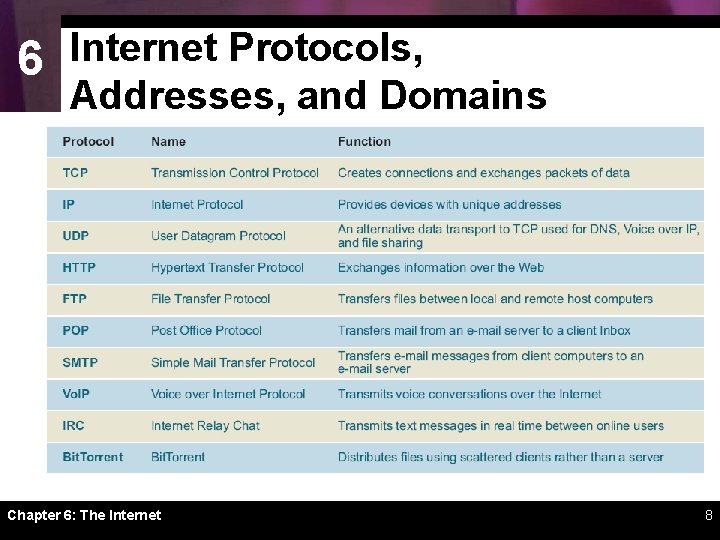
6 Internet Protocols, Addresses, and Domains Chapter 6: The Internet 8
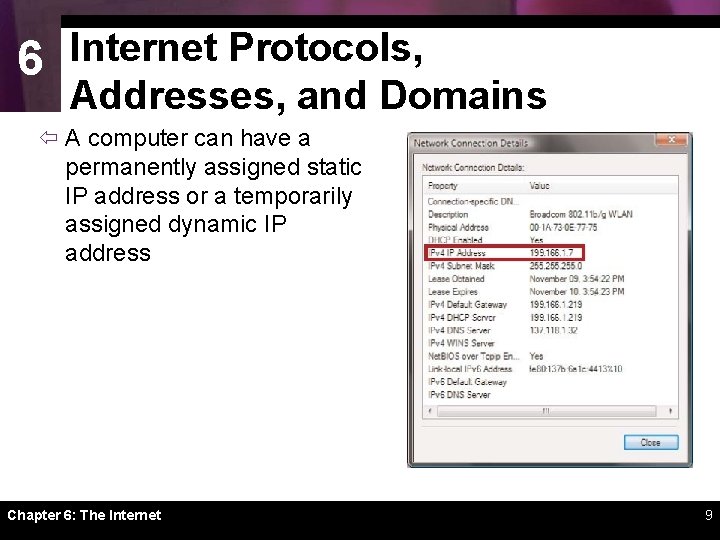
6 Internet Protocols, Addresses, and Domains ï A computer can have a permanently assigned static IP address or a temporarily assigned dynamic IP address Chapter 6: The Internet 9
6 Internet Protocols, Addresses, and Domains Chapter 6: The Internet 10
6 Internet Protocols, Addresses, and Domains The first step in registering a domain name is to find out whether the name is currently in use or reserved for future use. If a domain name is not available, consider using a different top-level domain, such as biz instead of com. After you’ve found an available domain name, you can continue the registration process by filling out a simple online form. Chapter 6: The Internet 11
6 Connection Speed ï Data travels over the Internet at an incredible speed ï The elapsed time for data to make a round trip from point A to point B and back to point A is referred to as latency – Ping – Traceroute tracert ï Upstream vs. downstream speed Chapter 6: The Internet 12
6 B SECTION Fixed Internet Access ï Dial-up Connections ï DSL, ISDN, and Dedicated Lines ï Cable Internet Service ï Satellite Internet Service Chapter 6: The Internet 13
6 Dial-up Connections ï A dial-up connection is a fixed Internet connection that uses a voiceband modem and telephone lines to transport data between your computer and your ISP Chapter 6: The Internet 14
6 Dial-up Connections ï A voiceband modem converts the signals from your computer into signals that can travel over telephone lines ï Modem speed is measured in bits per second Chapter 6: The Internet 15
6 DSL, ISDN, and Dedicated Lines ï T 1, T 3, and T 4 lines are leased from the telephone company and offer fast, high-capacity data transmission ï ISDN (Integrated Services Digital Network) is a type of fixed Internet connection that moves data at speeds of 64 Kbps or 128 Kbps over ordinary telephone lines – ISDN terminal adapter connects a computer to a telephone wall jack and converts signals to travel over ISDN connection Chapter 6: The Internet 16
6 DSL, ISDN, and Dedicated Lines ï DSL is a high-speed, digital, always-on Internet access technology that runs over standard phone lines – Some DSL installations require service technicians • DSL modem Chapter 6: The Internet 17
6 Cable Internet Service ï Cable Internet service distributes always-on, broadband Internet access over the same infrastructure that offers cable television service Chapter 6: The Internet 18
6 Cable Internet Service ï Cable modems convert your computer’s signal into one that can travel over the CATV network ï Always-on connection ï DOCSIS-compliant cable modems Chapter 6: The Internet 19
6 Satellite Internet Service ï Satellite Internet service distributes always-on, high-speed asymmetric Internet access by broadcasting signals to and from a personal satellite dish ï A satellite modem is a device that modulates data signals from a computer into a frequency band that can be carried to the satellite dish where it is converted to another frequency, amplified, and transmitted Chapter 6: The Internet 20
6 Satellite Internet Service Chapter 6: The Internet 21
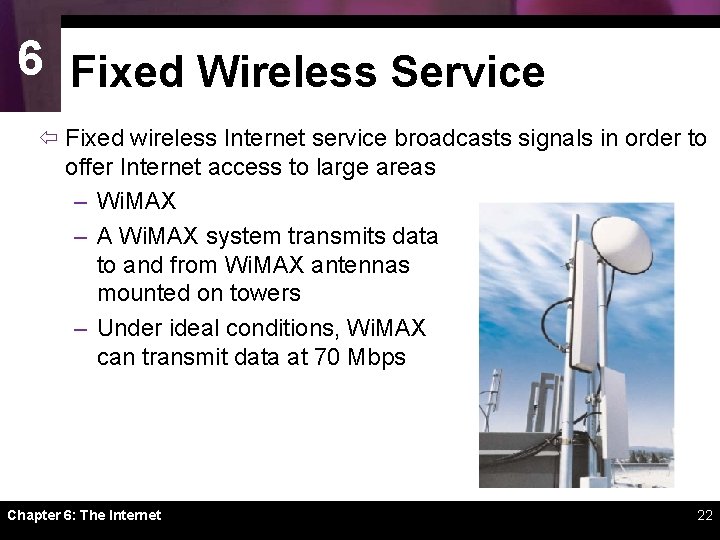
6 Fixed Wireless Service ï Fixed wireless Internet service broadcasts signals in order to offer Internet access to large areas – Wi. MAX – A Wi. MAX system transmits data to and from Wi. MAX antennas mounted on towers – Under ideal conditions, Wi. MAX can transmit data at 70 Mbps Chapter 6: The Internet 22
6 Fixed Internet Connection Roundup Chapter 6: The Internet 23
6 C SECTION Portable and Mobile Internet Access ï Internet to Go ï Wi-Fi Hotspots ï Portable and Mobile Wi. MAX ï Portable Satellite Service ï Cellular Data Service Chapter 6: The Internet 24
6 Wi-Fi Hotspots ï A Wi-Fi hotspot is an area in which the public can access a Wi-Fi network that offers Internet service ï Wi-Fi does not typically provide acceptable mobile Internet access because you can only remain connected within range of the network’s hotspot Chapter 6: The Internet 25
6 Portable Satellite Service Chapter 6: The Internet 26
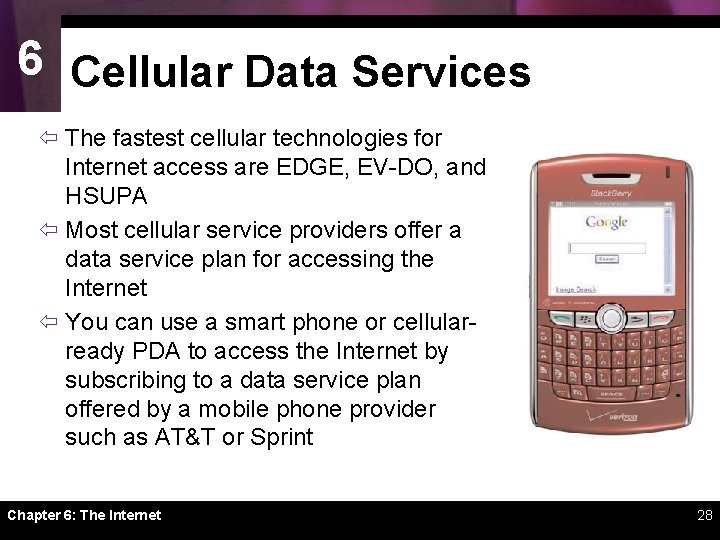
6 Cellular Data Services ï Using cellular phone technology to access the Internet offers mobility that is not yet possible with most of today’s wired or wireless computer network technologies Chapter 6: The Internet 27
6 Cellular Data Services ï The fastest cellular technologies for Internet access are EDGE, EV-DO, and HSUPA ï Most cellular service providers offer a data service plan for accessing the Internet ï You can use a smart phone or cellularready PDA to access the Internet by subscribing to a data service plan offered by a mobile phone provider such as AT&T or Sprint Chapter 6: The Internet 28
6 D SECTION Internet Services ï Real-Time Messaging ï Voice over IP ï Grid Computing ï FTP ï File sharing Chapter 6: The Internet 29
6 Real-Time Messaging ï A networked-based, real-time messaging system allows people to exchange short messages while they are online – Instant messaging (IM) – Chat Chapter 6: The Internet 30
6 Voice over IP ï Vo. IP (Voice over Internet Protocol) or Voice over IP, is a technology in which a broadband Internet connection is used to place telephone calls instead of the regular phone system ï To set up a standard Vo. IP system, you can use an inexpensive ATA, IP phone, wireless IP phone, or USB phone Chapter 6: The Internet 31
6 Voice over IP ï Advantages – Low cost – Flexibility – Phone number moves with you ï Disadvantages – Quality can vary – Must have power to work Chapter 6: The Internet 32
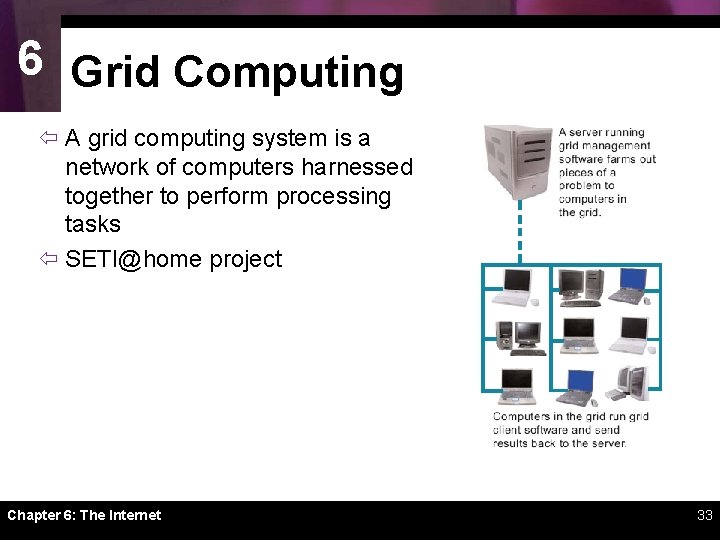
6 Grid Computing ï A grid computing system is a network of computers harnessed together to perform processing tasks ï SETI@home project Chapter 6: The Internet 33
6 FTP Chapter 6: The Internet 34
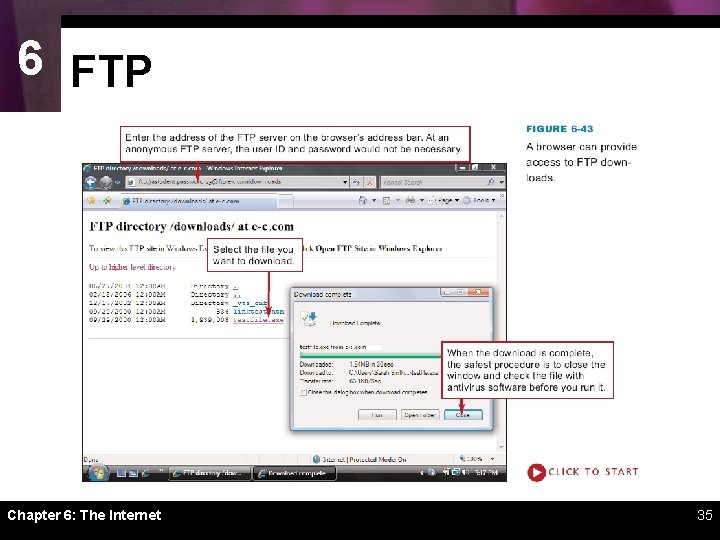
6 FTP Chapter 6: The Internet 35
6 File Sharing ï P 2 P file sharing uses peerto-peer (P 2 P) protocols that allow users to obtain files from other users located anywhere on the Internet ï Bit. Torrent is a file sharing protocol that distributes the role of file server across a collection of dispersed computers Chapter 6: The Internet 36
6 E SECTION Internet Security ï Intrusion Attempts ï Securing Ports ï Routers and NAT ï Virtual Private Networks Chapter 6: The Internet 37
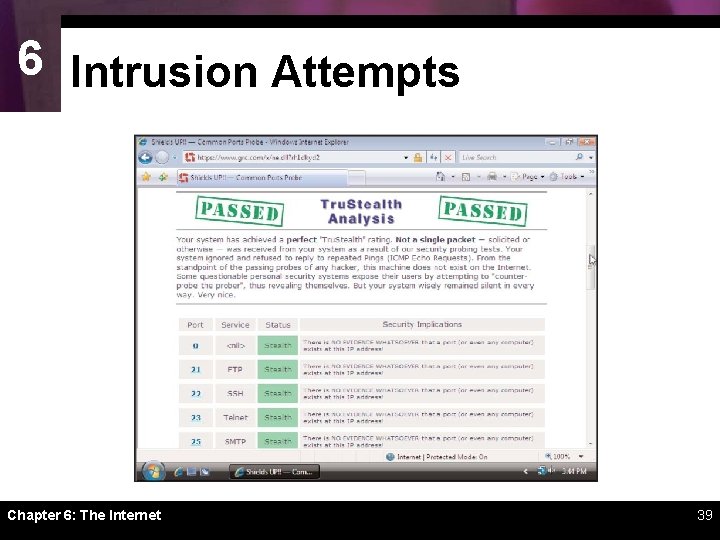
6 Intrusion Attempts ï An intrusion is any access to data or programs by hackers, criminals, or other unauthorized persons ï Looking for open ports is one of the most common ways of gaining unauthorized access to a network-based computer ï A port probe (or port scan) uses automated software to locate computers that have open ports and are vulnerable to unauthorized access Chapter 6: The Internet 38
6 Intrusion Attempts Chapter 6: The Internet 39
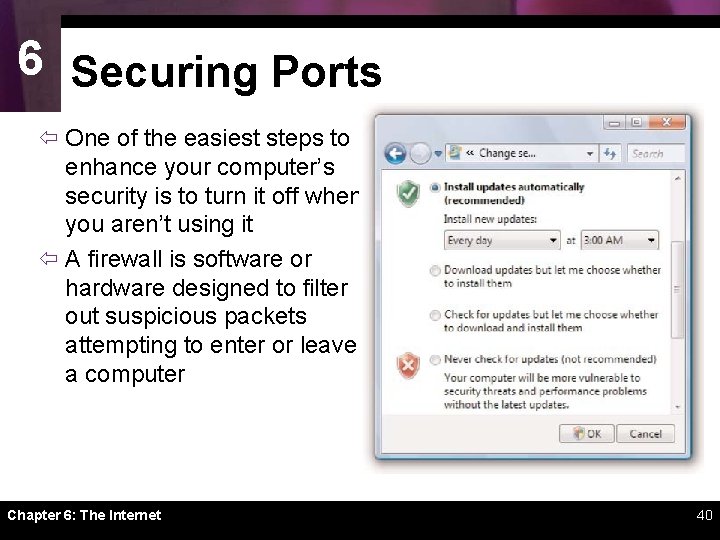
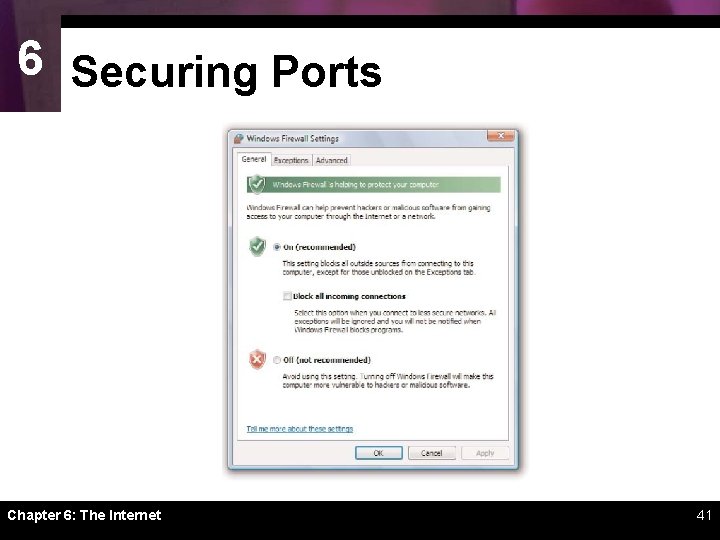
6 Securing Ports ï One of the easiest steps to enhance your computer’s security is to turn it off when you aren’t using it ï A firewall is software or hardware designed to filter out suspicious packets attempting to enter or leave a computer Chapter 6: The Internet 40
6 Securing Ports Chapter 6: The Internet 41
6 Routers and NAT ï Routers are intended to work on LANs to monitor and direct packets being transported from one device to another ï A routable IP address is one that can be accessed by packets on the Internet ï A private IP address is a non-routable IP address that can be used within a LAN, but not for Internet data transport Chapter 6: The Internet 42
6 Routers and NAT Chapter 6: The Internet 43
6 Routers and NAT ï Network address translation (NAT) is the process your router uses to keep track of packets and their corresponding private or public IP addresses Chapter 6: The Internet 44
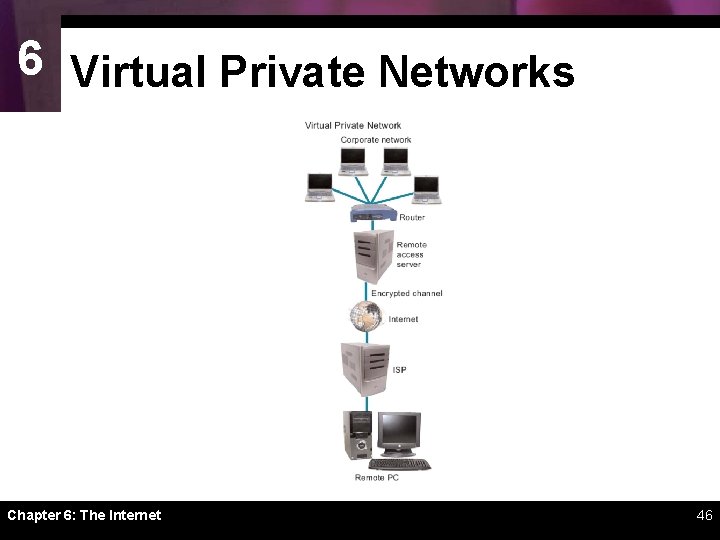
6 Virtual Private Networks ï It is possible to secure remote connections by setting up virtual private network (VPN) access to a remote access server in the corporate office ï Access to a VPN is usually by invitation only. Employees who need to access a VPN are given the necessary instructions, addresses, and passwords to make connections Chapter 6: The Internet 45
6 Virtual Private Networks Chapter 6: The Internet 46
Chapter 6 Complete The Internet