
Chapter 6 Project Time Management Information Technology Project
- Slides: 53
Chapter 6: Project Time Management Information Technology Project Management, Sixth Edition Note: See the text itself for full citations.
Importance of Project Schedules Managers often cite delivering projects on time as one of their biggest challenges Time has the least amount of flexibility; it passes no matter what happens on a project Schedule issues are the main reason for conflicts on projects, especially during the second half of projects Information Technology Project Management, Sixth Edition Copyright 2009 2
Project Time Management Processes Defining activities: identifying the specific activities that the project team members and stakeholders must perform to produce the project deliverables Sequencing activities: identifying and documenting the relationships between project activities Estimating activity resources: estimating how many resources a project team should use to perform project activities Estimating activity durations: estimating the number of work periods that are needed to complete individual activities Developing the schedule: analyzing activity sequences, activity resource estimates, and activity duration estimates to create the project schedule Controlling the schedule: controlling and managing changes to the project schedule Information Technology Project Management, Sixth Edition Copyright 2009 3
Defining Activities An activity or task is an element of work normally found on the work breakdown structure (WBS) that has an expected duration, a cost, and resource requirements Activity definition involves developing a more detailed WBS and supporting explanations to understand all the work to be done so you can develop realistic cost and duration estimates Information Technology Project Management, Sixth Edition Copyright 2009 4
Activity Lists and Attributes An activity list is a tabulation of activities to be included on a project schedule that includes: ◦ The activity name ◦ An activity identifier or number ◦ A brief description of the activity Activity attributes provide more information such as predecessors, successors, logical relationships, resource requirements, constraints, imposed dates, and assumptions related to the activity Information Technology Project Management, Sixth Edition Copyright 2009 5
Milestones A milestone is a significant event that normally has no duration It often takes several activities and a lot of work to complete a milestone They’re useful tools for setting schedule goals and monitoring progress Examples include obtaining customer sign-off on key documents or completion of specific products Information Technology Project Management, Sixth Edition Copyright 2009 6
Sequencing Activities Involves reviewing activities and determining dependencies A dependency or relationship is the sequencing of project activities or tasks You must determine dependencies in order to use critical path analysis Information Technology Project Management, Sixth Edition Copyright 2009 7
Three types of Dependencies Mandatory dependencies: inherent in the nature of the work being performed on a project, sometimes referred to as hard logic Discretionary dependencies: defined by the project team; sometimes referred to as soft logic and should be used with care since they may limit later scheduling options External dependencies: involve relationships between project and non-project activities Information Technology Project Management, Sixth Edition Copyright 2009 8
Examples of dependencies Mandatory dependencies Ex: you can not test code until after the code is written. Discretionary dependencies Ex: Project team not start detailed design of a new IS until the users sign off on all of the analysis work. External dependencies Ex: installation of a new operating system and other software may depend on delivery of new hardware from an external vendor. Information Technology Project Management, Sixth Edition Copyright 2009 9
Network Diagrams Network diagrams are the preferred technique for showing activity sequencing A network diagram is display of the logical relationships among, or sequencing of, project activities Two main formats are the arrow and precedence diagramming methods Information Technology Project Management, Sixth Edition Copyright 2009 10
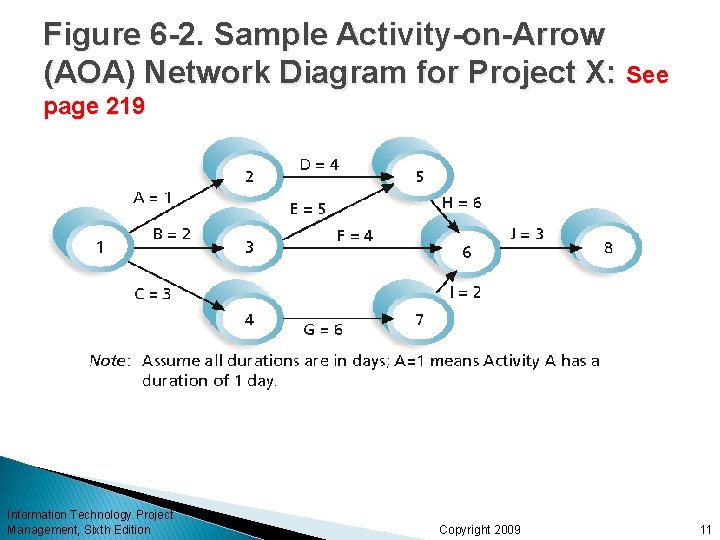
Figure 6 -2. Sample Activity-on-Arrow (AOA) Network Diagram for Project X: See page 219 Information Technology Project Management, Sixth Edition Copyright 2009 11
Arrow Diagramming Method (ADM) Also called activity-on-arrow (AOA) network diagrams Activities are represented by arrows Nodes or circles are the starting and ending points of activities Can only show finish-to-start dependencies Information Technology Project Management, Sixth Edition Copyright 2009 12
Process for Creating AOA Diagrams 1. Find all of the activities that start at node 1. Draw their finish nodes and draw arrows between node 1 and those finish nodes. Put the activity letter or name and duration estimate on the associated arrow. 2. Continue drawing the network diagram, working from left to right. Look for bursts and merges. Bursts occur when a single node is followed by two or more activities. A merge occurs when two or more nodes precede a single node. 3. Continue drawing the project network diagram until all activities are included on the diagram that have dependencies. Information Technology Project Management, Sixth Edition Copyright 2009 13
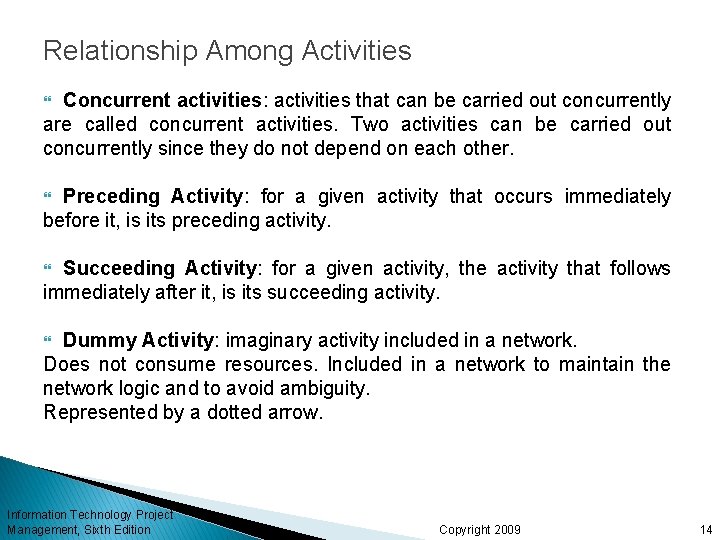
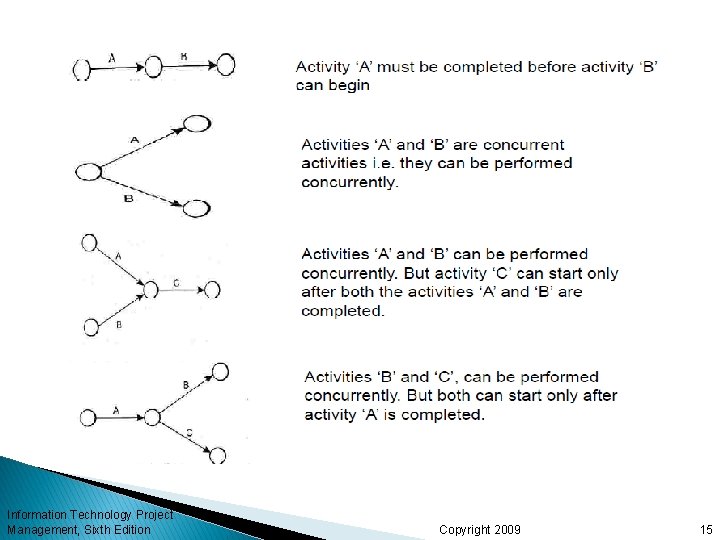
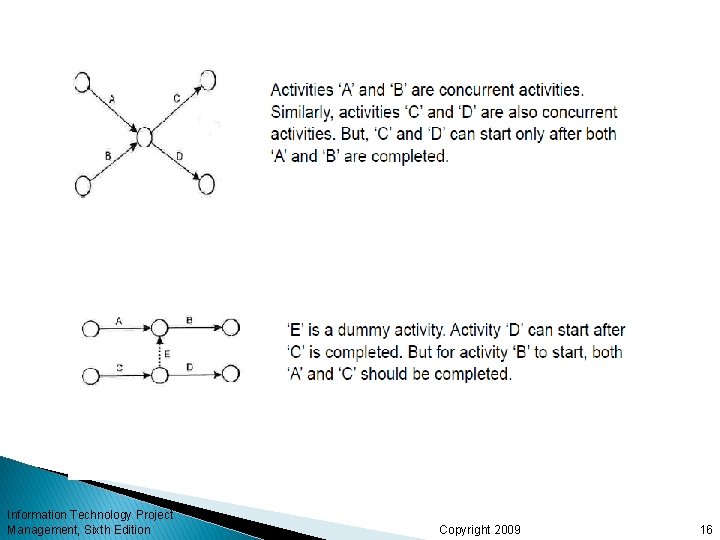
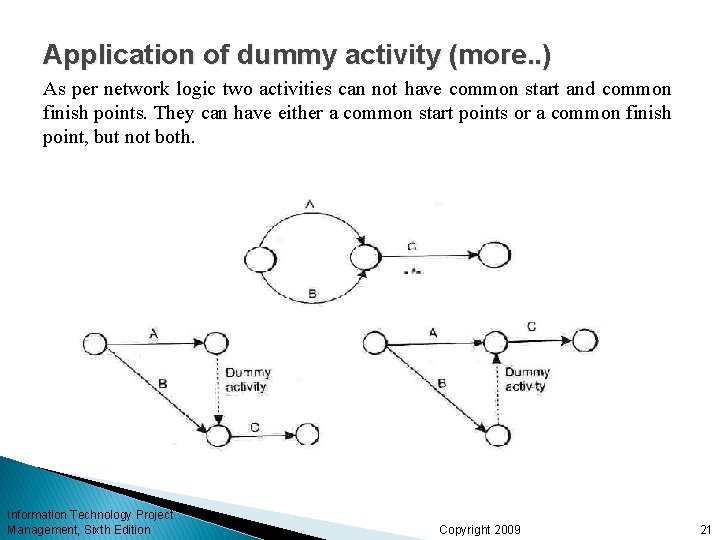
Relationship Among Activities Concurrent activities: activities that can be carried out concurrently are called concurrent activities. Two activities can be carried out concurrently since they do not depend on each other. Preceding Activity: for a given activity that occurs immediately before it, is its preceding activity. Succeeding Activity: for a given activity, the activity that follows immediately after it, is its succeeding activity. Dummy Activity: imaginary activity included in a network. Does not consume resources. Included in a network to maintain the network logic and to avoid ambiguity. Represented by a dotted arrow. Information Technology Project Management, Sixth Edition Copyright 2009 14
Information Technology Project Management, Sixth Edition Copyright 2009 15
Information Technology Project Management, Sixth Edition Copyright 2009 16
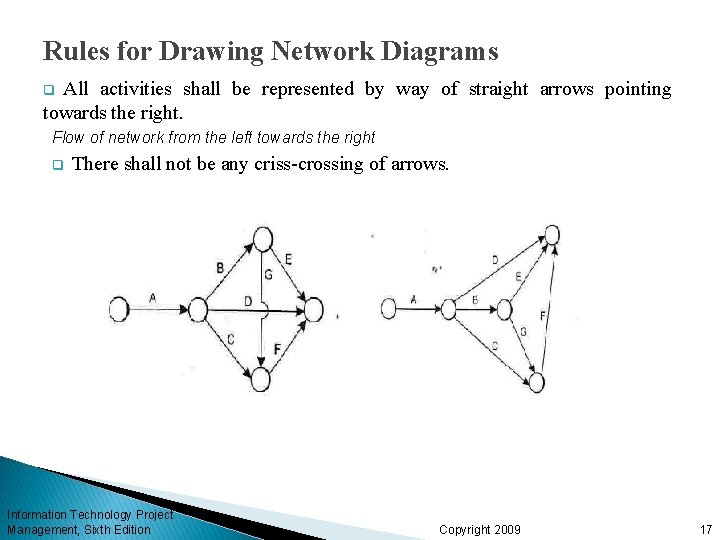
Rules for Drawing Network Diagrams All activities shall be represented by way of straight arrows pointing towards the right. q Flow of network from the left towards the right q There shall not be any criss-crossing of arrows. Information Technology Project Management, Sixth Edition Copyright 2009 17
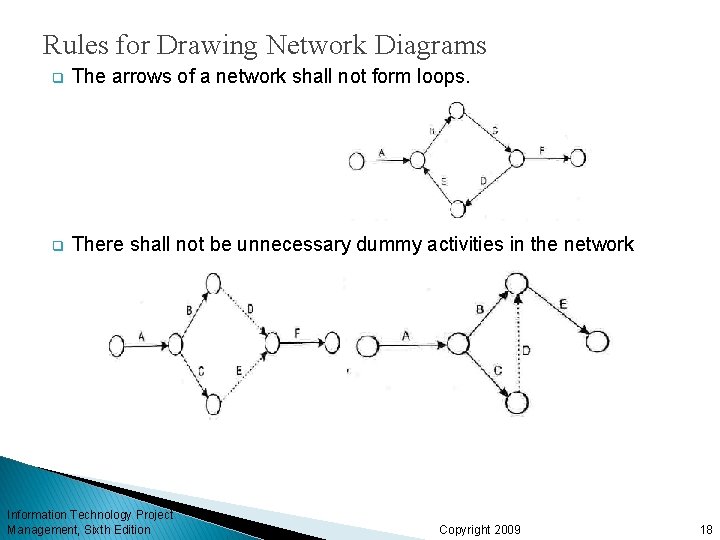
Rules for Drawing Network Diagrams q The arrows of a network shall not form loops. q There shall not be unnecessary dummy activities in the network Information Technology Project Management, Sixth Edition Copyright 2009 18
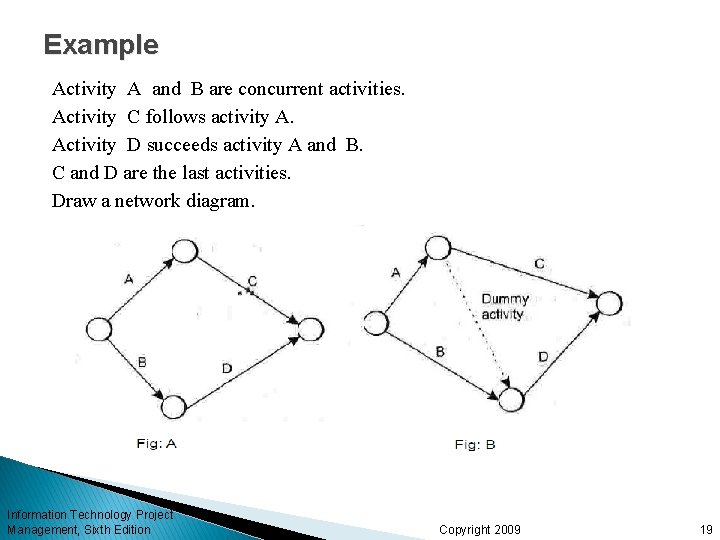
Example Activity A and B are concurrent activities. Activity C follows activity A. Activity D succeeds activity A and B. C and D are the last activities. Draw a network diagram. Information Technology Project Management, Sixth Edition Copyright 2009 19
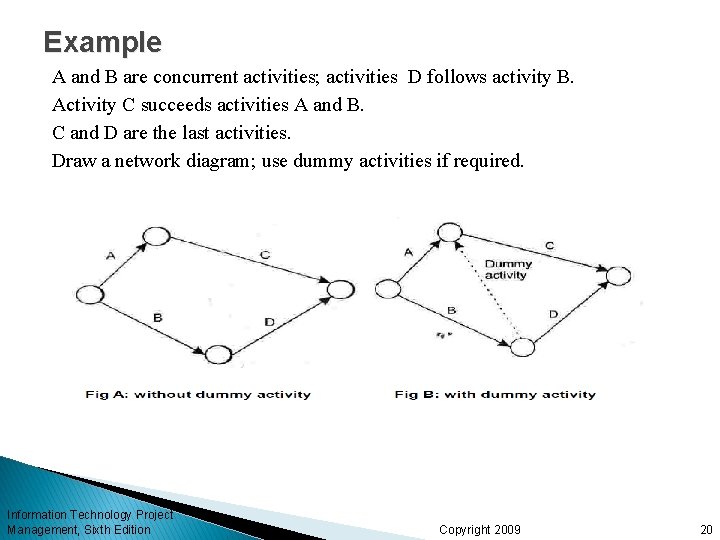
Example A and B are concurrent activities; activities D follows activity B. Activity C succeeds activities A and B. C and D are the last activities. Draw a network diagram; use dummy activities if required. Information Technology Project Management, Sixth Edition Copyright 2009 20
Application of dummy activity (more. . ) As per network logic two activities can not have common start and common finish points. They can have either a common start points or a common finish point, but not both. Information Technology Project Management, Sixth Edition Copyright 2009 21
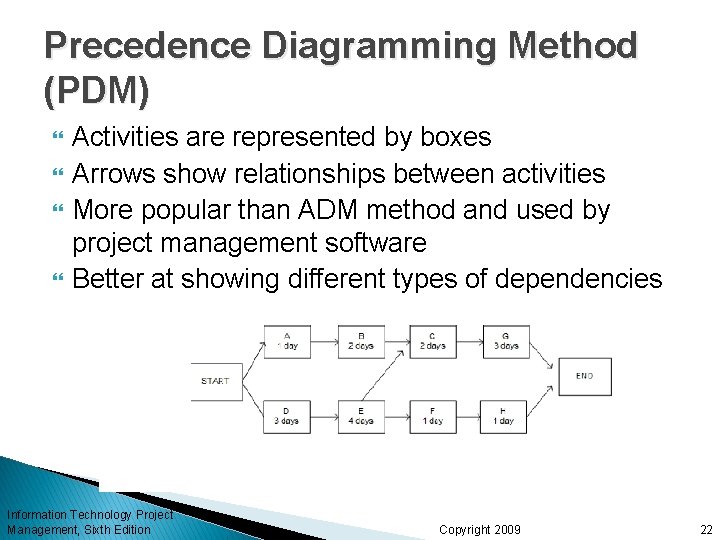
Precedence Diagramming Method (PDM) Activities are represented by boxes Arrows show relationships between activities More popular than ADM method and used by project management software Better at showing different types of dependencies Information Technology Project Management, Sixth Edition Copyright 2009 22
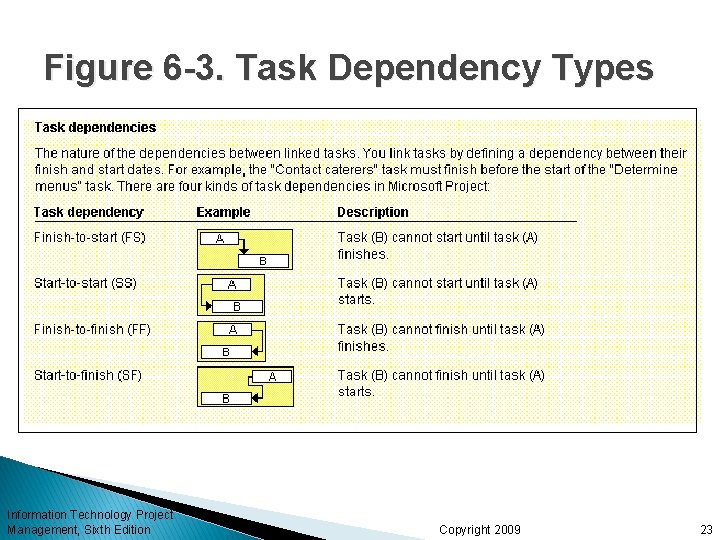
Figure 6 -3. Task Dependency Types Information Technology Project Management, Sixth Edition Copyright 2009 23
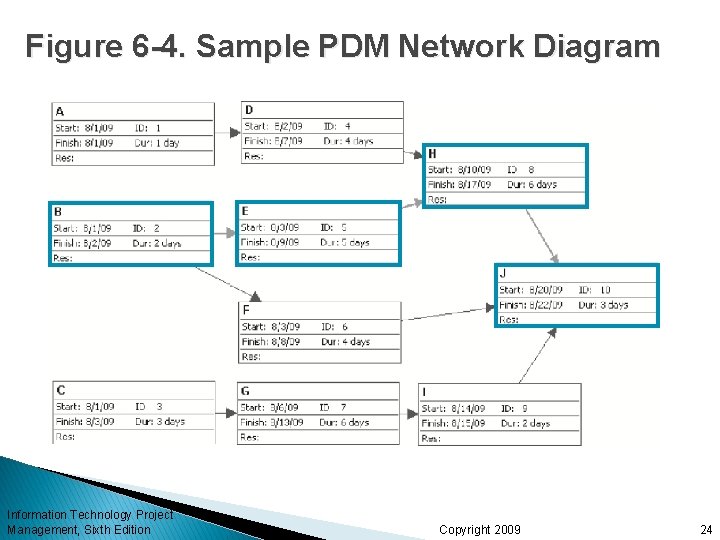
Figure 6 -4. Sample PDM Network Diagram Information Technology Project Management, Sixth Edition Copyright 2009 24
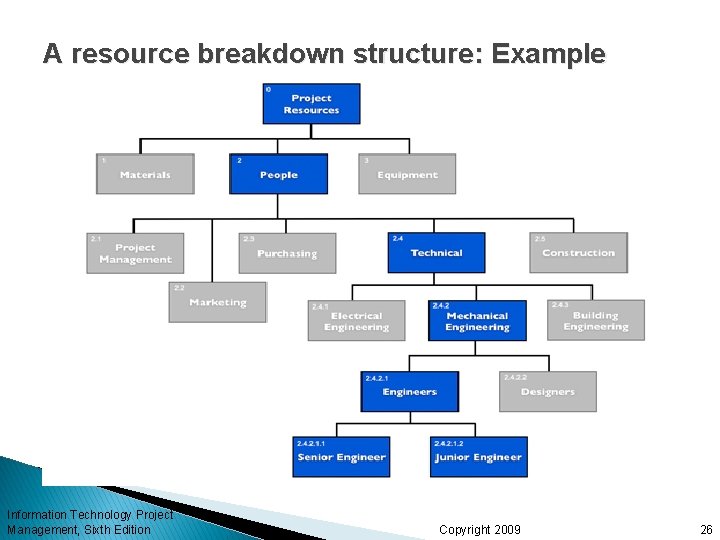
Estimating Activity Resources Before estimating activity durations, you must have a good idea of the quantity and type of resources that will be assigned to each activity; resources are people, equipment, and materials Consider important issues in estimating resources ◦ How difficult will it be to do specific activities on this project? Difficulty ◦ What is the organization’s history in doing similar activities? History ◦ Are the required resources available? Availability A resource breakdown structure is a hierarchical structure that identifies the project’s resources by category and type Information Technology Project Management, Sixth Edition Copyright 2009 25
A resource breakdown structure: Example Information Technology Project Management, Sixth Edition Copyright 2009 26
Activity Duration Estimating Duration includes the actual amount of time worked on an activity plus elapsed time Effort is the number of workdays or work hours required to complete a task Effort does not normally equal duration People doing the work should help create estimates, and an expert should review them Information Technology Project Management, Sixth Edition Copyright 2009 27
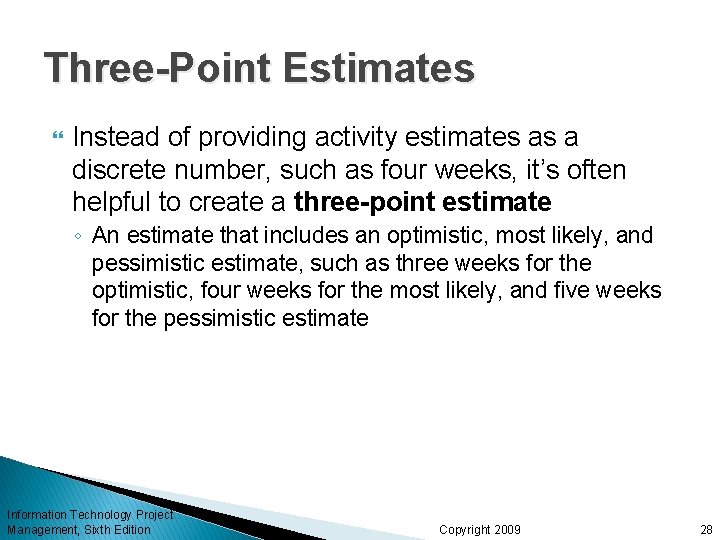
Three-Point Estimates Instead of providing activity estimates as a discrete number, such as four weeks, it’s often helpful to create a three-point estimate ◦ An estimate that includes an optimistic, most likely, and pessimistic estimate, such as three weeks for the optimistic, four weeks for the most likely, and five weeks for the pessimistic estimate Information Technology Project Management, Sixth Edition Copyright 2009 28
Developing the Schedule Uses results of the other time management processes to determine the start and end date of the project Ultimate goal is to create a realistic project schedule that provides a basis for monitoring project progress for the time dimension of the project Important tools and techniques include Gantt charts, critical path analysis, and critical chain scheduling, and PERT analysis Information Technology Project Management, Sixth Edition Copyright 2009 29
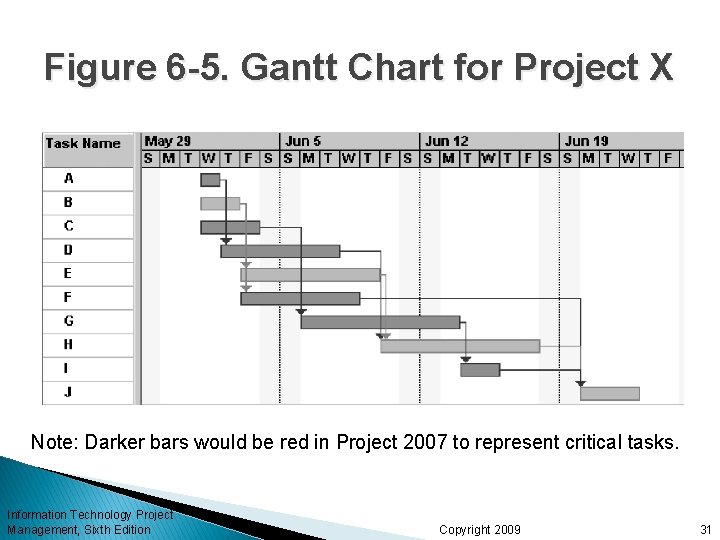
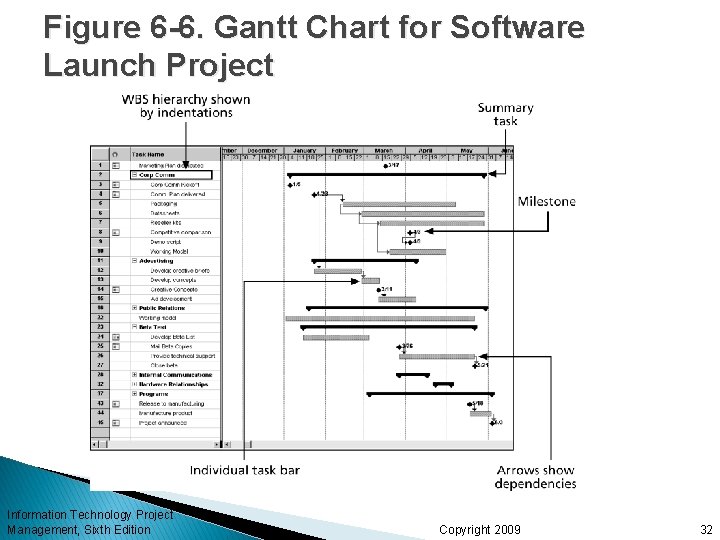
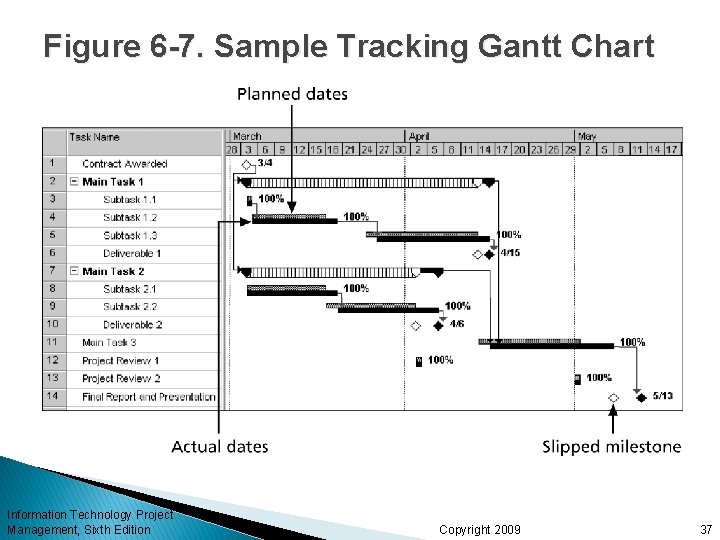
Gantt Charts Gantt charts provide a standard format for displaying project schedule information by listing project activities and their corresponding start and finish dates in a calendar format Symbols include: ◦ ◦ Black diamonds: milestones Thick black bars: summary tasks Lighter horizontal bars: durations of tasks Arrows: dependencies between tasks Information Technology Project Management, Sixth Edition Copyright 2009 30
Figure 6 -5. Gantt Chart for Project X Note: Darker bars would be red in Project 2007 to represent critical tasks. Information Technology Project Management, Sixth Edition Copyright 2009 31
Figure 6 -6. Gantt Chart for Software Launch Project Information Technology Project Management, Sixth Edition Copyright 2009 32
Adding Milestones to Gantt Charts Many people like to focus on meeting milestones, especially for large projects Milestones emphasize important events or accomplishments on projects Normally create milestone by entering tasks with a zero duration, or you can mark any task as a milestone Information Technology Project Management, Sixth Edition Copyright 2009 33
SMART Criteria Milestones should be: ◦ ◦ ◦ Specific Measurable Assignable Realistic Time-framed Information Technology Project Management, Sixth Edition Copyright 2009 34
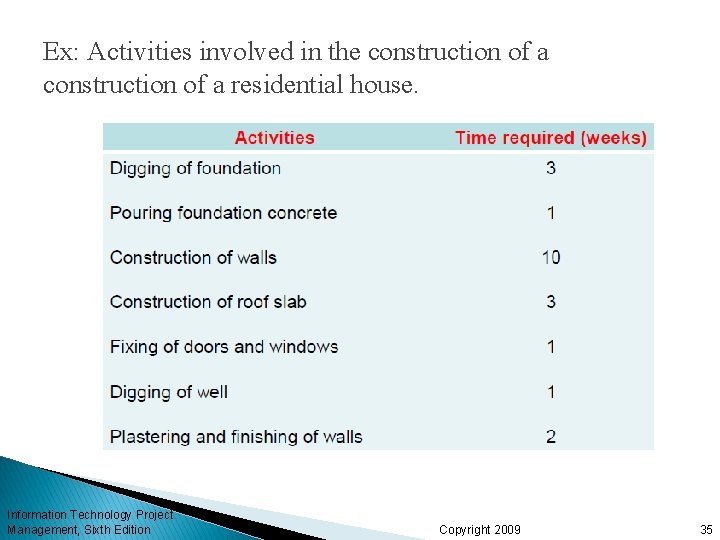
Ex: Activities involved in the construction of a residential house. Information Technology Project Management, Sixth Edition Copyright 2009 35
Best Practice Schedule risk is inherent in the development of complex systems. Luc Richard, the founder of www. projectmangler. com, suggests that project managers can reduce schedule risk through project milestones, a best practice that involves identifying and tracking significant points or achievements in the project. The five key points of using project milestones include the following: 1. Define milestones early in the project and include them in the Gantt chart to provide a visual guide. 2. Keep milestones small and frequent. 3. The set of milestones must be all-encompassing. 4. Each milestone must be binary, meaning it is either complete or incomplete. 5. Carefully monitor the critical path. Information Technology Project Management, Sixth Edition Copyright 2009 36
Figure 6 -7. Sample Tracking Gantt Chart Information Technology Project Management, Sixth Edition Copyright 2009 37
Network Based Scheduling Two popular network scheduling techniques: ü Critical Path Method (CPM) ü Programme Information Technology Project Management, Sixth Edition Evaluation Review Technique (PERT) Copyright 2009 38
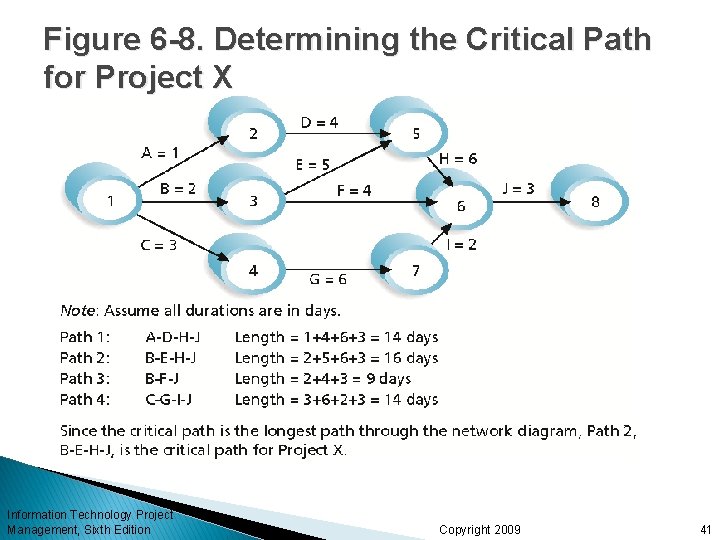
Critical Path Method (CPM) CPM is a network diagramming technique used to predict total project duration A critical path for a project is the series of activities that determines the earliest time by which the project can be completed The critical path is the longest path through the network diagram and has the least amount of slack or float Slack or float is the amount of time an activity may be delayed without delaying a succeeding activity or the project finish date Information Technology Project Management, Sixth Edition Copyright 2009 39
Calculating the Critical Path First develop a good network diagram Add the duration estimates for all activities on each path through the network diagram The longest path is the critical path If one or more of the activities on the critical path takes longer than planned, the whole project schedule will slip unless the project manager takes corrective action Information Technology Project Management, Sixth Edition Copyright 2009 40
Figure 6 -8. Determining the Critical Path for Project X Information Technology Project Management, Sixth Edition Copyright 2009 41
More on the Critical Path There can be more than one critical path if the lengths of two or more paths are the same The critical path can change as the project progresses Information Technology Project Management, Sixth Edition Copyright 2009 42
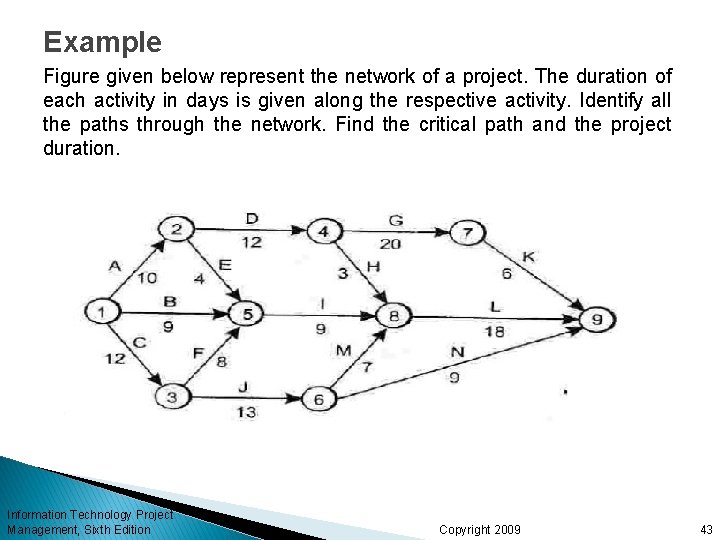
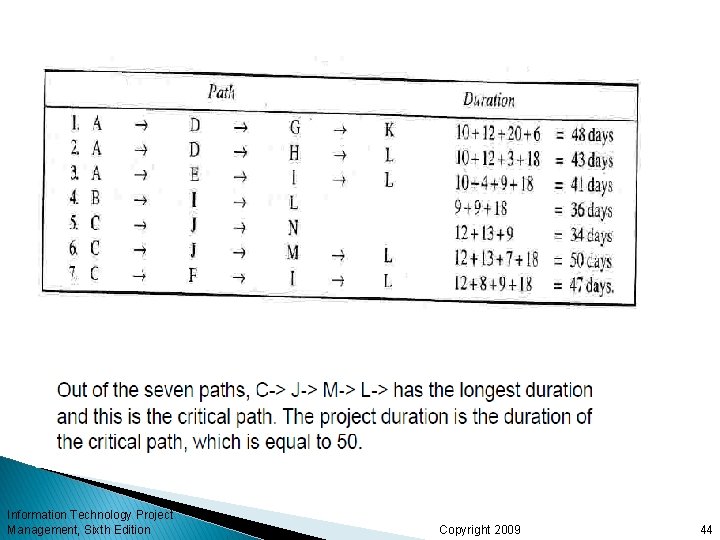
Example Figure given below represent the network of a project. The duration of each activity in days is given along the respective activity. Identify all the paths through the network. Find the critical path and the project duration. Information Technology Project Management, Sixth Edition Copyright 2009 43
Information Technology Project Management, Sixth Edition Copyright 2009 44
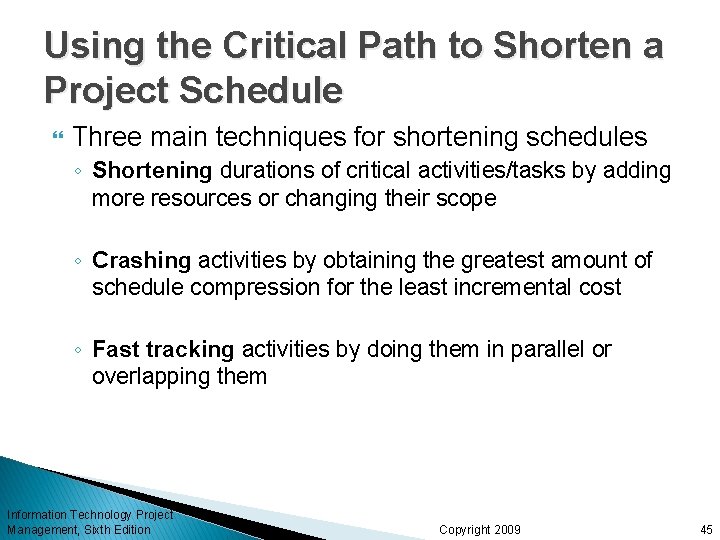
Using the Critical Path to Shorten a Project Schedule Three main techniques for shortening schedules ◦ Shortening durations of critical activities/tasks by adding more resources or changing their scope ◦ Crashing activities by obtaining the greatest amount of schedule compression for the least incremental cost ◦ Fast tracking activities by doing them in parallel or overlapping them Information Technology Project Management, Sixth Edition Copyright 2009 45
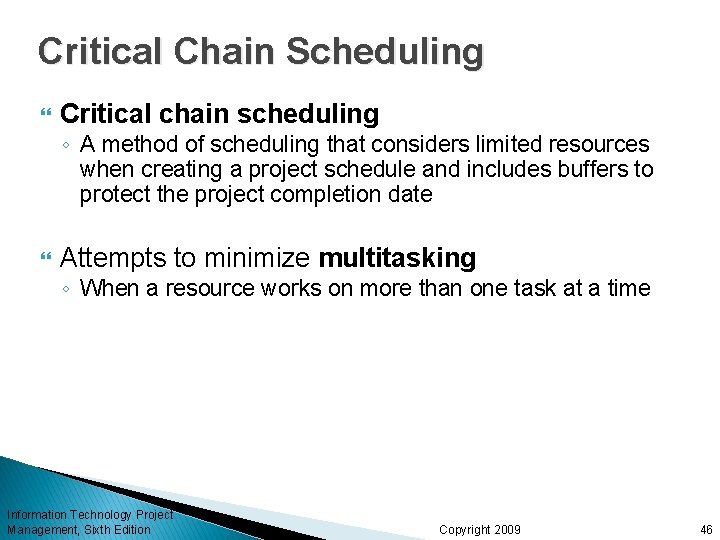
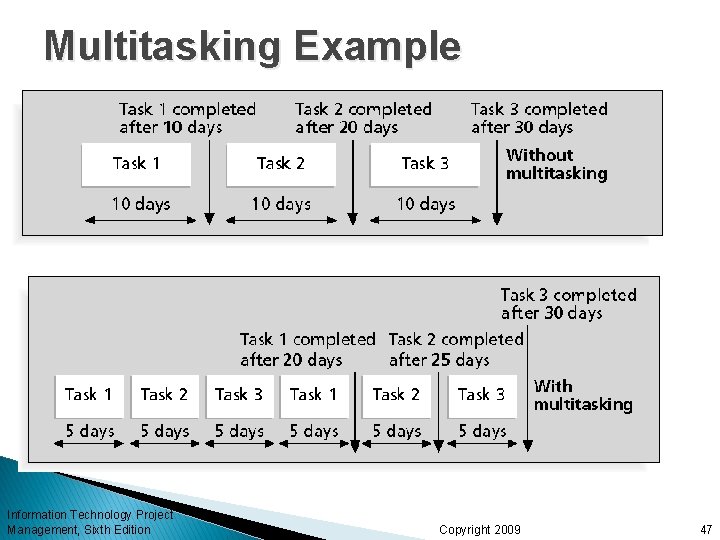
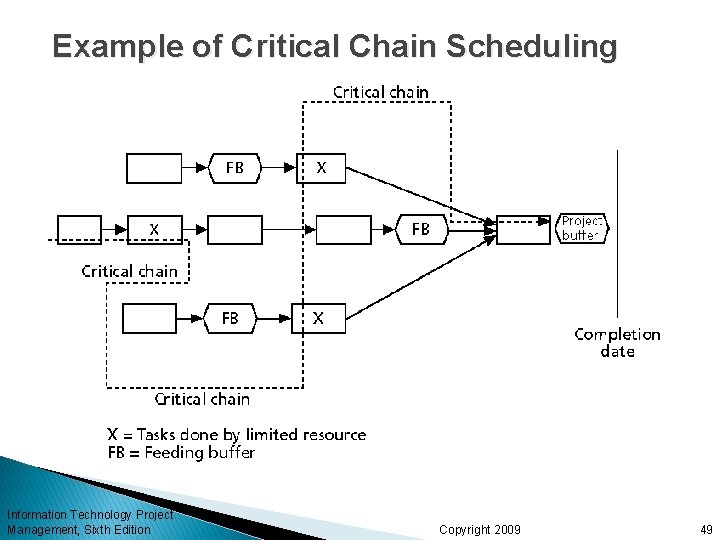
Critical Chain Scheduling Critical chain scheduling ◦ A method of scheduling that considers limited resources when creating a project schedule and includes buffers to protect the project completion date Attempts to minimize multitasking ◦ When a resource works on more than one task at a time Information Technology Project Management, Sixth Edition Copyright 2009 46
Multitasking Example Information Technology Project Management, Sixth Edition Copyright 2009 47
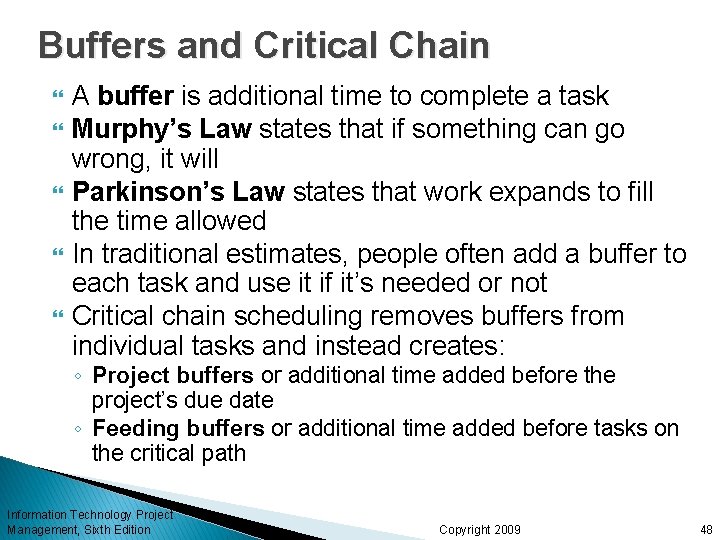
Buffers and Critical Chain A buffer is additional time to complete a task Murphy’s Law states that if something can go wrong, it will Parkinson’s Law states that work expands to fill the time allowed In traditional estimates, people often add a buffer to each task and use it if it’s needed or not Critical chain scheduling removes buffers from individual tasks and instead creates: ◦ Project buffers or additional time added before the project’s due date ◦ Feeding buffers or additional time added before tasks on the critical path Information Technology Project Management, Sixth Edition Copyright 2009 48
Example of Critical Chain Scheduling Information Technology Project Management, Sixth Edition Copyright 2009 49
Program Evaluation and Review Technique (PERT) PERT is a network analysis technique used to estimate project duration when there is a high degree of uncertainty about the individual activity duration estimates PERT uses probabilistic time estimates ◦ Duration estimates based on using optimistic, most likely, and pessimistic estimates of activity durations, or a threepoint estimate Information Technology Project Management, Sixth Edition Copyright 2009 50
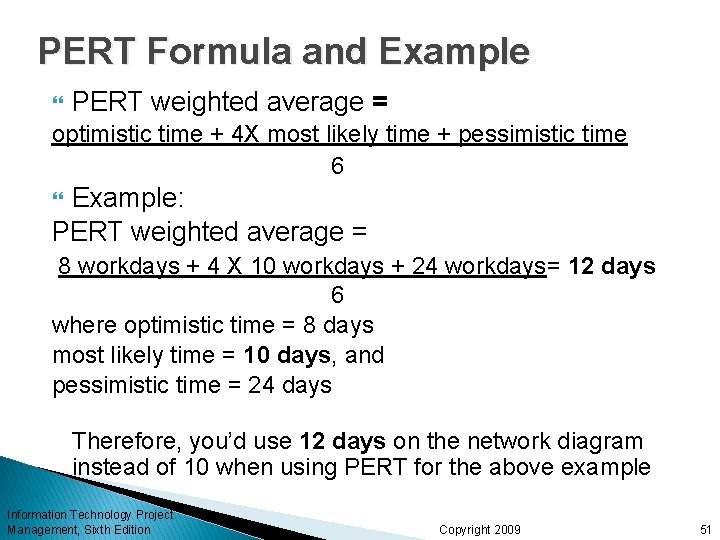
PERT Formula and Example PERT weighted average = optimistic time + 4 X most likely time + pessimistic time 6 Example: PERT weighted average = 8 workdays + 4 X 10 workdays + 24 workdays= 12 days 6 where optimistic time = 8 days most likely time = 10 days, and pessimistic time = 24 days Therefore, you’d use 12 days on the network diagram instead of 10 when using PERT for the above example Information Technology Project Management, Sixth Edition Copyright 2009 51
Schedule Control Suggestions Perform reality checks on schedules Allow for contingencies Don’t plan for everyone to work at 100% capacity all the time Hold progress meetings with stakeholders and be clear and honest in communicating schedule issues Information Technology Project Management, Sixth Edition Copyright 2009 52
Using Software to Assist in Time Management Software for facilitating communications helps people exchange schedule-related information Decision support models help analyze trade-offs that can be made Project management software can help in various time management areas Information Technology Project Management, Sixth Edition Copyright 2009 53