
Chapter 6 Introduction to the Common Gateway Interface
- Slides: 36
Chapter 6 – Introduction to the Common Gateway Interface (CGI) Outline 6. 1 Introduction 6. 2 Client and Web Server Interaction 6. 2. 1 System Architecture 6. 2. 2 Accessing Web Servers 6. 2. 3 HTTP Transactions 6. 3 Simple CGI Script 6. 4 Sending Input to a CGI Script 6. 5 Using XHTML Forms to Send Input and Using Module cgi to Retrieve Form Data 6. 6 Using cgi. Field. Storage to Read Input 6. 7 Other HTTP Headers 6. 8 Example: Interactive Portal 6. 9 Internet and World Wide Web Resources 2002 Prentice Hall. All rights reserved. 1
2 6. 1 Introduction • Common Gateway Interface (CGI) • Web-page generation – Dynamic : content generated each request – Static : never changes unless document edited 2002 Prentice Hall. All rights reserved.
3 6. 2 Client and Web Server Interaction • Extensible Hypertext Markup Language (XHTML) – Documents contain markup, or tags – Requires syntactically correct documents • Uniform Resource Locator (URL) directs browser to resource • Hypertext Transfer Protocol (HTTP) for transferring requests and files over the Internet • Domain name system (DNS) server translates hostname into Internet Protocol (IP) address 2002 Prentice Hall. All rights reserved.
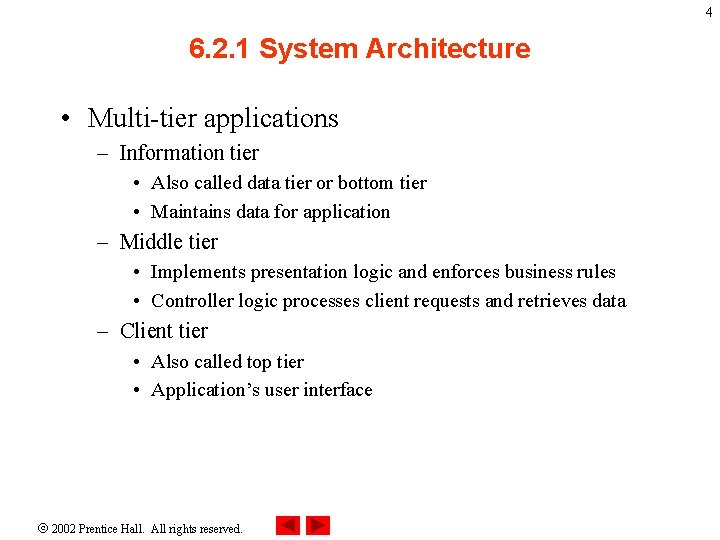
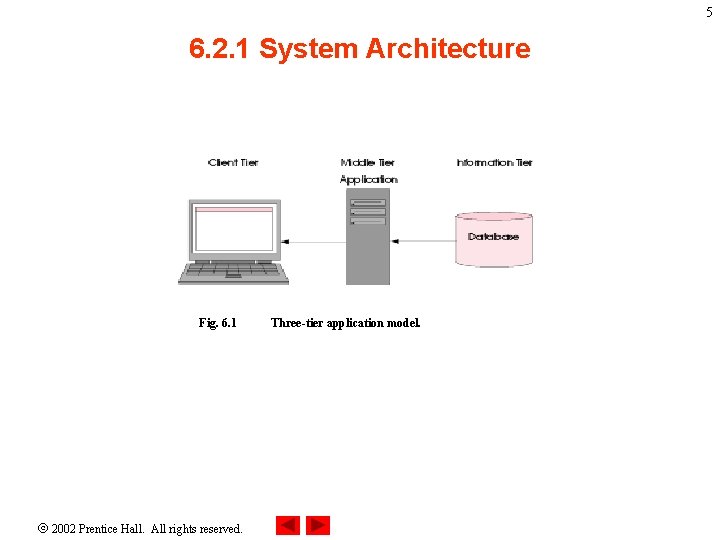
4 6. 2. 1 System Architecture • Multi-tier applications – Information tier • Also called data tier or bottom tier • Maintains data for application – Middle tier • Implements presentation logic and enforces business rules • Controller logic processes client requests and retrieves data – Client tier • Also called top tier • Application’s user interface 2002 Prentice Hall. All rights reserved.
5 6. 2. 1 System Architecture Fig. 6. 1 2002 Prentice Hall. All rights reserved. Three-tier application model.
6 6. 2. 2 Accessing Web Servers • Request documents from local or remote Web servers • Ways to request a document – Local Web server : machine name or localhost – Remote Web server: specify server’s domain name or IP address • Domain name – Represents groups of hosts on the Internet – combines with top-level domain (TLD) to form fully qualified hostname 2002 Prentice Hall. All rights reserved.
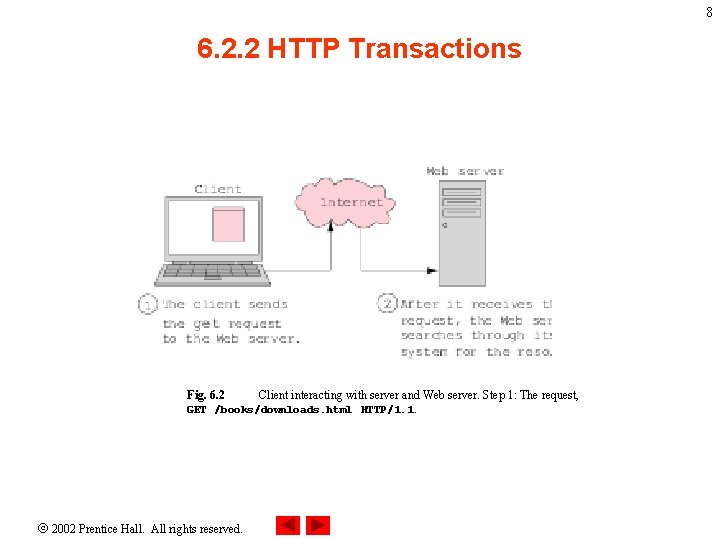
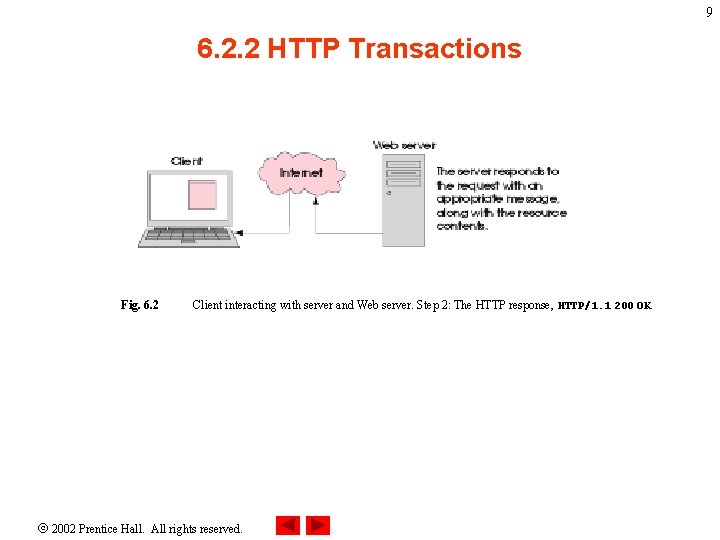
7 6. 2. 2 HTTP Transactions • HTTP request types – Get : sends form content as part of URL – Post : users cannot see sent data • HTTP headers – provide additional information about data sent in response to request – Multipurpose Internet Mail Extensions (MIME) : Internet standard that specifies how messages should be formatted 2002 Prentice Hall. All rights reserved.
8 6. 2. 2 HTTP Transactions Fig. 6. 2 Client interacting with server and Web server. Step 1: The request, GET /books/downloads. html HTTP/1. 1. 2002 Prentice Hall. All rights reserved.
9 6. 2. 2 HTTP Transactions Fig. 6. 2 Client interacting with server and Web server. Step 2: The HTTP response, HTTP/1. 1 200 OK. 2002 Prentice Hall. All rights reserved.
10 6. 2. 2 Simple CGI Script • Two types of scripting – Server-side scripting (i. e. , CGI scripts) manipulate server resources – Client-side scripting (i. e, Java. Script) accesses browser features, manipulates browser documents, validates user input, etc. • Server-side scripts – Execute on server – Usually generate custom responses for clients – Wider range of programmatic capabilities than client-side scripts 2002 Prentice Hall. All rights reserved.
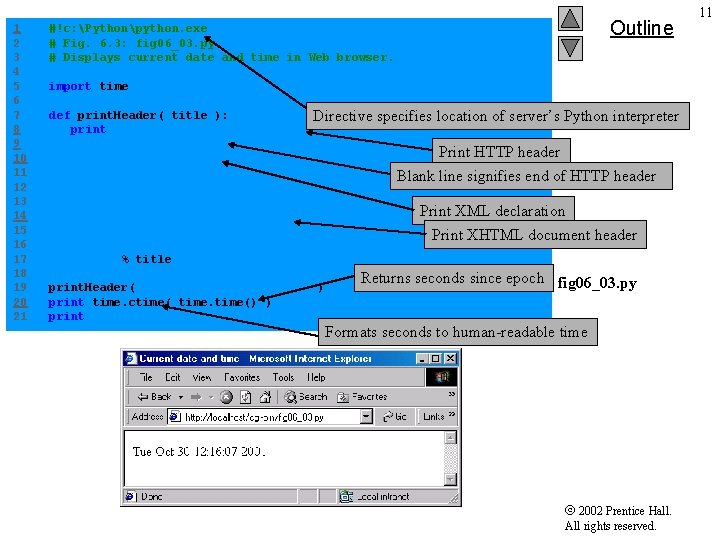
1 2 3 4 5 6 7 8 9 10 11 12 13 14 15 16 17 18 19 20 21 Outline #!c: Pythonpython. exe # Fig. 6. 3: fig 06_03. py # Displays current date and time in Web browser. import time def print. Header( title ): print """Content-type: text/html Directive specifies location of server’s Python interpreter <? xml version = "1. 0" encoding = "UTF-8"? > <!DOCTYPE html PUBLIC "-//W 3 C//DTD XHTML 1. 0 Strict//EN" "DTD/xhtml 1 -strict. dtd"> <html xmlns = "http: //www. w 3. org/1999/xhtml"> <head><title>%s</title></head> Print HTTP header Blank line signifies end of HTTP header Print XML declaration Print XHTML document header <body>""" % title print. Header( "Current date and time" ) print time. ctime() ) print "</body></html>" Returns seconds since epoch fig 06_03. py Formats seconds to human-readable time 2002 Prentice Hall. All rights reserved. 11
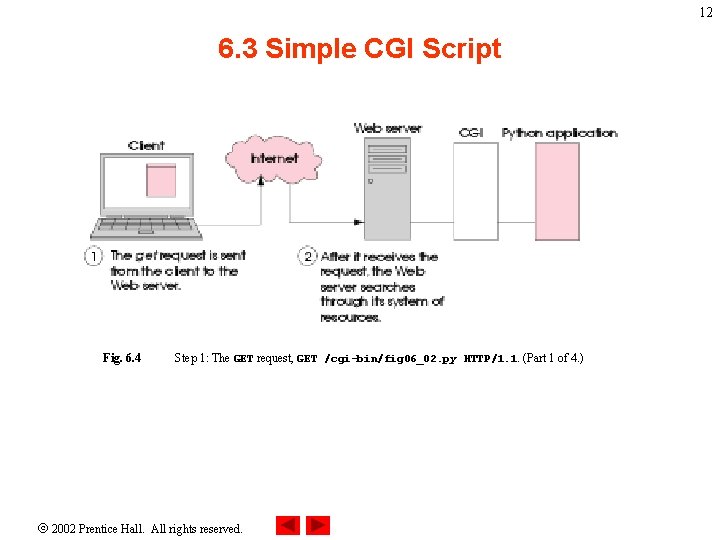
12 6. 3 Simple CGI Script Fig. 6. 4 Step 1: The GET request, GET /cgi-bin/fig 06_02. py HTTP/1. 1. (Part 1 of 4. ) 2002 Prentice Hall. All rights reserved.
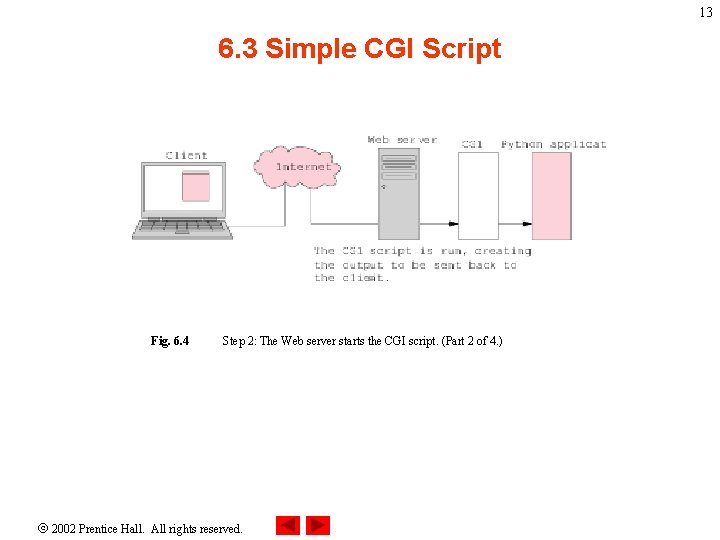
13 6. 3 Simple CGI Script Fig. 6. 4 Step 2: The Web server starts the CGI script. (Part 2 of 4. ) 2002 Prentice Hall. All rights reserved.
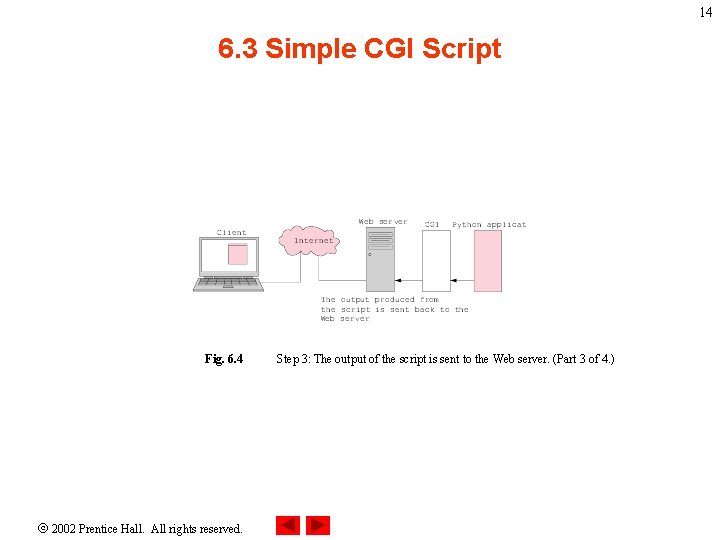
14 6. 3 Simple CGI Script Fig. 6. 4 2002 Prentice Hall. All rights reserved. Step 3: The output of the script is sent to the Web server. (Part 3 of 4. )
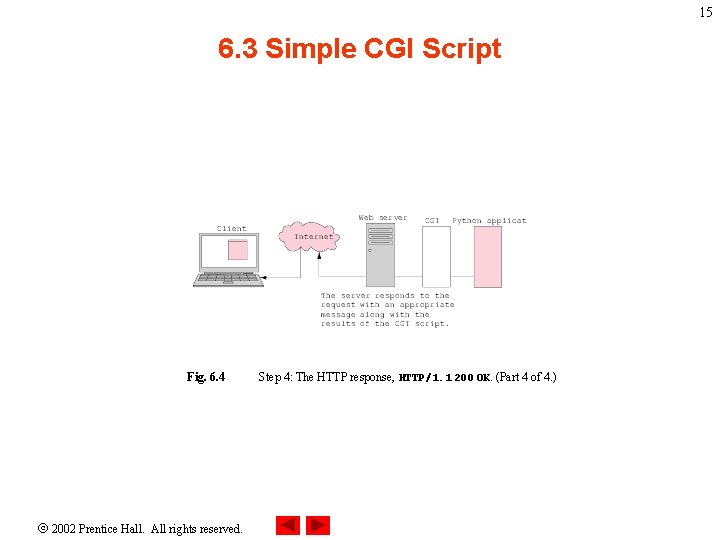
15 6. 3 Simple CGI Script Fig. 6. 4 2002 Prentice Hall. All rights reserved. Step 4: The HTTP response, HTTP/1. 1 200 OK. (Part 4 of 4. )
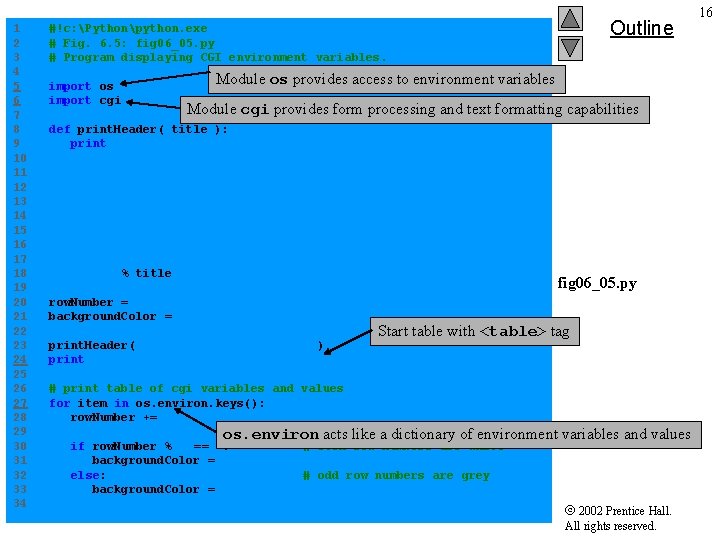
1 2 3 4 5 6 7 8 9 10 11 12 13 14 15 16 17 18 19 20 21 22 23 24 25 26 27 28 29 30 31 32 33 34 Outline #!c: Pythonpython. exe # Fig. 6. 5: fig 06_05. py # Program displaying CGI environment variables. import os import cgi Module os provides access to environment variables Module cgi provides form processing and text formatting capabilities def print. Header( title ): print """Content-type: text/html <? xml version = "1. 0" encoding = "UTF-8"? > <!DOCTYPE html PUBLIC "-//W 3 C//DTD XHTML 1. 0 Strict//EN" "DTD/xhtml 1 -strict. dtd"> <html xmlns = "http: //www. w 3. org/1999/xhtml"> <head><title>%s</title></head> <body>""" % title fig 06_05. py row. Number = 0 background. Color = "white" print. Header( "Environment Variables" ) print """<table style = "border: 0">""" Start table with <table> tag # print table of cgi variables and values for item in os. environ. keys(): row. Number += 1 os. environ acts like a dictionary of environment variables and values if row. Number % 2 == 0: # even row numbers are white background. Color = "white" else: # odd row numbers are grey background. Color = "lightgrey" 2002 Prentice Hall. All rights reserved. 16
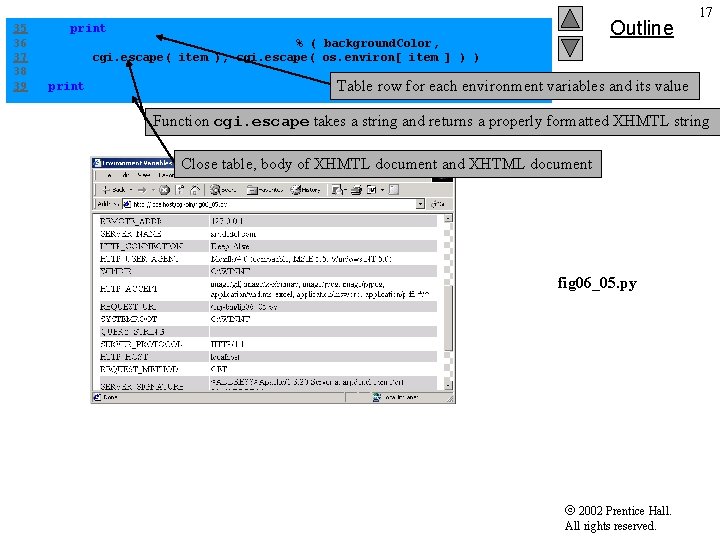
35 36 37 38 39 Outline print """<tr style = "background-color: %s"> <td>%s</td></tr>""" % ( background. Color, cgi. escape( item ), cgi. escape( os. environ[ item ] ) ) print """</table></body></html>""" 17 Table row for each environment variables and its value Function cgi. escape takes a string and returns a properly formatted XHMTL string Close table, body of XHMTL document and XHTML document fig 06_05. py 2002 Prentice Hall. All rights reserved.
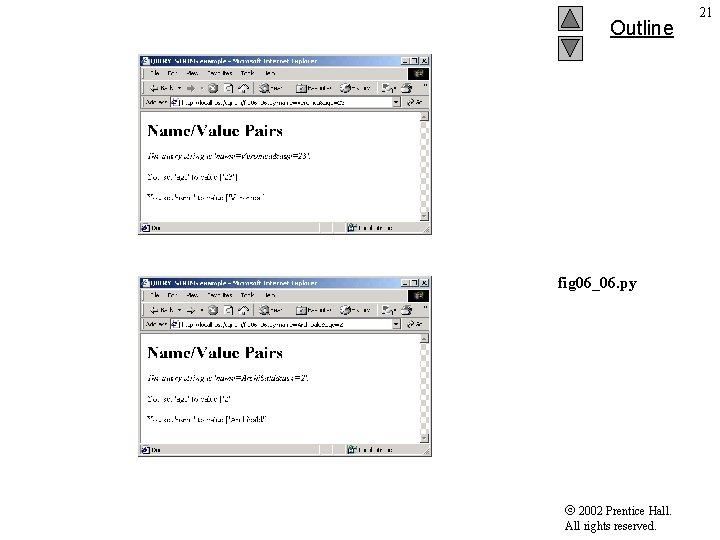
18 6. 4 Sending Input to a CGI Script • QUERY_STRING variable contains extra information appended to a URL in a GET request, following a question mark (? ) • Question mark (? ) serves as delimiter between source and query string • Name-value pairs in the query string separated by ampersands (&) 2002 Prentice Hall. All rights reserved.
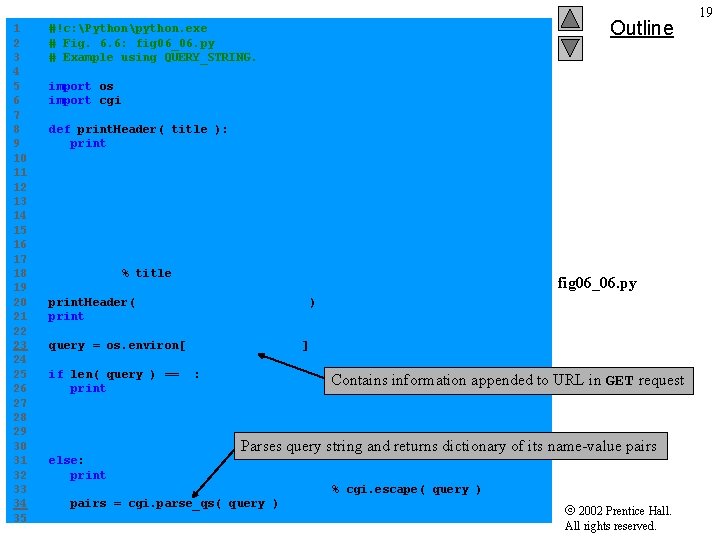
1 2 3 4 5 6 7 8 9 10 11 12 13 14 15 16 17 18 19 20 21 22 23 24 25 26 27 28 29 30 31 32 33 34 35 #!c: Pythonpython. exe # Fig. 6. 6: fig 06_06. py # Example using QUERY_STRING. Outline import os import cgi def print. Header( title ): print """Content-type: text/html <? xml version = "1. 0" encoding = "UTF-8"? > <!DOCTYPE html PUBLIC "-//W 3 C//DTD XHTML 1. 0 Strict//EN" "DTD/xhtml 1 -strict. dtd"> <html xmlns = "http: //www. w 3. org/1999/xhtml"> <head><title>%s</title></head> <body>""" % title fig 06_06. py print. Header( "QUERY_STRING example" ) print "<h 1>Name/Value Pairs</h 1>" query = os. environ[ "QUERY_STRING" ] if len( query ) == 0: Contains information appended to URL in GET request print """<p> Please add some name-value pairs to the URL above. Or try <a href = "fig 06_06. py? name=Veronica& age=23">this</a>. </p>""" Parses query string and returns dictionary of its name-value pairs else: print """<p style = "font-style: italic"> The query string is '%s'. </p>""" % cgi. escape( query ) pairs = cgi. parse_qs( query ) 2002 Prentice Hall. All rights reserved. 19
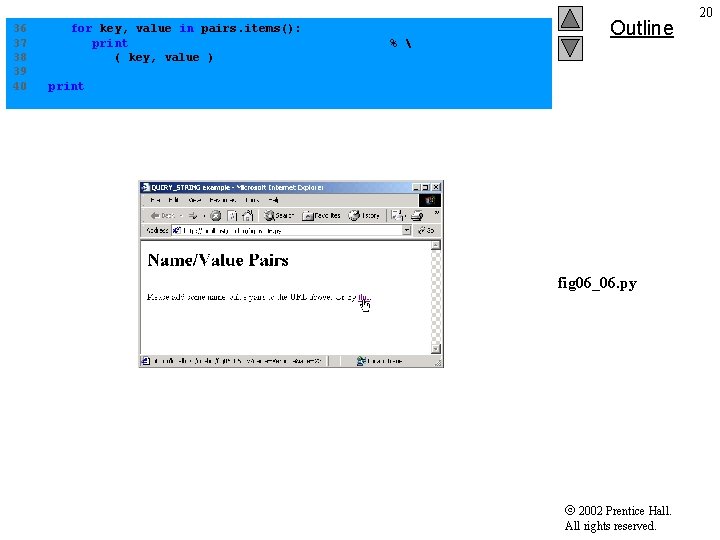
36 37 38 39 40 for key, value in pairs. items(): print "<p>You set '%s' to value %s</p>"" % ( key, value ) Outline print "</body></html>" fig 06_06. py 2002 Prentice Hall. All rights reserved. 20
Outline fig 06_06. py 2002 Prentice Hall. All rights reserved. 21
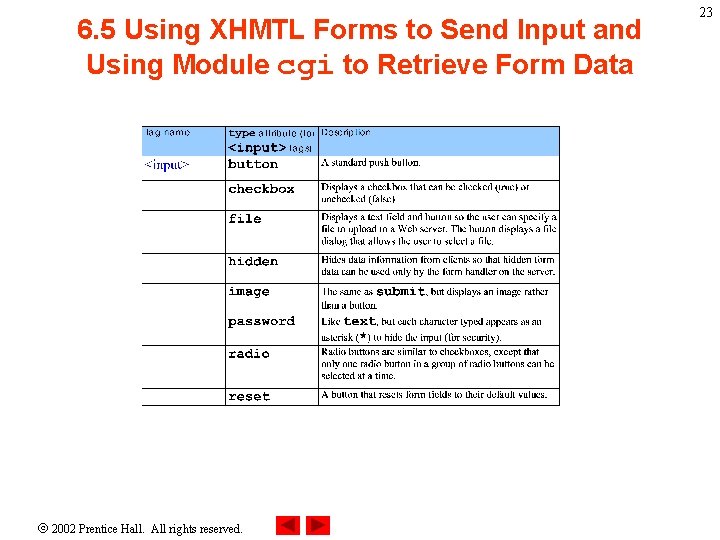
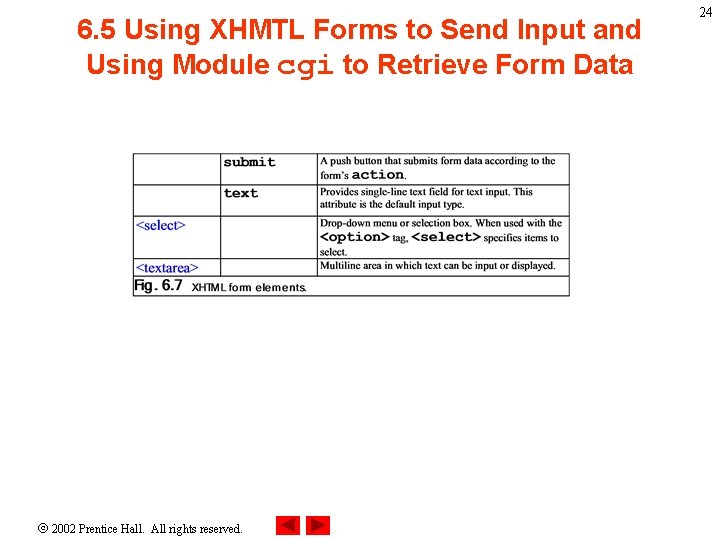
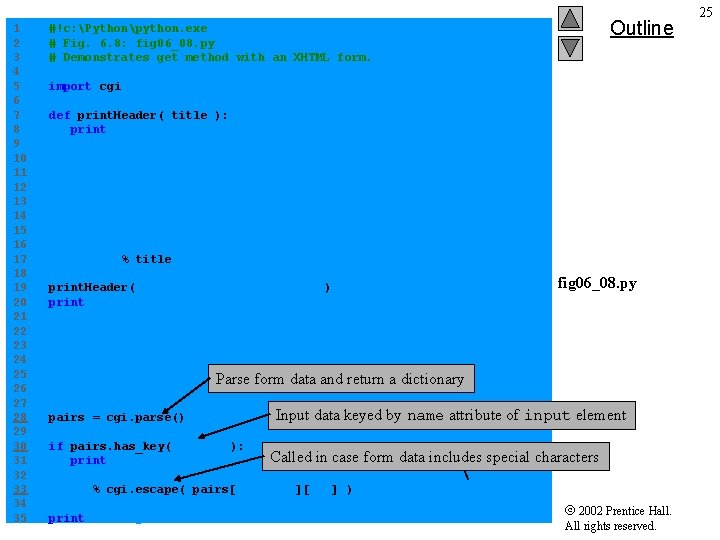
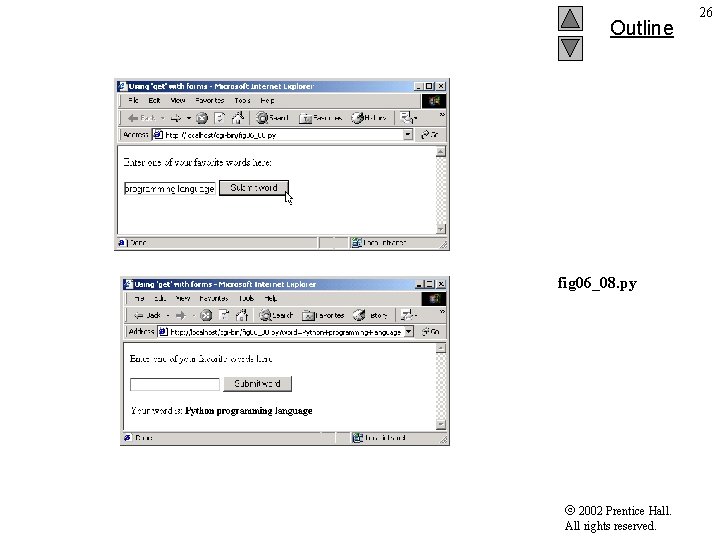
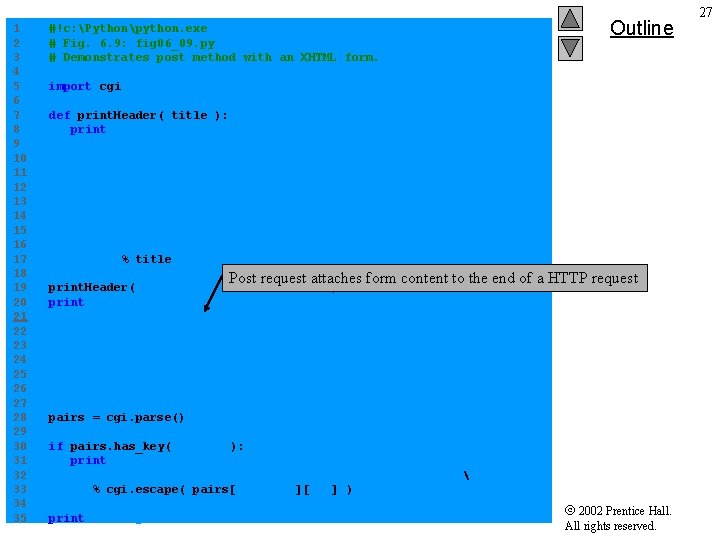
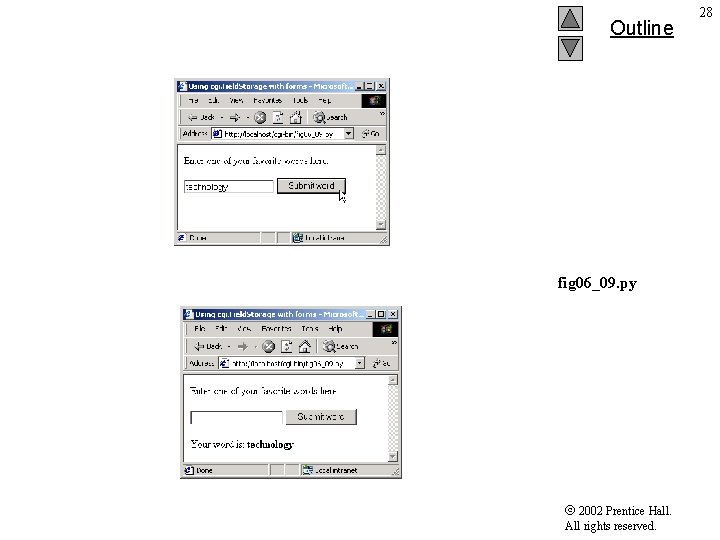
6. 5 Using XHMTL Forms to Send Input and Using Module cgi to Retrieve Form Data • Web page forms provide an intuitive way for users to input information to CGI scripts • <form> and </form> tags surround an XHTML form – Attribute action specifies operation to perform when users submit the form – Attribute method : either get or post • Get sends data to CGI script via QUERY_STRING environment variable • Post sends data to CGI script via standard input and sets environment variable CONTENT_LENGTH to number of characters that were posted 2002 Prentice Hall. All rights reserved. 22
6. 5 Using XHMTL Forms to Send Input and Using Module cgi to Retrieve Form Data 2002 Prentice Hall. All rights reserved. 23
6. 5 Using XHMTL Forms to Send Input and Using Module cgi to Retrieve Form Data 2002 Prentice Hall. All rights reserved. 24
1 2 3 4 5 6 7 8 9 10 11 12 13 14 15 16 17 18 19 20 21 22 23 24 25 26 27 28 29 30 31 32 33 34 35 Outline #!c: Pythonpython. exe # Fig. 6. 8: fig 06_08. py # Demonstrates get method with an XHTML form. import cgi def print. Header( title ): print """Content-type: text/html <? xml version = "1. 0" encoding = "UTF-8"? > <!DOCTYPE html PUBLIC "-//W 3 C//DTD XHTML 1. 0 Strict//EN" "DTD/xhtml 1 -strict. dtd"> <html xmlns = "http: //www. w 3. org/1999/xhtml"> <head><title>%s</title></head> <body>""" % title print. Header( "Using 'get' with forms" ) print """<p>Enter one of your favorite words here: </p> <form method = "get" action = "fig 06_08. py"> <p> <input type = "text" name = "word" /> <input type = "submit" value = "Submit word" /> </p> Parse form data and return a dictionary </form>""" pairs = cgi. parse() Input data keyed by name attribute of input element if pairs. has_key( "word" ): Called in case form data includes print """<p>Your word is: <span style = "font-weight: bold">%s</span></p>""" % cgi. escape( pairs[ "word" ][ 0 ] ) print "</body></html>" fig 06_08. py special characters 2002 Prentice Hall. All rights reserved. 25
Outline fig 06_08. py 2002 Prentice Hall. All rights reserved. 26
1 2 3 4 5 6 7 8 9 10 11 12 13 14 15 16 17 18 19 20 21 22 23 24 25 26 27 28 29 30 31 32 33 34 35 #!c: Pythonpython. exe # Fig. 6. 9: fig 06_09. py # Demonstrates post method with an XHTML form. Outline import cgi def print. Header( title ): print """Content-type: text/html <? xml version = "1. 0" encoding = "UTF-8"? > <!DOCTYPE html PUBLIC "-//W 3 C//DTD XHTML 1. 0 Strict//EN" "DTD/xhtml 1 -strict. dtd"> <html xmlns = "http: //www. w 3. org/1999/xhtml"> <head><title>%s</title></head> <body>""" % title Post request attaches form content to the end of a HTTP request fig 06_09. py print. Header( "Using 'post' with forms" ) print """<p>Enter one of your favorite words here: </p> <form method = "post" action = "fig 06_09. py"> <p> <input type = "text" name = "word" /> <input type = "submit" value = "Submit word" /> </p> </form>""" pairs = cgi. parse() if pairs. has_key( "word" ): print """<p>Your word is: <span style = "font-weight: bold">%s</span></p>""" % cgi. escape( pairs[ "word" ][ 0 ] ) print "</body></html>" 2002 Prentice Hall. All rights reserved. 27
Outline fig 06_09. py 2002 Prentice Hall. All rights reserved. 28
6. 5 Using cgi. Field. Storage to Read Input • Module cgi provides class Field. Storage to parse forms 2002 Prentice Hall. All rights reserved. 29
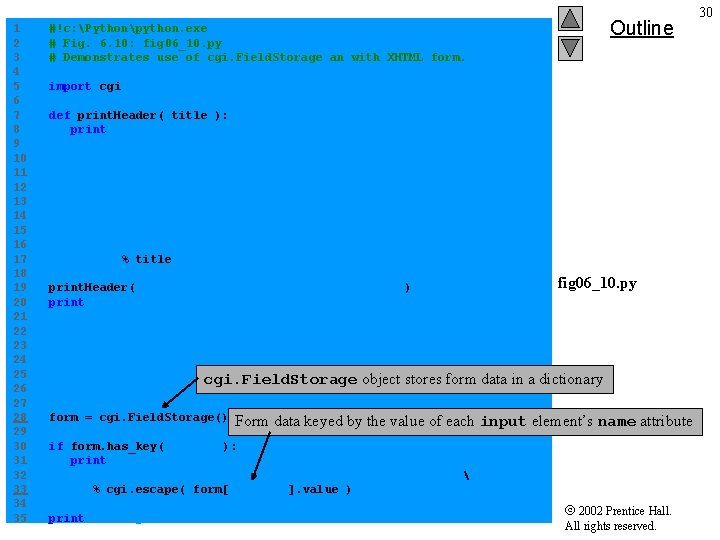
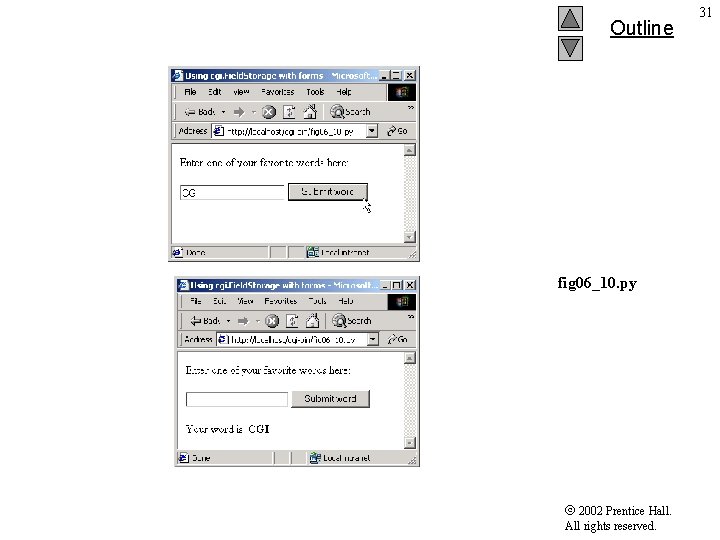
1 2 3 4 5 6 7 8 9 10 11 12 13 14 15 16 17 18 19 20 21 22 23 24 25 26 27 28 29 30 31 32 33 34 35 Outline #!c: Pythonpython. exe # Fig. 6. 10: fig 06_10. py # Demonstrates use of cgi. Field. Storage an with XHTML form. import cgi def print. Header( title ): print """Content-type: text/html <? xml version = "1. 0" encoding = "UTF-8"? > <!DOCTYPE html PUBLIC "-//W 3 C//DTD XHTML 1. 0 Strict//EN" "DTD/xhtml 1 -strict. dtd"> <html xmlns = "http: //www. w 3. org/1999/xhtml"> <head><title>%s</title></head> <body>""" % title print. Header( "Using cgi. Field. Storage with forms" ) print """<p>Enter one of your favorite words here: </p> <form method = "post" action = "fig 06_10. py"> <p> <input type = "text" name = "word" /> <input type = "submit" value = "Submit word" /> </p> cgi. Field. Storage object stores form data </form>""" form = cgi. Field. Storage() fig 06_10. py in a dictionary Form data keyed by the value of each input element’s name attribute if form. has_key( "word" ): print """<p>Your word is: <span style = "font-weight: bold">%s</span></p>""" % cgi. escape( form[ "word" ]. value ) print "</body></html>" 2002 Prentice Hall. All rights reserved. 30
Outline fig 06_10. py 2002 Prentice Hall. All rights reserved. 31
32 6. 5 Other HTTP Headers • Content-type header specifies how document is processed • Refresh header redirects client to new location or refreshes current page • Location header indicates redirection performed on server side • Status header tells server to output statusheader line 2002 Prentice Hall. All rights reserved.
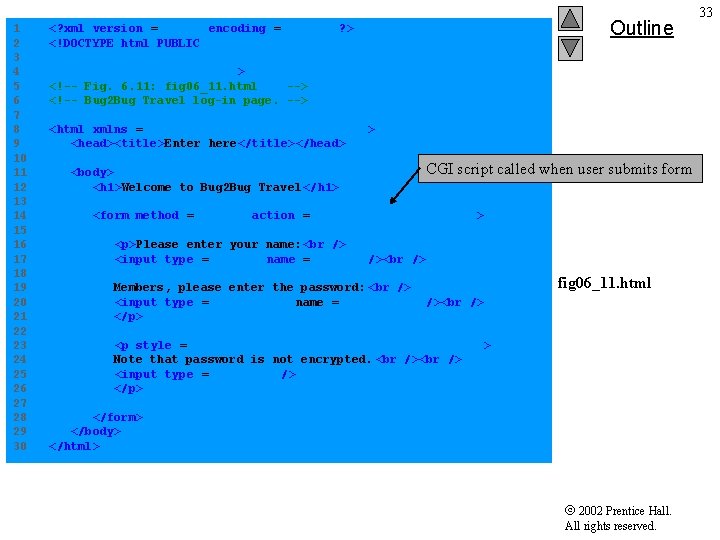
1 2 3 4 5 6 7 8 9 10 11 12 13 14 15 16 17 18 19 20 21 22 23 24 25 26 27 28 29 30 Outline <? xml version = "1. 0" encoding = "UTF-8"? > <!DOCTYPE html PUBLIC "-//W 3 C//DTD XHTML 1. 0 Strict//EN" "DTD/xhtml 1 -strict. dtd"> <!-- Fig. 6. 11: fig 06_11. html --> <!-- Bug 2 Bug Travel log-in page. --> <html xmlns = "http: //www. w 3. org/1999/xhtml" > <head><title>Enter here</title></head> <body> <h 1>Welcome to Bug 2 Bug Travel </h 1> CGI script called when user submits form <form method = "post" action = "/cgi-bin/fig 06_12. py"> <p>Please enter your name: <input type = "text" name = "name" /> Members, please enter the password: <input type = "password" name = "password" /> </p> fig 06_11. html <p style = "font-size: em - 1; font-style: italic" > Note that password is not encrypted. <input type = "submit" /> </p> </form> </body> </html> 2002 Prentice Hall. All rights reserved. 33
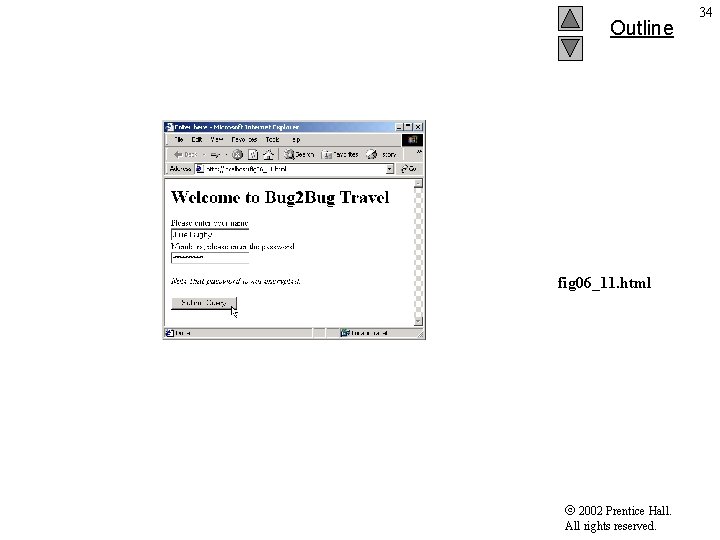
Outline fig 06_11. html 2002 Prentice Hall. All rights reserved. 34
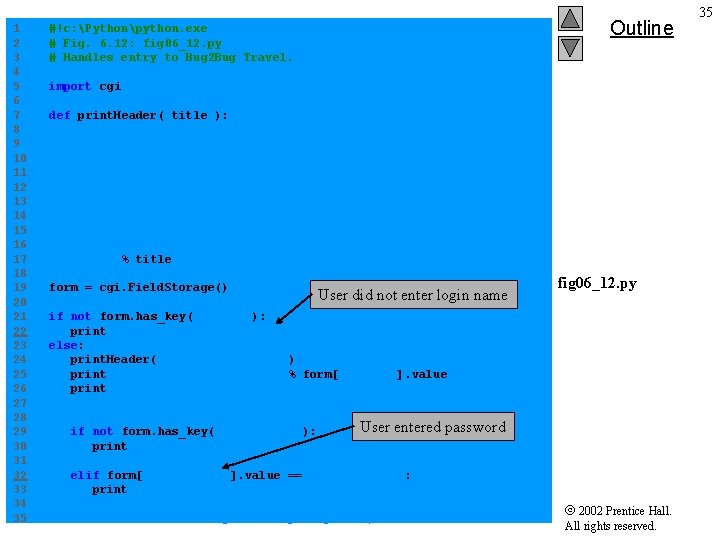
1 2 3 4 5 6 7 8 9 10 11 12 13 14 15 16 17 18 19 20 21 22 23 24 25 26 27 28 29 30 31 32 33 34 35 Outline #!c: Pythonpython. exe # Fig. 6. 12: fig 06_12. py # Handles entry to Bug 2 Bug Travel. import cgi def print. Header( title ): print """Content-type: text/html <? xml version = "1. 0" encoding = "UTF-8"? > <!DOCTYPE html PUBLIC "-//W 3 C//DTD XHTML 1. 0 Strict//EN" "DTD/xhtml 1 -strict. dtd"> <html xmlns = "http: //www. w 3. org/1999/xhtml"> <head><title>%s</title></head> <body>""" % title form = cgi. Field. Storage() User did not enter login name fig 06_12. py if not form. has_key( "name" ): print "Location: /fig 06_11. htmln" else: print. Header( "Bug 2 Bug Travel" ) print "<h 1>Welcome, %s!</h 1>" % form[ "name" ]. value print """<p>Here are our weekly specials: </p> <ul><li>Boston to Taiwan for $300</li></ul>""" User entered password if not form. has_key( "password" ): print """<p style = "font-style: italic"> Become a member today for more great deals!</p>""" elif form[ "password" ]. value == "Coast 2 Coast": print """<hr /> <p>Current specials just for members: </p> <ul><li>San Diego to Hong Kong for $250</li></ul>""" 2002 Prentice Hall. All rights reserved. 35
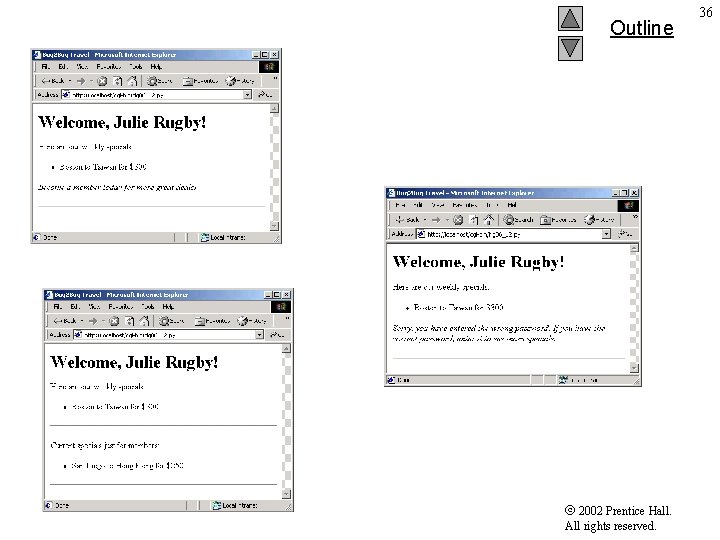
Outline fig 06_12. py 2002 Prentice Hall. All rights reserved. 36